

Static Code Analysis
Caribbean Developer Week 2018
Presenter: Obika Gellineau
Agenda
 What is Static Code Analysis?
 Manual vs. Automated
 Benefits of Static Code Analysis
 Problems with Static Code Analysis
 SDLC and Security
 Automated Static Code Analysis Tools
 Demo
 Key Takeaways
What is Static Code Analysis?
 Examination of source code without executing the program.
 It’s a method of computer program debugging.
 Web and non-web applications can be evaluated.
 Commonly known as “White-box” testing.
What is Static Code Analysis?
 Can be done manually or through the use of automated tools.
 Testers must understand code structure and be familiar with the source code’s programming
language idiosyncrasies.
 Used to detect flaws in software’s inputs and outputs that cannot be seen by dynamic scanning.
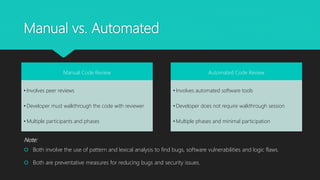
Manual vs. Automated
Manual Code Review
• Involves peer reviews
• Developer must walkthrough the code with reviewer
• Multiple participants and phases
Automated Code Review
• Involves automated software tools
• Developer does not require walkthrough session
• Multiple phases and minimal participation
Note:
 Both involve the use of pattern and lexical analysis to find bugs, software vulnerabilities and logic flaws.
 Both are preventative measures for reducing bugs and security issues.
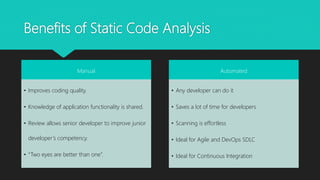
Benefits of Static Code Analysis
Manual
• Improves coding quality.
• Knowledge of application functionality is shared.
• Review allows senior developer to improve junior
developer’s competency.
• “Two eyes are better than one”.
Automated
• Any developer can do it
• Saves a lot of time for developers
• Scanning is effortless
• Ideal for Agile and DevOps SDLC
• Ideal for Continuous Integration
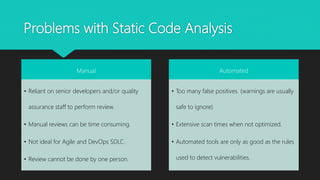
Problems with Static Code Analysis
Manual
• Reliant on senior developers and/or quality
assurance staff to perform review.
• Manual reviews can be time consuming.
• Not ideal for Agile and DevOps SDLC.
• Review cannot be done by one person.
Automated
• Too many false positives. (warnings are usually
safe to ignore)
• Extensive scan times when not optimized.
• Automated tools are only as good as the rules
used to detect vulnerabilities.
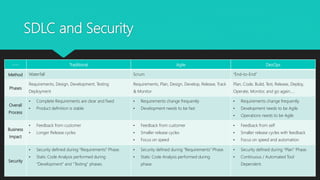
SDLC and Security
---- Traditional Agile DevOps
Method Waterfall Scrum “End-to-End”
Phases
Requirements, Design, Development, Testing
Deployment
Requirements, Plan, Design, Develop, Release, Track
& Monitor
Plan, Code, Build, Test, Release, Deploy,
Operate, Monitor, and go again…..
Overall
Process
• Complete Requirements are clear and fixed
• Product definition is stable
• Requirements change frequently
• Development needs to be fast
• Requirements change frequently
• Development needs to be Agile
• Operations needs to be Agile
Business
Impact
• Feedback from customer
• Longer Release cycles
• Feedback from customer
• Smaller release cycles
• Focus on speed
• Feedback from self
• Smaller release cycles with feedback
• Focus on speed and automation
Security
• Security defined during “Requirements” Phase.
• Static Code Analysis performed during
“Development” and “Testing” phases.
• Security defined during “Requirements” Phase.
• Static Code Analysis performed during
phase.
• Security defined during “Plan” Phase.
• Continuous / Automated Tool
Dependent.
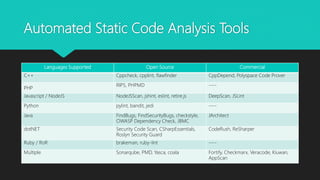
Automated Static Code Analysis Tools
Languages Supported Open Source Commercial
C++ Cppcheck, cpplint, flawfinder CppDepend, Polyspace Code Prover
PHP
RIPS, PHPMD ----
Javascript / NodeJS NodeJSScan, jshint, eslint, retire.js DeepScan, JSLint
Python pylint, bandit, jedi ----
Java FindBugs, FindSecurityBugs, checkstyle,
OWASP Dependency Check, JBMC
JArchitect
dotNET Security Code Scan, CSharpEssentials,
Roslyn Security Guard
CodeRush, ReSharper
Ruby / RoR brakeman, ruby-lint ----
Multiple Sonarqube, PMD, Yasca, coala Fortify, Checkmarx, Veracode, Kiuwan,
AppScan
Demo
 Static code Analysis of OWASP vulnerable application named JuiceShop (7.3.0).
 Automated tool is SonarQube 6.7.4 LTS.
 Installation on Windows 10 with MySQL 5.3 Database and Oracle JDK 8.
Key Takeaways
 To improve the quality of code, reduce software bugs, mitigate security vulnerabilities and avoid
logic flaws; developers can take proactive actions through static code analysis.
 Manual reviews and Automated tools are available to assist developers, but corrective actions
must be taken when issues are identified.
 Static Code Analysis is a good proactive measure, but always remember to include dynamic
testing to identify security vulnerabilities during runtime.
 Security must be integrated into all phases of the SDLC (especially at the start) and not be an
afterthought.
Q&A

Static Code Analysis

  • 1.
    Static Code Analysis CaribbeanDeveloper Week 2018 Presenter: Obika Gellineau
  • 2.
    Agenda  What isStatic Code Analysis?  Manual vs. Automated  Benefits of Static Code Analysis  Problems with Static Code Analysis  SDLC and Security  Automated Static Code Analysis Tools  Demo  Key Takeaways
  • 3.
    What is StaticCode Analysis?  Examination of source code without executing the program.  It’s a method of computer program debugging.  Web and non-web applications can be evaluated.  Commonly known as “White-box” testing.
  • 4.
    What is StaticCode Analysis?  Can be done manually or through the use of automated tools.  Testers must understand code structure and be familiar with the source code’s programming language idiosyncrasies.  Used to detect flaws in software’s inputs and outputs that cannot be seen by dynamic scanning.
  • 5.
    Manual vs. Automated ManualCode Review • Involves peer reviews • Developer must walkthrough the code with reviewer • Multiple participants and phases Automated Code Review • Involves automated software tools • Developer does not require walkthrough session • Multiple phases and minimal participation Note:  Both involve the use of pattern and lexical analysis to find bugs, software vulnerabilities and logic flaws.  Both are preventative measures for reducing bugs and security issues.
  • 6.
    Benefits of StaticCode Analysis Manual • Improves coding quality. • Knowledge of application functionality is shared. • Review allows senior developer to improve junior developer’s competency. • “Two eyes are better than one”. Automated • Any developer can do it • Saves a lot of time for developers • Scanning is effortless • Ideal for Agile and DevOps SDLC • Ideal for Continuous Integration
  • 7.
    Problems with StaticCode Analysis Manual • Reliant on senior developers and/or quality assurance staff to perform review. • Manual reviews can be time consuming. • Not ideal for Agile and DevOps SDLC. • Review cannot be done by one person. Automated • Too many false positives. (warnings are usually safe to ignore) • Extensive scan times when not optimized. • Automated tools are only as good as the rules used to detect vulnerabilities.
  • 8.
    SDLC and Security ----Traditional Agile DevOps Method Waterfall Scrum “End-to-End” Phases Requirements, Design, Development, Testing Deployment Requirements, Plan, Design, Develop, Release, Track & Monitor Plan, Code, Build, Test, Release, Deploy, Operate, Monitor, and go again….. Overall Process • Complete Requirements are clear and fixed • Product definition is stable • Requirements change frequently • Development needs to be fast • Requirements change frequently • Development needs to be Agile • Operations needs to be Agile Business Impact • Feedback from customer • Longer Release cycles • Feedback from customer • Smaller release cycles • Focus on speed • Feedback from self • Smaller release cycles with feedback • Focus on speed and automation Security • Security defined during “Requirements” Phase. • Static Code Analysis performed during “Development” and “Testing” phases. • Security defined during “Requirements” Phase. • Static Code Analysis performed during phase. • Security defined during “Plan” Phase. • Continuous / Automated Tool Dependent.
  • 9.
    Automated Static CodeAnalysis Tools Languages Supported Open Source Commercial C++ Cppcheck, cpplint, flawfinder CppDepend, Polyspace Code Prover PHP RIPS, PHPMD ---- Javascript / NodeJS NodeJSScan, jshint, eslint, retire.js DeepScan, JSLint Python pylint, bandit, jedi ---- Java FindBugs, FindSecurityBugs, checkstyle, OWASP Dependency Check, JBMC JArchitect dotNET Security Code Scan, CSharpEssentials, Roslyn Security Guard CodeRush, ReSharper Ruby / RoR brakeman, ruby-lint ---- Multiple Sonarqube, PMD, Yasca, coala Fortify, Checkmarx, Veracode, Kiuwan, AppScan
  • 10.
    Demo  Static codeAnalysis of OWASP vulnerable application named JuiceShop (7.3.0).  Automated tool is SonarQube 6.7.4 LTS.  Installation on Windows 10 with MySQL 5.3 Database and Oracle JDK 8.
  • 11.
    Key Takeaways  Toimprove the quality of code, reduce software bugs, mitigate security vulnerabilities and avoid logic flaws; developers can take proactive actions through static code analysis.  Manual reviews and Automated tools are available to assist developers, but corrective actions must be taken when issues are identified.  Static Code Analysis is a good proactive measure, but always remember to include dynamic testing to identify security vulnerabilities during runtime.  Security must be integrated into all phases of the SDLC (especially at the start) and not be an afterthought.
  • 12.