Unit 1 – Internet Basics Presentation   1 Web Programming
Objectives At the end of this presentation, you will be able to List the requirements to get Internet connection Describe the types of Internet connections Connect your computer to the Internet
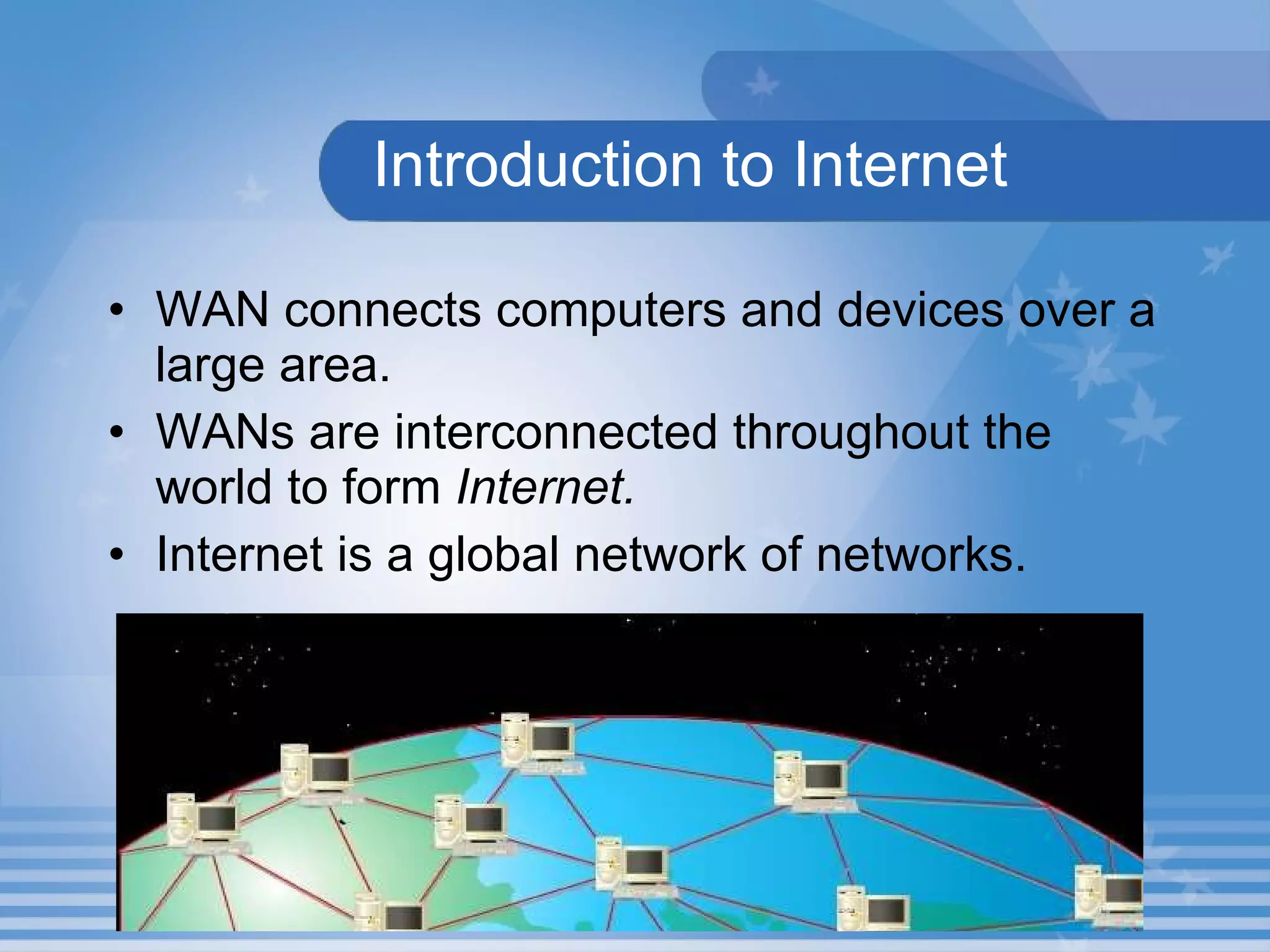
Introduction to Internet WAN connects computers and devices over a large area.  WANs are interconnected throughout the world to form  Internet. Internet is a global network of networks.
Hands-On! Browse and get the meaning of a word from the site  www.dictionary.com . Double-click the  Internet Explorer  icon on the desktop to open Internet Explorer. Type  www.dictionary.com  in the Address bar and press the  Enter  key. Click the  Word of the Day  hyperlink. Note down the word of the day and its meaning.
Requirements to get Internet connection A computer Processor : 486/66MHz Memory : 16 MB Video card which supports 640 X 480 resolution, 256 colors A telephone line A MODEM (Modulator and De-Modulator) An ISP (Internet Service Provider) A Web Browser
Types of Internet Connections Dial-up connection Broadband cable DSL and ISDN  Wireless connection
Dial-up connection Easy and inexpensive connection.  Speed is less than 56 kbps.  Data travels through telephone line.  Set up an account with your ISP. Can connect and disconnect your computer to the Internet whenever you want.
Broadband cable connection Connected to the Internet through a cable TV line Faster than dial-up connection  Dedicated connection  Can browse the Internet and watch the TV at the same time.
DSL and ISDN connection DSL is Digital Subscriber Line.  ISDN is Integrated Services Digital Network.  Connected to the Internet through copper telephone line.  Dedicated connection.  Errors are less while transmitting. Faster than dial-up connection.
Wireless connection Connects Internet with PDAs, notebook computers and smart phones.  Connection is established using satellite and cellular radio network.  Faster than dial-up connections.  Dedicated connection.
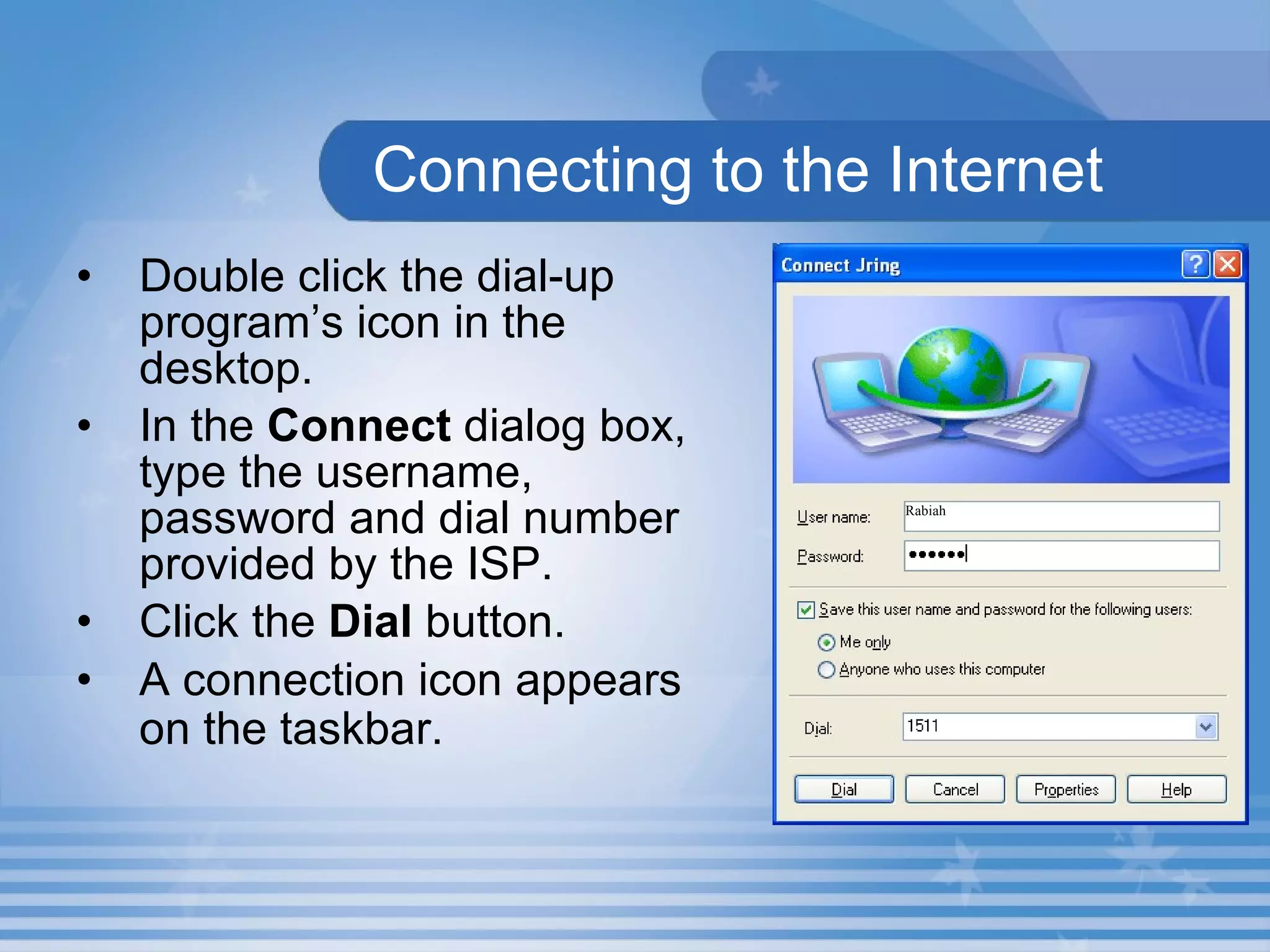
Connecting to the Internet Double click the dial-up program’s icon in the desktop. In the  Connect  dialog box, type the username, password and dial number provided by the ISP. Click the  Dial  button.  A connection icon appears on the taskbar.   Rabiah
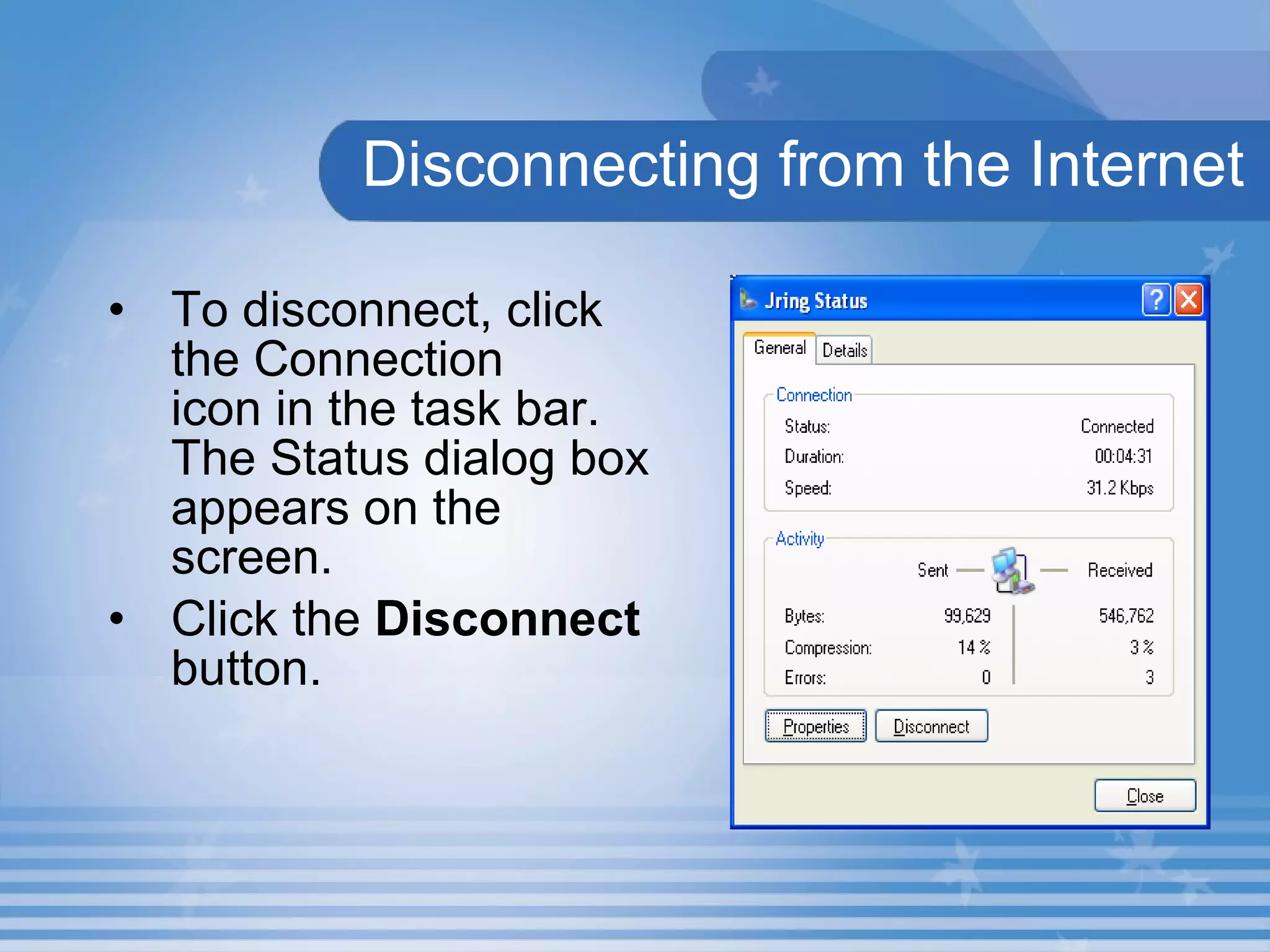
Disconnecting from the Internet To disconnect, click the Connection  icon in the task bar. The Status dialog box appears on the screen. Click the  Disconnect  button.
Activity 2.1.1 Browse the Internet and find the meanings of the following terms: Cybrarian Cybercafe Cybercitizen E - paper Electronic resume
Summary In this presentation, you learnt the following: WANs are interconnected through out the world to form  Internet   MODEM converts analog signals into digital signals and vice-versa. Data travels through telephone line in dial-up, DSL and ISDN connections.
Summary In broadband cable connection, computers are connected to the Internet through a cable TV line. Wireless connection connects Internet with PDAs, notebook computers and smart phones
Assignment Define the term Internet. List the requirements to get Internet connection. Write short notes on Dial-up connection. Write down the steps to connect your computer to the Internet.

M02 un01 p01

  • 1.
    Unit 1 –Internet Basics Presentation 1 Web Programming
  • 2.
    Objectives At theend of this presentation, you will be able to List the requirements to get Internet connection Describe the types of Internet connections Connect your computer to the Internet
  • 3.
    Introduction to InternetWAN connects computers and devices over a large area. WANs are interconnected throughout the world to form Internet. Internet is a global network of networks.
  • 4.
    Hands-On! Browse andget the meaning of a word from the site www.dictionary.com . Double-click the Internet Explorer icon on the desktop to open Internet Explorer. Type www.dictionary.com in the Address bar and press the Enter key. Click the Word of the Day hyperlink. Note down the word of the day and its meaning.
  • 5.
    Requirements to getInternet connection A computer Processor : 486/66MHz Memory : 16 MB Video card which supports 640 X 480 resolution, 256 colors A telephone line A MODEM (Modulator and De-Modulator) An ISP (Internet Service Provider) A Web Browser
  • 6.
    Types of InternetConnections Dial-up connection Broadband cable DSL and ISDN Wireless connection
  • 7.
    Dial-up connection Easyand inexpensive connection. Speed is less than 56 kbps. Data travels through telephone line. Set up an account with your ISP. Can connect and disconnect your computer to the Internet whenever you want.
  • 8.
    Broadband cable connectionConnected to the Internet through a cable TV line Faster than dial-up connection Dedicated connection Can browse the Internet and watch the TV at the same time.
  • 9.
    DSL and ISDNconnection DSL is Digital Subscriber Line. ISDN is Integrated Services Digital Network. Connected to the Internet through copper telephone line. Dedicated connection. Errors are less while transmitting. Faster than dial-up connection.
  • 10.
    Wireless connection ConnectsInternet with PDAs, notebook computers and smart phones. Connection is established using satellite and cellular radio network. Faster than dial-up connections. Dedicated connection.
  • 11.
    Connecting to theInternet Double click the dial-up program’s icon in the desktop. In the Connect dialog box, type the username, password and dial number provided by the ISP. Click the Dial button. A connection icon appears on the taskbar. Rabiah
  • 12.
    Disconnecting from theInternet To disconnect, click the Connection icon in the task bar. The Status dialog box appears on the screen. Click the Disconnect button.
  • 13.
    Activity 2.1.1 Browsethe Internet and find the meanings of the following terms: Cybrarian Cybercafe Cybercitizen E - paper Electronic resume
  • 14.
    Summary In thispresentation, you learnt the following: WANs are interconnected through out the world to form Internet MODEM converts analog signals into digital signals and vice-versa. Data travels through telephone line in dial-up, DSL and ISDN connections.
  • 15.
    Summary In broadbandcable connection, computers are connected to the Internet through a cable TV line. Wireless connection connects Internet with PDAs, notebook computers and smart phones
  • 16.
    Assignment Define theterm Internet. List the requirements to get Internet connection. Write short notes on Dial-up connection. Write down the steps to connect your computer to the Internet.