Mobile Phone Seizure
Guide
By:
Raghu Khimani,
Cyber Crime Expert / Advisor
Contact: raghukhimani2007@gmail.com
Mobile Phone Seizure Guide
Contents
 Introduction
 Understanding Mobile
Device Forensics
 Mobile Phone Basics
 Inside Mobile Devices
 Sources of Evidences
 Forensic Issues
 Principles of ACPO
 Mobile Phone Seizure
 Preparation of
examination
 Mobile Forensic
equipment
 Forensic Tools for
examination
Introduction
 More than 7 billion Mobile Phones are being
used world wide.
 A new phone model is released worldwide
about every 4 days.
 Major manufacturers make 80% of phones -
Others are Oppo, Vivo, etc..
 More than 50 manufacturers make up other 20%
 Many Operating Systems –
 Android 60%, Apple 30%, Windows 8% and others
 Each phone model on each network may have a different version
of OS
Understanding Mobile Device Forensics
 People store a wealth of information on cell
phones
 People don’t think about securing their cell phones
 Items stored on cell phones:
 Incoming, outgoing and missed calls
 Text and Short Message Service (SMS) messages
 E-mail
 Instant-messaging (IM) logs
 Web pages
 Pictures
 Items stored on cell phones: (continued)
 Personal calendars
 Address books
 Music files
 Voice recordings
 Video Files
 Investigating cell phones (mobile devices) is one of the
most challenging tasks in digital forensics
Mobile Phone Basics
 Mobile phone technology has been
advanced rapidly
 Several digital networks are used in the
mobile phone industry
 Digital Networks:
 CDMA (Code Division Multiple Access)
 GSM (Global System for Mobile
Communications)
 TDMA (Time Division Multiple Access)
 iDEN (Integrated Digital Enhanced Network)
 D-AMPS (Digital Advanced Mobile Phone
Services)
 EDGE (Enhanced Data GSM Environment)
 3G (3rd Generation)
 4G
Inside Mobile Devices
 Mobile devices can range from simple phones to
small computers
Also called smart phones
 Hardware components
Microprocessor, ROM, RAM, a digital signal
processor, a radio module, a microphone and
speaker, hardware interfaces, and an LCD
display
 Most basic phones have a proprietary OS
Although some smart phones use the same OSs
as PCs
 Phones store system data in electronically
erasable programmable read-only memory
(EEPROM)
Enables service providers to reprogram phones
without having to physically access memory
chips
 OS is stored in ROM
Nonvolatile memory
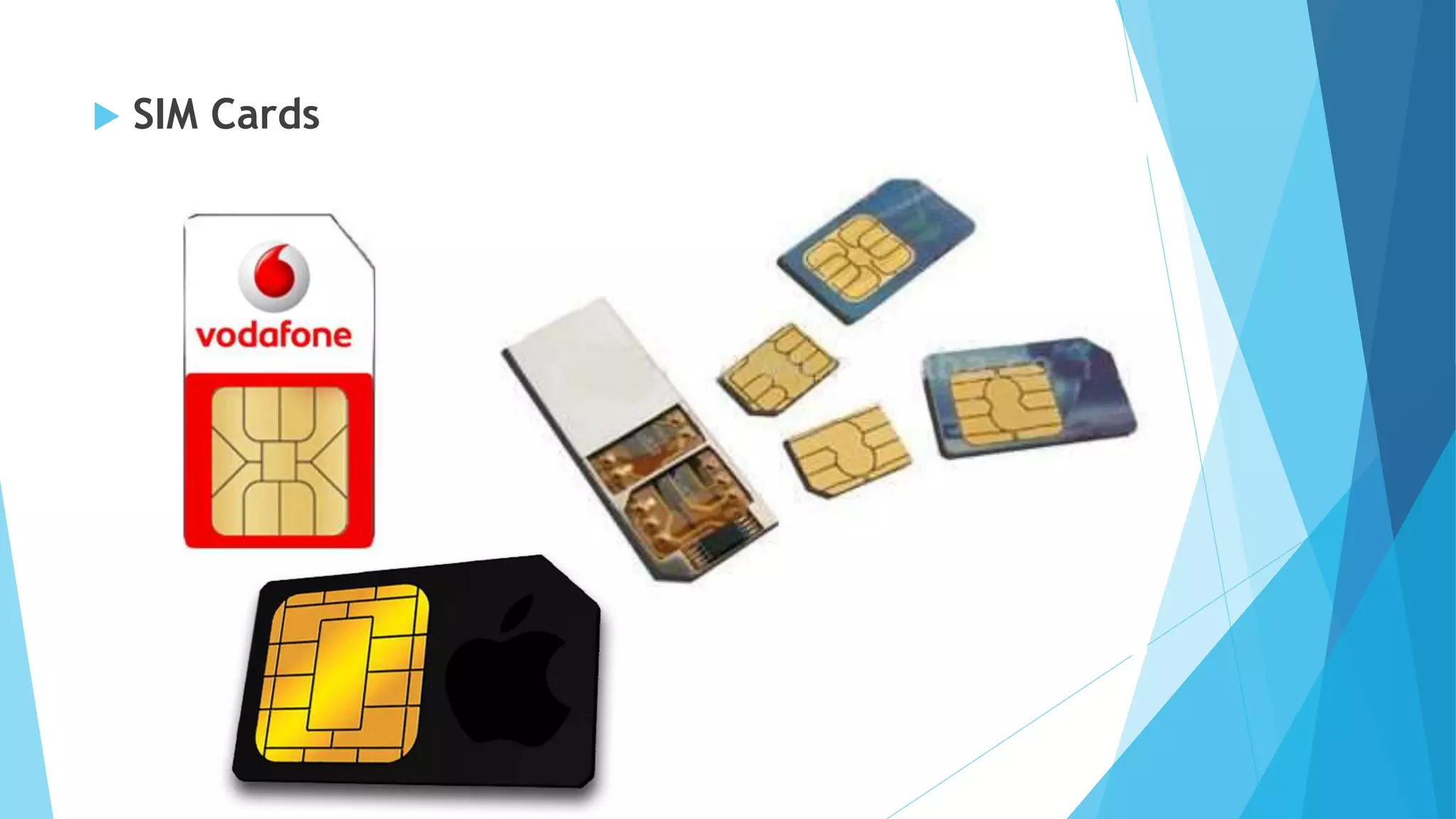
 SIM Cards
 SIM Cards
 Subscriber identity module (SIM) cards
 Found most commonly in GSM devices
 It has a Microprocessor and from 16 KB to 4 MB EEPROM
 GSM refers to mobile phones as “mobile stations” and
divides a station into two parts:
The SIM card and the mobile equipment (ME)
 SIM cards come in two sizes – Mini & Micro
 Additional SIM card purposes:
Identifies the subscriber to the network
Stores personal information
Stores address books and messages
Stores service-related information
Sources of Evidence
 Subscriber (You).
 SIM (Subscriber Identity Module).
 Phone.
 Base Station.
 Network.
Forensic Issues
Cables are a big problemForensic software supportBlock incoming signals
Battery PUK Code- network
Personal Pin codes -
3 attempts only
Principles of ACPO
 The four ACPO (Association of Chief Police Officers)
Principles of Digital Evidence are presented and discussed
in turn, both in terms of the implication on the personnel
involved in seizing mobile devices and also the
implications for those examining such devices.
 Principle 1:
 No action taken by law enforcement agencies or their
agents should change data held on a computer or
storage media which may subsequently be relied upon
in court.
 Principle 2:
 In circumstances where a person finds it necessary to
access original data held on a computer or on storage
media, that person must be competent to do so and be
able to give evidence explaining the relevance and the
implications of their actions.
 Principle 3:
 An audit trail or other record of all processes applied to
computer-based electronic evidence should be created
and preserved. An independent third party should be able
to examine those processes and achieve the same result.
 Principle 4:
 The person in charge of the investigation (the case
officer) has overall responsibility for ensuring that the
law and these principles are adhered to.
MOBILE PHONE SEIZURE
 Identify the item. Is it actually a telephone? Is it a dummy
phone?
 Note if it is switched on or off.
 Note what is displayed on the screen - pay particular attention
to icons displayed as Envelopes, or messages informing of new
unread text messages.
 Protect the phone with antistatic bag or Faraday bag.
 Do not dismantle the phone - Do not back off the phone, or
remove the SIM card as this can cause important data to be lost
from the phone, time/date etc.
 ASK the owner, or appropriate person for any passwords or PIN
numbers that may lock out the examiner during the examination
of the phone or SIM - This can save lots of time should these PIN
numbers or password be required, as the Service Provider will
not have to be contacted.
 Check for handset boxes, SIM card holders, phone bills, etc. -
These can hold very important information, such as PIN
numbers, PUK numbers, account details, account holder details,
telephone numbers, etc.
 Search for Phone chargers - These are as important as the
handset itself, certainly from an examiner's point of view.
 Telephones ideally should be fully charged during an
examination, and what better charger than the phone's own
charger?
 Place the telephone in a sealed evidence bag, and preferably in
a box where the buttons cannot be pressed on the phone once
sealed. – this prevents “helpful” interaction with the phone and
in any case prevents the telephone being turned on accidentally.
 Are there any other forensic Issues such as protecting the phone
for DNA / Fingerprints? If so the phone will need to be submitted
to the appropriate unit prior to a mobile forensic examination.
Preparation of Examination
 Photograph evidence inside the seizure enclosure.
 Document seizure labels.
 Open seizure enclosure.
 Photograph and detail any marks or peculiarities of note
 Caveat if the evidence is on and within a antistatic bag
you may not want to perform this step until an
acquisition has taken place unless it is absolutely
necessary to determine the make and model of phone.
 Determine specifications of phone and what software is
appropriate to download information from handset.
Examination
 Connect phone with appropriate cables or method, I.e. Infra-
red or Bluetooth
 Acquire with software
 Bookmark items of note
 If the phone is a GSM phone note IMEI number on screen (by
typing *#06#) and employ other manufacturer-specific
handset codes to obtain handset information.
 Remove handset from RF-Isolation / Faraday Bag / Anti-static
bag and turn power cycle the unit. Photograph any startup
screens or messages.
 Note time and date on handset.
Examination (Cont.)
 Power off handset, and remove casing.
 Photograph battery, and label behind it once battery
removed (usually shows IMEI)
 If the phone is a Nextel or GSM remove SIM and photograph
both sides.
 Acquire SIM with software
 Bookmark items of note
 Perform of memory cards if present.
 Reassemble handset.
 Reseal and return evidence to property locker.
 Create reports and burn onto CD/DVD.
Mobile Forensics Equipment
 Mobile forensics is a new science
 Biggest challenge is dealing with constantly changing
models of cell phones
 When you’re acquiring evidence, generally you’re
performing two tasks:
 Acting as though you’re a PC synchronizing with
the device (to download data)
 Reading the SIM card
 First step is to identify the mobile device
 Make sure you have installed the mobile device
software on your forensic workstation
 Attach the phone to its power supply and connect
the correct cables
 After you’ve connected the device
Start the forensics program and begin
downloading the available information
 SIM card readers
A combination of hardware/software device
used to access the SIM card
You need to be in a forensics lab equipped
with appropriate antistatic devices
General procedure is as follows:
Remove the back panel of the device
Remove the battery
Under the battery, remove the SIM card from
holder
Insert the SIM card into the card reader
 SIM card readers (continued)
 A variety of SIM card readers are on the market
Some are forensically sound and some are not
 Documenting messages that haven’t been read yet is critical
Use a tool that takes pictures of each screen
 Mobile forensics tools
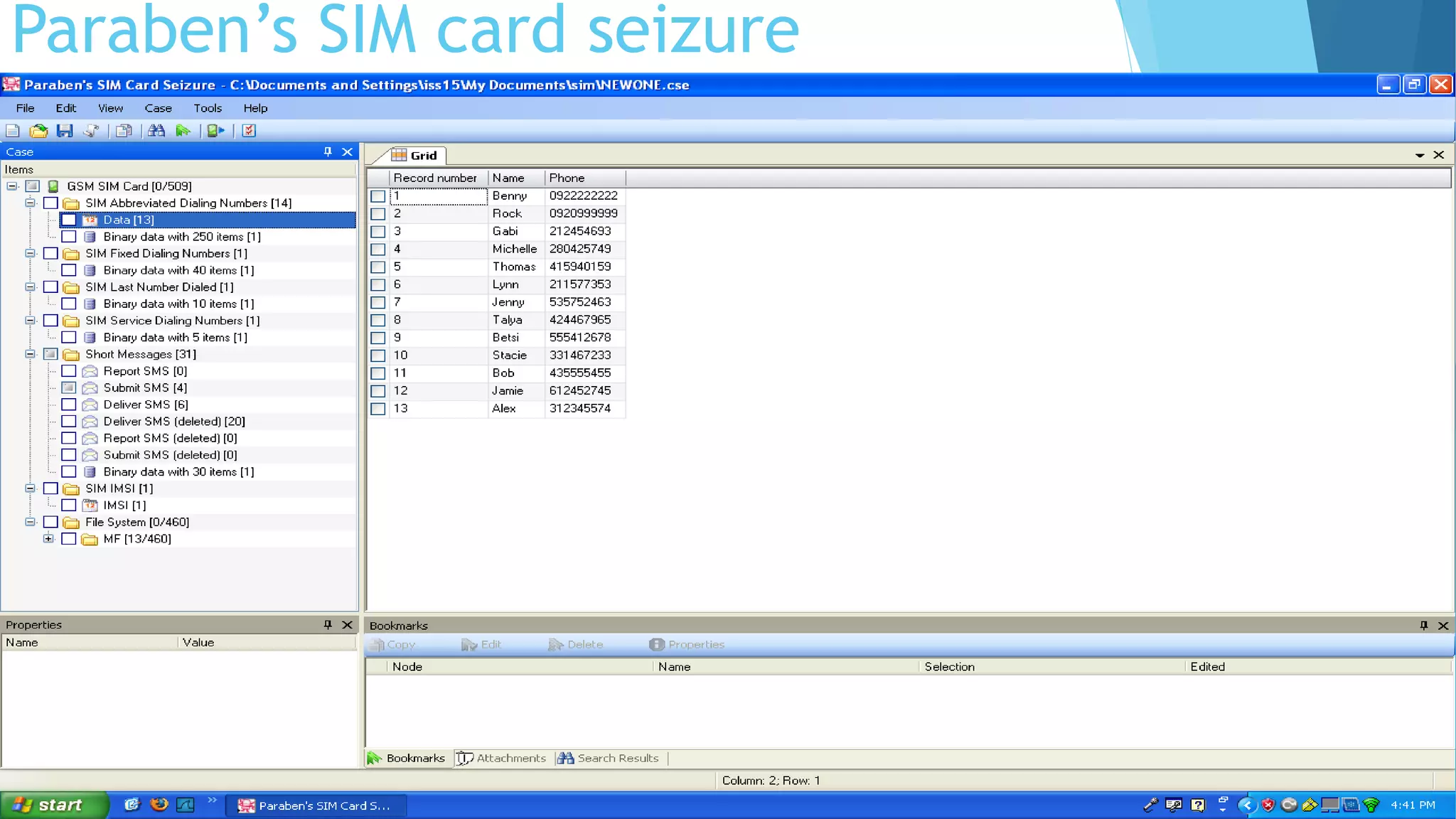
 Paraben’s SIM card Seizure & Paraben’s Device Seizure
 XRY Device Extractor
 Cell Seizure Tool
 SIMIS
 BitPim
 MOBILedit!
 SIMCon
 Software tools differ in the items they display and the level of
detail.
Forensic Tools
for Mobile Phone
Examination
Paraben’s SIM card seizure
SMS Outgoing Text Messages
Paraben’s Device Seizure
Cell Seizure Tool
 The main goal of Cell Seizure is to organize and report
various types of files.
 Cell Seizure is able to generate comprehensive HTML
reports of acquired data.
 The software is able to retrieve deleted files and check
for file integrity.
 Advantages of Cell Seizure
 It is designed not to change the data stored on the SIM card or cell phone. In
other words, all of the data can be examined while keeping the process
undetected.
 In fact, even some forensic software warns of possible data loss. Cell Seizure does
not allow data to be changed on the phone
 Disadvantages of Cell Seizure
 It does not support all models of cell phones. However, this application can
acquire information from most models made by the following companies: Nokia,
LG, Samsung, Siemens, Motorola, Sony-Ericcson, and can also acquire GSM SIM
Cards.
 Another disadvantage would be that the format of acquired data can sometimes
be confusing. The data is not organized nice and neat and given to the user in a
way that they can easily understand what they are seeing.
Cell Seizure Features
 Supports GSM, TDMA and CDMA cell phones
 Acquires text messages, address books, call logs, etc.
 Acquires complete GSM SIM card
 Recovers deleted data and full flash downloads
 Supports multiple languages
 Contains comprehensive HTML reporting and other
reporting formats
 Provides advanced searching including text & hex values
 Contains viewers for proprietary media file formats
 Allows viewing of multiple workspaces at one time
SIMIS
 SIM card Interrogation System is the world's
leading forensic tool for examining SIM cards
forensically.
 Used throughout the world since 1997, SIMIS has
become an integral tool for law enforcement and
digital investigators.
 The SIMIS desktop software has been evaluated by
the DoD (Department of Defense), and is
complimented by a mobile handheld device for
data collection in the field
XRY
 XRY is a software application designed to run on the Windows
operating system which allows you to perform a secure forensic
extraction of data from a wide variety of mobile devices, such as
smartphones, GPS navigation units, 3G modems, portable music
players and the latest tablet processors such as the iPad.
 Extracting data from mobile / cell phones is a special skill and not
the same as recovering information from computers. Most mobile
devices don't share the same operating systems and are proprietary
embedded devices which have unique configurations and operating
systems. What does that mean in terms of getting data out of
them? Well in simple terms, it means it is very difficult to do.
 XRY has been designed and developed to make that process a lot
easier for you, with supports for about 7,000 different mobile
device profiles. XRY supplies a complete solution to get you what
you need and the software guides you through the process step by
step to make it as easy as possible.
Scenario .XRY Results Ranking Results
Call Logs 100 3 Meet
SMS 120 (all retrieved, deleted not recovered) 3 Meet
Contacts 1511 3 Meet
Email 0 1 Below
Calendar 3188 3 Meet
Notes 1 3 Meet
Pictures 312 (photos taken with iPhone included GPS coordinates) 4 Above
Songs none loaded podcasts retrieved 3 Meet
Web History Yes, 28 were listed. Also listed recent searches. 4 Above
Bookmarks 2 3 Meet
Cookies 89 3 Meet
App Info Some apps left evidence 2 Below
Google Maps 1 Address record and GPS location 3 Meet
Voicemail 0 0 Below
Password None found 0 Below
Plists/XML Many retrieved 3 Meet
Phone Info Yes 3 Meet
Video 1 3 Meet
Podcasts 4 3 Meet
Speed Dials Found programmed speed dial in plist 3 Meet
VPN 0 0 Below
Bluetooth 0 0 Below
GPS Coordinates found in both images and plist. Specific info from the GPS not pulled. 3 Meet
File Hashes An available option 3 Meet
You Tube 0 0 Below
HTML 0 0 Below
1. XRY Logical
 Here, only LOGICAL extraction is performed.
 It means it is only communicated with operating system and requests system
information.
2. XRY Physical
 Here, PHYSICAL extraction is performed.
 All available raw data stored on the device is recovered.
 Typically, this is performed bypassing the operating system and this offers you the
opportunity to go deeper and recover deleted data from the device.
 XRY Physical is particularly useful when faced with a GSM mobile phone without a SIM
Card, or with security locked devices.
3. XRY Complete
 This is the top of the range solution combining the best of both worlds with XRY
Logical and XRY Physical in one complete package, hence the name.
 With XRY Complete you will be able to perform both logical and physical extractions
from a device, giving you the best possible opportunity to recover all the available
data from a mobile device. Allowing you to compare the results between the different
recovery methods.
 This system is supplied with all the necessary hardware from both the Logical and the
Physical systems to ensure you have everything you need to do complete the task.
4. XACT
 XACT is a separate hex viewer software application which complements XRY
Physical, allowing examiners to view the raw hexadecimal data extracted
during a physical dump of a mobile device.
 With XACT you can import binary files from other sources if required and
view the hexadecimal data to see for yourself exactly where the data is.
5. SIM id-Cloner
 It is specifically designed to assist you in the forensic recovery of data from
GSM SIM Cards and also provide a secure environment for forensic examiners
to investigate a mobile device free from the risks associated with examining
GSM devices.
 SIM id-Cloner will allow you to create a replica of the SIM card found within a
mobile device so that you can enable the operating system without the risk
of it making a network connection and changing data held on the device.
Any Questions??
Mobile Phone Seizure Guide by Raghu Khimani

Mobile Phone Seizure Guide by Raghu Khimani

  • 1.
  • 2.
    By: Raghu Khimani, Cyber CrimeExpert / Advisor Contact: raghukhimani2007@gmail.com Mobile Phone Seizure Guide
  • 3.
    Contents  Introduction  UnderstandingMobile Device Forensics  Mobile Phone Basics  Inside Mobile Devices  Sources of Evidences  Forensic Issues  Principles of ACPO  Mobile Phone Seizure  Preparation of examination  Mobile Forensic equipment  Forensic Tools for examination
  • 4.
    Introduction  More than7 billion Mobile Phones are being used world wide.  A new phone model is released worldwide about every 4 days.
  • 5.
     Major manufacturersmake 80% of phones - Others are Oppo, Vivo, etc..  More than 50 manufacturers make up other 20%  Many Operating Systems –  Android 60%, Apple 30%, Windows 8% and others  Each phone model on each network may have a different version of OS
  • 7.
    Understanding Mobile DeviceForensics  People store a wealth of information on cell phones  People don’t think about securing their cell phones  Items stored on cell phones:  Incoming, outgoing and missed calls  Text and Short Message Service (SMS) messages  E-mail  Instant-messaging (IM) logs  Web pages  Pictures
  • 8.
     Items storedon cell phones: (continued)  Personal calendars  Address books  Music files  Voice recordings  Video Files  Investigating cell phones (mobile devices) is one of the most challenging tasks in digital forensics
  • 9.
    Mobile Phone Basics Mobile phone technology has been advanced rapidly  Several digital networks are used in the mobile phone industry
  • 11.
     Digital Networks: CDMA (Code Division Multiple Access)  GSM (Global System for Mobile Communications)  TDMA (Time Division Multiple Access)  iDEN (Integrated Digital Enhanced Network)  D-AMPS (Digital Advanced Mobile Phone Services)  EDGE (Enhanced Data GSM Environment)  3G (3rd Generation)  4G
  • 13.
    Inside Mobile Devices Mobile devices can range from simple phones to small computers Also called smart phones  Hardware components Microprocessor, ROM, RAM, a digital signal processor, a radio module, a microphone and speaker, hardware interfaces, and an LCD display  Most basic phones have a proprietary OS Although some smart phones use the same OSs as PCs
  • 14.
     Phones storesystem data in electronically erasable programmable read-only memory (EEPROM) Enables service providers to reprogram phones without having to physically access memory chips  OS is stored in ROM Nonvolatile memory
  • 15.
  • 16.
     SIM Cards Subscriber identity module (SIM) cards  Found most commonly in GSM devices  It has a Microprocessor and from 16 KB to 4 MB EEPROM  GSM refers to mobile phones as “mobile stations” and divides a station into two parts: The SIM card and the mobile equipment (ME)  SIM cards come in two sizes – Mini & Micro  Additional SIM card purposes: Identifies the subscriber to the network Stores personal information Stores address books and messages Stores service-related information
  • 20.
    Sources of Evidence Subscriber (You).  SIM (Subscriber Identity Module).  Phone.  Base Station.  Network.
  • 21.
    Forensic Issues Cables area big problemForensic software supportBlock incoming signals Battery PUK Code- network Personal Pin codes - 3 attempts only
  • 22.
    Principles of ACPO The four ACPO (Association of Chief Police Officers) Principles of Digital Evidence are presented and discussed in turn, both in terms of the implication on the personnel involved in seizing mobile devices and also the implications for those examining such devices.  Principle 1:  No action taken by law enforcement agencies or their agents should change data held on a computer or storage media which may subsequently be relied upon in court.
  • 23.
     Principle 2: In circumstances where a person finds it necessary to access original data held on a computer or on storage media, that person must be competent to do so and be able to give evidence explaining the relevance and the implications of their actions.  Principle 3:  An audit trail or other record of all processes applied to computer-based electronic evidence should be created and preserved. An independent third party should be able to examine those processes and achieve the same result.  Principle 4:  The person in charge of the investigation (the case officer) has overall responsibility for ensuring that the law and these principles are adhered to.
  • 24.
    MOBILE PHONE SEIZURE Identify the item. Is it actually a telephone? Is it a dummy phone?  Note if it is switched on or off.  Note what is displayed on the screen - pay particular attention to icons displayed as Envelopes, or messages informing of new unread text messages.  Protect the phone with antistatic bag or Faraday bag.  Do not dismantle the phone - Do not back off the phone, or remove the SIM card as this can cause important data to be lost from the phone, time/date etc.  ASK the owner, or appropriate person for any passwords or PIN numbers that may lock out the examiner during the examination of the phone or SIM - This can save lots of time should these PIN numbers or password be required, as the Service Provider will not have to be contacted.
  • 25.
     Check forhandset boxes, SIM card holders, phone bills, etc. - These can hold very important information, such as PIN numbers, PUK numbers, account details, account holder details, telephone numbers, etc.  Search for Phone chargers - These are as important as the handset itself, certainly from an examiner's point of view.  Telephones ideally should be fully charged during an examination, and what better charger than the phone's own charger?  Place the telephone in a sealed evidence bag, and preferably in a box where the buttons cannot be pressed on the phone once sealed. – this prevents “helpful” interaction with the phone and in any case prevents the telephone being turned on accidentally.  Are there any other forensic Issues such as protecting the phone for DNA / Fingerprints? If so the phone will need to be submitted to the appropriate unit prior to a mobile forensic examination.
  • 26.
    Preparation of Examination Photograph evidence inside the seizure enclosure.  Document seizure labels.  Open seizure enclosure.  Photograph and detail any marks or peculiarities of note  Caveat if the evidence is on and within a antistatic bag you may not want to perform this step until an acquisition has taken place unless it is absolutely necessary to determine the make and model of phone.  Determine specifications of phone and what software is appropriate to download information from handset.
  • 27.
    Examination  Connect phonewith appropriate cables or method, I.e. Infra- red or Bluetooth  Acquire with software  Bookmark items of note  If the phone is a GSM phone note IMEI number on screen (by typing *#06#) and employ other manufacturer-specific handset codes to obtain handset information.  Remove handset from RF-Isolation / Faraday Bag / Anti-static bag and turn power cycle the unit. Photograph any startup screens or messages.  Note time and date on handset.
  • 28.
    Examination (Cont.)  Poweroff handset, and remove casing.  Photograph battery, and label behind it once battery removed (usually shows IMEI)  If the phone is a Nextel or GSM remove SIM and photograph both sides.  Acquire SIM with software  Bookmark items of note  Perform of memory cards if present.  Reassemble handset.  Reseal and return evidence to property locker.  Create reports and burn onto CD/DVD.
  • 29.
    Mobile Forensics Equipment Mobile forensics is a new science  Biggest challenge is dealing with constantly changing models of cell phones  When you’re acquiring evidence, generally you’re performing two tasks:  Acting as though you’re a PC synchronizing with the device (to download data)  Reading the SIM card  First step is to identify the mobile device
  • 30.
     Make sureyou have installed the mobile device software on your forensic workstation  Attach the phone to its power supply and connect the correct cables  After you’ve connected the device Start the forensics program and begin downloading the available information
  • 31.
     SIM cardreaders A combination of hardware/software device used to access the SIM card You need to be in a forensics lab equipped with appropriate antistatic devices General procedure is as follows: Remove the back panel of the device Remove the battery Under the battery, remove the SIM card from holder Insert the SIM card into the card reader
  • 32.
     SIM cardreaders (continued)  A variety of SIM card readers are on the market Some are forensically sound and some are not  Documenting messages that haven’t been read yet is critical Use a tool that takes pictures of each screen  Mobile forensics tools  Paraben’s SIM card Seizure & Paraben’s Device Seizure  XRY Device Extractor  Cell Seizure Tool  SIMIS  BitPim  MOBILedit!  SIMCon  Software tools differ in the items they display and the level of detail.
  • 33.
    Forensic Tools for MobilePhone Examination
  • 34.
  • 35.
  • 36.
  • 45.
    Cell Seizure Tool The main goal of Cell Seizure is to organize and report various types of files.  Cell Seizure is able to generate comprehensive HTML reports of acquired data.  The software is able to retrieve deleted files and check for file integrity.
  • 46.
     Advantages ofCell Seizure  It is designed not to change the data stored on the SIM card or cell phone. In other words, all of the data can be examined while keeping the process undetected.  In fact, even some forensic software warns of possible data loss. Cell Seizure does not allow data to be changed on the phone  Disadvantages of Cell Seizure  It does not support all models of cell phones. However, this application can acquire information from most models made by the following companies: Nokia, LG, Samsung, Siemens, Motorola, Sony-Ericcson, and can also acquire GSM SIM Cards.  Another disadvantage would be that the format of acquired data can sometimes be confusing. The data is not organized nice and neat and given to the user in a way that they can easily understand what they are seeing.
  • 47.
    Cell Seizure Features Supports GSM, TDMA and CDMA cell phones  Acquires text messages, address books, call logs, etc.  Acquires complete GSM SIM card  Recovers deleted data and full flash downloads  Supports multiple languages  Contains comprehensive HTML reporting and other reporting formats  Provides advanced searching including text & hex values  Contains viewers for proprietary media file formats  Allows viewing of multiple workspaces at one time
  • 48.
    SIMIS  SIM cardInterrogation System is the world's leading forensic tool for examining SIM cards forensically.  Used throughout the world since 1997, SIMIS has become an integral tool for law enforcement and digital investigators.  The SIMIS desktop software has been evaluated by the DoD (Department of Defense), and is complimented by a mobile handheld device for data collection in the field
  • 49.
    XRY  XRY isa software application designed to run on the Windows operating system which allows you to perform a secure forensic extraction of data from a wide variety of mobile devices, such as smartphones, GPS navigation units, 3G modems, portable music players and the latest tablet processors such as the iPad.  Extracting data from mobile / cell phones is a special skill and not the same as recovering information from computers. Most mobile devices don't share the same operating systems and are proprietary embedded devices which have unique configurations and operating systems. What does that mean in terms of getting data out of them? Well in simple terms, it means it is very difficult to do.  XRY has been designed and developed to make that process a lot easier for you, with supports for about 7,000 different mobile device profiles. XRY supplies a complete solution to get you what you need and the software guides you through the process step by step to make it as easy as possible.
  • 66.
    Scenario .XRY ResultsRanking Results Call Logs 100 3 Meet SMS 120 (all retrieved, deleted not recovered) 3 Meet Contacts 1511 3 Meet Email 0 1 Below Calendar 3188 3 Meet Notes 1 3 Meet Pictures 312 (photos taken with iPhone included GPS coordinates) 4 Above Songs none loaded podcasts retrieved 3 Meet Web History Yes, 28 were listed. Also listed recent searches. 4 Above Bookmarks 2 3 Meet Cookies 89 3 Meet App Info Some apps left evidence 2 Below Google Maps 1 Address record and GPS location 3 Meet Voicemail 0 0 Below Password None found 0 Below Plists/XML Many retrieved 3 Meet Phone Info Yes 3 Meet Video 1 3 Meet Podcasts 4 3 Meet Speed Dials Found programmed speed dial in plist 3 Meet VPN 0 0 Below Bluetooth 0 0 Below GPS Coordinates found in both images and plist. Specific info from the GPS not pulled. 3 Meet File Hashes An available option 3 Meet You Tube 0 0 Below HTML 0 0 Below
  • 67.
    1. XRY Logical Here, only LOGICAL extraction is performed.  It means it is only communicated with operating system and requests system information. 2. XRY Physical  Here, PHYSICAL extraction is performed.  All available raw data stored on the device is recovered.  Typically, this is performed bypassing the operating system and this offers you the opportunity to go deeper and recover deleted data from the device.  XRY Physical is particularly useful when faced with a GSM mobile phone without a SIM Card, or with security locked devices. 3. XRY Complete  This is the top of the range solution combining the best of both worlds with XRY Logical and XRY Physical in one complete package, hence the name.  With XRY Complete you will be able to perform both logical and physical extractions from a device, giving you the best possible opportunity to recover all the available data from a mobile device. Allowing you to compare the results between the different recovery methods.  This system is supplied with all the necessary hardware from both the Logical and the Physical systems to ensure you have everything you need to do complete the task.
  • 68.
    4. XACT  XACTis a separate hex viewer software application which complements XRY Physical, allowing examiners to view the raw hexadecimal data extracted during a physical dump of a mobile device.  With XACT you can import binary files from other sources if required and view the hexadecimal data to see for yourself exactly where the data is. 5. SIM id-Cloner  It is specifically designed to assist you in the forensic recovery of data from GSM SIM Cards and also provide a secure environment for forensic examiners to investigate a mobile device free from the risks associated with examining GSM devices.  SIM id-Cloner will allow you to create a replica of the SIM card found within a mobile device so that you can enable the operating system without the risk of it making a network connection and changing data held on the device.
  • 69.