INF526:
Secure Systems Administration
Red Teaming and Pen Testing Tools
Prof. Clifford Neuman
Lecture 6
15 February 2017
OHE100C
Class Presentation Schedule
2/8 Miles Wright-Walker - Developing adversarial security plan
2/15 Matthew Jackoski - Red Teaming / Pen Testing Tools
2/22 Abdulla Binkulaib - Developing a response plan
3/1 Jikun Li - Linux security administration
3/8 Daniel Dmytrisin - Network security components & Tech
3/22 Haibo Zhang - Network Security administration
3/29 Mariam Fahad Bubeshait - Configuration Management
4/5 Mohammed Alsubaie – SIEM and Intrusion Detection
4/12 Vishnu Vadlamani - Network Monitoring/Attack Forensics
4/19 Andrew Gronski - Accreditation and acceptance testing
1
Group Exercise One
• Decide on the software components to be deployed to
implement software requirements on next slide.
– Custom development should be simple scripts.
– Use packages for database and other components.
• Decide on the VM’s to be created to run those software
components.
– You can run more than one software component within a VM if you
choose.
– Decide on the methods you will use to contain access to those software
components, and to the information managed by those components.
• Configure communication between VM’s and to the outside
• Install packages
• Write scripts and demonstrate basic flow through system.
• Report on progress as group now by email on Tuesday 7 Feb.
2
INF526:
Secure Systems Administration
Penetration Tools
Yatin Wadhawan (Teaching Assistant)
Prof. Clifford Neuman
Lecture 5
17 June 2016
OHE100C
INF526:
Secure Systems Administration
Penetration Tools
Yatin Wadhawan (Ph.D. candidate)
Prof. Clifford Neuman
DISCLAIMER
DO NOT USE THESE TOOLS AND
METHODOLOGY FREELY OVER THE
INTERNET. IT MAY CAUSE DAMAGE TO SOME
ORGANIZATION’S CYBER INFRASTRUCTURE
WHICH IS A CRIMINAL OFFENCE.THIS
TUTORIAL IS JUST FOR LEARNING PURPOSE.
AUTHORS DO NOT ENCOURAGE ANY
MALICIOUS ACTIVITIES.
5
Topics
1. Ethical Hacking
2. Types of Hackers
3. Ethical Hacking Methodology
4. Information Gathering
5. Scanning
6. Attacks
7. Tools
8. Case Study: Ukraine Power Grid Attack
6
Ethical Hacking
• Primary motive: To identify the weaknesses of
the cyber infrastructure of an organization before
an unethical hacker does.
• It is legal given testers have taken permission
from the relevant stakeholders of the assets on
which testing is performed.
• It is a subset of an Organization’s security
program.
• It does not just protect the information but helps
organizations to succeed.
7
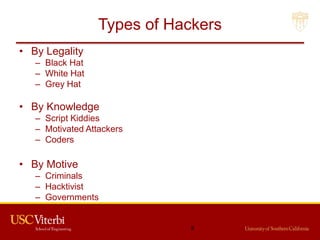
Types of Hackers
• By Legality
– Black Hat
– White Hat
– Grey Hat
• By Knowledge
– Script Kiddies
– Motivated Attackers
– Coders
• By Motive
– Criminals
– Hacktivist
– Governments
8
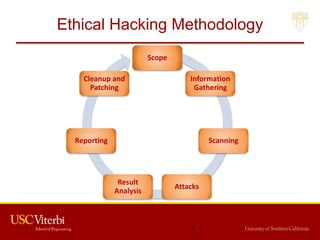
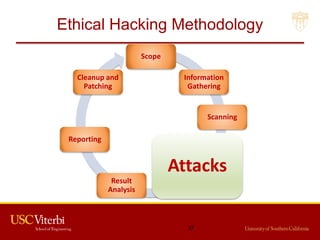
Ethical Hacking Methodology
Scope
Information
Gathering
Scanning
Attacks
Result
Analysis
Reporting
Cleanup and
Patching
9
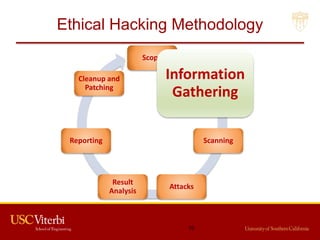
Ethical Hacking Methodology
Scope
Information
Gathering
Scanning
Attacks
Result
Analysis
Reporting
Cleanup and
Patching
10
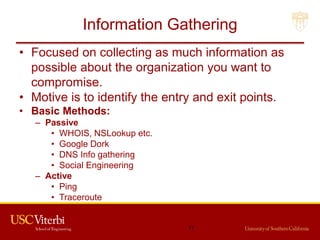
Information Gathering
• Focused on collecting as much information as
possible about the organization you want to
compromise.
• Motive is to identify the entry and exit points.
• Basic Methods:
– Passive
• WHOIS, NSLookup etc.
• Google Dork
• DNS Info gathering
• Social Engineering
– Active
• Ping
• Traceroute
11
Information Gathering (cont.)
• Passive Methods
– To gain information about targeted organization’s
cyber infrastructure without actively engaging with the
systems.
• WHOIS
– Anyone can use the this service to search for
databases and identify the registrant of a domain
name and other information.
– It also provides the information regarding: IP address,
name servers, admin contact etc.
– Link: http://whois.domaintools.com/
12
Information Gathering (cont.)
• Google Dork
– It uses Google search engine to find security holes on
the web applications over the internet.
– To locate specific strings of text within search results.
– Link: https://www.exploit-db.com/google-hacking-
database/
– Some of the Operators
• inurl .php?id=
• intitle text
• site text
• filetype pdf
13
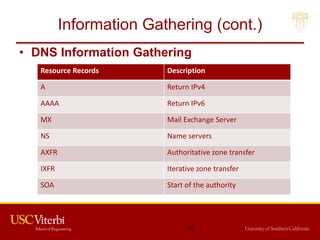
Information Gathering (cont.)
• DNS Information Gathering
Resource Records Description
A Return IPv4
AAAA Return IPv6
MX Mail Exchange Server
NS Name servers
AXFR Authoritative zone transfer
IXFR Iterative zone transfer
SOA Start of the authority
14
Information Gathering (cont.)
• DNS Information Gathering
– dnsenum: Tool in the backtrack Kali OS. It starts
querying DNS servers and gather information:
• Host address
• Name servers
• MX records
• Gathering SOA records
• Command: perl dnsnum.pl [host]
– dnsrecon: to gather network infrastructure
information.
– Dig: DNS information groper
• dig example.com MX @ns0.example.com
15
Information Gathering (cont.)
• Active Methods
– Interact directly with a system of interest.
• Ping
– It is used to test the reachability of a system.
– It works at the network layer.
– It measures RTT, report errors and packet losses.
– One can also fix the size of the parameters using -l
and number of request using –n.
– Command: ping -c 5 www.example.com
– Result: 64 bytes from xx.xxx.xxx.xxx: icmp_seq=0
ttl=100 time=23.82 ms
16
Information Gathering (cont.)
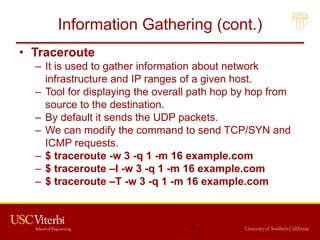
• Traceroute
– It is used to gather information about network
infrastructure and IP ranges of a given host.
– Tool for displaying the overall path hop by hop from
source to the destination.
– By default it sends the UDP packets.
– We can modify the command to send TCP/SYN and
ICMP requests.
– $ traceroute -w 3 -q 1 -m 16 example.com
– $ traceroute –I -w 3 -q 1 -m 16 example.com
– $ traceroute –T -w 3 -q 1 -m 16 example.com
17
Information Gathering (cont.)
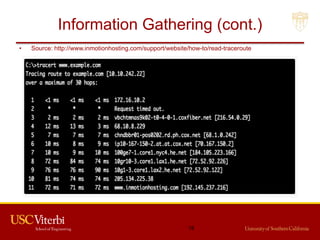
• Source: http://www.inmotionhosting.com/support/website/how-to/read-traceroute
18
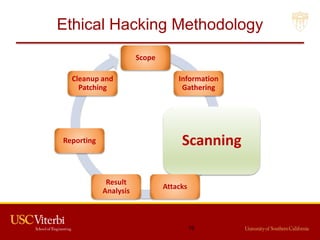
Ethical Hacking Methodology
Scope
Information
Gathering
Scanning
Attacks
Result
Analysis
Reporting
Cleanup and
Patching
19
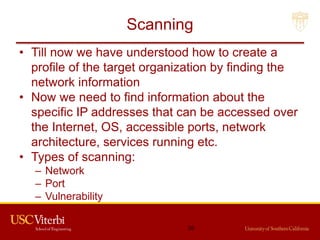
Scanning
• Till now we have understood how to create a
profile of the target organization by finding the
network information
• Now we need to find information about the
specific IP addresses that can be accessed over
the Internet, OS, accessible ports, network
architecture, services running etc.
• Types of scanning:
– Network
– Port
– Vulnerability
20
Scanning (cont.)
• Network Scanning
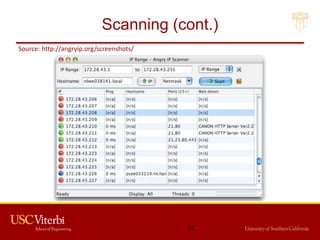
– Tool to find out active host on the network
– You select the range of IP addresses and start
scanning over the network.
– It provides the information Network devices including
FTP servers and workstations.
• Tools:
– Advance IP scanner (Windows, Mac and Linux)
– Network Mapper (Nmap, ZenMap)
– Nessus
21
Scanning (cont.)
Source: http://angryip.org/screenshots/
22
Scanning (cont.)
• Port Scanning
– Tool to find out which number of ports are accessible
on a server or a host.
– Port scanning identifies open doors to a hosts.
– Nmap classifies port in these States:
• Open
• Closed
• Filtered
• Unfiltered
23
Scanning (cont.)
• Commands:
– nmap ipaddress
– nmap -PN ipaddress
– nmap -6 ipaddress
– nmap -sP ipaddress (ping scan)
– nmap –open ipaddress
– nmap -p T:80 ipaddress
– nmap -o ipaddress
24
Scanning (cont.)
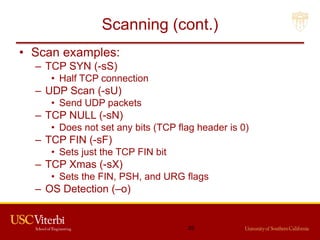
• Scan examples:
– TCP SYN (-sS)
• Half TCP connection
– UDP Scan (-sU)
• Send UDP packets
– TCP NULL (-sN)
• Does not set any bits (TCP flag header is 0)
– TCP FIN (-sF)
• Sets just the TCP FIN bit
– TCP Xmas (-sX)
• Sets the FIN, PSH, and URG flags
– OS Detection (–o)
25
Scanning (cont.)
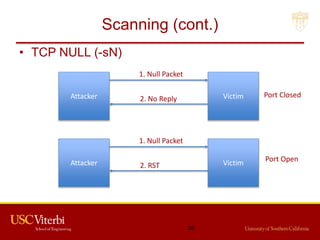
• TCP NULL (-sN)
26
Attacker Victim
1. Null Packet
2. No Reply
Attacker Victim
1. Null Packet
2. RST
Port Closed
Port Open
Scanning (cont.)
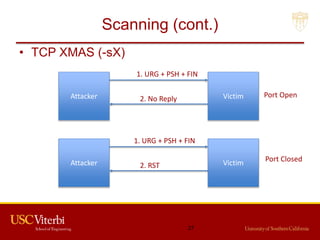
• TCP XMAS (-sX)
27
Attacker Victim
1. URG + PSH + FIN
2. No Reply
Attacker Victim
1. URG + PSH + FIN
2. RST
Port Open
Port Closed
Scanning (cont.)
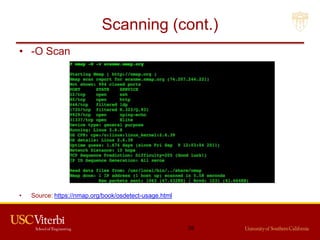
• -O Scan
• Source: https://nmap.org/book/osdetect-usage.html
28
Scanning (cont.)
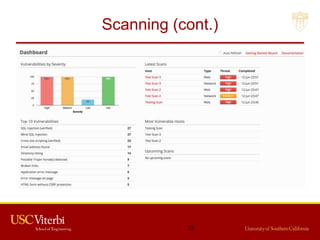
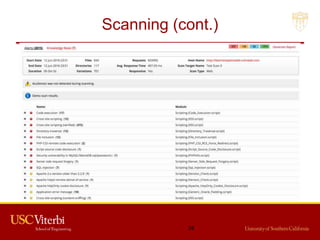
• Vulnerability Scanning
– Once we have identified the accessible ports and
services running on them, now we need to find the
vulnerabilities associated with those applications.
– Tools:
• Web Application Acunetix, BurpSuite etc.
• Network Security Nessus
• Mobile Security Veracode, Tenable Security etc.
– Web Goat
• Insecure web application maintained by OWASP
designed to teach web application security lessons.
29
Scanning (cont.)
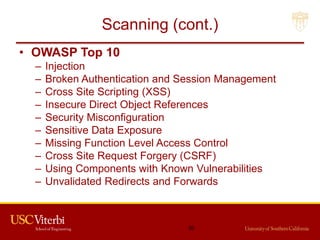
• OWASP Top 10
– Injection
– Broken Authentication and Session Management
– Cross Site Scripting (XSS)
– Insecure Direct Object References
– Security Misconfiguration
– Sensitive Data Exposure
– Missing Function Level Access Control
– Cross Site Request Forgery (CSRF)
– Using Components with Known Vulnerabilities
– Unvalidated Redirects and Forwards
30
Scanning (cont.)
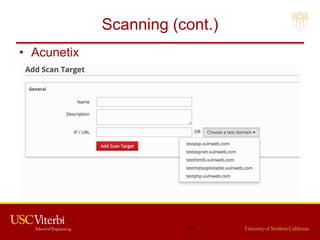
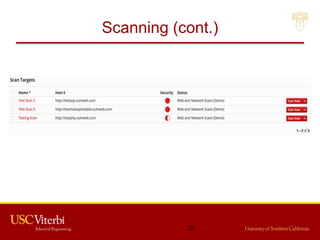
• Acunetix
31
Scanning (cont.)
32
Scanning (cont.)
33
Scanning (cont.)
34
Scanning (cont.)
• CMS (Content Management Servers)
– Popular ones are:
• Drupal
• WordPress
• Joomla
– Platforms rich in features and vulnerabilities
– Open source
– Some of the vulnerabilities are:
• SQL Injection
• Default and weak passwords
• Errors reveal sensitive information
• By default Directory listing
35
Scanning (cont.)
• Attackers maintain a dictionary of vulnerabilities
and corresponding exploits.
• For example, if they find an application and its
version running on a port. They know whether
this version of the application is vulnerable or
not. They use their dictionary to verify it.
• Now we understand how to exploit the
vulnerabilities.
36
Ethical Hacking Methodology
Scope
Information
Gathering
Scanning
Attacks
Result
Analysis
Reporting
Cleanup and
Patching
37
Attack
• Suppose these are the vulnerabilities we found
in the system:
– SQL Injection - SQLMap, SQLNinja etc.
– Buffer Overflow
• Now we will see how we hack into the system by
exploiting these weaknesses.
38
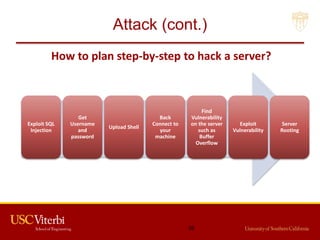
Attack (cont.)
Exploit SQL
Injection
Get
Username
and
password
Upload Shell
Back
Connect to
your
machine
Find
Vulnerability
on the server
such as
Buffer
Overflow
Exploit
Vulnerability
Server
Rooting
39
How to plan step-by-step to hack a server?
Attack (cont.)
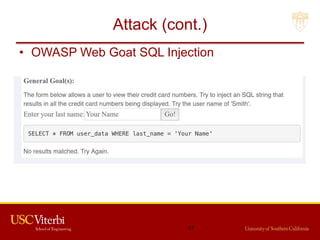
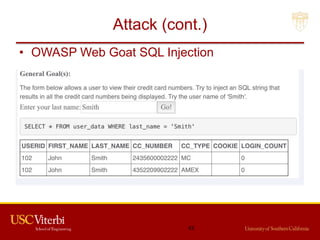
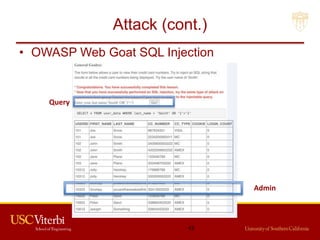
• Exploiting SQL Injection
– Idea of exploiting SQL injection is to get access to the
data and find out what is the admin username and
password on the website.
– Once we know this, we can login and upload our shell
on the server through which we can escalate our
privileges.
– In vulnerability scanning phase, we have identified
SQL injection vulnerability in a server. Now we exploit
that vulnerability manually and using a automated tool
SQL Map.
40
Attack (cont.)
• OWASP Web Goat SQL Injection
41
Attack (cont.)
• OWASP Web Goat SQL Injection
42
Attack (cont.)
• OWASP Web Goat SQL Injection
Admin
Query
43
Attack (cont.)
44
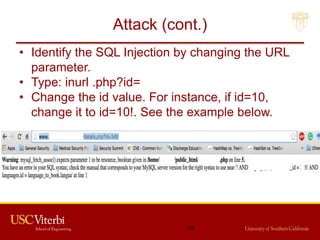
• Identify the SQL Injection by changing the URL
parameter.
• Type: inurl .php?id=
• Change the id value. For instance, if id=10,
change it to id=10!. See the example below.
Attack (cont.)
• Steps to perform SQL Injection
– Find vulnerable link (Vulnerability scanning)
– Find the databases on the vulnerable website
– Find the relevant tables containing username and
passwords
– Get columns of the table
– Get data from the table
• SQLMap performs all such actions automatically.
You need to provide vulnerable link to it.
• You can also run it as commands on cmd.
45
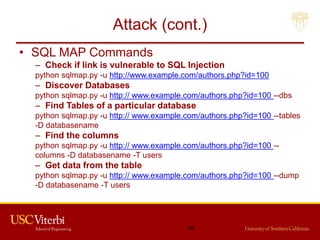
Attack (cont.)
• SQL MAP Commands
– Check if link is vulnerable to SQL Injection
python sqlmap.py -u http://www.example.com/authors.php?id=100
– Discover Databases
python sqlmap.py -u http:// www.example.com/authors.php?id=100 --dbs
– Find Tables of a particular database
python sqlmap.py -u http:// www.example.com/authors.php?id=100 --tables
-D databasename
– Find the columns
python sqlmap.py -u http:// www.example.com/authors.php?id=100 --
columns -D databasename -T users
– Get data from the table
python sqlmap.py -u http:// www.example.com/authors.php?id=100 --dump
-D databasename -T users
46
Attack (cont.)
• Modify the Request
– Suppose after exploiting SQL Injection we have the
admin username and password.
– We need to login and upload our shell.
– Waf performs sanitizing that which type of file is being
uploaded on the server. So, we need to by-pass the
waf.
– We can use Tamper/Scapy to perform this task.
– We can change the format of the shell while
uploading and use Tamper browser plug-in to capture
the http request to change the file extension to
original before it is sent to the server.
47
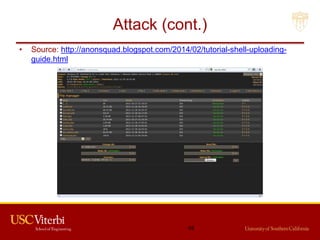
Attack (cont.)
• Source: http://anonsquad.blogspot.com/2014/02/tutorial-shell-uploading-
guide.html
48
Attack (cont.)
• Back connect
– Once shell is uploaded, we need to back connect the
server so that we can access all the functionality of
the uploaded shell and perform privilege escalation
attacks.
– For back connect you need to specify the IP address
of your computer and Port on which you want to
connect on the shell.
– You have to shutdown your firewall and router should
be configured for the port forwarding feature.
– Command for listening: nc -v ipaddress port
– Start listening for the connection on the port specified.
49
Attack (cont.)
• Server Rooting
– If connect is successful, you should be able to run
unix commands such as:
• ls
• uname –a
• whoami
– Download the specific exploit on the server using
wget command
– Use chmod 777 exploit for the full permission
– Execute exploit.
– If successful, whoami should say root.
50
Attack (cont.)
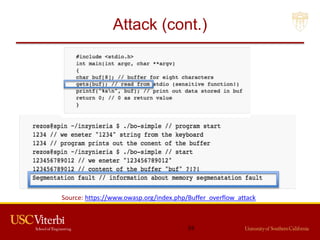
• Buffer Overflow (BO)
– It is a vulnerability where a software, while writing
data to a buffer, overruns the buffer's boundary and
overwrites adjacent memory locations.
– Overwriting values of the IP (Instruction Pointer), BP
(Base Pointer) and other registers causes exceptions,
segmentation faults etc.
– Consists of overflowing the heap or stack depending
on the code that developer has written.
51
Attack (cont.)
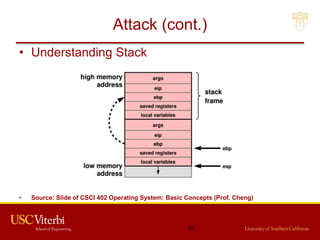
• Understanding Stack
• Source: Slide of CSCI 402 Operating System: Basic Concepts (Prof. Cheng)
52
Attack (cont.)
Source: https://www.owasp.org/index.php/Buffer_overflow_attack
53
Attack (cont.)
• Exploit the BO Vulnerability (CIJ)
– Crash the program by exploiting Buffer overflow.
– Injecting Malicious code in the program
• Give the malicious input the program when it crashes.
– Jumping to the Malicious Code
• When program runs, your malicious code is inside the
memory. You need to overwrite instruction pointer with
address so that it jumps to place where malicious code
is present.
• Find the address by understanding the program stack
and overwrite the IP.
54
Attack (cont.)
• DDOS Attacks
– Network bandwidth by flooding
• DNS Amplification
– Server resources
• TCP SYN flooding
• HTTP GET and HTTP POST
• Slowloris
– Destroy the function of the server or application
• Tools:
– Trinoo
– LOIC (Low Orbit In Cannon)
– TFN2K (Tribe Flood Network)
55
Attack (cont.)
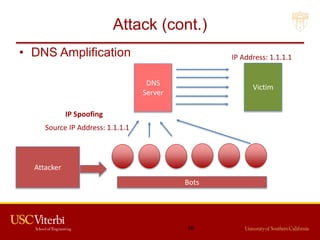
• DNS Amplification
56
Attacker
DNS
Server
Bots
Victim
IP Address: 1.1.1.1
Source IP Address: 1.1.1.1
IP Spoofing
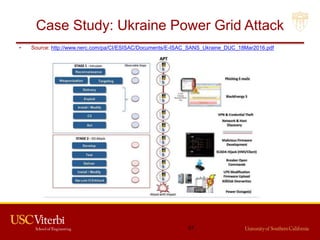
Case Study: Ukraine Power Grid Attack
• Source: http://www.nerc.com/pa/CI/ESISAC/Documents/E-ISAC_SANS_Ukraine_DUC_18Mar2016.pdf
57
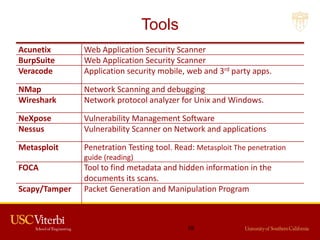
Tools
Acunetix Web Application Security Scanner
BurpSuite Web Application Security Scanner
Veracode Application security mobile, web and 3rd party apps.
NMap Network Scanning and debugging
Wireshark Network protocol analyzer for Unix and Windows.
NeXpose Vulnerability Management Software
Nessus Vulnerability Scanner on Network and applications
Metasploit Penetration Testing tool. Read: Metasploit The penetration
guide (reading)
FOCA Tool to find metadata and hidden information in the
documents its scans.
Scapy/Tamper Packet Generation and Manipulation Program
58
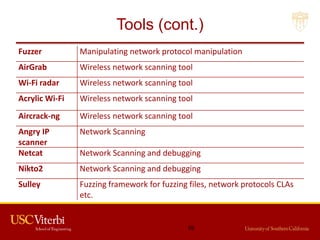
Tools (cont.)
Fuzzer Manipulating network protocol manipulation
AirGrab Wireless network scanning tool
Wi-Fi radar Wireless network scanning tool
Acrylic Wi-Fi Wireless network scanning tool
Aircrack-ng Wireless network scanning tool
Angry IP
scanner
Network Scanning
Netcat Network Scanning and debugging
Nikto2 Network Scanning and debugging
Sulley Fuzzing framework for fuzzing files, network protocols CLAs
etc.
59
Red Team and Penetration Testing
Procedures and Tools
M.S. Candidate: Matthew Jackoski
Lecture 6
15 February 2017
OHE 100C
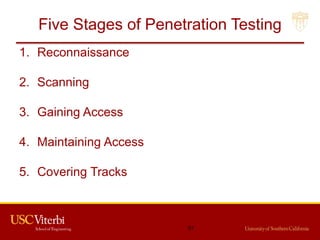
Five Stages of Penetration Testing
1. Reconnaissance
2. Scanning
3. Gaining Access
4. Maintaining Access
5. Covering Tracks
61
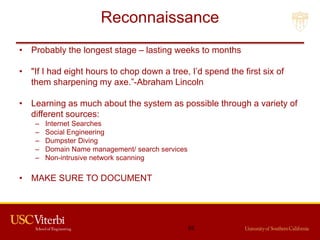
Reconnaissance
• Probably the longest stage – lasting weeks to months
• "If I had eight hours to chop down a tree, I’d spend the first six of
them sharpening my axe.”-Abraham Lincoln
• Learning as much about the system as possible through a variety of
different sources:
– Internet Searches
– Social Engineering
– Dumpster Diving
– Domain Name management/ search services
– Non-intrusive network scanning
• MAKE SURE TO DOCUMENT
62
Scanning
• Scanning the perimeter and internal network devices
looking for weaknesses.
• Weaknesses include:
– Open ports
– Open services
– Vulnerable Applications (including Operating Systems)
– Weak protection of data in transit
– Make and Model of LAN/WAN equipment
• MAKE SURE TO DOCUMENT
63
Gaining Access
• This is accomplished by using all of information
collected in the previous two stages.
– Exploiting previously discovered vulnerabilities
– Social Engineering
• Need to avoid detection.
• MAKE SURE TO DOCUMENT
64
Maintaining Access
• Creating a foothold in the network.
– Installing a backdoor.
• This action is easier for intrusion detection
systems to catch.
• MAKE SURE TO DOCUMENT
65
Covering Your Tracks
• Need to prove that an attacker can cover his
tracks.
• This is mostly accomplished by
editing/destroying audit logs.
• MAKE SURE TO DOCUMENT
66
Security Minded Linux Distributions
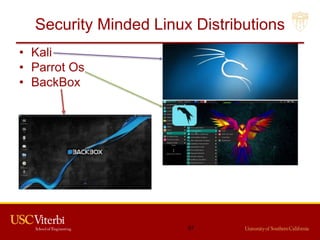
• Kali
• Parrot Os
• BackBox
67
Most Popular Penetration Testing Tools
• Nmap
• Metasploit Framework
• John The Ripper
• THC Hydra
• OWASP Zed
• Wireshark
• Aircrack-ng
• Maltego
• Cain and Abel (Cain)
• Nikto Website Vulnerability Scanner
68
Nmap
• Used to discover hosts and services on a
computer network.
• Creates a “map” of the network.
• Sends packets to host and analyzes response to
generate map.
• Examples of features:
– Os detection
– Open Ports
– Can adapt to latency and congestion
69
Metasploit Framework
• Tool for executing exploit code against remort
machines.
• Basic steps:
– Chose and configure an exploit
– Checking whether target is susceptible to the chosen
exploit (optional)
– Choosing and configuring payload
– Choosing and encoding a stealth method
– Executing the exploit
70
John The Ripper
• Password cracking software
• Combines multiple password crackers into one
program
• Auto-detects password hash types
• Can be run against various encrypted password
formats including:
71
THC Hydra
• Password cracker that works in conjunction with John the Ripper
• Fast and stable Network Login Hacking Tool
• Uses brute force or dictionary attacks to login to a webpage
• Supports multiple protocols:
– Mail
• POP3
• IMAP
• Etc
– Databases
– LDAP
– SMB
– VNC
– SSH
72
OWASP Zed
• Application Security Scanner
• When used as proxy server, it allows for the user to
manipulate all of the traffic that passes through using
https.
• Features:
– Intercepting proxy server
– Traditional and AJAX Web crawlers
– Automated scanner
– Passive scanner
– Forced browsing
– Fuzzer
– WebSocket support
– Scripting languages
– Plug-n-Hack support
73
Wireshark (TShark)
• Open source packet analyzer
• Uses pcap to capture packets
• Allows users to see all traffic, not just the traffic
addressed to one of the interface’s configured
addresses and broadcast/multicase traffic.
(network interface must support promisicious
mode)
74
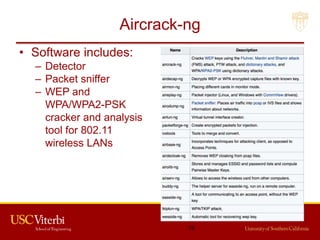
Aircrack-ng
• Software includes:
– Detector
– Packet sniffer
– WEP and
WPA/WPA2-PSK
cracker and analysis
tool for 802.11
wireless LANs
75
Maltego
• Used for open-source intelligence and forensics
• Allows for creating custom entities, which allows
for representation of any type of data.
• Main focus:
– To analyze real-world relationships between people,
groups, websites, domains, networks, internet
infrastructure, and affiliations with online services.
76
Cain and Abel
• Password recovery tool for Microsoft Windows
• Password cracks are done by dictionary attacks, brute force, and
Cryptanalysis
• Features:
– WEP cracking
– Speeding up packet capture speed
– Record VoIP conversations
– Decoding scrambled passwords
– Calculating hashes
– Traceroute
– Revealing password boxes
– Uncovering cached passwords
– Dumping protected storage passwords
– ARP spoofing
– IP to MAC Address resolver
– Network Password Sniffer
– LSA secret dumper
77
Nikto Website Scanner
• Open Source web server scanner.
• Performs comprehensive tests against web servers,
including over 6700 potentially dangerous files/CGIs.
• Checks for outdated versions
• Checks for specific problems associated with over 270
servers.
• Checks server configurations for items such as the
presence of multiple index files, HTTP server options,
and attempts to identify installed web servers and
software
78
Group 1
• Abdullah Binkulaib and Dan Dmytrisin have provided initial
information, but are having difficulty engaging the rest of group
one.
79
Group 2
• Submitted a requirements and design document
– Include project scope and assumptions
– Data classes, User Classes, and Protection Domains
– System Components
– System Design
• Including Data Flow Diagrams
• Including Network Diagrams
– Development timeline through end of February
80
Banking
• Your organization must:
– Maintain a database of account holders
– A database of account balances
– Enable web access by customers who:
• Can update their personal information
• Check their account balance
• Transfer funds to another account (by number)
• View transactions on their account
• Submit an image of a check for deposit
– (check should be viewable, but you do not need to scan it or process it)
• Access is needed
– Via web from the open internet
– Outbound email confirming transactions
– All other interactions may be limited by information flow policies
to internal machines.
81
Preparation for Lab Activities
• Install free version of vmplayer or
virtualbox on your own machine
• Configure some version / dist of Linux as a
guest OS.
• Run two instances simultaneously
• Configure to allow network communication
between the two VMs.
• Install a web server on one of the VMs.
• Configure Dynamic DNS (e.g. no-ip.com)
to enable connection to the server from the
internet.
16
Connecting to VMs
• VNC – Virtual Network Computing
– Install TightVNC or other Client on machine from which
access is attempted.
– Install and configure VNC server on Virtual Machine
– A VNC Server can be run inside your VM, or in the hypervisor
• Inside the VM is likely easier
• Portmapping a must
– Find the IP using dynamic DNS
– But multiple VM’s on a shared NAT need to be mapped manually to
different ports.
• We are trying to gain access to a server under which you can
run VM’s which you would connect to the same way you would
here, via VNC
– Address mapping would be easier.
83

Hacking - penetration tools

  • 1.
    INF526: Secure Systems Administration RedTeaming and Pen Testing Tools Prof. Clifford Neuman Lecture 6 15 February 2017 OHE100C
  • 2.
    Class Presentation Schedule 2/8Miles Wright-Walker - Developing adversarial security plan 2/15 Matthew Jackoski - Red Teaming / Pen Testing Tools 2/22 Abdulla Binkulaib - Developing a response plan 3/1 Jikun Li - Linux security administration 3/8 Daniel Dmytrisin - Network security components & Tech 3/22 Haibo Zhang - Network Security administration 3/29 Mariam Fahad Bubeshait - Configuration Management 4/5 Mohammed Alsubaie – SIEM and Intrusion Detection 4/12 Vishnu Vadlamani - Network Monitoring/Attack Forensics 4/19 Andrew Gronski - Accreditation and acceptance testing 1
  • 3.
    Group Exercise One •Decide on the software components to be deployed to implement software requirements on next slide. – Custom development should be simple scripts. – Use packages for database and other components. • Decide on the VM’s to be created to run those software components. – You can run more than one software component within a VM if you choose. – Decide on the methods you will use to contain access to those software components, and to the information managed by those components. • Configure communication between VM’s and to the outside • Install packages • Write scripts and demonstrate basic flow through system. • Report on progress as group now by email on Tuesday 7 Feb. 2
  • 4.
    INF526: Secure Systems Administration PenetrationTools Yatin Wadhawan (Teaching Assistant) Prof. Clifford Neuman Lecture 5 17 June 2016 OHE100C
  • 5.
    INF526: Secure Systems Administration PenetrationTools Yatin Wadhawan (Ph.D. candidate) Prof. Clifford Neuman
  • 6.
    DISCLAIMER DO NOT USETHESE TOOLS AND METHODOLOGY FREELY OVER THE INTERNET. IT MAY CAUSE DAMAGE TO SOME ORGANIZATION’S CYBER INFRASTRUCTURE WHICH IS A CRIMINAL OFFENCE.THIS TUTORIAL IS JUST FOR LEARNING PURPOSE. AUTHORS DO NOT ENCOURAGE ANY MALICIOUS ACTIVITIES. 5
  • 7.
    Topics 1. Ethical Hacking 2.Types of Hackers 3. Ethical Hacking Methodology 4. Information Gathering 5. Scanning 6. Attacks 7. Tools 8. Case Study: Ukraine Power Grid Attack 6
  • 8.
    Ethical Hacking • Primarymotive: To identify the weaknesses of the cyber infrastructure of an organization before an unethical hacker does. • It is legal given testers have taken permission from the relevant stakeholders of the assets on which testing is performed. • It is a subset of an Organization’s security program. • It does not just protect the information but helps organizations to succeed. 7
  • 9.
    Types of Hackers •By Legality – Black Hat – White Hat – Grey Hat • By Knowledge – Script Kiddies – Motivated Attackers – Coders • By Motive – Criminals – Hacktivist – Governments 8
  • 10.
  • 11.
  • 12.
    Information Gathering • Focusedon collecting as much information as possible about the organization you want to compromise. • Motive is to identify the entry and exit points. • Basic Methods: – Passive • WHOIS, NSLookup etc. • Google Dork • DNS Info gathering • Social Engineering – Active • Ping • Traceroute 11
  • 13.
    Information Gathering (cont.) •Passive Methods – To gain information about targeted organization’s cyber infrastructure without actively engaging with the systems. • WHOIS – Anyone can use the this service to search for databases and identify the registrant of a domain name and other information. – It also provides the information regarding: IP address, name servers, admin contact etc. – Link: http://whois.domaintools.com/ 12
  • 14.
    Information Gathering (cont.) •Google Dork – It uses Google search engine to find security holes on the web applications over the internet. – To locate specific strings of text within search results. – Link: https://www.exploit-db.com/google-hacking- database/ – Some of the Operators • inurl .php?id= • intitle text • site text • filetype pdf 13
  • 15.
    Information Gathering (cont.) •DNS Information Gathering Resource Records Description A Return IPv4 AAAA Return IPv6 MX Mail Exchange Server NS Name servers AXFR Authoritative zone transfer IXFR Iterative zone transfer SOA Start of the authority 14
  • 16.
    Information Gathering (cont.) •DNS Information Gathering – dnsenum: Tool in the backtrack Kali OS. It starts querying DNS servers and gather information: • Host address • Name servers • MX records • Gathering SOA records • Command: perl dnsnum.pl [host] – dnsrecon: to gather network infrastructure information. – Dig: DNS information groper • dig example.com MX @ns0.example.com 15
  • 17.
    Information Gathering (cont.) •Active Methods – Interact directly with a system of interest. • Ping – It is used to test the reachability of a system. – It works at the network layer. – It measures RTT, report errors and packet losses. – One can also fix the size of the parameters using -l and number of request using –n. – Command: ping -c 5 www.example.com – Result: 64 bytes from xx.xxx.xxx.xxx: icmp_seq=0 ttl=100 time=23.82 ms 16
  • 18.
    Information Gathering (cont.) •Traceroute – It is used to gather information about network infrastructure and IP ranges of a given host. – Tool for displaying the overall path hop by hop from source to the destination. – By default it sends the UDP packets. – We can modify the command to send TCP/SYN and ICMP requests. – $ traceroute -w 3 -q 1 -m 16 example.com – $ traceroute –I -w 3 -q 1 -m 16 example.com – $ traceroute –T -w 3 -q 1 -m 16 example.com 17
  • 19.
    Information Gathering (cont.) •Source: http://www.inmotionhosting.com/support/website/how-to/read-traceroute 18
  • 20.
  • 21.
    Scanning • Till nowwe have understood how to create a profile of the target organization by finding the network information • Now we need to find information about the specific IP addresses that can be accessed over the Internet, OS, accessible ports, network architecture, services running etc. • Types of scanning: – Network – Port – Vulnerability 20
  • 22.
    Scanning (cont.) • NetworkScanning – Tool to find out active host on the network – You select the range of IP addresses and start scanning over the network. – It provides the information Network devices including FTP servers and workstations. • Tools: – Advance IP scanner (Windows, Mac and Linux) – Network Mapper (Nmap, ZenMap) – Nessus 21
  • 23.
  • 24.
    Scanning (cont.) • PortScanning – Tool to find out which number of ports are accessible on a server or a host. – Port scanning identifies open doors to a hosts. – Nmap classifies port in these States: • Open • Closed • Filtered • Unfiltered 23
  • 25.
    Scanning (cont.) • Commands: –nmap ipaddress – nmap -PN ipaddress – nmap -6 ipaddress – nmap -sP ipaddress (ping scan) – nmap –open ipaddress – nmap -p T:80 ipaddress – nmap -o ipaddress 24
  • 26.
    Scanning (cont.) • Scanexamples: – TCP SYN (-sS) • Half TCP connection – UDP Scan (-sU) • Send UDP packets – TCP NULL (-sN) • Does not set any bits (TCP flag header is 0) – TCP FIN (-sF) • Sets just the TCP FIN bit – TCP Xmas (-sX) • Sets the FIN, PSH, and URG flags – OS Detection (–o) 25
  • 27.
    Scanning (cont.) • TCPNULL (-sN) 26 Attacker Victim 1. Null Packet 2. No Reply Attacker Victim 1. Null Packet 2. RST Port Closed Port Open
  • 28.
    Scanning (cont.) • TCPXMAS (-sX) 27 Attacker Victim 1. URG + PSH + FIN 2. No Reply Attacker Victim 1. URG + PSH + FIN 2. RST Port Open Port Closed
  • 29.
    Scanning (cont.) • -OScan • Source: https://nmap.org/book/osdetect-usage.html 28
  • 30.
    Scanning (cont.) • VulnerabilityScanning – Once we have identified the accessible ports and services running on them, now we need to find the vulnerabilities associated with those applications. – Tools: • Web Application Acunetix, BurpSuite etc. • Network Security Nessus • Mobile Security Veracode, Tenable Security etc. – Web Goat • Insecure web application maintained by OWASP designed to teach web application security lessons. 29
  • 31.
    Scanning (cont.) • OWASPTop 10 – Injection – Broken Authentication and Session Management – Cross Site Scripting (XSS) – Insecure Direct Object References – Security Misconfiguration – Sensitive Data Exposure – Missing Function Level Access Control – Cross Site Request Forgery (CSRF) – Using Components with Known Vulnerabilities – Unvalidated Redirects and Forwards 30
  • 32.
  • 33.
  • 34.
  • 35.
  • 36.
    Scanning (cont.) • CMS(Content Management Servers) – Popular ones are: • Drupal • WordPress • Joomla – Platforms rich in features and vulnerabilities – Open source – Some of the vulnerabilities are: • SQL Injection • Default and weak passwords • Errors reveal sensitive information • By default Directory listing 35
  • 37.
    Scanning (cont.) • Attackersmaintain a dictionary of vulnerabilities and corresponding exploits. • For example, if they find an application and its version running on a port. They know whether this version of the application is vulnerable or not. They use their dictionary to verify it. • Now we understand how to exploit the vulnerabilities. 36
  • 38.
  • 39.
    Attack • Suppose theseare the vulnerabilities we found in the system: – SQL Injection - SQLMap, SQLNinja etc. – Buffer Overflow • Now we will see how we hack into the system by exploiting these weaknesses. 38
  • 40.
    Attack (cont.) Exploit SQL Injection Get Username and password UploadShell Back Connect to your machine Find Vulnerability on the server such as Buffer Overflow Exploit Vulnerability Server Rooting 39 How to plan step-by-step to hack a server?
  • 41.
    Attack (cont.) • ExploitingSQL Injection – Idea of exploiting SQL injection is to get access to the data and find out what is the admin username and password on the website. – Once we know this, we can login and upload our shell on the server through which we can escalate our privileges. – In vulnerability scanning phase, we have identified SQL injection vulnerability in a server. Now we exploit that vulnerability manually and using a automated tool SQL Map. 40
  • 42.
    Attack (cont.) • OWASPWeb Goat SQL Injection 41
  • 43.
    Attack (cont.) • OWASPWeb Goat SQL Injection 42
  • 44.
    Attack (cont.) • OWASPWeb Goat SQL Injection Admin Query 43
  • 45.
    Attack (cont.) 44 • Identifythe SQL Injection by changing the URL parameter. • Type: inurl .php?id= • Change the id value. For instance, if id=10, change it to id=10!. See the example below.
  • 46.
    Attack (cont.) • Stepsto perform SQL Injection – Find vulnerable link (Vulnerability scanning) – Find the databases on the vulnerable website – Find the relevant tables containing username and passwords – Get columns of the table – Get data from the table • SQLMap performs all such actions automatically. You need to provide vulnerable link to it. • You can also run it as commands on cmd. 45
  • 47.
    Attack (cont.) • SQLMAP Commands – Check if link is vulnerable to SQL Injection python sqlmap.py -u http://www.example.com/authors.php?id=100 – Discover Databases python sqlmap.py -u http:// www.example.com/authors.php?id=100 --dbs – Find Tables of a particular database python sqlmap.py -u http:// www.example.com/authors.php?id=100 --tables -D databasename – Find the columns python sqlmap.py -u http:// www.example.com/authors.php?id=100 -- columns -D databasename -T users – Get data from the table python sqlmap.py -u http:// www.example.com/authors.php?id=100 --dump -D databasename -T users 46
  • 48.
    Attack (cont.) • Modifythe Request – Suppose after exploiting SQL Injection we have the admin username and password. – We need to login and upload our shell. – Waf performs sanitizing that which type of file is being uploaded on the server. So, we need to by-pass the waf. – We can use Tamper/Scapy to perform this task. – We can change the format of the shell while uploading and use Tamper browser plug-in to capture the http request to change the file extension to original before it is sent to the server. 47
  • 49.
    Attack (cont.) • Source:http://anonsquad.blogspot.com/2014/02/tutorial-shell-uploading- guide.html 48
  • 50.
    Attack (cont.) • Backconnect – Once shell is uploaded, we need to back connect the server so that we can access all the functionality of the uploaded shell and perform privilege escalation attacks. – For back connect you need to specify the IP address of your computer and Port on which you want to connect on the shell. – You have to shutdown your firewall and router should be configured for the port forwarding feature. – Command for listening: nc -v ipaddress port – Start listening for the connection on the port specified. 49
  • 51.
    Attack (cont.) • ServerRooting – If connect is successful, you should be able to run unix commands such as: • ls • uname –a • whoami – Download the specific exploit on the server using wget command – Use chmod 777 exploit for the full permission – Execute exploit. – If successful, whoami should say root. 50
  • 52.
    Attack (cont.) • BufferOverflow (BO) – It is a vulnerability where a software, while writing data to a buffer, overruns the buffer's boundary and overwrites adjacent memory locations. – Overwriting values of the IP (Instruction Pointer), BP (Base Pointer) and other registers causes exceptions, segmentation faults etc. – Consists of overflowing the heap or stack depending on the code that developer has written. 51
  • 53.
    Attack (cont.) • UnderstandingStack • Source: Slide of CSCI 402 Operating System: Basic Concepts (Prof. Cheng) 52
  • 54.
  • 55.
    Attack (cont.) • Exploitthe BO Vulnerability (CIJ) – Crash the program by exploiting Buffer overflow. – Injecting Malicious code in the program • Give the malicious input the program when it crashes. – Jumping to the Malicious Code • When program runs, your malicious code is inside the memory. You need to overwrite instruction pointer with address so that it jumps to place where malicious code is present. • Find the address by understanding the program stack and overwrite the IP. 54
  • 56.
    Attack (cont.) • DDOSAttacks – Network bandwidth by flooding • DNS Amplification – Server resources • TCP SYN flooding • HTTP GET and HTTP POST • Slowloris – Destroy the function of the server or application • Tools: – Trinoo – LOIC (Low Orbit In Cannon) – TFN2K (Tribe Flood Network) 55
  • 57.
    Attack (cont.) • DNSAmplification 56 Attacker DNS Server Bots Victim IP Address: 1.1.1.1 Source IP Address: 1.1.1.1 IP Spoofing
  • 58.
    Case Study: UkrainePower Grid Attack • Source: http://www.nerc.com/pa/CI/ESISAC/Documents/E-ISAC_SANS_Ukraine_DUC_18Mar2016.pdf 57
  • 59.
    Tools Acunetix Web ApplicationSecurity Scanner BurpSuite Web Application Security Scanner Veracode Application security mobile, web and 3rd party apps. NMap Network Scanning and debugging Wireshark Network protocol analyzer for Unix and Windows. NeXpose Vulnerability Management Software Nessus Vulnerability Scanner on Network and applications Metasploit Penetration Testing tool. Read: Metasploit The penetration guide (reading) FOCA Tool to find metadata and hidden information in the documents its scans. Scapy/Tamper Packet Generation and Manipulation Program 58
  • 60.
    Tools (cont.) Fuzzer Manipulatingnetwork protocol manipulation AirGrab Wireless network scanning tool Wi-Fi radar Wireless network scanning tool Acrylic Wi-Fi Wireless network scanning tool Aircrack-ng Wireless network scanning tool Angry IP scanner Network Scanning Netcat Network Scanning and debugging Nikto2 Network Scanning and debugging Sulley Fuzzing framework for fuzzing files, network protocols CLAs etc. 59
  • 61.
    Red Team andPenetration Testing Procedures and Tools M.S. Candidate: Matthew Jackoski Lecture 6 15 February 2017 OHE 100C
  • 62.
    Five Stages ofPenetration Testing 1. Reconnaissance 2. Scanning 3. Gaining Access 4. Maintaining Access 5. Covering Tracks 61
  • 63.
    Reconnaissance • Probably thelongest stage – lasting weeks to months • "If I had eight hours to chop down a tree, I’d spend the first six of them sharpening my axe.”-Abraham Lincoln • Learning as much about the system as possible through a variety of different sources: – Internet Searches – Social Engineering – Dumpster Diving – Domain Name management/ search services – Non-intrusive network scanning • MAKE SURE TO DOCUMENT 62
  • 64.
    Scanning • Scanning theperimeter and internal network devices looking for weaknesses. • Weaknesses include: – Open ports – Open services – Vulnerable Applications (including Operating Systems) – Weak protection of data in transit – Make and Model of LAN/WAN equipment • MAKE SURE TO DOCUMENT 63
  • 65.
    Gaining Access • Thisis accomplished by using all of information collected in the previous two stages. – Exploiting previously discovered vulnerabilities – Social Engineering • Need to avoid detection. • MAKE SURE TO DOCUMENT 64
  • 66.
    Maintaining Access • Creatinga foothold in the network. – Installing a backdoor. • This action is easier for intrusion detection systems to catch. • MAKE SURE TO DOCUMENT 65
  • 67.
    Covering Your Tracks •Need to prove that an attacker can cover his tracks. • This is mostly accomplished by editing/destroying audit logs. • MAKE SURE TO DOCUMENT 66
  • 68.
    Security Minded LinuxDistributions • Kali • Parrot Os • BackBox 67
  • 69.
    Most Popular PenetrationTesting Tools • Nmap • Metasploit Framework • John The Ripper • THC Hydra • OWASP Zed • Wireshark • Aircrack-ng • Maltego • Cain and Abel (Cain) • Nikto Website Vulnerability Scanner 68
  • 70.
    Nmap • Used todiscover hosts and services on a computer network. • Creates a “map” of the network. • Sends packets to host and analyzes response to generate map. • Examples of features: – Os detection – Open Ports – Can adapt to latency and congestion 69
  • 71.
    Metasploit Framework • Toolfor executing exploit code against remort machines. • Basic steps: – Chose and configure an exploit – Checking whether target is susceptible to the chosen exploit (optional) – Choosing and configuring payload – Choosing and encoding a stealth method – Executing the exploit 70
  • 72.
    John The Ripper •Password cracking software • Combines multiple password crackers into one program • Auto-detects password hash types • Can be run against various encrypted password formats including: 71
  • 73.
    THC Hydra • Passwordcracker that works in conjunction with John the Ripper • Fast and stable Network Login Hacking Tool • Uses brute force or dictionary attacks to login to a webpage • Supports multiple protocols: – Mail • POP3 • IMAP • Etc – Databases – LDAP – SMB – VNC – SSH 72
  • 74.
    OWASP Zed • ApplicationSecurity Scanner • When used as proxy server, it allows for the user to manipulate all of the traffic that passes through using https. • Features: – Intercepting proxy server – Traditional and AJAX Web crawlers – Automated scanner – Passive scanner – Forced browsing – Fuzzer – WebSocket support – Scripting languages – Plug-n-Hack support 73
  • 75.
    Wireshark (TShark) • Opensource packet analyzer • Uses pcap to capture packets • Allows users to see all traffic, not just the traffic addressed to one of the interface’s configured addresses and broadcast/multicase traffic. (network interface must support promisicious mode) 74
  • 76.
    Aircrack-ng • Software includes: –Detector – Packet sniffer – WEP and WPA/WPA2-PSK cracker and analysis tool for 802.11 wireless LANs 75
  • 77.
    Maltego • Used foropen-source intelligence and forensics • Allows for creating custom entities, which allows for representation of any type of data. • Main focus: – To analyze real-world relationships between people, groups, websites, domains, networks, internet infrastructure, and affiliations with online services. 76
  • 78.
    Cain and Abel •Password recovery tool for Microsoft Windows • Password cracks are done by dictionary attacks, brute force, and Cryptanalysis • Features: – WEP cracking – Speeding up packet capture speed – Record VoIP conversations – Decoding scrambled passwords – Calculating hashes – Traceroute – Revealing password boxes – Uncovering cached passwords – Dumping protected storage passwords – ARP spoofing – IP to MAC Address resolver – Network Password Sniffer – LSA secret dumper 77
  • 79.
    Nikto Website Scanner •Open Source web server scanner. • Performs comprehensive tests against web servers, including over 6700 potentially dangerous files/CGIs. • Checks for outdated versions • Checks for specific problems associated with over 270 servers. • Checks server configurations for items such as the presence of multiple index files, HTTP server options, and attempts to identify installed web servers and software 78
  • 80.
    Group 1 • AbdullahBinkulaib and Dan Dmytrisin have provided initial information, but are having difficulty engaging the rest of group one. 79
  • 81.
    Group 2 • Submitteda requirements and design document – Include project scope and assumptions – Data classes, User Classes, and Protection Domains – System Components – System Design • Including Data Flow Diagrams • Including Network Diagrams – Development timeline through end of February 80
  • 82.
    Banking • Your organizationmust: – Maintain a database of account holders – A database of account balances – Enable web access by customers who: • Can update their personal information • Check their account balance • Transfer funds to another account (by number) • View transactions on their account • Submit an image of a check for deposit – (check should be viewable, but you do not need to scan it or process it) • Access is needed – Via web from the open internet – Outbound email confirming transactions – All other interactions may be limited by information flow policies to internal machines. 81
  • 83.
    Preparation for LabActivities • Install free version of vmplayer or virtualbox on your own machine • Configure some version / dist of Linux as a guest OS. • Run two instances simultaneously • Configure to allow network communication between the two VMs. • Install a web server on one of the VMs. • Configure Dynamic DNS (e.g. no-ip.com) to enable connection to the server from the internet. 16
  • 84.
    Connecting to VMs •VNC – Virtual Network Computing – Install TightVNC or other Client on machine from which access is attempted. – Install and configure VNC server on Virtual Machine – A VNC Server can be run inside your VM, or in the hypervisor • Inside the VM is likely easier • Portmapping a must – Find the IP using dynamic DNS – But multiple VM’s on a shared NAT need to be mapped manually to different ports. • We are trying to gain access to a server under which you can run VM’s which you would connect to the same way you would here, via VNC – Address mapping would be easier. 83