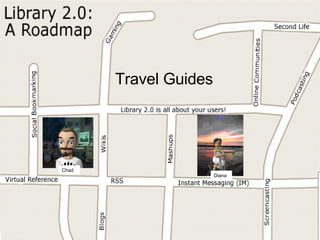
Travel Guides Chad Diana
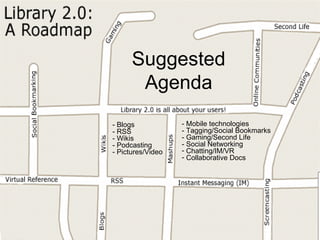
Suggested Agenda - Blogs - RSS - Wikis - Podcasting - Pictures/Video - Mobile technologies - Tagging/Social Bookmarks - Gaming/Second Life - Social Networking Chatting/IM/VR Collaborative Docs
Chad Mairn St. Petersburg College  mairn.chad@spcollege.edu  (727) 341.7181 GoogleTalk: chadmairn Diana Sachs-Silveira Tampa Bay Library Consortium  [email_address]   (813) 622-8252 ext 234 Yahoo ID: diverdee987 Library 2.0: A Roadmap to Success Introducing your “tour guides” … Note:   We value Library 2.0 principles and would like to practice what we preach, so let’s make these presentations as interactive, useful, and fun as possible! Library 2.0 is all about reaching out, listening, and responding to your user’s needs and one-way communication doesn’t advance our “conversation.”     Our referenced links are available at:  http://del.icio.us/Diana_Chad Our PowerPoint Presentation is available at:  http://www.slideshare.net/group/library-20    
Session 1: Publishing pŭb‘ lĭsh – to bring to the public’s attention What is Library 2.0? Blogs RSS Wikis  Collaborative Docs Podcasting Pictures/Video Mobile technologies
What is Library 2.0? Michael E. Casey  coined the term. There isn’t a clear and all encompassing definition. Helping to extend library services and meet the needs of our users no matter where they want it. Library 2.0 Reading List on Squidoo
1. Blogs are …  web pages that are organized by dated entries and resemble an online diary for the world to read.  an easy way to exchange and present information. about three things: “Frequency, Brevity and Personality“ [ Source:  Evan Williams, the creator of Blogger]. extremely popular! 39 % of Internet users, i.e., nearly 57 million American adults, read blogs. [ Source : Lenhart & Fox].
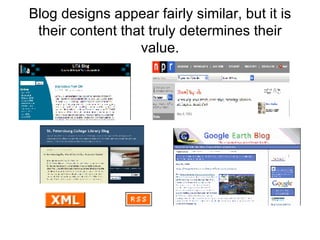
Blog designs appear fairly similar, but it is their content that truly determines their value.
Create a library blog to …  promote library events.  connect to your community.  support devoted library users. reach out to potential users. say something interesting.  allow your patrons to say something interesting. enhance book discussions. provide book reviews/recommendations. create a literary guide.  write a library newspaper.  revisit and perhaps revise work. interact with your colleagues.  be creative, critically think, and write about issues interesting to you. accomplish almost anything you want.
Some things to consider when planning …  Construct a clear blog mission statement that supports your Library’s mission (Audience? Message? Purpose?). Select a suitable Blogging software platform.  Develop posting policies and procedures.  Explore acceptable use and copyright statements from other institutions (e.g., SPC’s  statements ). Creative Commons License vs. copyright.  Work collaboratively. Write responsibly!
Popular Blogging platforms: Mostly Free:   Blogger:  http://www.blogger.com Bloxsom:  http://www.blosxom.com/ B2:  http://www.cafelog.com City Desk 2.0:  http://www.fogcreek.com/CityDesk/ Live Journal:  http://www.livejournal.com/ Moveable Type:  http://www.moveabletype.org Nucleus CMS:  http://nucleuscms.org/ PMachine:  http://www.pmachine.com/ Word Press:  http://wordpress.org/ Not Free: Manila:  http://manila.userland.com Radio:  http://radio.userland.com TypePad:  http://www.typepad.com  Expression Engine (Ellis Lab, formally pMachine):  http://ellislab.com/ Blogger Forum:  http://www.bloggerforum.com/
Searching for Blogs and Feeds http://blogsearch.google.com/ http://www.technorati.com/ http://www.libdex.com/weblogs.html http://search.blogger.com/   http://www.sphere.com/ http://www.icerocket.com/ http://www.blogpulse.com -- Search for  feeds – http://www.syndic8.com/ http://www.feedster.com/
2. RSS is …   an acronym for Really Simple Syndication, Rich Site Summary, RDF Site Summary, or Real-time Simple Syndication.  an XML format that works for you in order to distribute updated content.  For more information, watch  RSS in Plain English  at:  http://www.commoncraft.com/rss_plain_english
Many blogs are syndicated An RSS feed is an XML-based file (i.e., machine-readable) that blog aggregators “understand.”  Content can be "syndicated" (i.e., to join together) in order to be distributed on the web. Formats such as RSS and Atom are used to structure the XML file.
Think ‘ subscription ’ instead of ‘ syndication .’  Subscribing to a blog is similar to subscribing to a magazine. Basically, every time something new is published the content automatically comes to you!
What are all these buttons for? They create a URL or a link to a small file that a user copies/pastes into an aggregator (i.e., an RSS-aware software application).
Don’t worry about all this code, just copy/paste the URL into your favorite aggregator. <?xml version=&quot;1.0&quot; encoding=&quot;ISO-8859-1&quot; ?>  - <!--  generator=&quot;FeedCreator 1.7.2&quot;  -->  - <rss version=&quot;2.0&quot;> - <channel> <title>Squidoo : Lens : Library 2.0 in Three Easy Steps</title>  <description>This lens is meant to augment a presentation I gave at the Broward County Library Reference Forum on May 9.&amp;nbsp; There were about forty library professionals in attendance and I want to thank you all for enduring 122 slides!&amp;nbsp; The lens is supposed to be a one-stop shop for bringing yourself up to speed on Library 2.0. ...</description>  <link>http://www.squidoo.com/EasyL2</link>  <lastBuildDate>Thu, 11 May 2006 12:18:18 +0100</lastBuildDate>  <generator>FeedCreator 1.7.2</generator> - <item> <title>Library 2.0 in Three Easy Steps updated Tue May 9 2006 9:13 pm CDT</title>  <link>http://www.squidoo.com/EasyL2</link>  <description>This lens is meant to augment a presentation I gave at the Broward County Library Reference Forum on May 9.&amp;nbsp; There were about forty library professionals in attendance and I want to thank you all for enduring 122 slides!&amp;nbsp; The lens is supposed to be a one-stop shop for bringing yourself up to speed on Library 2.0.&amp;nbsp; Just click away on the links lists and have fun!&amp;nbsp; If you think it could be better, click on the &amp;quot;contact the lensmaster&amp;quot; link on the right and tell me how.</description>  <pubDate>Wed, 10 May 2006 02:13:03 +0100</pubDate>  </item>  </channel> </rss>
What is an aggregator? Web or client-based software (AKA feed readers, news readers etc.) that retrieve syndicated (i.e., subscription) Web content. Updated content comes to you!  Bloglines (free, web-based, and mobile)  www.bloglines.com Extensive list of aggregators (RSS 2.0):  http://blogs.law.harvard.edu/tech/directory/5/aggregators
RSS Resources Aggregators:  AmphetaDesk:  http://www.disobey.com/amphetadesk/ Bloglines:  http://www.bloglines.com NetNewsWire:  http://ranchero.com/netnewswire/ NewsMonster:  http://www.newsmonster.org/ NewzCrawler:  http://www.newzcrawler.com/ SharpReader:  http://www.sharpreader.net/   Introduction to RSS:  http://www.downes.ca/files/RSS%5fEduc.htm Fagan Finder:  http://www.faganfinder.com/search/rss.shtml Lockergnome's RSS Resource:  http://rss.lockergnome.com/ “ Hacking RSS and Atom” by Leslie Orchard is a great book that shows how to build a feed aggregator, produce and remix feeds, read feeds on iPods and other devices and much more.
3. Wikis “ A wiki is a  collaborative   website  which can be directly edited by anyone with access to it.” Most Popular:  Wikipedia Comparison with  Britannica Create your own:  pbwiki.com
3. Create your own Wiki pbwiki.com In libraries:   Programming:  http://bullrunlibrary.pbwiki.com/  (created by patron!) Knowledge base for  Health Librarians  Business Resources  @ Ohio University St Pete College  Campus Wiki University of Minnesota  Staff Wiki  Indiana  Subject Guides Ask a Librarian TBLC
Collaborative Docs Google Docs EditGrid Slideshare
5. Podcasting MP3 +   =
Podcast -  a digital media file (e.g., MP3), or a series of such files, that is distributed over the Internet using syndication feeds (e.g., RSS) for playback on portable media players and personal computers. (Source: Wikipedia) You can download the media file[s] and listen to them on your computer. You can subscribe to a feed and have updated content come to you – like a multimedia magazine delivered to your home once a new issue is published.  Some podcasts have a corresponding web page or a blog for show notes and other applicable information.  In 2005, the New Oxford American Dictionary rated ‘podcast’ the Word of the Year!
Why listen to and/or create a podcast?  Why listen to or create anything? Learn something. Teach something. Make lectures/discussions more portable. Promote events, connect with your community, and reach out to people with similar interests. Provide reviews/recommendations for books, other podcasts etc. Record events and share with people who were unable to attend it. Accomplish almost anything you want.
What do you need? 1. Soundcard. 2. Speakers. 3. Microphone.  4. Audio recording/editing software.  5. Internet connection.  6. Place to store media files (hosting service vs. institution’s server?). 7. Web page and/or a blog with an RSS feed. 8. Something to say.
Step-by-Step Guide to Podcasting 1. Decide what you want to say. 2. Write an outline and practice it. 3. Record in an audio editor/recorder. 4. Export to MP3 or other compatible format. 5. Upload file[s] to a server.  6. Create a post or a web page linking to the media file[s]. 7. Create and send RSS feed address to podcast directories. Use one-click subscriptions:
  For step-by-step instructions on creating a podcast, visit  http://www.slideshare.net/chadmairn/podcasting-in-15-minutes/ .  The “Just-in-case” podcast example is available at:  http://chadmairn.vox.com/  and  http://www.archive.org/details/PodcastDemo   For more resources click on the podcast bundle at:  http://del.icio.us/cmairn   Podcasts can be listened to on mobile phones (e.g., Pod2Mob, Podlinez, Fonpods etc.) Screencasting – great for creating tutorials. (Free software -  http://www.camstudio.org /)
5. Pictures/Video Creative Commons Flickr YouTube Joost
6. Mobile technologies Flickr YouTube Twitter http://twitter.com/askundergrad/with_friends   Txt Alerts Google Mobile Google Maps Ask a Librarian     iPhone “ Experts predict MORE people will be accessing the web via their cell phones than PC’s by 2008.”
Session 2: Participation pär-tĭs'ə-pā ' shən   -  taking part or sharing.  Tagging/Social Bookmarks Gaming/Second Life Social  Networking Chatting/IM/VR
Virtual Worlds Second Life (SL) began in 2003 and has had significant growth over the years (ca. 5 million residents) Museums, libraries, schools, businesses, homes, etc. are “in” SL. Avatar = digital identity that represents you in the virtual world. ActiveWorlds, Meebo Rooms etc.
What is going on in there? Alliance Library System in SecondLife Virtual Bibliographic Instruction (VBI) and Interactive Reference at Eastern University
Why? Remember there are 5 million users just in Second Life, so we can be there to help them find and evaluate online resources.  Nearly 5,000 avatars visit the Information Achipelago (SL) each day! (onlinemag.net) Libraries need to be visable ( Ambient Findability: What We Find Changes Who We Become  by Peter Morville) Why do you need a building when there is no weather?
Virtual Worlds Second Life 8.5 million users with 1.6 logging in during the last 60 days.  Other worlds for  teens  And Kids!  More  and more virtual  worlds
Gaming Want to become a leader?  Try MORPG   The average gamer is….
Who’s using these sites?
Social Networking
Chat/IM/VR Yahoo ,  MSN ,  Google Meebo ,  Trillian Ask a Librarian Skype 60% of teens and young adults on the Internet use chat “often” Allows for file sharing, conferencing and VoIP Nearly 6 in 10 use IM to communicate at work
More to consider … “ Library 2.0 is not about technology.” “ Library 2.0 is all about technology.” “ Library 2.0 is a path towards improvement of services.” “ Library 2.0 means abandoning services that serve small or unimportant groups.” “ Library 2.0 is a paradigm shift that changes almost everything in a library.” “ Library 2.0 is hype that can interfere with the sound ideals involved.” (Source: ‘Cites & Insights.’ Crawford at Large. Vol 6, No 2 Midwinter 2006 p.4 Thanks again Robert Berkman!)  Cluetrain Manifesto’s  95 Theses (1999) -  http://www.cluetrain.com/book/95-theses.html   L20 Manifesto -  http://eltuo.pbwiki.com/
Compare these mission statements: OCLC To further  access to the world’s information  and reduce library costs by offering services for libraries and their users. Google O rganize the world's information  and make it  universally accessible and useful . Source:  “Technology Curves and Libraries (or) The “Hurrieder” We Go, The “Behinder” We Get” by Richard Madaus.
Some Examples: Blogs.  Darien, CT Library Guilford Free Library Blog Georgia State University Library  Subject Specific Blogs Wikis.  University of Connecticut Staff Wiki Podcasts.  Cheshire Public Library Podcast :
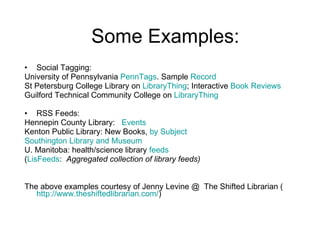
Some Examples: Social Tagging: University of Pennsylvania  PennTags . Sample  Record   St Petersburg College Library on  LibraryThing ; Interactive  Book Reviews Guilford Technical Community College on  LibraryThing RSS Feeds: Hennepin County Library:  Events Kenton Public Library: New Books,  by Subject Southington Library and Museum U. Manitoba: health/science library  feeds ( LisFeeds :  Aggregated collection of library feeds)   The above examples courtesy of Jenny Levine @  The Shifted Librarian ( http://www.theshiftedlibrarian.com/ )
Libraries must … Be noticed!  Be selective. Continue collaborating and benefit from the “wisdom of crowds” concept. Help clear “data smog” (i.e., information overload). Information Literacy! Focus on the user!!!
WARNING!  Ridiculous slide up next! 
Are we ready for what lies ahead and what may live outside the box? Print on demand? Users personalizing books (electronic/print). Surface technology? (Microsoft Surface, iPhone works with AaL!, bLink = book link has conductive ink on paper that connects to electronic devices via Bluetooth) ( http://radar.oreilly.com/archives/2007/06/blink_completin.html )  Skype, IM, Joost and more. (Meebo widget) Ambient findability = information available whenever the user wants it. Add quick search to your OPAC and/or WorldCat, create a custom search engine and share it (Swicki, Rollyo, Google Custom), create a library toolbar (Conduit), and … Pay attention to search engine innovations (Ask.com, iGoogle, SearchMass, Live Academic, PIPL,) Askville (Amazon.com), Yahoo Answers etc. Librarians could answer some questions while adding a advertisement to AaL or their library to the post.  Got Single Sign-on? (Shibboleth, OpenID, etc) Technology trends are fast and change frequently. Technolust is bad. Read outside ordinary library literature ( Wired ,  Business 2.0) There will be an Internet Operating System. Help build/conceptualize the Next Generation Library Catalog. Content Management Systems (e.g., Joomla, Drupal) Reference 2.0 = Ms. Dewey? Tagging games to help describe/organize the WWW? Library 2.0 = enhances traditional library values. How can we make sure that we are adding value?
What Now? Play! Learn! Share ideas and play nicely with others Read Blogs and blog your experiences  Think outside the box

Library 2.0: A Roadmap

  • 1.
  • 2.
    Suggested Agenda -Blogs - RSS - Wikis - Podcasting - Pictures/Video - Mobile technologies - Tagging/Social Bookmarks - Gaming/Second Life - Social Networking Chatting/IM/VR Collaborative Docs
  • 3.
    Chad Mairn St.Petersburg College mairn.chad@spcollege.edu (727) 341.7181 GoogleTalk: chadmairn Diana Sachs-Silveira Tampa Bay Library Consortium [email_address] (813) 622-8252 ext 234 Yahoo ID: diverdee987 Library 2.0: A Roadmap to Success Introducing your “tour guides” … Note: We value Library 2.0 principles and would like to practice what we preach, so let’s make these presentations as interactive, useful, and fun as possible! Library 2.0 is all about reaching out, listening, and responding to your user’s needs and one-way communication doesn’t advance our “conversation.”  Our referenced links are available at: http://del.icio.us/Diana_Chad Our PowerPoint Presentation is available at: http://www.slideshare.net/group/library-20  
  • 4.
    Session 1: Publishingpŭb‘ lĭsh – to bring to the public’s attention What is Library 2.0? Blogs RSS Wikis Collaborative Docs Podcasting Pictures/Video Mobile technologies
  • 5.
    What is Library2.0? Michael E. Casey coined the term. There isn’t a clear and all encompassing definition. Helping to extend library services and meet the needs of our users no matter where they want it. Library 2.0 Reading List on Squidoo
  • 6.
    1. Blogs are… web pages that are organized by dated entries and resemble an online diary for the world to read. an easy way to exchange and present information. about three things: “Frequency, Brevity and Personality“ [ Source: Evan Williams, the creator of Blogger]. extremely popular! 39 % of Internet users, i.e., nearly 57 million American adults, read blogs. [ Source : Lenhart & Fox].
  • 7.
    Blog designs appearfairly similar, but it is their content that truly determines their value.
  • 8.
    Create a libraryblog to … promote library events. connect to your community. support devoted library users. reach out to potential users. say something interesting. allow your patrons to say something interesting. enhance book discussions. provide book reviews/recommendations. create a literary guide. write a library newspaper. revisit and perhaps revise work. interact with your colleagues. be creative, critically think, and write about issues interesting to you. accomplish almost anything you want.
  • 9.
    Some things toconsider when planning … Construct a clear blog mission statement that supports your Library’s mission (Audience? Message? Purpose?). Select a suitable Blogging software platform. Develop posting policies and procedures. Explore acceptable use and copyright statements from other institutions (e.g., SPC’s statements ). Creative Commons License vs. copyright. Work collaboratively. Write responsibly!
  • 10.
    Popular Blogging platforms:Mostly Free: Blogger: http://www.blogger.com Bloxsom: http://www.blosxom.com/ B2: http://www.cafelog.com City Desk 2.0: http://www.fogcreek.com/CityDesk/ Live Journal: http://www.livejournal.com/ Moveable Type: http://www.moveabletype.org Nucleus CMS: http://nucleuscms.org/ PMachine: http://www.pmachine.com/ Word Press: http://wordpress.org/ Not Free: Manila: http://manila.userland.com Radio: http://radio.userland.com TypePad: http://www.typepad.com Expression Engine (Ellis Lab, formally pMachine): http://ellislab.com/ Blogger Forum: http://www.bloggerforum.com/
  • 11.
    Searching for Blogsand Feeds http://blogsearch.google.com/ http://www.technorati.com/ http://www.libdex.com/weblogs.html http://search.blogger.com/ http://www.sphere.com/ http://www.icerocket.com/ http://www.blogpulse.com -- Search for feeds – http://www.syndic8.com/ http://www.feedster.com/
  • 12.
    2. RSS is… an acronym for Really Simple Syndication, Rich Site Summary, RDF Site Summary, or Real-time Simple Syndication. an XML format that works for you in order to distribute updated content. For more information, watch RSS in Plain English at: http://www.commoncraft.com/rss_plain_english
  • 13.
    Many blogs aresyndicated An RSS feed is an XML-based file (i.e., machine-readable) that blog aggregators “understand.” Content can be &quot;syndicated&quot; (i.e., to join together) in order to be distributed on the web. Formats such as RSS and Atom are used to structure the XML file.
  • 14.
    Think ‘ subscription’ instead of ‘ syndication .’ Subscribing to a blog is similar to subscribing to a magazine. Basically, every time something new is published the content automatically comes to you!
  • 15.
    What are allthese buttons for? They create a URL or a link to a small file that a user copies/pastes into an aggregator (i.e., an RSS-aware software application).
  • 16.
    Don’t worry aboutall this code, just copy/paste the URL into your favorite aggregator. <?xml version=&quot;1.0&quot; encoding=&quot;ISO-8859-1&quot; ?> - <!-- generator=&quot;FeedCreator 1.7.2&quot; --> - <rss version=&quot;2.0&quot;> - <channel> <title>Squidoo : Lens : Library 2.0 in Three Easy Steps</title> <description>This lens is meant to augment a presentation I gave at the Broward County Library Reference Forum on May 9.&amp;nbsp; There were about forty library professionals in attendance and I want to thank you all for enduring 122 slides!&amp;nbsp; The lens is supposed to be a one-stop shop for bringing yourself up to speed on Library 2.0. ...</description> <link>http://www.squidoo.com/EasyL2</link> <lastBuildDate>Thu, 11 May 2006 12:18:18 +0100</lastBuildDate> <generator>FeedCreator 1.7.2</generator> - <item> <title>Library 2.0 in Three Easy Steps updated Tue May 9 2006 9:13 pm CDT</title> <link>http://www.squidoo.com/EasyL2</link> <description>This lens is meant to augment a presentation I gave at the Broward County Library Reference Forum on May 9.&amp;nbsp; There were about forty library professionals in attendance and I want to thank you all for enduring 122 slides!&amp;nbsp; The lens is supposed to be a one-stop shop for bringing yourself up to speed on Library 2.0.&amp;nbsp; Just click away on the links lists and have fun!&amp;nbsp; If you think it could be better, click on the &amp;quot;contact the lensmaster&amp;quot; link on the right and tell me how.</description> <pubDate>Wed, 10 May 2006 02:13:03 +0100</pubDate> </item> </channel> </rss>
  • 17.
    What is anaggregator? Web or client-based software (AKA feed readers, news readers etc.) that retrieve syndicated (i.e., subscription) Web content. Updated content comes to you! Bloglines (free, web-based, and mobile) www.bloglines.com Extensive list of aggregators (RSS 2.0): http://blogs.law.harvard.edu/tech/directory/5/aggregators
  • 18.
    RSS Resources Aggregators: AmphetaDesk: http://www.disobey.com/amphetadesk/ Bloglines: http://www.bloglines.com NetNewsWire: http://ranchero.com/netnewswire/ NewsMonster: http://www.newsmonster.org/ NewzCrawler: http://www.newzcrawler.com/ SharpReader: http://www.sharpreader.net/ Introduction to RSS: http://www.downes.ca/files/RSS%5fEduc.htm Fagan Finder: http://www.faganfinder.com/search/rss.shtml Lockergnome's RSS Resource: http://rss.lockergnome.com/ “ Hacking RSS and Atom” by Leslie Orchard is a great book that shows how to build a feed aggregator, produce and remix feeds, read feeds on iPods and other devices and much more.
  • 19.
    3. Wikis “A wiki is a collaborative website which can be directly edited by anyone with access to it.” Most Popular: Wikipedia Comparison with Britannica Create your own: pbwiki.com
  • 20.
    3. Create yourown Wiki pbwiki.com In libraries: Programming: http://bullrunlibrary.pbwiki.com/ (created by patron!) Knowledge base for Health Librarians Business Resources @ Ohio University St Pete College Campus Wiki University of Minnesota Staff Wiki Indiana Subject Guides Ask a Librarian TBLC
  • 21.
    Collaborative Docs GoogleDocs EditGrid Slideshare
  • 22.
  • 23.
    Podcast - a digital media file (e.g., MP3), or a series of such files, that is distributed over the Internet using syndication feeds (e.g., RSS) for playback on portable media players and personal computers. (Source: Wikipedia) You can download the media file[s] and listen to them on your computer. You can subscribe to a feed and have updated content come to you – like a multimedia magazine delivered to your home once a new issue is published. Some podcasts have a corresponding web page or a blog for show notes and other applicable information. In 2005, the New Oxford American Dictionary rated ‘podcast’ the Word of the Year!
  • 24.
    Why listen toand/or create a podcast? Why listen to or create anything? Learn something. Teach something. Make lectures/discussions more portable. Promote events, connect with your community, and reach out to people with similar interests. Provide reviews/recommendations for books, other podcasts etc. Record events and share with people who were unable to attend it. Accomplish almost anything you want.
  • 25.
    What do youneed? 1. Soundcard. 2. Speakers. 3. Microphone. 4. Audio recording/editing software. 5. Internet connection. 6. Place to store media files (hosting service vs. institution’s server?). 7. Web page and/or a blog with an RSS feed. 8. Something to say.
  • 26.
    Step-by-Step Guide toPodcasting 1. Decide what you want to say. 2. Write an outline and practice it. 3. Record in an audio editor/recorder. 4. Export to MP3 or other compatible format. 5. Upload file[s] to a server. 6. Create a post or a web page linking to the media file[s]. 7. Create and send RSS feed address to podcast directories. Use one-click subscriptions:
  • 27.
    Forstep-by-step instructions on creating a podcast, visit http://www.slideshare.net/chadmairn/podcasting-in-15-minutes/ . The “Just-in-case” podcast example is available at: http://chadmairn.vox.com/ and http://www.archive.org/details/PodcastDemo For more resources click on the podcast bundle at: http://del.icio.us/cmairn Podcasts can be listened to on mobile phones (e.g., Pod2Mob, Podlinez, Fonpods etc.) Screencasting – great for creating tutorials. (Free software - http://www.camstudio.org /)
  • 28.
    5. Pictures/Video CreativeCommons Flickr YouTube Joost
  • 29.
    6. Mobile technologiesFlickr YouTube Twitter http://twitter.com/askundergrad/with_friends Txt Alerts Google Mobile Google Maps Ask a Librarian  iPhone “ Experts predict MORE people will be accessing the web via their cell phones than PC’s by 2008.”
  • 30.
    Session 2: Participationpär-tĭs'ə-pā ' shən  - taking part or sharing. Tagging/Social Bookmarks Gaming/Second Life Social Networking Chatting/IM/VR
  • 31.
    Virtual Worlds SecondLife (SL) began in 2003 and has had significant growth over the years (ca. 5 million residents) Museums, libraries, schools, businesses, homes, etc. are “in” SL. Avatar = digital identity that represents you in the virtual world. ActiveWorlds, Meebo Rooms etc.
  • 32.
    What is goingon in there? Alliance Library System in SecondLife Virtual Bibliographic Instruction (VBI) and Interactive Reference at Eastern University
  • 33.
    Why? Remember thereare 5 million users just in Second Life, so we can be there to help them find and evaluate online resources. Nearly 5,000 avatars visit the Information Achipelago (SL) each day! (onlinemag.net) Libraries need to be visable ( Ambient Findability: What We Find Changes Who We Become by Peter Morville) Why do you need a building when there is no weather?
  • 34.
    Virtual Worlds SecondLife 8.5 million users with 1.6 logging in during the last 60 days. Other worlds for teens And Kids! More and more virtual worlds
  • 35.
    Gaming Want tobecome a leader? Try MORPG The average gamer is….
  • 36.
  • 37.
  • 38.
    Chat/IM/VR Yahoo , MSN , Google Meebo , Trillian Ask a Librarian Skype 60% of teens and young adults on the Internet use chat “often” Allows for file sharing, conferencing and VoIP Nearly 6 in 10 use IM to communicate at work
  • 39.
    More to consider… “ Library 2.0 is not about technology.” “ Library 2.0 is all about technology.” “ Library 2.0 is a path towards improvement of services.” “ Library 2.0 means abandoning services that serve small or unimportant groups.” “ Library 2.0 is a paradigm shift that changes almost everything in a library.” “ Library 2.0 is hype that can interfere with the sound ideals involved.” (Source: ‘Cites & Insights.’ Crawford at Large. Vol 6, No 2 Midwinter 2006 p.4 Thanks again Robert Berkman!) Cluetrain Manifesto’s 95 Theses (1999) - http://www.cluetrain.com/book/95-theses.html L20 Manifesto - http://eltuo.pbwiki.com/
  • 40.
    Compare these missionstatements: OCLC To further access to the world’s information and reduce library costs by offering services for libraries and their users. Google O rganize the world's information and make it universally accessible and useful . Source: “Technology Curves and Libraries (or) The “Hurrieder” We Go, The “Behinder” We Get” by Richard Madaus.
  • 41.
    Some Examples: Blogs. Darien, CT Library Guilford Free Library Blog Georgia State University Library Subject Specific Blogs Wikis. University of Connecticut Staff Wiki Podcasts. Cheshire Public Library Podcast :
  • 42.
    Some Examples: SocialTagging: University of Pennsylvania PennTags . Sample Record St Petersburg College Library on LibraryThing ; Interactive Book Reviews Guilford Technical Community College on LibraryThing RSS Feeds: Hennepin County Library: Events Kenton Public Library: New Books, by Subject Southington Library and Museum U. Manitoba: health/science library feeds ( LisFeeds : Aggregated collection of library feeds) The above examples courtesy of Jenny Levine @ The Shifted Librarian ( http://www.theshiftedlibrarian.com/ )
  • 43.
    Libraries must …Be noticed! Be selective. Continue collaborating and benefit from the “wisdom of crowds” concept. Help clear “data smog” (i.e., information overload). Information Literacy! Focus on the user!!!
  • 44.
    WARNING! Ridiculousslide up next! 
  • 45.
    Are we readyfor what lies ahead and what may live outside the box? Print on demand? Users personalizing books (electronic/print). Surface technology? (Microsoft Surface, iPhone works with AaL!, bLink = book link has conductive ink on paper that connects to electronic devices via Bluetooth) ( http://radar.oreilly.com/archives/2007/06/blink_completin.html ) Skype, IM, Joost and more. (Meebo widget) Ambient findability = information available whenever the user wants it. Add quick search to your OPAC and/or WorldCat, create a custom search engine and share it (Swicki, Rollyo, Google Custom), create a library toolbar (Conduit), and … Pay attention to search engine innovations (Ask.com, iGoogle, SearchMass, Live Academic, PIPL,) Askville (Amazon.com), Yahoo Answers etc. Librarians could answer some questions while adding a advertisement to AaL or their library to the post. Got Single Sign-on? (Shibboleth, OpenID, etc) Technology trends are fast and change frequently. Technolust is bad. Read outside ordinary library literature ( Wired , Business 2.0) There will be an Internet Operating System. Help build/conceptualize the Next Generation Library Catalog. Content Management Systems (e.g., Joomla, Drupal) Reference 2.0 = Ms. Dewey? Tagging games to help describe/organize the WWW? Library 2.0 = enhances traditional library values. How can we make sure that we are adding value?
  • 46.
    What Now? Play!Learn! Share ideas and play nicely with others Read Blogs and blog your experiences Think outside the box