File system internals
    Tanenbaum, Chapter 4


   COMP3231
Operating Systems
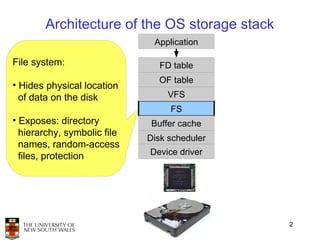
Architecture of the OS storage stack
                              Application

File system:                   FD table
                               OF table
• Hides physical location
  of data on the disk            VFS
                                  FS
• Exposes: directory          Buffer cache
  hierarchy, symbolic file
                             Disk scheduler
  names, random-access
  files, protection          Device driver


                                              2
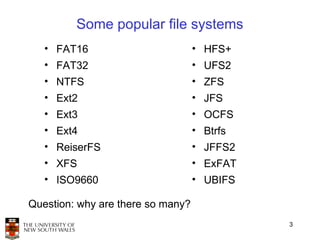
Some popular file systems
   • FAT16                         • HFS+
   • FAT32                         • UFS2
   • NTFS                          • ZFS
   • Ext2                          • JFS
   • Ext3                          • OCFS
   • Ext4                          • Btrfs
   • ReiserFS                      • JFFS2
   • XFS                           • ExFAT
   • ISO9660                       • UBIFS

Question: why are there so many?
                                             3
Why are there so many?
• Different physical nature of storage devices
   – Ext3 is optimised for magnetic disks
   – JFFS2 is optimised for flash memory devices
   – ISO9660 is optimised for CDROM
• Different storage capacities
   – FAT16 does not support drives >2GB
   – FAT32 becomes inefficient on drives >32GB
   – Btrfs is designed to scale to multi-TB disk arrays
• Different CPU and memory requirements
   – FAT16 is not suitable for modern PCs but is a good fit for
     many embedded devices
• Proprietary standards
   – NTFS may be a nice FS, but its specification is closed
                                                                  4
Assumptions

• In this lecture we focus on file systems for magnetic
  disks
   – Rotational delay
      • 8ms worst case for 7200rpm drive
   – Seek time
      • ~15ms worst case
   – For comparison, disk-to-buffer transfer speed of a modern
     drive is ~10Âľs per 4K block.
• Conclusion: keep blocks that are likely to be accessed
  together close to each other


                                                            5
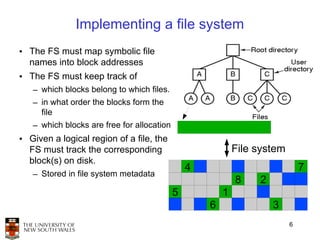
Implementing a file system
• The FS must map symbolic file
  names into block addresses
• The FS must keep track of
   – which blocks belong to which files.
   – in what order the blocks form the
     file
   – which blocks are free for allocation
• Given a logical region of a file, the
  FS must track the corresponding                           File system
  block(s) on disk.
                                                4                             7
   – Stored in file system metadata
                                                            8    2
                                            5           1
                                                    6                3
                                                                          6
Allocation strategies

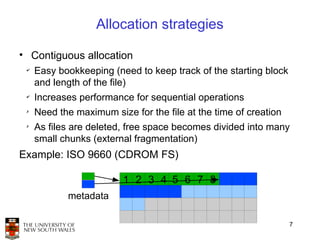
• Contiguous allocation
 ✔
     Easy bookkeeping (need to keep track of the starting block
     and length of the file)
 ✔
     Increases performance for sequential operations
 ✗
     Need the maximum size for the file at the time of creation
 ✗
     As files are deleted, free space becomes divided into many
     small chunks (external fragmentation)
Example: ISO 9660 (CDROM FS)

                         1 2 3 4 5 6 7 8
            metadata

                                                                  7
Allocation strategies
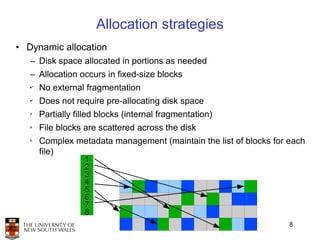
• Dynamic allocation
   – Disk space allocated in portions as needed
   – Allocation occurs in fixed-size blocks
   ✔
       No external fragmentation
   ✔
       Does not require pre-allocating disk space
   ✗
       Partially filled blocks (internal fragmentation)
   ✗
       File blocks are scattered across the disk
   ✗
       Complex metadata management (maintain the list of blocks for each
       file)
                   1
                   2
                   3
                   4
                   5
                   6
                   7
                   8
                                                                    8
External and internal fragmentation

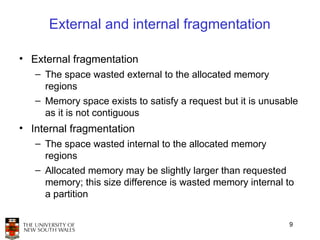
• External fragmentation
   – The space wasted external to the allocated memory
     regions
   – Memory space exists to satisfy a request but it is unusable
     as it is not contiguous
• Internal fragmentation
   – The space wasted internal to the allocated memory
     regions
   – Allocated memory may be slightly larger than requested
     memory; this size difference is wasted memory internal to
     a partition


                                                              9
Linked list allocation

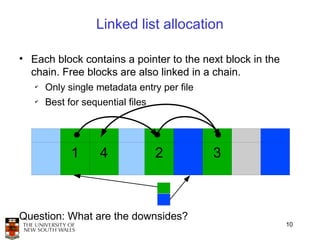
• Each block contains a pointer to the next block in the
  chain. Free blocks are also linked in a chain.
   ✔
       Only single metadata entry per file
   ✔
       Best for sequential files


             1      4              2         3


Question: What are the downsides?
                                                           10
Linked list allocation

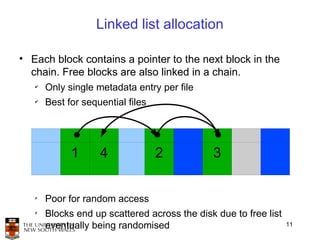
• Each block contains a pointer to the next block in the
  chain. Free blocks are also linked in a chain.
   ✔
       Only single metadata entry per file
   ✔
       Best for sequential files


             1      4              2          3

   ✗
       Poor for random access
   ✗
       Blocks end up scattered across the disk due to free list
       eventually being randomised                                11
File allocation table
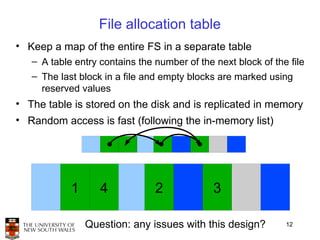
• Keep a map of the entire FS in a separate table
   – A table entry contains the number of the next block of the file
   – The last block in a file and empty blocks are marked using
     reserved values
• The table is stored on the disk and is replicated in memory
• Random access is fast (following the in-memory list)


            1      4            2             3

                Question: any issues with this design?         12
File allocation table
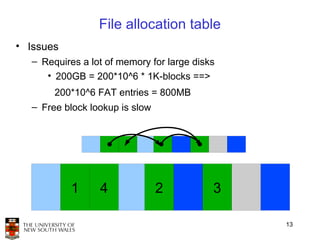
• Issues
  – Requires a lot of memory for large disks
     • 200GB = 200*10^6 * 1K-blocks ==>
       200*10^6 FAT entries = 800MB
  – Free block lookup is slow


           1     4              2          3

                                               13
File allocation table

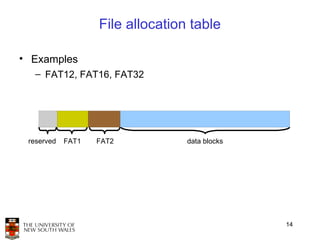
• Examples
  – FAT12, FAT16, FAT32


 reserved   FAT1   FAT2           data blocks


                                                14
inode-based FS structure

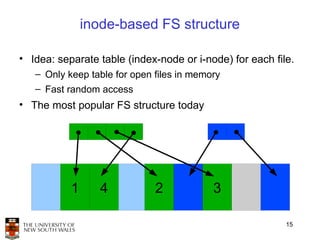
• Idea: separate table (index-node or i-node) for each file.
   – Only keep table for open files in memory
   – Fast random access
• The most popular FS structure today


           1      4           2            3

                                                          15
i-node implementation issues

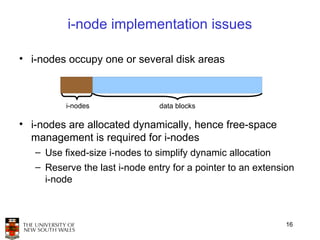
• i-nodes occupy one or several disk areas


          i-nodes               data blocks

• i-nodes are allocated dynamically, hence free-space
  management is required for i-nodes
   – Use fixed-size i-nodes to simplify dynamic allocation
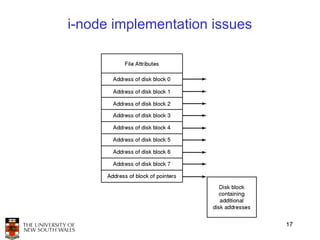
   – Reserve the last i-node entry for a pointer to an extension
     i-node


                                                              16
i-node implementation issues


                               17
i-node implementation issues
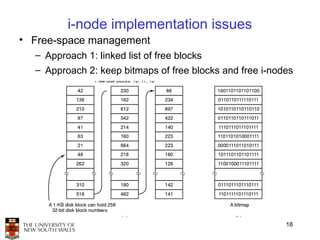
• Free-space management
  – Approach 1: linked list of free blocks
  – Approach 2: keep bitmaps of free blocks and free i-nodes


                                                          18
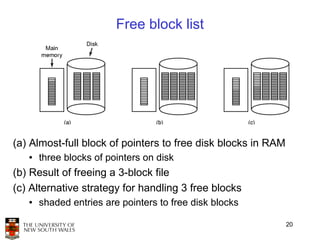
Free block list
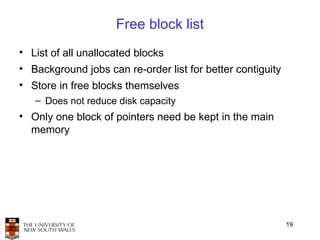
• List of all unallocated blocks
• Background jobs can re-order list for better contiguity
• Store in free blocks themselves
   – Does not reduce disk capacity
• Only one block of pointers need be kept in the main
  memory


                                                            19
Free block list


(a) Almost-full block of pointers to free disk blocks in RAM
   ●   three blocks of pointers on disk
(b) Result of freeing a 3-block file
(c) Alternative strategy for handling 3 free blocks
   ●   shaded entries are pointers to free disk blocks

                                                               20
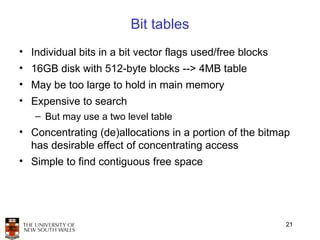
Bit tables
• Individual bits in a bit vector flags used/free blocks
• 16GB disk with 512-byte blocks --> 4MB table
• May be too large to hold in main memory
• Expensive to search
   – But may use a two level table
• Concentrating (de)allocations in a portion of the bitmap
  has desirable effect of concentrating access
• Simple to find contiguous free space


                                                           21
Implementing directories

• Directories are stored like normal files
   – directory entries are contained inside data blocks
• The FS assigns special meaning to the content of these
  files
   – a directory file is a list of directory entries
   – a directory entry contains file name, attributes, and the file
     i-node number
       • maps human-oriented file name to a system-oriented
         name


                                                               22
Fixed-size vs variable-size directory entries

• Fixed-size directory entries
   – Either too small
      • Example: DOS 8+3 characters
   – Or waste too much space
      • Example: 255 characters per file name
• Variable-size directory entries
   – Freeing variable length entries can create external
     fragmentation in directory blocks
       • Can compact when block is in RAM


                                                           23
Directory listing

• Locating a file in a directory
   – Linear scan
      • Use a directory cache to speed-up search
   – Hash lookup
   – B-tree (100's of thousands entries)


                                                   24
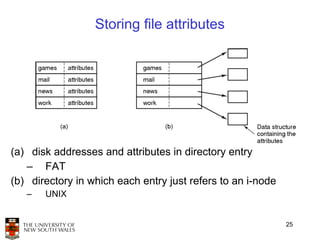
Storing file attributes


(a) disk addresses and attributes in directory entry
   – FAT
(b) directory in which each entry just refers to an i-node
   –   UNIX


                                                             25
Trade-off in FS block size
• File systems deal with 2 types of blocks
   – Disk blocks or sectors (usually 512 bytes)
   – File system blocks 512 * 2^N bytes
   – What is the optimal N?
• Larger blocks require less FS metadata
• Smaller blocks waste less disk space
• Sequential Access
   – The larger the block size, the fewer I/O operations required
• Random Access
   – The larger the block size, the more unrelated data loaded.
   – Spatial locality of access improves the situation
• Choosing an appropriate block size is a compromise
                                                                    26

Lect09

  • 1.
    File system internals Tanenbaum, Chapter 4 COMP3231 Operating Systems
  • 2.
    Architecture of theOS storage stack Application File system: FD table OF table • Hides physical location of data on the disk VFS FS • Exposes: directory Buffer cache hierarchy, symbolic file Disk scheduler names, random-access files, protection Device driver 2
  • 3.
    Some popular filesystems • FAT16 • HFS+ • FAT32 • UFS2 • NTFS • ZFS • Ext2 • JFS • Ext3 • OCFS • Ext4 • Btrfs • ReiserFS • JFFS2 • XFS • ExFAT • ISO9660 • UBIFS Question: why are there so many? 3
  • 4.
    Why are thereso many? • Different physical nature of storage devices – Ext3 is optimised for magnetic disks – JFFS2 is optimised for flash memory devices – ISO9660 is optimised for CDROM • Different storage capacities – FAT16 does not support drives >2GB – FAT32 becomes inefficient on drives >32GB – Btrfs is designed to scale to multi-TB disk arrays • Different CPU and memory requirements – FAT16 is not suitable for modern PCs but is a good fit for many embedded devices • Proprietary standards – NTFS may be a nice FS, but its specification is closed 4
  • 5.
    Assumptions • In thislecture we focus on file systems for magnetic disks – Rotational delay • 8ms worst case for 7200rpm drive – Seek time • ~15ms worst case – For comparison, disk-to-buffer transfer speed of a modern drive is ~10µs per 4K block. • Conclusion: keep blocks that are likely to be accessed together close to each other 5
  • 6.
    Implementing a filesystem • The FS must map symbolic file names into block addresses • The FS must keep track of – which blocks belong to which files. – in what order the blocks form the file – which blocks are free for allocation • Given a logical region of a file, the FS must track the corresponding File system block(s) on disk. 4 7 – Stored in file system metadata 8 2 5 1 6 3 6
  • 7.
    Allocation strategies • Contiguousallocation ✔ Easy bookkeeping (need to keep track of the starting block and length of the file) ✔ Increases performance for sequential operations ✗ Need the maximum size for the file at the time of creation ✗ As files are deleted, free space becomes divided into many small chunks (external fragmentation) Example: ISO 9660 (CDROM FS) 1 2 3 4 5 6 7 8 metadata 7
  • 8.
    Allocation strategies • Dynamicallocation – Disk space allocated in portions as needed – Allocation occurs in fixed-size blocks ✔ No external fragmentation ✔ Does not require pre-allocating disk space ✗ Partially filled blocks (internal fragmentation) ✗ File blocks are scattered across the disk ✗ Complex metadata management (maintain the list of blocks for each file) 1 2 3 4 5 6 7 8 8
  • 9.
    External and internalfragmentation • External fragmentation – The space wasted external to the allocated memory regions – Memory space exists to satisfy a request but it is unusable as it is not contiguous • Internal fragmentation – The space wasted internal to the allocated memory regions – Allocated memory may be slightly larger than requested memory; this size difference is wasted memory internal to a partition 9
  • 10.
    Linked list allocation •Each block contains a pointer to the next block in the chain. Free blocks are also linked in a chain. ✔ Only single metadata entry per file ✔ Best for sequential files 1 4 2 3 Question: What are the downsides? 10
  • 11.
    Linked list allocation •Each block contains a pointer to the next block in the chain. Free blocks are also linked in a chain. ✔ Only single metadata entry per file ✔ Best for sequential files 1 4 2 3 ✗ Poor for random access ✗ Blocks end up scattered across the disk due to free list eventually being randomised 11
  • 12.
    File allocation table •Keep a map of the entire FS in a separate table – A table entry contains the number of the next block of the file – The last block in a file and empty blocks are marked using reserved values • The table is stored on the disk and is replicated in memory • Random access is fast (following the in-memory list) 1 4 2 3 Question: any issues with this design? 12
  • 13.
    File allocation table •Issues – Requires a lot of memory for large disks • 200GB = 200*10^6 * 1K-blocks ==> 200*10^6 FAT entries = 800MB – Free block lookup is slow 1 4 2 3 13
  • 14.
    File allocation table •Examples – FAT12, FAT16, FAT32 reserved FAT1 FAT2 data blocks 14
  • 15.
    inode-based FS structure •Idea: separate table (index-node or i-node) for each file. – Only keep table for open files in memory – Fast random access • The most popular FS structure today 1 4 2 3 15
  • 16.
    i-node implementation issues •i-nodes occupy one or several disk areas i-nodes data blocks • i-nodes are allocated dynamically, hence free-space management is required for i-nodes – Use fixed-size i-nodes to simplify dynamic allocation – Reserve the last i-node entry for a pointer to an extension i-node 16
  • 17.
  • 18.
    i-node implementation issues •Free-space management – Approach 1: linked list of free blocks – Approach 2: keep bitmaps of free blocks and free i-nodes 18
  • 19.
    Free block list •List of all unallocated blocks • Background jobs can re-order list for better contiguity • Store in free blocks themselves – Does not reduce disk capacity • Only one block of pointers need be kept in the main memory 19
  • 20.
    Free block list (a)Almost-full block of pointers to free disk blocks in RAM ● three blocks of pointers on disk (b) Result of freeing a 3-block file (c) Alternative strategy for handling 3 free blocks ● shaded entries are pointers to free disk blocks 20
  • 21.
    Bit tables • Individualbits in a bit vector flags used/free blocks • 16GB disk with 512-byte blocks --> 4MB table • May be too large to hold in main memory • Expensive to search – But may use a two level table • Concentrating (de)allocations in a portion of the bitmap has desirable effect of concentrating access • Simple to find contiguous free space 21
  • 22.
    Implementing directories • Directoriesare stored like normal files – directory entries are contained inside data blocks • The FS assigns special meaning to the content of these files – a directory file is a list of directory entries – a directory entry contains file name, attributes, and the file i-node number • maps human-oriented file name to a system-oriented name 22
  • 23.
    Fixed-size vs variable-sizedirectory entries • Fixed-size directory entries – Either too small • Example: DOS 8+3 characters – Or waste too much space • Example: 255 characters per file name • Variable-size directory entries – Freeing variable length entries can create external fragmentation in directory blocks • Can compact when block is in RAM 23
  • 24.
    Directory listing • Locatinga file in a directory – Linear scan • Use a directory cache to speed-up search – Hash lookup – B-tree (100's of thousands entries) 24
  • 25.
    Storing file attributes (a)disk addresses and attributes in directory entry – FAT (b) directory in which each entry just refers to an i-node – UNIX 25
  • 26.
    Trade-off in FSblock size • File systems deal with 2 types of blocks – Disk blocks or sectors (usually 512 bytes) – File system blocks 512 * 2^N bytes – What is the optimal N? • Larger blocks require less FS metadata • Smaller blocks waste less disk space • Sequential Access – The larger the block size, the fewer I/O operations required • Random Access – The larger the block size, the more unrelated data loaded. – Spatial locality of access improves the situation • Choosing an appropriate block size is a compromise 26