Networking Brief Overview  Kristof De Brouwer
Agenda OSI – Model WAN Convergence Wireless Q & A
OSI Model Overview
OSI model – definition  Open System Interconnection Conceptual/Reference model 7 layers Simplify complex process Describes communication between nodes Nodes = computers, routers, switches,… Simplifies Internetwork concept
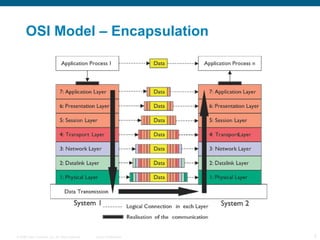
OSI Model – Encapsulation
OSI Model – Physical Layer Defines functions  Electrical Mechanical Procedural and functional Maintains physical link between nodes Examples: 10baseT, 100baseT,RJ45 X.21,v.35
OSI Model – Data link Layer Provides reliable transit of data across physical link 2 sub-layers MAC (media access control): physical addressing    MAC address Example:  00-15-58-27-81-9E LLC (logical link control) : flow control Examples: HDLC, PPP, Ethernet
OSI Model – Network Layer Provides end-to-end delivery of packets Defines logical addressing Defines how routing works Mapping between physical address (MAC address) and logical address (Network address) : ARP Examples: IP ; 144.254.0.1/24
OSI Model – Transport Layer Re-ordering and re-assembling Examples TCP: provides error-correction UDP: no error-correction RTP: Re-ordering
WAN Overview
WAN – Overview  LAN = Local Area Network LANs need to be connected to each other WAN can overcome large distances between LANs MAN can overcome smaller (metropolitan) distances between LANs Types of WAN: Frame Relay, ATM, Leased Line, ISDN
WAN – Leased Line A leased line  is a high-performance and permanently available Internet connection carrying voice, data and Internet traffic. A leased line is rented from telecommunications providers  Unlike dial-up connections, a leased line is always active Leased lines deliver dedicated, guaranteed bandwidth and are supported by Service-Level Agreements (SLA) Different types of leased lines are  E1, T1, E3, T3 or Frame Relay. Leased Lines are normally used by businesses:  Who require high quality 24/7 access Who are running mission critical applications, cannot afford downtime and require SLAs With multiple offices that require connectivity Leased line is delivered on copper or fiber optic transmission network
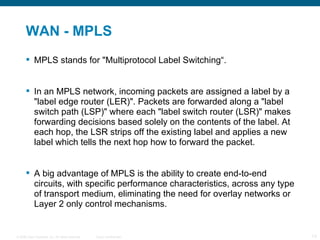
WAN - MPLS MPLS stands for "Multiprotocol Label Switching“. In an MPLS network, incoming packets are assigned a label by a "label edge router (LER)". Packets are forwarded along a "label switch path (LSP)" where each "label switch router (LSR)" makes forwarding decisions based solely on the contents of the label. At each hop, the LSR strips off the existing label and applies a new label which tells the next hop how to forward the packet. A big advantage  of MPLS is the ability to create end-to-end circuits, with specific performance characteristics, across any type of transport medium, eliminating the need for overlay networks or Layer 2 only control mechanisms.
Convergence Overview
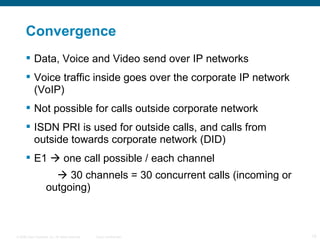
Convergence  Data, Voice and Video send over IP networks Voice traffic inside goes over the corporate IP network (VoIP) Not possible for calls outside corporate network ISDN PRI is used for outside calls, and calls from outside towards corporate network (DID) E1    one call possible / each channel      30 channels = 30 concurrent calls (incoming or outgoing)
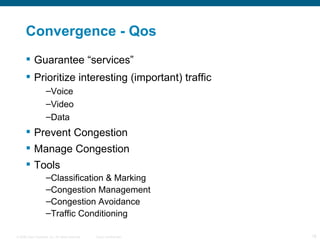
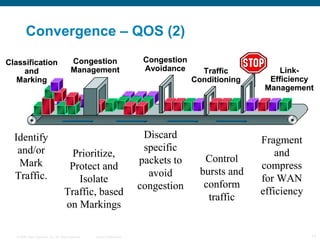
Convergence - Qos Guarantee “services” Prioritize interesting (important) traffic Voice Video Data Prevent Congestion Manage Congestion Tools Classification & Marking Congestion Management Congestion Avoidance Traffic Conditioning
Convergence – QOS (2)
Convergence - VOIP More efficient use of bandwidth and equipment Lower costs for telephony Consolidated voice and data Increased revenues from new services Greater innovation in services Access to new communication devices Return on investment difficult to prove Potential upgrade costs may override potential savings cost
Convergence – IPPhone  Obtain power from switch Switch detects an unpowered phone and sends power down the Ethernet cable Load stored image Firmware stored in non-volatile flash Initialising software and hardware Vlan Switch sends a CDP packet with vlan information Contact TFTP server Configuration files for the phone Contains up to 3 CallManagers Register with CallManager TCP connection is made to register with the CallManager Starting with highest CCM in the list Phone gets load ID from CallManager (Upgrade if needed)
Convergence – Callmanager  Primary Functions Call processing:  Route the call from source to destination Signalling and Device Control Set up all signalling connections between call endpoints Direct devices (ip phones, gateways, …) to setup and tear down streaming connections Dial Plan administration Configure the list CCM uses to determine call routing Phone Features Hold, transfer, forward, conference, … Speed dials, last-number redial, … Directory Services LDAP database Authenticate and authorize users
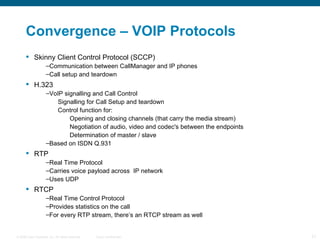
Convergence – VOIP Protocols Skinny Client Control Protocol (SCCP) Communication between CallManager and IP phones Call setup and teardown H.323 VoIP signalling and Call Control Signalling for Call Setup and teardown Control function for: Opening and closing channels (that carry the media stream) Negotiation of audio, video and codec's between the endpoints Determination of master / slave Based on ISDN Q.931 RTP Real Time Protocol Carries voice payload across  IP network Uses UDP RTCP Real Time Control Protocol Provides statistics on the call For every RTP stream, there’s an RTCP stream as well
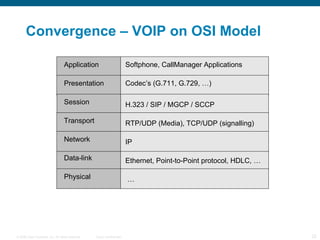
Convergence – VOIP on OSI Model Application Presentation Session Transport Network Data-link Physical Softphone, CallManager Applications Codec’s (G.711, G.729, …) RTP/UDP (Media), TCP/UDP (signalling) IP Ethernet, Point-to-Point protocol, HDLC, … H.323 / SIP / MGCP / SCCP …
Wireless Overview
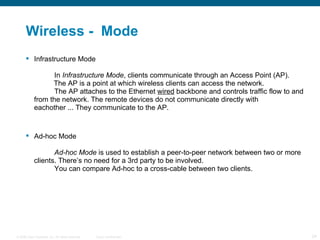
Wireless -  Mode Infrastructure Mode In  Infrastructure Mode , clients communicate through an Access Point (AP).    The AP is a point at which wireless clients can access the network. The AP attaches to the Ethernet  wired  backbone and controls traffic flow to and  from the network. The remote devices do not communicate directly with  eachother ... They communicate to the AP. Ad-hoc Mode Ad-hoc Mode  is used to establish a peer-to-peer network between two or more  clients. There’s no need for a 3rd party to be involved. You can compare Ad-hoc to a cross-cable between two clients.
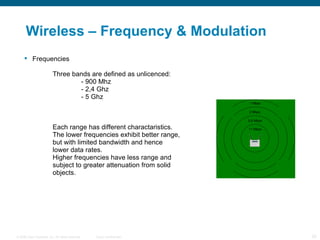
Wireless – Frequency & Modulation Frequencies Three bands are defined as unlicenced: - 900 Mhz - 2,4 Ghz - 5 Ghz Each range has different charactaristics.  The lower frequencies exhibit better range,  but with limited bandwidth and hence   lower data rates. Higher frequencies have less range and  subject to greater attenuation from solid objects.
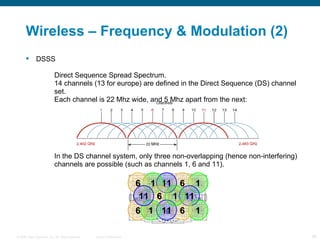
Wireless – Frequency & Modulation (2) DSSS Direct Sequence Spread Spectrum. 14 channels (13 for europe) are defined in the Direct Sequence (DS) channel  set. Each channel is 22 Mhz wide, and 5 Mhz apart from the next: In the DS channel system, only three non-overlapping (hence non-interfering)  channels are possible (such as channels 1, 6 and 11). 1 6 11 1 6 11 1 6 6 11 1 6 6 11 1 11 1
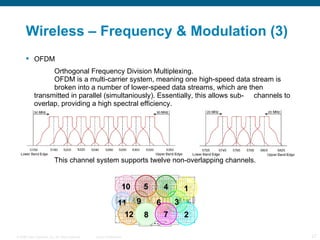
Wireless – Frequency & Modulation (3) OFDM Orthogonal Frequency Division Multiplexing. OFDM is a multi-carrier system, meaning one high-speed data stream is  broken into a number of lower-speed data streams, which are then  transmitted in parallel (simultaniously). Essentially, this allows sub- channels to overlap, providing a high spectral efficiency. This channel system supports twelve non-overlapping channels. 4 3 2 1 9 10 11 12 5 6 8 7
Wireless – Authentication  There’s two steps involved in connecting to a wireless AP. First the client station must be authenticated. If the authentication passes, the station can then be associated. Only when both these steps have completed, traffic can pass. Shared Key Authentication Shared Key authentication is considered  insecure:   only available in combination with  WEP  (Wired Equivalent Privacy)   WEP uses a key known by both transmitter and receiver to    encrypt and decrypt data signals.   AP sends random ASCII string to client. Client encrypts using WEP    and sends encrypted data back to AP. AP verifies encrypted string.   Both unencrypted & encrypted string can be intercepted, which makes    it possible to reverse engineer the used WEP key!!
Wireless – Authentication (2) Open Authentication Open authentication is considered  insecure:   no user verification    any   device can authenticate   authentication traffic is sent in   clear text Which is best, Open or Shared Key? Although still not concidered secure, Open Authentication in  combination  with WEP ends up being the better choice.The station will get authenticated and associated automatically, but it will still need the correct WEP key to encrypt/decrypt data. Since Open Authentication doesn’t send out data which makes reverse engineering of the key possible, unencrypted packets will just be discarded.
Wireless – Authentication (3)  SSID Based Authentication Service Set Identifier  (SSID) is a code attached to all packets on a wireless  network to identify each packet as part of that network. All wireless devices attempting to communicate with each other must share  the same SSID SSID’s can be broadcasted, for everyone to see, or can be ‘hidden’, so only  client stations that know the exact SSID string are able to authenticate. Hiding the SSID is concidered an extremely weak form of wireless security.  Although the average user may not be able to see a network, the SSID can  still be seen using the appropriate tools.
Wireless – Authentication (3) MAC Address Authentication Permits AP’s to filter based on client MAC addresses, allowing only those  clients that are in the “allow list” to be authenticated. A possible security risk using this type of authentication is “spoofing” or  altering the client’s MAC address to still gain access to the network.
Wireless – Network Authentication Network Authentication All protocols used for network authentication (except WPA and Radius) are   based on the Extensible Authentication Protocol (EAP). EAP is an authentication  framework  which provides common functions and  mechanisms used in (amongst others) the following authentication  methods: -LEAP Lightweight EAP  (Developed by Cisco) Supports the use of dynamic WEP keys and mutual authentication  (between client and Radius server). LEAP allows for clients to re- authenticate frequently, providing a new WEP key with each  successful authentication. -PEAP Protected EAP Uses server-side public key certificates to authenticate clients by  creating an encrypted tunnel between the client and the authentication  server.
Wireless – Security  - WEP Wired Equivalent Privacy Uses a security scheme that utilizes a combination of secret user keys and  system-generated values.. These keys are used to encrypt and decrypt data. Both the client station and the  AP need the same key to be able to communicate. The key can be either 40, 128 or 256 bits in length, but is fairly easy to “hack”. - TKIP Temporary Key Integrity Protocol TKIP is used by WPA, and was developed to replace WEP. It makes use of a mechanism called “key mixing”, ensuring every data packet is  sent with its own unique encryption key.  This makes decoding the keys  somewhat more complex.
Wireless – Network Authentication - EAP-FAST Flexible Authentication via Secure Tunneling (Developed by Cisco) Developed to replace LEAP. Like PEAP, EAP-FAST makes use of a secure tunnel. However, this  tunnel is established using a pre-shared key. - WPA Wi-Fi Protected Access Uses TKIP, which was developed to replace WEP and its weaknesses.  Features two different modes of operation: Enterprise Mode: Makes use of the Radius architecture,  authenticating to a dedicated Radius  authentication server. Pre-Shared Key (PSK) mode: Makes use of a static key or “passphrase” known  by both the client and the AP.
Wireless - Roaming Roaming occurs when a wireless client, currently associated to a certain AP moves out of that AP’s coverage area. In such case the client needs to associate to another AP that does have coverage for that area. The process of client association shifting between different AP’s is called roaming.
Wireless – Next Generation Current Situation: AP’s are “intelligent”. They process 802.11 frames They have limited QoS (Quality of Service) functionalities They have certain security features ....   requires processing power and memory   requires “complex” configuration of the AP’s New (NextGen) Situation: “Centralized WLAN”, which is based on a controller architecture. The central controller will take over the intelligent functions. Lightweight Access Point Protocol  (LWAPP) is used to handle  authentication and encryption between the AP’s and the controller.   processing & memory intensive tasks shift to controller   requires much less configuration on the AP’s   significantly eases management

Networking Brief Overview

  • 1.
    Networking Brief Overview Kristof De Brouwer
  • 2.
    Agenda OSI –Model WAN Convergence Wireless Q & A
  • 3.
  • 4.
    OSI model –definition Open System Interconnection Conceptual/Reference model 7 layers Simplify complex process Describes communication between nodes Nodes = computers, routers, switches,… Simplifies Internetwork concept
  • 5.
    OSI Model –Encapsulation
  • 6.
    OSI Model –Physical Layer Defines functions Electrical Mechanical Procedural and functional Maintains physical link between nodes Examples: 10baseT, 100baseT,RJ45 X.21,v.35
  • 7.
    OSI Model –Data link Layer Provides reliable transit of data across physical link 2 sub-layers MAC (media access control): physical addressing  MAC address Example: 00-15-58-27-81-9E LLC (logical link control) : flow control Examples: HDLC, PPP, Ethernet
  • 8.
    OSI Model –Network Layer Provides end-to-end delivery of packets Defines logical addressing Defines how routing works Mapping between physical address (MAC address) and logical address (Network address) : ARP Examples: IP ; 144.254.0.1/24
  • 9.
    OSI Model –Transport Layer Re-ordering and re-assembling Examples TCP: provides error-correction UDP: no error-correction RTP: Re-ordering
  • 10.
  • 11.
    WAN – Overview LAN = Local Area Network LANs need to be connected to each other WAN can overcome large distances between LANs MAN can overcome smaller (metropolitan) distances between LANs Types of WAN: Frame Relay, ATM, Leased Line, ISDN
  • 12.
    WAN – LeasedLine A leased line is a high-performance and permanently available Internet connection carrying voice, data and Internet traffic. A leased line is rented from telecommunications providers Unlike dial-up connections, a leased line is always active Leased lines deliver dedicated, guaranteed bandwidth and are supported by Service-Level Agreements (SLA) Different types of leased lines are E1, T1, E3, T3 or Frame Relay. Leased Lines are normally used by businesses: Who require high quality 24/7 access Who are running mission critical applications, cannot afford downtime and require SLAs With multiple offices that require connectivity Leased line is delivered on copper or fiber optic transmission network
  • 13.
    WAN - MPLSMPLS stands for "Multiprotocol Label Switching“. In an MPLS network, incoming packets are assigned a label by a "label edge router (LER)". Packets are forwarded along a "label switch path (LSP)" where each "label switch router (LSR)" makes forwarding decisions based solely on the contents of the label. At each hop, the LSR strips off the existing label and applies a new label which tells the next hop how to forward the packet. A big advantage of MPLS is the ability to create end-to-end circuits, with specific performance characteristics, across any type of transport medium, eliminating the need for overlay networks or Layer 2 only control mechanisms.
  • 14.
  • 15.
    Convergence Data,Voice and Video send over IP networks Voice traffic inside goes over the corporate IP network (VoIP) Not possible for calls outside corporate network ISDN PRI is used for outside calls, and calls from outside towards corporate network (DID) E1  one call possible / each channel  30 channels = 30 concurrent calls (incoming or outgoing)
  • 16.
    Convergence - QosGuarantee “services” Prioritize interesting (important) traffic Voice Video Data Prevent Congestion Manage Congestion Tools Classification & Marking Congestion Management Congestion Avoidance Traffic Conditioning
  • 17.
  • 18.
    Convergence - VOIPMore efficient use of bandwidth and equipment Lower costs for telephony Consolidated voice and data Increased revenues from new services Greater innovation in services Access to new communication devices Return on investment difficult to prove Potential upgrade costs may override potential savings cost
  • 19.
    Convergence – IPPhone Obtain power from switch Switch detects an unpowered phone and sends power down the Ethernet cable Load stored image Firmware stored in non-volatile flash Initialising software and hardware Vlan Switch sends a CDP packet with vlan information Contact TFTP server Configuration files for the phone Contains up to 3 CallManagers Register with CallManager TCP connection is made to register with the CallManager Starting with highest CCM in the list Phone gets load ID from CallManager (Upgrade if needed)
  • 20.
    Convergence – Callmanager Primary Functions Call processing: Route the call from source to destination Signalling and Device Control Set up all signalling connections between call endpoints Direct devices (ip phones, gateways, …) to setup and tear down streaming connections Dial Plan administration Configure the list CCM uses to determine call routing Phone Features Hold, transfer, forward, conference, … Speed dials, last-number redial, … Directory Services LDAP database Authenticate and authorize users
  • 21.
    Convergence – VOIPProtocols Skinny Client Control Protocol (SCCP) Communication between CallManager and IP phones Call setup and teardown H.323 VoIP signalling and Call Control Signalling for Call Setup and teardown Control function for: Opening and closing channels (that carry the media stream) Negotiation of audio, video and codec's between the endpoints Determination of master / slave Based on ISDN Q.931 RTP Real Time Protocol Carries voice payload across IP network Uses UDP RTCP Real Time Control Protocol Provides statistics on the call For every RTP stream, there’s an RTCP stream as well
  • 22.
    Convergence – VOIPon OSI Model Application Presentation Session Transport Network Data-link Physical Softphone, CallManager Applications Codec’s (G.711, G.729, …) RTP/UDP (Media), TCP/UDP (signalling) IP Ethernet, Point-to-Point protocol, HDLC, … H.323 / SIP / MGCP / SCCP …
  • 23.
  • 24.
    Wireless - Mode Infrastructure Mode In Infrastructure Mode , clients communicate through an Access Point (AP). The AP is a point at which wireless clients can access the network. The AP attaches to the Ethernet wired backbone and controls traffic flow to and from the network. The remote devices do not communicate directly with eachother ... They communicate to the AP. Ad-hoc Mode Ad-hoc Mode is used to establish a peer-to-peer network between two or more clients. There’s no need for a 3rd party to be involved. You can compare Ad-hoc to a cross-cable between two clients.
  • 25.
    Wireless – Frequency& Modulation Frequencies Three bands are defined as unlicenced: - 900 Mhz - 2,4 Ghz - 5 Ghz Each range has different charactaristics. The lower frequencies exhibit better range, but with limited bandwidth and hence lower data rates. Higher frequencies have less range and subject to greater attenuation from solid objects.
  • 26.
    Wireless – Frequency& Modulation (2) DSSS Direct Sequence Spread Spectrum. 14 channels (13 for europe) are defined in the Direct Sequence (DS) channel set. Each channel is 22 Mhz wide, and 5 Mhz apart from the next: In the DS channel system, only three non-overlapping (hence non-interfering) channels are possible (such as channels 1, 6 and 11). 1 6 11 1 6 11 1 6 6 11 1 6 6 11 1 11 1
  • 27.
    Wireless – Frequency& Modulation (3) OFDM Orthogonal Frequency Division Multiplexing. OFDM is a multi-carrier system, meaning one high-speed data stream is broken into a number of lower-speed data streams, which are then transmitted in parallel (simultaniously). Essentially, this allows sub- channels to overlap, providing a high spectral efficiency. This channel system supports twelve non-overlapping channels. 4 3 2 1 9 10 11 12 5 6 8 7
  • 28.
    Wireless – Authentication There’s two steps involved in connecting to a wireless AP. First the client station must be authenticated. If the authentication passes, the station can then be associated. Only when both these steps have completed, traffic can pass. Shared Key Authentication Shared Key authentication is considered insecure:  only available in combination with WEP (Wired Equivalent Privacy) WEP uses a key known by both transmitter and receiver to encrypt and decrypt data signals.  AP sends random ASCII string to client. Client encrypts using WEP and sends encrypted data back to AP. AP verifies encrypted string. Both unencrypted & encrypted string can be intercepted, which makes it possible to reverse engineer the used WEP key!!
  • 29.
    Wireless – Authentication(2) Open Authentication Open authentication is considered insecure:  no user verification  any device can authenticate  authentication traffic is sent in clear text Which is best, Open or Shared Key? Although still not concidered secure, Open Authentication in combination with WEP ends up being the better choice.The station will get authenticated and associated automatically, but it will still need the correct WEP key to encrypt/decrypt data. Since Open Authentication doesn’t send out data which makes reverse engineering of the key possible, unencrypted packets will just be discarded.
  • 30.
    Wireless – Authentication(3) SSID Based Authentication Service Set Identifier (SSID) is a code attached to all packets on a wireless network to identify each packet as part of that network. All wireless devices attempting to communicate with each other must share the same SSID SSID’s can be broadcasted, for everyone to see, or can be ‘hidden’, so only client stations that know the exact SSID string are able to authenticate. Hiding the SSID is concidered an extremely weak form of wireless security. Although the average user may not be able to see a network, the SSID can still be seen using the appropriate tools.
  • 31.
    Wireless – Authentication(3) MAC Address Authentication Permits AP’s to filter based on client MAC addresses, allowing only those clients that are in the “allow list” to be authenticated. A possible security risk using this type of authentication is “spoofing” or altering the client’s MAC address to still gain access to the network.
  • 32.
    Wireless – NetworkAuthentication Network Authentication All protocols used for network authentication (except WPA and Radius) are based on the Extensible Authentication Protocol (EAP). EAP is an authentication framework which provides common functions and mechanisms used in (amongst others) the following authentication methods: -LEAP Lightweight EAP (Developed by Cisco) Supports the use of dynamic WEP keys and mutual authentication (between client and Radius server). LEAP allows for clients to re- authenticate frequently, providing a new WEP key with each successful authentication. -PEAP Protected EAP Uses server-side public key certificates to authenticate clients by creating an encrypted tunnel between the client and the authentication server.
  • 33.
    Wireless – Security - WEP Wired Equivalent Privacy Uses a security scheme that utilizes a combination of secret user keys and system-generated values.. These keys are used to encrypt and decrypt data. Both the client station and the AP need the same key to be able to communicate. The key can be either 40, 128 or 256 bits in length, but is fairly easy to “hack”. - TKIP Temporary Key Integrity Protocol TKIP is used by WPA, and was developed to replace WEP. It makes use of a mechanism called “key mixing”, ensuring every data packet is sent with its own unique encryption key. This makes decoding the keys somewhat more complex.
  • 34.
    Wireless – NetworkAuthentication - EAP-FAST Flexible Authentication via Secure Tunneling (Developed by Cisco) Developed to replace LEAP. Like PEAP, EAP-FAST makes use of a secure tunnel. However, this tunnel is established using a pre-shared key. - WPA Wi-Fi Protected Access Uses TKIP, which was developed to replace WEP and its weaknesses. Features two different modes of operation: Enterprise Mode: Makes use of the Radius architecture, authenticating to a dedicated Radius authentication server. Pre-Shared Key (PSK) mode: Makes use of a static key or “passphrase” known by both the client and the AP.
  • 35.
    Wireless - RoamingRoaming occurs when a wireless client, currently associated to a certain AP moves out of that AP’s coverage area. In such case the client needs to associate to another AP that does have coverage for that area. The process of client association shifting between different AP’s is called roaming.
  • 36.
    Wireless – NextGeneration Current Situation: AP’s are “intelligent”. They process 802.11 frames They have limited QoS (Quality of Service) functionalities They have certain security features ....  requires processing power and memory  requires “complex” configuration of the AP’s New (NextGen) Situation: “Centralized WLAN”, which is based on a controller architecture. The central controller will take over the intelligent functions. Lightweight Access Point Protocol (LWAPP) is used to handle authentication and encryption between the AP’s and the controller.  processing & memory intensive tasks shift to controller  requires much less configuration on the AP’s  significantly eases management