Programming in Java
Lecture 3: Operators and Expressions
Contents
• Operators in Java
• Arithmetic Operators
• Bitwise Operators
• Relational Operators
• Logical Operators
Operators in Java
• Java’s operators can be grouped into
following four categories:
1. Arithmetic
2. Bitwise
3. Relational
4. Logical.
Arithmetic Operators
• used in mathematical expressions.
• operands of the arithmetic operators must be of a
numeric type.
• most operators in Java work just like they do in
C/C++.
• We can not use them on boolean types, but we can
use them on char types, since the char type in Java is,
essentially, a subset of int.
Arithmetic Operators
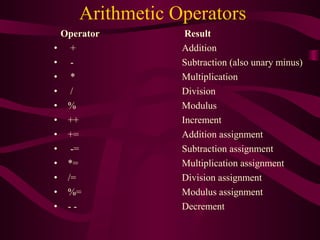
Operator Result
• + Addition
• - Subtraction (also unary minus)
• * Multiplication
• / Division
• % Modulus
• ++ Increment
• += Addition assignment
• -= Subtraction assignment
• *= Multiplication assignment
• /= Division assignment
• %= Modulus assignment
• - - Decrement
Modulus Operator (%)
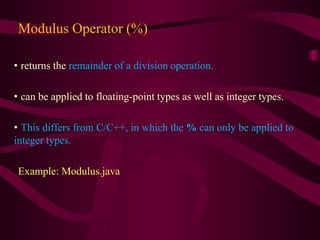
• returns the remainder of a division operation.
• can be applied to floating-point types as well as integer types.
• This differs from C/C++, in which the % can only be applied to
integer types.
Example: Modulus.java
Arithmetic Assignment Operators
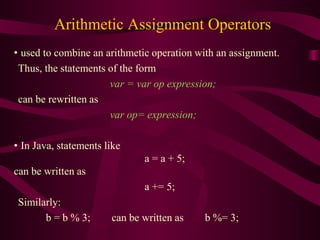
• used to combine an arithmetic operation with an assignment.
Thus, the statements of the form
var = var op expression;
can be rewritten as
var op= expression;
• In Java, statements like
a = a + 5;
can be written as
a += 5;
Similarly:
b = b % 3; can be written as b %= 3;
Increment and Decrement
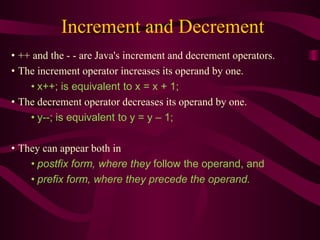
• ++ and the - - are Java's increment and decrement operators.
• The increment operator increases its operand by one.
• x++; is equivalent to x = x + 1;
• The decrement operator decreases its operand by one.
• y--; is equivalent to y = y – 1;
• They can appear both in
• postfix form, where they follow the operand, and
• prefix form, where they precede the operand.
• In the prefix form, the operand is incremented or
decremented before the value is obtained for use in the
expression.
Example: x = 19; y = ++x;
Output: y = 20 and x = 20
• In postfix form, the previous value is obtained for use
in the expression, and then the operand is modified.
Example: x = 19; y = x++;
Output: y = 19 and x = 20
Bitwise Operators
• These operators act upon the individual bits of their
operands.
• can be applied to the integer types, long, int, short,
char, and byte.
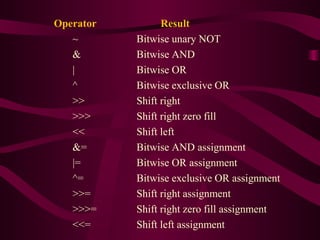
Operator Result
~ Bitwise unary NOT
& Bitwise AND
| Bitwise OR
^ Bitwise exclusive OR
>> Shift right
>>> Shift right zero fill
<< Shift left
&= Bitwise AND assignment
|= Bitwise OR assignment
^= Bitwise exclusive OR assignment
>>= Shift right assignment
>>>= Shift right zero fill assignment
<<= Shift left assignment
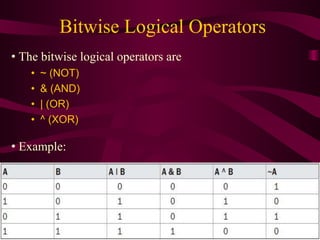
Bitwise Logical Operators
• The bitwise logical operators are
• ~ (NOT)
• & (AND)
• | (OR)
• ^ (XOR)
• Example:
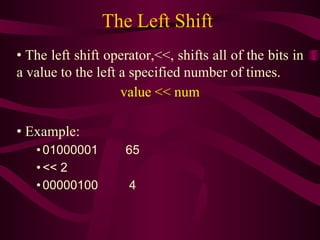
The Left Shift
• The left shift operator,<<, shifts all of the bits in
a value to the left a specified number of times.
value << num
• Example:
• 01000001 65
• << 2
• 00000100 4
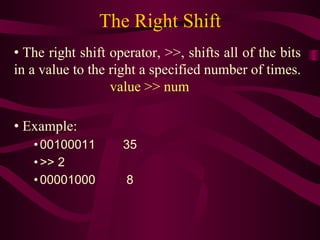
The Right Shift
• The right shift operator, >>, shifts all of the bits
in a value to the right a specified number of times.
value >> num
• Example:
• 00100011 35
• >> 2
• 00001000 8
• When we are shifting right, the top (leftmost)
bits exposed by the right shift are filled in with
the previous contents of the top bit.
• This is called sign extension and serves to
preserve the sign of negative numbers when you
shift them right.
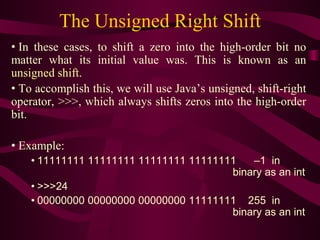
The Unsigned Right Shift
• In these cases, to shift a zero into the high-order bit no
matter what its initial value was. This is known as an
unsigned shift.
• To accomplish this, we will use Java’s unsigned, shift-right
operator, >>>, which always shifts zeros into the high-order
bit.
• Example:
• 11111111 11111111 11111111 11111111 –1 in
binary as an int
• >>>24
• 00000000 00000000 00000000 11111111 255 in
binary as an int
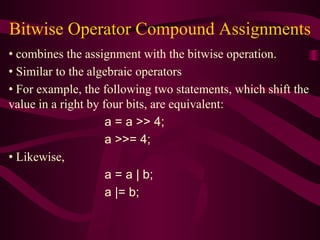
Bitwise Operator Compound Assignments
• combines the assignment with the bitwise operation.
• Similar to the algebraic operators
• For example, the following two statements, which shift the
value in a right by four bits, are equivalent:
a = a >> 4;
a >>= 4;
• Likewise,
a = a | b;
a |= b;
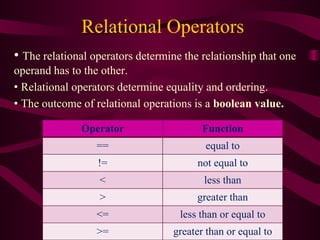
Relational Operators
• The relational operators determine the relationship that one
operand has to the other.
• Relational operators determine equality and ordering.
• The outcome of relational operations is a boolean value.
Operator Function
== equal to
!= not equal to
< less than
> greater than
<= less than or equal to
>= greater than or equal to
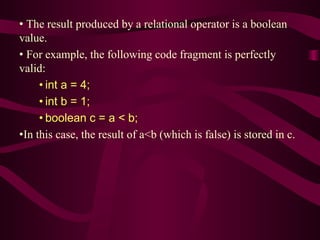
• The result produced by a relational operator is a boolean
value.
• For example, the following code fragment is perfectly
valid:
• int a = 4;
• int b = 1;
• boolean c = a < b;
•In this case, the result of a<b (which is false) is stored in c.
Boolean Logical Operators
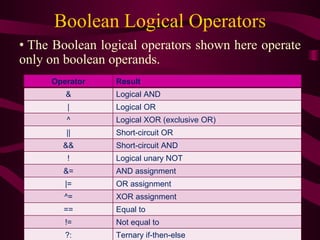
• The Boolean logical operators shown here operate
only on boolean operands.
Operator Result
& Logical AND
| Logical OR
^ Logical XOR (exclusive OR)
|| Short-circuit OR
&& Short-circuit AND
! Logical unary NOT
&= AND assignment
|= OR assignment
^= XOR assignment
== Equal to
!= Not equal to
?: Ternary if-then-else
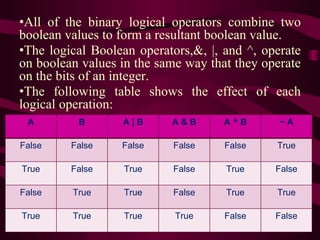
•All of the binary logical operators combine two
boolean values to form a resultant boolean value.
•The logical Boolean operators,&, |, and ^, operate
on boolean values in the same way that they operate
on the bits of an integer.
•The following table shows the effect of each
logical operation:
A B A | B A & B A ^ B ~ A
False False False False False True
True False True False True False
False True True False True True
True True True True False False
Short-Circuit Logical Operators
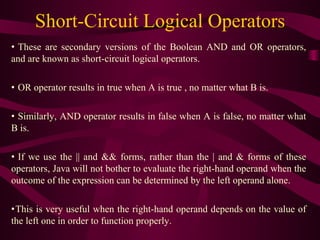
• These are secondary versions of the Boolean AND and OR operators,
and are known as short-circuit logical operators.
• OR operator results in true when A is true , no matter what B is.
• Similarly, AND operator results in false when A is false, no matter what
B is.
• If we use the || and && forms, rather than the | and & forms of these
operators, Java will not bother to evaluate the right-hand operand when the
outcome of the expression can be determined by the left operand alone.
•This is very useful when the right-hand operand depends on the value of
the left one in order to function properly.
• For example
if (denom != 0 && num / denom > 10)
• the following code fragment shows how you can take
advantage of short-circuit logical evaluation to be sure that a
division operation will be valid before evaluating it.
• circuit form of AND (&&) is used, there is no risk of
causing a run-time exception when denom is zero.
• If this line of code were written using the single & version
of AND, both sides would be evaluated, causing a run-time
exception when denom is zero.
The Assignment Operator
• The assignment operator is the single equal sign, =.
• The assignment operator works in Java much as it does in
any other computer language.
var = expression ;
• Here, the type of var must be compatible with the type of
expression.
• The assignment operator allows to create a chain of
assignments.
• For example:
int x, y, z;
x = y = z = 100; // set x, y, and z to 100
• This fragment sets the variables x , y, and z to 100 using a
single statement.
The ? Operator
• Java includes a special ternary (three-way)operator, ?, that
can replace certain types of if-then-else statements.
•The ? has this general form:
expression1 ? expression2 : expression3
• Here,expression1 can be any expression that evaluates to a
boolean value.
• If expression1 is true , then expression2 is evaluated;
otherwise, expression3 is evaluated.
• The result of the? operation is that of the expression
evaluated.
• Both expression2 and expression3 are required to return the
same type, which can’t be void.
• Example: TestTernary.java
ratio = denom == 0 ? 0 : num / denom ;
•When Java evaluates this assignment expression, it first looks
at the expression to the left of the question mark.
• If denom equals zero, then the expression between the
question mark and the colon is evaluated and used as the
value of the entire ? expression.
•If denom does not equal zero, then the expression after the
colon is evaluated and used for the value of the entire ?
expression.
•The result produced by the? operator is then assigned to ratio.
Operator Precedence
Highest
( ) [] .
++ -- %
+ -
>> >>> <<
> >= < <=
== !=
&
^
|
&&
||
?:
= Op=
Lowest
Questions

L3 operators

  • 1.
    Programming in Java Lecture3: Operators and Expressions
  • 2.
    Contents • Operators inJava • Arithmetic Operators • Bitwise Operators • Relational Operators • Logical Operators
  • 3.
    Operators in Java •Java’s operators can be grouped into following four categories: 1. Arithmetic 2. Bitwise 3. Relational 4. Logical.
  • 4.
    Arithmetic Operators • usedin mathematical expressions. • operands of the arithmetic operators must be of a numeric type. • most operators in Java work just like they do in C/C++. • We can not use them on boolean types, but we can use them on char types, since the char type in Java is, essentially, a subset of int.
  • 5.
    Arithmetic Operators Operator Result •+ Addition • - Subtraction (also unary minus) • * Multiplication • / Division • % Modulus • ++ Increment • += Addition assignment • -= Subtraction assignment • *= Multiplication assignment • /= Division assignment • %= Modulus assignment • - - Decrement
  • 6.
    Modulus Operator (%) •returns the remainder of a division operation. • can be applied to floating-point types as well as integer types. • This differs from C/C++, in which the % can only be applied to integer types. Example: Modulus.java
  • 7.
    Arithmetic Assignment Operators •used to combine an arithmetic operation with an assignment. Thus, the statements of the form var = var op expression; can be rewritten as var op= expression; • In Java, statements like a = a + 5; can be written as a += 5; Similarly: b = b % 3; can be written as b %= 3;
  • 8.
    Increment and Decrement •++ and the - - are Java's increment and decrement operators. • The increment operator increases its operand by one. • x++; is equivalent to x = x + 1; • The decrement operator decreases its operand by one. • y--; is equivalent to y = y – 1; • They can appear both in • postfix form, where they follow the operand, and • prefix form, where they precede the operand.
  • 9.
    • In theprefix form, the operand is incremented or decremented before the value is obtained for use in the expression. Example: x = 19; y = ++x; Output: y = 20 and x = 20 • In postfix form, the previous value is obtained for use in the expression, and then the operand is modified. Example: x = 19; y = x++; Output: y = 19 and x = 20
  • 10.
    Bitwise Operators • Theseoperators act upon the individual bits of their operands. • can be applied to the integer types, long, int, short, char, and byte.
  • 11.
    Operator Result ~ Bitwiseunary NOT & Bitwise AND | Bitwise OR ^ Bitwise exclusive OR >> Shift right >>> Shift right zero fill << Shift left &= Bitwise AND assignment |= Bitwise OR assignment ^= Bitwise exclusive OR assignment >>= Shift right assignment >>>= Shift right zero fill assignment <<= Shift left assignment
  • 12.
    Bitwise Logical Operators •The bitwise logical operators are • ~ (NOT) • & (AND) • | (OR) • ^ (XOR) • Example:
  • 13.
    The Left Shift •The left shift operator,<<, shifts all of the bits in a value to the left a specified number of times. value << num • Example: • 01000001 65 • << 2 • 00000100 4
  • 14.
    The Right Shift •The right shift operator, >>, shifts all of the bits in a value to the right a specified number of times. value >> num • Example: • 00100011 35 • >> 2 • 00001000 8
  • 15.
    • When weare shifting right, the top (leftmost) bits exposed by the right shift are filled in with the previous contents of the top bit. • This is called sign extension and serves to preserve the sign of negative numbers when you shift them right.
  • 16.
    The Unsigned RightShift • In these cases, to shift a zero into the high-order bit no matter what its initial value was. This is known as an unsigned shift. • To accomplish this, we will use Java’s unsigned, shift-right operator, >>>, which always shifts zeros into the high-order bit. • Example: • 11111111 11111111 11111111 11111111 –1 in binary as an int • >>>24 • 00000000 00000000 00000000 11111111 255 in binary as an int
  • 17.
    Bitwise Operator CompoundAssignments • combines the assignment with the bitwise operation. • Similar to the algebraic operators • For example, the following two statements, which shift the value in a right by four bits, are equivalent: a = a >> 4; a >>= 4; • Likewise, a = a | b; a |= b;
  • 18.
    Relational Operators • Therelational operators determine the relationship that one operand has to the other. • Relational operators determine equality and ordering. • The outcome of relational operations is a boolean value. Operator Function == equal to != not equal to < less than > greater than <= less than or equal to >= greater than or equal to
  • 19.
    • The resultproduced by a relational operator is a boolean value. • For example, the following code fragment is perfectly valid: • int a = 4; • int b = 1; • boolean c = a < b; •In this case, the result of a<b (which is false) is stored in c.
  • 20.
    Boolean Logical Operators •The Boolean logical operators shown here operate only on boolean operands. Operator Result & Logical AND | Logical OR ^ Logical XOR (exclusive OR) || Short-circuit OR && Short-circuit AND ! Logical unary NOT &= AND assignment |= OR assignment ^= XOR assignment == Equal to != Not equal to ?: Ternary if-then-else
  • 21.
    •All of thebinary logical operators combine two boolean values to form a resultant boolean value. •The logical Boolean operators,&, |, and ^, operate on boolean values in the same way that they operate on the bits of an integer. •The following table shows the effect of each logical operation: A B A | B A & B A ^ B ~ A False False False False False True True False True False True False False True True False True True True True True True False False
  • 22.
    Short-Circuit Logical Operators •These are secondary versions of the Boolean AND and OR operators, and are known as short-circuit logical operators. • OR operator results in true when A is true , no matter what B is. • Similarly, AND operator results in false when A is false, no matter what B is. • If we use the || and && forms, rather than the | and & forms of these operators, Java will not bother to evaluate the right-hand operand when the outcome of the expression can be determined by the left operand alone. •This is very useful when the right-hand operand depends on the value of the left one in order to function properly.
  • 23.
    • For example if(denom != 0 && num / denom > 10) • the following code fragment shows how you can take advantage of short-circuit logical evaluation to be sure that a division operation will be valid before evaluating it. • circuit form of AND (&&) is used, there is no risk of causing a run-time exception when denom is zero. • If this line of code were written using the single & version of AND, both sides would be evaluated, causing a run-time exception when denom is zero.
  • 24.
    The Assignment Operator •The assignment operator is the single equal sign, =. • The assignment operator works in Java much as it does in any other computer language. var = expression ; • Here, the type of var must be compatible with the type of expression. • The assignment operator allows to create a chain of assignments. • For example: int x, y, z; x = y = z = 100; // set x, y, and z to 100 • This fragment sets the variables x , y, and z to 100 using a single statement.
  • 25.
    The ? Operator •Java includes a special ternary (three-way)operator, ?, that can replace certain types of if-then-else statements. •The ? has this general form: expression1 ? expression2 : expression3 • Here,expression1 can be any expression that evaluates to a boolean value. • If expression1 is true , then expression2 is evaluated; otherwise, expression3 is evaluated. • The result of the? operation is that of the expression evaluated. • Both expression2 and expression3 are required to return the same type, which can’t be void.
  • 26.
    • Example: TestTernary.java ratio= denom == 0 ? 0 : num / denom ; •When Java evaluates this assignment expression, it first looks at the expression to the left of the question mark. • If denom equals zero, then the expression between the question mark and the colon is evaluated and used as the value of the entire ? expression. •If denom does not equal zero, then the expression after the colon is evaluated and used for the value of the entire ? expression. •The result produced by the? operator is then assigned to ratio.
  • 27.
    Operator Precedence Highest ( )[] . ++ -- % + - >> >>> << > >= < <= == != & ^ | && || ?: = Op= Lowest
  • 28.

Editor's Notes

  • #2 이 TP에서는 자바의 생성 배경과 그 동안 자바가 어떻게 발전해 왔는지에 대해 설명한다.