JAVA Programming
Chapter# 03
Operators
1
Operators
• Java provides a rich operator environment.
• Most of its operators can be divided into the
following four groups:
1) Arithmetic Operators
2) Bitwise Operators
3) Relational Operators
4) Logical Operators
Arithmetic Operators
• Arithmetic operators are used in
mathematical expressions in the same way
that they are used in algebra.
• The operands of the arithmetic operators
must be of a numeric type.
• You cannot use them on boolean types, but
you can use them on char types, since the
char type in Java is, essentially, a subset of int.
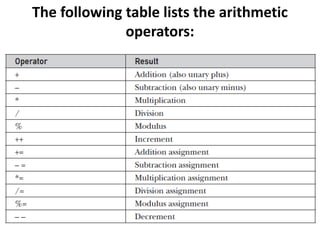
The following table lists the arithmetic
operators:
The Basic Arithmetic Operators
• The basic arithmetic operations—addition, subtraction,
multiplication, and division—all behave as you would
expect for all numeric types.
• The unary minus operator negates its single operand.
• The unary plus operator simply returns the value of its
operand.
• Remember that when the division operator is applied to
an integer type, there will be no fractional component
attached to the result.
/* Demonstrate the basic arithmetic
operators.*/
class BasicMath {
public static void main(String args[]) {
// arithmetic using integers
System.out.println("Integer
Arithmetic");
int a = 1 + 1;
int b = a * 3;
int c = b / 4;
int d = c - a;
int e = -d;
System.out.println("a = " + a);
System.out.println("b = " + b);
System.out.println("c = " + c);
System.out.println("d = " + d);
System.out.println("e = " + e);
// arithmetic using doubles
System.out.println("nFloating Point
Arithmetic");
double da = 1 + 1;
double db = da * 3;
double dc = db / 4;
double dd = dc - a;
double de = -dd;
System.out.println("da = " + da);
System.out.println("db = " + db);
System.out.println("dc = " + dc);
System.out.println("dd = " + dd);
System.out.println("de = " + de);
}
}
The Modulus Operator
• The modulus operator, %, returns the remainder
of a division operation.
• It can be applied to floating-point types as well
as integer types.
class Modulus {
public static void main(String args[]) {
int x = 42;
double y = 42.25;
System.out.println("x mod 10 = " + x % 10);
System.out.println("y mod 10 = " + y % 10);
}
}
Arithmetic Compound Assignment Operators
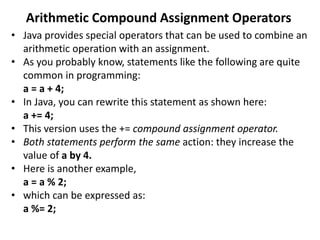
• Java provides special operators that can be used to combine an
arithmetic operation with an assignment.
• As you probably know, statements like the following are quite
common in programming:
a = a + 4;
• In Java, you can rewrite this statement as shown here:
a += 4;
• This version uses the += compound assignment operator.
• Both statements perform the same action: they increase the
value of a by 4.
• Here is another example,
a = a % 2;
• which can be expressed as:
a %= 2;
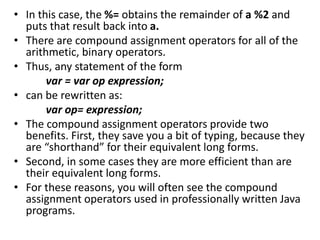
• In this case, the %= obtains the remainder of a %2 and
puts that result back into a.
• There are compound assignment operators for all of the
arithmetic, binary operators.
• Thus, any statement of the form
var = var op expression;
• can be rewritten as:
var op= expression;
• The compound assignment operators provide two
benefits. First, they save you a bit of typing, because they
are “shorthand” for their equivalent long forms.
• Second, in some cases they are more efficient than are
their equivalent long forms.
• For these reasons, you will often see the compound
assignment operators used in professionally written Java
programs.
// Demonstrate several assignment operators.
class OpEquals {
public static void main(String args[]) {
int a = 1;
int b = 2;
int c = 3;
a += 5;
b *= 4;
c += a * b;
c %= 6;
System.out.println("a = " + a);
System.out.println("b = " + b);
System.out.println("c = " + c);
}
}
Increment and Decrement
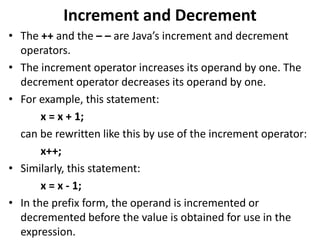
• The ++ and the – – are Java’s increment and decrement
operators.
• The increment operator increases its operand by one. The
decrement operator decreases its operand by one.
• For example, this statement:
x = x + 1;
can be rewritten like this by use of the increment operator:
x++;
• Similarly, this statement:
x = x - 1;
• In the prefix form, the operand is incremented or
decremented before the value is obtained for use in the
expression.
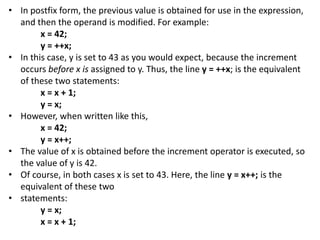
• In postfix form, the previous value is obtained for use in the expression,
and then the operand is modified. For example:
x = 42;
y = ++x;
• In this case, y is set to 43 as you would expect, because the increment
occurs before x is assigned to y. Thus, the line y = ++x; is the equivalent
of these two statements:
x = x + 1;
y = x;
• However, when written like this,
x = 42;
y = x++;
• The value of x is obtained before the increment operator is executed, so
the value of y is 42.
• Of course, in both cases x is set to 43. Here, the line y = x++; is the
equivalent of these two
• statements:
y = x;
x = x + 1;
// Demonstrate ++.
class IncDec {
public static void main(String args[]) {
int a = 1;
int b = 2;
int c;
int d;
c = ++b;
d = a++;
c++;
System.out.println("a = " + a);
System.out.println("b = " + b);
System.out.println("c = " + c);
System.out.println("d = " + d);
} }
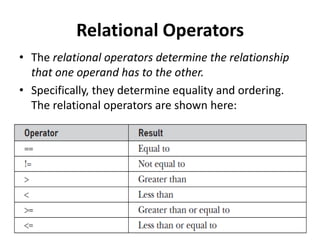
Relational Operators
• The relational operators determine the relationship
that one operand has to the other.
• Specifically, they determine equality and ordering.
The relational operators are shown here:
• The outcome of these operations is a Boolean value.
• The relational operators are most frequently used in
the expressions that control the if statement and the
various loop statements.
• As stated, the result produced by a relational operator
is a Boolean value. For example, the following code
fragment is perfectly valid:
int a = 4;
int b = 1;
boolean c = a < b;
• In Java, true and false are nonnumeric values that do
not relate to zero or nonzero.
• Therefore, to test for zero or nonzero, you must
explicitly employ one or more of the relational
operators.
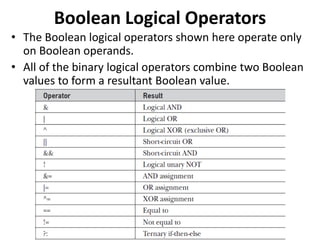
Boolean Logical Operators
• The Boolean logical operators shown here operate only
on Boolean operands.
• All of the binary logical operators combine two Boolean
values to form a resultant Boolean value.
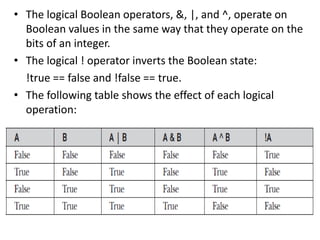
• The logical Boolean operators, &, |, and ^, operate on
Boolean values in the same way that they operate on the
bits of an integer.
• The logical ! operator inverts the Boolean state:
!true == false and !false == true.
• The following table shows the effect of each logical
operation:
// Demonstrate the boolean logical operators.
class BoolLogic {
public static void main(String args[]) {
boolean a = true;
boolean b = false;
boolean c = a | b;
boolean d = a & b;
boolean e = a ^ b;
boolean f = (!a & b) | (a & !b);
boolean g = !a;
System.out.println(" a = " + a);
System.out.println(" b = " + b);
System.out.println(" a|b = " + c);
System.out.println(" a&b = " + d);
System.out.println(" a^b = " + e);
System.out.println("!a&b|a&!b = " + f);
System.out.println(" !a = " + g);
} }
Output
Short-Circuit Logical Operators
• Java provides two interesting Boolean operators not
found in some other computer languages.
• These are secondary versions of the Boolean AND and OR
operators, and are commonly known as short-circuit
logical operators.
• As you can see from the preceding table, the OR operator
results is true when A is true, no matter what B is.
• Similarly, the AND operator result is false when A is false,
no matter what B is.
• If you use the || and && forms, rather than the | and &
forms of these operators, Java will not bother to evaluate
the right-hand operand when the outcome of the
expression can be determined by the left operand alone.
The Assignment Operator
• The assignment operator is the single equal sign, =.
• The assignment operator works in Java much as it does
in any other computer language.
• It has this general form:
var = expression;
• The assignment operator does have one interesting
attribute that you may not be familiar with: it allows you
to create a chain of assignments.
• For example, consider this fragment:
int x, y, z;
x = y = z = 100; // set x, y, and z to 100
The ? Operator
• Java includes a special ternary (three-way) operator
that can replace certain types of if-then—else
statements.
• This operator is the ?.
• It can seem somewhat confusing at first, but the ?
can be used very effectively once mastered.
• The ? has this general form:
expression1 ? expression2 : expression3;
• Here, expression1 can be any expression that
evaluates to a boolean value. If expression1 is
• true, then expression2 is evaluated; otherwise,
expression3 is evaluated.
// Demonstrate ?.
class Ternary {
public static void main(String args[]) {
int i, k;
i = 10;
k = i < 0 ? -i : i; // get absolute value of i
System.out.print("Absolute value of ");
System.out.println(i + " is " + k);
i = -10;
k = i < 0 ? -i : i; // get absolute value of i
System.out.print("Absolute value of ");
System.out.println(i + " is " + k);
} }
Output
Operator Precedence
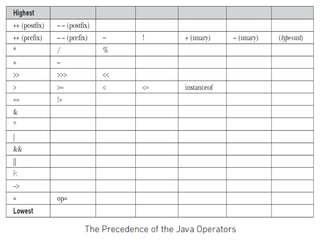
• Table on next slide, shows the order of precedence
for Java operators, from highest to lowest.
• Operators in the same row are equal in precedence.
• In binary operations, the order of evaluation is left
to right (except for assignment, which evaluates
right to left).
• Although they are technically separators, the [ ], ( ),
and . can also act like operators.
• In that capacity, they would have the highest
precedence.
• Also, notice the arrow operator (->).
• It was added by JDK 8 and is used in lambda
expressions.
Java chapter 3

Java chapter 3

  • 1.
  • 2.
    Operators • Java providesa rich operator environment. • Most of its operators can be divided into the following four groups: 1) Arithmetic Operators 2) Bitwise Operators 3) Relational Operators 4) Logical Operators
  • 3.
    Arithmetic Operators • Arithmeticoperators are used in mathematical expressions in the same way that they are used in algebra. • The operands of the arithmetic operators must be of a numeric type. • You cannot use them on boolean types, but you can use them on char types, since the char type in Java is, essentially, a subset of int.
  • 4.
    The following tablelists the arithmetic operators:
  • 5.
    The Basic ArithmeticOperators • The basic arithmetic operations—addition, subtraction, multiplication, and division—all behave as you would expect for all numeric types. • The unary minus operator negates its single operand. • The unary plus operator simply returns the value of its operand. • Remember that when the division operator is applied to an integer type, there will be no fractional component attached to the result.
  • 6.
    /* Demonstrate thebasic arithmetic operators.*/ class BasicMath { public static void main(String args[]) { // arithmetic using integers System.out.println("Integer Arithmetic"); int a = 1 + 1; int b = a * 3; int c = b / 4; int d = c - a; int e = -d; System.out.println("a = " + a); System.out.println("b = " + b); System.out.println("c = " + c); System.out.println("d = " + d); System.out.println("e = " + e); // arithmetic using doubles System.out.println("nFloating Point Arithmetic"); double da = 1 + 1; double db = da * 3; double dc = db / 4; double dd = dc - a; double de = -dd; System.out.println("da = " + da); System.out.println("db = " + db); System.out.println("dc = " + dc); System.out.println("dd = " + dd); System.out.println("de = " + de); } }
  • 7.
    The Modulus Operator •The modulus operator, %, returns the remainder of a division operation. • It can be applied to floating-point types as well as integer types. class Modulus { public static void main(String args[]) { int x = 42; double y = 42.25; System.out.println("x mod 10 = " + x % 10); System.out.println("y mod 10 = " + y % 10); } }
  • 8.
    Arithmetic Compound AssignmentOperators • Java provides special operators that can be used to combine an arithmetic operation with an assignment. • As you probably know, statements like the following are quite common in programming: a = a + 4; • In Java, you can rewrite this statement as shown here: a += 4; • This version uses the += compound assignment operator. • Both statements perform the same action: they increase the value of a by 4. • Here is another example, a = a % 2; • which can be expressed as: a %= 2;
  • 9.
    • In thiscase, the %= obtains the remainder of a %2 and puts that result back into a. • There are compound assignment operators for all of the arithmetic, binary operators. • Thus, any statement of the form var = var op expression; • can be rewritten as: var op= expression; • The compound assignment operators provide two benefits. First, they save you a bit of typing, because they are “shorthand” for their equivalent long forms. • Second, in some cases they are more efficient than are their equivalent long forms. • For these reasons, you will often see the compound assignment operators used in professionally written Java programs.
  • 10.
    // Demonstrate severalassignment operators. class OpEquals { public static void main(String args[]) { int a = 1; int b = 2; int c = 3; a += 5; b *= 4; c += a * b; c %= 6; System.out.println("a = " + a); System.out.println("b = " + b); System.out.println("c = " + c); } }
  • 11.
    Increment and Decrement •The ++ and the – – are Java’s increment and decrement operators. • The increment operator increases its operand by one. The decrement operator decreases its operand by one. • For example, this statement: x = x + 1; can be rewritten like this by use of the increment operator: x++; • Similarly, this statement: x = x - 1; • In the prefix form, the operand is incremented or decremented before the value is obtained for use in the expression.
  • 12.
    • In postfixform, the previous value is obtained for use in the expression, and then the operand is modified. For example: x = 42; y = ++x; • In this case, y is set to 43 as you would expect, because the increment occurs before x is assigned to y. Thus, the line y = ++x; is the equivalent of these two statements: x = x + 1; y = x; • However, when written like this, x = 42; y = x++; • The value of x is obtained before the increment operator is executed, so the value of y is 42. • Of course, in both cases x is set to 43. Here, the line y = x++; is the equivalent of these two • statements: y = x; x = x + 1;
  • 13.
    // Demonstrate ++. classIncDec { public static void main(String args[]) { int a = 1; int b = 2; int c; int d; c = ++b; d = a++; c++; System.out.println("a = " + a); System.out.println("b = " + b); System.out.println("c = " + c); System.out.println("d = " + d); } }
  • 14.
    Relational Operators • Therelational operators determine the relationship that one operand has to the other. • Specifically, they determine equality and ordering. The relational operators are shown here:
  • 15.
    • The outcomeof these operations is a Boolean value. • The relational operators are most frequently used in the expressions that control the if statement and the various loop statements. • As stated, the result produced by a relational operator is a Boolean value. For example, the following code fragment is perfectly valid: int a = 4; int b = 1; boolean c = a < b; • In Java, true and false are nonnumeric values that do not relate to zero or nonzero. • Therefore, to test for zero or nonzero, you must explicitly employ one or more of the relational operators.
  • 16.
    Boolean Logical Operators •The Boolean logical operators shown here operate only on Boolean operands. • All of the binary logical operators combine two Boolean values to form a resultant Boolean value.
  • 17.
    • The logicalBoolean operators, &, |, and ^, operate on Boolean values in the same way that they operate on the bits of an integer. • The logical ! operator inverts the Boolean state: !true == false and !false == true. • The following table shows the effect of each logical operation:
  • 18.
    // Demonstrate theboolean logical operators. class BoolLogic { public static void main(String args[]) { boolean a = true; boolean b = false; boolean c = a | b; boolean d = a & b; boolean e = a ^ b; boolean f = (!a & b) | (a & !b); boolean g = !a; System.out.println(" a = " + a); System.out.println(" b = " + b); System.out.println(" a|b = " + c); System.out.println(" a&b = " + d); System.out.println(" a^b = " + e); System.out.println("!a&b|a&!b = " + f); System.out.println(" !a = " + g); } } Output
  • 19.
    Short-Circuit Logical Operators •Java provides two interesting Boolean operators not found in some other computer languages. • These are secondary versions of the Boolean AND and OR operators, and are commonly known as short-circuit logical operators. • As you can see from the preceding table, the OR operator results is true when A is true, no matter what B is. • Similarly, the AND operator result is false when A is false, no matter what B is. • If you use the || and && forms, rather than the | and & forms of these operators, Java will not bother to evaluate the right-hand operand when the outcome of the expression can be determined by the left operand alone.
  • 20.
    The Assignment Operator •The assignment operator is the single equal sign, =. • The assignment operator works in Java much as it does in any other computer language. • It has this general form: var = expression; • The assignment operator does have one interesting attribute that you may not be familiar with: it allows you to create a chain of assignments. • For example, consider this fragment: int x, y, z; x = y = z = 100; // set x, y, and z to 100
  • 21.
    The ? Operator •Java includes a special ternary (three-way) operator that can replace certain types of if-then—else statements. • This operator is the ?. • It can seem somewhat confusing at first, but the ? can be used very effectively once mastered. • The ? has this general form: expression1 ? expression2 : expression3; • Here, expression1 can be any expression that evaluates to a boolean value. If expression1 is • true, then expression2 is evaluated; otherwise, expression3 is evaluated.
  • 22.
    // Demonstrate ?. classTernary { public static void main(String args[]) { int i, k; i = 10; k = i < 0 ? -i : i; // get absolute value of i System.out.print("Absolute value of "); System.out.println(i + " is " + k); i = -10; k = i < 0 ? -i : i; // get absolute value of i System.out.print("Absolute value of "); System.out.println(i + " is " + k); } } Output
  • 23.
    Operator Precedence • Tableon next slide, shows the order of precedence for Java operators, from highest to lowest. • Operators in the same row are equal in precedence. • In binary operations, the order of evaluation is left to right (except for assignment, which evaluates right to left). • Although they are technically separators, the [ ], ( ), and . can also act like operators. • In that capacity, they would have the highest precedence. • Also, notice the arrow operator (->). • It was added by JDK 8 and is used in lambda expressions.