Operators
• Java provides a rich operator environment. Most
of its operators can be divided into the following
four groups:
– arithmetic,
– bitwise,
– relational, and
– logical.
• Java also defines some additional operators that
handle certain special situations.
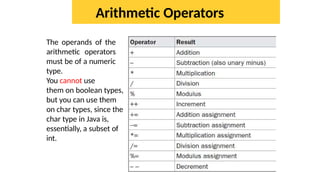
Arithmetic Operators
The operands of the
arithmetic operators
must be of a numeric
type.
You cannot use
them on boolean types,
but you can use them
on char types, since the
char type in Java is,
essentially, a subset of
int.
• The Modulus Operator (%)
• Arithmetic Compound Assignment Operators (+=)
• Increment and Decrement (++, --)
public class IncOp
{
public static void main(String args[])
{
int x=1;
int r = --x + x++ + ++x + x--;
System.out.println(x + " " + r);
}
}
//Guess the output
public class Test {
public
static void
main(String
[] args)
{
int a
=
10;
int b = ++(++a);
System.out.println(b);
}
}
//final
variable
public class
Test {
// Can not be applied boolean data type
public class Test {
public static void main(String[] args)
{
boolean b = false;
b++;
System.out.println(b);
}
}
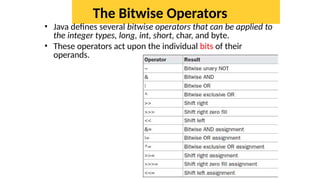
The Bitwise Operators
• Java defines several bitwise operators that can be applied to
the integer types, long, int, short, char, and byte.
• These operators act upon the individual bits of their
operands.
The Bitwise Operators
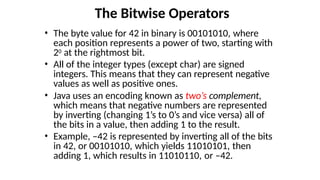
• The byte value for 42 in binary is 00101010, where
each position represents a power of two, starting with
20 at the rightmost bit.
• All of the integer types (except char) are signed
integers. This means that they can represent negative
values as well as positive ones.
• Java uses an encoding known as two’s complement,
which means that negative numbers are represented
by inverting (changing 1’s to 0’s and vice versa) all of
the bits in a value, then adding 1 to the result.
• Example, –42 is represented by inverting all of the bits
in 42, or 00101010, which yields 11010101, then
adding 1, which results in 11010110, or –42.
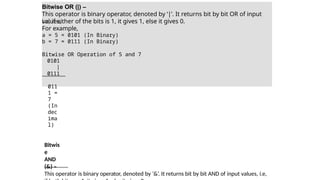
Bitwise OR (|) –
This operator is binary operator, denoted by ‘|’. It returns bit by bit OR of input
values,
i.e, if either of the bits is 1, it gives 1, else it gives 0.
For example,
a = 5 = 0101 (In Binary)
b = 7 = 0111 (In Binary)
Bitwise OR Operation of 5 and 7
0101
|
0111
011
1 =
7
(In
dec
ima
l)
Bitwis
e
AND
(&) –
This operator is binary operator, denoted by ‘&’. It returns bit by bit AND of input values, i.e,
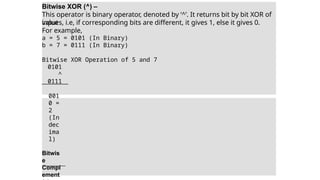
Bitwise XOR (^) –
This operator is binary operator, denoted by ‘^’. It returns bit by bit XOR of
input
values, i.e, if corresponding bits are different, it gives 1, else it gives 0.
For example,
a = 5 = 0101 (In Binary)
b = 7 = 0111 (In Binary)
Bitwise XOR Operation of 5 and 7
0101
^
0111
001
0 =
2
(In
dec
ima
l)
Bitwis
e
Compl
ement
public class Bitoperators {
public static void main(String[] args) {
int a = 5;
int b = 7;
// bitwise and
System.out.println("a&b = " + (a & b));
// bitwise or
System.out.println("a|b = " + (a | b));
// bitwise xor
System.out.println("a^b = " + (a ^ b));
// bitwise not ~0101=1010
// will give 2's complement of 1010 = -6
System.out.println("~a = " + ~a);
// assignment a=a&b
a &= b;
System.out.println("a= " + a);
}
}
Output :
a&b = 5
a|b = 7
a^b = 2
~a = -6
a= 5
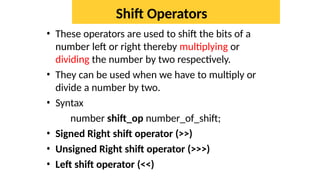
Shift Operators
• These operators are used to shift the bits of a
number left or right thereby multiplying or
dividing the number by two respectively.
• They can be used when we have to multiply or
divide a number by two.
• Syntax
number shift_op number_of_shift;
• Signed Right shift operator (>>)
• Unsigned Right shift operator (>>>)
• Left shift operator (<<)
log2base2
• Visit log2base2 site for animations
public class Shiftoperators {
public static void main(String[] args)
{
int a = 5;
int b = -10;
// left shift operator
// 0000 0101<<2 =0001
0100
// similar to 5*(2^2)
(20)
System.out.println("a<<2 = " + (a << 2));
// right shift operator
// 0000 0101 >> 2 =0000
0001
// similar to 5/(2^2)
(1)
System.out.println("b>>2 = " + (b >> 2));
// unsigned right shift operator
System.out.println("b>>>2 = " + (b >>> 2));
}
}
Output :
a<<2 = 20
b>>2 = -3
b>>>2 =
1073741821
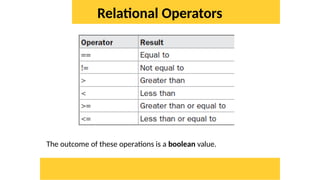
Relational Operators
The outcome of these operations is a boolean value.
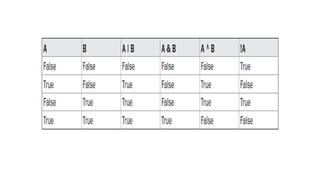
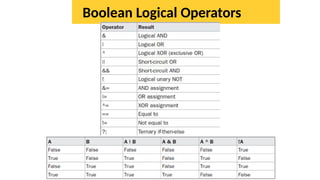
Boolean Logical Operators
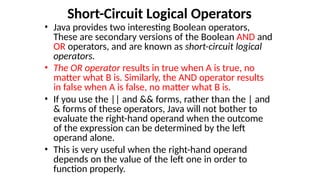
Short-Circuit Logical Operators
• Java provides two interesting Boolean operators,
These are secondary versions of the Boolean AND and
OR operators, and are known as short-circuit logical
operators.
• The OR operator results in true when A is true, no
matter what B is. Similarly, the AND operator results
in false when A is false, no matter what B is.
• If you use the || and && forms, rather than the | and
& forms of these operators, Java will not bother to
evaluate the right-hand operand when the outcome
of the expression can be determined by the left
operand alone.
• This is very useful when the right-hand operand
depends on the value of the left one in order to
function properly.
Short-Circuit Logical Operators
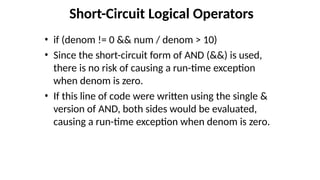
• if (denom != 0 && num / denom > 10)
• Since the short-circuit form of AND (&&) is used,
there is no risk of causing a run-time exception
when denom is zero.
• If this line of code were written using the single &
version of AND, both sides would be evaluated,
causing a run-time exception when denom is zero.
import java.io.*;
import java.util.Scanner;
public class AndopEx
{
public static void main(String[] args)
{
int x, y;
int sum=0;
Scanner sobj = new Scanner(System.in);
System.out.println("Enter x & y vals: ")
x = sobj.nextInt();
y = sobj.nextInt();
;
if(x>0 && ++y>0)
sum = x+y;
System.out.println("x=" + x + " and y=" + y + "
nx+y=" + sum);
}
}
The Assignment Operator
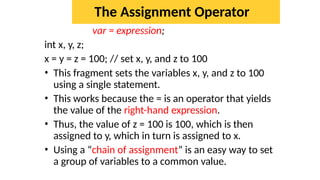
var = expression;
int x, y, z;
x = y = z = 100; // set x, y, and z to 100
• This fragment sets the variables x, y, and z to 100
using a single statement.
• This works because the = is an operator that yields
the value of the right-hand expression.
• Thus, the value of z = 100 is 100, which is then
assigned to y, which in turn is assigned to x.
• Using a “chain of assignment” is an easy way to set
a group of variables to a common value.
The ? Operator
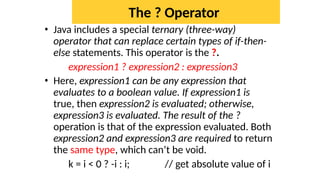
• Java includes a special ternary (three-way)
operator that can replace certain types of if-then-
else statements. This operator is the ?.
expression1 ? expression2 : expression3
• Here, expression1 can be any expression that
evaluates to a boolean value. If expression1 is
true, then expression2 is evaluated; otherwise,
expression3 is evaluated. The result of the ?
operation is that of the expression evaluated. Both
expression2 and expression3 are required to return
the same type, which can’t be void.
k = i < 0 ? -i : i; // get absolute value of i
public class
TernaryEx
{ public static void main(String[] args)
{
int A = 10;
int B = 20;
String result = A> B ? "A is greater" : "B is
greater"; System.out.println(result);
}
}
For three variables:
String result = a > b ? a > c ? "a is greatest" : "c is greatest" : b > c ? "b is greatest" : "c is
greatest“;
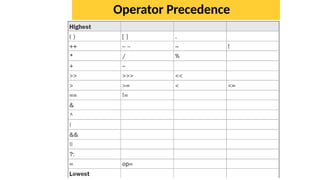
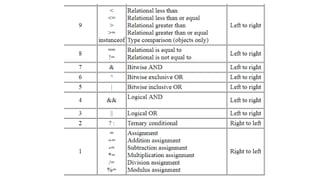
Operator Precedence
Arithmetic      Operators ____ java.pptx

Arithmetic Operators ____ java.pptx

  • 1.
    Operators • Java providesa rich operator environment. Most of its operators can be divided into the following four groups: – arithmetic, – bitwise, – relational, and – logical. • Java also defines some additional operators that handle certain special situations.
  • 2.
    Arithmetic Operators The operandsof the arithmetic operators must be of a numeric type. You cannot use them on boolean types, but you can use them on char types, since the char type in Java is, essentially, a subset of int.
  • 3.
    • The ModulusOperator (%) • Arithmetic Compound Assignment Operators (+=) • Increment and Decrement (++, --) public class IncOp { public static void main(String args[]) { int x=1; int r = --x + x++ + ++x + x--; System.out.println(x + " " + r); } }
  • 4.
    //Guess the output publicclass Test { public static void main(String [] args) { int a = 10; int b = ++(++a); System.out.println(b); } } //final variable public class Test {
  • 5.
    // Can notbe applied boolean data type public class Test { public static void main(String[] args) { boolean b = false; b++; System.out.println(b); } }
  • 6.
    The Bitwise Operators •Java defines several bitwise operators that can be applied to the integer types, long, int, short, char, and byte. • These operators act upon the individual bits of their operands.
  • 7.
    The Bitwise Operators •The byte value for 42 in binary is 00101010, where each position represents a power of two, starting with 20 at the rightmost bit. • All of the integer types (except char) are signed integers. This means that they can represent negative values as well as positive ones. • Java uses an encoding known as two’s complement, which means that negative numbers are represented by inverting (changing 1’s to 0’s and vice versa) all of the bits in a value, then adding 1 to the result. • Example, –42 is represented by inverting all of the bits in 42, or 00101010, which yields 11010101, then adding 1, which results in 11010110, or –42.
  • 9.
    Bitwise OR (|)– This operator is binary operator, denoted by ‘|’. It returns bit by bit OR of input values, i.e, if either of the bits is 1, it gives 1, else it gives 0. For example, a = 5 = 0101 (In Binary) b = 7 = 0111 (In Binary) Bitwise OR Operation of 5 and 7 0101 | 0111 011 1 = 7 (In dec ima l) Bitwis e AND (&) – This operator is binary operator, denoted by ‘&’. It returns bit by bit AND of input values, i.e,
  • 10.
    Bitwise XOR (^)– This operator is binary operator, denoted by ‘^’. It returns bit by bit XOR of input values, i.e, if corresponding bits are different, it gives 1, else it gives 0. For example, a = 5 = 0101 (In Binary) b = 7 = 0111 (In Binary) Bitwise XOR Operation of 5 and 7 0101 ^ 0111 001 0 = 2 (In dec ima l) Bitwis e Compl ement
  • 11.
    public class Bitoperators{ public static void main(String[] args) { int a = 5; int b = 7; // bitwise and System.out.println("a&b = " + (a & b)); // bitwise or System.out.println("a|b = " + (a | b)); // bitwise xor System.out.println("a^b = " + (a ^ b)); // bitwise not ~0101=1010 // will give 2's complement of 1010 = -6 System.out.println("~a = " + ~a); // assignment a=a&b a &= b; System.out.println("a= " + a); } } Output : a&b = 5 a|b = 7 a^b = 2 ~a = -6 a= 5
  • 12.
    Shift Operators • Theseoperators are used to shift the bits of a number left or right thereby multiplying or dividing the number by two respectively. • They can be used when we have to multiply or divide a number by two. • Syntax number shift_op number_of_shift; • Signed Right shift operator (>>) • Unsigned Right shift operator (>>>) • Left shift operator (<<)
  • 13.
    log2base2 • Visit log2base2site for animations
  • 14.
    public class Shiftoperators{ public static void main(String[] args) { int a = 5; int b = -10; // left shift operator // 0000 0101<<2 =0001 0100 // similar to 5*(2^2) (20) System.out.println("a<<2 = " + (a << 2)); // right shift operator // 0000 0101 >> 2 =0000 0001 // similar to 5/(2^2) (1) System.out.println("b>>2 = " + (b >> 2)); // unsigned right shift operator System.out.println("b>>>2 = " + (b >>> 2)); } } Output : a<<2 = 20 b>>2 = -3 b>>>2 = 1073741821
  • 15.
    Relational Operators The outcomeof these operations is a boolean value.
  • 16.
  • 17.
    Short-Circuit Logical Operators •Java provides two interesting Boolean operators, These are secondary versions of the Boolean AND and OR operators, and are known as short-circuit logical operators. • The OR operator results in true when A is true, no matter what B is. Similarly, the AND operator results in false when A is false, no matter what B is. • If you use the || and && forms, rather than the | and & forms of these operators, Java will not bother to evaluate the right-hand operand when the outcome of the expression can be determined by the left operand alone. • This is very useful when the right-hand operand depends on the value of the left one in order to function properly.
  • 18.
    Short-Circuit Logical Operators •if (denom != 0 && num / denom > 10) • Since the short-circuit form of AND (&&) is used, there is no risk of causing a run-time exception when denom is zero. • If this line of code were written using the single & version of AND, both sides would be evaluated, causing a run-time exception when denom is zero.
  • 19.
    import java.io.*; import java.util.Scanner; publicclass AndopEx { public static void main(String[] args) { int x, y; int sum=0; Scanner sobj = new Scanner(System.in); System.out.println("Enter x & y vals: ") x = sobj.nextInt(); y = sobj.nextInt(); ; if(x>0 && ++y>0) sum = x+y; System.out.println("x=" + x + " and y=" + y + " nx+y=" + sum); } }
  • 20.
    The Assignment Operator var= expression; int x, y, z; x = y = z = 100; // set x, y, and z to 100 • This fragment sets the variables x, y, and z to 100 using a single statement. • This works because the = is an operator that yields the value of the right-hand expression. • Thus, the value of z = 100 is 100, which is then assigned to y, which in turn is assigned to x. • Using a “chain of assignment” is an easy way to set a group of variables to a common value.
  • 21.
    The ? Operator •Java includes a special ternary (three-way) operator that can replace certain types of if-then- else statements. This operator is the ?. expression1 ? expression2 : expression3 • Here, expression1 can be any expression that evaluates to a boolean value. If expression1 is true, then expression2 is evaluated; otherwise, expression3 is evaluated. The result of the ? operation is that of the expression evaluated. Both expression2 and expression3 are required to return the same type, which can’t be void. k = i < 0 ? -i : i; // get absolute value of i
  • 22.
    public class TernaryEx { publicstatic void main(String[] args) { int A = 10; int B = 20; String result = A> B ? "A is greater" : "B is greater"; System.out.println(result); } } For three variables: String result = a > b ? a > c ? "a is greatest" : "c is greatest" : b > c ? "b is greatest" : "c is greatest“;
  • 23.