1
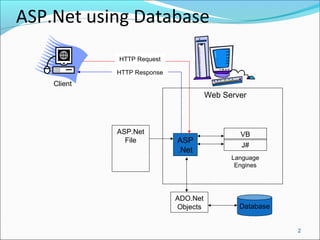
ASP.Net using Database
2
ASP
.Net
VB
J#
ASP.Net
File
ADO.Net
Objects Database
Web Server
Client
HTTP Request
HTTP Response
Language
Engines
ADO.NET
ActiveX Data Objects (ADO) and its .Net version
ADO.Net are Microsoft’s answer to universal data
access - at least for all their languages
ADO.Net insulates the programmer from database
implementation details
Allows you to use SQL and ADO.Net objects to
accomplish most of your data access and
manipulation
3
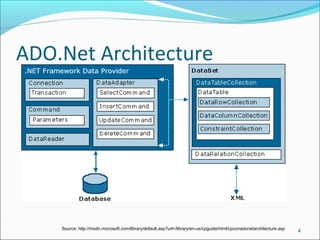
ADO.Net Architecture
4Source: http://msdn.microsoft.com/library/default.asp?url=/library/en-us/cpguide/html/cpconadonetarchitecture.asp
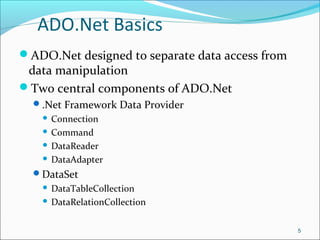
ADO.Net Basics
ADO.Net designed to separate data access from
data manipulation
Two central components of ADO.Net
.Net Framework Data Provider
 Connection
 Command
 DataReader
 DataAdapter
DataSet
 DataTableCollection
 DataRelationCollection
5
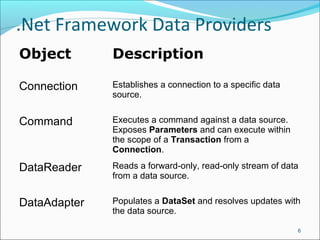
.Net Framework Data Providers
Object Description
Connection Establishes a connection to a specific data
source.
Command Executes a command against a data source.
Exposes Parameters and can execute within
the scope of a Transaction from a
Connection.
DataReader Reads a forward-only, read-only stream of data
from a data source.
DataAdapter Populates a DataSet and resolves updates with
the data source.
6
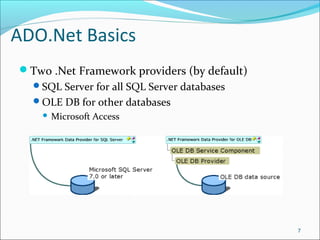
ADO.Net Basics
Two .Net Framework providers (by default)
SQL Server for all SQL Server databases
OLE DB for other databases
 Microsoft Access
7
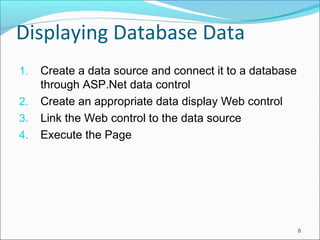
Displaying Database Data
1. Create a data source and connect it to a database
through ASP.Net data control
2. Create an appropriate data display Web control
3. Link the Web control to the data source
4. Execute the Page
8
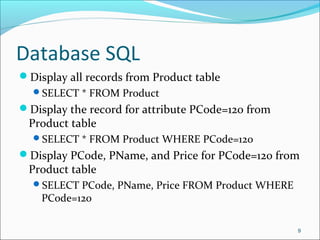
Database SQL
Display all records from Product table
SELECT * FROM Product
Display the record for attribute PCode=120 from
Product table
SELECT * FROM Product WHERE PCode=120
Display PCode, PName, and Price for PCode=120 from
Product table
SELECT PCode, PName, Price FROM Product WHERE
PCode=120
9
Database SQL
Display PCode, PName, and Price for
PName=‘Monitor’ from Product table
SELECT PCode, PName, Price FROM Product WHERE
PName=‘Monitor’
Display Client#, ClientName from Product table and
Trip#, TripDate, People from Booking table for
Client#=120
SELECT Client.[Client#], Client.ClientName, Booking.
[Trip#], Booking.TripDate, Booking.People FROM
Client INNER JOIN Booking ON Client.[Client#] =
Booking.[Client#] WHERE Client.[Client#]=120
10
Database SQL
Sum of People from Booking
SELECT Client.[Client#], Client.ClientName,
Sum(Booking.People) AS SumOfPeople FROM Client
INNER JOIN Booking ON Client.[Client#] = Booking.
[Client#] GROUP BY Client.[Client#],
Client.ClientName
Computed attribute
SELECT Product.ProdID, Product.ProdType,
Product.price, Product.stock, [price]*[stock] AS
StockValue FROM Product
11
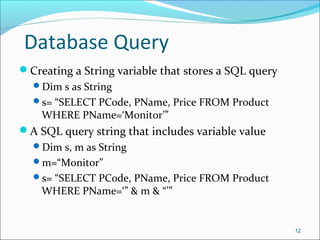
Database Query
Creating a String variable that stores a SQL query
Dim s as String
s= “SELECT PCode, PName, Price FROM Product
WHERE PName=‘Monitor’”
A SQL query string that includes variable value
Dim s, m as String
m=“Monitor”
s= “SELECT PCode, PName, Price FROM Product
WHERE PName=‘” & m & “’”
12

Asp db

  • 1.
  • 2.
    ASP.Net using Database 2 ASP .Net VB J# ASP.Net File ADO.Net ObjectsDatabase Web Server Client HTTP Request HTTP Response Language Engines
  • 3.
    ADO.NET ActiveX Data Objects(ADO) and its .Net version ADO.Net are Microsoft’s answer to universal data access - at least for all their languages ADO.Net insulates the programmer from database implementation details Allows you to use SQL and ADO.Net objects to accomplish most of your data access and manipulation 3
  • 4.
  • 5.
    ADO.Net Basics ADO.Net designedto separate data access from data manipulation Two central components of ADO.Net .Net Framework Data Provider  Connection  Command  DataReader  DataAdapter DataSet  DataTableCollection  DataRelationCollection 5
  • 6.
    .Net Framework DataProviders Object Description Connection Establishes a connection to a specific data source. Command Executes a command against a data source. Exposes Parameters and can execute within the scope of a Transaction from a Connection. DataReader Reads a forward-only, read-only stream of data from a data source. DataAdapter Populates a DataSet and resolves updates with the data source. 6
  • 7.
    ADO.Net Basics Two .NetFramework providers (by default) SQL Server for all SQL Server databases OLE DB for other databases  Microsoft Access 7
  • 8.
    Displaying Database Data 1.Create a data source and connect it to a database through ASP.Net data control 2. Create an appropriate data display Web control 3. Link the Web control to the data source 4. Execute the Page 8
  • 9.
    Database SQL Display allrecords from Product table SELECT * FROM Product Display the record for attribute PCode=120 from Product table SELECT * FROM Product WHERE PCode=120 Display PCode, PName, and Price for PCode=120 from Product table SELECT PCode, PName, Price FROM Product WHERE PCode=120 9
  • 10.
    Database SQL Display PCode,PName, and Price for PName=‘Monitor’ from Product table SELECT PCode, PName, Price FROM Product WHERE PName=‘Monitor’ Display Client#, ClientName from Product table and Trip#, TripDate, People from Booking table for Client#=120 SELECT Client.[Client#], Client.ClientName, Booking. [Trip#], Booking.TripDate, Booking.People FROM Client INNER JOIN Booking ON Client.[Client#] = Booking.[Client#] WHERE Client.[Client#]=120 10
  • 11.
    Database SQL Sum ofPeople from Booking SELECT Client.[Client#], Client.ClientName, Sum(Booking.People) AS SumOfPeople FROM Client INNER JOIN Booking ON Client.[Client#] = Booking. [Client#] GROUP BY Client.[Client#], Client.ClientName Computed attribute SELECT Product.ProdID, Product.ProdType, Product.price, Product.stock, [price]*[stock] AS StockValue FROM Product 11
  • 12.
    Database Query Creating aString variable that stores a SQL query Dim s as String s= “SELECT PCode, PName, Price FROM Product WHERE PName=‘Monitor’” A SQL query string that includes variable value Dim s, m as String m=“Monitor” s= “SELECT PCode, PName, Price FROM Product WHERE PName=‘” & m & “’” 12