OPERATORS: 
 A set of operators is available in Verilog. The operator symbols are 
similar to those in C language 
 With these operators we can carry out specified operations on the 
operands and assign the results to a net or a vector set of nets as the case 
may be. 
Unary Operators: Unary operators do an operation on a single operand and 
assign the result to the specified net. All unary operators get precedence 
over binary and ternary operators. 
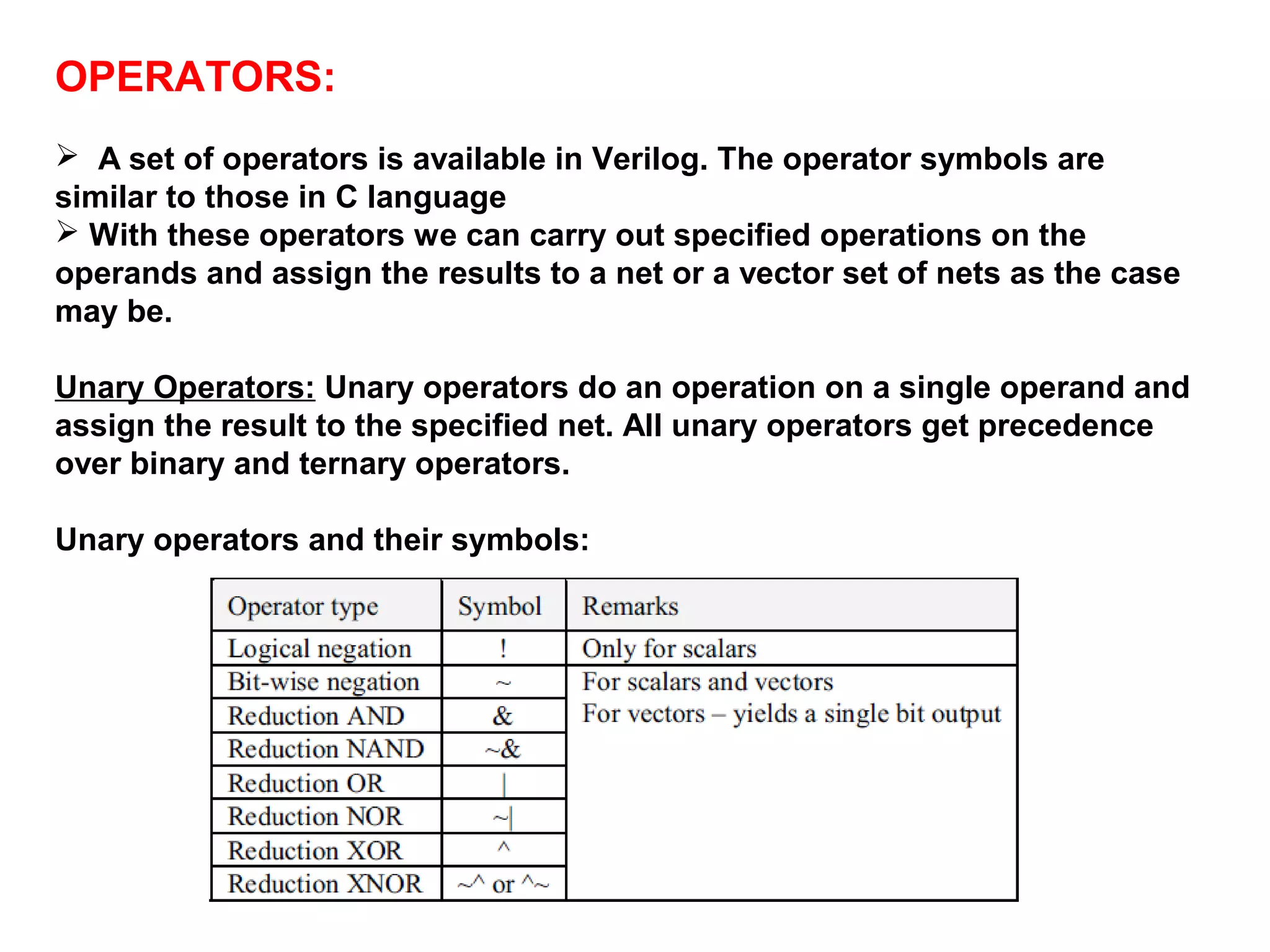
Unary operators and their symbols:
 Reduction operators opearate on all bits of a single operand and produce 1 
–bit result. The operator list given in previous slide 
 For reduction and: if any bit is 0 , the result is 0,else if any bit is an X or Z , 
the result is an X , else the result is 1. 
 Like that apply for or,nand,nor 
 for reduction XOR: if any bit is an X or Z the result is X ,else if there are 
even number of 1’s in the operand, the result is 0,else the result is 1. 
 a= ‘b0110, b= ‘b0100 
 then | b is 1 
 &b is 0 
 ~^ A is 1 
 next example myreg = 4’b01x0 ; 
 then ^myreg is an x
Binary operators: 
 Most operators available are of the binary type. A binary operator takes on 
two operands; the operator comes in between the two operands in the 
assignment. 
x The arithmetic operators treat both the operands as numbers and return the 
result as a number. 
x All net and reg operand values are treated as unsigned numbers. 
x Real and integer operands may be signed quantities. 
 The result of any arithmetic operation — with the “+” or “–” or with any of 
the other arithmetic operators discussed later — will have an x value if any of 
the operand bits has an x or a z value. 
 Classified into arithmetic operators, logical operators, relational operators, 
equality operators, bit wise logical operators, operator truth tables, shift 
operators.
Arithmetic operators: 
The modulus operand is similar to that in C language – It provides 
the remainder of the division of two numbers. 
Example: 
module add_8(a,b,c); 
input[7:0]a,b; 
output[7:0]c; 
assign c = a + b ; // indication of arithmetic binary operator for 
//addition 
endmodule
Examples: 
7/ 4 results 1 // division operation 
 7 % 4 results 3 // modulus operator 
 - 7 % 4 results -3 // modulus operator 
 if any bit of an operand in an arithmetic operation is an x or z , the entire 
result is x for example ‘b10x0 + ‘b01111 is ‘bxxxxx 
 the size of the result of an arithmetic expression is determined by the 
size of the largest operand.
Logical operators: 
 There are two logical operators involving two operands. The operands 
concerned can be variables or expressions involving variables. 
 In both cases the result of the operation is a single bit of value 1 (true) or 0 
(false). 
 If a bit in one of the operands is x or z, the result of evaluation of the 
expression has an x value. 
Crd = ‘b0 , dgs = ‘b1 then 
Crd && dgs is 0 
Crd||dgs is 1 
For vector operands , a non zero vector is treated as a 1, for example 
abus = ‘b0110 , bbus = ,b0100 
Then abus||bbus is 1 also abus&&bbus is also 1
Relational operators: There are four relational operators, their details are 
 A relational operator treats both the operands as binary numbers and 
compares them. 
 The result is a 1 (true) bit or a 0 (false) bit. If a bit in either operand is x 
or z, the result has x (unknown) value. 
 The operands can be variables or expressions involving variables. 
Operands of net or reg type are treated as unsigned numbers. 
Real and integers can be positive or negative (i.e., signed) numbers.
Example of relational operators: 
 23 > 45 is false (value 0), 
 while 52 < 8’hxff is x 
 if operands are not of the same size , the smaller operand is zero filled on 
the MSB side , for example 
‘b1000 >= ‘b01110 
is equivalent to ‘b01000>= ‘b01110 which is false value 0 is the output
Equality operators: 
 The equality operator makes a bit-by-bit comparison of the two operands 
and produces a result bit. 
 The result bit is a 1 (true) if the operand condition is satisfied; otherwise it 
is 0 (false). 
 The operands can be variables or expressions involving variables. 
 If the operands are of unequal length, the shorter one is zero filled to 
match the larger operand. 
 The operators in this category are only of two types – those to test the 
equality and those to test inequality. 
 == (logical equality) 
 != (logical inequality) 
 ===(case equality) 
 !== (case inequality) 
The result is 0 if the comparison is false, else the result is a 1, in case 
comparisons , values x and z are compared strictly as values that is with no 
interpretations.
Equality operators and their symbols:
 Examples of Equality operators: 
Example data = ‘b11x0 ,addr = ‘b11x0 then data = =addr is 
unknown , that is the value x and 
 if data ===addr is true , that is the value 1. 
 If the operands are of unequal lengths , the smaller operand is 
zero filled on the MSB side, that is on the left, for example 
2’b10 == 4’b0010 
is same as 
4’b0010==4’b0010 which is true the result value is 1
Bit wise logical operators: 
 The operator does a specified bit-by-bit operation on the two operands 
and produces a set of result bits. 
 The result is (bit-wise) as wide as the wider operand.If the width of one of 
the operands is less than that of the other, it is bit-extended. by filling zero 
bits and the widths are matched. 
 Subsequently, the specified operation is carried out. 
If one of the operands has an x or z bit in it, the corresponding result bit is 
x. Either operand can be a single variable or an expression involving 
variables.
Operator Truth Table: bit wise operators 
 The truth tables for different types of bit-wise operators are given in Table 
Note that an z input is treated as an x value.
Examples of bitwise operators: 
A= ‘b0110 ,B =‘b0100 then A | B is 0110 , A& B is 0100 
If the operands are unequal in length, the smaller operand is zero filled on 
the most significant side for example 
‘b0110 ^ ‘b10000 
Is same as ‘b00110 ^ ‘b10000 
Answer is ‘b10110
Shift Operators: 
 The << operator executes left shift operation, while the >> operator 
executes the right shift operation. 
In either case the operand specified on the left is shifted by the number of 
bits specified on the right. 
The shifting is done irrespective of whether the bits are 0, 1, x, or z. 
The bits shifted out are lost. 
 The vacated positions created as a result of the shifting are filled with 
zeroes. 
 If the right operand is x or z, the result has an x value. If the right operand 
is negative, the left operand remains unchanged.
Shift Operators contd..: 
 the shift operation shifts left operand by the right 
operand number of times. It is a logical shift .The 
vacated bits are filled with 0 , if the right operand 
evaluates to an x or z, the result of the shift operation 
is an x. 
 reg[0:7] Qreg; 
Qreg= 4’b0111; 
qreg >> 2 is 8’b0000_0001
Ternary Operator: Verilog has only one ternary 
operator – the conditional operator. 
 It checks a condition and does a branching. It is a versatile and powerful 
operator. 
The general form is A?b:c 
 The conditional operation is made up of two operators – “?” and “:” – 
and three operands. 
 The two operands separate the three operators in the order shown. 
 The operational sequence of the operation is as follows: 
“A” is evaluated first. 
If A is true, b is evaluated. 
If A is false, c is evaluated. 
If A evaluates to an ambiguous result, both b and c are evaluated.
Conditional operator contd… 
cond_expr ? expr1:expr2 
 If cond_expr is true (that is ,has a value 1), expr 1 is selected, if cond_expr 
is false (value 0) , expr2 is selected. 
 if cond_expr is an x or a z , the result is a bitwise operation on expr1 and 
expr2 with the following logic: 0 with 0 gives 0, 1 with gives 1, rest are x. 
 here is an example 
 wire [0:2] student = marks >18 ? Grade_A : grade_c; 
 the expression marks > 18 is computed ; if true , Grade_A is assighned to 
student , if marks <=18 , grade_C is assighed to student 
Another example 
always 
#5 ctr = (ctr!=25) ? (ctr+1) : 5; 
 The expression in the procedural assignment says that if ctr is not equal to 
25 increment ctr, else if ctr becomes 25, reset to 5.
Operator priority: 
 A clear understanding of the operator precedence makes room for a 
compact design description. But it may lead to ambiguity and to inadvertent 
errors. 
 Whenever one is not sure of the operator priorities, it is better to resort to 
the use of parentheses and ensure clarity and accuracy of expressions. 
 Further, some synthesizers may not interpret the operator precedence 
properly. These too call for the apt use of parentheses. 
 In any expression, operators associate from left to right. Ternary 
operator is the only exception to this; it associates from right to left.
Examples: 
 P = Q – R + S; 
Here R is subtracted from Q and then S is added to the result. However, 
operator precedence does not cause any ambiguity or change the result 
here. 
 P = Q – R / S; 
In the above case the “divide” operator “/” has precedence over the 
“subtract” operator “–”. Hence R will be divided by S, and the result will be 
subtracted from Q. 
 If division of (Q – R) is desired, 
the expression has to be recast as P = (Q – R) / S; 
 In a lengthier expression such as P = a1 – a2 / a3 + a4 * a5; 
The operation is equivalent to P = a1 – ( a2 / a3 ) + ( a4 * a5 ); 
Use of parentheses adds to clarity especially in operations involving more 
than two operators. 
 The operation P > Q – R is the same as P > (Q – R) 
 since the relational operator “>” has a lower precedence than the 
algebraic operator “–”. 
 Similarly, the expression P + Q <= R is the same as ( P + Q ) <= R.

Operators

  • 1.
    OPERATORS:  Aset of operators is available in Verilog. The operator symbols are similar to those in C language  With these operators we can carry out specified operations on the operands and assign the results to a net or a vector set of nets as the case may be. Unary Operators: Unary operators do an operation on a single operand and assign the result to the specified net. All unary operators get precedence over binary and ternary operators. Unary operators and their symbols:
  • 2.
     Reduction operatorsopearate on all bits of a single operand and produce 1 –bit result. The operator list given in previous slide  For reduction and: if any bit is 0 , the result is 0,else if any bit is an X or Z , the result is an X , else the result is 1.  Like that apply for or,nand,nor  for reduction XOR: if any bit is an X or Z the result is X ,else if there are even number of 1’s in the operand, the result is 0,else the result is 1.  a= ‘b0110, b= ‘b0100  then | b is 1  &b is 0  ~^ A is 1  next example myreg = 4’b01x0 ;  then ^myreg is an x
  • 3.
    Binary operators: Most operators available are of the binary type. A binary operator takes on two operands; the operator comes in between the two operands in the assignment. x The arithmetic operators treat both the operands as numbers and return the result as a number. x All net and reg operand values are treated as unsigned numbers. x Real and integer operands may be signed quantities.  The result of any arithmetic operation — with the “+” or “–” or with any of the other arithmetic operators discussed later — will have an x value if any of the operand bits has an x or a z value.  Classified into arithmetic operators, logical operators, relational operators, equality operators, bit wise logical operators, operator truth tables, shift operators.
  • 4.
    Arithmetic operators: Themodulus operand is similar to that in C language – It provides the remainder of the division of two numbers. Example: module add_8(a,b,c); input[7:0]a,b; output[7:0]c; assign c = a + b ; // indication of arithmetic binary operator for //addition endmodule
  • 5.
    Examples: 7/ 4results 1 // division operation  7 % 4 results 3 // modulus operator  - 7 % 4 results -3 // modulus operator  if any bit of an operand in an arithmetic operation is an x or z , the entire result is x for example ‘b10x0 + ‘b01111 is ‘bxxxxx  the size of the result of an arithmetic expression is determined by the size of the largest operand.
  • 6.
    Logical operators: There are two logical operators involving two operands. The operands concerned can be variables or expressions involving variables.  In both cases the result of the operation is a single bit of value 1 (true) or 0 (false).  If a bit in one of the operands is x or z, the result of evaluation of the expression has an x value. Crd = ‘b0 , dgs = ‘b1 then Crd && dgs is 0 Crd||dgs is 1 For vector operands , a non zero vector is treated as a 1, for example abus = ‘b0110 , bbus = ,b0100 Then abus||bbus is 1 also abus&&bbus is also 1
  • 7.
    Relational operators: Thereare four relational operators, their details are  A relational operator treats both the operands as binary numbers and compares them.  The result is a 1 (true) bit or a 0 (false) bit. If a bit in either operand is x or z, the result has x (unknown) value.  The operands can be variables or expressions involving variables. Operands of net or reg type are treated as unsigned numbers. Real and integers can be positive or negative (i.e., signed) numbers.
  • 8.
    Example of relationaloperators:  23 > 45 is false (value 0),  while 52 < 8’hxff is x  if operands are not of the same size , the smaller operand is zero filled on the MSB side , for example ‘b1000 >= ‘b01110 is equivalent to ‘b01000>= ‘b01110 which is false value 0 is the output
  • 9.
    Equality operators: The equality operator makes a bit-by-bit comparison of the two operands and produces a result bit.  The result bit is a 1 (true) if the operand condition is satisfied; otherwise it is 0 (false).  The operands can be variables or expressions involving variables.  If the operands are of unequal length, the shorter one is zero filled to match the larger operand.  The operators in this category are only of two types – those to test the equality and those to test inequality.  == (logical equality)  != (logical inequality)  ===(case equality)  !== (case inequality) The result is 0 if the comparison is false, else the result is a 1, in case comparisons , values x and z are compared strictly as values that is with no interpretations.
  • 10.
    Equality operators andtheir symbols:
  • 11.
     Examples ofEquality operators: Example data = ‘b11x0 ,addr = ‘b11x0 then data = =addr is unknown , that is the value x and  if data ===addr is true , that is the value 1.  If the operands are of unequal lengths , the smaller operand is zero filled on the MSB side, that is on the left, for example 2’b10 == 4’b0010 is same as 4’b0010==4’b0010 which is true the result value is 1
  • 12.
    Bit wise logicaloperators:  The operator does a specified bit-by-bit operation on the two operands and produces a set of result bits.  The result is (bit-wise) as wide as the wider operand.If the width of one of the operands is less than that of the other, it is bit-extended. by filling zero bits and the widths are matched.  Subsequently, the specified operation is carried out. If one of the operands has an x or z bit in it, the corresponding result bit is x. Either operand can be a single variable or an expression involving variables.
  • 13.
    Operator Truth Table:bit wise operators  The truth tables for different types of bit-wise operators are given in Table Note that an z input is treated as an x value.
  • 14.
    Examples of bitwiseoperators: A= ‘b0110 ,B =‘b0100 then A | B is 0110 , A& B is 0100 If the operands are unequal in length, the smaller operand is zero filled on the most significant side for example ‘b0110 ^ ‘b10000 Is same as ‘b00110 ^ ‘b10000 Answer is ‘b10110
  • 15.
    Shift Operators: The << operator executes left shift operation, while the >> operator executes the right shift operation. In either case the operand specified on the left is shifted by the number of bits specified on the right. The shifting is done irrespective of whether the bits are 0, 1, x, or z. The bits shifted out are lost.  The vacated positions created as a result of the shifting are filled with zeroes.  If the right operand is x or z, the result has an x value. If the right operand is negative, the left operand remains unchanged.
  • 16.
    Shift Operators contd..:  the shift operation shifts left operand by the right operand number of times. It is a logical shift .The vacated bits are filled with 0 , if the right operand evaluates to an x or z, the result of the shift operation is an x.  reg[0:7] Qreg; Qreg= 4’b0111; qreg >> 2 is 8’b0000_0001
  • 17.
    Ternary Operator: Veriloghas only one ternary operator – the conditional operator.  It checks a condition and does a branching. It is a versatile and powerful operator. The general form is A?b:c  The conditional operation is made up of two operators – “?” and “:” – and three operands.  The two operands separate the three operators in the order shown.  The operational sequence of the operation is as follows: “A” is evaluated first. If A is true, b is evaluated. If A is false, c is evaluated. If A evaluates to an ambiguous result, both b and c are evaluated.
  • 18.
    Conditional operator contd… cond_expr ? expr1:expr2  If cond_expr is true (that is ,has a value 1), expr 1 is selected, if cond_expr is false (value 0) , expr2 is selected.  if cond_expr is an x or a z , the result is a bitwise operation on expr1 and expr2 with the following logic: 0 with 0 gives 0, 1 with gives 1, rest are x.  here is an example  wire [0:2] student = marks >18 ? Grade_A : grade_c;  the expression marks > 18 is computed ; if true , Grade_A is assighned to student , if marks <=18 , grade_C is assighed to student Another example always #5 ctr = (ctr!=25) ? (ctr+1) : 5;  The expression in the procedural assignment says that if ctr is not equal to 25 increment ctr, else if ctr becomes 25, reset to 5.
  • 19.
    Operator priority: A clear understanding of the operator precedence makes room for a compact design description. But it may lead to ambiguity and to inadvertent errors.  Whenever one is not sure of the operator priorities, it is better to resort to the use of parentheses and ensure clarity and accuracy of expressions.  Further, some synthesizers may not interpret the operator precedence properly. These too call for the apt use of parentheses.  In any expression, operators associate from left to right. Ternary operator is the only exception to this; it associates from right to left.
  • 20.
    Examples:  P= Q – R + S; Here R is subtracted from Q and then S is added to the result. However, operator precedence does not cause any ambiguity or change the result here.  P = Q – R / S; In the above case the “divide” operator “/” has precedence over the “subtract” operator “–”. Hence R will be divided by S, and the result will be subtracted from Q.  If division of (Q – R) is desired, the expression has to be recast as P = (Q – R) / S;  In a lengthier expression such as P = a1 – a2 / a3 + a4 * a5; The operation is equivalent to P = a1 – ( a2 / a3 ) + ( a4 * a5 ); Use of parentheses adds to clarity especially in operations involving more than two operators.  The operation P > Q – R is the same as P > (Q – R)  since the relational operator “>” has a lower precedence than the algebraic operator “–”.  Similarly, the expression P + Q <= R is the same as ( P + Q ) <= R.