By- Teach4u.in
What is ASP.NET AJAX?
 AJAX is about updating parts of a web page, without
reloading the whole page.
 A pilot project by Atlas for Microsoft. Worked out so
well that it outperformed all parallel efforts and finally
got an approval from Microsoft.
 A framework to build AJAX enabled application with
ASP.NET.
 Enables user to create a rich UI with known controls.
ASP.NET AJAX
 Provides client script libraries that incorporate
JavaScript and DHTML technologies and integrate
them with ASP.NET 2.0.
 Based on Functionality
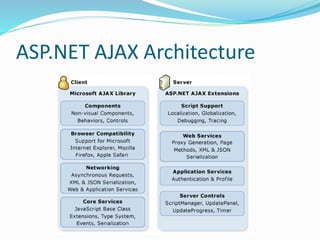
 Client based Microsoft AJAX Library.
 Support for creating client components, browser
compatibility, networking and core services.
 Server based Extensions.
 Script support, web services, application services and server
controls.
What is AJAX and why should I
care?
 Asynchronous JavaScript and XML.
 User expectations are increasing.
 Need both performance and rich look.
 Need more responsiveness.
 No frequent page refreshes.
 Lesser network overhead.
 Reduced postbacks.
 Partial page updates.
Supported Browsers and OS
 Supported browsers:
 IE 6.o or later.
 Mozilla Firefox 1.5 or later.
 Opera 9.0 or later.
 Apple safari 2.0 or later.
 Supported Operating Systems:
 Microsoft windows XP with service pack 2.
 Microsoft Vista.
 Apple OSX (Intel Architecture only).
ASP.NET AJAX Architecture
ASP.NET AJAX Server Architecture
 Server Components consist of server controls and
components to manage the UI and flow of an
application.
 Manage serialization, validation, control extensibility
etc.
 ASP.NET web services available that enable you to
access services like forms authentication and user
profiles.
ASP.NET AJAX Server Architecture
 Server Controls:
 Server and Client code integrated to produce AJAX like
behavior.
 Frequently used Server Controls are
 Script Manager – one instance per page.
 Update Panel – for partial page updates.
 Update Progress – track progress of Asynchronous req.
 Timer Control – set interval between requests.
 Along with these also available are Pointer control and
Script Manager Proxy.
Webservices and Control
Extensibility
 ASP.NET AJAX provides Web services that you can use
from client script to work with ASP.NET application
services for forms authentication and user profiles.
This enables you to use client script to help protect
resources by using forms authentication and to persist
user-specific settings on the server.
 ASP.NET AJAX enables you to create custom server
controls that include client behaviors. AJAX Control
Toolkit provides a number of extenders along with
source code. Users can extend the code more if they
wish.
ASP.NET AJAX Client Architecture
 ASP.NET AJAX client side libraries consist of JavaScript
files that provide features for object-oriented
development.
 Enable a high level of consistency and modularity in
client scripting.
 Layers included in script libraries are
 A Browser compatibility layer to support all modern browsers.
 Core services to empower JavaScript with Object Oriented
features.
ASP.NET AJAX Client Architecture
 Base Class Library includes string builders and extended error
handling.
 A networking layer to communicate with web services and
handle asynchronous remote calls.
 Support for JavaScript libraries embedded in an assembly or
added externally (standalone).
 Support for accessing server based forms authentication and
user profile. (without page refresh)
 Support for release and debug modes.
Localization and Globalization
 Provides a model for localizing and globalizing a client
script.
 Enables you to design applications that use single code
base to provide UI for different locales.
 Example : Enables JavaScript code to format date or Number
Objects automatically depending upon the browser’s culture
settings without post back to server.
 Provides additional support for localized script files
embedded in an assembly.
 Hub and spoke model. (Main Assembly and Satellite
Assemblies)
ASP.NET AJAX Control Toolkit
 The ASP.NET AJAX Control Toolkit is a collection of
samples and components that show you some of the
experiences you can create with rich client ASP.NET
AJAX controls and extenders.
 The Control Toolkit provides samples and a powerful
SDK to make it simple to create and reuse custom
controls and extenders.
 More up to date information can be obtained from
Merits :
 Integration between (Atlas) AJAX and ASP.NET is
wonderful !! Was designed for it.
 AJAX Control Toolkit contains around 28 extenders
allowing cool effects like drag and drop and collapsible
menus.
 Generates JavaScript web service proxy class allowing
easy integration with web services.
 Server side Exceptions are effectively caught and
thrown onto client side for JavaScript to handle them.
Merits and Issues :
 Integrated nicely with ASP.NET Membership and
Profile API’s supporting client side authentication
without postbacks.
 Supports all well known Browsers.
Issues and Work Arounds:
 Batch calls are not always faster.
 Know when to use Batch calls and when not to.
 Bad calls may cause good calls timeout.
 Write down a custom “onFailure” callback function and
a retry occurs when there is a timeout.
Issues and Work Arounds:
 Browsers allow two calls at a time and don’t expect any
order.
 ??? It’s Unpredictable..
 Browsers do not respond when there are more than
two calls in queue.
 Write your own implementation of queue.
Issues and Work Arounds:
 “THIS” is not always “THIS”.
 Unfortunately no documentation for this. But you need
to know yourself what “this” refers to under given
context.
 HTTP POST is slower than HTTP GET but it is default
in ASP.NET AJAX.
 In order to enable HTTP GET on a web service method,
you need to decorate the web method with the following
attribute [ScriptMethod(UseHttpGet=true)]
More Issues :
 JavaScript should be enabled for AJAX to work.
 Browser back button behavior doesn’t work well with
AJAX calls.
Conclusion:
 Despite all, it can be considered as one of the best
frameworks available to build new Ajax enabled
websites or easily Ajax enable any existing ASP.NET
website with lot of readily available code and support
through communities.

New microsoft office power point presentation

  • 1.
  • 2.
    What is ASP.NETAJAX?  AJAX is about updating parts of a web page, without reloading the whole page.  A pilot project by Atlas for Microsoft. Worked out so well that it outperformed all parallel efforts and finally got an approval from Microsoft.  A framework to build AJAX enabled application with ASP.NET.  Enables user to create a rich UI with known controls.
  • 3.
    ASP.NET AJAX  Providesclient script libraries that incorporate JavaScript and DHTML technologies and integrate them with ASP.NET 2.0.  Based on Functionality  Client based Microsoft AJAX Library.  Support for creating client components, browser compatibility, networking and core services.  Server based Extensions.  Script support, web services, application services and server controls.
  • 4.
    What is AJAXand why should I care?  Asynchronous JavaScript and XML.  User expectations are increasing.  Need both performance and rich look.  Need more responsiveness.  No frequent page refreshes.  Lesser network overhead.  Reduced postbacks.  Partial page updates.
  • 5.
    Supported Browsers andOS  Supported browsers:  IE 6.o or later.  Mozilla Firefox 1.5 or later.  Opera 9.0 or later.  Apple safari 2.0 or later.  Supported Operating Systems:  Microsoft windows XP with service pack 2.  Microsoft Vista.  Apple OSX (Intel Architecture only).
  • 6.
  • 7.
    ASP.NET AJAX ServerArchitecture  Server Components consist of server controls and components to manage the UI and flow of an application.  Manage serialization, validation, control extensibility etc.  ASP.NET web services available that enable you to access services like forms authentication and user profiles.
  • 8.
    ASP.NET AJAX ServerArchitecture  Server Controls:  Server and Client code integrated to produce AJAX like behavior.  Frequently used Server Controls are  Script Manager – one instance per page.  Update Panel – for partial page updates.  Update Progress – track progress of Asynchronous req.  Timer Control – set interval between requests.  Along with these also available are Pointer control and Script Manager Proxy.
  • 9.
    Webservices and Control Extensibility ASP.NET AJAX provides Web services that you can use from client script to work with ASP.NET application services for forms authentication and user profiles. This enables you to use client script to help protect resources by using forms authentication and to persist user-specific settings on the server.  ASP.NET AJAX enables you to create custom server controls that include client behaviors. AJAX Control Toolkit provides a number of extenders along with source code. Users can extend the code more if they wish.
  • 10.
    ASP.NET AJAX ClientArchitecture  ASP.NET AJAX client side libraries consist of JavaScript files that provide features for object-oriented development.  Enable a high level of consistency and modularity in client scripting.  Layers included in script libraries are  A Browser compatibility layer to support all modern browsers.  Core services to empower JavaScript with Object Oriented features.
  • 11.
    ASP.NET AJAX ClientArchitecture  Base Class Library includes string builders and extended error handling.  A networking layer to communicate with web services and handle asynchronous remote calls.  Support for JavaScript libraries embedded in an assembly or added externally (standalone).  Support for accessing server based forms authentication and user profile. (without page refresh)  Support for release and debug modes.
  • 12.
    Localization and Globalization Provides a model for localizing and globalizing a client script.  Enables you to design applications that use single code base to provide UI for different locales.  Example : Enables JavaScript code to format date or Number Objects automatically depending upon the browser’s culture settings without post back to server.  Provides additional support for localized script files embedded in an assembly.  Hub and spoke model. (Main Assembly and Satellite Assemblies)
  • 13.
    ASP.NET AJAX ControlToolkit  The ASP.NET AJAX Control Toolkit is a collection of samples and components that show you some of the experiences you can create with rich client ASP.NET AJAX controls and extenders.  The Control Toolkit provides samples and a powerful SDK to make it simple to create and reuse custom controls and extenders.  More up to date information can be obtained from
  • 14.
    Merits :  Integrationbetween (Atlas) AJAX and ASP.NET is wonderful !! Was designed for it.  AJAX Control Toolkit contains around 28 extenders allowing cool effects like drag and drop and collapsible menus.  Generates JavaScript web service proxy class allowing easy integration with web services.  Server side Exceptions are effectively caught and thrown onto client side for JavaScript to handle them.
  • 15.
    Merits and Issues:  Integrated nicely with ASP.NET Membership and Profile API’s supporting client side authentication without postbacks.  Supports all well known Browsers. Issues and Work Arounds:  Batch calls are not always faster.  Know when to use Batch calls and when not to.  Bad calls may cause good calls timeout.  Write down a custom “onFailure” callback function and a retry occurs when there is a timeout.
  • 16.
    Issues and WorkArounds:  Browsers allow two calls at a time and don’t expect any order.  ??? It’s Unpredictable..  Browsers do not respond when there are more than two calls in queue.  Write your own implementation of queue.
  • 17.
    Issues and WorkArounds:  “THIS” is not always “THIS”.  Unfortunately no documentation for this. But you need to know yourself what “this” refers to under given context.  HTTP POST is slower than HTTP GET but it is default in ASP.NET AJAX.  In order to enable HTTP GET on a web service method, you need to decorate the web method with the following attribute [ScriptMethod(UseHttpGet=true)]
  • 18.
    More Issues : JavaScript should be enabled for AJAX to work.  Browser back button behavior doesn’t work well with AJAX calls. Conclusion:  Despite all, it can be considered as one of the best frameworks available to build new Ajax enabled websites or easily Ajax enable any existing ASP.NET website with lot of readily available code and support through communities.