Unit II-Java Operators
Operatorsare symbols that perform operations on
variables and values. For example, + is an operator used
for addition, while * is also an operator used for
multiplication.
Operators in Java can be classified into 5 types:
•Arithmetic Operators
•Assignment Operators
•Relational Operators
•Logical Operators
•Unary Operators
•Bitwise Operators
2.
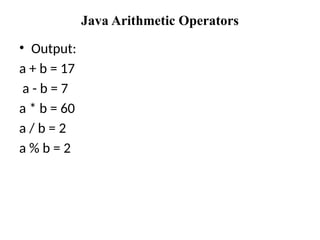
Java Arithmetic Operators
Arithmeticoperators are used to perform arithmetic operations on variables and data.
thmetic Operators
class Main {
public static void main(String[] args) {
// declare variables
int a = 12, b = 5;
// addition operator
System.out.println("a + b = " + (a + b));
// subtraction operator
System.out.println("a - b = " + (a - b));
// multiplication operator
System.out.println("a * b = " + (a * b));
// division operator
System.out.println("a / b = " + (a / b));
// modulo operator
System.out.println("a % b = " + (a % b));
}
}
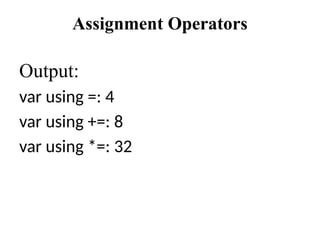
Assignment Operators
class Main{
public static void main(String[] args) {
// create variables
int a = 4;
int var;
// assign value using =
var = a;
System.out.println("var using =: " + var);
// assign value using =+
var += a;
System.out.println("var using +=: " + var);
// assign value using =*
var *= a;
System.out.println("var using *=: " + var);
}
}
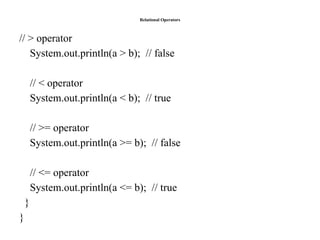
Relational Operators
• Relationaloperators are used to check the relationship between two
operands.
class Main {
public static void main(String[] args) {
// create variables
int a = 7, b = 11;
// value of a and b
System.out.println("a is " + a + " and b is " + b);
// == operator
System.out.println(a == b); // false
// != operator
System.out.println(a != b); // true
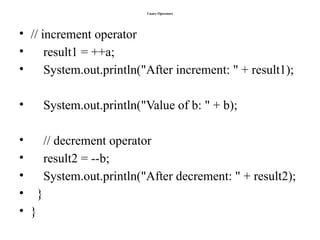
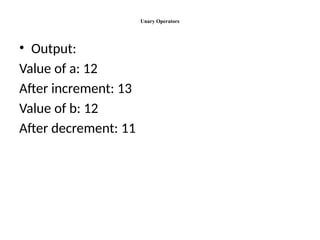
Unary Operators
• Usedwith only one operand
• E.g.
• ++ is a unary operator that increases the value of a
variable by 1. That is, ++5 will return 6
class Main {
public static void main(String[] args) {
// declare variables
int a = 12, b = 12;
int result1, result2;
// original value
System.out.println("Value of a: " + a);
Bitwise and ShiftOperators
• Bitwise OR
class Main {
public static void main(String[] args) {
int number1 = 12, number2 = 25, result;
// bitwise OR between 12 and 25
result = number1 | number2;
System.out.println(result); // prints 29
}
}
13.
Bitwise and ShiftOperators
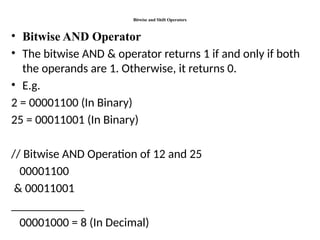
• Bitwise AND Operator
• The bitwise AND & operator returns 1 if and only if both
the operands are 1. Otherwise, it returns 0.
• E.g.
2 = 00001100 (In Binary)
25 = 00011001 (In Binary)
// Bitwise AND Operation of 12 and 25
00001100
& 00011001
____________
00001000 = 8 (In Decimal)
14.
Bitwise AND Operator
classMain {
public static void main(String[] args) {
int number1 = 12, number2 = 25, result;
// bitwise AND between 12 and 25
result = number1 & number2;
System.out.println(result); // prints 8
}
}
15.
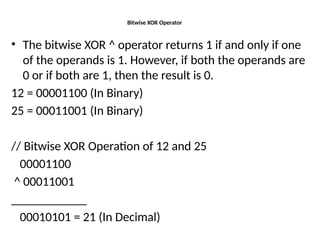
Bitwise XOR Operator
•The bitwise XOR ^ operator returns 1 if and only if one
of the operands is 1. However, if both the operands are
0 or if both are 1, then the result is 0.
12 = 00001100 (In Binary)
25 = 00011001 (In Binary)
// Bitwise XOR Operation of 12 and 25
00001100
^ 00011001
____________
00010101 = 21 (In Decimal)
16.
Bitwise XOR Operator
classMain {
public static void main(String[] args) {
int number1 = 12, number2 = 25, result;
// bitwise XOR between 12 and 25
result = number1 ^ number2;
System.out.println(result); // prints 21
}
}
17.
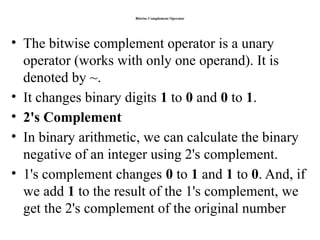
Bitwise Complement Operator
•The bitwise complement operator is a unary
operator (works with only one operand). It is
denoted by ~.
• It changes binary digits 1 to 0 and 0 to 1.
• 2's Complement
• In binary arithmetic, we can calculate the binary
negative of an integer using 2's complement.
• 1's complement changes 0 to 1 and 1 to 0. And, if
we add 1 to the result of the 1's complement, we
get the 2's complement of the original number
18.
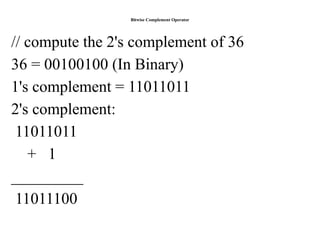
Bitwise Complement Operator
//compute the 2's complement of 36
36 = 00100100 (In Binary)
1's complement = 11011011
2's complement:
11011011
+ 1
_________
11011100
19.
Bitwise Complement Operator
classMain {
public static void main(String[] args) {
int number = 35, result;
// bitwise complement of 35
result = ~number;
System.out.println(result); // prints -36
}
}
20.
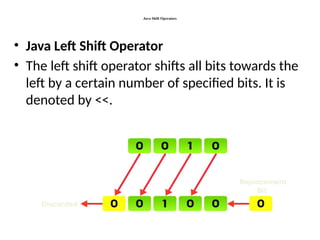
Java Shift Operators
•Java Left Shift Operator
• The left shift operator shifts all bits towards the
left by a certain number of specified bits. It is
denoted by <<.
21.
Java Left ShiftOperator
class Main {
public static void main(String[] args) {
int number = 2;
// 2 bit left shift operation
int result = number << 2;
System.out.println(result); // prints 8
}
}
22.
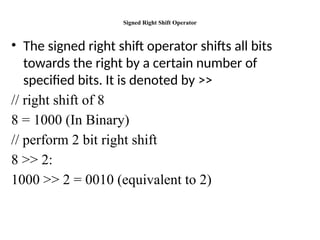
Signed Right ShiftOperator
• The signed right shift operator shifts all bits
towards the right by a certain number of
specified bits. It is denoted by >>
// right shift of 8
8 = 1000 (In Binary)
// perform 2 bit right shift
8 >> 2:
1000 >> 2 = 0010 (equivalent to 2)
23.
Signed Right ShiftOperator
class Main {
public static void main(String[] args) {
int number1 = 8;
int number2 = -8;
// 2 bit signed right shift
System.out.println(number1 >> 2); // prints 2
System.out.println(number2 >> 2); // prints -2
}
}
24.
References
• Java TheComplete Reference, Mc Graw Hill
Edition, Ninth Edition Herbert Schildt 2016
![Java Arithmetic Operators
Arithmetic operators are used to perform arithmetic operations on variables and data.
thmetic Operators
class Main {
public static void main(String[] args) {
// declare variables
int a = 12, b = 5;
// addition operator
System.out.println("a + b = " + (a + b));
// subtraction operator
System.out.println("a - b = " + (a - b));
// multiplication operator
System.out.println("a * b = " + (a * b));
// division operator
System.out.println("a / b = " + (a / b));
// modulo operator
System.out.println("a % b = " + (a % b));
}
}](https://image.slidesharecdn.com/oopjppt2-250420133207-b91e0899/85/OOPJ_PPT2-JAVA-OPERATORS-TPYE-WITH-EXAMPLES-pptx-2-320.jpg)
![Assignment Operators
class Main {
public static void main(String[] args) {
// create variables
int a = 4;
int var;
// assign value using =
var = a;
System.out.println("var using =: " + var);
// assign value using =+
var += a;
System.out.println("var using +=: " + var);
// assign value using =*
var *= a;
System.out.println("var using *=: " + var);
}
}](https://image.slidesharecdn.com/oopjppt2-250420133207-b91e0899/85/OOPJ_PPT2-JAVA-OPERATORS-TPYE-WITH-EXAMPLES-pptx-4-320.jpg)
![Relational Operators
• Relational operators are used to check the relationship between two
operands.
class Main {
public static void main(String[] args) {
// create variables
int a = 7, b = 11;
// value of a and b
System.out.println("a is " + a + " and b is " + b);
// == operator
System.out.println(a == b); // false
// != operator
System.out.println(a != b); // true](https://image.slidesharecdn.com/oopjppt2-250420133207-b91e0899/85/OOPJ_PPT2-JAVA-OPERATORS-TPYE-WITH-EXAMPLES-pptx-6-320.jpg)
![Logical Operators
• Check whether an expression is true or false
• Decision making
class Main {
public static void main(String[] args) {
// && operator
System.out.println((5 > 3) && (8 > 5)); // true
System.out.println((5 > 3) && (8 < 5)); // false
// || operator
System.out.println((5 < 3) || (8 > 5)); // true
System.out.println((5 > 3) || (8 < 5)); // true
System.out.println((5 < 3) || (8 < 5)); // false
// ! operator
System.out.println(!(5 == 3)); // true
System.out.println(!(5 > 3)); // false
}
}](https://image.slidesharecdn.com/oopjppt2-250420133207-b91e0899/85/OOPJ_PPT2-JAVA-OPERATORS-TPYE-WITH-EXAMPLES-pptx-8-320.jpg)
![Unary Operators
• Used with only one operand
• E.g.
• ++ is a unary operator that increases the value of a
variable by 1. That is, ++5 will return 6
class Main {
public static void main(String[] args) {
// declare variables
int a = 12, b = 12;
int result1, result2;
// original value
System.out.println("Value of a: " + a);](https://image.slidesharecdn.com/oopjppt2-250420133207-b91e0899/85/OOPJ_PPT2-JAVA-OPERATORS-TPYE-WITH-EXAMPLES-pptx-9-320.jpg)
![Bitwise and Shift Operators
• Bitwise OR
class Main {
public static void main(String[] args) {
int number1 = 12, number2 = 25, result;
// bitwise OR between 12 and 25
result = number1 | number2;
System.out.println(result); // prints 29
}
}](https://image.slidesharecdn.com/oopjppt2-250420133207-b91e0899/85/OOPJ_PPT2-JAVA-OPERATORS-TPYE-WITH-EXAMPLES-pptx-12-320.jpg)
![Bitwise AND Operator
class Main {
public static void main(String[] args) {
int number1 = 12, number2 = 25, result;
// bitwise AND between 12 and 25
result = number1 & number2;
System.out.println(result); // prints 8
}
}](https://image.slidesharecdn.com/oopjppt2-250420133207-b91e0899/85/OOPJ_PPT2-JAVA-OPERATORS-TPYE-WITH-EXAMPLES-pptx-14-320.jpg)
![Bitwise XOR Operator
class Main {
public static void main(String[] args) {
int number1 = 12, number2 = 25, result;
// bitwise XOR between 12 and 25
result = number1 ^ number2;
System.out.println(result); // prints 21
}
}](https://image.slidesharecdn.com/oopjppt2-250420133207-b91e0899/85/OOPJ_PPT2-JAVA-OPERATORS-TPYE-WITH-EXAMPLES-pptx-16-320.jpg)
![Bitwise Complement Operator
class Main {
public static void main(String[] args) {
int number = 35, result;
// bitwise complement of 35
result = ~number;
System.out.println(result); // prints -36
}
}](https://image.slidesharecdn.com/oopjppt2-250420133207-b91e0899/85/OOPJ_PPT2-JAVA-OPERATORS-TPYE-WITH-EXAMPLES-pptx-19-320.jpg)
![Java Left Shift Operator
class Main {
public static void main(String[] args) {
int number = 2;
// 2 bit left shift operation
int result = number << 2;
System.out.println(result); // prints 8
}
}](https://image.slidesharecdn.com/oopjppt2-250420133207-b91e0899/85/OOPJ_PPT2-JAVA-OPERATORS-TPYE-WITH-EXAMPLES-pptx-21-320.jpg)
![Signed Right Shift Operator
class Main {
public static void main(String[] args) {
int number1 = 8;
int number2 = -8;
// 2 bit signed right shift
System.out.println(number1 >> 2); // prints 2
System.out.println(number2 >> 2); // prints -2
}
}](https://image.slidesharecdn.com/oopjppt2-250420133207-b91e0899/85/OOPJ_PPT2-JAVA-OPERATORS-TPYE-WITH-EXAMPLES-pptx-23-320.jpg)