BY-Teach4u.in
ASP.NET Controls
 ASP includes normal HTML elements
 Server-side controls are objects that provide
corresponding HTML output.
 You can set their properties, call methods and
program events on them
2
Server Controls
 Four types of server controls:
 HTML server controls: server-based equivalent for
standard HTML elements
 Web controls: more object properties and events + new
types of controls not in HTML
 Validation controls: check user inputs
 User controls: developer designed controls
 More controls in ASP.NET 2.0
3
HTML Server Controls
 An object interface for standard HTML elements
 Generate equivalent interface
 Retain their state
 Fire events
 Add the attribute “runat=serevr” and an id to the
HTML element start tag
4
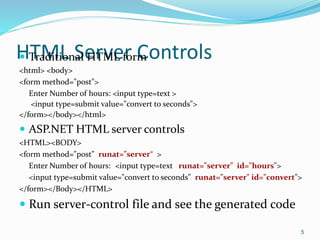
HTML Server Controls Traditional HTML form
<html> <body>
<form method="post">
Enter Number of hours: <input type=text >
<input type=submit value="convert to seconds">
</form></body></html>
 ASP.NET HTML server controls
<HTML><BODY>
<form method="post" runat="server“ >
Enter Number of hours: <input type=text runat="server" id="hours">
<input type=submit value="convert to seconds" runat="server" id="convert">
</form></Body></HTML>
 Run server-control file and see the generated code
5
HTML Server Controls Automatically maintain state of controls in the page using
the hidden field which is compressed and encrypted code.
 Exists in System.Web.UI.HTMLControls
 Note: An .aspx page can only contain ONE <form
runat="server"> control!
 Two types of events: ServerClick, ServerChange
6
7
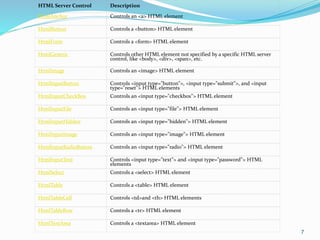
HTML Server Control Description
HtmlAnchor Controls an <a> HTML element
HtmlButton Controls a <button> HTML element
HtmlForm Controls a <form> HTML element
HtmlGeneric Controls other HTML element not specified by a specific HTML server
control, like <body>, <div>, <span>, etc.
HtmlImage Controls an <image> HTML element
HtmlInputButton Controls <input type="button">, <input type="submit">, and <input
type="reset"> HTML elements
HtmlInputCheckBox Controls an <input type="checkbox"> HTML element
HtmlInputFile Controls an <input type="file"> HTML element
HtmlInputHidden Controls an <input type="hidden"> HTML element
HtmlInputImage Controls an <input type="image"> HTML element
HtmlInputRadioButton Controls an <input type="radio"> HTML element
HtmlInputText Controls <input type="text"> and <input type="password"> HTML
elements
HtmlSelect Controls a <select> HTML element
HtmlTable Controls a <table> HTML element
HtmlTableCell Controls <td>and <th> HTML elements
HtmlTableRow Controls a <tr> HTML element
HtmlTextArea Controls a <textarea> HTML element
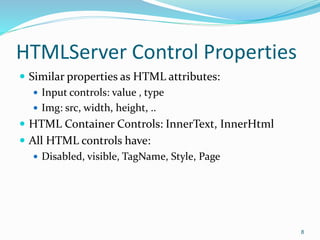
HTMLServer Control Properties
 Similar properties as HTML attributes:
 Input controls: value , type
 Img: src, width, height, ..
 HTML Container Controls: InnerText, InnerHtml
 All HTML controls have:
 Disabled, visible, TagName, Style, Page
8
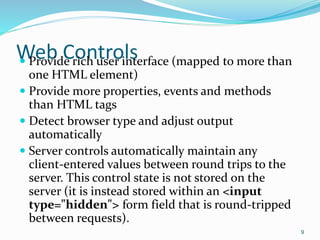
Web Controls Provide rich user interface (mapped to more than
one HTML element)
 Provide more properties, events and methods
than HTML tags
 Detect browser type and adjust output
automatically
 Server controls automatically maintain any
client-entered values between round trips to the
server. This control state is not stored on the
server (it is instead stored within an <input
type="hidden"> form field that is round-tripped
between requests).
9
10
Web Server Control Description
Button Displays a push button
CheckBox Displays a check box
CheckBoxList Creates a multi-selection check box group
DropDownList Creates a drop-down list
HyperLink Creates a hyperlink
Image Displays an image
ImageButton Displays a clickable image
Label Displays static content which is programmable (span)
LinkButton Creates a hyperlink button
ListBox Creates a single- or multi-selection drop-down list
Panel Provides a container for other controls
RadioButton Creates a radio button
RadioButtonList Creates a group of radio buttons
Table Creates a table
TableCell Creates a table cell
TableRow Creates a table row
TextBox Creates a text box
Web Controls
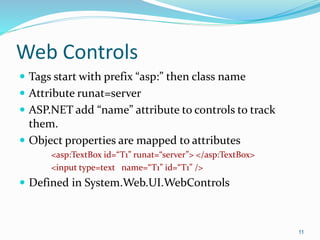
 Tags start with prefix “asp:” then class name
 Attribute runat=server
 ASP.NET add “name” attribute to controls to track
them.
 Object properties are mapped to attributes
<asp:TextBox id=“T1” runat=“server”> </asp:TextBox>
<input type=text name=“T1” id=“T1” />
 Defined in System.Web.UI.WebControls
11
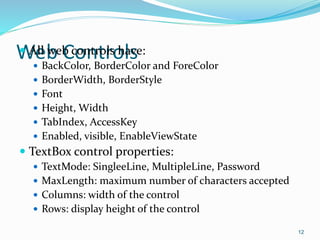
Web Controls All web controls have:
 BackColor, BorderColor and ForeColor
 BorderWidth, BorderStyle
 Font
 Height, Width
 TabIndex, AccessKey
 Enabled, visible, EnableViewState
 TextBox control properties:
 TextMode: SingleeLine, MultipleLine, Password
 MaxLength: maximum number of characters accepted
 Columns: width of the control
 Rows: display height of the control
12
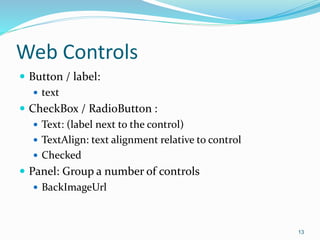
Web Controls
 Button / label:
 text
 CheckBox / RadioButton :
 Text: (label next to the control)
 TextAlign: text alignment relative to control
 Checked
 Panel: Group a number of controls
 BackImageUrl
13
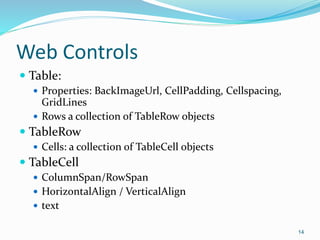
Web Controls
 Table:
 Properties: BackImageUrl, CellPadding, Cellspacing,
GridLines
 Rows a collection of TableRow objects
 TableRow
 Cells: a collection of TableCell objects
 TableCell
 ColumnSpan/RowSpan
 HorizontalAlign / VerticalAlign
 text
14
List Controls ListBox, DropDownList, CheckBoxList,
RadioButtonList
 Items: Collection of “ListItem” objects, which has:
 text : Displayed word
 value : hidden value in HTML code
 Selected: boolean
 Properties: SelectedIndex, SelectedItem
 Multiple selection for ListBox, set “SelectionMode” property
 RadioButtonList/ CheckBoxList properties:
 RepeatColumns, RepeatDirection, RepeateLayout, TextAlign
15
Web Control Events
 Events types: Click, TextChange, CheckChanged,
SelectedIndexChanged
 Change events have their autoPostBack property false
by default.
 ASP.NET adds a Java Script code that handles the
postback to the server when a server side control event
has occurred
 Two hidden fields (id of triggered control, and
additional information)
16
Page Lifecycle
 When the user changes a control that has
autopostback set to true:
1. Java script is invoked and the page is resubmitted
2. ASP.NET recreates page object from .aspx file
3. ASP.NET retrieves state information from hidden fields
and updates controls
4. Execute Page_load event handler
5. Execute appropriate event handlers
6. Execute page_unload event handler and render page
7. Send page to client
17
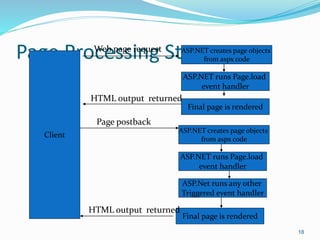
Page Processing Steps
18
Client
ASP.NET creates page objects
from aspx code
Web page request
ASP.NET runs Page.load
event handler
Final page is rendered
HTML output returned
Page postback
ASP.NET creates page objects
from aspx code
ASP.NET runs Page.load
event handler
Final page is rendered
ASP.Net runs any other
Triggered event handler
HTML output returned

Controls

  • 1.
  • 2.
    ASP.NET Controls  ASPincludes normal HTML elements  Server-side controls are objects that provide corresponding HTML output.  You can set their properties, call methods and program events on them 2
  • 3.
    Server Controls  Fourtypes of server controls:  HTML server controls: server-based equivalent for standard HTML elements  Web controls: more object properties and events + new types of controls not in HTML  Validation controls: check user inputs  User controls: developer designed controls  More controls in ASP.NET 2.0 3
  • 4.
    HTML Server Controls An object interface for standard HTML elements  Generate equivalent interface  Retain their state  Fire events  Add the attribute “runat=serevr” and an id to the HTML element start tag 4
  • 5.
    HTML Server ControlsTraditional HTML form <html> <body> <form method="post"> Enter Number of hours: <input type=text > <input type=submit value="convert to seconds"> </form></body></html>  ASP.NET HTML server controls <HTML><BODY> <form method="post" runat="server“ > Enter Number of hours: <input type=text runat="server" id="hours"> <input type=submit value="convert to seconds" runat="server" id="convert"> </form></Body></HTML>  Run server-control file and see the generated code 5
  • 6.
    HTML Server ControlsAutomatically maintain state of controls in the page using the hidden field which is compressed and encrypted code.  Exists in System.Web.UI.HTMLControls  Note: An .aspx page can only contain ONE <form runat="server"> control!  Two types of events: ServerClick, ServerChange 6
  • 7.
    7 HTML Server ControlDescription HtmlAnchor Controls an <a> HTML element HtmlButton Controls a <button> HTML element HtmlForm Controls a <form> HTML element HtmlGeneric Controls other HTML element not specified by a specific HTML server control, like <body>, <div>, <span>, etc. HtmlImage Controls an <image> HTML element HtmlInputButton Controls <input type="button">, <input type="submit">, and <input type="reset"> HTML elements HtmlInputCheckBox Controls an <input type="checkbox"> HTML element HtmlInputFile Controls an <input type="file"> HTML element HtmlInputHidden Controls an <input type="hidden"> HTML element HtmlInputImage Controls an <input type="image"> HTML element HtmlInputRadioButton Controls an <input type="radio"> HTML element HtmlInputText Controls <input type="text"> and <input type="password"> HTML elements HtmlSelect Controls a <select> HTML element HtmlTable Controls a <table> HTML element HtmlTableCell Controls <td>and <th> HTML elements HtmlTableRow Controls a <tr> HTML element HtmlTextArea Controls a <textarea> HTML element
  • 8.
    HTMLServer Control Properties Similar properties as HTML attributes:  Input controls: value , type  Img: src, width, height, ..  HTML Container Controls: InnerText, InnerHtml  All HTML controls have:  Disabled, visible, TagName, Style, Page 8
  • 9.
    Web Controls Providerich user interface (mapped to more than one HTML element)  Provide more properties, events and methods than HTML tags  Detect browser type and adjust output automatically  Server controls automatically maintain any client-entered values between round trips to the server. This control state is not stored on the server (it is instead stored within an <input type="hidden"> form field that is round-tripped between requests). 9
  • 10.
    10 Web Server ControlDescription Button Displays a push button CheckBox Displays a check box CheckBoxList Creates a multi-selection check box group DropDownList Creates a drop-down list HyperLink Creates a hyperlink Image Displays an image ImageButton Displays a clickable image Label Displays static content which is programmable (span) LinkButton Creates a hyperlink button ListBox Creates a single- or multi-selection drop-down list Panel Provides a container for other controls RadioButton Creates a radio button RadioButtonList Creates a group of radio buttons Table Creates a table TableCell Creates a table cell TableRow Creates a table row TextBox Creates a text box
  • 11.
    Web Controls  Tagsstart with prefix “asp:” then class name  Attribute runat=server  ASP.NET add “name” attribute to controls to track them.  Object properties are mapped to attributes <asp:TextBox id=“T1” runat=“server”> </asp:TextBox> <input type=text name=“T1” id=“T1” />  Defined in System.Web.UI.WebControls 11
  • 12.
    Web Controls Allweb controls have:  BackColor, BorderColor and ForeColor  BorderWidth, BorderStyle  Font  Height, Width  TabIndex, AccessKey  Enabled, visible, EnableViewState  TextBox control properties:  TextMode: SingleeLine, MultipleLine, Password  MaxLength: maximum number of characters accepted  Columns: width of the control  Rows: display height of the control 12
  • 13.
    Web Controls  Button/ label:  text  CheckBox / RadioButton :  Text: (label next to the control)  TextAlign: text alignment relative to control  Checked  Panel: Group a number of controls  BackImageUrl 13
  • 14.
    Web Controls  Table: Properties: BackImageUrl, CellPadding, Cellspacing, GridLines  Rows a collection of TableRow objects  TableRow  Cells: a collection of TableCell objects  TableCell  ColumnSpan/RowSpan  HorizontalAlign / VerticalAlign  text 14
  • 15.
    List Controls ListBox,DropDownList, CheckBoxList, RadioButtonList  Items: Collection of “ListItem” objects, which has:  text : Displayed word  value : hidden value in HTML code  Selected: boolean  Properties: SelectedIndex, SelectedItem  Multiple selection for ListBox, set “SelectionMode” property  RadioButtonList/ CheckBoxList properties:  RepeatColumns, RepeatDirection, RepeateLayout, TextAlign 15
  • 16.
    Web Control Events Events types: Click, TextChange, CheckChanged, SelectedIndexChanged  Change events have their autoPostBack property false by default.  ASP.NET adds a Java Script code that handles the postback to the server when a server side control event has occurred  Two hidden fields (id of triggered control, and additional information) 16
  • 17.
    Page Lifecycle  Whenthe user changes a control that has autopostback set to true: 1. Java script is invoked and the page is resubmitted 2. ASP.NET recreates page object from .aspx file 3. ASP.NET retrieves state information from hidden fields and updates controls 4. Execute Page_load event handler 5. Execute appropriate event handlers 6. Execute page_unload event handler and render page 7. Send page to client 17
  • 18.
    Page Processing Steps 18 Client ASP.NETcreates page objects from aspx code Web page request ASP.NET runs Page.load event handler Final page is rendered HTML output returned Page postback ASP.NET creates page objects from aspx code ASP.NET runs Page.load event handler Final page is rendered ASP.Net runs any other Triggered event handler HTML output returned