Know your Camera
    Essential Settings


     *Adapted from Travis Feil’s presentation
Photoshop can t do it all…
    It is true that Photoshop can do amazing things.

    However, the more you know before you take the
     shot, the better your pictures will turn out.

    Advanced cameras like the ones we use can take
     great pictures in the fully automatic mode, but your
     pictures will be better if you adjust settings manually.

    There are three basic features you should master in
     order to take great pictures. Finding the correct
     balance of these three features will help you achieve
     great photography.
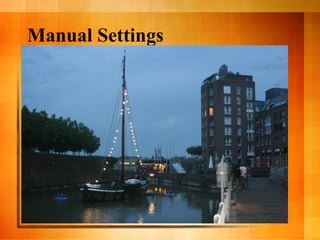
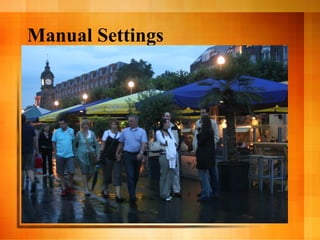
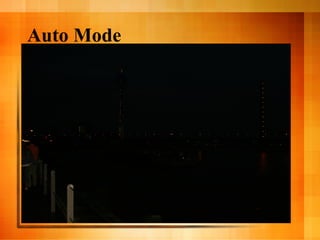
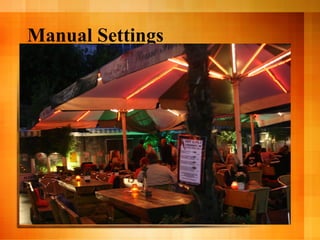
Auto Mode
Manual Settings
Auto Mode
Manual Settings
Auto Mode
Manual Settings
Auto Mode
Manual Settings
Auto Mode
Manual Settings
Auto Mode
Manual Settings
Glossary Time
  Exposure:
  –    Refers to the correct lighting of all objects
       in a photograph.
Underexposure
  Too dark
  Lacks definition
  Details lost
Overexposure
  Too bright
  Lacks details
  Definition lost
  Overblown
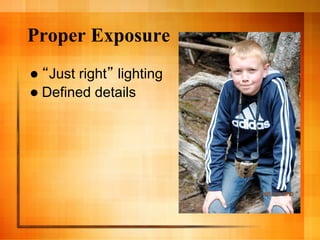
Proper Exposure
   Just right lighting
  Defined details
Glossary Time
  Metering:
  –  Using the camera s metering scale to
     determine correct exposure.
  –  Your camera tells you the settings to use!
Glossary Time
    ISO:
     –    The camera s sensitivity to light.

     –    Also known as film speed for those who have
          actually used real film.

     –    Useless info in case you re curious: ISO is from
           International Standards Organization originally
          ASA from American Standards Association.
          They just made sure all film, no matter where it
          was made or purchased, was properly labeled.
Glossary Time
  ISO:
Glossary Time
  Shutter   speed:
  –    The speed at which the camera s eye
       opens and closes.
Glossary Time
  Shutter   speed:
Glossary Time
  Aperture:
  –    The size of the eye in the camera.

  –    Most commonly known as F-Stop
Glossary Time
  Aperture:
Each Word Matters
  So   far we ve defined
  –  Exposure
  –  ISO
  –  Shutter Speed
  –  Aperture
  Now   let s see how they affect pictures.
ISO
  Sensitivity to light.
  Displayed as a whole                      number:
      100
     – 
      200
     – 
      400
     – 
      800
     – 
      1600
     – 
      3200
     – 
  Lower numbers mean
     –    less sensitive = less exposure = less light = darker pictures
    Higher numbers mean
     –    more sensitive = more exposure = more light = brighter pictures
ISO


What s the
ISO on this
camera
right now?
ISO


What s the
ISO on this
camera
right now?
ISO
    DOES affect image quality.
     –    Higher ISO = grain and noise

    Will probably remain the same for the whole
     shoot unless lighting changes.

    Use the lowest setting possible.

     Set it and forget it.
ISO
  To   properly expose an image in…

  …bright, natural light, use ____ ISO.

  …dimly lit situations, use a ____ ISO
ISO
  To   properly expose an image in…

  …bright, natural light, use LOW ISO.

  …dimly lit situations, use a HIGH ISO
ISO
  On a bright sunny day, an ISO of 1600
 will probably make my pictures turn
 out…

  …completely white (over exposed)

  …completely dark (under exposed)
ISO
  On a bright sunny day, an ISO of 1600
 will probably make my pictures turn
 out…

  …completely white (over exposed)

  …completely dark (under exposed)
ISO
  Ina dimly lit classroom, an ISO of 100
  will probably produce an image that
  is…

   …completely white (over exposed)

   …completely dark (under exposed)
ISO
  Ina dimly lit classroom, an ISO of 100
  will probably produce an image that
  is…

   …completely white (over exposed)

   …completely dark (under exposed)
Shutter Speed
  The   speed at which the eye blinks.

  Whenyou push the shutter release
 button, the internal eye opens and
 closes to let light in and create an
 image.

  The
     amount of light that gets in affects
 exposure.
Shutter Speed
Shutter Speed
    Usually appears as a fraction but might be a
     whole number on the screen. Refers to a
     fraction of 1 second.

        30      (30 seconds - slow blink )
        4       (4 seconds)
       1/80     (one 80th of one second)
       1/250    (one 250th of one second)
       1/500    (one 500th of one second)
       1/4000   (one 4000th of one second - fast blink )
Shutter Speed
  Think   exposure…
  –    If I leave the eye open for 30 seconds,
       my image will be…

  …brighter (over exposed)
  …darker (under exposed)
Shutter Speed
  Think   exposure…
  –    If I leave the eye open for 30 seconds,
       my image will be…

  …brighter (over exposed)
  …darker (under exposed)
Shutter Speed
  Think   exposure…
  –    If I only leave the eye open for 1/1000
       of 1 second, my image will be…

  …brighter (over exposed)
  …darker (under exposed)
Shutter Speed
  Think   exposure…
  –    If I only leave the eye open for 1/1000
       of 1 second, my image will be…

  …brighter (over exposed)
  …darker (under exposed)
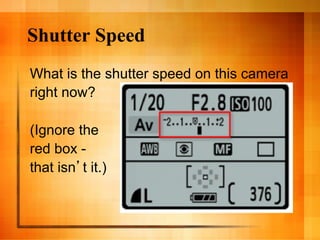
Shutter Speed
What is the shutter speed on this camera
right now?

(Ignore the
red box -
that isn t it.)
Shutter Speed
What is the shutter speed on this camera
right now?
Shutter Speed
  In   addition to exposure…

   –    A slower shutter speed (lower number)
        can create blur in the action.

   –    A faster shutter speed (higher number)
        freezes quick action.

   –    1/60 can capture good still frames.
   –    1/500 will stop a tennis racquet in swing.
Shutter Speed
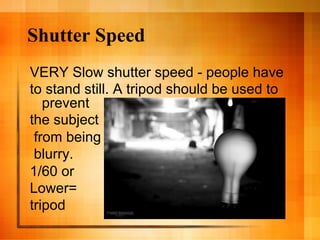
VERY Slow shutter speed - people have
to stand still. A tripod should be used to
   prevent
the subject
 from being
 blurry.
1/60 or
Lower=
tripod
Shutter Speed
Fast shutter speed
stops action.
Shutter Speed
Fast shutter speed stops action.
ISO + Shutter Speed
  Thinkabout the relationship between
  the 2 settings we ve discussed.

  –  If you increase ISO, your picture will
     become lighter or overexposed.
  –  You can increase shutter speed to
     balance that and make your picture
     darker…back to what it needs to be for
     proper exposure.
  –  It s like a teeter-totter.
ISO + Shutter Speed
  Thinkabout the relationship between
  the 2 settings we ve discussed.

  –  If your ISO is low, your image will be
     darker.
  –  You can decrease shutter speed to let in
     more light and make the image brighter.
ISO + Shutter Speed
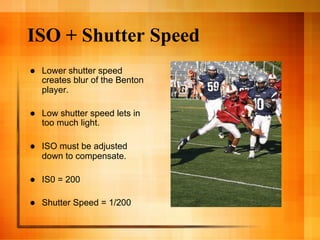
    Lower shutter speed
     creates blur of the Benton
     player.

    Low shutter speed lets in
     too much light.

    ISO must be adjusted
     down to compensate.

    IS0 = 200

    Shutter Speed = 1/200
Aperture (F-Stop)
    The size of the eye that blinks.

    This setting is backwards or
     counterintuitive. The lower the F-Stop
     number, the bigger the eye.
     –    F3.5 = big eye
     –    F21 = little eye

    The bigger the eye, the greater the exposure
     (more light gets in).
Aperture (F-Stop)
  Appears as an F-Number combination
  The lower the number, the bigger the
   eye.

  –    F 3.5   (big opening, lots of light, more exposure)
  –    F6      (medium opening, medium light)
  –    F 11    (small opening, little light)
Aperture (F-Stop)
Aperture
  Think   exposure…
  –    If I have a big eye (low F-Stop), my
       image will be…

  …brighter (over exposed)
  …darker (under exposed)
Aperture
  Think   exposure…
  –    If I have a big eye (low F-Stop), my
       image will be…

  …brighter (over exposed)
  …darker (under exposed)
Aperture
  Think   exposure…
  –    If I have a small eye (high F-Stop), my
       image will be…

  …brighter (over exposed)
  …darker (under exposed)
Aperture
  Think   exposure…
  –    If I have a small eye (high F-Stop), my
       image will be…

  …brighter (over exposed)
  …darker (under exposed)
Aperture
  What
     is the aperture setting on this
 camera right now?
Aperture
  What
     is the aperture setting on this
 camera right now?
Aperture
  An    F4.0 will let in…
  –    Lots of light
  –    Little light
Aperture
  An    F4.0 will let in…
  –    Lots of light
  –    Little light
Aperture
    In addition to exposure, aperture affects
      depth of field.

     –     Shallow Depth of Field = subject in focus but
          background blurred.

             Small   F-Stop number

     –     Greater Depth of Field = All objects in focus

             Larger   F-Stop number
Aperture
    Lower F-Stop (3.5) = blurred background
Aperture
    Lower F-Stop (3.5)
     = blurred
     background
Aperture
    Higher F-Stop (16) =
     all in focus
Aperture
    Higher F-Stop
     (16) = all in focus
Aperture + ISO + Shutter Speed

  Think about the relationship of all the
  settings together…
  –  If I want to blur a background, my F-Stop
     must be low.
  –  This causes a bigger eye which lets in
     more light and may cause my picture to
     be over exposed.
  –  There are 2 adjustments I can make to
     solve the problem…
         Decrease  ISO
         Increase Shutter Speed
Aperture + ISO + Shutter Speed

  Think about the relationship of all the
  settings together…
  –  If I want a crisp foreground AND
     background, my F-Stop will be higher.
  –  This causes a smaller eye which lets in
     less light and may cause my picture to be
     under exposed.
  –  There are 2 adjustments I can make to
     solve the problem…
         IncreaseISO
         Decrease Shutter Speed
Aperture + ISO + Shutter Speed

  Each   setting change affects exposure.

  Each  setting change affects the other
   settings.

  Ifyou understand what each one does,
   you can take better pictures.
Making Pictures v. Taking Pictures

  First,
        consider your lighting conditions:
  the type of light you re shooting in, the
  direction its coming from, etc.

  Set your ISO to the lowest possible
  setting for those conditions.

  Visualize
           the image you want and set
  the camera for those priorities.
Aperture + ISO + Shutter Speed

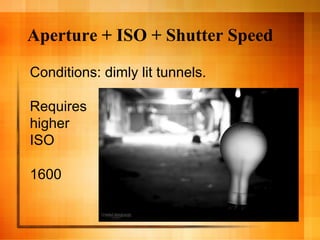
Conditions: dimly lit tunnels.

Requires
higher
ISO

1600
Aperture + ISO + Shutter Speed
Desired shot: Bulb in focus, background blurred.

Requires
Extremely slow
shutter speed


Bulb setting
or 1/4
Aperture + ISO + Shutter Speed
Compensation: with such a high ISO and slow shutter
speed, the image is WAY overexposed.

To balance,
increase
F-Stop

Eye is smaller
less light
gets in!
Aperture + ISO + Shutter Speed
Conditions: very sunny day,
  outdoors

Low ISO - no
need for an overly
sensitive camera

200
Aperture + ISO + Shutter Speed
Desire shot: selective focus
  background

Requires low
F-Stop -

3.5

Causes image to
be over exposed
because the eye
is so large
Aperture + ISO + Shutter Speed
Compensation: increase
  shutter speed


Decrease the time
the camera is
exposed to light

1/1000

Balances the effects
of large aperture
Aperture + ISO + Shutter Speed
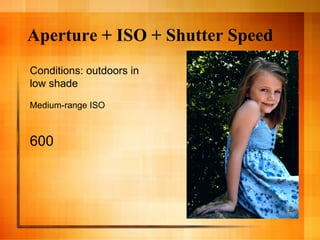
Conditions: outdoors in
low shade
Medium-range ISO


600
Aperture + ISO + Shutter Speed
Desired shot: Blurry background,
focus on the subject


Requires low F-Stop to blur
background.
  F5.6

Requires medium shutter speed to
ensure subject (young child) is in focus
Even though she was moving. 1/400
Aperture + ISO + Shutter Speed
Compensation: if F5.6 with a
1/400 shutter speed does not
expose properly, adjust ISO.
Review
ISO                     100 . . . . . . . . . . . . . . . . . . 1600
       camera is:       Less Sensitive                       More Sensitive
       makes my pic:    Darker                               Lighter


Shutter Speed            30 . . . . . . . . . . . . . . . . . . 1/4000
       eyes blinks:     Slower                               Faster
       makes my pic:    Lighter                              Darker
       other effects:   Motion blurred                       Frozen Action


Aperture                F3.5 . . . . . . . . . . . . . . . . . .F22
       eye is:          Larger                               Smaller
       makes my pic:    Lighter                              Darker
       other effects:   Blurred background                   Crisp background
Q&A

Know your camera

  • 1.
    Know your Camera Essential Settings *Adapted from Travis Feil’s presentation
  • 2.
    Photoshop can tdo it all…   It is true that Photoshop can do amazing things.   However, the more you know before you take the shot, the better your pictures will turn out.   Advanced cameras like the ones we use can take great pictures in the fully automatic mode, but your pictures will be better if you adjust settings manually.   There are three basic features you should master in order to take great pictures. Finding the correct balance of these three features will help you achieve great photography.
  • 3.
  • 4.
  • 5.
  • 6.
  • 7.
  • 8.
  • 9.
  • 10.
  • 11.
  • 12.
  • 13.
  • 14.
  • 15.
    Glossary Time   Exposure: –  Refers to the correct lighting of all objects in a photograph.
  • 16.
    Underexposure   Too dark  Lacks definition   Details lost
  • 17.
    Overexposure   Too bright  Lacks details   Definition lost   Overblown
  • 18.
    Proper Exposure   Just right lighting   Defined details
  • 19.
    Glossary Time   Metering: –  Using the camera s metering scale to determine correct exposure. –  Your camera tells you the settings to use!
  • 20.
    Glossary Time   ISO: –  The camera s sensitivity to light. –  Also known as film speed for those who have actually used real film. –  Useless info in case you re curious: ISO is from International Standards Organization originally ASA from American Standards Association. They just made sure all film, no matter where it was made or purchased, was properly labeled.
  • 21.
  • 22.
    Glossary Time   Shutter speed: –  The speed at which the camera s eye opens and closes.
  • 23.
  • 24.
    Glossary Time   Aperture: –  The size of the eye in the camera. –  Most commonly known as F-Stop
  • 25.
  • 26.
    Each Word Matters  So far we ve defined –  Exposure –  ISO –  Shutter Speed –  Aperture   Now let s see how they affect pictures.
  • 27.
    ISO   Sensitivity tolight.   Displayed as a whole number: 100 –  200 –  400 –  800 –  1600 –  3200 –    Lower numbers mean –  less sensitive = less exposure = less light = darker pictures   Higher numbers mean –  more sensitive = more exposure = more light = brighter pictures
  • 28.
    ISO What s the ISOon this camera right now?
  • 29.
    ISO What s the ISOon this camera right now?
  • 30.
    ISO   DOES affect image quality. –  Higher ISO = grain and noise   Will probably remain the same for the whole shoot unless lighting changes.   Use the lowest setting possible.   Set it and forget it.
  • 31.
    ISO   To properly expose an image in… …bright, natural light, use ____ ISO. …dimly lit situations, use a ____ ISO
  • 32.
    ISO   To properly expose an image in… …bright, natural light, use LOW ISO. …dimly lit situations, use a HIGH ISO
  • 33.
    ISO   On abright sunny day, an ISO of 1600 will probably make my pictures turn out… …completely white (over exposed) …completely dark (under exposed)
  • 34.
    ISO   On abright sunny day, an ISO of 1600 will probably make my pictures turn out… …completely white (over exposed) …completely dark (under exposed)
  • 35.
    ISO   Ina dimlylit classroom, an ISO of 100 will probably produce an image that is… …completely white (over exposed) …completely dark (under exposed)
  • 36.
    ISO   Ina dimlylit classroom, an ISO of 100 will probably produce an image that is… …completely white (over exposed) …completely dark (under exposed)
  • 37.
    Shutter Speed   The speed at which the eye blinks.   Whenyou push the shutter release button, the internal eye opens and closes to let light in and create an image.   The amount of light that gets in affects exposure.
  • 38.
  • 39.
    Shutter Speed   Usually appears as a fraction but might be a whole number on the screen. Refers to a fraction of 1 second. 30 (30 seconds - slow blink ) 4 (4 seconds) 1/80 (one 80th of one second) 1/250 (one 250th of one second) 1/500 (one 500th of one second) 1/4000 (one 4000th of one second - fast blink )
  • 40.
    Shutter Speed   Think exposure… –  If I leave the eye open for 30 seconds, my image will be… …brighter (over exposed) …darker (under exposed)
  • 41.
    Shutter Speed   Think exposure… –  If I leave the eye open for 30 seconds, my image will be… …brighter (over exposed) …darker (under exposed)
  • 42.
    Shutter Speed   Think exposure… –  If I only leave the eye open for 1/1000 of 1 second, my image will be… …brighter (over exposed) …darker (under exposed)
  • 43.
    Shutter Speed   Think exposure… –  If I only leave the eye open for 1/1000 of 1 second, my image will be… …brighter (over exposed) …darker (under exposed)
  • 44.
    Shutter Speed What isthe shutter speed on this camera right now? (Ignore the red box - that isn t it.)
  • 45.
    Shutter Speed What isthe shutter speed on this camera right now?
  • 46.
    Shutter Speed   In addition to exposure… –  A slower shutter speed (lower number) can create blur in the action. –  A faster shutter speed (higher number) freezes quick action. –  1/60 can capture good still frames. –  1/500 will stop a tennis racquet in swing.
  • 47.
    Shutter Speed VERY Slowshutter speed - people have to stand still. A tripod should be used to prevent the subject from being blurry. 1/60 or Lower= tripod
  • 48.
    Shutter Speed Fast shutterspeed stops action.
  • 49.
    Shutter Speed Fast shutterspeed stops action.
  • 50.
    ISO + ShutterSpeed   Thinkabout the relationship between the 2 settings we ve discussed. –  If you increase ISO, your picture will become lighter or overexposed. –  You can increase shutter speed to balance that and make your picture darker…back to what it needs to be for proper exposure. –  It s like a teeter-totter.
  • 51.
    ISO + ShutterSpeed   Thinkabout the relationship between the 2 settings we ve discussed. –  If your ISO is low, your image will be darker. –  You can decrease shutter speed to let in more light and make the image brighter.
  • 52.
    ISO + ShutterSpeed   Lower shutter speed creates blur of the Benton player.   Low shutter speed lets in too much light.   ISO must be adjusted down to compensate.   IS0 = 200   Shutter Speed = 1/200
  • 53.
    Aperture (F-Stop)   The size of the eye that blinks.   This setting is backwards or counterintuitive. The lower the F-Stop number, the bigger the eye. –  F3.5 = big eye –  F21 = little eye   The bigger the eye, the greater the exposure (more light gets in).
  • 54.
    Aperture (F-Stop)   Appearsas an F-Number combination   The lower the number, the bigger the eye. –  F 3.5 (big opening, lots of light, more exposure) –  F6 (medium opening, medium light) –  F 11 (small opening, little light)
  • 55.
  • 56.
    Aperture   Think exposure… –  If I have a big eye (low F-Stop), my image will be… …brighter (over exposed) …darker (under exposed)
  • 57.
    Aperture   Think exposure… –  If I have a big eye (low F-Stop), my image will be… …brighter (over exposed) …darker (under exposed)
  • 58.
    Aperture   Think exposure… –  If I have a small eye (high F-Stop), my image will be… …brighter (over exposed) …darker (under exposed)
  • 59.
    Aperture   Think exposure… –  If I have a small eye (high F-Stop), my image will be… …brighter (over exposed) …darker (under exposed)
  • 60.
    Aperture   What is the aperture setting on this camera right now?
  • 61.
    Aperture   What is the aperture setting on this camera right now?
  • 62.
    Aperture   An F4.0 will let in… –  Lots of light –  Little light
  • 63.
    Aperture   An F4.0 will let in… –  Lots of light –  Little light
  • 64.
    Aperture   In addition to exposure, aperture affects depth of field. –  Shallow Depth of Field = subject in focus but background blurred.   Small F-Stop number –  Greater Depth of Field = All objects in focus   Larger F-Stop number
  • 65.
    Aperture   Lower F-Stop (3.5) = blurred background
  • 66.
    Aperture   Lower F-Stop (3.5) = blurred background
  • 67.
    Aperture   Higher F-Stop (16) = all in focus
  • 68.
    Aperture   Higher F-Stop (16) = all in focus
  • 69.
    Aperture + ISO+ Shutter Speed   Think about the relationship of all the settings together… –  If I want to blur a background, my F-Stop must be low. –  This causes a bigger eye which lets in more light and may cause my picture to be over exposed. –  There are 2 adjustments I can make to solve the problem…   Decrease ISO   Increase Shutter Speed
  • 70.
    Aperture + ISO+ Shutter Speed   Think about the relationship of all the settings together… –  If I want a crisp foreground AND background, my F-Stop will be higher. –  This causes a smaller eye which lets in less light and may cause my picture to be under exposed. –  There are 2 adjustments I can make to solve the problem…   IncreaseISO   Decrease Shutter Speed
  • 71.
    Aperture + ISO+ Shutter Speed   Each setting change affects exposure.   Each setting change affects the other settings.   Ifyou understand what each one does, you can take better pictures.
  • 72.
    Making Pictures v.Taking Pictures   First, consider your lighting conditions: the type of light you re shooting in, the direction its coming from, etc.   Set your ISO to the lowest possible setting for those conditions.   Visualize the image you want and set the camera for those priorities.
  • 73.
    Aperture + ISO+ Shutter Speed Conditions: dimly lit tunnels. Requires higher ISO 1600
  • 74.
    Aperture + ISO+ Shutter Speed Desired shot: Bulb in focus, background blurred. Requires Extremely slow shutter speed Bulb setting or 1/4
  • 75.
    Aperture + ISO+ Shutter Speed Compensation: with such a high ISO and slow shutter speed, the image is WAY overexposed. To balance, increase F-Stop Eye is smaller less light gets in!
  • 76.
    Aperture + ISO+ Shutter Speed Conditions: very sunny day, outdoors Low ISO - no need for an overly sensitive camera 200
  • 77.
    Aperture + ISO+ Shutter Speed Desire shot: selective focus background Requires low F-Stop - 3.5 Causes image to be over exposed because the eye is so large
  • 78.
    Aperture + ISO+ Shutter Speed Compensation: increase shutter speed Decrease the time the camera is exposed to light 1/1000 Balances the effects of large aperture
  • 79.
    Aperture + ISO+ Shutter Speed Conditions: outdoors in low shade Medium-range ISO 600
  • 80.
    Aperture + ISO+ Shutter Speed Desired shot: Blurry background, focus on the subject Requires low F-Stop to blur background. F5.6 Requires medium shutter speed to ensure subject (young child) is in focus Even though she was moving. 1/400
  • 81.
    Aperture + ISO+ Shutter Speed Compensation: if F5.6 with a 1/400 shutter speed does not expose properly, adjust ISO.
  • 82.
    Review ISO 100 . . . . . . . . . . . . . . . . . . 1600 camera is: Less Sensitive More Sensitive makes my pic: Darker Lighter Shutter Speed 30 . . . . . . . . . . . . . . . . . . 1/4000 eyes blinks: Slower Faster makes my pic: Lighter Darker other effects: Motion blurred Frozen Action Aperture F3.5 . . . . . . . . . . . . . . . . . .F22 eye is: Larger Smaller makes my pic: Lighter Darker other effects: Blurred background Crisp background
  • 83.