Switching From Auto to Manual
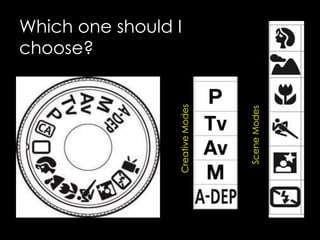
Which one should I
choose?
CreativeModes
SceneModes
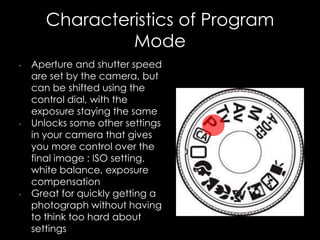
Characteristics of Program
Mode
• Aperture and shutter speed
are set by the camera, but
can be shifted using the
control dial, with the
exposure staying the same
• Unlocks some other settings
in your camera that gives
you more control over the
final image : ISO setting,
white balance, exposure
compensation
• Great for quickly getting a
photograph without having
to think too hard about
settings
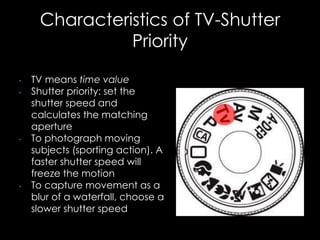
Characteristics of TV-Shutter
Priority
• TV means time value
• Shutter priority: set the
shutter speed and
calculates the matching
aperture
• To photograph moving
subjects (sporting action). A
faster shutter speed will
freeze the motion
• To capture movement as a
blur of a waterfall, choose a
slower shutter speed
Characteristics
of AV-Aperture
Priority
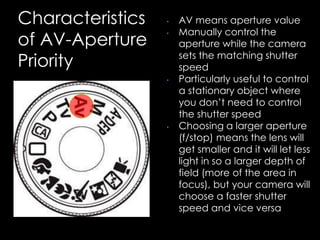
• AV means aperture value
• Manually control the
aperture while the camera
sets the matching shutter
speed
• Particularly useful to control
a stationary object where
you don’t need to control
the shutter speed
• Choosing a larger aperture
(f/stop) means the lens will
get smaller and it will let less
light in so a larger depth of
field (more of the area in
focus), but your camera will
choose a faster shutter
speed and vice versa
Characteristics of Manual Mode
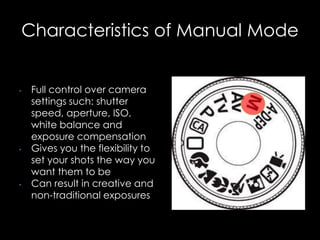
• Full control over camera
settings such: shutter
speed, aperture, ISO,
white balance and
exposure compensation
• Gives you the flexibility to
set your shots the way you
want them to be
• Can result in creative and
non-traditional exposures
Portrait Mode
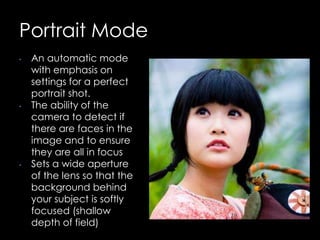
• An automatic mode
with emphasis on
settings for a perfect
portrait shot.
• The ability of the
camera to detect if
there are faces in the
image and to ensure
they are all in focus
• Sets a wide aperture
of the lens so that the
background behind
your subject is softly
focused (shallow
depth of field)
Landscape Mode
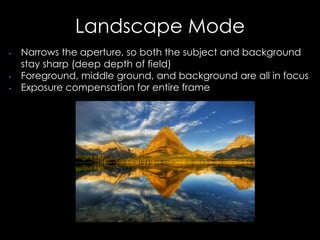
• Narrows the aperture, so both the subject and background
stay sharp (deep depth of field)
• Foreground, middle ground, and background are all in focus
• Exposure compensation for entire frame
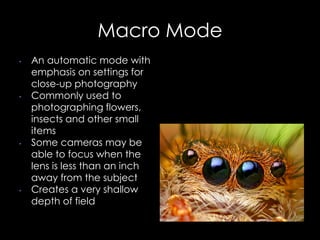
Macro Mode
• An automatic mode with
emphasis on settings for
close-up photography
• Commonly used to
photographing flowers,
insects and other small
items
• Some cameras may be
able to focus when the
lens is less than an inch
away from the subject
• Creates a very shallow
depth of field
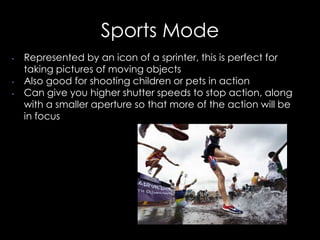
Sports Mode
• Represented by an icon of a sprinter, this is perfect for
taking pictures of moving objects
• Also good for shooting children or pets in action
• Can give you higher shutter speeds to stop action, along
with a smaller aperture so that more of the action will be
in focus
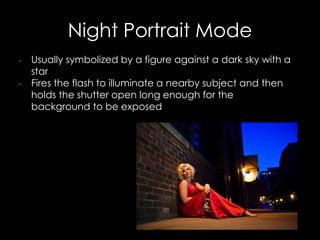
Night Portrait Mode
• Usually symbolized by a figure against a dark sky with a
star
• Fires the flash to illuminate a nearby subject and then
holds the shutter open long enough for the
background to be exposed
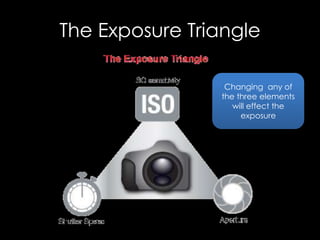
The Exposure Triangle
Changing any of
the three elements
will effect the
exposure
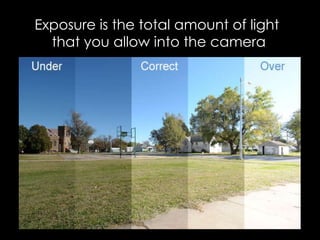
Exposure is the total amount of light
that you allow into the camera
Understanding Exposure
THE WINDOW EXAMPLE
• Imagine your camera is like a window with shutters that open and
close.
• Aperture is the size of the window. If it’s bigger more light gets
through and the room is brighter.
• Shutter Speed is the amount of time that the shutters of the
window are open. The longer you leave them open the more that
comes in.
• Now imagine that you’re inside the room and are wearing
sunglasses. Your eyes become desensitized to the light that
comes in (it’s like a low ISO)
• There are a number of ways of increasing the amount of light in
the room (You could increase the time that the shutters are open
(decrease shutter speed), you could increase the size of the
window (increase aperture) or you could take off your sunglasses
(make the ISO larger)
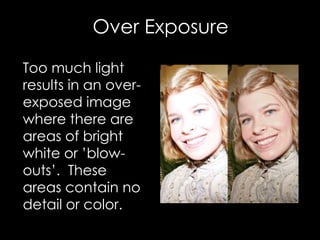
Over Exposure
Too much light
results in an over-
exposed image
where there are
areas of bright
white or ’blow-
outs’. These
areas contain no
detail or color.
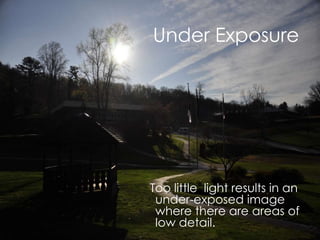
Under Exposure
Too little light results in an
under-exposed image
where there are areas of
low detail.
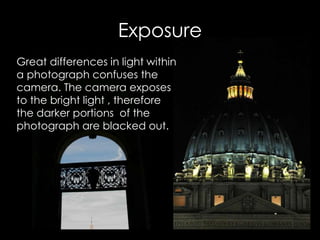
Great differences in light within
a photograph confuses the
camera. The camera exposes
to the bright light , therefore
the darker portions of the
photograph are blacked out.
Exposure
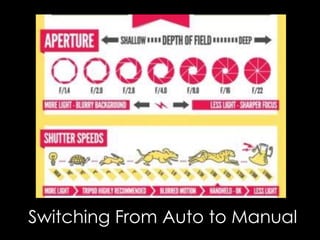
Aperture
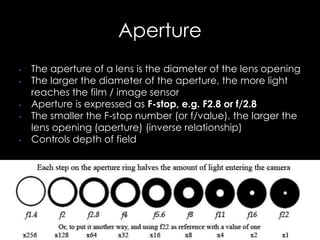
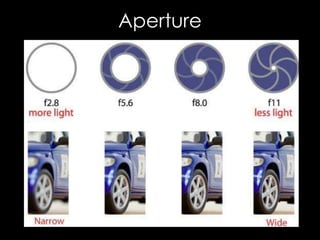
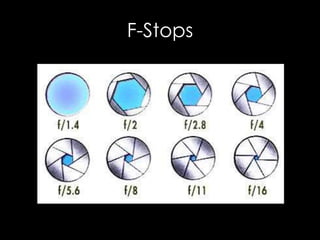
• The aperture of a lens is the diameter of the lens opening
• The larger the diameter of the aperture, the more light
reaches the film / image sensor
• Aperture is expressed as F-stop, e.g. F2.8 or f/2.8
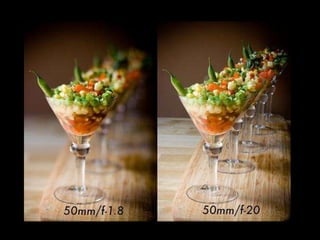
• The smaller the F-stop number (or f/value), the larger the
lens opening (aperture) (inverse relationship)
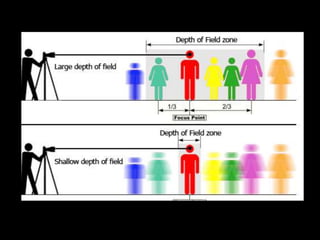
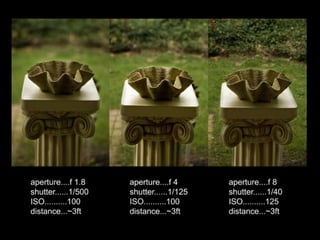
• Controls depth of field
Aperture
F-Stops
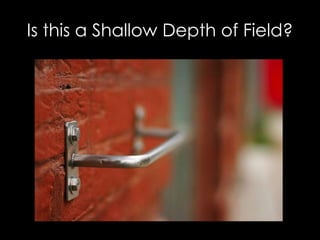
Is this a Shallow Depth of Field?
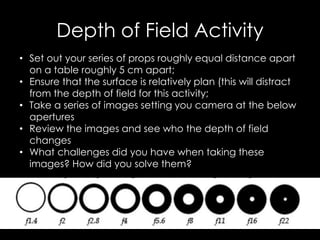
Depth of Field Activity
• Set out your series of props roughly equal distance apart
on a table roughly 5 cm apart;
• Ensure that the surface is relatively plan (this will distract
from the depth of field for this activity;
• Take a series of images setting you camera at the below
apertures
• Review the images and see who the depth of field
changes
• What challenges did you have when taking these
images? How did you solve them?
Shutter Speed
Shutter Speed
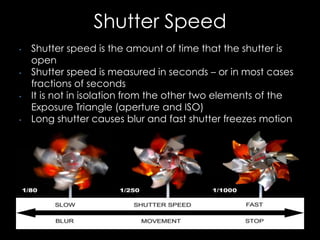
• Shutter speed is the amount of time that the shutter is
open
• Shutter speed is measured in seconds – or in most cases
fractions of seconds
• It is not in isolation from the other two elements of the
Exposure Triangle (aperture and ISO)
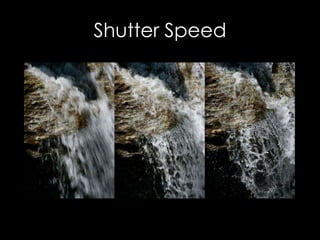
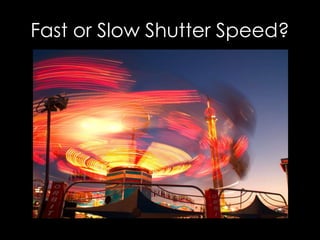
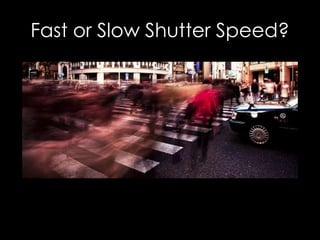
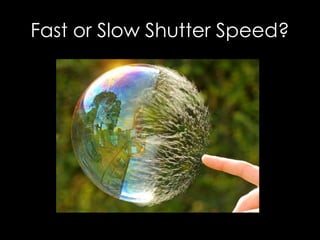
• Long shutter causes blur and fast shutter freezes motion
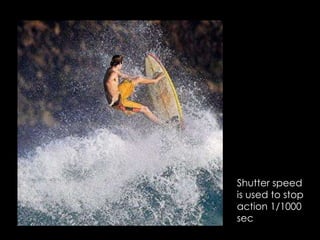
Shutter speed
is used to stop
action 1/1000
sec
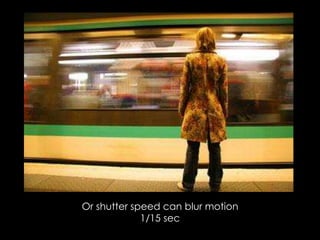
Or shutter speed can blur motion
1/15 sec
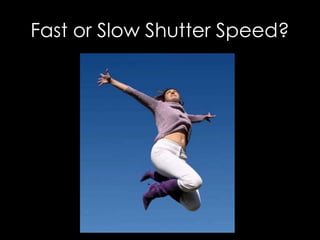
Fast or Slow Shutter Speed?
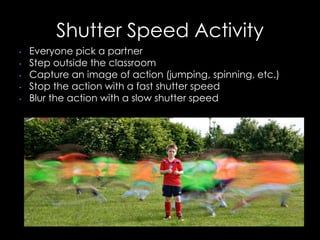
Shutter Speed Activity
• Everyone pick a partner
• Step outside the classroom
• Capture an image of action (jumping, spinning, etc.)
• Stop the action with a fast shutter speed
• Blur the action with a slow shutter speed
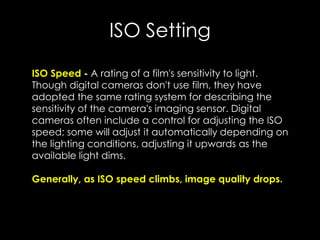
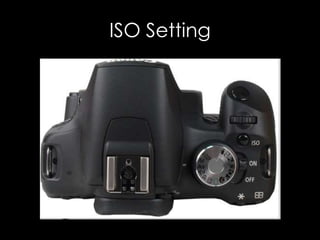
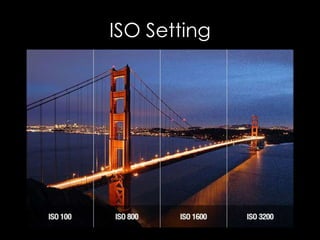
ISO Setting
ISO Speed - A rating of a film's sensitivity to light.
Though digital cameras don't use film, they have
adopted the same rating system for describing the
sensitivity of the camera's imaging sensor. Digital
cameras often include a control for adjusting the ISO
speed; some will adjust it automatically depending on
the lighting conditions, adjusting it upwards as the
available light dims.
Generally, as ISO speed climbs, image quality drops.
ISO Setting
ISO Setting
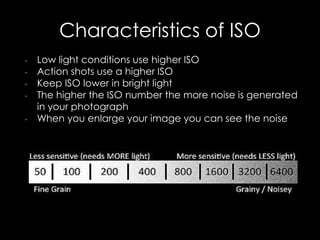
Characteristics of ISO
• Low light conditions use higher ISO
• Action shots use a higher ISO
• Keep ISO lower in bright light
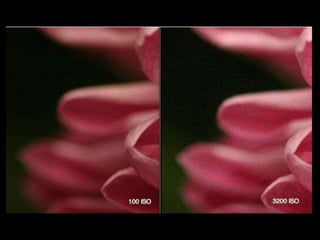
• The higher the ISO number the more noise is generated
in your photograph
• When you enlarge your image you can see the noise
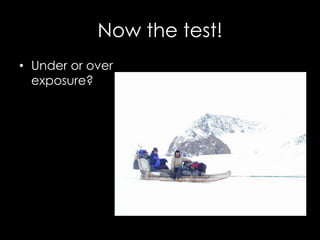
Now the test!
• Under or over
exposure?
Now the test!
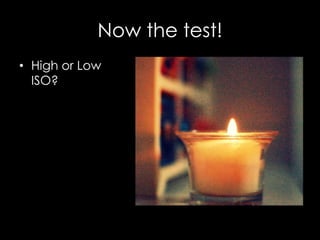
• High or Low
ISO?
Now the test!
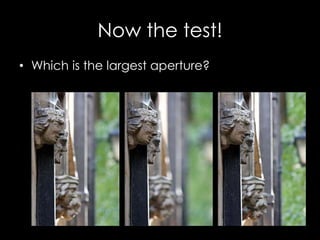
• Which is the largest aperture?
Now the test!
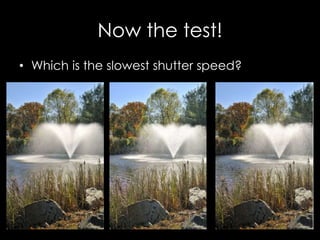
• Which is the slowest shutter speed?
Now the test!
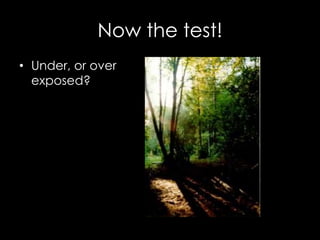
• Under, or over
exposed?
Now the test!
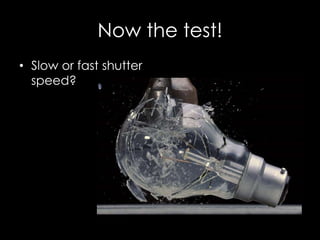
• Slow or fast shutter
speed?
Now the test!
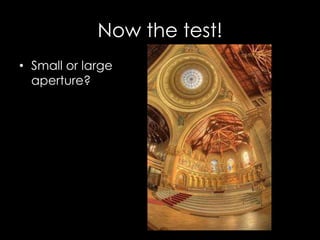
• Small or large
aperture?
Now the test!
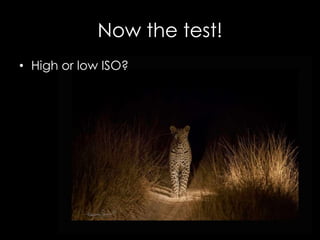
• High or low ISO?

Going Manual

  • 1.
  • 2.
    Which one shouldI choose? CreativeModes SceneModes
  • 3.
    Characteristics of Program Mode •Aperture and shutter speed are set by the camera, but can be shifted using the control dial, with the exposure staying the same • Unlocks some other settings in your camera that gives you more control over the final image : ISO setting, white balance, exposure compensation • Great for quickly getting a photograph without having to think too hard about settings
  • 4.
    Characteristics of TV-Shutter Priority •TV means time value • Shutter priority: set the shutter speed and calculates the matching aperture • To photograph moving subjects (sporting action). A faster shutter speed will freeze the motion • To capture movement as a blur of a waterfall, choose a slower shutter speed
  • 5.
    Characteristics of AV-Aperture Priority • AVmeans aperture value • Manually control the aperture while the camera sets the matching shutter speed • Particularly useful to control a stationary object where you don’t need to control the shutter speed • Choosing a larger aperture (f/stop) means the lens will get smaller and it will let less light in so a larger depth of field (more of the area in focus), but your camera will choose a faster shutter speed and vice versa
  • 6.
    Characteristics of ManualMode • Full control over camera settings such: shutter speed, aperture, ISO, white balance and exposure compensation • Gives you the flexibility to set your shots the way you want them to be • Can result in creative and non-traditional exposures
  • 7.
    Portrait Mode • Anautomatic mode with emphasis on settings for a perfect portrait shot. • The ability of the camera to detect if there are faces in the image and to ensure they are all in focus • Sets a wide aperture of the lens so that the background behind your subject is softly focused (shallow depth of field)
  • 8.
    Landscape Mode • Narrowsthe aperture, so both the subject and background stay sharp (deep depth of field) • Foreground, middle ground, and background are all in focus • Exposure compensation for entire frame
  • 9.
    Macro Mode • Anautomatic mode with emphasis on settings for close-up photography • Commonly used to photographing flowers, insects and other small items • Some cameras may be able to focus when the lens is less than an inch away from the subject • Creates a very shallow depth of field
  • 10.
    Sports Mode • Representedby an icon of a sprinter, this is perfect for taking pictures of moving objects • Also good for shooting children or pets in action • Can give you higher shutter speeds to stop action, along with a smaller aperture so that more of the action will be in focus
  • 11.
    Night Portrait Mode •Usually symbolized by a figure against a dark sky with a star • Fires the flash to illuminate a nearby subject and then holds the shutter open long enough for the background to be exposed
  • 12.
    The Exposure Triangle Changingany of the three elements will effect the exposure
  • 13.
    Exposure is thetotal amount of light that you allow into the camera
  • 14.
    Understanding Exposure THE WINDOWEXAMPLE • Imagine your camera is like a window with shutters that open and close. • Aperture is the size of the window. If it’s bigger more light gets through and the room is brighter. • Shutter Speed is the amount of time that the shutters of the window are open. The longer you leave them open the more that comes in. • Now imagine that you’re inside the room and are wearing sunglasses. Your eyes become desensitized to the light that comes in (it’s like a low ISO) • There are a number of ways of increasing the amount of light in the room (You could increase the time that the shutters are open (decrease shutter speed), you could increase the size of the window (increase aperture) or you could take off your sunglasses (make the ISO larger)
  • 15.
    Over Exposure Too muchlight results in an over- exposed image where there are areas of bright white or ’blow- outs’. These areas contain no detail or color.
  • 16.
    Under Exposure Too littlelight results in an under-exposed image where there are areas of low detail.
  • 17.
    Great differences inlight within a photograph confuses the camera. The camera exposes to the bright light , therefore the darker portions of the photograph are blacked out. Exposure
  • 18.
    Aperture • The apertureof a lens is the diameter of the lens opening • The larger the diameter of the aperture, the more light reaches the film / image sensor • Aperture is expressed as F-stop, e.g. F2.8 or f/2.8 • The smaller the F-stop number (or f/value), the larger the lens opening (aperture) (inverse relationship) • Controls depth of field
  • 19.
  • 21.
  • 24.
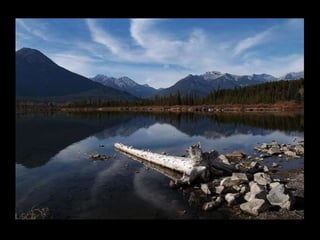
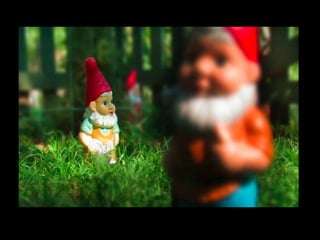
    Is this aShallow Depth of Field?
  • 27.
    Depth of FieldActivity • Set out your series of props roughly equal distance apart on a table roughly 5 cm apart; • Ensure that the surface is relatively plan (this will distract from the depth of field for this activity; • Take a series of images setting you camera at the below apertures • Review the images and see who the depth of field changes • What challenges did you have when taking these images? How did you solve them?
  • 28.
  • 29.
    Shutter Speed • Shutterspeed is the amount of time that the shutter is open • Shutter speed is measured in seconds – or in most cases fractions of seconds • It is not in isolation from the other two elements of the Exposure Triangle (aperture and ISO) • Long shutter causes blur and fast shutter freezes motion
  • 30.
    Shutter speed is usedto stop action 1/1000 sec
  • 31.
    Or shutter speedcan blur motion 1/15 sec
  • 32.
    Fast or SlowShutter Speed?
  • 33.
    Fast or SlowShutter Speed?
  • 34.
    Fast or SlowShutter Speed?
  • 35.
    Fast or SlowShutter Speed?
  • 36.
    Shutter Speed Activity •Everyone pick a partner • Step outside the classroom • Capture an image of action (jumping, spinning, etc.) • Stop the action with a fast shutter speed • Blur the action with a slow shutter speed
  • 37.
    ISO Setting ISO Speed- A rating of a film's sensitivity to light. Though digital cameras don't use film, they have adopted the same rating system for describing the sensitivity of the camera's imaging sensor. Digital cameras often include a control for adjusting the ISO speed; some will adjust it automatically depending on the lighting conditions, adjusting it upwards as the available light dims. Generally, as ISO speed climbs, image quality drops.
  • 38.
  • 39.
  • 40.
    Characteristics of ISO •Low light conditions use higher ISO • Action shots use a higher ISO • Keep ISO lower in bright light • The higher the ISO number the more noise is generated in your photograph • When you enlarge your image you can see the noise
  • 42.
    Now the test! •Under or over exposure?
  • 43.
    Now the test! •High or Low ISO?
  • 44.
    Now the test! •Which is the largest aperture?
  • 45.
    Now the test! •Which is the slowest shutter speed?
  • 46.
    Now the test! •Under, or over exposed?
  • 47.
    Now the test! •Slow or fast shutter speed?
  • 48.
    Now the test! •Small or large aperture?
  • 49.
    Now the test! •High or low ISO?

Editor's Notes

  • #16 http://www.mamma-razzi.com/2011/02/exposure-triangle/
  • #17 http://www.mamma-razzi.com/2011/02/exposure-triangle/