FULL TEXT SEARCH
FOR LAZY GUYS
Starring Apache solr
Alexander Tokarev
Senior Developer
DataArt
atokarev@dataart.com
Alexander Polushkin
Configuration Manager
DataArt
atokarev@dataart.com
Agenda
• Introduction
– FTS solutions
– FTS patterns
– Apache Solr
• Architecture
• Client libraries
• data treatment pipeline
• Index modeling
• ingestion
• Searching
• Demo 1
• Solr in clustered environment
– Architecture
– Idexing
– Quering
• Demo 2
• Advanced Solr
– Cool features overview
– Performance tuning
• Q&A sessions
FTS solutions attributes
1. Search by content of documents rather than by attributes
2. Read-oriented
3. Flexible data structure
4. 1 dedicated tailored index used further for search
5. index contains unique terms and their position in all documents
6. Indexer takes into account language-specific nuances like stop words,
stemming, synonyms
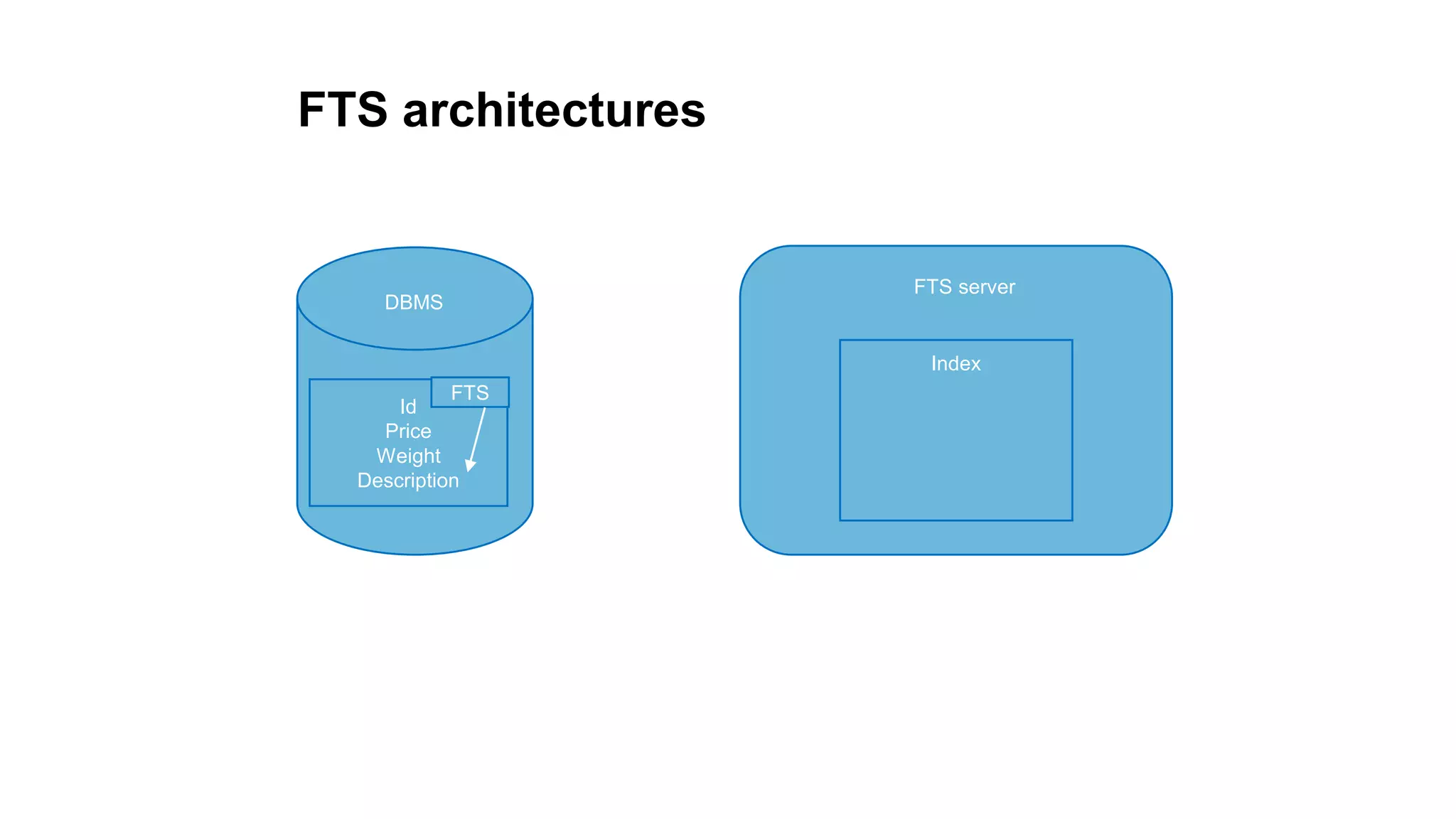
FTS architectures
Id
Price
Weight
Description
DBMS
FTS
FTS server
Index
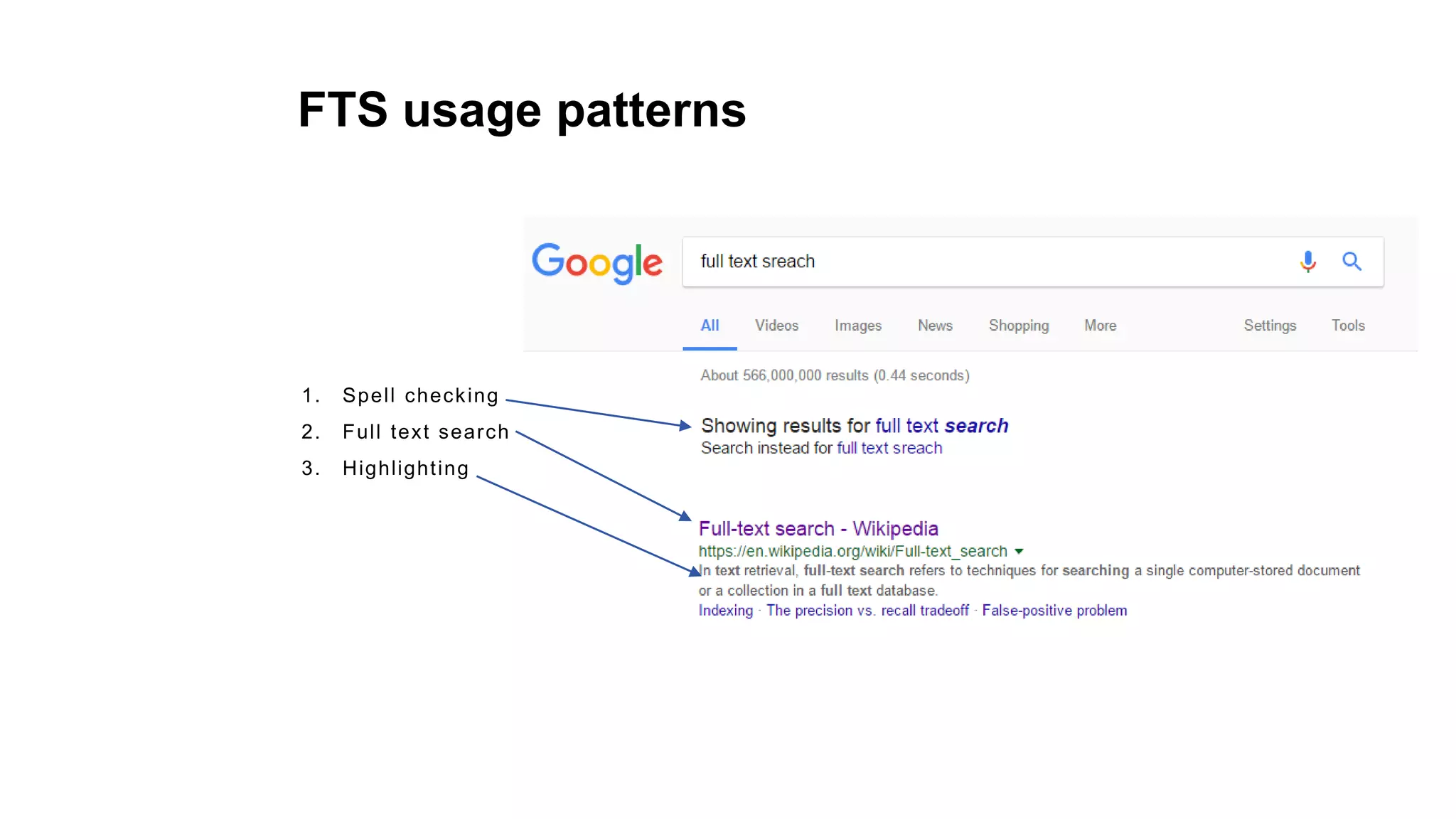
FTS usage patterns
1. Spell checking
2. Full text search
3. Highlighting
FTS usage patterns
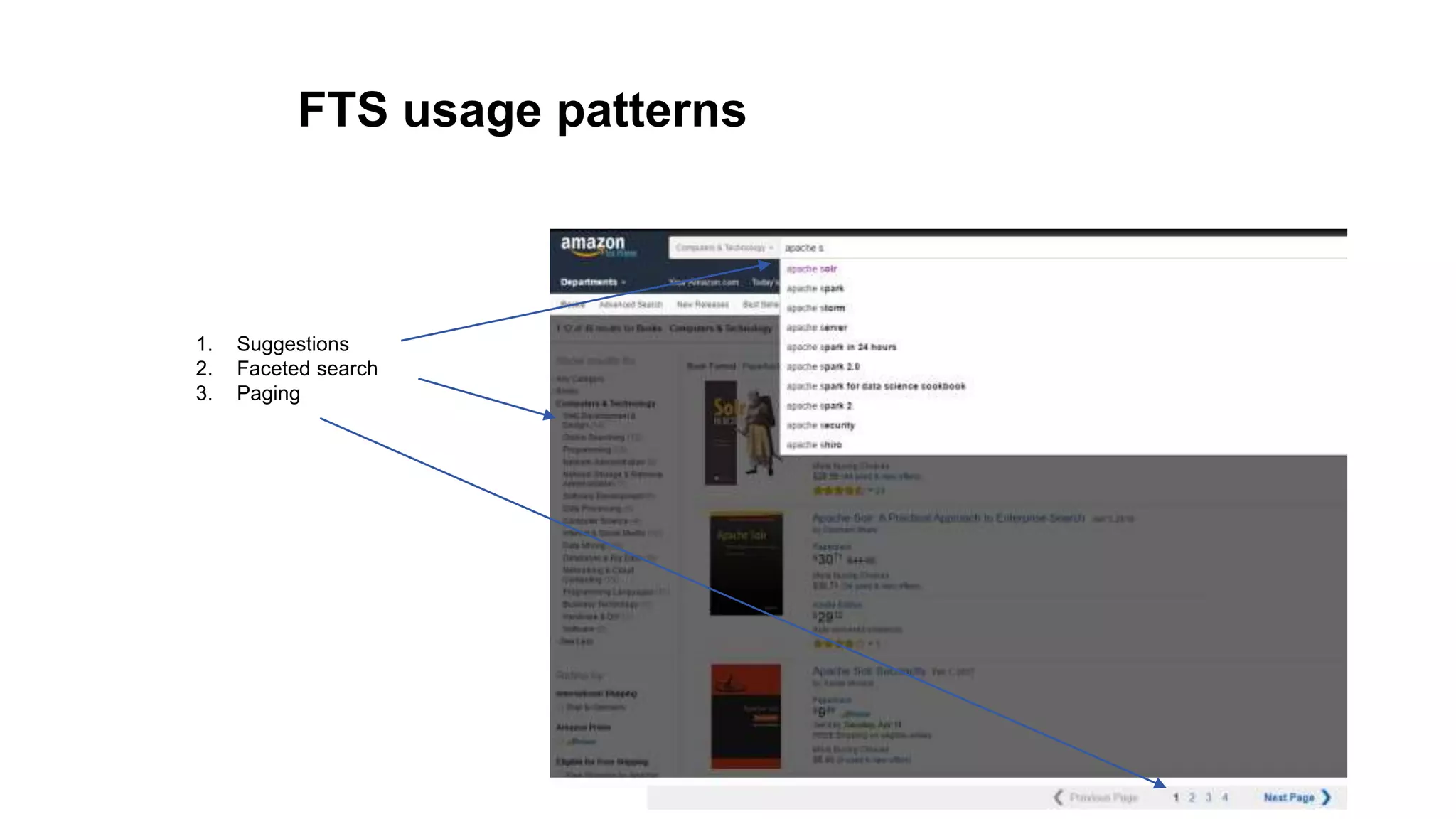
1. Suggestions
2. Faceted search
3. Paging
Market leaders
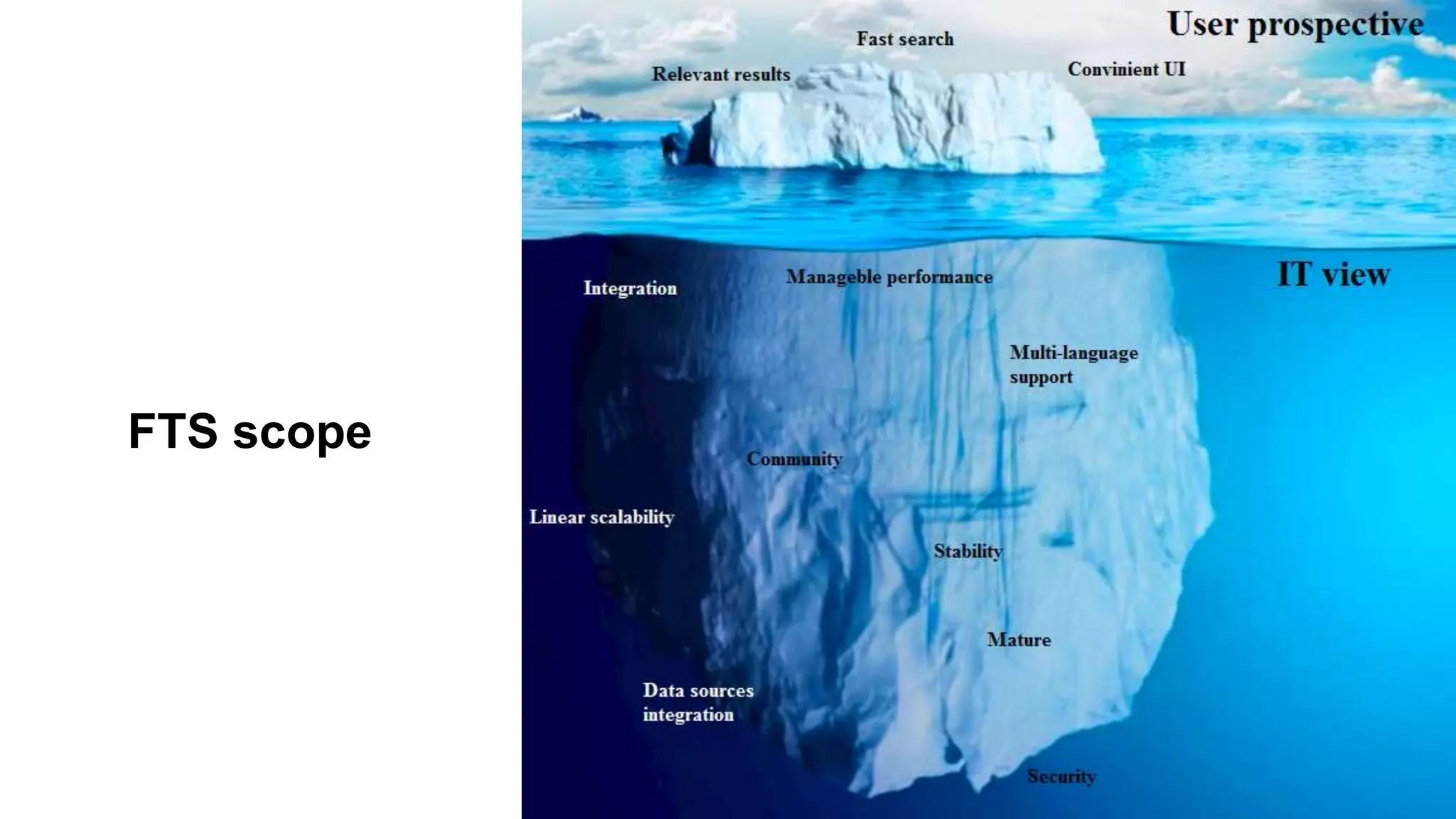
FTS scope
Q&A
Solr
• True open source (under Apache) full text search engine
• Built over Lucene
• Multi-language support
• Rich document parsing (rtf, pdf, …)
• Various client APIs
• Versatile query language
• Scalable
• Full of additional features 
Well-known Solr users
and many others in https://wiki.apache.org/solr/PublicServers
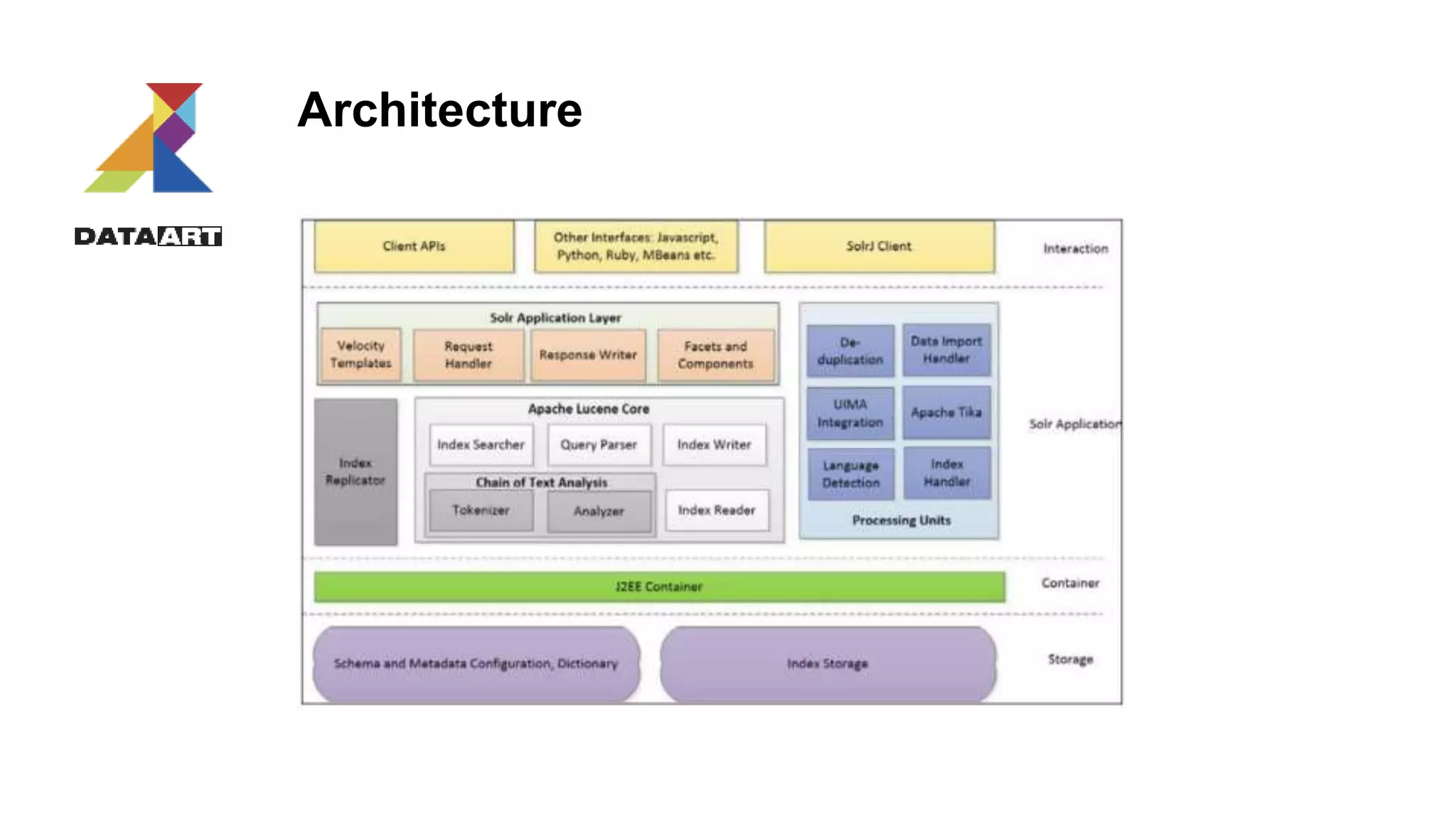
Architecture
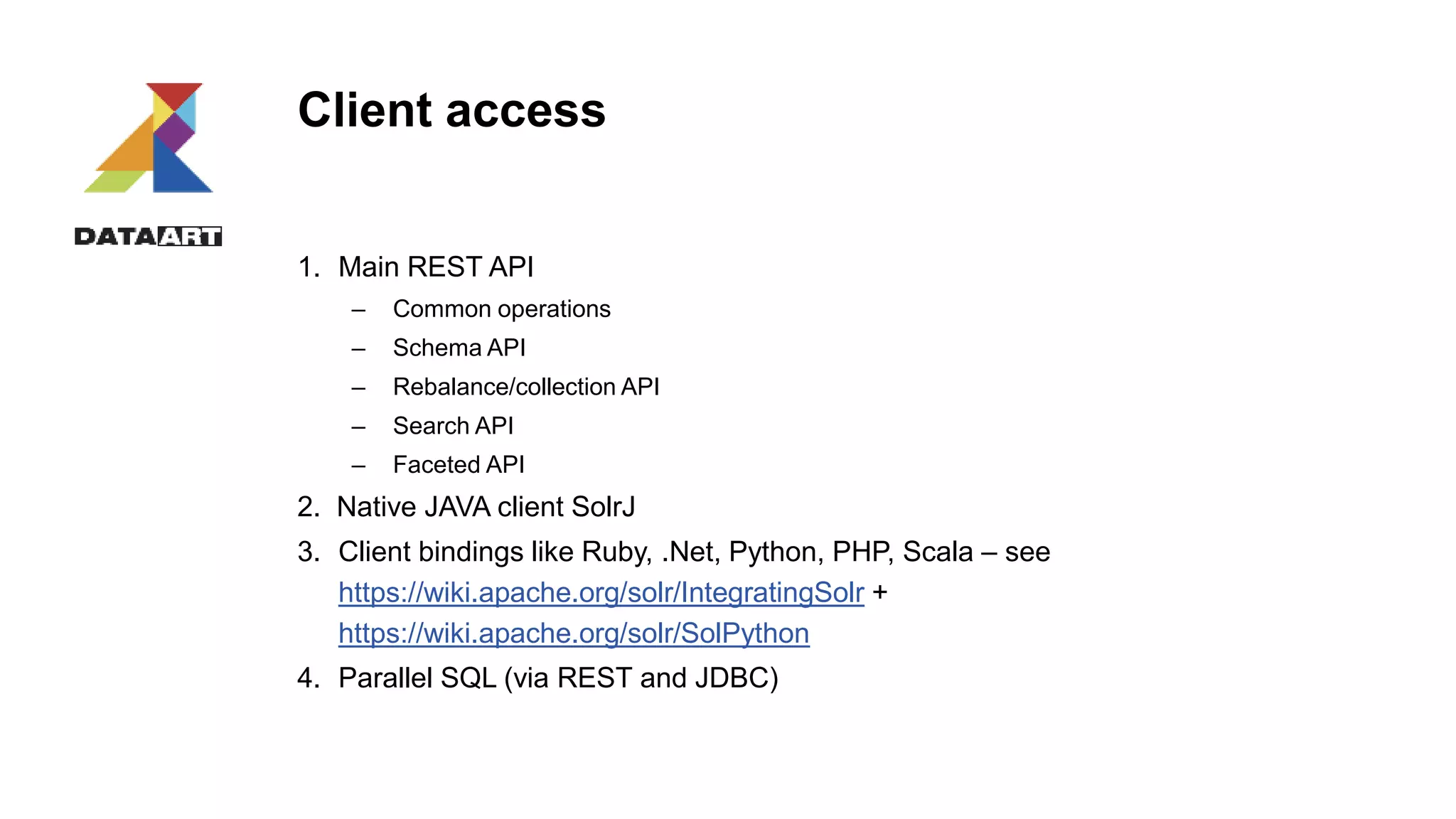
Client access
1. Main REST API
– Common operations
– Schema API
– Rebalance/collection API
– Search API
– Faceted API
2. Native JAVA client SolrJ
3. Client bindings like Ruby, .Net, Python, PHP, Scala – see
https://wiki.apache.org/solr/IntegratingSolr +
https://wiki.apache.org/solr/SolPython
4. Parallel SQL (via REST and JDBC)
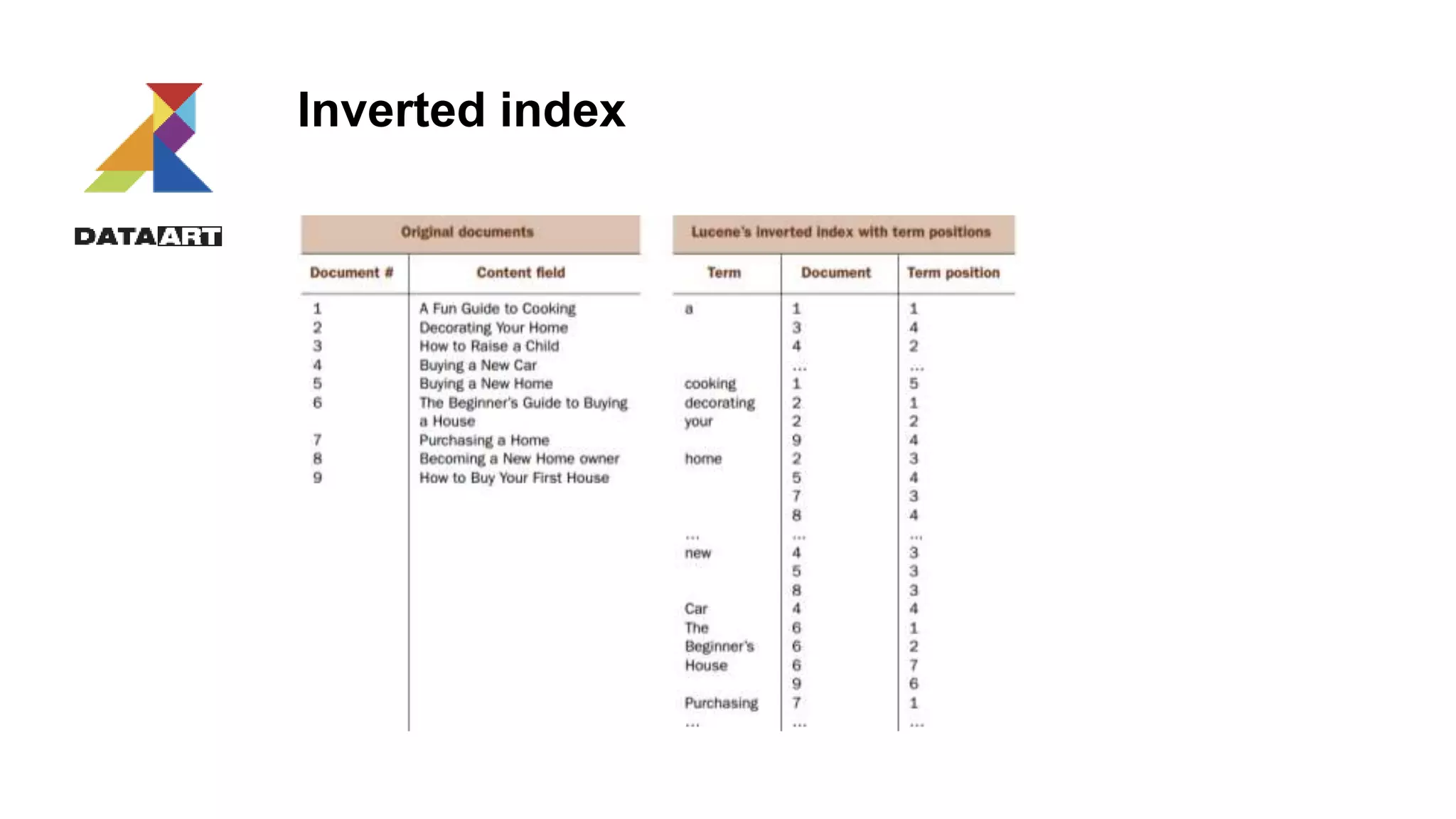
Inverted index
Index modeling
Choose Solr mode:
1. Schema
2. Schema-less
Define field attributes:
1. Indexed (query, sort, facet, group by, provide query suggestions for, execute function)
2. Stored – all fields which are intended to be shown in a response
3. Mandatory
4. Data type
5. Multivalued
6. Copy field (calculated)
Choose a field for UniqueIdentifier
Field data types
1. Dates
2. Strings
3. Numeric
4. Guid
5. Spatial
6. Boolean
7. Currency and etc
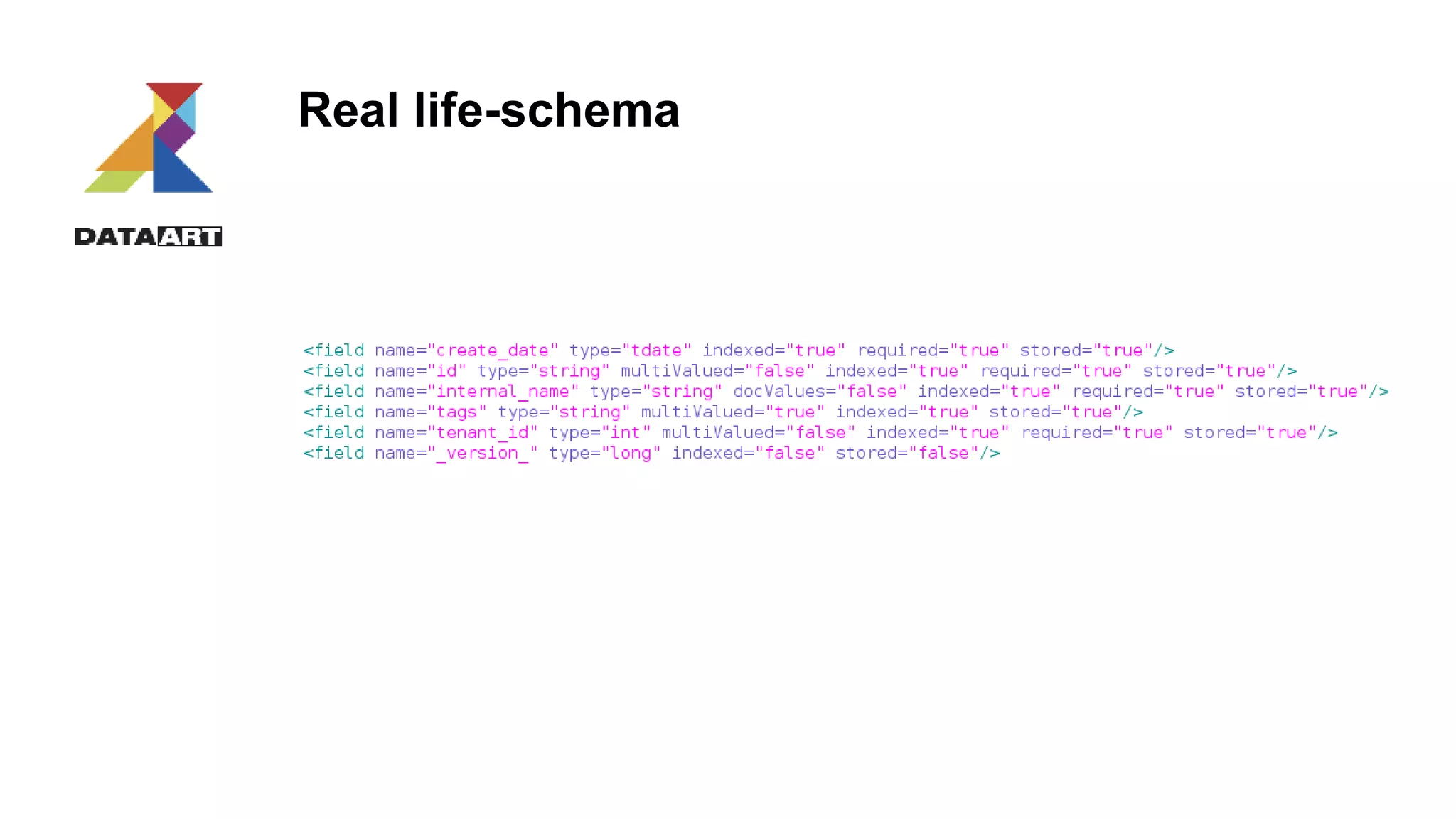
Real life-schema
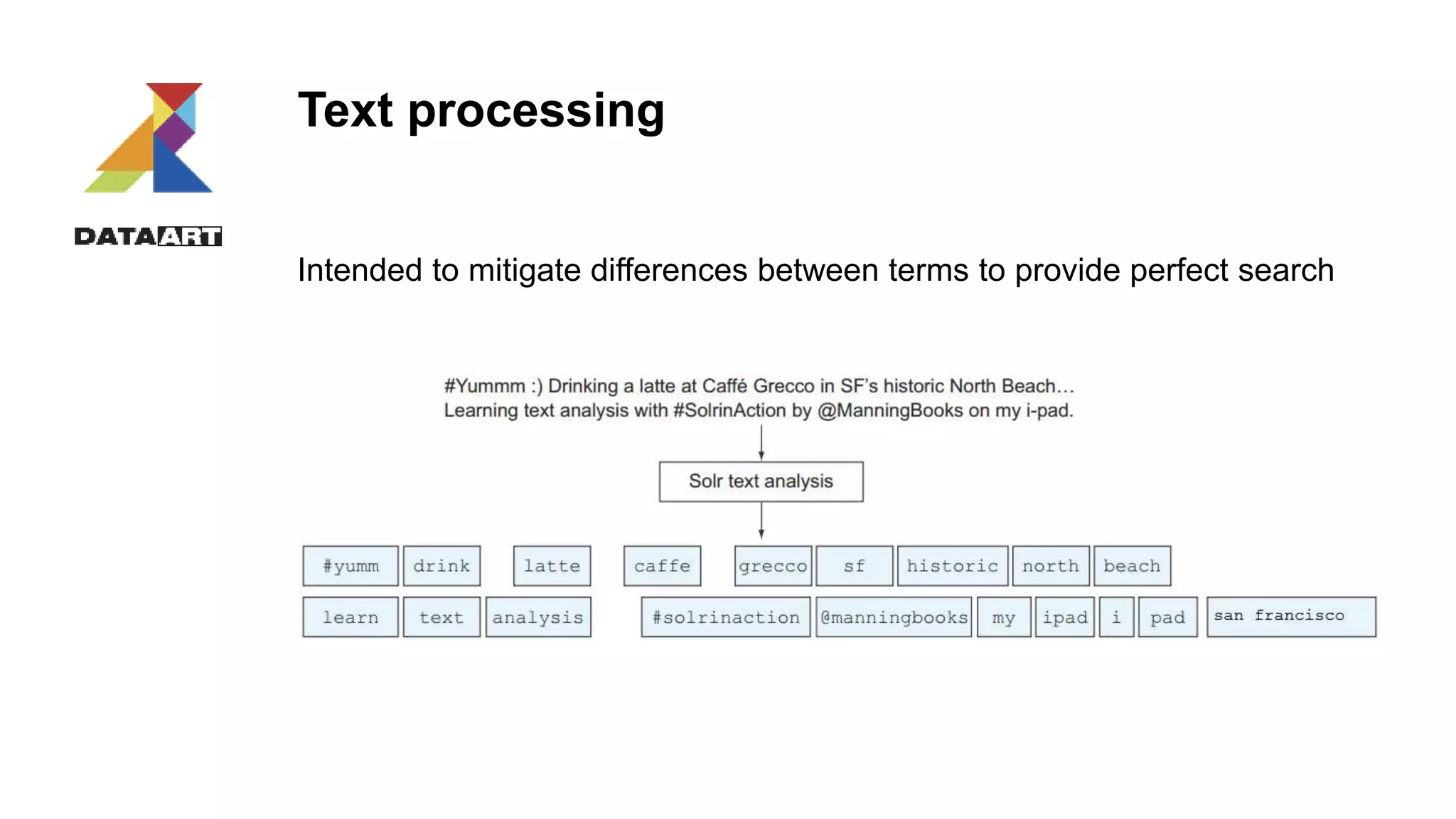
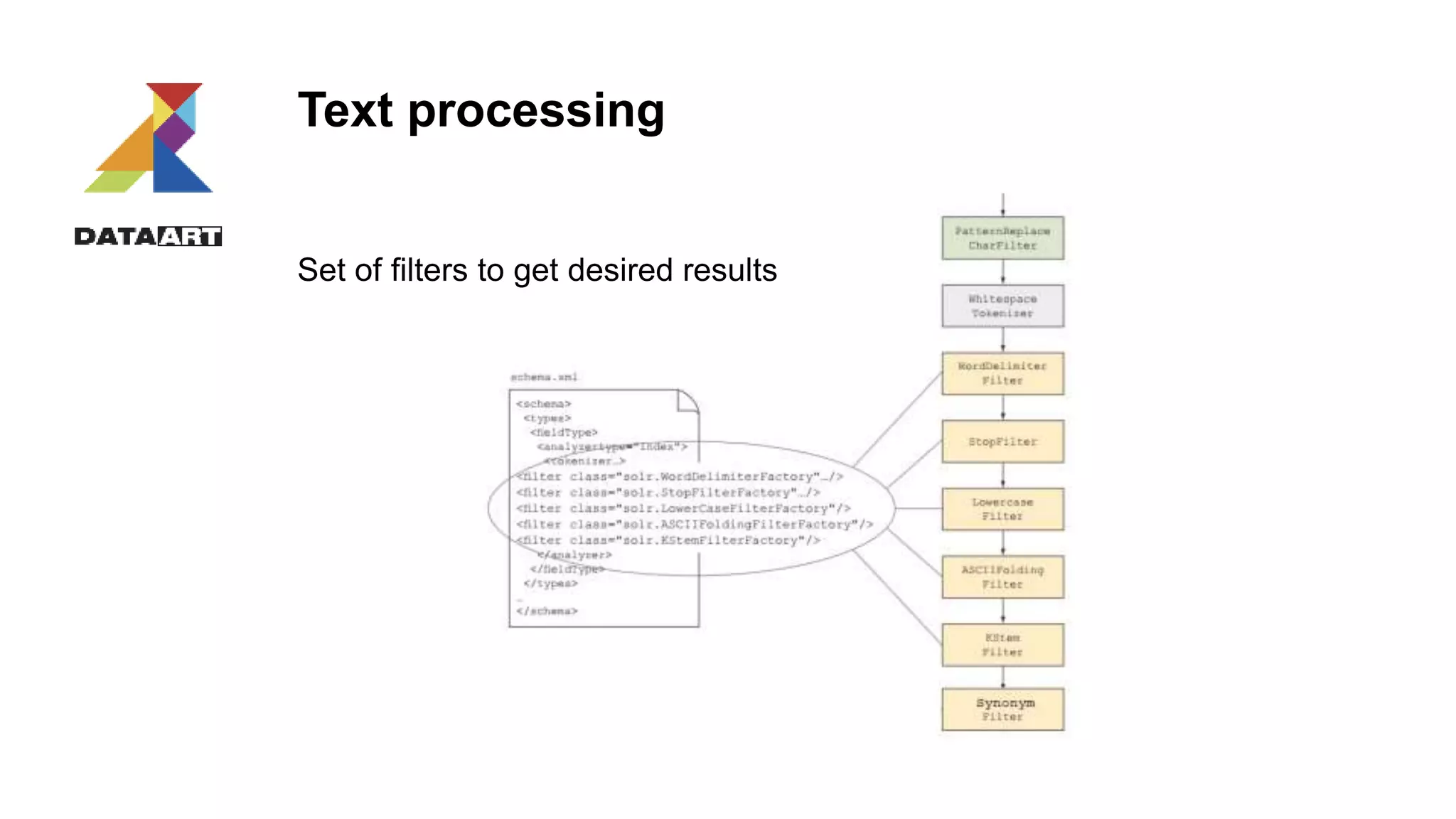
Text processing
Intended to mitigate differences between terms to provide perfect search
Text processing
Set of filters to get desired results
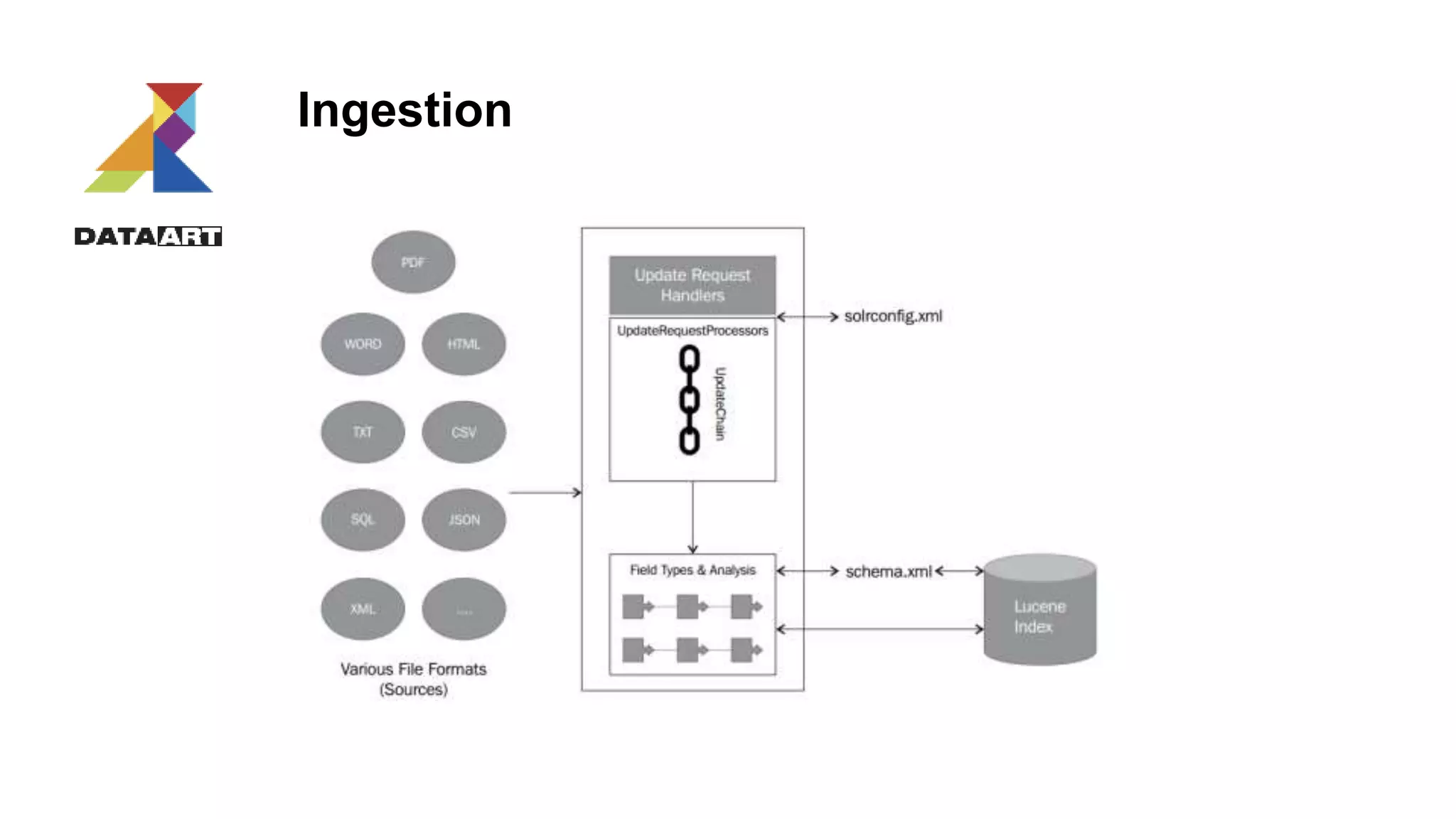
Ingestion
Transaction management
1. Solr doesn’t expose immediately new data as well as not remove deleted
2. Commit/rollback should be issued
Commit types:
1. Soft. Data indexed in memory
2. Hard. It moves data to hard-drive
Risks:
1. Commits are slow
2. Many simultaneous commits could lead to Solr exceptions (too many commits)
<h2>HTTP ERROR: 503</h2>
<pre>Error opening new searcher. exceeded limit of maxWarmingSearchers=2, try again later.</pre>
3. Commit command works on instance level – not on user one
Transaction log
Intention:
1. recovery/durability
2. Nearly-Real-Time (NRT) update
3. Replication for Solr cloud
4. Atomic document update, in-place update (syntax is different)
5. Optimistic concurrency
Transaction log could be enabled in solrconfig.xml
<updateLog>
<str name="dir">${solr.ulog.dir:}</str>
</updateLog>
Atomic update example:
{"id":"mydoc",
"price":{"set":99},
"popularity":{"inc":20},
"categories":{"add":["toys","games"]},
"promo_ids":{"remove":"a123x"},
"tags":{"remove":["free_to_try","on_sale"]}
}
Data modification Rest API
Rest API accepts:
1. Json objects
2. Xml-update
3. CSV
Solr UPDATE = UPSERT if schema.xml has <UniqueIdentifier>
Data modification Rest API
curl http://192.168.77.65:8983/solr/single-core/update?commit=true -H 'Content-type:application/json' -d '
[
{"id" : "3",
"internal_name":"post 2",
},
{"id" : “1",
"internal_name":"post 1",
}
]‘
Data.xml
<add>
<doc>
<field name='id'>8</field>
<field name='internal_name'>test1</field>
<doc>
<doc>
<field name='id'>9</field>
<field name='internal_name'>test6</field>
<doc>
</add>
curl -X POST 'http://192.168.77.65:8983/solr/single-core/update?commit=true&wt=json' -H 'Content-Type:text/xml' -d @data.xml
Delete.xml
<delete>
<id>11604</id>
<id>:11603</id>
</delete>
Delete_with_query.xml
<delete>
<query>id:[1 TO 85]</query>
</delete>
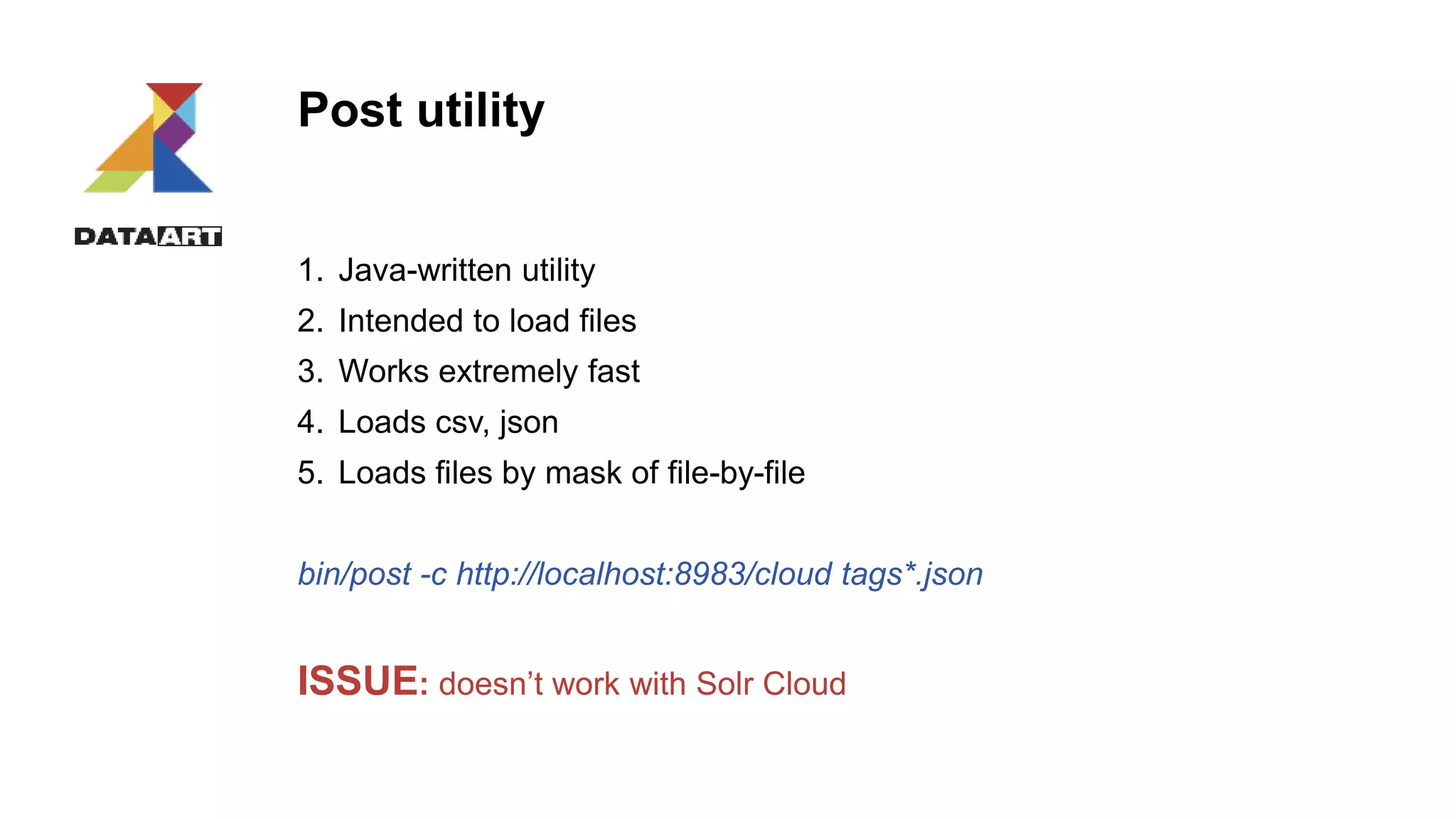
Post utility
1. Java-written utility
2. Intended to load files
3. Works extremely fast
4. Loads csv, json
5. Loads files by mask of file-by-file
bin/post -c http://localhost:8983/cloud tags*.json
ISSUE: doesn’t work with Solr Cloud
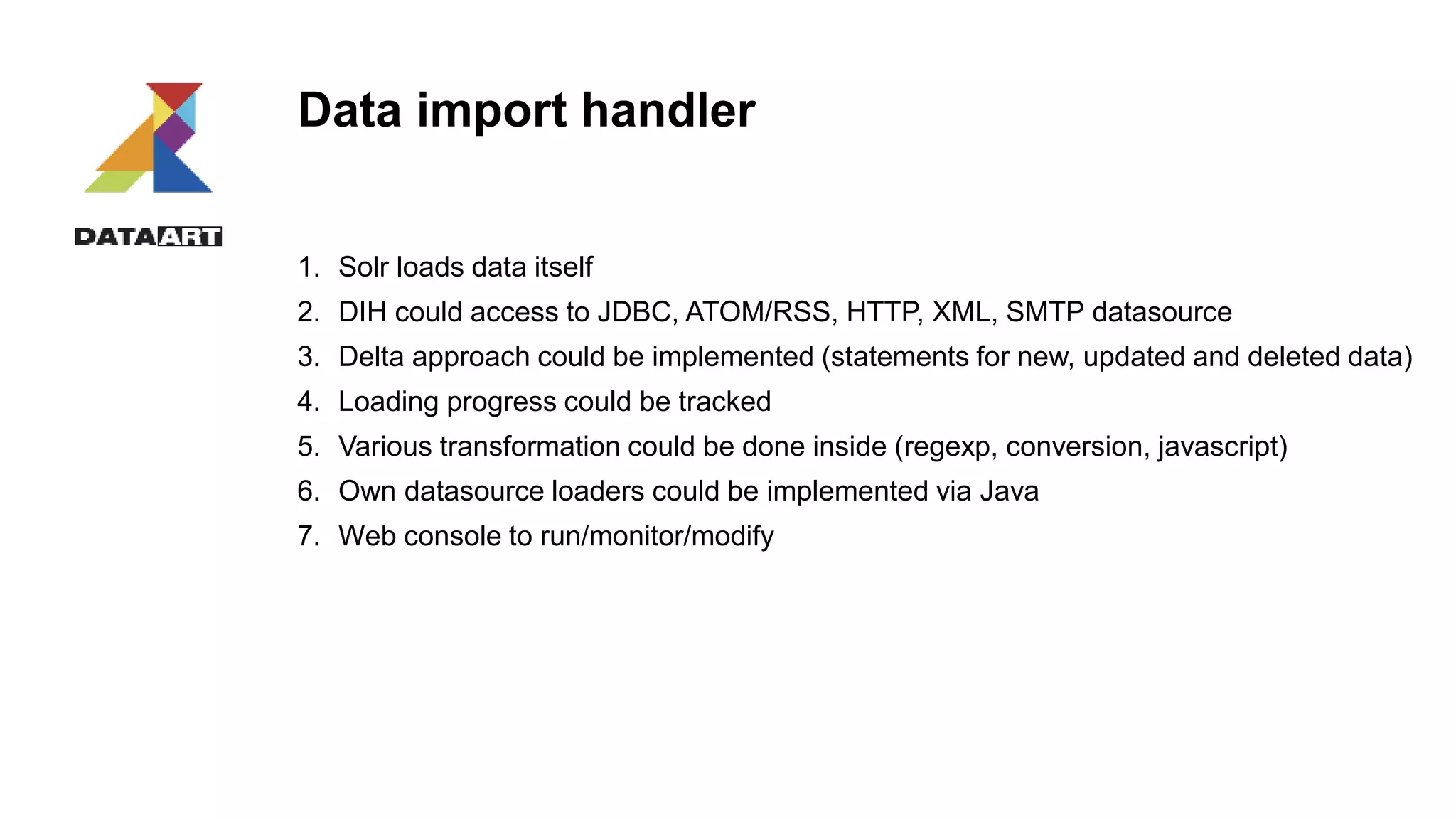
Data import handler
1. Solr loads data itself
2. DIH could access to JDBC, ATOM/RSS, HTTP, XML, SMTP datasource
3. Delta approach could be implemented (statements for new, updated and deleted data)
4. Loading progress could be tracked
5. Various transformation could be done inside (regexp, conversion, javascript)
6. Own datasource loaders could be implemented via Java
7. Web console to run/monitor/modify
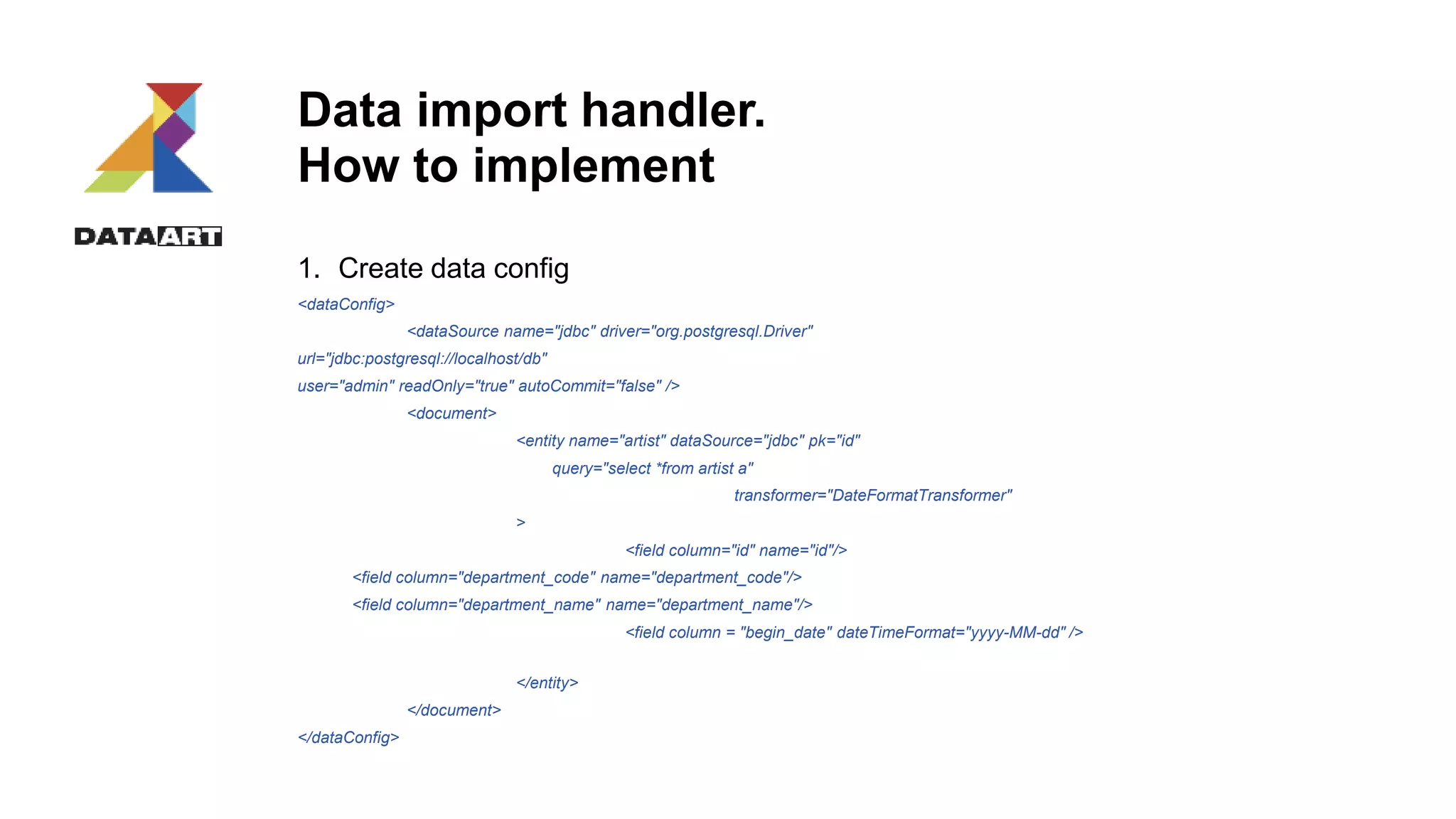
Data import handler.
How to implement
1. Create data config
<dataConfig>
<dataSource name="jdbc" driver="org.postgresql.Driver"
url="jdbc:postgresql://localhost/db"
user="admin" readOnly="true" autoCommit="false" />
<document>
<entity name="artist" dataSource="jdbc" pk="id"
query="select *from artist a"
transformer="DateFormatTransformer"
>
<field column="id" name="id"/>
<field column="department_code" name="department_code"/>
<field column="department_name" name="department_name"/>
<field column = "begin_date" dateTimeFormat="yyyy-MM-dd" />
</entity>
</document>
</dataConfig>
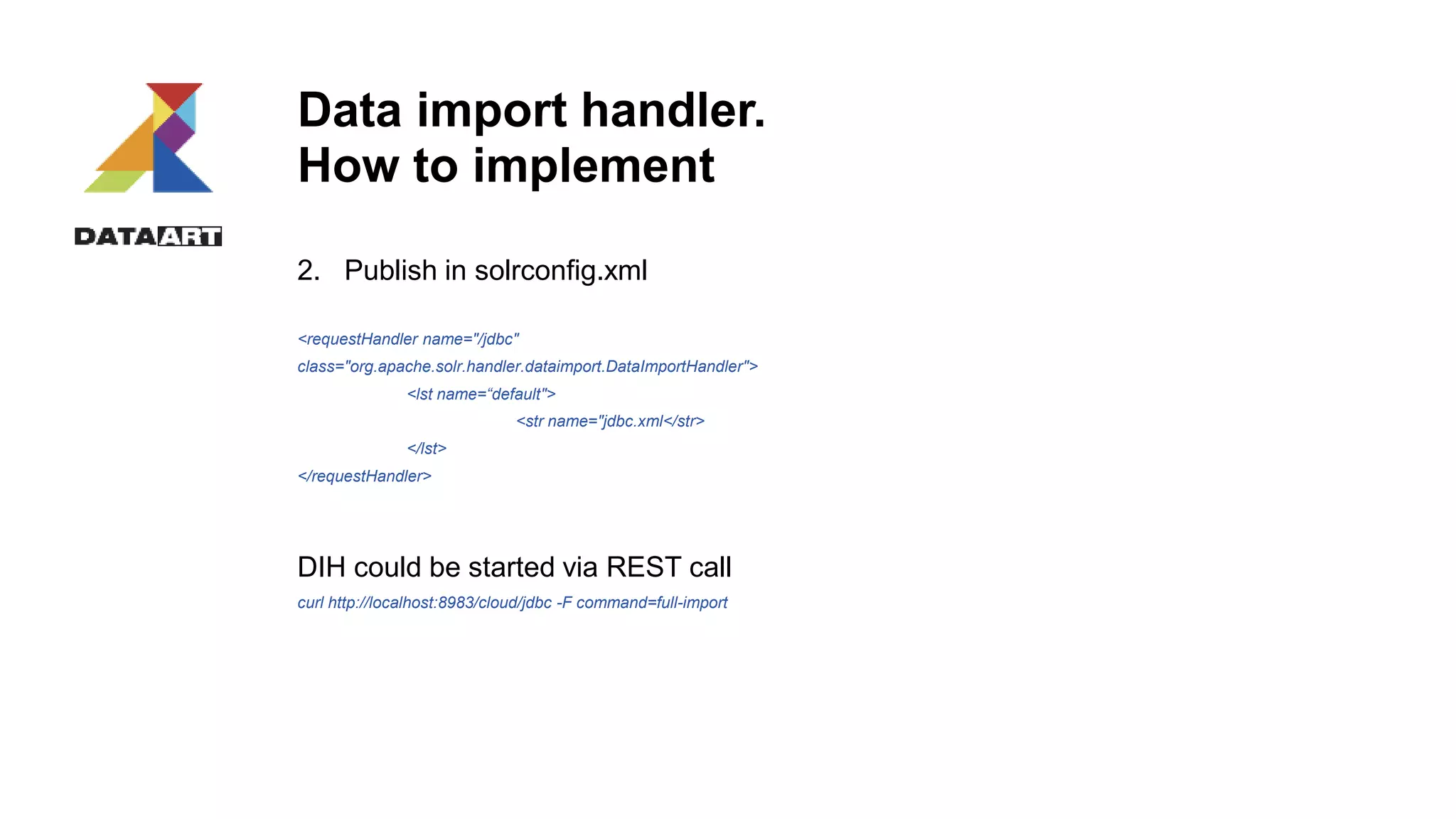
Data import handler.
How to implement
2. Publish in solrconfig.xml
<requestHandler name="/jdbc"
class="org.apache.solr.handler.dataimport.DataImportHandler">
<lst name=“default">
<str name="jdbc.xml</str>
</lst>
</requestHandler>
DIH could be started via REST call
curl http://localhost:8983/cloud/jdbc -F command=full-import
Data import handler
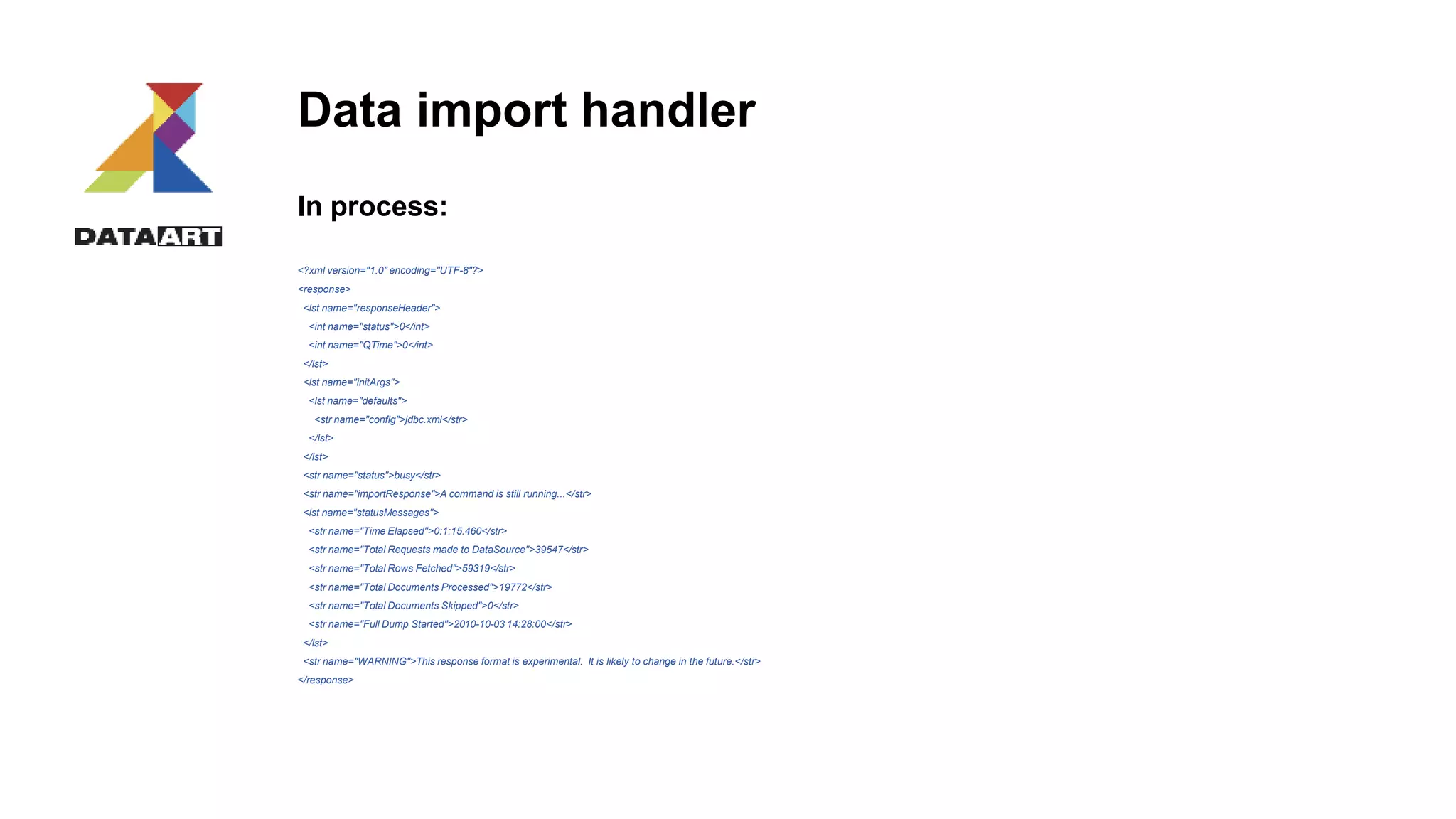
In process:
<?xml version="1.0" encoding="UTF-8"?>
<response>
<lst name="responseHeader">
<int name="status">0</int>
<int name="QTime">0</int>
</lst>
<lst name="initArgs">
<lst name="defaults">
<str name="config">jdbc.xml</str>
</lst>
</lst>
<str name="status">busy</str>
<str name="importResponse">A command is still running...</str>
<lst name="statusMessages">
<str name="Time Elapsed">0:1:15.460</str>
<str name="Total Requests made to DataSource">39547</str>
<str name="Total Rows Fetched">59319</str>
<str name="Total Documents Processed">19772</str>
<str name="Total Documents Skipped">0</str>
<str name="Full Dump Started">2010-10-03 14:28:00</str>
</lst>
<str name="WARNING">This response format is experimental. It is likely to change in the future.</str>
</response>
Data import handler
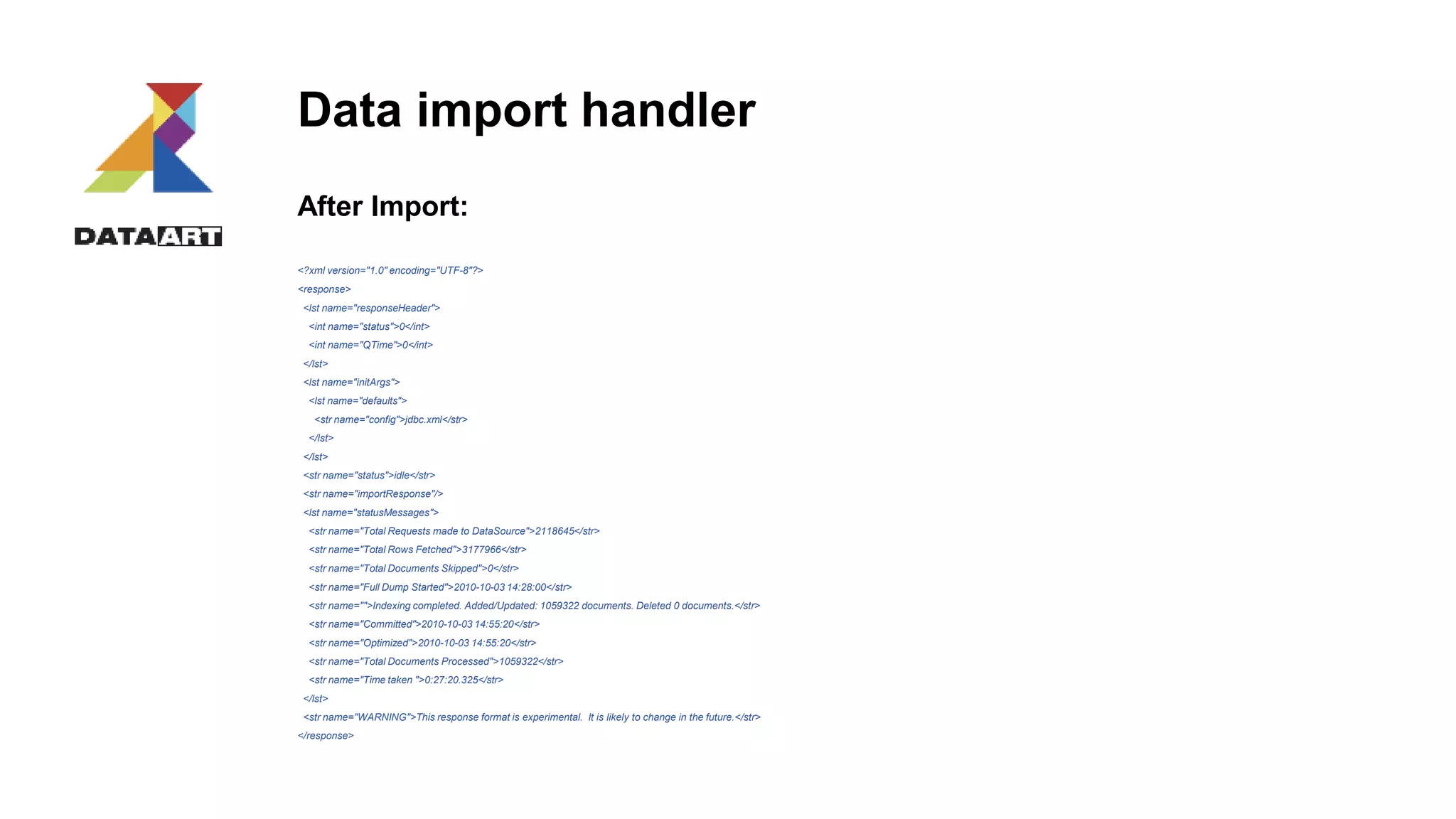
After Import:
<?xml version="1.0" encoding="UTF-8"?>
<response>
<lst name="responseHeader">
<int name="status">0</int>
<int name="QTime">0</int>
</lst>
<lst name="initArgs">
<lst name="defaults">
<str name="config">jdbc.xml</str>
</lst>
</lst>
<str name="status">idle</str>
<str name="importResponse"/>
<lst name="statusMessages">
<str name="Total Requests made to DataSource">2118645</str>
<str name="Total Rows Fetched">3177966</str>
<str name="Total Documents Skipped">0</str>
<str name="Full Dump Started">2010-10-03 14:28:00</str>
<str name="">Indexing completed. Added/Updated: 1059322 documents. Deleted 0 documents.</str>
<str name="Committed">2010-10-03 14:55:20</str>
<str name="Optimized">2010-10-03 14:55:20</str>
<str name="Total Documents Processed">1059322</str>
<str name="Time taken ">0:27:20.325</str>
</lst>
<str name="WARNING">This response format is experimental. It is likely to change in the future.</str>
</response>
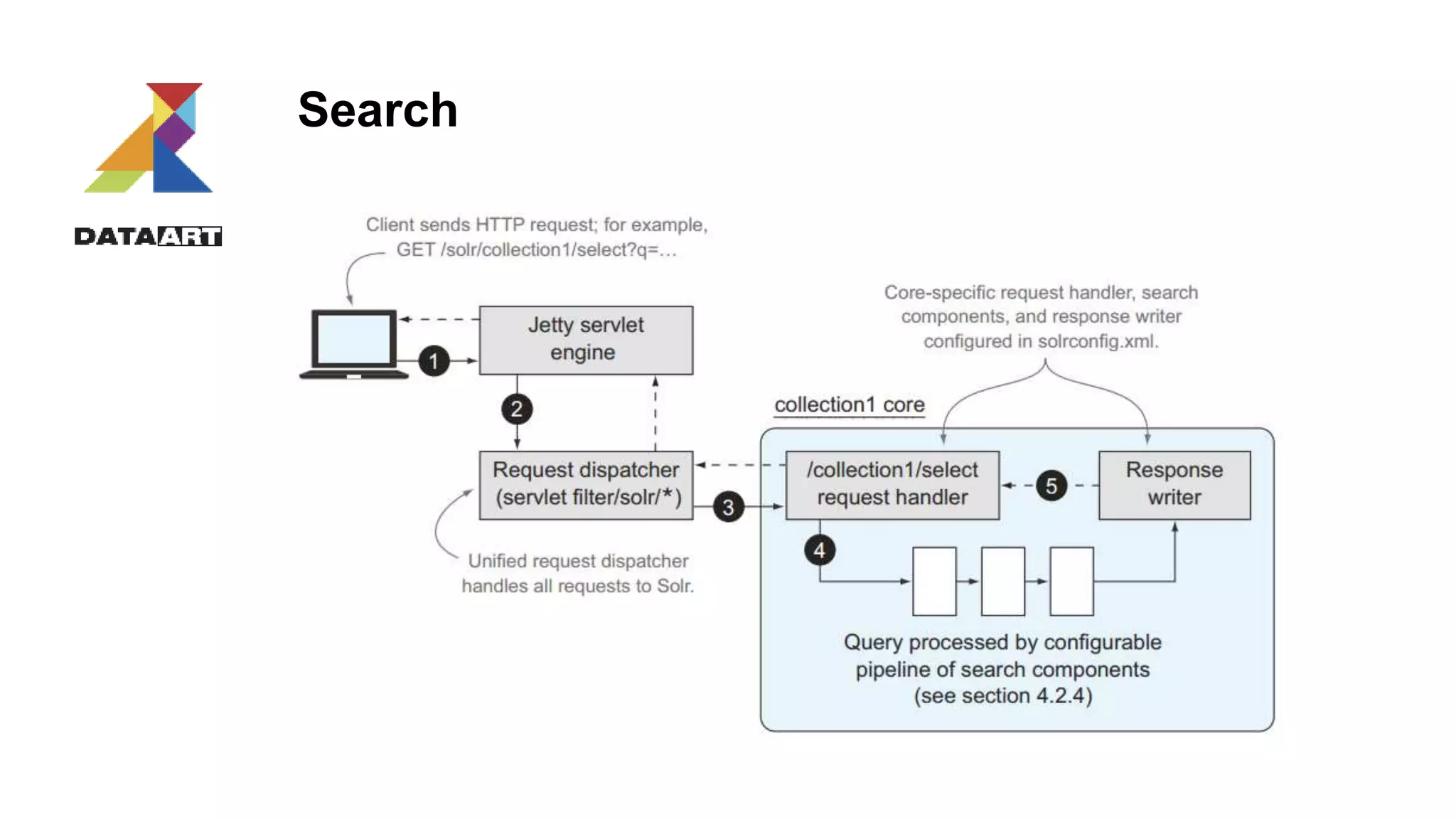
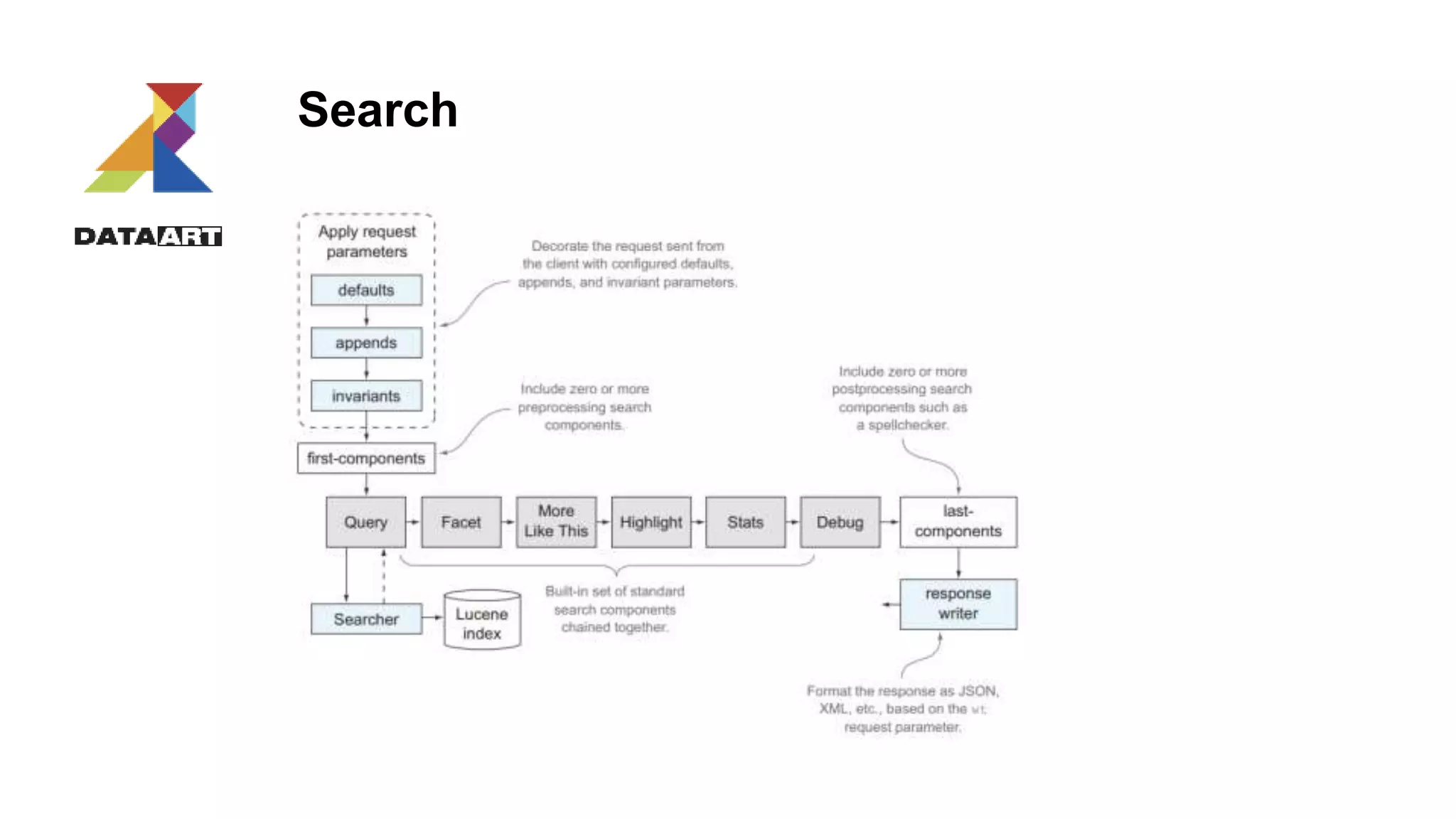
Search
Search
Search types
• Fuzzy
Developer~ Developer~1 Developer~4
It matches developer, developers, development and etc.
• Proximity
“solr search developer”~ “solr search developer”~1
It matches: solr search developer, solr senior developer
• Wildcard
Deal* Com*n C??t
Need *xed? Add ReversedWildcardFilterFactory.
• Range
[1 TO25] {23 TO50} {23 TO90]
Search characteristics
1. Similarity
2. Term frequency
Similarity could be changed via boosting:
q=title:(solr for developers)^2.5 AND description:(professional)
q=title:(java)^0.5 AND description:(professional)^3
Search result customization
Field list
/query?=&fl=id, genre /query?=&fl=*,score
Sort
/query?=&fl=id, name&sort=date, score desc
Paging
select?q=*:*&sort=id&fl=id&rows=5&start=5
Transformers
[docid] [shard]
Debuging
/query?=&fl=id&debug=true
Format
/query?=&fl=id&wt=json /query?=&fl=id&wt=xml
Search queries examples
Parameter style
curl "http://localhost:8983/cloud/query?q=heroy&fq=inStock:true"
JSON API
$ curl http://localhost:8983/cloud/query -d '
{
query:"hero"
"filter" : "inStock:true"
}'
Response
{
"responseHeader":{
"status":0,
"QTime":2,
"params":{
"json":"n{n query:"hero" "filter" : "inStock:true" n}"}},
"response":{"numFound":1,"start":0,"docs":[
{
"id":"book3",
"author":"Brandon Sanderson",
"author_s":"Brandon Sanderson",
"title":["The Hero of Aages"],
"series_s":"Mistborn",
"sequence_i":3,
"genre_s":"fantasy",
"_version_":1486581355536973824
}]
}
}
Q&A
18 April 2017 F U L L T E X T S E A R C H F O R L A Z Y G U Y S 38
Scaling & Solr
18 April 2017 39
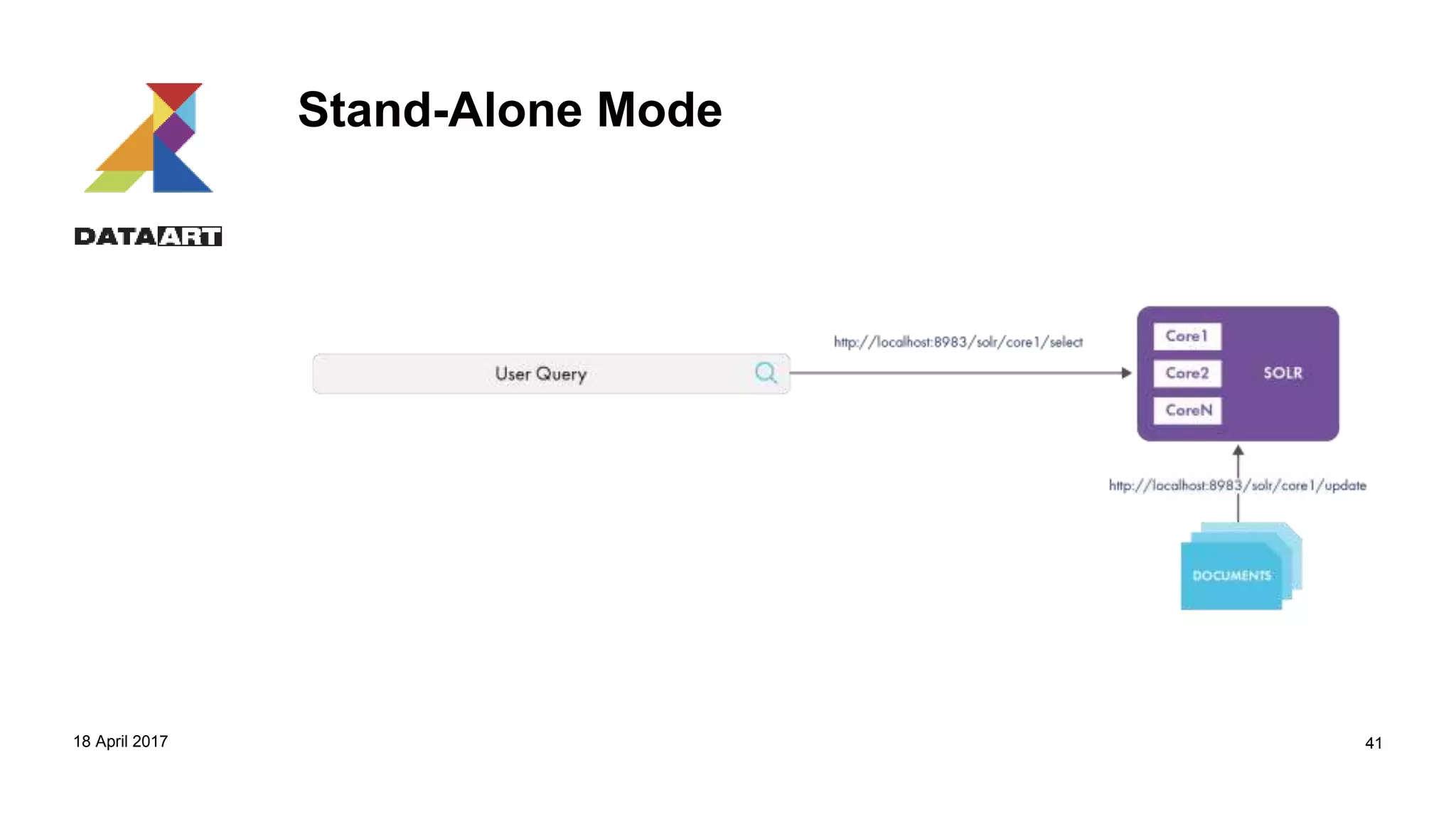
Stand-Alone Mode
Glossary:
• Instance
• Core
• Multiple cores
18 April 2017 40
Stand-Alone Mode
18 April 2017 41
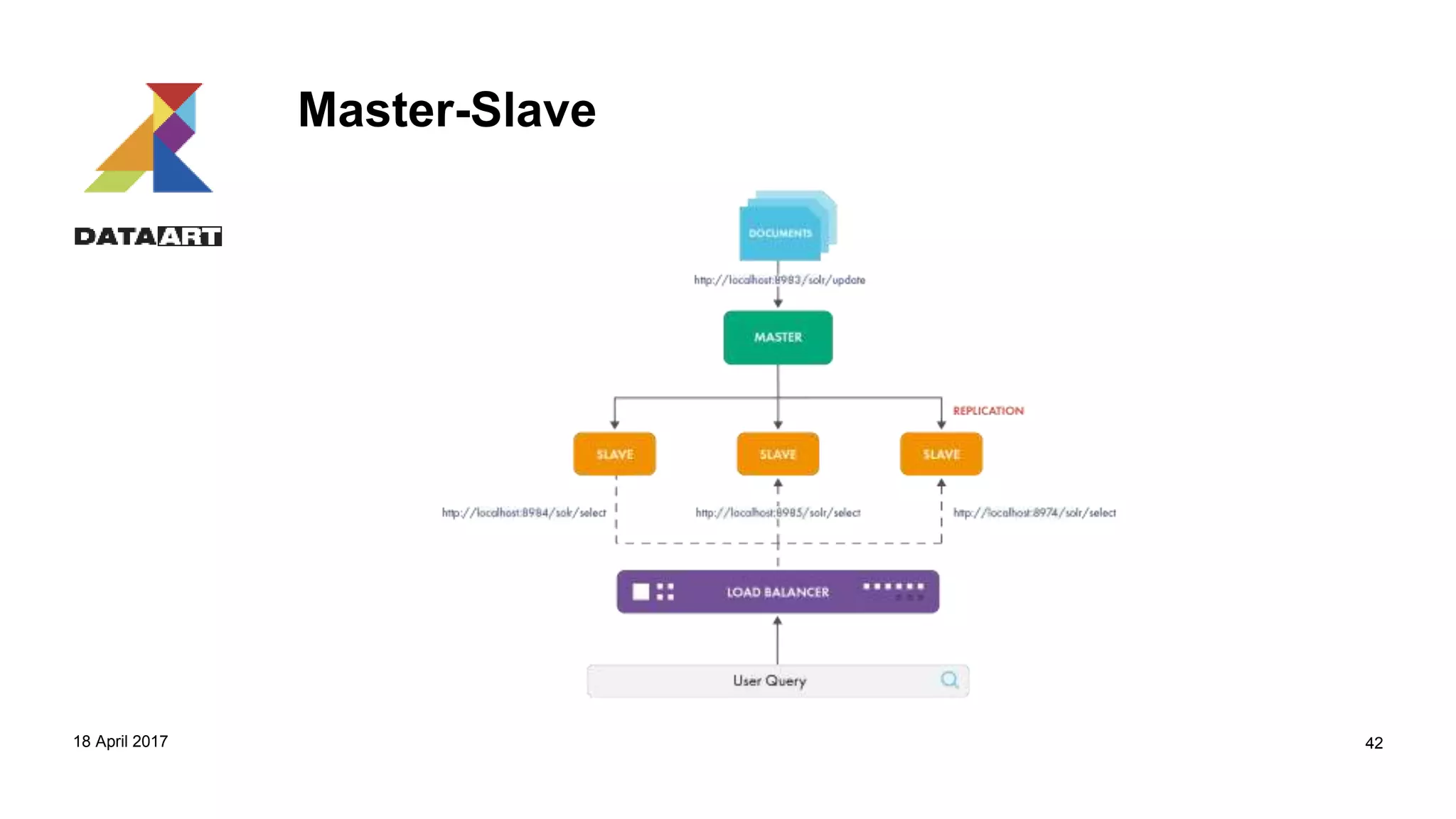
Master-Slave
18 April 2017 42
Master-Slave
Glossary:
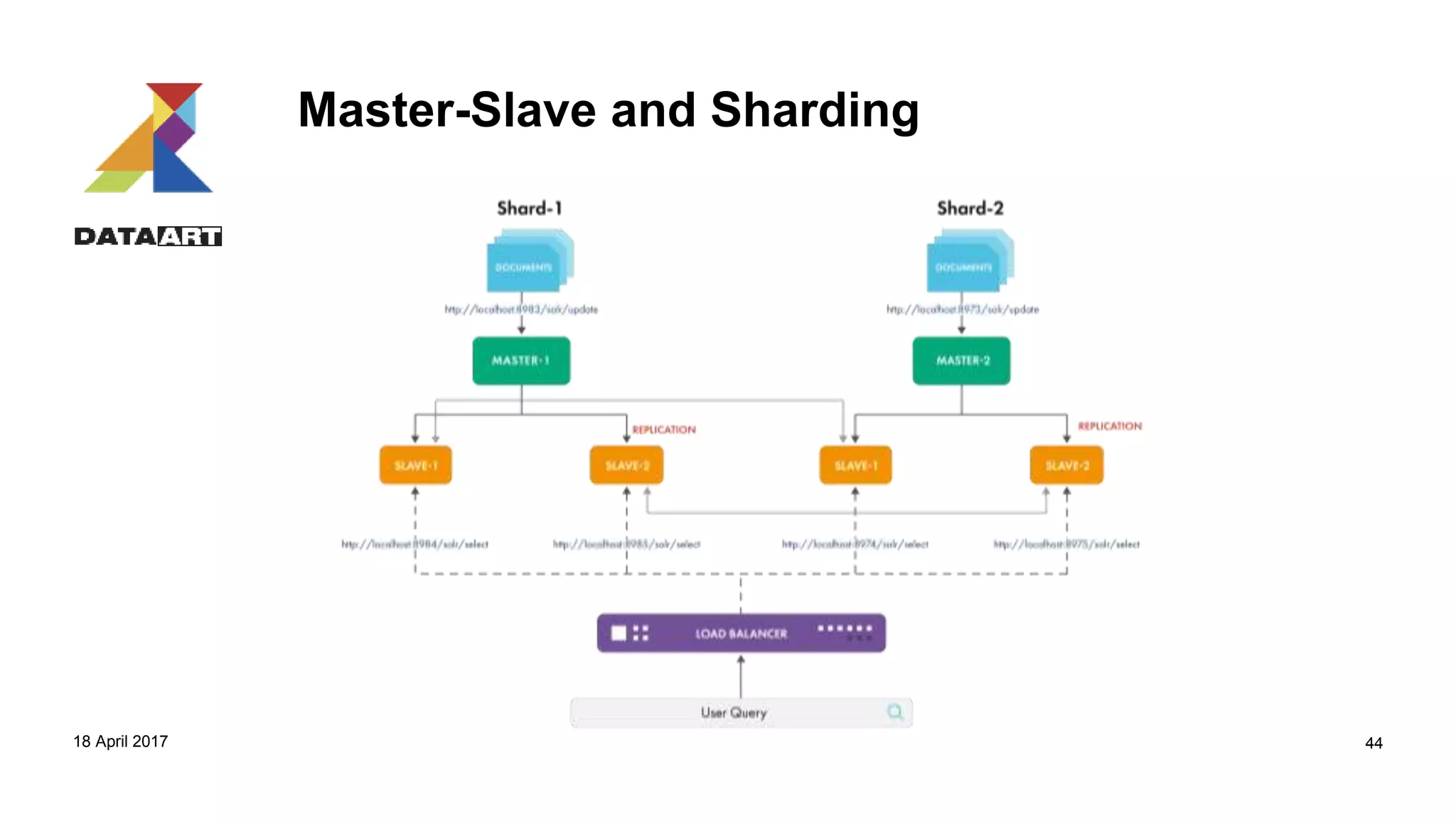
• Shard
• Collection
18 April 2017 43
Master-Slave and Sharding
18 April 2017 44
SolrCloud
18 April 2017 F U L L T E X T S E A R C H F O R L A Z Y G U Y S 45
SolrCloud
Glossary:
• Cluster
• Node
• Core (ReplicaLeader)
18 April 2017 F O O T E R H E R E 46
Zookeeper
Apache ZooKeeper is a mature and fast open source
server widely used in distributed systems for coordinating,
synchronizing, and maintaining shared information.
18 April 2017 47
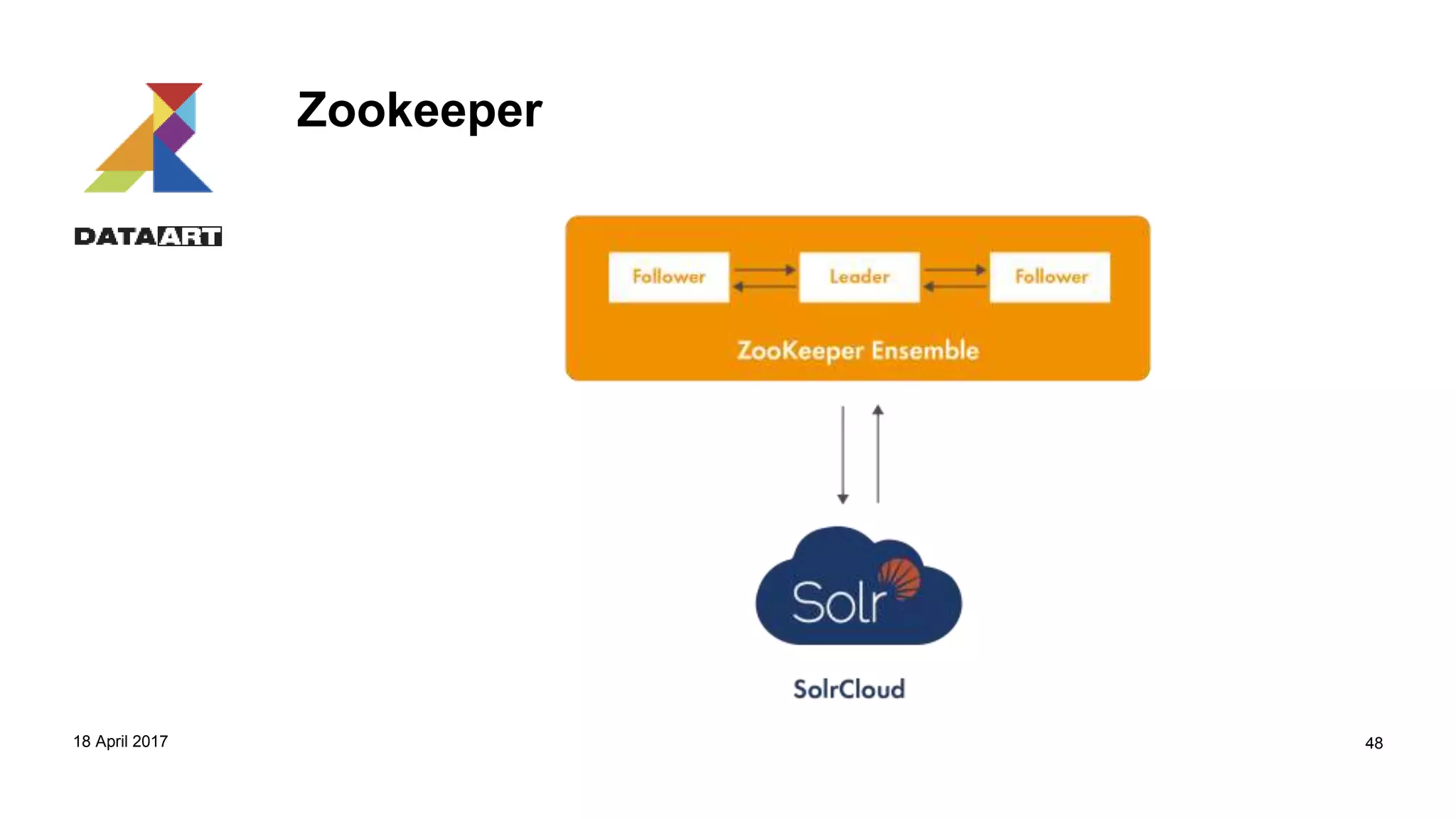
Zookeeper
18 April 2017 48
Zookeeper
• Configuration management
• Cluster coordination
• Leader election
18 April 2017 49
Zookeeper
• zkcli.sh
• https://cwiki.apache.org/confluence/display/solr/Command+Line+Utilities
18 April 2017 50
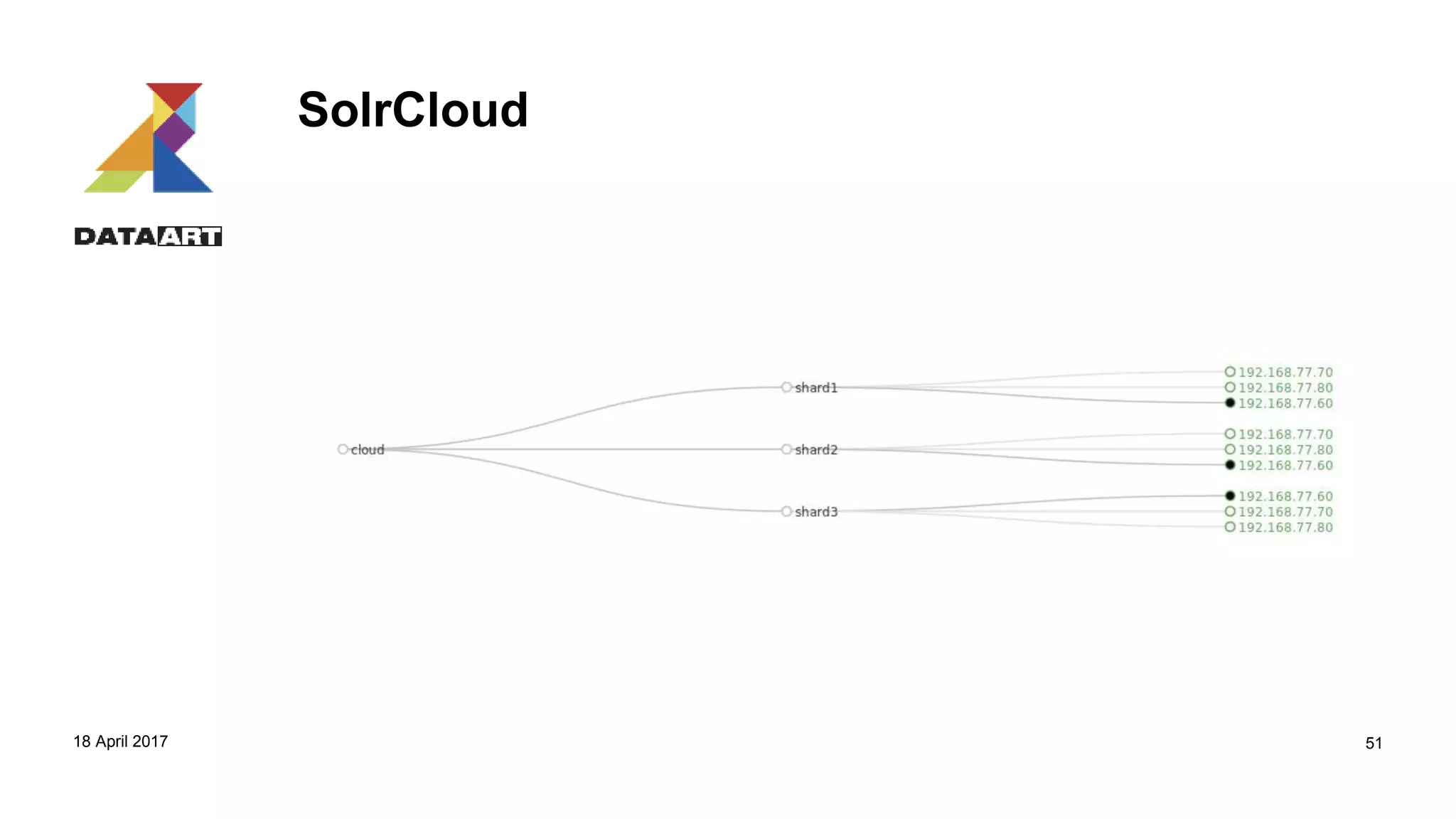
SolrCloud
18 April 2017 51
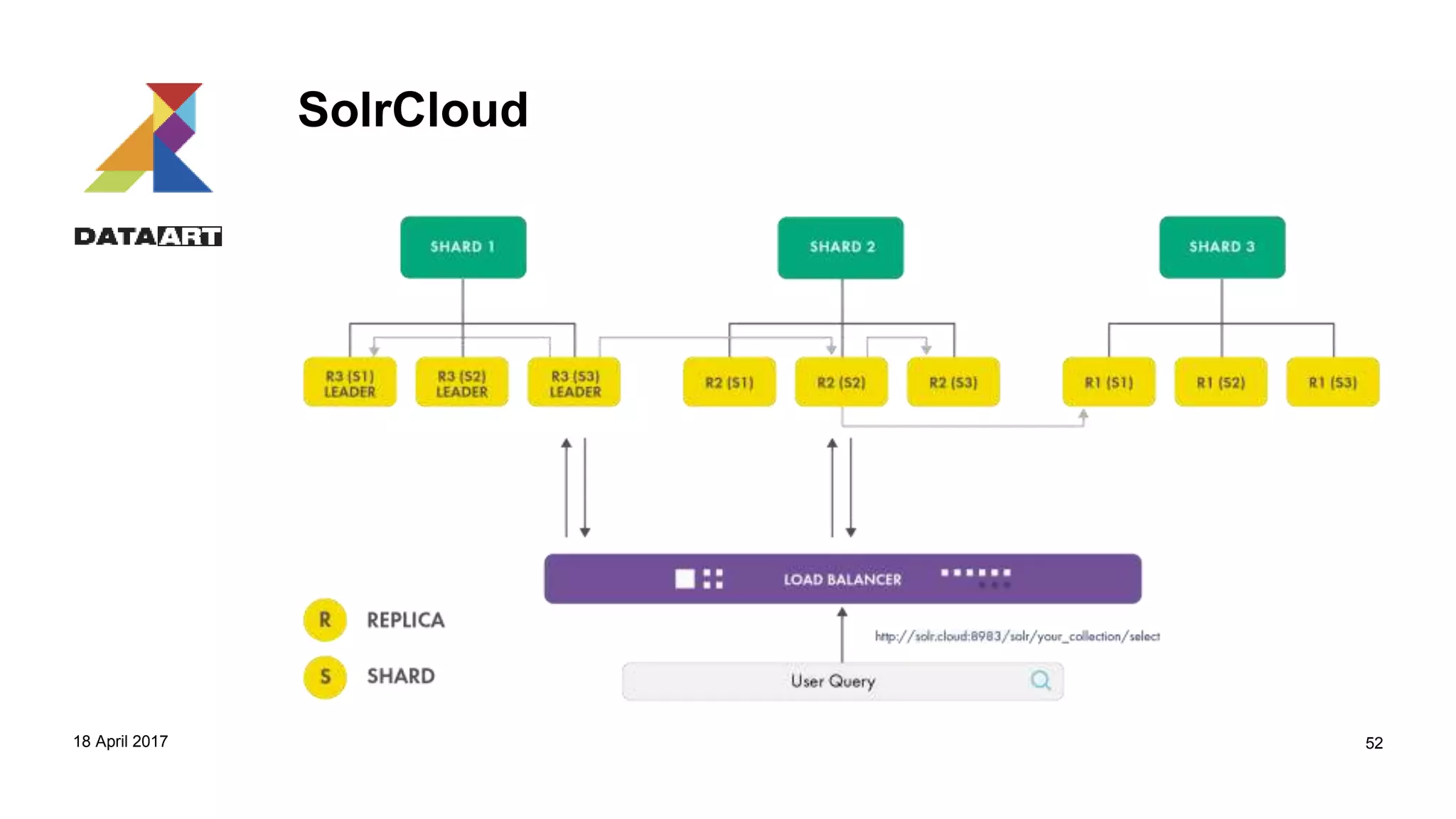
SolrCloud
18 April 2017 52
SolrCloud Shard Splitting
• curl 'http://192.168.70.60:8983/solr/admin/collections?action=SPLITSHARD&collection=cloud&shard=shard1‘
• /admin/collections?action=SPLITSHARD&collection=name&shard=shardID
18 April 2017 F O O T E R H E R E 53
SolrCloud Adding a Replica
• curl 'http://192.168.70.60:8983/solr/admin/collections?action=ADDREPLICA&collection=cloud&shard=shard1&node=192.168.70.100:8983_solr‘
• /admin/collections?action=ADDREPLICA&collection=collection&shard=shard&node=nodeName
18 April 2017 F O O T E R H E R E 54
SolrCloud Collections API
• https://cwiki.apache.org/confluence/display/solr/Collections+API
18 April 2017 F O O T E R H E R E 55
Q&A
18 April 2017 F U L L T E X T S E A R C H F O R L A Z Y G U Y S 57
Advanced Solr
1. Streaming language
Special language tailored mostly for Solr Cloud, parallel processing, map-reduce style approach. The idea is to process and return big datasets. Commands like: search, jdbc, intersect, parallel, or, and
2. Parallel query
JDBC/REST to process data in SQL style. Works on many Solr nodes in MPP style.
curl --data-urlencode 'stmt=SELECT to, count(*) FROM collection4 GROUP BY to ORDER BY count(*) desc LIMIT 10' http://localhost:8983/solr/cloud/sql
3. Graph functions
Graph traversal, aggregations, cycle detection, export to GraphML format
4. Spatial queries
There is field datatype Location. It permits to deal with spatial conditions like filtering by distance (circle, square, sphere) and etc.
&q=*:*&fq=(state:"FL" AND city:"Jacksonville")&sort=geodist()+asc
5. Spellchecking
It could be based on a current index, another index, file or using word breaks. Many options what to return: most similar,
more popular etc
http://localhost:8983/solr/cloud/spell?df=text&spellcheck.q=delll+ultra+sharp&spellcheck=true
6. Suggestions
http://localhost:8983/solr/cloud/a_term_suggest?q=sma&wt=json
7. Highlighter
Marks fragments in found document
http://localhost:8983/solr/cloud/select?hl=on&q=apple
8. Facets
Arrangement of search results into categories based on indexed terms with statistics. Could be done by values, range, dates, interval, heatmap
Performance tuning Cache
Be aware of Solr cache types:
1. Filter cache
Holds unordered document identifiers associated with filter queries that have been executed (only if fq query parameter is used)
2. Query result cache
Holds ordered document identifiers resulting from queries that have been executed
3. Document cache
Holds Lucene document instances for access to fields marked as stored
Identify most suitable cache class
1. LRUCache – last recently used are evicted first, track time
2. FastLRUCache – the same but works in separate thread
3. LFUCache – least frequently used are evicted first, track usage count
Play with auto-warm
<filterCache class="solr.FastLRUCache" size="512“ initialSize=“100" autowarmCount=“10"/>
Be aware how auto-warm works internally – doesn’t delete data, repopulated completely
Performance tuning Memory.
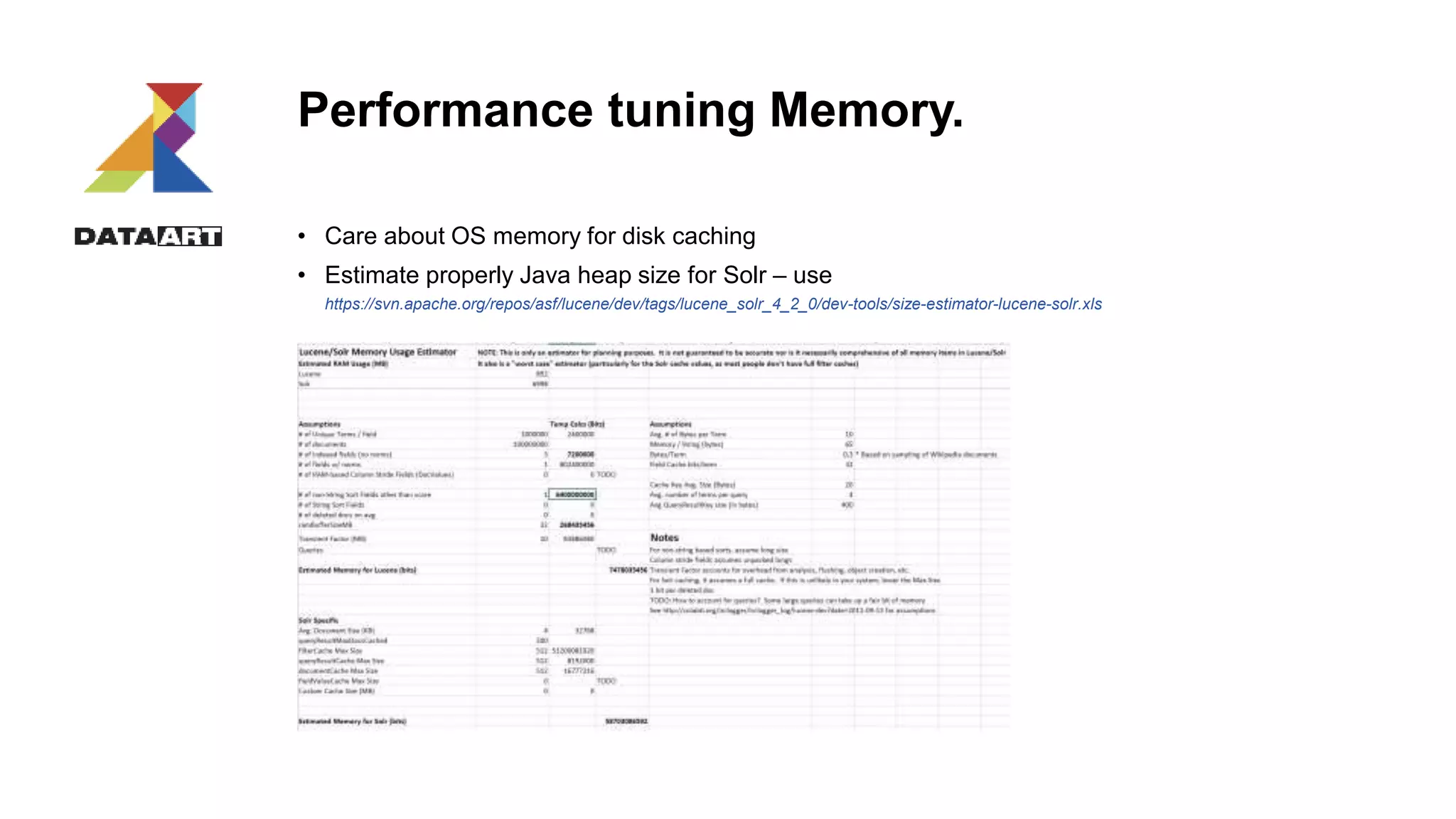
• Care about OS memory for disk caching
• Estimate properly Java heap size for Solr – use
https://svn.apache.org/repos/asf/lucene/dev/tags/lucene_solr_4_2_0/dev-tools/size-estimator-lucene-solr.xls
Performance tuning Schema design
1. Try to decrease number of stored fields mark as indexed only
2. If fields are used only to be returned in search results – use stored only
Performance tuning Ingestion
1. Use bulk sending data rather than per-document
2. If you use SolrJ use ConcurentUpdateSolrServer class
3. Disable ID uniqueness checking
4. Identify proper mergeFactor + maxSegments for Lucene segment merge
5. Issue OPTIMIZE after huge bulk loadings
6. If you use DIH try to not use transformers – pass them to DB level in SQL
7. Configure AUTOCOMMIT properly
Performance tuning Search
1. Choose appropriate query parser based on use case
2. Use Solr pagination to return data without waiting for a long time
3. If you return huge data set use Solr cursors rather than pagination
4. Use fq clause to speed up queries with one equal condition – time for scoring isn’t used + results
are put in cache
5. If you have a lot of stored fields but queries don’t show all of them use field lazy loading
<enableLazyFieldLoading>true</enableLazyFieldLoading>
6. Use shingling to make phrasal search faster
<filter class="solr.ShingleFilterFactory“ maxShingleSize="2" outputUnigrams="true"/>
<filter class="solr.CommonGramsQueryFilterFactory“ words="commongrams.txt" ignoreCase="true""/>
Q&A
18 April 2017 F U L L T E X T S E A R C H F O R L A Z Y G U Y S 64
THANK YOU.
WE ARE HIRING!
Alexander Tokarev
Senior Developer
DataArt
Alexander.Tokarev@dataart.com
Alexander Polushkin
Configuration Manager
DataArt
Alexander.Polushkin@dataart.com
IT talk SPb "Full text search for lazy guys"

IT talk SPb "Full text search for lazy guys"

  • 2.
    FULL TEXT SEARCH FORLAZY GUYS Starring Apache solr Alexander Tokarev Senior Developer DataArt atokarev@dataart.com Alexander Polushkin Configuration Manager DataArt atokarev@dataart.com
  • 3.
    Agenda • Introduction – FTSsolutions – FTS patterns – Apache Solr • Architecture • Client libraries • data treatment pipeline • Index modeling • ingestion • Searching • Demo 1 • Solr in clustered environment – Architecture – Idexing – Quering • Demo 2 • Advanced Solr – Cool features overview – Performance tuning • Q&A sessions
  • 4.
    FTS solutions attributes 1.Search by content of documents rather than by attributes 2. Read-oriented 3. Flexible data structure 4. 1 dedicated tailored index used further for search 5. index contains unique terms and their position in all documents 6. Indexer takes into account language-specific nuances like stop words, stemming, synonyms
  • 5.
  • 6.
    FTS usage patterns 1.Spell checking 2. Full text search 3. Highlighting
  • 7.
    FTS usage patterns 1.Suggestions 2. Faceted search 3. Paging
  • 8.
  • 9.
  • 10.
  • 11.
    Solr • True opensource (under Apache) full text search engine • Built over Lucene • Multi-language support • Rich document parsing (rtf, pdf, …) • Various client APIs • Versatile query language • Scalable • Full of additional features 
  • 12.
    Well-known Solr users andmany others in https://wiki.apache.org/solr/PublicServers
  • 13.
  • 14.
    Client access 1. MainREST API – Common operations – Schema API – Rebalance/collection API – Search API – Faceted API 2. Native JAVA client SolrJ 3. Client bindings like Ruby, .Net, Python, PHP, Scala – see https://wiki.apache.org/solr/IntegratingSolr + https://wiki.apache.org/solr/SolPython 4. Parallel SQL (via REST and JDBC)
  • 15.
  • 16.
    Index modeling Choose Solrmode: 1. Schema 2. Schema-less Define field attributes: 1. Indexed (query, sort, facet, group by, provide query suggestions for, execute function) 2. Stored – all fields which are intended to be shown in a response 3. Mandatory 4. Data type 5. Multivalued 6. Copy field (calculated) Choose a field for UniqueIdentifier
  • 17.
    Field data types 1.Dates 2. Strings 3. Numeric 4. Guid 5. Spatial 6. Boolean 7. Currency and etc
  • 18.
  • 19.
    Text processing Intended tomitigate differences between terms to provide perfect search
  • 20.
    Text processing Set offilters to get desired results
  • 21.
  • 22.
    Transaction management 1. Solrdoesn’t expose immediately new data as well as not remove deleted 2. Commit/rollback should be issued Commit types: 1. Soft. Data indexed in memory 2. Hard. It moves data to hard-drive Risks: 1. Commits are slow 2. Many simultaneous commits could lead to Solr exceptions (too many commits) <h2>HTTP ERROR: 503</h2> <pre>Error opening new searcher. exceeded limit of maxWarmingSearchers=2, try again later.</pre> 3. Commit command works on instance level – not on user one
  • 23.
    Transaction log Intention: 1. recovery/durability 2.Nearly-Real-Time (NRT) update 3. Replication for Solr cloud 4. Atomic document update, in-place update (syntax is different) 5. Optimistic concurrency Transaction log could be enabled in solrconfig.xml <updateLog> <str name="dir">${solr.ulog.dir:}</str> </updateLog> Atomic update example: {"id":"mydoc", "price":{"set":99}, "popularity":{"inc":20}, "categories":{"add":["toys","games"]}, "promo_ids":{"remove":"a123x"}, "tags":{"remove":["free_to_try","on_sale"]} }
  • 24.
    Data modification RestAPI Rest API accepts: 1. Json objects 2. Xml-update 3. CSV Solr UPDATE = UPSERT if schema.xml has <UniqueIdentifier>
  • 25.
    Data modification RestAPI curl http://192.168.77.65:8983/solr/single-core/update?commit=true -H 'Content-type:application/json' -d ' [ {"id" : "3", "internal_name":"post 2", }, {"id" : “1", "internal_name":"post 1", } ]‘ Data.xml <add> <doc> <field name='id'>8</field> <field name='internal_name'>test1</field> <doc> <doc> <field name='id'>9</field> <field name='internal_name'>test6</field> <doc> </add> curl -X POST 'http://192.168.77.65:8983/solr/single-core/update?commit=true&wt=json' -H 'Content-Type:text/xml' -d @data.xml Delete.xml <delete> <id>11604</id> <id>:11603</id> </delete> Delete_with_query.xml <delete> <query>id:[1 TO 85]</query> </delete>
  • 26.
    Post utility 1. Java-writtenutility 2. Intended to load files 3. Works extremely fast 4. Loads csv, json 5. Loads files by mask of file-by-file bin/post -c http://localhost:8983/cloud tags*.json ISSUE: doesn’t work with Solr Cloud
  • 27.
    Data import handler 1.Solr loads data itself 2. DIH could access to JDBC, ATOM/RSS, HTTP, XML, SMTP datasource 3. Delta approach could be implemented (statements for new, updated and deleted data) 4. Loading progress could be tracked 5. Various transformation could be done inside (regexp, conversion, javascript) 6. Own datasource loaders could be implemented via Java 7. Web console to run/monitor/modify
  • 28.
    Data import handler. Howto implement 1. Create data config <dataConfig> <dataSource name="jdbc" driver="org.postgresql.Driver" url="jdbc:postgresql://localhost/db" user="admin" readOnly="true" autoCommit="false" /> <document> <entity name="artist" dataSource="jdbc" pk="id" query="select *from artist a" transformer="DateFormatTransformer" > <field column="id" name="id"/> <field column="department_code" name="department_code"/> <field column="department_name" name="department_name"/> <field column = "begin_date" dateTimeFormat="yyyy-MM-dd" /> </entity> </document> </dataConfig>
  • 29.
    Data import handler. Howto implement 2. Publish in solrconfig.xml <requestHandler name="/jdbc" class="org.apache.solr.handler.dataimport.DataImportHandler"> <lst name=“default"> <str name="jdbc.xml</str> </lst> </requestHandler> DIH could be started via REST call curl http://localhost:8983/cloud/jdbc -F command=full-import
  • 30.
    Data import handler Inprocess: <?xml version="1.0" encoding="UTF-8"?> <response> <lst name="responseHeader"> <int name="status">0</int> <int name="QTime">0</int> </lst> <lst name="initArgs"> <lst name="defaults"> <str name="config">jdbc.xml</str> </lst> </lst> <str name="status">busy</str> <str name="importResponse">A command is still running...</str> <lst name="statusMessages"> <str name="Time Elapsed">0:1:15.460</str> <str name="Total Requests made to DataSource">39547</str> <str name="Total Rows Fetched">59319</str> <str name="Total Documents Processed">19772</str> <str name="Total Documents Skipped">0</str> <str name="Full Dump Started">2010-10-03 14:28:00</str> </lst> <str name="WARNING">This response format is experimental. It is likely to change in the future.</str> </response>
  • 31.
    Data import handler AfterImport: <?xml version="1.0" encoding="UTF-8"?> <response> <lst name="responseHeader"> <int name="status">0</int> <int name="QTime">0</int> </lst> <lst name="initArgs"> <lst name="defaults"> <str name="config">jdbc.xml</str> </lst> </lst> <str name="status">idle</str> <str name="importResponse"/> <lst name="statusMessages"> <str name="Total Requests made to DataSource">2118645</str> <str name="Total Rows Fetched">3177966</str> <str name="Total Documents Skipped">0</str> <str name="Full Dump Started">2010-10-03 14:28:00</str> <str name="">Indexing completed. Added/Updated: 1059322 documents. Deleted 0 documents.</str> <str name="Committed">2010-10-03 14:55:20</str> <str name="Optimized">2010-10-03 14:55:20</str> <str name="Total Documents Processed">1059322</str> <str name="Time taken ">0:27:20.325</str> </lst> <str name="WARNING">This response format is experimental. It is likely to change in the future.</str> </response>
  • 32.
  • 33.
  • 34.
    Search types • Fuzzy Developer~Developer~1 Developer~4 It matches developer, developers, development and etc. • Proximity “solr search developer”~ “solr search developer”~1 It matches: solr search developer, solr senior developer • Wildcard Deal* Com*n C??t Need *xed? Add ReversedWildcardFilterFactory. • Range [1 TO25] {23 TO50} {23 TO90]
  • 35.
    Search characteristics 1. Similarity 2.Term frequency Similarity could be changed via boosting: q=title:(solr for developers)^2.5 AND description:(professional) q=title:(java)^0.5 AND description:(professional)^3
  • 36.
    Search result customization Fieldlist /query?=&fl=id, genre /query?=&fl=*,score Sort /query?=&fl=id, name&sort=date, score desc Paging select?q=*:*&sort=id&fl=id&rows=5&start=5 Transformers [docid] [shard] Debuging /query?=&fl=id&debug=true Format /query?=&fl=id&wt=json /query?=&fl=id&wt=xml
  • 37.
    Search queries examples Parameterstyle curl "http://localhost:8983/cloud/query?q=heroy&fq=inStock:true" JSON API $ curl http://localhost:8983/cloud/query -d ' { query:"hero" "filter" : "inStock:true" }' Response { "responseHeader":{ "status":0, "QTime":2, "params":{ "json":"n{n query:"hero" "filter" : "inStock:true" n}"}}, "response":{"numFound":1,"start":0,"docs":[ { "id":"book3", "author":"Brandon Sanderson", "author_s":"Brandon Sanderson", "title":["The Hero of Aages"], "series_s":"Mistborn", "sequence_i":3, "genre_s":"fantasy", "_version_":1486581355536973824 }] } }
  • 38.
    Q&A 18 April 2017F U L L T E X T S E A R C H F O R L A Z Y G U Y S 38
  • 39.
    Scaling & Solr 18April 2017 39
  • 40.
    Stand-Alone Mode Glossary: • Instance •Core • Multiple cores 18 April 2017 40
  • 41.
  • 42.
  • 43.
  • 44.
  • 45.
    SolrCloud 18 April 2017F U L L T E X T S E A R C H F O R L A Z Y G U Y S 45
  • 46.
    SolrCloud Glossary: • Cluster • Node •Core (ReplicaLeader) 18 April 2017 F O O T E R H E R E 46
  • 47.
    Zookeeper Apache ZooKeeper isa mature and fast open source server widely used in distributed systems for coordinating, synchronizing, and maintaining shared information. 18 April 2017 47
  • 48.
  • 49.
    Zookeeper • Configuration management •Cluster coordination • Leader election 18 April 2017 49
  • 50.
  • 51.
  • 52.
  • 53.
    SolrCloud Shard Splitting •curl 'http://192.168.70.60:8983/solr/admin/collections?action=SPLITSHARD&collection=cloud&shard=shard1‘ • /admin/collections?action=SPLITSHARD&collection=name&shard=shardID 18 April 2017 F O O T E R H E R E 53
  • 54.
    SolrCloud Adding aReplica • curl 'http://192.168.70.60:8983/solr/admin/collections?action=ADDREPLICA&collection=cloud&shard=shard1&node=192.168.70.100:8983_solr‘ • /admin/collections?action=ADDREPLICA&collection=collection&shard=shard&node=nodeName 18 April 2017 F O O T E R H E R E 54
  • 55.
    SolrCloud Collections API •https://cwiki.apache.org/confluence/display/solr/Collections+API 18 April 2017 F O O T E R H E R E 55
  • 56.
    Q&A 18 April 2017F U L L T E X T S E A R C H F O R L A Z Y G U Y S 57
  • 57.
    Advanced Solr 1. Streaminglanguage Special language tailored mostly for Solr Cloud, parallel processing, map-reduce style approach. The idea is to process and return big datasets. Commands like: search, jdbc, intersect, parallel, or, and 2. Parallel query JDBC/REST to process data in SQL style. Works on many Solr nodes in MPP style. curl --data-urlencode 'stmt=SELECT to, count(*) FROM collection4 GROUP BY to ORDER BY count(*) desc LIMIT 10' http://localhost:8983/solr/cloud/sql 3. Graph functions Graph traversal, aggregations, cycle detection, export to GraphML format 4. Spatial queries There is field datatype Location. It permits to deal with spatial conditions like filtering by distance (circle, square, sphere) and etc. &q=*:*&fq=(state:"FL" AND city:"Jacksonville")&sort=geodist()+asc 5. Spellchecking It could be based on a current index, another index, file or using word breaks. Many options what to return: most similar, more popular etc http://localhost:8983/solr/cloud/spell?df=text&spellcheck.q=delll+ultra+sharp&spellcheck=true 6. Suggestions http://localhost:8983/solr/cloud/a_term_suggest?q=sma&wt=json 7. Highlighter Marks fragments in found document http://localhost:8983/solr/cloud/select?hl=on&q=apple 8. Facets Arrangement of search results into categories based on indexed terms with statistics. Could be done by values, range, dates, interval, heatmap
  • 58.
    Performance tuning Cache Beaware of Solr cache types: 1. Filter cache Holds unordered document identifiers associated with filter queries that have been executed (only if fq query parameter is used) 2. Query result cache Holds ordered document identifiers resulting from queries that have been executed 3. Document cache Holds Lucene document instances for access to fields marked as stored Identify most suitable cache class 1. LRUCache – last recently used are evicted first, track time 2. FastLRUCache – the same but works in separate thread 3. LFUCache – least frequently used are evicted first, track usage count Play with auto-warm <filterCache class="solr.FastLRUCache" size="512“ initialSize=“100" autowarmCount=“10"/> Be aware how auto-warm works internally – doesn’t delete data, repopulated completely
  • 59.
    Performance tuning Memory. •Care about OS memory for disk caching • Estimate properly Java heap size for Solr – use https://svn.apache.org/repos/asf/lucene/dev/tags/lucene_solr_4_2_0/dev-tools/size-estimator-lucene-solr.xls
  • 60.
    Performance tuning Schemadesign 1. Try to decrease number of stored fields mark as indexed only 2. If fields are used only to be returned in search results – use stored only
  • 61.
    Performance tuning Ingestion 1.Use bulk sending data rather than per-document 2. If you use SolrJ use ConcurentUpdateSolrServer class 3. Disable ID uniqueness checking 4. Identify proper mergeFactor + maxSegments for Lucene segment merge 5. Issue OPTIMIZE after huge bulk loadings 6. If you use DIH try to not use transformers – pass them to DB level in SQL 7. Configure AUTOCOMMIT properly
  • 62.
    Performance tuning Search 1.Choose appropriate query parser based on use case 2. Use Solr pagination to return data without waiting for a long time 3. If you return huge data set use Solr cursors rather than pagination 4. Use fq clause to speed up queries with one equal condition – time for scoring isn’t used + results are put in cache 5. If you have a lot of stored fields but queries don’t show all of them use field lazy loading <enableLazyFieldLoading>true</enableLazyFieldLoading> 6. Use shingling to make phrasal search faster <filter class="solr.ShingleFilterFactory“ maxShingleSize="2" outputUnigrams="true"/> <filter class="solr.CommonGramsQueryFilterFactory“ words="commongrams.txt" ignoreCase="true""/>
  • 63.
    Q&A 18 April 2017F U L L T E X T S E A R C H F O R L A Z Y G U Y S 64
  • 64.
    THANK YOU. WE AREHIRING! Alexander Tokarev Senior Developer DataArt Alexander.Tokarev@dataart.com Alexander Polushkin Configuration Manager DataArt Alexander.Polushkin@dataart.com

Editor's Notes

  • #3 Добрый день. Меня зовут Александр. В компании ДатаАрт мы начали формировании сёрч-практики и в качестве первого решения для изучения мы выбрали продукт Апач Солр. Мы хотим рассказать вам о том, что мы узнали за нём за довольно короткий период времени. В этом мне также поможет коллега Саша из девопс-практики.
  • #4 I plan to have intermediary breaks for small q&a sessions
  • #5 What distinguishes fts solutions from others databases. Do you know what stemming is? It is word normalization i.e. drive, drove and driven will be written as drive Consider the text "The quick brown fox jumped over the lazy dog". The use of shingling in a typical configuration would yield the indexed terms (shingles) "the quick", "quick brown", "brown fox", "fox jumped", "jumped over", "over the", "the lazy", and "lazy dog" in addition to all of the original nine terms. Common-grams is a more selective variation of shingling that only shingles when one of the consecutive words is in a configured list. Given the preceding sentence using an English stop word list, the indexed terms would be "the quick", "over the", "the lazy", and the original nine terms.
  • #6 There are 2 common approaches: fts index is created inside main database and dedicated FTS server. Which solution is better? It depends from your tasks, performance and scalability requirements. What is obvious FTS servers suggest reach function set but requires hardware, administration and development overhead. We will concentrate on dedicated FTS server.
  • #7 In spite of FTS solutions looks like intended for content search only the spectrum of their usage patterns is rather big.
  • #8 Pay attention that figures are calculated by faceted search engine Suggestions could be made tailored for a particular user All these patterns are done via FTS API which permits to reuse them without wasting time
  • #9 Please pay attention that Lucene and Xapian are set of libraries. For instance Elasticsearch and Solr are based on Lucene
  • #10 Full text search is rather sophisticated stuff throughout enterprise due it affects all aspects. We will have a look into some of these aspects during last part of our presentation. Any questions before we move to Apache Solr world?
  • #12 It is worth mentioning that initially it was full text search engine – now I would rather name it Search engine
  • #14 SOLR is j2ee application which as I mentioned uses Lucene library. Storage stores metadata and inverted index in a file store. Solr could be configured to be stored for hdfs storage Container Lucene DIH – export data from external sources Velocity template – UI of Solr admin tool RH – what’s process user requests: search, schema management, et.c
  • #15 SOLR has REST API for main operations like search, indexing. Solr developers stated there are some groups of API. Main idea was Solr api should be transparent enough to work without any additional payload – only by URI (in opposite of Elastic) but queries become more complicated and URI looks unreadable SolrJ is included in Solr distributive
  • #16 It is main structure. Please pay attention that stemming and stopwords aren’t used. As you could see it stores the position as well. It is done for phrase queries like “New Car”
  • #18 Data types
  • #19 show real schema
  • #20 Let’s have a look into ideal reverse index content
  • #21 Ascif remove e akstegu The first one removes continuous letters like cofeeeeee Why synonym isn’t linked – it actually done on query time rather than on indexing
  • #23 Rollback + nrt + soft/hard commit + indexes – what is new index handler p. 3 – it means if an user issue commit changes of others users will be committed as well There is Autocommit and CommitWIthin – it mention dataframe
  • #24 p. 4 – update only small part of the document rather than reindex it at all. Without it all document should be loaded for update. In-place – only for dovValues p. 5 is based in mandatory _Version field.
  • #27 Ordinal, json, xml, csv, rtf, csv
  • #28 My lovely feature
  • #29 Data import handler
  • #30 Data import handler
  • #31 Data import handler
  • #32 Data import handler
  • #33 Query parsers
  • #34 Pay attention to searcher – it reads read-only snapshot of Lucen index. once we commit the search is reopening which leads to cache invalidation. Searcher uses query parser. There are 3 of them but we will concentrate on mostly used Lucene query parser.
  • #35 ~ - number of replacements. So named edit distance Proximity the same as Fuzzu but edit distance in terms of words Please pay attention that we don’t consider function usage, cross index and cross document joins, faceting
  • #36 About boosting, relevancy, similarity
  • #37 Fields are returned only for stored fields To load huge datasets so named cursors are used – out of the scope Pay attention to score – it is search relevancy measure. You could manage it via boosting
  • #38 We will have a look more examples in demo + with debug
  • #40 Stand-Alone Master-Slave Master-Slave and sharding SolrCloud
  • #42 Обратить внимание на то что, ядро это не однопроцессорное приложение.
  • #45 This approach is the most sophisticated among all the traditional approaches, but it has a couple of limitations. This model of scaling Solr is complex and difficult to manage, monitor, and maintain. To address the limitation of the traditional architecture, SolrCloud was introduced. If you are planning to implement a hybrid approach, I recommend you consider SolrCloud, covered in the next section.
  • #48 Зукипер это зрелый, опенсорсный проект широко используемый в распределённых системах для координации, синхронизации и хранении общих данных.
  • #49 Когда вы запускаете SolrCloud без указания адреса зукипера, то у вас запускается встроенный зукипер. Для продакшена -Zookeeper ensemble На картинке видно что ,The primary server is called the leader, and has a set of followers for redundancy. Обратите внимание Зукипер состоит из трех серверов.
  • #50 -ZooKeeper maintains information about the cluster, its collections, live nodes, and replica states, which are watched by nodes for coordination. -Each shard should have a leader and can have multiple replicas. If the leader goes down, one of the replicas has to be elected as leader. ZooKeeper plays an important role in this process of leader election.
  • #51 -Any change in the configuration should be uploaded to ZooKeeper.
  • #52 Давай те представим себе что мы развернули солрклауд
  • #54 Splitting a shard will take an existing shard and break it into two pieces which are written to disk as two (new) shards. The original shard will continue to contain the same data as-is but it will start re-routing requests to the new shards. The new shards will have as many replicas as the original shard. A soft commit is automatically issued after splitting a shard so that documents are made visible on sub-shards. An explicit commit (hard or soft) is not necessary after a split operation because the index is automatically persisted to disk during the split operation.
  • #55 The Solr Collections API allows you to split a shard into two partitions. The documents of the existing shard are divided into two pieces, and each piece is copied to a new shard. The existing shard can be deleted later as per convenience. Here is an example to split shard1 in the hellocloud collection into two shards:
  • #59 These features are shown in my own interest range Solr has some advanced features which are out of the presentation but should be mentioned Streams is tailored lightweight json format for decent volumes of data (source, decorator, evaluator) p. 2 and 3 are based on p 1 p. 3 is used for recommendation engines p. 8 is the most complicated stuff, 2 api, a lot of performance tricks
  • #60 the Administration Console reports (Plugin/Stats | Cache) There are additional caches which are out of control – field cache and field value cache. There is also an interface to implement own caching strategy as well as warming up. sizing of document cache is to be larger than the max results * max concurrent queries being executed by Solr to prevent documents from being re-fetched during a query.
  • #63 ConcurentUpdate uses many threads to connect to Solr as well as a compression to deliver documents faster remove the QueryElevationComponent from solrconfig.xml  the more static your content is (that is, the less frequent you need to commit data), the lower the merge factor you want. number of segments on the Overview screen's Statistics section. No term vector, docvalues and e.t.c
  • #64 ConcurentUpdate uses many threads to connect to Solr as well as a compression to deliver documents faster remove the QueryElevationComponent from solrconfig.xml  the more static your content is (that is, the less frequent you need to commit data), the lower the merge factor you want. number of segments on the Overview screen's Statistics section. No term vector, docvalues and e.t.c