Building a Near Real time
“Logs Search Engine & Analytics”
using Solr
Lucene/Solr Revolution 2013
May 1st , 2013
Rahul Jain
jainr@ivycomptech.com
Who am I?
 Software Engineer
 Member of Core technology @ IVY Comptech,
Hyderabad, India
 6 years of programming experience
 Areas of expertise/interest
 High traffic web applications
 JAVA/J2EE
 Big data, NoSQL
 Information-Retrieval, Machine learning
2
Agenda
• Overview
• Indexing
• Search
• Analytics
• Architecture
• Lessons learned
• Q&A
3
Overview
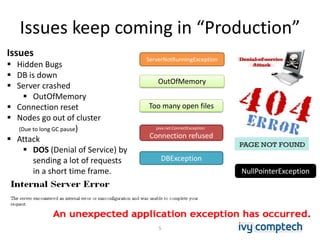
Issues keep coming in “Production”
5
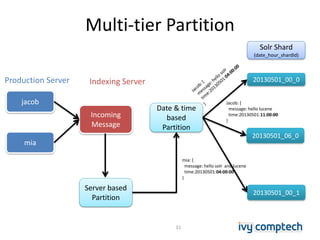
java.net.ConnectException:
Connection refused
ServerNotRunningException
Too many open files
DBException
NullPointerException
OutOfMemory
Issues
 Hidden Bugs
 DB is down
 Server crashed
 OutOfMemory
 Connection reset
 Nodes go out of cluster
(Due to long GC pause)
 Attack
 DOS (Denial of Service) by
sending a lot of requests
in a short time frame.
5
Why Logs Search?
• Enable production support team to immediately check for issues at
“one place”
– Saves time from logging on to multiple servers to check the logs
• Debugging production issues
– Is it a server specific or occurring in all other servers for that application?
• Allows to track user activity across multiple servers/applications.
• Correlation of multiple issues with each other.
– e.g. Logins might be failing on X Node due to OutOfMemory on Y node.
6
Key Problems
• Hundreds of servers/services generating logs
• terabytes of unstructured logs/day to index in Near Real time
• Millions of log events (Priority one)
• Full Text search & storage of log content
• High Indexing Rate of 1GB/min
• Search latency in seconds is acceptable
7
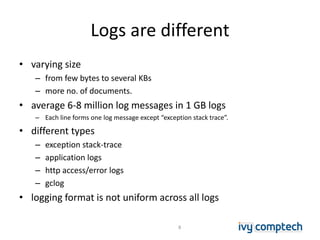
Logs are different
• varying size
– from few bytes to several KBs
– more no. of documents.
• average 6-8 million log messages in 1 GB logs
– Each line forms one log message except “exception stack trace”.
• different types
– exception stack-trace
– application logs
– http access/error logs
– gclog
• logging format is not uniform across all logs
8
Indexing
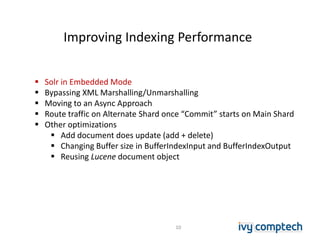
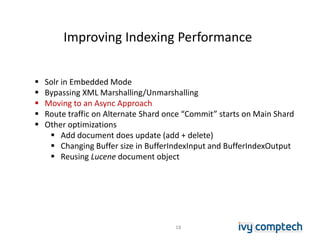
Improving Indexing Performance
10
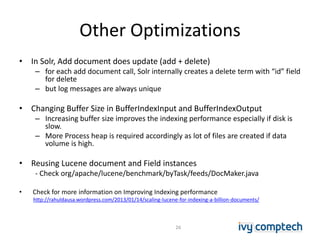
 Solr in Embedded Mode
 Bypassing XML Marshalling/Unmarshalling
 Moving to an Async Approach
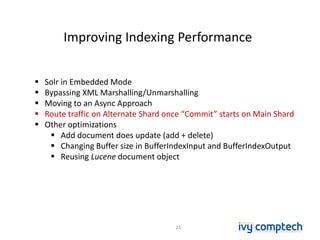
 Route traffic on Alternate Shard once “Commit” starts on Main Shard
 Other optimizations
 Add document does update (add + delete)
 Changing Buffer size in BufferIndexInput and BufferIndexOutput
 Reusing Lucene document object
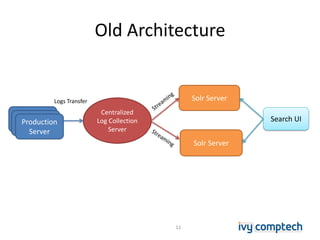
Old Architecture
11
Solr Server
Centralized
Log Collection
Server
Solr Server
Search UIProduction
Server
Logs Transfer
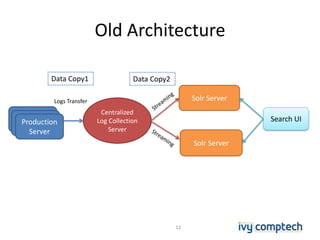
Old Architecture
12
Solr Server
Centralized
Log Collection
Server
Solr Server
Search UIProduction
Server
Logs Transfer
Data Copy1 Data Copy2
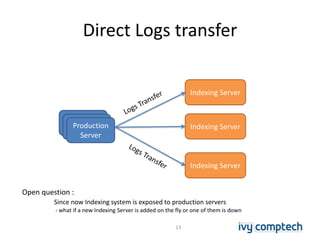
Direct Logs transfer
Indexing ServerProduction
Server
Indexing Server
Indexing Server
Open question :
Since now Indexing system is exposed to production servers
- what if a new Indexing Server is added on the fly or one of them is down
13
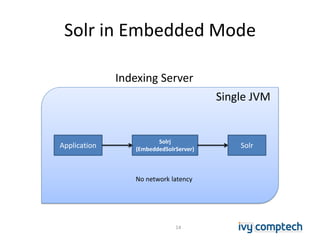
Solr in Embedded Mode
14
Single JVM
Solrj
(EmbeddedSolrServer)
SolrApplication
Indexing Server
No network latency
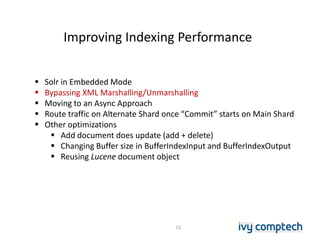
Improving Indexing Performance
15
 Solr in Embedded Mode
 Bypassing XML Marshalling/Unmarshalling
 Moving to an Async Approach
 Route traffic on Alternate Shard once “Commit” starts on Main Shard
 Other optimizations
 Add document does update (add + delete)
 Changing Buffer size in BufferIndexInput and BufferIndexOutput
 Reusing Lucene document object
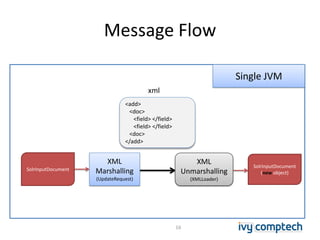
Message Flow
16
SolrInputDocument
SolrInputDocument
(new object)
Single JVM
XML
Marshalling
(UpdateRequest)
XML
Unmarshalling
(XMLLoader)
<add>
<doc>
<field> </field>
<field> </field>
<doc>
</add>
xml
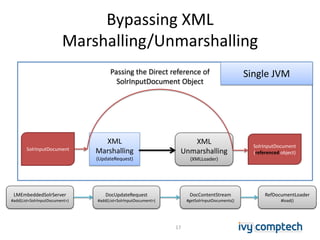
Bypassing XML
Marshalling/Unmarshalling
17
SolrInputDocument
XML
Marshalling
(UpdateRequest)
XML
Unmarshalling
(XMLLoader)
SolrInputDocument
(referenced object)
Passing the Direct reference of
SolrInputDocument Object
Single JVM
DocContentStream
#getSolrInputDocuments()
RefDocumentLoader
#load()
DocUpdateRequest
#add(List<SolrInputDocument>)
LMEmbeddedSolrServer
#add(List<SolrInputDocument>)
Improving Indexing Performance
18
 Solr in Embedded Mode
 Bypassing XML Marshalling/Unmarshalling
 Moving to an Async Approach
 Route traffic on Alternate Shard once “Commit” starts on Main Shard
 Other optimizations
 Add document does update (add + delete)
 Changing Buffer size in BufferIndexInput and BufferIndexOutput
 Reusing Lucene document object
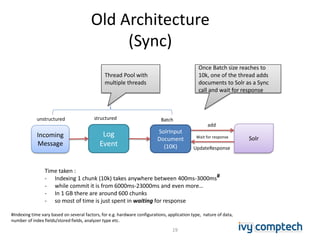
Old Architecture
(Sync)
19
Incoming
Message
Log
Event
Solr
unstructured structured
SolrInput
Document
(10K)
Thread Pool with
multiple threads
Once Batch size reaches to
10k, one of the thread adds
documents to Solr as a Sync
call and wait for response
add
UpdateResponse
Batch
Wait for response
Time taken :
- Indexing 1 chunk (10k) takes anywhere between 400ms-3000ms#
- while commit it is from 6000ms-23000ms and even more…
- In 1 GB there are around 600 chunks
- so most of time is just spent in waiting for response
#Indexing time vary based on several factors, for e.g. hardware configurations, application type, nature of data,
number of index fields/stored fields, analyzer type etc.
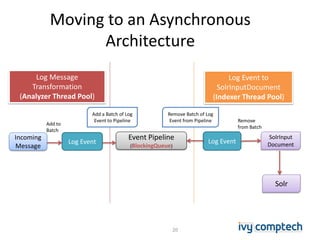
Moving to an Asynchronous
Architecture
20
Incoming
Message
Log Event
Event Pipeline
(BlockingQueue)
Log Event
SolrInput
Document
Log Message
Transformation
(Analyzer Thread Pool)
Log Event to
SolrInputDocument
(Indexer Thread Pool)
Add a Batch of Log
Event to Pipeline
Remove Batch of Log
Event from Pipeline
Solr
Add to
Batch
Remove
from Batch
Improving Indexing Performance
21
 Solr in Embedded Mode
 Bypassing XML Marshalling/Unmarshalling
 Moving to an Async Approach
 Route traffic on Alternate Shard once “Commit” starts on Main Shard
 Other optimizations
 Add document does update (add + delete)
 Changing Buffer size in BufferIndexInput and BufferIndexOutput
 Reusing Lucene document object
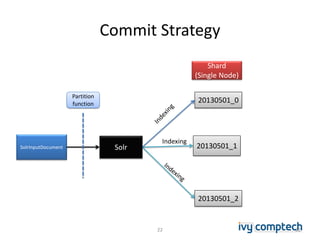
Commit Strategy
22
Solr
20130501_0
20130501_1
20130501_2
Shard
(Single Node)
SolrInputDocument
Indexing
Partition
function
22
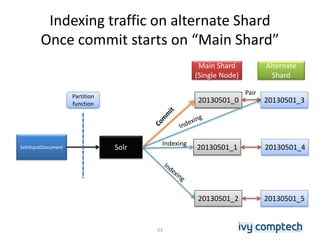
Indexing traffic on alternate Shard
Once commit starts on “Main Shard”
23
Solr
20130501_0
20130501_1
20130501_2
Main Shard
(Single Node)
20130501_3
20130501_4
20130501_5
Alternate
Shard
SolrInputDocument
Indexing
PairPartition
function
23
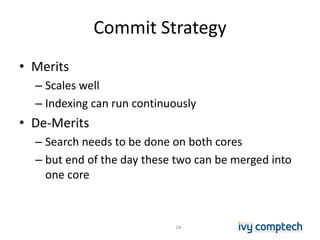
Commit Strategy
• Merits
– Scales well
– Indexing can run continuously
• De-Merits
– Search needs to be done on both cores
– but end of the day these two can be merged into
one core
24
Improving Indexing Performance
25
 Solr in Embedded Mode
 Bypassing XML Marshalling/Unmarshalling
 Moving to an Async Approach
 Route traffic on Alternate Shard once “Commit” starts on Main Shard
 Other optimizations
 Add document does update (add + delete)
 Changing Buffer size in BufferIndexInput and BufferIndexOutput
 Reusing Lucene document object
Other Optimizations
• In Solr, Add document does update (add + delete)
– for each add document call, Solr internally creates a delete term with “id” field
for delete
– but log messages are always unique
• Changing Buffer Size in BufferIndexInput and BufferIndexOutput
– Increasing buffer size improves the indexing performance especially if disk is
slow.
– More Process heap is required accordingly as lot of files are created if data
volume is high.
• Reusing Lucene document and Field instances
- Check org/apache/lucene/benchmark/byTask/feeds/DocMaker.java
• Check for more information on Improving Indexing performance
http://rahuldausa.wordpress.com/2013/01/14/scaling-lucene-for-indexing-a-billion-documents/
26
The Result
27
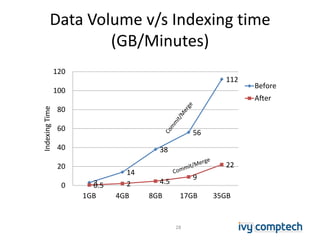
Data Volume v/s Indexing time
(GB/Minutes)
3
14
38
56
112
0.5 2 4.5
9
22
0
20
40
60
80
100
120
1GB 4GB 8GB 17GB 35GB
IndexingTime
Before
After
28
Search
Partition
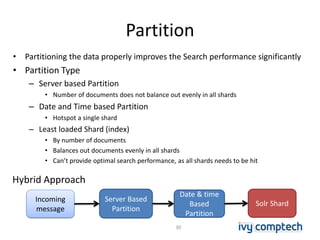
• Partitioning the data properly improves the Search performance significantly
• Partition Type
– Server based Partition
• Number of documents does not balance out evenly in all shards
– Date and Time based Partition
• Hotspot a single shard
– Least loaded Shard (index)
• By number of documents
• Balances out documents evenly in all shards
• Can’t provide optimal search performance, as all shards needs to be hit
30
Incoming
message
Server Based
Partition
Date & time
Based
Partition
Solr Shard
Hybrid Approach
Multi-tier Partition
jacob
Incoming
Message
Date & time
based
Partition
20130501_00_0
mia
Solr Shard
(date_hour_shardId)
20130501_06_0
20130501_00_1
Server based
Partition
Jacob: {
message: hello lucene
time:20130501:11:00:00
}
Indexing ServerProduction Server
mia: {
message: hello solr and lucene
time:20130501:04:00:00
}
31
Distributed Search
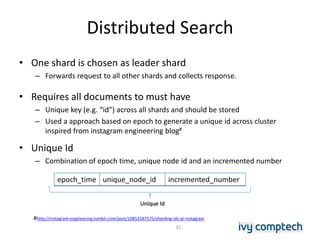
• One shard is chosen as leader shard
– Forwards request to all other shards and collects response.
• Requires all documents to must have
– Unique key (e.g. “id”) across all shards and should be stored
– Used a approach based on epoch to generate a unique id across cluster
inspired from instagram engineering blog#
• Unique Id
– Combination of epoch time, unique node id and an incremented number
epoch_time unique_node_id incremented_number
Unique Id
#http://instagram-engineering.tumblr.com/post/10853187575/sharding-ids-at-instagram
32
How Search works
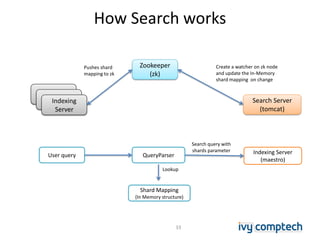
Zookeeper
(zk)
Search Server
(tomcat)
Pushes shard
mapping to zk
Create a watcher on zk node
and update the In-Memory
shard mapping on change
User query QueryParser Indexing Server
(maestro)
Search query with
shards parameter
Shard Mapping
(In Memory structure)
Lookup
33
erverIndexing
Server
How Search works (Cont’d)
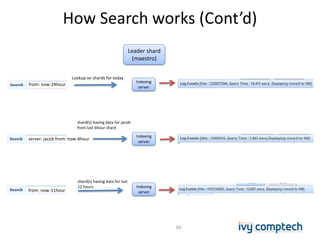
from: now-24hour
server: jacob from: now-4hour
from: now-11hour
Indexing
server
Indexing
server
Indexing
server
Lookup on shards for today
shard(s) having data for jacob
from last 6hour shard
shard(s) having data for last
12 hours
34
Leader shard
(maestro)
Analytics
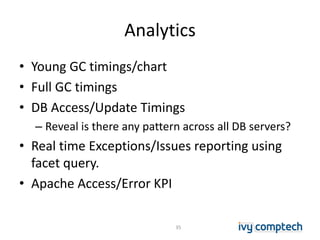
• Young GC timings/chart
• Full GC timings
• DB Access/Update Timings
– Reveal is there any pattern across all DB servers?
• Real time Exceptions/Issues reporting using
facet query.
• Apache Access/Error KPI
35
Analytics
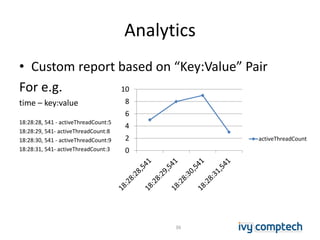
• Custom report based on “Key:Value” Pair
For e.g.
time – key:value
18:28:28, 541 - activeThreadCount:5
18:28:29, 541- activeThreadCount:8
18:28:30, 541 - activeThreadCount:9
18:28:31, 541- activeThreadCount:3
36
0
2
4
6
8
10
activeThreadCount
Architecture
Data Flows
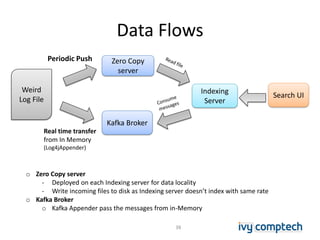
38
Weird
Log File
Zero Copy
server
Kafka Broker
Indexing
Server
Search UI
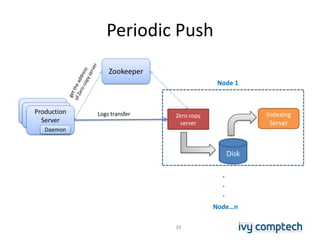
Periodic Push
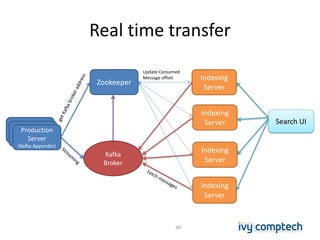
Real time transfer
from In Memory
(Log4jAppender)
o Zero Copy server
- Deployed on each Indexing server for data locality
- Write incoming files to disk as Indexing server doesn’t index with same rate
o Kafka Broker
o Kafka Appender pass the messages from in-Memory
Periodic Push
39
Zookeeper
Indexing
Server
Zero copy
server
Node 1
Production
Server
Logs transfer
Daemon
Disk
Node…n
.
.
.
Real time transfer
40
Indexing
Server
Kafka
Broker
Indexing
Server
Search UI
Production
Server
(Kafka Appender)
Zookeeper
Indexing
Server
Indexing
Server
Update Consumed
Message offset
Conclusion
Lessons Learned
• Always find sweet-spots for
– Number of Indexer threads, that can run in parallel
– Randomize
• Merge factor
• Commit Interval
• ramBufferSize
– Increasing Cache Size helps in bringing down search latency
• but with Full GC penalty
• Index size of more than 5GB in one core does not go well with Search
• Search on a lot of cores does not provide optimal response time
– Overall query response time is limited by slowest shard’s performance
• Solr scales both vertically and horizontally
• Batching of log messages based on message size (~10KB) in a MessageSet
– Kafka adds 10 bytes on each message
– Most of the time Log messages are < 100 bytes
41
Thank You
jainr@ivycomptech.com
42

Building a near real time search engine & analytics for logs using solr

  • 1.
    Building a NearReal time “Logs Search Engine & Analytics” using Solr Lucene/Solr Revolution 2013 May 1st , 2013 Rahul Jain jainr@ivycomptech.com
  • 2.
    Who am I? Software Engineer  Member of Core technology @ IVY Comptech, Hyderabad, India  6 years of programming experience  Areas of expertise/interest  High traffic web applications  JAVA/J2EE  Big data, NoSQL  Information-Retrieval, Machine learning 2
  • 3.
    Agenda • Overview • Indexing •Search • Analytics • Architecture • Lessons learned • Q&A 3
  • 4.
  • 5.
    Issues keep comingin “Production” 5 java.net.ConnectException: Connection refused ServerNotRunningException Too many open files DBException NullPointerException OutOfMemory Issues  Hidden Bugs  DB is down  Server crashed  OutOfMemory  Connection reset  Nodes go out of cluster (Due to long GC pause)  Attack  DOS (Denial of Service) by sending a lot of requests in a short time frame. 5
  • 6.
    Why Logs Search? •Enable production support team to immediately check for issues at “one place” – Saves time from logging on to multiple servers to check the logs • Debugging production issues – Is it a server specific or occurring in all other servers for that application? • Allows to track user activity across multiple servers/applications. • Correlation of multiple issues with each other. – e.g. Logins might be failing on X Node due to OutOfMemory on Y node. 6
  • 7.
    Key Problems • Hundredsof servers/services generating logs • terabytes of unstructured logs/day to index in Near Real time • Millions of log events (Priority one) • Full Text search & storage of log content • High Indexing Rate of 1GB/min • Search latency in seconds is acceptable 7
  • 8.
    Logs are different •varying size – from few bytes to several KBs – more no. of documents. • average 6-8 million log messages in 1 GB logs – Each line forms one log message except “exception stack trace”. • different types – exception stack-trace – application logs – http access/error logs – gclog • logging format is not uniform across all logs 8
  • 9.
  • 10.
    Improving Indexing Performance 10 Solr in Embedded Mode  Bypassing XML Marshalling/Unmarshalling  Moving to an Async Approach  Route traffic on Alternate Shard once “Commit” starts on Main Shard  Other optimizations  Add document does update (add + delete)  Changing Buffer size in BufferIndexInput and BufferIndexOutput  Reusing Lucene document object
  • 11.
    Old Architecture 11 Solr Server Centralized LogCollection Server Solr Server Search UIProduction Server Logs Transfer
  • 12.
    Old Architecture 12 Solr Server Centralized LogCollection Server Solr Server Search UIProduction Server Logs Transfer Data Copy1 Data Copy2
  • 13.
    Direct Logs transfer IndexingServerProduction Server Indexing Server Indexing Server Open question : Since now Indexing system is exposed to production servers - what if a new Indexing Server is added on the fly or one of them is down 13
  • 14.
    Solr in EmbeddedMode 14 Single JVM Solrj (EmbeddedSolrServer) SolrApplication Indexing Server No network latency
  • 15.
    Improving Indexing Performance 15 Solr in Embedded Mode  Bypassing XML Marshalling/Unmarshalling  Moving to an Async Approach  Route traffic on Alternate Shard once “Commit” starts on Main Shard  Other optimizations  Add document does update (add + delete)  Changing Buffer size in BufferIndexInput and BufferIndexOutput  Reusing Lucene document object
  • 16.
    Message Flow 16 SolrInputDocument SolrInputDocument (new object) SingleJVM XML Marshalling (UpdateRequest) XML Unmarshalling (XMLLoader) <add> <doc> <field> </field> <field> </field> <doc> </add> xml
  • 17.
    Bypassing XML Marshalling/Unmarshalling 17 SolrInputDocument XML Marshalling (UpdateRequest) XML Unmarshalling (XMLLoader) SolrInputDocument (referenced object) Passingthe Direct reference of SolrInputDocument Object Single JVM DocContentStream #getSolrInputDocuments() RefDocumentLoader #load() DocUpdateRequest #add(List<SolrInputDocument>) LMEmbeddedSolrServer #add(List<SolrInputDocument>)
  • 18.
    Improving Indexing Performance 18 Solr in Embedded Mode  Bypassing XML Marshalling/Unmarshalling  Moving to an Async Approach  Route traffic on Alternate Shard once “Commit” starts on Main Shard  Other optimizations  Add document does update (add + delete)  Changing Buffer size in BufferIndexInput and BufferIndexOutput  Reusing Lucene document object
  • 19.
    Old Architecture (Sync) 19 Incoming Message Log Event Solr unstructured structured SolrInput Document (10K) ThreadPool with multiple threads Once Batch size reaches to 10k, one of the thread adds documents to Solr as a Sync call and wait for response add UpdateResponse Batch Wait for response Time taken : - Indexing 1 chunk (10k) takes anywhere between 400ms-3000ms# - while commit it is from 6000ms-23000ms and even more… - In 1 GB there are around 600 chunks - so most of time is just spent in waiting for response #Indexing time vary based on several factors, for e.g. hardware configurations, application type, nature of data, number of index fields/stored fields, analyzer type etc.
  • 20.
    Moving to anAsynchronous Architecture 20 Incoming Message Log Event Event Pipeline (BlockingQueue) Log Event SolrInput Document Log Message Transformation (Analyzer Thread Pool) Log Event to SolrInputDocument (Indexer Thread Pool) Add a Batch of Log Event to Pipeline Remove Batch of Log Event from Pipeline Solr Add to Batch Remove from Batch
  • 21.
    Improving Indexing Performance 21 Solr in Embedded Mode  Bypassing XML Marshalling/Unmarshalling  Moving to an Async Approach  Route traffic on Alternate Shard once “Commit” starts on Main Shard  Other optimizations  Add document does update (add + delete)  Changing Buffer size in BufferIndexInput and BufferIndexOutput  Reusing Lucene document object
  • 22.
  • 23.
    Indexing traffic onalternate Shard Once commit starts on “Main Shard” 23 Solr 20130501_0 20130501_1 20130501_2 Main Shard (Single Node) 20130501_3 20130501_4 20130501_5 Alternate Shard SolrInputDocument Indexing PairPartition function 23
  • 24.
    Commit Strategy • Merits –Scales well – Indexing can run continuously • De-Merits – Search needs to be done on both cores – but end of the day these two can be merged into one core 24
  • 25.
    Improving Indexing Performance 25 Solr in Embedded Mode  Bypassing XML Marshalling/Unmarshalling  Moving to an Async Approach  Route traffic on Alternate Shard once “Commit” starts on Main Shard  Other optimizations  Add document does update (add + delete)  Changing Buffer size in BufferIndexInput and BufferIndexOutput  Reusing Lucene document object
  • 26.
    Other Optimizations • InSolr, Add document does update (add + delete) – for each add document call, Solr internally creates a delete term with “id” field for delete – but log messages are always unique • Changing Buffer Size in BufferIndexInput and BufferIndexOutput – Increasing buffer size improves the indexing performance especially if disk is slow. – More Process heap is required accordingly as lot of files are created if data volume is high. • Reusing Lucene document and Field instances - Check org/apache/lucene/benchmark/byTask/feeds/DocMaker.java • Check for more information on Improving Indexing performance http://rahuldausa.wordpress.com/2013/01/14/scaling-lucene-for-indexing-a-billion-documents/ 26
  • 27.
  • 28.
    Data Volume v/sIndexing time (GB/Minutes) 3 14 38 56 112 0.5 2 4.5 9 22 0 20 40 60 80 100 120 1GB 4GB 8GB 17GB 35GB IndexingTime Before After 28
  • 29.
  • 30.
    Partition • Partitioning thedata properly improves the Search performance significantly • Partition Type – Server based Partition • Number of documents does not balance out evenly in all shards – Date and Time based Partition • Hotspot a single shard – Least loaded Shard (index) • By number of documents • Balances out documents evenly in all shards • Can’t provide optimal search performance, as all shards needs to be hit 30 Incoming message Server Based Partition Date & time Based Partition Solr Shard Hybrid Approach
  • 31.
    Multi-tier Partition jacob Incoming Message Date &time based Partition 20130501_00_0 mia Solr Shard (date_hour_shardId) 20130501_06_0 20130501_00_1 Server based Partition Jacob: { message: hello lucene time:20130501:11:00:00 } Indexing ServerProduction Server mia: { message: hello solr and lucene time:20130501:04:00:00 } 31
  • 32.
    Distributed Search • Oneshard is chosen as leader shard – Forwards request to all other shards and collects response. • Requires all documents to must have – Unique key (e.g. “id”) across all shards and should be stored – Used a approach based on epoch to generate a unique id across cluster inspired from instagram engineering blog# • Unique Id – Combination of epoch time, unique node id and an incremented number epoch_time unique_node_id incremented_number Unique Id #http://instagram-engineering.tumblr.com/post/10853187575/sharding-ids-at-instagram 32
  • 33.
    How Search works Zookeeper (zk) SearchServer (tomcat) Pushes shard mapping to zk Create a watcher on zk node and update the In-Memory shard mapping on change User query QueryParser Indexing Server (maestro) Search query with shards parameter Shard Mapping (In Memory structure) Lookup 33 erverIndexing Server
  • 34.
    How Search works(Cont’d) from: now-24hour server: jacob from: now-4hour from: now-11hour Indexing server Indexing server Indexing server Lookup on shards for today shard(s) having data for jacob from last 6hour shard shard(s) having data for last 12 hours 34 Leader shard (maestro)
  • 35.
    Analytics • Young GCtimings/chart • Full GC timings • DB Access/Update Timings – Reveal is there any pattern across all DB servers? • Real time Exceptions/Issues reporting using facet query. • Apache Access/Error KPI 35
  • 36.
    Analytics • Custom reportbased on “Key:Value” Pair For e.g. time – key:value 18:28:28, 541 - activeThreadCount:5 18:28:29, 541- activeThreadCount:8 18:28:30, 541 - activeThreadCount:9 18:28:31, 541- activeThreadCount:3 36 0 2 4 6 8 10 activeThreadCount
  • 37.
  • 38.
    Data Flows 38 Weird Log File ZeroCopy server Kafka Broker Indexing Server Search UI Periodic Push Real time transfer from In Memory (Log4jAppender) o Zero Copy server - Deployed on each Indexing server for data locality - Write incoming files to disk as Indexing server doesn’t index with same rate o Kafka Broker o Kafka Appender pass the messages from in-Memory
  • 39.
    Periodic Push 39 Zookeeper Indexing Server Zero copy server Node1 Production Server Logs transfer Daemon Disk Node…n . . .
  • 40.
    Real time transfer 40 Indexing Server Kafka Broker Indexing Server SearchUI Production Server (Kafka Appender) Zookeeper Indexing Server Indexing Server Update Consumed Message offset
  • 41.
    Conclusion Lessons Learned • Alwaysfind sweet-spots for – Number of Indexer threads, that can run in parallel – Randomize • Merge factor • Commit Interval • ramBufferSize – Increasing Cache Size helps in bringing down search latency • but with Full GC penalty • Index size of more than 5GB in one core does not go well with Search • Search on a lot of cores does not provide optimal response time – Overall query response time is limited by slowest shard’s performance • Solr scales both vertically and horizontally • Batching of log messages based on message size (~10KB) in a MessageSet – Kafka adds 10 bytes on each message – Most of the time Log messages are < 100 bytes 41
  • 42.