symfony	
  integra.on	
  
Thomas	
  Rabaix	
  
•  Symfony	
  live	
  2009/2010/2011	
  
•  Plugins	
  
      –    swFunc8onalTestGenera8onPlugin	
  
      –    mgI18nPlugin	
  
      –    swCrossLinkApplica8onPlugin	
  
      –    swCombinePlugin	
  
      –    swToolboxPlugin	
  
      –    sfSolrPlugin	
  
•  Bundle	
  –	
  sonata	
  project	
  
      –    AdminBundle	
  (BaseApplica8onBundle)	
  
      –    IntlBundle	
  
      –    MediaBundle	
  
      –    More	
  to	
  come	
  ….	
  
•  «	
  More	
  with	
  symfony	
  »	
  book	
  
•  Now	
  working	
  for	
  Ekino	
  –	
  a	
  french	
  web	
  tech-­‐company	
  
co-­‐author	


Some	
  slides	
  have	
  been	
  wri1en	
  and	
  reviewed	
  	
  
             by	
  a	
  co-­‐worker	
  at	
  Ekino	
  	
  
                                -­‐	
  
         Frédéric	
  Cons	
  a	
  Java	
  Architect	
  
talk	
  
•      Introduc8on	
  
•      Schema	
  design	
  
•      Indexing	
  
•      Searching	
  
•      Administra8on	
  and	
  deployment	
  
•      Conclusion	


I.	
  INTRODUCTION	
  
what	
  is	
  a	
  search	
  engine	
  ?	
  
•  Warning	
  :	
  search	
  engine	
   	
  SELECT	
  *	
  FROM	
  
   document	
  LIKE	
  '%term%’	
  

•  Search	
  is	
  about	
  	
  
       –  indexing	
  informa8on	
  
       –  filtering	
  document	
  
       –  presen8ng	
  informa8on	


indexing	
  
•    get	
  rich	
  content	
  (webpage,	
  files,	
  database)	
  
•    parse	
  the	
  content	
  
•    analyse	
  the	
  parsed	
  content	
  
•    store	
  the	
  informa8on	
  into	
  the	
  index	
  
filtering	
  
•  get	
  user	
  input	
  
•  create	
  a	
  query	
  
•  retrieve	
  matching	
  documents	
  against	
  the	
  
   index	
  
•  display	
  results	
  and	
  filtering	
  op8ons	
  
Solr	
  -­‐	
  a	
  search	
  engine	
  
•  Solr	
  is	
  an	
  like	
  a	
  HTTP	
  server	
  with	


•  Lucene	
  has	
  been	
  published	
  in	
  2000	
  by	
  Doug	
  Cucng	
  :	
  It	
  
   is	
  a	
  search	
  engine	
  :	
  indexing,	
  search	
  algorithm	
  and	
  
   storage	
  format	
  

•  25th	
  january	
  2006	
  CNET	
  grants	
  the	
  license	
  to	
  the	
  
         Apache	
  Sofware	
  Founda8on	


•  Original	
  source	
  code	
  :	
  hgps://issues.apache.org/jira/
         browse/Solr-­‐1	


Apache	
  projects	
  around	
  Solr	
  
•  nutch	
  :	
  a	
  web	
  crawler	
  	
  
•  tika	
  :	
  a	
  file	
  content	
  extractor	
  from	
  doc/pdf/
   xls	
  files	
  
             :	
  diagnos8c	
  tool	
  
Lucene	
  +	
  Solr	


since	
  2010/03	
  the	
  two	
  teams	
  have	
  merged	
  
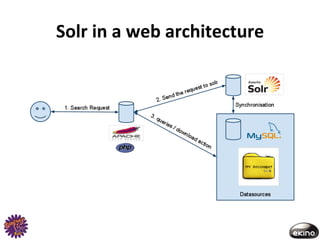
Solr	
  in	
  a	
  web	
  architecture	
  
II.	
  SCHEMA	
  DESIGN	
  
document	
  vs	
  database	
  
•  A	
  Solr	
  index	
  store	
  only	
  ONE	
  kind	
  of	
  document	
  
   defini8on.	
  	
  
•  A	
  document	
  has	
  typed	
  proper8es	
  :	
  string,	
  
   date,	
  integer	
  ….	
  
•  sta8c	
  defini8on	
  or	
  dynamic	
  type	
  
•  de-­‐normalize	
  your	
  database	
  into	
  a	
  structured	
  
   document	
  op8mized	
  for	
  the	
  search	
  
   requirements	
  
document	
  definiNon	
  

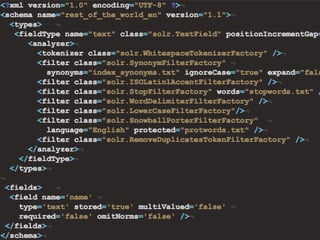
•  Defini8ons	
  are	
  set	
  in	
  the	
  schema.xml	
  file	
  
•  Type	
  defini8on	
  collec8on	
  
    –  Name	
  
    –  Class	
  
    –  Tokenizer/Analyser/filter	
  
•  Property	
  defini8on	
  collec8on	
  
    –  Name	
  
    –  Type	
  
    –  Indexed/stored/mul8Valued	
  
type	
  definiNon	
  
•  One	
  tokenizer	
  per	
  field	
  defini8on,	
  the	
  tokenizer	
  is	
  
   used	
  to	
  split	
  a	
  value	
  into	
  tokens	


  "Symfony2	
  is	
  awesome"	
  =>	
  ‘Symfony2’,	
  ‘is’,	
  
   ‘awesome’	
  

•  Filters	
  are	
  used	
  to	
  alter	
  each	
  token	
  
    –  stemmer:	
  merging	
  =>	
  merge	
  
    –  synonyms	
  	
  
    –  stopwords	
  :	
  remove	
  word	
  :	
  a,	
  the,	
  ...	
  
    –  accent	
  removal:	
  é	
  >	
  e	
  	
  
Type	
  defini@on	
  can	
  have	
  	
  
a	
  huge	
  impact	
  on	
  performance	
  
property	
  definiNon	
  
•  naming	
  conven8on	
  :	
  many	
  tables	
  or	
  many	
  
   metadata	
  (files)	
  goes	
  into	
  one	
  document	


•  Model	
  Recipe	
  and	
  Model	
  Ingredient	
  =>	
  it	
  is	
  a	
  
   good	
  prac8ce	
  to	
                            	
  
    –  r_name	
  or	
  recipe_name!
    –  i_name	
  or	
  ingredient_name!
property	
  definiNon	
  
•  A	
  value	
  can	
  be	
  	
  
     –  indexed	
  :	
  	
  the	
  filtering	
  result	
  is	
  stored	
  into	
  the	
  
        index	
  
     –  stored	
  :	
  the	
  original	
  value	
  is	
  stored	
  into	
  the	
  
        index	
  
     –  multiValued	
  
          •  the	
  property	
  is	
  similar	
  to	
  an	
  array	
  	
  
          •  neat	
  solu8on	
  for	
  storing	
  a	
  set	
  of	
  categories	
  linked	
  to	
  a	
  
             product	
  or	
  permissions	
  linked	
  to	
  a	
  document	
  
Sample	
  file	
  
updaNng	
  the	
  schema.xml!
•  not	
  an	
  easy	
  task	
  on	
  big	
  index	


•  some	
  changes	
  require	
  reindexing	
  documents
     (	
  add	
  a	
  new	
  filter,	
  change	
  field	
  type)	


•  need	
  to	
  reload	
  Solr	
  or	
  hot	
  reload	
  the	
  Solr	
  core	
  
symfony	
  integraNon	
  
•  Thanks	
  to	
  sfSolrPlugin	
  	
  
•  Author	
  :	
  Thomas	
  Rabaix	
  	
  
•  Hosted	
  on	
  github	


  hgp://github.com/rande/sfSolrPlugin	
  
•  Small	
  history	
  :	
  	
  
   –  It	
  is	
  a	
  fork	
  of	
  sfLucenePlugin	
  based	
  on	
  Zend
      Search (a	
  php	
  lucene	
  implementa8on)	
  originally	
  
      wrote	
  by	
  Carl	
  Vondrick.	
  
   –  The	
  underline	
  communica8on	
  API	
  uses	
  the	
  
      SolrPhpClient	
  project	
  
 iniNalizaNon	
  and	
  indexaNon	
  tools	
  
•  Tasks	
  
    –  to	
  generate	
  basic	
  configura8on	
  file	
  (lucene:create-Solr-
       config)	
  
    –  to	
  start	
  Jegy	
  -­‐	
  a	
  small	
  java	
  container	
  (lucene:service)	
  
    –  to	
  reindex	
  informa8on	
  (lucene:update-model-system)	
  
•  Behaviors	
  
    –  to	
  automa8cally	
  update	
  the	
  index	
  
    –  works	
  with	
  Doctrine	
  	
  
    –  works	
  with	
  Propel	
  (pull	
  request	
  ?)	
  
•  Indexes	
  
    –  index	
  has	
  a	
  name	
  and	
  a	
  culture	
  
    –  one	
  core	
  per	
  name/culture	
  =>	
  my_index_fr	
  
files	
  locaNon	
  
•  Configura8on	
  files	
  are	
  set	
  in	
  PROJECT_ROOT/config/solr/!

•  Generated	
  files	
  by	
  the	
  lucene:create-solr-config task !
     –  are	
  located	
  in	
  PROJECT_ROOT/config/solr/index_name/
        conf!
                                            and	
                       	
  are	
  generated	
  
        once	
  
                                	
  and	
           	
  are	
  overwrigen	
  by	
  the	
  task	
  

•  index	
  files	
  are	
  set	
  in	
  PROJECT_ROOT/data/solr_index/	
  

•  original	
  Solr	
  files	
  :	
  PROJECT_ROOT/plugins/sfSolrPlugin/lib/vendor/
   solr/	
  
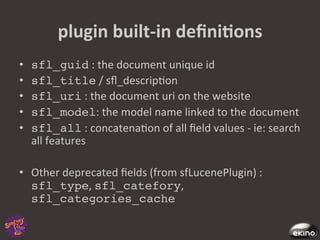
plugin	
  built-­‐in	
  definiNons	
  
•    sfl_guid	
  :	
  the	
  document	
  unique	
  id	
  
•    sfl_title	
  /	
  sfl_descrip8on	
  
•    sfl_uri	
  :	
  the	
  document	
  uri	
  on	
  the	
  website	
  
•    sfl_model:	
  the	
  model	
  name	
  linked	
  to	
  the	
  document	
  
•    sfl_all	
  :	
  concatena8on	
  of	
  all	
  field	
  values	
  -­‐	
  ie:	
  search	
  
     all	
  features	
  

•  Other	
  deprecated	
  fields	
  (from	
  sfLucenePlugin)	
  :	
  
   sfl_type,	
  sfl_catefory,	
  
   sfl_categories_cache!
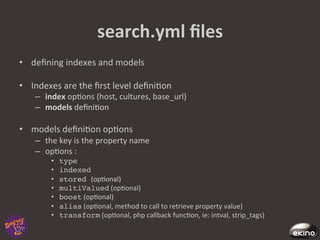
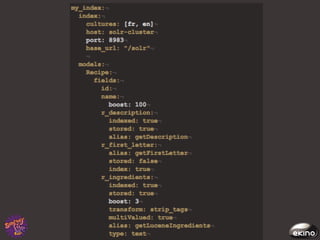
search.yml	
  files	
  
•  defining	
  indexes	
  and	
  models	
  

•  Indexes	
  are	
  the	
  first	
  level	
  defini8on	
  
     –  index	
  op8ons	
  (host,	
  cultures,	
  base_url)	
  
     –  models	
  defini8on	


•  models	
  defini8on	
  op8ons	
  	
  
     –  the	
  key	
  is	
  the	
  property	
  name	
  
     –  op8ons	
  :	
  
           •    type!
           •    indexed	
  
           •    stored (op8onal)	
  
           •    multiValued	
  (op8onal)	
  
           •    boost	
  (op8onal)	
  
           •    alias	
  (op8onal,	
  method	
  to	
  call	
  to	
  retrieve	
  property	
  value)	
  
           •    transform	
  (op8onal,	
  php	
  callback	
  func8on,	
  ie:	
  intval,	
  strip_tags)	
  
III.	
  INDEXING	
  
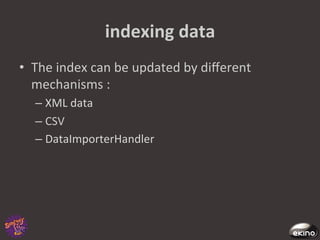
indexing	
  data	
  
•  The	
  index	
  can	
  be	
  updated	
  by	
  different	
  
   mechanisms	
  :	
  
    –  XML	
  data 	
  	
  
    –  CSV	
  
    –  DataImporterHandler	
  
indexing	
  process	
  
•    gathering	
  data	
  	
  
•    sent	
  the	
  data	
  to	
  Solr	
  	
  
•    at	
  this	
  point	
  the	
  data	
  are	
  not	
  yet	
  "searchable"	
  
•    commit	
  the	
  data	
  or	
  rollback	
  
indexing	
  with	
  curl	
  
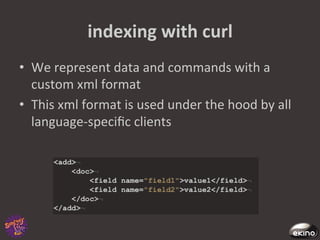
•  We	
  represent	
  data	
  and	
  commands	
  with	
  a	
  
   custom	
  xml	
  format	
  
•  This	
  xml	
  format	
  is	
  used	
  under	
  the	
  hood	
  by	
  all	
  
   language-­‐specific	
  clients	
  
indexing	
  with	
  curl	
  
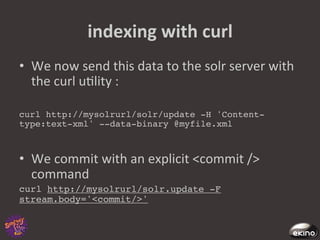
•  We	
  now	
  send	
  this	
  data	
  to	
  the	
  solr	
  server	
  with	
  
   the	
  curl	
  u8lity	
  :	
  

curl http://mysolrurl/solr/update -H 'Content-
type:text-xml' --data-binary @myfile.xml!


•  We	
  commit	
  with	
  an	
  explicit	
  <commit	
  />	
  
   command	
  
curl http://mysolrurl/solr.update -F
stream.body='<commit/>'!
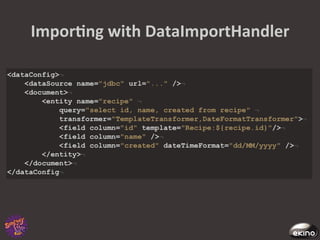
ImporNng	
  with	
  DataImportHandler	
  
•  DIH	
  allows	
  us	
  to	
  execute	
  a	
  sql	
  query	
  and	
  map	
  
   its	
  result	
  to	
  a	
  Solr	
  schema	
  
•  Sql	
  rows	
  can	
  be	
  transformed	
  on	
  the	
  way	
  with	
  
   Transformer	
  objects	
  :	
  regular	
  expressions,	
  
   date	
  formacng,	
  templa8ng,...	
  
•  Its	
  main	
  use	
  is	
  to	
  import	
  databases,	
  but	
  it	
  also	
  
   works	
  with	
  other	
  datasources	
  such	
  as	
  files	
  and	
  
   urls	
  
ImporNng	
  with	
  DataImportHandler	
  
indexing	
  with	
  sfSolrPlugin	
  
•  Use	
  the	
  task	
  
•  Or	
  the	
  doctrine	
  behavior	
  
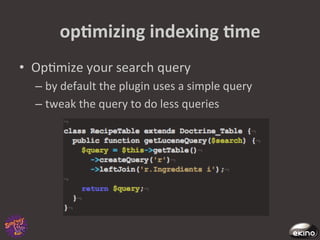
opNmizing	
  indexing	
  Nme	
  
•  Op8mize	
  your	
  search	
  query	
  
   –  by	
  default	
  the	
  plugin	
  uses	
  a	
  simple	
  query	
  
   –  tweak	
  the	
  query	
  to	
  do	
  less	
  queries	
  	
  
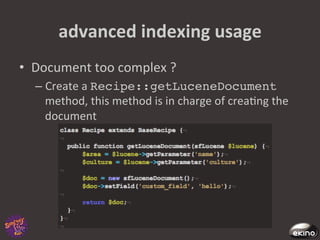
advanced	
  indexing	
  usage	
  
•  Document	
  too	
  complex	
  ?	
  
   –  Create	
  a	
  Recipe::getLuceneDocument
      method,	
  this	
  method	
  is	
  in	
  charge	
  of	
  crea8ng	
  the	
  
      document	
  
advanced	
  indexing	
  usage	
  
•  Model::isIndexable :	
  return	
  true	
  or	
  
   false	
  if	
  the	
  model	
  can	
  be	
  indexed	
  ...	
  
   –  Useful	
  if	
  you	
  have	
  a	
  publishing	
  workflow	
  or	
  
      complex	
  rules	
  that	
  cannot	
  be	
  match	
  by	
  a	
  SQL	
  
      queries	
  	
  
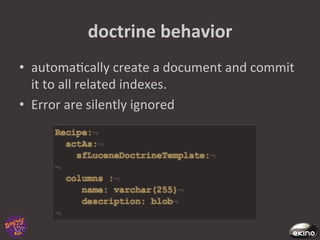
doctrine	
  behavior	
  
•  automa8cally	
  create	
  a	
  document	
  and	
  commit	
  
   it	
  to	
  all	
  related	
  indexes.	
  
•  Error	
  are	
  silently	
  ignored	
  
IV.	
  SEARCHING	
  
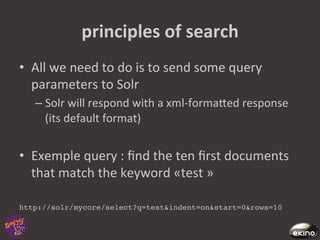
principles	
  of	
  search	
  
•  All	
  we	
  need	
  to	
  do	
  is	
  to	
  send	
  some	
  query	
  
   parameters	
  to	
  Solr	
  
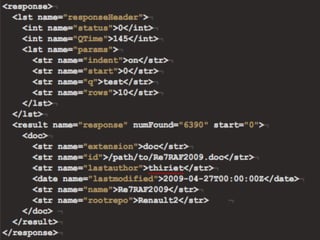
    –  Solr	
  will	
  respond	
  with	
  a	
  xml-­‐formaged	
  response	
  
       (its	
  default	
  format)	


•  Exemple	
  query	
  :	
  find	
  the	
  ten	
  first	
  documents	
  
     that	
  match	
  the	
  keyword	
  «test	
  »	


http://solr/mycore/select?q=test&indent=on&start=0&rows=10!
query	
  parameters	
  :	
  search	
  
•  q	
  :	
  the	
  main	
  query	
  ,	
  the	
  text	
  to	
  find	
  
•  q.op	
  :	
  the	
  query	
  operator	
  (AND	
  or	
  OR),	
  can	
  also	
  
   be	
  configured	
  on	
  the	
  server	
  side	
  
•  df	
  :	
  the	
  default	
  field	
  to	
  search,	
  can	
  also	
  be	
  
   configured	
  on	
  the	
  server	
  side	
  
•  fq	
  :	
  a	
  filter	
  query,	
  used	
  to	
  restrict	
  the	
  search	
  
   result,	
  not	
  involved	
  in	
  the	
  relevant	
  score	
  
•  defType	
  :	
  the	
  query	
  parser	
  defini8on,	
  
   «lucene	
  »	
  or	
  «	
  dismax	
  »	
  (see	
  next	
  slide)	
  	
  
query	
  parameters	
  :	
  output	
  
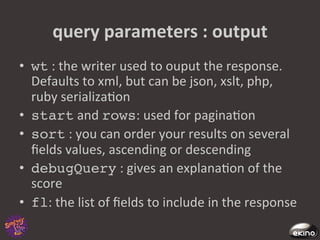
•  wt	
  :	
  the	
  writer	
  used	
  to	
  ouput	
  the	
  response.	
  
   Defaults	
  to	
  xml,	
  but	
  can	
  be	
  json,	
  xslt,	
  php,	
  
   ruby	
  serializa8on	
  
•  start	
  and	
  rows:	
  used	
  for	
  pagina8on	
  
•  sort	
  :	
  you	
  can	
  order	
  your	
  results	
  on	
  several	
  
   fields	
  values,	
  ascending	
  or	
  descending	
  
•  debugQuery	
  :	
  gives	
  an	
  explana8on	
  of	
  the	
  
   score	
  
•  fl:	
  the	
  list	
  of	
  fields	
  to	
  include	
  in	
  the	
  response	
  
configuring	
  search	
  Solr-­‐side	
  
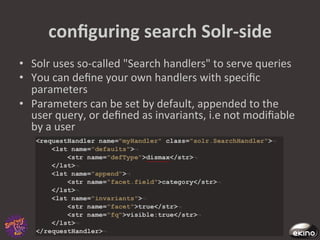
•  Solr	
  uses	
  so-­‐called	
  "Search	
  handlers"	
  to	
  serve	
  queries	
  
•  You	
  can	
  define	
  your	
  own	
  handlers	
  with	
  specific	
  
   parameters	
  
•  Parameters	
  can	
  be	
  set	
  by	
  default,	
  appended	
  to	
  the	
  
   user	
  query,	
  or	
  defined	
  as	
  invariants,	
  i.e	
  not	
  modifiable	
  
   by	
  a	
  user	
  
query	
  parsing	
  
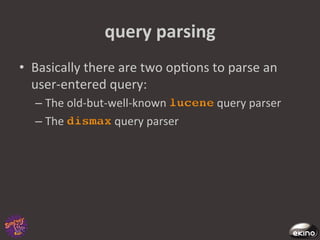
•  Basically	
  there	
  are	
  two	
  op8ons	
  to	
  parse	
  an	
  
   user-­‐entered	
  query:	
  	
  
       –  The	
  old-­‐but-­‐well-­‐known	
         query	
  parser	
  	
  
       –  The	
               query	
  parser	


query	
  parsing	
  :	
  lucene	
  
•  The	
  Lucene	
  query	
  parser	
  performs	
  all	
  the	
  Lucene	
  
   syntax	
  tricks	
  :	
  
    –  Logical	
  opera8ons	
  :	
  term1	
  AND	
  NOT	
  term2,(term1	
  OR	
  
       term2)	
  and	
  TERM3	
  	
  
    –  Targe8ng	
  a	
  special	
  field	
  :	
  my_field_name:term1	
  
    –  Range	
  queries	
  :	
  date_field:[*	
  TO	
  NOW	
  –	
  2	
  DAYS],	
  
       int_field:[0	
  TO	
  50]	
  
    –  Phrase	
  queries	
  :	
  "term1	
  term2",	
  or	
  "term1	
  term2"~5	
  
       with	
  a	
  slop	
  factor	
  	
  
    –  Keyword	
  boos8ng	
  :	
  term1^1.5	
  term2	


query	
  parsing	
  :	
  dismax	
  

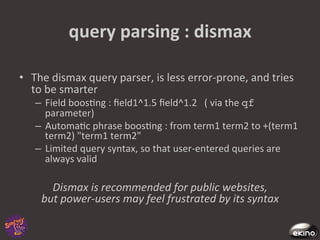
•  The	
  dismax	
  query	
  parser,	
  is	
  less	
  error-­‐prone,	
  and	
  tries	
  
   to	
  be	
  smarter	
  
     –  Field	
  boos8ng	
  :	
  field1^1.5	
  field^1.2	
  	
  	
  (	
  via	
  the	
  qf	
  
        parameter)	
  
     –  Automa8c	
  phrase	
  boos8ng	
  :	
  from	
  term1	
  term2	
  to	
  +(term1	
  
        term2)	
  "term1	
  term2"	
  	
  
     –  Limited	
  query	
  syntax,	
  so	
  that	
  user-­‐entered	
  queries	
  are	
  
        always	
  valid	
  

         Dismax	
  is	
  recommended	
  for	
  public	
  websites,	
  	
  
       but	
  power-­‐users	
  may	
  feel	
  frustrated	
  by	
  its	
  syntax	


faceNng	
  
•  Face8ng	
  is	
  the	
  process	
  of	
  enriching	
  search	
  
   results	
  with	
  documents	
  counts	
  on	
  predefined	
  
   categories.	
  Think	
  of	
  count	
  +	
  group	
  by	
  sql	
  
   query.	


•  To	
  facet	
  on	
  a	
  parameter	
  named	
  field1,	
  just	
  
   add	
  to	
  your	
  query	
  :	
  
   &facet=true&facet.field=field1 !
•  The	
  xml	
  response	
  now	
  includes	
  a	
  new	
  sec8on	
  	
  
faceNng	
  types	
  
•  Facet	
  on	
  field,	
  to	
  group	
  results	
  according	
  to	
  a	
  
   field	
  value	
  
•  Facet	
  on	
  date	
  interval	
  
•  Facet	
  on	
  query,	
  for	
  more	
  specific	
  needs	
  
faceNng	
  search	


You	
  can	
  fetch	
  the	
  whole	
  content	
  of	
  a	
  page	
  with	
  
  one	
  Solr	
  request	
  :	
  search	
  results	
  and	
  facets	
  
  values	
  are	
  defined	
  in	
  a	
  single	
  xml	
  response	
  
search	
  components	
  
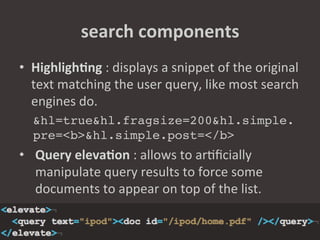
•  HighlighNng	
  :	
  displays	
  a	
  snippet	
  of	
  the	
  original	
  
   text	
  matching	
  the	
  user	
  query,	
  like	
  most	
  search	
  
   engines	
  do.	
  	
  
   &hl=true&hl.fragsize=200&hl.simple.
   pre=<b>&hl.simple.post=</b>!
•  Query	
  elevaNon	
  :	
  allows	
  to	
  ar8ficially	
  
   manipulate	
  query	
  results	
  to	
  force	
  some	
  
   documents	
  to	
  appear	
  on	
  top	
  of	
  the	
  list.	
  
   !
search	
  components	
  
•  More	
  Like	
  This	
  :	
  searches	
  for	
  results	
  similar	
  to	
  
   a	
  given	
  document	
  based	
  on	
  sta8s8cal	
  
   language	
  processing.	
  	
  
•  Spellchecking	
  :	
  can	
  use	
  a	
  dic8onary	
  or	
  (even	
  
   beger)	
  the	
  Solr	
  index	
  to	
  suggest	
  search	
  terms	
  
   to	
  the	
  end	
  user.	
  
search	
  with	
  sfLuceneCriteria	
  
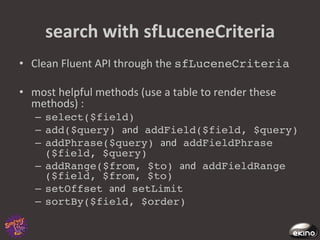
•  Clean	
  Fluent	
  API	
  through	
  the	
  sfLuceneCriteria!

•  most	
  helpful	
  methods	
  (use	
  a	
  table	
  to	
  render	
  these	
  
   methods)	
  :	
  
    –  select($field)!
    –  add($query) and addField($field, $query)!
    –  addPhrase($query) and addFieldPhrase
       ($field, $query)!
    –  addRange($from, $to) and addFieldRange
       ($field, $from, $to)!
    –  setOffset and setLimit!
    –  sortBy($field, $order)!
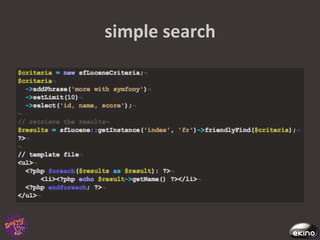
simple	
  search	
  
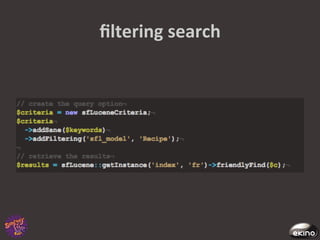
filtering	
  search	
  
faceted	
  search	
  
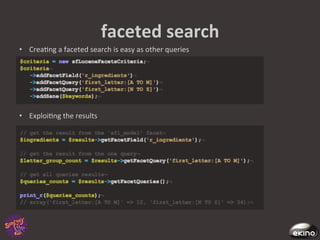
•  Crea8ng	
  a	
  faceted	
  search	
  is	
  easy	
  as	
  other	
  queries	


•  Exploi8ng	
  the	
  results	
  
geolocalized	
  search	
  –	
  opNon	
  I	
  
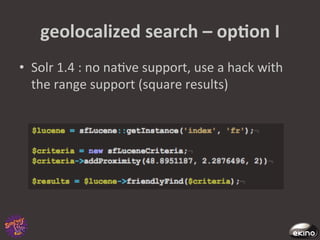
•  Solr	
  1.4	
  :	
  no	
  na8ve	
  support,	
  use	
  a	
  hack	
  with	
  
   the	
  range	
  support	
  (square	
  results)	
  
geolocalized	
  search	
  –	
  opNon	
  II	
  
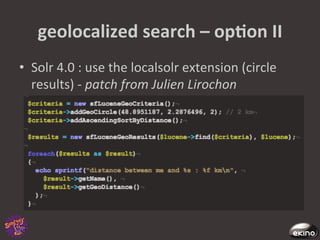
•  Solr	
  4.0	
  :	
  use	
  the	
  localsolr	
  extension	
  (circle	
  
   results)	
  -­‐	
  patch	
  from	
  Julien	
  Lirochon	
  
advanced	
  search	
  usage	
  
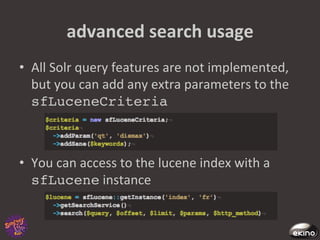
•  All	
  Solr	
  query	
  features	
  are	
  not	
  implemented,	
  
   but	
  you	
  can	
  add	
  any	
  extra	
  parameters	
  to	
  the	
  
   sfLuceneCriteria!


•  You	
  can	
  access	
  to	
  the	
  lucene	
  index	
  with	
  a	
  
   sfLucene	
  instance	
  
V.	
  ADMINISTRATION	
  AND	
  
DEPLOYMENT	
  
basic	
  administraNon	
  
•  What	
  are	
  Solr	
  Cores	
  ?	
  
    –  A	
  core	
  is	
  a	
  defini8on	
  of	
  an	
  index,	
  with	
  its	
  own	
  
       schema	
  and	
  solrconfig	
  files	
  
    –  The	
  main	
  <SOLR_HOME>/solr.xml	
  defines	
  a	
  list	
  
       of	
  cores	
  served	
  by	
  a	
  single	
  instance	
  
Solr	
  Cores	
  
•  Using	
  cores	
  allows	
  great	
  flexibility	
  in	
  
   administra8on	
  :	
  hot	
  reload	
  of	
  a	
  core	
  
   configura8on,	
  hotswap	
  of	
  cores,	
  merging	
  of	
  cores	


http://mySolrserver/solr/admin/cores?
action=RELOAD&core=mycorename!
http://mySolrserver/solr/admin/cores?
action=SWAP&core=myoldcore&other=mynewcore!


•  Weirdly	
  enough,	
  this	
  is	
  not	
  the	
  default	
  Solr	
  
   configura8on	
  :	
  use	
  it	
  now,	
  even	
  with	
  a	
  single	
  
   index	
  
core	
  configuraNon	
  
•  Solrconfig.xml :	
  is	
  the	
  main	
  file,	
  it	
  defines	
  the	
  
   internal	
  lucene	
  secngs,	
  the	
  way	
  Solr	
  will	
  handle	
  indexing	
  
   and	
  searching,	
  the	
  cache	
  secngs,	
  and	
  search	
  components	
  
•  schema.xml	
  :	
  holds	
  your	
  schema	
  defini8on,	
  as	
  seen	
  in	
  
   part	
  1	
  
•  synonyms.txt	
  :	
  allow	
  you	
  to	
  define	
  word	
  associa8ons	
  :	
  
   i-­‐pod	
  =>	
  ipod	
  	
  
•  elevate.xml	
  :	
  forces	
  top	
  results	
  for	
  special	
  keywords	
  as	
  
   seen	
  previously	
  
•  stopwords.txt	
  :	
  defines	
  «meaningless	
  »	
  words	
  that	
  are	
  
   not	
  to	
  be	
  indexed.	
  
•  spellings.txt :	
  feeds	
  Solr	
  with	
  a	
  custom	
  dic8onary.	
  	
  
caching	
  for	
  performance	
  
•  Cache	
  requests	
  with	
  httpcache	
  :	
  send	
  etags	
  
   and	
  /	
  or	
  304	
  to	
  clients	
  
•  Cache	
  filter	
  queries	
  with	
  filterCache	
  :	
  	
  
   unordered	
  documents	
  lists	
  for	
  common	
  filters	
  
   (driven	
  by	
  the	
  fq	
  parameter)	
  
•  Cache	
  queries	
  results	
  with	
  
   queryResultCache	
  :	
  stores	
  ordered	
  
   documentIds	
  for	
  common	
  queries	
  (driven	
  by	
  the	
  
   q	
  parameter)	
  
•  Cache	
  fieldValues	
  with	
  documentCache!
caching	
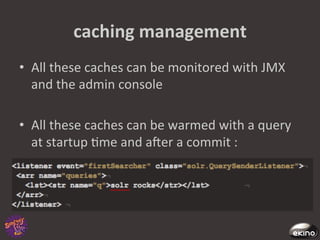
  management	
  
•  All	
  these	
  caches	
  can	
  be	
  monitored	
  with	
  JMX	
  
   and	
  the	
  admin	
  console	
  

•  All	
  these	
  caches	
  can	
  be	
  warmed	
  with	
  a	
  query	
  
   at	
  startup	
  8me	
  and	
  afer	
  a	
  commit	
  :	
  
scaling	
  
•  Replica8on:	
  a	
  whole	
  	
  index	
  is	
  replicated	
  across	
  mul8ple	
  
   servers.	
  Indexing	
  is	
  done	
  by	
  a	
  master	
  server,	
  search	
  is	
  
   handled	
  by	
  slave	
  servers.	
  	
  
•  Sharding:	
  a	
  single	
  index	
  is	
  split	
  across	
  mul8ple	
  indexes,	
  
   each	
  one	
  served	
  by	
  a	
  separated	
  instance.	
  For	
  a	
  single	
  
   query,	
  load	
  is	
  balanced	
  across	
  mul8ple	
  servers.	
  This	
  
   op8on	
  is	
  for	
  *huge*	
  indexes.	
  
•  Both:	
  you	
  can	
  replicate	
  your	
  shards	
  if	
  you	
  need	
  to.	
  

           the	
  replica@on	
  mechanism	
  can	
  also	
  be	
  used	
  	
  
                         to	
  make	
  index	
  backups	
  
VI.	
  CONCLUSION	
  
upcoming	
  features	
  
•  Language	
  iden8fica8on	
  (backed	
  by	
  8ka)	
  

•  Improvements	
  of	
  the	
  geolocalisa8on	
  capabili8es	
  (Spa8al	
  
   support	
  for	
  mul8-­‐valued	
  fields,	
  polygon	
  search)	
  

•  Sql	
  join-­‐like	
  queries	
  

•  Distributed	
  indexing	
  with	
  SolrCloud	
  

•  Extended	
  face8ng	
  with	
  hierarchical	
  facets	
  

•  Field	
  collapsing	
  :	
  the	
  ability	
  to	
  group	
  result	
  by	
  field	
  value.	
  
alternaNve	
  
•  Elas8c	
  search	
  
    –  Created	
  by	
  Shay	
  Bannon,	
  former	
  Compass	
  commiger	
  
       and	
  Gigaspaces	
  employee	
  
    –  Oriented	
  toward	
  distributed	
  search	
  
    –  Shares	
  a	
  lot	
  of	
  features	
  	
  with	
  Solr	
  :	
  face8ng,	
  json	
  
       streams,	
  many	
  clients	
  for	
  many	
  languages	
  
    –  Bonus	
  feature	
  :	
  a	
  concept	
  named	
  “river”,	
  which	
  allows	
  
       indexing	
  of	
  data	
  con8nuously	
  pulled	
  from	
  a	
  
       datasource	
  (rabbitmq,	
  couchdb,	
  twiger...)	
  
    –  Warning	
  :	
  a	
  one-­‐man	
  project,	
  with	
  sparse	
  
       documenta8on	
  	
  
references	
  
•  hgp://lucene.apache.org/,	
  home	
  of	
  lucene	
  and	
  its	
  subprojects,	
  
   including	
  Solr	
  

•  hgp://www.dzone.com/mz/solr-­‐lucene,	
  the	
  dzone	
  for	
  search-­‐
   oriented	
  news	
  

                                                  ,	
  home	
  of	
  many	
  lucene	
  /	
  	
  Solr	
  
    commigers	
  (check	
  the	
  developers	
  sec8on)	
  

                                               ,	
  another	
  shelter	
  for	
  Solr	
  commigers	
  
    (check	
  the	
  blog)	
  

•  hgp://solr.pl/en/,	
  a	
  polish	
  blog	
  with	
  frequent	
  updates	
  
ques8ons	
  ?	
  
    hgp://github.com/rande/sfSolrPlugin	
  
                 twi1er:	
  th0masr	
  
       github:	
  rande	
  /	
  sonata-­‐project	
  
     email:	
  thomas.rabaix@ekino.com	


                                                 We	
  are	


                                                 hiring	
  !	
  

Integrating the Solr search engine

  • 1.
  • 2.
    Thomas  Rabaix   • Symfony  live  2009/2010/2011   •  Plugins   –  swFunc8onalTestGenera8onPlugin   –  mgI18nPlugin   –  swCrossLinkApplica8onPlugin   –  swCombinePlugin   –  swToolboxPlugin   –  sfSolrPlugin   •  Bundle  –  sonata  project   –  AdminBundle  (BaseApplica8onBundle)   –  IntlBundle   –  MediaBundle   –  More  to  come  ….   •  «  More  with  symfony  »  book   •  Now  working  for  Ekino  –  a  french  web  tech-­‐company  
  • 3.
    co-­‐author   Some  slides  have  been  wri1en  and  reviewed     by  a  co-­‐worker  at  Ekino     -­‐   Frédéric  Cons  a  Java  Architect  
  • 4.
    talk   •  Introduc8on   •  Schema  design   •  Indexing   •  Searching   •  Administra8on  and  deployment   •  Conclusion    
  • 5.
  • 6.
    what  is  a  search  engine  ?   •  Warning  :  search  engine    SELECT  *  FROM   document  LIKE  '%term%’   •  Search  is  about     –  indexing  informa8on   –  filtering  document   –  presen8ng  informa8on    
  • 7.
    indexing   •  get  rich  content  (webpage,  files,  database)   •  parse  the  content   •  analyse  the  parsed  content   •  store  the  informa8on  into  the  index  
  • 8.
    filtering   •  get  user  input   •  create  a  query   •  retrieve  matching  documents  against  the   index   •  display  results  and  filtering  op8ons  
  • 9.
    Solr  -­‐  a  search  engine   •  Solr  is  an  like  a  HTTP  server  with     •  Lucene  has  been  published  in  2000  by  Doug  Cucng  :  It   is  a  search  engine  :  indexing,  search  algorithm  and   storage  format   •  25th  january  2006  CNET  grants  the  license  to  the   Apache  Sofware  Founda8on       •  Original  source  code  :  hgps://issues.apache.org/jira/ browse/Solr-­‐1    
  • 10.
    Apache  projects  around  Solr   •  nutch  :  a  web  crawler     •  tika  :  a  file  content  extractor  from  doc/pdf/ xls  files   :  diagnos8c  tool  
  • 11.
    Lucene  +  Solr     since  2010/03  the  two  teams  have  merged  
  • 12.
    Solr  in  a  web  architecture  
  • 13.
  • 14.
    document  vs  database   •  A  Solr  index  store  only  ONE  kind  of  document   defini8on.     •  A  document  has  typed  proper8es  :  string,   date,  integer  ….   •  sta8c  defini8on  or  dynamic  type   •  de-­‐normalize  your  database  into  a  structured   document  op8mized  for  the  search   requirements  
  • 15.
    document  definiNon   • Defini8ons  are  set  in  the  schema.xml  file   •  Type  defini8on  collec8on   –  Name   –  Class   –  Tokenizer/Analyser/filter   •  Property  defini8on  collec8on   –  Name   –  Type   –  Indexed/stored/mul8Valued  
  • 16.
    type  definiNon   • One  tokenizer  per  field  defini8on,  the  tokenizer  is   used  to  split  a  value  into  tokens      "Symfony2  is  awesome"  =>  ‘Symfony2’,  ‘is’,   ‘awesome’   •  Filters  are  used  to  alter  each  token   –  stemmer:  merging  =>  merge   –  synonyms     –  stopwords  :  remove  word  :  a,  the,  ...   –  accent  removal:  é  >  e    
  • 17.
    Type  defini@on  can  have     a  huge  impact  on  performance  
  • 18.
    property  definiNon   • naming  conven8on  :  many  tables  or  many   metadata  (files)  goes  into  one  document     •  Model  Recipe  and  Model  Ingredient  =>  it  is  a   good  prac8ce  to     –  r_name  or  recipe_name! –  i_name  or  ingredient_name!
  • 19.
    property  definiNon   • A  value  can  be     –  indexed  :    the  filtering  result  is  stored  into  the   index   –  stored  :  the  original  value  is  stored  into  the   index   –  multiValued   •  the  property  is  similar  to  an  array     •  neat  solu8on  for  storing  a  set  of  categories  linked  to  a   product  or  permissions  linked  to  a  document  
  • 20.
  • 21.
    updaNng  the  schema.xml! • not  an  easy  task  on  big  index     •  some  changes  require  reindexing  documents (  add  a  new  filter,  change  field  type)     •  need  to  reload  Solr  or  hot  reload  the  Solr  core  
  • 22.
    symfony  integraNon   • Thanks  to  sfSolrPlugin     •  Author  :  Thomas  Rabaix     •  Hosted  on  github      hgp://github.com/rande/sfSolrPlugin   •  Small  history  :     –  It  is  a  fork  of  sfLucenePlugin  based  on  Zend Search (a  php  lucene  implementa8on)  originally   wrote  by  Carl  Vondrick.   –  The  underline  communica8on  API  uses  the   SolrPhpClient  project  
  • 23.
     iniNalizaNon  and  indexaNon  tools   •  Tasks   –  to  generate  basic  configura8on  file  (lucene:create-Solr- config)   –  to  start  Jegy  -­‐  a  small  java  container  (lucene:service)   –  to  reindex  informa8on  (lucene:update-model-system)   •  Behaviors   –  to  automa8cally  update  the  index   –  works  with  Doctrine     –  works  with  Propel  (pull  request  ?)   •  Indexes   –  index  has  a  name  and  a  culture   –  one  core  per  name/culture  =>  my_index_fr  
  • 24.
    files  locaNon   • Configura8on  files  are  set  in  PROJECT_ROOT/config/solr/! •  Generated  files  by  the  lucene:create-solr-config task ! –  are  located  in  PROJECT_ROOT/config/solr/index_name/ conf! and    are  generated   once    and    are  overwrigen  by  the  task   •  index  files  are  set  in  PROJECT_ROOT/data/solr_index/   •  original  Solr  files  :  PROJECT_ROOT/plugins/sfSolrPlugin/lib/vendor/ solr/  
  • 25.
    plugin  built-­‐in  definiNons   •  sfl_guid  :  the  document  unique  id   •  sfl_title  /  sfl_descrip8on   •  sfl_uri  :  the  document  uri  on  the  website   •  sfl_model:  the  model  name  linked  to  the  document   •  sfl_all  :  concatena8on  of  all  field  values  -­‐  ie:  search   all  features   •  Other  deprecated  fields  (from  sfLucenePlugin)  :   sfl_type,  sfl_catefory,   sfl_categories_cache!
  • 26.
    search.yml  files   • defining  indexes  and  models   •  Indexes  are  the  first  level  defini8on   –  index  op8ons  (host,  cultures,  base_url)   –  models  defini8on     •  models  defini8on  op8ons     –  the  key  is  the  property  name   –  op8ons  :   •  type! •  indexed   •  stored (op8onal)   •  multiValued  (op8onal)   •  boost  (op8onal)   •  alias  (op8onal,  method  to  call  to  retrieve  property  value)   •  transform  (op8onal,  php  callback  func8on,  ie:  intval,  strip_tags)  
  • 28.
  • 29.
    indexing  data   • The  index  can  be  updated  by  different   mechanisms  :   –  XML  data     –  CSV   –  DataImporterHandler  
  • 30.
    indexing  process   •  gathering  data     •  sent  the  data  to  Solr     •  at  this  point  the  data  are  not  yet  "searchable"   •  commit  the  data  or  rollback  
  • 31.
    indexing  with  curl   •  We  represent  data  and  commands  with  a   custom  xml  format   •  This  xml  format  is  used  under  the  hood  by  all   language-­‐specific  clients  
  • 32.
    indexing  with  curl   •  We  now  send  this  data  to  the  solr  server  with   the  curl  u8lity  :   curl http://mysolrurl/solr/update -H 'Content- type:text-xml' --data-binary @myfile.xml! •  We  commit  with  an  explicit  <commit  />   command   curl http://mysolrurl/solr.update -F stream.body='<commit/>'!
  • 33.
    ImporNng  with  DataImportHandler   •  DIH  allows  us  to  execute  a  sql  query  and  map   its  result  to  a  Solr  schema   •  Sql  rows  can  be  transformed  on  the  way  with   Transformer  objects  :  regular  expressions,   date  formacng,  templa8ng,...   •  Its  main  use  is  to  import  databases,  but  it  also   works  with  other  datasources  such  as  files  and   urls  
  • 34.
  • 35.
    indexing  with  sfSolrPlugin   •  Use  the  task   •  Or  the  doctrine  behavior  
  • 36.
    opNmizing  indexing  Nme   •  Op8mize  your  search  query   –  by  default  the  plugin  uses  a  simple  query   –  tweak  the  query  to  do  less  queries    
  • 37.
    advanced  indexing  usage   •  Document  too  complex  ?   –  Create  a  Recipe::getLuceneDocument method,  this  method  is  in  charge  of  crea8ng  the   document  
  • 38.
    advanced  indexing  usage   •  Model::isIndexable :  return  true  or   false  if  the  model  can  be  indexed  ...   –  Useful  if  you  have  a  publishing  workflow  or   complex  rules  that  cannot  be  match  by  a  SQL   queries    
  • 39.
    doctrine  behavior   • automa8cally  create  a  document  and  commit   it  to  all  related  indexes.   •  Error  are  silently  ignored  
  • 40.
  • 41.
    principles  of  search   •  All  we  need  to  do  is  to  send  some  query   parameters  to  Solr   –  Solr  will  respond  with  a  xml-­‐formaged  response   (its  default  format)   •  Exemple  query  :  find  the  ten  first  documents   that  match  the  keyword  «test  »       http://solr/mycore/select?q=test&indent=on&start=0&rows=10!
  • 43.
    query  parameters  :  search   •  q  :  the  main  query  ,  the  text  to  find   •  q.op  :  the  query  operator  (AND  or  OR),  can  also   be  configured  on  the  server  side   •  df  :  the  default  field  to  search,  can  also  be   configured  on  the  server  side   •  fq  :  a  filter  query,  used  to  restrict  the  search   result,  not  involved  in  the  relevant  score   •  defType  :  the  query  parser  defini8on,   «lucene  »  or  «  dismax  »  (see  next  slide)    
  • 44.
    query  parameters  :  output   •  wt  :  the  writer  used  to  ouput  the  response.   Defaults  to  xml,  but  can  be  json,  xslt,  php,   ruby  serializa8on   •  start  and  rows:  used  for  pagina8on   •  sort  :  you  can  order  your  results  on  several   fields  values,  ascending  or  descending   •  debugQuery  :  gives  an  explana8on  of  the   score   •  fl:  the  list  of  fields  to  include  in  the  response  
  • 45.
    configuring  search  Solr-­‐side   •  Solr  uses  so-­‐called  "Search  handlers"  to  serve  queries   •  You  can  define  your  own  handlers  with  specific   parameters   •  Parameters  can  be  set  by  default,  appended  to  the   user  query,  or  defined  as  invariants,  i.e  not  modifiable   by  a  user  
  • 46.
    query  parsing   • Basically  there  are  two  op8ons  to  parse  an   user-­‐entered  query:     –  The  old-­‐but-­‐well-­‐known   query  parser     –  The   query  parser    
  • 47.
    query  parsing  :  lucene   •  The  Lucene  query  parser  performs  all  the  Lucene   syntax  tricks  :   –  Logical  opera8ons  :  term1  AND  NOT  term2,(term1  OR   term2)  and  TERM3     –  Targe8ng  a  special  field  :  my_field_name:term1   –  Range  queries  :  date_field:[*  TO  NOW  –  2  DAYS],   int_field:[0  TO  50]   –  Phrase  queries  :  "term1  term2",  or  "term1  term2"~5   with  a  slop  factor     –  Keyword  boos8ng  :  term1^1.5  term2      
  • 48.
    query  parsing  :  dismax   •  The  dismax  query  parser,  is  less  error-­‐prone,  and  tries   to  be  smarter   –  Field  boos8ng  :  field1^1.5  field^1.2      (  via  the  qf   parameter)   –  Automa8c  phrase  boos8ng  :  from  term1  term2  to  +(term1   term2)  "term1  term2"     –  Limited  query  syntax,  so  that  user-­‐entered  queries  are   always  valid   Dismax  is  recommended  for  public  websites,     but  power-­‐users  may  feel  frustrated  by  its  syntax              
  • 49.
    faceNng   •  Face8ng  is  the  process  of  enriching  search   results  with  documents  counts  on  predefined   categories.  Think  of  count  +  group  by  sql   query.       •  To  facet  on  a  parameter  named  field1,  just   add  to  your  query  :   &facet=true&facet.field=field1 ! •  The  xml  response  now  includes  a  new  sec8on    
  • 50.
    faceNng  types   • Facet  on  field,  to  group  results  according  to  a   field  value   •  Facet  on  date  interval   •  Facet  on  query,  for  more  specific  needs  
  • 51.
    faceNng  search       You  can  fetch  the  whole  content  of  a  page  with   one  Solr  request  :  search  results  and  facets   values  are  defined  in  a  single  xml  response  
  • 53.
    search  components   • HighlighNng  :  displays  a  snippet  of  the  original   text  matching  the  user  query,  like  most  search   engines  do.     &hl=true&hl.fragsize=200&hl.simple. pre=<b>&hl.simple.post=</b>! •  Query  elevaNon  :  allows  to  ar8ficially   manipulate  query  results  to  force  some   documents  to  appear  on  top  of  the  list.   !
  • 54.
    search  components   • More  Like  This  :  searches  for  results  similar  to   a  given  document  based  on  sta8s8cal   language  processing.     •  Spellchecking  :  can  use  a  dic8onary  or  (even   beger)  the  Solr  index  to  suggest  search  terms   to  the  end  user.  
  • 56.
    search  with  sfLuceneCriteria   •  Clean  Fluent  API  through  the  sfLuceneCriteria! •  most  helpful  methods  (use  a  table  to  render  these   methods)  :   –  select($field)! –  add($query) and addField($field, $query)! –  addPhrase($query) and addFieldPhrase ($field, $query)! –  addRange($from, $to) and addFieldRange ($field, $from, $to)! –  setOffset and setLimit! –  sortBy($field, $order)!
  • 57.
  • 58.
  • 59.
    faceted  search   • Crea8ng  a  faceted  search  is  easy  as  other  queries   •  Exploi8ng  the  results  
  • 60.
    geolocalized  search  –  opNon  I   •  Solr  1.4  :  no  na8ve  support,  use  a  hack  with   the  range  support  (square  results)  
  • 61.
    geolocalized  search  –  opNon  II   •  Solr  4.0  :  use  the  localsolr  extension  (circle   results)  -­‐  patch  from  Julien  Lirochon  
  • 62.
    advanced  search  usage   •  All  Solr  query  features  are  not  implemented,   but  you  can  add  any  extra  parameters  to  the   sfLuceneCriteria! •  You  can  access  to  the  lucene  index  with  a   sfLucene  instance  
  • 63.
  • 64.
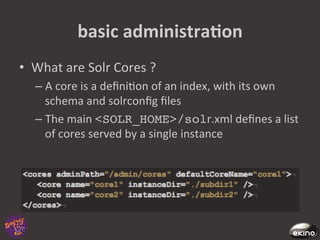
    basic  administraNon   • What  are  Solr  Cores  ?   –  A  core  is  a  defini8on  of  an  index,  with  its  own   schema  and  solrconfig  files   –  The  main  <SOLR_HOME>/solr.xml  defines  a  list   of  cores  served  by  a  single  instance  
  • 65.
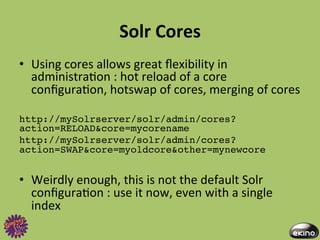
    Solr  Cores   • Using  cores  allows  great  flexibility  in   administra8on  :  hot  reload  of  a  core   configura8on,  hotswap  of  cores,  merging  of  cores     http://mySolrserver/solr/admin/cores? action=RELOAD&core=mycorename! http://mySolrserver/solr/admin/cores? action=SWAP&core=myoldcore&other=mynewcore! •  Weirdly  enough,  this  is  not  the  default  Solr   configura8on  :  use  it  now,  even  with  a  single   index  
  • 66.
    core  configuraNon   • Solrconfig.xml :  is  the  main  file,  it  defines  the   internal  lucene  secngs,  the  way  Solr  will  handle  indexing   and  searching,  the  cache  secngs,  and  search  components   •  schema.xml  :  holds  your  schema  defini8on,  as  seen  in   part  1   •  synonyms.txt  :  allow  you  to  define  word  associa8ons  :   i-­‐pod  =>  ipod     •  elevate.xml  :  forces  top  results  for  special  keywords  as   seen  previously   •  stopwords.txt  :  defines  «meaningless  »  words  that  are   not  to  be  indexed.   •  spellings.txt :  feeds  Solr  with  a  custom  dic8onary.    
  • 67.
    caching  for  performance   •  Cache  requests  with  httpcache  :  send  etags   and  /  or  304  to  clients   •  Cache  filter  queries  with  filterCache  :     unordered  documents  lists  for  common  filters   (driven  by  the  fq  parameter)   •  Cache  queries  results  with   queryResultCache  :  stores  ordered   documentIds  for  common  queries  (driven  by  the   q  parameter)   •  Cache  fieldValues  with  documentCache!
  • 68.
    caching  management   • All  these  caches  can  be  monitored  with  JMX   and  the  admin  console   •  All  these  caches  can  be  warmed  with  a  query   at  startup  8me  and  afer  a  commit  :  
  • 69.
    scaling   •  Replica8on:  a  whole    index  is  replicated  across  mul8ple   servers.  Indexing  is  done  by  a  master  server,  search  is   handled  by  slave  servers.     •  Sharding:  a  single  index  is  split  across  mul8ple  indexes,   each  one  served  by  a  separated  instance.  For  a  single   query,  load  is  balanced  across  mul8ple  servers.  This   op8on  is  for  *huge*  indexes.   •  Both:  you  can  replicate  your  shards  if  you  need  to.   the  replica@on  mechanism  can  also  be  used     to  make  index  backups  
  • 70.
  • 71.
    upcoming  features   • Language  iden8fica8on  (backed  by  8ka)   •  Improvements  of  the  geolocalisa8on  capabili8es  (Spa8al   support  for  mul8-­‐valued  fields,  polygon  search)   •  Sql  join-­‐like  queries   •  Distributed  indexing  with  SolrCloud   •  Extended  face8ng  with  hierarchical  facets   •  Field  collapsing  :  the  ability  to  group  result  by  field  value.  
  • 72.
    alternaNve   •  Elas8c  search   –  Created  by  Shay  Bannon,  former  Compass  commiger   and  Gigaspaces  employee   –  Oriented  toward  distributed  search   –  Shares  a  lot  of  features    with  Solr  :  face8ng,  json   streams,  many  clients  for  many  languages   –  Bonus  feature  :  a  concept  named  “river”,  which  allows   indexing  of  data  con8nuously  pulled  from  a   datasource  (rabbitmq,  couchdb,  twiger...)   –  Warning  :  a  one-­‐man  project,  with  sparse   documenta8on    
  • 73.
    references   •  hgp://lucene.apache.org/,  home  of  lucene  and  its  subprojects,   including  Solr   •  hgp://www.dzone.com/mz/solr-­‐lucene,  the  dzone  for  search-­‐ oriented  news   ,  home  of  many  lucene  /    Solr   commigers  (check  the  developers  sec8on)   ,  another  shelter  for  Solr  commigers   (check  the  blog)   •  hgp://solr.pl/en/,  a  polish  blog  with  frequent  updates  
  • 74.
    ques8ons  ?   hgp://github.com/rande/sfSolrPlugin   twi1er:  th0masr   github:  rande  /  sonata-­‐project   email:  thomas.rabaix@ekino.com       We  are     hiring  !