Retrieving
Information from Solr
JOSA Data Science Bootcamp
● Head of Technology @
OpenSooq.com
● Technical Reviewer for
“Scaling Apache Solr” and
“Apache Solr Search Patterns”
(Books)
● Contributor in Apache Solr
● Built 10 search engines in the
last 2 years
Ramzi Alqrainy
Topics to be covered
● Exploring Solr’s Query Form
● Basic Queries and Parameters
● Matching Multiple Terms
● Fuzzy Matching
● Range Searches
● Sorting
● Pseudo Fields
● Geospatial Searches
● Filter Queries
● Faceting and Stats
● Tuning Relevance
Detailed
Architectural
Diagram
Basic Queries and Parameters
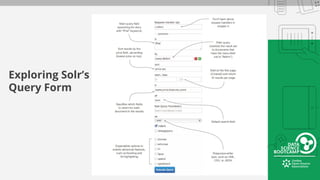
Exploring Solr’s
Query Form
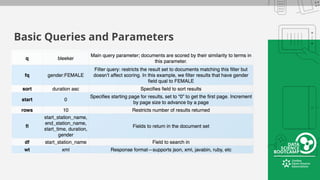
Basic Queries and Parameters
Matching Multiple Terms
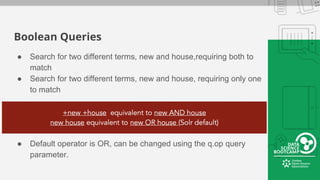
Boolean Queries
● Search for two different terms, new and house,requiring both to
match
● Search for two different terms, new and house, requiring only one
to match
● Default operator is OR, can be changed using the q.op query
parameter.
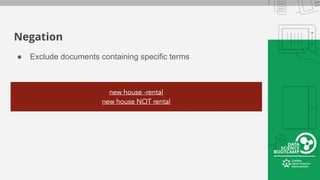
Negation
● Exclude documents containing specific terms
Inverted Index—Revisited
● All terms in the index map to 1 or more documents.
● Terms in inverted index are stored in ascending
lexicographical order
● When searching for multiple terms/ expressions, Solr (and
Lucene) returns multiple document result sets corresponding
to the various terms in the query and then does the specified
binary operations on these result sets in order to generate the
final result set.
● Scoring is performed on the result set o generate final result
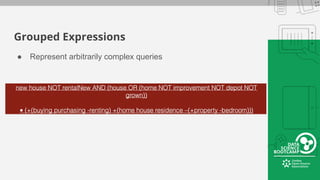
Grouped Expressions
● Represent arbitrarily complex queries
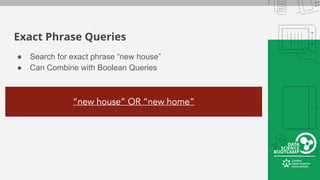
Exact Phrase Queries
● Search for exact phrase “new house”
● Can Combine with Boolean Queries
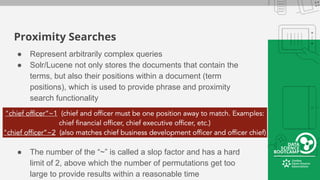
Proximity Searches
● Represent arbitrarily complex queries
● Solr/Lucene not only stores the documents that contain the
terms, but also their positions within a document (term
positions), which is used to provide phrase and proximity
search functionality
● The number of the “~” is called a slop factor and has a hard
limit of 2, above which the number of permutations get too
large to provide results within a reasonable time
Fuzzy Matching
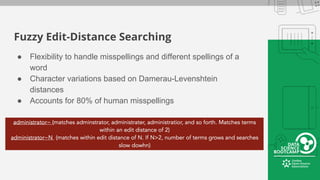
Fuzzy Edit-Distance Searching
● Flexibility to handle misspellings and different spellings of a
word
● Character variations based on Damerau-Levenshtein
distances
● Accounts for 80% of human misspellings
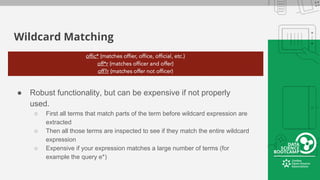
Wildcard Matching
● Robust functionality, but can be expensive if not properly
used.
○ First all terms that match parts of the term before wildcard expression are
extracted
○ Then all those terms are inspected to see if they match the entire wildcard
expression
○ Expensive if your expression matches a large number of terms (for
example the query e*)
Range Searches
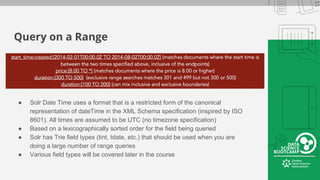
Query on a Range
● Solr Date Time uses a format that is a restricted form of the canonical
representation of dateTime in the XML Schema specification (inspired by ISO
8601). All times are assumed to be UTC (no timezone specification)
● Based on a lexicographically sorted order for the field being queried
● Solr has Trie field types (tint, tdate, etc.) that should be used when you are
doing a large number of range queries
● Various field types will be covered later in the course
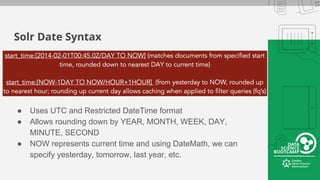
Solr Date Syntax
● Uses UTC and Restricted DateTime format
● Allows rounding down by YEAR, MONTH, WEEK, DAY,
MINUTE, SECOND
● NOW represents current time and using DateMath, we can
specify yesterday, tomorrow, last year, etc.
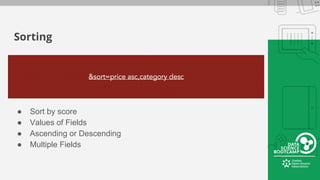
Sorting
Sorting
● Sort by score
● Values of Fields
● Ascending or Descending
● Multiple Fields
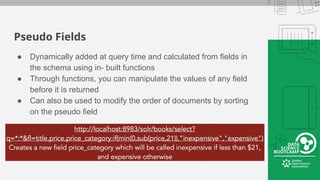
Pseudo Fields
● Dynamically added at query time and calculated from fields in
the schema using in- built functions
● Through functions, you can manipulate the values of any field
before it is returned
● Can also be used to modify the order of documents by sorting
on the pseudo field
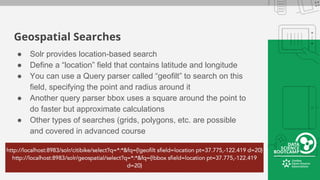
Geospatial Searches
Geospatial Searches
● Solr provides location-based search
● Define a “location” field that contains latitude and longitude
● You can use a Query parser called “geofilt” to search on this
field, specifying the point and radius around it
● Another query parser bbox uses a square around the point to
do faster but approximate calculations
● Other types of searches (grids, polygons, etc. are possible
and covered in advanced course
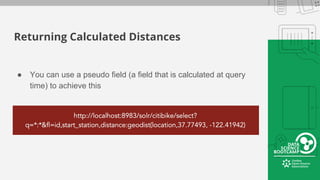
Returning Calculated Distances
● You can use a pseudo field (a field that is calculated at query
time) to achieve this
Filter Queries
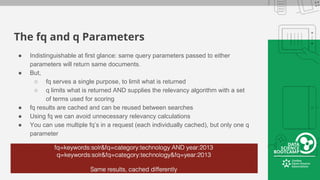
The fq and q Parameters
● Indistinguishable at first glance: same query parameters passed to either
parameters will return same documents.
● But,
○ fq serves a single purpose, to limit what is returned
○ q limits what is returned AND supplies the relevancy algorithm with a set
of terms used for scoring
● fq results are cached and can be reused between searches
● Using fq we can avoid unnecessary relevancy calculations
● You can use multiple fq’s in a request (each individually cached), but only one q
parameter
Faceting and Stats
Faceted Search
● High-level breakdown of search
results based on one or more
aspects (facets) of their
documents
● Allows users to filter by (drill
down into) specific components
● Can facet on values of fields, or
facet by queries
Types of Facet
● Field Facets
● Range Facets
● Pivot Facets
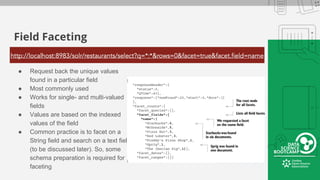
Field Faceting
● Request back the unique values
found in a particular field
● Most commonly used
● Works for single- and multi-valued
fields
● Values are based on the indexed
values of the field
● Common practice is to facet on a
String field and search on a text field
(to be discussed later). So, some
schema preparation is required for
faceting
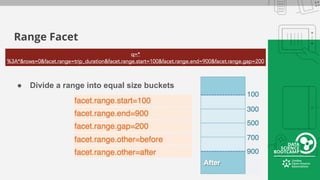
Range Facet
● Divide a range into equal size buckets
Range Faceting
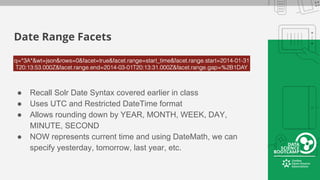
Date Range Facets
● Recall Solr Date Syntax covered earlier in class
● Uses UTC and Restricted DateTime format
● Allows rounding down by YEAR, MONTH, WEEK, DAY,
MINUTE, SECOND
● NOW represents current time and using DateMath, we can
specify yesterday, tomorrow, last year, etc.
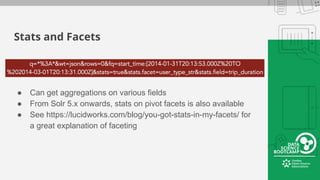
Stats and Facets
● Can get aggregations on various fields
● From Solr 5.x onwards, stats on pivot facets is also available
● See https://lucidworks.com/blog/you-got-stats-in-my-facets/ for
a great explanation of faceting
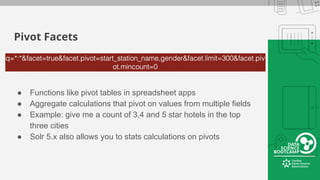
Pivot Facets
● Functions like pivot tables in spreadsheet apps
● Aggregate calculations that pivot on values from multiple fields
● Example: give me a count of 3,4 and 5 star hotels in the top
three cities
● Solr 5.x also allows you to stats calculations on pivots
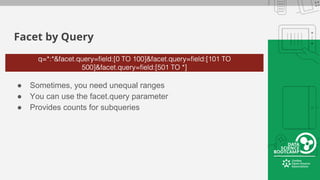
Facet by Query
● Sometimes, you need unequal ranges
● You can use the facet.query parameter
● Provides counts for subqueries
Tuning Relevance
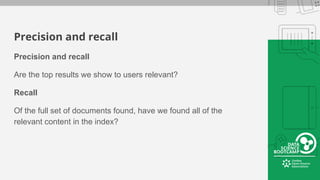
Precision and recall
Are the top results we show to users relevant?
Recall
Of the full set of documents found, have we found all of the
relevant content in the index?
Relevancy
Our goal is to give users relevant results Relevance is a soft or fuzzy thing
● Depends upon the judgment of users
Scoring is our attempt to predict relevance
Similarity classes hold the implementations
● DefaultSimilarity ( TF-IDF )
● BM25Similarity
● DFRSimilarity
● IBSimilarity
● LMDirichletSimilarity
● LMJelinekMercerSimilarity
Lucene Scoring
Similarity scoring formula
• Used to rank results by measuring the similarity between a query
and the documents that match the query
Domain knowledge
Examples
● Cheaper
● Newer or more recent
● More popular or higher user clicks Higher average user ratings
Interesting combinations
● Value = average user ratings ÷ price
● Staying power = recent popularity ÷ age
Boosting and biasing
Lucene uses a standardized scoring approach
Lucene does not know:
● Your data
● Your users
● Their queries Their preferences
Domain knowledge
What do you know about your data?
● Any specific rules about your data that wouldn't be suitable in
a generic IR scoring algorithm
● In many data domains, there are fundamental numeric
properties that make some objects generally "better" than
others
Domain knowledge
More subtle examples
● Novelty factor
○ Quantity of user ratings × stdDev of ratings Profit margin
● Profit margin
○ Retail price ‒ factory cost Scarcity
● Scarcity
○ Quantity remaining
● Popularity by association or categorization
○ Sweaters sell better then swimsuits in November
● Manual ranking
○ New York Times bestseller list
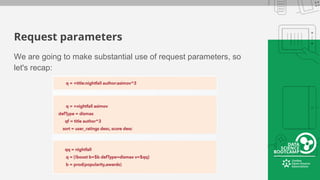
Request parameters
We are going to make substantial use of request parameters, so
let's recap:
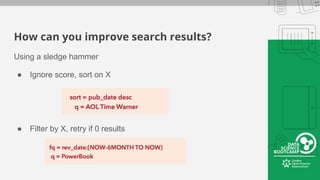
How can you improve search results?
Using a sledge hammer
● Ignore score, sort on X
● Filter by X, retry if 0 results
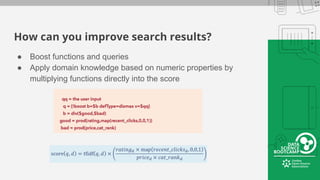
How can you improve search results?
● Boost functions and queries
● Apply domain knowledge based on numeric properties by
multiplying functions directly into the score
Retrieving
Information from Solr
JOSA Data Science Bootcamp

Retrieving Information From Solr

  • 1.
  • 2.
    ● Head ofTechnology @ OpenSooq.com ● Technical Reviewer for “Scaling Apache Solr” and “Apache Solr Search Patterns” (Books) ● Contributor in Apache Solr ● Built 10 search engines in the last 2 years Ramzi Alqrainy
  • 3.
    Topics to becovered ● Exploring Solr’s Query Form ● Basic Queries and Parameters ● Matching Multiple Terms ● Fuzzy Matching ● Range Searches ● Sorting ● Pseudo Fields ● Geospatial Searches ● Filter Queries ● Faceting and Stats ● Tuning Relevance
  • 4.
  • 5.
  • 6.
  • 7.
  • 8.
  • 9.
    Boolean Queries ● Searchfor two different terms, new and house,requiring both to match ● Search for two different terms, new and house, requiring only one to match ● Default operator is OR, can be changed using the q.op query parameter.
  • 10.
    Negation ● Exclude documentscontaining specific terms
  • 11.
    Inverted Index—Revisited ● Allterms in the index map to 1 or more documents. ● Terms in inverted index are stored in ascending lexicographical order ● When searching for multiple terms/ expressions, Solr (and Lucene) returns multiple document result sets corresponding to the various terms in the query and then does the specified binary operations on these result sets in order to generate the final result set. ● Scoring is performed on the result set o generate final result
  • 12.
    Grouped Expressions ● Representarbitrarily complex queries
  • 13.
    Exact Phrase Queries ●Search for exact phrase “new house” ● Can Combine with Boolean Queries
  • 14.
    Proximity Searches ● Representarbitrarily complex queries ● Solr/Lucene not only stores the documents that contain the terms, but also their positions within a document (term positions), which is used to provide phrase and proximity search functionality ● The number of the “~” is called a slop factor and has a hard limit of 2, above which the number of permutations get too large to provide results within a reasonable time
  • 15.
  • 16.
    Fuzzy Edit-Distance Searching ●Flexibility to handle misspellings and different spellings of a word ● Character variations based on Damerau-Levenshtein distances ● Accounts for 80% of human misspellings
  • 17.
    Wildcard Matching ● Robustfunctionality, but can be expensive if not properly used. ○ First all terms that match parts of the term before wildcard expression are extracted ○ Then all those terms are inspected to see if they match the entire wildcard expression ○ Expensive if your expression matches a large number of terms (for example the query e*)
  • 18.
  • 19.
    Query on aRange ● Solr Date Time uses a format that is a restricted form of the canonical representation of dateTime in the XML Schema specification (inspired by ISO 8601). All times are assumed to be UTC (no timezone specification) ● Based on a lexicographically sorted order for the field being queried ● Solr has Trie field types (tint, tdate, etc.) that should be used when you are doing a large number of range queries ● Various field types will be covered later in the course
  • 20.
    Solr Date Syntax ●Uses UTC and Restricted DateTime format ● Allows rounding down by YEAR, MONTH, WEEK, DAY, MINUTE, SECOND ● NOW represents current time and using DateMath, we can specify yesterday, tomorrow, last year, etc.
  • 21.
  • 22.
    Sorting ● Sort byscore ● Values of Fields ● Ascending or Descending ● Multiple Fields
  • 23.
    Pseudo Fields ● Dynamicallyadded at query time and calculated from fields in the schema using in- built functions ● Through functions, you can manipulate the values of any field before it is returned ● Can also be used to modify the order of documents by sorting on the pseudo field
  • 24.
  • 25.
    Geospatial Searches ● Solrprovides location-based search ● Define a “location” field that contains latitude and longitude ● You can use a Query parser called “geofilt” to search on this field, specifying the point and radius around it ● Another query parser bbox uses a square around the point to do faster but approximate calculations ● Other types of searches (grids, polygons, etc. are possible and covered in advanced course
  • 26.
    Returning Calculated Distances ●You can use a pseudo field (a field that is calculated at query time) to achieve this
  • 27.
  • 28.
    The fq andq Parameters ● Indistinguishable at first glance: same query parameters passed to either parameters will return same documents. ● But, ○ fq serves a single purpose, to limit what is returned ○ q limits what is returned AND supplies the relevancy algorithm with a set of terms used for scoring ● fq results are cached and can be reused between searches ● Using fq we can avoid unnecessary relevancy calculations ● You can use multiple fq’s in a request (each individually cached), but only one q parameter
  • 29.
  • 30.
    Faceted Search ● High-levelbreakdown of search results based on one or more aspects (facets) of their documents ● Allows users to filter by (drill down into) specific components ● Can facet on values of fields, or facet by queries
  • 31.
    Types of Facet ●Field Facets ● Range Facets ● Pivot Facets
  • 32.
    Field Faceting ● Requestback the unique values found in a particular field ● Most commonly used ● Works for single- and multi-valued fields ● Values are based on the indexed values of the field ● Common practice is to facet on a String field and search on a text field (to be discussed later). So, some schema preparation is required for faceting
  • 33.
    Range Facet ● Dividea range into equal size buckets
  • 34.
  • 35.
    Date Range Facets ●Recall Solr Date Syntax covered earlier in class ● Uses UTC and Restricted DateTime format ● Allows rounding down by YEAR, MONTH, WEEK, DAY, MINUTE, SECOND ● NOW represents current time and using DateMath, we can specify yesterday, tomorrow, last year, etc.
  • 36.
    Stats and Facets ●Can get aggregations on various fields ● From Solr 5.x onwards, stats on pivot facets is also available ● See https://lucidworks.com/blog/you-got-stats-in-my-facets/ for a great explanation of faceting
  • 37.
    Pivot Facets ● Functionslike pivot tables in spreadsheet apps ● Aggregate calculations that pivot on values from multiple fields ● Example: give me a count of 3,4 and 5 star hotels in the top three cities ● Solr 5.x also allows you to stats calculations on pivots
  • 38.
    Facet by Query ●Sometimes, you need unequal ranges ● You can use the facet.query parameter ● Provides counts for subqueries
  • 39.
  • 40.
    Precision and recall Precisionand recall Are the top results we show to users relevant? Recall Of the full set of documents found, have we found all of the relevant content in the index?
  • 41.
    Relevancy Our goal isto give users relevant results Relevance is a soft or fuzzy thing ● Depends upon the judgment of users Scoring is our attempt to predict relevance Similarity classes hold the implementations ● DefaultSimilarity ( TF-IDF ) ● BM25Similarity ● DFRSimilarity ● IBSimilarity ● LMDirichletSimilarity ● LMJelinekMercerSimilarity
  • 42.
    Lucene Scoring Similarity scoringformula • Used to rank results by measuring the similarity between a query and the documents that match the query
  • 43.
    Domain knowledge Examples ● Cheaper ●Newer or more recent ● More popular or higher user clicks Higher average user ratings Interesting combinations ● Value = average user ratings ÷ price ● Staying power = recent popularity ÷ age
  • 44.
    Boosting and biasing Luceneuses a standardized scoring approach Lucene does not know: ● Your data ● Your users ● Their queries Their preferences
  • 45.
    Domain knowledge What doyou know about your data? ● Any specific rules about your data that wouldn't be suitable in a generic IR scoring algorithm ● In many data domains, there are fundamental numeric properties that make some objects generally "better" than others
  • 46.
    Domain knowledge More subtleexamples ● Novelty factor ○ Quantity of user ratings × stdDev of ratings Profit margin ● Profit margin ○ Retail price ‒ factory cost Scarcity ● Scarcity ○ Quantity remaining ● Popularity by association or categorization ○ Sweaters sell better then swimsuits in November ● Manual ranking ○ New York Times bestseller list
  • 47.
    Request parameters We aregoing to make substantial use of request parameters, so let's recap:
  • 48.
    How can youimprove search results? Using a sledge hammer ● Ignore score, sort on X ● Filter by X, retry if 0 results
  • 49.
    How can youimprove search results? ● Boost functions and queries ● Apply domain knowledge based on numeric properties by multiplying functions directly into the score
  • 50.