http://www.skillbrew.com
/SkillbrewTalent brewed by the industry itself
os and sys Modules
Pavan Verma
@YinYangPavan
1
Founder, P3 InfoTech Solutions Pvt. Ltd.
Python Programming Essentials
© SkillBrew http://skillbrew.com
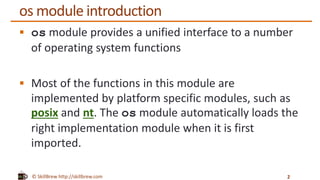
os module introduction
ď‚§ os module provides a unified interface to a number
of operating system functions
ď‚§ Most of the functions in this module are
implemented by platform specific modules, such as
posix and nt. The os module automatically loads the
right implementation module when it is first
imported.
2
© SkillBrew http://skillbrew.com
Working with files and directories
Functionality Description
os.rename(src, dst) Rename the file or directory src to dst.
os.remove(path) Remove (delete) the file path. If path is a
directory, OSError is raised
os.mkdir(path) Creates a Directory named path
os.rmdir(path) Remove (delete) the directory path. Only
works when the directory is empty.
3
© SkillBrew http://skillbrew.com
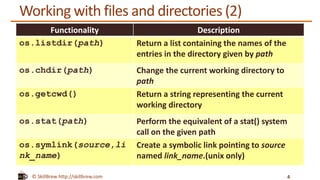
Working with files and directories (2)
Functionality Description
os.listdir(path) Return a list containing the names of the
entries in the directory given by path
os.chdir(path) Change the current working directory to
path
os.getcwd() Return a string representing the current
working directory
os.stat(path) Perform the equivalent of a stat() system
call on the given path
os.symlink(source,li
nk_name)
Create a symbolic link pointing to source
named link_name.(unix only)
4
© SkillBrew http://skillbrew.com
getcwd()
5
import os
curr_dir = os.getcwd()
print curr_dir
Output:
C:UsersPavanPycharmProjectsskillbrew programs
returns a string representing the current working directory
© SkillBrew http://skillbrew.com
Make and change directories
6
import os
curr_dir = os.getcwd()
print curr_dir
os.mkdir(os.path.join(curr_dir, 'foo'))
os.chdir(os.path.join(curr_dir, 'foo'))
print os.getcwd()
Output:
C:UsersPavanPycharmProjectsskillbrew programs
C:UsersPavanPycharmProjectsskillbrew programsfoo
© SkillBrew http://skillbrew.com
List all files in directory
7
import os
print os.listdir(os.getcwd())
returns a list containing the names of the entries in the
directory given by path
© SkillBrew http://skillbrew.com
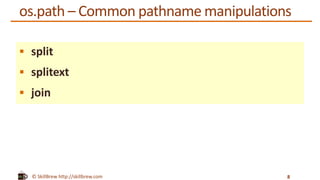
os.path – Common pathname manipulations
ď‚§ split
ď‚§ splitext
ď‚§ join
8
© SkillBrew http://skillbrew.com
split
9
>>> import os
>>>os.path.split("/home/user/pictures/foo.jpg")
('/home/user/pictures', 'foo.jpg')
>>> filepath, filename = os.path.split(
"/home/user/pictures/foo.jpg")
>>> filepath
'/home/user/pictures'
>>> filename
'foo.jpg'
split function splits a full pathname and returns a
tuple containing the path and filename
© SkillBrew http://skillbrew.com
splittext
10
>>> import os
>>> os.path.splitext('foo.jpg')
('foo', '.jpg')
splitext splits a filename and returns a tuple containing
the filename and the file extension
© SkillBrew http://skillbrew.com
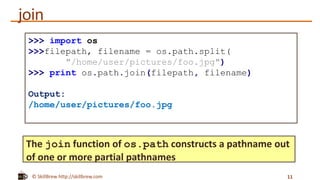
join
11
>>> import os
>>>filepath, filename = os.path.split(
"/home/user/pictures/foo.jpg")
>>> print os.path.join(filepath, filename)
Output:
/home/user/pictures/foo.jpg
The join function of os.path constructs a pathname out
of one or more partial pathnames
© SkillBrew http://skillbrew.com
Sys module
12
© SkillBrew http://skillbrew.com
sys module
sys module provides a number of functions and
variables that can be used to manipulate different
parts of the Python runtime environment
13
© SkillBrew http://skillbrew.com
command-line arguments
The argv list contains the arguments passed to the script, when
the interpreter was started. The first item contains the name of
the script itself.
14
import sys
print "script name: %s" % sys.argv[0]
print len(sys.argv)
$ python sys_ex1.py
Output:
Script name: sys_ex1.py
1
© SkillBrew http://skillbrew.com
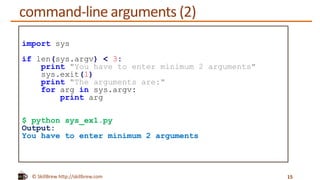
import sys
if len(sys.argv) < 3:
print "You have to enter minimum 2 arguments"
sys.exit(1)
print "The arguments are:"
for arg in sys.argv:
print arg
$ python sys_ex1.py
Output:
You have to enter minimum 2 arguments
command-line arguments (2)
15
© SkillBrew http://skillbrew.com
import sys
if len(sys.argv) < 3:
print "You have to enter minimum 2 arguments"
sys.exit(1)
print "The arguments are:"
for arg in sys.argv:
print arg
$ python sys_ex1.py foo bar
Output:
The arguments are:
sys_ex1.py
foo
bar
command-line arguments (2)
16
© SkillBrew http://skillbrew.com
Exiting the program
ď‚§ When you reach the end of the main program, the
interpreter is automatically terminated
ď‚§ If you need to exit in midflight, you can call
the sys.exit function instead
ď‚§ This function takes an optional integer value, which is
returned to the calling program
ď‚§ If it is an integer, zero is considered "successful
termination" and any nonzero value is considered
"abnormal termination"
17
© SkillBrew http://skillbrew.com
Exiting the program (2)
18
import sys
if len(sys.argv) < 3:
print "You have to enter minimum 2 arguments"
sys.exit(1)
print "The arguments are:"
for arg in sys.argv:
print arg
© SkillBrew http://skillbrew.com
Summary
ď‚§ os module introduction
ď‚§ Working with files and directories
ď‚§ Make and change directories
ď‚§ List all files in directories
ď‚§ Pathname manipulations
ď‚§ sys module introduction
ď‚§ Command line arguments
ď‚§ Exiting the program
19
© SkillBrew http://skillbrew.com
References
ď‚§ Sys module details http://effbot.org/librarybook/sys.htm
ď‚§ http://docs.python.org/2/library/sys.html
ď‚§ http://docs.python.org/2/library/os.html#os-file-dir
ď‚§ http://docs.python.org/2/library/os.html
20

Python Programming Essentials - M25 - os and sys modules

  • 1.
    http://www.skillbrew.com /SkillbrewTalent brewed bythe industry itself os and sys Modules Pavan Verma @YinYangPavan 1 Founder, P3 InfoTech Solutions Pvt. Ltd. Python Programming Essentials
  • 2.
    © SkillBrew http://skillbrew.com osmodule introduction  os module provides a unified interface to a number of operating system functions  Most of the functions in this module are implemented by platform specific modules, such as posix and nt. The os module automatically loads the right implementation module when it is first imported. 2
  • 3.
    © SkillBrew http://skillbrew.com Workingwith files and directories Functionality Description os.rename(src, dst) Rename the file or directory src to dst. os.remove(path) Remove (delete) the file path. If path is a directory, OSError is raised os.mkdir(path) Creates a Directory named path os.rmdir(path) Remove (delete) the directory path. Only works when the directory is empty. 3
  • 4.
    © SkillBrew http://skillbrew.com Workingwith files and directories (2) Functionality Description os.listdir(path) Return a list containing the names of the entries in the directory given by path os.chdir(path) Change the current working directory to path os.getcwd() Return a string representing the current working directory os.stat(path) Perform the equivalent of a stat() system call on the given path os.symlink(source,li nk_name) Create a symbolic link pointing to source named link_name.(unix only) 4
  • 5.
    © SkillBrew http://skillbrew.com getcwd() 5 importos curr_dir = os.getcwd() print curr_dir Output: C:UsersPavanPycharmProjectsskillbrew programs returns a string representing the current working directory
  • 6.
    © SkillBrew http://skillbrew.com Makeand change directories 6 import os curr_dir = os.getcwd() print curr_dir os.mkdir(os.path.join(curr_dir, 'foo')) os.chdir(os.path.join(curr_dir, 'foo')) print os.getcwd() Output: C:UsersPavanPycharmProjectsskillbrew programs C:UsersPavanPycharmProjectsskillbrew programsfoo
  • 7.
    © SkillBrew http://skillbrew.com Listall files in directory 7 import os print os.listdir(os.getcwd()) returns a list containing the names of the entries in the directory given by path
  • 8.
    © SkillBrew http://skillbrew.com os.path– Common pathname manipulations  split  splitext  join 8
  • 9.
    © SkillBrew http://skillbrew.com split 9 >>>import os >>>os.path.split("/home/user/pictures/foo.jpg") ('/home/user/pictures', 'foo.jpg') >>> filepath, filename = os.path.split( "/home/user/pictures/foo.jpg") >>> filepath '/home/user/pictures' >>> filename 'foo.jpg' split function splits a full pathname and returns a tuple containing the path and filename
  • 10.
    © SkillBrew http://skillbrew.com splittext 10 >>>import os >>> os.path.splitext('foo.jpg') ('foo', '.jpg') splitext splits a filename and returns a tuple containing the filename and the file extension
  • 11.
    © SkillBrew http://skillbrew.com join 11 >>>import os >>>filepath, filename = os.path.split( "/home/user/pictures/foo.jpg") >>> print os.path.join(filepath, filename) Output: /home/user/pictures/foo.jpg The join function of os.path constructs a pathname out of one or more partial pathnames
  • 12.
  • 13.
    © SkillBrew http://skillbrew.com sysmodule sys module provides a number of functions and variables that can be used to manipulate different parts of the Python runtime environment 13
  • 14.
    © SkillBrew http://skillbrew.com command-linearguments The argv list contains the arguments passed to the script, when the interpreter was started. The first item contains the name of the script itself. 14 import sys print "script name: %s" % sys.argv[0] print len(sys.argv) $ python sys_ex1.py Output: Script name: sys_ex1.py 1
  • 15.
    © SkillBrew http://skillbrew.com importsys if len(sys.argv) < 3: print "You have to enter minimum 2 arguments" sys.exit(1) print "The arguments are:" for arg in sys.argv: print arg $ python sys_ex1.py Output: You have to enter minimum 2 arguments command-line arguments (2) 15
  • 16.
    © SkillBrew http://skillbrew.com importsys if len(sys.argv) < 3: print "You have to enter minimum 2 arguments" sys.exit(1) print "The arguments are:" for arg in sys.argv: print arg $ python sys_ex1.py foo bar Output: The arguments are: sys_ex1.py foo bar command-line arguments (2) 16
  • 17.
    © SkillBrew http://skillbrew.com Exitingthe program  When you reach the end of the main program, the interpreter is automatically terminated  If you need to exit in midflight, you can call the sys.exit function instead  This function takes an optional integer value, which is returned to the calling program  If it is an integer, zero is considered "successful termination" and any nonzero value is considered "abnormal termination" 17
  • 18.
    © SkillBrew http://skillbrew.com Exitingthe program (2) 18 import sys if len(sys.argv) < 3: print "You have to enter minimum 2 arguments" sys.exit(1) print "The arguments are:" for arg in sys.argv: print arg
  • 19.
    © SkillBrew http://skillbrew.com Summary os module introduction  Working with files and directories  Make and change directories  List all files in directories  Pathname manipulations  sys module introduction  Command line arguments  Exiting the program 19
  • 20.
    © SkillBrew http://skillbrew.com References Sys module details http://effbot.org/librarybook/sys.htm  http://docs.python.org/2/library/sys.html  http://docs.python.org/2/library/os.html#os-file-dir  http://docs.python.org/2/library/os.html 20