Introduction to Network Fundamentals
- Presented by
Mohammed Adam
Agenda for today’s session
●
What is networking
●
What is internet
●
Identifying devices on a network
●
IP Address, Subnetting
●
Types of network- public and private network
●
IPV4 VS IPV6
●
MAC Addresses
●
MAC Spoofing
●
ARP
●
DHCP
●
Networking tools(Ping, Traceroute, whois, Dig)
●
Q & A session
What is Networking ?
●
Networks are simply things connected. For example, your
friendship circle: you are all connected because of
similar interests, hobbies, skills and sorts.
Networks can be found in all walks of life:
●
A city's public transportation system
●
Meeting and greeting your neighbours
●
Postal systems for sending letters and parcels
Networking(Contd.)
●
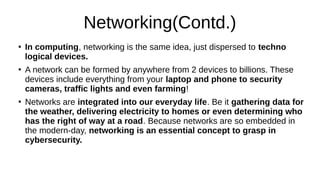
In computing, networking is the same idea, just dispersed to techno
logical devices.
●
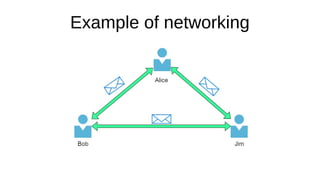
A network can be formed by anywhere from 2 devices to billions. These
devices include everything from your laptop and phone to security
cameras, traffic lights and even farming!
●
Networks are integrated into our everyday life. Be it gathering data for
the weather, delivering electricity to homes or even determining who
has the right of way at a road. Because networks are so embedded in
the modern-day, networking is an essential concept to grasp in
cybersecurity.
Example of networking
What is Internet ?
●
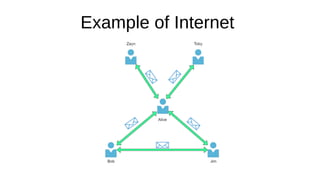
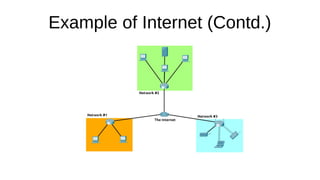
The Internet is one giant network that consists of many, many small
networks within itself.
●
The first iteration of the Internet was within the ARPANET project in
the late 1960s. This project was funded by the United States
Defence Department and was the first documented network in action.
●
However, it wasn't until 1989 when the Internet as we know it was
invented by Tim Berners-Lee by the creation of the World Wide Web
(WWW). It wasn't until this point that the Internet wasn't used as a
repository for storing and sharing information (like it is today).
Example of Internet
Example of Internet (Contd.)
Identifying Devices on a network
●
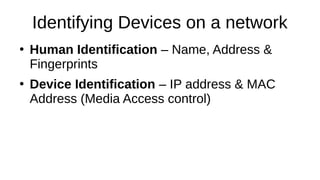
Human Identification – Name, Address &
Fingerprints
●
Device Identification – IP address & MAC
Address (Media Access control)
IP Address
●
An IP address (or Internet Protocol) address can be used as
a way of identifying a host on a network for a period of time,
where that IP address can then be associated with another
device without the IP address changing.
●
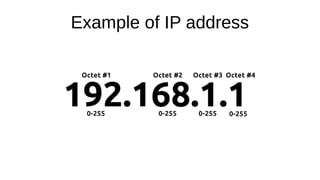
An IP address is a set of numbers that are divided into four
octets. The value of each octet will summarise to be the IP
address of the device on the network. This number is
calculated through a technique known as IP addressing &
subnetting
Example of IP address
Types of Network
●
A private network
●
A public network
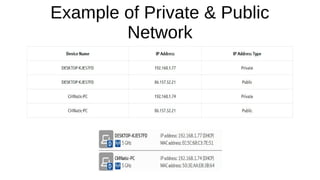
Example of Private & Public
Network
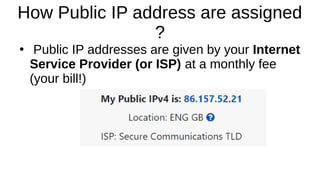
How Public IP address are assigned
?
●
Public IP addresses are given by your Internet
Service Provider (or ISP) at a monthly fee
(your bill!)
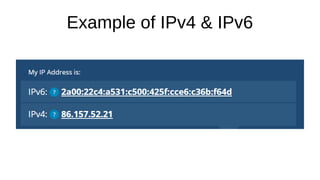
IPv4 & IPv6
●
As more and more devices become connected, it is becoming
increasingly harder to get a public address that isn't already in use.
●
So far, we have only discussed one version of the Internet Protocol
addressing scheme known as IPv4, which uses a numbering system of
●
2^32 IP addresses (4.29 billion) -- so you can see why there is such a shortage in IPv4!
●
IPv6 is a new iteration of the Internet Protocol addressing scheme to
help tackle this issue. Although it is seemingly more daunting, it boasts
a few benefits:
- Supports up to 2^128 of IP addresses (340 trillion-plus), resolving the issues faced with IPv4
- More efficient due to new methodologies
Example of IPv4 & IPv6
MAC Addresses
●
Devices on a network will all have a physical
network interface, which is a microchip board
found on the device's motherboard.
●
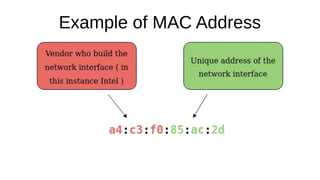
This network interface is assigned a unique address
at the factory it was built at, called a MAC (Media
Access Control ) address. The MAC address is a
twelve-character hexadecimal number
Example of MAC Address
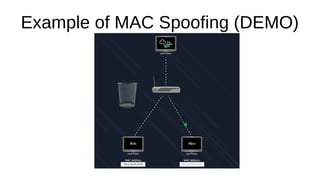
MAC Spoofing !
●
An interesting thing with MAC addresses is that
they can be faked or "spoofed" in a process
known as spoofing.
●
This spoofing occurs when a networked device
pretends to identify as another using its
MAC address.
Example of MAC Spoofing (DEMO)
ARP (Address Resolution Protocol)
●
It is the technology that is responsible for allowing
devices to identify themselves on a network.
●
Simply, the ARP protocol allows a device to
associate its MAC address with an IP address on
the network.
●
Each device on a network will keep a log of the
MAC addresses associated with other devices.
How does ARP works ?
●
Each device within a network has a ledger to store information
on, which is called a cache. In the context of the ARP protocol,
this cache stores the identifiers of other devices on the
network.
●
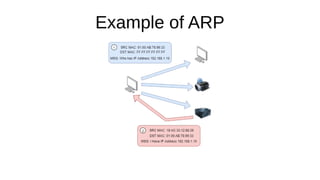
In order to map these two identifiers together (IP address and
MAC address), the ARP protocol sends two types of messages:
1) ARP Request
2) ARP Reply
Example of ARP
DHCP (Dynamic Host Configuration
Protocol)
●
IP addresses can be assigned either
manually, by entering them physically into a
device, or automatically and most commonly
by using a DHCP (Dynamic Host Configuration
Protocol) server.
Example of DHCP Server
Networking Tools (DEMO)
●
PING
●
Traceroute
●
WHOIS
●
DIG
References
●
https://tryhackme.com/room/whatisnetworking
●
https://tryhackme.com/room/introtonetworking
Q & A Session !
Thank You !
●
@iam_amdadam (Twitter)
●
Mohammedadam24 (LinkedIn)

Introduction to Network Fundamentals

  • 1.
    Introduction to NetworkFundamentals - Presented by Mohammed Adam
  • 2.
    Agenda for today’ssession ● What is networking ● What is internet ● Identifying devices on a network ● IP Address, Subnetting ● Types of network- public and private network ● IPV4 VS IPV6 ● MAC Addresses ● MAC Spoofing ● ARP ● DHCP ● Networking tools(Ping, Traceroute, whois, Dig) ● Q & A session
  • 3.
    What is Networking? ● Networks are simply things connected. For example, your friendship circle: you are all connected because of similar interests, hobbies, skills and sorts. Networks can be found in all walks of life: ● A city's public transportation system ● Meeting and greeting your neighbours ● Postal systems for sending letters and parcels
  • 4.
    Networking(Contd.) ● In computing, networkingis the same idea, just dispersed to techno logical devices. ● A network can be formed by anywhere from 2 devices to billions. These devices include everything from your laptop and phone to security cameras, traffic lights and even farming! ● Networks are integrated into our everyday life. Be it gathering data for the weather, delivering electricity to homes or even determining who has the right of way at a road. Because networks are so embedded in the modern-day, networking is an essential concept to grasp in cybersecurity.
  • 5.
  • 6.
    What is Internet? ● The Internet is one giant network that consists of many, many small networks within itself. ● The first iteration of the Internet was within the ARPANET project in the late 1960s. This project was funded by the United States Defence Department and was the first documented network in action. ● However, it wasn't until 1989 when the Internet as we know it was invented by Tim Berners-Lee by the creation of the World Wide Web (WWW). It wasn't until this point that the Internet wasn't used as a repository for storing and sharing information (like it is today).
  • 7.
  • 8.
  • 9.
    Identifying Devices ona network ● Human Identification – Name, Address & Fingerprints ● Device Identification – IP address & MAC Address (Media Access control)
  • 10.
    IP Address ● An IPaddress (or Internet Protocol) address can be used as a way of identifying a host on a network for a period of time, where that IP address can then be associated with another device without the IP address changing. ● An IP address is a set of numbers that are divided into four octets. The value of each octet will summarise to be the IP address of the device on the network. This number is calculated through a technique known as IP addressing & subnetting
  • 11.
  • 12.
    Types of Network ● Aprivate network ● A public network
  • 13.
    Example of Private& Public Network
  • 14.
    How Public IPaddress are assigned ? ● Public IP addresses are given by your Internet Service Provider (or ISP) at a monthly fee (your bill!)
  • 15.
    IPv4 & IPv6 ● Asmore and more devices become connected, it is becoming increasingly harder to get a public address that isn't already in use. ● So far, we have only discussed one version of the Internet Protocol addressing scheme known as IPv4, which uses a numbering system of ● 2^32 IP addresses (4.29 billion) -- so you can see why there is such a shortage in IPv4! ● IPv6 is a new iteration of the Internet Protocol addressing scheme to help tackle this issue. Although it is seemingly more daunting, it boasts a few benefits: - Supports up to 2^128 of IP addresses (340 trillion-plus), resolving the issues faced with IPv4 - More efficient due to new methodologies
  • 16.
  • 17.
    MAC Addresses ● Devices ona network will all have a physical network interface, which is a microchip board found on the device's motherboard. ● This network interface is assigned a unique address at the factory it was built at, called a MAC (Media Access Control ) address. The MAC address is a twelve-character hexadecimal number
  • 18.
  • 19.
    MAC Spoofing ! ● Aninteresting thing with MAC addresses is that they can be faked or "spoofed" in a process known as spoofing. ● This spoofing occurs when a networked device pretends to identify as another using its MAC address.
  • 20.
    Example of MACSpoofing (DEMO)
  • 21.
    ARP (Address ResolutionProtocol) ● It is the technology that is responsible for allowing devices to identify themselves on a network. ● Simply, the ARP protocol allows a device to associate its MAC address with an IP address on the network. ● Each device on a network will keep a log of the MAC addresses associated with other devices.
  • 22.
    How does ARPworks ? ● Each device within a network has a ledger to store information on, which is called a cache. In the context of the ARP protocol, this cache stores the identifiers of other devices on the network. ● In order to map these two identifiers together (IP address and MAC address), the ARP protocol sends two types of messages: 1) ARP Request 2) ARP Reply
  • 23.
  • 24.
    DHCP (Dynamic HostConfiguration Protocol) ● IP addresses can be assigned either manually, by entering them physically into a device, or automatically and most commonly by using a DHCP (Dynamic Host Configuration Protocol) server.
  • 25.
  • 26.
  • 27.
  • 28.
    Q & ASession !
  • 29.
    Thank You ! ● @iam_amdadam(Twitter) ● Mohammedadam24 (LinkedIn)