ANDROID
APPLICATION
PENETRATION
TESTING
AGENDA FOR THIS TRAINING SESSION
• Day 1: Mobile Application Penetration testing
• Basics of Android Application (Components & Framework)

• OWASP TOP 10 Mobile Vulnerabilities
• Lab Environment Setup for Android Pentesting
BASICS OF ANDROID APPLICATION
• Android is an open source and Linux-based Operating System for mobile devices
such as smartphones and tablet computers. Android was developed by the Open
Handset Alliance, which then led by Google.
• It is used for touchscreen mobile devices such as smartphones and tablets. But
nowadays these are used in Android Auto cars, TV, watches, camera, etc. It has
been one of the best-selling OS for smartphones.
• Google Play store features more than 3.3 million apps. The app is developed on
an application known as Android Studio. These executable apps are installed
through a bundle or package called APK(Android Package Kit).
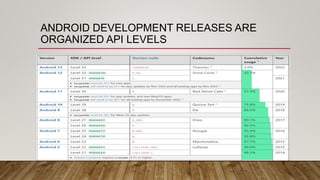
ANDROID DEVELOPMENT RELEASES ARE
ORGANIZED API LEVELS
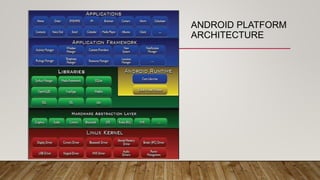
ANDROID PLATFORM
ARCHITECTURE
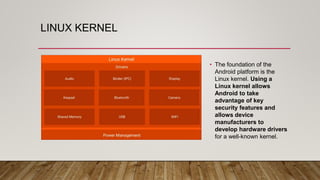
LINUX KERNEL
• The foundation of the
Android platform is the
Linux kernel. Using a
Linux kernel allows
Android to take
advantage of key
security features and
allows device
manufacturers to
develop hardware drivers
for a well-known kernel.
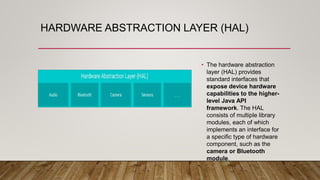
HARDWARE ABSTRACTION LAYER (HAL)
• The hardware abstraction
layer (HAL) provides
standard interfaces that
expose device hardware
capabilities to the higher-
level Java API
framework. The HAL
consists of multiple library
modules, each of which
implements an interface for
a specific type of hardware
component, such as the
camera or Bluetooth
module.
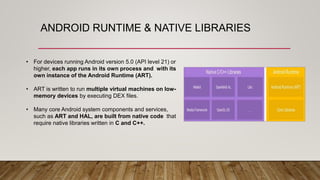
ANDROID RUNTIME & NATIVE LIBRARIES
• For devices running Android version 5.0 (API level 21) or
higher, each app runs in its own process and with its
own instance of the Android Runtime (ART).
• ART is written to run multiple virtual machines on low-
memory devices by executing DEX files.
• Many core Android system components and services,
such as ART and HAL, are built from native code that
require native libraries written in C and C++.
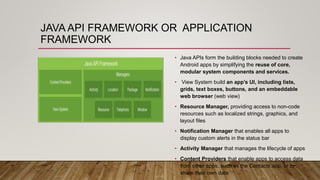
JAVA API FRAMEWORK OR APPLICATION
FRAMEWORK
• Java APIs form the building blocks needed to create
Android apps by simplifying the reuse of core,
modular system components and services.
• View System build an app’s UI, including lists,
grids, text boxes, buttons, and an embeddable
web browser (web view)
• Resource Manager, providing access to non-code
resources such as localized strings, graphics, and
layout files
• Notification Manager that enables all apps to
display custom alerts in the status bar
• Activity Manager that manages the lifecycle of apps
• Content Providers that enable apps to access data
from other apps, such as the Contacts app, or to
share their own data
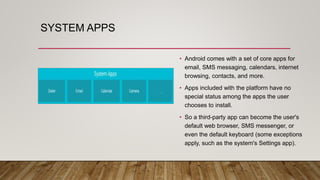
SYSTEM APPS
• Android comes with a set of core apps for
email, SMS messaging, calendars, internet
browsing, contacts, and more.
• Apps included with the platform have no
special status among the apps the user
chooses to install.
• So a third-party app can become the user's
default web browser, SMS messenger, or
even the default keyboard (some exceptions
apply, such as the system's Settings app).
ANDROID FUNDAMENTALS
Android Programming Languages
• In Android, basically, programming is done in two languages JAVA or C++ and
XML(Extension Markup Language).
• Nowadays KOTLIN is also preferred.
• The XML file deals with the design, presentation, layouts, blueprint, etc (as a
front-end) while the JAVA or KOTLIN deals with the working of buttons,
variables, storing, etc (as a back-end).
ANDROID COMPONENTS
• The App components are the building blocks of Android. Each component has its
own role and life cycles i.e from launching of an app till the end. Some of these
components depend upon others also. Each component has a definite purpose.
• The four major app components are:
• Activities
• Services
• Broadcast Receivers
• Content Provider
ACTIVITIES
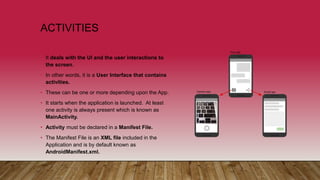
• It deals with the UI and the user interactions to
the screen.
• In other words, it is a User Interface that contains
activities.
• These can be one or more depending upon the App.
• It starts when the application is launched. At least
one activity is always present which is known as
MainActivity.
• Activity must be declared in a Manifest File.
• The Manifest File is an XML file included in the
Application and is by default known as
AndroidManifest.xml.
SERVICES
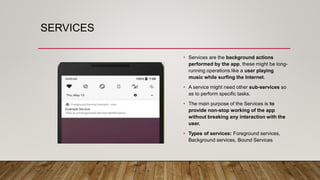
• Services are the background actions
performed by the app, these might be long-
running operations like a user playing
music while surfing the Internet.
• A service might need other sub-services so
as to perform specific tasks.
• The main purpose of the Services is to
provide non-stop working of the app
without breaking any interaction with the
user.
• Types of services: Foreground services,
Background services, Bound Services
BROADCAST RECEIVERS
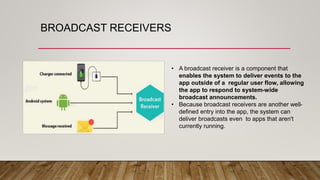
• A broadcast receiver is a component that
enables the system to deliver events to the
app outside of a regular user flow, allowing
the app to respond to system-wide
broadcast announcements.
• Because broadcast receivers are another well-
defined entry into the app, the system can
deliver broadcasts even to apps that aren't
currently running.
CONTENT PROVIDERS
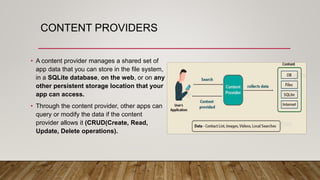
• A content provider manages a shared set of
app data that you can store in the file system,
in a SQLite database, on the web, or on any
other persistent storage location that your
app can access.
• Through the content provider, other apps can
query or modify the data if the content
provider allows it (CRUD(Create, Read,
Update, Delete operations).
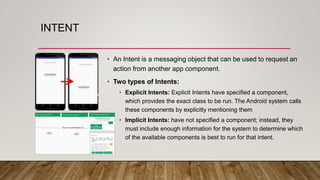
INTENT
• An Intent is a messaging object that can be used to request an
action from another app component.
• Two types of Intents:
• Explicit Intents: Explicit Intents have specified a component,
which provides the exact class to be run. The Android system calls
these components by explicitly mentioning them
• Implicit Intents: have not specified a component; instead, they
must include enough information for the system to determine which
of the available components is best to run for that intent.
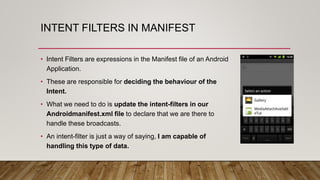
INTENT FILTERS IN MANIFEST
• Intent Filters are expressions in the Manifest file of an Android
Application.
• These are responsible for deciding the behaviour of the
Intent.
• What we need to do is update the intent-filters in our
Androidmanifest.xml file to declare that we are there to
handle these broadcasts.
• An intent-filter is just a way of saying, I am capable of
handling this type of data.
APK STRUCTURE
• An APK file is a compressed package that contains
the following files and directories:
• assets — directory with application assets. (files
used within the Android app, such as XML files,
JavaScript files, and pictures)
• res — directory with all resources that are not
compiled into resources.arsc. These are all resources
except the files in res/values. This folder contains the
activity layouts.
• lib — directory with compiled native libraries used by
your app. Contains multiple directories —one for each
supported CPU architecture (ABI). [armeabi-v7a |
arm64-v8a | x86 | x86_64]
APK STRUCTURE(CONTD.)
• META-INF — directory with APK metadata, such as its signature.
o MANIFEST.MF: stores hashes of the app resources
o CERT.RSA: the app's certificate(s)
o CERT.SF: list of resources and the SHA-1 digest of the corresponding lines in the
MANIFEST.MF file
• AndroidManifest.xml — application manifest in the binary XML file format. This contains the definition of the app's
package name, target and minimum API level, app configuration, app components, permissions, etc.
• classes.dex — file with app code in the Dex file format. There can be additional .dex files (named classes2.dex, etc.)
when the application uses multidex.
• resources.arsc — file with precompiled resources, such as strings, colors, or styles.
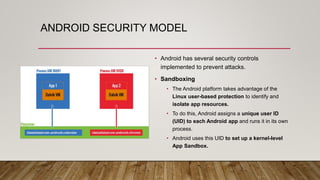
ANDROID SECURITY MODEL
• Android has several security controls
implemented to prevent attacks.
• Sandboxing
• The Android platform takes advantage of the
Linux user-based protection to identify and
isolate app resources.
• To do this, Android assigns a unique user ID
(UID) to each Android app and runs it in its own
process.
• Android uses this UID to set up a kernel-level
App Sandbox.
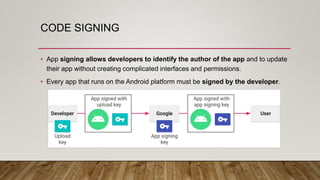
CODE SIGNING
• App signing allows developers to identify the author of the app and to update
their app without creating complicated interfaces and permissions.
• Every app that runs on the Android platform must be signed by the developer.
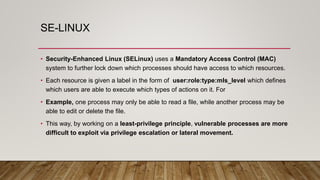
SE-LINUX
• Security-Enhanced Linux (SELinux) uses a Mandatory Access Control (MAC)
system to further lock down which processes should have access to which resources.
• Each resource is given a label in the form of user:role:type:mls_level which defines
which users are able to execute which types of actions on it. For
• Example, one process may only be able to read a file, while another process may be
able to edit or delete the file.
• This way, by working on a least-privilege principle, vulnerable processes are more
difficult to exploit via privilege escalation or lateral movement.
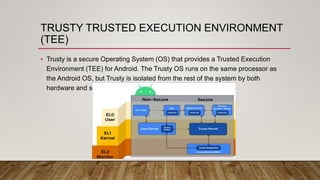
TRUSTY TRUSTED EXECUTION ENVIRONMENT
(TEE)
• Trusty is a secure Operating System (OS) that provides a Trusted Execution
Environment (TEE) for Android. The Trusty OS runs on the same processor as
the Android OS, but Trusty is isolated from the rest of the system by both
hardware and software
PERMISSION MODEL
• Android provides a system with a predefined set of permissions for certain tasks
that the app can request.
• For example, if you want your app to use a phone's camera, you have to
request the android.permission.CAMERA permission.
• Apps can request permissions for the protection levels: Normal, Dangerous,
and Signature by including <uses-permission /> tags into their manifest.
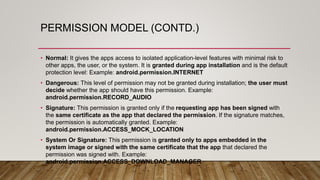
PERMISSION MODEL (CONTD.)
• Normal: It gives the apps access to isolated application-level features with minimal risk to
other apps, the user, or the system. It is granted during app installation and is the default
protection level: Example: android.permission.INTERNET
• Dangerous: This level of permission may not be granted during installation; the user must
decide whether the app should have this permission. Example:
android.permission.RECORD_AUDIO
• Signature: This permission is granted only if the requesting app has been signed with
the same certificate as the app that declared the permission. If the signature matches,
the permission is automatically granted. Example:
android.permission.ACCESS_MOCK_LOCATION
• System Or Signature: This permission is granted only to apps embedded in the
system image or signed with the same certificate that the app that declared the
permission was signed with. Example:
android.permission.ACCESS_DOWNLOAD_MANAGER
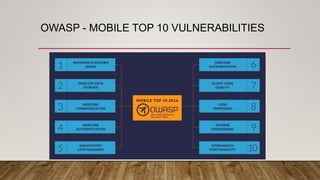
OWASP - MOBILE TOP 10 VULNERABILITIES
M1- IMPROPER PLATFORM USAGE
•Misuse of a platform feature or lack of
platform security controls for the Android
•Issues may include incorrect use of Android
Intents
BEST PRACTICES
Implement Intents carefully in Android
• Intents are used for inter-component signaling
• Improper implementation could result in data leakage, restricted functions
being called and program flow being manipulated.
M2- INSECURE DATA STORAGE
•Vulnerabilities that leak personal information
and provide access to hackers.
•Data from testing 400+ mobile apps
•We have found 1 in 10 apps leak private
sensitive data like email, username and
password.
BEST PRACTICES
• Implement secure data storage:
• Transmit and display but do not persist to memory.
• Ensure that an analog leak does not present itself where screenshots of the
data are written to disk.
• Store only on RAM (Clear at application close).
M3 – INSECURE COMMUNICATION
• Insecure Communication refers to
communications being sent in clear text as well
as other insecure methods
BEST PRACTICES
Implement Secure transmission of sensitive data
• Best practices call for app providers to use SSL/TLS effectively to secure the
transmission of passwords, login IDs and other sensitive data over the network.
• Leverage on application layer encryption to protect user data.
M4 – INSECURE AUTHENTICATION
• Mobile Apps need to securely identify a user
and maintain that user's identity, especially
when users are calling and sending sensitive
data such as financial information.
EXAMPLE: OLA BREACH
• India's largest startup with $1.1B in funding was hacked to allow unlimited free
rides
• Hacker used MITM proxy to view API calls over HTTP
• No OAuth Token mechanism or encryption was in place to guard APIs
BEST PRACTICES
• Hide Account numbers and tokens
• Given the widespread use of mobile apps in public places, displaying partial
numbers (eg."9881“ card numbers) can help ensure maximum privacy for this
information.
• Unless there is a need to store the complete number on the device, store the
partially hidden numbers
M5 – INSUFFICIENT CRYPTOGRAPHY
• The process behind encryption and decryption
may allow a hacker to decrypt sensitive data.
• The Algorithm behind encryption and decryption
may be weak in nature
BEST PRACTICES
• Implement secure data storage
• If storing sensitive data on the device is a requirement, add an additional layer
of verified, third-party encryption.
• By Adding another layer of encryption, you have more control over the
implementation and mitigate attacks focused on the main OS encryption classes.
M6 – INSECURE AUTHORIZATION
• Insecure authorization refers to the failure of a
server to properly enforce identity and
permissions as stated by the mobile app.
BEST PRACTICES
Implement proper web server configuration
• Certain settings on a webserver can increase security.
• One Commonly overlooked vulnerability on a web server is information disclosure.
• Information disclosure can lead to serious problems because every piece of
information attacks can gain from a server makes staging an attack easier.
• Implement proper access control in place
M7 – CLIENT CODE QUALITY
• Risks that come from vulnerabilities like SQL
injection, buffer overflows, format strings
vulnerabilities and various other code level
mistakes where the solution is to rewrite some
code that's running on the mobile devices.
BEST PRACTICES
Test Third-party libraries
• Third-party libraries can contain vulnerabilities and weakness.
• Many developers assume third-party libraries are well-developed and tested
• However, issues can and do exist in their code.
M8 – CODE TAMPERING
• When attackers tamper with or install a backdoor
on an app, re-sign it and publish the malicious
version to third party app marketplaces.
EXAMPLE - POKEMON GO
• 50M downloads in 19days on Android Alone
• Within 3days of initial release, malicious Droid Jack software found on a third
party app stores with same app name
• Remote Access tool (RAT) can open a silent, backdoor for hackers
BEST PRACTICES
• Implement Anti-tampering techniques
• Employ anti-tamper and tamper-detection techniques to prevent illegitimate
applications from executing.
• Use checksums, digital signatures and other validation mechanisms to help
detect file tampering
M9 – REVERSE ENGINEERING
• Reverse engineering refers to the analysis of a
final binary to determine its source code,
libraries, algorithms and more
EXAMPLE - TINDER APP
• Hackers decompiled mobile app and recompiled it so they didn't have to pay
for the premium content
• If it is possible, hackers will find a way.
BEST PRACTICES
• Increase Code complexity and use Obfuscation
• Reverse engineering apps can provide valuable insight into how you app works
• Making your app more complex internally makes it more difficult for attackers to
see how the app operates which can reduce the number of attack vectors.
M10 – EXTRANEOUS FUNCTIONALITY
•Developers frequently include hidden backdoors
or security controls they do not plan on releasing
into production.
•This error creates risk when a feature is released
to the wild that was never intended to be shared.
EXAMPLE: MEDIATEK
• Manufacturer of hardware chips and processors for mobile devices
• A debug tool, left open for carriers to test network connections, was left open on
shipped devices
BEST PRACTICES
Carefully manage debug logs
• Debug logs are generally designed to be used to detect and correct flaws in
an application.
• These logs can leak sensitive information that may help an attacker to create a
more powerful attack.
MSTG AND MASVS
• The MSTG is a comprehensive manual for mobile app security testing and reverse engineering.
It describes technical processes for verifying the controls listed in the OWASP Mobile
Application Verification Standard (MASVS)
• https://mobile-security.gitbook.io/mobile-security-testing-guide/
• The MASVS establishes baseline security requirements for mobile apps that are useful in
many scenarios, including:
• In the SDLC - to establish security requirements for solution architects and developers
In mobile application PT
• To ensure completeness and consistency in mobile application PT
• In procurement - as a measuring stick for security, e.g. in form of questionnaire for vendors.
• https://mobile-security.gitbook.io/masvs/
LAB ENVIRONMENT SETUP FOR ANDROID
PENTESTING
• Setting up your Virtual Machine
• Kali Linux or Santoku or Android Tamer
• Have a good internet connectivity for testing purposes
• Have a good configuration of 4GB to 8GB RAM
• Have a Internal Hard disk free storage space of 100GB
• Make sure you have enabled NAT in the network settings for both VM & Genymotion
LAB ENVIRONMENT SETUP FOR ANDROID
PENTESTING (CONTD.)
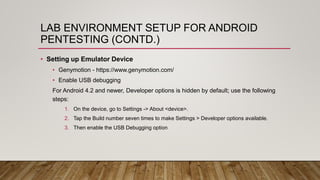
• Setting up Emulator Device
• Genymotion - https://www.genymotion.com/
• Enable USB debugging
For Android 4.2 and newer, Developer options is hidden by default; use the following
steps:
1. On the device, go to Settings -> About <device>.
2. Tap the Build number seven times to make Settings > Developer options available.
3. Then enable the USB Debugging option
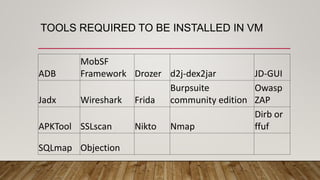
TOOLS REQUIRED TO BE INSTALLED IN VM
ADB
MobSF
Framework Drozer d2j-dex2jar JD-GUI
Jadx Wireshark Frida
Burpsuite
community edition
Owasp
ZAP
APKTool SSLscan Nikto Nmap
Dirb or
ffuf
SQLmap Objection
PRE-REQUISITES FOR TESTING
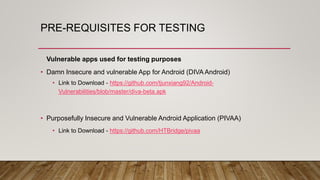
Vulnerable apps used for testing purposes
• Damn Insecure and vulnerable App for Android (DIVA Android)
• Link to Download - https://github.com/tjunxiang92/Android-
Vulnerabilities/blob/master/diva-beta.apk
• Purposefully Insecure and Vulnerable Android Application (PIVAA)
• Link to Download - https://github.com/HTBridge/pivaa
Q & A SESSION
THANK YOU !

Android Penetration Testing - Day 1

  • 1.
  • 2.
    AGENDA FOR THISTRAINING SESSION • Day 1: Mobile Application Penetration testing • Basics of Android Application (Components & Framework) • OWASP TOP 10 Mobile Vulnerabilities • Lab Environment Setup for Android Pentesting
  • 3.
    BASICS OF ANDROIDAPPLICATION • Android is an open source and Linux-based Operating System for mobile devices such as smartphones and tablet computers. Android was developed by the Open Handset Alliance, which then led by Google. • It is used for touchscreen mobile devices such as smartphones and tablets. But nowadays these are used in Android Auto cars, TV, watches, camera, etc. It has been one of the best-selling OS for smartphones. • Google Play store features more than 3.3 million apps. The app is developed on an application known as Android Studio. These executable apps are installed through a bundle or package called APK(Android Package Kit).
  • 4.
    ANDROID DEVELOPMENT RELEASESARE ORGANIZED API LEVELS
  • 5.
  • 6.
    LINUX KERNEL • Thefoundation of the Android platform is the Linux kernel. Using a Linux kernel allows Android to take advantage of key security features and allows device manufacturers to develop hardware drivers for a well-known kernel.
  • 7.
    HARDWARE ABSTRACTION LAYER(HAL) • The hardware abstraction layer (HAL) provides standard interfaces that expose device hardware capabilities to the higher- level Java API framework. The HAL consists of multiple library modules, each of which implements an interface for a specific type of hardware component, such as the camera or Bluetooth module.
  • 8.
    ANDROID RUNTIME &NATIVE LIBRARIES • For devices running Android version 5.0 (API level 21) or higher, each app runs in its own process and with its own instance of the Android Runtime (ART). • ART is written to run multiple virtual machines on low- memory devices by executing DEX files. • Many core Android system components and services, such as ART and HAL, are built from native code that require native libraries written in C and C++.
  • 9.
    JAVA API FRAMEWORKOR APPLICATION FRAMEWORK • Java APIs form the building blocks needed to create Android apps by simplifying the reuse of core, modular system components and services. • View System build an app’s UI, including lists, grids, text boxes, buttons, and an embeddable web browser (web view) • Resource Manager, providing access to non-code resources such as localized strings, graphics, and layout files • Notification Manager that enables all apps to display custom alerts in the status bar • Activity Manager that manages the lifecycle of apps • Content Providers that enable apps to access data from other apps, such as the Contacts app, or to share their own data
  • 10.
    SYSTEM APPS • Androidcomes with a set of core apps for email, SMS messaging, calendars, internet browsing, contacts, and more. • Apps included with the platform have no special status among the apps the user chooses to install. • So a third-party app can become the user's default web browser, SMS messenger, or even the default keyboard (some exceptions apply, such as the system's Settings app).
  • 11.
    ANDROID FUNDAMENTALS Android ProgrammingLanguages • In Android, basically, programming is done in two languages JAVA or C++ and XML(Extension Markup Language). • Nowadays KOTLIN is also preferred. • The XML file deals with the design, presentation, layouts, blueprint, etc (as a front-end) while the JAVA or KOTLIN deals with the working of buttons, variables, storing, etc (as a back-end).
  • 12.
    ANDROID COMPONENTS • TheApp components are the building blocks of Android. Each component has its own role and life cycles i.e from launching of an app till the end. Some of these components depend upon others also. Each component has a definite purpose. • The four major app components are: • Activities • Services • Broadcast Receivers • Content Provider
  • 13.
    ACTIVITIES • It dealswith the UI and the user interactions to the screen. • In other words, it is a User Interface that contains activities. • These can be one or more depending upon the App. • It starts when the application is launched. At least one activity is always present which is known as MainActivity. • Activity must be declared in a Manifest File. • The Manifest File is an XML file included in the Application and is by default known as AndroidManifest.xml.
  • 14.
    SERVICES • Services arethe background actions performed by the app, these might be long- running operations like a user playing music while surfing the Internet. • A service might need other sub-services so as to perform specific tasks. • The main purpose of the Services is to provide non-stop working of the app without breaking any interaction with the user. • Types of services: Foreground services, Background services, Bound Services
  • 15.
    BROADCAST RECEIVERS • Abroadcast receiver is a component that enables the system to deliver events to the app outside of a regular user flow, allowing the app to respond to system-wide broadcast announcements. • Because broadcast receivers are another well- defined entry into the app, the system can deliver broadcasts even to apps that aren't currently running.
  • 16.
    CONTENT PROVIDERS • Acontent provider manages a shared set of app data that you can store in the file system, in a SQLite database, on the web, or on any other persistent storage location that your app can access. • Through the content provider, other apps can query or modify the data if the content provider allows it (CRUD(Create, Read, Update, Delete operations).
  • 17.
    INTENT • An Intentis a messaging object that can be used to request an action from another app component. • Two types of Intents: • Explicit Intents: Explicit Intents have specified a component, which provides the exact class to be run. The Android system calls these components by explicitly mentioning them • Implicit Intents: have not specified a component; instead, they must include enough information for the system to determine which of the available components is best to run for that intent.
  • 18.
    INTENT FILTERS INMANIFEST • Intent Filters are expressions in the Manifest file of an Android Application. • These are responsible for deciding the behaviour of the Intent. • What we need to do is update the intent-filters in our Androidmanifest.xml file to declare that we are there to handle these broadcasts. • An intent-filter is just a way of saying, I am capable of handling this type of data.
  • 19.
    APK STRUCTURE • AnAPK file is a compressed package that contains the following files and directories: • assets — directory with application assets. (files used within the Android app, such as XML files, JavaScript files, and pictures) • res — directory with all resources that are not compiled into resources.arsc. These are all resources except the files in res/values. This folder contains the activity layouts. • lib — directory with compiled native libraries used by your app. Contains multiple directories —one for each supported CPU architecture (ABI). [armeabi-v7a | arm64-v8a | x86 | x86_64]
  • 20.
    APK STRUCTURE(CONTD.) • META-INF— directory with APK metadata, such as its signature. o MANIFEST.MF: stores hashes of the app resources o CERT.RSA: the app's certificate(s) o CERT.SF: list of resources and the SHA-1 digest of the corresponding lines in the MANIFEST.MF file • AndroidManifest.xml — application manifest in the binary XML file format. This contains the definition of the app's package name, target and minimum API level, app configuration, app components, permissions, etc. • classes.dex — file with app code in the Dex file format. There can be additional .dex files (named classes2.dex, etc.) when the application uses multidex. • resources.arsc — file with precompiled resources, such as strings, colors, or styles.
  • 21.
    ANDROID SECURITY MODEL •Android has several security controls implemented to prevent attacks. • Sandboxing • The Android platform takes advantage of the Linux user-based protection to identify and isolate app resources. • To do this, Android assigns a unique user ID (UID) to each Android app and runs it in its own process. • Android uses this UID to set up a kernel-level App Sandbox.
  • 22.
    CODE SIGNING • Appsigning allows developers to identify the author of the app and to update their app without creating complicated interfaces and permissions. • Every app that runs on the Android platform must be signed by the developer.
  • 23.
    SE-LINUX • Security-Enhanced Linux(SELinux) uses a Mandatory Access Control (MAC) system to further lock down which processes should have access to which resources. • Each resource is given a label in the form of user:role:type:mls_level which defines which users are able to execute which types of actions on it. For • Example, one process may only be able to read a file, while another process may be able to edit or delete the file. • This way, by working on a least-privilege principle, vulnerable processes are more difficult to exploit via privilege escalation or lateral movement.
  • 24.
    TRUSTY TRUSTED EXECUTIONENVIRONMENT (TEE) • Trusty is a secure Operating System (OS) that provides a Trusted Execution Environment (TEE) for Android. The Trusty OS runs on the same processor as the Android OS, but Trusty is isolated from the rest of the system by both hardware and software
  • 25.
    PERMISSION MODEL • Androidprovides a system with a predefined set of permissions for certain tasks that the app can request. • For example, if you want your app to use a phone's camera, you have to request the android.permission.CAMERA permission. • Apps can request permissions for the protection levels: Normal, Dangerous, and Signature by including <uses-permission /> tags into their manifest.
  • 26.
    PERMISSION MODEL (CONTD.) •Normal: It gives the apps access to isolated application-level features with minimal risk to other apps, the user, or the system. It is granted during app installation and is the default protection level: Example: android.permission.INTERNET • Dangerous: This level of permission may not be granted during installation; the user must decide whether the app should have this permission. Example: android.permission.RECORD_AUDIO • Signature: This permission is granted only if the requesting app has been signed with the same certificate as the app that declared the permission. If the signature matches, the permission is automatically granted. Example: android.permission.ACCESS_MOCK_LOCATION • System Or Signature: This permission is granted only to apps embedded in the system image or signed with the same certificate that the app that declared the permission was signed with. Example: android.permission.ACCESS_DOWNLOAD_MANAGER
  • 27.
    OWASP - MOBILETOP 10 VULNERABILITIES
  • 28.
    M1- IMPROPER PLATFORMUSAGE •Misuse of a platform feature or lack of platform security controls for the Android •Issues may include incorrect use of Android Intents
  • 29.
    BEST PRACTICES Implement Intentscarefully in Android • Intents are used for inter-component signaling • Improper implementation could result in data leakage, restricted functions being called and program flow being manipulated.
  • 30.
    M2- INSECURE DATASTORAGE •Vulnerabilities that leak personal information and provide access to hackers. •Data from testing 400+ mobile apps •We have found 1 in 10 apps leak private sensitive data like email, username and password.
  • 31.
    BEST PRACTICES • Implementsecure data storage: • Transmit and display but do not persist to memory. • Ensure that an analog leak does not present itself where screenshots of the data are written to disk. • Store only on RAM (Clear at application close).
  • 32.
    M3 – INSECURECOMMUNICATION • Insecure Communication refers to communications being sent in clear text as well as other insecure methods
  • 33.
    BEST PRACTICES Implement Securetransmission of sensitive data • Best practices call for app providers to use SSL/TLS effectively to secure the transmission of passwords, login IDs and other sensitive data over the network. • Leverage on application layer encryption to protect user data.
  • 34.
    M4 – INSECUREAUTHENTICATION • Mobile Apps need to securely identify a user and maintain that user's identity, especially when users are calling and sending sensitive data such as financial information.
  • 35.
    EXAMPLE: OLA BREACH •India's largest startup with $1.1B in funding was hacked to allow unlimited free rides • Hacker used MITM proxy to view API calls over HTTP • No OAuth Token mechanism or encryption was in place to guard APIs
  • 36.
    BEST PRACTICES • HideAccount numbers and tokens • Given the widespread use of mobile apps in public places, displaying partial numbers (eg."9881“ card numbers) can help ensure maximum privacy for this information. • Unless there is a need to store the complete number on the device, store the partially hidden numbers
  • 37.
    M5 – INSUFFICIENTCRYPTOGRAPHY • The process behind encryption and decryption may allow a hacker to decrypt sensitive data. • The Algorithm behind encryption and decryption may be weak in nature
  • 38.
    BEST PRACTICES • Implementsecure data storage • If storing sensitive data on the device is a requirement, add an additional layer of verified, third-party encryption. • By Adding another layer of encryption, you have more control over the implementation and mitigate attacks focused on the main OS encryption classes.
  • 39.
    M6 – INSECUREAUTHORIZATION • Insecure authorization refers to the failure of a server to properly enforce identity and permissions as stated by the mobile app.
  • 40.
    BEST PRACTICES Implement properweb server configuration • Certain settings on a webserver can increase security. • One Commonly overlooked vulnerability on a web server is information disclosure. • Information disclosure can lead to serious problems because every piece of information attacks can gain from a server makes staging an attack easier. • Implement proper access control in place
  • 41.
    M7 – CLIENTCODE QUALITY • Risks that come from vulnerabilities like SQL injection, buffer overflows, format strings vulnerabilities and various other code level mistakes where the solution is to rewrite some code that's running on the mobile devices.
  • 42.
    BEST PRACTICES Test Third-partylibraries • Third-party libraries can contain vulnerabilities and weakness. • Many developers assume third-party libraries are well-developed and tested • However, issues can and do exist in their code.
  • 43.
    M8 – CODETAMPERING • When attackers tamper with or install a backdoor on an app, re-sign it and publish the malicious version to third party app marketplaces.
  • 44.
    EXAMPLE - POKEMONGO • 50M downloads in 19days on Android Alone • Within 3days of initial release, malicious Droid Jack software found on a third party app stores with same app name • Remote Access tool (RAT) can open a silent, backdoor for hackers
  • 45.
    BEST PRACTICES • ImplementAnti-tampering techniques • Employ anti-tamper and tamper-detection techniques to prevent illegitimate applications from executing. • Use checksums, digital signatures and other validation mechanisms to help detect file tampering
  • 46.
    M9 – REVERSEENGINEERING • Reverse engineering refers to the analysis of a final binary to determine its source code, libraries, algorithms and more
  • 47.
    EXAMPLE - TINDERAPP • Hackers decompiled mobile app and recompiled it so they didn't have to pay for the premium content • If it is possible, hackers will find a way.
  • 48.
    BEST PRACTICES • IncreaseCode complexity and use Obfuscation • Reverse engineering apps can provide valuable insight into how you app works • Making your app more complex internally makes it more difficult for attackers to see how the app operates which can reduce the number of attack vectors.
  • 49.
    M10 – EXTRANEOUSFUNCTIONALITY •Developers frequently include hidden backdoors or security controls they do not plan on releasing into production. •This error creates risk when a feature is released to the wild that was never intended to be shared.
  • 50.
    EXAMPLE: MEDIATEK • Manufacturerof hardware chips and processors for mobile devices • A debug tool, left open for carriers to test network connections, was left open on shipped devices
  • 51.
    BEST PRACTICES Carefully managedebug logs • Debug logs are generally designed to be used to detect and correct flaws in an application. • These logs can leak sensitive information that may help an attacker to create a more powerful attack.
  • 52.
    MSTG AND MASVS •The MSTG is a comprehensive manual for mobile app security testing and reverse engineering. It describes technical processes for verifying the controls listed in the OWASP Mobile Application Verification Standard (MASVS) • https://mobile-security.gitbook.io/mobile-security-testing-guide/ • The MASVS establishes baseline security requirements for mobile apps that are useful in many scenarios, including: • In the SDLC - to establish security requirements for solution architects and developers In mobile application PT • To ensure completeness and consistency in mobile application PT • In procurement - as a measuring stick for security, e.g. in form of questionnaire for vendors. • https://mobile-security.gitbook.io/masvs/
  • 53.
    LAB ENVIRONMENT SETUPFOR ANDROID PENTESTING • Setting up your Virtual Machine • Kali Linux or Santoku or Android Tamer • Have a good internet connectivity for testing purposes • Have a good configuration of 4GB to 8GB RAM • Have a Internal Hard disk free storage space of 100GB • Make sure you have enabled NAT in the network settings for both VM & Genymotion
  • 54.
    LAB ENVIRONMENT SETUPFOR ANDROID PENTESTING (CONTD.) • Setting up Emulator Device • Genymotion - https://www.genymotion.com/ • Enable USB debugging For Android 4.2 and newer, Developer options is hidden by default; use the following steps: 1. On the device, go to Settings -> About <device>. 2. Tap the Build number seven times to make Settings > Developer options available. 3. Then enable the USB Debugging option
  • 55.
    TOOLS REQUIRED TOBE INSTALLED IN VM ADB MobSF Framework Drozer d2j-dex2jar JD-GUI Jadx Wireshark Frida Burpsuite community edition Owasp ZAP APKTool SSLscan Nikto Nmap Dirb or ffuf SQLmap Objection
  • 56.
    PRE-REQUISITES FOR TESTING Vulnerableapps used for testing purposes • Damn Insecure and vulnerable App for Android (DIVA Android) • Link to Download - https://github.com/tjunxiang92/Android- Vulnerabilities/blob/master/diva-beta.apk • Purposefully Insecure and Vulnerable Android Application (PIVAA) • Link to Download - https://github.com/HTBridge/pivaa
  • 57.
    Q & ASESSION
  • 58.