Multimedia Technologies
INTRODUCTION
By Tamanna Sehgal
tamanna.sehgal@live.com
Multimedia Products
1. Briefing Products
2. Reference Products
3. Database Products
4. Education and Training Products
5. Kiosk
6. Entertainment and Games
Multimedia Products
Briefing Products
• Small, straightforward, linear products used to present
information quickly and concisely.
• Characteristic of briefing product:
 Short Development Cycle
 Limited Number of Presentations
 Usage of text to present information with limited use of
graphic, audio and video.
 Have few navigational controls. (mouse click and button
press to move from one page to another)
 Content and the format are suitable for the audience and
fulfill the purpose of the presentation.
1/2
Multimedia Products
Briefing Products
• Good briefing presentation depends on:
 The understanding of the presented subject.
 Seamless integration of content.
 Consistent layout
• Example:
 Corporate Presentation
 Sales Presentation
 Educational Lectures
2/2
Multimedia Products
Reference Products
1/2
• Often used for answering specific questions or for general browsing of
information. (stored on CD/ DVD ROM)
• Characteristic of reference product:
 Used by wide range of user (small – adult)
 Have navigational menu, book marking, searching, printing utility
• 2 Basic classes of reference product:
 Generalized Content (dictionary/encyclopedia)
 Broad treatment of content at a limited depth
 Detailed Content
 Focus on specific area and provide extensive information.
Multimedia Products
Reference Products
• Good usability and success depends on:
 The developers understanding the body of information and
how the end user will want to access it.
 Help function should always available to explain how to
access and use the information
• Examples are electronic forms of:
 Encyclopedia
 Dictionaries
 Cookbooks, Historical, Informative
 Scientific surveys.
2/2
Multimedia Products
Reference Products
• Example:
2/2
Multimedia Products
Database Products
1/2
• Similar to reference product in a sense that large amount of information
are made available to the end user.
• Focus on storing and accessing the actual data (multimedia data such
as text, graphic, audio, animation and video)
• Characteristics of Database Products are:
 Manages multimedia data (large data)
 Descriptive finding methods
 Content based search
 Simultaneous access
 Online database
 Relational consistency in data management.
Multimedia Products
Database Products
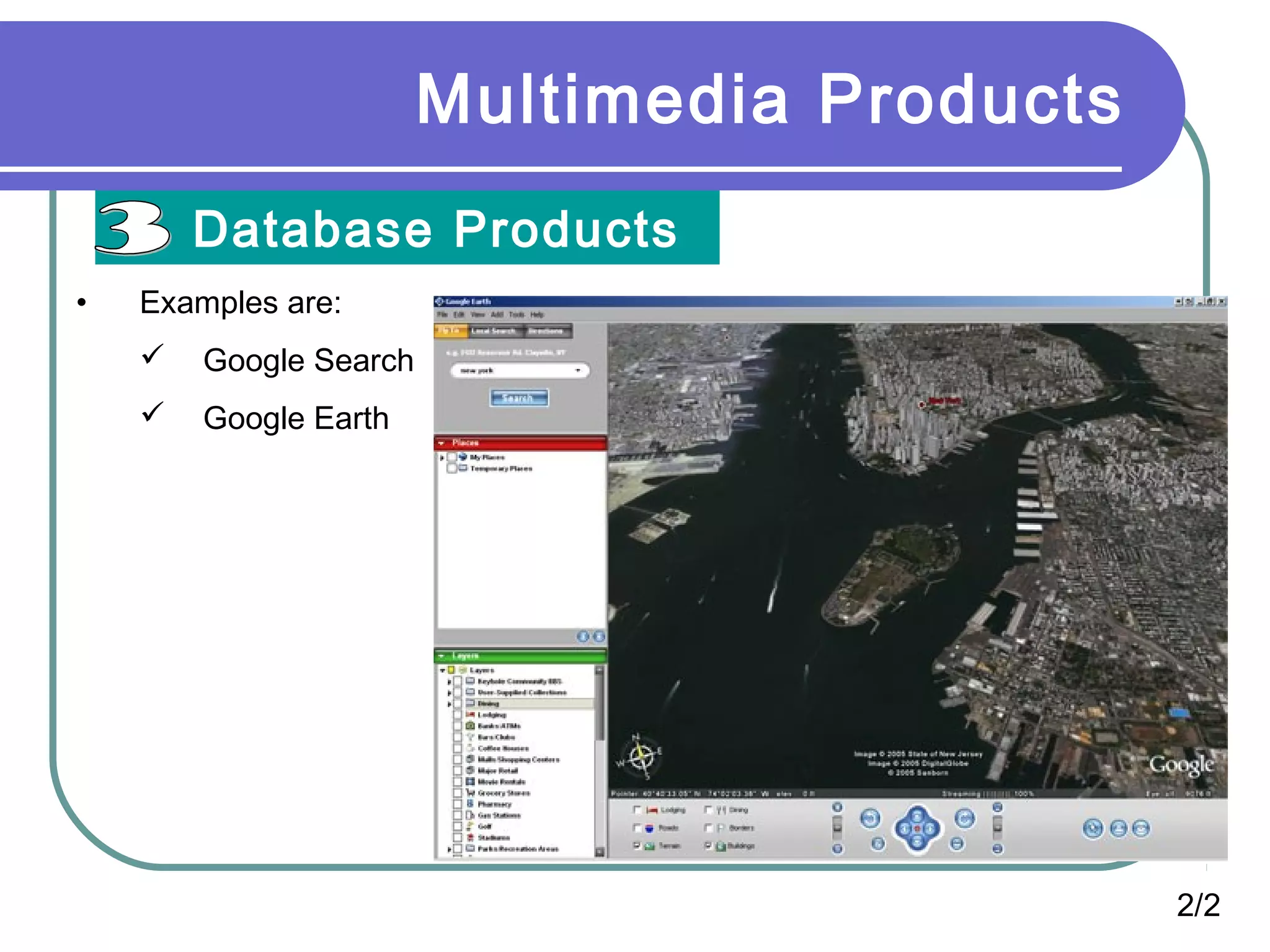
• Examples are:
 Google Search
 Google Earth
2/2
Multimedia Products
Education and Training Products
• Similar to textbook or training manuals but have added media such as
audio, animation and video.
• Make up a significant share of the multimedia market ranging from pre-
kindergarten to postgraduate offerings from technical to corporate
training products.
• 2 categories of reference product:
 Instructor Support Products
 Standalone or Self-Paced Products
 Combination Products
• Shares the same characteristics as Reference Product
1/2
Multimedia Products
Education and Training Products
• Example
2/2
Multimedia Products
Kiosk Products
1/2
• A product which is usually stationed at public places and allow the user
to find information interactively and also other types of transaction.
• Characteristics of Kiosk Products:-
 Limited target users and usage.
 User friendly and easily used by user.
 Fast response.
Multimedia Products
Kiosk Products
2/2
• Categories of Kiosk
 Point Of Information
 Provide certain information (example map, timetable etc)
 Point Of Sales System
 Allow users to purchase or make orders
• Example of Kiosk Products:-
 Instant Photo Booth
 Banking Kiosk (money deposit, cheque)
 University Information Kiosk
Multimedia Products
Entertainment & Games
• Most popular
• Shipped in the form of Interactive CD / DVD ROM.
• Characteristics of E & G Products:-
 Immersive.
 Requires constant feedback and interaction with the user.
 Challenging and sometimes intriguing for user
 Enabled online play for more than one user experience.
Basic Requirements to make
Multimedia applications
Hardware Devices
Software Applications
Computer Networks
Hardware Devices
 Input Devices
• Keyboard
• Image scanner
• Microphone
• Graphics tablet
• Joystick
• Lightpen
• Mouse
• Touchpad
• Touchscreen
• Trackball
• Webcam (Softcam)
Hardware Devices
Output Devices
Monitor
Speaker
Printer
Plotter
Multimedia Software Tools
These are divided into following main categories:
1. Music sequencing and Notations.
Cakewalk, Cubase, Macromedia, Soundedit
2. Digital Audio
Cool Edit, Sound Forge, Pro Tools
3. Graphics and Image Editing
Adobe Illustrator, Adobe Photoshop, Macromedia Fireworks.
4. Video Editing
Adobe Premiere, Adobe After Effects, Final Cut Pro.
5. Animation
Multimedia APIs Rendering Tools
1. Java 3D 1. 3D Studio Max
2. Direct X 2. Softimge XSI
3. Open GL 3. Maya
6. Multimedia Authoring
Macromedia Flash , Macromedia Director, quest
Computer Networks
 Multimedia Servers
 Communication Links
 Network Protocols to support secure distribution of
Multimedia
 Network devices such as
 Switches
 Hubs
 Bridges
 Routers
 Repeaters
 Modems
 And more based on network requirements
Scope of Research
Protocols to support heavy multimedia
data
New Multimedia tools
THANKYOU

Multimedia Products

  • 1.
  • 2.
    Multimedia Products 1. BriefingProducts 2. Reference Products 3. Database Products 4. Education and Training Products 5. Kiosk 6. Entertainment and Games
  • 3.
    Multimedia Products Briefing Products •Small, straightforward, linear products used to present information quickly and concisely. • Characteristic of briefing product:  Short Development Cycle  Limited Number of Presentations  Usage of text to present information with limited use of graphic, audio and video.  Have few navigational controls. (mouse click and button press to move from one page to another)  Content and the format are suitable for the audience and fulfill the purpose of the presentation. 1/2
  • 4.
    Multimedia Products Briefing Products •Good briefing presentation depends on:  The understanding of the presented subject.  Seamless integration of content.  Consistent layout • Example:  Corporate Presentation  Sales Presentation  Educational Lectures 2/2
  • 5.
    Multimedia Products Reference Products 1/2 •Often used for answering specific questions or for general browsing of information. (stored on CD/ DVD ROM) • Characteristic of reference product:  Used by wide range of user (small – adult)  Have navigational menu, book marking, searching, printing utility • 2 Basic classes of reference product:  Generalized Content (dictionary/encyclopedia)  Broad treatment of content at a limited depth  Detailed Content  Focus on specific area and provide extensive information.
  • 6.
    Multimedia Products Reference Products •Good usability and success depends on:  The developers understanding the body of information and how the end user will want to access it.  Help function should always available to explain how to access and use the information • Examples are electronic forms of:  Encyclopedia  Dictionaries  Cookbooks, Historical, Informative  Scientific surveys. 2/2
  • 7.
  • 8.
    Multimedia Products Database Products 1/2 •Similar to reference product in a sense that large amount of information are made available to the end user. • Focus on storing and accessing the actual data (multimedia data such as text, graphic, audio, animation and video) • Characteristics of Database Products are:  Manages multimedia data (large data)  Descriptive finding methods  Content based search  Simultaneous access  Online database  Relational consistency in data management.
  • 9.
    Multimedia Products Database Products •Examples are:  Google Search  Google Earth 2/2
  • 10.
    Multimedia Products Education andTraining Products • Similar to textbook or training manuals but have added media such as audio, animation and video. • Make up a significant share of the multimedia market ranging from pre- kindergarten to postgraduate offerings from technical to corporate training products. • 2 categories of reference product:  Instructor Support Products  Standalone or Self-Paced Products  Combination Products • Shares the same characteristics as Reference Product 1/2
  • 11.
    Multimedia Products Education andTraining Products • Example 2/2
  • 12.
    Multimedia Products Kiosk Products 1/2 •A product which is usually stationed at public places and allow the user to find information interactively and also other types of transaction. • Characteristics of Kiosk Products:-  Limited target users and usage.  User friendly and easily used by user.  Fast response.
  • 13.
    Multimedia Products Kiosk Products 2/2 •Categories of Kiosk  Point Of Information  Provide certain information (example map, timetable etc)  Point Of Sales System  Allow users to purchase or make orders • Example of Kiosk Products:-  Instant Photo Booth  Banking Kiosk (money deposit, cheque)  University Information Kiosk
  • 14.
    Multimedia Products Entertainment &Games • Most popular • Shipped in the form of Interactive CD / DVD ROM. • Characteristics of E & G Products:-  Immersive.  Requires constant feedback and interaction with the user.  Challenging and sometimes intriguing for user  Enabled online play for more than one user experience.
  • 15.
    Basic Requirements tomake Multimedia applications Hardware Devices Software Applications Computer Networks
  • 16.
    Hardware Devices  InputDevices • Keyboard • Image scanner • Microphone • Graphics tablet • Joystick • Lightpen • Mouse • Touchpad • Touchscreen • Trackball • Webcam (Softcam)
  • 17.
  • 18.
    Multimedia Software Tools Theseare divided into following main categories: 1. Music sequencing and Notations. Cakewalk, Cubase, Macromedia, Soundedit 2. Digital Audio Cool Edit, Sound Forge, Pro Tools 3. Graphics and Image Editing Adobe Illustrator, Adobe Photoshop, Macromedia Fireworks. 4. Video Editing Adobe Premiere, Adobe After Effects, Final Cut Pro. 5. Animation Multimedia APIs Rendering Tools 1. Java 3D 1. 3D Studio Max 2. Direct X 2. Softimge XSI 3. Open GL 3. Maya 6. Multimedia Authoring Macromedia Flash , Macromedia Director, quest
  • 19.
    Computer Networks  MultimediaServers  Communication Links  Network Protocols to support secure distribution of Multimedia  Network devices such as  Switches  Hubs  Bridges  Routers  Repeaters  Modems  And more based on network requirements
  • 20.
    Scope of Research Protocolsto support heavy multimedia data New Multimedia tools
  • 21.