Mobile Application Development  with ANDROID A.UMASHANKAR 06078115
Agenda Mobile Application Development (MAD) Intro to Android platform Platform architecture Application Framework & API Application building blocks Development tools Hello Android Porting application to Mobile
Few  reasons to go MAD. . . Smart Phones Internet access anywhere Social networking GPS and Google Maps Millions of mobile users Open standards
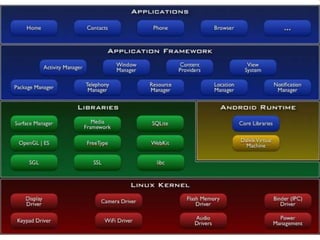
Introduction to Android Open software platform for mobile development A complete stack – OS, Middleware, Applications An Open Handset Alliance (OHA) project Powered by Linux operating system Fast application development in Java Open source under the Apache 2 license
 
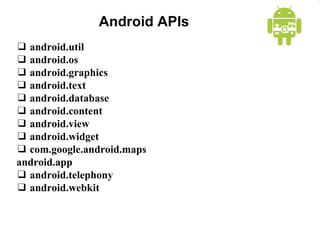
Android APIs ❑   android.util  ❑   android.os  ❑   android.graphics  ❑   android.text ❑   android.database  ❑   android.content  ❑   android.view ❑   android.widget  ❑   com.google.android.maps  android.app  ❑   android.telephony  ❑   android.webkit
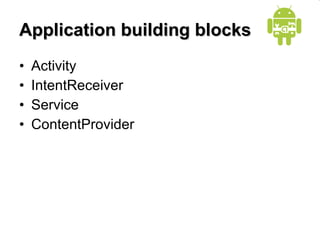
Application building blocks Activity IntentReceiver Service ContentProvider
Activities Typically correspond to one UI screen But, they can: Be faceless Be in a floating window Return a value Activity refers to (J)Frame in Swing
Intents Think of Intents as a verb and object; a description of what you want done E.g. VIEW, CALL, PLAY etc.. System matches Intent with Activity that can best provide the service Activities and IntentReceivers describe what Intents they can service
Intent Recievers  Components that respond to broadcast ‘Intents’ Way to respond to external notification or alarms Apps can invent and broadcast their own Intent
Services Faceless components that run in the background E.g. music player, network download etc…
ContentProviders Enables sharing of data across applications E.g. address book, photo gallery Provides uniform APIs for: querying delete, update and insert. Content is represented by URI and MIME type
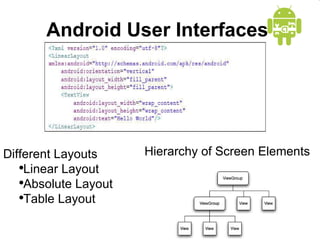
Android User Interfaces  Hierarchy of Screen Elements Different Layouts Linear Layout Absolute Layout Table Layout
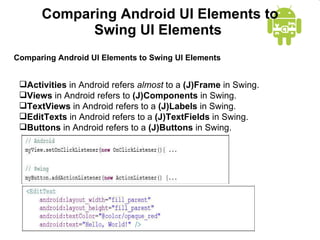
Comparing Android UI Elements to Swing UI Elements  Comparing Android UI Elements to Swing UI Elements  Activities  in Android refers  almost  to a  (J)Frame  in Swing.  Views  in Android refers to  (J)Components  in Swing.  TextViews  in Android refers to a  (J)Labels  in Swing.  EditTexts  in Android refers to a  (J)TextFields  in Swing.  Buttons  in Android refers to a  (J)Buttons  in Swing.
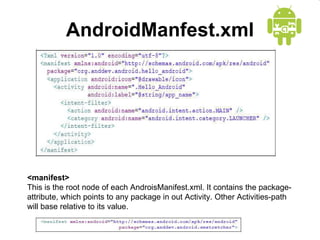
AndroidManfest.xml <manifest>  This is the root node of each AndroisManifest.xml. It contains the package-attribute, which points to any package in out Activity. Other Activities-path will base relative to its value.
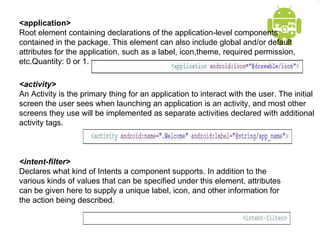
<application>  Root element containing declarations of the application-level components contained in the package. This element can also include global and/or default attributes for the application, such as a label, icon,theme, required permission, etc.Quantity: 0 or 1. <activity>  An Activity is the primary thing for an application to interact with the user. The initial screen the user sees when launching an application is an activity, and most other screens they use will be implemented as separate activities declared with additional activity tags. <intent-filter>  Declares what kind of Intents a component supports. In addition to the various kinds of values that can be specified under this element, attributes can be given here to supply a unique label, icon, and other information for the action being described.
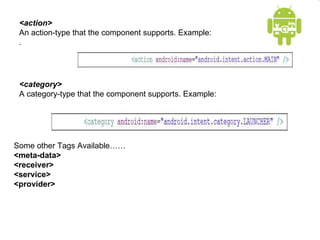
<action>  An action-type that the component supports. Example: . <category>  A category-type that the component supports. Example: Some other Tags Available…… <meta-data> <receiver>  <service>  <provider>
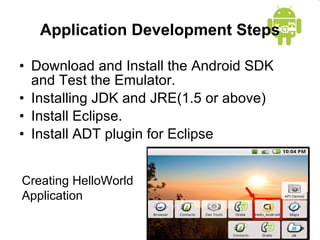
Application Development Steps Download and Install the Android SDK and Test the Emulator. Installing JDK and JRE(1.5 or above) Install Eclipse. Install ADT plugin for Eclipse Creating HelloWorld Application
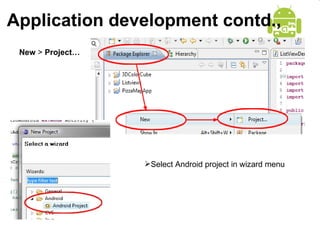
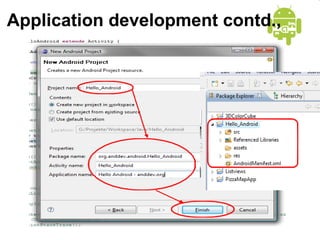
Application development contd., New  >  Project… Select Android project in wizard menu
Application development contd.,
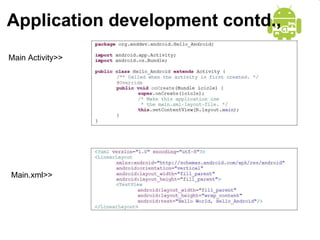
Application development contd., Main Activity>> Main.xml>>
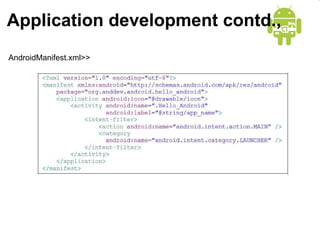
Application development contd., AndroidManifest.xml>>
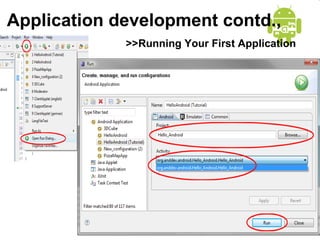
Application development contd., >>Running Your First Application
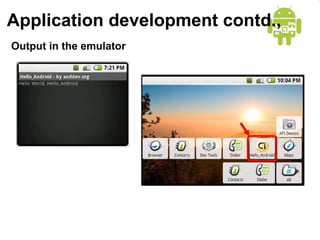
Application development contd., Output in the emulator
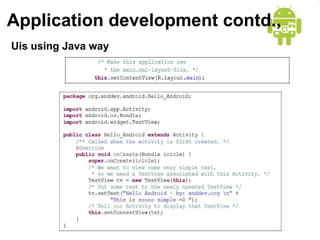
Application development contd., Uis using Java way
Porting Applications to Mobile Resource files are bundled to  .apk  file archive Bundled by  aapt tool One .apk file archive is a Single application
Interesting things to do Android is open source Opportunities for researchers Get the source, compile and update the device image
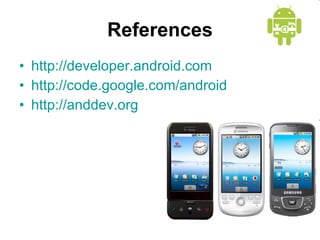
References http://developer.android.com http://code.google.com/android http://anddev.org
Thank You Queries

Mobile Application Development With Android

  • 1.
    Mobile Application Development with ANDROID A.UMASHANKAR 06078115
  • 2.
    Agenda Mobile ApplicationDevelopment (MAD) Intro to Android platform Platform architecture Application Framework & API Application building blocks Development tools Hello Android Porting application to Mobile
  • 3.
    Few reasonsto go MAD. . . Smart Phones Internet access anywhere Social networking GPS and Google Maps Millions of mobile users Open standards
  • 4.
    Introduction to AndroidOpen software platform for mobile development A complete stack – OS, Middleware, Applications An Open Handset Alliance (OHA) project Powered by Linux operating system Fast application development in Java Open source under the Apache 2 license
  • 5.
  • 6.
    Android APIs ❑ android.util ❑ android.os ❑ android.graphics ❑ android.text ❑ android.database ❑ android.content ❑ android.view ❑ android.widget ❑ com.google.android.maps android.app ❑ android.telephony ❑ android.webkit
  • 7.
    Application building blocksActivity IntentReceiver Service ContentProvider
  • 8.
    Activities Typically correspondto one UI screen But, they can: Be faceless Be in a floating window Return a value Activity refers to (J)Frame in Swing
  • 9.
    Intents Think ofIntents as a verb and object; a description of what you want done E.g. VIEW, CALL, PLAY etc.. System matches Intent with Activity that can best provide the service Activities and IntentReceivers describe what Intents they can service
  • 10.
    Intent Recievers Components that respond to broadcast ‘Intents’ Way to respond to external notification or alarms Apps can invent and broadcast their own Intent
  • 11.
    Services Faceless componentsthat run in the background E.g. music player, network download etc…
  • 12.
    ContentProviders Enables sharingof data across applications E.g. address book, photo gallery Provides uniform APIs for: querying delete, update and insert. Content is represented by URI and MIME type
  • 13.
    Android User Interfaces Hierarchy of Screen Elements Different Layouts Linear Layout Absolute Layout Table Layout
  • 14.
    Comparing Android UIElements to Swing UI Elements Comparing Android UI Elements to Swing UI Elements Activities in Android refers almost to a (J)Frame in Swing. Views in Android refers to (J)Components in Swing. TextViews in Android refers to a (J)Labels in Swing. EditTexts in Android refers to a (J)TextFields in Swing. Buttons in Android refers to a (J)Buttons in Swing.
  • 15.
    AndroidManfest.xml <manifest> This is the root node of each AndroisManifest.xml. It contains the package-attribute, which points to any package in out Activity. Other Activities-path will base relative to its value.
  • 16.
    <application> Rootelement containing declarations of the application-level components contained in the package. This element can also include global and/or default attributes for the application, such as a label, icon,theme, required permission, etc.Quantity: 0 or 1. <activity> An Activity is the primary thing for an application to interact with the user. The initial screen the user sees when launching an application is an activity, and most other screens they use will be implemented as separate activities declared with additional activity tags. <intent-filter> Declares what kind of Intents a component supports. In addition to the various kinds of values that can be specified under this element, attributes can be given here to supply a unique label, icon, and other information for the action being described.
  • 17.
    <action> Anaction-type that the component supports. Example: . <category> A category-type that the component supports. Example: Some other Tags Available…… <meta-data> <receiver> <service> <provider>
  • 18.
    Application Development StepsDownload and Install the Android SDK and Test the Emulator. Installing JDK and JRE(1.5 or above) Install Eclipse. Install ADT plugin for Eclipse Creating HelloWorld Application
  • 19.
    Application development contd.,New > Project… Select Android project in wizard menu
  • 20.
  • 21.
    Application development contd.,Main Activity>> Main.xml>>
  • 22.
    Application development contd.,AndroidManifest.xml>>
  • 23.
    Application development contd.,>>Running Your First Application
  • 24.
    Application development contd.,Output in the emulator
  • 25.
  • 26.
    Porting Applications toMobile Resource files are bundled to .apk file archive Bundled by aapt tool One .apk file archive is a Single application
  • 27.
    Interesting things todo Android is open source Opportunities for researchers Get the source, compile and update the device image
  • 28.
  • 29.