Divya K.S
 Fragments are used for creating dynamic and multi-
pane user interfaces in Android.
 While creating an Android app,You need to encapsulate
UI components and Activity behaviors into modules,
and you can create these modules using fragments.
 By using fragments ,you can divide an activity in to
modules
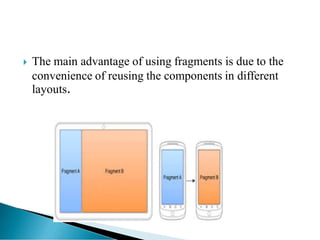
 The main advantage of using fragments is due to the
convenience of reusing the components in different
layouts.
 A Fragment represents a portion of
a user interface or an operation that
runs within an Activity.
 We can easily create dynamic
User Interface using Fragments.
 Like Activities ,Fragments also have separate layout & class
files.
 Fragments also have Life Cycle methods similar to Activity.
 By using fragments you can optimize your app user
experience on different screen sizes.
 You can add or remove a fragments while the activity is
running.
Create Fragment
 Create a class that extends Fragment class
 You must override one of the life cycle onCreateview()
to inflate the fragment layout
example
 We can add a fragment to an activity in two ways
 Create a Fragment layout using XML file.
 Create a Fragment at run time.
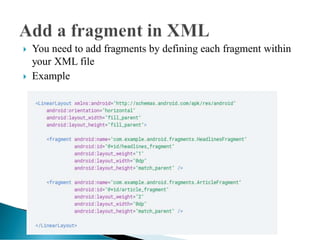
 You need to add fragments by defining each fragment within
your XML file
 Example
 If you add the fragment using xml, then it is not
possible to remove the fragment at run time.
 If you want to add, remove or replace fragments during
Activity’s run time ,then you have to add the fragment
programmatically.
 For performing the fragment transactions such as add,
remove or replace ,you have to create an object of
FragmentTransaction class using FragementManger
object.
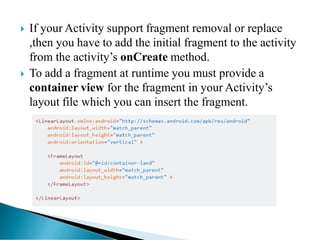
 If your Activity support fragment removal or replace
,then you have to add the initial fragment to the activity
from the activity’s onCreate method.
 To add a fragment at runtime you must provide a
container view for the fragment in your Activity’s
layout file which you can insert the fragment.
 You have to call the getSupportFragment Manager()
to get the FragmentManager object.
 For getting the FragmentTransaction object,the you
have to call the beginTransaction() method on the
FragmentManager object.
 For add a new fragment call the add() method on
Fragment Transaction object.
 You can perform multiple fragment transaction for the
activity using the same FragmetTransaction object.
 When you ready to make the changes, simply call the
commit() method on the FragmetTransaction object.
 If you want to replace a fragment ,then you have to call
the replace() method instead of add() method().
 To allow the user to navigate throught the backward
transactions you must call the addToBackStack()
before the commit the FragmentTransaction.
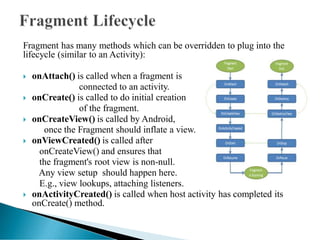
Fragment has many methods which can be overridden to plug into the
lifecycle (similar to an Activity):
 onAttach() is called when a fragment is
connected to an activity.
 onCreate() is called to do initial creation
of the fragment.
 onCreateView() is called by Android,
once the Fragment should inflate a view.
 onViewCreated() is called after
onCreateView() and ensures that
the fragment's root view is non-null.
Any view setup should happen here.
E.g., view lookups, attaching listeners.
 onActivityCreated() is called when host activity has completed its
onCreate() method.
• onStart() is called once the fragment is
ready to be displayed on screen.
• onResume() - Allocate “expensive”
resources such as registering for location,
sensor updates, etc.
• onPause() - Release “expensive” resources.
Commit any changes.
• onDestroyView() is called when fragment's
view is being destroyed, but the fragment is
still kept around.
• onDestroy() is called when fragment is no
longer in use.
• onDetach() is called when fragment is no
longer connected to the activity.
THANK YOU

Fragments In Android

  • 1.
  • 2.
     Fragments areused for creating dynamic and multi- pane user interfaces in Android.  While creating an Android app,You need to encapsulate UI components and Activity behaviors into modules, and you can create these modules using fragments.  By using fragments ,you can divide an activity in to modules
  • 3.
     The mainadvantage of using fragments is due to the convenience of reusing the components in different layouts.
  • 4.
     A Fragmentrepresents a portion of a user interface or an operation that runs within an Activity.  We can easily create dynamic User Interface using Fragments.
  • 5.
     Like Activities,Fragments also have separate layout & class files.  Fragments also have Life Cycle methods similar to Activity.  By using fragments you can optimize your app user experience on different screen sizes.  You can add or remove a fragments while the activity is running.
  • 6.
    Create Fragment  Createa class that extends Fragment class  You must override one of the life cycle onCreateview() to inflate the fragment layout example
  • 7.
     We canadd a fragment to an activity in two ways  Create a Fragment layout using XML file.  Create a Fragment at run time.
  • 8.
     You needto add fragments by defining each fragment within your XML file  Example
  • 9.
     If youadd the fragment using xml, then it is not possible to remove the fragment at run time.  If you want to add, remove or replace fragments during Activity’s run time ,then you have to add the fragment programmatically.  For performing the fragment transactions such as add, remove or replace ,you have to create an object of FragmentTransaction class using FragementManger object.
  • 10.
     If yourActivity support fragment removal or replace ,then you have to add the initial fragment to the activity from the activity’s onCreate method.  To add a fragment at runtime you must provide a container view for the fragment in your Activity’s layout file which you can insert the fragment.
  • 11.
     You haveto call the getSupportFragment Manager() to get the FragmentManager object.  For getting the FragmentTransaction object,the you have to call the beginTransaction() method on the FragmentManager object.  For add a new fragment call the add() method on Fragment Transaction object.  You can perform multiple fragment transaction for the activity using the same FragmetTransaction object.
  • 12.
     When youready to make the changes, simply call the commit() method on the FragmetTransaction object.  If you want to replace a fragment ,then you have to call the replace() method instead of add() method().  To allow the user to navigate throught the backward transactions you must call the addToBackStack() before the commit the FragmentTransaction.
  • 13.
    Fragment has manymethods which can be overridden to plug into the lifecycle (similar to an Activity):  onAttach() is called when a fragment is connected to an activity.  onCreate() is called to do initial creation of the fragment.  onCreateView() is called by Android, once the Fragment should inflate a view.  onViewCreated() is called after onCreateView() and ensures that the fragment's root view is non-null. Any view setup should happen here. E.g., view lookups, attaching listeners.  onActivityCreated() is called when host activity has completed its onCreate() method.
  • 14.
    • onStart() iscalled once the fragment is ready to be displayed on screen. • onResume() - Allocate “expensive” resources such as registering for location, sensor updates, etc. • onPause() - Release “expensive” resources. Commit any changes. • onDestroyView() is called when fragment's view is being destroyed, but the fragment is still kept around. • onDestroy() is called when fragment is no longer in use. • onDetach() is called when fragment is no longer connected to the activity.
  • 15.