WORKING WITH FRAGMENTS
Android Developer Days 2013
Can Elmas
Saturday, June 15, 13
ABOUT ME
• Pozitron, since 2007
• Backend and client side experience
• SoftwareTeam Leader at the moment
Saturday, June 15, 13
AGENDA
• Overview
• When to Use?
• Managing Fragments
• Fragment Operations
• Demo(s)
Saturday, June 15, 13
OVERVIEW
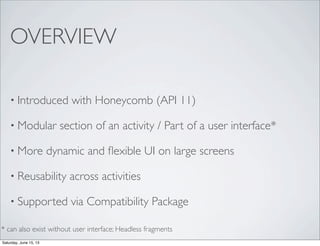
• Introduced with Honeycomb (API 11)
• Modular section of an activity / Part of a user interface*
• More dynamic and flexible UI on large screens
• Reusability across activities
• Supported via Compatibility Package
* can also exist without user interface; Headless fragments
Saturday, June 15, 13
OVERVIEW
• Embedded in activities
• Lives in aViewGroup inside the activity’s view hierarchy
• Its own layout and behavior with its own life-cycle
Saturday, June 15, 13
WHENTO USE?
• Large screens - multi pane, flexible UI
• Combined with other UI widgets, ActionBar,ViewPager,
NavigationDrawer etc. - beautiful native app!
• More flexible, smooth, compact app with less activities;
multiple fragments in a single activity
Saturday, June 15, 13
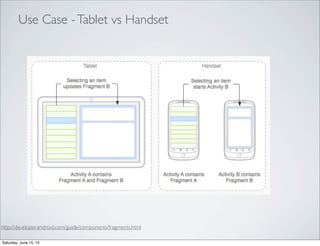
http://developer.android.com/guide/components/fragments.html
Use Case -Tablet vs Handset
Saturday, June 15, 13
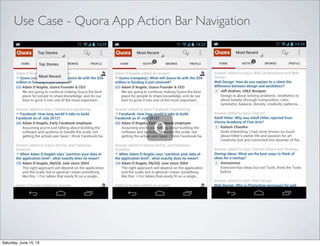
Use Case - Quora App Action Bar Navigation
Saturday, June 15, 13
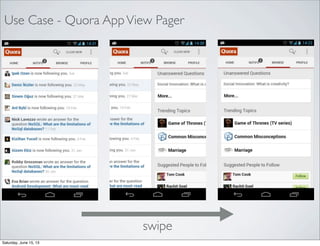
Use Case - Quora AppView Pager
swipe
Saturday, June 15, 13
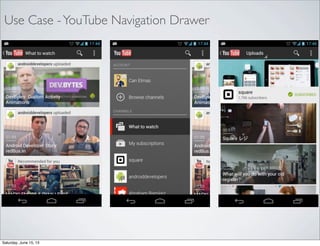
Use Case -YouTube Navigation Drawer
Saturday, June 15, 13
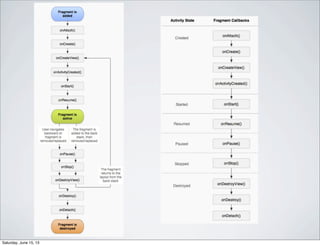
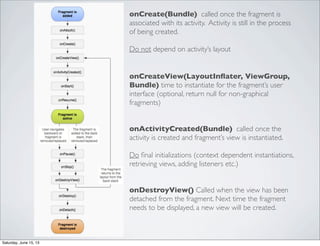
onCreate(Bundle) called once the fragment is
associated with its activity. Activity is still in the process
of being created.
Do not depend on activity’s layout
onCreateView(LayoutInflater, ViewGroup,
Bundle) time to instantiate for the fragment’s user
interface (optional, return null for non-graphical
fragments)
onActivityCreated(Bundle) called once the
activity is created and fragment’s view is instantiated.
Do final initializations (context dependent instantiations,
retrieving views, adding listeners etc.)
onDestroyView() Called when the view has been
detached from the fragment. Next time the fragment
needs to be displayed, a new view will be created.
Saturday, June 15, 13
MANAGING FRAGMENTS
• FragmentManager to interact with fragments inside an
Activity
• Activity.getFragmentManager()
• android.support.v4.app.FragmentActivity.getSupportFragmentMa
nager()
• FragmentTransaction to perform fragment operations :
add, remove, replace, hide at run-time etc.
Saturday, June 15, 13
ADDING FRAGMENTS -
STATIC
• <fragment> element in the activity’s layout XML
• Preferable if the fragment is consistent in the layout
• Limits run-time fragment operations; can’t remove
Saturday, June 15, 13
DEMO
Saturday, June 15, 13
TAKE AWAYS
• Use Support Library for backward compatibility
• android.support.v4.app.FragmentActivity
• android.support.v4.app.Fragment
• FragmentActivity.getSupportFragmentManager()
• Use different layouts to support multiple screen sizes
• Static Instantiation limits run time fragment operations
Saturday, June 15, 13
TAKE AWAYS
• Fragment to Fragment communication via callbacks to the
Activity; inner type interfaces defined in fragments
• Avoid tight coupling between activities and fragments
• To access activity from fragment, Fragment.getActivity()
• To access fragment from activity
• FragmentManager.findFragmentById(int id)
• FragmentManager.findFragmentByTag(String tag)
Saturday, June 15, 13
FRAGMENT OPERATIONS
• add - Add a fragment to the activity
• remove - Remove an existing fragment; its view is also
removed
• replace - Remove one fragment from the activity and add
another
• hide - Hides an existing fragment; its view is hidden
• show - Show previously hidden fragment
Saturday, June 15, 13
FRAGMENTTRANSACTIONS
• commit() resolves in the main thread
FragmentManager fm = getSupportFragmentManager();
FragmentTransaction ft = fm.beginTransaction();
ft.add(R.id.fragment_container, fragment);
ft.commit();
Saturday, June 15, 13
FRAGMENT BACK STACK
• Similar to activity back stack
• Allow user to navigate backward
• Ability to save fragment transaction onto back stack
• Managed by activity on back button press
• Activity destroyed once all fragment transactions removed
from the back stack and back button is pressed again
Saturday, June 15, 13
FRAGMENT BACK STACK
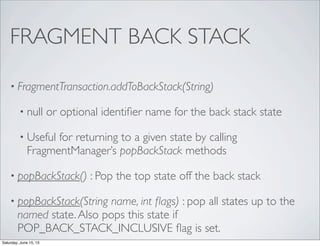
• FragmentTransaction.addToBackStack(String)
• null or optional identifier name for the back stack state
• Useful for returning to a given state by calling
FragmentManager’s popBackStack methods
• popBackStack() : Pop the top state off the back stack
• popBackStack(String name, int flags) : pop all states up to the
named state.Also pops this state if
POP_BACK_STACK_INCLUSIVE flag is set.
Saturday, June 15, 13
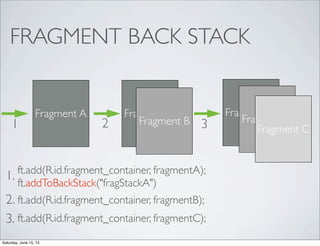
FRAGMENT BACK STACK
Fragment A
ft.add(R.id.fragment_container, fragmentA);
ft.addToBackStack("fragStackA")
Fragment A
Fragment B1
1.
2.
Fragment A
Fragment B
Fragment C2
ft.add(R.id.fragment_container, fragmentB);
3
ft.add(R.id.fragment_container, fragmentC);3.
Saturday, June 15, 13
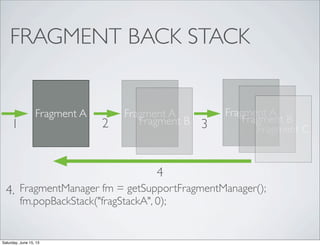
FRAGMENT BACK STACK
Fragment A Fragment A
Fragment B1
Fragment A
Fragment B
Fragment C2 3
4.
4
FragmentManager fm = getSupportFragmentManager();
fm.popBackStack("fragStackA", 0);
Saturday, June 15, 13
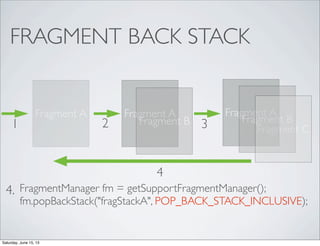
FRAGMENT BACK STACK
Fragment A Fragment A
Fragment B1
Fragment A
Fragment B
Fragment C2 3
4.
4
FragmentManager fm = getSupportFragmentManager();
fm.popBackStack("fragStackA", POP_BACK_STACK_INCLUSIVE);
Saturday, June 15, 13
DEMO
Saturday, June 15, 13
TAKE AWAYS
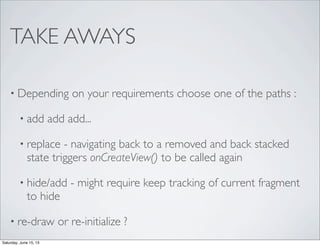
• Depending on your requirements choose one of the paths :
• add add add...
• replace - navigating back to a removed and back stacked
state triggers onCreateView() to be called again
• hide/add - might require keep tracking of current fragment
to hide
• re-draw or re-initialize ?
Saturday, June 15, 13
TAKE AWAYS
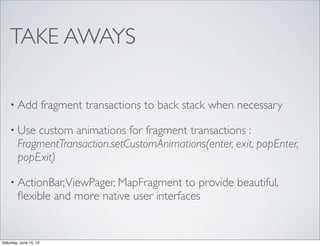
• Add fragment transactions to back stack when necessary
• Use custom animations for fragment transactions :
FragmentTransaction.setCustomAnimations(enter, exit, popEnter,
popExit)
• ActionBar,ViewPager, MapFragment to provide beautiful,
flexible and more native user interfaces
Saturday, June 15, 13
TAKE AWAYS
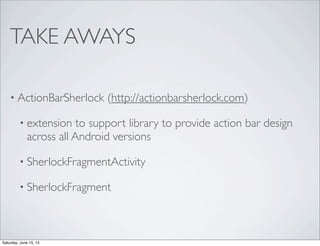
• ActionBarSherlock (http://actionbarsherlock.com)
• extension to support library to provide action bar design
across all Android versions
• SherlockFragmentActivity
• SherlockFragment
Saturday, June 15, 13
TAKE AWAYS
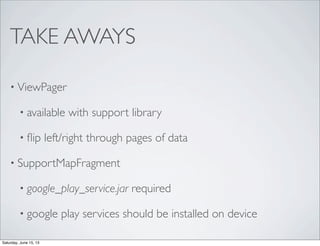
• ViewPager
• available with support library
• flip left/right through pages of data
• SupportMapFragment
• google_play_service.jar required
• google play services should be installed on device
Saturday, June 15, 13
TAKE AWAYS
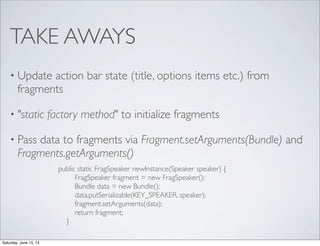
• Update action bar state (title, options items etc.) from
fragments
• "static factory method" to initialize fragments
• Pass data to fragments via Fragment.setArguments(Bundle) and
Fragments.getArguments()
public static FragSpeaker newInstance(Speaker speaker) {
FragSpeaker fragment = new FragSpeaker();
Bundle data = new Bundle();
data.putSerializable(KEY_SPEAKER, speaker);
fragment.setArguments(data);
return fragment;
}
Saturday, June 15, 13
FROM HERE
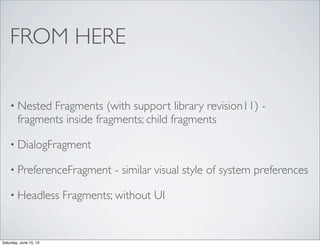
• Nested Fragments (with support library revision11) -
fragments inside fragments; child fragments
• DialogFragment
• PreferenceFragment - similar visual style of system preferences
• Headless Fragments; without UI
Saturday, June 15, 13
Slides and source code
https://github.com/canelmas/add2013
Saturday, June 15, 13
THANKYOU!
We are hiring!
ik@pozitron.com
http://www.pozitron.com/career/
can.elmas@pozitron.com
twitter : can_elmas
Saturday, June 15, 13

Android - Working with Fragments

  • 1.
    WORKING WITH FRAGMENTS AndroidDeveloper Days 2013 Can Elmas Saturday, June 15, 13
  • 2.
    ABOUT ME • Pozitron,since 2007 • Backend and client side experience • SoftwareTeam Leader at the moment Saturday, June 15, 13
  • 3.
    AGENDA • Overview • Whento Use? • Managing Fragments • Fragment Operations • Demo(s) Saturday, June 15, 13
  • 4.
    OVERVIEW • Introduced withHoneycomb (API 11) • Modular section of an activity / Part of a user interface* • More dynamic and flexible UI on large screens • Reusability across activities • Supported via Compatibility Package * can also exist without user interface; Headless fragments Saturday, June 15, 13
  • 5.
    OVERVIEW • Embedded inactivities • Lives in aViewGroup inside the activity’s view hierarchy • Its own layout and behavior with its own life-cycle Saturday, June 15, 13
  • 6.
    WHENTO USE? • Largescreens - multi pane, flexible UI • Combined with other UI widgets, ActionBar,ViewPager, NavigationDrawer etc. - beautiful native app! • More flexible, smooth, compact app with less activities; multiple fragments in a single activity Saturday, June 15, 13
  • 7.
  • 8.
    Use Case -Quora App Action Bar Navigation Saturday, June 15, 13
  • 9.
    Use Case -Quora AppView Pager swipe Saturday, June 15, 13
  • 10.
    Use Case -YouTubeNavigation Drawer Saturday, June 15, 13
  • 11.
  • 12.
    onCreate(Bundle) called oncethe fragment is associated with its activity. Activity is still in the process of being created. Do not depend on activity’s layout onCreateView(LayoutInflater, ViewGroup, Bundle) time to instantiate for the fragment’s user interface (optional, return null for non-graphical fragments) onActivityCreated(Bundle) called once the activity is created and fragment’s view is instantiated. Do final initializations (context dependent instantiations, retrieving views, adding listeners etc.) onDestroyView() Called when the view has been detached from the fragment. Next time the fragment needs to be displayed, a new view will be created. Saturday, June 15, 13
  • 13.
    MANAGING FRAGMENTS • FragmentManagerto interact with fragments inside an Activity • Activity.getFragmentManager() • android.support.v4.app.FragmentActivity.getSupportFragmentMa nager() • FragmentTransaction to perform fragment operations : add, remove, replace, hide at run-time etc. Saturday, June 15, 13
  • 14.
    ADDING FRAGMENTS - STATIC •<fragment> element in the activity’s layout XML • Preferable if the fragment is consistent in the layout • Limits run-time fragment operations; can’t remove Saturday, June 15, 13
  • 15.
  • 16.
    TAKE AWAYS • UseSupport Library for backward compatibility • android.support.v4.app.FragmentActivity • android.support.v4.app.Fragment • FragmentActivity.getSupportFragmentManager() • Use different layouts to support multiple screen sizes • Static Instantiation limits run time fragment operations Saturday, June 15, 13
  • 17.
    TAKE AWAYS • Fragmentto Fragment communication via callbacks to the Activity; inner type interfaces defined in fragments • Avoid tight coupling between activities and fragments • To access activity from fragment, Fragment.getActivity() • To access fragment from activity • FragmentManager.findFragmentById(int id) • FragmentManager.findFragmentByTag(String tag) Saturday, June 15, 13
  • 18.
    FRAGMENT OPERATIONS • add- Add a fragment to the activity • remove - Remove an existing fragment; its view is also removed • replace - Remove one fragment from the activity and add another • hide - Hides an existing fragment; its view is hidden • show - Show previously hidden fragment Saturday, June 15, 13
  • 19.
    FRAGMENTTRANSACTIONS • commit() resolvesin the main thread FragmentManager fm = getSupportFragmentManager(); FragmentTransaction ft = fm.beginTransaction(); ft.add(R.id.fragment_container, fragment); ft.commit(); Saturday, June 15, 13
  • 20.
    FRAGMENT BACK STACK •Similar to activity back stack • Allow user to navigate backward • Ability to save fragment transaction onto back stack • Managed by activity on back button press • Activity destroyed once all fragment transactions removed from the back stack and back button is pressed again Saturday, June 15, 13
  • 21.
    FRAGMENT BACK STACK •FragmentTransaction.addToBackStack(String) • null or optional identifier name for the back stack state • Useful for returning to a given state by calling FragmentManager’s popBackStack methods • popBackStack() : Pop the top state off the back stack • popBackStack(String name, int flags) : pop all states up to the named state.Also pops this state if POP_BACK_STACK_INCLUSIVE flag is set. Saturday, June 15, 13
  • 22.
    FRAGMENT BACK STACK FragmentA ft.add(R.id.fragment_container, fragmentA); ft.addToBackStack("fragStackA") Fragment A Fragment B1 1. 2. Fragment A Fragment B Fragment C2 ft.add(R.id.fragment_container, fragmentB); 3 ft.add(R.id.fragment_container, fragmentC);3. Saturday, June 15, 13
  • 23.
    FRAGMENT BACK STACK FragmentA Fragment A Fragment B1 Fragment A Fragment B Fragment C2 3 4. 4 FragmentManager fm = getSupportFragmentManager(); fm.popBackStack("fragStackA", 0); Saturday, June 15, 13
  • 24.
    FRAGMENT BACK STACK FragmentA Fragment A Fragment B1 Fragment A Fragment B Fragment C2 3 4. 4 FragmentManager fm = getSupportFragmentManager(); fm.popBackStack("fragStackA", POP_BACK_STACK_INCLUSIVE); Saturday, June 15, 13
  • 25.
  • 26.
    TAKE AWAYS • Dependingon your requirements choose one of the paths : • add add add... • replace - navigating back to a removed and back stacked state triggers onCreateView() to be called again • hide/add - might require keep tracking of current fragment to hide • re-draw or re-initialize ? Saturday, June 15, 13
  • 27.
    TAKE AWAYS • Addfragment transactions to back stack when necessary • Use custom animations for fragment transactions : FragmentTransaction.setCustomAnimations(enter, exit, popEnter, popExit) • ActionBar,ViewPager, MapFragment to provide beautiful, flexible and more native user interfaces Saturday, June 15, 13
  • 28.
    TAKE AWAYS • ActionBarSherlock(http://actionbarsherlock.com) • extension to support library to provide action bar design across all Android versions • SherlockFragmentActivity • SherlockFragment Saturday, June 15, 13
  • 29.
    TAKE AWAYS • ViewPager •available with support library • flip left/right through pages of data • SupportMapFragment • google_play_service.jar required • google play services should be installed on device Saturday, June 15, 13
  • 30.
    TAKE AWAYS • Updateaction bar state (title, options items etc.) from fragments • "static factory method" to initialize fragments • Pass data to fragments via Fragment.setArguments(Bundle) and Fragments.getArguments() public static FragSpeaker newInstance(Speaker speaker) { FragSpeaker fragment = new FragSpeaker(); Bundle data = new Bundle(); data.putSerializable(KEY_SPEAKER, speaker); fragment.setArguments(data); return fragment; } Saturday, June 15, 13
  • 31.
    FROM HERE • NestedFragments (with support library revision11) - fragments inside fragments; child fragments • DialogFragment • PreferenceFragment - similar visual style of system preferences • Headless Fragments; without UI Saturday, June 15, 13
  • 32.
    Slides and sourcecode https://github.com/canelmas/add2013 Saturday, June 15, 13
  • 33.