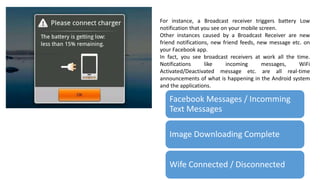
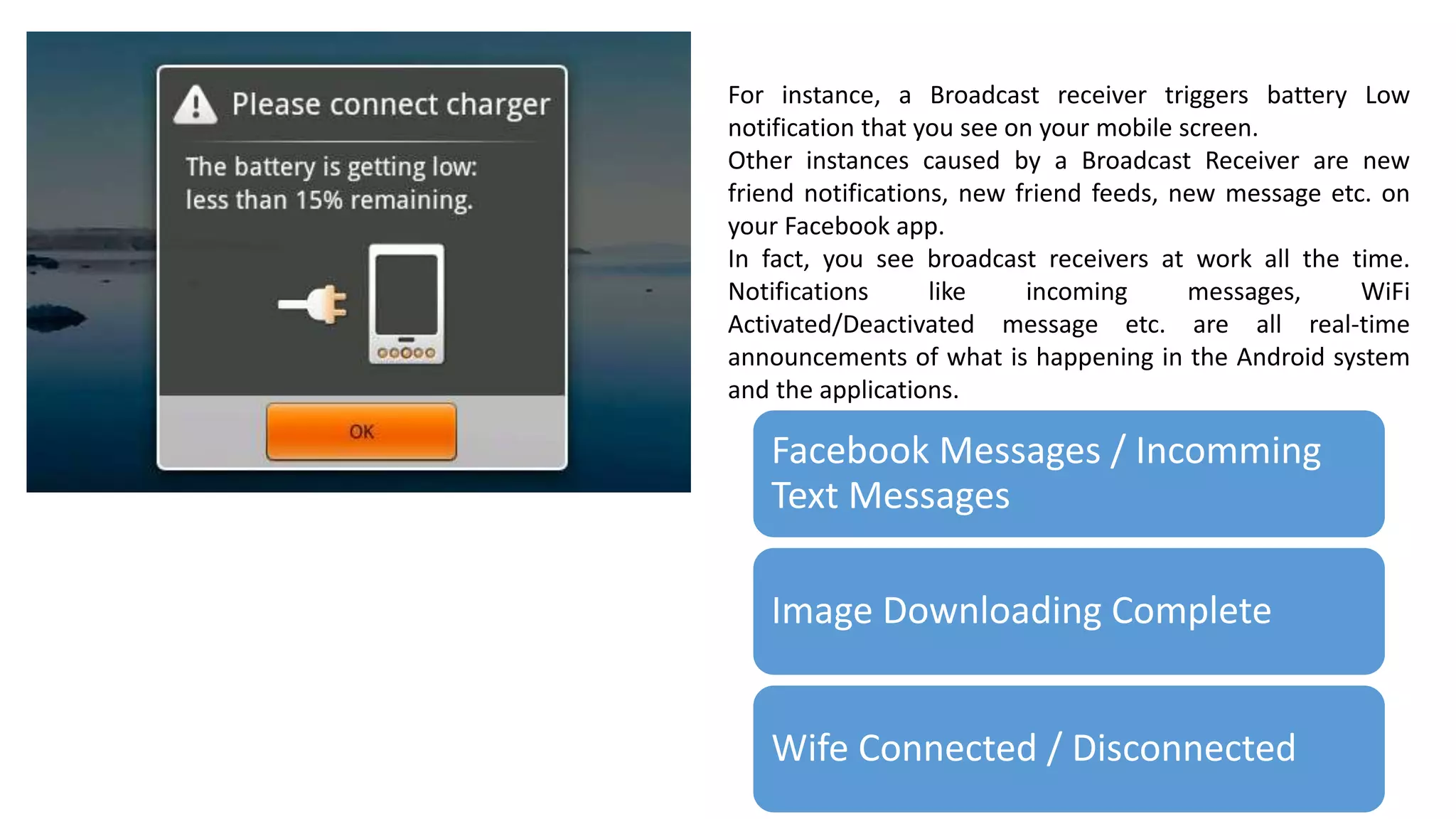
For instance, a Broadcast receiver triggers battery Low
notification that you see on your mobile screen.
Other instances caused by a Broadcast Receiver are new
friend notifications, new friend feeds, new message etc. on
your Facebook app.
In fact, you see broadcast receivers at work all the time.
Notifications like incoming messages, WiFi
Activated/Deactivated message etc. are all real-time
announcements of what is happening in the Android system
and the applications.
Facebook Messages / Incomming
Text Messages
Image Downloading Complete
Wife Connected / Disconnected
Analogy
•You have an important social gathering to
attend. Because of your shoddy memory, you
have requested your friend to notify you a
day before the event. Now, because you have
‘registered’ for the said friend’s help, you will
get a reminder from him as discussed
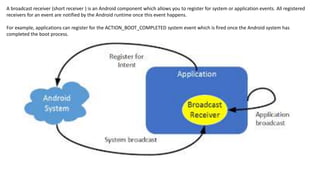
A broadcast receiver (short receiver ) is an Android component which allows you to register for system or application events. All registered
receivers for an event are notified by the Android runtime once this event happens.
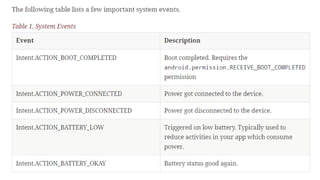
For example, applications can register for the ACTION_BOOT_COMPLETED system event which is fired once the Android system has
completed the boot process.
What is Broadcast Reciever
•Base class for components that receive and
react to events
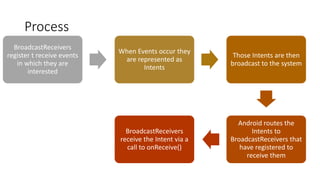
Process
BroadcastReceivers
register t receive events
in which they are
interested
When Events occur they
are represented as
Intents
Those Intents are then
broadcast to the system
Android routes the
Intents to
BroadcastReceivers that
have registered to
receive them
BroadcastReceivers
receive the Intent via a
call to onReceive()
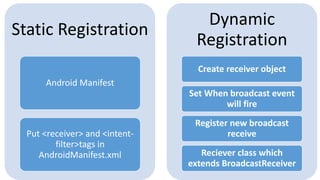
Static Registration
Android Manifest
Put <receiver> and <intent-
filter>tags in
AndroidManifest.xml
Dynamic
Registration
Create receiver object
Set When broadcast event
will fire
Register new broadcast
receive
Reciever class which
extends BroadcastReceiver
Implementing the Broadcast Receiver
1. Create a subclass of Android’s BroadcastReceiver
2. Implement the onReceive() method:
• Following are the two arguments of the onReceive()
method:
• Context: This is used to access additional information, or
to start services or activities.
• Intent: The Intent object is used to register the receiver.
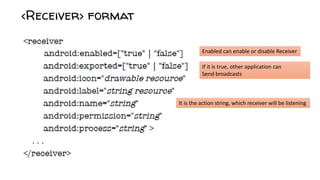
Enabled can enable or disable Receiver
If it is true, other application can
Send broadcasts
It is the action string, which receiver will be listening
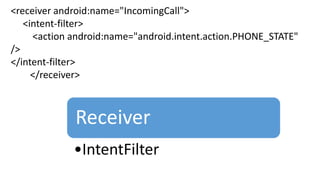
<receiver android:name="IncomingCall">
<intent-filter>
<action android:name="android.intent.action.PHONE_STATE"
/>
</intent-filter>
</receiver>
Receiver
•IntentFilter
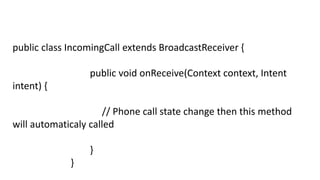
public class IncomingCall extends BroadcastReceiver {
public void onReceive(Context context, Intent
intent) {
// Phone call state change then this method
will automaticaly called
}
}
Broadcast receivers

Broadcast receivers

  • 1.
    For instance, aBroadcast receiver triggers battery Low notification that you see on your mobile screen. Other instances caused by a Broadcast Receiver are new friend notifications, new friend feeds, new message etc. on your Facebook app. In fact, you see broadcast receivers at work all the time. Notifications like incoming messages, WiFi Activated/Deactivated message etc. are all real-time announcements of what is happening in the Android system and the applications. Facebook Messages / Incomming Text Messages Image Downloading Complete Wife Connected / Disconnected
  • 2.
    Analogy •You have animportant social gathering to attend. Because of your shoddy memory, you have requested your friend to notify you a day before the event. Now, because you have ‘registered’ for the said friend’s help, you will get a reminder from him as discussed
  • 3.
    A broadcast receiver(short receiver ) is an Android component which allows you to register for system or application events. All registered receivers for an event are notified by the Android runtime once this event happens. For example, applications can register for the ACTION_BOOT_COMPLETED system event which is fired once the Android system has completed the boot process.
  • 4.
    What is BroadcastReciever •Base class for components that receive and react to events
  • 5.
    Process BroadcastReceivers register t receiveevents in which they are interested When Events occur they are represented as Intents Those Intents are then broadcast to the system Android routes the Intents to BroadcastReceivers that have registered to receive them BroadcastReceivers receive the Intent via a call to onReceive()
  • 6.
    Static Registration Android Manifest Put<receiver> and <intent- filter>tags in AndroidManifest.xml Dynamic Registration Create receiver object Set When broadcast event will fire Register new broadcast receive Reciever class which extends BroadcastReceiver
  • 7.
    Implementing the BroadcastReceiver 1. Create a subclass of Android’s BroadcastReceiver 2. Implement the onReceive() method: • Following are the two arguments of the onReceive() method: • Context: This is used to access additional information, or to start services or activities. • Intent: The Intent object is used to register the receiver.
  • 8.
    Enabled can enableor disable Receiver If it is true, other application can Send broadcasts It is the action string, which receiver will be listening
  • 9.
  • 10.
    public class IncomingCallextends BroadcastReceiver { public void onReceive(Context context, Intent intent) { // Phone call state change then this method will automaticaly called } }