Introduction to HTML &Introduction to HTML &
XHTMLXHTML
IntroductionIntroduction
 Web developers view web pages as
documents that must be created according to
authoring and development guidelines
 Web developers use HTML or XHTML to
write code of a web page
 Web browsers have a built-in interpreter to
render the results of the code in its window
The World Wide WebThe World Wide Web
 Definitions
 HTML
 The HyperText Markup Language
 The language used to structure text-based information
in a document
 by denoting certain text as headings, paragraphs, lists,
etc — and to supplement that text with interactive forms,
embedded images, and other multimedia objects
 XHTML
 The eXtensible HyperText Markup Language
 XHTML consists of all the elements in HTML 4.01
combined with the syntax of XML.
 Allows users to define their own “tags” for defining
structure, layout, etc.
Content of Web PagesContent of Web Pages
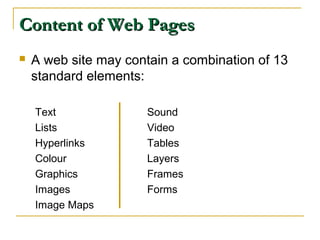
 A web site may contain a combination of 13
standard elements:
Text Sound
Lists Video
Hyperlinks Tables
Colour Layers
Graphics Frames
Images Forms
Image Maps
Content of Web PagesContent of Web Pages
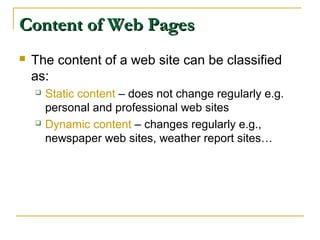
 The content of a web site can be classified
as:
 Static content – does not change regularly e.g.
personal and professional web sites
 Dynamic content – changes regularly e.g.,
newspaper web sites, weather report sites…
Authoring of Web PagesAuthoring of Web Pages
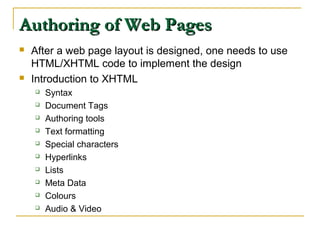
 After a web page layout is designed, one needs to use
HTML/XHTML code to implement the design
 Introduction to XHTML
 Syntax
 Document Tags
 Authoring tools
 Text formatting
 Special characters
 Hyperlinks
 Lists
 Meta Data
 Colours
 Audio & Video
XHTML SyntaxXHTML Syntax
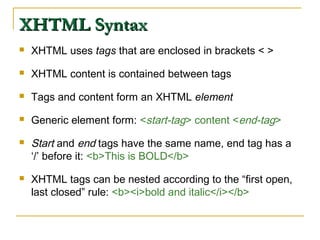
 XHTML uses tags that are enclosed in brackets < >
 XHTML content is contained between tags
 Tags and content form an XHTML element
 Generic element form: <start-tag> content <end-tag>
 Start and end tags have the same name, end tag has a
‘/’ before it: <b>This is BOLD</b>
 XHTML tags can be nested according to the “first open,
last closed” rule: <b><i>bold and italic</i></b>
XHTML SyntaxXHTML Syntax
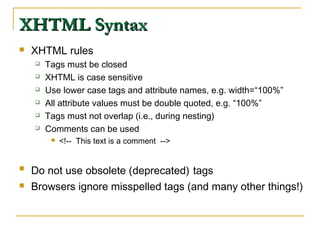
 XHTML rules
 Tags must be closed
 XHTML is case sensitive
 Use lower case tags and attribute names, e.g. width=“100%”
 All attribute values must be double quoted, e.g. “100%”
 Tags must not overlap (i.e., during nesting)
 Comments can be used
 <!-- This text is a comment -->
 Do not use obsolete (deprecated) tags
 Browsers ignore misspelled tags (and many other things!)
Document TagsDocument Tags
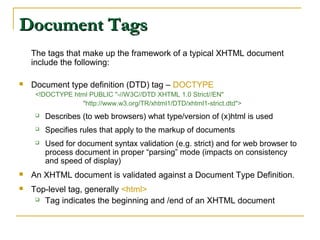
The tags that make up the framework of a typical XHTML document
include the following:
 Document type definition (DTD) tag – DOCTYPE
<!DOCTYPE html PUBLIC "-//W3C//DTD XHTML 1.0 Strict//EN"
"http://www.w3.org/TR/xhtml1/DTD/xhtml1-strict.dtd">
 Describes (to web browsers) what type/version of (x)html is used
 Specifies rules that apply to the markup of documents
 Used for document syntax validation (e.g. strict) and for web browser to
process document in proper “parsing” mode (impacts on consistency
and speed of display)
 An XHTML document is validated against a Document Type Definition.
 Top-level tag, generally <html>
 Tag indicates the beginning and /end of an XHTML document
Sample XHTML Document StructureSample XHTML Document Structure
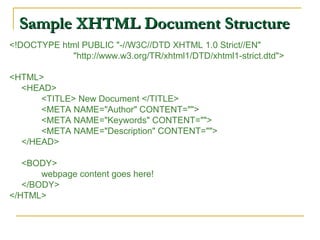
<!DOCTYPE html PUBLIC "-//W3C//DTD XHTML 1.0 Strict//EN"
"http://www.w3.org/TR/xhtml1/DTD/xhtml1-strict.dtd">
<HTML>
<HEAD>
<TITLE> New Document </TITLE>
<META NAME="Author" CONTENT="">
<META NAME="Keywords" CONTENT="">
<META NAME="Description" CONTENT="">
</HEAD>
<BODY>
webpage content goes here!
</BODY>
</HTML>
Minimal XHTML DocumentMinimal XHTML Document
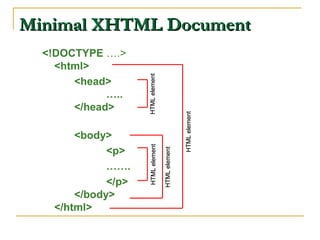
<!DOCTYPE ….>
<html>
<head>
…..
</head>
<body>
<p>
…….
</p>
</body>
</html>
HTMLelementHTMLelement
HTMLelementHTMLelementHTMLelementHTMLelement
HTMLelementHTMLelement
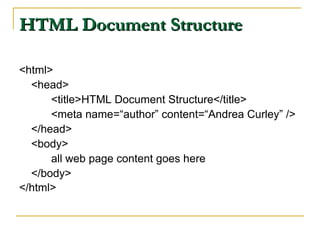
HTML Document StructureHTML Document Structure
<html>
<head>
<title>HTML Document Structure</title>
<meta name=“author” content=“Andrea Curley” />
</head>
<body>
all web page content goes here
</body>
</html>
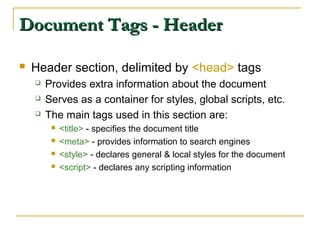
Document Tags - HeaderDocument Tags - Header
 Header section, delimited by <head> tags
 Provides extra information about the document
 Serves as a container for styles, global scripts, etc.
 The main tags used in this section are:
 <title> - specifies the document title
 <meta> - provides information to search engines
 <style> - declares general & local styles for the document
 <script> - declares any scripting information
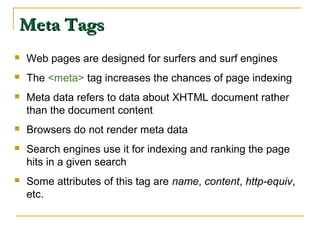
Meta TagsMeta Tags
 Web pages are designed for surfers and surf engines
 The <meta> tag increases the chances of page indexing
 Meta data refers to data about XHTML document rather
than the document content
 Browsers do not render meta data
 Search engines use it for indexing and ranking the page
hits in a given search
 Some attributes of this tag are name, content, http-equiv,
etc.
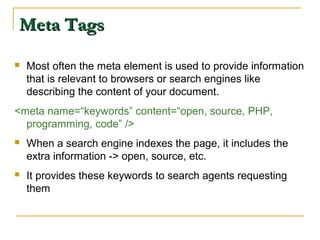
Meta TagsMeta Tags
 Most often the meta element is used to provide information
that is relevant to browsers or search engines like
describing the content of your document.
<meta name=“keywords” content=“open, source, PHP,
programming, code” />
 When a search engine indexes the page, it includes the
extra information -> open, source, etc.
 It provides these keywords to search agents requesting
them
Amazon’s Meta TagsAmazon’s Meta Tags
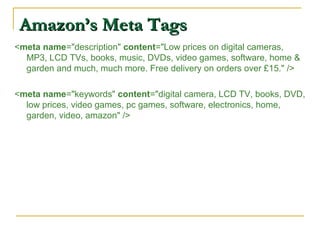
<meta name="description" content="Low prices on digital cameras,
MP3, LCD TVs, books, music, DVDs, video games, software, home &
garden and much, much more. Free delivery on orders over £15." />
<meta name="keywords" content="digital camera, LCD TV, books, DVD,
low prices, video games, pc games, software, electronics, home,
garden, video, amazon" />
Document Tags - BodyDocument Tags - Body
 Body section, delimited by <body> tags
 Section where visible content appears
 Content is a series of block tags containing inline
content
How can I write my first web page?How can I write my first web page?
1. Open a text editor e.g., Notepad, Edit Plus
2. Put in code from the HTML Document Structure
Slide
3. Save it as Example1.html
4. In web browser (IE/Firefox/Netscape),
 Select File -> Open
 Select Example1.html
 Select OK
Authoring ToolsAuthoring Tools
 Tools needed to develop a web site:
 Editor
 Graphics program
 Digital cameras
 Scanners
 Audio & video software
 Types of editors
 Text: type in code and view results later -> Bottom-up development
 HTML: view results as you develop the web page -> top-down
development
 Web author must be familiar with both approaches
 e.g. “EditPlus”, “MacroMedia Dreamweaver”
Text FormattingText Formatting
 Paragraphs
 Line breaks
 Headings
 Horizontal Rules
 Block divisions
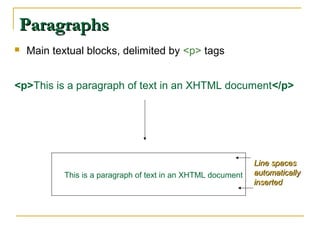
ParagraphsParagraphs
 Main textual blocks, delimited by <p> tags
<p>This is a paragraph of text in an XHTML document</p>
This is a paragraph of text in an XHTML document
Line spacesLine spaces
automaticallyautomatically
insertedinserted
Line breaksLine breaks
 Used when you need to break a line prematurely
(before the paragraph)
 The line break tag is <br />
 Need space between “br” and “/” for Netscape
browsers to interpret correctly
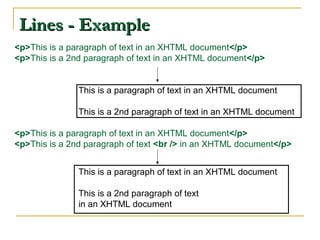
Lines - ExampleLines - Example
<p>This is a paragraph of text in an XHTML document</p>
<p>This is a 2nd paragraph of text in an XHTML document</p>
This is a paragraph of text in an XHTML document
This is a 2nd paragraph of text in an XHTML document
<p>This is a paragraph of text in an XHTML document</p>
<p>This is a 2nd paragraph of text <br /> in an XHTML document</p>
This is a paragraph of text in an XHTML document
This is a 2nd paragraph of text
in an XHTML document
HeadingsHeadings
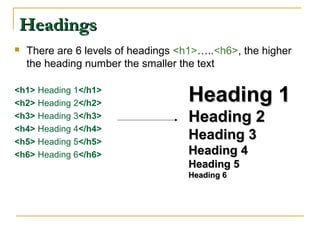
 There are 6 levels of headings <h1>…..<h6>, the higher
the heading number the smaller the text
<h1> Heading 1</h1>
<h2> Heading 2</h2>
<h3> Heading 3</h3>
<h4> Heading 4</h4>
<h5> Heading 5</h5>
<h6> Heading 6</h6>
Heading 1Heading 1
Heading 2Heading 2
Heading 3Heading 3
Heading 4Heading 4
Heading 5Heading 5
Heading 6Heading 6
Horizontal RulesHorizontal Rules
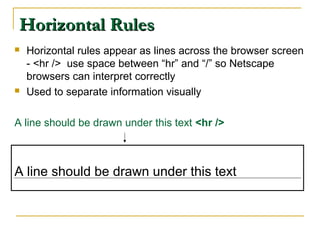
 Horizontal rules appear as lines across the browser screen
- <hr /> use space between “hr” and “/” so Netscape
browsers can interpret correctly
 Used to separate information visually
A line should be drawn under this text <hr />
A line should be drawn under this text
Block Divisions (div)Block Divisions (div)
 Sometimes, there is a need to format a large block of text
in a similar fashion but in a way that is different from other
blocks in the same document e.g. a quoted block of text
could appear in a different style than the text around it -
<div>
<div align="center">
Text formatted using div tag
</div>
Text formatted using div tag
Text FormattingText Formatting
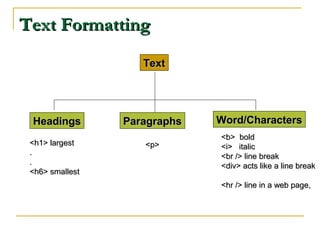
TextText
HeadingsHeadings ParagraphsParagraphs Word/CharactersWord/Characters
<h1> largest<h1> largest
..
..
<h6> smallest<h6> smallest
<p><p>
<b> bold<b> bold
<i> italic<i> italic
<br /> line break<br /> line break
<div> acts like a line break<div> acts like a line break
<hr /> line in a web page,<hr /> line in a web page,
HyperlinksHyperlinks
 Hyperlinks <a> link web pages to each other
 A link is a connection from one source to another
 Hyperlinks create hypertext and is the driving force of the web
 Hyperlinks can be used as:
 inter-document and intra-document links
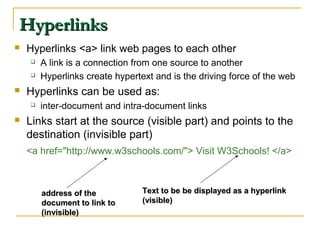
 Links start at the source (visible part) and points to the
destination (invisible part)
<a href="http://www.w3schools.com/"> Visit W3Schools! </a>
address of theaddress of the
document to link todocument to link to
(invisible)(invisible)
Text to beText to be be displayed as a hyperlinkbe displayed as a hyperlink
(visible)(visible)
HyperlinksHyperlinks
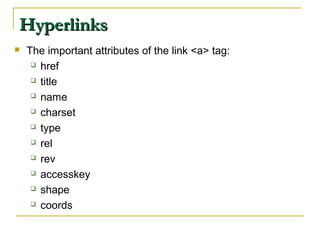
 The important attributes of the link <a> tag:
 href
 title
 name
 charset
 type
 rel
 rev
 accesskey
 shape
 coords
HyperlinksHyperlinks
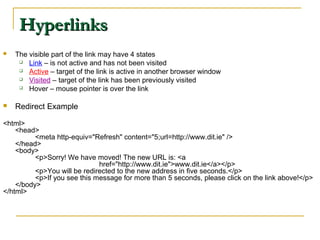
 The visible part of the link may have 4 states
 Link – is not active and has not been visited
 Active – target of the link is active in another browser window
 Visited – target of the link has been previously visited
 Hover – mouse pointer is over the link
 Redirect Example
<html>
<head>
<meta http-equiv="Refresh" content="5;url=http://www.dit.ie" />
</head>
<body>
<p>Sorry! We have moved! The new URL is: <a
href="http://www.dit.ie">www.dit.ie</a></p>
<p>You will be redirected to the new address in five seconds.</p>
<p>If you see this message for more than 5 seconds, please click on the link above!</p>
</body>
</html>
Hyperlinks - anchorsHyperlinks - anchors
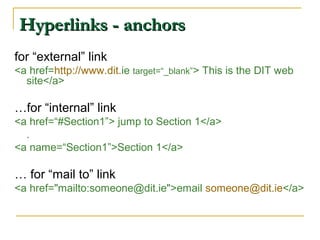
for “external” link
<a href=http://www.dit.ie target=“_blank”> This is the DIT web
site</a>
…for “internal” link
<a href=“#Section1”> jump to Section 1</a>
.
<a name=“Section1”>Section 1</a>
… for “mail to” link
<a href="mailto:someone@dit.ie">email someone@dit.ie</a>
ListsLists
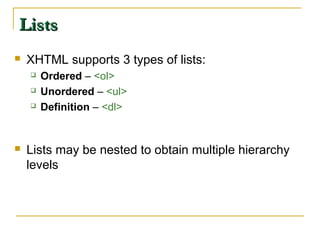
 XHTML supports 3 types of lists:
 Ordered – <ol>
 Unordered – <ul>
 Definition – <dl>
 Lists may be nested to obtain multiple hierarchy
levels
Ordered List - <ol>Ordered List - <ol>
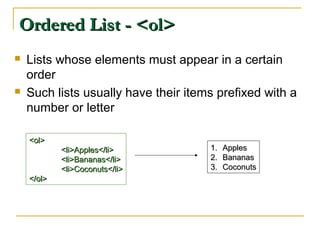
 Lists whose elements must appear in a certain
order
 Such lists usually have their items prefixed with a
number or letter
<ol><ol>
<li>Apples</li><li>Apples</li>
<li>Bananas</li><li>Bananas</li>
<li>Coconuts</li><li>Coconuts</li>
</ol></ol>
1.1. ApplesApples
2.2. BananasBananas
3.3. CoconutsCoconuts
Ordered List - <ol>Ordered List - <ol>
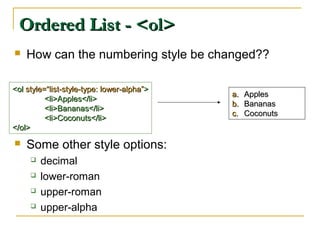
 How can the numbering style be changed??
 Some other style options:
 decimal
 lower-roman
 upper-roman
 upper-alpha
<ol<ol style=“list-style-type: lower-alpha”style=“list-style-type: lower-alpha”>>
<li>Apples</li><li>Apples</li>
<li>Bananas</li><li>Bananas</li>
<li>Coconuts</li><li>Coconuts</li>
</ol></ol>
a.a. ApplesApples
b.b. BananasBananas
c.c. CoconutsCoconuts
Unordered List - <ul>Unordered List - <ul>
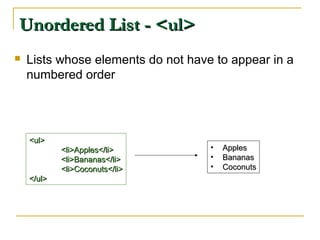
 Lists whose elements do not have to appear in a
numbered order
<ul><ul>
<li>Apples</li><li>Apples</li>
<li>Bananas</li><li>Bananas</li>
<li>Coconuts</li><li>Coconuts</li>
</ul></ul>
• ApplesApples
• BananasBananas
• CoconutsCoconuts
Unordered List - <ul>Unordered List - <ul>
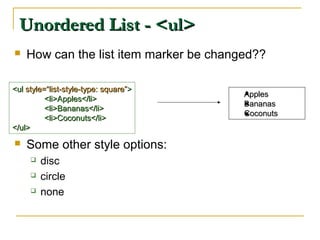
 How can the list item marker be changed??
 Some other style options:
 disc
 circle
 none
<ul<ul style=“list-style-type: square”style=“list-style-type: square”>>
<li>Apples</li><li>Apples</li>
<li>Bananas</li><li>Bananas</li>
<li>Coconuts</li><li>Coconuts</li>
</ul></ul>
ApplesApples
BananasBananas
CoconutsCoconuts
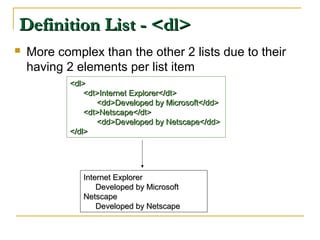
Definition List - <dl>Definition List - <dl>
 More complex than the other 2 lists due to their
having 2 elements per list item
<dl><dl>
<dt>Internet Explorer</dt><dt>Internet Explorer</dt>
<dd>Developed by Microsoft</dd><dd>Developed by Microsoft</dd>
<dt>Netscape</dt><dt>Netscape</dt>
<dd>Developed by Netscape</dd><dd>Developed by Netscape</dd>
</dl></dl>
Internet ExplorerInternet Explorer
Developed by MicrosoftDeveloped by Microsoft
NetscapeNetscape
Developed by NetscapeDeveloped by Netscape
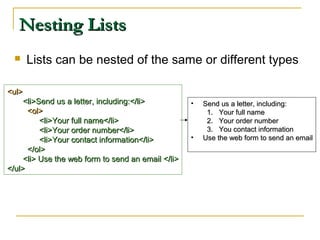
Nesting ListsNesting Lists
 Lists can be nested of the same or different types
<ul><ul>
<li>Send us a letter, including:</li><li>Send us a letter, including:</li>
<ol><ol>
<li>Your full name</li><li>Your full name</li>
<li>Your order number</li><li>Your order number</li>
<li>Your contact information</li><li>Your contact information</li>
</ol></ol>
<li> Use the web form to send an email </li><li> Use the web form to send an email </li>
</ul></ul>
• Send us a letter, including:Send us a letter, including:
1.1. Your full nameYour full name
2.2. Your order numberYour order number
3.3. You contact informationYou contact information
• Use the web form to send an emailUse the web form to send an email
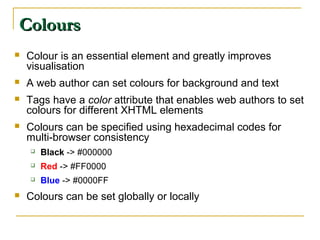
ColoursColours
 Colour is an essential element and greatly improves
visualisation
 A web author can set colours for background and text
 Tags have a color attribute that enables web authors to set
colours for different XHTML elements
 Colours can be specified using hexadecimal codes for
multi-browser consistency
 Black -> #000000
 Red -> #FF0000
 Blue -> #0000FF
 Colours can be set globally or locally
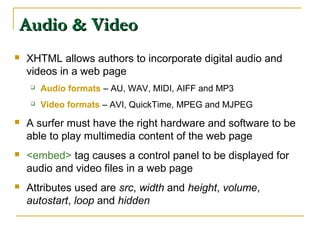
Audio & VideoAudio & Video
 XHTML allows authors to incorporate digital audio and
videos in a web page
 Audio formats – AU, WAV, MIDI, AIFF and MP3
 Video formats – AVI, QuickTime, MPEG and MJPEG
 A surfer must have the right hardware and software to be
able to play multimedia content of the web page
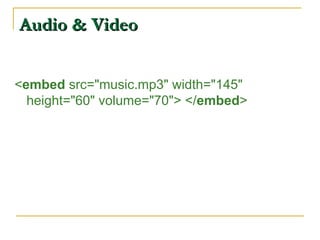
 <embed> tag causes a control panel to be displayed for
audio and video files in a web page
 Attributes used are src, width and height, volume,
autostart, loop and hidden
Audio & VideoAudio & Video
<embed src="music.mp3" width="145"
height="60" volume="70"> </embed>
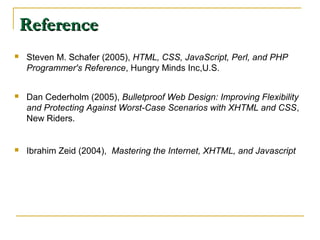
ReferenceReference
 Steven M. Schafer (2005), HTML, CSS, JavaScript, Perl, and PHP
Programmer's Reference, Hungry Minds Inc,U.S.
 Dan Cederholm (2005), Bulletproof Web Design: Improving Flexibility
and Protecting Against Worst-Case Scenarios with XHTML and CSS,
New Riders.
 Ibrahim Zeid (2004), Mastering the Internet, XHTML, and Javascript

Intr to-html-xhtml-1233508169541646-3

  • 1.
    Introduction to HTML&Introduction to HTML & XHTMLXHTML
  • 2.
    IntroductionIntroduction  Web developersview web pages as documents that must be created according to authoring and development guidelines  Web developers use HTML or XHTML to write code of a web page  Web browsers have a built-in interpreter to render the results of the code in its window
  • 3.
    The World WideWebThe World Wide Web  Definitions  HTML  The HyperText Markup Language  The language used to structure text-based information in a document  by denoting certain text as headings, paragraphs, lists, etc — and to supplement that text with interactive forms, embedded images, and other multimedia objects  XHTML  The eXtensible HyperText Markup Language  XHTML consists of all the elements in HTML 4.01 combined with the syntax of XML.  Allows users to define their own “tags” for defining structure, layout, etc.
  • 4.
    Content of WebPagesContent of Web Pages  A web site may contain a combination of 13 standard elements: Text Sound Lists Video Hyperlinks Tables Colour Layers Graphics Frames Images Forms Image Maps
  • 5.
    Content of WebPagesContent of Web Pages  The content of a web site can be classified as:  Static content – does not change regularly e.g. personal and professional web sites  Dynamic content – changes regularly e.g., newspaper web sites, weather report sites…
  • 6.
    Authoring of WebPagesAuthoring of Web Pages  After a web page layout is designed, one needs to use HTML/XHTML code to implement the design  Introduction to XHTML  Syntax  Document Tags  Authoring tools  Text formatting  Special characters  Hyperlinks  Lists  Meta Data  Colours  Audio & Video
  • 7.
    XHTML SyntaxXHTML Syntax XHTML uses tags that are enclosed in brackets < >  XHTML content is contained between tags  Tags and content form an XHTML element  Generic element form: <start-tag> content <end-tag>  Start and end tags have the same name, end tag has a ‘/’ before it: <b>This is BOLD</b>  XHTML tags can be nested according to the “first open, last closed” rule: <b><i>bold and italic</i></b>
  • 8.
    XHTML SyntaxXHTML Syntax XHTML rules  Tags must be closed  XHTML is case sensitive  Use lower case tags and attribute names, e.g. width=“100%”  All attribute values must be double quoted, e.g. “100%”  Tags must not overlap (i.e., during nesting)  Comments can be used  <!-- This text is a comment -->  Do not use obsolete (deprecated) tags  Browsers ignore misspelled tags (and many other things!)
  • 9.
    Document TagsDocument Tags Thetags that make up the framework of a typical XHTML document include the following:  Document type definition (DTD) tag – DOCTYPE <!DOCTYPE html PUBLIC "-//W3C//DTD XHTML 1.0 Strict//EN" "http://www.w3.org/TR/xhtml1/DTD/xhtml1-strict.dtd">  Describes (to web browsers) what type/version of (x)html is used  Specifies rules that apply to the markup of documents  Used for document syntax validation (e.g. strict) and for web browser to process document in proper “parsing” mode (impacts on consistency and speed of display)  An XHTML document is validated against a Document Type Definition.  Top-level tag, generally <html>  Tag indicates the beginning and /end of an XHTML document
  • 10.
    Sample XHTML DocumentStructureSample XHTML Document Structure <!DOCTYPE html PUBLIC "-//W3C//DTD XHTML 1.0 Strict//EN" "http://www.w3.org/TR/xhtml1/DTD/xhtml1-strict.dtd"> <HTML> <HEAD> <TITLE> New Document </TITLE> <META NAME="Author" CONTENT=""> <META NAME="Keywords" CONTENT=""> <META NAME="Description" CONTENT=""> </HEAD> <BODY> webpage content goes here! </BODY> </HTML>
  • 11.
    Minimal XHTML DocumentMinimalXHTML Document <!DOCTYPE ….> <html> <head> ….. </head> <body> <p> ……. </p> </body> </html> HTMLelementHTMLelement HTMLelementHTMLelementHTMLelementHTMLelement HTMLelementHTMLelement
  • 12.
    HTML Document StructureHTMLDocument Structure <html> <head> <title>HTML Document Structure</title> <meta name=“author” content=“Andrea Curley” /> </head> <body> all web page content goes here </body> </html>
  • 13.
    Document Tags -HeaderDocument Tags - Header  Header section, delimited by <head> tags  Provides extra information about the document  Serves as a container for styles, global scripts, etc.  The main tags used in this section are:  <title> - specifies the document title  <meta> - provides information to search engines  <style> - declares general & local styles for the document  <script> - declares any scripting information
  • 14.
    Meta TagsMeta Tags Web pages are designed for surfers and surf engines  The <meta> tag increases the chances of page indexing  Meta data refers to data about XHTML document rather than the document content  Browsers do not render meta data  Search engines use it for indexing and ranking the page hits in a given search  Some attributes of this tag are name, content, http-equiv, etc.
  • 15.
    Meta TagsMeta Tags Most often the meta element is used to provide information that is relevant to browsers or search engines like describing the content of your document. <meta name=“keywords” content=“open, source, PHP, programming, code” />  When a search engine indexes the page, it includes the extra information -> open, source, etc.  It provides these keywords to search agents requesting them
  • 16.
    Amazon’s Meta TagsAmazon’sMeta Tags <meta name="description" content="Low prices on digital cameras, MP3, LCD TVs, books, music, DVDs, video games, software, home & garden and much, much more. Free delivery on orders over £15." /> <meta name="keywords" content="digital camera, LCD TV, books, DVD, low prices, video games, pc games, software, electronics, home, garden, video, amazon" />
  • 17.
    Document Tags -BodyDocument Tags - Body  Body section, delimited by <body> tags  Section where visible content appears  Content is a series of block tags containing inline content
  • 18.
    How can Iwrite my first web page?How can I write my first web page? 1. Open a text editor e.g., Notepad, Edit Plus 2. Put in code from the HTML Document Structure Slide 3. Save it as Example1.html 4. In web browser (IE/Firefox/Netscape),  Select File -> Open  Select Example1.html  Select OK
  • 19.
    Authoring ToolsAuthoring Tools Tools needed to develop a web site:  Editor  Graphics program  Digital cameras  Scanners  Audio & video software  Types of editors  Text: type in code and view results later -> Bottom-up development  HTML: view results as you develop the web page -> top-down development  Web author must be familiar with both approaches  e.g. “EditPlus”, “MacroMedia Dreamweaver”
  • 20.
    Text FormattingText Formatting Paragraphs  Line breaks  Headings  Horizontal Rules  Block divisions
  • 21.
    ParagraphsParagraphs  Main textualblocks, delimited by <p> tags <p>This is a paragraph of text in an XHTML document</p> This is a paragraph of text in an XHTML document Line spacesLine spaces automaticallyautomatically insertedinserted
  • 22.
    Line breaksLine breaks Used when you need to break a line prematurely (before the paragraph)  The line break tag is <br />  Need space between “br” and “/” for Netscape browsers to interpret correctly
  • 23.
    Lines - ExampleLines- Example <p>This is a paragraph of text in an XHTML document</p> <p>This is a 2nd paragraph of text in an XHTML document</p> This is a paragraph of text in an XHTML document This is a 2nd paragraph of text in an XHTML document <p>This is a paragraph of text in an XHTML document</p> <p>This is a 2nd paragraph of text <br /> in an XHTML document</p> This is a paragraph of text in an XHTML document This is a 2nd paragraph of text in an XHTML document
  • 24.
    HeadingsHeadings  There are6 levels of headings <h1>…..<h6>, the higher the heading number the smaller the text <h1> Heading 1</h1> <h2> Heading 2</h2> <h3> Heading 3</h3> <h4> Heading 4</h4> <h5> Heading 5</h5> <h6> Heading 6</h6> Heading 1Heading 1 Heading 2Heading 2 Heading 3Heading 3 Heading 4Heading 4 Heading 5Heading 5 Heading 6Heading 6
  • 25.
    Horizontal RulesHorizontal Rules Horizontal rules appear as lines across the browser screen - <hr /> use space between “hr” and “/” so Netscape browsers can interpret correctly  Used to separate information visually A line should be drawn under this text <hr /> A line should be drawn under this text
  • 26.
    Block Divisions (div)BlockDivisions (div)  Sometimes, there is a need to format a large block of text in a similar fashion but in a way that is different from other blocks in the same document e.g. a quoted block of text could appear in a different style than the text around it - <div> <div align="center"> Text formatted using div tag </div> Text formatted using div tag
  • 27.
    Text FormattingText Formatting TextText HeadingsHeadingsParagraphsParagraphs Word/CharactersWord/Characters <h1> largest<h1> largest .. .. <h6> smallest<h6> smallest <p><p> <b> bold<b> bold <i> italic<i> italic <br /> line break<br /> line break <div> acts like a line break<div> acts like a line break <hr /> line in a web page,<hr /> line in a web page,
  • 28.
    HyperlinksHyperlinks  Hyperlinks <a>link web pages to each other  A link is a connection from one source to another  Hyperlinks create hypertext and is the driving force of the web  Hyperlinks can be used as:  inter-document and intra-document links  Links start at the source (visible part) and points to the destination (invisible part) <a href="http://www.w3schools.com/"> Visit W3Schools! </a> address of theaddress of the document to link todocument to link to (invisible)(invisible) Text to beText to be be displayed as a hyperlinkbe displayed as a hyperlink (visible)(visible)
  • 29.
    HyperlinksHyperlinks  The importantattributes of the link <a> tag:  href  title  name  charset  type  rel  rev  accesskey  shape  coords
  • 30.
    HyperlinksHyperlinks  The visiblepart of the link may have 4 states  Link – is not active and has not been visited  Active – target of the link is active in another browser window  Visited – target of the link has been previously visited  Hover – mouse pointer is over the link  Redirect Example <html> <head> <meta http-equiv="Refresh" content="5;url=http://www.dit.ie" /> </head> <body> <p>Sorry! We have moved! The new URL is: <a href="http://www.dit.ie">www.dit.ie</a></p> <p>You will be redirected to the new address in five seconds.</p> <p>If you see this message for more than 5 seconds, please click on the link above!</p> </body> </html>
  • 31.
    Hyperlinks - anchorsHyperlinks- anchors for “external” link <a href=http://www.dit.ie target=“_blank”> This is the DIT web site</a> …for “internal” link <a href=“#Section1”> jump to Section 1</a> . <a name=“Section1”>Section 1</a> … for “mail to” link <a href="mailto:someone@dit.ie">email someone@dit.ie</a>
  • 32.
    ListsLists  XHTML supports3 types of lists:  Ordered – <ol>  Unordered – <ul>  Definition – <dl>  Lists may be nested to obtain multiple hierarchy levels
  • 33.
    Ordered List -<ol>Ordered List - <ol>  Lists whose elements must appear in a certain order  Such lists usually have their items prefixed with a number or letter <ol><ol> <li>Apples</li><li>Apples</li> <li>Bananas</li><li>Bananas</li> <li>Coconuts</li><li>Coconuts</li> </ol></ol> 1.1. ApplesApples 2.2. BananasBananas 3.3. CoconutsCoconuts
  • 34.
    Ordered List -<ol>Ordered List - <ol>  How can the numbering style be changed??  Some other style options:  decimal  lower-roman  upper-roman  upper-alpha <ol<ol style=“list-style-type: lower-alpha”style=“list-style-type: lower-alpha”>> <li>Apples</li><li>Apples</li> <li>Bananas</li><li>Bananas</li> <li>Coconuts</li><li>Coconuts</li> </ol></ol> a.a. ApplesApples b.b. BananasBananas c.c. CoconutsCoconuts
  • 35.
    Unordered List -<ul>Unordered List - <ul>  Lists whose elements do not have to appear in a numbered order <ul><ul> <li>Apples</li><li>Apples</li> <li>Bananas</li><li>Bananas</li> <li>Coconuts</li><li>Coconuts</li> </ul></ul> • ApplesApples • BananasBananas • CoconutsCoconuts
  • 36.
    Unordered List -<ul>Unordered List - <ul>  How can the list item marker be changed??  Some other style options:  disc  circle  none <ul<ul style=“list-style-type: square”style=“list-style-type: square”>> <li>Apples</li><li>Apples</li> <li>Bananas</li><li>Bananas</li> <li>Coconuts</li><li>Coconuts</li> </ul></ul> ApplesApples BananasBananas CoconutsCoconuts
  • 37.
    Definition List -<dl>Definition List - <dl>  More complex than the other 2 lists due to their having 2 elements per list item <dl><dl> <dt>Internet Explorer</dt><dt>Internet Explorer</dt> <dd>Developed by Microsoft</dd><dd>Developed by Microsoft</dd> <dt>Netscape</dt><dt>Netscape</dt> <dd>Developed by Netscape</dd><dd>Developed by Netscape</dd> </dl></dl> Internet ExplorerInternet Explorer Developed by MicrosoftDeveloped by Microsoft NetscapeNetscape Developed by NetscapeDeveloped by Netscape
  • 38.
    Nesting ListsNesting Lists Lists can be nested of the same or different types <ul><ul> <li>Send us a letter, including:</li><li>Send us a letter, including:</li> <ol><ol> <li>Your full name</li><li>Your full name</li> <li>Your order number</li><li>Your order number</li> <li>Your contact information</li><li>Your contact information</li> </ol></ol> <li> Use the web form to send an email </li><li> Use the web form to send an email </li> </ul></ul> • Send us a letter, including:Send us a letter, including: 1.1. Your full nameYour full name 2.2. Your order numberYour order number 3.3. You contact informationYou contact information • Use the web form to send an emailUse the web form to send an email
  • 39.
    ColoursColours  Colour isan essential element and greatly improves visualisation  A web author can set colours for background and text  Tags have a color attribute that enables web authors to set colours for different XHTML elements  Colours can be specified using hexadecimal codes for multi-browser consistency  Black -> #000000  Red -> #FF0000  Blue -> #0000FF  Colours can be set globally or locally
  • 40.
    Audio & VideoAudio& Video  XHTML allows authors to incorporate digital audio and videos in a web page  Audio formats – AU, WAV, MIDI, AIFF and MP3  Video formats – AVI, QuickTime, MPEG and MJPEG  A surfer must have the right hardware and software to be able to play multimedia content of the web page  <embed> tag causes a control panel to be displayed for audio and video files in a web page  Attributes used are src, width and height, volume, autostart, loop and hidden
  • 41.
    Audio & VideoAudio& Video <embed src="music.mp3" width="145" height="60" volume="70"> </embed>
  • 42.
    ReferenceReference  Steven M.Schafer (2005), HTML, CSS, JavaScript, Perl, and PHP Programmer's Reference, Hungry Minds Inc,U.S.  Dan Cederholm (2005), Bulletproof Web Design: Improving Flexibility and Protecting Against Worst-Case Scenarios with XHTML and CSS, New Riders.  Ibrahim Zeid (2004), Mastering the Internet, XHTML, and Javascript