What is HTML?
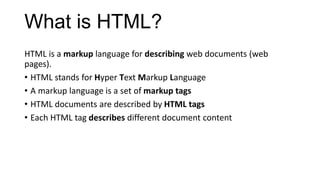
HTML is a markup language for describing web documents (web
pages).
• HTML stands for Hyper Text Markup Language
• A markup language is a set of markup tags
• HTML documents are described by HTML tags
• Each HTML tag describes different document content
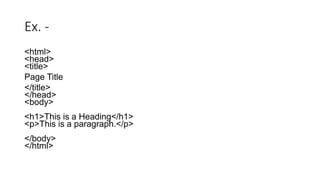
Ex. -
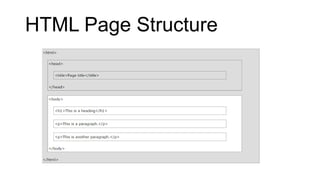
<html>
<head>
<title>
Page Title
</title>
</head>
<body>
<h1>This is a Heading</h1>
<p>This is a paragraph.</p>
</body>
</html>
HTML Tags
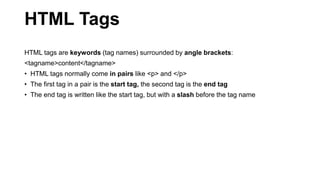
HTML tags are keywords (tag names) surrounded by angle brackets:
<tagname>content</tagname>
• HTML tags normally come in pairs like <p> and </p>
• The first tag in a pair is the start tag, the second tag is the end tag
• The end tag is written like the start tag, but with a slash before the tag name
HTML Page Structure
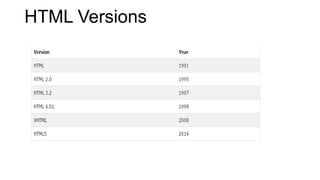
HTML Versions
HTML Editors
HTML can be edited by using professional HTML editors like:
• Microsoft WebMatrix
• Sublime Text
However, for learning HTML we recommend a text editor like Notepad
(PC) or TextEdit (Mac).
We believe using a simple text editor is a good way to learn HTML.
Follow the 4 steps below to create your first web page with Notepad.
Step 1: Open Notepad
• To open Notepad in Windows 7 or earlier:
• Click Start (bottom left on your screen). Click All Programs.
Click Accessories. Click Notepad.
• To open Notepad in Windows 8 or later:
• Open the Start Screen (the window symbol at the bottom left on your
screen). Type Notepad.
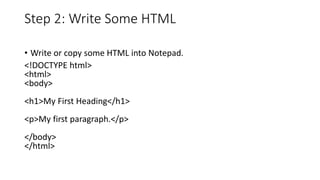
Step 2: Write Some HTML
• Write or copy some HTML into Notepad.
<!DOCTYPE html>
<html>
<body>
<h1>My First Heading</h1>
<p>My first paragraph.</p>
</body>
</html>
Step 3: Save the HTML Page
• Save the file on your computer.
• Select File > Save as in the Notepad menu.
• Name the file "index.html" or any other name ending with html or
htm.
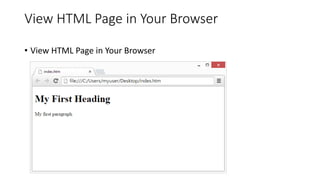
View HTML Page in Your Browser
• View HTML Page in Your Browser
HTML Tags
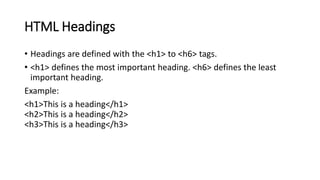
• HTML Headings
HTML headings are defined with the <h1> to <h6> tags.
Example:
<h1>This is a heading</h1>
<h2>This is a heading</h2>
<h3>This is a heading</h3>
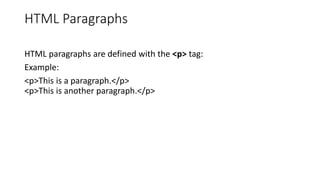
HTML Paragraphs
HTML paragraphs are defined with the <p> tag:
Example:
<p>This is a paragraph.</p>
<p>This is another paragraph.</p>
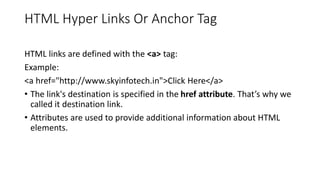
HTML Hyper Links Or Anchor Tag
HTML links are defined with the <a> tag:
Example:
<a href="http://www.skyinfotech.in">Click Here</a>
• The link's destination is specified in the href attribute. That’s why we
called it destination link.
• Attributes are used to provide additional information about HTML
elements.
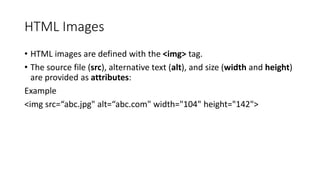
HTML Images
• HTML images are defined with the <img> tag.
• The source file (src), alternative text (alt), and size (width and height)
are provided as attributes:
Example
<img src=“abc.jpg" alt=“abc.com" width="104" height="142">
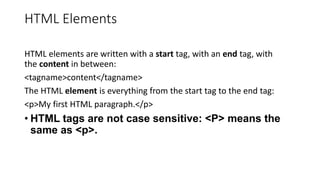
HTML Elements
HTML elements are written with a start tag, with an end tag, with
the content in between:
<tagname>content</tagname>
The HTML element is everything from the start tag to the end tag:
<p>My first HTML paragraph.</p>
• HTML tags are not case sensitive: <P> means the
same as <p>.
HTML Attributes
• HTML elements can have attributes
• Attributes provide additional information about an element
• Attributes are always specified in the start tag
• Attributes come in name/value pairs like: name="value"
The lang Attribute:
• The document language can be declared in the <html> tag.
• The language is declared in the lang attribute.
• Declaring a language is important for accessibility
applications (screen readers) and search engines:
The title Attribute
HTML paragraphs are defined with the <p> tag.
In this example, the <p> element has a title attribute.
Example:
<p title=“SEO Class">
SEO Class is a Training program.
It contains all the search engine practices with all on-page SEO and off-
page SEO techniques.
</p>
The href Attribute
HTML links are defined with the <a> tag. The link address is specified in
the href attribute:
Example:
<a href="http://www.skyinfotech.in ">This is a link</a>
Size Attributes
HTML images are defined with the <img> tag.
The filename of the source (src), and the size of the image
(width and height) are all provided as attributes:
Example:
<img src=“abc.jpg" width="104" height="142">
• The image size is specified in pixels: width="104" means 104 screen
pixels wide.
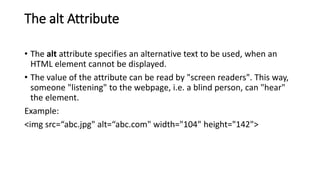
The alt Attribute
• The alt attribute specifies an alternative text to be used, when an
HTML element cannot be displayed.
• The value of the attribute can be read by "screen readers". This way,
someone "listening" to the webpage, i.e. a blind person, can "hear"
the element.
Example:
<img src=“abc.jpg" alt=“abc.com" width="104" height="142">
Chapter Summary
• All HTML elements can have attributes
• The HTML title attribute provides additional "tool-tip" information
• The HTML href attribute provides address information for links
• The HTML width and height attributes provide size information for
images
• The HTML alt attribute provides text for screen readers
HTML Headings
• Headings are defined with the <h1> to <h6> tags.
• <h1> defines the most important heading. <h6> defines the least
important heading.
Example:
<h1>This is a heading</h1>
<h2>This is a heading</h2>
<h3>This is a heading</h3>
Headings Are Important
• Use HTML headings for headings only. Don't use headings to make
text BIG or bold.
• Search engines use your headings to index the structure and content of
your web pages.
• Users skim your pages by its headings. It is important to use headings
to show the document structure.
• h1 headings should be main headings, followed by h2 headings, then
the less important h3, and so on.
HTML Horizontal Rules
• The <hr> tag creates a horizontal line in an HTML page.
• The hr element can be used to separate content:
Example:
<p>This is a paragraph.</p>
<hr>
<p>This is a paragraph.</p>
<hr>
<p>This is a paragraph.</p>
The HTML <head> Element
• The HTML <head> element has nothing to do with HTML headings.
• The HTML <head> element contains meta data. Meta data are not displayed.
• The HTML <head> element is placed between the <html> tag and the <body> tag
Example:
<!DOCTYPE html>
<html>
<head>
<title>My First HTML</title>
<meta charset="UTF-8">
</head>
<body>
Meta Data
• Metadata is "data that provides information about other data". Two
types of metadata exist: structural metadata and
descriptive metadata. Structural metadata is data about the
containers of data. Descriptive metadata uses individual instances of
application data or the data content.

SEO Training in Noida- Skyinfotech.in

  • 1.
    What is HTML? HTMLis a markup language for describing web documents (web pages). • HTML stands for Hyper Text Markup Language • A markup language is a set of markup tags • HTML documents are described by HTML tags • Each HTML tag describes different document content
  • 2.
    Ex. - <html> <head> <title> Page Title </title> </head> <body> <h1>Thisis a Heading</h1> <p>This is a paragraph.</p> </body> </html>
  • 3.
    HTML Tags HTML tagsare keywords (tag names) surrounded by angle brackets: <tagname>content</tagname> • HTML tags normally come in pairs like <p> and </p> • The first tag in a pair is the start tag, the second tag is the end tag • The end tag is written like the start tag, but with a slash before the tag name
  • 4.
  • 5.
  • 6.
    HTML Editors HTML canbe edited by using professional HTML editors like: • Microsoft WebMatrix • Sublime Text However, for learning HTML we recommend a text editor like Notepad (PC) or TextEdit (Mac). We believe using a simple text editor is a good way to learn HTML. Follow the 4 steps below to create your first web page with Notepad.
  • 7.
    Step 1: OpenNotepad • To open Notepad in Windows 7 or earlier: • Click Start (bottom left on your screen). Click All Programs. Click Accessories. Click Notepad. • To open Notepad in Windows 8 or later: • Open the Start Screen (the window symbol at the bottom left on your screen). Type Notepad.
  • 8.
    Step 2: WriteSome HTML • Write or copy some HTML into Notepad. <!DOCTYPE html> <html> <body> <h1>My First Heading</h1> <p>My first paragraph.</p> </body> </html>
  • 9.
    Step 3: Savethe HTML Page • Save the file on your computer. • Select File > Save as in the Notepad menu. • Name the file "index.html" or any other name ending with html or htm.
  • 10.
    View HTML Pagein Your Browser • View HTML Page in Your Browser
  • 11.
    HTML Tags • HTMLHeadings HTML headings are defined with the <h1> to <h6> tags. Example: <h1>This is a heading</h1> <h2>This is a heading</h2> <h3>This is a heading</h3>
  • 12.
    HTML Paragraphs HTML paragraphsare defined with the <p> tag: Example: <p>This is a paragraph.</p> <p>This is another paragraph.</p>
  • 13.
    HTML Hyper LinksOr Anchor Tag HTML links are defined with the <a> tag: Example: <a href="http://www.skyinfotech.in">Click Here</a> • The link's destination is specified in the href attribute. That’s why we called it destination link. • Attributes are used to provide additional information about HTML elements.
  • 14.
    HTML Images • HTMLimages are defined with the <img> tag. • The source file (src), alternative text (alt), and size (width and height) are provided as attributes: Example <img src=“abc.jpg" alt=“abc.com" width="104" height="142">
  • 15.
    HTML Elements HTML elementsare written with a start tag, with an end tag, with the content in between: <tagname>content</tagname> The HTML element is everything from the start tag to the end tag: <p>My first HTML paragraph.</p> • HTML tags are not case sensitive: <P> means the same as <p>.
  • 16.
    HTML Attributes • HTMLelements can have attributes • Attributes provide additional information about an element • Attributes are always specified in the start tag • Attributes come in name/value pairs like: name="value" The lang Attribute: • The document language can be declared in the <html> tag. • The language is declared in the lang attribute. • Declaring a language is important for accessibility applications (screen readers) and search engines:
  • 17.
    The title Attribute HTMLparagraphs are defined with the <p> tag. In this example, the <p> element has a title attribute. Example: <p title=“SEO Class"> SEO Class is a Training program. It contains all the search engine practices with all on-page SEO and off- page SEO techniques. </p>
  • 18.
    The href Attribute HTMLlinks are defined with the <a> tag. The link address is specified in the href attribute: Example: <a href="http://www.skyinfotech.in ">This is a link</a>
  • 19.
    Size Attributes HTML imagesare defined with the <img> tag. The filename of the source (src), and the size of the image (width and height) are all provided as attributes: Example: <img src=“abc.jpg" width="104" height="142"> • The image size is specified in pixels: width="104" means 104 screen pixels wide.
  • 20.
    The alt Attribute •The alt attribute specifies an alternative text to be used, when an HTML element cannot be displayed. • The value of the attribute can be read by "screen readers". This way, someone "listening" to the webpage, i.e. a blind person, can "hear" the element. Example: <img src=“abc.jpg" alt=“abc.com" width="104" height="142">
  • 21.
    Chapter Summary • AllHTML elements can have attributes • The HTML title attribute provides additional "tool-tip" information • The HTML href attribute provides address information for links • The HTML width and height attributes provide size information for images • The HTML alt attribute provides text for screen readers
  • 22.
    HTML Headings • Headingsare defined with the <h1> to <h6> tags. • <h1> defines the most important heading. <h6> defines the least important heading. Example: <h1>This is a heading</h1> <h2>This is a heading</h2> <h3>This is a heading</h3>
  • 23.
    Headings Are Important •Use HTML headings for headings only. Don't use headings to make text BIG or bold. • Search engines use your headings to index the structure and content of your web pages. • Users skim your pages by its headings. It is important to use headings to show the document structure. • h1 headings should be main headings, followed by h2 headings, then the less important h3, and so on.
  • 24.
    HTML Horizontal Rules •The <hr> tag creates a horizontal line in an HTML page. • The hr element can be used to separate content: Example: <p>This is a paragraph.</p> <hr> <p>This is a paragraph.</p> <hr> <p>This is a paragraph.</p>
  • 25.
    The HTML <head>Element • The HTML <head> element has nothing to do with HTML headings. • The HTML <head> element contains meta data. Meta data are not displayed. • The HTML <head> element is placed between the <html> tag and the <body> tag Example: <!DOCTYPE html> <html> <head> <title>My First HTML</title> <meta charset="UTF-8"> </head> <body>
  • 26.
    Meta Data • Metadatais "data that provides information about other data". Two types of metadata exist: structural metadata and descriptive metadata. Structural metadata is data about the containers of data. Descriptive metadata uses individual instances of application data or the data content.