HTML-5
PART-1
Introduction To HTML
● HTML stands for HyperText Markup Language.
● It is a way of marking up files so that browsers (Internet Explorer, Chrome, Safari,
Edge, etc) know how to display your content as a web page.
● HTML uses tags to distinguish between content (what the user should see) and the
instructions for displaying them (make this a list, make this a link to a different page,
show this picture, etc...)
● HTML consists of a series of elements.
SETTING UP THE HTML DOCUMENT STRUCTURE?
● HTML documents are plain text documents saved with an .html file extension
rather than a .txt file extension.
● To begin writing HTML, you first need a plain text editor that you are comfortable
using.
● Two of the more popular plain text editors for writing HTML and CSS are
Dreamweaver and Sublime Text. Free alternatives also include Notepad++ for
Windows and TextWrangler for Mac.
SIMPLE HTML DOCUMENT STRUCTURE
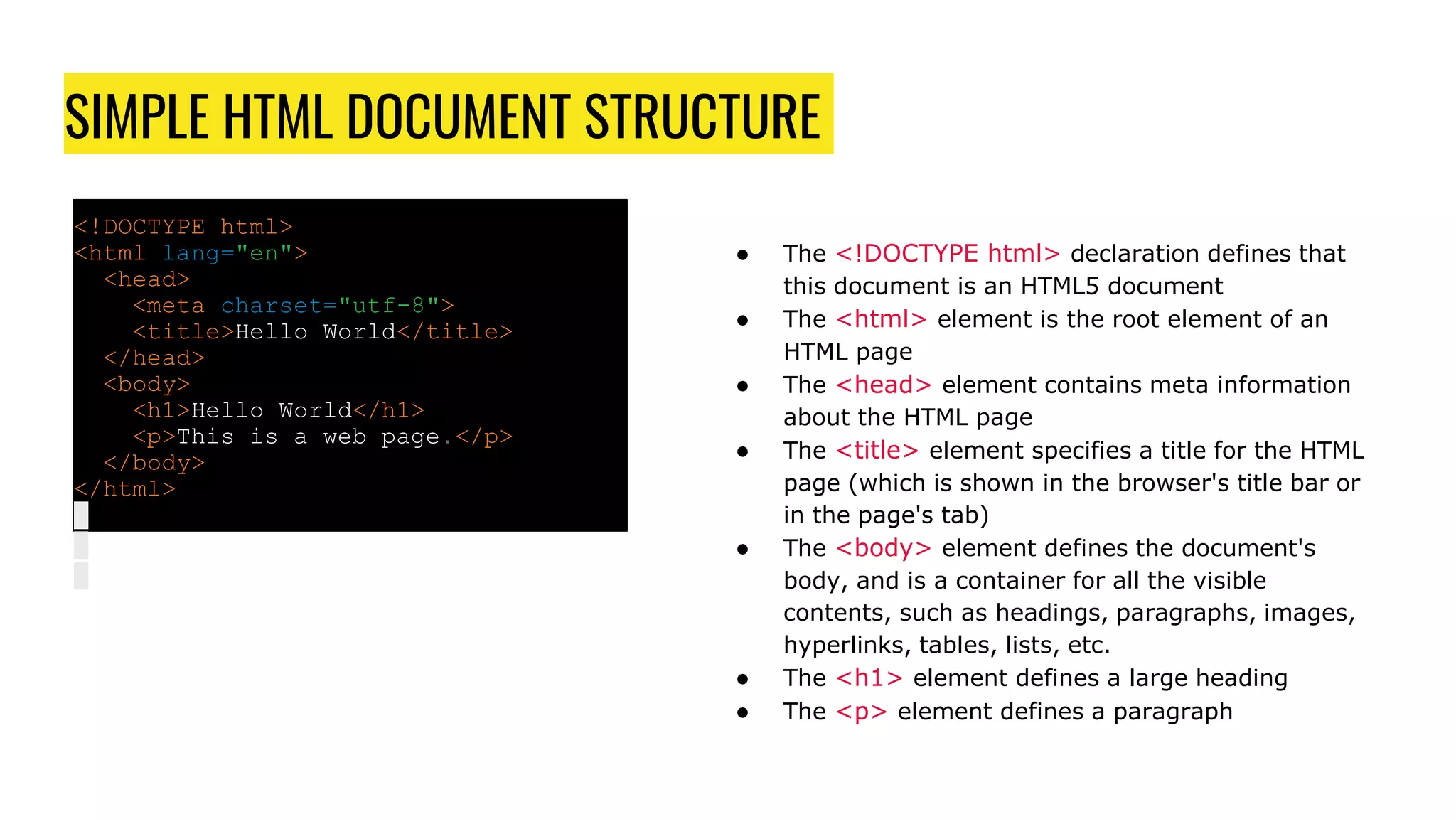
<!DOCTYPE html>
<html lang="en">
<head>
<meta charset="utf-8">
<title>Hello World</title>
</head>
<body>
<h1>Hello World</h1>
<p>This is a web page.</p>
</body>
</html>
● The <!DOCTYPE html> declaration defines that
this document is an HTML5 document
● The <html> element is the root element of an
HTML page
● The <head> element contains meta information
about the HTML page
● The <title> element specifies a title for the HTML
page (which is shown in the browser's title bar or
in the page's tab)
● The <body> element defines the document's
body, and is a container for all the visible
contents, such as headings, paragraphs, images,
hyperlinks, tables, lists, etc.
● The <h1> element defines a large heading
● The <p> element defines a paragraph
HTML ELEMENTS
● An HTML element is defined by a start tag, some content, and an end tag.
For example:<tagname>CONTENT</tagname>
<h1>FIRST HEADING</h1>
<p>FIRST PARAGRAPH</p>
● HTML is NOT CASE SENSITIVE.
<P> means the same as <p>
HTML ATTRIBUTES
● Attributes are properties used to provide additional information about an
element.
● Attributes provide additional information about elements
● Attributes are always specified in the start tag
● Attributes usually come in name/value pairs like: name="value"
HTML HEADINGS
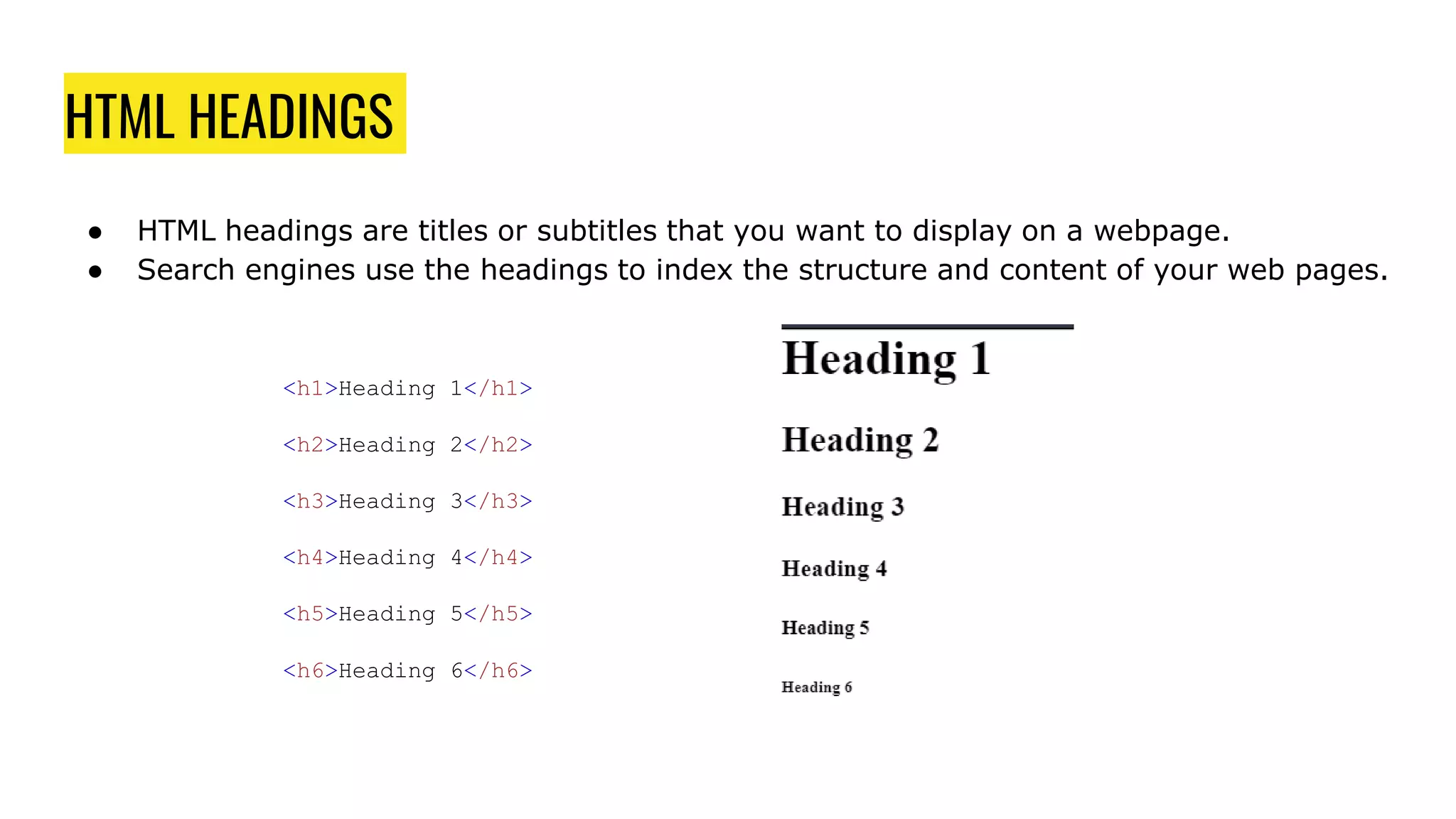
● HTML headings are titles or subtitles that you want to display on a webpage.
● Search engines use the headings to index the structure and content of your web pages.
<h1>Heading 1</h1>
<h2>Heading 2</h2>
<h3>Heading 3</h3>
<h4>Heading 4</h4>
<h5>Heading 5</h5>
<h6>Heading 6</h6>
HTML PARAGRAPH
● A paragraph always starts on a new line, and is usually a block of text.
<p>This is a paragraph.</p>
<p>This is another paragraph.</p>
HTML DISPLAY
● You cannot be sure how HTML will be displayed.
● Large or small screens, and resized windows will create different results.
● With HTML, you cannot change the display by adding extra spaces or extra lines in your
HTML code.
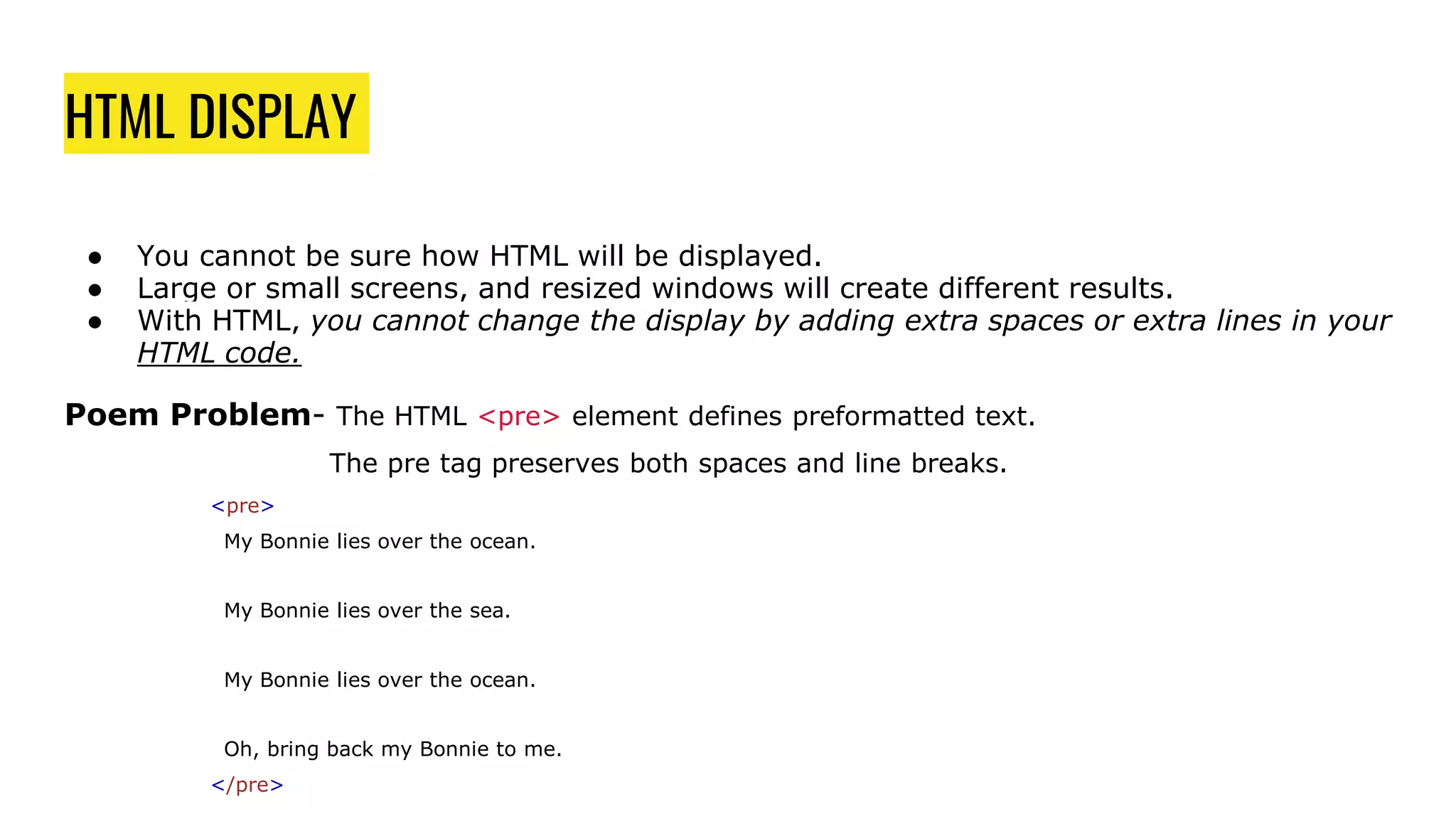
Poem Problem- The HTML <pre> element defines preformatted text.
The pre tag preserves both spaces and line breaks.
<pre>
My Bonnie lies over the ocean.
My Bonnie lies over the sea.
My Bonnie lies over the ocean.
Oh, bring back my Bonnie to me.
</pre>

Html 5

  • 1.
  • 2.
    Introduction To HTML ●HTML stands for HyperText Markup Language. ● It is a way of marking up files so that browsers (Internet Explorer, Chrome, Safari, Edge, etc) know how to display your content as a web page. ● HTML uses tags to distinguish between content (what the user should see) and the instructions for displaying them (make this a list, make this a link to a different page, show this picture, etc...) ● HTML consists of a series of elements.
  • 3.
    SETTING UP THEHTML DOCUMENT STRUCTURE? ● HTML documents are plain text documents saved with an .html file extension rather than a .txt file extension. ● To begin writing HTML, you first need a plain text editor that you are comfortable using. ● Two of the more popular plain text editors for writing HTML and CSS are Dreamweaver and Sublime Text. Free alternatives also include Notepad++ for Windows and TextWrangler for Mac.
  • 4.
    SIMPLE HTML DOCUMENTSTRUCTURE <!DOCTYPE html> <html lang="en"> <head> <meta charset="utf-8"> <title>Hello World</title> </head> <body> <h1>Hello World</h1> <p>This is a web page.</p> </body> </html> ● The <!DOCTYPE html> declaration defines that this document is an HTML5 document ● The <html> element is the root element of an HTML page ● The <head> element contains meta information about the HTML page ● The <title> element specifies a title for the HTML page (which is shown in the browser's title bar or in the page's tab) ● The <body> element defines the document's body, and is a container for all the visible contents, such as headings, paragraphs, images, hyperlinks, tables, lists, etc. ● The <h1> element defines a large heading ● The <p> element defines a paragraph
  • 5.
    HTML ELEMENTS ● AnHTML element is defined by a start tag, some content, and an end tag. For example:<tagname>CONTENT</tagname> <h1>FIRST HEADING</h1> <p>FIRST PARAGRAPH</p> ● HTML is NOT CASE SENSITIVE. <P> means the same as <p>
  • 6.
    HTML ATTRIBUTES ● Attributesare properties used to provide additional information about an element. ● Attributes provide additional information about elements ● Attributes are always specified in the start tag ● Attributes usually come in name/value pairs like: name="value"
  • 7.
    HTML HEADINGS ● HTMLheadings are titles or subtitles that you want to display on a webpage. ● Search engines use the headings to index the structure and content of your web pages. <h1>Heading 1</h1> <h2>Heading 2</h2> <h3>Heading 3</h3> <h4>Heading 4</h4> <h5>Heading 5</h5> <h6>Heading 6</h6>
  • 8.
    HTML PARAGRAPH ● Aparagraph always starts on a new line, and is usually a block of text. <p>This is a paragraph.</p> <p>This is another paragraph.</p>
  • 9.
    HTML DISPLAY ● Youcannot be sure how HTML will be displayed. ● Large or small screens, and resized windows will create different results. ● With HTML, you cannot change the display by adding extra spaces or extra lines in your HTML code. Poem Problem- The HTML <pre> element defines preformatted text. The pre tag preserves both spaces and line breaks. <pre> My Bonnie lies over the ocean. My Bonnie lies over the sea. My Bonnie lies over the ocean. Oh, bring back my Bonnie to me. </pre>