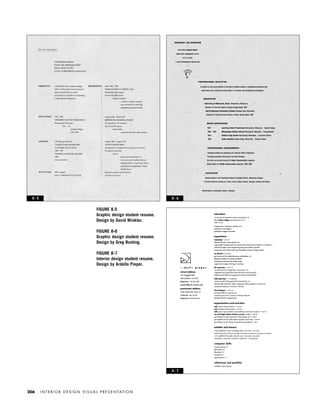
INTERIOR
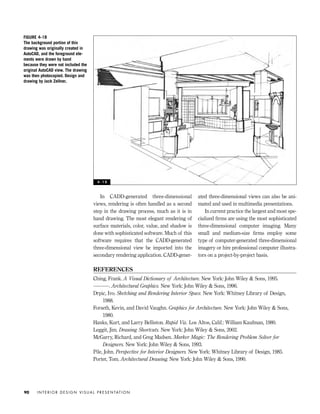
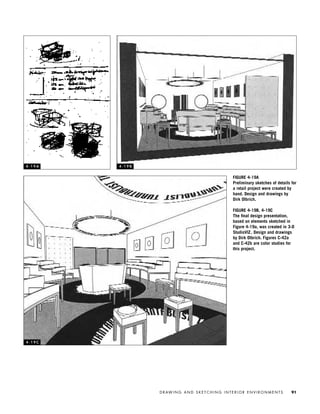
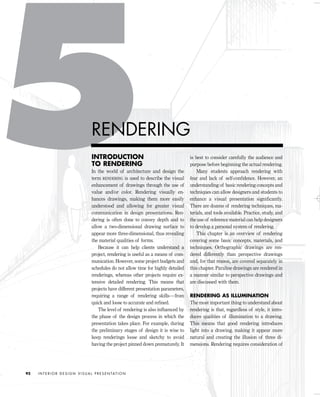
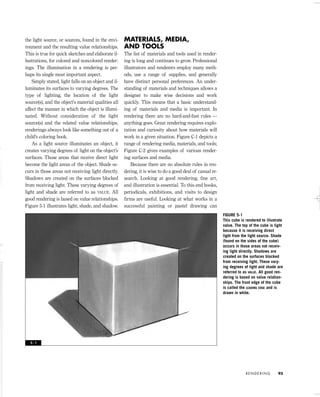
DESIGN
VISUAL
PRESENTATION
•
A Guide to Graphics, Models,
and Presentation Techniques
SECOND EDITION
Maureen Mitton
JOHN WILEY & SONS, INC.
IDVP 1 12/15/03 3:40 PM Page i
IDVP 1 12/15/03 3:40 PM Page iv
INTERIOR
DESIGN
VISUAL
PRESENTATION
•
A Guide to Graphics, Models,
and Presentation Techniques
SECOND EDITION
Maureen Mitton
JOHN WILEY & SONS, INC.
IDVP 1 12/15/03 3:40 PM Page i
This book is printed on acid-free paper. O∞
Copyright © 2004 by John Wiley & Sons, Inc. All rights reserved
Published by John Wiley & Sons, Inc., Hoboken, New Jersey
Published simultaneously in Canada
No part of this publication may be reproduced, stored in a retrieval system, or transmitted in any form
or by any means, electronic, mechanical, photocopying, recording, scanning, or otherwise, except as
permitted under Section 107 or 108 of the 1976 United States Copyright Act, without either the prior
written permission of the Publisher, or authorization through payment of the appropriate per-copy fee to
the Copyright Clearance Center, Inc., 222 Rosewood Drive, Danvers, MA 01923, (978) 750-8400, fax
(978) 750-4470, or on the web at www.copyright.com. Requests to the Publisher for permission should
be addressed to the Permissions Department, John Wiley & Sons, Inc., 111 River Street, Hoboken, NJ
07030, (201) 748-6011, fax (201) 748-6008, e-mail: permcoordinator@wiley.com.
Limit of Liability/Disclaimer of Warranty: While the publisher and author have used their best efforts in
preparing this book, they make no representations or warranties with respect to the accuracy or com-
pleteness of the contents of this book and specifically disclaim any implied warranties of merchantabil-
ity or fitness for a particular purpose. No warranty may be created or extended by sales representa-
tives or written sales materials. The advice and strategies contained herein may not be suitable for
your situation. You should consult with a professional where appropriate. Neither the publisher nor
author shall be liable for any loss of profit or any other commercial damages, including but not limited
to special, incidental, consequential, or other damages.
For general information on our other products and services or for technical support, please contact our
Customer Care Department within the United States at (800) 762-2974, outside the United States at
(317) 572-3993 or fax (317) 572-4002.
Wiley also publishes its books in a variety of electronic formats. Some content that appears in print may
not be available in electronic books. For more information about Wiley products, visit our web site at
www.wiley.com.
Library of Congress Cataloging-in-Publication Data:
Mitton, Maureen.
Interior design visual presentation : a guide to graphics, models, andpresentation techniques /
Maureen Mitton.-- 2nd ed.
p. cm.
ISBN 0-471-22552-5
1. Interior decoration rendering. 2. Interior decoration--Design. 3. Graphic arts. I. Title.
NK2113.5.M58 2003
729'.028--dc21
2002156140
Printed in the United States of America
10 9 8 7 6 5 4 3 2 1
IDVP 1 12/15/03 3:40 PM Page ii
For
Roger, Anna, and Luc
IDVP 1 12/15/03 3:40 PM Page iii
IDVP 1 12/15/03 3:40 PM Page iv
CONTENTS
ACKNOWLEDGMENTS vii
INTRODUCTION ix
ORTHOGRAPHIC DRAWINGS 1
Introduction to Drawing 1
Materials, Tools, and Equipment 2
Understanding Orthographic Projection Drawings 5
Orthographic Projection Drawings for Interior Environments 6
THE DESIGN PROCESS AND RELATED GRAPHICS 21
Introduction to the Design Process 21
Programming 23
Schematic Design 26
Design Development 42
PARALINE AND PERSPECTIVE DRAWINGS 44
Introduction to Three-Dimensional Views 44
Paraline Drawings 45
Perspective Drawings 50
Developing Visual Skills 55
DRAWING AND SKETCHING INTERIOR ENVIRONMENTS 64
Estimated One-Point Interior Perspective Drawings 64
Estimated Two-Point Interior Perspective Drawings 70
Refined Linear Perspective Methods 75
Two-Point Plan Projection Method 75
Prepared Perspective Grid Charts 83
Perspectives Traced from Photographs 85
Computer-Generated Imagery 88
RENDERING 92
Introduction to Rendering 92
Materials, Media, and Tools 93
Rendering Orthographic Projection Drawings 99
Rendering Perspective Drawings 106
IDVP 1 12/15/03 3:40 PM Page v
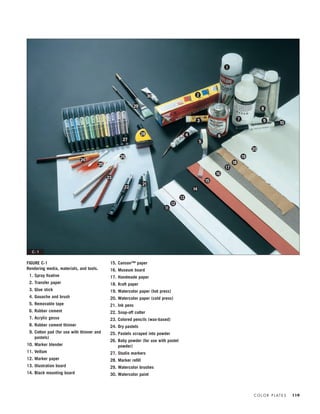
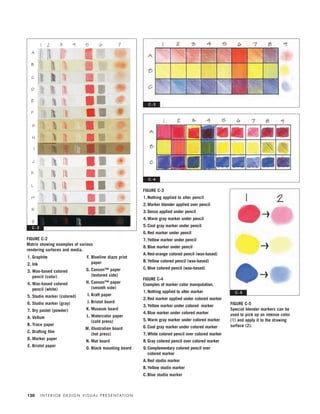
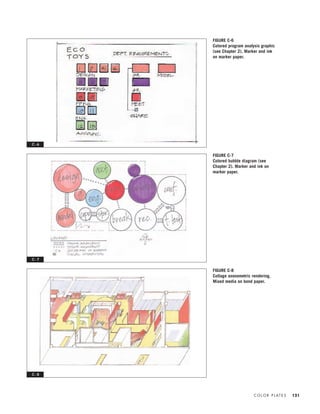
COLOR PLATES 119
SCALE MODELS 159
Introduction to Scale Models 159
Materials and Tools 160
Construction and Use of Models 171
PRESENTING MATERIALS AND FINISHES 181
Introduction to Materials Presentations 181
Materials and Media 183
Organization and Composition 186
Techniques and Methods of Presentation 191
PORTFOLIOS AND RESUMES 199
Graphic Design Components 199
The Resume 202
The Portfolio 220
The Digital Portfolio 222
APPENDIX ONE
DIRECTORY OF PROFESSIONALS FEATURED 227
APPENDIX TWO
DRAWING ELEVATIONS: A RESIDENTIAL CASE STUDY 228
APPENDIX THREE
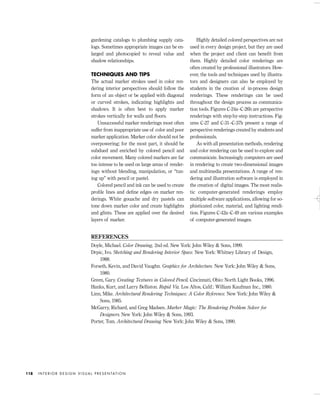
COLOR THEORY FOR RENDERING 230
APPENDIX FOUR
SCALE FIGURES AND ENTOURAGE 231
APPENDIX FIVE
TWO-POINT PERSPECTIVE GRID 234
APPENDIX SIX
FLOOR PLANS OF PROFESSIONAL CASE STUDY:
SCIENCE MUSEUM OF MINNESOTA 235
INDEX 236
IDVP 1 12/15/03 3:40 PM Page vi
This book, just like the first edition, compiles
the work of many hands (and keyboards) and
conversations. It has been made possible by the
generous contributions of numerous people, to
whom I would like to express my gratitude.
First, I must acknowledge my current and
former students, who have taught me volumes
and who continue give me the energy to keep
going. I must thank all of the former students
who contributed work to the first edition espe-
cially, including Theresa Isaacson, Leanne Lar-
son, Ardella Pieper, Cory Sherman, and Justin
Thomson. Denise Haertl, Dan Effenheim, Anne
(Cleary) Olsen, and Angela Ska, now profes-
sional designers, all willingly handed over
portfolios for inclusion in this edition. Current
students who contributed work and help in-
clude Kristy Bokelman, Anne Harmer, and
Randi Steinbrecher. And I thank former ex-
change students Elke Kalvelage, Jessica
Tebbe, and Dirk Olbrich for allowing me to in-
clude some of their fine work.
I have been amazed and touched by the
generosity of members of the design commu-
nity who shared time and contributed projects:
my friend Lynn Barnhouse at Meyer, Scherer
& Rockcastle Architects, who contributed a
great deal of work and gave hours of her time;
Jane Rademacher, Lisa Miller, and Bob Al-
bachten; and Thom Lasley, of RSP Architects.
Others who took time out of very busy sched-
ules to contribute include Thomas Oliphant;
Jim Smart, of Smart Associates; Jim Moeller, at
Arthur Shuster Inc.; Craig Beddow, of Beddow
Design; Deborah Kucera, of TKDA; Janet Law-
son, of Janet Lawson Architectural Illustration;
and Robert Lownes, of Design Visualizations;
Harris Birkeland; and Aj Dumas.
I must acknowledge and thank my col-
leagues at the University of Wisconsin–Stout.
Courtney Nystuen, a wonderful teacher and ar-
chitect, contributed in many ways. Bill Wikrent,
who is talented, knowledgeable, and very gener-
ous, deserves special thanks. And this edition
would not have been finished in this decade
without the gift of a sabbatical: thank you to the
Sabbatical Committee. Jack Zellner and Kristine
Recker Simpson deserve thanks for willingly
contributing their fine work.
This project would not have been possible
without the help of my husband, Roger Par-
enteau, support from our daughter, Anna, and
a fair amount of terror generated by young
Luc to keep things interesting.
vii
ACKNOWLEDGMENTS
IDVP 1 12/15/03 3:40 PM Page vii
IDVP 1 12/15/03 3:40 PM Page viii
The practice of interior design is complex and
continues to evolve. Technological and societal
changes fueled by the industrial revolution and
continued by more recent advancements in
technology have shaped the profession in deci-
sive ways. In a world that requires increasing
professional specialization, interior design has
gained recognition as an independent disci-
pline. Work done by groundbreaking interior
designers in the twentieth century has en-
hanced the built environment and increased
the visibility of the profession. The develop-
ment of educational standards, professional
organizations, a qualifying exam, and legisla-
tive certification has increased the quality and
credibility of practitioners and fostered design
excellence.
The design of interior environments re-
quires specialized methods of presentation,
which are often omitted in standard architec-
ture texts. This book identifies methods used
in the visual presentation of interior spaces
and articulates them in written and visual lan-
guage. Various phases of the design process
are discussed in order to reveal the connection
between process and presentation. Some often
overlooked basic principles of graphic design
and portfolio design are also discussed.
Intended as a primer on interior design vi-
sual communication, this book presents a
range of styles and techniques. The goal is to
provide students and practitioners with infor-
mation on visual presentation techniques and
a variety of methods and materials. It is im-
portant to note that this book is not intended to
impart ways of camouflaging poorly con-
ceived design work with tricky techniques.
This is not a rendering book; it is instead a
portfolio of methods of communication. Good
design requires, and deserves, adequate and
appropriate presentation.
My desire to write the first edition of this
book grew from an ongoing pedagogical need:
to show students a range of examples of pres-
entation techniques and styles. Often design
students look for the “right” way to create a
presentation, and this is a mistake because
there are many ways of creating successful
presentations. Interior design education has
suffered from a lack of documentation of the
many possible modes of presentation and a
lack of specialized information for students. I
have found that students exposed to a variety
of methods and specific examples create ap-
propriate and useful presentations, whereas
students left uninformed about the possibilities
often repeat the same lackluster or inappropri-
ate type of presentation project after project.
ix
INTRODUCTION
IDVP 1 12/15/03 3:40 PM Page ix
Unlike those found in many books on ren-
dering and presentation, many of the exam-
ples included here were executed by under-
graduate design students. I’ve included these
because I want students to see real examples
of developing skills. It is important for all de-
signers to develop drawing and sketching
skills. Drawing and model building should not
be reserved for the final presentation of fully
developed designs. Instead, sketching, draw-
ing, and model building must be seen as ways
of seeing and exploring throughout the design
process — from beginning to final presenta-
tion. I admit my desire to get interior designers
to draw (and draw and draw). It is the best way
to learn to visualize and develop good work.
Research for this edition made clear the sig-
nificant role computer-generated imagery
plays in current practice and in the academic
world. Most designers use computers in creat-
ing visual presentations. Despite this, hand
drawing continues to be a useful tool, particu-
larly in producing perspective drawings.
Quickly created perspective drawings offer the
benefit of providing designers a visualization
tool early in the design process, prior to the
time finalized design drawings are complete.
In addition, skills learned in drawing by hand
transfer directly to computer modeling. The
ability to create quick perspective sketches in
client conferences and in team meetings is a
highly useful tool; this is something that I have
heard many times from those hiring designers.
For these reasons, numerous examples of
quick sketching techniques are included. Ex-
amples of computer-generated three-dimen-
sional views are also provided because some
designers create these after refining the design
by hand sketching. I believe hand drawing and
computer-generated imagery can sit side by
side in the designer’s tool kit.
I have included some examples of work
done by professional illustrators, digital illus-
trators, and model makers to demonstrate
what is being done in current practice by spe-
cialists. The work is beautiful and highly pro-
fessional, and it depicts what top professionals
can produce. We can learn from this work and
allow it to influence our design drawings and
in-process presentations.
Most chapters begin with information
about specific materials and tools. Each pro-
vides written instruction in the text as well as
step-by-step illustrated instructions. In teach-
ing I’ve found that some students learn best by
reading and others by following brief graphic
guides. My goal is to provide instruction for a
variety of learning styles.
For the most part this book covers conven-
tional methods of drawing and presentation.
The one exception is the material on perspec-
tive, where I have focused on estimated per-
spective sketching. Estimated sketching re-
quires “eyeballing” perspectives, a method
that I have found works well for students, al-
though many educators find it horrifying. In
addition to estimated sketching, information
on more traditional methods of perspective
drawing is included.
The examples and projects presented here
range in scope from small residential student
projects to huge public interior spaces de-
signed by professionals. The projects range
from purely decorative treatment of interior el-
ements to space planning and interior architec-
ture. It is important to note that some of the
professional projects presented here are the
work of architects involved in the design of in-
terior space and exhibitions. This points to the
overlap of the two professions, the breadth of
current design practice, and some confusion
over what the design of interior space should
be called. When is it appropriate to use the
term interior architecture? When interior de-
sign? Certainly that debate cannot be ad-
dressed in a book on presentation methods. For
the book’s title, I chose to use the term interior
design because it describes the design of inte-
rior space, which is clearly a distinct area of
specialization.
I N T E R I O R D E S I G N V I S U A L P R E S E N TAT I O Nx
IDVP 1 12/15/03 3:40 PM Page x
INTRODUCTION
TO DRAWING
Interior design is a multifaceted and ever-
changing discipline. The practice of interior
design continues to evolve due to technological
as well as societal changes. Computers, the In-
ternet, and fax machines have deeply influ-
enced and changed its practice. For example,
use of computer-aided drafting and design
(CADD) is standard operating procedure in
current design practice, whereas 15 years ago
it was just beginning to gain in popularity.
In addition to undergoing rapid technologi-
cal advancement, the profession of interior de-
sign has grown in terms of scope of work, spe-
cialization, and the range of design practiced.
The growth of the profession, combined with
efforts toward standards and licensing, have
increased its legitimacy as a serious profes-
sional discipline.
Constant change in society and in one’s pro-
fession can be overwhelming and a bit frighten-
ing, and for that reason it is useful to consider
the elements that remain constant in an evolving
profession. In many ways, the design process it-
self remains constant — whether practiced with
a stick in the sand, a technical pen, or a power-
ful computer. There are many stories about de-
signers drawing preliminary sketches on cock-
tail napkins or cheeseburger wrappers, and
these stories lead us to a simple truth.
Professional designers conduct research,
take piles of information, inspiration, and hard
work, and wrap them all together in what is re-
ferred to as the design process, to create mean-
ingful and useful environments. A constant
and key factor in interior design is the fact that
human beings — and other living creatures —
occupy and move within interior spaces. To
create interior environments, professional de-
signers must engage in a process that involves
research, understanding, idea generation, eval-
uation, and documentation. These are signifi-
cant constants that exist in a changing world.
For the most part this book covers the
process designers engage in and the related
presentation techniques used in design commu-
nication. These processes and basic concepts
are consistent, whether generated manually or
by computer. Some examples included here
were created manually, whereas others were
computer generated. Regardless of how draw-
ings and graphics are generated, they are part
of a process of discovery, exploration, and
creation.
This chapter covers what is often referred
to as drafting, as well as other forms of two-di-
mensional graphics. The term DRAFTING refers
O R T H O G R A P H I C D R AW I N G S 1
ORTHOGRAPHIC
DRAWINGS
IDVP 1 12/15/03 3:40 PM Page 1
to measured drawings done with specialized
tools and equipment. The truth is that not all
drawings used in the process of interior design
are drawn with the aid of tools. Often those
drawings created in the preliminary stages of
the design process are rough sketches and in-
volve little use of drafting tools or equipment.
As designs are refined, there is clearly a need
for highly accurate, measured, and detailed
drawings, and these are drafted with tools.
This chapter presents the materials, equip-
ment, and tools used for manually drafted and
freehand design drawings, as well as an
overview of the most common drawings used
in interior design practice. The information
presented in this chapter is meant as an
overview, not a definitive drawing or drafting
reference.
MATERIALS, TOOLS,
AND EQUIPMENT
The graphics and drawings used in interior de-
sign practice vary, ranging from conceptual
sketches and rough layouts to measured tech-
nical drawings. The materials, tools, and
equipment used to create the variety of draw-
ings and graphics are numerous and ever pro-
liferating. The media and tools selected must
be appropriate to the task at hand. This means
that their proper selection requires careful con-
sideration of the drawing type and use, as well
as an understanding of the available products.
Currently many schools and most firms create
the majority of design drawings digitally,
using CADD programs. However, some stu-
dents begin the study of drafting by creating
drawings manually; for that reason a descrip-
tion of manual drawing tools and equipment
follows. Figure 1-1 illustrates commonly used
manual drafting and drawing materials and
equipment, which are discussed as follows.
DRAWING SURFACES
The type of drawing surface selected directly
affects the quality of the drawn image. Some
surfaces accept pencil and ink readily and
allow for clear, consistent imagery. Transparent
papers allow for diazo reproduction (blue-
printing) and can be used as an overlay to con-
tinue a drawing by transferring details from
one sheet to another. Drawings produced on
I N T E R I O R D E S I G N V I S U A L P R E S E N TAT I O N2
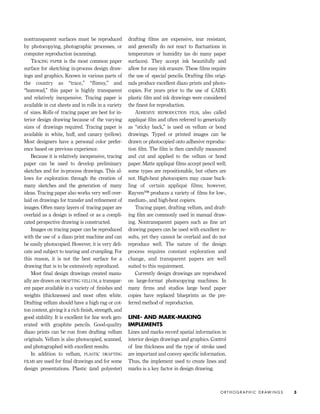
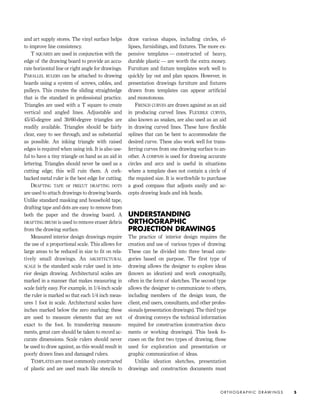
FIGURE 1-1
1. Compass
2. Architectural scales
3. Drafting film
4. Template
5. T square
6. Lettering triangle
7. Triangle
8. Appliqué film
9. Vellum
10. Tracing paper (roll)
11. Cork-backed ruler
12. Flexible curve
13. Drafting tape
14. Drafting dots
15. French curve
16. French curve
17. Adjustable triangle
18. Electric eraser
19. Eraser shield
20. Erasers
21. Dry-cleaning pad
22. Disposable ink pens
23. Technical pen
24. Lead holder
25. Lead pointer
26. Mechanical pencil
27. Wooden graphite pencils
28. Layout pencils
29. Drafting brush 1 - 1
1
2
3
4 5
6
7
8
9 10
11
12
13
14
15
1617
18
19
20
21
22
23
2425
26
27
28
29
IDVP 1 12/15/03 3:40 PM Page 2
nontransparent surfaces must be reproduced
by photocopying, photographic processes, or
computer reproduction (scanning).
TRACING PAPER is the most common paper
surface for sketching in-process design draw-
ings and graphics. Known in various parts of
the country as “trace,” “flimsy,” and
“bumwad,” this paper is highly transparent
and relatively inexpensive. Tracing paper is
available in cut sheets and in rolls in a variety
of sizes. Rolls of tracing paper are best for in-
terior design drawing because of the varying
sizes of drawings required. Tracing paper is
available in white, buff, and canary (yellow).
Most designers have a personal color prefer-
ence based on previous experience.
Because it is relatively inexpensive, tracing
paper can be used to develop preliminary
sketches and for in-process drawings. This al-
lows for exploration through the creation of
many sketches and the generation of many
ideas. Tracing paper also works very well over-
laid on drawings for transfer and refinement of
images. Often many layers of tracing paper are
overlaid as a design is refined or as a compli-
cated perspective drawing is constructed.
Images on tracing paper can be reproduced
with the use of a diazo print machine and can
be easily photocopied. However, it is very deli-
cate and subject to tearing and crumpling. For
this reason, it is not the best surface for a
drawing that is to be extensively reproduced.
Most final design drawings created manu-
ally are drawn on DRAFTING VELLUM, a transpar-
ent paper available in a variety of finishes and
weights (thicknesses) and most often white.
Drafting vellum should have a high rag or cot-
ton content, giving it a rich finish, strength, and
good stability. It is excellent for line work gen-
erated with graphite pencils. Good-quality
diazo prints can be run from drafting vellum
originals. Vellum is also photocopied, scanned,
and photographed with excellent results.
In addition to vellum, PLASTIC DRAFTING
FILMS are used for final drawings and for some
design presentations. Plastic (and polyester)
drafting films are expensive, tear resistant,
and generally do not react to fluctuations in
temperature or humidity (as do many paper
surfaces). They accept ink beautifully and
allow for easy ink erasure. These films require
the use of special pencils. Drafting film origi-
nals produce excellent diazo prints and photo-
copies. For years prior to the use of CADD,
plastic film and ink drawings were considered
the finest for reproduction.
ADHESIVE REPRODUCTION FILM, also called
appliqué film and often referred to generically
as “sticky back,” is used on vellum or bond
drawings. Typed or printed images can be
drawn or photocopied onto adhesive reproduc-
tion film. The film is then carefully measured
and cut and applied to the vellum or bond
paper. Matte appliqué films accept pencil well;
some types are repositionable, but others are
not. High-heat photocopiers may cause buck-
ling of certain appliqué films; however,
Rayven™ produces a variety of films for low-,
medium-, and high-heat copiers.
Tracing paper, drafting vellum, and draft-
ing film are commonly used in manual draw-
ing. Nontransparent papers such as fine art
drawing papers can be used with excellent re-
sults, yet they cannot be overlaid and do not
reproduce well. The nature of the design
process requires constant exploration and
change, and transparent papers are well
suited to this requirement.
Currently design drawings are reproduced
on large-format photocopying machines. In
many firms and studios large bond paper
copies have replaced blueprints as the pre-
ferred method of reproduction.
LINE- AND MARK-MAKING
IMPLEMENTS
Lines and marks record spatial information in
interior design drawings and graphics. Control
of line thickness and the type of stroke used
are important and convey specific information.
Thus, the implement used to create lines and
marks is a key factor in design drawing.
O R T H O G R A P H I C D R AW I N G S 3
IDVP 1 12/15/03 3:40 PM Page 3
GRAPHITE is mixed with clay and other ele-
ments to produce what are commonly called
“lead” pencils. Graphite pencils, used in design
drawing, are available in a range of hardnesses
based on the mixture of clay to graphite.
Graphite pencils and replaceable “leads” are
coded with a standard rating system: H stands
for hard, B stands for black (the softer leads).
The number found next to the H or B refers to
the level of hardness. For example, a 6B is
softer than a 2B; an 8H is very hard. F-rated
leads are at the center of the range, and HB
leads are slightly harder than Bs. The softer
leads are used in sketching and rendering,
whereas H, 2H, and sometimes F leads are
most commonly used in drafting. Polymer-
based leads, which are used on plastic and
polyester drafting films, are often graded dif-
ferently than graphite leads.
The graphite described above is used in a
variety of mark-making implements. WOODEN
DRAWING PENCILS involve a graphite mixture en-
cased in wood and are sharpened like standard
wooden writing pencils. MECHANICAL PENCILS
are hollow instruments that hold very fine
graphite leads. These are sold in a variety of
lead widths to create a range of line weights.
LEAD HOLDERS are hollow implements that ac-
cept thicker leads than mechanical pencils. Al-
though lead holders do not allow for any vari-
ety in lead widths, they do accept a range of
lead types in terms of softness. Lead holders
require the use of a specialized sharpener,
known as a LEAD POINTER.
Specialized colored drafting pencils and
leads can be used to develop drawings prior to
hard-lining them. NON-PHOTO-BLUE colored pen-
cils do not reproduce when photographed;
however, they sometimes reproduce when pho-
tocopied. NONPRINT colored pencils do not re-
produce in diazo prints. When appropriate,
both types of pencil can be used to lay out
drawings prior to completion.
One of the significant advantages of using
graphite pencils is the ease of erasing. Harder
leads are often the most difficult to erase,
whereas soft pencil marks are easily lifted with
gray kneaded erasers or pink erasers. Plastic
and film erasers can be used to remove marks
made with harder leads. A metal ERASER SHIELD
is used to protect the drawing surface from un-
wanted erasing. DRY CLEANING PADS, containing
art gum powder that sifts onto drawing sur-
faces, are available to keep drawings clean.
TECHNICAL PENS have tubular points and re-
fillable ink reservoirs. They are available in a
range of point sizes that allow for absolute
control of line weight. Because they employ
black ink and metal points, technical pens cre-
ate the finest line work of any drawing imple-
ment. They must be used with the appropriate
ink, as specified by the manufacturer.
DISPOSABLE TECHNICAL PENS combine a tubu-
lar support with a felt tip and are available in
a range of point sizes. These pens require no
maintenance or cleaning, making them easy to
use. Although disposable pens have been
known to skip, causing inconsistent line work,
they have improved a great deal recently and
are becoming very popular.
FELT-TIP PENS are available in a range of
styles and point sizes; they are often used in
sketching, exploration, and rendering. Felt-tip
pens are not generally used for refined drafted
drawings or working drawings.
Erasing ink marks is rather difficult and re-
quires special erasers. Hard plastic erasers can
remove ink. However, an ELECTRIC ERASER with
the appropriate eraser insert is most useful in
removing ink. Electric erasers are very effec-
tive but must always be used with an eraser
shield. Ink marks on film are erased more eas-
ily than those on vellum. Sharp razor blades
are sometimes used to scrape ink away from
drawing surfaces.
A quality DRAWING BOARD is required for the
creation of successful drawings. Serious stu-
dents must purchase a top-quality drawing
board if possible. The board should accommo-
date a minimum paper size of 24" by 36".
Drawing boards should be covered with a spe-
cialized vinyl drawing surface, sold at drafting
I N T E R I O R D E S I G N V I S U A L P R E S E N TAT I O N4
IDVP 1 12/15/03 3:40 PM Page 4
and art supply stores. The vinyl surface helps
to improve line consistency.
T SQUARES are used in conjunction with the
edge of the drawing board to provide an accu-
rate horizontal line or right angle for drawings.
PARALLEL RULERS can be attached to drawing
boards using a system of screws, cables, and
pulleys. This creates the sliding straightedge
that is the standard in professional practice.
Triangles are used with a T square to create
vertical and angled lines. Adjustable and
45/45-degree and 30/60-degree triangles are
readily available. Triangles should be fairly
clear, easy to see through, and as substantial
as possible. An inking triangle with raised
edges is required when using ink. It is also use-
ful to have a tiny triangle on hand as an aid in
lettering. Triangles should never be used as a
cutting edge; this will ruin them. A cork-
backed metal ruler is the best edge for cutting.
DRAFTING TAPE or PRECUT DRAFTING DOTS
are used to attach drawings to drawing boards.
Unlike standard masking and household tape,
drafting tape and dots are easy to remove from
both the paper and the drawing board. A
DRAFTING BRUSH is used to remove eraser debris
from the drawing surface.
Measured interior design drawings require
the use of a proportional scale. This allows for
large areas to be reduced in size to fit on rela-
tively small drawings. An ARCHITECTURAL
SCALE is the standard scale ruler used in inte-
rior design drawing. Architectural scales are
marked in a manner that makes measuring in
scale fairly easy. For example, in 1/4-inch scale
the ruler is marked so that each 1/4 inch meas-
ures 1 foot in scale. Architectural scales have
inches marked below the zero marking; these
are used to measure elements that are not
exact to the foot. In transferring measure-
ments, great care should be taken to record ac-
curate dimensions. Scale rulers should never
be used to draw against, as this would result in
poorly drawn lines and damaged rulers.
TEMPLATES are most commonly constructed
of plastic and are used much like stencils to
draw various shapes, including circles, el-
lipses, furnishings, and fixtures. The more ex-
pensive templates — constructed of heavy,
durable plastic — are worth the extra money.
Furniture and fixture templates work well to
quickly lay out and plan spaces. However, in
presentation drawings furniture and fixtures
drawn from templates can appear artificial
and monotonous.
FRENCH CURVES are drawn against as an aid
in producing curved lines. FLEXIBLE CURVES,
also known as snakes, are also used as an aid
in drawing curved lines. These have flexible
splines that can be bent to accommodate the
desired curve. These also work well for trans-
ferring curves from one drawing surface to an-
other. A COMPASS is used for drawing accurate
circles and arcs and is useful in situations
where a template does not contain a circle of
the required size. It is worthwhile to purchase
a good compass that adjusts easily and ac-
cepts drawing leads and ink heads.
UNDERSTANDING
ORTHOGRAPHIC
PROJECTION DRAWINGS
The practice of interior design requires the
creation and use of various types of drawing.
These can be divided into three broad cate-
gories based on purpose. The first type of
drawing allows the designer to explore ideas
(known as ideation) and work conceptually,
often in the form of sketches. The second type
allows the designer to communicate to others,
including members of the design team, the
client, end users, consultants, and other profes-
sionals (presentation drawings). The third type
of drawing conveys the technical information
required for construction (construction docu-
ments or working drawings). This book fo-
cuses on the first two types of drawing, those
used for exploration and presentation or
graphic communication of ideas.
Unlike ideation sketches, presentation
drawings and construction documents must
O R T H O G R A P H I C D R AW I N G S 5
IDVP 1 12/15/03 3:40 PM Page 5
use certain standard drawing conventions to
clearly communicate and delineate the pro-
posed design. Unlike fine art drawing, design
drawing requires adherence to conventions,
proportional scale, and accuracy of line. De-
sign drawings are highly standardized so that
they carry universal meaning. Or, as one early
reviewer of this book put it, “Design drawing
is much like a language; the drawings must
convey the designer’s meaning clearly.”
The design drawings most commonly used
in scaled delineation of interior environments
are floor plans, interior elevations, sections,
and reflected ceiling plans. These drawings,
called ORTHOGRAPHIC PROJECTIONS, are created
by projecting information about an object onto
an imaginary plane known as the PICTURE
PLANE. This direct projection of an object’s di-
mensions allows orthographic projections to
retain shape and proportion, making these
drawings accurate and precise. Orthographic
projection creates fragmentary views of an ob-
ject, resulting in the need for multiple drawings.
This means that because of their fragmentary
nature orthographic projections become parts
of a system and are mutually dependent on
one another. By their nature, orthographic pro-
jections appear flat and lack the three-dimen-
sional quality of perspective drawings. One
way to visualize orthographic projection is to
imagine an object enclosed in a transparent
box. Each transparent plane of the enclosing
box serves as the picture plane for that face of
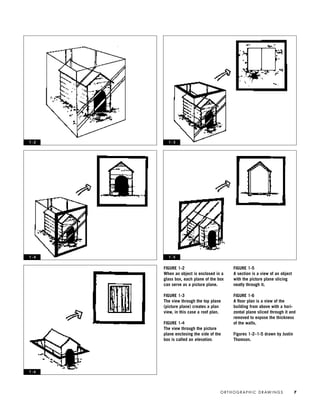
the object (Figure 1-2).
The view through the top plane of the en-
closing box is called a PLAN. In a plan view only
those elements seen when looking directly
down at the object are drawn. Figure 1-3 de-
picts a roof plan.
The views through the picture planes that
form the sides of the enclosing box are called
ELEVATIONS. Elevations depict only what is vis-
ible when viewed directly through the picture
plane (Figure 1-4).
A SECTION portrays a view of the object or
building with a vertical plane sliced through it
and removed. One way of understanding sec-
tion views is to imagine that a very sharp
plane has been inserted into the object or
building, cutting neatly into it and revealing
the structure and complexity of the object’s
form (Figure 1-5).
A floor plan, also known as a horizontal
section, portrays a view of the building with a
horizontal plane sliced through it and removed,
exposing the thickness of the walls and the el-
ements below the cut line such as floor finishes
and furniture (Figure 1-6).
ORTHOGRAPHIC
PROJECTION DRAWINGS
FOR INTERIOR
ENVIRONMENTS
The special orthographic projection drawings
used in delineation of interior environments
are based on the concepts mentioned to this
point. These drawings impart information par-
ticular to interior construction.
FLOOR PLANS
A FLOOR PLAN is a view as though looking
straight down at a room or building after a
horizontal cut has been made through the
structure. As stated previously, a floor plan
can also be called a HORIZONTAL BUILDING SEC-
TION because the drawing is created by cutting
through the building horizontally at roughly
four to five feet above floor level and removing
the top half. With the building cut open and
viewed from above, important information
such as wall, door, and window locations can
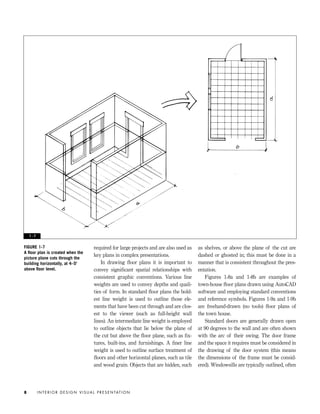
be drawn to scale (Figure 1-7). Additional de-
sign elements such as fixtures and furniture
can be drawn in appropriate locations to scale
in a floor plan.
In the United States floor plans are most
often drawn at a scale of 1⁄8" = 1'0" or
1/4" = 1'0", although this varies according to
project conditions. Larger-scale floor plans are
useful for presentation of complex or highly
detailed spaces. Smaller-scale floor plans are
I N T E R I O R D E S I G N V I S U A L P R E S E N TAT I O N6
IDVP 1 12/15/03 3:40 PM Page 6
FIGURE 1-5
A section is a view of an object
with the picture plane slicing
neatly through it.
FIGURE 1-6
A floor plan is a view of the
building from above with a hori-
zontal plane sliced through it and
removed to expose the thickness
of the walls.
Figures 1-2–1-5 drawn by Justin
Thomson.
1 - 6
O R T H O G R A P H I C D R AW I N G S 7
FIGURE 1-2
When an object is enclosed in a
glass box, each plane of the box
can serve as a picture plane.
FIGURE 1-3
The view through the top plane
(picture plane) creates a plan
view, in this case a roof plan.
FIGURE 1-4
The view through the picture
plane enclosing the side of the
box is called an elevation.
1 - 2 1 - 3
1 - 51 - 4
IDVP 1 12/15/03 3:40 PM Page 7
required for large projects and are also used as
key plans in complex presentations.
In drawing floor plans it is important to
convey significant spatial relationships with
consistent graphic conventions. Various line
weights are used to convey depths and quali-
ties of form. In standard floor plans the bold-
est line weight is used to outline those ele-
ments that have been cut through and are clos-
est to the viewer (such as full-height wall
lines). An intermediate line weight is employed
to outline objects that lie below the plane of
the cut but above the floor plane, such as fix-
tures, built-ins, and furnishings. A finer line
weight is used to outline surface treatment of
floors and other horizontal planes, such as tile
and wood grain. Objects that are hidden, such
as shelves, or above the plane of the cut are
dashed or ghosted in; this must be done in a
manner that is consistent throughout the pres-
entation.
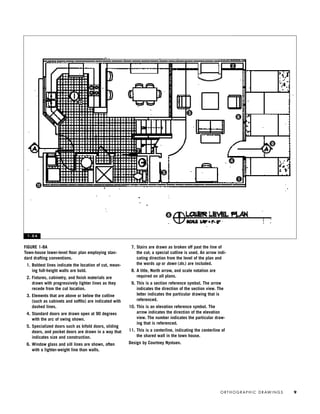
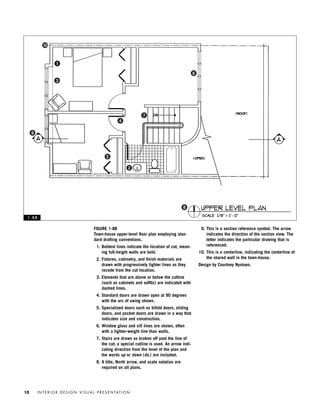
Figures 1-8a and 1-8b are examples of
town-house floor plans drawn using AutoCAD
software and employing standard conventions
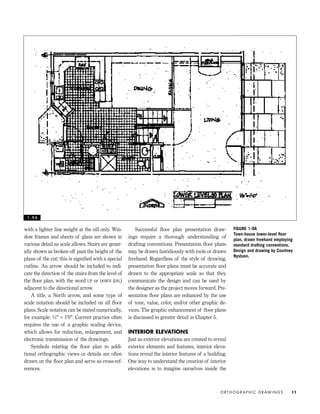
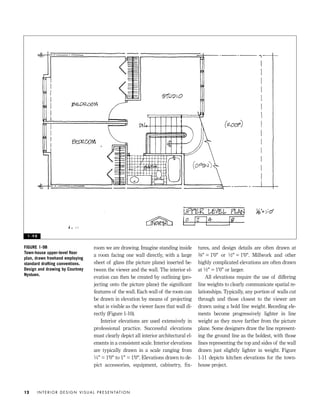
and reference symbols. Figures 1-9a and 1-9b
are freehand-drawn (no tools) floor plans of
the town house.
Standard doors are generally drawn open
at 90 degrees to the wall and are often shown
with the arc of their swing. The door frame
and the space it requires must be considered in
the drawing of the door system (this means
the dimensions of the frame must be consid-
ered). Windowsills are typically outlined, often
I N T E R I O R D E S I G N V I S U A L P R E S E N TAT I O N8
FIGURE 1-7
A floor plan is created when the
picture plane cuts through the
building horizontally, at 4–5'
above floor level.
1 - 7
IDVP 1 12/15/03 3:40 PM Page 8
O R T H O G R A P H I C D R AW I N G S 9
FIGURE 1-8A
Town-house lower-level floor plan employing stan-
dard drafting conventions.
1. Boldest lines indicate the location of cut, mean-
ing full-height walls are bold.
2. Fixtures, cabinetry, and finish materials are
drawn with progressively lighter lines as they
recede from the cut location.
3. Elements that are above or below the cutline
(such as cabinets and soffits) are indicated with
dashed lines.
4. Standard doors are drawn open at 90 degrees
with the arc of swing shown.
5. Specialized doors such as bifold doors, sliding
doors, and pocket doors are drawn in a way that
indicates size and construction.
6. Window glass and sill lines are shown, often
with a lighter-weight line than walls.
7. Stairs are drawn as broken off past the line of
the cut; a special cutline is used. An arrow indi-
cating direction from the level of the plan and
the words up or down (dn.) are included.
8. A title, North arrow, and scale notation are
required on all plans.
9. This is a section reference symbol. The arrow
indicates the direction of the section view. The
letter indicates the particular drawing that is
referenced.
10. This is an elevation reference symbol. The
arrow indicates the direction of the elevation
view. The number indicates the particular draw-
ing that is referenced.
11. This is a centerline, indicating the centerline of
the shared wall in the town house.
Design by Courtney Nystuen.
1 - 8 A
2
3
1
4
5
6
7
8
9
10
11
IDVP 1 12/15/03 3:40 PM Page 9
I N T E R I O R D E S I G N V I S U A L P R E S E N TAT I O N10
FIGURE 1-8B
Town-house upper-level floor plan employing stan-
dard drafting conventions.
1. Boldest lines indicate the location of cut, mean-
ing full-height walls are bold.
2. Fixtures, cabinetry, and finish materials are
drawn with progressively lighter lines as they
recede from the cut location.
3. Elements that are above or below the cutline
(such as cabinets and soffits) are indicated with
dashed lines.
4. Standard doors are drawn open at 90 degrees
with the arc of swing shown.
5. Specialized doors such as bifold doors, sliding
doors, and pocket doors are drawn in a way that
indicates size and construction.
6. Window glass and sill lines are shown, often
with a lighter-weight line than walls.
7. Stairs are drawn as broken off past the line of
the cut; a special cutline is used. An arrow indi-
cating direction from the level of the plan and
the words up or down (dn.) are included.
8. A title, North arrow, and scale notation are
required on all plans.
9. This is a section reference symbol. The arrow
indicates the direction of the section view. The
letter indicates the particular drawing that is
referenced.
10. This is a centerline, indicating the centerline of
the shared wall in the town-house.
Design by Courtney Nystuen.
1 - 8 B
1
2
3
4
5
6
7
8
9
10
IDVP 1 12/15/03 3:40 PM Page 10
with a lighter line weight at the sill only. Win-
dow frames and sheets of glass are shown in
various detail as scale allows. Stairs are gener-
ally shown as broken off past the height of the
plane of the cut; this is signified with a special
cutline. An arrow should be included to indi-
cate the direction of the stairs from the level of
the floor plan, with the word UP or DOWN (DN.)
adjacent to the directional arrow.
A title, a North arrow, and some type of
scale notation should be included on all floor
plans. Scale notation can be stated numerically,
for example: 1⁄4" = 1'0". Current practice often
requires the use of a graphic scaling device,
which allows for reduction, enlargement, and
electronic transmission of the drawings.
Symbols relating the floor plan to addi-
tional orthographic views or details are often
drawn on the floor plan and serve as cross-ref-
erences.
Successful floor plan presentation draw-
ings require a thorough understanding of
drafting conventions. Presentation floor plans
may be drawn fastidiously with tools or drawn
freehand. Regardless of the style of drawing,
presentation floor plans must be accurate and
drawn to the appropriate scale so that they
communicate the design and can be used by
the designer as the project moves forward. Pre-
sentation floor plans are enhanced by the use
of tone, value, color, and/or other graphic de-
vices. The graphic enhancement of floor plans
is discussed in greater detail in Chapter 5.
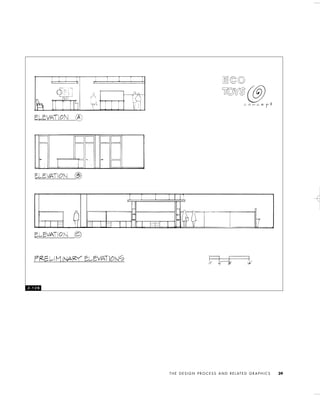
INTERIOR ELEVATIONS
Just as exterior elevations are created to reveal
exterior elements and features, interior eleva-
tions reveal the interior features of a building.
One way to understand the creation of interior
elevations is to imagine ourselves inside the
O R T H O G R A P H I C D R AW I N G S 11
FIGURE 1-9A
Town-house lower-level floor
plan, drawn freehand employing
standard drafting conventions.
Design and drawing by Courtney
Nystuen.
1 - 9 A
IDVP 1 12/15/03 3:40 PM Page 11
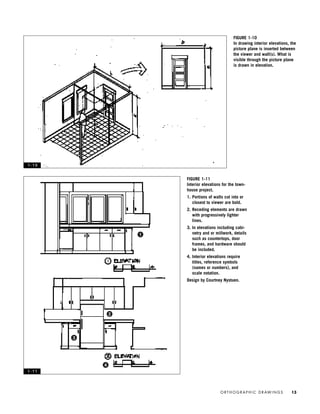
room we are drawing. Imagine standing inside
a room facing one wall directly, with a large
sheet of glass (the picture plane) inserted be-
tween the viewer and the wall. The interior el-
evation can then be created by outlining (pro-
jecting onto the picture plane) the significant
features of the wall. Each wall of the room can
be drawn in elevation by means of projecting
what is visible as the viewer faces that wall di-
rectly (Figure 1-10).
Interior elevations are used extensively in
professional practice. Successful elevations
must clearly depict all interior architectural el-
ements in a consistent scale. Interior elevations
are typically drawn in a scale ranging from
1⁄4" = 1'0" to 1" = 1'0". Elevations drawn to de-
pict accessories, equipment, cabinetry, fix-
tures, and design details are often drawn at
3⁄8" = 1'0" or 1⁄2" = 1'0". Millwork and other
highly complicated elevations are often drawn
at 1⁄2" = 1'0" or larger.
All elevations require the use of differing
line weights to clearly communicate spatial re-
lationships. Typically, any portion of walls cut
through and those closest to the viewer are
drawn using a bold line weight. Receding ele-
ments become progressively lighter in line
weight as they move farther from the picture
plane. Some designers draw the line represent-
ing the ground line as the boldest, with those
lines representing the top and sides of the wall
drawn just slightly lighter in weight. Figure
1-11 depicts kitchen elevations for the town-
house project.
I N T E R I O R D E S I G N V I S U A L P R E S E N TAT I O N12
FIGURE 1-9B
Town-house upper-level floor
plan, drawn freehand employing
standard drafting conventions.
Design and drawing by Courtney
Nystuen.
1 - 9 B
IDVP 1 12/15/03 3:40 PM Page 12
O R T H O G R A P H I C D R AW I N G S 13
FIGURE 1-10
In drawing interior elevations, the
picture plane is inserted between
the viewer and wall(s). What is
visible through the picture plane
is drawn in elevation.
FIGURE 1-11
Interior elevations for the town-
house project.
1. Portions of walls cut into or
closest to viewer are bold.
2. Receding elements are drawn
with progressively lighter
lines.
3. In elevations including cabi-
netry and or millwork, details
such as countertops, door
frames, and hardware should
be included.
4. Interior elevations require
titles, reference symbols
(names or numbers), and
scale notation.
Design by Courtney Nystuen.
1 - 1 0
1 - 1 1
1
2
3
4
IDVP 1 12/15/03 3:40 PM Page 13
Interior elevations can be difficult for be-
ginning students to master. However, they de-
serve full attention because accurate elevations
are necessary to successfully communicate key
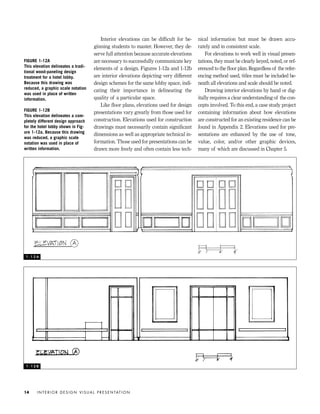
elements of a design. Figures 1-12a and 1-12b
are interior elevations depicting very different
design schemes for the same lobby space, indi-
cating their importance in delineating the
quality of a particular space.
Like floor plans, elevations used for design
presentations vary greatly from those used for
construction. Elevations used for construction
drawings must necessarily contain significant
dimensions as well as appropriate technical in-
formation. Those used for presentations can be
drawn more freely and often contain less tech-
nical information but must be drawn accu-
rately and in consistent scale.
For elevations to work well in visual presen-
tations, they must be clearly keyed, noted, or ref-
erenced to the floor plan. Regardless of the refer-
encing method used, titles must be included be-
neath all elevations and scale should be noted.
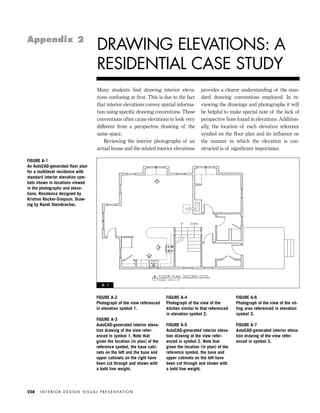
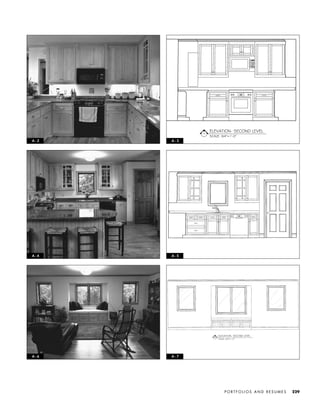
Drawing interior elevations by hand or dig-
itally requires a clear understanding of the con-
cepts involved. To this end, a case study project
containing information about how elevations
are constructed for an existing residence can be
found in Appendix 2. Elevations used for pre-
sentations are enhanced by the use of tone,
value, color, and/or other graphic devices,
many of which are discussed in Chapter 5.
I N T E R I O R D E S I G N V I S U A L P R E S E N TAT I O N14
FIGURE 1-12A
This elevation delineates a tradi-
tional wood-paneling design
treatment for a hotel lobby.
Because this drawing was
reduced, a graphic scale notation
was used in place of written
information.
FIGURE 1-12B
This elevation delineates a com-
pletely different design approach
for the hotel lobby shown in Fig-
ure 1-12a. Because this drawing
was reduced, a graphic scale
notation was used in place of
written information.
1 - 1 2 A
1 - 1 2 B
IDVP 1 12/15/03 3:40 PM Page 14
SECTIONS
As described earlier, a building section is a
view created as though a vertical plane has cut
through the building and been removed. Unlike
interior elevations, which depict only what oc-
curs inside the interior, sections can expose the
structure of the building. In drawing sections,
it is important to include the outline of the
structural elements as well as the internal con-
figuration of the interior space. Sections re-
quire varied line weights as a means of describ-
ing depths and spatial relationships. It is typi-
cal to show what is cut through, and therefore
closest to the viewer, in the boldest line weight;
receding features and details are drawn using
progressively lighter line weights.
It is important to consider carefully the
most useful location (or locations) of the build-
ing to show in section. The section should be
cut through the building as a single continuous
plane. Sections should expose and convey im-
portant interior relationships and details such
as doors, windows, changes in floor level, ceil-
ing heights, and, in some cases, finish material
locations.
Design and presentation sections differ
greatly from construction sections. Construc-
tion sections require technical information to
communicate information about building sys-
tems. In contrast, design sections and presen-
tation sections focus on form, finish materials,
and definition of interior space. For sections to
work well in visual presentations, they must be
clearly keyed, noted, or referenced to the ap-
propriate floor plan. Generally, sections are ref-
erenced to the floor plan with use of a symbol
that denotes the locations of the vertical cut.
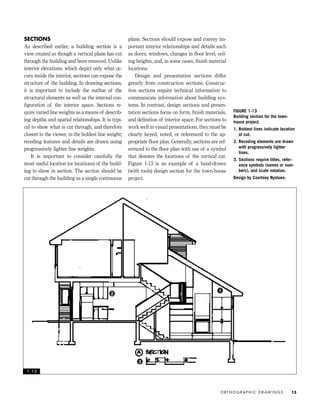
Figure 1-13 is an example of a hand-drawn
(with tools) design section for the town-house
project.
O R T H O G R A P H I C D R AW I N G S 15
FIGURE 1-13
Building section for the town-
house project.
1. Boldest lines indicate location
of cut.
2. Receding elements are drawn
with progressively lighter
lines.
3. Sections require titles, refer-
ence symbols (names or num-
bers), and scale notation.
Design by Courtney Nystuen.
1 - 1 3
1
2
3
IDVP 1 12/15/03 3:40 PM Page 15
REFLECTED CEILING PLANS
REFLECTED CEILING PLANS are often used in con-
junction with floor plans, elevations, and sec-
tions to communicate interior design. Reflected
ceiling plans communicate important informa-
tion about the design of the ceiling, such as
materials, layout and locations of fixtures, and
ceiling heights. A reflected ceiling plan is
drawn as though a giant mirror were on the
floor reflecting the elements located on the ceil-
ing. The use of reflective imagery allows for
the ceiling plan to have exactly the same orien-
tation as the floor plan.
There is often a distinction between ceiling
plans used for presentation and those used for
construction. Typically, ceilings plans created
for construction are highly technical and in-
clude a great deal of information. Reflected
ceiling plans used in design presentations can
be simplified. Most often reflected ceiling plans
used in presentations include simplified light-
ing information, ceiling heights, and finish ma-
terials, whereas precisely measured, complex
technical lighting plans are required for con-
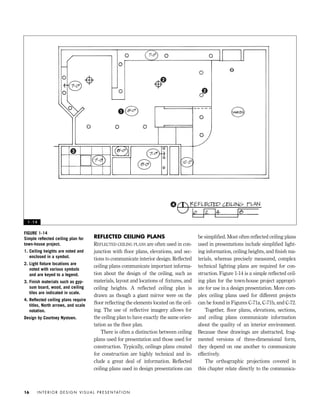
struction. Figure 1-14 is a simple reflected ceil-
ing plan for the town-house project appropri-
ate for use in a design presentation. More com-
plex ceiling plans used for different projects
can be found in Figures C-71a, C-71b, and C-72.
Together, floor plans, elevations, sections,
and ceiling plans communicate information
about the quality of an interior environment.
Because these drawings are abstracted, frag-
mented versions of three-dimensional form,
they depend on one another to communicate
effectively.
The orthographic projections covered in
this chapter relate directly to the communica-
I N T E R I O R D E S I G N V I S U A L P R E S E N TAT I O N16
FIGURE 1-14
Simple reflected ceiling plan for
town-house project.
1. Ceiling heights are noted and
enclosed in a symbol.
2. Light fixture locations are
noted with various symbols
and are keyed to a legend.
3. Finish materials such as gyp-
sum board, wood, and ceiling
tiles are indicated in scale.
4. Reflected ceiling plans require
titles, North arrows, and scale
notation.
Design by Courtney Nystuen.
1 - 1 4
1
2
2
3
4
IDVP 1 12/15/03 3:40 PM Page 16
tion and design of interior space. Differing ver-
sions of orthographic projections are used for
construction and presentation, but they are
used in one form or another on virtually all
projects.
Additional types of orthographic drawing
are used to communicate the features of build-
ings and building sites. Site plans, foundation
plans, demolition plans, roof plans, framing
plans, exterior elevations, wall sections, and
design details are also used in the design of
buildings. Designers of interior space must be
knowledgeable about the nature of these draw-
ings, how they are created, and how they relate
to the interior architecture of a building.
LETTERING
Traditionally, floor plans, elevations, and sec-
tions contained notes and dimensions written
in a standardized style of hand lettering. How-
ever, recent changes in technology allow for
creation of type that can be applied to hand-
drawn orthographic projections. Lettering and
type can be computer generated, printed on ad-
hesive reproduction film (“sticky back”), and
applied to drawings. Lettering is also created
by specialized machines (lettering machines)
that print on adhesive-backed tape that can be
applied to drawings. Lettering machines can
be used to produce type in a range of sizes,
styles, and colors. In addition, all of the com-
O R T H O G R A P H I C D R AW I N G S 17
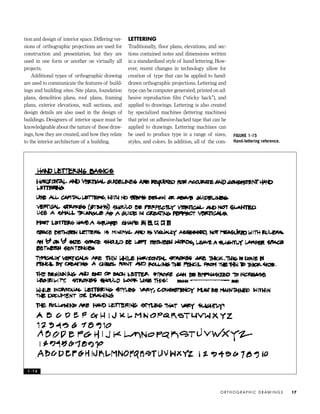
FIGURE 1-15
Hand-lettering reference.
1 - 1 4
IDVP 1 12/15/03 3:40 PM Page 17
monly used CADD programs allow for consis-
tent, standardized type to be readily applied to
the appropriate location on a drawing.
Even with these changes in technology, it is
useful to develop the ability to hand-letter in a
consistent standardized style. Many designers
still create presentation drawings by hand, and
for the sake of visual consistency, hand letter-
ing is crucial. Hand lettering is also often used
on quick sketches and design details, and for
dimensions and revisions of drawings.
There are some basic rules for lettering de-
sign drawings, as well as some stylistic ele-
ments that influence letter form. Guidelines are
required for all lettering locations. Horizontal
guidelines create the lines on which the letter-
ing rests. Consistent spacing between the lines
of lettering is required. Vertical guidelines
must be drawn so that the lines of type are
aligned consistently. Lettering for design draw-
ings is typically all capitals, allowing all letters
to fit within a single pair of guidelines, with no
tips or tails above or below the guidelines. Let-
ters should have perfectly vertical strokes; the
vertical strokes should not slant to the left or to
the right. A tiny lettering triangle is used as a
straightedge in making vertical strokes. Figure
1-15 is a hand-lettering reference.
DIMENSIONS
Dimensions, required on all construction draw-
ings, are sometimes necessary on drawings
used for presentation purposes. Their inclu-
sion is based on the project and the presenta-
tion audience. Dimensions must be accurate,
complete, and readable. Horizontal dimensions
should read across the sheet from left to right.
Vertical dimensions must read from the left-
hand edge so as not to require rotating the
drawing in a variety of directions.
Dimension lines should be of a thin, crisp
line weight that sets them apart from wall and
other construction lines. The lines leading
from the area dimensioned to the dimension
lines (known as leader lines) should be spaced
slightly apart from construction lines.
Dimensions should be written above the di-
mension lines, so that they are underlined by
them. Dimensions are best written in feet and
inches. For example, 2'-4" is written, not 28".
The single exception is made for items meas-
uring less than one foot; these are listed in
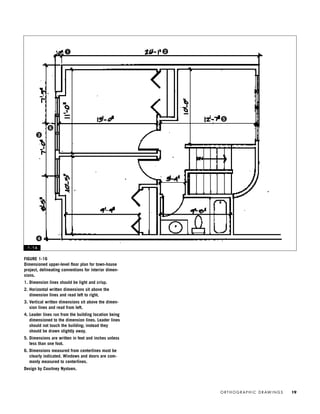
inches only. Figure 1-16 is a town-house
upper-level floor plan using standard dimen-
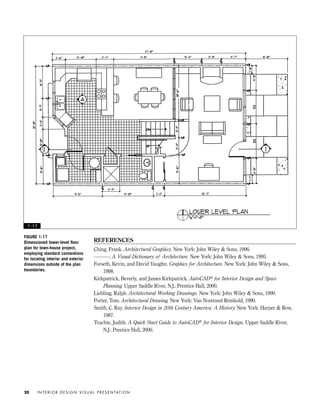
sioning conventions for interior. Figure 1-17 is
a town-house lower-level floor plan employ-
ing standard conventions for locating interior
and exterior dimensions outside of the plan
boundaries.
COMPUTER-AIDED DRAFTING
AND DESIGN (CADD)
It is important to note that the conceptual
basis for orthographic drawings and drafting
conventions is the same whether created by
hand or through the use of electronic tools.
The meaning communicated in a floor plan is
the same whether the drawing is created by
hand or with the use of a CADD program.
While the debate rages on as to the “best”
CADD program, most of the commercial de-
sign firms that I have interviewed use Auto-
CAD® software and expect entry-level design-
ers to have a working knowledge of it. I have
noted more variation in terms of CADD soft-
ware used by residential design firms. My
many interviews with those who hire profes-
sional interior designers have consistently
shown that all employers expect recent gradu-
ates to come equipped with high-level CADD
skills. Clearly this book is not the guide to any
software program; instead the focus is on the
concepts and conventions that convey infor-
mation in design drawings. Some recently pub-
lished AutoCAD guides have proven highly
useful, and those are listed in the references.
I N T E R I O R D E S I G N V I S U A L P R E S E N TAT I O N18
IDVP 1 12/15/03 3:40 PM Page 18
O R T H O G R A P H I C D R AW I N G S 19
FIGURE 1-16
Dimensioned upper-level floor plan for town-house
project, delineating conventions for interior dimen-
sions.
1. Dimension lines should be light and crisp.
2. Horizontal written dimensions sit above the
dimension lines and read left to right.
3. Vertical written dimensions sit above the dimen-
sion lines and read from left.
4. Leader lines run from the building location being
dimensioned to the dimension lines. Leader lines
should not touch the building; instead they
should be drawn slightly away.
5. Dimensions are written in feet and inches unless
less than one foot.
6. Dimensions measured from centerlines must be
clearly indicated. Windows and doors are com-
monly measured to centerlines.
Design by Courtney Nystuen.
1 - 1 6
1 2
3
4
5
6
IDVP 1 12/15/03 3:40 PM Page 19
REFERENCES
Ching, Frank. Architectural Graphics. New York: John Wiley & Sons, 1996.
———. A Visual Dictionary of Architecture. New York: John Wiley & Sons, 1995.
Forseth, Kevin, and David Vaughn. Graphics for Architecture. New York: John Wiley & Sons,
1998.
Kirkpatrick, Beverly, and James Kirkpatrick. AutoCAD® for Interior Design and Space
Planning. Upper Saddle River, N.J.: Prentice Hall, 2000.
Liebling, Ralph. Architectural Working Drawings. New York: John Wiley & Sons, 1990.
Porter, Tom. Architectural Drawing. New York: Van Nostrand Reinhold, 1990.
Smith, C. Ray. Interior Design in 20th Century America: A History. New York: Harper & Row,
1987.
Trachte, Judith. A Quick Start Guide to AutoCAD® for Interior Design. Upper Saddle River,
N.J.: Prentice Hall, 2000.
I N T E R I O R D E S I G N V I S U A L P R E S E N TAT I O N20
FIGURE 1-17
Dimensioned lower-level floor
plan for town-house project,
employing standard conventions
for locating interior and exterior
dimensions outside of the plan
boundaries.
1 - 1 7
IDVP 1 12/15/03 3:40 PM Page 20
INTRODUCTION TO
THE DESIGN PROCESS
The complexity of the design process requires
that at various points along the way designers
communicate aspects and outcomes of the
process to clients and consultants. Like profes-
sionals, students must present in-process proj-
ects to team members, instructors, and guest
critics. Visual presentations must vary to ac-
commodate the process of design and to com-
municate both process and outcome.
In Interior Design Illustrated, Francis Ching
identifies three basic stages of design process:
analysis, synthesis, and evaluation. According
to Ching, analysis involves defining and under-
standing the problem; synthesis involves the
formulation of possible solutions; and evalua-
tion involves a critical review of the strengths
and weaknesses of the proposed solutions.
Interestingly, these three basic stages of de-
sign process are used by design practitioners
in a variety of disciplines. Industrial design-
ers, graphic designers, exhibition designers,
and others often engage in a similar process.
Of course, the design disciplines vary a great
deal in terms of professional practice and final
outcome. For this reason, actual interior design
process and project phases are quite distinct
and are more elaborate than the three basic
stages may indicate.
For purposes of contractual organization,
the process of design engaged in by architects
and interior designers in the United States has
been divided into five basic project phases: (1)
PROGRAMMING, (2) SCHEMATIC DESIGN, (3) DESIGN
DEVELOPMENT, (4) CONSTRUCTION DOCUMENTA-
TION, and (5) CONTRACT ADMINISTRATION. These
phases are derived from the American Insti-
tute of Architects (AIA) Owner-Architect
Agreement for Interior Design Services and
the American Society of Interior Designers
(ASID) Interior Design Services Agreement.
Both of these documents serve as contracts
for design services and reflect the current de-
sign process and project management in the
United States. Figure 2-1 is a description of
design phases and related visual presentation
methods.
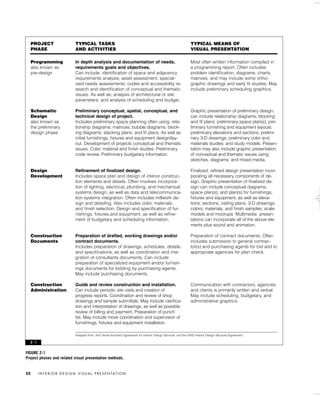
Peña, Parshall, and Kelly, writing in Prob-
lem Seeking, identify the actual design process
as taking place in the first three project
phases. They state that “programming is part
of the total design process but is separate
from schematic design.” The authors go on to
link schematic design and design develop-
ment as the second and third phases of the
total design process. This chapter is intended
as an exploration of the three phases of the
design process identified by Peña, Parshall,
Kelly, and others and as a study of the draw-
T H E D E S I G N P R O C E S S A N D R E L AT E D G R A P H I C S 21
THE DESIGN PROCESS
AND RELATED
GRAPHICS
IDVP 2 5/27/03 4:09 PM Page 21
I N T E R I O R D E S I G N V I S U A L P R E S E N TAT I O N22
FIGURE 2-1
Project phases and related visual presentation methods.
2 - 1
PROJECT
PHASE
Programming
also known as
pre-design
Schematic
Design
also known as
the preliminary
design phase
Design
Development
Construction
Documents
Construction
Administration
TYPICAL TASKS
AND ACTIVITIES
In depth analysis and documentation of needs,
requirements goals and objectives.
Can include: identification of space and adjacency
requirements analysis; asset assessment; special-
ized needs assessments; codes and accessibility re-
search and identification of conceptual and thematic
issues. As well as; analysis of architectural or site
parameters; and analysis of scheduling and budget.
Preliminary conceptual, spatial, conceptual, and
technical design of project.
Includes preliminary space planning often using; rela-
tionship diagrams; matrices; bubble diagrams; block-
ing diagrams; stacking plans; and fit plans. As well as
initial furnishings, fixtures and equipment design/lay-
out. Development of projects conceptual and thematic
issues. Color, material and finish studies. Preliminary
code review. Preliminary budgetary information.
Refinement of finalized design.
Includes space plan and design of interior construc-
tion elements and details. Often involves incorpora-
tion of lighting, electrical, plumbing, and mechanical
systems design; as well as data and telecommunica-
tion systems integration. Often includes millwork de-
sign and detailing. Also includes color, materials,
and finish selection. Design and specification of fur-
nishings, fixtures,and equipment, as well as refine-
ment of budgetary and scheduling information.
Preparation of drafted, working drawings and/or
contract documents.
Includes preparation of drawings, schedules, details,
and specifications, as well as coordination and inte-
gration of consultants documents. Can include
preparation of specialized equipment and/or furnish-
ings documents for bidding by purchasing agents.
May include purchasing documents.
Guide and review construction and installation.
Can include periodic site visits and creation of
progress reports. Coordination and review of shop
drawings and sample submittals. May include clarifica-
tion and interpretation of drawings, as well as possible
review of billing and payment. Preparation of punch
list. May include move coordination and supervision of
furnishings, fixtures and equipment installation.
TYPICAL MEANS OF
VISUAL PRESENTATION
Most often written information compiled in
a programming report. Often includes
problem identification, diagrams, charts,
matrixes, and may include some ortho-
graphic drawings and early fit studies. May
include preliminary scheduling graphics.
Graphic presentation of preliminary design;
can include relationship diagrams; blocking
and fit plans; preliminary space plan(s); pre-
liminary furnishing and equipment layouts;
preliminary elevations and sections; prelimi-
nary 3-D drawings; preliminary color and
materials studies; and study models. Presen-
tation may also include graphic presentation
of conceptual and thematic issues using
sketches, diagrams, and mixed media.
Finalized, refined design presentation incor-
porating all necessary components of de-
sign. Graphic presentation of finalized de-
sign can include conceptual diagrams;
space plan(s); and plan(s) for furnishings,
fixtures and equipment, as well as eleva-
tions; sections; ceiling plans; 3-D drawings;
colors, materials, and finish samples; scale
models and mockups. Multimedia presen-
tations can incorporate all of the above ele-
ments plus sound and animation.
Preparation of contract documents. Often
includes submission to general contrac-
tor(s) and purchasing agents for bid and to
appropriate agencies for plan check.
Communication with contractors, agencies
and clients is primarily written and verbal.
May include scheduling, budgetary, and
administrative graphics.
Adapted from: AIA Owner-Architect Agreement for Interior Design Services’ and the ASID Interior Design Services Agreement’.
IDVP 2 5/27/03 4:09 PM Page 22
ings and graphics used to communicate, docu-
ment, inform, and clarify the work done dur-
ing these phases.
PROGRAMMING
The experienced, creative designer with-
holds judgment, resists preconceived so-
lutions and the pressure to synthesize
until all the information is in. He refuses
to make sketches until he knows the
client’s problem. . . . Programming is the
prelude to good design. (Peña, Parshall,
and Kelly, 1987)
Programming, also known as predesign or
strategic planning, involves detailed analysis
of the client’s (or end user’s) needs, require-
ments, goals, budgetary factors, and assets, as
well as analysis of architectural or site param-
eters and constraints. Information gathered
about the user’s needs and requirements is
often documented in written form, whereas ar-
chitectural or site parameters are often com-
municated graphically through orthographic
projection. These two distinct forms of com-
munication, verbal and graphic, must be
brought together in the early stages of design.
Some firms employ professionals to work
as programmers and then hand the project
over to designers. It is also common for project
managers and/or designers to work on project
programming and then continue to work on
the design or management of the project. It
could be said that programmers and designers
are separate specialists, given the distinctions
between programming (analysis) and design
(synthesis). However, many firms and design-
ers choose not to separate these specialties or
do so only on very large or programming-in-
tensive projects.
In practice, programming varies greatly
from project to project. This is due to variation
in project type and size and to the quantity and
quality of information supplied by the client
(or end user). In some cases clients provide de-
signers with highly detailed written programs.
In other situations clients begin with little
more than general information or simply ex-
claim, “We need more space, we are growing
very fast” or “Help, we are out of control.” In
situations such as the latter, research and de-
tective work must be done to create program-
ming information that will allow for the cre-
ation of successful design solutions.
It is difficult to distill the programming
process used in a variety of projects into a
brief summary. Clearly the programming re-
quired for a major metropolitan public library
is very different from that required in a small-
scale residential renovation. It is important,
therefore, to consider what all projects relating
to interior environments share in terms of pro-
gramming.
All projects require careful analysis of
space requirements for current and future
needs, as well as analysis of work processes,
adjacency requirements, and organizational
structure (or life-style and needs-assessment
factors in residential design). Physical invento-
ries and asset assessments are required to
evaluate existing furniture and equipment as
well as to plan for future needs. Building code,
accessibility, and health/safety factors must
also be researched as part of the program-
ming process.
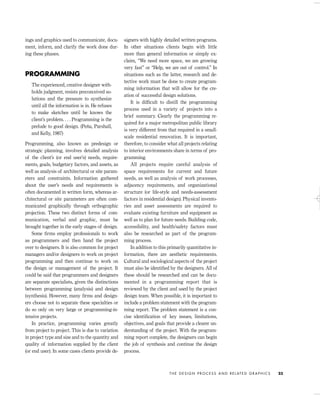
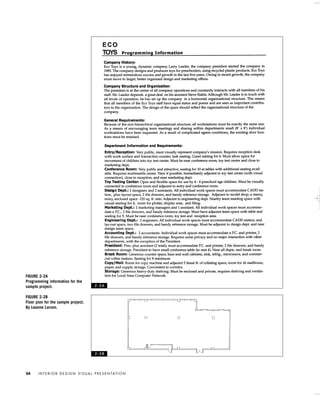
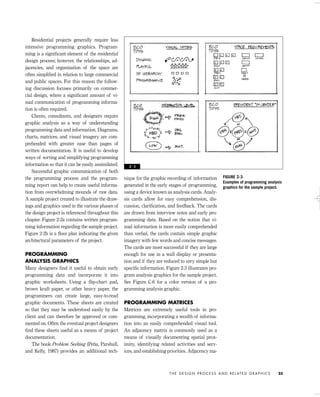
In addition to this primarily quantitative in-
formation, there are aesthetic requirements.
Cultural and sociological aspects of the project
must also be identified by the designers. All of
these should be researched and can be docu-
mented in a programming report that is
reviewed by the client and used by the project
design team. When possible, it is important to
include a problem statement with the program-
ming report. The problem statement is a con-
cise identification of key issues, limitations,
objectives, and goals that provide a clearer un-
derstanding of the project. With the program-
ming report complete, the designers can begin
the job of synthesis and continue the design
process.
T H E D E S I G N P R O C E S S A N D R E L AT E D G R A P H I C S 23
IDVP 2 5/27/03 4:09 PM Page 23
I N T E R I O R D E S I G N V I S U A L P R E S E N TAT I O N24
FIGURE 2-2A
Programming information for the
sample project.
FIGURE 2-2B
Floor plan for the sample project.
By Leanne Larson.
2 - 2 A
2 - 2 B
IDVP 2 5/27/03 4:09 PM Page 24
Residential projects generally require less
intensive programming graphics. Program-
ming is a significant element of the residential
design process; however, the relationships, ad-
jacencies, and organization of the space are
often simplified in relation to large commercial
and public spaces. For this reason the follow-
ing discussion focuses primarily on commer-
cial design, where a significant amount of vi-
sual communication of programming informa-
tion is often required.
Clients, consultants, and designers require
graphic analysis as a way of understanding
programming data and information. Diagrams,
charts, matrices, and visual imagery are com-
prehended with greater ease than pages of
written documentation. It is useful to develop
ways of sorting and simplifying programming
information so that it can be easily assimilated.
Successful graphic communication of both
the programming process and the program-
ming report can help to create useful informa-
tion from overwhelming mounds of raw data.
A sample project created to illustrate the draw-
ings and graphics used in the various phases of
the design project is referenced throughout this
chapter. Figure 2-2a contains written program-
ming information regarding the sample project.
Figure 2-2b is a floor plan indicating the given
architectural parameters of the project.
PROGRAMMING
ANALYSIS GRAPHICS
Many designers find it useful to obtain early
programming data and incorporate it into
graphic worksheets. Using a flip-chart pad,
brown kraft paper, or other heavy paper, the
programmers can create large, easy-to-read
graphic documents. These sheets are created
so that they may be understood easily by the
client and can therefore be approved or com-
mented on. Often the eventual project designers
find these sheets useful as a means of project
documentation.
The book Problem Seeking (Peña, Parshall,
and Kelly, 1987) provides an additional tech-
nique for the graphic recording of information
generated in the early stages of programming,
using a device known as analysis cards. Analy-
sis cards allow for easy comprehension, dis-
cussion, clarification, and feedback. The cards
are drawn from interview notes and early pro-
gramming data. Based on the notion that vi-
sual information is more easily comprehended
than verbal, the cards contain simple graphic
imagery with few words and concise messages.
The cards are most successful if they are large
enough for use in a wall display or presenta-
tion and if they are reduced to very simple but
specific information. Figure 2-3 illustrates pro-
gram analysis graphics for the sample project.
See Figure C-6 for a color version of a pro-
gramming analysis graphic.
PROGRAMMING MATRICES
Matrices are extremely useful tools in pro-
gramming, incorporating a wealth of informa-
tion into an easily comprehended visual tool.
An adjacency matrix is commonly used as a
means of visually documenting spatial prox-
imity, identifying related activities and serv-
ices, and establishing priorities. Adjacency ma-
T H E D E S I G N P R O C E S S A N D R E L AT E D G R A P H I C S 25
FIGURE 2-3
Examples of programming analysis
graphics for the sample project.
2 - 3
IDVP 2 5/27/03 4:09 PM Page 25
trices vary in complexity in relation to project
requirements. Large-scale, complex projects
often require highly detailed adjacency matri-
ces. Figures 2-4 and 2-5 illustrate two types of
adjacency matrix.
A criteria matrix can distill project issues
such as needs for privacy, natural light, and
security into a concise, consistent format.
Large-scale, complex design projects may re-
quire numerous detailed, complex matrices,
whereas smaller, less complex projects require
more simplified matrices. Criteria matrices are
used in residential design projects and in the
programming of public spaces. Smaller proj-
ects allow for criteria matrices to be combined
with adjacency matrices. Figure 2-6 illustrates a
criteria matrix that includes adjacency infor-
mation. Special types of matrix are used by de-
signers on particular projects.
Programming graphics, such as project
worksheets, analysis cards, and a variety of
matrices, are widely used in interior design
practice. These are presented to the client or
end user for comment, clarification, and ap-
proval. Many of these graphics are refined,
corrected, and improved upon during the pro-
gramming process and are eventually included
in the final programming report.
SCHEMATIC DESIGN
With the programming phase completed, de-
signers may begin the work of synthesis. An-
other way of stating this is that with the prob-
lem clearly stated, problem solving can begin.
The creation of relationship diagrams is often
a first step in the schematic design of a project.
Relationship diagrams serve a variety of func-
I N T E R I O R D E S I G N V I S U A L P R E S E N TAT I O N26
FIGURE 2-4
Simple adjacency matrix for the
sample project.
FIGURE 2-5
Another type of adjacency matrix
for the sample project.
2 - 4
2 - 5
IDVP 2 5/27/03 4:10 PM Page 26
T H E D E S I G N P R O C E S S A N D R E L AT E D G R A P H I C S 27
FIGURE 2-6
A combination criteria and adja-
cency matrix, computer gener-
ated. By Leanne Larson.
2 - 6
IDVP 2 5/27/03 4:10 PM Page 27
tions that allow the designers to digest and in-
ternalize the programming information. Rela-
tionship diagrams also allow the designer to
begin to use graphics to come to terms with the
physical qualities of the project.
One type of relationship diagram explores
the relationship of functional areas to one an-
other and uses information completed on the
criteria and adjacency matrices. This type of
one-step diagram can be adequate for smaller
commercial and residential projects. Larger-
scale, complex projects often require a series of
relationship diagrams. Diagrams of this type do
not generally relate to architectural or site pa-
rameters and are not drawn to scale. Most spe-
cialized or complex projects require additional
diagrams that explore issues such as personal
interaction, flexibility, and privacy requirements.
BUBBLE DIAGRAMS
As relationship diagrams begin to incorporate
and account for necessary requirements and
I N T E R I O R D E S I G N V I S U A L P R E S E N TAT I O N28
2 - 7 A
2 - 7 B
IDVP 2 5/27/03 4:10 PM Page 28
adjacencies, they can become refined into what
are generally referred to as BUBBLE DIAGRAMS.
Bubble diagrams take the project one step fur-
ther in the schematic design process. Often
bubble diagrams relate approximately to the
actual architectural parameters (the building
space) in rough scale. In addition, they often in-
corporate elements identified in criteria and
adjacency matrices through the use of graphic
devices keyed to a legend. Figures 2-7a–2-7e
are a sequence of bubble diagrams for the
sample project. See Figure C-7 for a color ver-
sion of a bubble diagram. It is important to
note that a primary purpose of these early
schematic diagrams is to generate a number of
options. Brainstorming many ideas is highly
advisable. Designers with years of experience
use brainstorming techniques, as should stu-
dents of design. Successful design requires
sparks of creativity in every phase, and these
sparks are fostered by nurturing idea genera-
tion. Rarely does the first try (or even the first
T H E D E S I G N P R O C E S S A N D R E L AT E D G R A P H I C S 29
FIGURES 2-7A, 2-7B, 2-7C, 2-7D
Bubble diagrams for the sample
project.
2 - 7 C
2 - 7 D
IDVP 2 5/27/03 4:10 PM Page 29
several) create a masterpiece or a workable so-
lution. It is often the combination of several di-
verse schemes that eventually generates a good
solution.
BLOCKING DIAGRAMS
Bubble diagrams are part of a continuous
process of refinement. One diagram may have
useful components that can be combined with
elements of another. As this process of refine-
ment continues, designers often proceed to
BLOCKING DIAGRAMS.
Before moving to blocking diagrams, de-
sign students benefit from the creation of
space studies, also known as area prototype
sketches. Each area or function is sketched in
scale with furniture and equipment included,
and these sketches can be used for purposes of
approximation in the blocking diagram. Space
study sketches are also helpful in the design of
systems furniture, allowing students to ex-
plore possibilities and gain insight into the use
of these products. See Figures 2-8a, b, c for ex-
amples of space studies.
Blocking diagrams can be generated on
tracing paper taped over a scaled, drafted floor
plan of the existing or proposed building. In
rare cases projects do not involve the use of ex-
isting architectural parameters because the in-
terior space will dictate the final building form.
In these cases, bubble diagrams and blocking
plans are sometimes the genesis for the even-
I N T E R I O R D E S I G N V I S U A L P R E S E N TAT I O N30
FIGURE 2-7E
Final successful bubble diagram
for the sample project.
2 - 7 E
IDVP 2 5/27/03 4:10 PM Page 30
T H E D E S I G N P R O C E S S A N D R E L AT E D G R A P H I C S 31
FIGURES 2-8A, 2-8B,
2-8C
Space studies for the
sample project.
2 - 8 A
2 - 8 B
IDVP 2 5/27/03 4:10 PM Page 31
tual building plan. It is increasingly common
for designers to begin the blocking plan process
on CADD and take the project through the rest
of the design process using CADD. Some de-
signers find that space planning on CADD is
frustrating and therefore plot out a CADD
drawing and work over it with tracing paper.
As stated, blocking diagrams are generally
drawn to scale and relate directly to the archi-
tectural parameters or the existing building
plan. Blocking plans are generally drawn with
each area or function represented by a block of
the appropriate square footage; circulation areas
are often blocked in as rectilinear corridors. Fig-
ures 2-9a, b, c are blocking diagrams.
Some experienced designers move quickly to
blocking diagrams, forgoing the use of bubble
diagrams, whereas others dislike the blocky, con-
fining nature of blocking diagrams. Many de-
signers develop a personal system of schematic
diagrams that is a combination of bubble and
blocking diagrams. The approach and graphic
quality of schematic diagrams used by individ-
ual designers vary greatly, yet the underlying
purpose is consistent. Designers use these dia-
grams to move from verbal and simplified
graphic notation toward true scale and the even-
tual realization of architectural form.
I N T E R I O R D E S I G N V I S U A L P R E S E N TAT I O N32
2 - 8 C
IDVP 2 5/27/03 4:10 PM Page 32
T H E D E S I G N P R O C E S S A N D R E L AT E D G R A P H I C S 33
FIGURES 2-9A, 2-9B, 2-9C
Blocking diagrams for the sample
project. Note that these blocking
diagrams focus on the layout of
individual work spaces.
2 - 9 A
2 - 9 B
2 - 9 C
IDVP 2 5/27/03 4:10 PM Page 33
FIT PLANS AND STACKING PLANS
A FIT PLAN can be considered a further refine-
ment of the blocking diagram. Basically the fit
plan is a test determining whether the require-
ments and needs clarified in programming fit
into a given space. In some cases, fit plans are
drawn up when a client reviews a piece of real
estate or a potential site. In other cases, fit
plans are drawn up to indicate the way a pro-
posed office tower may eventually be laid out.
These types of fit plan are generated for both
real estate professionals and end users.
In still other situations the fit plan is part of
the final stage of the space-planning process.
For this reason, fit plans often contain furni-
ture and equipment accurately drawn to scale
as a means of testing the space plan for fit and
for client review.
A STACKING PLAN is used when a project oc-
cupies more than one floor of a building. Often
the interrelationships of departments or work-
group locations are examined in a stacking
diagram. Generally stacking diagrams are cre-
ated early in the design process as a means of
evaluating the use of each floor before refined
space planning is done.
CONCEPTUAL DESIGN
The schematic design phase is often a time
when designers explore symbolic representa-
tion for the conceptual foundation of a project.
Although relationship, bubble, and blocking
diagrams represent functional and spatial re-
quirements, they sometimes do little to illumi-
nate the conceptual nature of a project. It is
often useful to employ an abstract diagram or
graphic device to represent the conceptual
qualities of a project.
One means of illustrating conceptual project
themes is the use of a design PARTI. Frank
Ching, in A Visual Dictionary of Architecture
(1995), defines a parti as “the basic scheme or
concept for an architectural design represented
by a diagram.” A design parti can take a wide
range of forms, from a highly simplified
graphic symbol to a more complex plan dia-
gram. Some designers use a conceptual diagram
such as a parti as an aid in bringing together the
functional and conceptual components of a de-
sign. The parti, or another conceptual diagram,
can be used throughout the design process as a
conceptual anchor for the project. Designers
sometimes employ the parti extensively, and it
may be the foundation for the design and ap-
pear as a logo or project icon on all presentation
graphics.
A formal design parti is not sought for all de-
sign projects. Most projects do, however, include
a considerable number of thematic issues.
Views, geography, climate, building context and
site, functional requirements, and cultural issues
may contribute to the project on a conceptual
level. Often the existing building form provides
project constraints in the design of interior envi-
ronments. Most designers find it useful to ar-
ticulate and explore conceptual and thematic
issues early in the schematic phase of a project.
Some designers find it useful to create three-
dimensional conceptual studies in the form of
models (see Chapter 6). In professional practice
the methods of presentation of conceptual
components of a project are varied and highly
personal, and involve both verbal and graphic
notations.
For purposes of organization, space plan-
ning and conceptual development are dis-
cussed separately here. However, in design
practice these elements are brought together in
the early stages of project design. Bubble dia-
grams often incorporate conceptual elements,
and a design parti can serve as an organiza-
tional anchor in the space-planning process. It
is important to see the schematic/conceptual
design phases as a continuous process of
refinement whereby all elements are brought
together. Figures 2-10a, b, c are conceptual
sketches that might be generated during the
drawing of blocking diagrams.
As the project evolves and blocking dia-
grams make way for a schematic space plan, it
is often helpful to consider the totality of the
design through the use of preliminary eleva-
I N T E R I O R D E S I G N V I S U A L P R E S E N TAT I O N34
IDVP 2 5/27/03 4:10 PM Page 34
T H E D E S I G N P R O C E S S A N D R E L AT E D G R A P H I C S 35
FIGURES 2-10A, 2-10B, 2-10C
Conceptual blocking diagrams for the sample project.
2 - 1 0 A
2 - 1 0 B
IDVP 2 5/27/03 4:10 PM Page 35
I N T E R I O R D E S I G N V I S U A L P R E S E N TAT I O N36
FIGURE 2-11
Two preliminary elevations of varying approaches for the
design shown in the blocking diagram in Figure 2-10c.
2 - 1 0 C
2 - 1 1
IDVP 2 5/27/03 4:10 PM Page 36
tions. Preliminary elevations, much like early
perspective studies, allow for more complete
understanding of the total volume of a space.
Preliminary elevations can be used as a means
of ideation or idea generation, and therefore it
is useful to attempt more than one approach as
the elevations are undertaken. Two such pre-
liminary elevations of varying approaches for
the design shown in the blocking diagram in
Figure 2-10c can be found in Figure 2-11.
SCHEMATIC DESIGN
PRESENTATION GRAPHICS
The preliminary design(s) created in this
process of continual refinement must be evalu-
ated by the designer or design team, as well the
client, for the project to continue successfully.
Presentation of the preliminary design may be
highly informal or formal, depending on the
nature of the project. In all cases it is useful to
consider the purpose of the presentation as
well as its audience. The audience for a prelim-
inary presentation may include the client, con-
sultants, real estate professionals, and those
with financial interests in the project. Prior to
the creation of any presentation, it is worth-
while to take time to assess the audience for the
presentation; identifying and understanding
this audience is imperative to the quality of the
communication.
In addressing members of the design team
or design consultants, a presentation may con-
sist of rough sketches and multiple layers of
paper. Designers and most consultants are fa-
miliar with orthographic drawings and can
wade through some confusing and messy draw-
ings and notes. Many clients, however, require
easy-to-understand graphic images as a means
to understanding the schematic presentation.
The client must understand the preliminary de-
sign to evaluate and approve it, which is neces-
sary for the project to continue successfully.
The preliminary client presentation must
communicate the underlying project research
and the constraints that have led to the prelim-
inary design. These include preliminary budg-
etary information, preliminary scheduling in-
formation, research of appropriate building
codes, and programming information. Gener-
ally at a minimum the preliminary schematic
design presentation requires a floor plan as a
means of communicating the space plan.
When the project involves more than one floor,
each floor plan and stacking plan is typically
included in the preliminary presentation.
The preliminary presentation floor plan(s)
may be drawn freely, drafted with tools, or gen-
erated on CADD. Regardless of the means of
drawing or drafting, the floor plan should be
drawn to scale and include a North arrow and
titles. If the designers wish to communicate
several design schemes, the various floor plans
must be labeled clearly with some sort of nota-
tion system, such as “Scheme 1” or “Concept 1.”
Some preliminary presentations include
programming information, floor plans, and
minimal additional graphics, whereas other
projects require preliminary presentations that
include additional drawings such as eleva-
tions, sections, and preliminary perspective
drawings, as well as models and materials
samples. The following chapters cover some of
these additional forms of preliminary presen-
tation. A successful presentation of the pre-
liminary schematic design communicates
information to the client and other interested
parties and allows for input, comments, criti-
cism, and approval. Figures 2-12a and 2-12b
are examples of a schematic design presenta-
tion for the sample project and are based on is-
sues covered to this point. Figures 2-13a and 2-
13b are examples of a professional schematic
design presentation.
Most often designers come away from a pre-
liminary presentation with lists of suggestions
from the client. These range from minor cor-
rections or clarifications to major changes in
functional, conceptual, or aesthetic aspects of
the design.
The information generated by feedback to
the first schematic presentation allows the de-
signers to move forward in the refinement of
T H E D E S I G N P R O C E S S A N D R E L AT E D G R A P H I C S 37
IDVP 2 5/27/03 4:10 PM Page 37
I N T E R I O R D E S I G N V I S U A L P R E S E N TAT I O N38
FIGURES 2-12A, 2-12B
Schematic presentation for the sample project,
graphite on drafting film.
2 - 1 2 A
IDVP 2 5/27/03 4:10 PM Page 38
T H E D E S I G N P R O C E S S A N D R E L AT E D G R A P H I C S 39
2 - 1 2 B
IDVP 2 5/27/03 4:10 PM Page 39
the design. Depending on project requirements
and constraints, and the number of changes re-
quested by the client, more schematic presen-
tations may be required. It is common for
smaller, less complicated projects to receive
quick general approval, allowing the designers
to move forward in the design process. Larger
projects can require many additional meetings
and presentations before the client grants ap-
proval of the schematic design.
In interviewing designers, I have found
great variety in the formality, visual quality,
and quantity of information included in pre-
liminary design presentations. Clearly there is
a range of styles of presentation, and firms
have varying standards. Even with this great
variety, there seem to be elements of consis-
tency. Most designers describe a need to com-
municate very clearly in early presentations
and to make sure that the client understands
I N T E R I O R D E S I G N V I S U A L P R E S E N TAT I O N40
FIGURES 2-13A, 2-13B
Professional schematic design
presentation, ink and graphite on
vellum and bond paper. By Bruck
Allen Architects Inc. Project team:
Christopher Allen, Mark Baus-
back, Brian Church, and Randall
Rhoads.
2 - 1 3 A
IDVP 2 5/27/03 4:10 PM Page 40
T H E D E S I G N P R O C E S S A N D R E L AT E D G R A P H I C S 41
2 - 1 3 B
IDVP 2 5/27/03 4:10 PM Page 41
the elements of the design presented. Most also
describe the importance of making clear the
very preliminary nature of the design. Many
designers find that clients need time to settle
into ideas; thus, pinning things down too early
can be frightening and frustrating for them.
DESIGN DEVELOPMENT
The design development of a project involves
finalizing the space plan and fully developing
all of the components of the design. All aspects
of the design must come together and be re-
solved in this phase of the project. It is useful
for students to know that the goal is to have the
design of a project completed in the design de-
velopment phase. It is important to keep in mind
that the phase following design development is
construction documentation, which involves
preparation of the project for construction. In
large firms the project is often handed from the
design team to the production team upon com-
pletion of design development.
In a perfect world, every detail would be con-
sidered and resolved in the design development
phase of a project. For the most part, design de-
velopment drawings are drafted accurately and
to scale. Some designers create design develop-
ment drawings that are somewhat sketchy, and
others create extremely precise, highly detailed
drawings. In either case, the entire volume of a
space must be explored and refined to ensure
a successful design project and to allow for a
smooth transition into the construction docu-
mentation phase of the project.
The presentation made upon the completion
of the design development phase is often seen
as the comprehensive final design presentation
of a project. This presentation must include
every possible element of the design to ensure
clear communication of the final design. Or-
thographic drawings — including detailed
floor plans, ceiling plans, detailed elevations,
sections, and design details — are generally
part of the presentation. In addition, technical
drawings, millwork drawings and samples,
materials samples, and furnishings and fix-
tures samples and images are often included in
the final design development presentation.
Smaller projects often move quickly from
schematic to design development and involve
minimal presentations. More complex projects
require many interim presentations and meet-
ings. Weekly or biweekly design meetings are
not uncommon on large or complex projects.
Final design presentations vary enormously
because of the variety of projects and working
styles of designers. Clearly there is no existing
industry standard for the preparation of de-
sign development presentations. It is with
pride and sometimes secrecy that firms and
designers create successful presentations.
Although design presentations reflect the
concerns, aesthetics, and tastes of designer(s)
and client, communication is the one constant
in their preparation. The final design presenta-
tion must clearly communicate all elements of
the design. For the project to move forward, the
design must be understood and approved by
the client. In addition to the client or end user,
a wide range of individuals may have to re-
view and approve the design.
Projects dependent on public funding, such
as libraries and municipal buildings, often re-
quire public review of the design. Many re-
quire design approval of municipal agencies or
local community groups. Investors and con-
sultants must often review design presenta-
tions before a project can move forward. All of
these individuals form the eventual audience
for the design presentation, and understanding
this audience is key to the successful commu-
nication of the design.
The following chapters offer information on
additional visual devices employed in the de-
sign and presentation of projects. These are
discussed separately for purposes of clarity,
but all are used throughout the design process
as a means of exploring and communicating
the design.
I N T E R I O R D E S I G N V I S U A L P R E S E N TAT I O N42
IDVP 2 5/27/03 4:10 PM Page 42
REFERENCES
Ballast, David. Interior Design Reference Manual. Belmont, Calif.: Professional Publications,
1995.
Ching, Frank. A Visual Dictionary of Architecture. New York: John Wiley & Sons, 1995.
Guthrie, Pat. Interior Designers’ Portable Handbook. New York: McGraw-Hill, 1999.
Harwood, Bouie. “An Interior Design Experience Program, Part II: Developing the Experiences.”
Journal of Interior Design 22(1), 15–31.
Henley, Pamela. Interior Design Practicum Exam Workbook. Belmont, Calif.: Professional
Publications, 1995.
Karlen, Mark. Space Planning Basics. New York: Van Nostrand Reinhold, 1993.
Koberg, Don, and Jim Bagnall. The Universal Traveler. Menlo Park, Calif.: Crisp Publications,
1991.
Peña, William, Steven Parshall, and Kevin Kelly. Problem Seeking. Washington, D.C.: AIA Press,
1987.
T H E D E S I G N P R O C E S S A N D R E L AT E D G R A P H I C S 43
IDVP 2 5/27/03 4:10 PM Page 43
INTRODUCTION TO THREE-
DIMENSIONAL VIEWS
Drawings depicting three-dimensional views
differ greatly from orthographic drawings in
that they offer a more natural view of space. It
is important to note that these three-dimen-
sional views (also known as pictorial draw-
ings) are useful at every phase of the design
process. Pictorial drawings work well in the
various phases of the design process as a
method of examining and refining ideas, and
should not be reserved merely as a means of
final project presentation.
The purpose of this chapter is to present a
wide range of three-dimensional drawing
methods and procedures. These methods
range from freehand sketches to measured,
hard-lined perspective illustrations. Students
of design should seek a method or methods
that work well for them as individuals. The
goal, then, is to find drawing methods that are
useful as tools throughout the design process
and to realize that pictorial drawing is a way of
seeing that is useful for all designers.
Unlike orthographic projections, three-di-
mensional views allow for a single depiction of
a large portion of an interior space. This type
of drawing can also help clients to clearly un-
derstand the design of a project. In addition,
three-dimensional views of a space allow the
designer to see and explore the entire volume
of space and make design decisions accord-
ingly.
Many designers create these drawings by
hand, but computers are increasingly used for
the generation of perspective drawings. Some
designers state that they can explore the total
volume of a space in the preliminary design
phases only when drawing it in perspective by
hand. Many designers have mentioned that
they use a combination of hand sketching and
computer-generated perspective imagery.
Increasingly design graduates are expected
to have the ability to create three-dimensional
views both by hand and with the use of comput-
ers. This is because understanding the basics of
creating hand-drawn three-dimensional views al-
lows a designer to work more effectively by com-
puter and also grants the ability to create quick
sketches in client meetings (and elsewhere).
Some designers use computer-generated
three-dimensional imagery from the inception
of a project and create no hand drawings at
any point in the design process. Software used
by those working this way includes AshlarVel-
lum® and Form•Z® from Auto*des*sys*. Oth-
ers generate two-dimensional design drawings
on AutoCAD (various releases) and then use
I N T E R I O R D E S I G N V I S U A L P R E S E N TAT I O N44
PARALINE AND
PERSPECTIVE
DRAWINGS
IDVP 3 5/27/03 4:57 PM Page 44
these to generate three-dimensional views on
AutoCAD.
This chapter provides step-by-step instruc-
tions on a range of hand-drawn perspective
methods. However, given the range of software
available, there are no explicit directions on cre-
ating computer-generated perspective draw-
ings because each software product has very
distinct properties. It is also worth noting that
hand-drawing works effectively early in the
schematic design phase as a means of generat-
ing many varied ideas about a given space.
Using the quick sketching techniques covered
in this chapter will help a designer generate a
wide range of ideas rapidly without first creat-
ing plans and elevations.
Pictorial drawings are created as line draw-
ings (or wire frames) and used as such in pre-
sentations or are rendered upon completion.
Some perspective and paraline line drawings
work very well in communicating a design to
an audience without the addition of value or
color rendering. This is especially true if addi-
tional descriptive items such as materials and
finishes samples are also used in the presenta-
tion. Therefore, it is worthwhile to attempt to
generate descriptive line drawings that commu-
nicate a design successfully and to see render-
ing as a secondary step in the drawing process.
The tools and materials used in pictorial
drawings are similar to those used in ortho-
graphic projection drawings and the other
forms of graphic communication mentioned
previously. An abundance of tracing paper is
probably the most important material in the pro-
duction of perspective drawings. The trans-
parency and low cost of tracing paper make it
highly useful as a visualization tool. As soon as
a drawing becomes confusing to sort out, a new
sheet of tracing paper can be overlaid. When
tracing paper is used as an overlay, a variety of
colored pencils can be used as a visual aid in the
construction of three-dimensional drawings.
Both pencils and pens can work well in the
construction of three-dimensional views when
working by hand. Although the choice of im-
plements is highly personal, quick-sketching
methods are best accomplished with marking
pens that provide quick visual impact. Mark-
ing pens also eliminate the use of erasers,
which actually helps with visualization. This
approach is tough at first but worth the effort.
Hand-drawn refined measured paraline and
perspective drawings are most often con-
structed in pencil on tracing paper, with many
layers of paper and a variety of colored pencils
used. These drawings often require the use of
drafting tools but are also drawn freehand by
some individuals. The final hard-lined meas-
ured paraline or perspective line drawing is
often done on high-quality vellum or drafting
film with drafting pencils or ink pens. This al-
lows for the line drawing to be reproduced by a
variety of reprographic methods on a variety
of papers. Once reproduced, the drawing may
be incorporated into a presentation with or
without rendering. Information on rendering
and reprographics is available in Chapter 5.
PARALINE DRAWINGS
PARALINE DRAWINGS are quick, accurate, and
useful in the communication of interior form.
The method of construction of these drawings
is based on the relationship of three principal
axes (x, y, and z). Although there are several
types of paraline drawing, all share common
characteristics: (1) paraline drawings have par-
allel lines drawn as parallel, and lines do not
converge to vanishing points; (2) vertical lines
are drawn as true verticals in paraline draw-
ings; and (3) paraline drawings are drawn
using some method of proportional scale.
PLAN OBLIQUE DRAWINGS
One type of paraline drawing commonly used
in the communication of interior environments
is known as a PLAN OBLIQUE. Figure 3-1 pro-
vides a quick reference of plan oblique con-
struction. Plan obliques can be constructed
quickly because they are drawn by projecting
directly off the floor plan. Drawing a plan
PA R A L I N E A N D P E R S P E C T I V E D R AW I N G S 45
IDVP 3 5/27/03 4:57 PM Page 45
oblique requires the rotation of the floor plan
to appropriate angles as measured against a
horizontal baseline. The most common angles
of plan rotation or orientation are 30 de-
grees–60 degrees and 45 degrees–45 degrees,
although plan obliques may be drawn at any
two angles that together equal 90 degrees. Ver-
tical elements are drawn by projecting loca-
I N T E R I O R D E S I G N V I S U A L P R E S E N TAT I O N46
FIGURE 3-1
Quick reference: plan oblique construction.
1. Rotate scaled plan to appropriate angles (shown here, 30 degrees–60 degrees and 45
degrees–45degrees).
2. Draw vertical lines upward to appropriate height in scale.
3. Lines parallel to the base plane (the floor plan) are drawn at the same angles as plan.
4. Circles found on the plan and its parallel planes are drawn as circles.
5. Circles found on vertical planes are drawn as ellipses.
6. Create an enclosing box to measure and locate nonaxonometric lines.
7. Create an enclosing box to measure and plot irregular and curvilinear lines and planes.
3 - 1
IDVP 3 5/27/03 4:57 PM Page 46
tions vertically from the plan to the appropriate
height. Horizontal elements are drawn using
the same angles as those used in the orienta-
tion of the plan.
Because they are generally projected from
existing plans, these drawings are created
quickly and can be used throughout the design
process as an aid in seeing and understanding
the environment. The angle of rotation
changes the orientation of the drawing and
must be considered in the construction of these
drawings. The angle of rotation used allows
for varying views and emphasis on particular
portions of the space. Often plan obliques em-
ploy some method of visual elimination of
portions of walls to depict the space success-
fully. This is often done by cutaway views or
by ghosting in portions of walls.
Circles and curvilinear forms can be drawn
in plan obliques using a number of methods.
Circles found in the true-size planes on plan
oblique drawings retain their true size and
form. This means that a true circle found in a
plan (and on surfaces parallel to the plan) re-
mains a true circle in a plan oblique. Circles or
curvilinear lines found on the vertical non-
frontal planes (those drawn at angles extend-
ing from the plan) appear as ellipses. (For addi-
tional information on ellipse construction see
Figures 3-14 and 3-15.)
The location of free-form curvilinear lines
can be approximated by plotting locations on
the plan and extending them vertically to the
appropriate height. Curvilinear forms found on
nonfrontal planes can be approximated using a
grid to plot locations and transferring them to
the appropriate location of a gridded area on
the oblique drawing.
Objects or lines that are not parallel to any
of the three primary axes are not measurable
in scale and can be tricky to draw. To draw
nonaxonometric lines and objects, an enclosing
box can be created within the axonometric
framework. The enclosing box can provide
measuring lines with which to locate the end
points of the object lines. Nonaxonometric
lines that are parallel to one another remain
parallel in plan oblique drawings.
Plan oblique drawings are quick to create
and are useful as an aid in the design process.
However, although they are a simple and effec-
tive means of visualization for the designer,
they can be confusing for clients who are not
accustomed to viewing this type of drawing.
Figures 3-2, 3-3, and 3-4 are examples of plan
oblique drawings.
ISOMETRIC DRAWINGS
An ISOMETRIC is a paraline drawing based on
the use of 30-degree angles. Unlike plan
obliques, isometrics cannot be constructed by
simple rotation and projection of the plan. In-
stead, the drawing of an isometric requires the
reconstruction of the plan in scale with the two
ground-plane axes (x and y axes) at 30 degrees.
All elements that are parallel to the ground
plane are drawn at 30 degrees. As in other
types of paraline drawings, vertical elements
remain vertical in isometric drawings. Scale
measurements can be made along any of the
three principal axes (x, y, and z). Figure 3-5
provides a quick reference of isometric con-
struction.
All circles and circular lines in isometric
drawings are drawn as ellipses. Readily avail-
able isometric ellipse templates can be used in
isometric drawing. For additional information
on ellipse construction, see Figures 3-14 and 3-
15. Lines not parallel to the three principal
axes are created by using an enclosing box
method to locate the object(s). Isometric draw-
ings offer a balanced view and the least distor-
tion of any paraline drawing. They are also
rather easy to create in most CADD programs.
Isometric drawings can be used at any
phase of the design process as a means of
communicating form and spatial relationships.
Isometrics are also used in technical and con-
struction documents. Although isometrics offer
some advantages, they are somewhat inflexible
and do not emphasize any particular portion of
the space.
PA R A L I N E A N D P E R S P E C T I V E D R AW I N G S 47
IDVP 3 5/27/03 4:57 PM Page 47
I N T E R I O R D E S I G N V I S U A L P R E S E N TAT I O N48
FIGURE 3-2
A plan oblique drawing of a resi-
dential storage area.
FIGURE 3-3
A plan oblique drawing of a resi-
dential basement remodeling
project.
3 - 2
3 - 3
IDVP 3 5/27/03 4:57 PM Page 48
PA R A L I N E A N D P E R S P E C T I V E D R AW I N G S 49
FIGURE 3-4
A plan oblique drawing of the Eco
Toys project (see Chapter 2).
FIGURE 3-5
Quick reference: isometric con-
struction.
1. Redraw plan, in scale, with x
and y axes at 30 degrees.
2. Draw vertical lines upward to
appropriate height in scale.
3. Lines parallel to the x and y
axes are drawn at the same
angles as plan.
4. All circles are drawn as
ellipses in an isometric draw-
ing.
5. Create an enclosing box to
measure and locate nonaxono-
metric lines.
6. Create an enclosing box to
measure and plot irregular and
curvilinear lines and planes.
3 - 4
3 - 5
IDVP 3 5/27/03 4:57 PM Page 49
PERSPECTIVE DRAWINGS
PERSPECTIVE DRAWING offers a natural view of
interior space and for this reason is commonly
used in design presentations. Many design stu-
dents (and some design professionals) have dif-
ficulty creating clear, natural-looking perspec-
tive drawings. This is unfortunate because per-
spective sketching and drawing is an excellent
design tool that can — and should — be used
throughout the design process to generate and
refine ideas. Using perspective drawing only in
finalized design presentations can result in
weak design projects and lost opportunities for
discovery.
An understanding of basic perspective prin-
ciples allows designers to draw quickly and
fairly accurately. Quick perspective drawings
are helpful as visualization tools for designers.
In addition, an understanding of basic princi-
ples and estimated sketching techniques allows
for the creation of fresh, attractive drawings
that can be used in design presentations.
The ability to draw simply measured or es-
timated freehand perspectives allows for the
rapid expression of ideas, which helps in the
generation of ideas and solutions. Certainly the
capacity to produce laboriously created me-
chanical perspective drawings is important in
design practice, but equally important is the
ability to express ideas rapidly. It is worth stat-
ing that some CADD programs require that the
design be complete and fully expressed in plan
and/or elevation drawings prior to the genera-
tion of a three-dimensional view, which also
points to the need for skills with quickly hand-
drawn perspectives.
PERSPECTIVE BASICS
Creating successful pictorial drawings requires
a working knowledge of basic principles of
perspective. Many of these principles remain
constant regardless of the method of drawing
employed. Therefore, it is worthwhile for stu-
dents to become well acquainted with the fun-
damental terms and principles of perspective
drawing.
Understanding the concept of the picture
plane is fundamental to understanding per-
spective drawing. The PICTURE PLANE is an
imaginary transparent plane through which
the area to be drawn is viewed. It can be visu-
alized as a giant sheet of glass standing be-
tween the viewer and the area to be drawn.
Once the drawing is begun, the surface of the
drawing paper represents this picture plane.
We cannot create successful perspective draw-
ings without first visualizing the picture plane
and its relationship to the items to be drawn on
the surface of the paper. Understanding that
the paper surface can be seen as a reproduction
of the picture plane is fundamental to good
perspective drawing (Figure 3-6).
It is the relationship of an object to the pic-
ture plane (and to the location of the viewer)
that creates a given perspective view of the ob-
ject. For example, a box that has its front face
(plane) parallel to the picture plane is in a posi-
tion that creates a one-point perspective draw-
ing (Figure 3-7).
Turning the box so that the entire front cor-
ner is on edge in relation to the picture plane
creates a two-point perspective view of the box
(Figure 3-8).
Tweaking the box so that only the top (or
bottom) corner touches the picture plane cre-
ates a three-point perspective view of the box
(Figure 3-9).
All three types of perspective employ a
HORIZON LINE representing the viewer’s eye
level. A box held high above the viewer’s eye
level (horizon line) allows a view of the bottom
of the box. As the box is moved below the eye
level of the viewer (the horizon line), a view of
the top of the box is possible. In all types of
perspective drawing, perspective lines con-
verge to a VANISHING POINT (or points, in two-
and three-point perspectives).
The general location of the viewer is often
called the STATION POINT. It is from this point in
space that the item is seen by the viewer. An-
other important perspective principle, shared by
all three types of perspective, is the CONE OF VI-
I N T E R I O R D E S I G N V I S U A L P R E S E N TAT I O N50
IDVP 3 5/27/03 4:57 PM Page 50
SION. The cone of vision represents the angle of
view, or sight range of the viewer. This concept
is based on the reality that humans cannot view
all of a space at a given time. As we approach a
given space, we focus on one area at a time,
owing to the natural limitations of our vision.
The cone of vision, or angle of view, can be
seen as representing the natural limits of human
sight. Elements that exist within the cone of vi-
sion of the viewer can generally be drawn with-
out excessive distortion. Those elements that
exist outside of the cone of vision become dis-
torted and cannot be drawn successfully.
Perspective drawings show objects becom-
ing smaller as they recede toward the vanishing
point(s); that is, items decrease in size as they
move away from the viewer. This perspective
principle is referred to as DIMINUTION OF SIZE. As
PA R A L I N E A N D P E R S P E C T I V E D R AW I N G S 51
FIGURE 3-6
In perspective drawing the pic-
ture plane is an imaginary view-
ing plane that can be represented
by the drawing surface.
FIGURE 3-7
A box drawn in one-point per-
spective has its front plane paral-
lel to the picture plane.
FIGURE 3-8
A box drawn in two-point per-
spective has its front corner
viewed on edge in relation to the
picture plane.
FIGURE 3-9
All planes of the box are oblique
to the picture plane when viewed
in three-point perspective.
Drawings by Justin Thomson.3 - 6 3 - 7
3 - 8 3 - 9
IDVP 3 5/27/03 4:57 PM Page 51
a result, a box drawn correctly will appear
larger when closest to the viewer and smaller as
it moves farther from the viewer. Because items
diminish in size, they cannot be measured con-
sistently in scale; therefore, a variety of meth-
ods of measurement have been devised.
Although there are a number of nuances
that create more complicated relationships of
object to picture plane and horizon line, those
mentioned here are fundamental perspective
relationships. An effective way to become
skilled at drawing in perspective is to practice
drawing simple boxes in various relationships
to the picture plane and to the horizon line.
The ability to sketch a box in perspective in
such various relationships allows for the
eventual capability to draw more complex ob-
jects constructed from boxlike forms. To
sketch boxes in perspective successfully, addi-
tional information about perspective drawing
is required.
ONE-POINT PERSPECTIVE
One-point perspective views portray an object
or environment with one plane parallel to the
picture plane. In addition to this parallel ori-
entation to the picture plane, one-point per-
spective views make use of one vanishing
point, located along the horizon line, to which
all perspective lines converge. The horizon
line is a horizontal line that represents the
viewer’s eye level, usually between five and
six feet from the floor. One-point perspective
is considered the easiest type of perspective
to draw because the entire plane that is paral-
lel to the picture plane can be measured in
scale. Figure 3-10 illustrates one-point per-
spective principles.
Ease of construction of one-point perspec-
tive is also based on the fact that lines that are
vertical in reality remain vertical, horizontal
lines remain horizontal, and only lines indicat-
ing perspective depth are drawn converging to
I N T E R I O R D E S I G N V I S U A L P R E S E N TAT I O N52
FIGURE 3-10
Quick reference: one-point per-
spective principles. Perspective
lines converge to a single van-
ishing point (V.P.), located on the
horizon line (H.L.). The front
faces of the cubes and the back
wall of a room are viewed paral-
lel to the picture plane. Those
elements with faces touching the
picture plane can be drawn in
scale. One-point perspective
drawings have true vertical, hori-
zontal, and perspective (depth)
lines. Items located outside of
the cone of vision (C.V.) tend to
appear distorted.
3 - 1 0
IDVP 3 5/27/03 4:57 PM Page 52
the vanishing point. Although they are easy to
draw, one-point perspective views can be un-
natural-looking and can become distorted. De-
spite their drawbacks, one-point perspective
drawings are highly useful during the early
stages of design and are often used by design-
ers for ideation (idea generation).
TWO-POINT PERSPECTIVE
Two-point perspective drawings portray ob-
jects and volumes on edge in relationship to the
picture plane. Another way of stating this is
that two-point perspective depicts the primary
faces of a volume oblique to the picture plane.
This means that two-point perspectives offer a
view of the front corner of objects or the rear
corners of rooms and environments. In two-
point perspective, an object’s edge (or the cor-
ner of a room) is drawn first and can be used
as a vertical measuring line from which per-
spective lines recede toward two vanishing
points. The two vanishing points lie on the
horizon line, one to the left and one to the right.
As with one-point perspective drawings, the
horizon line is always horizontal and repre-
sents the viewer’s eye level. Figure 3-11 illus-
trates the principles of two-point perspective.
Apart from the horizon line and elements
that lie along the horizon line, there are no hor-
izontal lines found in accurate two-point per-
spective drawings. Instead, lines that are not
true verticals converge to one of the two van-
ishing points. Only one vertical measuring line
can be drawn in scale owing to the fact that
perspective lines converge to two vanishing
points, causing objects to look smaller as they
recede away from the viewer toward the van-
ishing points. Two-point perspective drawings
can be tricky to measure and confusing to cre-
ate. However, two-point perspective drawings
appear more natural and suffer from less dis-
tortion than other types of perspective.
PA R A L I N E A N D P E R S P E C T I V E D R AW I N G S 53
FIGURE 3-11
Quick reference: two-point per-
spective principles. Perspective
lines converge to two vanishing
points (V.P.s), located on the
horizon line (H.L.). Boxes are
viewed from the front corner, and
rooms generally from the back
corner in relation to the picture
plane. Two-point perspective
drawings have true vertical lines
as well as perspective (depth)
lines. In two-point perspective,
the front edge (or back edge)
touching the picture plane can be
measured in scale. Items located
outside of the cone of vision
(C.V.) tend to appear distorted.
As with all forms of perspective,
items appear to diminish in size
as they recede from viewer.
3 - 1 1
IDVP 3 5/27/03 4:57 PM Page 53
THREE-POINT PERSPECTIVE
Three-point perspective is not commonly
used in traditional illustration of interior
space. Three-point perspective portrays an ob-
ject or volume with all principal faces oblique
to the picture plane. All lines in this type of
perspective converge to vanishing points. Gen-
erally three-point perspectives are constructed
with two vanishing points on the horizon line,
one to the left and one to the right, with an
additional vanishing point above or below the
horizon line. It is best to center the third van-
ishing point above or below the left and right
vanishing points. Figure 3-12 is a quick
reference to three-point perspective principles.
The use of three vanishing points creates
highly dynamic drawings that may easily be-
come distorted. Because all lines converge to
vanishing points, no true-scale measuring line
can be employed. This means that drawing
three-point perspectives requires good visuali-
zation skills. Three-point perspective is most
useful for portraying single objects, such as fur-
niture or products, that by design should be dy-
namic, unusual, or attention-grabbing. Three-
point perspective creates an “ant’s-eye view” or
“bird’s-eye view” and is also used in some types
of animation.
I N T E R I O R D E S I G N V I S U A L P R E S E N TAT I O N54
FIGURE 3-12
Quick reference: three-point per-
spective principles. Perspective
lines converge to three vanishing
points (V.P.s), two located on the
horizon line (H.L.) and one usu-
ally above or below the horizon
line. All planes of a box are
oblique to the picture plane. All
lines drawn in three-point per-
spective drawings converge to a
vanishing point. No portion of a
three-point perspective drawing
can be measured in scale. Items
located outside the cone of
vision (C.V.) tend to appear dis-
torted. As with all forms of per-
spective, items appear to dimin-
ish in size as they recede from
viewer.
3 - 1 2
IDVP 3 5/27/03 4:57 PM Page 54
DEVELOPING
VISUAL SKILLS
To develop visual skills and learn to “see” in
perspective, students should practice drawing
simple square-looking boxes in one-, two-, and
three-point perspectives. I believe that the abil-
ity to draw accurate-looking boxes lies at the
heart of successful perspective drawing. Fig-
ure 3-13 illustrates important principles of per-
spective sketching.
Boxes drawn in two-point perspective will
appear distorted when the two vanishing
points are located too close to each other on the
horizon line. The vanishing points should be
kept far enough apart to create an angle of 90
degrees or greater at the front edge of the
cube. At the same time, the front edge of the
cube should be less than 140 degrees (see Fig-
ure 3-13).
In two-point perspective the front corner
(also known as the vertical leading edge) of an
object is often used as a VERTICAL MEASURING
LINE. This line can be scaled and then used to
measure portions of the object that recede to-
ward the vanishing points. Vertical measuring
lines allow for fairly accurate measurement of
vertical elements of drawings. In principle, this
line is the only element of a drawing that can
be accurately scaled because the front corner
that serves as a measuring line is touching the
picture plane — or is very close to it (see Fig-
ure 3-13).
For dimensions that cannot be measured on
vertical surfaces, a number of very simple pro-
portional devices can be employed. One such
method of proportional perspective measure-
ment involves the use of diagonal lines as a
means of subdividing squares and rectangular
planes in perspective. Each face of a square
can be subdivided into visually equal portions
at the intersection of two diagonals. The inter-
section of diagonals drawn from corner to cor-
ner of a square locates the midpoint of that
square. Rectangular planes are also divided in
this manner. Diagonal subdivision of rectangu-
lar planes is a significant perspective principle
and is useful in all methods of perspective
drawing (see Figure 3-13).
The use of diagonals can also aid in adding,
extending, and duplicating boxes drawn in per-
spective. One method of doing this requires lo-
cating the midpoint of a single box or cube,
then drawing a diagonal from the bottom cor-
ner of the cube through the midpoint of the far
side of the cube. The diagonal is then extended
from the midpoint to the top perspective line
(that which recedes to the vanishing point).
Where the diagonal meets the perspective line
of the original cube, a new vertical is drawn,
creating a second square that is visually equal
in perspective (see Figure 3-13).
It is useful to learn to draw boxes with ele-
ments that have slanted surfaces, such as
gabled roofs. These slanted surfaces do not fall
on the primary horizon line. Instead the lines
that form the slanting surfaces converge at a
point directly above or below the vanishing
point for the box. This point, known as a VAN-
ISHING TRACE (after Ching, 1975), is a line to
which all parallel lines in the same plane will
converge. A vanishing trace is employed be-
cause lines that are parallel always converge at
a common point (see Figure 3-13).
A vanishing trace is also useful in relation
to drawing stairs. Stairs can be drawn by first
plotting the base of the stair (the width and
depth as found on the floor plane). The height
of the stair must then be located on a height
plane. The height plane must be divided
equally (use the forward vertical as a measur-
ing line) in increments that equal the required
number of risers. The first riser can be found
by drawing a line from the appropriate vanish-
ing point forward through the noted riser
height and onward to the riser location as
noted on the floor plan.
The next step involves drawing the vanish-
ing trace. A vanishing trace is found by draw-
ing a diagonal line from the forward location of
the height of the riser to the top of the stair run
(as measured on the height plane) and onward
to a location directly above the vanishing point.
PA R A L I N E A N D P E R S P E C T I V E D R AW I N G S 55
IDVP 3 5/27/03 4:57 PM Page 55
I N T E R I O R D E S I G N V I S U A L P R E S E N TAT I O N56
FIGURE 3-13
Quick reference: sketching in two-point perspective.
1. Practice drawing boxes that look square.
2. Boxes look distorted when the front corner equals less than 90 degrees — this means V.P.’s are too close.
3. Boxes look distorted when the front corner equals greater than 140 degrees — this means V.P.’s are too
far apart.
4. The front corner can be divided equally to serve as a measuring line.
5. Bisecting diagonals divide a square drawn in perspective.
6. Diagonals also divide rectangles.
7. Boxes can be extended using diagonals. Extend a diagonal from bottom corner through midpoint of a
square. Where the diagonal meets the perspective line (line to V.P.), a new box is formed.
8. Diagonals can also extend a box vertically.
9. Slanting parallel lines converge at a common point. This point is called a vanishing trace (after Ching,
1975), or V.T., and is directly below or above the V.P.
3 - 1 3
IDVP 3 5/27/03 4:57 PM Page 56
With this vanishing trace located, a second di-
agonal is drawn to the opposite side of the stair.
Risers and treads are then located where meas-
uring increments brought forward from vanish-
ing points intersect with diagonals. Figure 3-14
gives instructions for stair construction.
Circles and curves are drawn as ELLIPSES in
perspective. An understanding of ellipses and
how they are drawn can help create natural-
looking perspective drawings (Figures 3-15 and
3-16). Understanding the relationship of the
major and minor axes of an ellipse is essential
to successful perspective drawing. The MAJOR
AXIS is an imaginary line that is found at the
widest part of an ellipse, and the MINOR AXIS is
found at the narrow diameter of the ellipse. An
ellipse’s major axis is greater than its minor
axis. The major and minor axes always appear
at right angles (90 degrees) to each other re-
gardless of the position of the object. When
found on horizontal planes, such as floors and
ceilings, an ellipse’s major axis is horizontal.
PA R A L I N E A N D P E R S P E C T I V E D R AW I N G S 57
FIGURE 3-14
Sketching stairs in two-point perspective.
1. By measurement or estimation, plot the width and depth of the stairs on the floor plan. Locate a height
plane by extending vertical lines to the appropriate height (the top of the stair run). Divide the height
plane to create the appropriate number of risers.
2. Draw a line from the vanishing point through the height plane at the first riser measurement; this creates
the first riser. Draw a diagonal line from the forward height of the first riser through the top of the height
plane and continue this diagonal until it is directly above the V.P.; this is the vanishing trace (V.T.). Draw
a second diagonal from the vanishing trace to the location opposite the forward riser.
3. Draw lines from the V.P. through each riser measurement on the height plane. Continue these lines until
they intersect with diagonals; these are the forward riser locations.
4. Tread locations are found by extending vertical lines down to the next riser measurement; lines indicating
treads converge to the appropriate vanishing point.
3 - 1 4
IDVP 3 5/27/03 4:57 PM Page 57
The centerline of a cylinder or cylindrical
object is drawn as an extension of the minor
axis. Because it is an extension of the minor
axis, this centerline always appears at a right
angle to the major axis. This means that the
centerline of a complicated object, such as the
axle of a wheel or the cylindrical base of a
piece of furniture, can be drawn as an exten-
sion of the minor axis.
Understanding the relationship of the
minor and major axes and the location of the
centerline can eliminate distortion in the draw-
ing of circular forms in perspective, and allows
for freehand sketching of ellipses as well as
construction of complex linear perspectives.
One method of ellipse construction involves
using planes as an approximation guide for the
ellipse (Figure 3-16). This is done by first drawing
a plane, which resembles a square in perspective,
then dividing the square using a diagonal. On
each diagonal, approximately two-thirds of the
distance from the center point of the square, a dot
(or mark) is drawn. The ellipse is then approxi-
mated by drawing curved lines from the dots on
the diagonals to the midpoints of each side of the
plane. With the rough approximation complete,
the major and minor axes can be approximated
to aid in refinement. The minor and major axes
should not be confused with the diagonal divi-
sions of the plane, as these are separate items.
I N T E R I O R D E S I G N V I S U A L P R E S E N TAT I O N58
FIGURE 3-15
Ellipses.
1. Circle.
2. Ellipse. In perspective drawings, circles are drawn as ellipses.
3. The major axis is found at the widest diameter of an ellipse.
4. The minor axis is found at the narrow diameter and is always at 90 degrees to the major axis.
5. The centerline of a cylinder is drawn as an extension of the minor axis (also at 90 degrees to
major axis).
6. When found on a horizontal plane such as a floor, the major axis is horizontal. Our view of the
ellipse varies according to the location of our eye level (horizon line); elliptical templates are
used to easily approximate the various views.
3 - 1 5
IDVP 3 5/27/03 4:58 PM Page 58
Many designers use elliptical templates to
create accurate ellipses and curvilinear forms.
The use of elliptical templates is based on the
locations of the major axis, the minor axis, and
the centerline of the form. When templates are
used, the two-thirds estimating method is not
employed.
Clearly, methods mentioned for drawing el-
lipses underscore the need to be able to draw a
square-looking box accurately. This skill is
perhaps the single most effective tool in free-
hand perspective drawing. It is worthwhile for
students to practice by filling pages with
boxes drawn to look square in two-point per-
spective. Once this skill has been developed,
the box is drawn as an enclosing form, like a
packing crate, then portions of the box are
subtracted to reveal the object within (Figure
3-17). Starting with a simple box, and adding
boxes using diagonal division, allows us to
PA R A L I N E A N D P E R S P E C T I V E D R AW I N G S 59
FIGURE 3-16
Quick reference: estimated ellipse
construction. Based on their
geometry, as shown at the top of
the figure, ellipses can be esti-
mated by creating an enclosing
plane and plotting locations on
diagonals:
1. Create an enclosing plane that
appears square in perspectve;
divide the plane with diagonals
(as in diagonal division). Mark
the center as located by the
diagonals.
2. From the center mark, extend
lines vertically and horizon-
tally; these lines will define
midpoints of the enclosing
plane. Mark the locations
where these lines are tangent
to (touching) the enclosing
plane.
3. Divide each half of the diago-
nal into thirds and make marks
at these locations.
4 and 5. Sketch the ellipse by
locating the mark two-thirds
from center and drawing con-
necting curvilinear lines from
the two-thirds mark to the
adjacent midpoint mark. Refine
the ellipse by visual assess-
ment.
6. Note: quarter divisions of the
square are not the major and
minor axes. These divisions
are for estimation purposes
only. The major axis is actually
slightly forward of center
(dashed line).
7. The central leg of this table is
formed by a center line extend-
ing from the top minor axis to
the lower minor axis.
8. A full cylinder can be sketched
using an enclosing cube to
create the forward and rear
planes; these are then used to
form the required ellipses.
9. Refine the final drawing by
visual assessment.
3 - 1 6
IDVP 3 5/27/03 4:58 PM Page 59
sketch items in boxes that are not square but
may be elongated in a number of directions.
Figures 3-18 and 3-19 depict the steps involved
in creating drawings in which an enclosing
cube is employed to construct items that are
quite different in form from the original en-
closing cube.
The ability to visually assess freehand per-
spective drawings that have been constructed
from simple boxes lets us understand and see
form and spatial relationships. Employing the
principles of perspective mentioned thus far
allows for better drawing and for the use of
perspective drawing as a design tool.
I N T E R I O R D E S I G N V I S U A L P R E S E N TAT I O N60
FIGURE 3-17
Quick reference: two-point
sketching using estimated boxes.
1. Sketch a box that approxi-
mates the dimensions of the
object. Make sure the vanish-
ing points are generously
spaced. Create a measuring
line at the front corner of the
box. Mark equal divisions of
the measuring line (these can
be eyeballed or estimated with
diagonal division).
2. Use the measuring line and
diagonal division to rough out
details and proportions.
3. Overlay with clean tracing
paper and refine details.
4. Use a clean overlay for a final
drawing; a combination of
freehand and drafted lines
often look best. Drawing by
Leanne Larson.
3 - 1 7
IDVP 3 5/27/03 4:58 PM Page 60
PA R A L I N E A N D P E R S P E C T I V E D R AW I N G S 61
FIGURE 3-18
This series of sketches indicates
the steps involved in using an
enclosing cube to rough out pro-
portions for a preliminary sketch
of a seat.
3 - 1 8
IDVP 3 5/27/03 4:58 PM Page 61
I N T E R I O R D E S I G N V I S U A L P R E S E N TAT I O N62
FIGURE 3-19
This series of sketches indicates
the steps involved in using an
enclosing cube to rough out pro-
portions for a preliminary sketch
of an information desk.
3 - 1 9
IDVP 3 5/27/03 4:58 PM Page 62
REFERENCES
Ching, Frank. Architectural Graphics. New York: John Wiley & Sons, 1996.
———. A Visual Dictionary of Architecture. New York: John Wiley & Sons, 1995.
Drpic, Ivo. Sketching and Rendering Interior Space. New York: Whitney Library of Design,
1988.
Forseth, Kevin, and David Vaughn. Graphics for Architecture. New York: John Wiley & Sons,
1980.
Hanks, Kurt, and Larry Belliston. Rapid Viz. Los Altos, Calif.: William Kaufman, 1980.
McGarry, Richard, and Greg Madsen. Marker Magic: The Rendering Problem Solver for
Designers. New York: Van Nostrand Reinhold, 1993.
Pile, John. Perspective for Interior Designers. New York: Whitney Library of Design, 1985.
Porter, Tom. Architectural Drawing. New York: Van Nostrand Reinhold, 1990.
PA R A L I N E A N D P E R S P E C T I V E D R AW I N G S 63
IDVP 3 5/27/03 4:58 PM Page 63
ESTIMATED ONE-POINT
INTERIOR PERSPECTIVE
DRAWINGS
The same concepts that allow us to sketch ob-
jects using enclosing boxes can be employed in
sketching interior environments. There are
many methods of measured linear perspective
drawing that work well in the creation of accu-
rate, beautiful drawings. However, it is impor-
tant to note that all of the most accurate and re-
fined methods of perspective drawing require a
great deal of time, ranging from one hour to
eight hours or more. These may be appropriate
for final design development presentations, but
time constraints require designers to develop
quick sketching techniques in order to use
drawings throughout the design process. Quick
sketching is beneficial as a design tool, a pres-
entation tool, and a way of seeing the world
and recording details successfully.
The easiest method of quick sketching in-
terior environments has as its foundation the
box-sketching techniques discussed previ-
ously. This estimated method allows us to cre-
ate a perspective of a ten-foot-square room by
drawing a giant ten-foot-square box in one-
point perspective. Figure 4-1 is a quick refer-
ence to this estimated one-point perspective
method. It is important to note that this
method is unusual in that it requires that a
square-looking room is estimated, necessitat-
ing visual accuracy developed by practice.
The estimated sketch method is started by
drawing a horizontal line to serve as the hori-
zon line; this is the viewer’s eye level. A square
(that serves as the back wall of the room) can
then be drawn that is 10' by 10' (in any appro-
priate scale or eyeballed). The horizon line
should bisect the square at its vertical mid-
point. Next, a single vanishing point is located
on the horizon line slightly left or right of cen-
ter. Perspective lines indicating depth are cre-
ated by drawing lines from the vanishing point
through all four corners of the square. The
overall depth of the room is simply estimated.
The key to this method is the ability to esti-
mate the forward depth of the square room.
The depth must be estimated in a way that
makes the room look square. This is the tricky
part — which takes some practice. Once this is
accomplished, architectural elements can be
drawn by using measurements found on the
back wall (the original square) and estimating
depth. Diagonal bisection of planes can be
used to find depths of walls and correspon-
ding objects.
I N T E R I O R D E S I G N V I S U A L P R E S E N TAT I O N64
DRAWING AND
SKETCHING INTERIOR
ENVIRONMENTS
IDVP 4 12/15/03 3:46 PM Page 64
D R AW I N G A N D S K E T C H I N G I N T E R I O R E N V I R O N M E N T S 65
FIGURE 4-1
Quick reference: estimated one-
point interior sketching.
1. Draw a 10' x 10' square in a
workable scale (1⁄2" or 1").
2. Divide the square using diago-
nals. Draw a horizontal line
through the center. This is the
horizon line (H.L.); it is at
roughly 5' high. Place a van-
ishing point on the horizon line
slightly left or right of center.
3. Draw perspective lines from
the V.P. through the corners of
the original square, creating
wall and ceiling lines. Now
estimate the depth of the
room — make it look square.
4. Use diagonals to divide the
original square (see Figure
3-13), which is now the back
wall. By dividing the back
equally in four, you will create
30’ height increments.
5. If necessary, a grid can be
estimated through diagonal
division. On side walls, verti-
cals are located where height
lines intersect diagonals.
6. Use measuring increments
(created in step 4) or a grid to
locate objects and architec-
tural elements.
7. Use a clean overlay to create a
line drawing.
8. To raise or lower the ceiling,
simply draw lines from the V.P.
to the appropriate height on
the back wall and extend these
lines forward. Diagonal exten-
sions can be used to enlarge
the room (see Figure 3-13).
Curves are found by plotting
and sketching in appropriate
locations.
4 - 1
IDVP 4 12/15/03 3:46 PM Page 65
Because many rooms do not have ten-foot
ceilings, it is often necessary to “lower” the ceil-
ing by redrawing it at eight to nine feet. This is
accomplished by locating the desired height on
the back wall (the original measured square)
and cutting the wall off at the desired height.
Similarly, ceilings can be raised by adding the
appropriate dimension to the back wall (the
original square) and extending the walls to the
desired height.
Most rooms are not perfectly square, and
this method allows for the original 10' by 10'
square to serve as the starting point for a room
of another shape. Dividing and adding to the
room using diagonal bisection allows for the
creation of a variety of room sizes. Once again,
the ability to see and create the original square
room and use it as a guide for drawing a more
complicated environment is the key to the suc-
cess of this method.
In drawing estimated one-point interior per-
spectives, complicated items or architectural
elements are easiest to draw when placed on
the wall(s) parallel to the picture plane. The lo-
cation of the single vanishing point is impor-
tant because walls and objects located very
close to their vanishing points can become
quite distorted. It is useful to draw a few quick
thumbnail sketches of the space, using the es-
timation method, to locate the vanishing point
and visualize the space being drawn. Thumb-
nail sketches aid in the location of an appro-
priate view of the space and the location of the
vanishing point.
I N T E R I O R D E S I G N V I S U A L P R E S E N TAT I O N66
FIGURE 4-2A
This first step in constructing this
drawing requires drawing the
square-looking room shown in
Figure 4-1 and modifying it. The
bold lines in this drawing indicate
the back wall of the orignal 10' x
10’ room; dashed lines indicate
the areas in which the room was
elongated to set up the structure
of the larger environment (in this
case a hotel lobby and hallway).
With the basic proportions of the
environment complete, furnishings
and additional elements can be
roughed in.
FIGURE 4-2B
The drawing can be continued by
adding necessary details and
refining design elements.
FIGURE 4-2C
A final clean copy of the drawing
can be traced and readied for
rendering if necessary. Figures
C-24a, b, c show the process of
color-rendering this drawing.
4 - 2 A 4 - 2 B
4 - 2 C
IDVP 4 12/15/03 3:46 PM Page 66
The estimated method is an approximation
method. Measurements are based on rough ap-
proximations. For example, the horizon line is
placed at roughly five feet in height, providing
a view of the space from a five-foot eye level.
We can imagine that most pieces of furniture
fit into a 30-inch-high packing crate. Therefore,
much of the furniture is roughed in as 30-inch-
high boxes. Human figures drawn to scale
should be included in interior perspectives and
are best placed with eye levels at (or near) the
horizon line. More information regarding scale
figures can be found in Appendix 4.
This method of quick sketching, using
rough approximations, allows designers to
draw space as they design it. It also allows
perspective drawing to be integrated into the
design process during the schematic design
and design development phases of a project
prior to the completion of a full set of ortho-
graphic drawings. (Figures 4-2a, b, c, 4-3a, b, c,
and 4-4a, b, c). Practice generating these types
of drawing can provide the skills necessary
for drawing quickly and directly in client
meetings with simple pens and no tools (Fig-
ures 4-5a and 4-5b). Most of the more refined
methods of linear perspective require com-
plete scaled plans and elevations, thus necessi-
tating that the design be complete prior to the
creation of the perspective drawings. The
more refined perspectives are useful as a
means of presentation but are not as helpful
as a quick means of exploring design options
or brainstorming.
D R AW I N G A N D S K E T C H I N G I N T E R I O R E N V I R O N M E N T S 67
FIGURE 4-3A
This first step in constructing this
drawing requires drawing the
square-looking room shown in
Figure 4-1 and modifying it. The
bold lines in this drawing indicate
the back wall of the orignal 10' x
10' room; dashed lines indicate
the areas in which the ceiling
was altered, in this case to indi-
cate a shed roof in a small New
Mexico cabin. With the basic pro-
portions of the environment com-
plete, furnishings and additional
elements can be roughed in.
FIGURE 4-3B
The drawing can be continued by
adding necessary details and
refining design elements.
FIGURE 4-3C
A final clean copy of the drawing
can be traced and readied for
rendering if necessary. Figure
C-39 is a color rendering of this
drawing.
4 - 3 A 4 - 3 B
4 - 3 C
IDVP 4 12/15/03 3:46 PM Page 67
I N T E R I O R D E S I G N V I S U A L P R E S E N TAT I O N68
FIGURE 4-4A
The first step in constructing this
drawing requires drawing the
square-looking room shown in
Figure 4-1 and modifying it. The
bold lines in this drawing indicate
the back wall of the orignal 10' x
10' room; dashed lines indicate
the areas in which the room was
altered, in this case to create a
much larger exhibition space.
FIGURE 4-4B
With the basic proportions of the
environment complete, the basic
design elements can be roughed
in.
FIGURE 4-4C
Given the complexity of this envi-
ronment, some extra steps are
required to refine the design. Sig-
nage can be generated, photo-
copied, and pasted onto the draw-
ing.
4 - 4 A 4 - 4 B
4 - 4 C
IDVP 4 12/15/03 3:46 PM Page 68
FIGURES 4-5A, 4-5B
Practicing estimated one-point
sketching leads to the ability to do
quick sketches in client and team
meetings. This group of drawings
was sketched in less than ten
minutes using ink pens.
D R AW I N G A N D S K E T C H I N G I N T E R I O R E N V I R O N M E N T S 69
FIGURE 4-4D
Additional elements can be
copied onto the drawing surface
as the drawing is completed. Fig-
ure 4-16 illustrates this drawing
as manipulated digitally.
4 - 4 D
4 - 5 A 4 - 5 B
IDVP 4 12/15/03 3:46 PM Page 69
ESTIMATED TWO-POINT
INTERIOR PERSPECTIVE
DRAWINGS
One-point interiors are helpful and easy to cre-
ate but are limited in use because of problems
with distortion, particularly in drawing furni-
ture and freestanding objects. Because of the
limitations of one-point perspective, it is im-
portant to learn to draw two-point interior per-
spectives quickly using the estimation method.
The same concepts used in drawing boxes
and estimated one-point interiors are employed
in estimated two-point perspective sketching.
In the two-point method a 10' by 10' square
room is drawn first as a guideline for further
development. Figure 4-6 is a quick reference for
the estimated two-point perspective method.
The 10' by 10' room is created by first draw-
ing a single vertical measuring line with four
equal segments noted (in any appropriate scale
I N T E R I O R D E S I G N V I S U A L P R E S E N TAT I O N70
FIGURE 4-6
Quick reference: estimated two-
point interior sketching.
1. Draw a single vertical line to
serve as a measuring line.
Divide the line into four equal
segments. At the midpoint,
draw a horizontal line; this is
the horizon line (H.L.).
2. Place two vanishing points on
the H.L., one near to (N.V.P.)
and one far from (F.V.P.) the
measuring line. Draw lines
from each V.P. through the top
and bottom of the measuring
line. This creates floor and
ceiling lines. Now estimate the
depth of room — make it look
square.
3. Draw lines from each V.P.
through all increments on the
measuring line; these will
serve as height measurement
lines.
4. To create a grid, draw diago-
nals on each wall. Then, at the
intersection of the diagonal
and each height line, draw a
vertical.
5. Use the grid to estimate archi-
tectural elements and objects.
Note: grids are not always nec-
essary; for simple spaces it is
best to simply estimate meas-
urements.
6. Use a clean overlay for tracing
and refining the drawing.
7. Raise or lower the ceiling by
estimating the desired height.
Extend the room using diagonal
division (see Figure 3-13).
8. Curved surfaces are estimated
by using a grid.
4 - 6
IDVP 4 12/15/03 3:46 PM Page 70
or eyeballed). This vertical measuring line
serves two important functions: first, it is the
only true measuring device in the drawing; sec-
ond, it can become the back corner of the
room(s) being drawn. A horizontal line is then
drawn through the middle of the vertical line
(bisecting it at the five-foot mark). This is the
horizon line or viewer’s eye level.
Two vanishing points must be placed on the
horizon line. One should be located fairly close
to the vertical measuring line; this is referred to
as the near vanishing point. The second should
be located far from the vertical measuring line;
this is referred to as the far vanishing point.
Next, draw a line from the near vanishing
point to the very bottom of the vertical meas-
uring line and extend it forward, creating the
floor line. Repeat the process with the far van-
ishing point. Lines are then drawn from each
vanishing point to the top (the tenth increment)
of the vertical measuring line and extended
forward, creating the ceiling line.
At this point in the drawing we have created
the floor, two walls, and the ceiling location of
the room. The depth of the room must now be
estimated. The overall room depth is approxi-
mated by visually assessing the room and cre-
ating a square-looking box of a room. As with
one-point estimation, this is the tricky part. The
key is the ability to estimate the depth of a 10'
by 10' square room, which takes some practice.
With the use of this method, architectural
elements and freestanding objects are located
by measurement and estimation. The vertical
measuring line can be used to find vertical
measurements; these are taken from the van-
ishing point through the vertical measuring
line and plotted on the appropriate wall. In
cases where objects are freestanding, heights
can be determined by extending a line from the
vanishing point through the appropriate height
on the wall to the location of the object. Depths
are estimated using diagonal division and ex-
tension — dividing the walls with diagonals
and finding the midpoint of the room at the in-
tersection of the two diagonals.
The originally estimated square room can be
modified to create a lower or higher ceiling by
simply extending or reducing the dimensions of
the original vertical measuring line and extend-
ing lines to the vanishing points. The walls of the
room can be reconfigured easily by diagonal
subdivision and extension. The ability to see and
create the original square-looking room and use it
as a guide for drawing a more complicated envi-
ronment is the key to the success of this method.
In drawing two-point interior perspectives,
complicated items and architectural elements are
easiest to draw when placed on the wall created
by the far vanishing point. This is because the
wall generated by the near vanishing point tends
to become distorted. A common distortion prob-
lem in two-point perspective drawing is caused
by locating the two vanishing points too close to
each other. This creates a distorted, unnatural-
looking view of the space. If in the process of
using this method your drawing becomes dis-
torted, it is best to start over with the vanishing
points located farther from each other.
As with one-point sketches, it is useful to do
a few thumbnail sketches of the space to locate
the vanishing points and visualize the space
being drawn. Thumbnail sketches allow for the
location of an appropriate view of the space and
the proper positioning of the vanishing points.
The estimated two-point perspective method
is an approximation method. Measurements
are based on rough approximations. For exam-
ple, the horizon line is placed at roughly five
feet in height. This gives the drawing the over-
all view at eye level of the viewer. We can
imagine that most pieces of furniture fit into a
30-inch-high packing crate. Therefore, much of
the furniture can be sketched into the space as
30-inch-high boxes. Human figures drawn to
scale should be included in interior perspectives
and are best placed with eye levels located at or
near the horizon line. This method of estimat-
ing two-point perspective drawings perspective
allows drawing to be integrated into the design
process during the schematic design and de-
sign development phases of a project (Figures
D R AW I N G A N D S K E T C H I N G I N T E R I O R E N V I R O N M E N T S 71
IDVP 4 12/15/03 3:46 PM Page 71
FIGURE 4-7C
The drawing is then continued by adding necessary
details and refining design elements.
FIGURE 4-7D
A final clean copy of the drawing can be traced and
readied for rendering if necessary. In preparing this
more refined drawing, templates were used for hang-
ing lamps and tools were used for edges of furniture.
Figures C-24a, b, c show the process of color-ren-
dering this drawing.
4-7a, b, c, d, 4-8a, b, c and 4-9a, b, c show the var-
ious steps in constructing “estimated” two-point
perspective drawings for a range of projects).
Methods of estimated sketching, using
rough approximation as described here (also
known as “eyeballing” drawings), permit de-
signers to draw a space as they design it. This
type of sketching allows perspective drawing
to be integrated into the design process.
Sketching in perspective lets us visualize
spaces three-dimensionally rather than merely
view space in plan, where a sense of volume is
I N T E R I O R D E S I G N V I S U A L P R E S E N TAT I O N72
FIGURE 4-7A
This first step in constructing this drawing requires
drawing the square-looking room shown in Figure
4-6 and modifying it. The bold lines in this drawing
indicate the back wall of the orignal 10' x 10' room;
dashed lines indicate the areas in which the room
was elongated (to the left) and the ceiling was low-
ered to roughly eight feet above the floor.
FIGURE 4-7B
With the basic proportions of the environment com-
plete, furnishings and additional elements can be
“roughed in.”
4 - 7 A 4 - 7 B
4 - 7 C 4 - 7 D
IDVP 4 12/15/03 3:46 PM Page 72
often missing. Visualization skills are funda-
mental to the design of interior environments.
Most of the more refined methods of linear
perspective require complete scaled plans and
elevations, thus necessitating the design to be
complete prior to the creation of the perspec-
tive drawings. The more refined perspectives
often appear highly realistic in contrast to the
estimated methods. Refined, measured linear
perspectives are most useful as a means of
presentation for clients, end users, real estate
professionals, investors, and the general public.
D R AW I N G A N D S K E T C H I N G I N T E R I O R E N V I R O N M E N T S 73
FIGURE 4-8A
This first step in constructing this drawing
requires drawing the square-looking room
shown in Figure 4-6 and modifying it. The bold
lines in this drawing indicate the back wall of
the orignal 10' x 10' room; dashed lines indi-
cate the areas in which the room was elon-
gated (to the left) and the ceiling was lowered
to roughly eight feet above the floor.
FIGURE 4-8B
With the basic proportions of the environment
complete, furnishings and additional elements
can be roughed in. The drawing is then contin-
ued by adding necessary details and refining
design elements
FIGURE 4-8C
A final clean copy of the drawing can be
traced and readied for rendering if necessary.
In preparing this more refined drawing, tem-
plates and tools were used.
4 - 8 A
4 - 8 C
4 - 8 B
IDVP 4 12/15/03 3:46 PM Page 73
I N T E R I O R D E S I G N V I S U A L P R E S E N TAT I O N74
FIGURE 4-9A
This first step in constructing this
drawing requires drawing the
square-looking room shown in
Figure 4-6 and modifying it. The
bold lines in this drawing indicate
the back wall of the orignal 10' x
10' room; dashed lines indicate
the areas in which the room was
elongated (to the rear of the origi-
nal square).
FIGURE 4-9B
With the basic proportions of the
environment complete, the basic
design elements can be roughed
in. This particluar drawing was
done very early in the design
process and was used to consider
the entire volume of the retail
design. Type was printed and
pasted into the signage area as a
means of understanding scale
isues.
FIGURE 4-9C
A final clean copy of the drawing
can be traced and readied for
rendering if necessary. In prepar-
ing this more refined drawing,
some elements were drawn free-
hand while tools were used for
others. The type shown in the pre-
vious figure was modified (by
hand) to relate directly to the
right vanishing point.
4 - 9 A 4 - 9 B
4 - 9 C
IDVP 4 12/15/03 3:46 PM Page 74
REFINED LINEAR
PERSPECTIVE METHODS
The perspective drawing concepts and skills
covered thus far can help us gain valuable visu-
alization skills. These skills are easily trans-
ferred to the refined, measured methods of lin-
ear perspective. Therefore, the ability to draw
well in estimated perspective allows us to draw
well in refined, precisely measured perspectives.
The ability to create refined perspective pres-
entation drawings is useful for all environmental
designers. Most firms have at least one employee
(and often several) who is considered to be a per-
spective drawing or rendering specialist. Such
individuals are often called upon to do much of
the detailed perspective drawing and rendering
for the firm. These drawings are generally cre-
ated well into the design process and are not
used as preliminary ideation sketches. It is also
quite common for firms to hire professional de-
sign illustrators and renderers to create highly
detailed drawings as required for particular proj-
ect presentations. Firms often select a particular
professional illustrator’s style to enhance a proj-
ect. This points to the fact that there is never a
single way to illustrate space; there is a range of
stylistic approaches.
A wide variety of methods of measured
perspective drawing are used in practice. I
have found that certain methods work best for
certain people. People who draw well in meas-
ured perspective employ the particular method
that works best for them. For this reason a va-
riety of methods are discussed briefly and il-
lustrated in the following sections. Students
should experiment with the described methods
to discover a personal method of measured
perspective drawing.
TWO-POINT PLAN
PROJECTION METHOD
Two-point plan projection, also known as the
“common method” or the “office method,” is
used by students and professionals alike. A
comparable method is used commonly for ex-
terior perspectives, and a similar one-point
method is used as well. The plan projection
method requires a completed scaled floor plan
and scaled elevations, which means the project
must be well resolved for this method of draw-
ing to take place. Figures 4-10a and 4-10b illus-
trate step-by-step plan projection instructions.
This method is completely different from
any perspective methods discussed previously.
Although it is useful and highly accurate, it
can be confusing at first because it requires
going back and forth from plan view to per-
spective view. To minimize confusion, one must
understand that the floor plan is used to set up
the final perspective elements and measure-
ments. In this method the floor plan is manipu-
lated to provide information that is projected
onto the perspective drawing.
To begin this method, decisions must be
made as to what view of the space is desired, the
location of the viewer, and the cone of vision.
Key elements of the space must be included
within a 60-degree cone of vision. With deci-
sions made regarding the areas to be shown and
the orientation of the viewer, the plan is set up
against the picture plane (also drawn in plan).
The plan setup must also include the loca-
tion of the viewer in plan; this is known as the
station point, but I like my students to think of
it as the head of the viewer in plan. The station
point, or location of the viewer, is extremely
important to the success of this method. The
location of the station point dictates the view
of the space, as well as the cone of vision and
other key elements, such as the location of the
vanishing points.
With the plan set up against the picture
plane and the station point located, the vanish-
ing points can be located on the picture plane
in plan. This is done by drawing lines from the
station point parallel to the walls of the room
(or building) that terminate at the picture
plane. This method requires that lines be
drawn from the station point to the location on
the plan, to the picture plane, and then pro-
jected onto the perspective drawing.
D R AW I N G A N D S K E T C H I N G I N T E R I O R E N V I R O N M E N T S 75
IDVP 4 12/15/03 3:46 PM Page 75
I N T E R I O R D E S I G N V I S U A L P R E S E N TAT I O N76
4 - 1 0 A
IDVP 4 12/15/03 3:46 PM Page 76
FIGURE 4-10B
Quick reference: locating freestanding objects using
plan projection.
1. Draw lines from the S.P. through the edges of the
object and extend them to the P.P. Project these
locations vertically onto the drawing.
2. To find a floor location, first transfer the furniture
location onto walls in plan setup (a). Then draw
lines from the S.P. to locations on walls; extend the
lines to P.P. Next project locations on the P.P. verti-
cally to the appropriate wall in the drawing (b).
Draw a line from the V.P. to the location where the
wall projection meets the floor (c); extend these
lines forward onto the object to find the floor
location.
3. Find the height of objects by drawing a line from
V.P. (in this case, V.P.R.) through the appropriate
height on the M.L. to the wall location (c).
4. The object is completed with lines drawn to the
appropriate vanishing points.
Hint: Often when a drawing looks wrong or “off,” it is
because a location was not projected from the P.P.
D R AW I N G A N D S K E T C H I N G I N T E R I O R E N V I R O N M E N T S 77
FIGURE 4-10A
Quick reference: two-point plan
projection.
1. Draw a horizontal line; this is
the picture plane (P.P.). Select
the desired angle of view and
orient the plan so that the rear
corner touches the picture
plane. Locate the station point
(S.P.); make sure all desired
elements fit within a 60-degree
cone of vision projecting from
the S.P. to the desired areas in
plan. Locate the station point
one to three times the height of
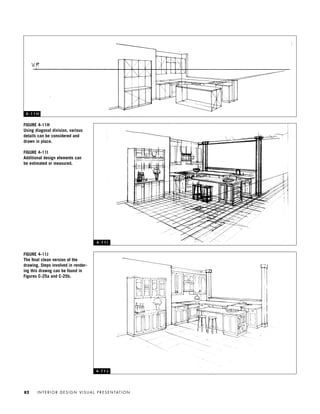
the interior space from the
focal point of the drawing.
2. Draw lines from the S.P. to the
P.P. that are parallel to the
walls of the floor plan; the
locations of the intersections
of these lines and the P.P. are
the setup vanishing points,
vanishing point right (V.P.R.)
and vanishing point left
(V.P.L.).
3. Draw a horizontal line below
the plan setup; this is the hori-
zon line (H.L.). Project the
location of V.P.L. and V.P.R.
vertically to the H.L.; this relo-
cates the vanishing points.
Project a line from the rear
corner of plan vertically to the
H.L.; this will be the measuring
line (M.L.). It can be measured
in scale (to match plan); it will
also be the back corner of the
room. The horizon line must be
located at 5' to 6' in scale on
the M.L. (normal eye level).
4. Draw lines from the V.P.L.
through the top and bottom of
the M.L. These are the wall
and floor lines. Repeat this
step with V.P.R. Next, draw
lines from the S.P. through the
ends of walls (in plan) to the
P.P. Project these locations
vertically onto the drawing.
5. Draw lines from the S.P.
through window locations, or
any other elements (in plan), to
the P.P. Project these locations
vertically onto the drawing.
Heights are determined by
measuring from M.L. or from an
available elevation.
4 - 1 0 B
IDVP 4 12/15/03 3:46 PM Page 77
Most students find it helpful to recognize
two separate types of activity within this
method: (1) those set up in plan and related to
the picture plane and (2) those then projected
from the picture plane to the perspective draw-
ing. Measurements of width and depth are pro-
jected from the picture plane onto the perspec-
tive drawings. Heights are taken from the
measuring line or elevation(s) and tranferred to
the appropriate location.
The plan projection method is generally ac-
curate and provides an excellent perspective
framework. But it can be time-consuming and
sometimes leads to unexpected distortion, re-
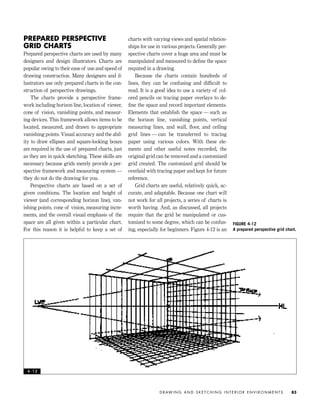
quiring the entire process to be completed a
second time. I find that the method works best
for environments based on simple geometric
forms rather than those based on complex or
organic forms. Figures 4-11a–4-11j delineate
the various steps in a plan projection method
drawing for a residential project.
I N T E R I O R D E S I G N V I S U A L P R E S E N TAT I O N78
FIGURE 4-11A
1. In beginning the drawing, the
desired view must be selected.
In this case the plan is ori-
ented to provide a view of the
rear corner of the kitchen to
include the kitchen cabinets.
2. The picture plane should pass
through the rear corner of the
plan with the walls you wish to
include in the drawing on the
left and right.
3. Create a station point directly
below the rear corner of the
plan (there are other ways to
do this, but this is the easiest).
The station point indicates the
location of the viewer. This
point should be located roughly
2–3 times the height of the
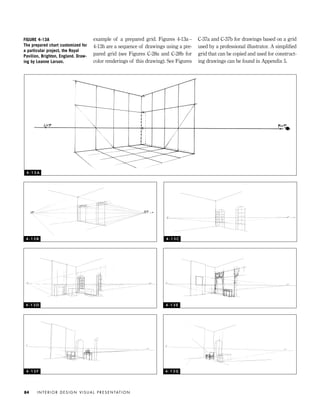
room (in the same scale as the
plan).
4. Draw a line (dashed here) from
the station point to the picture
plane; this line must be paral-
lel to the back walls of the
room in plan.
5. The actual perspective drawing
is begun by projecting the
location of the back corner
down vertically through the
station point and well below
(or above) the plan.
6. The line projected in 5 now
becomes the measuring line.
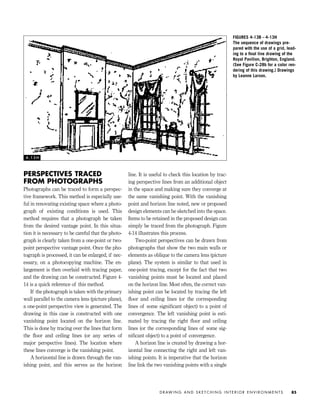
This line is drawn to the
desired height of the room (in
this case nine feet), in the
same scale as the original plan
was created. It is helpful to
draw “tic marks” that indicate
one-foot increments on the
measuring line.
7. A horizontal line is now drawn
to serve as the horizon line for
the perspective drawing. In
most drawings it should be
located at eyeball height, in this
case 5'5". The vanishing points
should be projected vertically
directly from the picture plane
onto this new horizon line.
8. If desired, an elevation can be
placed alongside the perspec-
tive drawing to aid in estab-
lishing height measurements.
9. Wall and ceiling lines can now
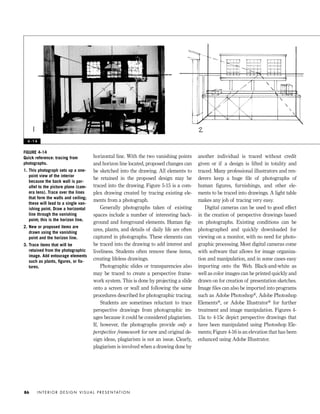
be drawn from opposite vanish-
ing point to the appropriate
heights on the measuring line.
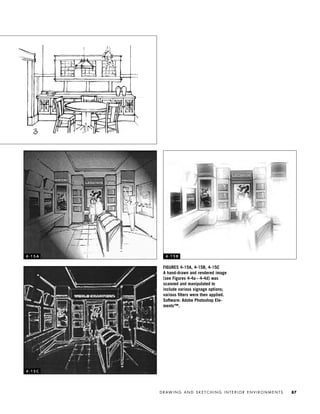
4 - 1 1 A
IDVP 4 12/15/03 3:47 PM Page 78
D R AW I N G A N D S K E T C H I N G I N T E R I O R E N V I R O N M E N T S 79
FIGURE 4-11B
1. Wall and object locations are
found by locating the item on
the plan and projecting a line
from the station point to the
location on the plan, onward to
the picture plane, and down
onto the drawing.
2. In this case a line is drawn
from the station point to the
cabinet, onward to the picture
plane, and then projected verti-
cally from the picture plane to
the drawing. Note: If your
drawing looks weird, you are
not projecting consistently
down from the picture plane.
3. The height of the lower cabi-
nets is found by counting off
the measuring line, in this
case 3'. Some people prefer to
obtain the height dimensions
by transferring them from the
adjacent elevations.
FIGURE 4-11C
1. The sink location is found by
drawing a line from the station
point to the front corners of the
sink, onward to the picture plane,
and then onto the drawing.
2. The dishwasher is found by
drawing a line from the station
point to the front corners of the
dishwasher, onward to the pic-
ture plane, and then onto the
drawing.
3. To find the heights of the wall
cabinets it is necessary to first
locate the height on the origi-
nal measuring line (in this
case the height information is
transferred from the adjacent
elevation).
4. Because the cabinets are
recessed into the wall (see
plan), it is necessary to draw a
line from the station point to the
rear edge of the cabinet, onto
the picture plane, and project
this location onto the drawing.
5. The lower cabinets are com-
pleted when lines are drawn
from the edges of the cabinets
to the appropriate vanishing
points.
4 - 1 1 B
4 - 1 1 C
IDVP 4 12/15/03 3:47 PM Page 79
I N T E R I O R D E S I G N V I S U A L P R E S E N TAT I O N80
FIGURE 4-11D
1. The angled portion of the lower cabinets is
created by drawing a line from the station
point to the edges of the angled portion
onward to the picture plane, and then the
lines are projected onto cabinets in the
drawing.
2. The location of the stove is found by draw-
ing a line from the station point to the front
corners of the stove, onward to the picture
plane, and then down onto the drawing.
3. This piece of furniture is located by draw-
ing lines from the station point to the three
visible edges of the object, onward to the
picture plane, and then onto the drawing.
The height of the object is determined by
locating it on the measuring line and then
transferring, by use of the vanishing point
(dashed lines).
4. The upper cabinets can be completed by
working from the measuring line and the
vanishing points, similarly to step 3 above.
FIGURE 4-11E
1. The island, which is freestanding, is drawn
using a combination of projected lines.
Lines are drawn from the station point to
the three visible edges of the island,
onward to the picture plane, and then down
to the drawing, creating the island’s corner
locations.
2. Because the item is freestanding, its height
and actual floor location must be deter-
mined by transferring the object location
onto walls in plan setup (dashed lines in
plan).
3. Lines are then drawn from the station point
to the plan wall locations found in 2 above,
onward to the picture plane, and then onto
the corresponding walls in the perspective
drawing. Now, working on the perspective
drawing, lines are drawn from the left van-
ishing point to the location where the wall
projection (done in 2) meets the floor, and
these lines are extended foward to the cor-
ners of the island. The height of the island
is taken from the measuring line and
extended using the vanishing points.
4 - 1 1 D
4 - 1 1 E
IDVP 4 12/15/03 3:47 PM Page 80
D R AW I N G A N D S K E T C H I N G I N T E R I O R E N V I R O N M E N T S 81
FIGURE 4-11F
At this stage, a quick overlay
sketch can be created to deter-
mine the quality of the perspec-
tive drawing and locate any prob-
lem areas.
FIGURE 4-11G
1. With the significant features
completed, the plan is no
longer necessary because most
height and spatial relationships
can be determined through use
of the measuring line and van-
ishing points.
2. The location of the hood and
cabinets above the stove is
found by drawing lines upward
from the back corners of the
stove to the upper cabinets
(dashed line with arrows).
These locations are brought
forward through use of the left
vanishing point and then drawn
on the front face of the upper
cabinets.
3. To finalize the details of the
freestanding buffet, dimensions
are found on the measuring
line, brought “behind” the buf-
fet, and extended using the left
vanishing point.4 - 1 1 F
4 - 1 1 G
IDVP 4 12/15/03 3:47 PM Page 81
FIGURE 4-11J
The final clean version of the
drawing. Steps involved in render-
ing this drawng can be found in
Figures C-25a and C-25b.
I N T E R I O R D E S I G N V I S U A L P R E S E N TAT I O N82
FIGURE 4-11H
Using diagonal division, various
details can be considered and
drawn in place.
FIGURE 4-11I
Additional design elements can
be estimated or measured.
4 - 1 1 H
4 - 1 1 I
4 - 1 1 J
IDVP 4 12/15/03 3:47 PM Page 82
PREPARED PERSPECTIVE
GRID CHARTS
Prepared perspective charts are used by many
designers and design illustrators. Charts are
popular owing to their ease of use and speed of
drawing construction. Many designers and il-
lustrators use only prepared charts in the con-
struction of perspective drawings.
The charts provide a perspective frame-
work including horizon line, location of viewer,
cone of vision, vanishing points, and measur-
ing devices. This framework allows items to be
located, measured, and drawn to appropriate
vanishing points. Visual accuracy and the abil-
ity to draw ellipses and square-looking boxes
are required in the use of prepared charts, just
as they are in quick sketching. These skills are
necessary because grids merely provide a per-
spective framework and measuring system —
they do not do the drawing for you.
Perspective charts are based on a set of
given conditions. The location and height of
viewer (and corresponding horizon line), van-
ishing points, cone of vision, measuring incre-
ments, and the overall visual emphasis of the
space are all given within a particular chart.
For this reason it is helpful to keep a set of
charts with varying views and spatial relation-
ships for use in various projects. Generally per-
spective charts cover a huge area and must be
manipulated and measured to define the space
required in a drawing.
Because the charts contain hundreds of
lines, they can be confusing and difficult to
read. It is a good idea to use a variety of col-
ored pencils on tracing paper overlays to de-
fine the space and record important elements.
Elements that establish the space — such as
the horizon line, vanishing points, vertical
measuring lines, and wall, floor, and ceiling
grid lines — can be transferred to tracing
paper using various colors. With these ele-
ments and other useful notes recorded, the
original grid can be removed and a customized
grid created. The customized grid should be
overlaid with tracing paper and kept for future
reference.
Grid charts are useful, relatively quick, ac-
curate, and adaptable. Because one chart will
not work for all projects, a series of charts is
worth having. And, as discussed, all projects
require that the grid be manipulated or cus-
tomized to some degree, which can be confus-
ing, especially for beginners. Figure 4-12 is an
D R AW I N G A N D S K E T C H I N G I N T E R I O R E N V I R O N M E N T S 83
FIGURE 4-12
A prepared perspective grid chart.
4 - 1 2
IDVP 4 12/15/03 3:47 PM Page 83
example of a prepared grid. Figures 4-13a–
4-13h are a sequence of drawings using a pre-
pared grid (see Figures C-28a and C-28b for
color renderings of this drawing). See Figures
C-37a and C-37b for drawings based on a grid
used by a professional illustrator. A simplified
grid that can be copied and used for construct-
ing drawings can be found in Appendix 5.
I N T E R I O R D E S I G N V I S U A L P R E S E N TAT I O N84
FIGURE 4-13A
The prepared chart customized for
a particular project, the Royal
Pavilion, Brighton, England. Draw-
ing by Leanne Larson.
4 - 1 3 A
4 - 1 3 B 4 - 1 3 C
4 - 1 3 D 4 - 1 3 E
4 - 1 3 F 4 - 1 3 G
IDVP 4 12/15/03 3:47 PM Page 84
PERSPECTIVES TRACED
FROM PHOTOGRAPHS
Photographs can be traced to form a perspec-
tive framework. This method is especially use-
ful in renovating existing space where a photo-
graph of existing conditions is used. This
method requires that a photograph be taken
from the desired vantage point. In this situa-
tion it is necessary to be careful that the photo-
graph is clearly taken from a one-point or two-
point perspective vantage point. Once the pho-
tograph is processed, it can be enlarged, if nec-
essary, on a photocopying machine. The en-
largement is then overlaid with tracing paper,
and the drawing can be constructed. Figure 4-
14 is a quick reference of this method.
If the photograph is taken with the primary
wall parallel to the camera lens (picture plane),
a one-point perspective view is generated. The
drawing in this case is constructed with one
vanishing point located on the horizon line.
This is done by tracing over the lines that form
the floor and ceiling lines (or any series of
major perspective lines). The location where
these lines converge is the vanishing point.
A horizontal line is drawn through the van-
ishing point, and this serves as the horizon
line. It is useful to check this location by trac-
ing perspective lines from an additional object
in the space and making sure they converge at
the same vanishing point. With the vanishing
point and horizon line noted, new or proposed
design elements can be sketched into the space.
Items to be retained in the proposed design can
simply be traced from the photograph. Figure
4-14 illustrates this process.
Two-point perspectives can be drawn from
photographs that show the two main walls or
elements as oblique to the camera lens (picture
plane). The system is similar to that used in
one-point tracing, except for the fact that two
vanishing points must be located and placed
on the horizon line. Most often, the correct van-
ishing point can be located by tracing the left
floor and ceiling lines (or the corresponding
lines of some significant object) to a point of
convergence. The left vanishing point is esti-
mated by tracing the right floor and ceiling
lines (or the corresponding lines of some sig-
nificant object) to a point of convergence.
A horizon line is created by drawing a hor-
izontal line connecting the right and left van-
ishing points. It is imperative that the horizon
line link the two vanishing points with a single
D R AW I N G A N D S K E T C H I N G I N T E R I O R E N V I R O N M E N T S 85
FIGURES 4-13B – 4-13H
The sequence of drawings pre-
pared with the use of a grid, lead-
ing to a final line drawing of the
Royal Pavilion, Brighton, England.
(See Figure C-28b for a color ren-
dering of this drawing.) Drawings
by Leanne Larson.
4 - 1 3 H
IDVP 4 12/15/03 3:47 PM Page 85
horizontal line. With the two vanishing points
and horizon line located, proposed changes can
be sketched into the drawing. All elements to
be retained in the proposed design may be
traced into the drawing. Figure 5-15 is a com-
plex drawing created by tracing existing ele-
ments from a photograph.
Generally photographs taken of existing
spaces include a number of interesting back-
ground and foreground elements. Human fig-
ures, plants, and details of daily life are often
captured in photographs. These elements can
be traced into the drawing to add interest and
liveliness. Students often remove these items,
creating lifeless drawings.
Photographic slides or transparencies also
may be traced to create a perspective frame-
work system. This is done by projecting a slide
onto a screen or wall and following the same
procedures described for photographic tracing.
Students are sometimes reluctant to trace
perspective drawings from photographic im-
ages because it could be considered plagiarism.
If, however, the photographs provide only a
perspective framework for new and original de-
sign ideas, plagiarism is not an issue. Clearly,
plagiarism is involved when a drawing done by
another individual is traced without credit
given or if a design is lifted in totality and
traced. Many professional illustrators and ren-
derers keep a huge file of photographs of
human figures, furnishings, and other ele-
ments to be traced into drawings. A light table
makes any job of tracing very easy.
Digital cameras can be used to good effect
in the creation of perspective drawings based
on photographs. Existing conditions can be
photographed and quickly downloaded for
viewing on a monitor, with no need for photo-
graphic processing. Most digital cameras come
with software that allows for image organiza-
tion and manipulation, and in some cases easy
importing onto the Web. Black-and-white as
well as color images can be printed quickly and
drawn on for creation of presentation sketches.
Image files can also be imported into programs
such as Adobe Photoshop®, Adobe Photoshop
Elements®, or Adobe Illustrator® for further
treatment and image manipulation. Figures 4-
15a to 4-15c depict perspective drawings that
have been manipulated using Photoshop Ele-
ments; Figure 4-16 is an elevation that has been
enhanced using Adobe Illustrator.
I N T E R I O R D E S I G N V I S U A L P R E S E N TAT I O N86
FIGURE 4-14
Quick reference: tracing from
photographs.
1. This photograph sets up a one-
point view of the interior
because the back wall is par-
allel to the picture plane (cam-
era lens). Trace over the lines
that form the walls and ceiling;
these will lead to a single van-
ishing point. Draw a horizontal
line through the vanishing
point; this is the horizon line.
2. New or proposed items are
drawn using the vanishing
point and the horizon line.
3. Trace items that will be
retained from the photographic
image. Add entourage elements
such as plants, figures, or fix-
tures.
4 - 1 4
IDVP 4 12/15/03 3:47 PM Page 86
D R AW I N G A N D S K E T C H I N G I N T E R I O R E N V I R O N M E N T S 87
FIGURES 4-15A, 4-15B, 4-15C
A hand-drawn and rendered image
(see Figures 4-4a – 4-4d) was
scanned and manipulated to
include various signage options;
various filters were then applied.
Software: Adobe Photoshop Ele-
ments™.
4 - 1 5 A 4 - 1 5 B
4 - 1 5 C
IDVP 4 12/15/03 3:47 PM Page 87
COMPUTER-GENERATED
IMAGERY
Increasingly architectural and interior design-
ers are using CADD in the creation of paraline
and perspective drawings — these are called
three-dimensional models by some. As previ-
ously mentioned, some software allows CADD-
generated orthographic projections to be con-
verted easily into three-dimensional views. In
other cases the three-dimensional image is
built without first generating orthographic
drawings. As with many CADD programs,
often three-dimensional drawing programs are
difficult to learn to use. Yet once the data are
correctly entered, various three-dimensional
views are easily generated and changes are
made with great ease. The location and height
of the viewer are easily changed, allowing a
range of drawings to be created.
CADD-generated three-dimensional images
are highly accurate and provide great flexibility
because changes can be made quickly. The
software ranges a great deal in price and so-
phistication, but rapid advances in CADD tech-
nology promise lower costs and greater sophis-
tication in the future. CADD is currently used
by designers in all areas of practice, from li-
brary design to kitchen and bath renovation.
With future advances and refinement CADD-
generated imagery will continue to revolution-
ize interior design practice. Figure 4-17 is a
computer-generated perspective drawing. Fig-
ure 4-18 is a drawing done using AutoCAD
that has been enhanced by hand. Figures 4-19a
and 4-19b are hand-drawn and computer-gen-
erated images for a student project.
Many CADD three-dimensional views are
generated as wire-frame models, which are rep-
resentations of objects consisting of multiple
boundary lines. Wire frames look similar to
hand-drawn perspective sketches, with con-
struction lines running in all directions. Some of
these lines can be hidden to more clearly depict
an environment. Even so, wire frames can look
somewhat unnatural because items often do not
appear as true three-dimensional solids until
they are rendered. Although most three-dimen-
sional modeling programs allow for quite a
range of views of a given space, occasionally it
is difficult to obtain the exact view desired. In
cases such as this the image can be drawn over
by hand to manipulate the view (see Figure 4-18).
I N T E R I O R D E S I G N V I S U A L P R E S E N TAT I O N88
FIGURE 4-16
Computer-generated image using
hand-drawn elements manipulated
with Adobe Illustrator™. Drawing
by Cory Sherman and the author.
4 - 1 6
IDVP 4 12/15/03 3:47 PM Page 88
D R AW I N G A N D S K E T C H I N G I N T E R I O R E N V I R O N M E N T S 89
FIGURE 4-17
An AutoCAD-generated perspective
drawing of the project featured in
the professional case study (see
Figures C-77 to C-86). Design and
drawing by Meyer, Scherer &
Rockcastle Ltd.
4 - 1 7
IDVP 4 12/15/03 3:47 PM Page 89
REFERENCES
Ching, Frank. A Visual Dictionary of Architecture. New York: John Wiley & Sons, 1995.
———. Architectural Graphics. New York: John Wiley & Sons, 1996.
Drpic, Ivo. Sketching and Rendering Interior Space. New York: Whitney Library of Design,
1988.
Forseth, Kevin, and David Vaughn. Graphics for Architecture. New York: John Wiley & Sons,
1980.
Hanks, Kurt, and Larry Belliston. Rapid Viz. Los Altos, Calif.: William Kaufman, 1980.
Leggit, Jim. Drawing Shortcuts. New York: John Wiley & Sons, 2002.
McGarry, Richard, and Greg Madsen. Marker Magic: The Rendering Problem Solver for
Designers. New York: John Wiley & Sons, 1993.
Pile, John. Perspective for Interior Designers. New York: Whitney Library of Design, 1985.
Porter, Tom. Architectural Drawing. New York: John Wiley & Sons, 1990.
In CADD-generated three-dimensional
views, rendering is often handled as a second
step in the drawing process, much as it is in
hand drawing. The most elegant rendering of
surface materials, color, value, and shadow is
done with sophisticated software. Much of this
software requires that the CADD-generated
three-dimensional view be imported into the
secondary rendering application. CADD-gener-
ated three-dimensional views can also be ani-
mated and used in multimedia presentations.
In current practice the largest and most spe-
cialized firms are using the most sophisticated
three-dimensional computer imaging. Many
small and medium-size firms employ some
type of computer-generated three-dimensional
imagery or hire professional computer illustra-
tors on a project-by-project basis.
I N T E R I O R D E S I G N V I S U A L P R E S E N TAT I O N90
FIGURE 4-18
The background portion of this
drawing was originally created in
AutoCAD, and the foreground ele-
ments were drawn by hand
because they were not included the
original AutoCAD view. The drawing
was then photocopied. Design and
drawing by Jack Zellner.
4 - 1 8
IDVP 4 12/15/03 3:47 PM Page 90
D R AW I N G A N D S K E T C H I N G I N T E R I O R E N V I R O N M E N T S 91
FIGURE 4-19A
Preliminary sketches of details for
a retail project were created by
hand. Design and drawings by
Dirk Olbrich.
FIGURE 4-19B, 4-19C
The final design presentation,
based on elements sketched in
Figure 4-19a, was created in 3-D
StudioVIZ. Design and drawings
by Dirk Olbrich. Figures C-42a
and C-42b are color studies for
this project.
4 - 1 9 A 4 - 1 9 B
4 - 1 9 C
IDVP 4 12/15/03 3:47 PM Page 91
INTRODUCTION
TO RENDERING
In the world of architecture and design the
term RENDERING is used to describe the visual
enhancement of drawings through the use of
value and/or color. Rendering visually en-
hances drawings, making them more easily
understood and allowing for greater visual
communication in design presentations. Ren-
dering is often done to convey depth and to
allow a two-dimensional drawing surface to
appear more three-dimensional, thus revealing
the material qualities of forms.
Because it can help clients understand a
project, rendering is useful as a means of com-
munication. However, some project budgets and
schedules do not allow time for highly detailed
renderings, whereas other projects require ex-
tensive detailed rendering. This means that
projects have different presentation parameters,
requiring a range of rendering skills—from
quick and loose to accurate and refined.
The level of rendering is also influenced by
the phase of the design process in which the
presentation takes place. For example, during
the preliminary stages of design it is wise to
keep renderings loose and sketchy to avoid
having the project pinned down prematurely. It
is best to consider carefully the audience and
purpose before beginning the actual rendering.
Many students approach rendering with
fear and lack of self-confidence. However, an
understanding of basic rendering concepts and
techniques can allow designers and students to
enhance a visual presentation significantly.
There are dozens of rendering techniques, ma-
terials, and tools available. Practice, study, and
the use of reference material can help designers
to develop a personal system of rendering.
This chapter is an overview of rendering
covering some basic concepts, materials, and
techniques. Orthographic drawings are ren-
dered differently than perspective drawings
and, for that reason, are covered separately in
this chapter. Paraline drawings are rendered in
a manner similar to perspective drawings and
are discussed with them.
RENDERING AS ILLUMINATION
The most important thing to understand about
rendering is that, regardless of style, it intro-
duces qualities of illumination to a drawing.
This means that good rendering introduces
light into a drawing, making it appear more
natural and creating the illusion of three di-
mensions. Rendering requires consideration of
I N T E R I O R D E S I G N V I S U A L P R E S E N TAT I O N92
RENDERING
IDVP 5 5/27/03 3:21 PM Page 92
the light source, or sources, found in the envi-
ronment and the resulting value relationships.
This is true for quick sketches and elaborate il-
lustrations, for colored and noncolored render-
ings. The illumination in a rendering is per-
haps its single most important aspect.
Simply stated, light falls on an object and il-
luminates its surfaces to varying degrees. The
type of lighting, the location of the light
source(s), and the object’s material qualities all
affect the manner in which the object is illumi-
nated. Without consideration of the light
source(s) and the related value relationships,
renderings always look like something out of a
child’s coloring book.
As a light source illuminates an object, it
creates varying degrees of light on the object’s
surfaces. Those areas that receive direct light
become the light areas of the object. Shade oc-
curs in those areas not receiving light directly.
Shadows are created on the surfaces blocked
from receiving light. These varying degrees of
light and shade are referred to as VALUE. All
good rendering is based on value relationships.
Figure 5-1 illustrates light, shade, and shadow.
MATERIALS, MEDIA,
AND TOOLS
The list of materials and tools used in render-
ing is long and continues to grow. Professional
illustrators and renderers employ many meth-
ods, use a range of supplies, and generally
have distinct personal preferences. An under-
standing of materials and techniques allows a
designer to make wise decisions and work
quickly. This means that a basic understand-
ing of materials and media is important. In
rendering there are no hard-and-fast rules —
anything goes. Great rendering requires explo-
ration and curiosity about how materials will
work in a given situation. Figure C-1 depicts a
range of rendering media, materials, and tools;
Figure C-2 gives examples of various render-
ing surfaces and media.
Because there are no absolute rules in ren-
dering, it is wise to do a good deal of casual re-
search. Looking at good rendering, fine art,
and illustration is essential. To this end books,
periodicals, exhibitions, and visits to design
firms are useful. Looking at what works in a
successful painting or pastel drawing can
R E N D E R I N G 93
FIGURE 5-1
This cube is rendered to illustrate
value. The top of the cube is light
because it is receiving direct
light from the light source. Shade
(found on the sides of the cube)
occurs in those areas not receiv-
ing light directly. Shadows are
created on the surfaces blocked
from receiving light. These vary-
ing degrees of light and shade are
referred to as VALUE. All good ren-
dering is based on value relation-
ships. The front edge of the cube
is called the LEADING EDGE and is
drawn in white.
5 - 1
IDVP 5 5/27/03 3:21 PM Page 93
teach a great deal about how to work with
color markers. Discussions with art supply
store personnel can be valuable in acquiring
information about paper, drawing surfaces,
and other supplies.
PAPER AND DRAWING SURFACES
The type of paper or rendering surface used
has a significant influence on the quality of
the final product. Many designers limit them-
selves to working on tracing paper or vellum
because these papers are commonly used
throughout the design process and are avail-
able in design offices.
Tracing paper and vellum have slick sur-
faces and are transparent, allowing them to be
overlaid and easily traced. Graphite pencils,
ink pens, and colored pencils and markers are
often used with success on tracing paper and
vellum. Markers are not absorbed into the sur-
face of these papers, so the color stays rather
weak and tends to pool. This creates softer
color renderings that often have a watercolor
effect, which can be attractive. Colored pencil
can be layered on top of marker on these trans-
parent papers to enrich the color and define
edges. Using a combination of white,
beige/cream, and darker pencils for highlights
and refinement can work particularly well. On
tracing paper and vellum, white gouache
works well for tiny areas of highlight.
MARKER or VISUALIZING PAPER is commonly
used in advertising and industrial design and is
excellent for rich marker renderings. Marker
paper is less transparent than tracing paper or
vellum but absorbs markers well (see Figures C-
6 and C-7). Graphite, ink pens, colored pencils,
and small amounts of paint (including gouache)
can all work well on marker paper. Some heav-
ier types of marker paper may be difficult to see
through and require the use of a light table or
taping onto a sunny window for tracing. Some
types of marker paper can be photocopied and
rendered. Pretesting of paper, photocopier toner,
and marker compatibility is required. Figure 5-2
is a rendering on marker paper.
Plain BOND PAPER, used in standard office
copying machines, is highly absorbent and can
be used for rendering. Bond paper can be very
messy because it soaks up marker dye, but
when used with care it can create rich marker
renderings. This paper also allows colored pen-
cils to be layered over marker for clarity, crisp-
ness, and highlights. Rendering directly on
bond photocopies is a fast, popular rendering
technique that is becoming the standard in de-
sign offices. A word of caution: some marker
base components can smear and dissolve copy
toner, resulting in disaster. Pretesting of all
materials to be used on bond paper copies is
highly advised. Some plotter paper used for
CADD-generated drawings shares the same
qualities as bond paper.
Marker paper and bond paper allow for
mistakes to be carefully cut out and reworked;
problem areas can be replaced with new por-
tions. In addition, objects with ragged, poorly
rendered edges can be cleanly cut and placed
on a new sheet of paper. This technique works
particularly well with photocopies and is used
a great deal in product rendering.
There are many types of nontransparent
paper that are used in rendering. These papers
require some method of image transfer. TRANS-
FER PAPER, available from art supply stores, is
placed between the original image and the ren-
dering surface; the image is then redrawn and,
thus, transferred. A cheap alternative method
involves drawing on the back of the original
with a soft pencil. The original is then placed
face up on the rendering surface, and the image
is redrawn, causing it to transfer. With some
types of paper, commercial photocopying ma-
chines are also effective in reproducing images.
A variety of nontransparent colored papers
can work well for stylized, minimally rendered
presentations. Canson™ paper and other types
of pastel paper accept graphite, ink, marker, col-
ored pencil, pastel, and small amounts of
gouache. This type of colored paper works best
when the color selected is used in great amounts
in the final rendering. For example, an interior
I N T E R I O R D E S I G N V I S U A L P R E S E N TAT I O N94
IDVP 5 5/27/03 3:21 PM Page 94
with green slate used abundantly as a finish ma-
terial can be rendered nicely on similarly green-
colored Canson paper. With the appropriate
paper color selected, only the highlights, darkest
values, and shadows are rendered in, leaving the
paper color to serve as the middle value of the
rendering (see Figures C-38–C-41 ).
Many colored papers are highly textured on
one side only. Colored pencils used on the
highly textured side create a grainy look.
Sometimes this is not desirable, so care must
be taken in selecting the best side for render-
ing. Some types of colored paper can be photo-
copied, allowing for speed in the rendering
process. However, tests should be run prior to
rendering because copy toner does not adhere
well to many types of colored paper.
Print paper used in diazo machines is also
used for rendering. Because prints can be run
quickly from an original, this method is highly
efficient. Presentation BLUELINE, BLACKLINE, and
sepia-toned prints are available at commercial
blueprint shops and are easily rendered with
marker and colored pencil. The choice of print
paper is based on the colors used in the ren-
dering. For example, a very warm rendering
with a predominance of red, brown, or yellow
is best rendered on brown- or black-toned print
paper but is difficult to render on blue-toned
paper. Large-format photocopying machines
are increasingly replacing blueprint machines
in popularity. Bond copies are highly ab-
sorbent, can offer rich renderings, and are com-
monly used in design offices for presentations.
Cheap brown KRAFT PAPER like the kind
used for paper bags can also be used in ren-
dering. Given the particular qualities of this
paper, it should be used only in presentations
R E N D E R I N G 95
FIGURE 5-2
A rendering created on marker
paper. Drawing and rendering by
Michael Andreini.
5 - 2
IDVP 5 5/27/03 3:21 PM Page 95
where its earthy qualities are deemed appropri-
ate. (Figures C-63a and C-63b are student pre-
sentations done on kraft paper.) When used for
the right project this paper can work effectively.
Kraft paper is highly absorbent and practically
empties the dye out of a marker, which can be
messy. Ink pen, colored pencil, and pastel work
well on kraft paper to define edges and create
highlights. Generally this type of paper can be
used in photocopying machines.
A variety of specialized art papers and hand-
made papers can be used for rendering as well.
These papers sometimes work in photocopying
machines and are then rendered minimally for
inclusion in a nontraditional presentation.
BRISTOL PAPER, BRISTOL BOARD, and ILLUSTRA-
TION and MOUNTING BOARDS are, for the most
part, highly absorbent and take marker very
well. Many professional illustrators prefer illus-
tration board for rendering. Bristol paper comes
in a variety of weights, the thinnest of which
work in photocopying machines. Illustration
and some mounting boards are available in hot
press (smoother, less tooth) and cold press
(more textured, more tooth). Both hot and cold
press boards absorb marker dye well. However,
the texture of cold press products can create
problems in detailed renderings. Colored pen-
cils and ink pens can look unduly grainy on
highly textured surfaces. Museum board is a
beautiful, expensive, buttery soft board that
comes in white, beige, gray, and black, is highly
absorbent, and works well with colored pencil.
Drafting films are sometimes used in ren-
dering. Generally these films are nonabsorbent
and tend to pool marker dye and ink. Graphite
and colored pencils are sometimes used on
drafting film. Paint works well on plastic film
but requires hours of practice to master.
WATERCOLOR PAPER is used in working with
wet media such as watercolor paint. Watercolor
paper is available in hot or cold press, in fin-
ishes that range from smooth to very rough,
and in various weights. Heavier-weight paper is
required in working without premounting the
paper to a frame. Lighter-weight paper should
be presoaked with water, stretched, and taped
or stapled to a sturdy frame. Watercolor paper
absorbs marker dye readily and can be worked
with graphite, ink, colored pencil, acrylic and
gouache paint, and just about anything else
available commercially for mark making. Heav-
ily textured watercolor papers are very difficult
to use for detailed design renderings.
RENDERING MEDIA
A trip to an art supply store makes evident the
huge selection of rendering media, from col-
ored pencils to markers and paint. The avail-
able rendering media range in price and have
advantages and disadvantages. This means
that no one item does everything well. For this
reason most renderings require the use of more
than one medium, and many renderings re-
quire a little bit of everything.
Graphite pencils, lead holders, and mechan-
ical pencils can be used in noncolored render-
ings. Pencils can be used for contour lines as
well as texture, pattern, and material indication.
Although pencil can be used to create subtle and
beautiful original drawings and renderings, it
does not reproduce as well as ink. This means
that blueprints and photocopies of pencil ren-
derings depicting variations of value and tex-
ture are often less clear than the originals. Delib-
erate individual pencil strokes reproduce far
better than do those portions where the side of
the pencil has been used to cover large areas. In
cases where a rendering will be heavily repro-
duced, pencil may be a poor choice.
Ink used in refillable or disposable pens cre-
ates excellent line work that reproduces beauti-
fully in both photocopying and diazo machines.
Thus ink can be used successfully to create line
drawings for reproduction and overrendering
with colored media.
Unfortunately, using ink can be messy and
time-consuming. Before ink dries, it can smear
and ruin an original. Therefore, it is wise to
take care with ink drawings and use ink only
as the final step in drawings that have been
fully drawn with guidelines in graphite, non-
I N T E R I O R D E S I G N V I S U A L P R E S E N TAT I O N96
IDVP 5 5/27/03 3:21 PM Page 96
photo, or nonprint pencil. Inking triangles with
raised edges are also helpful.
Refillable technical pens in varying widths
are available, as are disposable ink pens. Refill-
able pens produce the finest quality of line, but
they require cleaning and proper maintenance.
Disposable ink pens are less consistent in
terms of line quality, yet are preferred by some
because they do not require cleaning or main-
tenance. Fine-point markers and various forms
of felt-tip pens can be used to create excellent
ink renderings. Disposable technical pens are
useful in creating line drawings, whereas felt-
tip ink markers work well on colored render-
ings to define edges.
There are three types of COLORED PENCILS:
wax-based, oil-based, and water soluble. I find
the wax-based the most useful in rendering. In
my experience, Berol Prismacolor™ wax-
based pencils are the easiest to render with.
Colored pencils can work well alone, although
for rich color buildup they must be layered or
manipulated. See Figure C-3 for examples of
colored pencil color manipulation. Without lay-
ering, colored pencils can look grainy because
the pencil often works only on the top surface
of the paper, allowing little valleys to stay un-
colored. Underlayering warm colors with deep
red pencil and cool colors with indigo blue pen-
cil can diminish the grainy look.
A variety of solvents can be used to de-
crease the grainy quality of pencil renderings.
One of the best is rubber-cement thinner,
which is toxic and emits vapors that can cause
serious health problems. Use rubber-cement
thinner in an appropriate manner, and follow
the warning instructions carefully. In using
this solvent, a small amount is placed on a cot-
ton swab and applied on top of colored pencil
— in a well-ventilated space.
An alcohol-based colorless blender marker
is an alternative pencil solvent that poses fewer
health hazards. The colorless blender can be
applied over the surface of the colored pencil
area and worked back and forth, loosening up
the pencil.
Often when used alone and overworked,
wax-based pencils can produce a buildup of
wax. This makes the area look shiny, overdone,
and amateurish. The solution to this shiny
buildup is to apply a layer of color or gray
marker before any pencil touches the paper.
The marker functions like a paint primer and
allows the surface to accept pencil better. This
works well when done with subtle shades of
the object color or light values of gray. Coating
paper with acrylic gesso also adds a primer
coat for pencil renderings.
The appearance of colored pencil rendering
varies greatly according to the type and texture
of paper used, thus creating a need for experi-
mentation. In addition, the way the pencil is held
and the stroke used produce different effects.
When used to cover large areas, colored pencils
are best applied with angled strokes. Using
strokes of roughly 45 degrees is less tiring and
produces an attractive rendering. Sharp pencils
have a greater surface area and cover large
areas rapidly. Pencils also must be kept very
sharp when used to define edges and outline ob-
jects. In creating outlines or definition, the use of
a metal or plastic straightedge is required.
Pencils can be used over marker renderings
to enhance color and define shape and value. A
sharp white or light-colored pencil works well
to clean up messy edges of marker rendering.
To create subtle color variations, colored pencil
pigment can be chipped away from the pencil
using a blade and applied by rubbing onto the
drawing surface with a tissue.
ART MARKERS, also called STUDIO MARKERS,
are filled with transparent dye in an alcohol or
xylene base solution. Xylene-based markers last
longer and are considered by some to have bet-
ter color rendition. Unfortunately, xylene-based
markers produce fumes that can cause health
problems. For this reason, some schools, insti-
tutions, and design firms have policies pro-
hibiting the use of xylene-based art supplies.
Alcohol-based markers have recently im-
proved greatly and are now widely used. Unfor-
tunately, alcohol-based markers tend to dry up
R E N D E R I N G 97
IDVP 5 5/27/03 3:21 PM Page 97
quickly and do not last long. Denatured alcohol
or 91 percent alcohol solution can be used to re-
vive markers. Marker tips can be removed and
an alcohol solution placed in the marker body, or
the marker can be placed (open) with the tip in an
alcohol solution. Because they dry up quickly, al-
cohol-based markers should be tested prior to
application on a final rendering; this prevents
unwanted streaks and poor color matches.
There are numerous brands of high-quality
art markers currently available. Many design-
ers and illustrators have distinct personal fa-
vorites. Others tend to mix and match brands,
based on availability, price, and color selection.
Many of my students prefer Pantone Tria™
markers by Letraset™ because they have three
tip sizes, produce good color rendition, and are
refillable. Tria markers also make use of a
chisel point for the marking tip, which works
well in rendering nonorganic forms and in
using a straightedge for marker application.
Prismacolor brand markers have a true range
of warm and cool grays and come with a ren-
dering tip that is a modified chisel point, which
works well for rendering organic forms and
working freehand.
Markers are a popular rendering medium
because they are quick to use, do not require ex-
tensive setup or cleaning time, and come in an
enormous range of colors. However, markers
can be difficult to master because they are diffi-
cult for beginners to control. Moreover, marker
color must be manipulated to portray value,
texture, and material qualities successfully.
When possible, marker strokes should be
applied against a straightedge. Do not use
metal or plastic edges for applying marker
color because it smears and causes problems.
The best straightedge for marker application is
a strip of mat or illustration board.
Marker color is usually layered or touched
up with additional media to properly render
value and color. A single marker color can be
applied in layers to create value contrast. Gray
marker as well can be layered under the appro-
priate color to create value or enrich color. Col-
ored pencil, pastel, and small quantities of
paint can be layered over marker color to create
value contrast or tune up color. See Figure C-4
for examples of marker color manipulation.
Regardless of the method used, marker
color must be manipulated to reveal form. The
most common mistake in marker rendering is
neglecting to manipulate marker color and, in
so doing, creating “coloring book” images that
appear amateurish. Often marker color is too
intense for use in interior perspectives. One
method for softening marker intensity is to use
colorless blender to pick up the marker dye and
then apply it to the drawing surface. To do this,
apply the marker to slick paper, “pick it up”
with the colorless blender, and apply it to the
rendering surface (Figure C-5).
DRY PASTELS (sometimes called chalk) work
well as a complement to marker and colored
pencil renderings. These pastels are dry and
chalky in contrast to oil pastels. Dry pastels can
be used to color an area quickly and can create
light washes for highlights. One useful dry pas-
tel technique involves using the edge of a blade
to shave off portions of pastel, creating a pas-
tel pigment dust. The pastel dust can be mixed
with baby powder, making it easy to work. The
dry pastel and baby powder mixture is then
smoothed onto the rendering surface with tis-
sue, cotton pads, or swabs over marker, or used
alone to create washes of color. Pastels are also
blended into a drawing with a finger, which
works far better than simply drawing with a
pastel stick. Pastels are available in pencil form;
however, these lack the speed of application
found with stick pastels.
Many of those involved in rendering enjoy
the speed with which pastels can be employed.
Dry pastels work well on colored paper as a pri-
mary rendering medium but are best used in
less detailed renderings. Large areas of pastel
can be applied neatly when worked against re-
movable tape or sticky back as a masking
agent. It is easy to erase or brush pastels from
a drawing surface. This makes pastels a far
more forgiving medium than markers. Finished
I N T E R I O R D E S I G N V I S U A L P R E S E N TAT I O N98
IDVP 5 5/27/03 3:21 PM Page 98
pastel drawings require the application of fixa-
tive spray to keep them in place. This can cause
problems in renderings done with markers be-
cause fixative can remove marker dye. However,
special marker fixative is available.
WATERCOLORS, transparent water-based
paints used by many professional illustrators
and artists, can be used to create beautiful ren-
derings. However, they are difficult and ex-
tremely time-consuming to use. A good deal of
practice and experimentation is required in de-
veloping watercolor painting skills. Students in-
terested in watercolor rendering are well advised
to enroll in a watercolor painting course; infor-
mation gained there can be used in rendering.
Watercolor rendering requires special tools
such as brushes, high-quality paper, and
mounting board. Because it is time-consuming,
watercolor rendering is not often used for pre-
liminary or schematic presentations but is in-
stead used in final design presentations.
GOUACHE is an opaque water-based paint.
When used straight from the tube, it appears
opaque; when mixed with water, it can become
somewhat transparent. Professional illustrators
and renderers use gouache to create rich, realis-
tic renderings. However, like watercolors,
gouache painting is time-consuming and re-
quires special skills and equipment. Because it
is water-based and is often mixed with water,
gouache should be applied only to heavier pa-
pers. White or light-colored gouache can be
used to create highlights and glints on marker,
ink, and pencil renderings. This is best done by
mixing white gouache with a small amount of
water and applying it to the drawing surface
with a fine paintbrush. The gouache should be
applied with great care in extremely small quan-
tities only. When applied improperly, white
gouache can appear unnatural and seriously
distract from a rendering. It is advisable for stu-
dents to keep a small tube of white gouache, as
well as a very fine paintbrush, on hand for
painting tiny highlights into some renderings.
An AIRBRUSH is a system that actually pro-
pels paint or dye onto a drawing surface. In
standard airbrush systems a compressor, hose,
and spray gun combine to propel the pigment.
Airbrushes produce dazzling, sophisticated im-
ages with an amazing range of hue and value.
Standard airbrush systems are expensive and
require lots of practice. A great deal of setup
and cleanup time is required for airbrush use.
There are airbrush attachments that can be
purchased for use with markers. These are less
costly and require less preparation time than
traditional airbrushes. Marker airbrush attach-
ments require plenty of practice and generally
involve masking off large areas of a drawing. I
have found them to produce inconsistent results.
Many renderings combine various forms of
media. It is common to see renderings created
with marker, colored pencil, a bit of pastel, ink,
and tiny areas of paint. The combining of
media limits weaknesses and takes advantage
of strengths. Some designers create renderings
that are collages of a variety of materials and
media and come from a range of sources (see
Figure C-8). Some collages make use of com-
puter-generated images combined with hand-
drawn images.
Other successful collages are hand ren-
dered, with the exception of photographs of
human figures and entourage elements. For the
most part these collages create nontraditional
renderings that may not be appropriate for all
projects. With the audience and project care-
fully considered, nontraditional collage-type
renderings can successfully communicate con-
ceptual as well as spatial issues.
RENDERING
ORTHOGRAPHIC
PROJECTION DRAWINGS
Rendering orthographic projections helps to re-
veal the material qualities of the design and in-
dicate relative depth. Because orthographic
views are by nature flattened views, they often
require rendering as a means of graphic en-
hancement. With the appropriate enhancement,
orthographic views can be used successfully in
R E N D E R I N G 99
IDVP 5 5/27/03 3:21 PM Page 99
design presentations. This is fortunate, because
orthographic views are created on most proj-
ects and are therefore readily available for use
in design presentations. For this reason, ren-
dered orthographic views are commonly used
for presentations made throughout the design
process. Orthographic projections are faster
and easier to render than perspective drawings.
The best way to begin a rendered plan, sec-
tion, or elevation is to create a clean original
drawing. For the final rendering to have clarity,
complex dimensions and confusing notes
should be omitted. Items such as ceramic tile
and certain simple textures may exist on the
original drawing or can be drawn in as part of
the rendering process.
The key to rendering is to consider light,
and this is most easily accomplished in ortho-
graphic projections by adding shadows. If
time allows, additional value contrast, materi-
als, and color rendition can be included in the
rendering. Including shadows helps to reveal
height and can provide the contrast necessary
to enhance the drawing. There are a number of
methods for determining shadow location and
length; most of these are overcomplicated.
Quite often, shadows can be simplified and es-
timated with few ill effects.
SIMPLIFIED SHADOWS
IN PLAN DRAWINGS
There are two simple systems for estimating
shadows in plan drawings. One system em-
ploys a consistent shadow orientation for the
entire plan. Typically this simplified system
employs a 45-degree diagonal direction for the
light source. Each element and object in the en-
tire plan receives a shadow cast by the same
45-degree light source. Shadows are drawn ad-
jacent to each form in plan at a 45-degree
angle, using a standard 45-degree triangle. The
length of each shadow is estimated based on
the relative height of each form. This method
is simple and creates an easy-to-read plan (Fig-
ure 5-3).
Another shadow estimation system in-
volves creating shadows that are cast by the
variety of light sources found in the environ-
ment. The locations of windows, skylights,
and electric light sources are used to cast 45-de-
I N T E R I O R D E S I G N V I S U A L P R E S E N TAT I O N100
FIGURE 5-3
A floor plan with simplified shad-
ows, all cast at a consistent 45
degrees.
5 - 3
IDVP 5 5/27/03 3:21 PM Page 100
gree shadows. This system creates shadows
that vary from room to room, relative to the
natural and electric light sources. Shadows are
cast at 45-degree angles (using a 45-degree tri-
angle), based on the location of the light
source. Shadow length is estimated relative to
height. This variable shadow system creates
dramatic effects that help to indicate window
locations (Figure 5-4). However, plans employ-
ing this system require more time, and com-
plex plans can be visually confusing.
SIMPLIFIED SHADOWS
IN ELEVATION AND
SECTION DRAWINGS
Shadows enhance elevations and sections. In
these drawings they can be used to indicate the
relative depths and the forms of design ele-
ments. A simple technique is for shadows to be
drawn in section and elevation as cast from top
right to bottom left, following a 45-degree di-
agonal, allowing for the use of a standard 45-
degree triangle.
In elevation, shadows are cast at 45 degrees
with lengths determined by the relative depth
of the object casting the shadow (Figure 5-5).
Shadows drawn in elevation enhance a draw-
ing but should generally be kept minimal in
terms of length for purposes of graphic clar-
ity. Where a dramatic rendering is required,
shadows can be drawn with great lengths to
create interest. It is important to note that ex-
terior elevations, unlike interiors, are often
drawn with dramatic shadows because they
are outdoors and receive large quantities of
natural light.
Section drawings have shadows cast by cut
elements such as the roof, floors, and walls.
Generally the length of these shadows is var-
ied, based on the distance from the cutline to
the plane receiving the shadow.
R E N D E R I N G 101
FIGURE 5-4
A floor plan with simplified shad-
ows, cast at 45 degrees, based
on natural light direction.
FIGURE 5-5
An interior elevation with simpli-
fied shadows, cast at 45-degree
angles.
5 - 4
5 - 5
IDVP 5 5/27/03 3:21 PM Page 101
TEXTURE, PATTERN,
AND MATERIAL QUALITIES
It is often useful to render the material proper-
ties of design elements in orthographic projec-
tion drawings. This is done by delineating the
size and location, texture and finish of both
building elements and furnishings. Rendering
these elements in plan and elevation drawings
is easier and less time-consuming than render-
ing in perspectives and paraline drawings. For
this reason, it is not unusual to see professional
design presentations that consist of rendered
plans and elevations and nonrendered perspec-
tive drawings. When such elements are drawn
successfully, many clients can distinguish ma-
terial qualities quite well in rendered ortho-
graphic projections.
Rendering materials and finishes can be
done quite simply, for example, with minimal
line work and stippling used to indicate wood
and ceramic tile. When necessary, great detail
can be added to plans and elevations. There are
some fairly standard conventions for rendering
common finish materials in orthographic pro-
jection. See Figure 5-6 for examples of ortho-
graphic finish materials.
Regardless of the level of detail required for
a given project, materials must be rendered in
I N T E R I O R D E S I G N V I S U A L P R E S E N TAT I O N102
FIGURE 5-6
Examples of rendered finish mate-
rials for use in orthographic pro-
jections. Note: These are not the
standard symbols for use in con-
struction documents.
5 - 6
IDVP 5 5/27/03 3:21 PM Page 102
scale and with some indication of texture or
surface finish. For example, the most minimally
rendered plan should show properly scaled tile
locations, wood floors in scale with a slight
graining pattern, and minimal stippling for car-
pet locations. The indication of surface finishes
in proper scale allows the plan to indicate accu-
rately the finish material sizes and locations.
When in doubt about the rendering of a
particular material, it is best to carefully exam-
ine the actual material and render an abstrac-
tion of what is visible. For example, no con-
vention exists for rendering a speckled rubber
floor tile. This particular tile can be rendered
only through examination of its visual quali-
ties. Are the speckles large or small? Are the
speckles in a contrasting color? Are they ran-
dom or in a particular pattern?
Some designers prefer spare, minimally ren-
dered orthographic projections, whereas others
prefer a detailed, rather busy style of rendering.
This is certainly a matter of taste or personal
style. Regardless of personal style, however,
renderings of orthographic projections must be
drawn in scale and should accurately reflect pro-
portion and true material qualities. Figures 5-7,
5-8, and 5-9 are orthographic projections ren-
dered with line work, stippling, and shadows.
R E N D E R I N G 103
FIGURE 5-7
Floor plan rendered using lines,
stipples, and shadows (tone).
5 - 7
IDVP 5 5/27/03 3:21 PM Page 103
I N T E R I O R D E S I G N V I S U A L P R E S E N TAT I O N104
FIGURE 5-8
Floor plan rendered using lines,
stipples, and shadows (tone).
FIGURE 5-9
Interior elevation rendered with
disposable ink pens and marker.
5 - 8
5 - 9
IDVP 5 5/27/03 3:21 PM Page 104
Generally, accurate visual assessment of
materials is a key to successful rendering. In
some cases, certain materials simply cannot be
rendered in the time allowed, so a legend sys-
tem can be used to delineate material locations.
COLOR-RENDERING PLANS,
SECTIONS, AND ELEVATIONS
Prior to beginning any color rendering, a de-
signer should consider the amount of time
available and the nature of the project. Project
phase, type of project, and the presentation au-
dience are important factors in the selection of
a color rendering style. All factors must be con-
sidered and the most appropriate media cho-
sen. Color rendering requires a working knowl-
edge of color theory; some basic color infor-
mation can be found in Appendix 3.
Color rendering can greatly enhance plan,
elevation, and section drawings. The quickest
method calls for creating a photocopy or print
of an original line drawing and rendering on
the copy with pencil, marker, pastel, or a com-
bination of these media (see Figures C-9a–C-
23). Another quick method involves the use of
white or colored tracing paper laid over draw-
ings and washed with colored pencil, ink, or
washes of marker.
In working on bond copies and print paper,
shadows can be rendered into the print with
gray markers before the application of any col-
ored marker or pencils. Areas that are to ap-
pear much darker in value should also be laid
in gray marker prior to the application of color
media. With shadows and darker values ap-
plied, marker color, pencil color, or pastels may
then be used to create the desired hue. Because
rendering on bond and print papers is quick
and relatively easy, they are often used for de-
sign presentations, such as those made in the
schematic design phase of a project. Figures C-
9a through C-12b show the steps in rendering
bond paper copies of plans and elevations.
Some varieties of colored paper can be photo-
copied and rendered. The color of paper selected
will be predominant in the final rendering, and
this should be considered. For example, selecting
a paper color that is the middle value of a pre-
dominant color in the design allows one to render
only shadows, dark values, and highlights into
those areas (see Figures C-40 and C-41).
In some cases, when little time is available,
orthographic drawings can be spot rendered;
this means that only a small portion (usually cir-
cular) of the drawing needs to be rendered accu-
rately to indicate the materials used throughout
the project (Figure C-13a). This technique is ef-
fective when the spot that is rendered clearly de-
picts the range of materials used in the project.
Another time-saving method involves using
the correct color in a particular area and defin-
ing elements accurately in part of that area.
For example, a large tile area can be indicated
by applying the correct marker to the entire
tiled portion, with only a limited number of
tiles outlined in pencil, ink, or marker to show
the tile size and shape (Figure C-13b). This al-
lows the rendering to communicate material lo-
cations with a limited amount of detail work.
This method must be accompanied by clear
verbal communication to allow clients to un-
derstand material locations.
TECHNIQUES AND TIPS
All rendered orthographic projections require
shadows. Shadows should be considered prior to
rendering, and a shadow plan should be created
with each shadow located. Shadows can then be
rendered in colored pencil, ink, or marker.
Because they can remove ink and colored
pencil, markers should generally be used for a
base coat. This means they should be applied
before the use of ink or colored pencil. How-
ever, when necessary, light markers and color-
less blenders can be used to remove areas of
pencil that have become too waxy.
Plans, elevations, and sections require that
large areas of marker be applied in deliberate
strokes with a straightedge. Large areas of car-
pet or wood flooring should be applied with the
lightest marker color possible, applied with a
straightedge.
R E N D E R I N G 105
IDVP 5 5/27/03 3:21 PM Page 105
Additional layers of marker can be applied
to tune up marker color and to add nuances
where required. In rendering natural materials
such as wood and stone, marker color should
vary slightly; this requires going over particu-
lar areas with a second application of marker.
Unsuccessful marker renderings of ortho-
graphic projections generally suffer from one
or more of the following: strokes not created
with a straightedge, marker color that is too in-
tense, lack of value contrast (no highlights or
dark values), or a combination of these flaws.
Colored pencil is often applied over gray or
colored markers to add highlights, intensify
dark areas, and enrich color. Marker color
alone is often too intense for use in interior
renderings and requires the addition of colored
pencil to soften and subdue the color.
Unsuccessful colored pencil renderings
often suffer from heavy-handed use of a single
color, pencil strokes that are all over the place,
unsharpened pencil points, or a combination of
all three.
RENDERING
PERSPECTIVE DRAWINGS
Rendering perspective and paraline drawings is
often more difficult and time-consuming than
rendering orthographic projections. This is due
to the complex nature of perspective drawing.
Light, shade, and shadow must be rendered in
perspective drawings. Moreover, the surfaces of
objects recede toward vanishing points, creat-
ing complexity in rendering colors and materi-
als. However, rendering adds richness, interest,
and reality to perspective drawings, allowing
for successful visual communication.
Rendered perspectives can help the proposed
design to become real to a client and are thus ex-
cellent sales and communications tools. For this
reason rendered perspectives are often used in
formal final design presentations. There are
many perspective rendering techniques, vary-
ing from those that can be accomplished quickly
to those that require days for completion.
The time and budget constraints of a proj-
ect influence the rendering method selected.
When scheduling and budgets allow, profes-
sional illustrators may be hired to create highly
detailed or dramatic renderings. Quickly
drawn perspectives rendered with value and al-
most no color may be used on some projects.
Sometimes minimally rendered black-and-
white perspective drawings are used in tandem
with rendered floor plans because they can be
produced quickly. Because projects vary in
terms of design fees and schedules, it is useful
to be aware of a range of rendering techniques
and basic perspective rendering concepts.
All rendering requires that the source of
light and its influence on the environment be
considered. In perspective rendering, however,
light and its relationship to the object(s) ren-
dered must be considered above all else. What
is the light source or sources? How do the ren-
dered materials react in relationship to the
light source? Every stroke of the marker or
pencil is actually determined by the relation-
ship of light to the object.
Understanding the relationship of light,
value, and shadow on basic forms in perspective
is required for successful perspective rendering.
The cube, cylinder, sphere, and cone are basic
shapes that are found in combination in more
complex objects. Learning to render these basic
shapes in a variety of noncolor media is a useful
preparation for the eventual rendering of color
and materials. The basic shapes are most easily
rendered with a light source above and slightly
to the right or left. The light source in this posi-
tion creates three distinct values — light (1),
medium (2), and dark (3) — and a cast shadow
(4). Figure 5-10 illustrates this light source setup
in relation to a variety of simple forms.
In this light-source setup, the top surface of
a cube receives the most light (value 1), fol-
lowed by the side closest to the light source
(value 2). The side farthest from the light
source receives the least light and is darkest
(value 3), and typically the cast shadow (4) is
adjacent to the darkest side (see Figure 5-10).
I N T E R I O R D E S I G N V I S U A L P R E S E N TAT I O N106
IDVP 5 5/27/03 3:21 PM Page 106
A cylinder with this lighting setup has its
top surface rendered as the lightest (value 1).
Light curves around a curving surface, creat-
ing levels of value contrast that also curve
around the cylinder. On a simplified nonreflec-
tive cylinder, the portion of the cylinder closest
to the light is rendered with the medium value
(value 2) and the portion farthest from the light
source is rendered the darkest value (value 3).
The shadow (4) is generally located on the sur-
face next to the darkest portion of the cylinder
(see Figure 5-10).
R E N D E R I N G 107
FIGURE 5-10
The basic shapes are most easily
rendered with a light source
above and slightly to the right or
left. The light source in this posi-
tion creates three distinct
values — 1, light; 2, medium; 3,
dark; and a cast shadow (4).
5 - 1 0
IDVP 5 5/27/03 3:21 PM Page 107
Cylinders are frequently drawn in a more
complex manner because they often pick up re-
flective light, causing a dark reflection next to
the medium value of the cylinder, as well as a
light reflection on the dark value. This is the
case when rendering highly reflective material
such as metal. The portions of the cylinder far-
thest from the light source, which recede from
the viewer, also receive medium to dark values.
The location of the darkest value on a cylinder,
cone, or sphere is called a CORE. Cores often
have a thin reflected highlight immediately
next to them.
A sphere with the described lighting setup
has its top portion rendered as lightest (value
1), and as the surface curves away from the
light source, values are blended in a range from
medium (value 2) to dark (value 3). The shadow
(4) is generally found on the surface next to the
darkest portion of the sphere. Generally values
are rendered into a sphere with curved strokes
that follow the form of the sphere. Often a
bright highlight can be found toward the top
portion of the sphere in the location of the
lightest value. The darkest portion, or core, of
a sphere is sometimes rendered with a narrow
adjacent highlight on reflective surfaces (see
Figure 5-10).
A cone is rendered with the portion closest
to the light source lightest (value 1), with adja-
cent areas of the cone rendered darker (value 2
and ranging to almost value 3); the portion of
the cone farthest from the light receives the
least light and is darkest (value 3). A shadow is
most often found on the surface next to the
darkest value of the cone. A cone with a reflec-
tive surface is rendered with the core, or dark-
est portion, adjacent to a highlight indicating
surface reflection (see Figure 5-10).
It is essential to be able to render these basic
forms with a minimum of three values plus a
shadow. Complex, detailed rendering requires
more value contrast to illustrate more complex
lighting situations. However, creating a mini-
mum of three values plus a shadow often al-
lows a rendering to be visually successful.
RENDERING SHADOWS IN
PERSPECTIVE DRAWINGS
In quick sketch renderings fewer values than the
three discussed can be used in combination with
rendered shadows. When time is scarce, a draw-
ing can be slightly rendered by the inclusion of
shadows only. There are a variety of methods of
shadow construction, most of which are rather
confusing and overtechnical. The important
I N T E R I O R D E S I G N V I S U A L P R E S E N TAT I O N108
FIGURE 5-11
Quick reference: simple parallel
shadow construction. Construct
shadows by selecting an angle
formed by the light source and
using this angle consistently to
create triangles at appropriate
corners of the object. The bases
of the triangles are then con-
nected to one another to form the
shadow.
5 - 1 1
IDVP 5 5/27/03 3:21 PM Page 108
things to remember about shadows in perspec-
tive renderings are that shadows are absolutely
necessary, especially on floor surfaces; shadows
should be handled in a consistent fashion
throughout the rendering; and shadows need not
be absolutely technically accurate to work well.
Although shadows are necessary, they can be
simplified and minimized for ease of rendering.
The easiest method of shadow construction
employs sets of parallel lines that are cast as
the bases of triangles. Shadows are constructed
by selecting an angle formed by the light
source and using this angle consistently to cre-
ate a triangle from each corner of the object.
The bases of the triangles are then connected
to each other to form the shadow (Figure 5-11).
More dramatic shadows can be created by
the use of a shadow vanishing point. This
method requires that the light source be lo-
cated somewhere above the horizon line. A
shadow vanishing point is then plotted directly
below the light source, on the horizon line.
Lines are drawn from the light source through
the top corners of the object. Lines are then
drawn from the shadow vanishing point
through the bottom corners of the object.
These two sets of lines form the shadow loca-
tion. The lines determining the length of the
shadow are drawn by connecting the two sets
of lines as shown in Figure 5-12.
R E N D E R I N G 109
FIGURE 5-12
Quick reference: shadow construc-
tion with a shadow vanishing point
(S.V.P.). Decide on the location of
the light source (L.P.). Plot a
shadow vanishing point (S.V.P.)
directly below the L.P. on the hori-
zon line. Draw lines from the L.P.
through the tops of the appropriate
corners. Draw lines from the S.V.P.
through the bottoms of the appro-
priate corners of the object. The
lines determining the length of the
shadows are drawn by connecting
the two sets of lines (in this case
the two sets of dashed lines where
the tic marks are).
5 - 1 2
IDVP 5 5/27/03 3:22 PM Page 109
RENDERING PERSPECTIVE
DRAWINGS WITHOUT COLOR
Most current reference books on rendering
focus a great deal on colored perspective draw-
ings. It is useful, however, to learn to render
without color, because such renderings are
quick and help one to develop an understand-
ing of value.
In noncolored renderings the type of marks
made must be appropriate to the surfaces
being rendered and the rendering style. For ex-
ample, carpet is best rendered with stipples or
tiny irregular strokes, whereas polished metal
is best rendered with gray markers or ink
washes. Messy scribbles and hatch marks look
best on quick freehand renderings. Detailed, re-
fined renderings require lines drawn with tools.
The use of varying line weights can quickly
define and enhance a drawing. This is particu-
larly true in outlining and defining the overall
form of an object.
The way the edges of an object are outlined
can greatly enhance the graphic quality of a
quick rendering. The edges of an object that
lead toward the viewer are called LEADING
EDGES. Leading edges are generally kept very
light in line weight and are sometimes drawn
in white pencil or gouache. The edges of an ob-
ject that recede away from the viewer are some-
times called RECEDING EDGES. Receding edges
can be drawn in a very bold line weight to read-
ily define the form of an object. The use of
varying line weights to delineate leading and
receding edges can greatly enhance a render-
ing. Figures 5-13 and 5-14 illustrate the use of
leading edges. Occasionally the quality of the
line work employed creates a focal point in the
drawing that serves to enhance the entire com-
position (see Figure 5-15).
The best way to ensure that value and
shadow relationships are included in every ren-
dering is to create a value study prior to begin-
ning the actual rendering. To create a value
study, take a copy of the perspective line draw-
ing and mark the values that will be rendered
in each area. Shadows and highlights should
be included (Figure 5-16a).
The three values and the shadow can be
created without the introduction of color by
using graphite pencils, ink pens or washes,
markers, pastels, gray markers, or gray or
white pencils. The values can be created using
lines, scribble marks, hatching and cross-
hatching, stippling, and shading by using the
side of a pencil on edge. Marks made in ink
will allow the best reproduction (Figures 5-16b
and 5-16c).
Perspective drawings rendered with gray
markers can work well in design presentations
when combined with material sample boards
or colored orthographic renderings. In addi-
tion, creating gray marker renderings can
teach design students a great deal about value
and marker application. For this reason, stu-
dents should practice rendering with gray
markers.
Gray marker renderings require that mark-
ers be applied with accurate and deliberate
strokes. In most renderings the tops of hori-
zontal surfaces are rendered in the lightest
I N T E R I O R D E S I G N V I S U A L P R E S E N TAT I O N110
FIGURE 5-13
Leading and receding edges.
1. The edges of an object that
lead toward the viewer are
called LEADING EDGES; these
edges are generally kept very
light in line weight (a). The
edges of an object that recede
away from the viewer are
called RECEDING EDGES (b); these
can be drawn in a very bold
line to define the form of the
object.
2. As lines recede, they can
become bolder (c).
3. The use of leading and reced-
ing edges can quickly enhance
a drawing. 5 - 1 3
IDVP 5 5/27/03 3:22 PM Page 110
R E N D E R I N G 111
FIGURE 5-14
This clean line drawing of an
information desk employs leading
and receding edges. (Figure 3-19
shows the steps involved in con-
structing this drawing.)
FIGURE 5-15
This drawing of the proposed ren-
ovation of a Victorian residence
employs leading and receding
edges. In addition, the dramatic
use of bold line work in the fore-
ground archway creates an invit-
ing composition. Note: this per-
spective was sketched from a
photograph. The lines on the floor
indicate tape that was placed at
one-foot increments on the floor
during photography; these loca-
tions were later used as propor-
tional markers. Drawing by Jack
Zellner.
5 - 1 4
5 - 1 5
IDVP 5 5/27/03 3:22 PM Page 111
I N T E R I O R D E S I G N V I S U A L P R E S E N TAT I O N112
FIGURE 5-16B
Value relationships can be ren-
dered using lines and stipples. In
this drawing the back wall was
rendered in a value darker than
the other walls.
FIGURE 5-16A
A value study is an important first
step in rendering a perspective
drawing.
5 - 1 6 A
5 - 1 6 B
IDVP 5 5/27/03 3:22 PM Page 112
value, using very small amounts of marker.
These lightest areas can have marker applied
in circular strokes that are nondirectional. Also
on these lightest surfaces, light gray marker
(10 to 20 percent gray) can be applied vertically
or at an angle representing light reflection. For
light surfaces a dusting of gray pastel mixed
with powder can be applied.
Floors and walls of interior perspectives re-
quire special consideration concerning marker
application. It is easiest to render walls by ap-
plying marker strokes vertically with a
straightedge (see Figure 5-17a). It is difficult to
apply marker strokes horizontally or aiming
toward a vanishing point because the lines will
overlap and distort the perspective.
A quick look at any floor surface will reveal
many shadows, values, and highlights. No
floor surface can be rendered by the applica-
tion of a single marker layer applied consis-
tently — this will look amateurish. Reflective
and polished floors must be rendered with a
range of lights, darks, and highlights (Figure
5-17b). Carpet must be rendered with a range of
values, or it will appear flat and artificial.
Walls in most environments receive varying
amounts of light, so to work well in a render-
ing, walls must vary in value. Typically in one-
point perspective the rear wall can be rendered
in a medium value with the two adjacent side
walls rendered very light — or not rendered at
all (Figure 5-17b). See Figures 5-18 a, b, c for
additional information on one-point gray inte-
rior renderings. In two-point perspective, walls
should vary in value to indicate light-source lo-
cations (Figures 5-19 and 5-20). Depending on
the locations of the light source(s), a single
wall plane may have variations in value. For
example, those walls with accent lights or
sconces may be very light at the sources of
light and become darker as they recede from
the light sources.
Gray marker renderings are useful study
tools and can be used in design presentations.
Special care must be taken in these renderings
to create value contrast, to include shadows,
R E N D E R I N G 113
FIGURE 5-16C
Value relationships can be ren-
dered using scribbles.
5 - 1 6 C
IDVP 5 5/27/03 3:22 PM Page 113
and to use a range of values on floor and wall
surfaces. Markers should be carefully applied,
and strokes should relate to the structure,
form, or direction of an object. With these as-
pects considered, gray marker renderings can
serve a valuable purpose.
Most noncolored renderings are created
using combinations of the media mentioned
here. Ink line work can be used to create value
and indicate receding and leading edges, as can
stipples. Gray markers used with black ink and
gray and white colored pencils can clearly re-
veal the material qualities of form. With the in-
troduction of minimal amounts of color, these
drawings can be greatly enhanced.
COLOR-RENDERING
INTERIOR PERSPECTIVES
Adding color to renderings enhances design
communication. It is best to think of color ren-
dering as existing on a continuum, progressing
from lightly rendered to fully rendered. Project
constraints and the materials used often dictate
the level of finish a color rendering will have.
As with all aspects of design presentation, the
designer must consider the audience, the con-
ceptual issues, the phase of the design process,
and the amount of time available. Color ren-
dering requires a working knowledge of color
theory; basic color information can be found in
Appendix 1.
Colored renderings generated in the
schematic phase of a project should reflect the
preliminary nature of the presentation. This
means that renderings created for schematic
design presentations often hint at the color, fin-
ish, and design details of a project. Renderings
created for a final design development presen-
tation may be far more refined to allow for
communication of details and actual material
finishes (Figure C-87). Some designers prefer
that renderings retain a sketchlike quality so as
to reflect the conceptual nature of the project.
Others use only highly detailed realistic ren-
derings to fully communicate project design
and to eliminate guesswork by the client.
Regardless of the level of finish, most ren-
derings require that a color and value study be
completed prior to the final rendering. To cre-
ate a color and value study, take a copy of the
perspective line drawing and mark the values,
shadows, and highlights that will be rendered
I N T E R I O R D E S I G N V I S U A L P R E S E N TAT I O N114
FIGURES 5-17A, 5-17B
It is useful to apply marker with a
straightedge. Markers used on
wall and floor surfaces are often
applied with a vertical stroke for
the first layer; secondary layers
can be applied freehand or with
tools, depending on the desired
effect.
5 - 1 7 A 5 - 1 7 B
IDVP 5 5/27/03 3:22 PM Page 114
R E N D E R I N G 115
FIGURE 5-18A
The first step in the creation of
this drawing is the application of
cool gray markers of varying val-
ues in the directions indicated by
the arrows.
FIGURE 5-18B
The finalized drawing includes
additional layers of gray markers
applied freehand, the application
of black ink (Sharpie® pens and
Staedtler Pigment Liner® in vari-
ous line weights), and the use of
Liquid Paper® “white-out” pen for
highlights and reflections.
FIGURE 5-18C
A second drawing was created in a
manner described in 5-18a and b;
however, this version makes use of
darker marker values, especially
for the flooring materials.
5 - 1 8 A
5 - 1 8 B
5 - 1 8 C
IDVP 5 5/27/03 3:22 PM Page 115
in each area. Colors must be fully tested on the
study prior to beginning the final rendering
(see Figures C-28a and C-28b).
Minimally colored perspectives work well
when time is limited, when the actual materials
have not been finalized, or when one or two
hues are predominant. This method is some-
times referred to as “underrendering,” which
allows for the introduction of color yet only
hints at actual materials. See Figures C-34, C-
36, and C-37b.
Shadows are rendered in color in a variety
of ways. Shadows often contain the color of
their surface in a very dark value. In addition,
the color of the object casting the shadow can
be subtly washed into the shadow. Shadows
are often created by applying warm gray (for
warm colors) or cool gray (for cool colors)
marker to the appropriate location prior to the
application of colored marker or colored pen-
cil. In very soft colored pencil renderings shad-
ows can be created in pencil in the surface
color, in a complementary color, or in gray (Fig-
ure C-29 is a soft colored pencil rendering).
COLOR MOVEMENT is another key aspect of
color rendering. Color movement is based on
the idea that light and color bounce around in
the environment. Capturing the reflection of
light and the movement of color makes render-
ings appear rich and interesting. Objects and
surfaces should never be rendered in just one
color of marker; instead they should have ad-
ditional color washed or dotted into them. For
example, a red apple sitting on a wood table
will bounce a bit of red onto the table surface,
and an adjacent wall may also pick up a dot of
red from the apple. Because green is the com-
plement of red, a bit of green can be washed
into the apple and dotted onto the table as well
(see Figure C-87).
A simplified method of creating color
movement requires that when a color is used
on a surface, that same color is washed or stip-
pled into a minimum of two additional surface
I N T E R I O R D E S I G N V I S U A L P R E S E N TAT I O N116
FIGURE 5-19
This gray marker interior study
was completed in 20 minutes
using marker paper and gray
markers. Drawing and design by
Jack Zellner.
5 - 1 9
IDVP 5 5/27/03 3:22 PM Page 116
locations. Incorporating movement of color is
a bit strange at first, but it is a useful render-
ing trick. Objects sitting close to one another
actually wash each other with color, and this
color movement must also be considered in
rendering.
Along with color movement, renderings re-
quire COLOR VARIATION. A hue such as green
should be rendered with variations of that hue,
not with one layer of forest green marker. Of
course, creating value contrast does to some
extent create value variation. However, hues
should be varied to communicate the actual in-
herent variation of color found in many mate-
rials. Wood floors, for example, have variety
owing to graining patterns and actual varia-
tions in hue from board to board. Plants have
leaves with a range of hues and values; new
leaves appear bright and fresh, older leaves be-
come yellow or brown. This type of natural
variation in hue must be communicated in ren-
derings. This means that it is not advisable to
use any single color of marker for any natural
surface — it always looks unnatural.
Color variation can be used to create a focal
point in a drawing as well. The focal point of a
drawing may contain richly rendered colors.
As the surfaces recede from the focal point,
they can fade away. This technique creates a
lively rendering; it also highlights important
points and requires less rendering time.
Interior perspective renderings are complex
and vary greatly in technique. It is important
to note that there is no single way to render any
particular material or setting. The way items
are rendered must reflect design intent. For this
reason rendering requires the use of extensive
reference material. A clip file (or reference file)
with hundreds of images of figures, surfaces,
materials, plants, and entourage elements is
fundamental. It is by examining images that
one can render them in a manner appropriate to
the project. Professional illustrators keep vast
reference archives containing everything from
R E N D E R I N G 117
FIGURE 5-20
This gray marker rendering was
created using gray markers and a
small amount of white pen (for the
light fixture) on marker paper.
Drawing and design by Kristy
Bokelman.
5 - 2 0
IDVP 5 5/27/03 3:22 PM Page 117
gardening catalogs to plumbing supply cata-
logs. Sometimes appropriate images can be en-
larged and photocopied to reveal value and
shadow relationships.
TECHNIQUES AND TIPS
The actual marker strokes used in color ren-
dering interior perspectives should follow the
form of an object or be applied with diagonal
or curved strokes, indicating highlights and
shadows. It is often best to apply marker
strokes vertically for walls and floors.
Unsuccessful marker renderings most often
suffer from inappropriate use of color and poor
marker application. Marker color should not be
overpowering; for the most part, it should be
subdued and enriched by colored pencil and
color movement. Many colored markers are far
too intense to be used on large areas of render-
ings without blending, manipulation, or “tun-
ing up” with pencil or pastel.
Colored pencil and ink can be used to create
profile lines and define edges on marker ren-
derings. White gouache and dry pastels can
tone down marker color and create highlights
and glints. These are applied over the desired
layers of marker.
Highly detailed colored perspectives are not
used in every design project, but they are used
when the project and client can benefit from
them. Highly detailed color renderings are
often created by professional illustrators. How-
ever, the tools and techniques used by illustra-
tors and designers can also be employed by
students in the creation of in-process design
renderings. These renderings can be used
throughout the design process as communica-
tion tools. Figures C-24a–C-26b are perspective
renderings with step-by-step instructions. Fig-
ures C-27 and C-31–C-37b present a range of
perspective renderings created by students and
professionals.
As with all presentation methods, rendering
and color rendering can be used to explore and
communicate. Increasingly computers are used
in rendering to create two-dimensional images
and multimedia presentations. A range of ren-
dering and illustration software is employed in
the creation of digital images. The most realis-
tic computer-generated renderings employ
multiple software applications, allowing for so-
phisticated color, material, and lighting rendi-
tion. Figures C-42a–C-49 are various examples
of computer-generated images.
I N T E R I O R D E S I G N V I S U A L P R E S E N TAT I O N118
REFERENCES
Doyle, Michael. Color Drawing, 2nd ed. New York: John Wiley & Sons, 1999.
Drpic, Ivo. Sketching and Rendering Interior Space. New York: Whitney Library of Design,
1988.
Forseth, Kevin, and David Vaughn. Graphics for Architecture. New York: John Wiley & Sons,
1980.
Green, Gary. Creating Textures in Colored Pencil. Cincinnati, Ohio: North Light Books, 1996.
Hanks, Kurt, and Larry Belliston. Rapid Viz. Los Altos, Calif.: William Kaufman Inc., 1980.
Linn, Mike. Architectural Rendering Techniques: A Color Reference. New York: John Wiley &
Sons, 1985.
McGarry, Richard, and Greg Madsen. Marker Magic: The Rendering Problem Solver for
Designers. New York: John Wiley & Sons, 1993.
Porter, Tom. Architectural Drawing. New York: John Wiley & Sons, 1990.
IDVP 5 5/27/03 3:22 PM Page 118
C O L O R P L AT E S 119
FIGURE C-1
Rendering media, materials, and tools.
1. Spray fixative
2. Transfer paper
3. Glue stick
4. Gouache and brush
5. Removable tape
6. Rubber cement
7. Acrylic gesso
8. Rubber cement thinner
9. Cotton pad (for use with thinner and
pastels)
10. Marker blender
11. Vellum
12. Marker paper
13. Illustration board
14. Black mounting board
15. Canson™ paper
16. Museum board
17. Handmade paper
18. Kraft paper
19. Watercolor paper (hot press)
20. Watercolor paper (cold press)
21. Ink pens
22. Snap-off cutter
23. Colored pencils (wax-based)
24. Dry pastels
25. Pastels scraped into powder
26. Baby powder (for use with pastel
powder)
27. Studio markers
28. Marker refill
29. Watercolor brushes
30. Watercolor paint
C - 1
1
2
3
4
5
6
7
8
9 10
11
12
13
14
15
16
17
18
19
20
21
22
23
24
25
26
27
28
29
30
IDVP 5.5 Color 12/15/03 4:00 PM Page 119
1. Graphite
2. Ink
3. Wax-based colored
pencil (color)
4. Wax-based colored
pencil (white)
5. Studio marker (colored)
6. Studio marker (gray)
7. Dry pastel (powder)
A. Vellum
B. Trace paper
C. Drafting film
D. Marker paper
E. Bristol paper
F. Blueline diazo print
paper
G. Canson™ paper
(textured side)
H. Canson™ paper
(smooth side)
I. Kraft paper
J. Bristol board
K. Museum board
L. Watercolor paper
(cold press)
M. Illustration board
(hot press)
N. Mat board
O. Black mounting board
FIGURE C-5
Special blender markers can be
used to pick up an intense color
(1) and apply it to the drawing
surface (2).
FIGURE C-3
1.Nothing applied to alter pencil
2. Marker blender applied over pencil
3. Gesso applied under pencil
4. Warm gray marker under pencil
5. Cool gray marker under pencil
6. Red marker under pencil
7. Yellow marker under pencil
8. Blue marker under pencil
A. Red-orange colored pencil (wax-based)
B. Yellow colored pencil (wax-based)
C. Blue colored pencil (wax-based)
FIGURE C-4
Examples of marker color manipulation.
1. Nothing applied to alter marker
2. Red marker applied under colored marker
3. Yellow marker under colored marker
4. Blue marker under colored marker
5. Warm gray marker under colored marker
6. Cool gray marker under colored marker
7. White colored pencil over colored marker
8. Gray colored pencil over colored marker
9. Complementary colored pencil over
colored marker
A. Red studio marker
B. Yellow studio marker
C.Blue studio marker
I N T E R I O R D E S I G N V I S U A L P R E S E N TAT I O N120
FIGURE C-2
Matrix showing examples of various
rendering surfaces and media.
C - 2
C - 3
C - 4
C - 5
IDVP 5.5 Color 12/15/03 4:00 PM Page 120
C O L O R P L AT E S 121
FIGURE C-6
Colored program analysis graphic
(see Chapter 2). Marker and ink
on marker paper.
FIGURE C-7
Colored bubble diagram (see
Chapter 2). Marker and ink on
marker paper.
C - 6
C - 7
FIGURE C-8
Collage axonometric rendering.
Mixed media on bond paper.
C - 8
IDVP 5.5 Color 12/15/03 4:00 PM Page 121
FIGURE C-9A
The first step in rendering floor plans on bond paper
is the application of gray markers to shadow loca-
tions.
FIGURE C-9B
The second step in rendering floor plans on bond
paper is the application of colored markers (using a
straightedge). It is best to use subdued marker color
to give mere indications of color and texture.
FIGURE C-9C
The final step in rendering floor plans on bond paper
is “tuning up” color by adding multiple layers of col-
ored marker and colored pencil. When tuning up
color, markers may be applied freely without the use
of a straightedge. Shadows are enhanced with
washes of colored pencil.
I N T E R I O R D E S I G N V I S U A L P R E S E N TAT I O N122
C - 9 A
C - 9 B
C - 9 C
IDVP 5.5 Color 12/15/03 4:00 PM Page 122
C O L O R P L AT E S 123
FIGURE C-10A
The first steps in rendering this floor plan
on bond paper involved laying in shadows
and general material hues using a straight-
edge for marker application in the direction
shown. Design and line drawing by Court-
ney Nystuen.
FIGURE C-10B
The final steps in rendering this floor plan
on bond paper involved tuning up hues and
adding variety to the limestone floor tiles
so that they illustrate the variety inherent
in the material.
Colored pencil was added to floor, table-
top, and chairs. A rendered perspective
drawing of this kitchen can be found in
Figures C-25a and C-25b. Design and line
drawing by Courtney Nystuen.
FIGURE C-11A
The first steps in rendering this freehand
floor plan drawn on bond paper involved
laying in shadows and general material
hues using a straightedge for marker appli-
cation in the direction shown. Note:
Because the carpet shown is to be lighter
than the final chair color, marker is applied
right over chairs to save time and keep
things tidy. Design and line drawing by
Courtney Nystuen.
FIGURE C-11B
The final steps in rendering this floor plan
involved tuning up hues and adding green
and orange marker to the chairs as well as
blue colored pencil to dark portions of
green chairs.
C - 1 0 A C - 1 0 B
C - 1 1 A
C - 1 1 B
IDVP 5.5 Color 12/15/03 4:00 PM Page 123
I N T E R I O R D E S I G N V I S U A L P R E S E N TAT I O N124
FIGURE C-12A
Rendering a plotted AutoCAD
drawing is similar to working with
hand-drawn plans. The first steps
in rendering here involved laying
in shadows and general material
hues. Because the flooring shown
is to be lighter than the final
chair, table, and bar colors, it
was possible to apply marker
right over furniture locations to
save time and keep things tidy.
AutoCAD drawing by Randi Lee
Steinbrecher.
FIGURE C-12B
The final steps in rendering this
floor plan involved applying
marker color to the furnishings as
well as inconsistent marker treat-
ment of the tiles. Also, orange
Prismacolor pencil was applied
on top of gray marker to create
the bar stool color. Note that
plants are best rendered in a
range of green hues.
FIGURE C-13A
Spot rendering is a time-saving
technique allowing for a small
descriptive area to be fully ren-
dered (bond paper, marker, col-
ored pencil).
FIGURE C-13B
Time is also saved by washing
large areas with the appropriate
colors and detailing only portions
of each material (bond paper,
marker, colored pencil).
C - 1 2 A
C - 1 2 B
C - 1 3 A C - 1 3 B
IDVP 5.5 Color 12/15/03 4:00 PM Page 124
C O L O R P L AT E S 125
FIGURES C-14A, C-14B
Student design-development presen-
tation rendering on bond paper with
marker and colored pencil. Design
and rendering by Ardella Pieper.
C - 1 4 A
C - 1 4 B
IDVP 5.5 Color 12/15/03 4:00 PM Page 125
I N T E R I O R D E S I G N V I S U A L P R E S E N TAT I O N126
FIGURE C-17
Rendered floor plan for a yacht
project. Marker and colored
pencil on marker paper, mounted
on Canson paper. Design and
rendering by Mercedes Thauer.
FIGURE C-15
Rendered plan for use in prelimi-
nary student presentation. Colored
pencil on bond paper copy.
Design and rendering by Martina
Lehmann.
FIGURE C-16
Rendered plan for use in prelimi-
nary presentation. Pastel, marker,
and ink on printed bond paper
copy. Design and rendering by
Smart and Associates.
C - 1 5 C - 1 6
C - 1 7
IDVP 5.5 Color 12/15/03 4:00 PM Page 126
C O L O R P L AT E S 127
FIGURE C-18
Floor plan rendered using Photo-
shop software. This image was
created by scanning an AutoCAD
drawing and the actual materials
to be used, and adjusting for
scale. Photoshop was then used
to render the desired materials
into the appropriate locations.
Design and drawing by TKDA,
Engineers, Architects, Planners.
FIGURE C-19A
The first step in rendering eleva-
tions on bond paper is the appli-
cation of gray markers to shadow
locations.
FIGURE C-19C
The final step in rendering eleva-
tions on bond paper is tuning up
color by adding multiple layers of
colored marker and colored pen-
cil. When tuning up color, mark-
ers may be applied freely without
the use of a straightedge.
FIGURE C-19B
The second step in rendering ele-
vations on bond paper is the
application of colored markers
(using a straightedge). It is best
to use subdued marker color, to
give mere indications of color and
texture, and to avoid overly dark
or intense marker color.
C - 1 8
C - 1 9 A
C - 1 9 B
C - 1 9 C
IDVP 5.5 Color 12/15/03 4:00 PM Page 127
I N T E R I O R D E S I G N V I S U A L P R E S E N TAT I O N128
FIGURE C-20A
The first step in rendering eleva-
tions on bond paper is the appli-
cation of gray markers to shadow
locations.
FIGURE C-20B
The second step in rendering ele-
vations on bond paper is the
application of colored marker
(using a straightedge). It is best
to use subdued marker color, to
give mere indications of color and
texture, and to avoid overly dark
or intense marker color.
FIGURE C-20C
The final step in rendering eleva-
tions on bond paper is tuning up
color by adding multiple layers of
colored marker and colored pen-
cil. When tuning up color, mark-
ers may be applied freely without
the use of a straightedge. Shad-
ows are enhanced with washes of
colored pencil.
C - 2 0 A
C - 2 0 B
C - 2 0 C
IDVP 5.5 Color 12/15/03 4:00 PM Page 128
C O L O R P L AT E S 129
FIGURE C-21A
The first steps in rendering this elevation on bond paper involved laying
in general material hues in values lighter than the final will depict. A
straightedge was used for marker application in the direction shown.
FIGURE C-21B
The final steps in rendering this elevation involved tuning up hues by
adding yellow marker used for the wall on top of the brown marker in
the wood areas, bringing the composition together visually. Dark blue
and white colored pencil were used to create highlights and shadowed
areas for each wood panel. Black ink pens (Staedtler Pigment Liner)
were used to punch some lines up in terms of weight.
FIGURE C-22A
The first steps in rendering this hand-sketched elevation on bond paper
involved laying in general material hues in values lighter than the final
will depict. A straightedge was used for marker application in the
directions shown. Note that because the wall color is lighter than the
other elements, the marker used for the walls was applied everywhere
as a base coat. Design by Courtney Nystuen.
FIGURE C-22B
The final steps involved using additional marker layers for the colored
built-ins and trim, which was done freehand with some 45-degree
strokes to indicate reflections. Dark blue Prismacolor pencil was used
to outline and for shadowed areas. This finished drawing was meant for
use with the plan shown in Figure C-11b.
C - 2 1 B
C - 2 1 A
C - 2 2 A C - 2 2 B
IDVP 5.5 Color 12/15/03 4:00 PM Page 129
I N T E R I O R D E S I G N V I S U A L P R E S E N TAT I O N130
FIGURES C-23A, C-23B
Rendered elevation and section for use in
preliminary presentation. Pastel, marker,
and ink on printed bond paper copy. Design
and rendering by Smart and Associates.
FIGURE C-24A
The first steps in rendering this one-point
perspective on bond paper involved laying
in general background material hues, in
values lighter than the final will depict. A
straightedge was used for marker applica-
tion in the direction shown. Simple shad-
ows were laid in with warm gray marker.
FIGURE C-24B
The next steps involved using additional
markers layers for the purple wall, yellow
chairs, flooring, and wood furniture. Hori-
zontal blue marker strokes were applied in
the rear hallway area.
FIGURE C-24C
The rendering was completed with the
application of more gray marker in the
background areas, orange Prismacolor pen-
cil for fruit and artwork, gray marker
applied as random reflections, and a good
deal of black ink for outlines of all objects.
C - 2 3 A
C - 2 3 B
C - 2 4 A
C - 2 4 B
C - 2 4 C
IDVP 5.5 Color 12/15/03 4:00 PM Page 130
C O L O R P L AT E S 131
FIGURE C-25A
The first steps in rendering this
two-point perspective on bond
paper involved laying in general
background material hues in val-
ues lighter than the final will
depict. A straightedge was used
for marker application in the
directions shown. Large areas of
white space were left in the coun-
tertop areas to indicate a highly
reflective surface. Simple shad-
ows were laid in with warm gray
marker. Residence designed by
Courtney Nystuen.
FIGURE C-25B
The next steps involved using additional marker lay-
ers for the wood, with contrast between light and
dark surfaces given special attention. Additional
blue and green marker was applied to plants, deco-
rative elements, and books. Additional buff-colored
marker was applied in various directions on the floor
to depict reflections. White correction pen was used
for reflections at the leading edges of countertops
and faucets. Black ink and white Prisamcolor pen-
cils were used to depict leading and receding edges.
Residence designed by Courtney Nystuen.
C - 2 5 A
C - 2 5 B
IDVP 5.5 Color 12/15/03 4:00 PM Page 131
I N T E R I O R D E S I G N V I S U A L P R E S E N TAT I O N132
FIGURE C-26A
The first steps in rendering this two-point perspective on bond paper
involved laying in general background material hues in values lighter
than the final will depict. A straightedge was used for marker applica-
tion in the directions shown. The top surfaces of the sofa and floor were
left blank to prepare for the use of dry (chalk) pastels. Simple shadows
were laid in with warm gray marker on the floor, while the wall surfaces
received cool gray markers.
FIGURE C-26B
The next steps involved using dry (chalk) pastels for the orange flooring
and top areas of the couch (lighter blue areas) as well as the pillows.
The orange pastel was applied freely and then erased as required for
the floor; the same was done with the blue on the window. Blue and
orange pastels were also washed into the bookcase, small vertical
areas of the lamp, and the white rug. Black pens in varying widths were
used for leading and receding edges.
FIGURE C-27
Demonstration drawing created using steps similar to those followed in
Figures C-26a and C-26b. This drawing makes use of a good deal of
white correction pen for highlights and bold black ink outlines.
C - 2 6 A C - 2 6 B
C - 2 7
IDVP 5.5 Color 12/15/03 4:00 PM Page 132
C O L O R P L AT E S 133
FIGURE C-28A
A color and value study on bond
paper and marker, a helpful step
in successful rendering.
Project: Period interior, Royal
Pavilion at Brighton, England. By
Leanne Larson.
FIGURE C-28B
Final rendering on bond paper
with markers and colored pencil.
Project: Period interior, Royal
Pavilion at Brighton, England. By
Leanne Larson.C - 2 8 A
C - 2 8 B
IDVP 5.5 Color 12/15/03 4:01 PM Page 133
I N T E R I O R D E S I G N V I S U A L P R E S E N TAT I O N134
FIGURE C-29
Rendered perspective included in
student design-development pres-
entation, created primarily with
colored pencils. Design and ren-
dering by Jessica Tebbe.
FIGURE C-30
Rendered floor plan included in
student design development pres-
entation shown in Figure C-29.
Design and rendering by Jessica
Tebbe.
C - 2 9
C - 3 0
IDVP 5.5 Color 12/15/03 4:01 PM Page 134
C O L O R P L AT E S 135
FIGURE C-31
Rendered perspective included in
student schematic design presen-
tation. Marker, colored pencil,
and ink on Canson paper with
bond-paper insert. Note that a
small icon of the floor plan is
included to indicate direction of
view (cone of vision). Design and
rendering by Ardella Pieper.
FIGURE C-32
Rendered perspective included in
student schematic design presen-
tation. Marker, colored pencil,
and ink on marker paper with
photograph under tracing paper
used as an insert. Note that a
small icon of the floor plan is
included to indicate direction of
view. Design and rendering by
Anne Cleary.
FIGURE C-33
Rendered perspective and design
details included in a student
design-development presentation.
Note that the floor plan is used as
a project graphic in the title area.
Marker, ink, and colored pencil
on bond paper. Design and ren-
dering by Kelly Urevig.C - 3 1
C - 3 2 C - 3 3
IDVP 5.5 Color 12/15/03 4:01 PM Page 135
I N T E R I O R D E S I G N V I S U A L P R E S E N TAT I O N136
FIGURE C-34
Drawing rendered on marker
paper using markers only. The
use of bold, strongly directional
marker strokes enhances the
drawing, which was completed in
two hours (including the two-point
perspective drawing). Design and
rendering by Jack Zellner.
FIGURE C-35
Rendered perspective included in
student design-development pres-
entation. Marker and pencil on
bond paper. Notice the vertical
application of marker and por-
tions of paper left blank to serve
as highlights. Design and render-
ing by Susan Reische.
C - 3 4
C - 3 5
IDVP 5.5 Color 12/15/03 4:01 PM Page 136
C O L O R P L AT E S 137
FIGURE C-36
This drawing is minimally ren-
dered yet executed in a manner
that makes it clear, dynamic, and
highly useful as a presentation
element. The entire drawing was
completed in one hour on marker
paper with markers and a Sharpie
pen. Design and rendering by
Jack Zellner.
FIGURE C-37A
Perspective rough-out using pre-
pared grid. Notice that boxes are
used as guides for drawing fur-
nishings, fixtures, and architec-
tural elements. Project: University
Church of Hope, Minneapolis,
Minnesota. Design by CNH Archi-
tects Inc. Drawing by Janet Law-
son, Architectural Illustration.
FIGURE C-37B
Final perspective rendering by a
professional design illustrator.
Marker on bond paper. This ren-
dering is treated with minimal
marker application, with excellent
results. Project: University Church
of Hope, Minneapolis, Minnesota.
Design by CNH Architects, Inc.
Illustration by Janet Lawson Archi-
tectural Illustration.
C - 3 6
C - 3 7 A
C - 3 7 B
IDVP 5.5 Color 12/15/03 4:01 PM Page 137
I N T E R I O R D E S I G N V I S U A L P R E S E N TAT I O N138
FIGURE C-38
Drawing rendered on brown Can-
son paper with colored pencil and
marker, applied mostly with the
use of a straightedge. The color
of the paper serves as the middle
value range of the drawing.
Marker is used for the darker val-
ues, with white pencil serving as
the lighter values; a bit of green
and orange have been added to
perk up the drawing. Design and
rendering by Jack Zellner.
FIGURE C-39
This drawing is rendered on
brown Canson paper with marker
used for the floor and wood areas
and colored pencil for additional
colored areas.
FIGURE C-40
Student design-development pres-
entation using Canson paper,
marker, and colored pencil.
Design and rendering by Theresa
L. Isaacson.
C - 3 9
C - 4 0
C - 3 8
IDVP 5.5 Color 12/15/03 4:01 PM Page 138
C O L O R P L AT E S 139
FIGURE C-41
Student design-development pres-
entation using Canson paper,
marker, and colored pencil.
Design and rendering by Elke
Kalvelage.
FIGURES C-42A, C-42B
AutoCAD-generated three-dimen-
sional views serving as color
studies. Design and drawings by
Dirk Olbrich.
C - 4 1
C - 4 2 A
C - 4 2 B
IDVP 5.5 Color 12/15/03 4:01 PM Page 139
I N T E R I O R D E S I G N V I S U A L P R E S E N TAT I O N140
FIGURE C-43
Computer rendering of a worship
space.
Software: Architrion™, Art-
lantis™, Canvas™. By Aj Dumas,
Minds Eye Design.
FIGURE C-44
Image taken from a professional
multimedia design presentation.
Project: New Headquarters Facil-
ity, Middle East. Software: AES™
(Architect/Engineer Software), 3-D
Studio Max™R3, Photoshop™
4.0, Autocad™ R12. By Ellerbe
Becket, Minneapolis. Project
team: Jerry Croxdale, Robert Her-
rick, Dave Koenen, Chris Mullen,
Prasad Vaidya, Jeffrey Walden.
C - 4 3
C - 4 4
IDVP 5.5 Color 12/15/03 4:01 PM Page 140
C O L O R P L AT E S 141
FIGURE C-45
Professional computer-generated
image. Project: Wilsons, the
Leather Experts. Software:
FormZ™ (modeling) and Electric
Image Animation System™ (ren-
dering). Designed, computer mod-
eled, and rendered by Craig Bed-
dow, Beddow Design • Digital
Architecture.
FIGURE C-46
Professional computer-generated
image. Project: Wilsons, the
Leather Experts. Software: FormZ
(modeling) and Electric Image
Animation System (rendering).
Designed, computer-modeled, and
rendered by Craig Beddow, Bed-
dow Design • Digital Architecture.
FIGURE C-47
Professional computer-generated
image (photo merge). Project:
Wilsons, the Leather Experts.
Software: FormZ (modeling and
rendering), Adobe Photoshop
(compositing and image manipu-
lation).
Designed, computer modeled, and
rendered by Craig Beddow, Bed-
dow Design • Digital Architecture.
C - 4 5
C - 4 6
C - 4 7
IDVP 5.5 Color 12/15/03 4:01 PM Page 141
I N T E R I O R D E S I G N V I S U A L P R E S E N TAT I O N142
FIGURE C-48
Professional computer-generated
image. Designed, computer-mod-
eled, and rendered by Robert
Lownes, Design Visualizations.
Software: Autodesk VIZ4 and
Architectural Desktop 2.
FIGURE C-49
Professional computer-generated
image. Designed, computer-mod-
eled, and rendered by Robert
Lownes, Design Visualizations.
Software: Autodesk VIZ4 and
Architectural Desktop 2.
FIGURES C-50A, C-50B
This model was constructed as
part of a final design-development
presentation for an exhibition-
space project. Wood, plastic,
paperboard, and metal. Design
and model by Melanie Deeg. Pho-
tograph by Bill Wikrent.
C - 4 8
C - 4 9
C - 5 0 A C - 5 0 B
IDVP 5.5 Color 12/15/03 4:01 PM Page 142
C O L O R P L AT E S 143
FIGURE C-51
Study model for a corporate head-
quarters. Foam board, plastic,
teak veneer, metal mesh, fabric.
Design and model by Meyer,
Scherer & Rockcastle Ltd.
FIGURE C-52
Detailed presentation model for a
corporate headquarters. Bass-
wood. Design and model by
Meyer, Scherer & Rockcastle Ltd.
C - 5 2
C - 5 1
IDVP 5.5 Color 12/15/03 4:01 PM Page 143
I N T E R I O R D E S I G N V I S U A L P R E S E N TAT I O N144
FIGURES C-53A, C-53B
Final presentation boards for a
hospitality project containing
drawings that are window matted
and samples that are surface
mounted, including actual plant
materials. Drawings for this pres-
entation were mounted not with
spray adhesive but with limited
amounts of double-sided tape to
prevent warping.
FIGURE C-54
Professional presentation board
mounted on foam board with titles
on plastic label tape and hand-
drawn ink borders. Project: Laurel
Gardens of Avon, Avon, Conn. By
Arthur Shuster Inc.
C - 5 3 A C - 5 3 B
C - 5 4
IDVP 5.5 Color 12/15/03 4:01 PM Page 144
C O L O R P L AT E S 145
FIGURE C-55
Professional presentation board
mounted on foam board with titles
on plastic label tape and hand-
drawn ink borders. Project: Lour-
des Nursing Home, Waterford,
Mich. By Arthur Shuster, Inc.
FIGURE C-56
Conceptual design presentation
exploring material culture. Con-
structed of found objects and
paper mounted on wood. Photo-
graph by Bill Wikrent.
FIGURE C-57
Conceptual design presentation
for a hospitality project created
using Photoshop Elements® with
scanned vintage photographs, a
scanned floor plan, and scanned
fabric samples.C - 5 5
C - 5 6 C - 5 7
IDVP 5.5 Color 12/15/03 4:01 PM Page 145
I N T E R I O R D E S I G N V I S U A L P R E S E N TAT I O N146
FIGURE C-58
Virtual sample board created
using BlueBolt Network’s online
services.
FIGURE C-59
Virtual sample board created
using BlueBolt Network’s online
services. This image incorporates
the product shown in C-58.
FIGURE C-60A
Student final design presentation
with samples mounted on photo-
copied Canson paper, rendered in
marker. By Kelly Urevig.
FIGURE C-60B
Two portfolio pages making use of
a grid format consistent with that
of Figure C-60a. By Kelly Urevig.
C - 5 8 C - 5 9
C - 6 0 A
C - 6 0 B
IDVP 5.5 Color 12/15/03 4:01 PM Page 146
C O L O R P L AT E S 147
FIGURE C-61
Student final design presentation
with samples mounted on hand-
made paper; plan and text photo-
copied on kraft paper. By Ardella
Pieper.
FIGURE C-62A
This presentation board has a
translucent paper overlay contain-
ing the reflected ceiling plan and
light-fixture information, which
can be removed to reveal a floor
plan underneath. By Anne Cleary.
Photograph by Andrew Bottolfson.
FIGURE C-62B
This rendered floor plan is
revealed when the overlay, shown
in Figure C-62a is removed. By
Anne Cleary. Photograph by
Andrew Bottolfson.C - 6 1
C - 6 2 A C - 6 2 B
IDVP 5.5 Color 12/15/03 4:01 PM Page 147
FIGURE C-63B
Presentation board with drawings
copied onto kraft paper, some of
which are rendered. The board is
one of many from the project
shown in Figure C-63a. By Daniel
Effenheim. Photograph by Andrew
Bottolfson.
FIGURE C-64
These rendered floor plans were
placed on exposed blueline diazo
paper (blueprint paper); the board
was then color copied. Kroy® tape
titles were added to the board. By
Anne Cleary. Photograph by
Andrew Bottolfson.
I N T E R I O R D E S I G N V I S U A L P R E S E N TAT I O N148
FIGURE C-63A
Presentation board with a translu-
cent paper overlay containing a
partial reflected ceiling plan (on
kraft paper), which can be
removed to reveal a floor plan
underneath. By Daniel Effenheim.
Photograph by Andrew Bottolfson.
C - 6 3 A C - 6 3 B
C - 6 4
IDVP 5.5 Color 12/15/03 4:01 PM Page 148
C O L O R P L AT E S 149
FIGURE C-65A
AutoCAD-generated floor plan with
complex interior finish material
relationships. Rendered with
markers on bond paper mounted
on silver paper board for a senior
thesis project presentation. By
Angela Skaare. Photograph by
Andrew Bottolfson.
FIGURE C-65B
A finish plan and schedule to be
presented together with the board
shown in Figure C-65a. By Angela
Skaare. Photograph by Andrew
Bottolfson.
FIGURE C-65C
One in a series of material sample
boards to be used together with
those shown in Figures C-65a and
C-65b. By Angela Skaare. Photo-
graph by Andrew Bottolfson.
C - 6 5 A
C - 6 5 B
C - 6 5 C
IDVP 5.5 Color 12/15/03 4:01 PM Page 149
I N T E R I O R D E S I G N V I S U A L P R E S E N TAT I O N150
FIGURES C-66A, C-66B
Preliminary conceptual sketches
(“droodles”), marker, colored
pencil, and ink on watercolor
paper. Drawings by Thom Lasley.
Courtesy of Thom Lasley.
FIGURES C-67, C-68, C-69, C-70,
C-71, C-72
Colored conceptual sketches, cre-
ated in mixed media including
marker paper, colored paper,
markers, dry pastel, and white-out
pen. Sketches by Harris Birke-
land. Courtesy of Ellerbe Becket
and the Science Museum of Min-
nesota.
CASE STUDY 1
Designer Thom Lasley began his work on this project,
a large multilevel museum facility, by creating pre-
liminary “droodles” or design-doodles (Figures C-66a
and C-66b). He sought to create order within the
huge volume of space and to create an “experience
of exhibits.” This was accomplished by employing the
concept of a game board as a design metaphor and
ordering spaces as they would be in a dynamic city.
Lasley then worked with Harris Birkeland, a pro-
fessional design illustrator, to clarify and communi-
cate the design with colored preliminary conceptual
sketches. Birkeland’s sketches were used as a
means of communicating the spirit of the design to
the client early in the design process (Figures C-
67–C-72).
Interior designer Jane Rademacher researched
and selected a wide range of materials and finishes,
which were presented on large dynamic boards (Fig-
ures C-73–C-76). The conceptual sketches, materi-
als boards, and CADD-generated floor plans were
presented together in preliminary conceptual design
presentations. A preliminary CADD floor plan can be
found in Appendix 6.
C - 6 6 A C - 6 6 B
C - 6 7
IDVP 5.5 Color 12/15/03 4:02 PM Page 150
C O L O R P L AT E S 151
C - 6 8
C - 6 9
IDVP 5.5 Color 12/15/03 4:02 PM Page 151
I N T E R I O R D E S I G N V I S U A L P R E S E N TAT I O N152
C - 7 0
C - 7 1
C - 7 2
IDVP 5.5 Color 12/15/03 4:02 PM Page 152
C O L O R P L AT E S 153
FIGURES C-73, C-74, C-75, C-76
Presentation boards (Gator
Board™). Boards prepared by
Jane Rademacher; logos by the
Ellerbe Becket graphic design
staff. Photographs by Peter Lee.
Courtesy of Ellerbe Becket and
the Science Museum of Min-
nesota.
C - 7 3 C - 7 4
C - 7 5 C - 7 6
IDVP 5.5 Color 12/15/03 4:02 PM Page 153
I N T E R I O R D E S I G N V I S U A L P R E S E N TAT I O N154
FIGURES C-77–C-86
Architecture, interior design,
models, renderings, drawings,
and boards by Meyer, Scherer &
Rockcastle LTD.
CASE STUDY 2
This project involved the design of a new corporate
campus for 700 occupants. The client sought a design
that was revolutionary in terms of work process and
flexibility, was technologically advanced, and made
use of environmentally responsible materials.
The designers sought to create elements of visual
consistency that could be shared by the various
buildings and at the same time create buildings with
distinct identities. Project interior designer Lynn
Barnhouse began the process with “inspiration
boards” as a means of defining color identities for
each building (Figures C-77 and C-78). Based on the
inspiration boards and further study, preliminary
materials boards were made and presented for each
building (Figures C-79 and C-80), as were colored
drawings (Figures C-81 and C-82). Later finalized
materials boards were presented (Figure C-83).
Scale models were used to study interior spatial
relationships as well as specialized furnishings and
equipment (Figures C-84 and C-85); eventually full-
scale mock-ups were created to study interior
details. CADD-generated perspective views were
used to explore scale, sight lines (due to the chaotic
nature of elements), floor pattern, building color, and
spatial relationships (Figure C-86).
C - 7 7
C - 7 8
C - 7 9 C - 8 0
IDVP 5.5 Color 12/15/03 4:02 PM Page 154
C O L O R P L AT E S 155
C - 8 1
C - 8 2 C - 8 3
C - 8 4
IDVP 5.5 Color 12/15/03 4:02 PM Page 155
I N T E R I O R D E S I G N V I S U A L P R E S E N TAT I O N156
C - 8 5
C - 8 6
IDVP 5.5 Color 12/15/03 4:02 PM Page 156
C O L O R P L AT E S 157
FIGURE C-87
Rendering by a professional design
illustrator for a design-development
presentation. Marker and colored
pencil on bond paper. Notice the
movement of color throughout the
composition. Project: Ward House at
Winchester Gardens, Maplewood, N.J.
Design: Arthur Shuster Inc. Illustra-
tion: Janet Lawson Architectural
Illustration.
C - 8 7
IDVP 5.5 Color 12/15/03 4:02 PM Page 157
I N T E R I O R D E S I G N V I S U A L P R E S E N TAT I O N158
FIGURE C-88
Screen shot of a simple Web-
based portfolio created using
Dreamweaver and a standard tem-
plate, with a total time of less
than two hours for completion.
FIGURE C-89A
Screen shot of the home page for
Web-based portfolio created using
Macromedia Dreamweaver. By
Anne Harmer.
FIGURE C-89B
Screen shot of a single portfolio
from the site shown in C-88a cre-
ated using Adobe Photoshop. By
Anne Harmer.
FIGURE C-90A
Screen shot of a CD-based portfo-
lio gallery created using Portfolio
by Extensis. By Randi Stein-
brecher.
FIGURE C-90B
Screen shot of a portfolio page
from the disk shown in Figure
90a. By Randi Steinbrecher.
Sketch shown is after a Brun-
schwig & Fils advertisement.
C - 8 8
C - 8 9 A C - 8 9 B
C - 9 0 A C - 9 0 B
IDVP 5.5 Color 12/15/03 4:02 PM Page 158
INTRODUCTION
TO SCALE MODELS
The use of three-dimensional scale models al-
lows designers to study the volume of a given
space. Unlike drawings and graphics, which
exist on a two-dimensional surface, models re-
veal the three-dimensional qualities of form.
Scale models provide designers with the op-
portunity to comprehensively study and re-
view the elements of a design.
Scale models vary widely in terms of finish,
refinement, and time spent in construction. Gen-
erally the level of refinement of a model reflects
the stage of the design process in which it is con-
structed. This means that in the preliminary
stages of design, models are often quickly con-
structed and reflect the preliminary nature of
the design; these are referred to as STUDY MODELS
or WORKING MODELS. As a project proceeds into
design development, models often become more
refined and detailed. Those models used as a
means of presenting a fully developed finalized
design are often very refined and painstakingly
crafted and are commonly referred to as PRESEN-
TATION MODELS or FINISHED MODELS.
Most study models present simplified or ab-
stracted versions of finishes, materials, and col-
ors, yet all elements must be presented in accu-
rate scale. Presentation models also often depict
design elements in a simplified manner, with all
elements accurately scaled; however, they are
considerably more refined than study models.
On some occasions finished models are con-
structed for design presentations with all mate-
rials, colors, and finishes depicted accurately.
These highly accurate models are most often
constructed by professional model makers.
Many architecture and design firms have full-
time model makers on staff; other firms hire
model-making consultants as required. These
professionals employ a wide variety of materi-
als, techniques, and equipment — ranging from
band saws to laser cutters — in the construc-
tion of beautiful scale models.
The construction of any model must begin
with deciding its purpose. If the purpose is
study and eventual refinement of an in-
progress design, a study model is constructed.
If the model’s purpose is to present a fully de-
veloped design to a client, a presentation model
is constructed. Furthermore, in constructing a
presentation model, thought should be given to
the nature of the design presented as well as
the audience. For example, if the model is
meant to communicate the spatial relationships
or functional aspects of a space, the model
maker should simplify and abstract the finishes
so that they are not the focus of the model.
S C A L E M O D E L S 159
SCALE MODELS
IDVP 6 5/27/03 3:23 PM Page 159
Projects that are publicly funded often re-
quire presentation models to gain public ap-
proval, and projects funded by investors may
also require presentation models. In these
cases, the audience must be considered care-
fully and the model must clearly communicate
the design. Models meant for a general audi-
ence may require very accurate, realistic depic-
tion of finishes and are often made by profes-
sionals.
Models are highly useful as a means of
study for students of design. Many design stu-
dents are more comfortable designing spaces
by drawing plans and elevations and avoid
constructing scale models. The problem here is
that most students have trouble visualizing the
totality of a space when they limit their work
to two-dimensional drawings. Without a doubt,
the best way to come to know the totality of
any space is to build a scale model; it is also a
wonderful way for design students to improve
design visualization skills.
Constructing quick study models of in-
process designs allows students to “see” a
space early in the design process. Study models
are often constructed rapidly, using inexpen-
sive, readily available materials. Given the way
interior spaces are planned, interior study
models are often constructed by attaching ver-
tical elements directly to a drafted floor plan. A
basic understanding of materials and con-
struction techniques will allow design students
to construct helpful study models.
MATERIALS AND TOOLS
PAPERBOARDS
Various types of paperboards available in art
supply stores are used in scale model building.
For the most part, paper products are inex-
pensive, lightweight, and easy to cut. Figure 6-
1 illustrates a range of paperboards used in
model building.
Foam board (also called foam core) is a type
of paperboard consisting of polystyrene foam
(or Styrofoam™) sandwiched between two
sheets of paper. Foam core comes in a variety
of thicknesses, often 3⁄16" or 1⁄8", and is readily
available in bleached white paper with a white
center. Also available are black foam core, con-
sisting of black cover paper and a black foam
center, and foam core that is primarily white
with one colored top layer.
White foam board is commonly used for
study models because its thickness relates well
to standard scaled wall thicknesses. Most often
foam board is left unpainted to serve as a neu-
tral or abstract presentation of materials.
Sometimes designers cap foam core edges with
another paper such as bristol board or museum
board to cover the exposed Styrofoam, which
gives a more refined appearance.
Foam board is easily cut with snap-off cut-
ters or X-acto™ knives. When cutting foam
board, it is important to use very sharp blades
and to cut in a minimum of three steps. The
first cut is made through the top layer of
paper, the second cut should go through the
middle layer of Styrofoam, and the last cut
must cut cleanly through the bottom paper
layer (Figure 6-2).
Do not try to cut through foam board in less
than these three steps; otherwise the effort will
result in jagged edges. Only very sharp blades
should be used, because dull ones produce poor
results. When required, the paper can be peeled
from away from the foam center and the foam
can be cut, sanded, or scored. This allows for
the creation of angles, curves, and other com-
plex shapes (Figures 6-3, 6-4, and 6-5).
White glue works well in joining foam
board. When required, straight pins are used
to hold joints together while the glue dries. In
complex models, angled weights and clamps
may be used. Spray adhesive and double-sided
tape also work with foam board. As stated,
most often foam core is left unpainted, creat-
ing attractive, simple study models. If paint-
ing is desired, paint must be carefully tested
on a scrap of foam core, as some paints dis-
solve the foam.
I N T E R I O R D E S I G N V I S U A L P R E S E N TAT I O N160
IDVP 6 5/27/03 3:23 PM Page 160
S C A L E M O D E L S 161
FIGURE 6-1
Various paperboards used in model
making.
1. Foam board (white)
2. Foam board (black)
3. Foam board (colored)
4. Corrugated board (commonly called
cardboard)
5. Ripple wrap
6. Chipboard
7. Mat board (with black core)
8. Museum board (white)
9. Illustration board
10. Mounting board (black)
11. Bristol board
Photograph by Bill Wikrent.
FIGURE 6-2
Cutting paperboard. When cutting paper-
board, three separate cuts should be
made. First the top paper surface is cut,
then the middle surface, and finally, the
bottom paper surface is cut.
6 - 1
6 - 2
1 2 3 4 5
6 7 8 9 10 11
IDVP 6 5/27/03 3:23 PM Page 161
Foam board is also used as a mounting sur-
face for materials presentations, drawings, and
renderings. Although it works well in this ap-
plication, foam core can warp, depending on
weather conditions, paper surfaces, and adhe-
sives used.
GATOR BOARD™ (also called gator foam) is
similar to foam core, in that it consists of foam
sandwiched between layers of paper. This ma-
terial is very sturdy and is difficult to cut.
Gator Board is best cut on a band saw. If no
saw is available, the material can be scored and
I N T E R I O R D E S I G N V I S U A L P R E S E N TAT I O N162
FIGURE 6-3
When using foam board, a 45-
degree angle is cut by first peel-
ing away a portion of the top sur-
face that matches the thickness
of the board. Then the inner mate-
rial and bottom layer of paper are
cut at 45 degrees. Two sheets cut
this way can be joined together to
form a 90-degree angle. Photo-
graph by Bill Wikrent.
FIGURE 6-4
When using foam board, a 90-
degree angle can be formed by
removing a portion of the top
paper surface that is twice the
thickness of the foam board. Each
side of the foam core is then cut
away at a 45-degree angle with
the backing paper left in place.
The board is then folded to create
a 90-degree angle with a continu-
ous paper surface. Photograph by
Bill Wikrent.
FIGURE 6-5
Create curves with paperboard by
first scoring the material (leaving
the backing paper intact) and
then securing the board in place
with glue. Photograph by Bill
Wikrent.
6 - 3
6 - 4
6 - 5
IDVP 6 5/27/03 3:23 PM Page 162
carefully snapped off along the scored edge.
As with foam board, the outer layers of Gator
Board can be peeled away, allowing the inner
foam to be cut and sanded. White glue works
well in Gator Board scale models, as do spray
adhesives and double-sided tape.
Gator Board is available in bleached white
as well as black; it also works well in presenta-
tion boards, especially for heavy items. Gator
Board is used occasionally as a mounting sur-
face for drawings and renderings because it
does not warp as easily as foam board.
CORRUGATED BOARD (commonly called card-
board) is generally brown in color, inexpensive,
and can be used in constructing study models.
Corrugated board consists of heavy corru-
gated paper covered with outer layers of heavy
brown paper. The outer layers of corrugated
board may be peeled away to reveal the corru-
gated paper center. This corrugated center can
then be used to indicate texture. Corrugated
board works well in quick study models be-
cause it is widely available, inexpensive, and
can be cut easily. Although it is easy to cut, this
material requires the three-cut method dis-
cussed earlier in regard to foam core. White
glue works well with corrugated board, as do
spray adhesives and double-sided tape. FIGURE
6-6 shows a study model constructed of corru-
gated board and chipboard.
Another kind of paper that is currently
available looks like the corrugated center por-
tions of corrugated board; this is often referred
to as RIPPLE WRAP. Ripple wrap is available in a
wide range of colors and is used in the creation
of presentation boards, notebook covers, and
portfolio covers, as well as in model making.
CHIPBOARD looks like the outer layer of card-
board (corrugated board). It is extremely inex-
pensive and is used on quick study models.
Chipboard cuts easily with a cutter or an X-
acto blade and can be fastened with white glue,
spray adhesive, or double-sided tape. Figure 6-
6 shows a study model constructed of corru-
S C A L E M O D E L S 163
FIGURE 6-6
This study model for a worksta-
tion is constructed from corru-
gated board (for vertical parti-
tions), chipboard (for the work
suface), and tracing paper (for
transparent sliding windows) and
is held together with white glue.
6 - 6
IDVP 6 5/27/03 3:23 PM Page 163
gated board and chipboard. MAT BOARD is pa-
perboard with a colored top surface. It is avail-
able with a white or black paper center. Mat
board is sometimes used to add color and de-
tails to models, and on some occasions models
are constructed completely of mat board. MU-
SEUM BOARD generally has a high rag content
and is white or off-white throughout. Museum
board is used to create pristine study and pres-
entation models because of its attractive ap-
pearance.
ILLUSTRATION BOARD most often has a white
or buff-colored surface and a high rag content,
and can be used for model making. Illustration
board requires three cuts through the paper
surfaces to produce a clean-looking cut area.
Black MOUNTING BOARD is thin and easy to cut,
as is BRISTOL BOARD (or bristol paper), which is
often white. Figure 6-7 is a conceptual model
made of bristol board.
Chipboard, mat board, museum board,
black mounting board, and bristol board are
easily cut, lightweight, easy to glue, and often
used in model making. Because they are thin-
ner than foam core, they work in smaller-scale
models. In large-scale models these thinner
paper boards are laminated (layered together
using glue or double-sided tape) or used in con-
junction with additional paperboard, wood, or
plastic.
WOOD
Wood is used often in scale model building. Be-
cause it is more costly and time-consuming to
work with, it is not used as often as paper prod-
ucts in quick study models. It is, however, used
widely in models during the design develop-
ment of a project and for final presentations.
Because of its warmth and natural beauty,
wood is often treated very simply and ab-
stractly in models. It may be sanded, stained,
or sealed but is rarely painted or heavily em-
bellished. Wood is particularly useful in mod-
els where it is to be a major interior finish.
A variety of wood products useful in model
building are available in hobby stores. Particular
wood species offer certain advantages. Figure
6-8 illustrates wood products used in models.
I N T E R I O R D E S I G N V I S U A L P R E S E N TAT I O N164
FIGURE 6-7
This conceptual study model,
made of bristol board, is a vehicle
for exploring various thematic
issues for a particular project.
Model by John Urban. Photograph
by Bill Wikrent.
6 - 7
IDVP 6 5/27/03 3:24 PM Page 164
BALSA WOOD is a light and porous wood that
can be cut with a blade or knife (or a saw on
larger pieces) and requires no power tools for
cutting. Because it is easy to carve, balsa wood
is used for toy making, crafts, and scale model
building. Balsa wood is readily available in
blocks, strips, sheets, and veneers (very thin
sheets) in a wide range of sizes. Because of its
fibrous nature, this wood may appear rough
even after sanding. Although balsa wood can
be cut easily, it can be difficult to cut evenly be-
cause of the structure of the wood.
BASSWOOD is an attractive, smooth, light-
colored hardwood that is very popular for
model building. It has only slight graining pat-
terns, giving it a neutral appearance useful in
models. In addition, basswood is relatively
easy to cut and work with. Unlike balsa wood,
basswood can be sanded smooth if handled
carefully. Basswood is sold at many hobby
stores, especially those that specialize in rail-
road models or miniature houses. It is available
in blocks, sheets, veneers, strips, dowels, cut
with siding patterns, and in scaled ornamental
moldings. Thin sheets and strips of basswood
can be cut with a sharp X-acto blade or a util-
ity knife, whereas thicker slabs and blocks re-
quire hand saws or power tools.
S C A L E M O D E L S 165
FIGURE 6-8
Some examples of wood used in
constructing presentation models.
1. Balsa wood (strips and blocks)
2. Cherry
3. Walnut
4. Basswood (strips, veneer, and
scaled moldings)
Photograph by Bill Wikrent.
6 - 8
1
2
3
4
IDVP 6 5/27/03 3:24 PM Page 165
Other hardwood species such as walnut, ma-
hogany, cherry, and teak — available in sheets,
veneers, and blocks — are used in models. Be-
cause these woods have distinct patterns of
graining and coloration, they are often used to
accent basswood models. In constructing highly
detailed models, it is helpful to use the actual
wood species that is proposed for a particular
design. Often hard-to-find wood veneers are
available at local specialty woodworking shops.
White glue is often used in the construction
of wood models. It is best applied sparingly,
which provides better adhesion and a neat ap-
pearance. Because white glue requires time to
dry, items should be weighted, clamped, or oth-
erwise held in place as the glue dries. In some
cases instant glue is used on wood models. Many
expert model makers rely on slower versions of
instant glue such as Slow Jet™ or Slo-Zap™, es-
pecially when gluing small or complex items.
PLASTICS AND FOAM
Plastics are used by professional model builders
and by industrial designers for scale models,
mock-ups, and working prototypes. Styrene,
polystyrene, and Balsa-Foam™ are some of the
most popular plastics for use in model and pro-
totype construction. Figure 6-9 illustrates types
of plastic used in model building.
STYRENE sheets, strips, rods, and I-beams
are available at hobby shops in a range of sizes
with a white finish. A variety of grooved and
scored sheet styrene is available in patterns
that resemble tiles, siding, and other finish ma-
terials. Sheet styrene is cut by scoring with a
sharp blade and then snapping along the
scored area. Sheet styrene is best glued with
specialized plastic cement that creates a fast
and strong bond that actually fuses the joint.
STYRENE FOAM insulation board is light-
weight and readily available at lumberyards
I N T E R I O R D E S I G N V I S U A L P R E S E N TAT I O N166
FIGURE 6-9
Plastics are often used in study
models and for portions of pres-
entation models.
1. Styrene foam (cut into blocks)
2. Balsa-Foam™ (cut into cylin-
ders)
3. Sintra™ (colored)
4. Sintra (white)
5. Styrene (strips, rods, grooved
sheets, plain sheets)
Photograph by Bill Wikrent.
6 - 9
1
2 3
4
5
IDVP 6 5/27/03 3:24 PM Page 166
and home-improvement stores. This material is
most often sold in blue, pink, and gray in a
range of thicknesses. Sheets of styrene foam
can be glued together (or laminated) to form the
desired width and depth. The best means of cut-
ting styrene foam is a hot wire cutter. Nonrepo-
sitionable spray adhesive works well as a glue in
layering foam. Styrene foam presents a problem
in terms of toxicity and does not accept paint
well. It is best used unpainted in study models
or as an abstraction of material form.
BALSA-FOAM is a tan-colored, nontoxic, phe-
nolic polymer resin foam that is easier to work
with than standard styrene foam. Balsa-Foam
can be readily cut with simple hand tools (knife
blades, cutters, and saws) and is easily glued
with low-melt hot glue or spray adhesive. If re-
quired, Balsa-Foam can be painted with acrylic
or enamel paints. It is available through model
railroad shops and catalogs geared to indus-
trial designers.
SINTRA™ is a polyvinyl chloride product
used in point-of-purchase displays and signage
construction. This material is used increasingly
by model makers. Much like sheet styrene, thin
sheets of Sintra are cut by scoring and break-
ing along the score. Sintra is available in vary-
ing thicknesses and colors and can sometimes
be painted with acrylic paints over appropriate
primers (this works only for models; displays
require different paints). Paint may be applied
by brush, airbrush, or spray can.
ADHESIVES AND TOOLS
Model making requires tremendous patience in
measuring, cutting, gluing, and attaching. Cer-
tain tools and adhesive products can make the
job of model construction easier. However, the
most important tools of all are patience and al-
lowing the proper amount of time. Figure 6-10 il-
lustrates popular modeling tools and adhesives.
WHITE GLUE, such as Elmer’s Glue-All™, is
used a great deal in model construction. It
works well on paper, foam core, Gator Board,
and wood. White glue forms an excellent bond;
however, it takes some time to dry. This means
that the items being glued must be held in place
by clamps, weights, or hands. Generally white
glue should be applied in thin layers to create
neat, tight joints. White glue applied in thick
layers does not hold well and looks terrible.
RUBBER CEMENT is an excellent adhesive for
bonding paper and light fabrics to paperboard
in models or materials presentations. When
using rubber cement, be sure to apply the ce-
ment lightly to both surfaces, let it dry a bit
and become tacky, and then attach the two sur-
faces. This type of application allows for repo-
sitioning of the cement. Rubber cement is flam-
mable and can produce toxic vapors.
INSTANT GLUES have the advantage of dry-
ing quickly and the disadvantage of drying so
fast that mistakes are made. Many model
builders use slow versions of instant glue,
such as Slow Jet or Slo-Zap. These slower
quick glues allow for objects to be set in place
and repositioned. Once the items are in place,
an accelerator such as Zip Kicker™ or Zap
Kicker™ is sprayed on the joint, and the glue
dries instantly.
The use of slow glues and accelerators is
necessary in constructing detailed and refined
models with complex elements. These instant
glues work well on wood but not on styrene.
They are highly toxic and flammable, and
should be used only according to manufac-
turer’s instructions in extremely well-venti-
lated work areas.
DOUBLE-SIDED TAPE (including transfer
tape), masking tape, and painter’s tape all
work well in model construction. Double-sided
tape is excellent for attaching and layering
sheets of paper, foam core, and wood veneers.
It works better than spray adhesive, which can
cause warping of dissimilar surfaces.
TRANSFER TAPE is sold in rolls; it is sticky on
both sides yet contains no sheet of plastic to
hold the adhesive. It can be applied by hand or
with a transfer tape gun (sold in some art sup-
ply stores). Transfer tape works well for layer-
ing paper and thin veneers and causes little
telegraphing of the tape through the veneer.
S C A L E M O D E L S 167
IDVP 6 5/27/03 3:24 PM Page 167
I N T E R I O R D E S I G N V I S U A L P R E S E N TAT I O N168
FIGURE 6-10
Model-building tools and adhesives.
1. White glue
2. Slow instant glue
3. Glue accelerator
4. Glue stick
5. Rubber cement
6. Double-sided tape
7. Transfer tape
8. Masking tape
9. Painter’s tape (removable)
10. Spray adhesive
11. Sandpaper
12. Small file
13. Tack cloth (for removing debris
after sanding)
14. Small, heavy angle plate (used
as a weight)
15. Large paper clips
16. Small clamps
17. Straight pins
18. Utility knife
19. Snap-off cutter
20. Excel™ (or X-acto) knife
21. Metal builder’s square
22. Cork-backed metal ruler
23. Steel straightedge with knob
24. Cutting pad
Photograph by Bill Wikrent.
21
2223
24
6 - 1 0
IDVP 6 5/27/03 3:24 PM Page 168
S C A L E M O D E L S 169
1
2
3
4 5
6
7
8
9
10 11
12
13
14
15
16
17
18
19
20
IDVP 6 5/27/03 3:24 PM Page 169
This tape is excellent for attaching paper to
foam core or mat board and generally causes
no warping.
MASKING and PAINTER’S TAPE work for mask-
ing off areas and bonding items together.
Long-Mask™, or painter’s tape, looks similar
to masking tape but is blue in color. The ad-
vantage to painter’s tape is that it is easily re-
movable and leaves no residue even after sev-
eral days. This allows the model maker to leave
the tape in place while paints and glues dry,
without having to remove the tape too soon.
SPRAY ADHESIVE is used like spray paint.
The adhesive is sprayed from a can onto the
appropriate surfaces. Some types of spray ad-
hesive adhere permanently, and others allow
for repositioning. Spray adhesives are very
popular with design students. In model mak-
ing, spray adhesive is most commonly used in
attaching copies of plans and elevations onto
foam core for use in study models. This is a
fast and effective method of study model con-
struction.
Although spray adhesive is quick, it is im-
portant to note that paper applied with spray
mount to foam board will eventually wrinkle or
bubble if applied to large surface areas. It is
wise to use repositionable spray mount in
model construction and materials presenta-
tions. However, almost all spray adhesives can
cause wrinkling and warping of paper and
foam board if left for any period of time. One
trick to removing a spray adhesive is to use a
hair dryer to warm it before attempting re-
moval. The overspray from spray adhesives
can be messy. These adhesives also generate
fumes and are flammable.
STUDIO TAC™ is an alternative to spray ad-
hesive. This is a double-sided adhesive sheet
sold in a range of sizes. Studio Tac is peeled
away from a backing paper and applied to the
object for mounting; it is then peeled away
from another backing surface and mounted.
Studio Tac works best in adhering lightweight
items such as paper and paperboard. It pro-
duces no overspray or fumes.
HOT GLUE guns are electric guns that heat and
dispense hot (or very warm) glue. Glue guns
hold sticks of glue that melt and are pushed
through a nozzle; they are popular with many
hobbyists and have some applications for mod-
els. However, hot glue is messy, hard to control,
and in many cases does not produce a strong
bond. Hot glue is used more often in the con-
struction of quick study models than in refined
presentation models. Hot glue can cause gaps to
form in joints and can fail in completed models.
Generally hot glue is more useful in adher-
ing materials to presentation boards than in as-
sembling scale models. Glue guns range in size
and in temperature. High-temperature glues
work best for fabric, some plastics, glass,
wood, and ceramic. Lower-temperature glues
are often used for Styrofoam, paper, and more
delicate materials.
X-acto knives and blades are commonly
used in model building, as are snap-off cutters
and utility knives. A wide range of blades are
available for use with X-acto (or similar brand)
knives. The range of blades provides for spe-
cialized cutting uses, although the classic fine-
point blade (#11) is most useful in cutting
paperboards. Cutters with snap-off blades also
work well because they allow for easy chang-
ing of blades.
The key to using all types of knives and
blades is to work with a sharp blade and make
many cuts through the paperboard or wood.
Foam board, mat board, museum board, bristol
board, and cardboard all require at least three
cuts through their surfaces. The three-cut
method is the only way to achieve neat and tidy
cuts, and it requires absolutely sharp blades.
A specially designed polyvinyl cutting pad
is very useful for cutting all types of material.
Most cutting pads have a grid pattern that al-
lows for alignment. These pads protect table
surfaces, provide a nice measured cutting sur-
face, and seem to make blades last longer.
A cork-backed metal straightedge is an ex-
cellent cutting edge for model making. In addi-
tion, steel straightedges are available with
I N T E R I O R D E S I G N V I S U A L P R E S E N TAT I O N170
IDVP 6 5/27/03 3:24 PM Page 170
knob holders that protect fingers from cutting
accidents. Plastic rulers and triangles are not to
be used for cutting edges because they are eas-
ily damaged and do not work well.
Professional model makers sometimes use
heavy angled plates, as well as clamps, to hold
pieces together while glue sets up. These are nec-
essary for detailed and complex models and are
not used as often by students for study models.
One busy professional model builder has
stated that the six most important items for
model making are a steel triangle with knob
holder (to protect fingers), a polyvinyl cutting
pad with a horizontal wood edge attached (for
use in conjunction with the triangle), an X-acto
knife, white glue, double-stick tape, and Long-
Mask tape (Figure 6-11).
CONSTRUCTION
AND USE OF MODELS
As stated, all types of model building require
patience and time. The first step in model con-
struction is careful consideration of the pur-
pose of the model. If the purpose is for the de-
signer(s) to study spatial relationships and pro-
portions, a very quick study model can be con-
structed. Quick study models are most often
constructed of chipboard, cardboard (corru-
gated board), mat board, museum board, or
foam board.
As a project is refined, a more refined model
may be used to study design details and fin-
ishes; in this case the study model must be
more detailed and may be shown to a client for
approval. Refined study models are often con-
structed of illustration board, mat board, mu-
seum board, foam core, or wood (or some com-
bination of these materials). Refined study
models may also include plastic or acrylic, for
indication of glazed surfaces.
A common method of constructing a quick
study model involves gluing orthographic
drawings to chipboard, corrugated board, or
foam core. This is done by first gluing the floor
plan in place on the model-making material,
such as foam board. The interior elevations are
then glued onto foam core, chipboard, or cor-
S C A L E M O D E L S 171
FIGURE 6-11
Helpful tools for student paper-
board models.
1. Transfer tape
2. Painter’s tape (blue)
3. Elmer’s white glue
4. X-acto knife
5. Steel straightedge with knob (a
metal triangle with knob also
works well)
6. Cutting board fitted with wood
to use with straightedge or tri-
angle
Photograph by Bill Wikrent.
6 - 1 1
1
2
3
45
6
IDVP 6 5/27/03 3:24 PM Page 171
rugated board, attached to the plan, and glued
in place. It is advantageous to use scaled
human figures in study models. These can be
drawn by hand and glued to foam core.
When gluing orthographic drawings, it is
important to consider the eventual thickness of
the walls and to plan accordingly. Figures 6-
12a, b, c illustrate the steps in constructing this
type of study model. Figure 6-13 depicts a
model constructed similarly, with the exception
that the orthographic drawings are attached to
a building section, creating a sectional model.
Figures 6-14a, 6-14b, and 6-15 show student
study models constucted to examine spatial
relationships. A more complex model con-
structed by attaching foam core to ortho-
graphic projection drawings can be found in
Figures 6-16a–6-16d.
The materials selected for a model must re-
late to its scale. For example, a model con-
structed in 1⁄4" scale requires exterior walls
that scale to roughly 1⁄16"; in this case thin mu-
seum board or mat board would be an appro-
priate choice (Figure 6-17). In some cases, the
paper used in constructing the study model
can be rendered.
I N T E R I O R D E S I G N V I S U A L P R E S E N TAT I O N172
FIGURE 6-12A
Quick study models are often con-
structed by first attaching the
floor plan to foam board, then
attaching the elevations. It is best
to plan ahead and leave extra
room at either side of the appro-
priate elevations in order to
attach the adjacent walls. Photo-
graph by Bill Wikrent.
FIGURE 6-12B
The walls are glued into place on
the plan. Notice that the extra
room at each side of the first wall
elevation allows for gluing and
joining the adjacent wall. Photo-
graph by Bill Wikrent.
FIGURE 6-12C
An overview of the steps of con-
struction. Photograph by Bill
Wikrent.
6 - 1 2 A 6 - 1 2 B
6 - 1 2 C
IDVP 6 5/27/03 3:24 PM Page 172
S C A L E M O D E L S 173
FIGURES 6-14A, 6-14B
This study model, constucted
early in the design process, was
used to study spatial relationships
and scale issues on a retail proj-
ect. The model is constructed in
the manner described in Figures
6-12a, b, c. Design and model by
Denise Haertl. Photograph by Bill
Wikrent.
FIGURE 6-13
A sectional model (a section frag-
ment model) of the Unité d’Habita-
tion, designed by Le Corbusier. This
model was part of a demonstration of
quick and efficient model building for
students. Model by Thomas Oliphant.
Photograph by Bill Wikrent.
6 - 1 3
6 - 1 4 A
6 - 1 4 B
IDVP 6 5/27/03 3:24 PM Page 173
I N T E R I O R D E S I G N V I S U A L P R E S E N TAT I O N174
FIGURES 6-16A, B, C, AND D
This foam board and paper model was built to depict the design of a
small two-story building. Due to the nature of the design and the scale of
the project, the model was designed in two parts, the top of which can
be removed for better viewing of the first story. Special care was given
to accurately portray specially designed cabinetry and millwork details.
Design and model by Siv Jane Refsnes. Photograph by Bill Wikrent.
FIGURE 6-15
This study model was used to
present the design for a class cri-
tique. The model is constructed in
the manner described in Figures
6-12a, b, c. Design and model by
Anne Cleary. Photograph by Bill
Wikrent.
6 - 1 5
6 - 1 6 A
6 - 1 6 B
6 - 1 6 C
6 - 1 6 D
IDVP 6 5/27/03 3:24 PM Page 174
Some designers prefer pristine monochro-
matic models. In such cases simply gluing an
elevation onto paperboard is not appropriate.
A model like this requires that measurements
be taken from orthographic drawings and
transferred to paperboard. The paperboard is
cut to the correct dimensions, and the model is
then glued in place. Figure 6-18 illustrates a
study model constructed by transferring di-
mensions instead of attaching elevations.
For the most part, it is best to avoid using
manufactured dollhouse products in study
models. Such items tend to be too busy and
distracting. Instead, abstracting materials to
simple forms is useful and less distracting.
However, some milled wood items such as pan-
eling and interior moldings can be used to
good effect in study models. Figures 6-19a and
6-19b are simple models with abstracted fin-
ishes. Figures C-50a and C-50b depict a colored
presentation model with abstracted versions of
finish materials applied in a visually success-
ful manner.
S C A L E M O D E L S 175
FIGURE 6-17
A model built to study wall heights,
constructed of museum board
mounted on black foam board.
Design by Courtney Nystuen.
Model by Leanne Larson and the
author. Photograph by Bill Wikrent.
FIGURE 6-18
Study model constructed of illus-
tration board. Model by Eric
Zeimet. Photograph by Bill
Wikrent.
6 - 1 7
6 - 1 8
IDVP 6 5/27/03 3:24 PM Page 175
I N T E R I O R D E S I G N V I S U A L P R E S E N TAT I O N176
FIGURE 6-19A
A vignette model built to study
wall finishes, constructed of foam
board, rendered mat board, bass-
wood veneer, and basswood doll-
house moldings. Photograph by
Bill Wikrent.
FIGURE 6-19B
A vignette model built to study
wall finishes and design, con-
structed of mat board, rendered
mat board, ripple wrap (metallic
finish), and basswood veneer.
Photograph by Bill Wikrent.
FIGURE 6-20
A rendered flip-up model. Con-
structed of rendered bond paper
on black foam board. Model by
Ardella Pieper. Photograph by Bill
Wikrent.
6 - 1 9 A 6 - 1 9 B
6 - 2 0
IDVP 6 5/27/03 3:24 PM Page 176
FLIP-UP MODELS
Simple square or rectilinear spaces can be il-
lustrated with flip-up models. These models
use floor plans and interior elevations that are
rendered and glued onto a paperboard surface.
The elevations are then attached to the plan
with a single strip of tape placed on both back
surfaces. The tape serves as a hinge and allows
the elevations to flip up into place. The eleva-
tions can be taped into place as needed for
study and review (Figure 6-20).
Creating flip-up models is a way to use draw-
ing skills as an aid in model making, and these
models can be stored flat for inclusion in a port-
folio. The limitation of flip-up models is that
they work only for very simple floor plans and
are less realistic spatially than standard models.
SCALE MODELS IN
PROFESSIONAL PRACTICE
Some design firms use scale models a great
deal; others use them rarely. Highly refined
presentation models take hours to build and
are very costly. For this reason some designers
do not use them. However, many designers
have a commitment to study projects fully dur-
ing the design process, and this requires the
use of scale models. It also requires that design
contracts include the costs of model building.
Larger firms often have a fully equipped
model shop where a range of models are con-
structed for study and presentation. In many
firms, designers build only study models, and
professional model builders are hired to build
presentation models.
Firms that use models as a fundamental
part of the design process often construct
many in the course of a project. This means
that a series of models are constructed that re-
flect the levels of refinement of the design. Fig-
ures 6-21– 6-25 illustrate a series of models
built for one design project. Figures C-51 and
C-52 are color images from this project.
On very large design projects, such as hotels
and entertainment facilities, full-scale mock-ups
may be constructed. It is not unusual for large
hotel projects to employ full-size room mock-ups
for viewing by investors or owners. Unusual de-
sign details may also require full-scale mock-
ups as a means of study prior to construction.
S C A L E M O D E L S 177
FIGURE 6-21
An overhead view of a large study
model built for a professional
project, constructed of bond
paper, foam board, plastic, teak
veneer, metal screen, and fabric.
Design and model by Meyer,
Scherer, & Rockcastle, Ltd. Pho-
tograph by Bill Wikrent.
6 - 2 1
IDVP 6 5/27/03 3:24 PM Page 177
Industrial designers create a number of
study models throughout the design process.
These models are made of a variety of materi-
als, ranging from foam board to styrene and
Balsa-Foam (Figures 6-26 and 6-27). In an on-
going process of refinement, industrial design-
ers often create many models for each project,
ending with absolutely accurate presentation
models that can be mistaken for the real thing.
In the specialized process of designing fur-
niture, it is necessary to construct many mod-
els and mock-ups. Furniture study models are
often constructed of corrugated board, chip-
board, foam board, or styrene. As a design be-
comes refined, it is often necessary to move to
large-scale mock-ups or prototypes as a
means of studying form as well as working
out construction issues. Prototypes are re-
quired to perform as the actual products will,
so they are often constructed of materials
very similar to the actual final product (Fig-
ures 6-28 and 6-29).
I N T E R I O R D E S I G N V I S U A L P R E S E N TAT I O N178
FIGURE 6-22
An overhead view of a smaller
study model built for a profes-
sional project (also shown in Fig-
ure 6-21), constructed of bond
paper, foam board, plastic, bass-
wood, teak veneer, and fabric.
Design and model by Meyer,
Scherer & Rockcastle Ltd. Photo-
graph by Bill Wikrent.
FIGURE 6-23
Side view of the model shown in
Figure 6-22, constructed of bond
paper, foamboard, plastic, bass-
wood, teak veneer, and fabric.
Design and model by Meyer,
Scherer & Rockcastle Ltd. Photo-
graph by Bill Wikrent.
6 - 2 2
6 - 2 3
IDVP 6 5/27/03 3:24 PM Page 178
S C A L E M O D E L S 179
FIGURE 6-24
Furniture models for the project
featured in Figures 6-21, 6-22,
and 6-23, constructed of assorted
wood. Design and model by
Meyer, Scherer & Rockcastle Ltd.
Photograph by Bill Wikrent.
FIGURE 6-25
Furniture model for the project
featured in Figures 6-21, 6-22,
and 6-23, constructed of assorted
wood and metal. Design and
model by Meyer, Scherer & Rock-
castle Ltd. Photograph by Bill
Wikrent.
FIGURE 6-26
Study model of a videophone,
constructed of foam board. Design
and model by Evan Sparks.
Photograph by Bill Wikrent.
6 - 2 4
6 - 2 5
6 - 2 6
IDVP 6 5/27/03 3:24 PM Page 179
REFERENCES
Mills, Criss. Designing with Models. New York: John Wiley and Sons, 2000.
Shimizu, Yoshiharu. Models and Prototypes: Clay, Plaster, Styrofoam, Paper. Tokyo: Graphic-
sha Publishing Company, 1991.
I N T E R I O R D E S I G N V I S U A L P R E S E N TAT I O N180
FIGURE 6-27
Study model of a portable stereo,
constructed of Balsa Foam.
Design and model by Jill Holter-
haus. Photograph by Bill Wikrent.
FIGURE 6-28
Chair prototype constructed of
wood and steel. Designed and
made by Thomas Oliphant. Photo-
graph by Kathy Fogerty.
FIGURE 6-29
Chair prototype (on right) shown
with actual finished chair (on
left). Designed and made by
Thomas Oliphant. Photograph by
Kathy Fogerty.
6 - 2 7
6 - 2 8
6 - 2 9
IDVP 6 5/27/03 3:24 PM Page 180
INTRODUCTION
TO MATERIALS
PRESENTATIONS
Most professional interior design projects in-
volve study, review, and refinement of interior
architectural finishes and materials, as well as
furnishings, fixtures, and equipment. Finish
materials, furnishings, and fixtures must be
studied individually and also be viewed as
parts of a whole. All of these items must be
evaluated in terms of life-safety issues and
performance as well as from an aesthetic
standpoint. This chapter focuses only on the
presentation of these items and does not cover
the important issues of life safety, perform-
ance, and specification.
A formal materials presentation is not of
particular importance to the individual de-
signer as an aid in the design process. It is
most common for designers to gather a variety
of samples and make preliminary decisions
without pinning anything down. Most design-
ers can work from large samples kept loose
(unmounted) while in the preliminary stages of
a design (Figure 7-1). It is necessary to create
formal presentations for clients, end users, or
investors only when selections have been de-
termined or narrowed down. Large projects, or
those with many team members, may in rare
cases require a materials presentation as a
communication and design aid. These cases
are the exceptions, not the rule.
Early in the space-planning process many
designers begin to consider architectural fin-
ishes and materials. After careful study, pre-
liminary selection of finishes, materials, and
furnishings can be made. These preliminary
selections are presented to the client or end
user in a way that reflects the preliminary na-
ture of the selections.
Often preliminary selections of materials
are presented at the same time as preliminary
plans, elevations, perspective or axonometric
drawings, and perhaps study models. All of
the elements used in a particular presentation
must be consistent graphically, and they work
best if they contain unifying elements. For ex-
ample, if it is used in a preliminary presenta-
tion, a materials board may incorporate the
graphics found in the title block of drawings.
Or perhaps the format of a materials board
can be consistent with the format used to pres-
ent renderings. In many cases, materials
boards are keyed graphically to floor plans
and serve as an aid in understanding elements
of the design presented.
Some designers prefer to keep the prelimi-
nary materials presentation casual, with all
P R E S E N T I N G M AT E R I A L S A N D F I N I S H E S 181
PRESENTING
MATERIALS AND
FINISHES
IDVP 7 12/15/03 4:22 PM Page 181
elements remaining loose and unmounted. Pro-
viding loose items allows the presentation audi-
ence to touch and easily examine the samples.
Keeping things loose also allows the client to
understand clearly the preliminary nature of
the selection and imparts a sense that there is
plenty of room for decision making.
Many designers mount preliminary selec-
tions on presentation boards so that the client
or end user gets a sense that decisions have
been made and are being communicated. An-
other method of preliminary presentation calls
for pinning samples down on a board with
pushpins so that they can easily be removed
for examination by the client (Figure 7-2).
As a project moves forward, it is important
that materials presentations clearly reflect the
given stages of the design. Many designers cre-
ate a materials presentation as part of the final
visual presentation, which takes place at the end
of design development phase of a project. Large
and complex projects often require several mate-
rials presentations, which occur at key points in
the design development process. Some projects,
however, may require no formal materials pres-
entation during the entire design process.
One extremely successful residential de-
signer never mounts materials onto boards for
any project. He keeps all samples loose and
arranges them on a worktable for his clients’ re-
view. Several designers interviewed prefer to
drape fabrics on full-size furniture samples and
keep all finishes unmounted for client approval.
Clearly there is variation in the manner in
which finalized selections of materials, fur-
nishings, and finishes are presented to clients.
Many designers pride themselves on consis-
tent, well-crafted materials presentations,
whereas others prefer to keep samples loose
and informal. Many firms have standards for
I N T E R I O R D E S I G N V I S U A L P R E S E N TAT I O N182
FIGURE 7-1
Many designers prefer to keep
materials loose and unmounted,
especially in preliminary presen-
tations. Photograph by Bill
Wikrent.
FIGURE 7-2
This preliminary presentation of
finishes makes use of foam board,
pushpins, and simple titles. This
type of presentation allows for
easy removal of the samples for
inspection or replacement. Photo-
graph by Bill Wikrent.
7 - 1 7 - 2
IDVP 7 12/15/03 4:22 PM Page 182
the way presentation boards are prepared.
These standards include preferred board size,
color, graphics, and methods for attaching
samples, as well as the level of formality con-
veyed in the presentations.
The standards employed by an individual
firm allow presentations to distinctly reflect
the concerns and focus of the firm and at the
same time clearly convey the selections for a
particular project. Final presentations often in-
clude drawings, renderings, models, and mate-
rials boards, all of which must appear visually
cohesive and logical.
On some projects, all of the elements for a
final presentation, including materials boards,
must be packed for travel. This means that all
necessary items are included, and everything
of importance must be packed and organized
for the designer’s arrival in a strange city. Or-
ganizing a final presentation for travel can take
weeks of preparation. There are large projects
that include more than 50 materials boards
that must be packed for travel and presenta-
tion to large audiences. Presentations of this
sort must be organized in a clear and logical
fashion that leaves no margin for error.
The variation in practice and presentation
of interior design projects requires that design
students develop a range of skills in preparing
materials presentations. Fortunately, intern-
ships often provide an excellent opportunity
for students to become involved in creating
many types of design presentations, including
materials presentations, thus allowing the stu-
dents to see particular office standards as they
relate to these presentations.
Although there is great diversity as to for-
mality of presentation and office graphic stan-
dards, there are numerous factors common to
all materials presentations. These have to do
with legibility, organization, graphic cohesion,
quality of craftsmanship, techniques, and
tools, and appropriateness. All design students
can benefit from a clear understanding of these
factors in developing visual skills and creating
meaningful presentations.
MATERIALS AND MEDIA
Many of the materials used in presentation
boards are discussed in previous chapters. In-
formation on types of paper and drawing
tools can be found in Chapter 1; additional in-
formation on paper and rendering media is
found in Chapter 5. For descriptions of paper-
boards, adhesives, and cutting tools, refer to
Chapter 6.
Most materials presentations require
sturdy backing materials, most often a type of
paperboard. Foam board is often used in such
presentations because it is sturdy yet light-
weight and easy to work with. Samples, titles,
and notes can be applied directly to the top
paper surface of the foam core. In some cases
white foam board is used as the surface to
which all samples are applied; a mat board
border is also added to the surface of the foam
board (Figures 7-3a and b). This type of pres-
entation has the added feature of resisting
warping, making it useful for student portfo-
lios, which otherwise fall prey to warping and
wrinkling. While many prefer white foam
board, black foam board is favored by others
for more dramatic presentations. Figures C-54
and C-55 depict attractive, well-organized pro-
fessional presentations mounted directly on
white foam-core board.
In some presentations foam board is cov-
ered with mat board, illustration board, bond
paper, or Canson™ paper. Samples and titles
are then mounted to the top paper surface.
When thinner papers such as bond paper or
Canson paper are used, the entire surface can
be laid out with titles and notes and printed
on a large-format copy machine; samples are
then added to the appropriate locations (Fig-
ures 7-4, 7-5a, and 7-5b). Some words of warn-
ing about the use of lightweight paper ap-
plied to boards: warping and wrinkling are
huge problems if spray adhesive is used; two-
sided tape is far superior. For color illustra-
tions of presentations employing paper
board, see C-60a, C-60b, C-61, C-63a, C-63b,
and C-64.
P R E S E N T I N G M AT E R I A L S A N D F I N I S H E S 183
IDVP 7 12/15/03 4:22 PM Page 183
Smaller or lightweight materials may be
mounted on lighter-weight boards such as mat
board, illustration board, or museum board.
However, lighter boards can appear flimsy and
will not support heavy materials such as tile or
stone samples. Mat board and museum board
are sometimes cut with windows; samples are
mounted behind the windows just as artwork
is matted (for further information, see the dis-
cussion later in this chapter under “Window
Matting”).
Materials presented in professional practice
are often large and quite heavy. Full-size ce-
ramic tile, glass, and stone samples are particu-
larly heavy. For this reason Gator Board or
wood panels are used as a mounting surface in
some professional presentations. Large pieces
of Gator Board can be used with minimal warp-
ing, as can wood panels. Gator Board and wood
also allow for the mounting of very heavy sam-
ples (see Figures C-73, C-74, C-75, and C-76).
Professional practice also requires very
large-scale sample mock-ups to be provided on
some jobs. For example, it is not uncommon to
create 3' by 3' ceramic tile sample mock-ups for
large projects such as retail malls and airports.
These large-scale samples are often provided
by the appropriate subcontractors on a project.
However, in some cases they are created by de-
sign firms.
Nontraditional projects often require nontra-
ditional materials presentations. One designer
uses galvanized sheet metal, with magnets
holding samples in place, for nontraditional
I N T E R I O R D E S I G N V I S U A L P R E S E N TAT I O N184
FIGURES 7-3A, 7-3B
Samples, titles, and notes can be applied
directly to the top paper surface of white
foam board, as shown in this sample board.
Here colored mat board has been used to
create a frame around the entire composi-
tion. The project floor plan is presented
similarly with the drawing taped to the
foam core to prevent warping and wrin-
kling. The similar treatment of these ele-
ments creates a cohesive presentation that
is less likely to warp than many other tech-
niques. Photograph by Bill Wikrent.
FIGURE 7-4
This simple traditional board was made by
photocopying the titles and borders onto
bond paper, mounting the bond paper onto
foam board, and attaching samples directly
to the bond paper or board. Photograph by
Bill Wikrent.
7 - 3 A
7 - 3 B
7 - 4
IDVP 7 12/15/03 4:22 PM Page 184
P R E S E N T I N G M AT E R I A L S A N D F I N I S H E S 185
FIGURES 7-5A, 7-5B
Materials sample boards with
samples surface-mounted on col-
ored paper, mounted on black
foam board. By Daniel Effenheim.
Photograph by Andrew Bottolfson.
7 - 5 A
7 - 5 B
IDVP 7 12/15/03 4:22 PM Page 185
ORGANIZATION
AND COMPOSITION
In materials presentations there is great vari-
ety in the placement of samples and materials,
yet designers generally agree on the impor-
tance of planning the arrangement of presen-
tation graphics.
Stylistically boards may vary greatly. How-
ever, regardless of style or method of sample
organization, some basic principles of graphic
design should be employed in laying out pres-
entation boards. For example, the use of a grid
can do wonders for any presentation (see Chap-
ter 6). Traditionally presentations with multiple
boards should have a consistent compositional
orientation: all boards should be formatted
vertically, all horizontally, all square, and so
forth.
Regardless of the presentation style, materi-
als boards should have actual or implied borders.
A border may be drawn, printed, or created with
graphic tape (plastic or vinyl tape is available in
a range of thicknesses and colors), or the border
area may be left blank, with no samples or titles
presentations. A recent presentation made use
of chain-link fencing panels as a mounting sur-
face. Clearly appropriateness is important in se-
lecting nontraditional presentation modes (Fig-
ures 7-6, 7-7, 7-8, and C-56).
A variety of adhesives is used to mount
samples, and a variety of mounting techniques
is employed in materials presentations (see
“Techniques and Methods of Presentation”
later in this chapter).
I N T E R I O R D E S I G N V I S U A L P R E S E N TAT I O N186
FIGURE 7-6
This board employs bond paper
mounted to foam board, with the
materials arranged in a nontradi-
tional manner. The bond paper
contains a scanned image of the
design parti. Photograph by Bill
Wikrent.
FIGURE 7-7
This board employs bond paper
mounted to foam board, with the
materials arranged in a nontradi-
tional manner. The bond paper
contains a scanned and manipu-
lated image of the floor plan. Pho-
tograph by Bill Wikrent.
FIGURE 7-8
This nontraditional board consists
of rendered illustration board and
draped samples. Photograph by
Bill Wikrent.
7 - 8
7 - 7
7 - 6
IDVP 7 12/15/03 4:22 PM Page 186
placed within a given area. Figure 7-9 shows
thumbnail sketches of border arrangements.
There are distinct, diverse opinions regard-
ing the organization of samples for presenta-
tions (Figure 7-10). One school of thought calls
for materials to be laid out in relation to their
actual physical location. This means that all
flooring is placed at the bottom of the arrange-
ment, furnishings are placed above flooring,
wall finishes are placed above flooring, win-
P R E S E N T I N G M AT E R I A L S A N D F I N I S H E S 187
FIGURE 7-9
Boards look best with some type
of border.
1. Borders may be implied
(dashed lines), with no items
displayed beyond the implied
borders.
2. Borders may be defined with a
window mat.
3. Borders can be drawn onto the
board surface or applied with
graphic tape.
4. Borders may be defined with a
sheet of colored paper
mounted on foam board.
FIGURE 7-10
Board organization.
1. Materials applied in relation to
their location in the environ-
ment: flooring at the bottom,
walls above flooring, ceiling
materials at top of board.
2. Materials applied in relation to
proximity or physical contact;
for example, flooring adjacent
to related furnishings and fin-
ishes.
3. Materials placed according to
their visual impact on the com-
position; for example, large
areas of flooring represented
by large samples.
4. Materials placed in relation to
a graphic element or design
parti; in this example, the
materials form a collage relat-
ing to the floor plan.
7 - 9
7 - 1 0
IDVP 7 12/15/03 4:22 PM Page 187
dow treatments and ceiling materials are
placed at the top of the arrangement.
It is also common for designers to place
items that relate to one another in close proxim-
ity on the presentation board. For example, a
picture of a chair will be mounted adjacent to
the wood finish and upholstery samples for that
chair. This method is useful for clients who are
not accustomed to viewing presentation boards,
such as corporate officers or homeowners.
Another school of thought calls for materi-
als to be placed according to their visual im-
pact within the composition. For example, on a
project with hundreds of yards of rubber floor
tile and very little carpeting, the presentation
may show large samples of rubber flooring
and smaller samples of carpeting.
Some designers place samples of exactly
the same size on the board and lay them out in
equally spaced horizontal bands. Others place
important items in the center of the presenta-
tion and spin additional samples out from the
center. A few designers use the floor plan of a
given space as an abstract diagram for laying
out the materials on a presentation board.
There is a bit of controversy in regard to
whether samples should physically touch one
another on presentation boards. For years de-
signers were trained to lay out samples with
blank spaces (negative space) between sam-
ples. In current practice this is no longer con-
sidered important by some designers, who
think that items that will touch in reality
should touch on boards.
Many designers place black or white cloth
tape on the edges of materials boards. The
tape can hide the several layers of material
that would otherwise be exposed at the edge
and creates a neat, clean look. A black taped
edge creates a distinct border, whereas a white
taped edge is less visually dominant. Certain
designers find a taped edge unnecessary if the
boards have been cut cleanly.
On occasion clients require that materials
boards be framed and placed behind glass.
This is most common when presentations will
be viewed by investors or hung in the sales or
leasing office of a developer of commercial real
estate. In these cases the particular needs of
the audience must be considered in the titling
and layout of the boards.
TITLES, KEYS, AND LEGENDS
It is imperative that all materials presentations
clearly communicate the items selected. This
means that samples must be titled, referenced, or
keyed. There are two basic systems of referenc-
ing samples and images on presentation boards.
One method requires that all items be titled or la-
beled directly on the front of the board, adjacent
or very close to the appropriate sample. Another
method allows for samples to be keyed and refer-
enced with a legend on the front or back of the
board or on an accompanying document. De-
signers and firms most often have office stan-
dards that call for some form of one of these
methods. Figure 7-11 shows thumbnails of
some methods of titling and keying boards.
There are many board-titling methods. Some
designers prefer labels to be kept simple; for ex-
ample, a carpet sample may simply be labeled
“Carpet — Master Bedroom” or “Carpet.” Other
designers prefer that actual specifications be in-
cluded in the title; for example, the carpet would
be labeled “Carpet — Master Bedroom, Wool
Berber, 42 oz., Helios Carpet Mills.” Some design-
ers prefer simple titles on the front of the board
with full specifications keyed to the back of the
board or keyed to a floor plan. Figure 7-12 shows
a board with samples keyed to a floor plan.
Systems for keying or referencing samples
vary as well. Some designers prefer a letter or
number code that relates to the type of sample
used. For example, carpet may be listed as “C-1,”
wallcovering as “WC-1,” and both are then fully
referenced on the back of the board. Other de-
signers prefer a simple numbering or lettering
system starting with “1” or “A,” running through
all of the samples and referenced on the back.
Some designers prefer a system that em-
ploys no titles or codes on the front of the pre-
sentations. Instead a duplicate image of the
I N T E R I O R D E S I G N V I S U A L P R E S E N TAT I O N188
IDVP 7 12/15/03 4:22 PM Page 188
P R E S E N T I N G M AT E R I A L S A N D F I N I S H E S 189
FIGURE 7-12
Materials sample board making
use of titles keyed to a floor plan.
By Anne Cleary. Photograph by
Andrew Bottolfson.
FIGURE 7-11
Board titles.
1. Materials may be titled directly
on the board.
2. Materials may be titled using a
code system, with a legend or
key placed on the back of the
board.
3. This example employs no titles
on the face of the board;
instead a coding system and
legend are used on the back of
the board.
4. Legend on the back of board
shown in 3.
LEGEND
CODE ITEM MFG PRODUCT #
A paint PPG “ dover ” dv-102
B paint PPG “ taos ” qv-102
...
(back of board)
EC D
F G
A B
P-1 P-2
W PL-1 PL-2
C CT
PROJECT ABC PROJECT ABC
PAINT
LAMINATE
CARPET CERAMIC TILE
WOOD
PROJECT ABC
1 2
3 4
7 - 1 1
7 - 1 2
IDVP 7 12/15/03 4:22 PM Page 189
board appears on the back with samples spec-
ified or referenced. It is also common to key
materials to related floor plans or elevations
and use the orthographic drawings as part of
the reference system. For example, a materials
board may have the code “C-1” for a particular
carpet; the locations for the carpet are then
shown on an accompanying floor plan.
There are many ways to create the actual ti-
tles used on boards. The simplest titles are cre-
ated by hand lettering. In some cases lettering is
drawn directly on the top surface of the presenta-
tion board. A more professional look is created by
using machines that print type onto plastic tape,
such as Kroy™ or Merlin™ machines. After the
machine expels the printed tape, a plastic back-
ing is peeled away and the tape is mounted to the
board surface or raised mat board title plates,
much as in hand lettering. It is imperative that
the tape lettering is neatly cut and applied to
boards with the use of guidelines. Figure C-64
shows tape titles used in a presentation.
Appliqué film (sticky back) is commonly
used in titling boards and drawings for presen-
tation. Almost any graphics may be photo-
copied onto sticky back. The film is then cut to
size and the backing surface removed, allowing
the graphic to be applied to any paper surface.
Sticky back works well in creating neat titles
and unusual graphics, such as logos for boards
and drawings. Sticky back can be found at
most commercial photocopier supply stores
and is available in a range of finishes from
matte to glossy. Designers often select a matte
finish for titling materials boards. It is impera-
tive that appliqué film is measured and cut
neatly (an X-acto works well). In applying film
to any surface, vertical and horizontal guide-
lines are required. For more information on ap-
pliqué films, see Chapter 1.
Most computer word-processing software
will allow for printing a range of type styles.
This means that students and designers with
computers can create beautiful titles by simple
computer generation of the appropriate words.
The titles may then be mounted directly, or
first applied to paperboard and then mounted
(with the use of guidelines).
Titles, borders, and notes and additional in-
formation can be laid out on a large sheet of
paper and photocopied using a large-format
copier (or a standard copier for boards 11" by 17"
and smaller). The large copy is then mounted
on paperboard and samples are attached. This
method allows titles and logos to be printed on
colored papers that accept photocopy toner.
The colored paper is then mounted on paper-
board, and samples are applied to the colored
paper. Figure 7-13 is a presentation board with
drawings, titles, and borders copied directly onto
colored paper, with surface-mounted samples.
I N T E R I O R D E S I G N V I S U A L P R E S E N TAT I O N190
FIGURE 7-13
Board with drawings, titles, and
samples surface mounted on kraft
paper, mounted on black foam
board. By Daniel Effenheim. Pho-
tograph by Andrew Bottolfson.
7 - 1 3
IDVP 7 12/15/03 4:22 PM Page 190
TECHNIQUES
AND METHODS
OF PRESENTATION
Currently, given the time constraints of profes-
sional practice, most designers mount or attach
samples to the front surface of a presentation
board. This method requires samples to be neatly
mounted with all edges trimmed or wrapped.
Fabrics are often wrapped around card-
board (or mat board) and taped or glued in
place. This treatment produces neat, uniform
samples with no unraveled edges. Figure 7-14
illustrates the construction of these samples.
The same wrapping method can be used on
formal boards for paint samples (Figure 7-15).
When it is necessary to save time, fabric sam-
ples can be neatly trimmed and placed on mat
board, which is then glued to the presentation
board. In appropriate circumstances, fabric
samples may be draped and glued in place.
Pictures or photocopies of furnishings and
equipment look best if they are mounted (with
double-sided tape, Studio Tac, or spray mount)
on mat board, which is then trimmed and
mounted directly on the presentation board.
Placing these items on mat board allows them
to sit on the surface of the presentation board,
creating a shadow line and adding a profes-
sional finish to the board; it also can prevent
warping. The fastest method of trimming pho-
tos that are mounted on mat board is to use a
large paper cutter with a sharp blade (Figure
7-16). This is quicker than cutting with a utility
knife or X-acto. Replacement blades are avail-
able for paper cutters and should be replaced
as necessary.
When mounting heavy objects such as tile,
stone, or metal panels it is sometimes neces-
sary to score the mounting board surface
prior to applying glue. Scoring the surface
P R E S E N T I N G M AT E R I A L S A N D F I N I S H E S 191
FIGURE 7-14
In wrapping fabric samples, first
allow an appropriate amount of
material for wrapping. Then pull
the ends firmly in place and
secure with glue or tape. Adding
a piece of paperboard to the back
of the wrapped sample allows for
easy mounting and gluing. Photo-
graph by Bill Wikrent.
7 - 1 4
IDVP 7 12/15/03 4:22 PM Page 191
adds texture to the board and increases the
bonding capacity of most glues. This is espe-
cially necessary if Canson or another art
paper is applied on top of a mounting board.
Often the paper must be cut away to reveal
the mounting surface, so objects are glued di-
rectly to the backing board. This prevents the
sample from pulling the Canson paper from
the backing board. A consistent, thin applica-
tion of white glue can often bond heavy sam-
ples to boards. In rare cases, contact cement is
used, but because it is toxic and rather un-
I N T E R I O R D E S I G N V I S U A L P R E S E N TAT I O N192
FIGURE 7-15
Paint samples can be wrapped
around a cardboard form and held
in place with tape. Photograph by
Bill Wikrent.
FIGURE 7-16
Photographs look best mounted
on mat paperboard and then
trimmed and glued onto a board.
A paper cutter makes quick work
of trimming. Photograph by Bill
Wikrent.
7 - 1 5
7 - 1 6
IDVP 7 12/15/03 4:22 PM Page 192
pleasant to work with, it should be used as a
last resort.
Especially large or heavy samples may re-
quire two layers of foam board to be used as
backing. This allows one layer of the foam
board to be cut away so that the sample may be
recessed into the opening.
Plastic laminates and other samples may
have product numbers printed on them. These
printed numbers can often be removed with an
electric eraser. Bestine™ or another solvent
can also be used to remove stubborn printed in-
formation.
Designers use a variety of adhesive prod-
ucts in mounting samples and materials. A rel-
atively thin application of white glue works
beautifully in adhering lighter- and medium-
weight samples. However, white glue will cause
light papers (tracing paper, vellum, bond) to
wrinkle. In mounting these papers, double-
sided tape, rubber cement, or spray-on adhe-
sive (for small areas) can work well. Studio Tac
works well in adhering paper and light sam-
ples to board surfaces.
Hot glue can work wonders in creating ma-
terials presentations if it is used on light- to
medium-weight items with large flat surface
areas. Heavier samples will not bond well with
hot glue. A fairly thin, consistent application
works best. Big globs of glue are not only
messy, but do not create enough surface area of
glue for a good bond. It is imperative that care
is taken to prevent the hot glue from spilling
onto the presentation board surface.
Sometimes it is necessary to remove an item
that has been glued permanently in place. Hand-
held hair dryers may work to warm and loosen a
variety of adhesives, such as spray-on adhesive,
StudioTac, hot glue, rubber cement, and sticky
back. A warm setting is usually best because a
hot setting may cause melting or warping.
There are some technical issues to consider
in mounting a presentation. It is generally a
mistake to use spray adhesive to mount large
bond or print paper drawings to foam board or
mat board. Boards mounted in this fashion will
wrinkle or warp — or both. It is far superior to
use Studio Tac or rubber cement to mount these
lightweight drawings. In some cases drawings
may be mounted on Canson or other art papers,
which creates a thinner presentation format
that can be inserted into a portfolio.
Some designers prefer to use large black
clips (available at office supply stores) to attach
drawings to foam board or precut plywood
sheets (the exact size of the drawing’s surface).
This allows drawings to be easily removed and
replaced with revised drawings.
WINDOW MATTING
Some designers and educators prefer formal
boards with samples placed behind neatly cut
window mats. Clearly, window mats create tidy
and clean presentation boards. However, cut-
ting a window for each sample is time-consum-
ing. Because time and budgets are constant fac-
tors in design practice, some designers have
forsaken this presentation method, and others
use individual window mats only for very for-
mal presentations or those that will eventually
hang in sales rooms or developers’ offices.
Some design firms continue to employ win-
dow-matted presentation boards.
Window matting requires that the board be
designed and laid out with all of the samples
and items in place. Window locations are
drawn on the surface of the mat board and
then cut in the marked locations. If a beveled
edge is required, I recommend using a commer-
cially available mat cutter. Mat cutters range in
price from about $30 to more than $1,000. Mat
cutters generally provide a housing for a cut-
ting blade that slides along a metal straight-
edge, providing a beautiful beveled or straight
cut. Most mat cutters create a beveled edge by
making cuts from the back of the mat board
surface; this can become quite confusing when
many windows are to be cut.
When cutting windows by hand, it is imper-
ative to use a very sharp blade. It is also impor-
tant that the cutting blade is used to make a
minimum of three cuts: one through the top,
P R E S E N T I N G M AT E R I A L S A N D F I N I S H E S 193
IDVP 7 12/15/03 4:22 PM Page 193
one through the middle, and one through the
bottom paper surface. Making three cuts will
create clean, sharp edges. It is also a good idea
to use a fresh blade for each window. To avoid
overshooting the corners of windows with the
blade, try to precut corners (Figure 7-17). A
nail file can be used to smooth ragged cuts
when necessary.
In window matting, samples are attached to
the backing board, then the front board with
windows is placed on top (Figure 7-18). In some
cases, the mat board lies on top of the samples
to create a presentation where the samples are
recessed behind the windows (Figure 7-19). It is
common for boards with window mats to have
taped edges that conceal the many layers of
material involved. In presentations employing
window mats it is also common to include win-
dow-matted drawings. In these cases, a win-
dow is cut in a board and that board is hinged
(using tape) to a backing board. The flat draw-
ing is then taped over the back of the window
(Figure 7-20) or attached to the backing board.
Archival mat board, backing board, and hinge
tape are used for matting drawings that should
be preserved. Figures C-53a and C-53b show a
materials presentation in which some elements
are window matted and others are surface
mounted.
DIGITAL TECHNOLOGY
Increasingly designers are relying on digital
technology when preparing materials presen-
tations as well as documenting various selec-
tions and options. Currently digital cameras
and scanners are used to capture materials,
samples, and product imagery. For example,
several firms that I have interviewed scan all
samples for use in specification books. Many of
these firms also scan all components of visual
presentations to preserve images and retain ac-
curate records, this was previously done at
many firms using traditional photography.
Firms working on long-distance projects use
scanned versions of presentations as a means
of communicating. In many cases, digital files
containing visual presentations are sent via e-
mail for client review. In other cases, the actual
presentation boards are sent or left with the
client and the designer retains digital files and
then is able to discuss elements of the presen-
tation over the phone or via e-mail.
Current methods of documenting finish se-
lections include scanning actual materials and
importing them directly onto design drawings
such as orthographic drawings and three-di-
mensional views generated on CADD or drawn
by hand. This is done easily with a range of
products, but I favor Photoshop Elements®, a
reasonably priced image-editing, photo-re-
touching, and Web graphics software product.
Using this software, drawings can be imported
via scanning, as can all of the desired finish
materials. The various finish materials can
then be imported directly onto the appropriate
places on plans, elevations, and three-dimen-
sional views (Figure C-18).
Complete virtual boards can be created by
scanning materials and adding text (Figure C-
57). In a few hours most students can develop
the basic skills required for creating digital
renderings and materials boards using this
product. It is worth noting that there is a range
of software designed for this purpose. Photo-
shop Elements is useful due to its reasonable
price and wide range of applications; however,
there are many useful products on the market.
It is also worth noting that these virtual sample
presentations lack the textural quality avail-
able with true finish materials; they are
nonetheless worthwhile, especially in terms of
setting a conceptual direction or being used in
conjuction with the actual samples.
The Internet has become a powerful tool for
obtaining design and building product informa-
tion and related visual imagery. When items are
not available in firm or school product libraries,
many people seek them via the Internet. Speci-
fication information, visual information, prod-
uct guides, and sometimes pricing are available
on the Internet. There is a range in terms of the
accuracy of the visual imagery found on the
I N T E R I O R D E S I G N V I S U A L P R E S E N TAT I O N194
IDVP 7 12/15/03 4:22 PM Page 194
P R E S E N T I N G M AT E R I A L S A N D F I N I S H E S 195
FIGURE 7-17
When cutting window mats by
hand, it helps to precut the cor-
ners. Photograph by Bill Wikrent.
FIGURE 7-18
Window mats can allow items to
project from the windows. Pho-
tographs by Bill Wikrent.
FIGURE 7-19
The nature of some materials
requires items to be recessed
beneath window mats. Photograph
by Bill Wikrent.
FIGURE 7-20
Interior view of matted flat art-
work. The drawing is taped to the
back of the window, and the
backing board is hinged at the top
with tape. To preserve artwork,
only archival materials should
come in contact with the artwork.
Photograph by Bill Wikrent.
7 - 1 7 7 - 1 8
7 - 1 9 7 - 2 0
IDVP 7 12/15/03 4:23 PM Page 195
Internet, therefore, many designers continue to
use real samples when digital images are not
useful or appropriate.
One solution to the problems related to the
visual accuracy of Web-obtained samples is
available through the services of BlueBolt.
This company provides an online resource
with a library of more than 50,000 interior fin-
ish products. Design students as well as prac-
ticing professionals can use BlueBolt’s search
and selection tools. Color- and pattern-accurate
images are consistent for lighting and scale.
Up-to-date specifications and the ability to cre-
ate digital sample boards with an automati-
cally integrated legend and titles are features
that are available at no cost.
For educational content specifically tailored
to design students as well as the ability to
order material samples online, individual stu-
dents and educational institutions may pur-
chase a subscription to the service. Interest-
ingly, because it’s an online resource, work can
be easily archived and stored on BlueBolt Net-
work. The service also allows for e-mail trans-
mission of digital sample boards. Figures 7-21
and 7-22 are images of products and specifica-
tions from BlueBolt. Figures C-58 and C-59 are
color images of a sample board created
through the use of this service.
DESIGNING THE
TOTAL PRESENTATION
Many of the materials and methods discussed in
this chapter are used not only for materials sam-
ple boards but in mounting drawings, render-
ings, models, and other elements used in visual
presentations. When multiple elements are com-
bined for a visual presentation, all of them must
be consistent graphically and must contain uni-
fying elements. This sounds easy but is typically
I N T E R I O R D E S I G N V I S U A L P R E S E N TAT I O N196
FIGURE 7-21
This enlarged view of a virtual
carpet sample obtained from
BlueBolt’s online service contains
visual information as well as
product specification information.
Courtesy of BlueBolt.
FIGURE 7-22
This virtual sample presentation
obtained from BlueBolt’s online
service incorporates the item
shown in Figure 7-21 as well as
additional samples. A legend, cor-
responding titles, and product
information are readily included.
Courtesy of BlueBolt. Figures C-58
and C-59 show color boards from
BlueBolt.
7 - 2 1 7 - 2 2
IDVP 7 12/15/03 4:23 PM Page 196
rather complex. For example, a presentation may
include sheets of orthographic drawings or con-
struction documents, renderings, models, and
materials boards. Creating unity among such
varied formats can be problematic.
The key is to seek a unifying element(s) that
will hold the presentation together visually and
conceptually. Project graphics, including title
blocks, logos, and/or conceptual diagrams,
may be employed as unifying elements. For in-
stance, the graphics found in the title block on
a sheet of orthographic drawings may be used
on materials boards and mounted renderings
to unify the presentation. In some cases, the ac-
tual format of the boards is used as a unifying
element (Figures C-60a and C-60b). For exam-
ple, all of the two-dimensional elements of a
presentation can be mounted on boards with
consistent horizontal bands at the bottom, in a
consistent color.
Formal materials presentations employing
window-matted materials may require that ren-
derings are window matted and titled similarly
to create unity and consistency. Certainly there
are no hard-and-fast rules in bringing together
the many visual aids used in design presenta-
tions. However, consistency, clarity, legibility,
and craftsmanship are worthy goals. In all
cases it is important to carefully consider the
presentation audience. An audience familiar
with design drawings will require far fewer vi-
sual aids than one unfamiliar with viewing
floor plans and elevations. Moreover, an unfa-
miliar audience requires far clearer titling and
greater graphic consistency than a group of
design professionals.
The foregoing considerations point to the
need for design presentations to be designed.
Students must see unity of presentation as a de-
sign problem rather than an afterthought. In de-
signing and developing a presentation, it is
worthwhile to follow the steps of the design
process. The presentation should be analyzed, a
list of criteria created, and research regarding
the audience and available materials undertaken.
Synthesis is achieved by the creation of thumb-
nail drawings and design sketches. The design
of the presentation must be evaluated, and only
then should the presentation be created.
In analyzing design presentations, it is im-
portant first to consider the stage of the design
process that is to be communicated. Prelimi-
nary presentations are quite different from
final design development presentations. Analy-
sis must include the relative sizes of elements,
the number of components presented, and the
various formats to be employed. The size of
the audience and the layout of the room used
for the presentation influence its relative size
and format. Time as well as budgetary con-
straints must be considered.
Once the important issues are analyzed,
several sketches can be made of possible pres-
entation formats, and these should be reviewed
and evaluated. Possible presentation formats
include renderings and materials formally
mounted on boards. As stated previously, some
situations call for nontraditional board presen-
tations (Figures 7-23 and 7-24). On some occa-
P R E S E N T I N G M AT E R I A L S A N D F I N I S H E S 197
FIGURE 7-23
Inspiration board created as a
starting point for a project. Con-
structed of a game board, fabric,
and paper mounted on foam
board. Photograph by Bill
Wikrent.
7 - 2 3
IDVP 7 12/15/03 4:23 PM Page 197
sions drawings, renderings, sketches, and ma-
terials are left unmounted and are simply
pinned up in the design firm’s conference room
(or in some appropriate viewing area), and the
client is invited to view the work. In these in-
stances full-size samples of furnishings and
equipment may be placed in the viewing area
as well. Figures C-60a–C-65c are examples of
student presentations. Case studies highlight-
ing methods of visual presentation used in two
professional design projects are illustrated in
Figures C-66a–C-88.
I N T E R I O R D E S I G N V I S U A L P R E S E N TAT I O N198
FIGURE 7-24
A presentation board used to
communicate a marketing mes-
sage. Specialized presentations
created to communicate a firm’s
strengths for a given project are
commonly used by practicing
designers. This nontraditional
board is constructed of Masonite,
paper, a clear plastic panel,
images copied onto clear trans-
parencies, nuts, and bolts. Clear
plastic panels can also be used
for reflected ceiling plans
mounted on top of floor plans.
Photograph by Bill Wikrent.
REFERENCES
Leach, Sid Delmar. Techniques of Interior Design Rendering and Presentation. New York:
Architectural Record Books, 1978.
Tate, Allen. The Making of Interiors. New York: Harper & Row, 1987.
7 - 2 4
IDVP 7 12/15/03 4:23 PM Page 198
The mere word portfolio can strike fear in the
heart of a soon-to-be design graduate. This is
because in representing a student’s body of
work, the portfolio is often the key to getting an
excellent entry-level job or internship. And
often the portfolio becomes symbolic of a stu-
dent’s fears about graduation and employment.
Yes, portfolios can be scary business. They
require planning and organization, an expendi-
ture of money, excellent design skills, and a
huge amount of effort. Working on your port-
folio also signifies that the next step is inter-
viewing, followed by working. This is the goal
of many individuals pursuing an education in
design. Therefore, working on a portfolio is a
commitment to working in design. And, of
course, anyone who will hire you without look-
ing at your work is probably not really hiring
you to do design.
Creating a portfolio along with a resume,
cover letter, and other related items is a neces-
sary step in moving forward as a designer.
This is true whether one is searching for an in-
ternship, an entry-level job, or a new job within
the design community after years of experi-
ence. The graphic design of one’s portfolio, re-
sume, and cover letter must be appropriate to
the intended audience, most often a design di-
rector, managing designer, or human resources
director of a firm or corporation. These profes-
sionals are busy people who will be reviewing
a great deal of information. As a result, econ-
omy and organization are key factors in the de-
sign of one’s employment-generating tools. A
basic understanding of the principles of
graphic design and general hiring practices
can help in creating employment-seeking ma-
terials. Some of those principles and concepts
are covered in this chapter.
Although some basics are covered here, it is
most useful for interior designers and design
students to enroll in an introductory graphic
design course (more advanced courses are also
highly beneficial). Graphic design is a fascinat-
ing discipline with a rich history and vast ap-
plication in the practice of interior design.
GRAPHIC DESIGN
COMPONENTS
GRIDS
Good graphic design allows for good commu-
nication. Organization and composition lead to
clear communication and are important princi-
ples of graphic design. For years graphic de-
signers have employed grids as a means of
composing and organizing information. Grids
P O R T F O L I O S A N D R E S U M E S 199
PORTFOLIOS
AND RESUMES
IDVP 8 5/27/03 3:30 PM Page 199
I N T E R I O R D E S I G N V I S U A L P R E S E N TAT I O N200
FIGURE 8-1A
Grids provide the framework for
page design. These are examples
of simple multicolumn grids and
columns divided into blocks.
FIGURE 8-1B
Text and images can be struc-
tured using grids.
8 - 1 A
8 - 1 B
IDVP 8 5/27/03 3:30 PM Page 200
provide the framework for the design of any
page or two-dimensional surface. Writing in
Grids (1996), André Jute states, “The primary
purpose of the grid is to create order out of
chaos.” He goes on to say, “Of all the tools
available to help the designer to present a con-
cept in a thoroughly professional manner, none
is more powerful than the grid.”
Grids offer structure and aid in the organi-
zation of data, allowing the reader to easily lo-
cate and comprehend information. In addition,
grids are very helpful for individuals with little
experience in graphic design and page layout.
Components of a grid include the actual page
size, the margins at the four edges of the page,
and the printed area. The printed area is often
divided into columns, further dividing the grid
structure.
In many areas of graphic design, such as
book and magazine design, margins are set ac-
cording to printing and publication con-
straints. In resume and portfolio design, how-
ever, margins are set rather arbitrarily, based
on individual preference. Margins may be
equal and uniform or asymmetrical, focusing
attention on a particular portion of the page.
With the margins established, the total print
area is defined and columns can be created
within the print area. Columns are useful be-
cause most people prefer to read short lines of
text rather than long lines. Simple grids em-
ploy a limited number of columns to carry
data. Some occasions call for many columns
and further division within columns (usually
into blocks). Regardless of the number or
width of columns, it is essential that spaces be-
tween columns are left blank for ease of read-
ing and clarity of communication. Figures 8-1a
and 8-1b depict some simple grids.
Thumbnail sketches are required in laying
out the elements of a grid. Thumbnails may be
drawn by hand or quickly generated by com-
puter. When drawing thumbnails by hand, it is
best to work in scale. This means that the
thumbnail sketches of an 81⁄2-by-11-inch re-
sume should be drawn in a workable scale.
Grid thumbnails are constructed easily
with the use of appropriate computer software,
such as PageMaker™ and QuarkXPress™.
Margins and columns are quickly indicated, al-
lowing the designer to evaluate the layout im-
mediately. In creating hand-drawn or com-
puter-generated grids, it is important to exper-
iment with a range of options. It is also essen-
tial to estimate the amount of text required for
the document, with important headings or
areas of text identified, as one creates thumb-
nails.
TYPE
According to Jute (1996), the main purpose of
the grid is to organize various typefaces and
integrate type and illustrations of varying for-
mat and origin. This means that type and illus-
trations become part of the grid and are signif-
icant elements of composition. Understanding
basic information about typography is essen-
tial for successful graphic design.
Typefaces can be divided into two main cat-
egories for purposes of classification: serif and
sans serif (Figure 8-2). Serif typefaces have
main strokes that end in cross strokes or ac-
cents. Sans serif typefaces do not have these
cross strokes or accents. Serif typefaces are
thought to work best for long passages of text,
in that the serif leads the eye across the page.
Sans serif typefaces are considered highly leg-
ible for a word or group of words that stands
alone, such as a headline. Within the two clas-
sifications there are many varying typefaces.
For example, Avant Garde, Gill Sans, and Hel-
vetica are sans serif typefaces. Garamond,
Bodoni, and Palatino are serif typefaces.
Most word-processing or page-design pro-
grams allow for the creation of a number of
style choices within a typeface. Underline, Ital-
ics, Bold, ALL CAPS, SMALL CAPS, ,
OOuuttlliinnee,, and Strike Through are generally
available. Very often these styles are overused
by those without graphic design experience.
Overusing underline, bold, outline, or shadow
style can destroy consistency and legibility. To
P O R T F O L I O S A N D R E S U M E S 201
FIGURE 8-2
Examples of serif and sans serif
type.
8 - 2
IDVP 8 5/27/03 3:30 PM Page 201
FIGURE 8-3
Examples of alignment.
add emphasis within lines of text, it is often
best to use the italic style in place of bold or
underline. Writing in The Non-Designer’s Type
Book (1998), Robin Williams states, “Rarely
should you use all caps and never should you
underline. Never. That’s a law.” Williams con-
tinues to describe only headings, headlines,
and subtitles as benefiting from the use of
bold style.
Williams goes on to discuss other options for
emphasizing type, such as using a bold italic
version of the same typeface or a completely
different bold typeface. There is much agree-
ment with Williams’ admonishments against
using all bolded type in the world of profes-
sional graphic design; however, many resume
writing guides call for their use. This points to
the fact that professional graphic designers are
trained to create emphasis through the use of
various design elements rather than simply rely-
ing on bold type, caps, or other styles.
Word-processing and page-design pro-
grams allow for the size of type to be altered
instantly. Text is easiest to read when set at 9,
10, 11, or 12 points. Most text used in resumes
and business correspondence is set at 10, 11, or
12 points. Many graphic designers insist that
smaller type, such as 10 or 11 points, is actually
easier to read than is 12-point type for text. Ti-
tles for portfolio elements are generally larger.
The size of type selected affects column width.
In general practice, column width is limited to
fewer than 65 characters. Therefore, when
small-size type is used, columns are generally
narrow, which is often easy to read at a glance.
Jute (1996) sets forth a useful rule of thumb
regarding type selection: a designer should re-
main limited to “sixteen fonts as follows: two
typefaces, in two sizes, in two weights, in two
styles.” It is important to note that Jute is refer-
ring to an entire unit of design, such as a book
or magazine; clearly a resume or brochure
should employ fewer fonts. In graphic design,
restraint will consistently produce the best re-
sults for those with limited experience.
The alignment of type in a column has an
influence on the composition of the page and
the legibility of the document. Alignment
refers to the way type is aligned in columns.
Word-processing and page-design software
allow for a range of alignment. Left-aligned
(flush left) type is aligned to the left column
margin. Right-aligned type is aligned to the
right column margin. Center alignment centers
text in the column. Justified alignment creates
type that is aligned to both the right and left
margins (see Figure 8-3).
Left-aligned text is considered very read-
able and is the standard setting (default) for
most word-processing programs. Center-
aligned text can appear quite formal; however,
centering large blocks of text can diminish leg-
ibility. Right-aligned text is somewhat unusual,
but in some cases it is useful. Although justi-
fied text creates blocks of type with crisp mar-
gins, it can become heavy compositionally.
Proper spacing between letters, words, and
paragraphs is important. Most word-process-
ing and page-design programs automatically
establish spacing between characters. How-
ever, in certain cases there appears to be too
much space between characters, and the spac-
ing requires adjustment. Adjusting the space
between pairs of letters is called kerning. The
amount of space between lines of type is
called leading. Leading can be adjusted in most
word-processing or page-design programs. For
purposes of legibility, it is common to increase
leading as line length increases.
The preceding discussions of grids and ty-
pography are related to the design of resumes,
personal identity systems, and business corre-
spondence. Although grids are very useful in
the design and layout of portfolios, most port-
folios do not require extensive text. Therefore,
portfolios will be discussed separately in this
chapter.
Most individuals seeking design-related
jobs should create the following: a resume,
cover letters or letters of application, a thank-
you letter, an acceptance letter, and a refusal let-
ter. In addition, most recent graduates find that
I N T E R I O R D E S I G N V I S U A L P R E S E N TAT I O N202
8 - 3
IDVP 8 5/27/03 3:30 PM Page 202
a promotional mailer sample portfolio can help
in getting one’s foot in the door for interviews.
Most firms receive cover letters and resumes
constantly, and it is often the graphic strength
of resumes or promotional mailers that gives
potential employers a glimpse of what sets spe-
cial applicants apart from the crowd.
THE RESUME
In Your First Resume (1992), Ron Fry defines a
resume as “a written document that attempts
to communicate what you can do for an em-
ployer — by informing him what you have al-
ready done — and motivate him to meet you.
However, content alone cannot do that job;
presentation is almost equally important.”
The resume is an essential tool in finding
work in design; it is a means of illustrating
one’s strengths and opening doors to inter-
views. With the cover letter and the appropri-
ate samples of work, it is an introduction to po-
tential employers. This means your resume
must be well considered and professional.
Most individuals responsible for hiring new
employees are very busy and must wade
through large numbers of resumes and cover
letters. For this reason, a resume must clearly
illustrate one’s attributes in an eye-catching
manner. It must be brief and legible, and at the
same time elevate one above other applicants.
Designers’ resumes are different on the
whole from those of many other business pro-
fessionals. Because we do creative work, our re-
sumes may be presented in a creative manner.
In fact, many of those hiring design profession-
als look for creative (yet concise and legible) re-
sumes. Burdette Bostwick states in Resume
Writing (1990) that creative resumes do not fol-
low a formal pattern or standard format. Bur-
dette goes on to describe the necessity of in-
cluding only relevant, condensed information
in creative resumes. In designing and writing a
creative resume one must meet all of the re-
quirements of a traditional resume, yet do so in
a creative manner.
Where I teach, we often have successful
professional designers discuss resumes with
our senior students. I must say that the stu-
dents are always amazed that the visiting pro-
fessionals never agree about resume and port-
folio styles and formats. Typically profession-
als involved in facilities management or office
planning and furniture dealerships are looking
for more restrained traditional resume design.
Yet designers engaged in retail, hospitality, or
exhibition design are looking for extremely cre-
ative, nontraditional resume designs.
The disagreement among design profession-
als points to a key in resume writing. It is nec-
essary to analyze carefully your own personal-
ity, strengths, weaknesses, and employment ob-
jectives prior to writing and designing your re-
sume. It is only after you figure out who you
are, what you are comfortable with, and what
your objectives are that you can create a resume
that reflects these issues. The creative resume
must reflect you and illustrate who you are.
If you are comfortable with a simple,
straightforward resume, that is what you must
use. If, on the other hand, you are most comfort-
able with a dynamic or nontraditional resume,
you must undertake to create one. These differ-
ing resume styles will clearly appeal to different
employers and will set you on your way to mak-
ing the appropriate employment connection.
One caveat about the creative resume: Do
not go overboard with poorly refined designs
or an unstructured, ill-conceived resume and
use the excuse of “creativity” to get away with
it. Resumes must necessarily be professional-
looking and legible, and work within standard
business practices.
There are some basic guidelines for design-
ing creative resumes. The use of a grid is
highly beneficial for all resumes; designers
should employ some form of grid to provide
graphic structure. Generally employers will
find it easiest to deal with a standard letter-size
paper format. Most business correspondence is
formatted this way. I have found that resumes
printed with a horizontal orientation may be-
P O R T F O L I O S A N D R E S U M E S 203
IDVP 8 5/27/03 3:30 PM Page 203
come lost in files; using nonstandard paper
sizes can present problems because odd sheets
of paper also tend to get lost.
In designing your resume it is important to
show restraint in type selection (most often, no
more than two different typefaces). It is also
important to use restraint in kerning and lead-
ing. The paper selected should allow for legibil-
ity. Very dark or highly decorative papers may
present problems; they can be distracting and
can thwart photocopying. It is also best to
avoid folds and staples, both of which can be
problematic in filing.
Additional guidelines for resumes include
careful consideration of the location of your
name. Although there are a number of appropri-
ate locations, it is never a good idea to make the
name hard to locate. Some employers prefer the
name to be placed close to the top margin for fil-
ing purposes. Generally speaking, your name,
address, and phone number should be presented
in a straightforward manner. Do not confuse cre-
ativity with unduly clever complications that
can frustrate potential employers. Remember,
the goals are to attract attention, sell yourself,
and allow employers to find you (see Figures
8-4– 8-10c).
Creative resumes can be organized in a
chronological or functional format. A chrono-
logical resume describes work experience in a
reverse chronological (last first) order. This
type of resume often lists employers’ names,
position titles, and the dates the positions were
held as a means of organizing information.
Short statements relating to activities, duties,
and accomplishment are clustered with each
position. Chronological organization makes it
easy for an employer to quickly determine
work history and education. Chronological re-
sumes are most commonly used by designers
with several years of experience in design and
by those remaining in a given field.
Functional organization groups work expe-
rience by function and job duties. Functional
resumes highlight related work experience and
focus attention on the type of job held rather
than chronology. The organization of a func-
tional resume allows for emphasis on particu-
lar experiences by organizing relevant skills
into skill group paragraphs. This type of re-
sume organization is useful for designers who
may have held non-design-related jobs but
wish to focus attention on design experience.
This may be particularly true for recent design
graduates who have held a nondesign job but
wish to focus attention on a previously held
successful internship. The functional resume
also provides an opportunity to describe skills
that may transfer to a design position from an-
other profession, such as project management.
Burdette Bostwick (1990) has identified a
basic resume, appropriate for those entering the
job market with little experience. A basic re-
sume focuses attention on career objectives and
education and may include extracurricular ac-
tivities, useful skills such as languages other
than English, summer jobs, volunteer work,
and interesting hobbies. For those seeking a de-
sign-related position, computer skills and spe-
cialized class work should be emphasized in the
resume and highlighted in the portfolio. In writ-
ing all types of resume it is best to use action
words to describe experience. Words such as
accomplished, achieved, and created work well
to insert energy into the described activities.
Many employers look for an employment ob-
jective as part of an entry-level resume. If in-
cluded, this should be a briefly stated objective
for the immediate future — the next two to three
years. A well-stated objective can tell an em-
ployer a great deal about you and your communi-
cation skills. A vague, poorly stated objective can
land your resume in the trash. Some employers
find objectives trite and tedious. Therefore, if you
do not have a genuine objective, it may be best to
omit this feature. It is also worthwile to review
and edit the objective for a particular job applica-
tion so that it is in keeping with the position.
Recent graduates should assess the
strengths of their educational programs and
highlight them in their resumes. Course work
in construction and construction documents,
I N T E R I O R D E S I G N V I S U A L P R E S E N TAT I O N204
IDVP 8 5/27/03 3:30 PM Page 204
P O R T F O L I O S A N D R E S U M E S 205
FIGURE 8-4
Graphic design student resume.
Design by Rachel Eidet.
8 - 4
IDVP 8 5/27/03 3:30 PM Page 205
I N T E R I O R D E S I G N V I S U A L P R E S E N TAT I O N206
FIGURE 8.5
Graphic design student resume.
Design by David Winkler.
FIGURE 8-6
Graphic design student resume.
Design by Greg Bunting.
FIGURE 8-7
Interior design student resume.
Design by Ardella Pieper.
8 - 5 8 - 6
8 - 7
IDVP 8 5/27/03 3:30 PM Page 206
P O R T F O L I O S A N D R E S U M E S 207
FIGURE 8-8
Graphic design student resume.
Design by Anne Cleary.
FIGURE 8-9
Graphic design student resume.
Design by Jason Gilmour.
8 - 8 8 - 9
IDVP 8 5/27/03 3:30 PM Page 207
FIGURES 8-10A,8-10B, 8-10C
Professional resumes require
careful consideration in organiza-
tion and design. This resume
belongs to a professional graphic
designer. Design by Timothy O’Ke-
effe.
I N T E R I O R D E S I G N V I S U A L P R E S E N TAT I O N208
8 - 1 0 A
8 - 1 0 B
8 - 1 0 C
IDVP 8 5/27/03 3:30 PM Page 208
P O R T F O L I O S A N D R E S U M E S 209
business, specialized computer software,
human factors, universal design, and related
fine-arts activities should be noted. This does
not mean that you should list every course
taken. Instead, focus on what made your edu-
cation extraordinary. Student membership in
design organizations and service projects
should be included as well. Remember, your re-
sume must set you apart from the competition.
Recent graduates with prior nonrelated edu-
cation and work experience often employ a com-
bination of the functional and chronological re-
sume formats. This can be done by clustering
related activities chronologically and emphasiz-
ing skills and experiences. It is exceedingly
important that individuals with multiple life ex-
periences seek interesting and appropriate ways
to communicate them in resumes. It is also im-
portant for those with a few years of design
experience to alter the basic resume to clearly
communicate experience.
Currently potential employers may request
that a resume be sent via e-mail. This is worth
doing because it lands the resume in the correct
hands, often immediately. To preserve the
graphic integrity of the resume it is best to send
it as an attachment rather than as lines of text
to the e-mail message. Prior to sending a resume
in this fashion it is worthwhile to send a test
message to be sure that the resume document
can be opened. If the document was created in a
program not available on the recieving end, the
document may not open. Therefore it may be ad-
visable to save the resume in a format that can
be opened by Web browsers or in a standard
software program such as Microsoft Word®.
Some large corporations use computer track-
ing systems to search through hundreds of ap-
plicant resumes. Although these systems are not
generally used by design firms, they are used by
companies that may hire interior designers. It
can prove worthwhile to inquire whether or not
a particular large corporation or governmental
agency makes use of such a tracking system be-
cause a creative resume may prove less than
ideal in these situations. Because tracking sys-
tems rely on scanning resumes and creating a
database through the use of key words, certain
graphic nuances may be lost, to say the least. If
documents are to be scanned, it is useful to sim-
plify the resume and perhaps use less italicized
type and more bold type.
Spelling and grammatical errors will land
a beautifully designed and produced resume
and cover letter in the garbage can or shred-
der. Check, check, and check again prior to
mailing anything to potential employers.
ADDITIONAL CORRESPONDENCE
It is customary to send a cover letter with a re-
sume as means of stating your interest in a job.
In addition, a thank-you letter, letter of ac-
knowledgment, and letter accepting or declin-
ing an offer are useful. One of the best reasons
to design an original, creative resume is that
you can use the grid (or format), type, font, and
any logo on all correspondence used for your
job search. A cover letter using design compo-
nents found in the resume is an attractive and
enticing promotional item. Following up an in-
terview with a similarly designed thank-you
card is an excellent idea that says volumes
about a designer’s skills and professionalism.
There are varying circumstances encoun-
tered in applying for a job. For example, a po-
sition may be advertised or communicated by
word of mouth. In other cases a resume and
cover letter may be sent to a huge number of
firms and companies (this is known as broad-
casting or generalized mailing). Because there
is a range of circumstances, a cover letter must
be sent with the resume as a means of intro-
ducing yourself, describing your interest in a
position, and briefly listing your qualifications.
A successful cover letter generates enough
interest for the reader to turn the page and re-
view your resume. In most cases a brief cover
letter is best — everyone’s time is valuable. Al-
though there are significant variations, most
cover letters include an introductory para-
graph. This is where you describe your interest
in the company and state that you are answer-
IDVP 8 5/27/03 3:30 PM Page 209
ing an ad or that a mutual acquaintance links
you to the employer. In a generalized mailing it
is common to simply introduce yourself,
whereas in a letter targeted for a particular po-
sition you may lead with why you are interested
in working for the particular firm or company.
The cover letter then continues with a par-
tial list of your qualifications (including infor-
mation about your recent degree or job). The
final paragraph should recap, with interest and
enthusiasm, the points stated. Be clear and
brief; do not waste the reader’s time by going
over in detail what is covered in your resume.
Some applicants find it useful to include a
stamped postcard with the resume and cover
letter. The postcard can be preprinted with re-
sponses such as “We are not hiring at this
time,” to be mailed back to the applicant.
All forms of business correspondence dis-
cussed require accuracy and correct spelling
and grammar (do not rely on spell-check
alone). By being brief and to the point, you
demonstrate business acumen and profession-
alism. Although a resume can be quite nontra-
ditional and creative, other forms of corre-
spondence should follow standard business
conventions. A good book on resume writing
and job seeking can be worth the cost.
Employers are often deluged with resumes
and cover letters from recent graduates. An ex-
cellent resume and cover letter go a long way in
getting the door open. However, in some cases
more is required. It may be necessary to actu-
ally include samples of work with a resume
and cover letter. Most often this entails creat-
ing a mailer or sample portfolio. (See Figures
8-11a–8-16c).
A sample portfolio is an interesting means
of offering a quick look at your work. I have
found that recent graduates with well-designed
sample portfolios, also known as “mailers,”
cause quite a stir with employers and are often
called for interviews. In designing sample port-
folios, careful consideration must be given to
items for inclusion and the overall cost of mail-
ing. Sample portfolios are expensive, time-con-
suming, and should be used only for targeted
firms or known job openings.
The most inexpensive sample portfolios con-
tain reduced black-and-white copies of design
projects and student work. These may be photo-
copies or images scanned into a computer and
used in conjunction with page-design software.
Reduced color photocopies are also an option for
sample portfolios. Graphic designers and prod-
uct designers use slides extensively in sample
portfolios; interior designers use them less often.
Sending samples of work along with a re-
sume and cover letter creates the need for a well-
designed package to house the items. When de-
signing a sample package it is important to con-
sider mailing regulations and ease of opening
and review. In some cases the package can be de-
signed for return, with postage and return in-
structions enclosed. However, the party who re-
ceives the documents has absolutely no responsi-
bility to return them. Digital portfolios work in a
manner similar to sample portfolios, and those
are covered in detail at the end of this chapter.
I N T E R I O R D E S I G N V I S U A L P R E S E N TAT I O N210
8 - 1 1 A
IDVP 8 5/27/03 3:30 PM Page 210
FIGURE 8-11B
Sample portfolio as seen when
opened. By Jill Stifter. Photograph
by Bill Wikrent.
FIGURE 8-11C
Sample portfolio as seen with
contents fully displayed. Pho-
tographs of special projects were
reduced and mounted on well-
designed project cards; a resume
and a reply card are included. By
Jill Stifter. Photograph by Bill
Wikrent.
P O R T F O L I O S A N D R E S U M E S 211
FIGURE 8-11A
Sample portfolio ready for mail-
ing. By Jill Stifter. Photograph by
Bill Wikrent.
8 - 1 1 B
8 - 1 1 C
IDVP 8 5/27/03 3:30 PM Page 211
FIGURE 8-12A
Sample portfolio, closed, with
view of cover. By Mercedes
Thauer. Photograph by Bill
Wikrent.
FIGURE 8-12B
Sample portfolio, opened. By Mer-
cedes Thauer. Photograph by Bill
Wikrent.
FIGURE 8-12C
Sample portfolio, opened. By Mer-
cedes Thauer. Photograph by Bill
Wikrent.
I N T E R I O R D E S I G N V I S U A L P R E S E N TAT I O N212
8 - 1 2 A 8 - 1 2 B
8 - 1 2 C
IDVP 8 5/27/03 3:30 PM Page 212
P O R T F O L I O S A N D R E S U M E S 213
FIGURE 8-13A
Sample portfolio, closed, with
view of cover. This was created
several years ago as a tool for
entry-level design employment by
the owner of the firm featured in
Figures 8-14a and 8-14b. By
Kathryn Pertzsch. Photograph by
Bill Wikrent.
FIGURE 8-13B
Sample portfolio opened to reveal
“chain set.” By Kathryn Pertzsch.
Photograph by Bill Wikrent.
8 - 1 3 A
8 - 1 3 B
IDVP 8 5/27/03 3:30 PM Page 213
FIGURE 8-14A
Professional brochure for firm
owned by the creator of Figures
8-13a and 8-13b. Firm: Pertzsch
Design Inc. Design by Susan C.
Schuyler of the Creative Edge.
Photograph by Bill Wikrent.
FIGURE 8-14B
Brochure opened to reveal interior
contents. Firm: Pertzsch Design
Inc. Design by Susan C. Schuyler
of the Creative Edge. Photograph
by Bill Wikrent.
I N T E R I O R D E S I G N V I S U A L P R E S E N TAT I O N214
8 - 1 4 A
IDVP 8 5/27/03 3:30 PM Page 214
P O R T F O L I O S A N D R E S U M E S 215
8 - 1 4 B
IDVP 8 5/27/03 3:30 PM Page 215
I N T E R I O R D E S I G N V I S U A L P R E S E N TAT I O N216
FIGURE 8-16A
Resume and related business card
created by a graphic design stu-
dent. By Rachel Eidet. Photograph
by Bill Wikrent.
FIGURE 8-16B
Cover of sample portfolio created
by a graphic design student. By
Rachel Eidet. Photograph by Bill
Wikrent.
FIGURE 8-16C
Interior of sample portfolio cre-
ated by a graphic design student.
By Rachel Eidet. Photograph by
Bill Wikrent.
FIGURE 8-15
Sample portfolio on a chain. By
Ardella Pieper. Photograph by Bill
Wikrent.
8 - 1 5
IDVP 8 5/27/03 3:30 PM Page 216
P O R T F O L I O S A N D R E S U M E S 217
8 - 1 6 A 8 - 1 6 B
8 - 1 6 C
IDVP 8 5/27/03 3:30 PM Page 217
FIGURE 8-18A
Student project booklet (exterior)
created for a furniture design
class. By Sarah Amundsen. Photo-
graph by Bill Wikrent.
FIGURE 8-18B
Student project booklet opened to
display sketches and finished
product. By Sarah Amundsen.
Photograph by Bill Wikrent.
I N T E R I O R D E S I G N V I S U A L P R E S E N TAT I O N218
8 - 1 8 A
8 - 1 8 B
6. Small presentation case with binder,
sheets, and sheet protectors (excel-
lent for photographic and smaller
images)
7. Inexpensive coated paper or fiber
portfolio (no binder)
8. Easel binder with sheets and sheet
protectors (usually no larger than 18"
x 24")
FIGURE 8-17
Portfolios and presentation cases.
1. Zippered presentation case with
binder, sheets, and sheet protectors
2. Zippered portfolio for use with indi-
vidual boards (no binder)
3. Hard-sided portfolio (no binder)
4. Attaché case (individual boards, no
binder)
5. Handmade box (individual boards, no
binder)
8 - 1 7
IDVP 8 5/27/03 3:30 PM Page 218
P O R T F O L I O S A N D R E S U M E S 219
FIGURE 8-19A
Student project booklet (exterior
cover) created for an interior
design studio project. By Ardella
Pieper. Photograph by Bill
Wikrent.
FIGURE 8-19B
Student project booklet (in use)
created for an interior design stu-
dio project. By Ardella Pieper.
Photograph by Bill Wikrent.
8 - 1 9 A
8 - 1 9 B
IDVP 8 5/27/03 3:30 PM Page 219
THE PORTFOLIO
Putting together a design portfolio requires the
selection of appropriate items for inclusion, the
selection of a format (or grid) for the items in-
cluded, the selection of an actual portfolio case
to house the contents, and some practice in pre-
senting a portfolio.
The selection of items is a primary step in
creating a portfolio. This requires taking an in-
ventory of all student projects and assignments,
as well as items completed during an internship
or specialized study. It is important to assess the
items honestly and decide which projects are ex-
cellent and ready for inclusion, which items re-
quire reworking, and which should be tossed out.
In selecting items, it is essential to include a
range of project types. Residential, commer-
cial, small and simple, large, concrete, realiz-
able and highly conceptual projects all have a
place in a portfolio. It is also useful to include a
range of types of presentation. Currently it is
important to include computer-aided drafting
and design (CADD) pieces and additional com-
puter-generated imagery, as well as construc-
tion documents, if possible.
Many soon-to-be graduates wonder
whether all projects should be presented com-
pletely consistently, or whether projects should
be treated individually in terms of graphics
and format. Unfortunately, there is no hard-
and-fast answer to this question. Like resumes,
portfolios reflect the tastes and personality of
the individual. This means that for some a
portfolio that is completely consistent graphi-
cally is the only possibility; for others a diverse
portfolio with a range of project formats, sizes,
and styles is best.
Creating a portfolio that is completely con-
sistent means that all items must be exactly the
same size, similar in color, and consistent
graphically. This often requires that all proj-
ects be redone for inclusion in the portfolio, an
expensive and time-consuming proposition.
Another drawback is that this type of portfolio
presentation does not show projects as they
were done for class assignments and therefore
may not indicate growth or improvement (see
Figures C-60a and C-60b for an example of a
consistent portfolio format).
Portfolios that present projects with a range
of graphic styles require some element of
unity to tie the projects together. In these port-
folios the quality must be consistent, so often a
few projects are redone for greater legibility or
graphic unity. It is also useful to limit, to some
degree, variation in the size of boards and
sheets presented because too much variety in
size can be confusing and messy.
Regardless of the consistency of format, all
portfolio presentations benefit from elements
that add unity and cohesion. The best way to
create graphic unity is to use a consistent or
similar grid for all projects presented. When
this is not possible, a consistent typeface, title
block, or logo may be employed. In some cases,
perhaps the only possible unifying element is
the size of items presented.
Students often ask how many projects to in-
clude, and that is difficult to answer. The best
way to decide on quantity is to take an inven-
tory of the projects you wish to present, then
do a mock-up presentation or run-through and
check for time. It is best to limit the presenta-
tion to a half hour (for entry-level jobs). Al-
though many interviews go on for longer than
an hour, some are cut short, and you must
make sure all the best work is presented in the
time allotted. First interviews often take be-
tween a half hour and a full hour. When set-
ting up an interview, it is reasonable to ask
how much time will be allowed. Knowledge
about the interview time combined with knowl-
edge about the potential employer can allow
you to edit items in the portfolio.
Questions often arise as to sequence or or-
ganization of projects. Much like resumes,
portfolios may be organized chronologically or
functionally. Generally one’s best projects are
completed in the last two years of school, with
the finest completed in the last studio courses.
There is merit in presenting the most recent
projects first and working backward.
I N T E R I O R D E S I G N V I S U A L P R E S E N TAT I O N220
IDVP 8 5/27/03 3:30 PM Page 220
Grouping projects in terms of scope and
function also has merit because it allows one to
target certain areas for certain interviews. For
example, if hospitality projects are clustered to-
gether, one can focus on them in an interview
with a hospitality-oriented firm. When cluster-
ing projects functionally, it is common to lead
with the strongest projects and work backward.
Organizing projects purely in terms of
quality also has merit. Presenting the strongest
projects first can generate excitement. This al-
lows for weaker projects to be seen as building
blocks. I think it is a mistake to lead with weak
projects in the hope that you will build excite-
ment as quality increases. Weak projects seen
too early will generally put off a potential em-
ployer. Moreover, there is always the possibil-
ity that the potential employer will be called
away in the middle of the interview, not having
seen the best work.
One of the biggest problems for interior de-
signers in creating entry-level portfolios is the
size and weight of many presentation boards.
It is difficult to include many thick boards of
mounted materials in a standard zipper portfo-
lio case with plastic sleeves. One way around
this problem is to include all drawings, render-
ings, and graphics simply mounted or copied
onto paper, held inside sleeves. Only materials
presentations are then mounted on paperboard.
The materials boards can be removed from the
portfolio and presented as the employer re-
views the project drawings in the sleeves.
Some recent graduates opt for a thin box-
like portfolio and present all projects mounted
on boards or plates. The boards are carried to
the interview in the portfolio or presentation
case, then removed and handed in stacks to the
interviewer. Some students decide that they
wish to have a more compact portfolio and
choose to reduce all project documents to fit a
smaller case. This creates a manageable port-
folio; however, reducing all student work is
time-consuming and expensive.
Practicing designers usually have photo-
graphs taken of built projects and combine
these with sketches and reduced working
drawings. Photographs, sketches, and reduced
drawings can be included in small, very man-
ageable portfolios or binders. Figure 8-17 illus-
trates some popular portfolios and presenta-
tion cases.
Some design graduates manage the size
problem by presenting multiple portfolio cases.
This is most often done with special projects,
such as a thesis or long-term project. Putting
special projects into separate portfolios can
add interest to the presentation. However, it
may be a mistake to use more than two individ-
ual portfolios because they can become diffi-
cult to handle if the applicant is nervous. Fig-
ures 8-18a, 8-18b, 8-19a, and 8-19b are samples
of project notebooks.
In the case of technical drawings, it is per-
fectly appropriate to hand them to an inter-
viewer as flat stapled sheets, rolled drawings,
or a small booklet. These drawings, such as
construction documents and CADD drawings,
are important to bring to interviews and are
often presented outside the traditional portfolio
case. It is worth practicing arriving in the room
for the interview with a portfolio case and rolls
of drawings. Remember, you will need to shake
someone’s hand at the same time you are set-
ting down your portfolio, drawings, and per-
haps a coat or bag.
It is important to include design-process
documents with finished presentation draw-
ings in the portfolio. Employers often wish to
see how a potential employee thinks and the
nature of his or her design process. The best
way to document the design process in student
projects is to save everything — all research,
notes, doodles, schedules, bubble diagrams,
sketches, and so forth. At the end of the proj-
ect these process documents and sketches can
be photocopied and bound into a project book-
let. The project booklet is then available for dis-
cussion during the interview. Retaining
sketches, notes, and drawings is also impor-
tant for practicing designers, who should keep
these items for reference (and for interviews).
P O R T F O L I O S A N D R E S U M E S 221
IDVP 8 5/27/03 3:30 PM Page 221
THE DIGITAL PORTFOLIO
Increasingly interior designers are using digital
portfolios as components of a complete pack-
age, which often includes a physical portfolio,
resume, and perhaps a mailer or sample prot-
flio. Digital portfolios provide an excellent vehi-
cle for relaying the types of visual imagery and
project information found in standard interior-
design portfolios. There are significant issues
involved in creating digital portfolios, and these
relate to the use and selection of software, or-
ganizing and obtaining digital images, and the
decision about whether to create a Web-based
portfolio or a compact disk (CD). These issues
present something of a roadblock to many stu-
dents and designers, which is unfortunate, be-
cause despite having to deal with these issues,
digital portfolios can be easier than one might
think to create.
Initial digital-portfolio development in-
volves many of the same steps as a developing
a “real” or physical portfolio. Decisions about
what to include and the manner in which to in-
clude it must be made well in advance of stit-
ing down to the computer with Web-authoring
software or a CD to burn. Consistency between
the digital portfolio and the actual physical
portfolio is a worthy goal and can be accom-
plished with some thought and planning. Very
often digital images of the actual pages of the
physical portfolio are used to create the
“pages” of the digital portfolio. Therefore, se-
lecting background colors or type styles con-
sistent with the elements of the physical port-
folio is worthwhile when possible.
Interior designers and design students
often produce large presentation boards con-
taining items and elements created by hand.
This means that in order to include this non-
technology-based material it must be scanned,
or photographed with a digital camera to pre-
pare it for inclusion in a digital portfolio.
Many colleges and universities provide digi-
tal-photography services. In cases where this
type of service is not available students can pho-
tograph their own work using standard or digi-
tal cameras. High-quality cameras must be used
to avoid distortion, poor color rendition, and gen-
erally poor quality results. Standard photo-
graphs can be made into digital image files at
most places that process standard film. In place
of photography, many copy and reprographics
shops provide scanning and digital file-creation
services for all but the largest presentation
boards. With the desired digital images on hand,
the actual digital portfolio can be authored.
Digital portfolio-authoring programs are
those that allow text, links, digital images, and
often audio and video to be imported and
viewed. Adobe Photoshop®, Macromedia
Dreamweaver®, and Microsoft FrontPage® are
commonly used among students with whom I
come in contact. Adobe Photoshop Elements®
is less expensive than the standard version of
Photoshop, and it allows for easy creation of a
Web gallery, Although it does have some de-
sign limitiations, given the price it is quite use-
ful. Netscape Communicator comes with a free
authoring program called Composer®; Front-
Page Express comes with Windows 98®. These
free options allow for the creation of gallery
pages that can be used to create a simple digi-
tal portfolio.
Most digital portfolios start with a main
page, which provides some sort of introduc-
tion as well as links to the various pages of the
portfolio. Each page or slide should then link
back to the main page or provide some form of
navigation. Photoshop, Dreamweaver, and
FrontPage all provide standardized templates
that allow for quick and easy generation of
digital portfolios. Working with standardized
templates is useful for those with little experi-
ence using Web-authoring software, but it can
be limiting in terms of font selection, layout,
and backgound colors and styles (Figures 8-
20a, 8-20b, C-88, C-89a, and C-89b).
I agree with Robin Williams, writing in The
Non-Designer’s Web Book (2000), “It’s easy to
make a web page; to make a well-designed
web page, however, is not so easy.” Web-
authoring software allows those of us who do
I N T E R I O R D E S I G N V I S U A L P R E S E N TAT I O N222
IDVP 8 5/27/03 3:30 PM Page 222
not know HTML (HyperText Markup Lan-
guage) or anything about the design of Web
sites to create Web pages and digital portfolios
easily using templates. This means that one
must consider the amount of time available
and use standardized templates if time is short
due to the learning curve involved in going be-
yond the template. However, it’s worthwhile to
spend time developing a more well-designed
digital portfolio as time allows. For those inter-
ested in spending the time necessary to move
away from standardized templates, I recom-
P O R T F O L I O S A N D R E S U M E S 223
8 - 2 0 A
FIGURE 8-20A
Simple Web page from a site
made in less than two hours, con-
taining a gallery of thumbnail
images. Made with a Photoshop
Elements standard template.
Architectural photographs by Ed
Gohlich.
FIGURE 8-20B
A larger image located on a sepa-
rate page on the same Web site
as Figure 8-10a. Made with a
Photoshop Elements standard
template. Architectural photo-
graph by Ed Gohlich.
8 - 2 0 B
IDVP 8 5/27/03 3:30 PM Page 223
mend reading Williams’ book, which is easy to
understand and covers all aspects of Web-site
creation. Additionally The Web Style Guide:
Basic Principles for Creating Web Sites, by Hor-
ton and Lynch (2002), is useful.
Once all of the elements of the portfolio are
complete — with desired text, links, and visual
imagery in place — the portfolio can be
burned to a CD or uploaded to a server for use
as a Web site. The decision about which format
to use for the digital portfolio requires thought
and careful consideration of related advan-
tages and disadvantages. Advantages of creat-
ing a Web-based portfolio include the fact that
when produced properly they open easily
using standard Web browsers, avoiding issues
of computer-platform compatibility. In addi-
tion, Web-based portfolios are viewed easily by
potential employers as directed in a cover letter
or resume, and there is no CD to misplace.
The primary disadvantage of Web-based
portfolios relates to their need to be posted to a
server or host so that the site is accessible via
the Internet. Most colleges and universities
currently offer students space on the institu-
tion’s server; however, this service is often
stopped shortly after graduation — when the
site is most necessary. There are a variety of
commercial server options available. Fee-based
servers are run on a for-profit basis, generally
requiring a monthly fee for server space. There
are also a number of free servers available.
Many Internet service providers, online serv-
ices (such as AOL), and computer software and
hardware manufacturers provice free space on
servers. However, these services often come
with a fair amount of online advertising, which
can be less than ideal.
The digital portfolio can also be burned to a
CD and sent to potential employers. Advantages
of CD-based portfolios include the fact that they
are relatively inexpensive, do not rely on a
server, and are easily included with resumes or
mailers. They can also be labeled easily using
readily available software to create an identity
consistent with the resume and portfolio (see
Figure 8-21). Disadvantages of CD-based port-
folios relate to issues of computer-platform
compatiblility, meaning that a disk created on a
Mac is not readily opened on a PC. To ensure
that the disk can be opened on either platform, a
hybrid disk must be created. Software used to
create hybrid disks includes Toast and Easy CD
Creator by Roxio, both of which have additional
capacities related to the viewing and organizing
of images, videos, and sound.
Because CDs are read by browsers using the
“file system protocol” and Web sites are read
using “hypertext transfer protocol”(http), one
cannot simply put the HTML pages created by
Web-authoring software onto a CD — it won’t
automatically “run” and open to the main page.
Creating a self-starting CD on a Windows-based
computer inolves adding one or two small files
to the root directory of the CD during creation.
One file is called “autorun.inf,” which is required
to auto-launch a program with an “.exe” exten-
sion. If the file that is to be auto-started is not a
program (Web pages, for example), then a sec-
ond intermediary .exe file should also be added
to the root level. One such file is “ShelExec.exe,”
which associates the Web-page file with a de-
fault browser and launches the page in that pro-
gram. ShelExec.exe can be downloaded as free-
ware.
Creating a self-starting CD for use on a Mac
involves using Toast software during the cre-
ation of the CD and specifying a file to open au-
tomatically. It is important to note that this and
the previous paragraph describe creating a CD
that operates like a Web site. Some designers
and students are perfectly content with simply
creating a CD containing a gallery of images
with minimal text in which images can be se-
lected and enlarged. This is done easily with the
software that is shipped with most CD burners.
In situations when there are many graphic
images to view, store, and edit, specialized soft-
ware can be used. For example, Extensis Port-
folio® creates a catalog of a large database of
images. The images can be viewed as a list,
thumbnails, or a slide show; can have signifi-
I N T E R I O R D E S I G N V I S U A L P R E S E N TAT I O N224
IDVP 8 5/27/03 3:30 PM Page 224
P O R T F O L I O S A N D R E S U M E S 225
FIGURE 8-21
CD labels are created easily and
are best handled in a manner
graphically consistent with the
resume or mailer. By Anne Cleary.
Photograph by Bill Wikrent.
8 - 2 1
cant text added; and can be found via a key-
word search. This product also readily installs
the software necessary for viewing files di-
rectly onto the CD. Design firms, educators,
and museums use this powerful software,
which is also rather expensive. Increasingly
my students are using this product as a means
of storing digital images of projects for future
use and as long-term digital file storage (see
Figures C-90a and C-90b). It is not likely that
IDVP 8 5/27/03 3:30 PM Page 225
REFERENCES
Benun, Ilise. Self Promotion Online. Cincinnati, Ohio: North Light Books, 2001.
Berry, Wayne. 15 Seconds: Creating a CD-ROM from a Web Site [online]. Available at
www.15seconds.com/issue/990708.htm, 1999.
Berryman, Gregg. Designing Creative Portfolios. Menlo Park, Calif.: Crisp Publications, 1994.
———. Designing Creative Resumes. Menlo Park, Calif.: Crisp Publications, 1990.
Bostwick, Burdette. Resume Writing. New York: John Wiley & Sons, 1990.
Horton, S., and P. Lynch. Web Style Guide: Basic Design Principles for Creating Web Sites. New
Haven, Conn.: Yale University Press, 2002.
Kirby, J. Douglas. Educational Technology: Digital Portfolios [online]. Available at
www.dkirby.com/edtech/digitalportfolio.htm, 2002.
Linton, Harold. Portfolio Design. New York: W. W. Norton, 2000.
Marquand, Ed. Graphic Design Presentations. New York: Van Nostrand Reinhold, 1986.
Oldach, Mark. Creativity for Graphic Designers. New York: McGraw-Hill, 1998.
Rich, Jason. Job Hunting for the Utterly Confused. Cincinnati, Ohio: North Light Books, 1995.
Swan, Alan. The New Graphic Design School. New York: John Wiley & Sons, 1997.
Williams, Robin. The Non-Designer’s Web Book. Berkeley, Calif.: Peachpit Press, 2000.
———. The Little Mac Book. Berkeley, Calif.: Peachpit Press, 1999.
———. The Non-Designer’s Type Book. Berkeley, Calif.: Peachpit Press, 1998.
all computers will have the programs needed to
open and view customized slide shows and spe-
cialized CAD images. In cases where these items
are used, it is necessary to include viewer soft-
ware on the CD as well as instructions for use.
My interviews with those hiring designers
consistently point to a willingness to review
digital portfolios. All of those interviewed to
date have stated that they would be willing to
access a Web site if the resume and cover let-
ter indicated a high-caliber applicant. One firm
expressed concern about inserting an unkown
CD into the company’s computer system due to
a fear of viruses. However, the digital portfolio
is consistently seen by employers as a way to
get one’s foot in the door, paving the way for
the “real” portfolio. Therefore, the digital por-
folio is a worthwhile tool for recording and
sharing one’s work, but it should be used as
part of a total package that relies on the re-
sume, cover letter, and physical portfolio to
convey strengths, skills, and knowledge.
Clearly, developing a successful resume and
portfolio takes work, talent, and time. The
graphic design and organization of these ele-
ments deserve careful consideration and a seri-
ous look inward. By taking an honest inventory
of your objectives, work, interests, talents, and
skills, you can design a system that communi-
cates your identity to potential employers. Devel-
oping a schedule and budget for your portfolio
system in your final semester at school is ex-
tremely helpful. Researching potential employ-
ers and firms early in your last year of school is
highly advisable. Practicing professionals are
well advised to save everything (make copies!)
for inclusion in a future portfolio — because in
a designer’s life learning never ends.
I N T E R I O R D E S I G N V I S U A L P R E S E N TAT I O N226
IDVP 8 5/27/03 3:30 PM Page 226
Craig Beddow, AIA
Beddow Design • Digital Architecture
4036 Colfax Avenue South
Minneapolis, MN 55409
CNH Architects Inc.
7300 West 147th Street, Suite 504
Saint Paul, MN 55124
Ellerbe Becket
800 LaSalle Avenue
Minneapolis, MN 55402-2014
BlueBolt Network
www.blueboltstudio.com
1-800-845-2511
Aj Dumas
Mind’s Eye Design
2681 118th Street
Chippewa Falls, WI 54729
Kathy Fogerty
1070 Ashland
Saint Paul, MN 55104
Ed Gohlich
P.O. Box 180919
Coronado, CA 92178
Janet Lawson
Architectural Illustration
112 North Third Street, Suite 206
Minneapolis, MN 55401
Peter Lee
1331 North East Tyler, Studio 232
Minneapolis, MN 55413
Robert Lownes
Design Visualizations
www.designvisualizations.com
Meyer, Scherer & Rockcastle Ltd.
119 North Second Street
Minneapolis, MN 55401-1420
Courtney Nystuen
P.O. Box 111
Menomonie, WI 54751
Thomas Oliphant Studio
1500 Jackson Street N.E.
Minneapolis, MN 55413
Arthur Shuster, Inc.
1995 Oakcrest Avenue West
Saint Paul, MN 55113
Smart Associates
119 North Fourth Street, Suite 506
Minneapolis, MN 55401
TKDA
Engineers, Architects, Planners
1500 Piper Jaffray Plaza, Suite 506
444 Cedar Street
Saint Paul, MN 55101
Bill Wikrent
University of Wisconsin–Stout
Menomonie, WI 54751
D I R E C T O R Y O F F E AT U R E D P R O F E S S I O N A L S 227
DIRECTORY OF FEATURED
PROFESSIONALS
Appendix 1
IDVP Appendices 5/27/03 3:33 PM Page 227
Many students find drawing interior eleva-
tions confusing at first. This is due to the fact
that interior elevations convey spatial informa-
tion using specific drawing conventions. These
conventions often cause elevations to look very
different from a perspective drawing of the
same space.
Reviewing the interior photographs of an
actual house and the related interior elevations
provides a clearer understanding of the stan-
dard drawing conventions employed. In re-
viewing the drawings and photographs it will
be helpful to make special note of the lack of
perspective lines found in elevations. Addition-
ally, the location of each elevation reference
symbol on the floor plan and its influence on
the manner in which the elevation is con-
structed is of significant importance.
I N T E R I O R D E S I G N V I S U A L P R E S E N TAT I O N228
DRAWING ELEVATIONS: A
RESIDENTIAL CASE STUDY
Appendix 2
FIGURE A-2
Photograph of the view referenced
in elevation symbol 1.
FIGURE A-3
AutoCAD-generated interior eleva-
tion drawing of the view refer-
enced in symbol 1. Note that
given the location (in plan) of the
reference symbol, the base cabi-
nets on the left and the base and
upper cabinets on the right have
been cut through and shown with
a bold line weight.
FIGURE A-4
Photograph of the view of the
kitchen similar to that referenced
in elevation symbol 2.
FIGURE A-5
AutoCAD-generated interior eleva-
tion drawing of the view refer-
enced in symbol 2. Note that
given the location (in plan) of the
reference symbol, the base and
upper cabinets on the left have
been cut through and shown with
a bold line weight.
FIGURE A-6
Photograph of the view of the sit-
ting area referenced in elevation
symbol 3.
FIGURE A-7
AutoCAD-generated interior eleva-
tion drawing of the view refer-
enced in symbol 3.
FIGURE A-1
An AutoCAD-generated floor plan
for a multilevel residence with
standard interior elevation sym-
bols shown in locations viewed
in the photographs and eleva-
tions. Residence designed by
Kristine Recker-Simpson. Draw-
ing by Randi Steinbrecher.
A - 1
IDVP Appendices 5/27/03 3:33 PM Page 228
P O R T F O L I O S A N D R E S U M E S 229
A - 2 A - 3
A - 4 A - 5
A - 6 A - 7
IDVP Appendices 5/27/03 3:33 PM Page 229
Color rendering requires a basic understand-
ing of color theory, especially the properties of
color and how to approximate these with vari-
ous media or pigments.
Hue. What we often call a color should ac-
tually be referred to as a hue. Green and or-
ange are both hues. Hue is changed only when
mixed with another hue. Green mixed with
blue changes the hue to greenish blue.
Value. This term refers to lightness or dark-
ness. Adding white lightens a color without
changing the hue; this is also true of adding
black to darken a color. Value also refers to the
manner in which light falls on an object illumi-
nating its surfaces.
Chroma. Also referred to as intensity or sat-
uration, chroma describes the purity or level of
brightness of a color. Describing something as
being dull or bright is a way of referring to
chroma.
Hue, value, and chroma are all properties of
color and are part of color rendering. Consider
the following example. When rendering a
faded red chair, we must select the correct
hue — red. The red must be not bright, but
faded; this means the chroma is not highly sat-
urated. The chair must have light, medium,
and dark values applied to various locations
based on the light source — these values are
necessary in rendering.
When using markers, the following can be
done to achieve properties of color:
Hue. Sometimes a desired marker hue does
not exist. Layering two marker hues can some-
times produce the appropriate hue. For example,
red-orange is often created by layering orange
and red. In some cases the hue can be altered
with the application of colored pencil over the
marker color. Hue is also altered by making a
pool of color on tracing paper and “picking it
up” with a colorless blender; the blender is then
dabbed on in the desired locations.
Value. The best way to create value with
markers is to lay gray marker in the appropri-
ate locations prior to the colored marker appli-
cation. This is done by locating the light,
medium, and dark areas of the form, then
light, medium, and gray markers can be un-
derlaid. Colored marker is then applied on top
of the gray, and the values are complete. Some-
times the complementary color may be under-
laid in place of gray. A wash of gray or com-
plementary colored pencil may also be applied
on top of marker in the appropriate locations.
To create highlights or light areas, it is
sometimes necessary to wash over marker
with light-colored pencil, especially white or
beige. Washes of dry pastel may also be used
to lighten or darken areas and to achieve value
gradation. Small amounts of white gouache or
white-out pen (pen only — not liquid from a
bottle) also work for highlights.
Chroma. Marker chroma is often dulled by
the application of a layer of complementary-
hued marker, colored pencil, or dry pastel.
Chroma may be brightened with the applica-
tion of a similar hue of marker, pencil, or pas-
tel. For example, to brighten dull green marker
color, apply a brighter green colored pencil
layer on top of the marker.
It is worthwhile to experiment with multi-
ple layers of markers, washes of pencil, and
pastel to vary hue, chroma, and value to enrich
a rendering.
I N T E R I O R D E S I G N V I S U A L P R E S E N TAT I O N230
COLOR THEORY
FOR RENDERING
Appendix 3
IDVP Appendices 5/27/03 3:33 PM Page 230
Adding scale figures to orthographic projec-
tions, perspectives, and paraline drawings pro-
vides a touch of realism and clarifies relative
proportions. Adding plants, animals, and other
elements of everyday life can also enliven
drawings. It is also helpful to trace figures or
cut and paste photographs onto CADD-gener-
ated drawings.
A number of books are available with
scaled figures and entourage elements such as
plants, cars, boats, and sports equipment.
These books contain hundreds of images, free
of copyright restrictions, that are easily traced
onto transparent paper. Images from maga-
zines can also be traced into drawings. Many
designers prefer to draw their own scale fig-
ures, reflective of personal style. Figure A-8
shows a step-by-step creation of stylized
human figures.
Human figures must be placed at the ap-
propriate height and locations in a drawing. In
orthographic projections and paraline draw-
ings, most adult figures should be drawn with
eye levels at about five to six feet. In perspec-
tive drawings, most adult figures should be
placed with eye level at about five to six feet,
which is the standard horizon-line location. In
perspectives drawn with nonstandard horizon
lines (those above or below eye level), scale fig-
ures are placed at five to six feet, which may be
far above or below the horizon line. Figure A-9
shows placement of human figures in two-
point perspective.
I recommend keeping a file filled with en-
tourage elements such as plants, window cov-
erings, and decorative objects. Mail-order cata-
logs, plant catalogs, equipment catalogs, and
magazines provide excellent images for en-
tourage elements. Items from a clip file can be
drawn or traced using a quick stylized ap-
proach that allows for elimination of details.
These traced items should be simplified to
speed the drawing process and to avoid over-
whelming the composition. Figures A-10, A-
11, and A-12 are simplified drawings of
human figures and plants that may be traced.
S C A L E F I G U R E S A N D E N T O U R A G E 231
SCALE FIGURES
AND ENTOURAGE
Appendix 4
FIGURE A-8
Step-by-step drawing of human
figures.
1. Draw a small oval head.
2. Draw curved shoulders slightly
below head.
3. Draw torso extending down-
ward from shoulders.
4. Draw legs below torso; legs
can be slightly uneven.
A - 8
IDVP Appendices 5/27/03 3:33 PM Page 231
I N T E R I O R D E S I G N V I S U A L P R E S E N TAT I O N232
FIGURE A-9
Figures and other scale elements
diminish in size as they recede
from the viewer. A standard adult
figure will diminish in size in
accordance with the location of
the horizon line.
FIGURE A-10
These simplified scale figures can
be copied, reduced, or enlarged
as necessary and traced for
inclusion in drawings, as shown
in Figure A-9. The horizon line is
shown at a standard five to six
feet above floor level.
A - 9
A - 1 0
IDVP Appendices 5/27/03 3:33 PM Page 232
P O R T F O L I O S A N D R E S U M E S 233
FIGURE A-11
These simplified scale figures can
be copied, reduced, or enlarged
as necessary and traced for
inclusion in drawings, as shown
in Figure A-9. The horizon line is
shown at a standard five to six
feet above floor level.
FIGURE A-12
These simplified plants can be
copied and traced for inclusion in
drawings.
A - 1 1
A - 1 2
IDVP Appendices 5/27/03 3:33 PM Page 233
I N T E R I O R D E S I G N V I S U A L P R E S E N TAT I O N234
TWO-POINT
PERSPECTIVE GRID
Appendix 5
A - 1 3
FIGURE A-13
This basic two-point perspective
grid can be copied and used as
an aid in constructing drawings,
as shown in Figures 4-13a–h.
Note that the horizon line or
viewer’s eye level is at five feet
above the floor.
IDVP Appendices 5/27/03 3:33 PM Page 234
F L O O R P L A N S O F P R O F E S S I O N A L C A S E S T U D Y: S C I E N C E M U S E U M O F M I N N E S O TA 235
FLOOR PLANS OF
PROFESSIONAL CASE
STUDY: SCIENCE MUSEUM
OF MINNESOTA
Appendix 6
FIGURE A-14
Floor plan, level six, Science
Museum of Minnesota, featured in
Figures C-66–C-76. By Ellerbe
Becket. Courtesy of Ellerbe
Becket and the Science Museum
of Minnesota.
A - 1 4
IDVP Appendices 5/27/03 3:33 PM Page 235
INDEX
I N T E R I O R D E S I G N V I S U A L P R E S E N TAT I O N236
Adhesive reproduction film, described, 3, 190
Adhesives, scale models, 163, 168–170
materials presentation, 191–193
Airbrush, rendering, 99
American Institute of Architects (AIA),
design process, 22
Analysis, design process, 22
Appliqué film, see Adhesive reproduction
film
Architectural scale, described, 6
Art markers, rendering, 97–98, 105–106, 110,
113–114, 120 122–124, 127–133
Art papers, rendering, 94–96
materials presentation, 183, 190
Balsa foam, scale models, 166–167
Balsa wood, scale models, 165
Basswood, scale models, 165
Blocking diagrams, schematic design, 30–33
Blueprinting, see Diazo reproduction
Bond paper, rendering, 94, 105
materials presentation 183
Bristol paper, rendering, 85
Bubble diagrams, schematic design, 28–30
Ceiling plans, see Reflected ceiling plans
Chipboard, scale models, 161, 163–164
Collage, rendering, 99, 122
Color, rendering, 104–106, 114–118, 122–129
Colored paper, rendering, 94–96
materials presentation, 183
Colored pencils, rendering, 97, 106, 134
Color movement, rendering, 116, 157
Color variation, rendering, 117
Compact disk (CD), see Portfolios and
resumes; digital
Compass, described, 2, 5
Computer aided drafting and design (CADD):
blocking diagrams, 32
lettering, 18
orthographic drawing,
perspective drawing, 88–90
portfolio design, 220–221
rendering 118, 139–142
technology and, 1
Conceptual design, schematic design, 34–36
Cone of vision, perspective drawing, 50–51,
75, 77
Construction documents:
defined, 5
design process, 22
Contract administration, design process,
21–22
Corrugated board, scale models, 161, 163
Cover letters, writing of, 209–210
Design development:
described, 42
design process, 21–22
Design process, 21–42
design development phase, 40–42
overview, 22
programming, 23–26
schematic design, 26–42. See also
Schematic design
Diagonal lines, perspective drawing, 55–56
Diazo reproduction:
described, 2
rendering, 95
Dimensions, orthographic drawing, 18–20
Diminution of size, perspective drawing,
51–52
Disposable technical pens, described, 4
Doors, floor plans, 8–10
Double-sided tape, scale models, 167,
materials presentation 183, 191
Drafting, defined, 1–2
Drafting tape, described, 5
Drafting vellum:
described, 3
rendering, 94
Drawing. See Orthographic drawing;
Perspective drawing
Drawing board, described, 4–5
Drawing pencils, described, 4
Drawing surfaces:
described, 2–3
rendering, 94–96
Dry cleaning pads, described, 4
Dry pastels, rendering, 98–99, 132
Electric eraser, described, 4
Elevations, 6–7. See also Interior elevations
Ellipses, perspective drawing, 57–59
Erasers, described, 4
Eraser shield, described, 4
Estimated one-point perspective, drawing of,
64–69
Estimated two-point perspective, drawing of,
70–74
Evaluation, design process, 21
Felt-tip pens, described, 4
Fit plans, stacking plans and, schematic
design, 34
Flexible curve, described, 5
Flip-up models, construction of, 176–177
Floor plans:
described, 6–11
interior elevations and, 14
Foam, scale models, 166–167
Foam board, scale models, 160–162
French curve, described, 5
Furniture, scale models, 178–178
Gator Board, scale models, 162–163
Gouache, rendering, 99
Graphite:
described, 4
rendering, 94, 96,
Grid charts, see Prepared perspective grid
charts
Grids, portfolios and resumes, 199–201, 220
Guidelines, lettering, 18
Hand-made paper, rendering, 96
Horizon line, perspective drawing, 50, 52–54
Horizontal building section, see Floor plans
Hot glue, scale models, 167, 170
materials presentation, 193
Ideation sketches, defined, 5
Page numbers in italic refer to illustrations.
IDVP Appendices 5/27/03 3:33 PM Page 236
Illumination, rendering, 92–93
Illustration board:
rendering, 96
scale models, 161, 164
Ink, rendering, 96–97
Instant glues, scale models, 167
Interior design:
defined, x
practice of, ix–x
technology and, 1
Interior elevations, 11–14
Isometric drawings, paraline drawing, 47
Keys, materials presentations, 188-190
Knives, scale models, 168–171
Kraft paper, rendering, 95–96
materials presentations, 190
Lead holders, described, 4
Lead pointer, described, 4
Legends, materials presentations, 188–190
Lettering, described, 17–18
Line-making implements, described, 3–5
Line weight:
floor plans, 8–11
interior elevations, 12–13
Major axis, perspective drawing, 57–59
Marker paper, rendering, 94
Markers, rendering, 97–98
Mark-making implements, described, 3–5
Masking tape, scale models, 168–170
Material qualities, rendering, 102–105
Materials presentations, 181–198
materials and media, 183–184
organization and composition, 186–188
overview, 181–186
techniques and methods, 191–196
total presentation, 196–198
window matting, 193–195,
titles, keys, and legends, 188–190
Matrices, programming, described, 25-27
Mechanical pencils, described, 4
Minor axis, perspective drawing, 57–59
Mounting boards, rendering, 96
North arrow, floor plans, 11
One-point perspective:
estimated, drawing of, 64–69
perspective drawing, described, 52–53
Orthographic drawing, 1–20
computer aided drafting and design
(CADD), 18
dimensions, 18
drawing surfaces, 2-3
floor plans, 6–11
interior elevations, 11–14
lettering, 17–18
line- and mark-making implements, 3–5
reflected ceiling plans, 16
rendering of, 99–106
sections, 15
three-dimensional drawing compared, 44
types of, 6
Orthographic projection, defined, 6
Painters tape, scale models, 168–170
Paper, rendering, 94–96
Paperboards, scale models, 160–164
Paraline drawing, 45–49
isometric drawings, 47
overview, 45
plan oblique drawings, 45–49
tools for, 45
Parallel rulers, described, 5
Pattern, rendering, 102–104
Pencils:
described, 4
rendering, 96–98
Pens, rendering, 96–97
Perspective drawing, 50–62, 64–91
basics of, 50–52
computer aided drafting and design
(CADD), 88–90
estimated one-point perspective, 64–69
estimated two-point perspective, 70–74
importance of, 50
one-point perspective, 51–53
overview, 52–53
photograph tracing, 85–87
prepared grid charts, 83–85
refined linear drawing, 75
rendering, 106–118
three-point perspective, 51, 54
tools for, 44–45
two-point perspective, 51, 53
two-point plan projection method, 75–82
visual skills development, 55–57
Photograph tracing, perspective drawing,
85–87
Picture plane:
defined, 6
perspective drawing, 50
Plan, defined, 6
Plan oblique drawings, paraline drawing,
45–49
Plastic drafting film, described, 3
Plastics, scale models, 166–167
Portfolios and resumes, 199–226
cover letters, 209–210
digital, 222-226
graphic design components, 199–203
grids, 199–201
typefaces, 201–203
sample, 210–218
overview, 199
portfolio design, 220–221
resumes, 203–209
samples of, 205–208
writing of, 203–204, 209
Precut drafting dots, described, 5
Prepared perspective grid charts, use of,
83–85
Presentation drawings:
defined, 5
schematic design, 37–42
Presentation materials, see Materials
presentations
Print paper, rendering, 95
Programming, 21–26
design process, 22
overview, 23-25
programming analysis graphics, 25
programming matrices, 25–27
Programming analysis graphics, described,
25
Programming matrices, described, 25–26
Refined linear drawing, perspective drawing,
75
Reflected ceiling plans, described, 16
Rendering, 92–118
illumination, 92–93
importance of, 92
media, 93–99
orthographic projection drawings, 99–106
paper and drawing surfaces, 94–96
perspective drawings, 106–118
Resumes, see Portfolios and resumes
Rubber cement, scale models, 167
materials presentation, 193
Scale, floor plans, 6
Scale models, 159–181
construction, 171–174
flip-up models, 176–177
practical applications, 177–180
study models, 159–160
materials and tools, 160–171
adhesives, 167–170
paperboards, 160–164
I N D E X 237
IDVP Appendices 5/27/03 3:33 PM Page 237
Scale models (continued)
plastics and foam, 166–167
wood, 164–166
types of, 159–160
Scale notation, floor plans, 11
Schematic design, 21–22, 26–42
blocking diagrams, 30–34
bubble diagrams, 28–30
conceptual design, 34–37
design process, 21–22
fit plans and stacking plans, 34
overview, 26–42
presentation graphics, 37–42
Sections:
defined, 6–7
described, 15
Solvents, rendering, 97
materials presentation, 193
Spray adhesive, scale models, 168–170
materials presentation, 191–193
Stacking plans, fit plans and, schematic
design, 34
Stairs:
floor plans, 9–11
perspective drawing, 55–57
Station point, perspective drawing, 50, 75
Studio markers, rendering, 97–98
Styrene, scale models, 166–167
Symbols, floor plans, 11
Synthesis, design process, 21, 23
Technical pens, described, 4
Technology. See also Computer aided
drafting and design (CADD)
interior design and, 1
lettering, 17–18
Templates:
described, 5
ellipses, 59
Texture, rendering, 102–105
Three-dimensional drawing, orthographic
drawing compared, 44. See also
Perspective drawing
Three-point perspective, perspective
drawing, 51, 54
Titles:
floor plans, 9–11
materials presentations, 188–190
Tracing, of photographs, perspective
drawing, 85–87
Tracing paper:
described, 2–3
rendering, 94
Transfer paper, rendering, 94
Transfer tape, scale models, 167–170
Triangles, described, 5
T squares, described, 5
Two-point perspective:
estimated, drawing of, 70–74
perspective drawing, 51, 53
Two-point plan projection method, 75–82
Typefaces, portfolios and resumes, 201–203
Vanishing point, perspective drawing, 50,
52–54
Vanishing trace, perspective drawing, 55–57
Vellum. See Drafting vellum
Vertical measuring line, perspective drawing,
55–56
Visualizing paper, rendering, 94
Visual skills development, perspective
drawing, 55–62
Watercolor paper, rendering, 96
Watercolors, rendering, 99
Web page, see Portfolios and resumes; digital
White glue, scale models, 166–167, 171
materials presentations, 193
Window matting, materials presentations,
193–194
Windows, floor plans, 8–11
Wood, scale models, 164–166
Wooden drawing pencils, see Pencils
Working drawings, see Construction
documents
X-acto knives, scale models, 160, 168–169
I N T E R I O R D E S I G N V I S U A L P R E S E N TAT I O N238
IDVP Appendices 5/27/03 3:33 PM Page 238

INTERIOR DESIGN VISUAL PRESENTATION

  • 1.
    INTERIOR DESIGN VISUAL PRESENTATION • A Guide toGraphics, Models, and Presentation Techniques SECOND EDITION Maureen Mitton JOHN WILEY & SONS, INC. IDVP 1 12/15/03 3:40 PM Page i
  • 2.
    IDVP 1 12/15/033:40 PM Page iv
  • 3.
    INTERIOR DESIGN VISUAL PRESENTATION • A Guide toGraphics, Models, and Presentation Techniques SECOND EDITION Maureen Mitton JOHN WILEY & SONS, INC. IDVP 1 12/15/03 3:40 PM Page i
  • 4.
    This book isprinted on acid-free paper. O∞ Copyright © 2004 by John Wiley & Sons, Inc. All rights reserved Published by John Wiley & Sons, Inc., Hoboken, New Jersey Published simultaneously in Canada No part of this publication may be reproduced, stored in a retrieval system, or transmitted in any form or by any means, electronic, mechanical, photocopying, recording, scanning, or otherwise, except as permitted under Section 107 or 108 of the 1976 United States Copyright Act, without either the prior written permission of the Publisher, or authorization through payment of the appropriate per-copy fee to the Copyright Clearance Center, Inc., 222 Rosewood Drive, Danvers, MA 01923, (978) 750-8400, fax (978) 750-4470, or on the web at www.copyright.com. Requests to the Publisher for permission should be addressed to the Permissions Department, John Wiley & Sons, Inc., 111 River Street, Hoboken, NJ 07030, (201) 748-6011, fax (201) 748-6008, e-mail: permcoordinator@wiley.com. Limit of Liability/Disclaimer of Warranty: While the publisher and author have used their best efforts in preparing this book, they make no representations or warranties with respect to the accuracy or com- pleteness of the contents of this book and specifically disclaim any implied warranties of merchantabil- ity or fitness for a particular purpose. No warranty may be created or extended by sales representa- tives or written sales materials. The advice and strategies contained herein may not be suitable for your situation. You should consult with a professional where appropriate. Neither the publisher nor author shall be liable for any loss of profit or any other commercial damages, including but not limited to special, incidental, consequential, or other damages. For general information on our other products and services or for technical support, please contact our Customer Care Department within the United States at (800) 762-2974, outside the United States at (317) 572-3993 or fax (317) 572-4002. Wiley also publishes its books in a variety of electronic formats. Some content that appears in print may not be available in electronic books. For more information about Wiley products, visit our web site at www.wiley.com. Library of Congress Cataloging-in-Publication Data: Mitton, Maureen. Interior design visual presentation : a guide to graphics, models, andpresentation techniques / Maureen Mitton.-- 2nd ed. p. cm. ISBN 0-471-22552-5 1. Interior decoration rendering. 2. Interior decoration--Design. 3. Graphic arts. I. Title. NK2113.5.M58 2003 729'.028--dc21 2002156140 Printed in the United States of America 10 9 8 7 6 5 4 3 2 1 IDVP 1 12/15/03 3:40 PM Page ii
  • 5.
    For Roger, Anna, andLuc IDVP 1 12/15/03 3:40 PM Page iii
  • 6.
    IDVP 1 12/15/033:40 PM Page iv
  • 7.
    CONTENTS ACKNOWLEDGMENTS vii INTRODUCTION ix ORTHOGRAPHICDRAWINGS 1 Introduction to Drawing 1 Materials, Tools, and Equipment 2 Understanding Orthographic Projection Drawings 5 Orthographic Projection Drawings for Interior Environments 6 THE DESIGN PROCESS AND RELATED GRAPHICS 21 Introduction to the Design Process 21 Programming 23 Schematic Design 26 Design Development 42 PARALINE AND PERSPECTIVE DRAWINGS 44 Introduction to Three-Dimensional Views 44 Paraline Drawings 45 Perspective Drawings 50 Developing Visual Skills 55 DRAWING AND SKETCHING INTERIOR ENVIRONMENTS 64 Estimated One-Point Interior Perspective Drawings 64 Estimated Two-Point Interior Perspective Drawings 70 Refined Linear Perspective Methods 75 Two-Point Plan Projection Method 75 Prepared Perspective Grid Charts 83 Perspectives Traced from Photographs 85 Computer-Generated Imagery 88 RENDERING 92 Introduction to Rendering 92 Materials, Media, and Tools 93 Rendering Orthographic Projection Drawings 99 Rendering Perspective Drawings 106 IDVP 1 12/15/03 3:40 PM Page v
  • 8.
    COLOR PLATES 119 SCALEMODELS 159 Introduction to Scale Models 159 Materials and Tools 160 Construction and Use of Models 171 PRESENTING MATERIALS AND FINISHES 181 Introduction to Materials Presentations 181 Materials and Media 183 Organization and Composition 186 Techniques and Methods of Presentation 191 PORTFOLIOS AND RESUMES 199 Graphic Design Components 199 The Resume 202 The Portfolio 220 The Digital Portfolio 222 APPENDIX ONE DIRECTORY OF PROFESSIONALS FEATURED 227 APPENDIX TWO DRAWING ELEVATIONS: A RESIDENTIAL CASE STUDY 228 APPENDIX THREE COLOR THEORY FOR RENDERING 230 APPENDIX FOUR SCALE FIGURES AND ENTOURAGE 231 APPENDIX FIVE TWO-POINT PERSPECTIVE GRID 234 APPENDIX SIX FLOOR PLANS OF PROFESSIONAL CASE STUDY: SCIENCE MUSEUM OF MINNESOTA 235 INDEX 236 IDVP 1 12/15/03 3:40 PM Page vi
  • 9.
    This book, justlike the first edition, compiles the work of many hands (and keyboards) and conversations. It has been made possible by the generous contributions of numerous people, to whom I would like to express my gratitude. First, I must acknowledge my current and former students, who have taught me volumes and who continue give me the energy to keep going. I must thank all of the former students who contributed work to the first edition espe- cially, including Theresa Isaacson, Leanne Lar- son, Ardella Pieper, Cory Sherman, and Justin Thomson. Denise Haertl, Dan Effenheim, Anne (Cleary) Olsen, and Angela Ska, now profes- sional designers, all willingly handed over portfolios for inclusion in this edition. Current students who contributed work and help in- clude Kristy Bokelman, Anne Harmer, and Randi Steinbrecher. And I thank former ex- change students Elke Kalvelage, Jessica Tebbe, and Dirk Olbrich for allowing me to in- clude some of their fine work. I have been amazed and touched by the generosity of members of the design commu- nity who shared time and contributed projects: my friend Lynn Barnhouse at Meyer, Scherer & Rockcastle Architects, who contributed a great deal of work and gave hours of her time; Jane Rademacher, Lisa Miller, and Bob Al- bachten; and Thom Lasley, of RSP Architects. Others who took time out of very busy sched- ules to contribute include Thomas Oliphant; Jim Smart, of Smart Associates; Jim Moeller, at Arthur Shuster Inc.; Craig Beddow, of Beddow Design; Deborah Kucera, of TKDA; Janet Law- son, of Janet Lawson Architectural Illustration; and Robert Lownes, of Design Visualizations; Harris Birkeland; and Aj Dumas. I must acknowledge and thank my col- leagues at the University of Wisconsin–Stout. Courtney Nystuen, a wonderful teacher and ar- chitect, contributed in many ways. Bill Wikrent, who is talented, knowledgeable, and very gener- ous, deserves special thanks. And this edition would not have been finished in this decade without the gift of a sabbatical: thank you to the Sabbatical Committee. Jack Zellner and Kristine Recker Simpson deserve thanks for willingly contributing their fine work. This project would not have been possible without the help of my husband, Roger Par- enteau, support from our daughter, Anna, and a fair amount of terror generated by young Luc to keep things interesting. vii ACKNOWLEDGMENTS IDVP 1 12/15/03 3:40 PM Page vii
  • 10.
    IDVP 1 12/15/033:40 PM Page viii
  • 11.
    The practice ofinterior design is complex and continues to evolve. Technological and societal changes fueled by the industrial revolution and continued by more recent advancements in technology have shaped the profession in deci- sive ways. In a world that requires increasing professional specialization, interior design has gained recognition as an independent disci- pline. Work done by groundbreaking interior designers in the twentieth century has en- hanced the built environment and increased the visibility of the profession. The develop- ment of educational standards, professional organizations, a qualifying exam, and legisla- tive certification has increased the quality and credibility of practitioners and fostered design excellence. The design of interior environments re- quires specialized methods of presentation, which are often omitted in standard architec- ture texts. This book identifies methods used in the visual presentation of interior spaces and articulates them in written and visual lan- guage. Various phases of the design process are discussed in order to reveal the connection between process and presentation. Some often overlooked basic principles of graphic design and portfolio design are also discussed. Intended as a primer on interior design vi- sual communication, this book presents a range of styles and techniques. The goal is to provide students and practitioners with infor- mation on visual presentation techniques and a variety of methods and materials. It is im- portant to note that this book is not intended to impart ways of camouflaging poorly con- ceived design work with tricky techniques. This is not a rendering book; it is instead a portfolio of methods of communication. Good design requires, and deserves, adequate and appropriate presentation. My desire to write the first edition of this book grew from an ongoing pedagogical need: to show students a range of examples of pres- entation techniques and styles. Often design students look for the “right” way to create a presentation, and this is a mistake because there are many ways of creating successful presentations. Interior design education has suffered from a lack of documentation of the many possible modes of presentation and a lack of specialized information for students. I have found that students exposed to a variety of methods and specific examples create ap- propriate and useful presentations, whereas students left uninformed about the possibilities often repeat the same lackluster or inappropri- ate type of presentation project after project. ix INTRODUCTION IDVP 1 12/15/03 3:40 PM Page ix
  • 12.
    Unlike those foundin many books on ren- dering and presentation, many of the exam- ples included here were executed by under- graduate design students. I’ve included these because I want students to see real examples of developing skills. It is important for all de- signers to develop drawing and sketching skills. Drawing and model building should not be reserved for the final presentation of fully developed designs. Instead, sketching, draw- ing, and model building must be seen as ways of seeing and exploring throughout the design process — from beginning to final presenta- tion. I admit my desire to get interior designers to draw (and draw and draw). It is the best way to learn to visualize and develop good work. Research for this edition made clear the sig- nificant role computer-generated imagery plays in current practice and in the academic world. Most designers use computers in creat- ing visual presentations. Despite this, hand drawing continues to be a useful tool, particu- larly in producing perspective drawings. Quickly created perspective drawings offer the benefit of providing designers a visualization tool early in the design process, prior to the time finalized design drawings are complete. In addition, skills learned in drawing by hand transfer directly to computer modeling. The ability to create quick perspective sketches in client conferences and in team meetings is a highly useful tool; this is something that I have heard many times from those hiring designers. For these reasons, numerous examples of quick sketching techniques are included. Ex- amples of computer-generated three-dimen- sional views are also provided because some designers create these after refining the design by hand sketching. I believe hand drawing and computer-generated imagery can sit side by side in the designer’s tool kit. I have included some examples of work done by professional illustrators, digital illus- trators, and model makers to demonstrate what is being done in current practice by spe- cialists. The work is beautiful and highly pro- fessional, and it depicts what top professionals can produce. We can learn from this work and allow it to influence our design drawings and in-process presentations. Most chapters begin with information about specific materials and tools. Each pro- vides written instruction in the text as well as step-by-step illustrated instructions. In teach- ing I’ve found that some students learn best by reading and others by following brief graphic guides. My goal is to provide instruction for a variety of learning styles. For the most part this book covers conven- tional methods of drawing and presentation. The one exception is the material on perspec- tive, where I have focused on estimated per- spective sketching. Estimated sketching re- quires “eyeballing” perspectives, a method that I have found works well for students, al- though many educators find it horrifying. In addition to estimated sketching, information on more traditional methods of perspective drawing is included. The examples and projects presented here range in scope from small residential student projects to huge public interior spaces de- signed by professionals. The projects range from purely decorative treatment of interior el- ements to space planning and interior architec- ture. It is important to note that some of the professional projects presented here are the work of architects involved in the design of in- terior space and exhibitions. This points to the overlap of the two professions, the breadth of current design practice, and some confusion over what the design of interior space should be called. When is it appropriate to use the term interior architecture? When interior de- sign? Certainly that debate cannot be ad- dressed in a book on presentation methods. For the book’s title, I chose to use the term interior design because it describes the design of inte- rior space, which is clearly a distinct area of specialization. I N T E R I O R D E S I G N V I S U A L P R E S E N TAT I O Nx IDVP 1 12/15/03 3:40 PM Page x
  • 13.
    INTRODUCTION TO DRAWING Interior designis a multifaceted and ever- changing discipline. The practice of interior design continues to evolve due to technological as well as societal changes. Computers, the In- ternet, and fax machines have deeply influ- enced and changed its practice. For example, use of computer-aided drafting and design (CADD) is standard operating procedure in current design practice, whereas 15 years ago it was just beginning to gain in popularity. In addition to undergoing rapid technologi- cal advancement, the profession of interior de- sign has grown in terms of scope of work, spe- cialization, and the range of design practiced. The growth of the profession, combined with efforts toward standards and licensing, have increased its legitimacy as a serious profes- sional discipline. Constant change in society and in one’s pro- fession can be overwhelming and a bit frighten- ing, and for that reason it is useful to consider the elements that remain constant in an evolving profession. In many ways, the design process it- self remains constant — whether practiced with a stick in the sand, a technical pen, or a power- ful computer. There are many stories about de- signers drawing preliminary sketches on cock- tail napkins or cheeseburger wrappers, and these stories lead us to a simple truth. Professional designers conduct research, take piles of information, inspiration, and hard work, and wrap them all together in what is re- ferred to as the design process, to create mean- ingful and useful environments. A constant and key factor in interior design is the fact that human beings — and other living creatures — occupy and move within interior spaces. To create interior environments, professional de- signers must engage in a process that involves research, understanding, idea generation, eval- uation, and documentation. These are signifi- cant constants that exist in a changing world. For the most part this book covers the process designers engage in and the related presentation techniques used in design commu- nication. These processes and basic concepts are consistent, whether generated manually or by computer. Some examples included here were created manually, whereas others were computer generated. Regardless of how draw- ings and graphics are generated, they are part of a process of discovery, exploration, and creation. This chapter covers what is often referred to as drafting, as well as other forms of two-di- mensional graphics. The term DRAFTING refers O R T H O G R A P H I C D R AW I N G S 1 ORTHOGRAPHIC DRAWINGS IDVP 1 12/15/03 3:40 PM Page 1
  • 14.
    to measured drawingsdone with specialized tools and equipment. The truth is that not all drawings used in the process of interior design are drawn with the aid of tools. Often those drawings created in the preliminary stages of the design process are rough sketches and in- volve little use of drafting tools or equipment. As designs are refined, there is clearly a need for highly accurate, measured, and detailed drawings, and these are drafted with tools. This chapter presents the materials, equip- ment, and tools used for manually drafted and freehand design drawings, as well as an overview of the most common drawings used in interior design practice. The information presented in this chapter is meant as an overview, not a definitive drawing or drafting reference. MATERIALS, TOOLS, AND EQUIPMENT The graphics and drawings used in interior de- sign practice vary, ranging from conceptual sketches and rough layouts to measured tech- nical drawings. The materials, tools, and equipment used to create the variety of draw- ings and graphics are numerous and ever pro- liferating. The media and tools selected must be appropriate to the task at hand. This means that their proper selection requires careful con- sideration of the drawing type and use, as well as an understanding of the available products. Currently many schools and most firms create the majority of design drawings digitally, using CADD programs. However, some stu- dents begin the study of drafting by creating drawings manually; for that reason a descrip- tion of manual drawing tools and equipment follows. Figure 1-1 illustrates commonly used manual drafting and drawing materials and equipment, which are discussed as follows. DRAWING SURFACES The type of drawing surface selected directly affects the quality of the drawn image. Some surfaces accept pencil and ink readily and allow for clear, consistent imagery. Transparent papers allow for diazo reproduction (blue- printing) and can be used as an overlay to con- tinue a drawing by transferring details from one sheet to another. Drawings produced on I N T E R I O R D E S I G N V I S U A L P R E S E N TAT I O N2 FIGURE 1-1 1. Compass 2. Architectural scales 3. Drafting film 4. Template 5. T square 6. Lettering triangle 7. Triangle 8. Appliqué film 9. Vellum 10. Tracing paper (roll) 11. Cork-backed ruler 12. Flexible curve 13. Drafting tape 14. Drafting dots 15. French curve 16. French curve 17. Adjustable triangle 18. Electric eraser 19. Eraser shield 20. Erasers 21. Dry-cleaning pad 22. Disposable ink pens 23. Technical pen 24. Lead holder 25. Lead pointer 26. Mechanical pencil 27. Wooden graphite pencils 28. Layout pencils 29. Drafting brush 1 - 1 1 2 3 4 5 6 7 8 9 10 11 12 13 14 15 1617 18 19 20 21 22 23 2425 26 27 28 29 IDVP 1 12/15/03 3:40 PM Page 2
  • 15.
    nontransparent surfaces mustbe reproduced by photocopying, photographic processes, or computer reproduction (scanning). TRACING PAPER is the most common paper surface for sketching in-process design draw- ings and graphics. Known in various parts of the country as “trace,” “flimsy,” and “bumwad,” this paper is highly transparent and relatively inexpensive. Tracing paper is available in cut sheets and in rolls in a variety of sizes. Rolls of tracing paper are best for in- terior design drawing because of the varying sizes of drawings required. Tracing paper is available in white, buff, and canary (yellow). Most designers have a personal color prefer- ence based on previous experience. Because it is relatively inexpensive, tracing paper can be used to develop preliminary sketches and for in-process drawings. This al- lows for exploration through the creation of many sketches and the generation of many ideas. Tracing paper also works very well over- laid on drawings for transfer and refinement of images. Often many layers of tracing paper are overlaid as a design is refined or as a compli- cated perspective drawing is constructed. Images on tracing paper can be reproduced with the use of a diazo print machine and can be easily photocopied. However, it is very deli- cate and subject to tearing and crumpling. For this reason, it is not the best surface for a drawing that is to be extensively reproduced. Most final design drawings created manu- ally are drawn on DRAFTING VELLUM, a transpar- ent paper available in a variety of finishes and weights (thicknesses) and most often white. Drafting vellum should have a high rag or cot- ton content, giving it a rich finish, strength, and good stability. It is excellent for line work gen- erated with graphite pencils. Good-quality diazo prints can be run from drafting vellum originals. Vellum is also photocopied, scanned, and photographed with excellent results. In addition to vellum, PLASTIC DRAFTING FILMS are used for final drawings and for some design presentations. Plastic (and polyester) drafting films are expensive, tear resistant, and generally do not react to fluctuations in temperature or humidity (as do many paper surfaces). They accept ink beautifully and allow for easy ink erasure. These films require the use of special pencils. Drafting film origi- nals produce excellent diazo prints and photo- copies. For years prior to the use of CADD, plastic film and ink drawings were considered the finest for reproduction. ADHESIVE REPRODUCTION FILM, also called appliqué film and often referred to generically as “sticky back,” is used on vellum or bond drawings. Typed or printed images can be drawn or photocopied onto adhesive reproduc- tion film. The film is then carefully measured and cut and applied to the vellum or bond paper. Matte appliqué films accept pencil well; some types are repositionable, but others are not. High-heat photocopiers may cause buck- ling of certain appliqué films; however, Rayven™ produces a variety of films for low-, medium-, and high-heat copiers. Tracing paper, drafting vellum, and draft- ing film are commonly used in manual draw- ing. Nontransparent papers such as fine art drawing papers can be used with excellent re- sults, yet they cannot be overlaid and do not reproduce well. The nature of the design process requires constant exploration and change, and transparent papers are well suited to this requirement. Currently design drawings are reproduced on large-format photocopying machines. In many firms and studios large bond paper copies have replaced blueprints as the pre- ferred method of reproduction. LINE- AND MARK-MAKING IMPLEMENTS Lines and marks record spatial information in interior design drawings and graphics. Control of line thickness and the type of stroke used are important and convey specific information. Thus, the implement used to create lines and marks is a key factor in design drawing. O R T H O G R A P H I C D R AW I N G S 3 IDVP 1 12/15/03 3:40 PM Page 3
  • 16.
    GRAPHITE is mixedwith clay and other ele- ments to produce what are commonly called “lead” pencils. Graphite pencils, used in design drawing, are available in a range of hardnesses based on the mixture of clay to graphite. Graphite pencils and replaceable “leads” are coded with a standard rating system: H stands for hard, B stands for black (the softer leads). The number found next to the H or B refers to the level of hardness. For example, a 6B is softer than a 2B; an 8H is very hard. F-rated leads are at the center of the range, and HB leads are slightly harder than Bs. The softer leads are used in sketching and rendering, whereas H, 2H, and sometimes F leads are most commonly used in drafting. Polymer- based leads, which are used on plastic and polyester drafting films, are often graded dif- ferently than graphite leads. The graphite described above is used in a variety of mark-making implements. WOODEN DRAWING PENCILS involve a graphite mixture en- cased in wood and are sharpened like standard wooden writing pencils. MECHANICAL PENCILS are hollow instruments that hold very fine graphite leads. These are sold in a variety of lead widths to create a range of line weights. LEAD HOLDERS are hollow implements that ac- cept thicker leads than mechanical pencils. Al- though lead holders do not allow for any vari- ety in lead widths, they do accept a range of lead types in terms of softness. Lead holders require the use of a specialized sharpener, known as a LEAD POINTER. Specialized colored drafting pencils and leads can be used to develop drawings prior to hard-lining them. NON-PHOTO-BLUE colored pen- cils do not reproduce when photographed; however, they sometimes reproduce when pho- tocopied. NONPRINT colored pencils do not re- produce in diazo prints. When appropriate, both types of pencil can be used to lay out drawings prior to completion. One of the significant advantages of using graphite pencils is the ease of erasing. Harder leads are often the most difficult to erase, whereas soft pencil marks are easily lifted with gray kneaded erasers or pink erasers. Plastic and film erasers can be used to remove marks made with harder leads. A metal ERASER SHIELD is used to protect the drawing surface from un- wanted erasing. DRY CLEANING PADS, containing art gum powder that sifts onto drawing sur- faces, are available to keep drawings clean. TECHNICAL PENS have tubular points and re- fillable ink reservoirs. They are available in a range of point sizes that allow for absolute control of line weight. Because they employ black ink and metal points, technical pens cre- ate the finest line work of any drawing imple- ment. They must be used with the appropriate ink, as specified by the manufacturer. DISPOSABLE TECHNICAL PENS combine a tubu- lar support with a felt tip and are available in a range of point sizes. These pens require no maintenance or cleaning, making them easy to use. Although disposable pens have been known to skip, causing inconsistent line work, they have improved a great deal recently and are becoming very popular. FELT-TIP PENS are available in a range of styles and point sizes; they are often used in sketching, exploration, and rendering. Felt-tip pens are not generally used for refined drafted drawings or working drawings. Erasing ink marks is rather difficult and re- quires special erasers. Hard plastic erasers can remove ink. However, an ELECTRIC ERASER with the appropriate eraser insert is most useful in removing ink. Electric erasers are very effec- tive but must always be used with an eraser shield. Ink marks on film are erased more eas- ily than those on vellum. Sharp razor blades are sometimes used to scrape ink away from drawing surfaces. A quality DRAWING BOARD is required for the creation of successful drawings. Serious stu- dents must purchase a top-quality drawing board if possible. The board should accommo- date a minimum paper size of 24" by 36". Drawing boards should be covered with a spe- cialized vinyl drawing surface, sold at drafting I N T E R I O R D E S I G N V I S U A L P R E S E N TAT I O N4 IDVP 1 12/15/03 3:40 PM Page 4
  • 17.
    and art supplystores. The vinyl surface helps to improve line consistency. T SQUARES are used in conjunction with the edge of the drawing board to provide an accu- rate horizontal line or right angle for drawings. PARALLEL RULERS can be attached to drawing boards using a system of screws, cables, and pulleys. This creates the sliding straightedge that is the standard in professional practice. Triangles are used with a T square to create vertical and angled lines. Adjustable and 45/45-degree and 30/60-degree triangles are readily available. Triangles should be fairly clear, easy to see through, and as substantial as possible. An inking triangle with raised edges is required when using ink. It is also use- ful to have a tiny triangle on hand as an aid in lettering. Triangles should never be used as a cutting edge; this will ruin them. A cork- backed metal ruler is the best edge for cutting. DRAFTING TAPE or PRECUT DRAFTING DOTS are used to attach drawings to drawing boards. Unlike standard masking and household tape, drafting tape and dots are easy to remove from both the paper and the drawing board. A DRAFTING BRUSH is used to remove eraser debris from the drawing surface. Measured interior design drawings require the use of a proportional scale. This allows for large areas to be reduced in size to fit on rela- tively small drawings. An ARCHITECTURAL SCALE is the standard scale ruler used in inte- rior design drawing. Architectural scales are marked in a manner that makes measuring in scale fairly easy. For example, in 1/4-inch scale the ruler is marked so that each 1/4 inch meas- ures 1 foot in scale. Architectural scales have inches marked below the zero marking; these are used to measure elements that are not exact to the foot. In transferring measure- ments, great care should be taken to record ac- curate dimensions. Scale rulers should never be used to draw against, as this would result in poorly drawn lines and damaged rulers. TEMPLATES are most commonly constructed of plastic and are used much like stencils to draw various shapes, including circles, el- lipses, furnishings, and fixtures. The more ex- pensive templates — constructed of heavy, durable plastic — are worth the extra money. Furniture and fixture templates work well to quickly lay out and plan spaces. However, in presentation drawings furniture and fixtures drawn from templates can appear artificial and monotonous. FRENCH CURVES are drawn against as an aid in producing curved lines. FLEXIBLE CURVES, also known as snakes, are also used as an aid in drawing curved lines. These have flexible splines that can be bent to accommodate the desired curve. These also work well for trans- ferring curves from one drawing surface to an- other. A COMPASS is used for drawing accurate circles and arcs and is useful in situations where a template does not contain a circle of the required size. It is worthwhile to purchase a good compass that adjusts easily and ac- cepts drawing leads and ink heads. UNDERSTANDING ORTHOGRAPHIC PROJECTION DRAWINGS The practice of interior design requires the creation and use of various types of drawing. These can be divided into three broad cate- gories based on purpose. The first type of drawing allows the designer to explore ideas (known as ideation) and work conceptually, often in the form of sketches. The second type allows the designer to communicate to others, including members of the design team, the client, end users, consultants, and other profes- sionals (presentation drawings). The third type of drawing conveys the technical information required for construction (construction docu- ments or working drawings). This book fo- cuses on the first two types of drawing, those used for exploration and presentation or graphic communication of ideas. Unlike ideation sketches, presentation drawings and construction documents must O R T H O G R A P H I C D R AW I N G S 5 IDVP 1 12/15/03 3:40 PM Page 5
  • 18.
    use certain standarddrawing conventions to clearly communicate and delineate the pro- posed design. Unlike fine art drawing, design drawing requires adherence to conventions, proportional scale, and accuracy of line. De- sign drawings are highly standardized so that they carry universal meaning. Or, as one early reviewer of this book put it, “Design drawing is much like a language; the drawings must convey the designer’s meaning clearly.” The design drawings most commonly used in scaled delineation of interior environments are floor plans, interior elevations, sections, and reflected ceiling plans. These drawings, called ORTHOGRAPHIC PROJECTIONS, are created by projecting information about an object onto an imaginary plane known as the PICTURE PLANE. This direct projection of an object’s di- mensions allows orthographic projections to retain shape and proportion, making these drawings accurate and precise. Orthographic projection creates fragmentary views of an ob- ject, resulting in the need for multiple drawings. This means that because of their fragmentary nature orthographic projections become parts of a system and are mutually dependent on one another. By their nature, orthographic pro- jections appear flat and lack the three-dimen- sional quality of perspective drawings. One way to visualize orthographic projection is to imagine an object enclosed in a transparent box. Each transparent plane of the enclosing box serves as the picture plane for that face of the object (Figure 1-2). The view through the top plane of the en- closing box is called a PLAN. In a plan view only those elements seen when looking directly down at the object are drawn. Figure 1-3 de- picts a roof plan. The views through the picture planes that form the sides of the enclosing box are called ELEVATIONS. Elevations depict only what is vis- ible when viewed directly through the picture plane (Figure 1-4). A SECTION portrays a view of the object or building with a vertical plane sliced through it and removed. One way of understanding sec- tion views is to imagine that a very sharp plane has been inserted into the object or building, cutting neatly into it and revealing the structure and complexity of the object’s form (Figure 1-5). A floor plan, also known as a horizontal section, portrays a view of the building with a horizontal plane sliced through it and removed, exposing the thickness of the walls and the el- ements below the cut line such as floor finishes and furniture (Figure 1-6). ORTHOGRAPHIC PROJECTION DRAWINGS FOR INTERIOR ENVIRONMENTS The special orthographic projection drawings used in delineation of interior environments are based on the concepts mentioned to this point. These drawings impart information par- ticular to interior construction. FLOOR PLANS A FLOOR PLAN is a view as though looking straight down at a room or building after a horizontal cut has been made through the structure. As stated previously, a floor plan can also be called a HORIZONTAL BUILDING SEC- TION because the drawing is created by cutting through the building horizontally at roughly four to five feet above floor level and removing the top half. With the building cut open and viewed from above, important information such as wall, door, and window locations can be drawn to scale (Figure 1-7). Additional de- sign elements such as fixtures and furniture can be drawn in appropriate locations to scale in a floor plan. In the United States floor plans are most often drawn at a scale of 1⁄8" = 1'0" or 1/4" = 1'0", although this varies according to project conditions. Larger-scale floor plans are useful for presentation of complex or highly detailed spaces. Smaller-scale floor plans are I N T E R I O R D E S I G N V I S U A L P R E S E N TAT I O N6 IDVP 1 12/15/03 3:40 PM Page 6
  • 19.
    FIGURE 1-5 A sectionis a view of an object with the picture plane slicing neatly through it. FIGURE 1-6 A floor plan is a view of the building from above with a hori- zontal plane sliced through it and removed to expose the thickness of the walls. Figures 1-2–1-5 drawn by Justin Thomson. 1 - 6 O R T H O G R A P H I C D R AW I N G S 7 FIGURE 1-2 When an object is enclosed in a glass box, each plane of the box can serve as a picture plane. FIGURE 1-3 The view through the top plane (picture plane) creates a plan view, in this case a roof plan. FIGURE 1-4 The view through the picture plane enclosing the side of the box is called an elevation. 1 - 2 1 - 3 1 - 51 - 4 IDVP 1 12/15/03 3:40 PM Page 7
  • 20.
    required for largeprojects and are also used as key plans in complex presentations. In drawing floor plans it is important to convey significant spatial relationships with consistent graphic conventions. Various line weights are used to convey depths and quali- ties of form. In standard floor plans the bold- est line weight is used to outline those ele- ments that have been cut through and are clos- est to the viewer (such as full-height wall lines). An intermediate line weight is employed to outline objects that lie below the plane of the cut but above the floor plane, such as fix- tures, built-ins, and furnishings. A finer line weight is used to outline surface treatment of floors and other horizontal planes, such as tile and wood grain. Objects that are hidden, such as shelves, or above the plane of the cut are dashed or ghosted in; this must be done in a manner that is consistent throughout the pres- entation. Figures 1-8a and 1-8b are examples of town-house floor plans drawn using AutoCAD software and employing standard conventions and reference symbols. Figures 1-9a and 1-9b are freehand-drawn (no tools) floor plans of the town house. Standard doors are generally drawn open at 90 degrees to the wall and are often shown with the arc of their swing. The door frame and the space it requires must be considered in the drawing of the door system (this means the dimensions of the frame must be consid- ered). Windowsills are typically outlined, often I N T E R I O R D E S I G N V I S U A L P R E S E N TAT I O N8 FIGURE 1-7 A floor plan is created when the picture plane cuts through the building horizontally, at 4–5' above floor level. 1 - 7 IDVP 1 12/15/03 3:40 PM Page 8
  • 21.
    O R TH O G R A P H I C D R AW I N G S 9 FIGURE 1-8A Town-house lower-level floor plan employing stan- dard drafting conventions. 1. Boldest lines indicate the location of cut, mean- ing full-height walls are bold. 2. Fixtures, cabinetry, and finish materials are drawn with progressively lighter lines as they recede from the cut location. 3. Elements that are above or below the cutline (such as cabinets and soffits) are indicated with dashed lines. 4. Standard doors are drawn open at 90 degrees with the arc of swing shown. 5. Specialized doors such as bifold doors, sliding doors, and pocket doors are drawn in a way that indicates size and construction. 6. Window glass and sill lines are shown, often with a lighter-weight line than walls. 7. Stairs are drawn as broken off past the line of the cut; a special cutline is used. An arrow indi- cating direction from the level of the plan and the words up or down (dn.) are included. 8. A title, North arrow, and scale notation are required on all plans. 9. This is a section reference symbol. The arrow indicates the direction of the section view. The letter indicates the particular drawing that is referenced. 10. This is an elevation reference symbol. The arrow indicates the direction of the elevation view. The number indicates the particular draw- ing that is referenced. 11. This is a centerline, indicating the centerline of the shared wall in the town house. Design by Courtney Nystuen. 1 - 8 A 2 3 1 4 5 6 7 8 9 10 11 IDVP 1 12/15/03 3:40 PM Page 9
  • 22.
    I N TE R I O R D E S I G N V I S U A L P R E S E N TAT I O N10 FIGURE 1-8B Town-house upper-level floor plan employing stan- dard drafting conventions. 1. Boldest lines indicate the location of cut, mean- ing full-height walls are bold. 2. Fixtures, cabinetry, and finish materials are drawn with progressively lighter lines as they recede from the cut location. 3. Elements that are above or below the cutline (such as cabinets and soffits) are indicated with dashed lines. 4. Standard doors are drawn open at 90 degrees with the arc of swing shown. 5. Specialized doors such as bifold doors, sliding doors, and pocket doors are drawn in a way that indicates size and construction. 6. Window glass and sill lines are shown, often with a lighter-weight line than walls. 7. Stairs are drawn as broken off past the line of the cut; a special cutline is used. An arrow indi- cating direction from the level of the plan and the words up or down (dn.) are included. 8. A title, North arrow, and scale notation are required on all plans. 9. This is a section reference symbol. The arrow indicates the direction of the section view. The letter indicates the particular drawing that is referenced. 10. This is a centerline, indicating the centerline of the shared wall in the town-house. Design by Courtney Nystuen. 1 - 8 B 1 2 3 4 5 6 7 8 9 10 IDVP 1 12/15/03 3:40 PM Page 10
  • 23.
    with a lighterline weight at the sill only. Win- dow frames and sheets of glass are shown in various detail as scale allows. Stairs are gener- ally shown as broken off past the height of the plane of the cut; this is signified with a special cutline. An arrow should be included to indi- cate the direction of the stairs from the level of the floor plan, with the word UP or DOWN (DN.) adjacent to the directional arrow. A title, a North arrow, and some type of scale notation should be included on all floor plans. Scale notation can be stated numerically, for example: 1⁄4" = 1'0". Current practice often requires the use of a graphic scaling device, which allows for reduction, enlargement, and electronic transmission of the drawings. Symbols relating the floor plan to addi- tional orthographic views or details are often drawn on the floor plan and serve as cross-ref- erences. Successful floor plan presentation draw- ings require a thorough understanding of drafting conventions. Presentation floor plans may be drawn fastidiously with tools or drawn freehand. Regardless of the style of drawing, presentation floor plans must be accurate and drawn to the appropriate scale so that they communicate the design and can be used by the designer as the project moves forward. Pre- sentation floor plans are enhanced by the use of tone, value, color, and/or other graphic de- vices. The graphic enhancement of floor plans is discussed in greater detail in Chapter 5. INTERIOR ELEVATIONS Just as exterior elevations are created to reveal exterior elements and features, interior eleva- tions reveal the interior features of a building. One way to understand the creation of interior elevations is to imagine ourselves inside the O R T H O G R A P H I C D R AW I N G S 11 FIGURE 1-9A Town-house lower-level floor plan, drawn freehand employing standard drafting conventions. Design and drawing by Courtney Nystuen. 1 - 9 A IDVP 1 12/15/03 3:40 PM Page 11
  • 24.
    room we aredrawing. Imagine standing inside a room facing one wall directly, with a large sheet of glass (the picture plane) inserted be- tween the viewer and the wall. The interior el- evation can then be created by outlining (pro- jecting onto the picture plane) the significant features of the wall. Each wall of the room can be drawn in elevation by means of projecting what is visible as the viewer faces that wall di- rectly (Figure 1-10). Interior elevations are used extensively in professional practice. Successful elevations must clearly depict all interior architectural el- ements in a consistent scale. Interior elevations are typically drawn in a scale ranging from 1⁄4" = 1'0" to 1" = 1'0". Elevations drawn to de- pict accessories, equipment, cabinetry, fix- tures, and design details are often drawn at 3⁄8" = 1'0" or 1⁄2" = 1'0". Millwork and other highly complicated elevations are often drawn at 1⁄2" = 1'0" or larger. All elevations require the use of differing line weights to clearly communicate spatial re- lationships. Typically, any portion of walls cut through and those closest to the viewer are drawn using a bold line weight. Receding ele- ments become progressively lighter in line weight as they move farther from the picture plane. Some designers draw the line represent- ing the ground line as the boldest, with those lines representing the top and sides of the wall drawn just slightly lighter in weight. Figure 1-11 depicts kitchen elevations for the town- house project. I N T E R I O R D E S I G N V I S U A L P R E S E N TAT I O N12 FIGURE 1-9B Town-house upper-level floor plan, drawn freehand employing standard drafting conventions. Design and drawing by Courtney Nystuen. 1 - 9 B IDVP 1 12/15/03 3:40 PM Page 12
  • 25.
    O R TH O G R A P H I C D R AW I N G S 13 FIGURE 1-10 In drawing interior elevations, the picture plane is inserted between the viewer and wall(s). What is visible through the picture plane is drawn in elevation. FIGURE 1-11 Interior elevations for the town- house project. 1. Portions of walls cut into or closest to viewer are bold. 2. Receding elements are drawn with progressively lighter lines. 3. In elevations including cabi- netry and or millwork, details such as countertops, door frames, and hardware should be included. 4. Interior elevations require titles, reference symbols (names or numbers), and scale notation. Design by Courtney Nystuen. 1 - 1 0 1 - 1 1 1 2 3 4 IDVP 1 12/15/03 3:40 PM Page 13
  • 26.
    Interior elevations canbe difficult for be- ginning students to master. However, they de- serve full attention because accurate elevations are necessary to successfully communicate key elements of a design. Figures 1-12a and 1-12b are interior elevations depicting very different design schemes for the same lobby space, indi- cating their importance in delineating the quality of a particular space. Like floor plans, elevations used for design presentations vary greatly from those used for construction. Elevations used for construction drawings must necessarily contain significant dimensions as well as appropriate technical in- formation. Those used for presentations can be drawn more freely and often contain less tech- nical information but must be drawn accu- rately and in consistent scale. For elevations to work well in visual presen- tations, they must be clearly keyed, noted, or ref- erenced to the floor plan. Regardless of the refer- encing method used, titles must be included be- neath all elevations and scale should be noted. Drawing interior elevations by hand or dig- itally requires a clear understanding of the con- cepts involved. To this end, a case study project containing information about how elevations are constructed for an existing residence can be found in Appendix 2. Elevations used for pre- sentations are enhanced by the use of tone, value, color, and/or other graphic devices, many of which are discussed in Chapter 5. I N T E R I O R D E S I G N V I S U A L P R E S E N TAT I O N14 FIGURE 1-12A This elevation delineates a tradi- tional wood-paneling design treatment for a hotel lobby. Because this drawing was reduced, a graphic scale notation was used in place of written information. FIGURE 1-12B This elevation delineates a com- pletely different design approach for the hotel lobby shown in Fig- ure 1-12a. Because this drawing was reduced, a graphic scale notation was used in place of written information. 1 - 1 2 A 1 - 1 2 B IDVP 1 12/15/03 3:40 PM Page 14
  • 27.
    SECTIONS As described earlier,a building section is a view created as though a vertical plane has cut through the building and been removed. Unlike interior elevations, which depict only what oc- curs inside the interior, sections can expose the structure of the building. In drawing sections, it is important to include the outline of the structural elements as well as the internal con- figuration of the interior space. Sections re- quire varied line weights as a means of describ- ing depths and spatial relationships. It is typi- cal to show what is cut through, and therefore closest to the viewer, in the boldest line weight; receding features and details are drawn using progressively lighter line weights. It is important to consider carefully the most useful location (or locations) of the build- ing to show in section. The section should be cut through the building as a single continuous plane. Sections should expose and convey im- portant interior relationships and details such as doors, windows, changes in floor level, ceil- ing heights, and, in some cases, finish material locations. Design and presentation sections differ greatly from construction sections. Construc- tion sections require technical information to communicate information about building sys- tems. In contrast, design sections and presen- tation sections focus on form, finish materials, and definition of interior space. For sections to work well in visual presentations, they must be clearly keyed, noted, or referenced to the ap- propriate floor plan. Generally, sections are ref- erenced to the floor plan with use of a symbol that denotes the locations of the vertical cut. Figure 1-13 is an example of a hand-drawn (with tools) design section for the town-house project. O R T H O G R A P H I C D R AW I N G S 15 FIGURE 1-13 Building section for the town- house project. 1. Boldest lines indicate location of cut. 2. Receding elements are drawn with progressively lighter lines. 3. Sections require titles, refer- ence symbols (names or num- bers), and scale notation. Design by Courtney Nystuen. 1 - 1 3 1 2 3 IDVP 1 12/15/03 3:40 PM Page 15
  • 28.
    REFLECTED CEILING PLANS REFLECTEDCEILING PLANS are often used in con- junction with floor plans, elevations, and sec- tions to communicate interior design. Reflected ceiling plans communicate important informa- tion about the design of the ceiling, such as materials, layout and locations of fixtures, and ceiling heights. A reflected ceiling plan is drawn as though a giant mirror were on the floor reflecting the elements located on the ceil- ing. The use of reflective imagery allows for the ceiling plan to have exactly the same orien- tation as the floor plan. There is often a distinction between ceiling plans used for presentation and those used for construction. Typically, ceilings plans created for construction are highly technical and in- clude a great deal of information. Reflected ceiling plans used in design presentations can be simplified. Most often reflected ceiling plans used in presentations include simplified light- ing information, ceiling heights, and finish ma- terials, whereas precisely measured, complex technical lighting plans are required for con- struction. Figure 1-14 is a simple reflected ceil- ing plan for the town-house project appropri- ate for use in a design presentation. More com- plex ceiling plans used for different projects can be found in Figures C-71a, C-71b, and C-72. Together, floor plans, elevations, sections, and ceiling plans communicate information about the quality of an interior environment. Because these drawings are abstracted, frag- mented versions of three-dimensional form, they depend on one another to communicate effectively. The orthographic projections covered in this chapter relate directly to the communica- I N T E R I O R D E S I G N V I S U A L P R E S E N TAT I O N16 FIGURE 1-14 Simple reflected ceiling plan for town-house project. 1. Ceiling heights are noted and enclosed in a symbol. 2. Light fixture locations are noted with various symbols and are keyed to a legend. 3. Finish materials such as gyp- sum board, wood, and ceiling tiles are indicated in scale. 4. Reflected ceiling plans require titles, North arrows, and scale notation. Design by Courtney Nystuen. 1 - 1 4 1 2 2 3 4 IDVP 1 12/15/03 3:40 PM Page 16
  • 29.
    tion and designof interior space. Differing ver- sions of orthographic projections are used for construction and presentation, but they are used in one form or another on virtually all projects. Additional types of orthographic drawing are used to communicate the features of build- ings and building sites. Site plans, foundation plans, demolition plans, roof plans, framing plans, exterior elevations, wall sections, and design details are also used in the design of buildings. Designers of interior space must be knowledgeable about the nature of these draw- ings, how they are created, and how they relate to the interior architecture of a building. LETTERING Traditionally, floor plans, elevations, and sec- tions contained notes and dimensions written in a standardized style of hand lettering. How- ever, recent changes in technology allow for creation of type that can be applied to hand- drawn orthographic projections. Lettering and type can be computer generated, printed on ad- hesive reproduction film (“sticky back”), and applied to drawings. Lettering is also created by specialized machines (lettering machines) that print on adhesive-backed tape that can be applied to drawings. Lettering machines can be used to produce type in a range of sizes, styles, and colors. In addition, all of the com- O R T H O G R A P H I C D R AW I N G S 17 FIGURE 1-15 Hand-lettering reference. 1 - 1 4 IDVP 1 12/15/03 3:40 PM Page 17
  • 30.
    monly used CADDprograms allow for consis- tent, standardized type to be readily applied to the appropriate location on a drawing. Even with these changes in technology, it is useful to develop the ability to hand-letter in a consistent standardized style. Many designers still create presentation drawings by hand, and for the sake of visual consistency, hand letter- ing is crucial. Hand lettering is also often used on quick sketches and design details, and for dimensions and revisions of drawings. There are some basic rules for lettering de- sign drawings, as well as some stylistic ele- ments that influence letter form. Guidelines are required for all lettering locations. Horizontal guidelines create the lines on which the letter- ing rests. Consistent spacing between the lines of lettering is required. Vertical guidelines must be drawn so that the lines of type are aligned consistently. Lettering for design draw- ings is typically all capitals, allowing all letters to fit within a single pair of guidelines, with no tips or tails above or below the guidelines. Let- ters should have perfectly vertical strokes; the vertical strokes should not slant to the left or to the right. A tiny lettering triangle is used as a straightedge in making vertical strokes. Figure 1-15 is a hand-lettering reference. DIMENSIONS Dimensions, required on all construction draw- ings, are sometimes necessary on drawings used for presentation purposes. Their inclu- sion is based on the project and the presenta- tion audience. Dimensions must be accurate, complete, and readable. Horizontal dimensions should read across the sheet from left to right. Vertical dimensions must read from the left- hand edge so as not to require rotating the drawing in a variety of directions. Dimension lines should be of a thin, crisp line weight that sets them apart from wall and other construction lines. The lines leading from the area dimensioned to the dimension lines (known as leader lines) should be spaced slightly apart from construction lines. Dimensions should be written above the di- mension lines, so that they are underlined by them. Dimensions are best written in feet and inches. For example, 2'-4" is written, not 28". The single exception is made for items meas- uring less than one foot; these are listed in inches only. Figure 1-16 is a town-house upper-level floor plan using standard dimen- sioning conventions for interior. Figure 1-17 is a town-house lower-level floor plan employ- ing standard conventions for locating interior and exterior dimensions outside of the plan boundaries. COMPUTER-AIDED DRAFTING AND DESIGN (CADD) It is important to note that the conceptual basis for orthographic drawings and drafting conventions is the same whether created by hand or through the use of electronic tools. The meaning communicated in a floor plan is the same whether the drawing is created by hand or with the use of a CADD program. While the debate rages on as to the “best” CADD program, most of the commercial de- sign firms that I have interviewed use Auto- CAD® software and expect entry-level design- ers to have a working knowledge of it. I have noted more variation in terms of CADD soft- ware used by residential design firms. My many interviews with those who hire profes- sional interior designers have consistently shown that all employers expect recent gradu- ates to come equipped with high-level CADD skills. Clearly this book is not the guide to any software program; instead the focus is on the concepts and conventions that convey infor- mation in design drawings. Some recently pub- lished AutoCAD guides have proven highly useful, and those are listed in the references. I N T E R I O R D E S I G N V I S U A L P R E S E N TAT I O N18 IDVP 1 12/15/03 3:40 PM Page 18
  • 31.
    O R TH O G R A P H I C D R AW I N G S 19 FIGURE 1-16 Dimensioned upper-level floor plan for town-house project, delineating conventions for interior dimen- sions. 1. Dimension lines should be light and crisp. 2. Horizontal written dimensions sit above the dimension lines and read left to right. 3. Vertical written dimensions sit above the dimen- sion lines and read from left. 4. Leader lines run from the building location being dimensioned to the dimension lines. Leader lines should not touch the building; instead they should be drawn slightly away. 5. Dimensions are written in feet and inches unless less than one foot. 6. Dimensions measured from centerlines must be clearly indicated. Windows and doors are com- monly measured to centerlines. Design by Courtney Nystuen. 1 - 1 6 1 2 3 4 5 6 IDVP 1 12/15/03 3:40 PM Page 19
  • 32.
    REFERENCES Ching, Frank. ArchitecturalGraphics. New York: John Wiley & Sons, 1996. ———. A Visual Dictionary of Architecture. New York: John Wiley & Sons, 1995. Forseth, Kevin, and David Vaughn. Graphics for Architecture. New York: John Wiley & Sons, 1998. Kirkpatrick, Beverly, and James Kirkpatrick. AutoCAD® for Interior Design and Space Planning. Upper Saddle River, N.J.: Prentice Hall, 2000. Liebling, Ralph. Architectural Working Drawings. New York: John Wiley & Sons, 1990. Porter, Tom. Architectural Drawing. New York: Van Nostrand Reinhold, 1990. Smith, C. Ray. Interior Design in 20th Century America: A History. New York: Harper & Row, 1987. Trachte, Judith. A Quick Start Guide to AutoCAD® for Interior Design. Upper Saddle River, N.J.: Prentice Hall, 2000. I N T E R I O R D E S I G N V I S U A L P R E S E N TAT I O N20 FIGURE 1-17 Dimensioned lower-level floor plan for town-house project, employing standard conventions for locating interior and exterior dimensions outside of the plan boundaries. 1 - 1 7 IDVP 1 12/15/03 3:40 PM Page 20
  • 33.
    INTRODUCTION TO THE DESIGNPROCESS The complexity of the design process requires that at various points along the way designers communicate aspects and outcomes of the process to clients and consultants. Like profes- sionals, students must present in-process proj- ects to team members, instructors, and guest critics. Visual presentations must vary to ac- commodate the process of design and to com- municate both process and outcome. In Interior Design Illustrated, Francis Ching identifies three basic stages of design process: analysis, synthesis, and evaluation. According to Ching, analysis involves defining and under- standing the problem; synthesis involves the formulation of possible solutions; and evalua- tion involves a critical review of the strengths and weaknesses of the proposed solutions. Interestingly, these three basic stages of de- sign process are used by design practitioners in a variety of disciplines. Industrial design- ers, graphic designers, exhibition designers, and others often engage in a similar process. Of course, the design disciplines vary a great deal in terms of professional practice and final outcome. For this reason, actual interior design process and project phases are quite distinct and are more elaborate than the three basic stages may indicate. For purposes of contractual organization, the process of design engaged in by architects and interior designers in the United States has been divided into five basic project phases: (1) PROGRAMMING, (2) SCHEMATIC DESIGN, (3) DESIGN DEVELOPMENT, (4) CONSTRUCTION DOCUMENTA- TION, and (5) CONTRACT ADMINISTRATION. These phases are derived from the American Insti- tute of Architects (AIA) Owner-Architect Agreement for Interior Design Services and the American Society of Interior Designers (ASID) Interior Design Services Agreement. Both of these documents serve as contracts for design services and reflect the current de- sign process and project management in the United States. Figure 2-1 is a description of design phases and related visual presentation methods. Peña, Parshall, and Kelly, writing in Prob- lem Seeking, identify the actual design process as taking place in the first three project phases. They state that “programming is part of the total design process but is separate from schematic design.” The authors go on to link schematic design and design develop- ment as the second and third phases of the total design process. This chapter is intended as an exploration of the three phases of the design process identified by Peña, Parshall, Kelly, and others and as a study of the draw- T H E D E S I G N P R O C E S S A N D R E L AT E D G R A P H I C S 21 THE DESIGN PROCESS AND RELATED GRAPHICS IDVP 2 5/27/03 4:09 PM Page 21
  • 34.
    I N TE R I O R D E S I G N V I S U A L P R E S E N TAT I O N22 FIGURE 2-1 Project phases and related visual presentation methods. 2 - 1 PROJECT PHASE Programming also known as pre-design Schematic Design also known as the preliminary design phase Design Development Construction Documents Construction Administration TYPICAL TASKS AND ACTIVITIES In depth analysis and documentation of needs, requirements goals and objectives. Can include: identification of space and adjacency requirements analysis; asset assessment; special- ized needs assessments; codes and accessibility re- search and identification of conceptual and thematic issues. As well as; analysis of architectural or site parameters; and analysis of scheduling and budget. Preliminary conceptual, spatial, conceptual, and technical design of project. Includes preliminary space planning often using; rela- tionship diagrams; matrices; bubble diagrams; block- ing diagrams; stacking plans; and fit plans. As well as initial furnishings, fixtures and equipment design/lay- out. Development of projects conceptual and thematic issues. Color, material and finish studies. Preliminary code review. Preliminary budgetary information. Refinement of finalized design. Includes space plan and design of interior construc- tion elements and details. Often involves incorpora- tion of lighting, electrical, plumbing, and mechanical systems design; as well as data and telecommunica- tion systems integration. Often includes millwork de- sign and detailing. Also includes color, materials, and finish selection. Design and specification of fur- nishings, fixtures,and equipment, as well as refine- ment of budgetary and scheduling information. Preparation of drafted, working drawings and/or contract documents. Includes preparation of drawings, schedules, details, and specifications, as well as coordination and inte- gration of consultants documents. Can include preparation of specialized equipment and/or furnish- ings documents for bidding by purchasing agents. May include purchasing documents. Guide and review construction and installation. Can include periodic site visits and creation of progress reports. Coordination and review of shop drawings and sample submittals. May include clarifica- tion and interpretation of drawings, as well as possible review of billing and payment. Preparation of punch list. May include move coordination and supervision of furnishings, fixtures and equipment installation. TYPICAL MEANS OF VISUAL PRESENTATION Most often written information compiled in a programming report. Often includes problem identification, diagrams, charts, matrixes, and may include some ortho- graphic drawings and early fit studies. May include preliminary scheduling graphics. Graphic presentation of preliminary design; can include relationship diagrams; blocking and fit plans; preliminary space plan(s); pre- liminary furnishing and equipment layouts; preliminary elevations and sections; prelimi- nary 3-D drawings; preliminary color and materials studies; and study models. Presen- tation may also include graphic presentation of conceptual and thematic issues using sketches, diagrams, and mixed media. Finalized, refined design presentation incor- porating all necessary components of de- sign. Graphic presentation of finalized de- sign can include conceptual diagrams; space plan(s); and plan(s) for furnishings, fixtures and equipment, as well as eleva- tions; sections; ceiling plans; 3-D drawings; colors, materials, and finish samples; scale models and mockups. Multimedia presen- tations can incorporate all of the above ele- ments plus sound and animation. Preparation of contract documents. Often includes submission to general contrac- tor(s) and purchasing agents for bid and to appropriate agencies for plan check. Communication with contractors, agencies and clients is primarily written and verbal. May include scheduling, budgetary, and administrative graphics. Adapted from: AIA Owner-Architect Agreement for Interior Design Services’ and the ASID Interior Design Services Agreement’. IDVP 2 5/27/03 4:09 PM Page 22
  • 35.
    ings and graphicsused to communicate, docu- ment, inform, and clarify the work done dur- ing these phases. PROGRAMMING The experienced, creative designer with- holds judgment, resists preconceived so- lutions and the pressure to synthesize until all the information is in. He refuses to make sketches until he knows the client’s problem. . . . Programming is the prelude to good design. (Peña, Parshall, and Kelly, 1987) Programming, also known as predesign or strategic planning, involves detailed analysis of the client’s (or end user’s) needs, require- ments, goals, budgetary factors, and assets, as well as analysis of architectural or site param- eters and constraints. Information gathered about the user’s needs and requirements is often documented in written form, whereas ar- chitectural or site parameters are often com- municated graphically through orthographic projection. These two distinct forms of com- munication, verbal and graphic, must be brought together in the early stages of design. Some firms employ professionals to work as programmers and then hand the project over to designers. It is also common for project managers and/or designers to work on project programming and then continue to work on the design or management of the project. It could be said that programmers and designers are separate specialists, given the distinctions between programming (analysis) and design (synthesis). However, many firms and design- ers choose not to separate these specialties or do so only on very large or programming-in- tensive projects. In practice, programming varies greatly from project to project. This is due to variation in project type and size and to the quantity and quality of information supplied by the client (or end user). In some cases clients provide de- signers with highly detailed written programs. In other situations clients begin with little more than general information or simply ex- claim, “We need more space, we are growing very fast” or “Help, we are out of control.” In situations such as the latter, research and de- tective work must be done to create program- ming information that will allow for the cre- ation of successful design solutions. It is difficult to distill the programming process used in a variety of projects into a brief summary. Clearly the programming re- quired for a major metropolitan public library is very different from that required in a small- scale residential renovation. It is important, therefore, to consider what all projects relating to interior environments share in terms of pro- gramming. All projects require careful analysis of space requirements for current and future needs, as well as analysis of work processes, adjacency requirements, and organizational structure (or life-style and needs-assessment factors in residential design). Physical invento- ries and asset assessments are required to evaluate existing furniture and equipment as well as to plan for future needs. Building code, accessibility, and health/safety factors must also be researched as part of the program- ming process. In addition to this primarily quantitative in- formation, there are aesthetic requirements. Cultural and sociological aspects of the project must also be identified by the designers. All of these should be researched and can be docu- mented in a programming report that is reviewed by the client and used by the project design team. When possible, it is important to include a problem statement with the program- ming report. The problem statement is a con- cise identification of key issues, limitations, objectives, and goals that provide a clearer un- derstanding of the project. With the program- ming report complete, the designers can begin the job of synthesis and continue the design process. T H E D E S I G N P R O C E S S A N D R E L AT E D G R A P H I C S 23 IDVP 2 5/27/03 4:09 PM Page 23
  • 36.
    I N TE R I O R D E S I G N V I S U A L P R E S E N TAT I O N24 FIGURE 2-2A Programming information for the sample project. FIGURE 2-2B Floor plan for the sample project. By Leanne Larson. 2 - 2 A 2 - 2 B IDVP 2 5/27/03 4:09 PM Page 24
  • 37.
    Residential projects generallyrequire less intensive programming graphics. Program- ming is a significant element of the residential design process; however, the relationships, ad- jacencies, and organization of the space are often simplified in relation to large commercial and public spaces. For this reason the follow- ing discussion focuses primarily on commer- cial design, where a significant amount of vi- sual communication of programming informa- tion is often required. Clients, consultants, and designers require graphic analysis as a way of understanding programming data and information. Diagrams, charts, matrices, and visual imagery are com- prehended with greater ease than pages of written documentation. It is useful to develop ways of sorting and simplifying programming information so that it can be easily assimilated. Successful graphic communication of both the programming process and the program- ming report can help to create useful informa- tion from overwhelming mounds of raw data. A sample project created to illustrate the draw- ings and graphics used in the various phases of the design project is referenced throughout this chapter. Figure 2-2a contains written program- ming information regarding the sample project. Figure 2-2b is a floor plan indicating the given architectural parameters of the project. PROGRAMMING ANALYSIS GRAPHICS Many designers find it useful to obtain early programming data and incorporate it into graphic worksheets. Using a flip-chart pad, brown kraft paper, or other heavy paper, the programmers can create large, easy-to-read graphic documents. These sheets are created so that they may be understood easily by the client and can therefore be approved or com- mented on. Often the eventual project designers find these sheets useful as a means of project documentation. The book Problem Seeking (Peña, Parshall, and Kelly, 1987) provides an additional tech- nique for the graphic recording of information generated in the early stages of programming, using a device known as analysis cards. Analy- sis cards allow for easy comprehension, dis- cussion, clarification, and feedback. The cards are drawn from interview notes and early pro- gramming data. Based on the notion that vi- sual information is more easily comprehended than verbal, the cards contain simple graphic imagery with few words and concise messages. The cards are most successful if they are large enough for use in a wall display or presenta- tion and if they are reduced to very simple but specific information. Figure 2-3 illustrates pro- gram analysis graphics for the sample project. See Figure C-6 for a color version of a pro- gramming analysis graphic. PROGRAMMING MATRICES Matrices are extremely useful tools in pro- gramming, incorporating a wealth of informa- tion into an easily comprehended visual tool. An adjacency matrix is commonly used as a means of visually documenting spatial prox- imity, identifying related activities and serv- ices, and establishing priorities. Adjacency ma- T H E D E S I G N P R O C E S S A N D R E L AT E D G R A P H I C S 25 FIGURE 2-3 Examples of programming analysis graphics for the sample project. 2 - 3 IDVP 2 5/27/03 4:09 PM Page 25
  • 38.
    trices vary incomplexity in relation to project requirements. Large-scale, complex projects often require highly detailed adjacency matri- ces. Figures 2-4 and 2-5 illustrate two types of adjacency matrix. A criteria matrix can distill project issues such as needs for privacy, natural light, and security into a concise, consistent format. Large-scale, complex design projects may re- quire numerous detailed, complex matrices, whereas smaller, less complex projects require more simplified matrices. Criteria matrices are used in residential design projects and in the programming of public spaces. Smaller proj- ects allow for criteria matrices to be combined with adjacency matrices. Figure 2-6 illustrates a criteria matrix that includes adjacency infor- mation. Special types of matrix are used by de- signers on particular projects. Programming graphics, such as project worksheets, analysis cards, and a variety of matrices, are widely used in interior design practice. These are presented to the client or end user for comment, clarification, and ap- proval. Many of these graphics are refined, corrected, and improved upon during the pro- gramming process and are eventually included in the final programming report. SCHEMATIC DESIGN With the programming phase completed, de- signers may begin the work of synthesis. An- other way of stating this is that with the prob- lem clearly stated, problem solving can begin. The creation of relationship diagrams is often a first step in the schematic design of a project. Relationship diagrams serve a variety of func- I N T E R I O R D E S I G N V I S U A L P R E S E N TAT I O N26 FIGURE 2-4 Simple adjacency matrix for the sample project. FIGURE 2-5 Another type of adjacency matrix for the sample project. 2 - 4 2 - 5 IDVP 2 5/27/03 4:10 PM Page 26
  • 39.
    T H ED E S I G N P R O C E S S A N D R E L AT E D G R A P H I C S 27 FIGURE 2-6 A combination criteria and adja- cency matrix, computer gener- ated. By Leanne Larson. 2 - 6 IDVP 2 5/27/03 4:10 PM Page 27
  • 40.
    tions that allowthe designers to digest and in- ternalize the programming information. Rela- tionship diagrams also allow the designer to begin to use graphics to come to terms with the physical qualities of the project. One type of relationship diagram explores the relationship of functional areas to one an- other and uses information completed on the criteria and adjacency matrices. This type of one-step diagram can be adequate for smaller commercial and residential projects. Larger- scale, complex projects often require a series of relationship diagrams. Diagrams of this type do not generally relate to architectural or site pa- rameters and are not drawn to scale. Most spe- cialized or complex projects require additional diagrams that explore issues such as personal interaction, flexibility, and privacy requirements. BUBBLE DIAGRAMS As relationship diagrams begin to incorporate and account for necessary requirements and I N T E R I O R D E S I G N V I S U A L P R E S E N TAT I O N28 2 - 7 A 2 - 7 B IDVP 2 5/27/03 4:10 PM Page 28
  • 41.
    adjacencies, they canbecome refined into what are generally referred to as BUBBLE DIAGRAMS. Bubble diagrams take the project one step fur- ther in the schematic design process. Often bubble diagrams relate approximately to the actual architectural parameters (the building space) in rough scale. In addition, they often in- corporate elements identified in criteria and adjacency matrices through the use of graphic devices keyed to a legend. Figures 2-7a–2-7e are a sequence of bubble diagrams for the sample project. See Figure C-7 for a color ver- sion of a bubble diagram. It is important to note that a primary purpose of these early schematic diagrams is to generate a number of options. Brainstorming many ideas is highly advisable. Designers with years of experience use brainstorming techniques, as should stu- dents of design. Successful design requires sparks of creativity in every phase, and these sparks are fostered by nurturing idea genera- tion. Rarely does the first try (or even the first T H E D E S I G N P R O C E S S A N D R E L AT E D G R A P H I C S 29 FIGURES 2-7A, 2-7B, 2-7C, 2-7D Bubble diagrams for the sample project. 2 - 7 C 2 - 7 D IDVP 2 5/27/03 4:10 PM Page 29
  • 42.
    several) create amasterpiece or a workable so- lution. It is often the combination of several di- verse schemes that eventually generates a good solution. BLOCKING DIAGRAMS Bubble diagrams are part of a continuous process of refinement. One diagram may have useful components that can be combined with elements of another. As this process of refine- ment continues, designers often proceed to BLOCKING DIAGRAMS. Before moving to blocking diagrams, de- sign students benefit from the creation of space studies, also known as area prototype sketches. Each area or function is sketched in scale with furniture and equipment included, and these sketches can be used for purposes of approximation in the blocking diagram. Space study sketches are also helpful in the design of systems furniture, allowing students to ex- plore possibilities and gain insight into the use of these products. See Figures 2-8a, b, c for ex- amples of space studies. Blocking diagrams can be generated on tracing paper taped over a scaled, drafted floor plan of the existing or proposed building. In rare cases projects do not involve the use of ex- isting architectural parameters because the in- terior space will dictate the final building form. In these cases, bubble diagrams and blocking plans are sometimes the genesis for the even- I N T E R I O R D E S I G N V I S U A L P R E S E N TAT I O N30 FIGURE 2-7E Final successful bubble diagram for the sample project. 2 - 7 E IDVP 2 5/27/03 4:10 PM Page 30
  • 43.
    T H ED E S I G N P R O C E S S A N D R E L AT E D G R A P H I C S 31 FIGURES 2-8A, 2-8B, 2-8C Space studies for the sample project. 2 - 8 A 2 - 8 B IDVP 2 5/27/03 4:10 PM Page 31
  • 44.
    tual building plan.It is increasingly common for designers to begin the blocking plan process on CADD and take the project through the rest of the design process using CADD. Some de- signers find that space planning on CADD is frustrating and therefore plot out a CADD drawing and work over it with tracing paper. As stated, blocking diagrams are generally drawn to scale and relate directly to the archi- tectural parameters or the existing building plan. Blocking plans are generally drawn with each area or function represented by a block of the appropriate square footage; circulation areas are often blocked in as rectilinear corridors. Fig- ures 2-9a, b, c are blocking diagrams. Some experienced designers move quickly to blocking diagrams, forgoing the use of bubble diagrams, whereas others dislike the blocky, con- fining nature of blocking diagrams. Many de- signers develop a personal system of schematic diagrams that is a combination of bubble and blocking diagrams. The approach and graphic quality of schematic diagrams used by individ- ual designers vary greatly, yet the underlying purpose is consistent. Designers use these dia- grams to move from verbal and simplified graphic notation toward true scale and the even- tual realization of architectural form. I N T E R I O R D E S I G N V I S U A L P R E S E N TAT I O N32 2 - 8 C IDVP 2 5/27/03 4:10 PM Page 32
  • 45.
    T H ED E S I G N P R O C E S S A N D R E L AT E D G R A P H I C S 33 FIGURES 2-9A, 2-9B, 2-9C Blocking diagrams for the sample project. Note that these blocking diagrams focus on the layout of individual work spaces. 2 - 9 A 2 - 9 B 2 - 9 C IDVP 2 5/27/03 4:10 PM Page 33
  • 46.
    FIT PLANS ANDSTACKING PLANS A FIT PLAN can be considered a further refine- ment of the blocking diagram. Basically the fit plan is a test determining whether the require- ments and needs clarified in programming fit into a given space. In some cases, fit plans are drawn up when a client reviews a piece of real estate or a potential site. In other cases, fit plans are drawn up to indicate the way a pro- posed office tower may eventually be laid out. These types of fit plan are generated for both real estate professionals and end users. In still other situations the fit plan is part of the final stage of the space-planning process. For this reason, fit plans often contain furni- ture and equipment accurately drawn to scale as a means of testing the space plan for fit and for client review. A STACKING PLAN is used when a project oc- cupies more than one floor of a building. Often the interrelationships of departments or work- group locations are examined in a stacking diagram. Generally stacking diagrams are cre- ated early in the design process as a means of evaluating the use of each floor before refined space planning is done. CONCEPTUAL DESIGN The schematic design phase is often a time when designers explore symbolic representa- tion for the conceptual foundation of a project. Although relationship, bubble, and blocking diagrams represent functional and spatial re- quirements, they sometimes do little to illumi- nate the conceptual nature of a project. It is often useful to employ an abstract diagram or graphic device to represent the conceptual qualities of a project. One means of illustrating conceptual project themes is the use of a design PARTI. Frank Ching, in A Visual Dictionary of Architecture (1995), defines a parti as “the basic scheme or concept for an architectural design represented by a diagram.” A design parti can take a wide range of forms, from a highly simplified graphic symbol to a more complex plan dia- gram. Some designers use a conceptual diagram such as a parti as an aid in bringing together the functional and conceptual components of a de- sign. The parti, or another conceptual diagram, can be used throughout the design process as a conceptual anchor for the project. Designers sometimes employ the parti extensively, and it may be the foundation for the design and ap- pear as a logo or project icon on all presentation graphics. A formal design parti is not sought for all de- sign projects. Most projects do, however, include a considerable number of thematic issues. Views, geography, climate, building context and site, functional requirements, and cultural issues may contribute to the project on a conceptual level. Often the existing building form provides project constraints in the design of interior envi- ronments. Most designers find it useful to ar- ticulate and explore conceptual and thematic issues early in the schematic phase of a project. Some designers find it useful to create three- dimensional conceptual studies in the form of models (see Chapter 6). In professional practice the methods of presentation of conceptual components of a project are varied and highly personal, and involve both verbal and graphic notations. For purposes of organization, space plan- ning and conceptual development are dis- cussed separately here. However, in design practice these elements are brought together in the early stages of project design. Bubble dia- grams often incorporate conceptual elements, and a design parti can serve as an organiza- tional anchor in the space-planning process. It is important to see the schematic/conceptual design phases as a continuous process of refinement whereby all elements are brought together. Figures 2-10a, b, c are conceptual sketches that might be generated during the drawing of blocking diagrams. As the project evolves and blocking dia- grams make way for a schematic space plan, it is often helpful to consider the totality of the design through the use of preliminary eleva- I N T E R I O R D E S I G N V I S U A L P R E S E N TAT I O N34 IDVP 2 5/27/03 4:10 PM Page 34
  • 47.
    T H ED E S I G N P R O C E S S A N D R E L AT E D G R A P H I C S 35 FIGURES 2-10A, 2-10B, 2-10C Conceptual blocking diagrams for the sample project. 2 - 1 0 A 2 - 1 0 B IDVP 2 5/27/03 4:10 PM Page 35
  • 48.
    I N TE R I O R D E S I G N V I S U A L P R E S E N TAT I O N36 FIGURE 2-11 Two preliminary elevations of varying approaches for the design shown in the blocking diagram in Figure 2-10c. 2 - 1 0 C 2 - 1 1 IDVP 2 5/27/03 4:10 PM Page 36
  • 49.
    tions. Preliminary elevations,much like early perspective studies, allow for more complete understanding of the total volume of a space. Preliminary elevations can be used as a means of ideation or idea generation, and therefore it is useful to attempt more than one approach as the elevations are undertaken. Two such pre- liminary elevations of varying approaches for the design shown in the blocking diagram in Figure 2-10c can be found in Figure 2-11. SCHEMATIC DESIGN PRESENTATION GRAPHICS The preliminary design(s) created in this process of continual refinement must be evalu- ated by the designer or design team, as well the client, for the project to continue successfully. Presentation of the preliminary design may be highly informal or formal, depending on the nature of the project. In all cases it is useful to consider the purpose of the presentation as well as its audience. The audience for a prelim- inary presentation may include the client, con- sultants, real estate professionals, and those with financial interests in the project. Prior to the creation of any presentation, it is worth- while to take time to assess the audience for the presentation; identifying and understanding this audience is imperative to the quality of the communication. In addressing members of the design team or design consultants, a presentation may con- sist of rough sketches and multiple layers of paper. Designers and most consultants are fa- miliar with orthographic drawings and can wade through some confusing and messy draw- ings and notes. Many clients, however, require easy-to-understand graphic images as a means to understanding the schematic presentation. The client must understand the preliminary de- sign to evaluate and approve it, which is neces- sary for the project to continue successfully. The preliminary client presentation must communicate the underlying project research and the constraints that have led to the prelim- inary design. These include preliminary budg- etary information, preliminary scheduling in- formation, research of appropriate building codes, and programming information. Gener- ally at a minimum the preliminary schematic design presentation requires a floor plan as a means of communicating the space plan. When the project involves more than one floor, each floor plan and stacking plan is typically included in the preliminary presentation. The preliminary presentation floor plan(s) may be drawn freely, drafted with tools, or gen- erated on CADD. Regardless of the means of drawing or drafting, the floor plan should be drawn to scale and include a North arrow and titles. If the designers wish to communicate several design schemes, the various floor plans must be labeled clearly with some sort of nota- tion system, such as “Scheme 1” or “Concept 1.” Some preliminary presentations include programming information, floor plans, and minimal additional graphics, whereas other projects require preliminary presentations that include additional drawings such as eleva- tions, sections, and preliminary perspective drawings, as well as models and materials samples. The following chapters cover some of these additional forms of preliminary presen- tation. A successful presentation of the pre- liminary schematic design communicates information to the client and other interested parties and allows for input, comments, criti- cism, and approval. Figures 2-12a and 2-12b are examples of a schematic design presenta- tion for the sample project and are based on is- sues covered to this point. Figures 2-13a and 2- 13b are examples of a professional schematic design presentation. Most often designers come away from a pre- liminary presentation with lists of suggestions from the client. These range from minor cor- rections or clarifications to major changes in functional, conceptual, or aesthetic aspects of the design. The information generated by feedback to the first schematic presentation allows the de- signers to move forward in the refinement of T H E D E S I G N P R O C E S S A N D R E L AT E D G R A P H I C S 37 IDVP 2 5/27/03 4:10 PM Page 37
  • 50.
    I N TE R I O R D E S I G N V I S U A L P R E S E N TAT I O N38 FIGURES 2-12A, 2-12B Schematic presentation for the sample project, graphite on drafting film. 2 - 1 2 A IDVP 2 5/27/03 4:10 PM Page 38
  • 51.
    T H ED E S I G N P R O C E S S A N D R E L AT E D G R A P H I C S 39 2 - 1 2 B IDVP 2 5/27/03 4:10 PM Page 39
  • 52.
    the design. Dependingon project requirements and constraints, and the number of changes re- quested by the client, more schematic presen- tations may be required. It is common for smaller, less complicated projects to receive quick general approval, allowing the designers to move forward in the design process. Larger projects can require many additional meetings and presentations before the client grants ap- proval of the schematic design. In interviewing designers, I have found great variety in the formality, visual quality, and quantity of information included in pre- liminary design presentations. Clearly there is a range of styles of presentation, and firms have varying standards. Even with this great variety, there seem to be elements of consis- tency. Most designers describe a need to com- municate very clearly in early presentations and to make sure that the client understands I N T E R I O R D E S I G N V I S U A L P R E S E N TAT I O N40 FIGURES 2-13A, 2-13B Professional schematic design presentation, ink and graphite on vellum and bond paper. By Bruck Allen Architects Inc. Project team: Christopher Allen, Mark Baus- back, Brian Church, and Randall Rhoads. 2 - 1 3 A IDVP 2 5/27/03 4:10 PM Page 40
  • 53.
    T H ED E S I G N P R O C E S S A N D R E L AT E D G R A P H I C S 41 2 - 1 3 B IDVP 2 5/27/03 4:10 PM Page 41
  • 54.
    the elements ofthe design presented. Most also describe the importance of making clear the very preliminary nature of the design. Many designers find that clients need time to settle into ideas; thus, pinning things down too early can be frightening and frustrating for them. DESIGN DEVELOPMENT The design development of a project involves finalizing the space plan and fully developing all of the components of the design. All aspects of the design must come together and be re- solved in this phase of the project. It is useful for students to know that the goal is to have the design of a project completed in the design de- velopment phase. It is important to keep in mind that the phase following design development is construction documentation, which involves preparation of the project for construction. In large firms the project is often handed from the design team to the production team upon com- pletion of design development. In a perfect world, every detail would be con- sidered and resolved in the design development phase of a project. For the most part, design de- velopment drawings are drafted accurately and to scale. Some designers create design develop- ment drawings that are somewhat sketchy, and others create extremely precise, highly detailed drawings. In either case, the entire volume of a space must be explored and refined to ensure a successful design project and to allow for a smooth transition into the construction docu- mentation phase of the project. The presentation made upon the completion of the design development phase is often seen as the comprehensive final design presentation of a project. This presentation must include every possible element of the design to ensure clear communication of the final design. Or- thographic drawings — including detailed floor plans, ceiling plans, detailed elevations, sections, and design details — are generally part of the presentation. In addition, technical drawings, millwork drawings and samples, materials samples, and furnishings and fix- tures samples and images are often included in the final design development presentation. Smaller projects often move quickly from schematic to design development and involve minimal presentations. More complex projects require many interim presentations and meet- ings. Weekly or biweekly design meetings are not uncommon on large or complex projects. Final design presentations vary enormously because of the variety of projects and working styles of designers. Clearly there is no existing industry standard for the preparation of de- sign development presentations. It is with pride and sometimes secrecy that firms and designers create successful presentations. Although design presentations reflect the concerns, aesthetics, and tastes of designer(s) and client, communication is the one constant in their preparation. The final design presenta- tion must clearly communicate all elements of the design. For the project to move forward, the design must be understood and approved by the client. In addition to the client or end user, a wide range of individuals may have to re- view and approve the design. Projects dependent on public funding, such as libraries and municipal buildings, often re- quire public review of the design. Many re- quire design approval of municipal agencies or local community groups. Investors and con- sultants must often review design presenta- tions before a project can move forward. All of these individuals form the eventual audience for the design presentation, and understanding this audience is key to the successful commu- nication of the design. The following chapters offer information on additional visual devices employed in the de- sign and presentation of projects. These are discussed separately for purposes of clarity, but all are used throughout the design process as a means of exploring and communicating the design. I N T E R I O R D E S I G N V I S U A L P R E S E N TAT I O N42 IDVP 2 5/27/03 4:10 PM Page 42
  • 55.
    REFERENCES Ballast, David. InteriorDesign Reference Manual. Belmont, Calif.: Professional Publications, 1995. Ching, Frank. A Visual Dictionary of Architecture. New York: John Wiley & Sons, 1995. Guthrie, Pat. Interior Designers’ Portable Handbook. New York: McGraw-Hill, 1999. Harwood, Bouie. “An Interior Design Experience Program, Part II: Developing the Experiences.” Journal of Interior Design 22(1), 15–31. Henley, Pamela. Interior Design Practicum Exam Workbook. Belmont, Calif.: Professional Publications, 1995. Karlen, Mark. Space Planning Basics. New York: Van Nostrand Reinhold, 1993. Koberg, Don, and Jim Bagnall. The Universal Traveler. Menlo Park, Calif.: Crisp Publications, 1991. Peña, William, Steven Parshall, and Kevin Kelly. Problem Seeking. Washington, D.C.: AIA Press, 1987. T H E D E S I G N P R O C E S S A N D R E L AT E D G R A P H I C S 43 IDVP 2 5/27/03 4:10 PM Page 43
  • 56.
    INTRODUCTION TO THREE- DIMENSIONALVIEWS Drawings depicting three-dimensional views differ greatly from orthographic drawings in that they offer a more natural view of space. It is important to note that these three-dimen- sional views (also known as pictorial draw- ings) are useful at every phase of the design process. Pictorial drawings work well in the various phases of the design process as a method of examining and refining ideas, and should not be reserved merely as a means of final project presentation. The purpose of this chapter is to present a wide range of three-dimensional drawing methods and procedures. These methods range from freehand sketches to measured, hard-lined perspective illustrations. Students of design should seek a method or methods that work well for them as individuals. The goal, then, is to find drawing methods that are useful as tools throughout the design process and to realize that pictorial drawing is a way of seeing that is useful for all designers. Unlike orthographic projections, three-di- mensional views allow for a single depiction of a large portion of an interior space. This type of drawing can also help clients to clearly un- derstand the design of a project. In addition, three-dimensional views of a space allow the designer to see and explore the entire volume of space and make design decisions accord- ingly. Many designers create these drawings by hand, but computers are increasingly used for the generation of perspective drawings. Some designers state that they can explore the total volume of a space in the preliminary design phases only when drawing it in perspective by hand. Many designers have mentioned that they use a combination of hand sketching and computer-generated perspective imagery. Increasingly design graduates are expected to have the ability to create three-dimensional views both by hand and with the use of comput- ers. This is because understanding the basics of creating hand-drawn three-dimensional views al- lows a designer to work more effectively by com- puter and also grants the ability to create quick sketches in client meetings (and elsewhere). Some designers use computer-generated three-dimensional imagery from the inception of a project and create no hand drawings at any point in the design process. Software used by those working this way includes AshlarVel- lum® and Form•Z® from Auto*des*sys*. Oth- ers generate two-dimensional design drawings on AutoCAD (various releases) and then use I N T E R I O R D E S I G N V I S U A L P R E S E N TAT I O N44 PARALINE AND PERSPECTIVE DRAWINGS IDVP 3 5/27/03 4:57 PM Page 44
  • 57.
    these to generatethree-dimensional views on AutoCAD. This chapter provides step-by-step instruc- tions on a range of hand-drawn perspective methods. However, given the range of software available, there are no explicit directions on cre- ating computer-generated perspective draw- ings because each software product has very distinct properties. It is also worth noting that hand-drawing works effectively early in the schematic design phase as a means of generat- ing many varied ideas about a given space. Using the quick sketching techniques covered in this chapter will help a designer generate a wide range of ideas rapidly without first creat- ing plans and elevations. Pictorial drawings are created as line draw- ings (or wire frames) and used as such in pre- sentations or are rendered upon completion. Some perspective and paraline line drawings work very well in communicating a design to an audience without the addition of value or color rendering. This is especially true if addi- tional descriptive items such as materials and finishes samples are also used in the presenta- tion. Therefore, it is worthwhile to attempt to generate descriptive line drawings that commu- nicate a design successfully and to see render- ing as a secondary step in the drawing process. The tools and materials used in pictorial drawings are similar to those used in ortho- graphic projection drawings and the other forms of graphic communication mentioned previously. An abundance of tracing paper is probably the most important material in the pro- duction of perspective drawings. The trans- parency and low cost of tracing paper make it highly useful as a visualization tool. As soon as a drawing becomes confusing to sort out, a new sheet of tracing paper can be overlaid. When tracing paper is used as an overlay, a variety of colored pencils can be used as a visual aid in the construction of three-dimensional drawings. Both pencils and pens can work well in the construction of three-dimensional views when working by hand. Although the choice of im- plements is highly personal, quick-sketching methods are best accomplished with marking pens that provide quick visual impact. Mark- ing pens also eliminate the use of erasers, which actually helps with visualization. This approach is tough at first but worth the effort. Hand-drawn refined measured paraline and perspective drawings are most often con- structed in pencil on tracing paper, with many layers of paper and a variety of colored pencils used. These drawings often require the use of drafting tools but are also drawn freehand by some individuals. The final hard-lined meas- ured paraline or perspective line drawing is often done on high-quality vellum or drafting film with drafting pencils or ink pens. This al- lows for the line drawing to be reproduced by a variety of reprographic methods on a variety of papers. Once reproduced, the drawing may be incorporated into a presentation with or without rendering. Information on rendering and reprographics is available in Chapter 5. PARALINE DRAWINGS PARALINE DRAWINGS are quick, accurate, and useful in the communication of interior form. The method of construction of these drawings is based on the relationship of three principal axes (x, y, and z). Although there are several types of paraline drawing, all share common characteristics: (1) paraline drawings have par- allel lines drawn as parallel, and lines do not converge to vanishing points; (2) vertical lines are drawn as true verticals in paraline draw- ings; and (3) paraline drawings are drawn using some method of proportional scale. PLAN OBLIQUE DRAWINGS One type of paraline drawing commonly used in the communication of interior environments is known as a PLAN OBLIQUE. Figure 3-1 pro- vides a quick reference of plan oblique con- struction. Plan obliques can be constructed quickly because they are drawn by projecting directly off the floor plan. Drawing a plan PA R A L I N E A N D P E R S P E C T I V E D R AW I N G S 45 IDVP 3 5/27/03 4:57 PM Page 45
  • 58.
    oblique requires therotation of the floor plan to appropriate angles as measured against a horizontal baseline. The most common angles of plan rotation or orientation are 30 de- grees–60 degrees and 45 degrees–45 degrees, although plan obliques may be drawn at any two angles that together equal 90 degrees. Ver- tical elements are drawn by projecting loca- I N T E R I O R D E S I G N V I S U A L P R E S E N TAT I O N46 FIGURE 3-1 Quick reference: plan oblique construction. 1. Rotate scaled plan to appropriate angles (shown here, 30 degrees–60 degrees and 45 degrees–45degrees). 2. Draw vertical lines upward to appropriate height in scale. 3. Lines parallel to the base plane (the floor plan) are drawn at the same angles as plan. 4. Circles found on the plan and its parallel planes are drawn as circles. 5. Circles found on vertical planes are drawn as ellipses. 6. Create an enclosing box to measure and locate nonaxonometric lines. 7. Create an enclosing box to measure and plot irregular and curvilinear lines and planes. 3 - 1 IDVP 3 5/27/03 4:57 PM Page 46
  • 59.
    tions vertically fromthe plan to the appropriate height. Horizontal elements are drawn using the same angles as those used in the orienta- tion of the plan. Because they are generally projected from existing plans, these drawings are created quickly and can be used throughout the design process as an aid in seeing and understanding the environment. The angle of rotation changes the orientation of the drawing and must be considered in the construction of these drawings. The angle of rotation used allows for varying views and emphasis on particular portions of the space. Often plan obliques em- ploy some method of visual elimination of portions of walls to depict the space success- fully. This is often done by cutaway views or by ghosting in portions of walls. Circles and curvilinear forms can be drawn in plan obliques using a number of methods. Circles found in the true-size planes on plan oblique drawings retain their true size and form. This means that a true circle found in a plan (and on surfaces parallel to the plan) re- mains a true circle in a plan oblique. Circles or curvilinear lines found on the vertical non- frontal planes (those drawn at angles extend- ing from the plan) appear as ellipses. (For addi- tional information on ellipse construction see Figures 3-14 and 3-15.) The location of free-form curvilinear lines can be approximated by plotting locations on the plan and extending them vertically to the appropriate height. Curvilinear forms found on nonfrontal planes can be approximated using a grid to plot locations and transferring them to the appropriate location of a gridded area on the oblique drawing. Objects or lines that are not parallel to any of the three primary axes are not measurable in scale and can be tricky to draw. To draw nonaxonometric lines and objects, an enclosing box can be created within the axonometric framework. The enclosing box can provide measuring lines with which to locate the end points of the object lines. Nonaxonometric lines that are parallel to one another remain parallel in plan oblique drawings. Plan oblique drawings are quick to create and are useful as an aid in the design process. However, although they are a simple and effec- tive means of visualization for the designer, they can be confusing for clients who are not accustomed to viewing this type of drawing. Figures 3-2, 3-3, and 3-4 are examples of plan oblique drawings. ISOMETRIC DRAWINGS An ISOMETRIC is a paraline drawing based on the use of 30-degree angles. Unlike plan obliques, isometrics cannot be constructed by simple rotation and projection of the plan. In- stead, the drawing of an isometric requires the reconstruction of the plan in scale with the two ground-plane axes (x and y axes) at 30 degrees. All elements that are parallel to the ground plane are drawn at 30 degrees. As in other types of paraline drawings, vertical elements remain vertical in isometric drawings. Scale measurements can be made along any of the three principal axes (x, y, and z). Figure 3-5 provides a quick reference of isometric con- struction. All circles and circular lines in isometric drawings are drawn as ellipses. Readily avail- able isometric ellipse templates can be used in isometric drawing. For additional information on ellipse construction, see Figures 3-14 and 3- 15. Lines not parallel to the three principal axes are created by using an enclosing box method to locate the object(s). Isometric draw- ings offer a balanced view and the least distor- tion of any paraline drawing. They are also rather easy to create in most CADD programs. Isometric drawings can be used at any phase of the design process as a means of communicating form and spatial relationships. Isometrics are also used in technical and con- struction documents. Although isometrics offer some advantages, they are somewhat inflexible and do not emphasize any particular portion of the space. PA R A L I N E A N D P E R S P E C T I V E D R AW I N G S 47 IDVP 3 5/27/03 4:57 PM Page 47
  • 60.
    I N TE R I O R D E S I G N V I S U A L P R E S E N TAT I O N48 FIGURE 3-2 A plan oblique drawing of a resi- dential storage area. FIGURE 3-3 A plan oblique drawing of a resi- dential basement remodeling project. 3 - 2 3 - 3 IDVP 3 5/27/03 4:57 PM Page 48
  • 61.
    PA R AL I N E A N D P E R S P E C T I V E D R AW I N G S 49 FIGURE 3-4 A plan oblique drawing of the Eco Toys project (see Chapter 2). FIGURE 3-5 Quick reference: isometric con- struction. 1. Redraw plan, in scale, with x and y axes at 30 degrees. 2. Draw vertical lines upward to appropriate height in scale. 3. Lines parallel to the x and y axes are drawn at the same angles as plan. 4. All circles are drawn as ellipses in an isometric draw- ing. 5. Create an enclosing box to measure and locate nonaxono- metric lines. 6. Create an enclosing box to measure and plot irregular and curvilinear lines and planes. 3 - 4 3 - 5 IDVP 3 5/27/03 4:57 PM Page 49
  • 62.
    PERSPECTIVE DRAWINGS PERSPECTIVE DRAWINGoffers a natural view of interior space and for this reason is commonly used in design presentations. Many design stu- dents (and some design professionals) have dif- ficulty creating clear, natural-looking perspec- tive drawings. This is unfortunate because per- spective sketching and drawing is an excellent design tool that can — and should — be used throughout the design process to generate and refine ideas. Using perspective drawing only in finalized design presentations can result in weak design projects and lost opportunities for discovery. An understanding of basic perspective prin- ciples allows designers to draw quickly and fairly accurately. Quick perspective drawings are helpful as visualization tools for designers. In addition, an understanding of basic princi- ples and estimated sketching techniques allows for the creation of fresh, attractive drawings that can be used in design presentations. The ability to draw simply measured or es- timated freehand perspectives allows for the rapid expression of ideas, which helps in the generation of ideas and solutions. Certainly the capacity to produce laboriously created me- chanical perspective drawings is important in design practice, but equally important is the ability to express ideas rapidly. It is worth stat- ing that some CADD programs require that the design be complete and fully expressed in plan and/or elevation drawings prior to the genera- tion of a three-dimensional view, which also points to the need for skills with quickly hand- drawn perspectives. PERSPECTIVE BASICS Creating successful pictorial drawings requires a working knowledge of basic principles of perspective. Many of these principles remain constant regardless of the method of drawing employed. Therefore, it is worthwhile for stu- dents to become well acquainted with the fun- damental terms and principles of perspective drawing. Understanding the concept of the picture plane is fundamental to understanding per- spective drawing. The PICTURE PLANE is an imaginary transparent plane through which the area to be drawn is viewed. It can be visu- alized as a giant sheet of glass standing be- tween the viewer and the area to be drawn. Once the drawing is begun, the surface of the drawing paper represents this picture plane. We cannot create successful perspective draw- ings without first visualizing the picture plane and its relationship to the items to be drawn on the surface of the paper. Understanding that the paper surface can be seen as a reproduction of the picture plane is fundamental to good perspective drawing (Figure 3-6). It is the relationship of an object to the pic- ture plane (and to the location of the viewer) that creates a given perspective view of the ob- ject. For example, a box that has its front face (plane) parallel to the picture plane is in a posi- tion that creates a one-point perspective draw- ing (Figure 3-7). Turning the box so that the entire front cor- ner is on edge in relation to the picture plane creates a two-point perspective view of the box (Figure 3-8). Tweaking the box so that only the top (or bottom) corner touches the picture plane cre- ates a three-point perspective view of the box (Figure 3-9). All three types of perspective employ a HORIZON LINE representing the viewer’s eye level. A box held high above the viewer’s eye level (horizon line) allows a view of the bottom of the box. As the box is moved below the eye level of the viewer (the horizon line), a view of the top of the box is possible. In all types of perspective drawing, perspective lines con- verge to a VANISHING POINT (or points, in two- and three-point perspectives). The general location of the viewer is often called the STATION POINT. It is from this point in space that the item is seen by the viewer. An- other important perspective principle, shared by all three types of perspective, is the CONE OF VI- I N T E R I O R D E S I G N V I S U A L P R E S E N TAT I O N50 IDVP 3 5/27/03 4:57 PM Page 50
  • 63.
    SION. The coneof vision represents the angle of view, or sight range of the viewer. This concept is based on the reality that humans cannot view all of a space at a given time. As we approach a given space, we focus on one area at a time, owing to the natural limitations of our vision. The cone of vision, or angle of view, can be seen as representing the natural limits of human sight. Elements that exist within the cone of vi- sion of the viewer can generally be drawn with- out excessive distortion. Those elements that exist outside of the cone of vision become dis- torted and cannot be drawn successfully. Perspective drawings show objects becom- ing smaller as they recede toward the vanishing point(s); that is, items decrease in size as they move away from the viewer. This perspective principle is referred to as DIMINUTION OF SIZE. As PA R A L I N E A N D P E R S P E C T I V E D R AW I N G S 51 FIGURE 3-6 In perspective drawing the pic- ture plane is an imaginary view- ing plane that can be represented by the drawing surface. FIGURE 3-7 A box drawn in one-point per- spective has its front plane paral- lel to the picture plane. FIGURE 3-8 A box drawn in two-point per- spective has its front corner viewed on edge in relation to the picture plane. FIGURE 3-9 All planes of the box are oblique to the picture plane when viewed in three-point perspective. Drawings by Justin Thomson.3 - 6 3 - 7 3 - 8 3 - 9 IDVP 3 5/27/03 4:57 PM Page 51
  • 64.
    a result, abox drawn correctly will appear larger when closest to the viewer and smaller as it moves farther from the viewer. Because items diminish in size, they cannot be measured con- sistently in scale; therefore, a variety of meth- ods of measurement have been devised. Although there are a number of nuances that create more complicated relationships of object to picture plane and horizon line, those mentioned here are fundamental perspective relationships. An effective way to become skilled at drawing in perspective is to practice drawing simple boxes in various relationships to the picture plane and to the horizon line. The ability to sketch a box in perspective in such various relationships allows for the eventual capability to draw more complex ob- jects constructed from boxlike forms. To sketch boxes in perspective successfully, addi- tional information about perspective drawing is required. ONE-POINT PERSPECTIVE One-point perspective views portray an object or environment with one plane parallel to the picture plane. In addition to this parallel ori- entation to the picture plane, one-point per- spective views make use of one vanishing point, located along the horizon line, to which all perspective lines converge. The horizon line is a horizontal line that represents the viewer’s eye level, usually between five and six feet from the floor. One-point perspective is considered the easiest type of perspective to draw because the entire plane that is paral- lel to the picture plane can be measured in scale. Figure 3-10 illustrates one-point per- spective principles. Ease of construction of one-point perspec- tive is also based on the fact that lines that are vertical in reality remain vertical, horizontal lines remain horizontal, and only lines indicat- ing perspective depth are drawn converging to I N T E R I O R D E S I G N V I S U A L P R E S E N TAT I O N52 FIGURE 3-10 Quick reference: one-point per- spective principles. Perspective lines converge to a single van- ishing point (V.P.), located on the horizon line (H.L.). The front faces of the cubes and the back wall of a room are viewed paral- lel to the picture plane. Those elements with faces touching the picture plane can be drawn in scale. One-point perspective drawings have true vertical, hori- zontal, and perspective (depth) lines. Items located outside of the cone of vision (C.V.) tend to appear distorted. 3 - 1 0 IDVP 3 5/27/03 4:57 PM Page 52
  • 65.
    the vanishing point.Although they are easy to draw, one-point perspective views can be un- natural-looking and can become distorted. De- spite their drawbacks, one-point perspective drawings are highly useful during the early stages of design and are often used by design- ers for ideation (idea generation). TWO-POINT PERSPECTIVE Two-point perspective drawings portray ob- jects and volumes on edge in relationship to the picture plane. Another way of stating this is that two-point perspective depicts the primary faces of a volume oblique to the picture plane. This means that two-point perspectives offer a view of the front corner of objects or the rear corners of rooms and environments. In two- point perspective, an object’s edge (or the cor- ner of a room) is drawn first and can be used as a vertical measuring line from which per- spective lines recede toward two vanishing points. The two vanishing points lie on the horizon line, one to the left and one to the right. As with one-point perspective drawings, the horizon line is always horizontal and repre- sents the viewer’s eye level. Figure 3-11 illus- trates the principles of two-point perspective. Apart from the horizon line and elements that lie along the horizon line, there are no hor- izontal lines found in accurate two-point per- spective drawings. Instead, lines that are not true verticals converge to one of the two van- ishing points. Only one vertical measuring line can be drawn in scale owing to the fact that perspective lines converge to two vanishing points, causing objects to look smaller as they recede away from the viewer toward the van- ishing points. Two-point perspective drawings can be tricky to measure and confusing to cre- ate. However, two-point perspective drawings appear more natural and suffer from less dis- tortion than other types of perspective. PA R A L I N E A N D P E R S P E C T I V E D R AW I N G S 53 FIGURE 3-11 Quick reference: two-point per- spective principles. Perspective lines converge to two vanishing points (V.P.s), located on the horizon line (H.L.). Boxes are viewed from the front corner, and rooms generally from the back corner in relation to the picture plane. Two-point perspective drawings have true vertical lines as well as perspective (depth) lines. In two-point perspective, the front edge (or back edge) touching the picture plane can be measured in scale. Items located outside of the cone of vision (C.V.) tend to appear distorted. As with all forms of perspective, items appear to diminish in size as they recede from viewer. 3 - 1 1 IDVP 3 5/27/03 4:57 PM Page 53
  • 66.
    THREE-POINT PERSPECTIVE Three-point perspectiveis not commonly used in traditional illustration of interior space. Three-point perspective portrays an ob- ject or volume with all principal faces oblique to the picture plane. All lines in this type of perspective converge to vanishing points. Gen- erally three-point perspectives are constructed with two vanishing points on the horizon line, one to the left and one to the right, with an additional vanishing point above or below the horizon line. It is best to center the third van- ishing point above or below the left and right vanishing points. Figure 3-12 is a quick reference to three-point perspective principles. The use of three vanishing points creates highly dynamic drawings that may easily be- come distorted. Because all lines converge to vanishing points, no true-scale measuring line can be employed. This means that drawing three-point perspectives requires good visuali- zation skills. Three-point perspective is most useful for portraying single objects, such as fur- niture or products, that by design should be dy- namic, unusual, or attention-grabbing. Three- point perspective creates an “ant’s-eye view” or “bird’s-eye view” and is also used in some types of animation. I N T E R I O R D E S I G N V I S U A L P R E S E N TAT I O N54 FIGURE 3-12 Quick reference: three-point per- spective principles. Perspective lines converge to three vanishing points (V.P.s), two located on the horizon line (H.L.) and one usu- ally above or below the horizon line. All planes of a box are oblique to the picture plane. All lines drawn in three-point per- spective drawings converge to a vanishing point. No portion of a three-point perspective drawing can be measured in scale. Items located outside the cone of vision (C.V.) tend to appear dis- torted. As with all forms of per- spective, items appear to dimin- ish in size as they recede from viewer. 3 - 1 2 IDVP 3 5/27/03 4:57 PM Page 54
  • 67.
    DEVELOPING VISUAL SKILLS To developvisual skills and learn to “see” in perspective, students should practice drawing simple square-looking boxes in one-, two-, and three-point perspectives. I believe that the abil- ity to draw accurate-looking boxes lies at the heart of successful perspective drawing. Fig- ure 3-13 illustrates important principles of per- spective sketching. Boxes drawn in two-point perspective will appear distorted when the two vanishing points are located too close to each other on the horizon line. The vanishing points should be kept far enough apart to create an angle of 90 degrees or greater at the front edge of the cube. At the same time, the front edge of the cube should be less than 140 degrees (see Fig- ure 3-13). In two-point perspective the front corner (also known as the vertical leading edge) of an object is often used as a VERTICAL MEASURING LINE. This line can be scaled and then used to measure portions of the object that recede to- ward the vanishing points. Vertical measuring lines allow for fairly accurate measurement of vertical elements of drawings. In principle, this line is the only element of a drawing that can be accurately scaled because the front corner that serves as a measuring line is touching the picture plane — or is very close to it (see Fig- ure 3-13). For dimensions that cannot be measured on vertical surfaces, a number of very simple pro- portional devices can be employed. One such method of proportional perspective measure- ment involves the use of diagonal lines as a means of subdividing squares and rectangular planes in perspective. Each face of a square can be subdivided into visually equal portions at the intersection of two diagonals. The inter- section of diagonals drawn from corner to cor- ner of a square locates the midpoint of that square. Rectangular planes are also divided in this manner. Diagonal subdivision of rectangu- lar planes is a significant perspective principle and is useful in all methods of perspective drawing (see Figure 3-13). The use of diagonals can also aid in adding, extending, and duplicating boxes drawn in per- spective. One method of doing this requires lo- cating the midpoint of a single box or cube, then drawing a diagonal from the bottom cor- ner of the cube through the midpoint of the far side of the cube. The diagonal is then extended from the midpoint to the top perspective line (that which recedes to the vanishing point). Where the diagonal meets the perspective line of the original cube, a new vertical is drawn, creating a second square that is visually equal in perspective (see Figure 3-13). It is useful to learn to draw boxes with ele- ments that have slanted surfaces, such as gabled roofs. These slanted surfaces do not fall on the primary horizon line. Instead the lines that form the slanting surfaces converge at a point directly above or below the vanishing point for the box. This point, known as a VAN- ISHING TRACE (after Ching, 1975), is a line to which all parallel lines in the same plane will converge. A vanishing trace is employed be- cause lines that are parallel always converge at a common point (see Figure 3-13). A vanishing trace is also useful in relation to drawing stairs. Stairs can be drawn by first plotting the base of the stair (the width and depth as found on the floor plane). The height of the stair must then be located on a height plane. The height plane must be divided equally (use the forward vertical as a measur- ing line) in increments that equal the required number of risers. The first riser can be found by drawing a line from the appropriate vanish- ing point forward through the noted riser height and onward to the riser location as noted on the floor plan. The next step involves drawing the vanish- ing trace. A vanishing trace is found by draw- ing a diagonal line from the forward location of the height of the riser to the top of the stair run (as measured on the height plane) and onward to a location directly above the vanishing point. PA R A L I N E A N D P E R S P E C T I V E D R AW I N G S 55 IDVP 3 5/27/03 4:57 PM Page 55
  • 68.
    I N TE R I O R D E S I G N V I S U A L P R E S E N TAT I O N56 FIGURE 3-13 Quick reference: sketching in two-point perspective. 1. Practice drawing boxes that look square. 2. Boxes look distorted when the front corner equals less than 90 degrees — this means V.P.’s are too close. 3. Boxes look distorted when the front corner equals greater than 140 degrees — this means V.P.’s are too far apart. 4. The front corner can be divided equally to serve as a measuring line. 5. Bisecting diagonals divide a square drawn in perspective. 6. Diagonals also divide rectangles. 7. Boxes can be extended using diagonals. Extend a diagonal from bottom corner through midpoint of a square. Where the diagonal meets the perspective line (line to V.P.), a new box is formed. 8. Diagonals can also extend a box vertically. 9. Slanting parallel lines converge at a common point. This point is called a vanishing trace (after Ching, 1975), or V.T., and is directly below or above the V.P. 3 - 1 3 IDVP 3 5/27/03 4:57 PM Page 56
  • 69.
    With this vanishingtrace located, a second di- agonal is drawn to the opposite side of the stair. Risers and treads are then located where meas- uring increments brought forward from vanish- ing points intersect with diagonals. Figure 3-14 gives instructions for stair construction. Circles and curves are drawn as ELLIPSES in perspective. An understanding of ellipses and how they are drawn can help create natural- looking perspective drawings (Figures 3-15 and 3-16). Understanding the relationship of the major and minor axes of an ellipse is essential to successful perspective drawing. The MAJOR AXIS is an imaginary line that is found at the widest part of an ellipse, and the MINOR AXIS is found at the narrow diameter of the ellipse. An ellipse’s major axis is greater than its minor axis. The major and minor axes always appear at right angles (90 degrees) to each other re- gardless of the position of the object. When found on horizontal planes, such as floors and ceilings, an ellipse’s major axis is horizontal. PA R A L I N E A N D P E R S P E C T I V E D R AW I N G S 57 FIGURE 3-14 Sketching stairs in two-point perspective. 1. By measurement or estimation, plot the width and depth of the stairs on the floor plan. Locate a height plane by extending vertical lines to the appropriate height (the top of the stair run). Divide the height plane to create the appropriate number of risers. 2. Draw a line from the vanishing point through the height plane at the first riser measurement; this creates the first riser. Draw a diagonal line from the forward height of the first riser through the top of the height plane and continue this diagonal until it is directly above the V.P.; this is the vanishing trace (V.T.). Draw a second diagonal from the vanishing trace to the location opposite the forward riser. 3. Draw lines from the V.P. through each riser measurement on the height plane. Continue these lines until they intersect with diagonals; these are the forward riser locations. 4. Tread locations are found by extending vertical lines down to the next riser measurement; lines indicating treads converge to the appropriate vanishing point. 3 - 1 4 IDVP 3 5/27/03 4:57 PM Page 57
  • 70.
    The centerline ofa cylinder or cylindrical object is drawn as an extension of the minor axis. Because it is an extension of the minor axis, this centerline always appears at a right angle to the major axis. This means that the centerline of a complicated object, such as the axle of a wheel or the cylindrical base of a piece of furniture, can be drawn as an exten- sion of the minor axis. Understanding the relationship of the minor and major axes and the location of the centerline can eliminate distortion in the draw- ing of circular forms in perspective, and allows for freehand sketching of ellipses as well as construction of complex linear perspectives. One method of ellipse construction involves using planes as an approximation guide for the ellipse (Figure 3-16). This is done by first drawing a plane, which resembles a square in perspective, then dividing the square using a diagonal. On each diagonal, approximately two-thirds of the distance from the center point of the square, a dot (or mark) is drawn. The ellipse is then approxi- mated by drawing curved lines from the dots on the diagonals to the midpoints of each side of the plane. With the rough approximation complete, the major and minor axes can be approximated to aid in refinement. The minor and major axes should not be confused with the diagonal divi- sions of the plane, as these are separate items. I N T E R I O R D E S I G N V I S U A L P R E S E N TAT I O N58 FIGURE 3-15 Ellipses. 1. Circle. 2. Ellipse. In perspective drawings, circles are drawn as ellipses. 3. The major axis is found at the widest diameter of an ellipse. 4. The minor axis is found at the narrow diameter and is always at 90 degrees to the major axis. 5. The centerline of a cylinder is drawn as an extension of the minor axis (also at 90 degrees to major axis). 6. When found on a horizontal plane such as a floor, the major axis is horizontal. Our view of the ellipse varies according to the location of our eye level (horizon line); elliptical templates are used to easily approximate the various views. 3 - 1 5 IDVP 3 5/27/03 4:58 PM Page 58
  • 71.
    Many designers useelliptical templates to create accurate ellipses and curvilinear forms. The use of elliptical templates is based on the locations of the major axis, the minor axis, and the centerline of the form. When templates are used, the two-thirds estimating method is not employed. Clearly, methods mentioned for drawing el- lipses underscore the need to be able to draw a square-looking box accurately. This skill is perhaps the single most effective tool in free- hand perspective drawing. It is worthwhile for students to practice by filling pages with boxes drawn to look square in two-point per- spective. Once this skill has been developed, the box is drawn as an enclosing form, like a packing crate, then portions of the box are subtracted to reveal the object within (Figure 3-17). Starting with a simple box, and adding boxes using diagonal division, allows us to PA R A L I N E A N D P E R S P E C T I V E D R AW I N G S 59 FIGURE 3-16 Quick reference: estimated ellipse construction. Based on their geometry, as shown at the top of the figure, ellipses can be esti- mated by creating an enclosing plane and plotting locations on diagonals: 1. Create an enclosing plane that appears square in perspectve; divide the plane with diagonals (as in diagonal division). Mark the center as located by the diagonals. 2. From the center mark, extend lines vertically and horizon- tally; these lines will define midpoints of the enclosing plane. Mark the locations where these lines are tangent to (touching) the enclosing plane. 3. Divide each half of the diago- nal into thirds and make marks at these locations. 4 and 5. Sketch the ellipse by locating the mark two-thirds from center and drawing con- necting curvilinear lines from the two-thirds mark to the adjacent midpoint mark. Refine the ellipse by visual assess- ment. 6. Note: quarter divisions of the square are not the major and minor axes. These divisions are for estimation purposes only. The major axis is actually slightly forward of center (dashed line). 7. The central leg of this table is formed by a center line extend- ing from the top minor axis to the lower minor axis. 8. A full cylinder can be sketched using an enclosing cube to create the forward and rear planes; these are then used to form the required ellipses. 9. Refine the final drawing by visual assessment. 3 - 1 6 IDVP 3 5/27/03 4:58 PM Page 59
  • 72.
    sketch items inboxes that are not square but may be elongated in a number of directions. Figures 3-18 and 3-19 depict the steps involved in creating drawings in which an enclosing cube is employed to construct items that are quite different in form from the original en- closing cube. The ability to visually assess freehand per- spective drawings that have been constructed from simple boxes lets us understand and see form and spatial relationships. Employing the principles of perspective mentioned thus far allows for better drawing and for the use of perspective drawing as a design tool. I N T E R I O R D E S I G N V I S U A L P R E S E N TAT I O N60 FIGURE 3-17 Quick reference: two-point sketching using estimated boxes. 1. Sketch a box that approxi- mates the dimensions of the object. Make sure the vanish- ing points are generously spaced. Create a measuring line at the front corner of the box. Mark equal divisions of the measuring line (these can be eyeballed or estimated with diagonal division). 2. Use the measuring line and diagonal division to rough out details and proportions. 3. Overlay with clean tracing paper and refine details. 4. Use a clean overlay for a final drawing; a combination of freehand and drafted lines often look best. Drawing by Leanne Larson. 3 - 1 7 IDVP 3 5/27/03 4:58 PM Page 60
  • 73.
    PA R AL I N E A N D P E R S P E C T I V E D R AW I N G S 61 FIGURE 3-18 This series of sketches indicates the steps involved in using an enclosing cube to rough out pro- portions for a preliminary sketch of a seat. 3 - 1 8 IDVP 3 5/27/03 4:58 PM Page 61
  • 74.
    I N TE R I O R D E S I G N V I S U A L P R E S E N TAT I O N62 FIGURE 3-19 This series of sketches indicates the steps involved in using an enclosing cube to rough out pro- portions for a preliminary sketch of an information desk. 3 - 1 9 IDVP 3 5/27/03 4:58 PM Page 62
  • 75.
    REFERENCES Ching, Frank. ArchitecturalGraphics. New York: John Wiley & Sons, 1996. ———. A Visual Dictionary of Architecture. New York: John Wiley & Sons, 1995. Drpic, Ivo. Sketching and Rendering Interior Space. New York: Whitney Library of Design, 1988. Forseth, Kevin, and David Vaughn. Graphics for Architecture. New York: John Wiley & Sons, 1980. Hanks, Kurt, and Larry Belliston. Rapid Viz. Los Altos, Calif.: William Kaufman, 1980. McGarry, Richard, and Greg Madsen. Marker Magic: The Rendering Problem Solver for Designers. New York: Van Nostrand Reinhold, 1993. Pile, John. Perspective for Interior Designers. New York: Whitney Library of Design, 1985. Porter, Tom. Architectural Drawing. New York: Van Nostrand Reinhold, 1990. PA R A L I N E A N D P E R S P E C T I V E D R AW I N G S 63 IDVP 3 5/27/03 4:58 PM Page 63
  • 76.
    ESTIMATED ONE-POINT INTERIOR PERSPECTIVE DRAWINGS Thesame concepts that allow us to sketch ob- jects using enclosing boxes can be employed in sketching interior environments. There are many methods of measured linear perspective drawing that work well in the creation of accu- rate, beautiful drawings. However, it is impor- tant to note that all of the most accurate and re- fined methods of perspective drawing require a great deal of time, ranging from one hour to eight hours or more. These may be appropriate for final design development presentations, but time constraints require designers to develop quick sketching techniques in order to use drawings throughout the design process. Quick sketching is beneficial as a design tool, a pres- entation tool, and a way of seeing the world and recording details successfully. The easiest method of quick sketching in- terior environments has as its foundation the box-sketching techniques discussed previ- ously. This estimated method allows us to cre- ate a perspective of a ten-foot-square room by drawing a giant ten-foot-square box in one- point perspective. Figure 4-1 is a quick refer- ence to this estimated one-point perspective method. It is important to note that this method is unusual in that it requires that a square-looking room is estimated, necessitat- ing visual accuracy developed by practice. The estimated sketch method is started by drawing a horizontal line to serve as the hori- zon line; this is the viewer’s eye level. A square (that serves as the back wall of the room) can then be drawn that is 10' by 10' (in any appro- priate scale or eyeballed). The horizon line should bisect the square at its vertical mid- point. Next, a single vanishing point is located on the horizon line slightly left or right of cen- ter. Perspective lines indicating depth are cre- ated by drawing lines from the vanishing point through all four corners of the square. The overall depth of the room is simply estimated. The key to this method is the ability to esti- mate the forward depth of the square room. The depth must be estimated in a way that makes the room look square. This is the tricky part — which takes some practice. Once this is accomplished, architectural elements can be drawn by using measurements found on the back wall (the original square) and estimating depth. Diagonal bisection of planes can be used to find depths of walls and correspon- ding objects. I N T E R I O R D E S I G N V I S U A L P R E S E N TAT I O N64 DRAWING AND SKETCHING INTERIOR ENVIRONMENTS IDVP 4 12/15/03 3:46 PM Page 64
  • 77.
    D R AWI N G A N D S K E T C H I N G I N T E R I O R E N V I R O N M E N T S 65 FIGURE 4-1 Quick reference: estimated one- point interior sketching. 1. Draw a 10' x 10' square in a workable scale (1⁄2" or 1"). 2. Divide the square using diago- nals. Draw a horizontal line through the center. This is the horizon line (H.L.); it is at roughly 5' high. Place a van- ishing point on the horizon line slightly left or right of center. 3. Draw perspective lines from the V.P. through the corners of the original square, creating wall and ceiling lines. Now estimate the depth of the room — make it look square. 4. Use diagonals to divide the original square (see Figure 3-13), which is now the back wall. By dividing the back equally in four, you will create 30’ height increments. 5. If necessary, a grid can be estimated through diagonal division. On side walls, verti- cals are located where height lines intersect diagonals. 6. Use measuring increments (created in step 4) or a grid to locate objects and architec- tural elements. 7. Use a clean overlay to create a line drawing. 8. To raise or lower the ceiling, simply draw lines from the V.P. to the appropriate height on the back wall and extend these lines forward. Diagonal exten- sions can be used to enlarge the room (see Figure 3-13). Curves are found by plotting and sketching in appropriate locations. 4 - 1 IDVP 4 12/15/03 3:46 PM Page 65
  • 78.
    Because many roomsdo not have ten-foot ceilings, it is often necessary to “lower” the ceil- ing by redrawing it at eight to nine feet. This is accomplished by locating the desired height on the back wall (the original measured square) and cutting the wall off at the desired height. Similarly, ceilings can be raised by adding the appropriate dimension to the back wall (the original square) and extending the walls to the desired height. Most rooms are not perfectly square, and this method allows for the original 10' by 10' square to serve as the starting point for a room of another shape. Dividing and adding to the room using diagonal bisection allows for the creation of a variety of room sizes. Once again, the ability to see and create the original square room and use it as a guide for drawing a more complicated environment is the key to the suc- cess of this method. In drawing estimated one-point interior per- spectives, complicated items or architectural elements are easiest to draw when placed on the wall(s) parallel to the picture plane. The lo- cation of the single vanishing point is impor- tant because walls and objects located very close to their vanishing points can become quite distorted. It is useful to draw a few quick thumbnail sketches of the space, using the es- timation method, to locate the vanishing point and visualize the space being drawn. Thumb- nail sketches aid in the location of an appro- priate view of the space and the location of the vanishing point. I N T E R I O R D E S I G N V I S U A L P R E S E N TAT I O N66 FIGURE 4-2A This first step in constructing this drawing requires drawing the square-looking room shown in Figure 4-1 and modifying it. The bold lines in this drawing indicate the back wall of the orignal 10' x 10’ room; dashed lines indicate the areas in which the room was elongated to set up the structure of the larger environment (in this case a hotel lobby and hallway). With the basic proportions of the environment complete, furnishings and additional elements can be roughed in. FIGURE 4-2B The drawing can be continued by adding necessary details and refining design elements. FIGURE 4-2C A final clean copy of the drawing can be traced and readied for rendering if necessary. Figures C-24a, b, c show the process of color-rendering this drawing. 4 - 2 A 4 - 2 B 4 - 2 C IDVP 4 12/15/03 3:46 PM Page 66
  • 79.
    The estimated methodis an approximation method. Measurements are based on rough ap- proximations. For example, the horizon line is placed at roughly five feet in height, providing a view of the space from a five-foot eye level. We can imagine that most pieces of furniture fit into a 30-inch-high packing crate. Therefore, much of the furniture is roughed in as 30-inch- high boxes. Human figures drawn to scale should be included in interior perspectives and are best placed with eye levels at (or near) the horizon line. More information regarding scale figures can be found in Appendix 4. This method of quick sketching, using rough approximations, allows designers to draw space as they design it. It also allows perspective drawing to be integrated into the design process during the schematic design and design development phases of a project prior to the completion of a full set of ortho- graphic drawings. (Figures 4-2a, b, c, 4-3a, b, c, and 4-4a, b, c). Practice generating these types of drawing can provide the skills necessary for drawing quickly and directly in client meetings with simple pens and no tools (Fig- ures 4-5a and 4-5b). Most of the more refined methods of linear perspective require com- plete scaled plans and elevations, thus necessi- tating that the design be complete prior to the creation of the perspective drawings. The more refined perspectives are useful as a means of presentation but are not as helpful as a quick means of exploring design options or brainstorming. D R AW I N G A N D S K E T C H I N G I N T E R I O R E N V I R O N M E N T S 67 FIGURE 4-3A This first step in constructing this drawing requires drawing the square-looking room shown in Figure 4-1 and modifying it. The bold lines in this drawing indicate the back wall of the orignal 10' x 10' room; dashed lines indicate the areas in which the ceiling was altered, in this case to indi- cate a shed roof in a small New Mexico cabin. With the basic pro- portions of the environment com- plete, furnishings and additional elements can be roughed in. FIGURE 4-3B The drawing can be continued by adding necessary details and refining design elements. FIGURE 4-3C A final clean copy of the drawing can be traced and readied for rendering if necessary. Figure C-39 is a color rendering of this drawing. 4 - 3 A 4 - 3 B 4 - 3 C IDVP 4 12/15/03 3:46 PM Page 67
  • 80.
    I N TE R I O R D E S I G N V I S U A L P R E S E N TAT I O N68 FIGURE 4-4A The first step in constructing this drawing requires drawing the square-looking room shown in Figure 4-1 and modifying it. The bold lines in this drawing indicate the back wall of the orignal 10' x 10' room; dashed lines indicate the areas in which the room was altered, in this case to create a much larger exhibition space. FIGURE 4-4B With the basic proportions of the environment complete, the basic design elements can be roughed in. FIGURE 4-4C Given the complexity of this envi- ronment, some extra steps are required to refine the design. Sig- nage can be generated, photo- copied, and pasted onto the draw- ing. 4 - 4 A 4 - 4 B 4 - 4 C IDVP 4 12/15/03 3:46 PM Page 68
  • 81.
    FIGURES 4-5A, 4-5B Practicingestimated one-point sketching leads to the ability to do quick sketches in client and team meetings. This group of drawings was sketched in less than ten minutes using ink pens. D R AW I N G A N D S K E T C H I N G I N T E R I O R E N V I R O N M E N T S 69 FIGURE 4-4D Additional elements can be copied onto the drawing surface as the drawing is completed. Fig- ure 4-16 illustrates this drawing as manipulated digitally. 4 - 4 D 4 - 5 A 4 - 5 B IDVP 4 12/15/03 3:46 PM Page 69
  • 82.
    ESTIMATED TWO-POINT INTERIOR PERSPECTIVE DRAWINGS One-pointinteriors are helpful and easy to cre- ate but are limited in use because of problems with distortion, particularly in drawing furni- ture and freestanding objects. Because of the limitations of one-point perspective, it is im- portant to learn to draw two-point interior per- spectives quickly using the estimation method. The same concepts used in drawing boxes and estimated one-point interiors are employed in estimated two-point perspective sketching. In the two-point method a 10' by 10' square room is drawn first as a guideline for further development. Figure 4-6 is a quick reference for the estimated two-point perspective method. The 10' by 10' room is created by first draw- ing a single vertical measuring line with four equal segments noted (in any appropriate scale I N T E R I O R D E S I G N V I S U A L P R E S E N TAT I O N70 FIGURE 4-6 Quick reference: estimated two- point interior sketching. 1. Draw a single vertical line to serve as a measuring line. Divide the line into four equal segments. At the midpoint, draw a horizontal line; this is the horizon line (H.L.). 2. Place two vanishing points on the H.L., one near to (N.V.P.) and one far from (F.V.P.) the measuring line. Draw lines from each V.P. through the top and bottom of the measuring line. This creates floor and ceiling lines. Now estimate the depth of room — make it look square. 3. Draw lines from each V.P. through all increments on the measuring line; these will serve as height measurement lines. 4. To create a grid, draw diago- nals on each wall. Then, at the intersection of the diagonal and each height line, draw a vertical. 5. Use the grid to estimate archi- tectural elements and objects. Note: grids are not always nec- essary; for simple spaces it is best to simply estimate meas- urements. 6. Use a clean overlay for tracing and refining the drawing. 7. Raise or lower the ceiling by estimating the desired height. Extend the room using diagonal division (see Figure 3-13). 8. Curved surfaces are estimated by using a grid. 4 - 6 IDVP 4 12/15/03 3:46 PM Page 70
  • 83.
    or eyeballed). Thisvertical measuring line serves two important functions: first, it is the only true measuring device in the drawing; sec- ond, it can become the back corner of the room(s) being drawn. A horizontal line is then drawn through the middle of the vertical line (bisecting it at the five-foot mark). This is the horizon line or viewer’s eye level. Two vanishing points must be placed on the horizon line. One should be located fairly close to the vertical measuring line; this is referred to as the near vanishing point. The second should be located far from the vertical measuring line; this is referred to as the far vanishing point. Next, draw a line from the near vanishing point to the very bottom of the vertical meas- uring line and extend it forward, creating the floor line. Repeat the process with the far van- ishing point. Lines are then drawn from each vanishing point to the top (the tenth increment) of the vertical measuring line and extended forward, creating the ceiling line. At this point in the drawing we have created the floor, two walls, and the ceiling location of the room. The depth of the room must now be estimated. The overall room depth is approxi- mated by visually assessing the room and cre- ating a square-looking box of a room. As with one-point estimation, this is the tricky part. The key is the ability to estimate the depth of a 10' by 10' square room, which takes some practice. With the use of this method, architectural elements and freestanding objects are located by measurement and estimation. The vertical measuring line can be used to find vertical measurements; these are taken from the van- ishing point through the vertical measuring line and plotted on the appropriate wall. In cases where objects are freestanding, heights can be determined by extending a line from the vanishing point through the appropriate height on the wall to the location of the object. Depths are estimated using diagonal division and ex- tension — dividing the walls with diagonals and finding the midpoint of the room at the in- tersection of the two diagonals. The originally estimated square room can be modified to create a lower or higher ceiling by simply extending or reducing the dimensions of the original vertical measuring line and extend- ing lines to the vanishing points. The walls of the room can be reconfigured easily by diagonal subdivision and extension. The ability to see and create the original square-looking room and use it as a guide for drawing a more complicated envi- ronment is the key to the success of this method. In drawing two-point interior perspectives, complicated items and architectural elements are easiest to draw when placed on the wall created by the far vanishing point. This is because the wall generated by the near vanishing point tends to become distorted. A common distortion prob- lem in two-point perspective drawing is caused by locating the two vanishing points too close to each other. This creates a distorted, unnatural- looking view of the space. If in the process of using this method your drawing becomes dis- torted, it is best to start over with the vanishing points located farther from each other. As with one-point sketches, it is useful to do a few thumbnail sketches of the space to locate the vanishing points and visualize the space being drawn. Thumbnail sketches allow for the location of an appropriate view of the space and the proper positioning of the vanishing points. The estimated two-point perspective method is an approximation method. Measurements are based on rough approximations. For exam- ple, the horizon line is placed at roughly five feet in height. This gives the drawing the over- all view at eye level of the viewer. We can imagine that most pieces of furniture fit into a 30-inch-high packing crate. Therefore, much of the furniture can be sketched into the space as 30-inch-high boxes. Human figures drawn to scale should be included in interior perspectives and are best placed with eye levels located at or near the horizon line. This method of estimat- ing two-point perspective drawings perspective allows drawing to be integrated into the design process during the schematic design and de- sign development phases of a project (Figures D R AW I N G A N D S K E T C H I N G I N T E R I O R E N V I R O N M E N T S 71 IDVP 4 12/15/03 3:46 PM Page 71
  • 84.
    FIGURE 4-7C The drawingis then continued by adding necessary details and refining design elements. FIGURE 4-7D A final clean copy of the drawing can be traced and readied for rendering if necessary. In preparing this more refined drawing, templates were used for hang- ing lamps and tools were used for edges of furniture. Figures C-24a, b, c show the process of color-ren- dering this drawing. 4-7a, b, c, d, 4-8a, b, c and 4-9a, b, c show the var- ious steps in constructing “estimated” two-point perspective drawings for a range of projects). Methods of estimated sketching, using rough approximation as described here (also known as “eyeballing” drawings), permit de- signers to draw a space as they design it. This type of sketching allows perspective drawing to be integrated into the design process. Sketching in perspective lets us visualize spaces three-dimensionally rather than merely view space in plan, where a sense of volume is I N T E R I O R D E S I G N V I S U A L P R E S E N TAT I O N72 FIGURE 4-7A This first step in constructing this drawing requires drawing the square-looking room shown in Figure 4-6 and modifying it. The bold lines in this drawing indicate the back wall of the orignal 10' x 10' room; dashed lines indicate the areas in which the room was elongated (to the left) and the ceiling was low- ered to roughly eight feet above the floor. FIGURE 4-7B With the basic proportions of the environment com- plete, furnishings and additional elements can be “roughed in.” 4 - 7 A 4 - 7 B 4 - 7 C 4 - 7 D IDVP 4 12/15/03 3:46 PM Page 72
  • 85.
    often missing. Visualizationskills are funda- mental to the design of interior environments. Most of the more refined methods of linear perspective require complete scaled plans and elevations, thus necessitating the design to be complete prior to the creation of the perspec- tive drawings. The more refined perspectives often appear highly realistic in contrast to the estimated methods. Refined, measured linear perspectives are most useful as a means of presentation for clients, end users, real estate professionals, investors, and the general public. D R AW I N G A N D S K E T C H I N G I N T E R I O R E N V I R O N M E N T S 73 FIGURE 4-8A This first step in constructing this drawing requires drawing the square-looking room shown in Figure 4-6 and modifying it. The bold lines in this drawing indicate the back wall of the orignal 10' x 10' room; dashed lines indi- cate the areas in which the room was elon- gated (to the left) and the ceiling was lowered to roughly eight feet above the floor. FIGURE 4-8B With the basic proportions of the environment complete, furnishings and additional elements can be roughed in. The drawing is then contin- ued by adding necessary details and refining design elements FIGURE 4-8C A final clean copy of the drawing can be traced and readied for rendering if necessary. In preparing this more refined drawing, tem- plates and tools were used. 4 - 8 A 4 - 8 C 4 - 8 B IDVP 4 12/15/03 3:46 PM Page 73
  • 86.
    I N TE R I O R D E S I G N V I S U A L P R E S E N TAT I O N74 FIGURE 4-9A This first step in constructing this drawing requires drawing the square-looking room shown in Figure 4-6 and modifying it. The bold lines in this drawing indicate the back wall of the orignal 10' x 10' room; dashed lines indicate the areas in which the room was elongated (to the rear of the origi- nal square). FIGURE 4-9B With the basic proportions of the environment complete, the basic design elements can be roughed in. This particluar drawing was done very early in the design process and was used to consider the entire volume of the retail design. Type was printed and pasted into the signage area as a means of understanding scale isues. FIGURE 4-9C A final clean copy of the drawing can be traced and readied for rendering if necessary. In prepar- ing this more refined drawing, some elements were drawn free- hand while tools were used for others. The type shown in the pre- vious figure was modified (by hand) to relate directly to the right vanishing point. 4 - 9 A 4 - 9 B 4 - 9 C IDVP 4 12/15/03 3:46 PM Page 74
  • 87.
    REFINED LINEAR PERSPECTIVE METHODS Theperspective drawing concepts and skills covered thus far can help us gain valuable visu- alization skills. These skills are easily trans- ferred to the refined, measured methods of lin- ear perspective. Therefore, the ability to draw well in estimated perspective allows us to draw well in refined, precisely measured perspectives. The ability to create refined perspective pres- entation drawings is useful for all environmental designers. Most firms have at least one employee (and often several) who is considered to be a per- spective drawing or rendering specialist. Such individuals are often called upon to do much of the detailed perspective drawing and rendering for the firm. These drawings are generally cre- ated well into the design process and are not used as preliminary ideation sketches. It is also quite common for firms to hire professional de- sign illustrators and renderers to create highly detailed drawings as required for particular proj- ect presentations. Firms often select a particular professional illustrator’s style to enhance a proj- ect. This points to the fact that there is never a single way to illustrate space; there is a range of stylistic approaches. A wide variety of methods of measured perspective drawing are used in practice. I have found that certain methods work best for certain people. People who draw well in meas- ured perspective employ the particular method that works best for them. For this reason a va- riety of methods are discussed briefly and il- lustrated in the following sections. Students should experiment with the described methods to discover a personal method of measured perspective drawing. TWO-POINT PLAN PROJECTION METHOD Two-point plan projection, also known as the “common method” or the “office method,” is used by students and professionals alike. A comparable method is used commonly for ex- terior perspectives, and a similar one-point method is used as well. The plan projection method requires a completed scaled floor plan and scaled elevations, which means the project must be well resolved for this method of draw- ing to take place. Figures 4-10a and 4-10b illus- trate step-by-step plan projection instructions. This method is completely different from any perspective methods discussed previously. Although it is useful and highly accurate, it can be confusing at first because it requires going back and forth from plan view to per- spective view. To minimize confusion, one must understand that the floor plan is used to set up the final perspective elements and measure- ments. In this method the floor plan is manipu- lated to provide information that is projected onto the perspective drawing. To begin this method, decisions must be made as to what view of the space is desired, the location of the viewer, and the cone of vision. Key elements of the space must be included within a 60-degree cone of vision. With deci- sions made regarding the areas to be shown and the orientation of the viewer, the plan is set up against the picture plane (also drawn in plan). The plan setup must also include the loca- tion of the viewer in plan; this is known as the station point, but I like my students to think of it as the head of the viewer in plan. The station point, or location of the viewer, is extremely important to the success of this method. The location of the station point dictates the view of the space, as well as the cone of vision and other key elements, such as the location of the vanishing points. With the plan set up against the picture plane and the station point located, the vanish- ing points can be located on the picture plane in plan. This is done by drawing lines from the station point parallel to the walls of the room (or building) that terminate at the picture plane. This method requires that lines be drawn from the station point to the location on the plan, to the picture plane, and then pro- jected onto the perspective drawing. D R AW I N G A N D S K E T C H I N G I N T E R I O R E N V I R O N M E N T S 75 IDVP 4 12/15/03 3:46 PM Page 75
  • 88.
    I N TE R I O R D E S I G N V I S U A L P R E S E N TAT I O N76 4 - 1 0 A IDVP 4 12/15/03 3:46 PM Page 76
  • 89.
    FIGURE 4-10B Quick reference:locating freestanding objects using plan projection. 1. Draw lines from the S.P. through the edges of the object and extend them to the P.P. Project these locations vertically onto the drawing. 2. To find a floor location, first transfer the furniture location onto walls in plan setup (a). Then draw lines from the S.P. to locations on walls; extend the lines to P.P. Next project locations on the P.P. verti- cally to the appropriate wall in the drawing (b). Draw a line from the V.P. to the location where the wall projection meets the floor (c); extend these lines forward onto the object to find the floor location. 3. Find the height of objects by drawing a line from V.P. (in this case, V.P.R.) through the appropriate height on the M.L. to the wall location (c). 4. The object is completed with lines drawn to the appropriate vanishing points. Hint: Often when a drawing looks wrong or “off,” it is because a location was not projected from the P.P. D R AW I N G A N D S K E T C H I N G I N T E R I O R E N V I R O N M E N T S 77 FIGURE 4-10A Quick reference: two-point plan projection. 1. Draw a horizontal line; this is the picture plane (P.P.). Select the desired angle of view and orient the plan so that the rear corner touches the picture plane. Locate the station point (S.P.); make sure all desired elements fit within a 60-degree cone of vision projecting from the S.P. to the desired areas in plan. Locate the station point one to three times the height of the interior space from the focal point of the drawing. 2. Draw lines from the S.P. to the P.P. that are parallel to the walls of the floor plan; the locations of the intersections of these lines and the P.P. are the setup vanishing points, vanishing point right (V.P.R.) and vanishing point left (V.P.L.). 3. Draw a horizontal line below the plan setup; this is the hori- zon line (H.L.). Project the location of V.P.L. and V.P.R. vertically to the H.L.; this relo- cates the vanishing points. Project a line from the rear corner of plan vertically to the H.L.; this will be the measuring line (M.L.). It can be measured in scale (to match plan); it will also be the back corner of the room. The horizon line must be located at 5' to 6' in scale on the M.L. (normal eye level). 4. Draw lines from the V.P.L. through the top and bottom of the M.L. These are the wall and floor lines. Repeat this step with V.P.R. Next, draw lines from the S.P. through the ends of walls (in plan) to the P.P. Project these locations vertically onto the drawing. 5. Draw lines from the S.P. through window locations, or any other elements (in plan), to the P.P. Project these locations vertically onto the drawing. Heights are determined by measuring from M.L. or from an available elevation. 4 - 1 0 B IDVP 4 12/15/03 3:46 PM Page 77
  • 90.
    Most students findit helpful to recognize two separate types of activity within this method: (1) those set up in plan and related to the picture plane and (2) those then projected from the picture plane to the perspective draw- ing. Measurements of width and depth are pro- jected from the picture plane onto the perspec- tive drawings. Heights are taken from the measuring line or elevation(s) and tranferred to the appropriate location. The plan projection method is generally ac- curate and provides an excellent perspective framework. But it can be time-consuming and sometimes leads to unexpected distortion, re- quiring the entire process to be completed a second time. I find that the method works best for environments based on simple geometric forms rather than those based on complex or organic forms. Figures 4-11a–4-11j delineate the various steps in a plan projection method drawing for a residential project. I N T E R I O R D E S I G N V I S U A L P R E S E N TAT I O N78 FIGURE 4-11A 1. In beginning the drawing, the desired view must be selected. In this case the plan is ori- ented to provide a view of the rear corner of the kitchen to include the kitchen cabinets. 2. The picture plane should pass through the rear corner of the plan with the walls you wish to include in the drawing on the left and right. 3. Create a station point directly below the rear corner of the plan (there are other ways to do this, but this is the easiest). The station point indicates the location of the viewer. This point should be located roughly 2–3 times the height of the room (in the same scale as the plan). 4. Draw a line (dashed here) from the station point to the picture plane; this line must be paral- lel to the back walls of the room in plan. 5. The actual perspective drawing is begun by projecting the location of the back corner down vertically through the station point and well below (or above) the plan. 6. The line projected in 5 now becomes the measuring line. This line is drawn to the desired height of the room (in this case nine feet), in the same scale as the original plan was created. It is helpful to draw “tic marks” that indicate one-foot increments on the measuring line. 7. A horizontal line is now drawn to serve as the horizon line for the perspective drawing. In most drawings it should be located at eyeball height, in this case 5'5". The vanishing points should be projected vertically directly from the picture plane onto this new horizon line. 8. If desired, an elevation can be placed alongside the perspec- tive drawing to aid in estab- lishing height measurements. 9. Wall and ceiling lines can now be drawn from opposite vanish- ing point to the appropriate heights on the measuring line. 4 - 1 1 A IDVP 4 12/15/03 3:47 PM Page 78
  • 91.
    D R AWI N G A N D S K E T C H I N G I N T E R I O R E N V I R O N M E N T S 79 FIGURE 4-11B 1. Wall and object locations are found by locating the item on the plan and projecting a line from the station point to the location on the plan, onward to the picture plane, and down onto the drawing. 2. In this case a line is drawn from the station point to the cabinet, onward to the picture plane, and then projected verti- cally from the picture plane to the drawing. Note: If your drawing looks weird, you are not projecting consistently down from the picture plane. 3. The height of the lower cabi- nets is found by counting off the measuring line, in this case 3'. Some people prefer to obtain the height dimensions by transferring them from the adjacent elevations. FIGURE 4-11C 1. The sink location is found by drawing a line from the station point to the front corners of the sink, onward to the picture plane, and then onto the drawing. 2. The dishwasher is found by drawing a line from the station point to the front corners of the dishwasher, onward to the pic- ture plane, and then onto the drawing. 3. To find the heights of the wall cabinets it is necessary to first locate the height on the origi- nal measuring line (in this case the height information is transferred from the adjacent elevation). 4. Because the cabinets are recessed into the wall (see plan), it is necessary to draw a line from the station point to the rear edge of the cabinet, onto the picture plane, and project this location onto the drawing. 5. The lower cabinets are com- pleted when lines are drawn from the edges of the cabinets to the appropriate vanishing points. 4 - 1 1 B 4 - 1 1 C IDVP 4 12/15/03 3:47 PM Page 79
  • 92.
    I N TE R I O R D E S I G N V I S U A L P R E S E N TAT I O N80 FIGURE 4-11D 1. The angled portion of the lower cabinets is created by drawing a line from the station point to the edges of the angled portion onward to the picture plane, and then the lines are projected onto cabinets in the drawing. 2. The location of the stove is found by draw- ing a line from the station point to the front corners of the stove, onward to the picture plane, and then down onto the drawing. 3. This piece of furniture is located by draw- ing lines from the station point to the three visible edges of the object, onward to the picture plane, and then onto the drawing. The height of the object is determined by locating it on the measuring line and then transferring, by use of the vanishing point (dashed lines). 4. The upper cabinets can be completed by working from the measuring line and the vanishing points, similarly to step 3 above. FIGURE 4-11E 1. The island, which is freestanding, is drawn using a combination of projected lines. Lines are drawn from the station point to the three visible edges of the island, onward to the picture plane, and then down to the drawing, creating the island’s corner locations. 2. Because the item is freestanding, its height and actual floor location must be deter- mined by transferring the object location onto walls in plan setup (dashed lines in plan). 3. Lines are then drawn from the station point to the plan wall locations found in 2 above, onward to the picture plane, and then onto the corresponding walls in the perspective drawing. Now, working on the perspective drawing, lines are drawn from the left van- ishing point to the location where the wall projection (done in 2) meets the floor, and these lines are extended foward to the cor- ners of the island. The height of the island is taken from the measuring line and extended using the vanishing points. 4 - 1 1 D 4 - 1 1 E IDVP 4 12/15/03 3:47 PM Page 80
  • 93.
    D R AWI N G A N D S K E T C H I N G I N T E R I O R E N V I R O N M E N T S 81 FIGURE 4-11F At this stage, a quick overlay sketch can be created to deter- mine the quality of the perspec- tive drawing and locate any prob- lem areas. FIGURE 4-11G 1. With the significant features completed, the plan is no longer necessary because most height and spatial relationships can be determined through use of the measuring line and van- ishing points. 2. The location of the hood and cabinets above the stove is found by drawing lines upward from the back corners of the stove to the upper cabinets (dashed line with arrows). These locations are brought forward through use of the left vanishing point and then drawn on the front face of the upper cabinets. 3. To finalize the details of the freestanding buffet, dimensions are found on the measuring line, brought “behind” the buf- fet, and extended using the left vanishing point.4 - 1 1 F 4 - 1 1 G IDVP 4 12/15/03 3:47 PM Page 81
  • 94.
    FIGURE 4-11J The finalclean version of the drawing. Steps involved in render- ing this drawng can be found in Figures C-25a and C-25b. I N T E R I O R D E S I G N V I S U A L P R E S E N TAT I O N82 FIGURE 4-11H Using diagonal division, various details can be considered and drawn in place. FIGURE 4-11I Additional design elements can be estimated or measured. 4 - 1 1 H 4 - 1 1 I 4 - 1 1 J IDVP 4 12/15/03 3:47 PM Page 82
  • 95.
    PREPARED PERSPECTIVE GRID CHARTS Preparedperspective charts are used by many designers and design illustrators. Charts are popular owing to their ease of use and speed of drawing construction. Many designers and il- lustrators use only prepared charts in the con- struction of perspective drawings. The charts provide a perspective frame- work including horizon line, location of viewer, cone of vision, vanishing points, and measur- ing devices. This framework allows items to be located, measured, and drawn to appropriate vanishing points. Visual accuracy and the abil- ity to draw ellipses and square-looking boxes are required in the use of prepared charts, just as they are in quick sketching. These skills are necessary because grids merely provide a per- spective framework and measuring system — they do not do the drawing for you. Perspective charts are based on a set of given conditions. The location and height of viewer (and corresponding horizon line), van- ishing points, cone of vision, measuring incre- ments, and the overall visual emphasis of the space are all given within a particular chart. For this reason it is helpful to keep a set of charts with varying views and spatial relation- ships for use in various projects. Generally per- spective charts cover a huge area and must be manipulated and measured to define the space required in a drawing. Because the charts contain hundreds of lines, they can be confusing and difficult to read. It is a good idea to use a variety of col- ored pencils on tracing paper overlays to de- fine the space and record important elements. Elements that establish the space — such as the horizon line, vanishing points, vertical measuring lines, and wall, floor, and ceiling grid lines — can be transferred to tracing paper using various colors. With these ele- ments and other useful notes recorded, the original grid can be removed and a customized grid created. The customized grid should be overlaid with tracing paper and kept for future reference. Grid charts are useful, relatively quick, ac- curate, and adaptable. Because one chart will not work for all projects, a series of charts is worth having. And, as discussed, all projects require that the grid be manipulated or cus- tomized to some degree, which can be confus- ing, especially for beginners. Figure 4-12 is an D R AW I N G A N D S K E T C H I N G I N T E R I O R E N V I R O N M E N T S 83 FIGURE 4-12 A prepared perspective grid chart. 4 - 1 2 IDVP 4 12/15/03 3:47 PM Page 83
  • 96.
    example of aprepared grid. Figures 4-13a– 4-13h are a sequence of drawings using a pre- pared grid (see Figures C-28a and C-28b for color renderings of this drawing). See Figures C-37a and C-37b for drawings based on a grid used by a professional illustrator. A simplified grid that can be copied and used for construct- ing drawings can be found in Appendix 5. I N T E R I O R D E S I G N V I S U A L P R E S E N TAT I O N84 FIGURE 4-13A The prepared chart customized for a particular project, the Royal Pavilion, Brighton, England. Draw- ing by Leanne Larson. 4 - 1 3 A 4 - 1 3 B 4 - 1 3 C 4 - 1 3 D 4 - 1 3 E 4 - 1 3 F 4 - 1 3 G IDVP 4 12/15/03 3:47 PM Page 84
  • 97.
    PERSPECTIVES TRACED FROM PHOTOGRAPHS Photographscan be traced to form a perspec- tive framework. This method is especially use- ful in renovating existing space where a photo- graph of existing conditions is used. This method requires that a photograph be taken from the desired vantage point. In this situa- tion it is necessary to be careful that the photo- graph is clearly taken from a one-point or two- point perspective vantage point. Once the pho- tograph is processed, it can be enlarged, if nec- essary, on a photocopying machine. The en- largement is then overlaid with tracing paper, and the drawing can be constructed. Figure 4- 14 is a quick reference of this method. If the photograph is taken with the primary wall parallel to the camera lens (picture plane), a one-point perspective view is generated. The drawing in this case is constructed with one vanishing point located on the horizon line. This is done by tracing over the lines that form the floor and ceiling lines (or any series of major perspective lines). The location where these lines converge is the vanishing point. A horizontal line is drawn through the van- ishing point, and this serves as the horizon line. It is useful to check this location by trac- ing perspective lines from an additional object in the space and making sure they converge at the same vanishing point. With the vanishing point and horizon line noted, new or proposed design elements can be sketched into the space. Items to be retained in the proposed design can simply be traced from the photograph. Figure 4-14 illustrates this process. Two-point perspectives can be drawn from photographs that show the two main walls or elements as oblique to the camera lens (picture plane). The system is similar to that used in one-point tracing, except for the fact that two vanishing points must be located and placed on the horizon line. Most often, the correct van- ishing point can be located by tracing the left floor and ceiling lines (or the corresponding lines of some significant object) to a point of convergence. The left vanishing point is esti- mated by tracing the right floor and ceiling lines (or the corresponding lines of some sig- nificant object) to a point of convergence. A horizon line is created by drawing a hor- izontal line connecting the right and left van- ishing points. It is imperative that the horizon line link the two vanishing points with a single D R AW I N G A N D S K E T C H I N G I N T E R I O R E N V I R O N M E N T S 85 FIGURES 4-13B – 4-13H The sequence of drawings pre- pared with the use of a grid, lead- ing to a final line drawing of the Royal Pavilion, Brighton, England. (See Figure C-28b for a color ren- dering of this drawing.) Drawings by Leanne Larson. 4 - 1 3 H IDVP 4 12/15/03 3:47 PM Page 85
  • 98.
    horizontal line. Withthe two vanishing points and horizon line located, proposed changes can be sketched into the drawing. All elements to be retained in the proposed design may be traced into the drawing. Figure 5-15 is a com- plex drawing created by tracing existing ele- ments from a photograph. Generally photographs taken of existing spaces include a number of interesting back- ground and foreground elements. Human fig- ures, plants, and details of daily life are often captured in photographs. These elements can be traced into the drawing to add interest and liveliness. Students often remove these items, creating lifeless drawings. Photographic slides or transparencies also may be traced to create a perspective frame- work system. This is done by projecting a slide onto a screen or wall and following the same procedures described for photographic tracing. Students are sometimes reluctant to trace perspective drawings from photographic im- ages because it could be considered plagiarism. If, however, the photographs provide only a perspective framework for new and original de- sign ideas, plagiarism is not an issue. Clearly, plagiarism is involved when a drawing done by another individual is traced without credit given or if a design is lifted in totality and traced. Many professional illustrators and ren- derers keep a huge file of photographs of human figures, furnishings, and other ele- ments to be traced into drawings. A light table makes any job of tracing very easy. Digital cameras can be used to good effect in the creation of perspective drawings based on photographs. Existing conditions can be photographed and quickly downloaded for viewing on a monitor, with no need for photo- graphic processing. Most digital cameras come with software that allows for image organiza- tion and manipulation, and in some cases easy importing onto the Web. Black-and-white as well as color images can be printed quickly and drawn on for creation of presentation sketches. Image files can also be imported into programs such as Adobe Photoshop®, Adobe Photoshop Elements®, or Adobe Illustrator® for further treatment and image manipulation. Figures 4- 15a to 4-15c depict perspective drawings that have been manipulated using Photoshop Ele- ments; Figure 4-16 is an elevation that has been enhanced using Adobe Illustrator. I N T E R I O R D E S I G N V I S U A L P R E S E N TAT I O N86 FIGURE 4-14 Quick reference: tracing from photographs. 1. This photograph sets up a one- point view of the interior because the back wall is par- allel to the picture plane (cam- era lens). Trace over the lines that form the walls and ceiling; these will lead to a single van- ishing point. Draw a horizontal line through the vanishing point; this is the horizon line. 2. New or proposed items are drawn using the vanishing point and the horizon line. 3. Trace items that will be retained from the photographic image. Add entourage elements such as plants, figures, or fix- tures. 4 - 1 4 IDVP 4 12/15/03 3:47 PM Page 86
  • 99.
    D R AWI N G A N D S K E T C H I N G I N T E R I O R E N V I R O N M E N T S 87 FIGURES 4-15A, 4-15B, 4-15C A hand-drawn and rendered image (see Figures 4-4a – 4-4d) was scanned and manipulated to include various signage options; various filters were then applied. Software: Adobe Photoshop Ele- ments™. 4 - 1 5 A 4 - 1 5 B 4 - 1 5 C IDVP 4 12/15/03 3:47 PM Page 87
  • 100.
    COMPUTER-GENERATED IMAGERY Increasingly architectural andinterior design- ers are using CADD in the creation of paraline and perspective drawings — these are called three-dimensional models by some. As previ- ously mentioned, some software allows CADD- generated orthographic projections to be con- verted easily into three-dimensional views. In other cases the three-dimensional image is built without first generating orthographic drawings. As with many CADD programs, often three-dimensional drawing programs are difficult to learn to use. Yet once the data are correctly entered, various three-dimensional views are easily generated and changes are made with great ease. The location and height of the viewer are easily changed, allowing a range of drawings to be created. CADD-generated three-dimensional images are highly accurate and provide great flexibility because changes can be made quickly. The software ranges a great deal in price and so- phistication, but rapid advances in CADD tech- nology promise lower costs and greater sophis- tication in the future. CADD is currently used by designers in all areas of practice, from li- brary design to kitchen and bath renovation. With future advances and refinement CADD- generated imagery will continue to revolution- ize interior design practice. Figure 4-17 is a computer-generated perspective drawing. Fig- ure 4-18 is a drawing done using AutoCAD that has been enhanced by hand. Figures 4-19a and 4-19b are hand-drawn and computer-gen- erated images for a student project. Many CADD three-dimensional views are generated as wire-frame models, which are rep- resentations of objects consisting of multiple boundary lines. Wire frames look similar to hand-drawn perspective sketches, with con- struction lines running in all directions. Some of these lines can be hidden to more clearly depict an environment. Even so, wire frames can look somewhat unnatural because items often do not appear as true three-dimensional solids until they are rendered. Although most three-dimen- sional modeling programs allow for quite a range of views of a given space, occasionally it is difficult to obtain the exact view desired. In cases such as this the image can be drawn over by hand to manipulate the view (see Figure 4-18). I N T E R I O R D E S I G N V I S U A L P R E S E N TAT I O N88 FIGURE 4-16 Computer-generated image using hand-drawn elements manipulated with Adobe Illustrator™. Drawing by Cory Sherman and the author. 4 - 1 6 IDVP 4 12/15/03 3:47 PM Page 88
  • 101.
    D R AWI N G A N D S K E T C H I N G I N T E R I O R E N V I R O N M E N T S 89 FIGURE 4-17 An AutoCAD-generated perspective drawing of the project featured in the professional case study (see Figures C-77 to C-86). Design and drawing by Meyer, Scherer & Rockcastle Ltd. 4 - 1 7 IDVP 4 12/15/03 3:47 PM Page 89
  • 102.
    REFERENCES Ching, Frank. AVisual Dictionary of Architecture. New York: John Wiley & Sons, 1995. ———. Architectural Graphics. New York: John Wiley & Sons, 1996. Drpic, Ivo. Sketching and Rendering Interior Space. New York: Whitney Library of Design, 1988. Forseth, Kevin, and David Vaughn. Graphics for Architecture. New York: John Wiley & Sons, 1980. Hanks, Kurt, and Larry Belliston. Rapid Viz. Los Altos, Calif.: William Kaufman, 1980. Leggit, Jim. Drawing Shortcuts. New York: John Wiley & Sons, 2002. McGarry, Richard, and Greg Madsen. Marker Magic: The Rendering Problem Solver for Designers. New York: John Wiley & Sons, 1993. Pile, John. Perspective for Interior Designers. New York: Whitney Library of Design, 1985. Porter, Tom. Architectural Drawing. New York: John Wiley & Sons, 1990. In CADD-generated three-dimensional views, rendering is often handled as a second step in the drawing process, much as it is in hand drawing. The most elegant rendering of surface materials, color, value, and shadow is done with sophisticated software. Much of this software requires that the CADD-generated three-dimensional view be imported into the secondary rendering application. CADD-gener- ated three-dimensional views can also be ani- mated and used in multimedia presentations. In current practice the largest and most spe- cialized firms are using the most sophisticated three-dimensional computer imaging. Many small and medium-size firms employ some type of computer-generated three-dimensional imagery or hire professional computer illustra- tors on a project-by-project basis. I N T E R I O R D E S I G N V I S U A L P R E S E N TAT I O N90 FIGURE 4-18 The background portion of this drawing was originally created in AutoCAD, and the foreground ele- ments were drawn by hand because they were not included the original AutoCAD view. The drawing was then photocopied. Design and drawing by Jack Zellner. 4 - 1 8 IDVP 4 12/15/03 3:47 PM Page 90
  • 103.
    D R AWI N G A N D S K E T C H I N G I N T E R I O R E N V I R O N M E N T S 91 FIGURE 4-19A Preliminary sketches of details for a retail project were created by hand. Design and drawings by Dirk Olbrich. FIGURE 4-19B, 4-19C The final design presentation, based on elements sketched in Figure 4-19a, was created in 3-D StudioVIZ. Design and drawings by Dirk Olbrich. Figures C-42a and C-42b are color studies for this project. 4 - 1 9 A 4 - 1 9 B 4 - 1 9 C IDVP 4 12/15/03 3:47 PM Page 91
  • 104.
    INTRODUCTION TO RENDERING In theworld of architecture and design the term RENDERING is used to describe the visual enhancement of drawings through the use of value and/or color. Rendering visually en- hances drawings, making them more easily understood and allowing for greater visual communication in design presentations. Ren- dering is often done to convey depth and to allow a two-dimensional drawing surface to appear more three-dimensional, thus revealing the material qualities of forms. Because it can help clients understand a project, rendering is useful as a means of com- munication. However, some project budgets and schedules do not allow time for highly detailed renderings, whereas other projects require ex- tensive detailed rendering. This means that projects have different presentation parameters, requiring a range of rendering skills—from quick and loose to accurate and refined. The level of rendering is also influenced by the phase of the design process in which the presentation takes place. For example, during the preliminary stages of design it is wise to keep renderings loose and sketchy to avoid having the project pinned down prematurely. It is best to consider carefully the audience and purpose before beginning the actual rendering. Many students approach rendering with fear and lack of self-confidence. However, an understanding of basic rendering concepts and techniques can allow designers and students to enhance a visual presentation significantly. There are dozens of rendering techniques, ma- terials, and tools available. Practice, study, and the use of reference material can help designers to develop a personal system of rendering. This chapter is an overview of rendering covering some basic concepts, materials, and techniques. Orthographic drawings are ren- dered differently than perspective drawings and, for that reason, are covered separately in this chapter. Paraline drawings are rendered in a manner similar to perspective drawings and are discussed with them. RENDERING AS ILLUMINATION The most important thing to understand about rendering is that, regardless of style, it intro- duces qualities of illumination to a drawing. This means that good rendering introduces light into a drawing, making it appear more natural and creating the illusion of three di- mensions. Rendering requires consideration of I N T E R I O R D E S I G N V I S U A L P R E S E N TAT I O N92 RENDERING IDVP 5 5/27/03 3:21 PM Page 92
  • 105.
    the light source,or sources, found in the envi- ronment and the resulting value relationships. This is true for quick sketches and elaborate il- lustrations, for colored and noncolored render- ings. The illumination in a rendering is per- haps its single most important aspect. Simply stated, light falls on an object and il- luminates its surfaces to varying degrees. The type of lighting, the location of the light source(s), and the object’s material qualities all affect the manner in which the object is illumi- nated. Without consideration of the light source(s) and the related value relationships, renderings always look like something out of a child’s coloring book. As a light source illuminates an object, it creates varying degrees of light on the object’s surfaces. Those areas that receive direct light become the light areas of the object. Shade oc- curs in those areas not receiving light directly. Shadows are created on the surfaces blocked from receiving light. These varying degrees of light and shade are referred to as VALUE. All good rendering is based on value relationships. Figure 5-1 illustrates light, shade, and shadow. MATERIALS, MEDIA, AND TOOLS The list of materials and tools used in render- ing is long and continues to grow. Professional illustrators and renderers employ many meth- ods, use a range of supplies, and generally have distinct personal preferences. An under- standing of materials and techniques allows a designer to make wise decisions and work quickly. This means that a basic understand- ing of materials and media is important. In rendering there are no hard-and-fast rules — anything goes. Great rendering requires explo- ration and curiosity about how materials will work in a given situation. Figure C-1 depicts a range of rendering media, materials, and tools; Figure C-2 gives examples of various render- ing surfaces and media. Because there are no absolute rules in ren- dering, it is wise to do a good deal of casual re- search. Looking at good rendering, fine art, and illustration is essential. To this end books, periodicals, exhibitions, and visits to design firms are useful. Looking at what works in a successful painting or pastel drawing can R E N D E R I N G 93 FIGURE 5-1 This cube is rendered to illustrate value. The top of the cube is light because it is receiving direct light from the light source. Shade (found on the sides of the cube) occurs in those areas not receiv- ing light directly. Shadows are created on the surfaces blocked from receiving light. These vary- ing degrees of light and shade are referred to as VALUE. All good ren- dering is based on value relation- ships. The front edge of the cube is called the LEADING EDGE and is drawn in white. 5 - 1 IDVP 5 5/27/03 3:21 PM Page 93
  • 106.
    teach a greatdeal about how to work with color markers. Discussions with art supply store personnel can be valuable in acquiring information about paper, drawing surfaces, and other supplies. PAPER AND DRAWING SURFACES The type of paper or rendering surface used has a significant influence on the quality of the final product. Many designers limit them- selves to working on tracing paper or vellum because these papers are commonly used throughout the design process and are avail- able in design offices. Tracing paper and vellum have slick sur- faces and are transparent, allowing them to be overlaid and easily traced. Graphite pencils, ink pens, and colored pencils and markers are often used with success on tracing paper and vellum. Markers are not absorbed into the sur- face of these papers, so the color stays rather weak and tends to pool. This creates softer color renderings that often have a watercolor effect, which can be attractive. Colored pencil can be layered on top of marker on these trans- parent papers to enrich the color and define edges. Using a combination of white, beige/cream, and darker pencils for highlights and refinement can work particularly well. On tracing paper and vellum, white gouache works well for tiny areas of highlight. MARKER or VISUALIZING PAPER is commonly used in advertising and industrial design and is excellent for rich marker renderings. Marker paper is less transparent than tracing paper or vellum but absorbs markers well (see Figures C- 6 and C-7). Graphite, ink pens, colored pencils, and small amounts of paint (including gouache) can all work well on marker paper. Some heav- ier types of marker paper may be difficult to see through and require the use of a light table or taping onto a sunny window for tracing. Some types of marker paper can be photocopied and rendered. Pretesting of paper, photocopier toner, and marker compatibility is required. Figure 5-2 is a rendering on marker paper. Plain BOND PAPER, used in standard office copying machines, is highly absorbent and can be used for rendering. Bond paper can be very messy because it soaks up marker dye, but when used with care it can create rich marker renderings. This paper also allows colored pen- cils to be layered over marker for clarity, crisp- ness, and highlights. Rendering directly on bond photocopies is a fast, popular rendering technique that is becoming the standard in de- sign offices. A word of caution: some marker base components can smear and dissolve copy toner, resulting in disaster. Pretesting of all materials to be used on bond paper copies is highly advised. Some plotter paper used for CADD-generated drawings shares the same qualities as bond paper. Marker paper and bond paper allow for mistakes to be carefully cut out and reworked; problem areas can be replaced with new por- tions. In addition, objects with ragged, poorly rendered edges can be cleanly cut and placed on a new sheet of paper. This technique works particularly well with photocopies and is used a great deal in product rendering. There are many types of nontransparent paper that are used in rendering. These papers require some method of image transfer. TRANS- FER PAPER, available from art supply stores, is placed between the original image and the ren- dering surface; the image is then redrawn and, thus, transferred. A cheap alternative method involves drawing on the back of the original with a soft pencil. The original is then placed face up on the rendering surface, and the image is redrawn, causing it to transfer. With some types of paper, commercial photocopying ma- chines are also effective in reproducing images. A variety of nontransparent colored papers can work well for stylized, minimally rendered presentations. Canson™ paper and other types of pastel paper accept graphite, ink, marker, col- ored pencil, pastel, and small amounts of gouache. This type of colored paper works best when the color selected is used in great amounts in the final rendering. For example, an interior I N T E R I O R D E S I G N V I S U A L P R E S E N TAT I O N94 IDVP 5 5/27/03 3:21 PM Page 94
  • 107.
    with green slateused abundantly as a finish ma- terial can be rendered nicely on similarly green- colored Canson paper. With the appropriate paper color selected, only the highlights, darkest values, and shadows are rendered in, leaving the paper color to serve as the middle value of the rendering (see Figures C-38–C-41 ). Many colored papers are highly textured on one side only. Colored pencils used on the highly textured side create a grainy look. Sometimes this is not desirable, so care must be taken in selecting the best side for render- ing. Some types of colored paper can be photo- copied, allowing for speed in the rendering process. However, tests should be run prior to rendering because copy toner does not adhere well to many types of colored paper. Print paper used in diazo machines is also used for rendering. Because prints can be run quickly from an original, this method is highly efficient. Presentation BLUELINE, BLACKLINE, and sepia-toned prints are available at commercial blueprint shops and are easily rendered with marker and colored pencil. The choice of print paper is based on the colors used in the ren- dering. For example, a very warm rendering with a predominance of red, brown, or yellow is best rendered on brown- or black-toned print paper but is difficult to render on blue-toned paper. Large-format photocopying machines are increasingly replacing blueprint machines in popularity. Bond copies are highly ab- sorbent, can offer rich renderings, and are com- monly used in design offices for presentations. Cheap brown KRAFT PAPER like the kind used for paper bags can also be used in ren- dering. Given the particular qualities of this paper, it should be used only in presentations R E N D E R I N G 95 FIGURE 5-2 A rendering created on marker paper. Drawing and rendering by Michael Andreini. 5 - 2 IDVP 5 5/27/03 3:21 PM Page 95
  • 108.
    where its earthyqualities are deemed appropri- ate. (Figures C-63a and C-63b are student pre- sentations done on kraft paper.) When used for the right project this paper can work effectively. Kraft paper is highly absorbent and practically empties the dye out of a marker, which can be messy. Ink pen, colored pencil, and pastel work well on kraft paper to define edges and create highlights. Generally this type of paper can be used in photocopying machines. A variety of specialized art papers and hand- made papers can be used for rendering as well. These papers sometimes work in photocopying machines and are then rendered minimally for inclusion in a nontraditional presentation. BRISTOL PAPER, BRISTOL BOARD, and ILLUSTRA- TION and MOUNTING BOARDS are, for the most part, highly absorbent and take marker very well. Many professional illustrators prefer illus- tration board for rendering. Bristol paper comes in a variety of weights, the thinnest of which work in photocopying machines. Illustration and some mounting boards are available in hot press (smoother, less tooth) and cold press (more textured, more tooth). Both hot and cold press boards absorb marker dye well. However, the texture of cold press products can create problems in detailed renderings. Colored pen- cils and ink pens can look unduly grainy on highly textured surfaces. Museum board is a beautiful, expensive, buttery soft board that comes in white, beige, gray, and black, is highly absorbent, and works well with colored pencil. Drafting films are sometimes used in ren- dering. Generally these films are nonabsorbent and tend to pool marker dye and ink. Graphite and colored pencils are sometimes used on drafting film. Paint works well on plastic film but requires hours of practice to master. WATERCOLOR PAPER is used in working with wet media such as watercolor paint. Watercolor paper is available in hot or cold press, in fin- ishes that range from smooth to very rough, and in various weights. Heavier-weight paper is required in working without premounting the paper to a frame. Lighter-weight paper should be presoaked with water, stretched, and taped or stapled to a sturdy frame. Watercolor paper absorbs marker dye readily and can be worked with graphite, ink, colored pencil, acrylic and gouache paint, and just about anything else available commercially for mark making. Heav- ily textured watercolor papers are very difficult to use for detailed design renderings. RENDERING MEDIA A trip to an art supply store makes evident the huge selection of rendering media, from col- ored pencils to markers and paint. The avail- able rendering media range in price and have advantages and disadvantages. This means that no one item does everything well. For this reason most renderings require the use of more than one medium, and many renderings re- quire a little bit of everything. Graphite pencils, lead holders, and mechan- ical pencils can be used in noncolored render- ings. Pencils can be used for contour lines as well as texture, pattern, and material indication. Although pencil can be used to create subtle and beautiful original drawings and renderings, it does not reproduce as well as ink. This means that blueprints and photocopies of pencil ren- derings depicting variations of value and tex- ture are often less clear than the originals. Delib- erate individual pencil strokes reproduce far better than do those portions where the side of the pencil has been used to cover large areas. In cases where a rendering will be heavily repro- duced, pencil may be a poor choice. Ink used in refillable or disposable pens cre- ates excellent line work that reproduces beauti- fully in both photocopying and diazo machines. Thus ink can be used successfully to create line drawings for reproduction and overrendering with colored media. Unfortunately, using ink can be messy and time-consuming. Before ink dries, it can smear and ruin an original. Therefore, it is wise to take care with ink drawings and use ink only as the final step in drawings that have been fully drawn with guidelines in graphite, non- I N T E R I O R D E S I G N V I S U A L P R E S E N TAT I O N96 IDVP 5 5/27/03 3:21 PM Page 96
  • 109.
    photo, or nonprintpencil. Inking triangles with raised edges are also helpful. Refillable technical pens in varying widths are available, as are disposable ink pens. Refill- able pens produce the finest quality of line, but they require cleaning and proper maintenance. Disposable ink pens are less consistent in terms of line quality, yet are preferred by some because they do not require cleaning or main- tenance. Fine-point markers and various forms of felt-tip pens can be used to create excellent ink renderings. Disposable technical pens are useful in creating line drawings, whereas felt- tip ink markers work well on colored render- ings to define edges. There are three types of COLORED PENCILS: wax-based, oil-based, and water soluble. I find the wax-based the most useful in rendering. In my experience, Berol Prismacolor™ wax- based pencils are the easiest to render with. Colored pencils can work well alone, although for rich color buildup they must be layered or manipulated. See Figure C-3 for examples of colored pencil color manipulation. Without lay- ering, colored pencils can look grainy because the pencil often works only on the top surface of the paper, allowing little valleys to stay un- colored. Underlayering warm colors with deep red pencil and cool colors with indigo blue pen- cil can diminish the grainy look. A variety of solvents can be used to de- crease the grainy quality of pencil renderings. One of the best is rubber-cement thinner, which is toxic and emits vapors that can cause serious health problems. Use rubber-cement thinner in an appropriate manner, and follow the warning instructions carefully. In using this solvent, a small amount is placed on a cot- ton swab and applied on top of colored pencil — in a well-ventilated space. An alcohol-based colorless blender marker is an alternative pencil solvent that poses fewer health hazards. The colorless blender can be applied over the surface of the colored pencil area and worked back and forth, loosening up the pencil. Often when used alone and overworked, wax-based pencils can produce a buildup of wax. This makes the area look shiny, overdone, and amateurish. The solution to this shiny buildup is to apply a layer of color or gray marker before any pencil touches the paper. The marker functions like a paint primer and allows the surface to accept pencil better. This works well when done with subtle shades of the object color or light values of gray. Coating paper with acrylic gesso also adds a primer coat for pencil renderings. The appearance of colored pencil rendering varies greatly according to the type and texture of paper used, thus creating a need for experi- mentation. In addition, the way the pencil is held and the stroke used produce different effects. When used to cover large areas, colored pencils are best applied with angled strokes. Using strokes of roughly 45 degrees is less tiring and produces an attractive rendering. Sharp pencils have a greater surface area and cover large areas rapidly. Pencils also must be kept very sharp when used to define edges and outline ob- jects. In creating outlines or definition, the use of a metal or plastic straightedge is required. Pencils can be used over marker renderings to enhance color and define shape and value. A sharp white or light-colored pencil works well to clean up messy edges of marker rendering. To create subtle color variations, colored pencil pigment can be chipped away from the pencil using a blade and applied by rubbing onto the drawing surface with a tissue. ART MARKERS, also called STUDIO MARKERS, are filled with transparent dye in an alcohol or xylene base solution. Xylene-based markers last longer and are considered by some to have bet- ter color rendition. Unfortunately, xylene-based markers produce fumes that can cause health problems. For this reason, some schools, insti- tutions, and design firms have policies pro- hibiting the use of xylene-based art supplies. Alcohol-based markers have recently im- proved greatly and are now widely used. Unfor- tunately, alcohol-based markers tend to dry up R E N D E R I N G 97 IDVP 5 5/27/03 3:21 PM Page 97
  • 110.
    quickly and donot last long. Denatured alcohol or 91 percent alcohol solution can be used to re- vive markers. Marker tips can be removed and an alcohol solution placed in the marker body, or the marker can be placed (open) with the tip in an alcohol solution. Because they dry up quickly, al- cohol-based markers should be tested prior to application on a final rendering; this prevents unwanted streaks and poor color matches. There are numerous brands of high-quality art markers currently available. Many design- ers and illustrators have distinct personal fa- vorites. Others tend to mix and match brands, based on availability, price, and color selection. Many of my students prefer Pantone Tria™ markers by Letraset™ because they have three tip sizes, produce good color rendition, and are refillable. Tria markers also make use of a chisel point for the marking tip, which works well in rendering nonorganic forms and in using a straightedge for marker application. Prismacolor brand markers have a true range of warm and cool grays and come with a ren- dering tip that is a modified chisel point, which works well for rendering organic forms and working freehand. Markers are a popular rendering medium because they are quick to use, do not require ex- tensive setup or cleaning time, and come in an enormous range of colors. However, markers can be difficult to master because they are diffi- cult for beginners to control. Moreover, marker color must be manipulated to portray value, texture, and material qualities successfully. When possible, marker strokes should be applied against a straightedge. Do not use metal or plastic edges for applying marker color because it smears and causes problems. The best straightedge for marker application is a strip of mat or illustration board. Marker color is usually layered or touched up with additional media to properly render value and color. A single marker color can be applied in layers to create value contrast. Gray marker as well can be layered under the appro- priate color to create value or enrich color. Col- ored pencil, pastel, and small quantities of paint can be layered over marker color to create value contrast or tune up color. See Figure C-4 for examples of marker color manipulation. Regardless of the method used, marker color must be manipulated to reveal form. The most common mistake in marker rendering is neglecting to manipulate marker color and, in so doing, creating “coloring book” images that appear amateurish. Often marker color is too intense for use in interior perspectives. One method for softening marker intensity is to use colorless blender to pick up the marker dye and then apply it to the drawing surface. To do this, apply the marker to slick paper, “pick it up” with the colorless blender, and apply it to the rendering surface (Figure C-5). DRY PASTELS (sometimes called chalk) work well as a complement to marker and colored pencil renderings. These pastels are dry and chalky in contrast to oil pastels. Dry pastels can be used to color an area quickly and can create light washes for highlights. One useful dry pas- tel technique involves using the edge of a blade to shave off portions of pastel, creating a pas- tel pigment dust. The pastel dust can be mixed with baby powder, making it easy to work. The dry pastel and baby powder mixture is then smoothed onto the rendering surface with tis- sue, cotton pads, or swabs over marker, or used alone to create washes of color. Pastels are also blended into a drawing with a finger, which works far better than simply drawing with a pastel stick. Pastels are available in pencil form; however, these lack the speed of application found with stick pastels. Many of those involved in rendering enjoy the speed with which pastels can be employed. Dry pastels work well on colored paper as a pri- mary rendering medium but are best used in less detailed renderings. Large areas of pastel can be applied neatly when worked against re- movable tape or sticky back as a masking agent. It is easy to erase or brush pastels from a drawing surface. This makes pastels a far more forgiving medium than markers. Finished I N T E R I O R D E S I G N V I S U A L P R E S E N TAT I O N98 IDVP 5 5/27/03 3:21 PM Page 98
  • 111.
    pastel drawings requirethe application of fixa- tive spray to keep them in place. This can cause problems in renderings done with markers be- cause fixative can remove marker dye. However, special marker fixative is available. WATERCOLORS, transparent water-based paints used by many professional illustrators and artists, can be used to create beautiful ren- derings. However, they are difficult and ex- tremely time-consuming to use. A good deal of practice and experimentation is required in de- veloping watercolor painting skills. Students in- terested in watercolor rendering are well advised to enroll in a watercolor painting course; infor- mation gained there can be used in rendering. Watercolor rendering requires special tools such as brushes, high-quality paper, and mounting board. Because it is time-consuming, watercolor rendering is not often used for pre- liminary or schematic presentations but is in- stead used in final design presentations. GOUACHE is an opaque water-based paint. When used straight from the tube, it appears opaque; when mixed with water, it can become somewhat transparent. Professional illustrators and renderers use gouache to create rich, realis- tic renderings. However, like watercolors, gouache painting is time-consuming and re- quires special skills and equipment. Because it is water-based and is often mixed with water, gouache should be applied only to heavier pa- pers. White or light-colored gouache can be used to create highlights and glints on marker, ink, and pencil renderings. This is best done by mixing white gouache with a small amount of water and applying it to the drawing surface with a fine paintbrush. The gouache should be applied with great care in extremely small quan- tities only. When applied improperly, white gouache can appear unnatural and seriously distract from a rendering. It is advisable for stu- dents to keep a small tube of white gouache, as well as a very fine paintbrush, on hand for painting tiny highlights into some renderings. An AIRBRUSH is a system that actually pro- pels paint or dye onto a drawing surface. In standard airbrush systems a compressor, hose, and spray gun combine to propel the pigment. Airbrushes produce dazzling, sophisticated im- ages with an amazing range of hue and value. Standard airbrush systems are expensive and require lots of practice. A great deal of setup and cleanup time is required for airbrush use. There are airbrush attachments that can be purchased for use with markers. These are less costly and require less preparation time than traditional airbrushes. Marker airbrush attach- ments require plenty of practice and generally involve masking off large areas of a drawing. I have found them to produce inconsistent results. Many renderings combine various forms of media. It is common to see renderings created with marker, colored pencil, a bit of pastel, ink, and tiny areas of paint. The combining of media limits weaknesses and takes advantage of strengths. Some designers create renderings that are collages of a variety of materials and media and come from a range of sources (see Figure C-8). Some collages make use of com- puter-generated images combined with hand- drawn images. Other successful collages are hand ren- dered, with the exception of photographs of human figures and entourage elements. For the most part these collages create nontraditional renderings that may not be appropriate for all projects. With the audience and project care- fully considered, nontraditional collage-type renderings can successfully communicate con- ceptual as well as spatial issues. RENDERING ORTHOGRAPHIC PROJECTION DRAWINGS Rendering orthographic projections helps to re- veal the material qualities of the design and in- dicate relative depth. Because orthographic views are by nature flattened views, they often require rendering as a means of graphic en- hancement. With the appropriate enhancement, orthographic views can be used successfully in R E N D E R I N G 99 IDVP 5 5/27/03 3:21 PM Page 99
  • 112.
    design presentations. Thisis fortunate, because orthographic views are created on most proj- ects and are therefore readily available for use in design presentations. For this reason, ren- dered orthographic views are commonly used for presentations made throughout the design process. Orthographic projections are faster and easier to render than perspective drawings. The best way to begin a rendered plan, sec- tion, or elevation is to create a clean original drawing. For the final rendering to have clarity, complex dimensions and confusing notes should be omitted. Items such as ceramic tile and certain simple textures may exist on the original drawing or can be drawn in as part of the rendering process. The key to rendering is to consider light, and this is most easily accomplished in ortho- graphic projections by adding shadows. If time allows, additional value contrast, materi- als, and color rendition can be included in the rendering. Including shadows helps to reveal height and can provide the contrast necessary to enhance the drawing. There are a number of methods for determining shadow location and length; most of these are overcomplicated. Quite often, shadows can be simplified and es- timated with few ill effects. SIMPLIFIED SHADOWS IN PLAN DRAWINGS There are two simple systems for estimating shadows in plan drawings. One system em- ploys a consistent shadow orientation for the entire plan. Typically this simplified system employs a 45-degree diagonal direction for the light source. Each element and object in the en- tire plan receives a shadow cast by the same 45-degree light source. Shadows are drawn ad- jacent to each form in plan at a 45-degree angle, using a standard 45-degree triangle. The length of each shadow is estimated based on the relative height of each form. This method is simple and creates an easy-to-read plan (Fig- ure 5-3). Another shadow estimation system in- volves creating shadows that are cast by the variety of light sources found in the environ- ment. The locations of windows, skylights, and electric light sources are used to cast 45-de- I N T E R I O R D E S I G N V I S U A L P R E S E N TAT I O N100 FIGURE 5-3 A floor plan with simplified shad- ows, all cast at a consistent 45 degrees. 5 - 3 IDVP 5 5/27/03 3:21 PM Page 100
  • 113.
    gree shadows. Thissystem creates shadows that vary from room to room, relative to the natural and electric light sources. Shadows are cast at 45-degree angles (using a 45-degree tri- angle), based on the location of the light source. Shadow length is estimated relative to height. This variable shadow system creates dramatic effects that help to indicate window locations (Figure 5-4). However, plans employ- ing this system require more time, and com- plex plans can be visually confusing. SIMPLIFIED SHADOWS IN ELEVATION AND SECTION DRAWINGS Shadows enhance elevations and sections. In these drawings they can be used to indicate the relative depths and the forms of design ele- ments. A simple technique is for shadows to be drawn in section and elevation as cast from top right to bottom left, following a 45-degree di- agonal, allowing for the use of a standard 45- degree triangle. In elevation, shadows are cast at 45 degrees with lengths determined by the relative depth of the object casting the shadow (Figure 5-5). Shadows drawn in elevation enhance a draw- ing but should generally be kept minimal in terms of length for purposes of graphic clar- ity. Where a dramatic rendering is required, shadows can be drawn with great lengths to create interest. It is important to note that ex- terior elevations, unlike interiors, are often drawn with dramatic shadows because they are outdoors and receive large quantities of natural light. Section drawings have shadows cast by cut elements such as the roof, floors, and walls. Generally the length of these shadows is var- ied, based on the distance from the cutline to the plane receiving the shadow. R E N D E R I N G 101 FIGURE 5-4 A floor plan with simplified shad- ows, cast at 45 degrees, based on natural light direction. FIGURE 5-5 An interior elevation with simpli- fied shadows, cast at 45-degree angles. 5 - 4 5 - 5 IDVP 5 5/27/03 3:21 PM Page 101
  • 114.
    TEXTURE, PATTERN, AND MATERIALQUALITIES It is often useful to render the material proper- ties of design elements in orthographic projec- tion drawings. This is done by delineating the size and location, texture and finish of both building elements and furnishings. Rendering these elements in plan and elevation drawings is easier and less time-consuming than render- ing in perspectives and paraline drawings. For this reason, it is not unusual to see professional design presentations that consist of rendered plans and elevations and nonrendered perspec- tive drawings. When such elements are drawn successfully, many clients can distinguish ma- terial qualities quite well in rendered ortho- graphic projections. Rendering materials and finishes can be done quite simply, for example, with minimal line work and stippling used to indicate wood and ceramic tile. When necessary, great detail can be added to plans and elevations. There are some fairly standard conventions for rendering common finish materials in orthographic pro- jection. See Figure 5-6 for examples of ortho- graphic finish materials. Regardless of the level of detail required for a given project, materials must be rendered in I N T E R I O R D E S I G N V I S U A L P R E S E N TAT I O N102 FIGURE 5-6 Examples of rendered finish mate- rials for use in orthographic pro- jections. Note: These are not the standard symbols for use in con- struction documents. 5 - 6 IDVP 5 5/27/03 3:21 PM Page 102
  • 115.
    scale and withsome indication of texture or surface finish. For example, the most minimally rendered plan should show properly scaled tile locations, wood floors in scale with a slight graining pattern, and minimal stippling for car- pet locations. The indication of surface finishes in proper scale allows the plan to indicate accu- rately the finish material sizes and locations. When in doubt about the rendering of a particular material, it is best to carefully exam- ine the actual material and render an abstrac- tion of what is visible. For example, no con- vention exists for rendering a speckled rubber floor tile. This particular tile can be rendered only through examination of its visual quali- ties. Are the speckles large or small? Are the speckles in a contrasting color? Are they ran- dom or in a particular pattern? Some designers prefer spare, minimally ren- dered orthographic projections, whereas others prefer a detailed, rather busy style of rendering. This is certainly a matter of taste or personal style. Regardless of personal style, however, renderings of orthographic projections must be drawn in scale and should accurately reflect pro- portion and true material qualities. Figures 5-7, 5-8, and 5-9 are orthographic projections ren- dered with line work, stippling, and shadows. R E N D E R I N G 103 FIGURE 5-7 Floor plan rendered using lines, stipples, and shadows (tone). 5 - 7 IDVP 5 5/27/03 3:21 PM Page 103
  • 116.
    I N TE R I O R D E S I G N V I S U A L P R E S E N TAT I O N104 FIGURE 5-8 Floor plan rendered using lines, stipples, and shadows (tone). FIGURE 5-9 Interior elevation rendered with disposable ink pens and marker. 5 - 8 5 - 9 IDVP 5 5/27/03 3:21 PM Page 104
  • 117.
    Generally, accurate visualassessment of materials is a key to successful rendering. In some cases, certain materials simply cannot be rendered in the time allowed, so a legend sys- tem can be used to delineate material locations. COLOR-RENDERING PLANS, SECTIONS, AND ELEVATIONS Prior to beginning any color rendering, a de- signer should consider the amount of time available and the nature of the project. Project phase, type of project, and the presentation au- dience are important factors in the selection of a color rendering style. All factors must be con- sidered and the most appropriate media cho- sen. Color rendering requires a working knowl- edge of color theory; some basic color infor- mation can be found in Appendix 3. Color rendering can greatly enhance plan, elevation, and section drawings. The quickest method calls for creating a photocopy or print of an original line drawing and rendering on the copy with pencil, marker, pastel, or a com- bination of these media (see Figures C-9a–C- 23). Another quick method involves the use of white or colored tracing paper laid over draw- ings and washed with colored pencil, ink, or washes of marker. In working on bond copies and print paper, shadows can be rendered into the print with gray markers before the application of any col- ored marker or pencils. Areas that are to ap- pear much darker in value should also be laid in gray marker prior to the application of color media. With shadows and darker values ap- plied, marker color, pencil color, or pastels may then be used to create the desired hue. Because rendering on bond and print papers is quick and relatively easy, they are often used for de- sign presentations, such as those made in the schematic design phase of a project. Figures C- 9a through C-12b show the steps in rendering bond paper copies of plans and elevations. Some varieties of colored paper can be photo- copied and rendered. The color of paper selected will be predominant in the final rendering, and this should be considered. For example, selecting a paper color that is the middle value of a pre- dominant color in the design allows one to render only shadows, dark values, and highlights into those areas (see Figures C-40 and C-41). In some cases, when little time is available, orthographic drawings can be spot rendered; this means that only a small portion (usually cir- cular) of the drawing needs to be rendered accu- rately to indicate the materials used throughout the project (Figure C-13a). This technique is ef- fective when the spot that is rendered clearly de- picts the range of materials used in the project. Another time-saving method involves using the correct color in a particular area and defin- ing elements accurately in part of that area. For example, a large tile area can be indicated by applying the correct marker to the entire tiled portion, with only a limited number of tiles outlined in pencil, ink, or marker to show the tile size and shape (Figure C-13b). This al- lows the rendering to communicate material lo- cations with a limited amount of detail work. This method must be accompanied by clear verbal communication to allow clients to un- derstand material locations. TECHNIQUES AND TIPS All rendered orthographic projections require shadows. Shadows should be considered prior to rendering, and a shadow plan should be created with each shadow located. Shadows can then be rendered in colored pencil, ink, or marker. Because they can remove ink and colored pencil, markers should generally be used for a base coat. This means they should be applied before the use of ink or colored pencil. How- ever, when necessary, light markers and color- less blenders can be used to remove areas of pencil that have become too waxy. Plans, elevations, and sections require that large areas of marker be applied in deliberate strokes with a straightedge. Large areas of car- pet or wood flooring should be applied with the lightest marker color possible, applied with a straightedge. R E N D E R I N G 105 IDVP 5 5/27/03 3:21 PM Page 105
  • 118.
    Additional layers ofmarker can be applied to tune up marker color and to add nuances where required. In rendering natural materials such as wood and stone, marker color should vary slightly; this requires going over particu- lar areas with a second application of marker. Unsuccessful marker renderings of ortho- graphic projections generally suffer from one or more of the following: strokes not created with a straightedge, marker color that is too in- tense, lack of value contrast (no highlights or dark values), or a combination of these flaws. Colored pencil is often applied over gray or colored markers to add highlights, intensify dark areas, and enrich color. Marker color alone is often too intense for use in interior renderings and requires the addition of colored pencil to soften and subdue the color. Unsuccessful colored pencil renderings often suffer from heavy-handed use of a single color, pencil strokes that are all over the place, unsharpened pencil points, or a combination of all three. RENDERING PERSPECTIVE DRAWINGS Rendering perspective and paraline drawings is often more difficult and time-consuming than rendering orthographic projections. This is due to the complex nature of perspective drawing. Light, shade, and shadow must be rendered in perspective drawings. Moreover, the surfaces of objects recede toward vanishing points, creat- ing complexity in rendering colors and materi- als. However, rendering adds richness, interest, and reality to perspective drawings, allowing for successful visual communication. Rendered perspectives can help the proposed design to become real to a client and are thus ex- cellent sales and communications tools. For this reason rendered perspectives are often used in formal final design presentations. There are many perspective rendering techniques, vary- ing from those that can be accomplished quickly to those that require days for completion. The time and budget constraints of a proj- ect influence the rendering method selected. When scheduling and budgets allow, profes- sional illustrators may be hired to create highly detailed or dramatic renderings. Quickly drawn perspectives rendered with value and al- most no color may be used on some projects. Sometimes minimally rendered black-and- white perspective drawings are used in tandem with rendered floor plans because they can be produced quickly. Because projects vary in terms of design fees and schedules, it is useful to be aware of a range of rendering techniques and basic perspective rendering concepts. All rendering requires that the source of light and its influence on the environment be considered. In perspective rendering, however, light and its relationship to the object(s) ren- dered must be considered above all else. What is the light source or sources? How do the ren- dered materials react in relationship to the light source? Every stroke of the marker or pencil is actually determined by the relation- ship of light to the object. Understanding the relationship of light, value, and shadow on basic forms in perspective is required for successful perspective rendering. The cube, cylinder, sphere, and cone are basic shapes that are found in combination in more complex objects. Learning to render these basic shapes in a variety of noncolor media is a useful preparation for the eventual rendering of color and materials. The basic shapes are most easily rendered with a light source above and slightly to the right or left. The light source in this posi- tion creates three distinct values — light (1), medium (2), and dark (3) — and a cast shadow (4). Figure 5-10 illustrates this light source setup in relation to a variety of simple forms. In this light-source setup, the top surface of a cube receives the most light (value 1), fol- lowed by the side closest to the light source (value 2). The side farthest from the light source receives the least light and is darkest (value 3), and typically the cast shadow (4) is adjacent to the darkest side (see Figure 5-10). I N T E R I O R D E S I G N V I S U A L P R E S E N TAT I O N106 IDVP 5 5/27/03 3:21 PM Page 106
  • 119.
    A cylinder withthis lighting setup has its top surface rendered as the lightest (value 1). Light curves around a curving surface, creat- ing levels of value contrast that also curve around the cylinder. On a simplified nonreflec- tive cylinder, the portion of the cylinder closest to the light is rendered with the medium value (value 2) and the portion farthest from the light source is rendered the darkest value (value 3). The shadow (4) is generally located on the sur- face next to the darkest portion of the cylinder (see Figure 5-10). R E N D E R I N G 107 FIGURE 5-10 The basic shapes are most easily rendered with a light source above and slightly to the right or left. The light source in this posi- tion creates three distinct values — 1, light; 2, medium; 3, dark; and a cast shadow (4). 5 - 1 0 IDVP 5 5/27/03 3:21 PM Page 107
  • 120.
    Cylinders are frequentlydrawn in a more complex manner because they often pick up re- flective light, causing a dark reflection next to the medium value of the cylinder, as well as a light reflection on the dark value. This is the case when rendering highly reflective material such as metal. The portions of the cylinder far- thest from the light source, which recede from the viewer, also receive medium to dark values. The location of the darkest value on a cylinder, cone, or sphere is called a CORE. Cores often have a thin reflected highlight immediately next to them. A sphere with the described lighting setup has its top portion rendered as lightest (value 1), and as the surface curves away from the light source, values are blended in a range from medium (value 2) to dark (value 3). The shadow (4) is generally found on the surface next to the darkest portion of the sphere. Generally values are rendered into a sphere with curved strokes that follow the form of the sphere. Often a bright highlight can be found toward the top portion of the sphere in the location of the lightest value. The darkest portion, or core, of a sphere is sometimes rendered with a narrow adjacent highlight on reflective surfaces (see Figure 5-10). A cone is rendered with the portion closest to the light source lightest (value 1), with adja- cent areas of the cone rendered darker (value 2 and ranging to almost value 3); the portion of the cone farthest from the light receives the least light and is darkest (value 3). A shadow is most often found on the surface next to the darkest value of the cone. A cone with a reflec- tive surface is rendered with the core, or dark- est portion, adjacent to a highlight indicating surface reflection (see Figure 5-10). It is essential to be able to render these basic forms with a minimum of three values plus a shadow. Complex, detailed rendering requires more value contrast to illustrate more complex lighting situations. However, creating a mini- mum of three values plus a shadow often al- lows a rendering to be visually successful. RENDERING SHADOWS IN PERSPECTIVE DRAWINGS In quick sketch renderings fewer values than the three discussed can be used in combination with rendered shadows. When time is scarce, a draw- ing can be slightly rendered by the inclusion of shadows only. There are a variety of methods of shadow construction, most of which are rather confusing and overtechnical. The important I N T E R I O R D E S I G N V I S U A L P R E S E N TAT I O N108 FIGURE 5-11 Quick reference: simple parallel shadow construction. Construct shadows by selecting an angle formed by the light source and using this angle consistently to create triangles at appropriate corners of the object. The bases of the triangles are then con- nected to one another to form the shadow. 5 - 1 1 IDVP 5 5/27/03 3:21 PM Page 108
  • 121.
    things to rememberabout shadows in perspec- tive renderings are that shadows are absolutely necessary, especially on floor surfaces; shadows should be handled in a consistent fashion throughout the rendering; and shadows need not be absolutely technically accurate to work well. Although shadows are necessary, they can be simplified and minimized for ease of rendering. The easiest method of shadow construction employs sets of parallel lines that are cast as the bases of triangles. Shadows are constructed by selecting an angle formed by the light source and using this angle consistently to cre- ate a triangle from each corner of the object. The bases of the triangles are then connected to each other to form the shadow (Figure 5-11). More dramatic shadows can be created by the use of a shadow vanishing point. This method requires that the light source be lo- cated somewhere above the horizon line. A shadow vanishing point is then plotted directly below the light source, on the horizon line. Lines are drawn from the light source through the top corners of the object. Lines are then drawn from the shadow vanishing point through the bottom corners of the object. These two sets of lines form the shadow loca- tion. The lines determining the length of the shadow are drawn by connecting the two sets of lines as shown in Figure 5-12. R E N D E R I N G 109 FIGURE 5-12 Quick reference: shadow construc- tion with a shadow vanishing point (S.V.P.). Decide on the location of the light source (L.P.). Plot a shadow vanishing point (S.V.P.) directly below the L.P. on the hori- zon line. Draw lines from the L.P. through the tops of the appropriate corners. Draw lines from the S.V.P. through the bottoms of the appro- priate corners of the object. The lines determining the length of the shadows are drawn by connecting the two sets of lines (in this case the two sets of dashed lines where the tic marks are). 5 - 1 2 IDVP 5 5/27/03 3:22 PM Page 109
  • 122.
    RENDERING PERSPECTIVE DRAWINGS WITHOUTCOLOR Most current reference books on rendering focus a great deal on colored perspective draw- ings. It is useful, however, to learn to render without color, because such renderings are quick and help one to develop an understand- ing of value. In noncolored renderings the type of marks made must be appropriate to the surfaces being rendered and the rendering style. For ex- ample, carpet is best rendered with stipples or tiny irregular strokes, whereas polished metal is best rendered with gray markers or ink washes. Messy scribbles and hatch marks look best on quick freehand renderings. Detailed, re- fined renderings require lines drawn with tools. The use of varying line weights can quickly define and enhance a drawing. This is particu- larly true in outlining and defining the overall form of an object. The way the edges of an object are outlined can greatly enhance the graphic quality of a quick rendering. The edges of an object that lead toward the viewer are called LEADING EDGES. Leading edges are generally kept very light in line weight and are sometimes drawn in white pencil or gouache. The edges of an ob- ject that recede away from the viewer are some- times called RECEDING EDGES. Receding edges can be drawn in a very bold line weight to read- ily define the form of an object. The use of varying line weights to delineate leading and receding edges can greatly enhance a render- ing. Figures 5-13 and 5-14 illustrate the use of leading edges. Occasionally the quality of the line work employed creates a focal point in the drawing that serves to enhance the entire com- position (see Figure 5-15). The best way to ensure that value and shadow relationships are included in every ren- dering is to create a value study prior to begin- ning the actual rendering. To create a value study, take a copy of the perspective line draw- ing and mark the values that will be rendered in each area. Shadows and highlights should be included (Figure 5-16a). The three values and the shadow can be created without the introduction of color by using graphite pencils, ink pens or washes, markers, pastels, gray markers, or gray or white pencils. The values can be created using lines, scribble marks, hatching and cross- hatching, stippling, and shading by using the side of a pencil on edge. Marks made in ink will allow the best reproduction (Figures 5-16b and 5-16c). Perspective drawings rendered with gray markers can work well in design presentations when combined with material sample boards or colored orthographic renderings. In addi- tion, creating gray marker renderings can teach design students a great deal about value and marker application. For this reason, stu- dents should practice rendering with gray markers. Gray marker renderings require that mark- ers be applied with accurate and deliberate strokes. In most renderings the tops of hori- zontal surfaces are rendered in the lightest I N T E R I O R D E S I G N V I S U A L P R E S E N TAT I O N110 FIGURE 5-13 Leading and receding edges. 1. The edges of an object that lead toward the viewer are called LEADING EDGES; these edges are generally kept very light in line weight (a). The edges of an object that recede away from the viewer are called RECEDING EDGES (b); these can be drawn in a very bold line to define the form of the object. 2. As lines recede, they can become bolder (c). 3. The use of leading and reced- ing edges can quickly enhance a drawing. 5 - 1 3 IDVP 5 5/27/03 3:22 PM Page 110
  • 123.
    R E ND E R I N G 111 FIGURE 5-14 This clean line drawing of an information desk employs leading and receding edges. (Figure 3-19 shows the steps involved in con- structing this drawing.) FIGURE 5-15 This drawing of the proposed ren- ovation of a Victorian residence employs leading and receding edges. In addition, the dramatic use of bold line work in the fore- ground archway creates an invit- ing composition. Note: this per- spective was sketched from a photograph. The lines on the floor indicate tape that was placed at one-foot increments on the floor during photography; these loca- tions were later used as propor- tional markers. Drawing by Jack Zellner. 5 - 1 4 5 - 1 5 IDVP 5 5/27/03 3:22 PM Page 111
  • 124.
    I N TE R I O R D E S I G N V I S U A L P R E S E N TAT I O N112 FIGURE 5-16B Value relationships can be ren- dered using lines and stipples. In this drawing the back wall was rendered in a value darker than the other walls. FIGURE 5-16A A value study is an important first step in rendering a perspective drawing. 5 - 1 6 A 5 - 1 6 B IDVP 5 5/27/03 3:22 PM Page 112
  • 125.
    value, using verysmall amounts of marker. These lightest areas can have marker applied in circular strokes that are nondirectional. Also on these lightest surfaces, light gray marker (10 to 20 percent gray) can be applied vertically or at an angle representing light reflection. For light surfaces a dusting of gray pastel mixed with powder can be applied. Floors and walls of interior perspectives re- quire special consideration concerning marker application. It is easiest to render walls by ap- plying marker strokes vertically with a straightedge (see Figure 5-17a). It is difficult to apply marker strokes horizontally or aiming toward a vanishing point because the lines will overlap and distort the perspective. A quick look at any floor surface will reveal many shadows, values, and highlights. No floor surface can be rendered by the applica- tion of a single marker layer applied consis- tently — this will look amateurish. Reflective and polished floors must be rendered with a range of lights, darks, and highlights (Figure 5-17b). Carpet must be rendered with a range of values, or it will appear flat and artificial. Walls in most environments receive varying amounts of light, so to work well in a render- ing, walls must vary in value. Typically in one- point perspective the rear wall can be rendered in a medium value with the two adjacent side walls rendered very light — or not rendered at all (Figure 5-17b). See Figures 5-18 a, b, c for additional information on one-point gray inte- rior renderings. In two-point perspective, walls should vary in value to indicate light-source lo- cations (Figures 5-19 and 5-20). Depending on the locations of the light source(s), a single wall plane may have variations in value. For example, those walls with accent lights or sconces may be very light at the sources of light and become darker as they recede from the light sources. Gray marker renderings are useful study tools and can be used in design presentations. Special care must be taken in these renderings to create value contrast, to include shadows, R E N D E R I N G 113 FIGURE 5-16C Value relationships can be ren- dered using scribbles. 5 - 1 6 C IDVP 5 5/27/03 3:22 PM Page 113
  • 126.
    and to usea range of values on floor and wall surfaces. Markers should be carefully applied, and strokes should relate to the structure, form, or direction of an object. With these as- pects considered, gray marker renderings can serve a valuable purpose. Most noncolored renderings are created using combinations of the media mentioned here. Ink line work can be used to create value and indicate receding and leading edges, as can stipples. Gray markers used with black ink and gray and white colored pencils can clearly re- veal the material qualities of form. With the in- troduction of minimal amounts of color, these drawings can be greatly enhanced. COLOR-RENDERING INTERIOR PERSPECTIVES Adding color to renderings enhances design communication. It is best to think of color ren- dering as existing on a continuum, progressing from lightly rendered to fully rendered. Project constraints and the materials used often dictate the level of finish a color rendering will have. As with all aspects of design presentation, the designer must consider the audience, the con- ceptual issues, the phase of the design process, and the amount of time available. Color ren- dering requires a working knowledge of color theory; basic color information can be found in Appendix 1. Colored renderings generated in the schematic phase of a project should reflect the preliminary nature of the presentation. This means that renderings created for schematic design presentations often hint at the color, fin- ish, and design details of a project. Renderings created for a final design development presen- tation may be far more refined to allow for communication of details and actual material finishes (Figure C-87). Some designers prefer that renderings retain a sketchlike quality so as to reflect the conceptual nature of the project. Others use only highly detailed realistic ren- derings to fully communicate project design and to eliminate guesswork by the client. Regardless of the level of finish, most ren- derings require that a color and value study be completed prior to the final rendering. To cre- ate a color and value study, take a copy of the perspective line drawing and mark the values, shadows, and highlights that will be rendered I N T E R I O R D E S I G N V I S U A L P R E S E N TAT I O N114 FIGURES 5-17A, 5-17B It is useful to apply marker with a straightedge. Markers used on wall and floor surfaces are often applied with a vertical stroke for the first layer; secondary layers can be applied freehand or with tools, depending on the desired effect. 5 - 1 7 A 5 - 1 7 B IDVP 5 5/27/03 3:22 PM Page 114
  • 127.
    R E ND E R I N G 115 FIGURE 5-18A The first step in the creation of this drawing is the application of cool gray markers of varying val- ues in the directions indicated by the arrows. FIGURE 5-18B The finalized drawing includes additional layers of gray markers applied freehand, the application of black ink (Sharpie® pens and Staedtler Pigment Liner® in vari- ous line weights), and the use of Liquid Paper® “white-out” pen for highlights and reflections. FIGURE 5-18C A second drawing was created in a manner described in 5-18a and b; however, this version makes use of darker marker values, especially for the flooring materials. 5 - 1 8 A 5 - 1 8 B 5 - 1 8 C IDVP 5 5/27/03 3:22 PM Page 115
  • 128.
    in each area.Colors must be fully tested on the study prior to beginning the final rendering (see Figures C-28a and C-28b). Minimally colored perspectives work well when time is limited, when the actual materials have not been finalized, or when one or two hues are predominant. This method is some- times referred to as “underrendering,” which allows for the introduction of color yet only hints at actual materials. See Figures C-34, C- 36, and C-37b. Shadows are rendered in color in a variety of ways. Shadows often contain the color of their surface in a very dark value. In addition, the color of the object casting the shadow can be subtly washed into the shadow. Shadows are often created by applying warm gray (for warm colors) or cool gray (for cool colors) marker to the appropriate location prior to the application of colored marker or colored pen- cil. In very soft colored pencil renderings shad- ows can be created in pencil in the surface color, in a complementary color, or in gray (Fig- ure C-29 is a soft colored pencil rendering). COLOR MOVEMENT is another key aspect of color rendering. Color movement is based on the idea that light and color bounce around in the environment. Capturing the reflection of light and the movement of color makes render- ings appear rich and interesting. Objects and surfaces should never be rendered in just one color of marker; instead they should have ad- ditional color washed or dotted into them. For example, a red apple sitting on a wood table will bounce a bit of red onto the table surface, and an adjacent wall may also pick up a dot of red from the apple. Because green is the com- plement of red, a bit of green can be washed into the apple and dotted onto the table as well (see Figure C-87). A simplified method of creating color movement requires that when a color is used on a surface, that same color is washed or stip- pled into a minimum of two additional surface I N T E R I O R D E S I G N V I S U A L P R E S E N TAT I O N116 FIGURE 5-19 This gray marker interior study was completed in 20 minutes using marker paper and gray markers. Drawing and design by Jack Zellner. 5 - 1 9 IDVP 5 5/27/03 3:22 PM Page 116
  • 129.
    locations. Incorporating movementof color is a bit strange at first, but it is a useful render- ing trick. Objects sitting close to one another actually wash each other with color, and this color movement must also be considered in rendering. Along with color movement, renderings re- quire COLOR VARIATION. A hue such as green should be rendered with variations of that hue, not with one layer of forest green marker. Of course, creating value contrast does to some extent create value variation. However, hues should be varied to communicate the actual in- herent variation of color found in many mate- rials. Wood floors, for example, have variety owing to graining patterns and actual varia- tions in hue from board to board. Plants have leaves with a range of hues and values; new leaves appear bright and fresh, older leaves be- come yellow or brown. This type of natural variation in hue must be communicated in ren- derings. This means that it is not advisable to use any single color of marker for any natural surface — it always looks unnatural. Color variation can be used to create a focal point in a drawing as well. The focal point of a drawing may contain richly rendered colors. As the surfaces recede from the focal point, they can fade away. This technique creates a lively rendering; it also highlights important points and requires less rendering time. Interior perspective renderings are complex and vary greatly in technique. It is important to note that there is no single way to render any particular material or setting. The way items are rendered must reflect design intent. For this reason rendering requires the use of extensive reference material. A clip file (or reference file) with hundreds of images of figures, surfaces, materials, plants, and entourage elements is fundamental. It is by examining images that one can render them in a manner appropriate to the project. Professional illustrators keep vast reference archives containing everything from R E N D E R I N G 117 FIGURE 5-20 This gray marker rendering was created using gray markers and a small amount of white pen (for the light fixture) on marker paper. Drawing and design by Kristy Bokelman. 5 - 2 0 IDVP 5 5/27/03 3:22 PM Page 117
  • 130.
    gardening catalogs toplumbing supply cata- logs. Sometimes appropriate images can be en- larged and photocopied to reveal value and shadow relationships. TECHNIQUES AND TIPS The actual marker strokes used in color ren- dering interior perspectives should follow the form of an object or be applied with diagonal or curved strokes, indicating highlights and shadows. It is often best to apply marker strokes vertically for walls and floors. Unsuccessful marker renderings most often suffer from inappropriate use of color and poor marker application. Marker color should not be overpowering; for the most part, it should be subdued and enriched by colored pencil and color movement. Many colored markers are far too intense to be used on large areas of render- ings without blending, manipulation, or “tun- ing up” with pencil or pastel. Colored pencil and ink can be used to create profile lines and define edges on marker ren- derings. White gouache and dry pastels can tone down marker color and create highlights and glints. These are applied over the desired layers of marker. Highly detailed colored perspectives are not used in every design project, but they are used when the project and client can benefit from them. Highly detailed color renderings are often created by professional illustrators. How- ever, the tools and techniques used by illustra- tors and designers can also be employed by students in the creation of in-process design renderings. These renderings can be used throughout the design process as communica- tion tools. Figures C-24a–C-26b are perspective renderings with step-by-step instructions. Fig- ures C-27 and C-31–C-37b present a range of perspective renderings created by students and professionals. As with all presentation methods, rendering and color rendering can be used to explore and communicate. Increasingly computers are used in rendering to create two-dimensional images and multimedia presentations. A range of ren- dering and illustration software is employed in the creation of digital images. The most realis- tic computer-generated renderings employ multiple software applications, allowing for so- phisticated color, material, and lighting rendi- tion. Figures C-42a–C-49 are various examples of computer-generated images. I N T E R I O R D E S I G N V I S U A L P R E S E N TAT I O N118 REFERENCES Doyle, Michael. Color Drawing, 2nd ed. New York: John Wiley & Sons, 1999. Drpic, Ivo. Sketching and Rendering Interior Space. New York: Whitney Library of Design, 1988. Forseth, Kevin, and David Vaughn. Graphics for Architecture. New York: John Wiley & Sons, 1980. Green, Gary. Creating Textures in Colored Pencil. Cincinnati, Ohio: North Light Books, 1996. Hanks, Kurt, and Larry Belliston. Rapid Viz. Los Altos, Calif.: William Kaufman Inc., 1980. Linn, Mike. Architectural Rendering Techniques: A Color Reference. New York: John Wiley & Sons, 1985. McGarry, Richard, and Greg Madsen. Marker Magic: The Rendering Problem Solver for Designers. New York: John Wiley & Sons, 1993. Porter, Tom. Architectural Drawing. New York: John Wiley & Sons, 1990. IDVP 5 5/27/03 3:22 PM Page 118
  • 131.
    C O LO R P L AT E S 119 FIGURE C-1 Rendering media, materials, and tools. 1. Spray fixative 2. Transfer paper 3. Glue stick 4. Gouache and brush 5. Removable tape 6. Rubber cement 7. Acrylic gesso 8. Rubber cement thinner 9. Cotton pad (for use with thinner and pastels) 10. Marker blender 11. Vellum 12. Marker paper 13. Illustration board 14. Black mounting board 15. Canson™ paper 16. Museum board 17. Handmade paper 18. Kraft paper 19. Watercolor paper (hot press) 20. Watercolor paper (cold press) 21. Ink pens 22. Snap-off cutter 23. Colored pencils (wax-based) 24. Dry pastels 25. Pastels scraped into powder 26. Baby powder (for use with pastel powder) 27. Studio markers 28. Marker refill 29. Watercolor brushes 30. Watercolor paint C - 1 1 2 3 4 5 6 7 8 9 10 11 12 13 14 15 16 17 18 19 20 21 22 23 24 25 26 27 28 29 30 IDVP 5.5 Color 12/15/03 4:00 PM Page 119
  • 132.
    1. Graphite 2. Ink 3.Wax-based colored pencil (color) 4. Wax-based colored pencil (white) 5. Studio marker (colored) 6. Studio marker (gray) 7. Dry pastel (powder) A. Vellum B. Trace paper C. Drafting film D. Marker paper E. Bristol paper F. Blueline diazo print paper G. Canson™ paper (textured side) H. Canson™ paper (smooth side) I. Kraft paper J. Bristol board K. Museum board L. Watercolor paper (cold press) M. Illustration board (hot press) N. Mat board O. Black mounting board FIGURE C-5 Special blender markers can be used to pick up an intense color (1) and apply it to the drawing surface (2). FIGURE C-3 1.Nothing applied to alter pencil 2. Marker blender applied over pencil 3. Gesso applied under pencil 4. Warm gray marker under pencil 5. Cool gray marker under pencil 6. Red marker under pencil 7. Yellow marker under pencil 8. Blue marker under pencil A. Red-orange colored pencil (wax-based) B. Yellow colored pencil (wax-based) C. Blue colored pencil (wax-based) FIGURE C-4 Examples of marker color manipulation. 1. Nothing applied to alter marker 2. Red marker applied under colored marker 3. Yellow marker under colored marker 4. Blue marker under colored marker 5. Warm gray marker under colored marker 6. Cool gray marker under colored marker 7. White colored pencil over colored marker 8. Gray colored pencil over colored marker 9. Complementary colored pencil over colored marker A. Red studio marker B. Yellow studio marker C.Blue studio marker I N T E R I O R D E S I G N V I S U A L P R E S E N TAT I O N120 FIGURE C-2 Matrix showing examples of various rendering surfaces and media. C - 2 C - 3 C - 4 C - 5 IDVP 5.5 Color 12/15/03 4:00 PM Page 120
  • 133.
    C O LO R P L AT E S 121 FIGURE C-6 Colored program analysis graphic (see Chapter 2). Marker and ink on marker paper. FIGURE C-7 Colored bubble diagram (see Chapter 2). Marker and ink on marker paper. C - 6 C - 7 FIGURE C-8 Collage axonometric rendering. Mixed media on bond paper. C - 8 IDVP 5.5 Color 12/15/03 4:00 PM Page 121
  • 134.
    FIGURE C-9A The firststep in rendering floor plans on bond paper is the application of gray markers to shadow loca- tions. FIGURE C-9B The second step in rendering floor plans on bond paper is the application of colored markers (using a straightedge). It is best to use subdued marker color to give mere indications of color and texture. FIGURE C-9C The final step in rendering floor plans on bond paper is “tuning up” color by adding multiple layers of col- ored marker and colored pencil. When tuning up color, markers may be applied freely without the use of a straightedge. Shadows are enhanced with washes of colored pencil. I N T E R I O R D E S I G N V I S U A L P R E S E N TAT I O N122 C - 9 A C - 9 B C - 9 C IDVP 5.5 Color 12/15/03 4:00 PM Page 122
  • 135.
    C O LO R P L AT E S 123 FIGURE C-10A The first steps in rendering this floor plan on bond paper involved laying in shadows and general material hues using a straight- edge for marker application in the direction shown. Design and line drawing by Court- ney Nystuen. FIGURE C-10B The final steps in rendering this floor plan on bond paper involved tuning up hues and adding variety to the limestone floor tiles so that they illustrate the variety inherent in the material. Colored pencil was added to floor, table- top, and chairs. A rendered perspective drawing of this kitchen can be found in Figures C-25a and C-25b. Design and line drawing by Courtney Nystuen. FIGURE C-11A The first steps in rendering this freehand floor plan drawn on bond paper involved laying in shadows and general material hues using a straightedge for marker appli- cation in the direction shown. Note: Because the carpet shown is to be lighter than the final chair color, marker is applied right over chairs to save time and keep things tidy. Design and line drawing by Courtney Nystuen. FIGURE C-11B The final steps in rendering this floor plan involved tuning up hues and adding green and orange marker to the chairs as well as blue colored pencil to dark portions of green chairs. C - 1 0 A C - 1 0 B C - 1 1 A C - 1 1 B IDVP 5.5 Color 12/15/03 4:00 PM Page 123
  • 136.
    I N TE R I O R D E S I G N V I S U A L P R E S E N TAT I O N124 FIGURE C-12A Rendering a plotted AutoCAD drawing is similar to working with hand-drawn plans. The first steps in rendering here involved laying in shadows and general material hues. Because the flooring shown is to be lighter than the final chair, table, and bar colors, it was possible to apply marker right over furniture locations to save time and keep things tidy. AutoCAD drawing by Randi Lee Steinbrecher. FIGURE C-12B The final steps in rendering this floor plan involved applying marker color to the furnishings as well as inconsistent marker treat- ment of the tiles. Also, orange Prismacolor pencil was applied on top of gray marker to create the bar stool color. Note that plants are best rendered in a range of green hues. FIGURE C-13A Spot rendering is a time-saving technique allowing for a small descriptive area to be fully ren- dered (bond paper, marker, col- ored pencil). FIGURE C-13B Time is also saved by washing large areas with the appropriate colors and detailing only portions of each material (bond paper, marker, colored pencil). C - 1 2 A C - 1 2 B C - 1 3 A C - 1 3 B IDVP 5.5 Color 12/15/03 4:00 PM Page 124
  • 137.
    C O LO R P L AT E S 125 FIGURES C-14A, C-14B Student design-development presen- tation rendering on bond paper with marker and colored pencil. Design and rendering by Ardella Pieper. C - 1 4 A C - 1 4 B IDVP 5.5 Color 12/15/03 4:00 PM Page 125
  • 138.
    I N TE R I O R D E S I G N V I S U A L P R E S E N TAT I O N126 FIGURE C-17 Rendered floor plan for a yacht project. Marker and colored pencil on marker paper, mounted on Canson paper. Design and rendering by Mercedes Thauer. FIGURE C-15 Rendered plan for use in prelimi- nary student presentation. Colored pencil on bond paper copy. Design and rendering by Martina Lehmann. FIGURE C-16 Rendered plan for use in prelimi- nary presentation. Pastel, marker, and ink on printed bond paper copy. Design and rendering by Smart and Associates. C - 1 5 C - 1 6 C - 1 7 IDVP 5.5 Color 12/15/03 4:00 PM Page 126
  • 139.
    C O LO R P L AT E S 127 FIGURE C-18 Floor plan rendered using Photo- shop software. This image was created by scanning an AutoCAD drawing and the actual materials to be used, and adjusting for scale. Photoshop was then used to render the desired materials into the appropriate locations. Design and drawing by TKDA, Engineers, Architects, Planners. FIGURE C-19A The first step in rendering eleva- tions on bond paper is the appli- cation of gray markers to shadow locations. FIGURE C-19C The final step in rendering eleva- tions on bond paper is tuning up color by adding multiple layers of colored marker and colored pen- cil. When tuning up color, mark- ers may be applied freely without the use of a straightedge. FIGURE C-19B The second step in rendering ele- vations on bond paper is the application of colored markers (using a straightedge). It is best to use subdued marker color, to give mere indications of color and texture, and to avoid overly dark or intense marker color. C - 1 8 C - 1 9 A C - 1 9 B C - 1 9 C IDVP 5.5 Color 12/15/03 4:00 PM Page 127
  • 140.
    I N TE R I O R D E S I G N V I S U A L P R E S E N TAT I O N128 FIGURE C-20A The first step in rendering eleva- tions on bond paper is the appli- cation of gray markers to shadow locations. FIGURE C-20B The second step in rendering ele- vations on bond paper is the application of colored marker (using a straightedge). It is best to use subdued marker color, to give mere indications of color and texture, and to avoid overly dark or intense marker color. FIGURE C-20C The final step in rendering eleva- tions on bond paper is tuning up color by adding multiple layers of colored marker and colored pen- cil. When tuning up color, mark- ers may be applied freely without the use of a straightedge. Shad- ows are enhanced with washes of colored pencil. C - 2 0 A C - 2 0 B C - 2 0 C IDVP 5.5 Color 12/15/03 4:00 PM Page 128
  • 141.
    C O LO R P L AT E S 129 FIGURE C-21A The first steps in rendering this elevation on bond paper involved laying in general material hues in values lighter than the final will depict. A straightedge was used for marker application in the direction shown. FIGURE C-21B The final steps in rendering this elevation involved tuning up hues by adding yellow marker used for the wall on top of the brown marker in the wood areas, bringing the composition together visually. Dark blue and white colored pencil were used to create highlights and shadowed areas for each wood panel. Black ink pens (Staedtler Pigment Liner) were used to punch some lines up in terms of weight. FIGURE C-22A The first steps in rendering this hand-sketched elevation on bond paper involved laying in general material hues in values lighter than the final will depict. A straightedge was used for marker application in the directions shown. Note that because the wall color is lighter than the other elements, the marker used for the walls was applied everywhere as a base coat. Design by Courtney Nystuen. FIGURE C-22B The final steps involved using additional marker layers for the colored built-ins and trim, which was done freehand with some 45-degree strokes to indicate reflections. Dark blue Prismacolor pencil was used to outline and for shadowed areas. This finished drawing was meant for use with the plan shown in Figure C-11b. C - 2 1 B C - 2 1 A C - 2 2 A C - 2 2 B IDVP 5.5 Color 12/15/03 4:00 PM Page 129
  • 142.
    I N TE R I O R D E S I G N V I S U A L P R E S E N TAT I O N130 FIGURES C-23A, C-23B Rendered elevation and section for use in preliminary presentation. Pastel, marker, and ink on printed bond paper copy. Design and rendering by Smart and Associates. FIGURE C-24A The first steps in rendering this one-point perspective on bond paper involved laying in general background material hues, in values lighter than the final will depict. A straightedge was used for marker applica- tion in the direction shown. Simple shad- ows were laid in with warm gray marker. FIGURE C-24B The next steps involved using additional markers layers for the purple wall, yellow chairs, flooring, and wood furniture. Hori- zontal blue marker strokes were applied in the rear hallway area. FIGURE C-24C The rendering was completed with the application of more gray marker in the background areas, orange Prismacolor pen- cil for fruit and artwork, gray marker applied as random reflections, and a good deal of black ink for outlines of all objects. C - 2 3 A C - 2 3 B C - 2 4 A C - 2 4 B C - 2 4 C IDVP 5.5 Color 12/15/03 4:00 PM Page 130
  • 143.
    C O LO R P L AT E S 131 FIGURE C-25A The first steps in rendering this two-point perspective on bond paper involved laying in general background material hues in val- ues lighter than the final will depict. A straightedge was used for marker application in the directions shown. Large areas of white space were left in the coun- tertop areas to indicate a highly reflective surface. Simple shad- ows were laid in with warm gray marker. Residence designed by Courtney Nystuen. FIGURE C-25B The next steps involved using additional marker lay- ers for the wood, with contrast between light and dark surfaces given special attention. Additional blue and green marker was applied to plants, deco- rative elements, and books. Additional buff-colored marker was applied in various directions on the floor to depict reflections. White correction pen was used for reflections at the leading edges of countertops and faucets. Black ink and white Prisamcolor pen- cils were used to depict leading and receding edges. Residence designed by Courtney Nystuen. C - 2 5 A C - 2 5 B IDVP 5.5 Color 12/15/03 4:00 PM Page 131
  • 144.
    I N TE R I O R D E S I G N V I S U A L P R E S E N TAT I O N132 FIGURE C-26A The first steps in rendering this two-point perspective on bond paper involved laying in general background material hues in values lighter than the final will depict. A straightedge was used for marker applica- tion in the directions shown. The top surfaces of the sofa and floor were left blank to prepare for the use of dry (chalk) pastels. Simple shadows were laid in with warm gray marker on the floor, while the wall surfaces received cool gray markers. FIGURE C-26B The next steps involved using dry (chalk) pastels for the orange flooring and top areas of the couch (lighter blue areas) as well as the pillows. The orange pastel was applied freely and then erased as required for the floor; the same was done with the blue on the window. Blue and orange pastels were also washed into the bookcase, small vertical areas of the lamp, and the white rug. Black pens in varying widths were used for leading and receding edges. FIGURE C-27 Demonstration drawing created using steps similar to those followed in Figures C-26a and C-26b. This drawing makes use of a good deal of white correction pen for highlights and bold black ink outlines. C - 2 6 A C - 2 6 B C - 2 7 IDVP 5.5 Color 12/15/03 4:00 PM Page 132
  • 145.
    C O LO R P L AT E S 133 FIGURE C-28A A color and value study on bond paper and marker, a helpful step in successful rendering. Project: Period interior, Royal Pavilion at Brighton, England. By Leanne Larson. FIGURE C-28B Final rendering on bond paper with markers and colored pencil. Project: Period interior, Royal Pavilion at Brighton, England. By Leanne Larson.C - 2 8 A C - 2 8 B IDVP 5.5 Color 12/15/03 4:01 PM Page 133
  • 146.
    I N TE R I O R D E S I G N V I S U A L P R E S E N TAT I O N134 FIGURE C-29 Rendered perspective included in student design-development pres- entation, created primarily with colored pencils. Design and ren- dering by Jessica Tebbe. FIGURE C-30 Rendered floor plan included in student design development pres- entation shown in Figure C-29. Design and rendering by Jessica Tebbe. C - 2 9 C - 3 0 IDVP 5.5 Color 12/15/03 4:01 PM Page 134
  • 147.
    C O LO R P L AT E S 135 FIGURE C-31 Rendered perspective included in student schematic design presen- tation. Marker, colored pencil, and ink on Canson paper with bond-paper insert. Note that a small icon of the floor plan is included to indicate direction of view (cone of vision). Design and rendering by Ardella Pieper. FIGURE C-32 Rendered perspective included in student schematic design presen- tation. Marker, colored pencil, and ink on marker paper with photograph under tracing paper used as an insert. Note that a small icon of the floor plan is included to indicate direction of view. Design and rendering by Anne Cleary. FIGURE C-33 Rendered perspective and design details included in a student design-development presentation. Note that the floor plan is used as a project graphic in the title area. Marker, ink, and colored pencil on bond paper. Design and ren- dering by Kelly Urevig.C - 3 1 C - 3 2 C - 3 3 IDVP 5.5 Color 12/15/03 4:01 PM Page 135
  • 148.
    I N TE R I O R D E S I G N V I S U A L P R E S E N TAT I O N136 FIGURE C-34 Drawing rendered on marker paper using markers only. The use of bold, strongly directional marker strokes enhances the drawing, which was completed in two hours (including the two-point perspective drawing). Design and rendering by Jack Zellner. FIGURE C-35 Rendered perspective included in student design-development pres- entation. Marker and pencil on bond paper. Notice the vertical application of marker and por- tions of paper left blank to serve as highlights. Design and render- ing by Susan Reische. C - 3 4 C - 3 5 IDVP 5.5 Color 12/15/03 4:01 PM Page 136
  • 149.
    C O LO R P L AT E S 137 FIGURE C-36 This drawing is minimally ren- dered yet executed in a manner that makes it clear, dynamic, and highly useful as a presentation element. The entire drawing was completed in one hour on marker paper with markers and a Sharpie pen. Design and rendering by Jack Zellner. FIGURE C-37A Perspective rough-out using pre- pared grid. Notice that boxes are used as guides for drawing fur- nishings, fixtures, and architec- tural elements. Project: University Church of Hope, Minneapolis, Minnesota. Design by CNH Archi- tects Inc. Drawing by Janet Law- son, Architectural Illustration. FIGURE C-37B Final perspective rendering by a professional design illustrator. Marker on bond paper. This ren- dering is treated with minimal marker application, with excellent results. Project: University Church of Hope, Minneapolis, Minnesota. Design by CNH Architects, Inc. Illustration by Janet Lawson Archi- tectural Illustration. C - 3 6 C - 3 7 A C - 3 7 B IDVP 5.5 Color 12/15/03 4:01 PM Page 137
  • 150.
    I N TE R I O R D E S I G N V I S U A L P R E S E N TAT I O N138 FIGURE C-38 Drawing rendered on brown Can- son paper with colored pencil and marker, applied mostly with the use of a straightedge. The color of the paper serves as the middle value range of the drawing. Marker is used for the darker val- ues, with white pencil serving as the lighter values; a bit of green and orange have been added to perk up the drawing. Design and rendering by Jack Zellner. FIGURE C-39 This drawing is rendered on brown Canson paper with marker used for the floor and wood areas and colored pencil for additional colored areas. FIGURE C-40 Student design-development pres- entation using Canson paper, marker, and colored pencil. Design and rendering by Theresa L. Isaacson. C - 3 9 C - 4 0 C - 3 8 IDVP 5.5 Color 12/15/03 4:01 PM Page 138
  • 151.
    C O LO R P L AT E S 139 FIGURE C-41 Student design-development pres- entation using Canson paper, marker, and colored pencil. Design and rendering by Elke Kalvelage. FIGURES C-42A, C-42B AutoCAD-generated three-dimen- sional views serving as color studies. Design and drawings by Dirk Olbrich. C - 4 1 C - 4 2 A C - 4 2 B IDVP 5.5 Color 12/15/03 4:01 PM Page 139
  • 152.
    I N TE R I O R D E S I G N V I S U A L P R E S E N TAT I O N140 FIGURE C-43 Computer rendering of a worship space. Software: Architrion™, Art- lantis™, Canvas™. By Aj Dumas, Minds Eye Design. FIGURE C-44 Image taken from a professional multimedia design presentation. Project: New Headquarters Facil- ity, Middle East. Software: AES™ (Architect/Engineer Software), 3-D Studio Max™R3, Photoshop™ 4.0, Autocad™ R12. By Ellerbe Becket, Minneapolis. Project team: Jerry Croxdale, Robert Her- rick, Dave Koenen, Chris Mullen, Prasad Vaidya, Jeffrey Walden. C - 4 3 C - 4 4 IDVP 5.5 Color 12/15/03 4:01 PM Page 140
  • 153.
    C O LO R P L AT E S 141 FIGURE C-45 Professional computer-generated image. Project: Wilsons, the Leather Experts. Software: FormZ™ (modeling) and Electric Image Animation System™ (ren- dering). Designed, computer mod- eled, and rendered by Craig Bed- dow, Beddow Design • Digital Architecture. FIGURE C-46 Professional computer-generated image. Project: Wilsons, the Leather Experts. Software: FormZ (modeling) and Electric Image Animation System (rendering). Designed, computer-modeled, and rendered by Craig Beddow, Bed- dow Design • Digital Architecture. FIGURE C-47 Professional computer-generated image (photo merge). Project: Wilsons, the Leather Experts. Software: FormZ (modeling and rendering), Adobe Photoshop (compositing and image manipu- lation). Designed, computer modeled, and rendered by Craig Beddow, Bed- dow Design • Digital Architecture. C - 4 5 C - 4 6 C - 4 7 IDVP 5.5 Color 12/15/03 4:01 PM Page 141
  • 154.
    I N TE R I O R D E S I G N V I S U A L P R E S E N TAT I O N142 FIGURE C-48 Professional computer-generated image. Designed, computer-mod- eled, and rendered by Robert Lownes, Design Visualizations. Software: Autodesk VIZ4 and Architectural Desktop 2. FIGURE C-49 Professional computer-generated image. Designed, computer-mod- eled, and rendered by Robert Lownes, Design Visualizations. Software: Autodesk VIZ4 and Architectural Desktop 2. FIGURES C-50A, C-50B This model was constructed as part of a final design-development presentation for an exhibition- space project. Wood, plastic, paperboard, and metal. Design and model by Melanie Deeg. Pho- tograph by Bill Wikrent. C - 4 8 C - 4 9 C - 5 0 A C - 5 0 B IDVP 5.5 Color 12/15/03 4:01 PM Page 142
  • 155.
    C O LO R P L AT E S 143 FIGURE C-51 Study model for a corporate head- quarters. Foam board, plastic, teak veneer, metal mesh, fabric. Design and model by Meyer, Scherer & Rockcastle Ltd. FIGURE C-52 Detailed presentation model for a corporate headquarters. Bass- wood. Design and model by Meyer, Scherer & Rockcastle Ltd. C - 5 2 C - 5 1 IDVP 5.5 Color 12/15/03 4:01 PM Page 143
  • 156.
    I N TE R I O R D E S I G N V I S U A L P R E S E N TAT I O N144 FIGURES C-53A, C-53B Final presentation boards for a hospitality project containing drawings that are window matted and samples that are surface mounted, including actual plant materials. Drawings for this pres- entation were mounted not with spray adhesive but with limited amounts of double-sided tape to prevent warping. FIGURE C-54 Professional presentation board mounted on foam board with titles on plastic label tape and hand- drawn ink borders. Project: Laurel Gardens of Avon, Avon, Conn. By Arthur Shuster Inc. C - 5 3 A C - 5 3 B C - 5 4 IDVP 5.5 Color 12/15/03 4:01 PM Page 144
  • 157.
    C O LO R P L AT E S 145 FIGURE C-55 Professional presentation board mounted on foam board with titles on plastic label tape and hand- drawn ink borders. Project: Lour- des Nursing Home, Waterford, Mich. By Arthur Shuster, Inc. FIGURE C-56 Conceptual design presentation exploring material culture. Con- structed of found objects and paper mounted on wood. Photo- graph by Bill Wikrent. FIGURE C-57 Conceptual design presentation for a hospitality project created using Photoshop Elements® with scanned vintage photographs, a scanned floor plan, and scanned fabric samples.C - 5 5 C - 5 6 C - 5 7 IDVP 5.5 Color 12/15/03 4:01 PM Page 145
  • 158.
    I N TE R I O R D E S I G N V I S U A L P R E S E N TAT I O N146 FIGURE C-58 Virtual sample board created using BlueBolt Network’s online services. FIGURE C-59 Virtual sample board created using BlueBolt Network’s online services. This image incorporates the product shown in C-58. FIGURE C-60A Student final design presentation with samples mounted on photo- copied Canson paper, rendered in marker. By Kelly Urevig. FIGURE C-60B Two portfolio pages making use of a grid format consistent with that of Figure C-60a. By Kelly Urevig. C - 5 8 C - 5 9 C - 6 0 A C - 6 0 B IDVP 5.5 Color 12/15/03 4:01 PM Page 146
  • 159.
    C O LO R P L AT E S 147 FIGURE C-61 Student final design presentation with samples mounted on hand- made paper; plan and text photo- copied on kraft paper. By Ardella Pieper. FIGURE C-62A This presentation board has a translucent paper overlay contain- ing the reflected ceiling plan and light-fixture information, which can be removed to reveal a floor plan underneath. By Anne Cleary. Photograph by Andrew Bottolfson. FIGURE C-62B This rendered floor plan is revealed when the overlay, shown in Figure C-62a is removed. By Anne Cleary. Photograph by Andrew Bottolfson.C - 6 1 C - 6 2 A C - 6 2 B IDVP 5.5 Color 12/15/03 4:01 PM Page 147
  • 160.
    FIGURE C-63B Presentation boardwith drawings copied onto kraft paper, some of which are rendered. The board is one of many from the project shown in Figure C-63a. By Daniel Effenheim. Photograph by Andrew Bottolfson. FIGURE C-64 These rendered floor plans were placed on exposed blueline diazo paper (blueprint paper); the board was then color copied. Kroy® tape titles were added to the board. By Anne Cleary. Photograph by Andrew Bottolfson. I N T E R I O R D E S I G N V I S U A L P R E S E N TAT I O N148 FIGURE C-63A Presentation board with a translu- cent paper overlay containing a partial reflected ceiling plan (on kraft paper), which can be removed to reveal a floor plan underneath. By Daniel Effenheim. Photograph by Andrew Bottolfson. C - 6 3 A C - 6 3 B C - 6 4 IDVP 5.5 Color 12/15/03 4:01 PM Page 148
  • 161.
    C O LO R P L AT E S 149 FIGURE C-65A AutoCAD-generated floor plan with complex interior finish material relationships. Rendered with markers on bond paper mounted on silver paper board for a senior thesis project presentation. By Angela Skaare. Photograph by Andrew Bottolfson. FIGURE C-65B A finish plan and schedule to be presented together with the board shown in Figure C-65a. By Angela Skaare. Photograph by Andrew Bottolfson. FIGURE C-65C One in a series of material sample boards to be used together with those shown in Figures C-65a and C-65b. By Angela Skaare. Photo- graph by Andrew Bottolfson. C - 6 5 A C - 6 5 B C - 6 5 C IDVP 5.5 Color 12/15/03 4:01 PM Page 149
  • 162.
    I N TE R I O R D E S I G N V I S U A L P R E S E N TAT I O N150 FIGURES C-66A, C-66B Preliminary conceptual sketches (“droodles”), marker, colored pencil, and ink on watercolor paper. Drawings by Thom Lasley. Courtesy of Thom Lasley. FIGURES C-67, C-68, C-69, C-70, C-71, C-72 Colored conceptual sketches, cre- ated in mixed media including marker paper, colored paper, markers, dry pastel, and white-out pen. Sketches by Harris Birke- land. Courtesy of Ellerbe Becket and the Science Museum of Min- nesota. CASE STUDY 1 Designer Thom Lasley began his work on this project, a large multilevel museum facility, by creating pre- liminary “droodles” or design-doodles (Figures C-66a and C-66b). He sought to create order within the huge volume of space and to create an “experience of exhibits.” This was accomplished by employing the concept of a game board as a design metaphor and ordering spaces as they would be in a dynamic city. Lasley then worked with Harris Birkeland, a pro- fessional design illustrator, to clarify and communi- cate the design with colored preliminary conceptual sketches. Birkeland’s sketches were used as a means of communicating the spirit of the design to the client early in the design process (Figures C- 67–C-72). Interior designer Jane Rademacher researched and selected a wide range of materials and finishes, which were presented on large dynamic boards (Fig- ures C-73–C-76). The conceptual sketches, materi- als boards, and CADD-generated floor plans were presented together in preliminary conceptual design presentations. A preliminary CADD floor plan can be found in Appendix 6. C - 6 6 A C - 6 6 B C - 6 7 IDVP 5.5 Color 12/15/03 4:02 PM Page 150
  • 163.
    C O LO R P L AT E S 151 C - 6 8 C - 6 9 IDVP 5.5 Color 12/15/03 4:02 PM Page 151
  • 164.
    I N TE R I O R D E S I G N V I S U A L P R E S E N TAT I O N152 C - 7 0 C - 7 1 C - 7 2 IDVP 5.5 Color 12/15/03 4:02 PM Page 152
  • 165.
    C O LO R P L AT E S 153 FIGURES C-73, C-74, C-75, C-76 Presentation boards (Gator Board™). Boards prepared by Jane Rademacher; logos by the Ellerbe Becket graphic design staff. Photographs by Peter Lee. Courtesy of Ellerbe Becket and the Science Museum of Min- nesota. C - 7 3 C - 7 4 C - 7 5 C - 7 6 IDVP 5.5 Color 12/15/03 4:02 PM Page 153
  • 166.
    I N TE R I O R D E S I G N V I S U A L P R E S E N TAT I O N154 FIGURES C-77–C-86 Architecture, interior design, models, renderings, drawings, and boards by Meyer, Scherer & Rockcastle LTD. CASE STUDY 2 This project involved the design of a new corporate campus for 700 occupants. The client sought a design that was revolutionary in terms of work process and flexibility, was technologically advanced, and made use of environmentally responsible materials. The designers sought to create elements of visual consistency that could be shared by the various buildings and at the same time create buildings with distinct identities. Project interior designer Lynn Barnhouse began the process with “inspiration boards” as a means of defining color identities for each building (Figures C-77 and C-78). Based on the inspiration boards and further study, preliminary materials boards were made and presented for each building (Figures C-79 and C-80), as were colored drawings (Figures C-81 and C-82). Later finalized materials boards were presented (Figure C-83). Scale models were used to study interior spatial relationships as well as specialized furnishings and equipment (Figures C-84 and C-85); eventually full- scale mock-ups were created to study interior details. CADD-generated perspective views were used to explore scale, sight lines (due to the chaotic nature of elements), floor pattern, building color, and spatial relationships (Figure C-86). C - 7 7 C - 7 8 C - 7 9 C - 8 0 IDVP 5.5 Color 12/15/03 4:02 PM Page 154
  • 167.
    C O LO R P L AT E S 155 C - 8 1 C - 8 2 C - 8 3 C - 8 4 IDVP 5.5 Color 12/15/03 4:02 PM Page 155
  • 168.
    I N TE R I O R D E S I G N V I S U A L P R E S E N TAT I O N156 C - 8 5 C - 8 6 IDVP 5.5 Color 12/15/03 4:02 PM Page 156
  • 169.
    C O LO R P L AT E S 157 FIGURE C-87 Rendering by a professional design illustrator for a design-development presentation. Marker and colored pencil on bond paper. Notice the movement of color throughout the composition. Project: Ward House at Winchester Gardens, Maplewood, N.J. Design: Arthur Shuster Inc. Illustra- tion: Janet Lawson Architectural Illustration. C - 8 7 IDVP 5.5 Color 12/15/03 4:02 PM Page 157
  • 170.
    I N TE R I O R D E S I G N V I S U A L P R E S E N TAT I O N158 FIGURE C-88 Screen shot of a simple Web- based portfolio created using Dreamweaver and a standard tem- plate, with a total time of less than two hours for completion. FIGURE C-89A Screen shot of the home page for Web-based portfolio created using Macromedia Dreamweaver. By Anne Harmer. FIGURE C-89B Screen shot of a single portfolio from the site shown in C-88a cre- ated using Adobe Photoshop. By Anne Harmer. FIGURE C-90A Screen shot of a CD-based portfo- lio gallery created using Portfolio by Extensis. By Randi Stein- brecher. FIGURE C-90B Screen shot of a portfolio page from the disk shown in Figure 90a. By Randi Steinbrecher. Sketch shown is after a Brun- schwig & Fils advertisement. C - 8 8 C - 8 9 A C - 8 9 B C - 9 0 A C - 9 0 B IDVP 5.5 Color 12/15/03 4:02 PM Page 158
  • 171.
    INTRODUCTION TO SCALE MODELS Theuse of three-dimensional scale models al- lows designers to study the volume of a given space. Unlike drawings and graphics, which exist on a two-dimensional surface, models re- veal the three-dimensional qualities of form. Scale models provide designers with the op- portunity to comprehensively study and re- view the elements of a design. Scale models vary widely in terms of finish, refinement, and time spent in construction. Gen- erally the level of refinement of a model reflects the stage of the design process in which it is con- structed. This means that in the preliminary stages of design, models are often quickly con- structed and reflect the preliminary nature of the design; these are referred to as STUDY MODELS or WORKING MODELS. As a project proceeds into design development, models often become more refined and detailed. Those models used as a means of presenting a fully developed finalized design are often very refined and painstakingly crafted and are commonly referred to as PRESEN- TATION MODELS or FINISHED MODELS. Most study models present simplified or ab- stracted versions of finishes, materials, and col- ors, yet all elements must be presented in accu- rate scale. Presentation models also often depict design elements in a simplified manner, with all elements accurately scaled; however, they are considerably more refined than study models. On some occasions finished models are con- structed for design presentations with all mate- rials, colors, and finishes depicted accurately. These highly accurate models are most often constructed by professional model makers. Many architecture and design firms have full- time model makers on staff; other firms hire model-making consultants as required. These professionals employ a wide variety of materi- als, techniques, and equipment — ranging from band saws to laser cutters — in the construc- tion of beautiful scale models. The construction of any model must begin with deciding its purpose. If the purpose is study and eventual refinement of an in- progress design, a study model is constructed. If the model’s purpose is to present a fully de- veloped design to a client, a presentation model is constructed. Furthermore, in constructing a presentation model, thought should be given to the nature of the design presented as well as the audience. For example, if the model is meant to communicate the spatial relationships or functional aspects of a space, the model maker should simplify and abstract the finishes so that they are not the focus of the model. S C A L E M O D E L S 159 SCALE MODELS IDVP 6 5/27/03 3:23 PM Page 159
  • 172.
    Projects that arepublicly funded often re- quire presentation models to gain public ap- proval, and projects funded by investors may also require presentation models. In these cases, the audience must be considered care- fully and the model must clearly communicate the design. Models meant for a general audi- ence may require very accurate, realistic depic- tion of finishes and are often made by profes- sionals. Models are highly useful as a means of study for students of design. Many design stu- dents are more comfortable designing spaces by drawing plans and elevations and avoid constructing scale models. The problem here is that most students have trouble visualizing the totality of a space when they limit their work to two-dimensional drawings. Without a doubt, the best way to come to know the totality of any space is to build a scale model; it is also a wonderful way for design students to improve design visualization skills. Constructing quick study models of in- process designs allows students to “see” a space early in the design process. Study models are often constructed rapidly, using inexpen- sive, readily available materials. Given the way interior spaces are planned, interior study models are often constructed by attaching ver- tical elements directly to a drafted floor plan. A basic understanding of materials and con- struction techniques will allow design students to construct helpful study models. MATERIALS AND TOOLS PAPERBOARDS Various types of paperboards available in art supply stores are used in scale model building. For the most part, paper products are inex- pensive, lightweight, and easy to cut. Figure 6- 1 illustrates a range of paperboards used in model building. Foam board (also called foam core) is a type of paperboard consisting of polystyrene foam (or Styrofoam™) sandwiched between two sheets of paper. Foam core comes in a variety of thicknesses, often 3⁄16" or 1⁄8", and is readily available in bleached white paper with a white center. Also available are black foam core, con- sisting of black cover paper and a black foam center, and foam core that is primarily white with one colored top layer. White foam board is commonly used for study models because its thickness relates well to standard scaled wall thicknesses. Most often foam board is left unpainted to serve as a neu- tral or abstract presentation of materials. Sometimes designers cap foam core edges with another paper such as bristol board or museum board to cover the exposed Styrofoam, which gives a more refined appearance. Foam board is easily cut with snap-off cut- ters or X-acto™ knives. When cutting foam board, it is important to use very sharp blades and to cut in a minimum of three steps. The first cut is made through the top layer of paper, the second cut should go through the middle layer of Styrofoam, and the last cut must cut cleanly through the bottom paper layer (Figure 6-2). Do not try to cut through foam board in less than these three steps; otherwise the effort will result in jagged edges. Only very sharp blades should be used, because dull ones produce poor results. When required, the paper can be peeled from away from the foam center and the foam can be cut, sanded, or scored. This allows for the creation of angles, curves, and other com- plex shapes (Figures 6-3, 6-4, and 6-5). White glue works well in joining foam board. When required, straight pins are used to hold joints together while the glue dries. In complex models, angled weights and clamps may be used. Spray adhesive and double-sided tape also work with foam board. As stated, most often foam core is left unpainted, creat- ing attractive, simple study models. If paint- ing is desired, paint must be carefully tested on a scrap of foam core, as some paints dis- solve the foam. I N T E R I O R D E S I G N V I S U A L P R E S E N TAT I O N160 IDVP 6 5/27/03 3:23 PM Page 160
  • 173.
    S C AL E M O D E L S 161 FIGURE 6-1 Various paperboards used in model making. 1. Foam board (white) 2. Foam board (black) 3. Foam board (colored) 4. Corrugated board (commonly called cardboard) 5. Ripple wrap 6. Chipboard 7. Mat board (with black core) 8. Museum board (white) 9. Illustration board 10. Mounting board (black) 11. Bristol board Photograph by Bill Wikrent. FIGURE 6-2 Cutting paperboard. When cutting paper- board, three separate cuts should be made. First the top paper surface is cut, then the middle surface, and finally, the bottom paper surface is cut. 6 - 1 6 - 2 1 2 3 4 5 6 7 8 9 10 11 IDVP 6 5/27/03 3:23 PM Page 161
  • 174.
    Foam board isalso used as a mounting sur- face for materials presentations, drawings, and renderings. Although it works well in this ap- plication, foam core can warp, depending on weather conditions, paper surfaces, and adhe- sives used. GATOR BOARD™ (also called gator foam) is similar to foam core, in that it consists of foam sandwiched between layers of paper. This ma- terial is very sturdy and is difficult to cut. Gator Board is best cut on a band saw. If no saw is available, the material can be scored and I N T E R I O R D E S I G N V I S U A L P R E S E N TAT I O N162 FIGURE 6-3 When using foam board, a 45- degree angle is cut by first peel- ing away a portion of the top sur- face that matches the thickness of the board. Then the inner mate- rial and bottom layer of paper are cut at 45 degrees. Two sheets cut this way can be joined together to form a 90-degree angle. Photo- graph by Bill Wikrent. FIGURE 6-4 When using foam board, a 90- degree angle can be formed by removing a portion of the top paper surface that is twice the thickness of the foam board. Each side of the foam core is then cut away at a 45-degree angle with the backing paper left in place. The board is then folded to create a 90-degree angle with a continu- ous paper surface. Photograph by Bill Wikrent. FIGURE 6-5 Create curves with paperboard by first scoring the material (leaving the backing paper intact) and then securing the board in place with glue. Photograph by Bill Wikrent. 6 - 3 6 - 4 6 - 5 IDVP 6 5/27/03 3:23 PM Page 162
  • 175.
    carefully snapped offalong the scored edge. As with foam board, the outer layers of Gator Board can be peeled away, allowing the inner foam to be cut and sanded. White glue works well in Gator Board scale models, as do spray adhesives and double-sided tape. Gator Board is available in bleached white as well as black; it also works well in presenta- tion boards, especially for heavy items. Gator Board is used occasionally as a mounting sur- face for drawings and renderings because it does not warp as easily as foam board. CORRUGATED BOARD (commonly called card- board) is generally brown in color, inexpensive, and can be used in constructing study models. Corrugated board consists of heavy corru- gated paper covered with outer layers of heavy brown paper. The outer layers of corrugated board may be peeled away to reveal the corru- gated paper center. This corrugated center can then be used to indicate texture. Corrugated board works well in quick study models be- cause it is widely available, inexpensive, and can be cut easily. Although it is easy to cut, this material requires the three-cut method dis- cussed earlier in regard to foam core. White glue works well with corrugated board, as do spray adhesives and double-sided tape. FIGURE 6-6 shows a study model constructed of corru- gated board and chipboard. Another kind of paper that is currently available looks like the corrugated center por- tions of corrugated board; this is often referred to as RIPPLE WRAP. Ripple wrap is available in a wide range of colors and is used in the creation of presentation boards, notebook covers, and portfolio covers, as well as in model making. CHIPBOARD looks like the outer layer of card- board (corrugated board). It is extremely inex- pensive and is used on quick study models. Chipboard cuts easily with a cutter or an X- acto blade and can be fastened with white glue, spray adhesive, or double-sided tape. Figure 6- 6 shows a study model constructed of corru- S C A L E M O D E L S 163 FIGURE 6-6 This study model for a worksta- tion is constructed from corru- gated board (for vertical parti- tions), chipboard (for the work suface), and tracing paper (for transparent sliding windows) and is held together with white glue. 6 - 6 IDVP 6 5/27/03 3:23 PM Page 163
  • 176.
    gated board andchipboard. MAT BOARD is pa- perboard with a colored top surface. It is avail- able with a white or black paper center. Mat board is sometimes used to add color and de- tails to models, and on some occasions models are constructed completely of mat board. MU- SEUM BOARD generally has a high rag content and is white or off-white throughout. Museum board is used to create pristine study and pres- entation models because of its attractive ap- pearance. ILLUSTRATION BOARD most often has a white or buff-colored surface and a high rag content, and can be used for model making. Illustration board requires three cuts through the paper surfaces to produce a clean-looking cut area. Black MOUNTING BOARD is thin and easy to cut, as is BRISTOL BOARD (or bristol paper), which is often white. Figure 6-7 is a conceptual model made of bristol board. Chipboard, mat board, museum board, black mounting board, and bristol board are easily cut, lightweight, easy to glue, and often used in model making. Because they are thin- ner than foam core, they work in smaller-scale models. In large-scale models these thinner paper boards are laminated (layered together using glue or double-sided tape) or used in con- junction with additional paperboard, wood, or plastic. WOOD Wood is used often in scale model building. Be- cause it is more costly and time-consuming to work with, it is not used as often as paper prod- ucts in quick study models. It is, however, used widely in models during the design develop- ment of a project and for final presentations. Because of its warmth and natural beauty, wood is often treated very simply and ab- stractly in models. It may be sanded, stained, or sealed but is rarely painted or heavily em- bellished. Wood is particularly useful in mod- els where it is to be a major interior finish. A variety of wood products useful in model building are available in hobby stores. Particular wood species offer certain advantages. Figure 6-8 illustrates wood products used in models. I N T E R I O R D E S I G N V I S U A L P R E S E N TAT I O N164 FIGURE 6-7 This conceptual study model, made of bristol board, is a vehicle for exploring various thematic issues for a particular project. Model by John Urban. Photograph by Bill Wikrent. 6 - 7 IDVP 6 5/27/03 3:24 PM Page 164
  • 177.
    BALSA WOOD isa light and porous wood that can be cut with a blade or knife (or a saw on larger pieces) and requires no power tools for cutting. Because it is easy to carve, balsa wood is used for toy making, crafts, and scale model building. Balsa wood is readily available in blocks, strips, sheets, and veneers (very thin sheets) in a wide range of sizes. Because of its fibrous nature, this wood may appear rough even after sanding. Although balsa wood can be cut easily, it can be difficult to cut evenly be- cause of the structure of the wood. BASSWOOD is an attractive, smooth, light- colored hardwood that is very popular for model building. It has only slight graining pat- terns, giving it a neutral appearance useful in models. In addition, basswood is relatively easy to cut and work with. Unlike balsa wood, basswood can be sanded smooth if handled carefully. Basswood is sold at many hobby stores, especially those that specialize in rail- road models or miniature houses. It is available in blocks, sheets, veneers, strips, dowels, cut with siding patterns, and in scaled ornamental moldings. Thin sheets and strips of basswood can be cut with a sharp X-acto blade or a util- ity knife, whereas thicker slabs and blocks re- quire hand saws or power tools. S C A L E M O D E L S 165 FIGURE 6-8 Some examples of wood used in constructing presentation models. 1. Balsa wood (strips and blocks) 2. Cherry 3. Walnut 4. Basswood (strips, veneer, and scaled moldings) Photograph by Bill Wikrent. 6 - 8 1 2 3 4 IDVP 6 5/27/03 3:24 PM Page 165
  • 178.
    Other hardwood speciessuch as walnut, ma- hogany, cherry, and teak — available in sheets, veneers, and blocks — are used in models. Be- cause these woods have distinct patterns of graining and coloration, they are often used to accent basswood models. In constructing highly detailed models, it is helpful to use the actual wood species that is proposed for a particular design. Often hard-to-find wood veneers are available at local specialty woodworking shops. White glue is often used in the construction of wood models. It is best applied sparingly, which provides better adhesion and a neat ap- pearance. Because white glue requires time to dry, items should be weighted, clamped, or oth- erwise held in place as the glue dries. In some cases instant glue is used on wood models. Many expert model makers rely on slower versions of instant glue such as Slow Jet™ or Slo-Zap™, es- pecially when gluing small or complex items. PLASTICS AND FOAM Plastics are used by professional model builders and by industrial designers for scale models, mock-ups, and working prototypes. Styrene, polystyrene, and Balsa-Foam™ are some of the most popular plastics for use in model and pro- totype construction. Figure 6-9 illustrates types of plastic used in model building. STYRENE sheets, strips, rods, and I-beams are available at hobby shops in a range of sizes with a white finish. A variety of grooved and scored sheet styrene is available in patterns that resemble tiles, siding, and other finish ma- terials. Sheet styrene is cut by scoring with a sharp blade and then snapping along the scored area. Sheet styrene is best glued with specialized plastic cement that creates a fast and strong bond that actually fuses the joint. STYRENE FOAM insulation board is light- weight and readily available at lumberyards I N T E R I O R D E S I G N V I S U A L P R E S E N TAT I O N166 FIGURE 6-9 Plastics are often used in study models and for portions of pres- entation models. 1. Styrene foam (cut into blocks) 2. Balsa-Foam™ (cut into cylin- ders) 3. Sintra™ (colored) 4. Sintra (white) 5. Styrene (strips, rods, grooved sheets, plain sheets) Photograph by Bill Wikrent. 6 - 9 1 2 3 4 5 IDVP 6 5/27/03 3:24 PM Page 166
  • 179.
    and home-improvement stores.This material is most often sold in blue, pink, and gray in a range of thicknesses. Sheets of styrene foam can be glued together (or laminated) to form the desired width and depth. The best means of cut- ting styrene foam is a hot wire cutter. Nonrepo- sitionable spray adhesive works well as a glue in layering foam. Styrene foam presents a problem in terms of toxicity and does not accept paint well. It is best used unpainted in study models or as an abstraction of material form. BALSA-FOAM is a tan-colored, nontoxic, phe- nolic polymer resin foam that is easier to work with than standard styrene foam. Balsa-Foam can be readily cut with simple hand tools (knife blades, cutters, and saws) and is easily glued with low-melt hot glue or spray adhesive. If re- quired, Balsa-Foam can be painted with acrylic or enamel paints. It is available through model railroad shops and catalogs geared to indus- trial designers. SINTRA™ is a polyvinyl chloride product used in point-of-purchase displays and signage construction. This material is used increasingly by model makers. Much like sheet styrene, thin sheets of Sintra are cut by scoring and break- ing along the score. Sintra is available in vary- ing thicknesses and colors and can sometimes be painted with acrylic paints over appropriate primers (this works only for models; displays require different paints). Paint may be applied by brush, airbrush, or spray can. ADHESIVES AND TOOLS Model making requires tremendous patience in measuring, cutting, gluing, and attaching. Cer- tain tools and adhesive products can make the job of model construction easier. However, the most important tools of all are patience and al- lowing the proper amount of time. Figure 6-10 il- lustrates popular modeling tools and adhesives. WHITE GLUE, such as Elmer’s Glue-All™, is used a great deal in model construction. It works well on paper, foam core, Gator Board, and wood. White glue forms an excellent bond; however, it takes some time to dry. This means that the items being glued must be held in place by clamps, weights, or hands. Generally white glue should be applied in thin layers to create neat, tight joints. White glue applied in thick layers does not hold well and looks terrible. RUBBER CEMENT is an excellent adhesive for bonding paper and light fabrics to paperboard in models or materials presentations. When using rubber cement, be sure to apply the ce- ment lightly to both surfaces, let it dry a bit and become tacky, and then attach the two sur- faces. This type of application allows for repo- sitioning of the cement. Rubber cement is flam- mable and can produce toxic vapors. INSTANT GLUES have the advantage of dry- ing quickly and the disadvantage of drying so fast that mistakes are made. Many model builders use slow versions of instant glue, such as Slow Jet or Slo-Zap. These slower quick glues allow for objects to be set in place and repositioned. Once the items are in place, an accelerator such as Zip Kicker™ or Zap Kicker™ is sprayed on the joint, and the glue dries instantly. The use of slow glues and accelerators is necessary in constructing detailed and refined models with complex elements. These instant glues work well on wood but not on styrene. They are highly toxic and flammable, and should be used only according to manufac- turer’s instructions in extremely well-venti- lated work areas. DOUBLE-SIDED TAPE (including transfer tape), masking tape, and painter’s tape all work well in model construction. Double-sided tape is excellent for attaching and layering sheets of paper, foam core, and wood veneers. It works better than spray adhesive, which can cause warping of dissimilar surfaces. TRANSFER TAPE is sold in rolls; it is sticky on both sides yet contains no sheet of plastic to hold the adhesive. It can be applied by hand or with a transfer tape gun (sold in some art sup- ply stores). Transfer tape works well for layer- ing paper and thin veneers and causes little telegraphing of the tape through the veneer. S C A L E M O D E L S 167 IDVP 6 5/27/03 3:24 PM Page 167
  • 180.
    I N TE R I O R D E S I G N V I S U A L P R E S E N TAT I O N168 FIGURE 6-10 Model-building tools and adhesives. 1. White glue 2. Slow instant glue 3. Glue accelerator 4. Glue stick 5. Rubber cement 6. Double-sided tape 7. Transfer tape 8. Masking tape 9. Painter’s tape (removable) 10. Spray adhesive 11. Sandpaper 12. Small file 13. Tack cloth (for removing debris after sanding) 14. Small, heavy angle plate (used as a weight) 15. Large paper clips 16. Small clamps 17. Straight pins 18. Utility knife 19. Snap-off cutter 20. Excel™ (or X-acto) knife 21. Metal builder’s square 22. Cork-backed metal ruler 23. Steel straightedge with knob 24. Cutting pad Photograph by Bill Wikrent. 21 2223 24 6 - 1 0 IDVP 6 5/27/03 3:24 PM Page 168
  • 181.
    S C AL E M O D E L S 169 1 2 3 4 5 6 7 8 9 10 11 12 13 14 15 16 17 18 19 20 IDVP 6 5/27/03 3:24 PM Page 169
  • 182.
    This tape isexcellent for attaching paper to foam core or mat board and generally causes no warping. MASKING and PAINTER’S TAPE work for mask- ing off areas and bonding items together. Long-Mask™, or painter’s tape, looks similar to masking tape but is blue in color. The ad- vantage to painter’s tape is that it is easily re- movable and leaves no residue even after sev- eral days. This allows the model maker to leave the tape in place while paints and glues dry, without having to remove the tape too soon. SPRAY ADHESIVE is used like spray paint. The adhesive is sprayed from a can onto the appropriate surfaces. Some types of spray ad- hesive adhere permanently, and others allow for repositioning. Spray adhesives are very popular with design students. In model mak- ing, spray adhesive is most commonly used in attaching copies of plans and elevations onto foam core for use in study models. This is a fast and effective method of study model con- struction. Although spray adhesive is quick, it is im- portant to note that paper applied with spray mount to foam board will eventually wrinkle or bubble if applied to large surface areas. It is wise to use repositionable spray mount in model construction and materials presenta- tions. However, almost all spray adhesives can cause wrinkling and warping of paper and foam board if left for any period of time. One trick to removing a spray adhesive is to use a hair dryer to warm it before attempting re- moval. The overspray from spray adhesives can be messy. These adhesives also generate fumes and are flammable. STUDIO TAC™ is an alternative to spray ad- hesive. This is a double-sided adhesive sheet sold in a range of sizes. Studio Tac is peeled away from a backing paper and applied to the object for mounting; it is then peeled away from another backing surface and mounted. Studio Tac works best in adhering lightweight items such as paper and paperboard. It pro- duces no overspray or fumes. HOT GLUE guns are electric guns that heat and dispense hot (or very warm) glue. Glue guns hold sticks of glue that melt and are pushed through a nozzle; they are popular with many hobbyists and have some applications for mod- els. However, hot glue is messy, hard to control, and in many cases does not produce a strong bond. Hot glue is used more often in the con- struction of quick study models than in refined presentation models. Hot glue can cause gaps to form in joints and can fail in completed models. Generally hot glue is more useful in adher- ing materials to presentation boards than in as- sembling scale models. Glue guns range in size and in temperature. High-temperature glues work best for fabric, some plastics, glass, wood, and ceramic. Lower-temperature glues are often used for Styrofoam, paper, and more delicate materials. X-acto knives and blades are commonly used in model building, as are snap-off cutters and utility knives. A wide range of blades are available for use with X-acto (or similar brand) knives. The range of blades provides for spe- cialized cutting uses, although the classic fine- point blade (#11) is most useful in cutting paperboards. Cutters with snap-off blades also work well because they allow for easy chang- ing of blades. The key to using all types of knives and blades is to work with a sharp blade and make many cuts through the paperboard or wood. Foam board, mat board, museum board, bristol board, and cardboard all require at least three cuts through their surfaces. The three-cut method is the only way to achieve neat and tidy cuts, and it requires absolutely sharp blades. A specially designed polyvinyl cutting pad is very useful for cutting all types of material. Most cutting pads have a grid pattern that al- lows for alignment. These pads protect table surfaces, provide a nice measured cutting sur- face, and seem to make blades last longer. A cork-backed metal straightedge is an ex- cellent cutting edge for model making. In addi- tion, steel straightedges are available with I N T E R I O R D E S I G N V I S U A L P R E S E N TAT I O N170 IDVP 6 5/27/03 3:24 PM Page 170
  • 183.
    knob holders thatprotect fingers from cutting accidents. Plastic rulers and triangles are not to be used for cutting edges because they are eas- ily damaged and do not work well. Professional model makers sometimes use heavy angled plates, as well as clamps, to hold pieces together while glue sets up. These are nec- essary for detailed and complex models and are not used as often by students for study models. One busy professional model builder has stated that the six most important items for model making are a steel triangle with knob holder (to protect fingers), a polyvinyl cutting pad with a horizontal wood edge attached (for use in conjunction with the triangle), an X-acto knife, white glue, double-stick tape, and Long- Mask tape (Figure 6-11). CONSTRUCTION AND USE OF MODELS As stated, all types of model building require patience and time. The first step in model con- struction is careful consideration of the pur- pose of the model. If the purpose is for the de- signer(s) to study spatial relationships and pro- portions, a very quick study model can be con- structed. Quick study models are most often constructed of chipboard, cardboard (corru- gated board), mat board, museum board, or foam board. As a project is refined, a more refined model may be used to study design details and fin- ishes; in this case the study model must be more detailed and may be shown to a client for approval. Refined study models are often con- structed of illustration board, mat board, mu- seum board, foam core, or wood (or some com- bination of these materials). Refined study models may also include plastic or acrylic, for indication of glazed surfaces. A common method of constructing a quick study model involves gluing orthographic drawings to chipboard, corrugated board, or foam core. This is done by first gluing the floor plan in place on the model-making material, such as foam board. The interior elevations are then glued onto foam core, chipboard, or cor- S C A L E M O D E L S 171 FIGURE 6-11 Helpful tools for student paper- board models. 1. Transfer tape 2. Painter’s tape (blue) 3. Elmer’s white glue 4. X-acto knife 5. Steel straightedge with knob (a metal triangle with knob also works well) 6. Cutting board fitted with wood to use with straightedge or tri- angle Photograph by Bill Wikrent. 6 - 1 1 1 2 3 45 6 IDVP 6 5/27/03 3:24 PM Page 171
  • 184.
    rugated board, attachedto the plan, and glued in place. It is advantageous to use scaled human figures in study models. These can be drawn by hand and glued to foam core. When gluing orthographic drawings, it is important to consider the eventual thickness of the walls and to plan accordingly. Figures 6- 12a, b, c illustrate the steps in constructing this type of study model. Figure 6-13 depicts a model constructed similarly, with the exception that the orthographic drawings are attached to a building section, creating a sectional model. Figures 6-14a, 6-14b, and 6-15 show student study models constucted to examine spatial relationships. A more complex model con- structed by attaching foam core to ortho- graphic projection drawings can be found in Figures 6-16a–6-16d. The materials selected for a model must re- late to its scale. For example, a model con- structed in 1⁄4" scale requires exterior walls that scale to roughly 1⁄16"; in this case thin mu- seum board or mat board would be an appro- priate choice (Figure 6-17). In some cases, the paper used in constructing the study model can be rendered. I N T E R I O R D E S I G N V I S U A L P R E S E N TAT I O N172 FIGURE 6-12A Quick study models are often con- structed by first attaching the floor plan to foam board, then attaching the elevations. It is best to plan ahead and leave extra room at either side of the appro- priate elevations in order to attach the adjacent walls. Photo- graph by Bill Wikrent. FIGURE 6-12B The walls are glued into place on the plan. Notice that the extra room at each side of the first wall elevation allows for gluing and joining the adjacent wall. Photo- graph by Bill Wikrent. FIGURE 6-12C An overview of the steps of con- struction. Photograph by Bill Wikrent. 6 - 1 2 A 6 - 1 2 B 6 - 1 2 C IDVP 6 5/27/03 3:24 PM Page 172
  • 185.
    S C AL E M O D E L S 173 FIGURES 6-14A, 6-14B This study model, constucted early in the design process, was used to study spatial relationships and scale issues on a retail proj- ect. The model is constructed in the manner described in Figures 6-12a, b, c. Design and model by Denise Haertl. Photograph by Bill Wikrent. FIGURE 6-13 A sectional model (a section frag- ment model) of the Unité d’Habita- tion, designed by Le Corbusier. This model was part of a demonstration of quick and efficient model building for students. Model by Thomas Oliphant. Photograph by Bill Wikrent. 6 - 1 3 6 - 1 4 A 6 - 1 4 B IDVP 6 5/27/03 3:24 PM Page 173
  • 186.
    I N TE R I O R D E S I G N V I S U A L P R E S E N TAT I O N174 FIGURES 6-16A, B, C, AND D This foam board and paper model was built to depict the design of a small two-story building. Due to the nature of the design and the scale of the project, the model was designed in two parts, the top of which can be removed for better viewing of the first story. Special care was given to accurately portray specially designed cabinetry and millwork details. Design and model by Siv Jane Refsnes. Photograph by Bill Wikrent. FIGURE 6-15 This study model was used to present the design for a class cri- tique. The model is constructed in the manner described in Figures 6-12a, b, c. Design and model by Anne Cleary. Photograph by Bill Wikrent. 6 - 1 5 6 - 1 6 A 6 - 1 6 B 6 - 1 6 C 6 - 1 6 D IDVP 6 5/27/03 3:24 PM Page 174
  • 187.
    Some designers preferpristine monochro- matic models. In such cases simply gluing an elevation onto paperboard is not appropriate. A model like this requires that measurements be taken from orthographic drawings and transferred to paperboard. The paperboard is cut to the correct dimensions, and the model is then glued in place. Figure 6-18 illustrates a study model constructed by transferring di- mensions instead of attaching elevations. For the most part, it is best to avoid using manufactured dollhouse products in study models. Such items tend to be too busy and distracting. Instead, abstracting materials to simple forms is useful and less distracting. However, some milled wood items such as pan- eling and interior moldings can be used to good effect in study models. Figures 6-19a and 6-19b are simple models with abstracted fin- ishes. Figures C-50a and C-50b depict a colored presentation model with abstracted versions of finish materials applied in a visually success- ful manner. S C A L E M O D E L S 175 FIGURE 6-17 A model built to study wall heights, constructed of museum board mounted on black foam board. Design by Courtney Nystuen. Model by Leanne Larson and the author. Photograph by Bill Wikrent. FIGURE 6-18 Study model constructed of illus- tration board. Model by Eric Zeimet. Photograph by Bill Wikrent. 6 - 1 7 6 - 1 8 IDVP 6 5/27/03 3:24 PM Page 175
  • 188.
    I N TE R I O R D E S I G N V I S U A L P R E S E N TAT I O N176 FIGURE 6-19A A vignette model built to study wall finishes, constructed of foam board, rendered mat board, bass- wood veneer, and basswood doll- house moldings. Photograph by Bill Wikrent. FIGURE 6-19B A vignette model built to study wall finishes and design, con- structed of mat board, rendered mat board, ripple wrap (metallic finish), and basswood veneer. Photograph by Bill Wikrent. FIGURE 6-20 A rendered flip-up model. Con- structed of rendered bond paper on black foam board. Model by Ardella Pieper. Photograph by Bill Wikrent. 6 - 1 9 A 6 - 1 9 B 6 - 2 0 IDVP 6 5/27/03 3:24 PM Page 176
  • 189.
    FLIP-UP MODELS Simple squareor rectilinear spaces can be il- lustrated with flip-up models. These models use floor plans and interior elevations that are rendered and glued onto a paperboard surface. The elevations are then attached to the plan with a single strip of tape placed on both back surfaces. The tape serves as a hinge and allows the elevations to flip up into place. The eleva- tions can be taped into place as needed for study and review (Figure 6-20). Creating flip-up models is a way to use draw- ing skills as an aid in model making, and these models can be stored flat for inclusion in a port- folio. The limitation of flip-up models is that they work only for very simple floor plans and are less realistic spatially than standard models. SCALE MODELS IN PROFESSIONAL PRACTICE Some design firms use scale models a great deal; others use them rarely. Highly refined presentation models take hours to build and are very costly. For this reason some designers do not use them. However, many designers have a commitment to study projects fully dur- ing the design process, and this requires the use of scale models. It also requires that design contracts include the costs of model building. Larger firms often have a fully equipped model shop where a range of models are con- structed for study and presentation. In many firms, designers build only study models, and professional model builders are hired to build presentation models. Firms that use models as a fundamental part of the design process often construct many in the course of a project. This means that a series of models are constructed that re- flect the levels of refinement of the design. Fig- ures 6-21– 6-25 illustrate a series of models built for one design project. Figures C-51 and C-52 are color images from this project. On very large design projects, such as hotels and entertainment facilities, full-scale mock-ups may be constructed. It is not unusual for large hotel projects to employ full-size room mock-ups for viewing by investors or owners. Unusual de- sign details may also require full-scale mock- ups as a means of study prior to construction. S C A L E M O D E L S 177 FIGURE 6-21 An overhead view of a large study model built for a professional project, constructed of bond paper, foam board, plastic, teak veneer, metal screen, and fabric. Design and model by Meyer, Scherer, & Rockcastle, Ltd. Pho- tograph by Bill Wikrent. 6 - 2 1 IDVP 6 5/27/03 3:24 PM Page 177
  • 190.
    Industrial designers createa number of study models throughout the design process. These models are made of a variety of materi- als, ranging from foam board to styrene and Balsa-Foam (Figures 6-26 and 6-27). In an on- going process of refinement, industrial design- ers often create many models for each project, ending with absolutely accurate presentation models that can be mistaken for the real thing. In the specialized process of designing fur- niture, it is necessary to construct many mod- els and mock-ups. Furniture study models are often constructed of corrugated board, chip- board, foam board, or styrene. As a design be- comes refined, it is often necessary to move to large-scale mock-ups or prototypes as a means of studying form as well as working out construction issues. Prototypes are re- quired to perform as the actual products will, so they are often constructed of materials very similar to the actual final product (Fig- ures 6-28 and 6-29). I N T E R I O R D E S I G N V I S U A L P R E S E N TAT I O N178 FIGURE 6-22 An overhead view of a smaller study model built for a profes- sional project (also shown in Fig- ure 6-21), constructed of bond paper, foam board, plastic, bass- wood, teak veneer, and fabric. Design and model by Meyer, Scherer & Rockcastle Ltd. Photo- graph by Bill Wikrent. FIGURE 6-23 Side view of the model shown in Figure 6-22, constructed of bond paper, foamboard, plastic, bass- wood, teak veneer, and fabric. Design and model by Meyer, Scherer & Rockcastle Ltd. Photo- graph by Bill Wikrent. 6 - 2 2 6 - 2 3 IDVP 6 5/27/03 3:24 PM Page 178
  • 191.
    S C AL E M O D E L S 179 FIGURE 6-24 Furniture models for the project featured in Figures 6-21, 6-22, and 6-23, constructed of assorted wood. Design and model by Meyer, Scherer & Rockcastle Ltd. Photograph by Bill Wikrent. FIGURE 6-25 Furniture model for the project featured in Figures 6-21, 6-22, and 6-23, constructed of assorted wood and metal. Design and model by Meyer, Scherer & Rock- castle Ltd. Photograph by Bill Wikrent. FIGURE 6-26 Study model of a videophone, constructed of foam board. Design and model by Evan Sparks. Photograph by Bill Wikrent. 6 - 2 4 6 - 2 5 6 - 2 6 IDVP 6 5/27/03 3:24 PM Page 179
  • 192.
    REFERENCES Mills, Criss. Designingwith Models. New York: John Wiley and Sons, 2000. Shimizu, Yoshiharu. Models and Prototypes: Clay, Plaster, Styrofoam, Paper. Tokyo: Graphic- sha Publishing Company, 1991. I N T E R I O R D E S I G N V I S U A L P R E S E N TAT I O N180 FIGURE 6-27 Study model of a portable stereo, constructed of Balsa Foam. Design and model by Jill Holter- haus. Photograph by Bill Wikrent. FIGURE 6-28 Chair prototype constructed of wood and steel. Designed and made by Thomas Oliphant. Photo- graph by Kathy Fogerty. FIGURE 6-29 Chair prototype (on right) shown with actual finished chair (on left). Designed and made by Thomas Oliphant. Photograph by Kathy Fogerty. 6 - 2 7 6 - 2 8 6 - 2 9 IDVP 6 5/27/03 3:24 PM Page 180
  • 193.
    INTRODUCTION TO MATERIALS PRESENTATIONS Most professionalinterior design projects in- volve study, review, and refinement of interior architectural finishes and materials, as well as furnishings, fixtures, and equipment. Finish materials, furnishings, and fixtures must be studied individually and also be viewed as parts of a whole. All of these items must be evaluated in terms of life-safety issues and performance as well as from an aesthetic standpoint. This chapter focuses only on the presentation of these items and does not cover the important issues of life safety, perform- ance, and specification. A formal materials presentation is not of particular importance to the individual de- signer as an aid in the design process. It is most common for designers to gather a variety of samples and make preliminary decisions without pinning anything down. Most design- ers can work from large samples kept loose (unmounted) while in the preliminary stages of a design (Figure 7-1). It is necessary to create formal presentations for clients, end users, or investors only when selections have been de- termined or narrowed down. Large projects, or those with many team members, may in rare cases require a materials presentation as a communication and design aid. These cases are the exceptions, not the rule. Early in the space-planning process many designers begin to consider architectural fin- ishes and materials. After careful study, pre- liminary selection of finishes, materials, and furnishings can be made. These preliminary selections are presented to the client or end user in a way that reflects the preliminary na- ture of the selections. Often preliminary selections of materials are presented at the same time as preliminary plans, elevations, perspective or axonometric drawings, and perhaps study models. All of the elements used in a particular presentation must be consistent graphically, and they work best if they contain unifying elements. For ex- ample, if it is used in a preliminary presenta- tion, a materials board may incorporate the graphics found in the title block of drawings. Or perhaps the format of a materials board can be consistent with the format used to pres- ent renderings. In many cases, materials boards are keyed graphically to floor plans and serve as an aid in understanding elements of the design presented. Some designers prefer to keep the prelimi- nary materials presentation casual, with all P R E S E N T I N G M AT E R I A L S A N D F I N I S H E S 181 PRESENTING MATERIALS AND FINISHES IDVP 7 12/15/03 4:22 PM Page 181
  • 194.
    elements remaining looseand unmounted. Pro- viding loose items allows the presentation audi- ence to touch and easily examine the samples. Keeping things loose also allows the client to understand clearly the preliminary nature of the selection and imparts a sense that there is plenty of room for decision making. Many designers mount preliminary selec- tions on presentation boards so that the client or end user gets a sense that decisions have been made and are being communicated. An- other method of preliminary presentation calls for pinning samples down on a board with pushpins so that they can easily be removed for examination by the client (Figure 7-2). As a project moves forward, it is important that materials presentations clearly reflect the given stages of the design. Many designers cre- ate a materials presentation as part of the final visual presentation, which takes place at the end of design development phase of a project. Large and complex projects often require several mate- rials presentations, which occur at key points in the design development process. Some projects, however, may require no formal materials pres- entation during the entire design process. One extremely successful residential de- signer never mounts materials onto boards for any project. He keeps all samples loose and arranges them on a worktable for his clients’ re- view. Several designers interviewed prefer to drape fabrics on full-size furniture samples and keep all finishes unmounted for client approval. Clearly there is variation in the manner in which finalized selections of materials, fur- nishings, and finishes are presented to clients. Many designers pride themselves on consis- tent, well-crafted materials presentations, whereas others prefer to keep samples loose and informal. Many firms have standards for I N T E R I O R D E S I G N V I S U A L P R E S E N TAT I O N182 FIGURE 7-1 Many designers prefer to keep materials loose and unmounted, especially in preliminary presen- tations. Photograph by Bill Wikrent. FIGURE 7-2 This preliminary presentation of finishes makes use of foam board, pushpins, and simple titles. This type of presentation allows for easy removal of the samples for inspection or replacement. Photo- graph by Bill Wikrent. 7 - 1 7 - 2 IDVP 7 12/15/03 4:22 PM Page 182
  • 195.
    the way presentationboards are prepared. These standards include preferred board size, color, graphics, and methods for attaching samples, as well as the level of formality con- veyed in the presentations. The standards employed by an individual firm allow presentations to distinctly reflect the concerns and focus of the firm and at the same time clearly convey the selections for a particular project. Final presentations often in- clude drawings, renderings, models, and mate- rials boards, all of which must appear visually cohesive and logical. On some projects, all of the elements for a final presentation, including materials boards, must be packed for travel. This means that all necessary items are included, and everything of importance must be packed and organized for the designer’s arrival in a strange city. Or- ganizing a final presentation for travel can take weeks of preparation. There are large projects that include more than 50 materials boards that must be packed for travel and presenta- tion to large audiences. Presentations of this sort must be organized in a clear and logical fashion that leaves no margin for error. The variation in practice and presentation of interior design projects requires that design students develop a range of skills in preparing materials presentations. Fortunately, intern- ships often provide an excellent opportunity for students to become involved in creating many types of design presentations, including materials presentations, thus allowing the stu- dents to see particular office standards as they relate to these presentations. Although there is great diversity as to for- mality of presentation and office graphic stan- dards, there are numerous factors common to all materials presentations. These have to do with legibility, organization, graphic cohesion, quality of craftsmanship, techniques, and tools, and appropriateness. All design students can benefit from a clear understanding of these factors in developing visual skills and creating meaningful presentations. MATERIALS AND MEDIA Many of the materials used in presentation boards are discussed in previous chapters. In- formation on types of paper and drawing tools can be found in Chapter 1; additional in- formation on paper and rendering media is found in Chapter 5. For descriptions of paper- boards, adhesives, and cutting tools, refer to Chapter 6. Most materials presentations require sturdy backing materials, most often a type of paperboard. Foam board is often used in such presentations because it is sturdy yet light- weight and easy to work with. Samples, titles, and notes can be applied directly to the top paper surface of the foam core. In some cases white foam board is used as the surface to which all samples are applied; a mat board border is also added to the surface of the foam board (Figures 7-3a and b). This type of pres- entation has the added feature of resisting warping, making it useful for student portfo- lios, which otherwise fall prey to warping and wrinkling. While many prefer white foam board, black foam board is favored by others for more dramatic presentations. Figures C-54 and C-55 depict attractive, well-organized pro- fessional presentations mounted directly on white foam-core board. In some presentations foam board is cov- ered with mat board, illustration board, bond paper, or Canson™ paper. Samples and titles are then mounted to the top paper surface. When thinner papers such as bond paper or Canson paper are used, the entire surface can be laid out with titles and notes and printed on a large-format copy machine; samples are then added to the appropriate locations (Fig- ures 7-4, 7-5a, and 7-5b). Some words of warn- ing about the use of lightweight paper ap- plied to boards: warping and wrinkling are huge problems if spray adhesive is used; two- sided tape is far superior. For color illustra- tions of presentations employing paper board, see C-60a, C-60b, C-61, C-63a, C-63b, and C-64. P R E S E N T I N G M AT E R I A L S A N D F I N I S H E S 183 IDVP 7 12/15/03 4:22 PM Page 183
  • 196.
    Smaller or lightweightmaterials may be mounted on lighter-weight boards such as mat board, illustration board, or museum board. However, lighter boards can appear flimsy and will not support heavy materials such as tile or stone samples. Mat board and museum board are sometimes cut with windows; samples are mounted behind the windows just as artwork is matted (for further information, see the dis- cussion later in this chapter under “Window Matting”). Materials presented in professional practice are often large and quite heavy. Full-size ce- ramic tile, glass, and stone samples are particu- larly heavy. For this reason Gator Board or wood panels are used as a mounting surface in some professional presentations. Large pieces of Gator Board can be used with minimal warp- ing, as can wood panels. Gator Board and wood also allow for the mounting of very heavy sam- ples (see Figures C-73, C-74, C-75, and C-76). Professional practice also requires very large-scale sample mock-ups to be provided on some jobs. For example, it is not uncommon to create 3' by 3' ceramic tile sample mock-ups for large projects such as retail malls and airports. These large-scale samples are often provided by the appropriate subcontractors on a project. However, in some cases they are created by de- sign firms. Nontraditional projects often require nontra- ditional materials presentations. One designer uses galvanized sheet metal, with magnets holding samples in place, for nontraditional I N T E R I O R D E S I G N V I S U A L P R E S E N TAT I O N184 FIGURES 7-3A, 7-3B Samples, titles, and notes can be applied directly to the top paper surface of white foam board, as shown in this sample board. Here colored mat board has been used to create a frame around the entire composi- tion. The project floor plan is presented similarly with the drawing taped to the foam core to prevent warping and wrin- kling. The similar treatment of these ele- ments creates a cohesive presentation that is less likely to warp than many other tech- niques. Photograph by Bill Wikrent. FIGURE 7-4 This simple traditional board was made by photocopying the titles and borders onto bond paper, mounting the bond paper onto foam board, and attaching samples directly to the bond paper or board. Photograph by Bill Wikrent. 7 - 3 A 7 - 3 B 7 - 4 IDVP 7 12/15/03 4:22 PM Page 184
  • 197.
    P R ES E N T I N G M AT E R I A L S A N D F I N I S H E S 185 FIGURES 7-5A, 7-5B Materials sample boards with samples surface-mounted on col- ored paper, mounted on black foam board. By Daniel Effenheim. Photograph by Andrew Bottolfson. 7 - 5 A 7 - 5 B IDVP 7 12/15/03 4:22 PM Page 185
  • 198.
    ORGANIZATION AND COMPOSITION In materialspresentations there is great vari- ety in the placement of samples and materials, yet designers generally agree on the impor- tance of planning the arrangement of presen- tation graphics. Stylistically boards may vary greatly. How- ever, regardless of style or method of sample organization, some basic principles of graphic design should be employed in laying out pres- entation boards. For example, the use of a grid can do wonders for any presentation (see Chap- ter 6). Traditionally presentations with multiple boards should have a consistent compositional orientation: all boards should be formatted vertically, all horizontally, all square, and so forth. Regardless of the presentation style, materi- als boards should have actual or implied borders. A border may be drawn, printed, or created with graphic tape (plastic or vinyl tape is available in a range of thicknesses and colors), or the border area may be left blank, with no samples or titles presentations. A recent presentation made use of chain-link fencing panels as a mounting sur- face. Clearly appropriateness is important in se- lecting nontraditional presentation modes (Fig- ures 7-6, 7-7, 7-8, and C-56). A variety of adhesives is used to mount samples, and a variety of mounting techniques is employed in materials presentations (see “Techniques and Methods of Presentation” later in this chapter). I N T E R I O R D E S I G N V I S U A L P R E S E N TAT I O N186 FIGURE 7-6 This board employs bond paper mounted to foam board, with the materials arranged in a nontradi- tional manner. The bond paper contains a scanned image of the design parti. Photograph by Bill Wikrent. FIGURE 7-7 This board employs bond paper mounted to foam board, with the materials arranged in a nontradi- tional manner. The bond paper contains a scanned and manipu- lated image of the floor plan. Pho- tograph by Bill Wikrent. FIGURE 7-8 This nontraditional board consists of rendered illustration board and draped samples. Photograph by Bill Wikrent. 7 - 8 7 - 7 7 - 6 IDVP 7 12/15/03 4:22 PM Page 186
  • 199.
    placed within agiven area. Figure 7-9 shows thumbnail sketches of border arrangements. There are distinct, diverse opinions regard- ing the organization of samples for presenta- tions (Figure 7-10). One school of thought calls for materials to be laid out in relation to their actual physical location. This means that all flooring is placed at the bottom of the arrange- ment, furnishings are placed above flooring, wall finishes are placed above flooring, win- P R E S E N T I N G M AT E R I A L S A N D F I N I S H E S 187 FIGURE 7-9 Boards look best with some type of border. 1. Borders may be implied (dashed lines), with no items displayed beyond the implied borders. 2. Borders may be defined with a window mat. 3. Borders can be drawn onto the board surface or applied with graphic tape. 4. Borders may be defined with a sheet of colored paper mounted on foam board. FIGURE 7-10 Board organization. 1. Materials applied in relation to their location in the environ- ment: flooring at the bottom, walls above flooring, ceiling materials at top of board. 2. Materials applied in relation to proximity or physical contact; for example, flooring adjacent to related furnishings and fin- ishes. 3. Materials placed according to their visual impact on the com- position; for example, large areas of flooring represented by large samples. 4. Materials placed in relation to a graphic element or design parti; in this example, the materials form a collage relat- ing to the floor plan. 7 - 9 7 - 1 0 IDVP 7 12/15/03 4:22 PM Page 187
  • 200.
    dow treatments andceiling materials are placed at the top of the arrangement. It is also common for designers to place items that relate to one another in close proxim- ity on the presentation board. For example, a picture of a chair will be mounted adjacent to the wood finish and upholstery samples for that chair. This method is useful for clients who are not accustomed to viewing presentation boards, such as corporate officers or homeowners. Another school of thought calls for materi- als to be placed according to their visual im- pact within the composition. For example, on a project with hundreds of yards of rubber floor tile and very little carpeting, the presentation may show large samples of rubber flooring and smaller samples of carpeting. Some designers place samples of exactly the same size on the board and lay them out in equally spaced horizontal bands. Others place important items in the center of the presenta- tion and spin additional samples out from the center. A few designers use the floor plan of a given space as an abstract diagram for laying out the materials on a presentation board. There is a bit of controversy in regard to whether samples should physically touch one another on presentation boards. For years de- signers were trained to lay out samples with blank spaces (negative space) between sam- ples. In current practice this is no longer con- sidered important by some designers, who think that items that will touch in reality should touch on boards. Many designers place black or white cloth tape on the edges of materials boards. The tape can hide the several layers of material that would otherwise be exposed at the edge and creates a neat, clean look. A black taped edge creates a distinct border, whereas a white taped edge is less visually dominant. Certain designers find a taped edge unnecessary if the boards have been cut cleanly. On occasion clients require that materials boards be framed and placed behind glass. This is most common when presentations will be viewed by investors or hung in the sales or leasing office of a developer of commercial real estate. In these cases the particular needs of the audience must be considered in the titling and layout of the boards. TITLES, KEYS, AND LEGENDS It is imperative that all materials presentations clearly communicate the items selected. This means that samples must be titled, referenced, or keyed. There are two basic systems of referenc- ing samples and images on presentation boards. One method requires that all items be titled or la- beled directly on the front of the board, adjacent or very close to the appropriate sample. Another method allows for samples to be keyed and refer- enced with a legend on the front or back of the board or on an accompanying document. De- signers and firms most often have office stan- dards that call for some form of one of these methods. Figure 7-11 shows thumbnails of some methods of titling and keying boards. There are many board-titling methods. Some designers prefer labels to be kept simple; for ex- ample, a carpet sample may simply be labeled “Carpet — Master Bedroom” or “Carpet.” Other designers prefer that actual specifications be in- cluded in the title; for example, the carpet would be labeled “Carpet — Master Bedroom, Wool Berber, 42 oz., Helios Carpet Mills.” Some design- ers prefer simple titles on the front of the board with full specifications keyed to the back of the board or keyed to a floor plan. Figure 7-12 shows a board with samples keyed to a floor plan. Systems for keying or referencing samples vary as well. Some designers prefer a letter or number code that relates to the type of sample used. For example, carpet may be listed as “C-1,” wallcovering as “WC-1,” and both are then fully referenced on the back of the board. Other de- signers prefer a simple numbering or lettering system starting with “1” or “A,” running through all of the samples and referenced on the back. Some designers prefer a system that em- ploys no titles or codes on the front of the pre- sentations. Instead a duplicate image of the I N T E R I O R D E S I G N V I S U A L P R E S E N TAT I O N188 IDVP 7 12/15/03 4:22 PM Page 188
  • 201.
    P R ES E N T I N G M AT E R I A L S A N D F I N I S H E S 189 FIGURE 7-12 Materials sample board making use of titles keyed to a floor plan. By Anne Cleary. Photograph by Andrew Bottolfson. FIGURE 7-11 Board titles. 1. Materials may be titled directly on the board. 2. Materials may be titled using a code system, with a legend or key placed on the back of the board. 3. This example employs no titles on the face of the board; instead a coding system and legend are used on the back of the board. 4. Legend on the back of board shown in 3. LEGEND CODE ITEM MFG PRODUCT # A paint PPG “ dover ” dv-102 B paint PPG “ taos ” qv-102 ... (back of board) EC D F G A B P-1 P-2 W PL-1 PL-2 C CT PROJECT ABC PROJECT ABC PAINT LAMINATE CARPET CERAMIC TILE WOOD PROJECT ABC 1 2 3 4 7 - 1 1 7 - 1 2 IDVP 7 12/15/03 4:22 PM Page 189
  • 202.
    board appears onthe back with samples spec- ified or referenced. It is also common to key materials to related floor plans or elevations and use the orthographic drawings as part of the reference system. For example, a materials board may have the code “C-1” for a particular carpet; the locations for the carpet are then shown on an accompanying floor plan. There are many ways to create the actual ti- tles used on boards. The simplest titles are cre- ated by hand lettering. In some cases lettering is drawn directly on the top surface of the presenta- tion board. A more professional look is created by using machines that print type onto plastic tape, such as Kroy™ or Merlin™ machines. After the machine expels the printed tape, a plastic back- ing is peeled away and the tape is mounted to the board surface or raised mat board title plates, much as in hand lettering. It is imperative that the tape lettering is neatly cut and applied to boards with the use of guidelines. Figure C-64 shows tape titles used in a presentation. Appliqué film (sticky back) is commonly used in titling boards and drawings for presen- tation. Almost any graphics may be photo- copied onto sticky back. The film is then cut to size and the backing surface removed, allowing the graphic to be applied to any paper surface. Sticky back works well in creating neat titles and unusual graphics, such as logos for boards and drawings. Sticky back can be found at most commercial photocopier supply stores and is available in a range of finishes from matte to glossy. Designers often select a matte finish for titling materials boards. It is impera- tive that appliqué film is measured and cut neatly (an X-acto works well). In applying film to any surface, vertical and horizontal guide- lines are required. For more information on ap- pliqué films, see Chapter 1. Most computer word-processing software will allow for printing a range of type styles. This means that students and designers with computers can create beautiful titles by simple computer generation of the appropriate words. The titles may then be mounted directly, or first applied to paperboard and then mounted (with the use of guidelines). Titles, borders, and notes and additional in- formation can be laid out on a large sheet of paper and photocopied using a large-format copier (or a standard copier for boards 11" by 17" and smaller). The large copy is then mounted on paperboard and samples are attached. This method allows titles and logos to be printed on colored papers that accept photocopy toner. The colored paper is then mounted on paper- board, and samples are applied to the colored paper. Figure 7-13 is a presentation board with drawings, titles, and borders copied directly onto colored paper, with surface-mounted samples. I N T E R I O R D E S I G N V I S U A L P R E S E N TAT I O N190 FIGURE 7-13 Board with drawings, titles, and samples surface mounted on kraft paper, mounted on black foam board. By Daniel Effenheim. Pho- tograph by Andrew Bottolfson. 7 - 1 3 IDVP 7 12/15/03 4:22 PM Page 190
  • 203.
    TECHNIQUES AND METHODS OF PRESENTATION Currently,given the time constraints of profes- sional practice, most designers mount or attach samples to the front surface of a presentation board. This method requires samples to be neatly mounted with all edges trimmed or wrapped. Fabrics are often wrapped around card- board (or mat board) and taped or glued in place. This treatment produces neat, uniform samples with no unraveled edges. Figure 7-14 illustrates the construction of these samples. The same wrapping method can be used on formal boards for paint samples (Figure 7-15). When it is necessary to save time, fabric sam- ples can be neatly trimmed and placed on mat board, which is then glued to the presentation board. In appropriate circumstances, fabric samples may be draped and glued in place. Pictures or photocopies of furnishings and equipment look best if they are mounted (with double-sided tape, Studio Tac, or spray mount) on mat board, which is then trimmed and mounted directly on the presentation board. Placing these items on mat board allows them to sit on the surface of the presentation board, creating a shadow line and adding a profes- sional finish to the board; it also can prevent warping. The fastest method of trimming pho- tos that are mounted on mat board is to use a large paper cutter with a sharp blade (Figure 7-16). This is quicker than cutting with a utility knife or X-acto. Replacement blades are avail- able for paper cutters and should be replaced as necessary. When mounting heavy objects such as tile, stone, or metal panels it is sometimes neces- sary to score the mounting board surface prior to applying glue. Scoring the surface P R E S E N T I N G M AT E R I A L S A N D F I N I S H E S 191 FIGURE 7-14 In wrapping fabric samples, first allow an appropriate amount of material for wrapping. Then pull the ends firmly in place and secure with glue or tape. Adding a piece of paperboard to the back of the wrapped sample allows for easy mounting and gluing. Photo- graph by Bill Wikrent. 7 - 1 4 IDVP 7 12/15/03 4:22 PM Page 191
  • 204.
    adds texture tothe board and increases the bonding capacity of most glues. This is espe- cially necessary if Canson or another art paper is applied on top of a mounting board. Often the paper must be cut away to reveal the mounting surface, so objects are glued di- rectly to the backing board. This prevents the sample from pulling the Canson paper from the backing board. A consistent, thin applica- tion of white glue can often bond heavy sam- ples to boards. In rare cases, contact cement is used, but because it is toxic and rather un- I N T E R I O R D E S I G N V I S U A L P R E S E N TAT I O N192 FIGURE 7-15 Paint samples can be wrapped around a cardboard form and held in place with tape. Photograph by Bill Wikrent. FIGURE 7-16 Photographs look best mounted on mat paperboard and then trimmed and glued onto a board. A paper cutter makes quick work of trimming. Photograph by Bill Wikrent. 7 - 1 5 7 - 1 6 IDVP 7 12/15/03 4:22 PM Page 192
  • 205.
    pleasant to workwith, it should be used as a last resort. Especially large or heavy samples may re- quire two layers of foam board to be used as backing. This allows one layer of the foam board to be cut away so that the sample may be recessed into the opening. Plastic laminates and other samples may have product numbers printed on them. These printed numbers can often be removed with an electric eraser. Bestine™ or another solvent can also be used to remove stubborn printed in- formation. Designers use a variety of adhesive prod- ucts in mounting samples and materials. A rel- atively thin application of white glue works beautifully in adhering lighter- and medium- weight samples. However, white glue will cause light papers (tracing paper, vellum, bond) to wrinkle. In mounting these papers, double- sided tape, rubber cement, or spray-on adhe- sive (for small areas) can work well. Studio Tac works well in adhering paper and light sam- ples to board surfaces. Hot glue can work wonders in creating ma- terials presentations if it is used on light- to medium-weight items with large flat surface areas. Heavier samples will not bond well with hot glue. A fairly thin, consistent application works best. Big globs of glue are not only messy, but do not create enough surface area of glue for a good bond. It is imperative that care is taken to prevent the hot glue from spilling onto the presentation board surface. Sometimes it is necessary to remove an item that has been glued permanently in place. Hand- held hair dryers may work to warm and loosen a variety of adhesives, such as spray-on adhesive, StudioTac, hot glue, rubber cement, and sticky back. A warm setting is usually best because a hot setting may cause melting or warping. There are some technical issues to consider in mounting a presentation. It is generally a mistake to use spray adhesive to mount large bond or print paper drawings to foam board or mat board. Boards mounted in this fashion will wrinkle or warp — or both. It is far superior to use Studio Tac or rubber cement to mount these lightweight drawings. In some cases drawings may be mounted on Canson or other art papers, which creates a thinner presentation format that can be inserted into a portfolio. Some designers prefer to use large black clips (available at office supply stores) to attach drawings to foam board or precut plywood sheets (the exact size of the drawing’s surface). This allows drawings to be easily removed and replaced with revised drawings. WINDOW MATTING Some designers and educators prefer formal boards with samples placed behind neatly cut window mats. Clearly, window mats create tidy and clean presentation boards. However, cut- ting a window for each sample is time-consum- ing. Because time and budgets are constant fac- tors in design practice, some designers have forsaken this presentation method, and others use individual window mats only for very for- mal presentations or those that will eventually hang in sales rooms or developers’ offices. Some design firms continue to employ win- dow-matted presentation boards. Window matting requires that the board be designed and laid out with all of the samples and items in place. Window locations are drawn on the surface of the mat board and then cut in the marked locations. If a beveled edge is required, I recommend using a commer- cially available mat cutter. Mat cutters range in price from about $30 to more than $1,000. Mat cutters generally provide a housing for a cut- ting blade that slides along a metal straight- edge, providing a beautiful beveled or straight cut. Most mat cutters create a beveled edge by making cuts from the back of the mat board surface; this can become quite confusing when many windows are to be cut. When cutting windows by hand, it is imper- ative to use a very sharp blade. It is also impor- tant that the cutting blade is used to make a minimum of three cuts: one through the top, P R E S E N T I N G M AT E R I A L S A N D F I N I S H E S 193 IDVP 7 12/15/03 4:22 PM Page 193
  • 206.
    one through themiddle, and one through the bottom paper surface. Making three cuts will create clean, sharp edges. It is also a good idea to use a fresh blade for each window. To avoid overshooting the corners of windows with the blade, try to precut corners (Figure 7-17). A nail file can be used to smooth ragged cuts when necessary. In window matting, samples are attached to the backing board, then the front board with windows is placed on top (Figure 7-18). In some cases, the mat board lies on top of the samples to create a presentation where the samples are recessed behind the windows (Figure 7-19). It is common for boards with window mats to have taped edges that conceal the many layers of material involved. In presentations employing window mats it is also common to include win- dow-matted drawings. In these cases, a win- dow is cut in a board and that board is hinged (using tape) to a backing board. The flat draw- ing is then taped over the back of the window (Figure 7-20) or attached to the backing board. Archival mat board, backing board, and hinge tape are used for matting drawings that should be preserved. Figures C-53a and C-53b show a materials presentation in which some elements are window matted and others are surface mounted. DIGITAL TECHNOLOGY Increasingly designers are relying on digital technology when preparing materials presen- tations as well as documenting various selec- tions and options. Currently digital cameras and scanners are used to capture materials, samples, and product imagery. For example, several firms that I have interviewed scan all samples for use in specification books. Many of these firms also scan all components of visual presentations to preserve images and retain ac- curate records, this was previously done at many firms using traditional photography. Firms working on long-distance projects use scanned versions of presentations as a means of communicating. In many cases, digital files containing visual presentations are sent via e- mail for client review. In other cases, the actual presentation boards are sent or left with the client and the designer retains digital files and then is able to discuss elements of the presen- tation over the phone or via e-mail. Current methods of documenting finish se- lections include scanning actual materials and importing them directly onto design drawings such as orthographic drawings and three-di- mensional views generated on CADD or drawn by hand. This is done easily with a range of products, but I favor Photoshop Elements®, a reasonably priced image-editing, photo-re- touching, and Web graphics software product. Using this software, drawings can be imported via scanning, as can all of the desired finish materials. The various finish materials can then be imported directly onto the appropriate places on plans, elevations, and three-dimen- sional views (Figure C-18). Complete virtual boards can be created by scanning materials and adding text (Figure C- 57). In a few hours most students can develop the basic skills required for creating digital renderings and materials boards using this product. It is worth noting that there is a range of software designed for this purpose. Photo- shop Elements is useful due to its reasonable price and wide range of applications; however, there are many useful products on the market. It is also worth noting that these virtual sample presentations lack the textural quality avail- able with true finish materials; they are nonetheless worthwhile, especially in terms of setting a conceptual direction or being used in conjuction with the actual samples. The Internet has become a powerful tool for obtaining design and building product informa- tion and related visual imagery. When items are not available in firm or school product libraries, many people seek them via the Internet. Speci- fication information, visual information, prod- uct guides, and sometimes pricing are available on the Internet. There is a range in terms of the accuracy of the visual imagery found on the I N T E R I O R D E S I G N V I S U A L P R E S E N TAT I O N194 IDVP 7 12/15/03 4:22 PM Page 194
  • 207.
    P R ES E N T I N G M AT E R I A L S A N D F I N I S H E S 195 FIGURE 7-17 When cutting window mats by hand, it helps to precut the cor- ners. Photograph by Bill Wikrent. FIGURE 7-18 Window mats can allow items to project from the windows. Pho- tographs by Bill Wikrent. FIGURE 7-19 The nature of some materials requires items to be recessed beneath window mats. Photograph by Bill Wikrent. FIGURE 7-20 Interior view of matted flat art- work. The drawing is taped to the back of the window, and the backing board is hinged at the top with tape. To preserve artwork, only archival materials should come in contact with the artwork. Photograph by Bill Wikrent. 7 - 1 7 7 - 1 8 7 - 1 9 7 - 2 0 IDVP 7 12/15/03 4:23 PM Page 195
  • 208.
    Internet, therefore, manydesigners continue to use real samples when digital images are not useful or appropriate. One solution to the problems related to the visual accuracy of Web-obtained samples is available through the services of BlueBolt. This company provides an online resource with a library of more than 50,000 interior fin- ish products. Design students as well as prac- ticing professionals can use BlueBolt’s search and selection tools. Color- and pattern-accurate images are consistent for lighting and scale. Up-to-date specifications and the ability to cre- ate digital sample boards with an automati- cally integrated legend and titles are features that are available at no cost. For educational content specifically tailored to design students as well as the ability to order material samples online, individual stu- dents and educational institutions may pur- chase a subscription to the service. Interest- ingly, because it’s an online resource, work can be easily archived and stored on BlueBolt Net- work. The service also allows for e-mail trans- mission of digital sample boards. Figures 7-21 and 7-22 are images of products and specifica- tions from BlueBolt. Figures C-58 and C-59 are color images of a sample board created through the use of this service. DESIGNING THE TOTAL PRESENTATION Many of the materials and methods discussed in this chapter are used not only for materials sam- ple boards but in mounting drawings, render- ings, models, and other elements used in visual presentations. When multiple elements are com- bined for a visual presentation, all of them must be consistent graphically and must contain uni- fying elements. This sounds easy but is typically I N T E R I O R D E S I G N V I S U A L P R E S E N TAT I O N196 FIGURE 7-21 This enlarged view of a virtual carpet sample obtained from BlueBolt’s online service contains visual information as well as product specification information. Courtesy of BlueBolt. FIGURE 7-22 This virtual sample presentation obtained from BlueBolt’s online service incorporates the item shown in Figure 7-21 as well as additional samples. A legend, cor- responding titles, and product information are readily included. Courtesy of BlueBolt. Figures C-58 and C-59 show color boards from BlueBolt. 7 - 2 1 7 - 2 2 IDVP 7 12/15/03 4:23 PM Page 196
  • 209.
    rather complex. Forexample, a presentation may include sheets of orthographic drawings or con- struction documents, renderings, models, and materials boards. Creating unity among such varied formats can be problematic. The key is to seek a unifying element(s) that will hold the presentation together visually and conceptually. Project graphics, including title blocks, logos, and/or conceptual diagrams, may be employed as unifying elements. For in- stance, the graphics found in the title block on a sheet of orthographic drawings may be used on materials boards and mounted renderings to unify the presentation. In some cases, the ac- tual format of the boards is used as a unifying element (Figures C-60a and C-60b). For exam- ple, all of the two-dimensional elements of a presentation can be mounted on boards with consistent horizontal bands at the bottom, in a consistent color. Formal materials presentations employing window-matted materials may require that ren- derings are window matted and titled similarly to create unity and consistency. Certainly there are no hard-and-fast rules in bringing together the many visual aids used in design presenta- tions. However, consistency, clarity, legibility, and craftsmanship are worthy goals. In all cases it is important to carefully consider the presentation audience. An audience familiar with design drawings will require far fewer vi- sual aids than one unfamiliar with viewing floor plans and elevations. Moreover, an unfa- miliar audience requires far clearer titling and greater graphic consistency than a group of design professionals. The foregoing considerations point to the need for design presentations to be designed. Students must see unity of presentation as a de- sign problem rather than an afterthought. In de- signing and developing a presentation, it is worthwhile to follow the steps of the design process. The presentation should be analyzed, a list of criteria created, and research regarding the audience and available materials undertaken. Synthesis is achieved by the creation of thumb- nail drawings and design sketches. The design of the presentation must be evaluated, and only then should the presentation be created. In analyzing design presentations, it is im- portant first to consider the stage of the design process that is to be communicated. Prelimi- nary presentations are quite different from final design development presentations. Analy- sis must include the relative sizes of elements, the number of components presented, and the various formats to be employed. The size of the audience and the layout of the room used for the presentation influence its relative size and format. Time as well as budgetary con- straints must be considered. Once the important issues are analyzed, several sketches can be made of possible pres- entation formats, and these should be reviewed and evaluated. Possible presentation formats include renderings and materials formally mounted on boards. As stated previously, some situations call for nontraditional board presen- tations (Figures 7-23 and 7-24). On some occa- P R E S E N T I N G M AT E R I A L S A N D F I N I S H E S 197 FIGURE 7-23 Inspiration board created as a starting point for a project. Con- structed of a game board, fabric, and paper mounted on foam board. Photograph by Bill Wikrent. 7 - 2 3 IDVP 7 12/15/03 4:23 PM Page 197
  • 210.
    sions drawings, renderings,sketches, and ma- terials are left unmounted and are simply pinned up in the design firm’s conference room (or in some appropriate viewing area), and the client is invited to view the work. In these in- stances full-size samples of furnishings and equipment may be placed in the viewing area as well. Figures C-60a–C-65c are examples of student presentations. Case studies highlight- ing methods of visual presentation used in two professional design projects are illustrated in Figures C-66a–C-88. I N T E R I O R D E S I G N V I S U A L P R E S E N TAT I O N198 FIGURE 7-24 A presentation board used to communicate a marketing mes- sage. Specialized presentations created to communicate a firm’s strengths for a given project are commonly used by practicing designers. This nontraditional board is constructed of Masonite, paper, a clear plastic panel, images copied onto clear trans- parencies, nuts, and bolts. Clear plastic panels can also be used for reflected ceiling plans mounted on top of floor plans. Photograph by Bill Wikrent. REFERENCES Leach, Sid Delmar. Techniques of Interior Design Rendering and Presentation. New York: Architectural Record Books, 1978. Tate, Allen. The Making of Interiors. New York: Harper & Row, 1987. 7 - 2 4 IDVP 7 12/15/03 4:23 PM Page 198
  • 211.
    The mere wordportfolio can strike fear in the heart of a soon-to-be design graduate. This is because in representing a student’s body of work, the portfolio is often the key to getting an excellent entry-level job or internship. And often the portfolio becomes symbolic of a stu- dent’s fears about graduation and employment. Yes, portfolios can be scary business. They require planning and organization, an expendi- ture of money, excellent design skills, and a huge amount of effort. Working on your port- folio also signifies that the next step is inter- viewing, followed by working. This is the goal of many individuals pursuing an education in design. Therefore, working on a portfolio is a commitment to working in design. And, of course, anyone who will hire you without look- ing at your work is probably not really hiring you to do design. Creating a portfolio along with a resume, cover letter, and other related items is a neces- sary step in moving forward as a designer. This is true whether one is searching for an in- ternship, an entry-level job, or a new job within the design community after years of experi- ence. The graphic design of one’s portfolio, re- sume, and cover letter must be appropriate to the intended audience, most often a design di- rector, managing designer, or human resources director of a firm or corporation. These profes- sionals are busy people who will be reviewing a great deal of information. As a result, econ- omy and organization are key factors in the de- sign of one’s employment-generating tools. A basic understanding of the principles of graphic design and general hiring practices can help in creating employment-seeking ma- terials. Some of those principles and concepts are covered in this chapter. Although some basics are covered here, it is most useful for interior designers and design students to enroll in an introductory graphic design course (more advanced courses are also highly beneficial). Graphic design is a fascinat- ing discipline with a rich history and vast ap- plication in the practice of interior design. GRAPHIC DESIGN COMPONENTS GRIDS Good graphic design allows for good commu- nication. Organization and composition lead to clear communication and are important princi- ples of graphic design. For years graphic de- signers have employed grids as a means of composing and organizing information. Grids P O R T F O L I O S A N D R E S U M E S 199 PORTFOLIOS AND RESUMES IDVP 8 5/27/03 3:30 PM Page 199
  • 212.
    I N TE R I O R D E S I G N V I S U A L P R E S E N TAT I O N200 FIGURE 8-1A Grids provide the framework for page design. These are examples of simple multicolumn grids and columns divided into blocks. FIGURE 8-1B Text and images can be struc- tured using grids. 8 - 1 A 8 - 1 B IDVP 8 5/27/03 3:30 PM Page 200
  • 213.
    provide the frameworkfor the design of any page or two-dimensional surface. Writing in Grids (1996), André Jute states, “The primary purpose of the grid is to create order out of chaos.” He goes on to say, “Of all the tools available to help the designer to present a con- cept in a thoroughly professional manner, none is more powerful than the grid.” Grids offer structure and aid in the organi- zation of data, allowing the reader to easily lo- cate and comprehend information. In addition, grids are very helpful for individuals with little experience in graphic design and page layout. Components of a grid include the actual page size, the margins at the four edges of the page, and the printed area. The printed area is often divided into columns, further dividing the grid structure. In many areas of graphic design, such as book and magazine design, margins are set ac- cording to printing and publication con- straints. In resume and portfolio design, how- ever, margins are set rather arbitrarily, based on individual preference. Margins may be equal and uniform or asymmetrical, focusing attention on a particular portion of the page. With the margins established, the total print area is defined and columns can be created within the print area. Columns are useful be- cause most people prefer to read short lines of text rather than long lines. Simple grids em- ploy a limited number of columns to carry data. Some occasions call for many columns and further division within columns (usually into blocks). Regardless of the number or width of columns, it is essential that spaces be- tween columns are left blank for ease of read- ing and clarity of communication. Figures 8-1a and 8-1b depict some simple grids. Thumbnail sketches are required in laying out the elements of a grid. Thumbnails may be drawn by hand or quickly generated by com- puter. When drawing thumbnails by hand, it is best to work in scale. This means that the thumbnail sketches of an 81⁄2-by-11-inch re- sume should be drawn in a workable scale. Grid thumbnails are constructed easily with the use of appropriate computer software, such as PageMaker™ and QuarkXPress™. Margins and columns are quickly indicated, al- lowing the designer to evaluate the layout im- mediately. In creating hand-drawn or com- puter-generated grids, it is important to exper- iment with a range of options. It is also essen- tial to estimate the amount of text required for the document, with important headings or areas of text identified, as one creates thumb- nails. TYPE According to Jute (1996), the main purpose of the grid is to organize various typefaces and integrate type and illustrations of varying for- mat and origin. This means that type and illus- trations become part of the grid and are signif- icant elements of composition. Understanding basic information about typography is essen- tial for successful graphic design. Typefaces can be divided into two main cat- egories for purposes of classification: serif and sans serif (Figure 8-2). Serif typefaces have main strokes that end in cross strokes or ac- cents. Sans serif typefaces do not have these cross strokes or accents. Serif typefaces are thought to work best for long passages of text, in that the serif leads the eye across the page. Sans serif typefaces are considered highly leg- ible for a word or group of words that stands alone, such as a headline. Within the two clas- sifications there are many varying typefaces. For example, Avant Garde, Gill Sans, and Hel- vetica are sans serif typefaces. Garamond, Bodoni, and Palatino are serif typefaces. Most word-processing or page-design pro- grams allow for the creation of a number of style choices within a typeface. Underline, Ital- ics, Bold, ALL CAPS, SMALL CAPS, , OOuuttlliinnee,, and Strike Through are generally available. Very often these styles are overused by those without graphic design experience. Overusing underline, bold, outline, or shadow style can destroy consistency and legibility. To P O R T F O L I O S A N D R E S U M E S 201 FIGURE 8-2 Examples of serif and sans serif type. 8 - 2 IDVP 8 5/27/03 3:30 PM Page 201
  • 214.
    FIGURE 8-3 Examples ofalignment. add emphasis within lines of text, it is often best to use the italic style in place of bold or underline. Writing in The Non-Designer’s Type Book (1998), Robin Williams states, “Rarely should you use all caps and never should you underline. Never. That’s a law.” Williams con- tinues to describe only headings, headlines, and subtitles as benefiting from the use of bold style. Williams goes on to discuss other options for emphasizing type, such as using a bold italic version of the same typeface or a completely different bold typeface. There is much agree- ment with Williams’ admonishments against using all bolded type in the world of profes- sional graphic design; however, many resume writing guides call for their use. This points to the fact that professional graphic designers are trained to create emphasis through the use of various design elements rather than simply rely- ing on bold type, caps, or other styles. Word-processing and page-design pro- grams allow for the size of type to be altered instantly. Text is easiest to read when set at 9, 10, 11, or 12 points. Most text used in resumes and business correspondence is set at 10, 11, or 12 points. Many graphic designers insist that smaller type, such as 10 or 11 points, is actually easier to read than is 12-point type for text. Ti- tles for portfolio elements are generally larger. The size of type selected affects column width. In general practice, column width is limited to fewer than 65 characters. Therefore, when small-size type is used, columns are generally narrow, which is often easy to read at a glance. Jute (1996) sets forth a useful rule of thumb regarding type selection: a designer should re- main limited to “sixteen fonts as follows: two typefaces, in two sizes, in two weights, in two styles.” It is important to note that Jute is refer- ring to an entire unit of design, such as a book or magazine; clearly a resume or brochure should employ fewer fonts. In graphic design, restraint will consistently produce the best re- sults for those with limited experience. The alignment of type in a column has an influence on the composition of the page and the legibility of the document. Alignment refers to the way type is aligned in columns. Word-processing and page-design software allow for a range of alignment. Left-aligned (flush left) type is aligned to the left column margin. Right-aligned type is aligned to the right column margin. Center alignment centers text in the column. Justified alignment creates type that is aligned to both the right and left margins (see Figure 8-3). Left-aligned text is considered very read- able and is the standard setting (default) for most word-processing programs. Center- aligned text can appear quite formal; however, centering large blocks of text can diminish leg- ibility. Right-aligned text is somewhat unusual, but in some cases it is useful. Although justi- fied text creates blocks of type with crisp mar- gins, it can become heavy compositionally. Proper spacing between letters, words, and paragraphs is important. Most word-process- ing and page-design programs automatically establish spacing between characters. How- ever, in certain cases there appears to be too much space between characters, and the spac- ing requires adjustment. Adjusting the space between pairs of letters is called kerning. The amount of space between lines of type is called leading. Leading can be adjusted in most word-processing or page-design programs. For purposes of legibility, it is common to increase leading as line length increases. The preceding discussions of grids and ty- pography are related to the design of resumes, personal identity systems, and business corre- spondence. Although grids are very useful in the design and layout of portfolios, most port- folios do not require extensive text. Therefore, portfolios will be discussed separately in this chapter. Most individuals seeking design-related jobs should create the following: a resume, cover letters or letters of application, a thank- you letter, an acceptance letter, and a refusal let- ter. In addition, most recent graduates find that I N T E R I O R D E S I G N V I S U A L P R E S E N TAT I O N202 8 - 3 IDVP 8 5/27/03 3:30 PM Page 202
  • 215.
    a promotional mailersample portfolio can help in getting one’s foot in the door for interviews. Most firms receive cover letters and resumes constantly, and it is often the graphic strength of resumes or promotional mailers that gives potential employers a glimpse of what sets spe- cial applicants apart from the crowd. THE RESUME In Your First Resume (1992), Ron Fry defines a resume as “a written document that attempts to communicate what you can do for an em- ployer — by informing him what you have al- ready done — and motivate him to meet you. However, content alone cannot do that job; presentation is almost equally important.” The resume is an essential tool in finding work in design; it is a means of illustrating one’s strengths and opening doors to inter- views. With the cover letter and the appropri- ate samples of work, it is an introduction to po- tential employers. This means your resume must be well considered and professional. Most individuals responsible for hiring new employees are very busy and must wade through large numbers of resumes and cover letters. For this reason, a resume must clearly illustrate one’s attributes in an eye-catching manner. It must be brief and legible, and at the same time elevate one above other applicants. Designers’ resumes are different on the whole from those of many other business pro- fessionals. Because we do creative work, our re- sumes may be presented in a creative manner. In fact, many of those hiring design profession- als look for creative (yet concise and legible) re- sumes. Burdette Bostwick states in Resume Writing (1990) that creative resumes do not fol- low a formal pattern or standard format. Bur- dette goes on to describe the necessity of in- cluding only relevant, condensed information in creative resumes. In designing and writing a creative resume one must meet all of the re- quirements of a traditional resume, yet do so in a creative manner. Where I teach, we often have successful professional designers discuss resumes with our senior students. I must say that the stu- dents are always amazed that the visiting pro- fessionals never agree about resume and port- folio styles and formats. Typically profession- als involved in facilities management or office planning and furniture dealerships are looking for more restrained traditional resume design. Yet designers engaged in retail, hospitality, or exhibition design are looking for extremely cre- ative, nontraditional resume designs. The disagreement among design profession- als points to a key in resume writing. It is nec- essary to analyze carefully your own personal- ity, strengths, weaknesses, and employment ob- jectives prior to writing and designing your re- sume. It is only after you figure out who you are, what you are comfortable with, and what your objectives are that you can create a resume that reflects these issues. The creative resume must reflect you and illustrate who you are. If you are comfortable with a simple, straightforward resume, that is what you must use. If, on the other hand, you are most comfort- able with a dynamic or nontraditional resume, you must undertake to create one. These differ- ing resume styles will clearly appeal to different employers and will set you on your way to mak- ing the appropriate employment connection. One caveat about the creative resume: Do not go overboard with poorly refined designs or an unstructured, ill-conceived resume and use the excuse of “creativity” to get away with it. Resumes must necessarily be professional- looking and legible, and work within standard business practices. There are some basic guidelines for design- ing creative resumes. The use of a grid is highly beneficial for all resumes; designers should employ some form of grid to provide graphic structure. Generally employers will find it easiest to deal with a standard letter-size paper format. Most business correspondence is formatted this way. I have found that resumes printed with a horizontal orientation may be- P O R T F O L I O S A N D R E S U M E S 203 IDVP 8 5/27/03 3:30 PM Page 203
  • 216.
    come lost infiles; using nonstandard paper sizes can present problems because odd sheets of paper also tend to get lost. In designing your resume it is important to show restraint in type selection (most often, no more than two different typefaces). It is also important to use restraint in kerning and lead- ing. The paper selected should allow for legibil- ity. Very dark or highly decorative papers may present problems; they can be distracting and can thwart photocopying. It is also best to avoid folds and staples, both of which can be problematic in filing. Additional guidelines for resumes include careful consideration of the location of your name. Although there are a number of appropri- ate locations, it is never a good idea to make the name hard to locate. Some employers prefer the name to be placed close to the top margin for fil- ing purposes. Generally speaking, your name, address, and phone number should be presented in a straightforward manner. Do not confuse cre- ativity with unduly clever complications that can frustrate potential employers. Remember, the goals are to attract attention, sell yourself, and allow employers to find you (see Figures 8-4– 8-10c). Creative resumes can be organized in a chronological or functional format. A chrono- logical resume describes work experience in a reverse chronological (last first) order. This type of resume often lists employers’ names, position titles, and the dates the positions were held as a means of organizing information. Short statements relating to activities, duties, and accomplishment are clustered with each position. Chronological organization makes it easy for an employer to quickly determine work history and education. Chronological re- sumes are most commonly used by designers with several years of experience in design and by those remaining in a given field. Functional organization groups work expe- rience by function and job duties. Functional resumes highlight related work experience and focus attention on the type of job held rather than chronology. The organization of a func- tional resume allows for emphasis on particu- lar experiences by organizing relevant skills into skill group paragraphs. This type of re- sume organization is useful for designers who may have held non-design-related jobs but wish to focus attention on design experience. This may be particularly true for recent design graduates who have held a nondesign job but wish to focus attention on a previously held successful internship. The functional resume also provides an opportunity to describe skills that may transfer to a design position from an- other profession, such as project management. Burdette Bostwick (1990) has identified a basic resume, appropriate for those entering the job market with little experience. A basic re- sume focuses attention on career objectives and education and may include extracurricular ac- tivities, useful skills such as languages other than English, summer jobs, volunteer work, and interesting hobbies. For those seeking a de- sign-related position, computer skills and spe- cialized class work should be emphasized in the resume and highlighted in the portfolio. In writ- ing all types of resume it is best to use action words to describe experience. Words such as accomplished, achieved, and created work well to insert energy into the described activities. Many employers look for an employment ob- jective as part of an entry-level resume. If in- cluded, this should be a briefly stated objective for the immediate future — the next two to three years. A well-stated objective can tell an em- ployer a great deal about you and your communi- cation skills. A vague, poorly stated objective can land your resume in the trash. Some employers find objectives trite and tedious. Therefore, if you do not have a genuine objective, it may be best to omit this feature. It is also worthwile to review and edit the objective for a particular job applica- tion so that it is in keeping with the position. Recent graduates should assess the strengths of their educational programs and highlight them in their resumes. Course work in construction and construction documents, I N T E R I O R D E S I G N V I S U A L P R E S E N TAT I O N204 IDVP 8 5/27/03 3:30 PM Page 204
  • 217.
    P O RT F O L I O S A N D R E S U M E S 205 FIGURE 8-4 Graphic design student resume. Design by Rachel Eidet. 8 - 4 IDVP 8 5/27/03 3:30 PM Page 205
  • 218.
    I N TE R I O R D E S I G N V I S U A L P R E S E N TAT I O N206 FIGURE 8.5 Graphic design student resume. Design by David Winkler. FIGURE 8-6 Graphic design student resume. Design by Greg Bunting. FIGURE 8-7 Interior design student resume. Design by Ardella Pieper. 8 - 5 8 - 6 8 - 7 IDVP 8 5/27/03 3:30 PM Page 206
  • 219.
    P O RT F O L I O S A N D R E S U M E S 207 FIGURE 8-8 Graphic design student resume. Design by Anne Cleary. FIGURE 8-9 Graphic design student resume. Design by Jason Gilmour. 8 - 8 8 - 9 IDVP 8 5/27/03 3:30 PM Page 207
  • 220.
    FIGURES 8-10A,8-10B, 8-10C Professionalresumes require careful consideration in organiza- tion and design. This resume belongs to a professional graphic designer. Design by Timothy O’Ke- effe. I N T E R I O R D E S I G N V I S U A L P R E S E N TAT I O N208 8 - 1 0 A 8 - 1 0 B 8 - 1 0 C IDVP 8 5/27/03 3:30 PM Page 208
  • 221.
    P O RT F O L I O S A N D R E S U M E S 209 business, specialized computer software, human factors, universal design, and related fine-arts activities should be noted. This does not mean that you should list every course taken. Instead, focus on what made your edu- cation extraordinary. Student membership in design organizations and service projects should be included as well. Remember, your re- sume must set you apart from the competition. Recent graduates with prior nonrelated edu- cation and work experience often employ a com- bination of the functional and chronological re- sume formats. This can be done by clustering related activities chronologically and emphasiz- ing skills and experiences. It is exceedingly important that individuals with multiple life ex- periences seek interesting and appropriate ways to communicate them in resumes. It is also im- portant for those with a few years of design experience to alter the basic resume to clearly communicate experience. Currently potential employers may request that a resume be sent via e-mail. This is worth doing because it lands the resume in the correct hands, often immediately. To preserve the graphic integrity of the resume it is best to send it as an attachment rather than as lines of text to the e-mail message. Prior to sending a resume in this fashion it is worthwhile to send a test message to be sure that the resume document can be opened. If the document was created in a program not available on the recieving end, the document may not open. Therefore it may be ad- visable to save the resume in a format that can be opened by Web browsers or in a standard software program such as Microsoft Word®. Some large corporations use computer track- ing systems to search through hundreds of ap- plicant resumes. Although these systems are not generally used by design firms, they are used by companies that may hire interior designers. It can prove worthwhile to inquire whether or not a particular large corporation or governmental agency makes use of such a tracking system be- cause a creative resume may prove less than ideal in these situations. Because tracking sys- tems rely on scanning resumes and creating a database through the use of key words, certain graphic nuances may be lost, to say the least. If documents are to be scanned, it is useful to sim- plify the resume and perhaps use less italicized type and more bold type. Spelling and grammatical errors will land a beautifully designed and produced resume and cover letter in the garbage can or shred- der. Check, check, and check again prior to mailing anything to potential employers. ADDITIONAL CORRESPONDENCE It is customary to send a cover letter with a re- sume as means of stating your interest in a job. In addition, a thank-you letter, letter of ac- knowledgment, and letter accepting or declin- ing an offer are useful. One of the best reasons to design an original, creative resume is that you can use the grid (or format), type, font, and any logo on all correspondence used for your job search. A cover letter using design compo- nents found in the resume is an attractive and enticing promotional item. Following up an in- terview with a similarly designed thank-you card is an excellent idea that says volumes about a designer’s skills and professionalism. There are varying circumstances encoun- tered in applying for a job. For example, a po- sition may be advertised or communicated by word of mouth. In other cases a resume and cover letter may be sent to a huge number of firms and companies (this is known as broad- casting or generalized mailing). Because there is a range of circumstances, a cover letter must be sent with the resume as a means of intro- ducing yourself, describing your interest in a position, and briefly listing your qualifications. A successful cover letter generates enough interest for the reader to turn the page and re- view your resume. In most cases a brief cover letter is best — everyone’s time is valuable. Al- though there are significant variations, most cover letters include an introductory para- graph. This is where you describe your interest in the company and state that you are answer- IDVP 8 5/27/03 3:30 PM Page 209
  • 222.
    ing an ador that a mutual acquaintance links you to the employer. In a generalized mailing it is common to simply introduce yourself, whereas in a letter targeted for a particular po- sition you may lead with why you are interested in working for the particular firm or company. The cover letter then continues with a par- tial list of your qualifications (including infor- mation about your recent degree or job). The final paragraph should recap, with interest and enthusiasm, the points stated. Be clear and brief; do not waste the reader’s time by going over in detail what is covered in your resume. Some applicants find it useful to include a stamped postcard with the resume and cover letter. The postcard can be preprinted with re- sponses such as “We are not hiring at this time,” to be mailed back to the applicant. All forms of business correspondence dis- cussed require accuracy and correct spelling and grammar (do not rely on spell-check alone). By being brief and to the point, you demonstrate business acumen and profession- alism. Although a resume can be quite nontra- ditional and creative, other forms of corre- spondence should follow standard business conventions. A good book on resume writing and job seeking can be worth the cost. Employers are often deluged with resumes and cover letters from recent graduates. An ex- cellent resume and cover letter go a long way in getting the door open. However, in some cases more is required. It may be necessary to actu- ally include samples of work with a resume and cover letter. Most often this entails creat- ing a mailer or sample portfolio. (See Figures 8-11a–8-16c). A sample portfolio is an interesting means of offering a quick look at your work. I have found that recent graduates with well-designed sample portfolios, also known as “mailers,” cause quite a stir with employers and are often called for interviews. In designing sample port- folios, careful consideration must be given to items for inclusion and the overall cost of mail- ing. Sample portfolios are expensive, time-con- suming, and should be used only for targeted firms or known job openings. The most inexpensive sample portfolios con- tain reduced black-and-white copies of design projects and student work. These may be photo- copies or images scanned into a computer and used in conjunction with page-design software. Reduced color photocopies are also an option for sample portfolios. Graphic designers and prod- uct designers use slides extensively in sample portfolios; interior designers use them less often. Sending samples of work along with a re- sume and cover letter creates the need for a well- designed package to house the items. When de- signing a sample package it is important to con- sider mailing regulations and ease of opening and review. In some cases the package can be de- signed for return, with postage and return in- structions enclosed. However, the party who re- ceives the documents has absolutely no responsi- bility to return them. Digital portfolios work in a manner similar to sample portfolios, and those are covered in detail at the end of this chapter. I N T E R I O R D E S I G N V I S U A L P R E S E N TAT I O N210 8 - 1 1 A IDVP 8 5/27/03 3:30 PM Page 210
  • 223.
    FIGURE 8-11B Sample portfolioas seen when opened. By Jill Stifter. Photograph by Bill Wikrent. FIGURE 8-11C Sample portfolio as seen with contents fully displayed. Pho- tographs of special projects were reduced and mounted on well- designed project cards; a resume and a reply card are included. By Jill Stifter. Photograph by Bill Wikrent. P O R T F O L I O S A N D R E S U M E S 211 FIGURE 8-11A Sample portfolio ready for mail- ing. By Jill Stifter. Photograph by Bill Wikrent. 8 - 1 1 B 8 - 1 1 C IDVP 8 5/27/03 3:30 PM Page 211
  • 224.
    FIGURE 8-12A Sample portfolio,closed, with view of cover. By Mercedes Thauer. Photograph by Bill Wikrent. FIGURE 8-12B Sample portfolio, opened. By Mer- cedes Thauer. Photograph by Bill Wikrent. FIGURE 8-12C Sample portfolio, opened. By Mer- cedes Thauer. Photograph by Bill Wikrent. I N T E R I O R D E S I G N V I S U A L P R E S E N TAT I O N212 8 - 1 2 A 8 - 1 2 B 8 - 1 2 C IDVP 8 5/27/03 3:30 PM Page 212
  • 225.
    P O RT F O L I O S A N D R E S U M E S 213 FIGURE 8-13A Sample portfolio, closed, with view of cover. This was created several years ago as a tool for entry-level design employment by the owner of the firm featured in Figures 8-14a and 8-14b. By Kathryn Pertzsch. Photograph by Bill Wikrent. FIGURE 8-13B Sample portfolio opened to reveal “chain set.” By Kathryn Pertzsch. Photograph by Bill Wikrent. 8 - 1 3 A 8 - 1 3 B IDVP 8 5/27/03 3:30 PM Page 213
  • 226.
    FIGURE 8-14A Professional brochurefor firm owned by the creator of Figures 8-13a and 8-13b. Firm: Pertzsch Design Inc. Design by Susan C. Schuyler of the Creative Edge. Photograph by Bill Wikrent. FIGURE 8-14B Brochure opened to reveal interior contents. Firm: Pertzsch Design Inc. Design by Susan C. Schuyler of the Creative Edge. Photograph by Bill Wikrent. I N T E R I O R D E S I G N V I S U A L P R E S E N TAT I O N214 8 - 1 4 A IDVP 8 5/27/03 3:30 PM Page 214
  • 227.
    P O RT F O L I O S A N D R E S U M E S 215 8 - 1 4 B IDVP 8 5/27/03 3:30 PM Page 215
  • 228.
    I N TE R I O R D E S I G N V I S U A L P R E S E N TAT I O N216 FIGURE 8-16A Resume and related business card created by a graphic design stu- dent. By Rachel Eidet. Photograph by Bill Wikrent. FIGURE 8-16B Cover of sample portfolio created by a graphic design student. By Rachel Eidet. Photograph by Bill Wikrent. FIGURE 8-16C Interior of sample portfolio cre- ated by a graphic design student. By Rachel Eidet. Photograph by Bill Wikrent. FIGURE 8-15 Sample portfolio on a chain. By Ardella Pieper. Photograph by Bill Wikrent. 8 - 1 5 IDVP 8 5/27/03 3:30 PM Page 216
  • 229.
    P O RT F O L I O S A N D R E S U M E S 217 8 - 1 6 A 8 - 1 6 B 8 - 1 6 C IDVP 8 5/27/03 3:30 PM Page 217
  • 230.
    FIGURE 8-18A Student projectbooklet (exterior) created for a furniture design class. By Sarah Amundsen. Photo- graph by Bill Wikrent. FIGURE 8-18B Student project booklet opened to display sketches and finished product. By Sarah Amundsen. Photograph by Bill Wikrent. I N T E R I O R D E S I G N V I S U A L P R E S E N TAT I O N218 8 - 1 8 A 8 - 1 8 B 6. Small presentation case with binder, sheets, and sheet protectors (excel- lent for photographic and smaller images) 7. Inexpensive coated paper or fiber portfolio (no binder) 8. Easel binder with sheets and sheet protectors (usually no larger than 18" x 24") FIGURE 8-17 Portfolios and presentation cases. 1. Zippered presentation case with binder, sheets, and sheet protectors 2. Zippered portfolio for use with indi- vidual boards (no binder) 3. Hard-sided portfolio (no binder) 4. Attaché case (individual boards, no binder) 5. Handmade box (individual boards, no binder) 8 - 1 7 IDVP 8 5/27/03 3:30 PM Page 218
  • 231.
    P O RT F O L I O S A N D R E S U M E S 219 FIGURE 8-19A Student project booklet (exterior cover) created for an interior design studio project. By Ardella Pieper. Photograph by Bill Wikrent. FIGURE 8-19B Student project booklet (in use) created for an interior design stu- dio project. By Ardella Pieper. Photograph by Bill Wikrent. 8 - 1 9 A 8 - 1 9 B IDVP 8 5/27/03 3:30 PM Page 219
  • 232.
    THE PORTFOLIO Putting togethera design portfolio requires the selection of appropriate items for inclusion, the selection of a format (or grid) for the items in- cluded, the selection of an actual portfolio case to house the contents, and some practice in pre- senting a portfolio. The selection of items is a primary step in creating a portfolio. This requires taking an in- ventory of all student projects and assignments, as well as items completed during an internship or specialized study. It is important to assess the items honestly and decide which projects are ex- cellent and ready for inclusion, which items re- quire reworking, and which should be tossed out. In selecting items, it is essential to include a range of project types. Residential, commer- cial, small and simple, large, concrete, realiz- able and highly conceptual projects all have a place in a portfolio. It is also useful to include a range of types of presentation. Currently it is important to include computer-aided drafting and design (CADD) pieces and additional com- puter-generated imagery, as well as construc- tion documents, if possible. Many soon-to-be graduates wonder whether all projects should be presented com- pletely consistently, or whether projects should be treated individually in terms of graphics and format. Unfortunately, there is no hard- and-fast answer to this question. Like resumes, portfolios reflect the tastes and personality of the individual. This means that for some a portfolio that is completely consistent graphi- cally is the only possibility; for others a diverse portfolio with a range of project formats, sizes, and styles is best. Creating a portfolio that is completely con- sistent means that all items must be exactly the same size, similar in color, and consistent graphically. This often requires that all proj- ects be redone for inclusion in the portfolio, an expensive and time-consuming proposition. Another drawback is that this type of portfolio presentation does not show projects as they were done for class assignments and therefore may not indicate growth or improvement (see Figures C-60a and C-60b for an example of a consistent portfolio format). Portfolios that present projects with a range of graphic styles require some element of unity to tie the projects together. In these port- folios the quality must be consistent, so often a few projects are redone for greater legibility or graphic unity. It is also useful to limit, to some degree, variation in the size of boards and sheets presented because too much variety in size can be confusing and messy. Regardless of the consistency of format, all portfolio presentations benefit from elements that add unity and cohesion. The best way to create graphic unity is to use a consistent or similar grid for all projects presented. When this is not possible, a consistent typeface, title block, or logo may be employed. In some cases, perhaps the only possible unifying element is the size of items presented. Students often ask how many projects to in- clude, and that is difficult to answer. The best way to decide on quantity is to take an inven- tory of the projects you wish to present, then do a mock-up presentation or run-through and check for time. It is best to limit the presenta- tion to a half hour (for entry-level jobs). Al- though many interviews go on for longer than an hour, some are cut short, and you must make sure all the best work is presented in the time allotted. First interviews often take be- tween a half hour and a full hour. When set- ting up an interview, it is reasonable to ask how much time will be allowed. Knowledge about the interview time combined with knowl- edge about the potential employer can allow you to edit items in the portfolio. Questions often arise as to sequence or or- ganization of projects. Much like resumes, portfolios may be organized chronologically or functionally. Generally one’s best projects are completed in the last two years of school, with the finest completed in the last studio courses. There is merit in presenting the most recent projects first and working backward. I N T E R I O R D E S I G N V I S U A L P R E S E N TAT I O N220 IDVP 8 5/27/03 3:30 PM Page 220
  • 233.
    Grouping projects interms of scope and function also has merit because it allows one to target certain areas for certain interviews. For example, if hospitality projects are clustered to- gether, one can focus on them in an interview with a hospitality-oriented firm. When cluster- ing projects functionally, it is common to lead with the strongest projects and work backward. Organizing projects purely in terms of quality also has merit. Presenting the strongest projects first can generate excitement. This al- lows for weaker projects to be seen as building blocks. I think it is a mistake to lead with weak projects in the hope that you will build excite- ment as quality increases. Weak projects seen too early will generally put off a potential em- ployer. Moreover, there is always the possibil- ity that the potential employer will be called away in the middle of the interview, not having seen the best work. One of the biggest problems for interior de- signers in creating entry-level portfolios is the size and weight of many presentation boards. It is difficult to include many thick boards of mounted materials in a standard zipper portfo- lio case with plastic sleeves. One way around this problem is to include all drawings, render- ings, and graphics simply mounted or copied onto paper, held inside sleeves. Only materials presentations are then mounted on paperboard. The materials boards can be removed from the portfolio and presented as the employer re- views the project drawings in the sleeves. Some recent graduates opt for a thin box- like portfolio and present all projects mounted on boards or plates. The boards are carried to the interview in the portfolio or presentation case, then removed and handed in stacks to the interviewer. Some students decide that they wish to have a more compact portfolio and choose to reduce all project documents to fit a smaller case. This creates a manageable port- folio; however, reducing all student work is time-consuming and expensive. Practicing designers usually have photo- graphs taken of built projects and combine these with sketches and reduced working drawings. Photographs, sketches, and reduced drawings can be included in small, very man- ageable portfolios or binders. Figure 8-17 illus- trates some popular portfolios and presenta- tion cases. Some design graduates manage the size problem by presenting multiple portfolio cases. This is most often done with special projects, such as a thesis or long-term project. Putting special projects into separate portfolios can add interest to the presentation. However, it may be a mistake to use more than two individ- ual portfolios because they can become diffi- cult to handle if the applicant is nervous. Fig- ures 8-18a, 8-18b, 8-19a, and 8-19b are samples of project notebooks. In the case of technical drawings, it is per- fectly appropriate to hand them to an inter- viewer as flat stapled sheets, rolled drawings, or a small booklet. These drawings, such as construction documents and CADD drawings, are important to bring to interviews and are often presented outside the traditional portfolio case. It is worth practicing arriving in the room for the interview with a portfolio case and rolls of drawings. Remember, you will need to shake someone’s hand at the same time you are set- ting down your portfolio, drawings, and per- haps a coat or bag. It is important to include design-process documents with finished presentation draw- ings in the portfolio. Employers often wish to see how a potential employee thinks and the nature of his or her design process. The best way to document the design process in student projects is to save everything — all research, notes, doodles, schedules, bubble diagrams, sketches, and so forth. At the end of the proj- ect these process documents and sketches can be photocopied and bound into a project book- let. The project booklet is then available for dis- cussion during the interview. Retaining sketches, notes, and drawings is also impor- tant for practicing designers, who should keep these items for reference (and for interviews). P O R T F O L I O S A N D R E S U M E S 221 IDVP 8 5/27/03 3:30 PM Page 221
  • 234.
    THE DIGITAL PORTFOLIO Increasinglyinterior designers are using digital portfolios as components of a complete pack- age, which often includes a physical portfolio, resume, and perhaps a mailer or sample prot- flio. Digital portfolios provide an excellent vehi- cle for relaying the types of visual imagery and project information found in standard interior- design portfolios. There are significant issues involved in creating digital portfolios, and these relate to the use and selection of software, or- ganizing and obtaining digital images, and the decision about whether to create a Web-based portfolio or a compact disk (CD). These issues present something of a roadblock to many stu- dents and designers, which is unfortunate, be- cause despite having to deal with these issues, digital portfolios can be easier than one might think to create. Initial digital-portfolio development in- volves many of the same steps as a developing a “real” or physical portfolio. Decisions about what to include and the manner in which to in- clude it must be made well in advance of stit- ing down to the computer with Web-authoring software or a CD to burn. Consistency between the digital portfolio and the actual physical portfolio is a worthy goal and can be accom- plished with some thought and planning. Very often digital images of the actual pages of the physical portfolio are used to create the “pages” of the digital portfolio. Therefore, se- lecting background colors or type styles con- sistent with the elements of the physical port- folio is worthwhile when possible. Interior designers and design students often produce large presentation boards con- taining items and elements created by hand. This means that in order to include this non- technology-based material it must be scanned, or photographed with a digital camera to pre- pare it for inclusion in a digital portfolio. Many colleges and universities provide digi- tal-photography services. In cases where this type of service is not available students can pho- tograph their own work using standard or digi- tal cameras. High-quality cameras must be used to avoid distortion, poor color rendition, and gen- erally poor quality results. Standard photo- graphs can be made into digital image files at most places that process standard film. In place of photography, many copy and reprographics shops provide scanning and digital file-creation services for all but the largest presentation boards. With the desired digital images on hand, the actual digital portfolio can be authored. Digital portfolio-authoring programs are those that allow text, links, digital images, and often audio and video to be imported and viewed. Adobe Photoshop®, Macromedia Dreamweaver®, and Microsoft FrontPage® are commonly used among students with whom I come in contact. Adobe Photoshop Elements® is less expensive than the standard version of Photoshop, and it allows for easy creation of a Web gallery, Although it does have some de- sign limitiations, given the price it is quite use- ful. Netscape Communicator comes with a free authoring program called Composer®; Front- Page Express comes with Windows 98®. These free options allow for the creation of gallery pages that can be used to create a simple digi- tal portfolio. Most digital portfolios start with a main page, which provides some sort of introduc- tion as well as links to the various pages of the portfolio. Each page or slide should then link back to the main page or provide some form of navigation. Photoshop, Dreamweaver, and FrontPage all provide standardized templates that allow for quick and easy generation of digital portfolios. Working with standardized templates is useful for those with little experi- ence using Web-authoring software, but it can be limiting in terms of font selection, layout, and backgound colors and styles (Figures 8- 20a, 8-20b, C-88, C-89a, and C-89b). I agree with Robin Williams, writing in The Non-Designer’s Web Book (2000), “It’s easy to make a web page; to make a well-designed web page, however, is not so easy.” Web- authoring software allows those of us who do I N T E R I O R D E S I G N V I S U A L P R E S E N TAT I O N222 IDVP 8 5/27/03 3:30 PM Page 222
  • 235.
    not know HTML(HyperText Markup Lan- guage) or anything about the design of Web sites to create Web pages and digital portfolios easily using templates. This means that one must consider the amount of time available and use standardized templates if time is short due to the learning curve involved in going be- yond the template. However, it’s worthwhile to spend time developing a more well-designed digital portfolio as time allows. For those inter- ested in spending the time necessary to move away from standardized templates, I recom- P O R T F O L I O S A N D R E S U M E S 223 8 - 2 0 A FIGURE 8-20A Simple Web page from a site made in less than two hours, con- taining a gallery of thumbnail images. Made with a Photoshop Elements standard template. Architectural photographs by Ed Gohlich. FIGURE 8-20B A larger image located on a sepa- rate page on the same Web site as Figure 8-10a. Made with a Photoshop Elements standard template. Architectural photo- graph by Ed Gohlich. 8 - 2 0 B IDVP 8 5/27/03 3:30 PM Page 223
  • 236.
    mend reading Williams’book, which is easy to understand and covers all aspects of Web-site creation. Additionally The Web Style Guide: Basic Principles for Creating Web Sites, by Hor- ton and Lynch (2002), is useful. Once all of the elements of the portfolio are complete — with desired text, links, and visual imagery in place — the portfolio can be burned to a CD or uploaded to a server for use as a Web site. The decision about which format to use for the digital portfolio requires thought and careful consideration of related advan- tages and disadvantages. Advantages of creat- ing a Web-based portfolio include the fact that when produced properly they open easily using standard Web browsers, avoiding issues of computer-platform compatibility. In addi- tion, Web-based portfolios are viewed easily by potential employers as directed in a cover letter or resume, and there is no CD to misplace. The primary disadvantage of Web-based portfolios relates to their need to be posted to a server or host so that the site is accessible via the Internet. Most colleges and universities currently offer students space on the institu- tion’s server; however, this service is often stopped shortly after graduation — when the site is most necessary. There are a variety of commercial server options available. Fee-based servers are run on a for-profit basis, generally requiring a monthly fee for server space. There are also a number of free servers available. Many Internet service providers, online serv- ices (such as AOL), and computer software and hardware manufacturers provice free space on servers. However, these services often come with a fair amount of online advertising, which can be less than ideal. The digital portfolio can also be burned to a CD and sent to potential employers. Advantages of CD-based portfolios include the fact that they are relatively inexpensive, do not rely on a server, and are easily included with resumes or mailers. They can also be labeled easily using readily available software to create an identity consistent with the resume and portfolio (see Figure 8-21). Disadvantages of CD-based port- folios relate to issues of computer-platform compatiblility, meaning that a disk created on a Mac is not readily opened on a PC. To ensure that the disk can be opened on either platform, a hybrid disk must be created. Software used to create hybrid disks includes Toast and Easy CD Creator by Roxio, both of which have additional capacities related to the viewing and organizing of images, videos, and sound. Because CDs are read by browsers using the “file system protocol” and Web sites are read using “hypertext transfer protocol”(http), one cannot simply put the HTML pages created by Web-authoring software onto a CD — it won’t automatically “run” and open to the main page. Creating a self-starting CD on a Windows-based computer inolves adding one or two small files to the root directory of the CD during creation. One file is called “autorun.inf,” which is required to auto-launch a program with an “.exe” exten- sion. If the file that is to be auto-started is not a program (Web pages, for example), then a sec- ond intermediary .exe file should also be added to the root level. One such file is “ShelExec.exe,” which associates the Web-page file with a de- fault browser and launches the page in that pro- gram. ShelExec.exe can be downloaded as free- ware. Creating a self-starting CD for use on a Mac involves using Toast software during the cre- ation of the CD and specifying a file to open au- tomatically. It is important to note that this and the previous paragraph describe creating a CD that operates like a Web site. Some designers and students are perfectly content with simply creating a CD containing a gallery of images with minimal text in which images can be se- lected and enlarged. This is done easily with the software that is shipped with most CD burners. In situations when there are many graphic images to view, store, and edit, specialized soft- ware can be used. For example, Extensis Port- folio® creates a catalog of a large database of images. The images can be viewed as a list, thumbnails, or a slide show; can have signifi- I N T E R I O R D E S I G N V I S U A L P R E S E N TAT I O N224 IDVP 8 5/27/03 3:30 PM Page 224
  • 237.
    P O RT F O L I O S A N D R E S U M E S 225 FIGURE 8-21 CD labels are created easily and are best handled in a manner graphically consistent with the resume or mailer. By Anne Cleary. Photograph by Bill Wikrent. 8 - 2 1 cant text added; and can be found via a key- word search. This product also readily installs the software necessary for viewing files di- rectly onto the CD. Design firms, educators, and museums use this powerful software, which is also rather expensive. Increasingly my students are using this product as a means of storing digital images of projects for future use and as long-term digital file storage (see Figures C-90a and C-90b). It is not likely that IDVP 8 5/27/03 3:30 PM Page 225
  • 238.
    REFERENCES Benun, Ilise. SelfPromotion Online. Cincinnati, Ohio: North Light Books, 2001. Berry, Wayne. 15 Seconds: Creating a CD-ROM from a Web Site [online]. Available at www.15seconds.com/issue/990708.htm, 1999. Berryman, Gregg. Designing Creative Portfolios. Menlo Park, Calif.: Crisp Publications, 1994. ———. Designing Creative Resumes. Menlo Park, Calif.: Crisp Publications, 1990. Bostwick, Burdette. Resume Writing. New York: John Wiley & Sons, 1990. Horton, S., and P. Lynch. Web Style Guide: Basic Design Principles for Creating Web Sites. New Haven, Conn.: Yale University Press, 2002. Kirby, J. Douglas. Educational Technology: Digital Portfolios [online]. Available at www.dkirby.com/edtech/digitalportfolio.htm, 2002. Linton, Harold. Portfolio Design. New York: W. W. Norton, 2000. Marquand, Ed. Graphic Design Presentations. New York: Van Nostrand Reinhold, 1986. Oldach, Mark. Creativity for Graphic Designers. New York: McGraw-Hill, 1998. Rich, Jason. Job Hunting for the Utterly Confused. Cincinnati, Ohio: North Light Books, 1995. Swan, Alan. The New Graphic Design School. New York: John Wiley & Sons, 1997. Williams, Robin. The Non-Designer’s Web Book. Berkeley, Calif.: Peachpit Press, 2000. ———. The Little Mac Book. Berkeley, Calif.: Peachpit Press, 1999. ———. The Non-Designer’s Type Book. Berkeley, Calif.: Peachpit Press, 1998. all computers will have the programs needed to open and view customized slide shows and spe- cialized CAD images. In cases where these items are used, it is necessary to include viewer soft- ware on the CD as well as instructions for use. My interviews with those hiring designers consistently point to a willingness to review digital portfolios. All of those interviewed to date have stated that they would be willing to access a Web site if the resume and cover let- ter indicated a high-caliber applicant. One firm expressed concern about inserting an unkown CD into the company’s computer system due to a fear of viruses. However, the digital portfolio is consistently seen by employers as a way to get one’s foot in the door, paving the way for the “real” portfolio. Therefore, the digital por- folio is a worthwhile tool for recording and sharing one’s work, but it should be used as part of a total package that relies on the re- sume, cover letter, and physical portfolio to convey strengths, skills, and knowledge. Clearly, developing a successful resume and portfolio takes work, talent, and time. The graphic design and organization of these ele- ments deserve careful consideration and a seri- ous look inward. By taking an honest inventory of your objectives, work, interests, talents, and skills, you can design a system that communi- cates your identity to potential employers. Devel- oping a schedule and budget for your portfolio system in your final semester at school is ex- tremely helpful. Researching potential employ- ers and firms early in your last year of school is highly advisable. Practicing professionals are well advised to save everything (make copies!) for inclusion in a future portfolio — because in a designer’s life learning never ends. I N T E R I O R D E S I G N V I S U A L P R E S E N TAT I O N226 IDVP 8 5/27/03 3:30 PM Page 226
  • 239.
    Craig Beddow, AIA BeddowDesign • Digital Architecture 4036 Colfax Avenue South Minneapolis, MN 55409 CNH Architects Inc. 7300 West 147th Street, Suite 504 Saint Paul, MN 55124 Ellerbe Becket 800 LaSalle Avenue Minneapolis, MN 55402-2014 BlueBolt Network www.blueboltstudio.com 1-800-845-2511 Aj Dumas Mind’s Eye Design 2681 118th Street Chippewa Falls, WI 54729 Kathy Fogerty 1070 Ashland Saint Paul, MN 55104 Ed Gohlich P.O. Box 180919 Coronado, CA 92178 Janet Lawson Architectural Illustration 112 North Third Street, Suite 206 Minneapolis, MN 55401 Peter Lee 1331 North East Tyler, Studio 232 Minneapolis, MN 55413 Robert Lownes Design Visualizations www.designvisualizations.com Meyer, Scherer & Rockcastle Ltd. 119 North Second Street Minneapolis, MN 55401-1420 Courtney Nystuen P.O. Box 111 Menomonie, WI 54751 Thomas Oliphant Studio 1500 Jackson Street N.E. Minneapolis, MN 55413 Arthur Shuster, Inc. 1995 Oakcrest Avenue West Saint Paul, MN 55113 Smart Associates 119 North Fourth Street, Suite 506 Minneapolis, MN 55401 TKDA Engineers, Architects, Planners 1500 Piper Jaffray Plaza, Suite 506 444 Cedar Street Saint Paul, MN 55101 Bill Wikrent University of Wisconsin–Stout Menomonie, WI 54751 D I R E C T O R Y O F F E AT U R E D P R O F E S S I O N A L S 227 DIRECTORY OF FEATURED PROFESSIONALS Appendix 1 IDVP Appendices 5/27/03 3:33 PM Page 227
  • 240.
    Many students finddrawing interior eleva- tions confusing at first. This is due to the fact that interior elevations convey spatial informa- tion using specific drawing conventions. These conventions often cause elevations to look very different from a perspective drawing of the same space. Reviewing the interior photographs of an actual house and the related interior elevations provides a clearer understanding of the stan- dard drawing conventions employed. In re- viewing the drawings and photographs it will be helpful to make special note of the lack of perspective lines found in elevations. Addition- ally, the location of each elevation reference symbol on the floor plan and its influence on the manner in which the elevation is con- structed is of significant importance. I N T E R I O R D E S I G N V I S U A L P R E S E N TAT I O N228 DRAWING ELEVATIONS: A RESIDENTIAL CASE STUDY Appendix 2 FIGURE A-2 Photograph of the view referenced in elevation symbol 1. FIGURE A-3 AutoCAD-generated interior eleva- tion drawing of the view refer- enced in symbol 1. Note that given the location (in plan) of the reference symbol, the base cabi- nets on the left and the base and upper cabinets on the right have been cut through and shown with a bold line weight. FIGURE A-4 Photograph of the view of the kitchen similar to that referenced in elevation symbol 2. FIGURE A-5 AutoCAD-generated interior eleva- tion drawing of the view refer- enced in symbol 2. Note that given the location (in plan) of the reference symbol, the base and upper cabinets on the left have been cut through and shown with a bold line weight. FIGURE A-6 Photograph of the view of the sit- ting area referenced in elevation symbol 3. FIGURE A-7 AutoCAD-generated interior eleva- tion drawing of the view refer- enced in symbol 3. FIGURE A-1 An AutoCAD-generated floor plan for a multilevel residence with standard interior elevation sym- bols shown in locations viewed in the photographs and eleva- tions. Residence designed by Kristine Recker-Simpson. Draw- ing by Randi Steinbrecher. A - 1 IDVP Appendices 5/27/03 3:33 PM Page 228
  • 241.
    P O RT F O L I O S A N D R E S U M E S 229 A - 2 A - 3 A - 4 A - 5 A - 6 A - 7 IDVP Appendices 5/27/03 3:33 PM Page 229
  • 242.
    Color rendering requiresa basic understand- ing of color theory, especially the properties of color and how to approximate these with vari- ous media or pigments. Hue. What we often call a color should ac- tually be referred to as a hue. Green and or- ange are both hues. Hue is changed only when mixed with another hue. Green mixed with blue changes the hue to greenish blue. Value. This term refers to lightness or dark- ness. Adding white lightens a color without changing the hue; this is also true of adding black to darken a color. Value also refers to the manner in which light falls on an object illumi- nating its surfaces. Chroma. Also referred to as intensity or sat- uration, chroma describes the purity or level of brightness of a color. Describing something as being dull or bright is a way of referring to chroma. Hue, value, and chroma are all properties of color and are part of color rendering. Consider the following example. When rendering a faded red chair, we must select the correct hue — red. The red must be not bright, but faded; this means the chroma is not highly sat- urated. The chair must have light, medium, and dark values applied to various locations based on the light source — these values are necessary in rendering. When using markers, the following can be done to achieve properties of color: Hue. Sometimes a desired marker hue does not exist. Layering two marker hues can some- times produce the appropriate hue. For example, red-orange is often created by layering orange and red. In some cases the hue can be altered with the application of colored pencil over the marker color. Hue is also altered by making a pool of color on tracing paper and “picking it up” with a colorless blender; the blender is then dabbed on in the desired locations. Value. The best way to create value with markers is to lay gray marker in the appropri- ate locations prior to the colored marker appli- cation. This is done by locating the light, medium, and dark areas of the form, then light, medium, and gray markers can be un- derlaid. Colored marker is then applied on top of the gray, and the values are complete. Some- times the complementary color may be under- laid in place of gray. A wash of gray or com- plementary colored pencil may also be applied on top of marker in the appropriate locations. To create highlights or light areas, it is sometimes necessary to wash over marker with light-colored pencil, especially white or beige. Washes of dry pastel may also be used to lighten or darken areas and to achieve value gradation. Small amounts of white gouache or white-out pen (pen only — not liquid from a bottle) also work for highlights. Chroma. Marker chroma is often dulled by the application of a layer of complementary- hued marker, colored pencil, or dry pastel. Chroma may be brightened with the applica- tion of a similar hue of marker, pencil, or pas- tel. For example, to brighten dull green marker color, apply a brighter green colored pencil layer on top of the marker. It is worthwhile to experiment with multi- ple layers of markers, washes of pencil, and pastel to vary hue, chroma, and value to enrich a rendering. I N T E R I O R D E S I G N V I S U A L P R E S E N TAT I O N230 COLOR THEORY FOR RENDERING Appendix 3 IDVP Appendices 5/27/03 3:33 PM Page 230
  • 243.
    Adding scale figuresto orthographic projec- tions, perspectives, and paraline drawings pro- vides a touch of realism and clarifies relative proportions. Adding plants, animals, and other elements of everyday life can also enliven drawings. It is also helpful to trace figures or cut and paste photographs onto CADD-gener- ated drawings. A number of books are available with scaled figures and entourage elements such as plants, cars, boats, and sports equipment. These books contain hundreds of images, free of copyright restrictions, that are easily traced onto transparent paper. Images from maga- zines can also be traced into drawings. Many designers prefer to draw their own scale fig- ures, reflective of personal style. Figure A-8 shows a step-by-step creation of stylized human figures. Human figures must be placed at the ap- propriate height and locations in a drawing. In orthographic projections and paraline draw- ings, most adult figures should be drawn with eye levels at about five to six feet. In perspec- tive drawings, most adult figures should be placed with eye level at about five to six feet, which is the standard horizon-line location. In perspectives drawn with nonstandard horizon lines (those above or below eye level), scale fig- ures are placed at five to six feet, which may be far above or below the horizon line. Figure A-9 shows placement of human figures in two- point perspective. I recommend keeping a file filled with en- tourage elements such as plants, window cov- erings, and decorative objects. Mail-order cata- logs, plant catalogs, equipment catalogs, and magazines provide excellent images for en- tourage elements. Items from a clip file can be drawn or traced using a quick stylized ap- proach that allows for elimination of details. These traced items should be simplified to speed the drawing process and to avoid over- whelming the composition. Figures A-10, A- 11, and A-12 are simplified drawings of human figures and plants that may be traced. S C A L E F I G U R E S A N D E N T O U R A G E 231 SCALE FIGURES AND ENTOURAGE Appendix 4 FIGURE A-8 Step-by-step drawing of human figures. 1. Draw a small oval head. 2. Draw curved shoulders slightly below head. 3. Draw torso extending down- ward from shoulders. 4. Draw legs below torso; legs can be slightly uneven. A - 8 IDVP Appendices 5/27/03 3:33 PM Page 231
  • 244.
    I N TE R I O R D E S I G N V I S U A L P R E S E N TAT I O N232 FIGURE A-9 Figures and other scale elements diminish in size as they recede from the viewer. A standard adult figure will diminish in size in accordance with the location of the horizon line. FIGURE A-10 These simplified scale figures can be copied, reduced, or enlarged as necessary and traced for inclusion in drawings, as shown in Figure A-9. The horizon line is shown at a standard five to six feet above floor level. A - 9 A - 1 0 IDVP Appendices 5/27/03 3:33 PM Page 232
  • 245.
    P O RT F O L I O S A N D R E S U M E S 233 FIGURE A-11 These simplified scale figures can be copied, reduced, or enlarged as necessary and traced for inclusion in drawings, as shown in Figure A-9. The horizon line is shown at a standard five to six feet above floor level. FIGURE A-12 These simplified plants can be copied and traced for inclusion in drawings. A - 1 1 A - 1 2 IDVP Appendices 5/27/03 3:33 PM Page 233
  • 246.
    I N TE R I O R D E S I G N V I S U A L P R E S E N TAT I O N234 TWO-POINT PERSPECTIVE GRID Appendix 5 A - 1 3 FIGURE A-13 This basic two-point perspective grid can be copied and used as an aid in constructing drawings, as shown in Figures 4-13a–h. Note that the horizon line or viewer’s eye level is at five feet above the floor. IDVP Appendices 5/27/03 3:33 PM Page 234
  • 247.
    F L OO R P L A N S O F P R O F E S S I O N A L C A S E S T U D Y: S C I E N C E M U S E U M O F M I N N E S O TA 235 FLOOR PLANS OF PROFESSIONAL CASE STUDY: SCIENCE MUSEUM OF MINNESOTA Appendix 6 FIGURE A-14 Floor plan, level six, Science Museum of Minnesota, featured in Figures C-66–C-76. By Ellerbe Becket. Courtesy of Ellerbe Becket and the Science Museum of Minnesota. A - 1 4 IDVP Appendices 5/27/03 3:33 PM Page 235
  • 248.
    INDEX I N TE R I O R D E S I G N V I S U A L P R E S E N TAT I O N236 Adhesive reproduction film, described, 3, 190 Adhesives, scale models, 163, 168–170 materials presentation, 191–193 Airbrush, rendering, 99 American Institute of Architects (AIA), design process, 22 Analysis, design process, 22 Appliqué film, see Adhesive reproduction film Architectural scale, described, 6 Art markers, rendering, 97–98, 105–106, 110, 113–114, 120 122–124, 127–133 Art papers, rendering, 94–96 materials presentation, 183, 190 Balsa foam, scale models, 166–167 Balsa wood, scale models, 165 Basswood, scale models, 165 Blocking diagrams, schematic design, 30–33 Blueprinting, see Diazo reproduction Bond paper, rendering, 94, 105 materials presentation 183 Bristol paper, rendering, 85 Bubble diagrams, schematic design, 28–30 Ceiling plans, see Reflected ceiling plans Chipboard, scale models, 161, 163–164 Collage, rendering, 99, 122 Color, rendering, 104–106, 114–118, 122–129 Colored paper, rendering, 94–96 materials presentation, 183 Colored pencils, rendering, 97, 106, 134 Color movement, rendering, 116, 157 Color variation, rendering, 117 Compact disk (CD), see Portfolios and resumes; digital Compass, described, 2, 5 Computer aided drafting and design (CADD): blocking diagrams, 32 lettering, 18 orthographic drawing, perspective drawing, 88–90 portfolio design, 220–221 rendering 118, 139–142 technology and, 1 Conceptual design, schematic design, 34–36 Cone of vision, perspective drawing, 50–51, 75, 77 Construction documents: defined, 5 design process, 22 Contract administration, design process, 21–22 Corrugated board, scale models, 161, 163 Cover letters, writing of, 209–210 Design development: described, 42 design process, 21–22 Design process, 21–42 design development phase, 40–42 overview, 22 programming, 23–26 schematic design, 26–42. See also Schematic design Diagonal lines, perspective drawing, 55–56 Diazo reproduction: described, 2 rendering, 95 Dimensions, orthographic drawing, 18–20 Diminution of size, perspective drawing, 51–52 Disposable technical pens, described, 4 Doors, floor plans, 8–10 Double-sided tape, scale models, 167, materials presentation 183, 191 Drafting, defined, 1–2 Drafting tape, described, 5 Drafting vellum: described, 3 rendering, 94 Drawing. See Orthographic drawing; Perspective drawing Drawing board, described, 4–5 Drawing pencils, described, 4 Drawing surfaces: described, 2–3 rendering, 94–96 Dry cleaning pads, described, 4 Dry pastels, rendering, 98–99, 132 Electric eraser, described, 4 Elevations, 6–7. See also Interior elevations Ellipses, perspective drawing, 57–59 Erasers, described, 4 Eraser shield, described, 4 Estimated one-point perspective, drawing of, 64–69 Estimated two-point perspective, drawing of, 70–74 Evaluation, design process, 21 Felt-tip pens, described, 4 Fit plans, stacking plans and, schematic design, 34 Flexible curve, described, 5 Flip-up models, construction of, 176–177 Floor plans: described, 6–11 interior elevations and, 14 Foam, scale models, 166–167 Foam board, scale models, 160–162 French curve, described, 5 Furniture, scale models, 178–178 Gator Board, scale models, 162–163 Gouache, rendering, 99 Graphite: described, 4 rendering, 94, 96, Grid charts, see Prepared perspective grid charts Grids, portfolios and resumes, 199–201, 220 Guidelines, lettering, 18 Hand-made paper, rendering, 96 Horizon line, perspective drawing, 50, 52–54 Horizontal building section, see Floor plans Hot glue, scale models, 167, 170 materials presentation, 193 Ideation sketches, defined, 5 Page numbers in italic refer to illustrations. IDVP Appendices 5/27/03 3:33 PM Page 236
  • 249.
    Illumination, rendering, 92–93 Illustrationboard: rendering, 96 scale models, 161, 164 Ink, rendering, 96–97 Instant glues, scale models, 167 Interior design: defined, x practice of, ix–x technology and, 1 Interior elevations, 11–14 Isometric drawings, paraline drawing, 47 Keys, materials presentations, 188-190 Knives, scale models, 168–171 Kraft paper, rendering, 95–96 materials presentations, 190 Lead holders, described, 4 Lead pointer, described, 4 Legends, materials presentations, 188–190 Lettering, described, 17–18 Line-making implements, described, 3–5 Line weight: floor plans, 8–11 interior elevations, 12–13 Major axis, perspective drawing, 57–59 Marker paper, rendering, 94 Markers, rendering, 97–98 Mark-making implements, described, 3–5 Masking tape, scale models, 168–170 Material qualities, rendering, 102–105 Materials presentations, 181–198 materials and media, 183–184 organization and composition, 186–188 overview, 181–186 techniques and methods, 191–196 total presentation, 196–198 window matting, 193–195, titles, keys, and legends, 188–190 Matrices, programming, described, 25-27 Mechanical pencils, described, 4 Minor axis, perspective drawing, 57–59 Mounting boards, rendering, 96 North arrow, floor plans, 11 One-point perspective: estimated, drawing of, 64–69 perspective drawing, described, 52–53 Orthographic drawing, 1–20 computer aided drafting and design (CADD), 18 dimensions, 18 drawing surfaces, 2-3 floor plans, 6–11 interior elevations, 11–14 lettering, 17–18 line- and mark-making implements, 3–5 reflected ceiling plans, 16 rendering of, 99–106 sections, 15 three-dimensional drawing compared, 44 types of, 6 Orthographic projection, defined, 6 Painters tape, scale models, 168–170 Paper, rendering, 94–96 Paperboards, scale models, 160–164 Paraline drawing, 45–49 isometric drawings, 47 overview, 45 plan oblique drawings, 45–49 tools for, 45 Parallel rulers, described, 5 Pattern, rendering, 102–104 Pencils: described, 4 rendering, 96–98 Pens, rendering, 96–97 Perspective drawing, 50–62, 64–91 basics of, 50–52 computer aided drafting and design (CADD), 88–90 estimated one-point perspective, 64–69 estimated two-point perspective, 70–74 importance of, 50 one-point perspective, 51–53 overview, 52–53 photograph tracing, 85–87 prepared grid charts, 83–85 refined linear drawing, 75 rendering, 106–118 three-point perspective, 51, 54 tools for, 44–45 two-point perspective, 51, 53 two-point plan projection method, 75–82 visual skills development, 55–57 Photograph tracing, perspective drawing, 85–87 Picture plane: defined, 6 perspective drawing, 50 Plan, defined, 6 Plan oblique drawings, paraline drawing, 45–49 Plastic drafting film, described, 3 Plastics, scale models, 166–167 Portfolios and resumes, 199–226 cover letters, 209–210 digital, 222-226 graphic design components, 199–203 grids, 199–201 typefaces, 201–203 sample, 210–218 overview, 199 portfolio design, 220–221 resumes, 203–209 samples of, 205–208 writing of, 203–204, 209 Precut drafting dots, described, 5 Prepared perspective grid charts, use of, 83–85 Presentation drawings: defined, 5 schematic design, 37–42 Presentation materials, see Materials presentations Print paper, rendering, 95 Programming, 21–26 design process, 22 overview, 23-25 programming analysis graphics, 25 programming matrices, 25–27 Programming analysis graphics, described, 25 Programming matrices, described, 25–26 Refined linear drawing, perspective drawing, 75 Reflected ceiling plans, described, 16 Rendering, 92–118 illumination, 92–93 importance of, 92 media, 93–99 orthographic projection drawings, 99–106 paper and drawing surfaces, 94–96 perspective drawings, 106–118 Resumes, see Portfolios and resumes Rubber cement, scale models, 167 materials presentation, 193 Scale, floor plans, 6 Scale models, 159–181 construction, 171–174 flip-up models, 176–177 practical applications, 177–180 study models, 159–160 materials and tools, 160–171 adhesives, 167–170 paperboards, 160–164 I N D E X 237 IDVP Appendices 5/27/03 3:33 PM Page 237
  • 250.
    Scale models (continued) plasticsand foam, 166–167 wood, 164–166 types of, 159–160 Scale notation, floor plans, 11 Schematic design, 21–22, 26–42 blocking diagrams, 30–34 bubble diagrams, 28–30 conceptual design, 34–37 design process, 21–22 fit plans and stacking plans, 34 overview, 26–42 presentation graphics, 37–42 Sections: defined, 6–7 described, 15 Solvents, rendering, 97 materials presentation, 193 Spray adhesive, scale models, 168–170 materials presentation, 191–193 Stacking plans, fit plans and, schematic design, 34 Stairs: floor plans, 9–11 perspective drawing, 55–57 Station point, perspective drawing, 50, 75 Studio markers, rendering, 97–98 Styrene, scale models, 166–167 Symbols, floor plans, 11 Synthesis, design process, 21, 23 Technical pens, described, 4 Technology. See also Computer aided drafting and design (CADD) interior design and, 1 lettering, 17–18 Templates: described, 5 ellipses, 59 Texture, rendering, 102–105 Three-dimensional drawing, orthographic drawing compared, 44. See also Perspective drawing Three-point perspective, perspective drawing, 51, 54 Titles: floor plans, 9–11 materials presentations, 188–190 Tracing, of photographs, perspective drawing, 85–87 Tracing paper: described, 2–3 rendering, 94 Transfer paper, rendering, 94 Transfer tape, scale models, 167–170 Triangles, described, 5 T squares, described, 5 Two-point perspective: estimated, drawing of, 70–74 perspective drawing, 51, 53 Two-point plan projection method, 75–82 Typefaces, portfolios and resumes, 201–203 Vanishing point, perspective drawing, 50, 52–54 Vanishing trace, perspective drawing, 55–57 Vellum. See Drafting vellum Vertical measuring line, perspective drawing, 55–56 Visualizing paper, rendering, 94 Visual skills development, perspective drawing, 55–62 Watercolor paper, rendering, 96 Watercolors, rendering, 99 Web page, see Portfolios and resumes; digital White glue, scale models, 166–167, 171 materials presentations, 193 Window matting, materials presentations, 193–194 Windows, floor plans, 8–11 Wood, scale models, 164–166 Wooden drawing pencils, see Pencils Working drawings, see Construction documents X-acto knives, scale models, 160, 168–169 I N T E R I O R D E S I G N V I S U A L P R E S E N TAT I O N238 IDVP Appendices 5/27/03 3:33 PM Page 238