Prof. Ashvini Kulkarni
Electronics & Telecommunication
International Institute of Information Technology, I²IT
www.isquareit.edu.in
Interfacing of LCD with LPC2148
International Institute of Information Technology, I²IT, P-14, Rajiv Gandhi Infotech Park, Hinjawadi Phase 1, Pune - 411 057
Phone - +91 20 22933441/2/3 | Website - www.isquareit.edu.in | Email - info@isquareit.edu.in
Introduction to LCD
LCD modes of operation
LCD commands
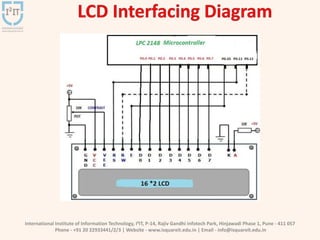
Interfacing LCD with LPC2148
References
International Institute of Information Technology, I²IT, P-14, Rajiv Gandhi Infotech Park, Hinjawadi Phase 1, Pune - 411 057
Phone - +91 20 22933441/2/3 | Website - www.isquareit.edu.in | Email - info@isquareit.edu.in
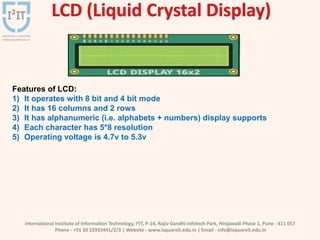
Features of LCD:
1) It operates with 8 bit and 4 bit mode
2) It has 16 columns and 2 rows
3) It has alphanumeric (i.e. alphabets + numbers) display supports
4) Each character has 5*8 resolution
5) Operating voltage is 4.7v to 5.3v
International Institute of Information Technology, I²IT, P-14, Rajiv Gandhi Infotech Park, Hinjawadi Phase 1, Pune - 411 057
Phone - +91 20 22933441/2/3 | Website - www.isquareit.edu.in | Email - info@isquareit.edu.in
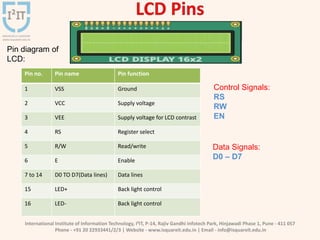
Pin diagram of
LCD:
Control Signals:
RS
RW
EN
Data Signals:
D0 – D7
Pin no. Pin name Pin function
1 VSS Ground
2 VCC Supply voltage
3 VEE Supply voltage for LCD contrast
4 RS Register select
5 R/W Read/write
6 E Enable
7 to 14 D0 TO D7(Data lines) Data lines
15 LED+ Back light control
16 LED- Back light control
International Institute of Information Technology, I²IT, P-14, Rajiv Gandhi Infotech Park, Hinjawadi Phase 1, Pune - 411 057
Phone - +91 20 22933441/2/3 | Website - www.isquareit.edu.in | Email - info@isquareit.edu.in
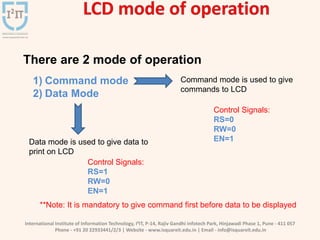
There are 2 mode of operation
1) Command mode
2) Data Mode
Command mode is used to give
commands to LCD
Data mode is used to give data to
print on LCD
**Note: It is mandatory to give command first before data to be displayed
Control Signals:
RS=0
RW=0
EN=1
Control Signals:
RS=1
RW=0
EN=1
International Institute of Information Technology, I²IT, P-14, Rajiv Gandhi Infotech Park, Hinjawadi Phase 1, Pune - 411 057
Phone - +91 20 22933441/2/3 | Website - www.isquareit.edu.in | Email - info@isquareit.edu.in
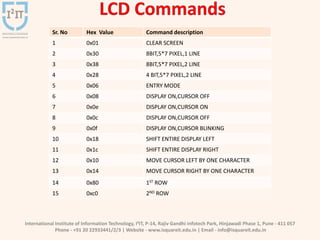
Sr. No Hex Value Command description
1 0x01 CLEAR SCREEN
2 0x30 8BIT,5*7 PIXEL,1 LINE
3 0x38 8BIT,5*7 PIXEL,2 LINE
4 0x28 4 BIT,5*7 PIXEL,2 LINE
5 0x06 ENTRY MODE
6 0x08 DISPLAY ON,CURSOR OFF
7 0x0e DISPLAY ON,CURSOR ON
8 0x0c DISPLAY ON,CURSOR OFF
9 0x0f DISPLAY ON,CURSOR BLINKING
10 0x18 SHIFT ENTIRE DISPLAY LEFT
11 0x1c SHIFT ENTIRE DISPLAY RIGHT
12 0x10 MOVE CURSOR LEFT BY ONE CHARACTER
13 0x14 MOVE CURSOR RIGHT BY ONE CHARACTER
14 0x80 1ST ROW
15 0xc0 2ND ROW
International Institute of Information Technology, I²IT, P-14, Rajiv Gandhi Infotech Park, Hinjawadi Phase 1, Pune - 411 057
Phone - +91 20 22933441/2/3 | Website - www.isquareit.edu.in | Email - info@isquareit.edu.in
International Institute of Information Technology, I²IT, P-14, Rajiv Gandhi Infotech Park, Hinjawadi Phase 1, Pune - 411 057
Phone - +91 20 22933441/2/3 | Website - www.isquareit.edu.in | Email - info@isquareit.edu.in
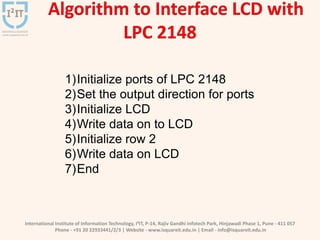
1)Initialize ports of LPC 2148
2)Set the output direction for ports
3)Initialize LCD
4)Write data on to LCD
5)Initialize row 2
6)Write data on LCD
7)End
International Institute of Information Technology, I²IT, P-14, Rajiv Gandhi Infotech Park, Hinjawadi Phase 1, Pune - 411 057
Phone - +91 20 22933441/2/3 | Website - www.isquareit.edu.in | Email - info@isquareit.edu.in
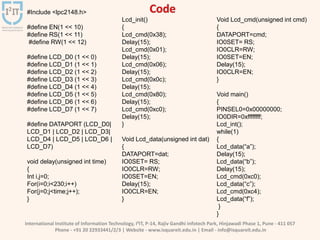
#Include <lpc2148.h>
#define EN(1 << 10)
#define RS(1 << 11)
#define RW(1 << 12)
#define LCD_D0 (1 << 0)
#define LCD_D1 (1 << 1)
#define LCD_D2 (1 << 2)
#define LCD_D3 (1 << 3)
#define LCD_D4 (1 << 4)
#define LCD_D5 (1 << 5)
#define LCD_D6 (1 << 6)
#define LCD_D7 (1 << 7)
#define DATAPORT (LCD_D0|
LCD_D1 | LCD_D2 | LCD_D3|
LCD_D4 | LCD_D5 | LCD_D6 |
LCD_D7)
void delay(unsigned int time)
{
Int i,j=0;
For(i=0;i<230;i++)
For(j=0;j<time;j++);
}
Lcd_init()
{
Lcd_cmd(0x38);
Delay(15);
Lcd_cmd(0x01);
Delay(15);
Lcd_cmd(0x06);
Delay(15);
Lcd_cmd(0x0c);
Delay(15);
Lcd_cmd(0x80);
Delay(15);
Lcd_cmd(0xc0);
Delay(15);
}
Void Lcd_data(unsigned int dat)
{
DATAPORT=dat;
IO0SET= RS;
IO0CLR=RW;
IO0SET=EN;
Delay(15);
IO0CLR=EN;
}
Void Lcd_cmd(unsigned int cmd)
{
DATAPORT=cmd;
IO0SET= RS;
IO0CLR=RW;
IO0SET=EN;
Delay(15);
IO0CLR=EN;
}
Void main()
{
PINSEL0=0x00000000;
IO0DIR=0xffffffff;
Lcd_int();
while(1)
{
Lcd_data(“a”);
Delay(15);
Lcd_data(“b”);
Delay(15);
Lcd_cmd(0xc0);
Lcd_data(“c”);
Lcd_cmd(0xc4);
Lcd_data(“f”);
}
}
International Institute of Information Technology, I²IT, P-14, Rajiv Gandhi Infotech Park, Hinjawadi Phase 1, Pune - 411 057
Phone - +91 20 22933441/2/3 | Website - www.isquareit.edu.in | Email - info@isquareit.edu.in
[1]Trevor Martin- Insider’s guide to the philips
ARM7-based Microcontrollers,Hitex
[2] www.arm.com
[3] Data sheet: LPC2148 User Manual
[4] Data sheet: 16*2 LCD
International Institute of Information Technology, I²IT, P-14, Rajiv Gandhi Infotech Park, Hinjawadi Phase 1, Pune - 411 057
Phone - +91 20 22933441/2/3 | Website - www.isquareit.edu.in | Email - info@isquareit.edu.in
THANK YOU
For further information please contact
Prof. Ashvini Kulkarni
Department of Electronics & Telecommunication
Hope Foundation’s International Institute of Information
Technology, I²IT Hinjawadi, Pune – 411 057
Phone - +91 20 22933441
www.isquareit.edu.in | ashvinik@isquareit.edu.in |
info@isquareit.edu.in

Interfacing of LCD with LPC2148

  • 1.
    Prof. Ashvini Kulkarni Electronics& Telecommunication International Institute of Information Technology, I²IT www.isquareit.edu.in Interfacing of LCD with LPC2148
  • 2.
    International Institute ofInformation Technology, I²IT, P-14, Rajiv Gandhi Infotech Park, Hinjawadi Phase 1, Pune - 411 057 Phone - +91 20 22933441/2/3 | Website - www.isquareit.edu.in | Email - info@isquareit.edu.in Introduction to LCD LCD modes of operation LCD commands Interfacing LCD with LPC2148 References
  • 3.
    International Institute ofInformation Technology, I²IT, P-14, Rajiv Gandhi Infotech Park, Hinjawadi Phase 1, Pune - 411 057 Phone - +91 20 22933441/2/3 | Website - www.isquareit.edu.in | Email - info@isquareit.edu.in Features of LCD: 1) It operates with 8 bit and 4 bit mode 2) It has 16 columns and 2 rows 3) It has alphanumeric (i.e. alphabets + numbers) display supports 4) Each character has 5*8 resolution 5) Operating voltage is 4.7v to 5.3v
  • 4.
    International Institute ofInformation Technology, I²IT, P-14, Rajiv Gandhi Infotech Park, Hinjawadi Phase 1, Pune - 411 057 Phone - +91 20 22933441/2/3 | Website - www.isquareit.edu.in | Email - info@isquareit.edu.in Pin diagram of LCD: Control Signals: RS RW EN Data Signals: D0 – D7 Pin no. Pin name Pin function 1 VSS Ground 2 VCC Supply voltage 3 VEE Supply voltage for LCD contrast 4 RS Register select 5 R/W Read/write 6 E Enable 7 to 14 D0 TO D7(Data lines) Data lines 15 LED+ Back light control 16 LED- Back light control
  • 5.
    International Institute ofInformation Technology, I²IT, P-14, Rajiv Gandhi Infotech Park, Hinjawadi Phase 1, Pune - 411 057 Phone - +91 20 22933441/2/3 | Website - www.isquareit.edu.in | Email - info@isquareit.edu.in There are 2 mode of operation 1) Command mode 2) Data Mode Command mode is used to give commands to LCD Data mode is used to give data to print on LCD **Note: It is mandatory to give command first before data to be displayed Control Signals: RS=0 RW=0 EN=1 Control Signals: RS=1 RW=0 EN=1
  • 6.
    International Institute ofInformation Technology, I²IT, P-14, Rajiv Gandhi Infotech Park, Hinjawadi Phase 1, Pune - 411 057 Phone - +91 20 22933441/2/3 | Website - www.isquareit.edu.in | Email - info@isquareit.edu.in Sr. No Hex Value Command description 1 0x01 CLEAR SCREEN 2 0x30 8BIT,5*7 PIXEL,1 LINE 3 0x38 8BIT,5*7 PIXEL,2 LINE 4 0x28 4 BIT,5*7 PIXEL,2 LINE 5 0x06 ENTRY MODE 6 0x08 DISPLAY ON,CURSOR OFF 7 0x0e DISPLAY ON,CURSOR ON 8 0x0c DISPLAY ON,CURSOR OFF 9 0x0f DISPLAY ON,CURSOR BLINKING 10 0x18 SHIFT ENTIRE DISPLAY LEFT 11 0x1c SHIFT ENTIRE DISPLAY RIGHT 12 0x10 MOVE CURSOR LEFT BY ONE CHARACTER 13 0x14 MOVE CURSOR RIGHT BY ONE CHARACTER 14 0x80 1ST ROW 15 0xc0 2ND ROW
  • 7.
    International Institute ofInformation Technology, I²IT, P-14, Rajiv Gandhi Infotech Park, Hinjawadi Phase 1, Pune - 411 057 Phone - +91 20 22933441/2/3 | Website - www.isquareit.edu.in | Email - info@isquareit.edu.in
  • 8.
    International Institute ofInformation Technology, I²IT, P-14, Rajiv Gandhi Infotech Park, Hinjawadi Phase 1, Pune - 411 057 Phone - +91 20 22933441/2/3 | Website - www.isquareit.edu.in | Email - info@isquareit.edu.in 1)Initialize ports of LPC 2148 2)Set the output direction for ports 3)Initialize LCD 4)Write data on to LCD 5)Initialize row 2 6)Write data on LCD 7)End
  • 9.
    International Institute ofInformation Technology, I²IT, P-14, Rajiv Gandhi Infotech Park, Hinjawadi Phase 1, Pune - 411 057 Phone - +91 20 22933441/2/3 | Website - www.isquareit.edu.in | Email - info@isquareit.edu.in #Include <lpc2148.h> #define EN(1 << 10) #define RS(1 << 11) #define RW(1 << 12) #define LCD_D0 (1 << 0) #define LCD_D1 (1 << 1) #define LCD_D2 (1 << 2) #define LCD_D3 (1 << 3) #define LCD_D4 (1 << 4) #define LCD_D5 (1 << 5) #define LCD_D6 (1 << 6) #define LCD_D7 (1 << 7) #define DATAPORT (LCD_D0| LCD_D1 | LCD_D2 | LCD_D3| LCD_D4 | LCD_D5 | LCD_D6 | LCD_D7) void delay(unsigned int time) { Int i,j=0; For(i=0;i<230;i++) For(j=0;j<time;j++); } Lcd_init() { Lcd_cmd(0x38); Delay(15); Lcd_cmd(0x01); Delay(15); Lcd_cmd(0x06); Delay(15); Lcd_cmd(0x0c); Delay(15); Lcd_cmd(0x80); Delay(15); Lcd_cmd(0xc0); Delay(15); } Void Lcd_data(unsigned int dat) { DATAPORT=dat; IO0SET= RS; IO0CLR=RW; IO0SET=EN; Delay(15); IO0CLR=EN; } Void Lcd_cmd(unsigned int cmd) { DATAPORT=cmd; IO0SET= RS; IO0CLR=RW; IO0SET=EN; Delay(15); IO0CLR=EN; } Void main() { PINSEL0=0x00000000; IO0DIR=0xffffffff; Lcd_int(); while(1) { Lcd_data(“a”); Delay(15); Lcd_data(“b”); Delay(15); Lcd_cmd(0xc0); Lcd_data(“c”); Lcd_cmd(0xc4); Lcd_data(“f”); } }
  • 10.
    International Institute ofInformation Technology, I²IT, P-14, Rajiv Gandhi Infotech Park, Hinjawadi Phase 1, Pune - 411 057 Phone - +91 20 22933441/2/3 | Website - www.isquareit.edu.in | Email - info@isquareit.edu.in [1]Trevor Martin- Insider’s guide to the philips ARM7-based Microcontrollers,Hitex [2] www.arm.com [3] Data sheet: LPC2148 User Manual [4] Data sheet: 16*2 LCD
  • 11.
    International Institute ofInformation Technology, I²IT, P-14, Rajiv Gandhi Infotech Park, Hinjawadi Phase 1, Pune - 411 057 Phone - +91 20 22933441/2/3 | Website - www.isquareit.edu.in | Email - info@isquareit.edu.in THANK YOU For further information please contact Prof. Ashvini Kulkarni Department of Electronics & Telecommunication Hope Foundation’s International Institute of Information Technology, I²IT Hinjawadi, Pune – 411 057 Phone - +91 20 22933441 www.isquareit.edu.in | ashvinik@isquareit.edu.in | info@isquareit.edu.in