PROJECT TITLE: SENDING DATA TO LCD DISPLAY INCLUDING TIMING DIAGRAMS
COURSE: ASSEMBLY LANGUAGE PROGRAMMING
MENTORS:
ASST PROF DYMTRO ZUBOV PhD
ASST ILE DIMITRIEVSKI MSc
BY
ISHMAEL ADAMS ABDULAI CSE 158
GAIUS BABRINDE CSE 157
OCHIKA CALEB ONUCHE CSE 154
CONTENT
 INTRODUCTION
 INTERFACING WITH AN LCD
 USEFUL COMMAND SETTING UP THE LCD
 SENDING COMMANDS TO LCD
 ADVANTAGES / DISADVANTAGES
 CONCLUSION
 REFERENCES
INTRODUCTION
This project focused under the assembly language programming is set to derive
combinations to on how data are actually sent to the LCD to display, using mother board
chips, crystal LCD and buses where necessary to send and receive data’s and most important
memory where this combinations will be stored before execution.
This project will help in understanding the importance of the whole idea of LCD
programming and of course discuss certain help or rescue positions to enable perfect and
adequate working principles for the programming concept.
We as group did some researches on the whole LCD programming concept, and many
presently working IDE like the Arduino, Arduino UNO and other programming that supports
chip or port to port programming for mother boards can be used for Assembly language
programming.
INTERFACING WITH AND LCD
In this process it describes the operation modes of LCDs and also how to program and
interface LCD to PC via 8255 (also known as the Intel 8255 (or i8255)
Programmable Peripheral Interface(PPI) chip is a peripheral chip originally developed for
the Intel 8085 microprocessor,[1] and as such is a member of a large array of such chips, known
as the MCS-85 Family.)
As described in the image below is the pin description for LCD
Pin Description and Function
1. VSS: this is the ground power connection also known as the negative –ve power
supply.
2. VCC: this is now the positive +ve connection for power that bring in a power supply of
+5V.
3. VEE: this as described in the diagram above is used to control the LCD contrast in
respect to the incoming power supply.
4. RS: this are now linked with the registers for information storing, so from the diagram
when RS=0 the option for command register is prompted to call all commands from
the registers but when the RS=1 the data register is set to accept data storage.
5. R/W: this is used for read and write into the registers or address or storage, when
R/W= 0 it is set to write only into the destination, but when R/W=1 it is set to read
from the destination.
6. E: often regarded as the Enable, this pin is used to as a circuit used to store information
presented by from the data pins, when data are sent , a high to low pulse must be applied
is applied to this pin, this pulse must be around 450 ns wide.
7. D0-D7: this are 8 bits long data pins that used for sending bits information to the LCD
or read contents from the LCD internal registers, either ASCII to represent A-Z letters
and 0-9 numbers while doing so RS=1.
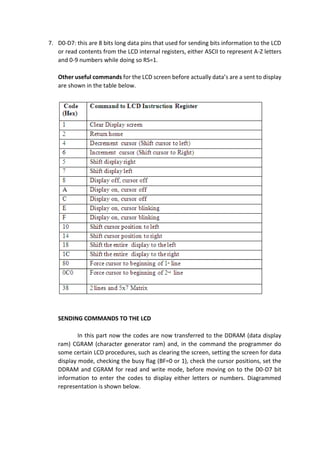
Other useful commands for the LCD screen before actually data’s are a sent to display
are shown in the table below.
SENDING COMMANDS TO THE LCD
In this part now the codes are now transferred to the DDRAM (data display
ram) CGRAM (character generator ram) and, in the command the programmer do
some certain LCD procedures, such as clearing the screen, setting the screen for data
display mode, checking the busy flag (BF=0 or 1), check the cursor positions, set the
DDRAM and CGRAM for read and write mode, before moving on to the D0-D7 bit
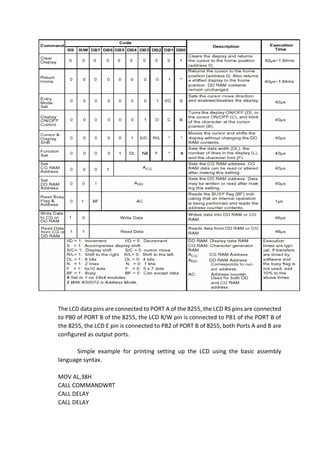
information to enter the codes to display either letters or numbers. Diagrammed
representation is shown below.
The LCD data pins are connected to PORT A of the 8255, the LCD RS pins are connected
to PB0 of PORT B of the 8255, the LCD R/W pin is connected to PB1 of the PORT B of
the 8255, the LCD E pin is connected to PB2 of PORT B of 8255, both Ports A and B are
configured as output ports.
Simple example for printing setting up the LCD using the basic assembly
language syntax.
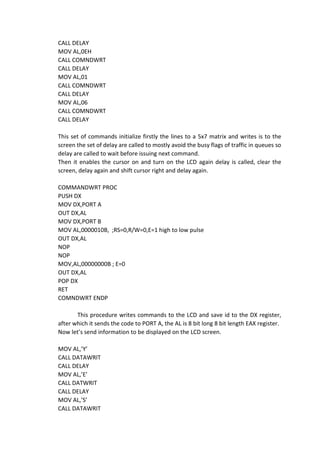
MOV AL,38H
CALL COMMANDWRT
CALL DELAY
CALL DELAY
CALL DELAY
MOV AL,0EH
CALL COMNDWRT
CALL DELAY
MOV AL,01
CALL COMNDWRT
CALL DELAY
MOV AL,06
CALL COMNDWRT
CALL DELAY
This set of commands initialize firstly the lines to a 5x7 matrix and writes is to the
screen the set of delay are called to mostly avoid the busy flags of traffic in queues so
delay are called to wait before issuing next command.
Then it enables the cursor on and turn on the LCD again delay is called, clear the
screen, delay again and shift cursor right and delay again.
COMMANDWRT PROC
PUSH DX
MOV DX,PORT A
OUT DX,AL
MOV DX,PORT B
MOV AL,0000010B, ;RS=0,R/W=0,E=1 high to low pulse
OUT DX,AL
NOP
NOP
MOV,AL,00000000B ; E=0
OUT DX,AL
POP DX
RET
COMNDWRT ENDP
This procedure writes commands to the LCD and save id to the DX register,
after which it sends the code to PORT A, the AL is 8 bit long 8 bit length EAX register.
Now let’s send information to be displayed on the LCD screen.
MOV AL,’Y’
CALL DATAWRIT
CALL DELAY
MOV AL,’E’
CALL DATWRIT
CALL DELAY
MOV AL,’S’
CALL DATAWRIT
CALL DELAY
This message will display YES on the LCD screen in the, first it moves Y to the AL and
writes out the data, calls a delay and waits for next instruction, this calls E and then S
in the same format.
DATAWRIT PROC
PUSH DX
MOV DX,PORTA
OUT DX,AL
MOV AL,0000010B
MOV AL,00000001B
OUT DX,AL
POP DX
RET
DATAWRIT ENDP
This saves data to the DX register and set DX=PORTA, the OUT issues character to the LCD
then RS=1,R/W=0,E=1., most importantly the
In each of the coding the BF, busy flag is checked if its either in 1 or 0, set or unset.
ADVANTAGES
The advantage here is helping for easy coding and objective implementation of the
code and easy navigation around the LCD display a sizable example for this implementation
is mainly in the stock exchange firms, where numbers, messages, bids are displayed on the
screen, in different sizes and appearances, colour and motion movement, delay is fully
implemented and is fully helpful for adequate delivering of the characters. Consumes less power and
generates less heat. Saves lot of space compared picture tubes due to LCD's flatness.
Due to less weight and flatness LCDs are highly portable. No flicker and less screen glare in LCDs to
reduce eyestrain.
DISADVANTAGES
The inevitable disadvantages here is that the programming is done by hand, manually and
takes turn of time to assemble this codes, although this times are physically visible because they are
just in micro milli seconds to implements, this delay is only experienced by the LCD display, because
it waits for other instructions before executing. . Another disadvantage is that it requires a long
delay for the time delay between each character. While an advantage for the busy checking is
that its a more efficient way to monitor the streams.
Probably the biggest disadvantage to having more than one screen is the added risk of
distractions.
It’s easy enough to get distracted when you’re working with just one screen, and even
more so when you add to it. I mentioned the possibility of using the second screen to
keep your email or Twitter open all the time.
While this is potentially a good thing for communication purposes, without some
resistance to distraction it could also be a productivity killer. It really depends on your
workflow and your own personal preferences.
CONCLUSION
In conclusion this is a very useful tool for easy LCD screen programming, which helps
the programmer for easy display design although not in 3D but hold details in address which
can be easily written from the register or address at any time to read and write to the screen
of choice.
REFERENCE
HITACHI (HD44780U LCD-II)
Dot Matrix Liquid Crystal Controller/Driver
Kip R. Irvine. Assembly language for x86 processors, 6th ed. Pearson Publishing, 2011

Alp lcd

  • 1.
    PROJECT TITLE: SENDINGDATA TO LCD DISPLAY INCLUDING TIMING DIAGRAMS COURSE: ASSEMBLY LANGUAGE PROGRAMMING MENTORS: ASST PROF DYMTRO ZUBOV PhD ASST ILE DIMITRIEVSKI MSc BY ISHMAEL ADAMS ABDULAI CSE 158 GAIUS BABRINDE CSE 157 OCHIKA CALEB ONUCHE CSE 154
  • 2.
    CONTENT  INTRODUCTION  INTERFACINGWITH AN LCD  USEFUL COMMAND SETTING UP THE LCD  SENDING COMMANDS TO LCD  ADVANTAGES / DISADVANTAGES  CONCLUSION  REFERENCES
  • 3.
    INTRODUCTION This project focusedunder the assembly language programming is set to derive combinations to on how data are actually sent to the LCD to display, using mother board chips, crystal LCD and buses where necessary to send and receive data’s and most important memory where this combinations will be stored before execution. This project will help in understanding the importance of the whole idea of LCD programming and of course discuss certain help or rescue positions to enable perfect and adequate working principles for the programming concept. We as group did some researches on the whole LCD programming concept, and many presently working IDE like the Arduino, Arduino UNO and other programming that supports chip or port to port programming for mother boards can be used for Assembly language programming.
  • 4.
    INTERFACING WITH ANDLCD In this process it describes the operation modes of LCDs and also how to program and interface LCD to PC via 8255 (also known as the Intel 8255 (or i8255) Programmable Peripheral Interface(PPI) chip is a peripheral chip originally developed for the Intel 8085 microprocessor,[1] and as such is a member of a large array of such chips, known as the MCS-85 Family.) As described in the image below is the pin description for LCD Pin Description and Function 1. VSS: this is the ground power connection also known as the negative –ve power supply. 2. VCC: this is now the positive +ve connection for power that bring in a power supply of +5V. 3. VEE: this as described in the diagram above is used to control the LCD contrast in respect to the incoming power supply. 4. RS: this are now linked with the registers for information storing, so from the diagram when RS=0 the option for command register is prompted to call all commands from the registers but when the RS=1 the data register is set to accept data storage. 5. R/W: this is used for read and write into the registers or address or storage, when R/W= 0 it is set to write only into the destination, but when R/W=1 it is set to read from the destination. 6. E: often regarded as the Enable, this pin is used to as a circuit used to store information presented by from the data pins, when data are sent , a high to low pulse must be applied is applied to this pin, this pulse must be around 450 ns wide.
  • 5.
    7. D0-D7: thisare 8 bits long data pins that used for sending bits information to the LCD or read contents from the LCD internal registers, either ASCII to represent A-Z letters and 0-9 numbers while doing so RS=1. Other useful commands for the LCD screen before actually data’s are a sent to display are shown in the table below. SENDING COMMANDS TO THE LCD In this part now the codes are now transferred to the DDRAM (data display ram) CGRAM (character generator ram) and, in the command the programmer do some certain LCD procedures, such as clearing the screen, setting the screen for data display mode, checking the busy flag (BF=0 or 1), check the cursor positions, set the DDRAM and CGRAM for read and write mode, before moving on to the D0-D7 bit information to enter the codes to display either letters or numbers. Diagrammed representation is shown below.
  • 6.
    The LCD datapins are connected to PORT A of the 8255, the LCD RS pins are connected to PB0 of PORT B of the 8255, the LCD R/W pin is connected to PB1 of the PORT B of the 8255, the LCD E pin is connected to PB2 of PORT B of 8255, both Ports A and B are configured as output ports. Simple example for printing setting up the LCD using the basic assembly language syntax. MOV AL,38H CALL COMMANDWRT CALL DELAY CALL DELAY
  • 7.
    CALL DELAY MOV AL,0EH CALLCOMNDWRT CALL DELAY MOV AL,01 CALL COMNDWRT CALL DELAY MOV AL,06 CALL COMNDWRT CALL DELAY This set of commands initialize firstly the lines to a 5x7 matrix and writes is to the screen the set of delay are called to mostly avoid the busy flags of traffic in queues so delay are called to wait before issuing next command. Then it enables the cursor on and turn on the LCD again delay is called, clear the screen, delay again and shift cursor right and delay again. COMMANDWRT PROC PUSH DX MOV DX,PORT A OUT DX,AL MOV DX,PORT B MOV AL,0000010B, ;RS=0,R/W=0,E=1 high to low pulse OUT DX,AL NOP NOP MOV,AL,00000000B ; E=0 OUT DX,AL POP DX RET COMNDWRT ENDP This procedure writes commands to the LCD and save id to the DX register, after which it sends the code to PORT A, the AL is 8 bit long 8 bit length EAX register. Now let’s send information to be displayed on the LCD screen. MOV AL,’Y’ CALL DATAWRIT CALL DELAY MOV AL,’E’ CALL DATWRIT CALL DELAY MOV AL,’S’ CALL DATAWRIT
  • 8.
    CALL DELAY This messagewill display YES on the LCD screen in the, first it moves Y to the AL and writes out the data, calls a delay and waits for next instruction, this calls E and then S in the same format. DATAWRIT PROC PUSH DX MOV DX,PORTA OUT DX,AL MOV AL,0000010B MOV AL,00000001B OUT DX,AL POP DX RET DATAWRIT ENDP This saves data to the DX register and set DX=PORTA, the OUT issues character to the LCD then RS=1,R/W=0,E=1., most importantly the In each of the coding the BF, busy flag is checked if its either in 1 or 0, set or unset. ADVANTAGES The advantage here is helping for easy coding and objective implementation of the code and easy navigation around the LCD display a sizable example for this implementation is mainly in the stock exchange firms, where numbers, messages, bids are displayed on the screen, in different sizes and appearances, colour and motion movement, delay is fully implemented and is fully helpful for adequate delivering of the characters. Consumes less power and generates less heat. Saves lot of space compared picture tubes due to LCD's flatness. Due to less weight and flatness LCDs are highly portable. No flicker and less screen glare in LCDs to reduce eyestrain. DISADVANTAGES The inevitable disadvantages here is that the programming is done by hand, manually and takes turn of time to assemble this codes, although this times are physically visible because they are just in micro milli seconds to implements, this delay is only experienced by the LCD display, because it waits for other instructions before executing. . Another disadvantage is that it requires a long delay for the time delay between each character. While an advantage for the busy checking is that its a more efficient way to monitor the streams.
  • 9.
    Probably the biggestdisadvantage to having more than one screen is the added risk of distractions. It’s easy enough to get distracted when you’re working with just one screen, and even more so when you add to it. I mentioned the possibility of using the second screen to keep your email or Twitter open all the time. While this is potentially a good thing for communication purposes, without some resistance to distraction it could also be a productivity killer. It really depends on your workflow and your own personal preferences. CONCLUSION In conclusion this is a very useful tool for easy LCD screen programming, which helps the programmer for easy display design although not in 3D but hold details in address which can be easily written from the register or address at any time to read and write to the screen of choice. REFERENCE HITACHI (HD44780U LCD-II) Dot Matrix Liquid Crystal Controller/Driver Kip R. Irvine. Assembly language for x86 processors, 6th ed. Pearson Publishing, 2011