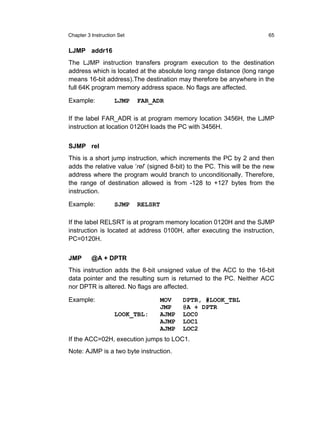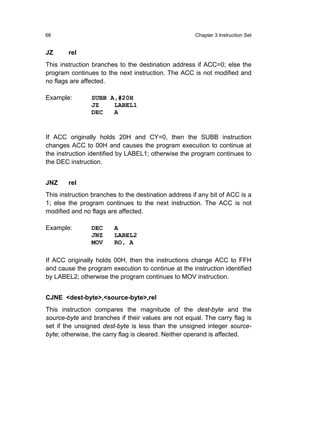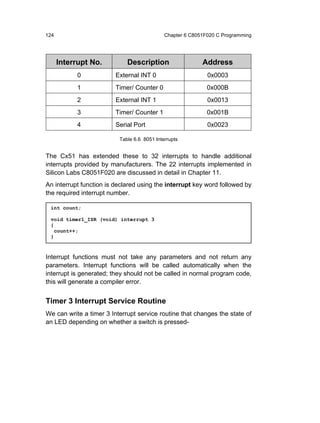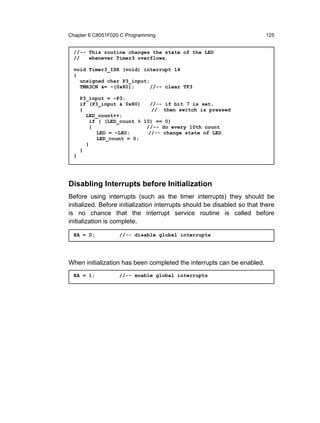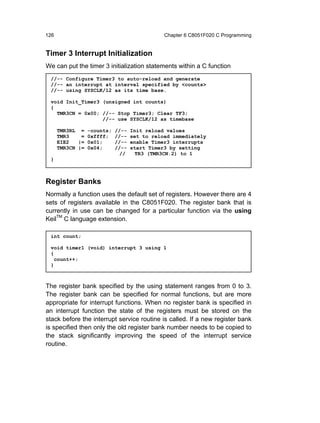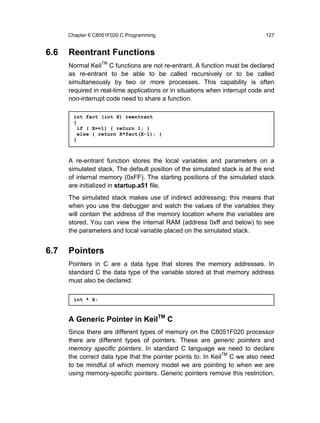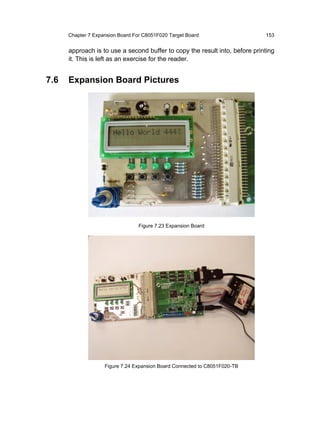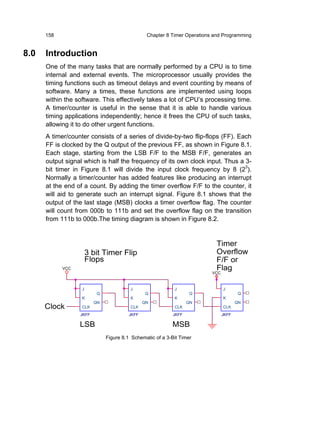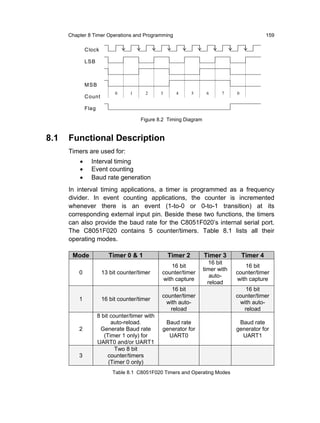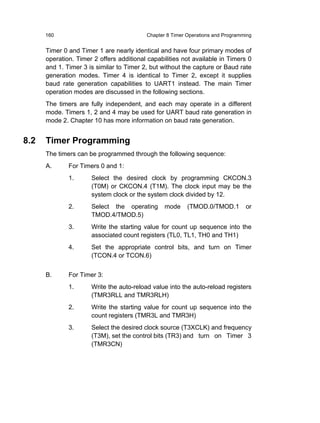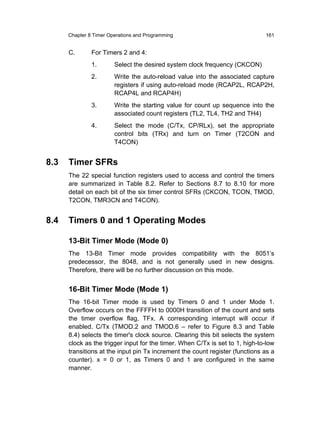




EMBEDDED
 PROGRAMMING
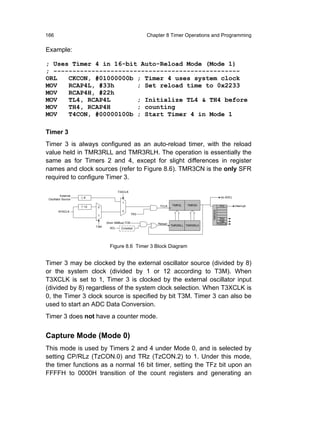
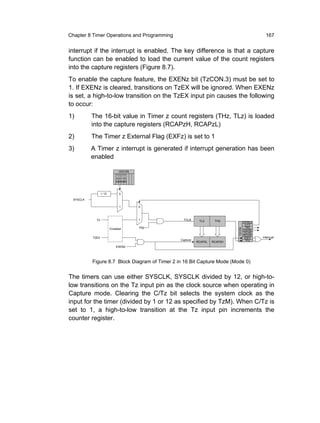
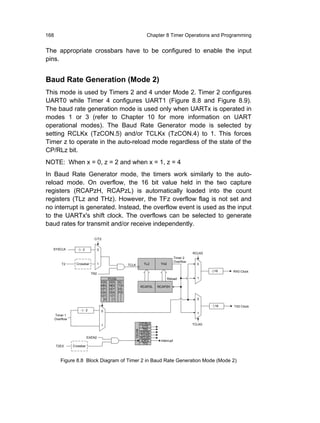
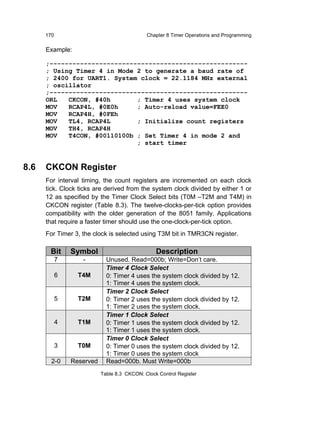
        with Field-Programmable
       Mixed-Signal µControllers


Moi Tin Chew           Gourab Sen Gupta
To

My husband who made me believe that I could write this book!

                                                          Chew Moi Tin


My students who never cease to teach me.
My teachers who embedded knowledge in my mind.
My parents, Eva and Niranjan, who taught me the values of life.
Mamta, Anushree and Amiya for being so fault tolerant.

                                                     Gourab Sen Gupta
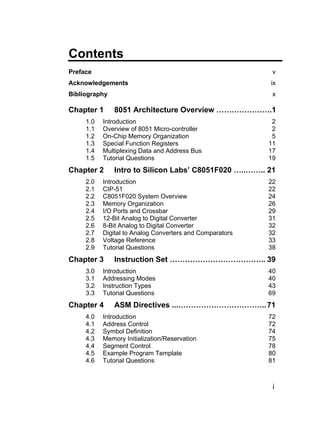
Contents
Preface                                                    v
Acknowledgements                                          ix
Bibliography                                               x

Chapter 1      8051 Architecture Overview ………………….1
     1.0   Introduction                                    2
     1.1   Overview of 8051 Micro-controller               2
     1.2   On-Chip Memory Organization                     5
     1.3   Special Function Registers                     11
     1.4   Multiplexing Data and Address Bus              17
     1.5   Tutorial Questions                             19
Chapter 2      Intro to Silicon Labs’ C8051F020 …..…….. 21
     2.0   Introduction                                   22
     2.1   CIP-51                                         22
     2.2   C8051F020 System Overview                      24
     2.3   Memory Organization                            26
     2.4   I/O Ports and Crossbar                         29
     2.5   12-Bit Analog to Digital Converter             31
     2.6   8-Bit Analog to Digital Converter              32
     2.7   Digital to Analog Converters and Comparators   32
     2.8   Voltage Reference                              33
     2.9   Tutorial Questions                             38
Chapter 3      Instruction Set ……………………………….. 39
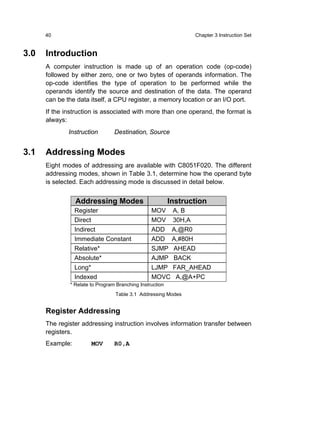
     3.0   Introduction                                   40
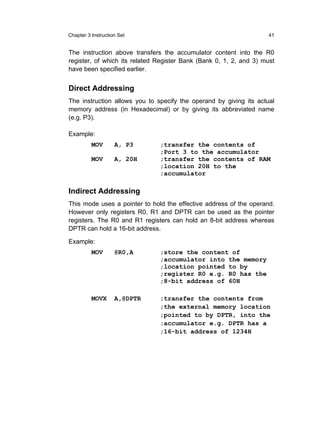
     3.1   Addressing Modes                               40
     3.2   Instruction Types                              43
     3.3   Tutorial Questions                             69
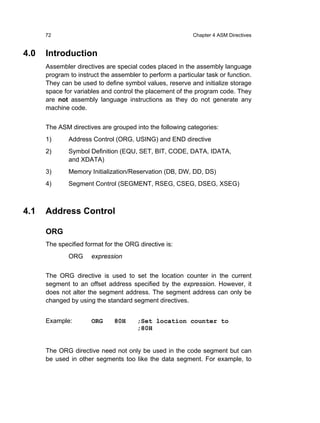
Chapter 4      ASM Directives ...…………………………….. 71
     4.0   Introduction                                   72
     4.1   Address Control                                72
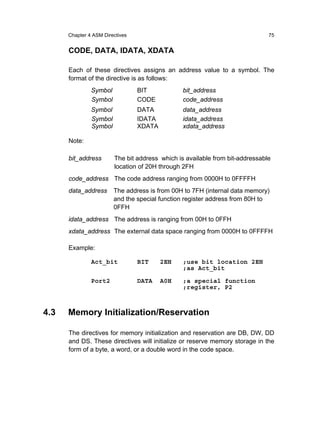
     4.2   Symbol Definition                              74
     4.3   Memory Initialization/Reservation              75
     4.4   Segment Control                                78
     4.5   Example Program Template                       80
     4.6   Tutorial Questions                             81


                                                           i
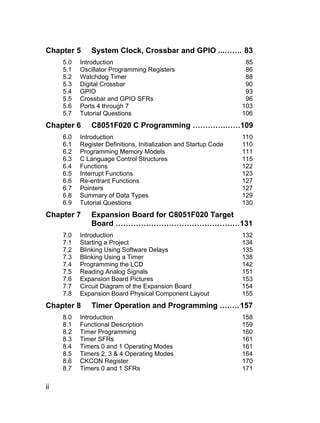
Chapter 5      System Clock, Crossbar and GPIO ...……. 83
     5.0   Introduction                                             85
     5.1   Oscillator Programming Registers                         86
     5.2   Watchdog Timer                                           88
     5.3   Digital Crossbar                                         90
     5.4   GPIO                                                     93
     5.5   Crossbar and GPIO SFRs                                   96
     5.6   Ports 4 through 7                                       103
     5.7   Tutorial Questions                                      106
Chapter 6      C8051F020 C Programming ………….……109
     6.0   Introduction                                            110
     6.1   Register Definitions, Initialization and Startup Code   110
     6.2   Programming Memory Models                               111
     6.3   C Language Control Structures                           115
     6.4   Functions                                               122
     6.5   Interrupt Functions                                     123
     6.6   Re-entrant Functions                                    127
     6.7   Pointers                                                127
     6.8   Summary of Data Types                                   129
     6.9   Tutorial Questions                                      130
Chapter 7      Expansion Board for C8051F020 Target
               Board …………………………………………. 131
     7.0   Introduction                                            132
     7.1   Starting a Project                                      134
     7.2   Blinking Using Software Delays                          135
     7.3   Blinking Using a Timer                                  138
     7.4   Programming the LCD                                     142
     7.5   Reading Analog Signals                                  151
     7.6   Expansion Board Pictures                                153
     7.7   Circuit Diagram of the Expansion Board                  154
     7.8   Expansion Board Physical Component Layout               155
Chapter 8      Timer Operation and Programming ….…. 157
     8.0   Introduction                                            158
     8.1   Functional Description                                  159
     8.2   Timer Programming                                       160
     8.3   Timer SFRs                                              161
     8.4   Timers 0 and 1 Operating Modes                          161
     8.5   Timers 2, 3 & 4 Operating Modes                         164
     8.6   CKCON Register                                          170
     8.7   Timers 0 and 1 SFRs                                     171

ii
8.8     Timer 2 SFRs                           173
    8.9     Timer 3 SFRs                           175
    8.10    Timer 4 SFRs                           176
    8.11    Timer 2 - C Programming Example        178
    8.12    Tutorial Questions                     181
Chapter 9       ADC and DAC ………………………………. 183
    9.0     Introduction                           185
    9.1     12-Bit ADC (ADC0)                      186
    9.2     Data Word Conversion Map (12-bit)      188
    9.3     Programming ADC0                       189
    9.4     ADC0 SFRs                              195
    9.5     8-Bit ADC (ADC1)                       199
    9.6     Data Word Conversion Map (8-bit)       201
    9.7     Programming ADC1                       201
    9.8     ADC1 SFRs                              206
    9.9     12-Bit DACs (DAC0 and DAC1)            208
    9.10    Programming the DACs                   210
    9.11    DAC0 SFRs                              212
    9.12    DAC1 SFRs                              213
    9.13    Tutorial Questions                     214
Chapter 10 Serial Communication ……………..……… 215
    10.0 Introduction                              216
    10.1 UART0 and UART1                           217
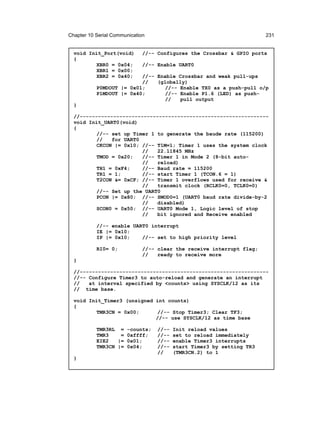
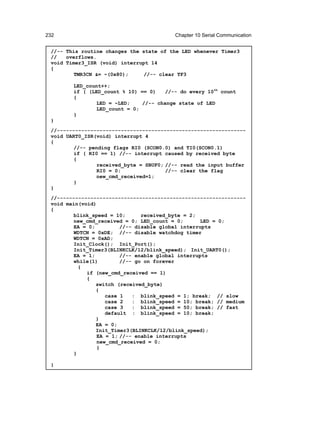
    10.2 Programming the UARTs                     219
    10.3 Operation Modes                           220
    10.4 Interrupt Flags                           225
    10.5 UARTx SFRs                                227
    10.6 Blinking LED at Different Frequencies –
         C Programming Example                     229
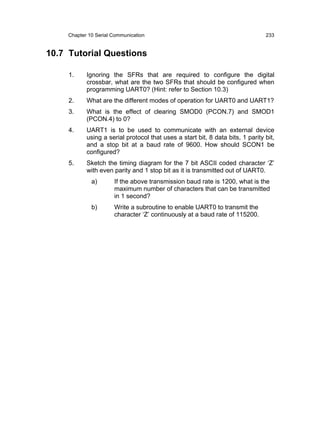
    10.7 Tutorial Questions                        233
Chapter 11 Interrupts ……………………………………. 235
    11.0    Introduction                           236
    11.1    Interrupt Organization                 236
    11.2    Interrupt Process                      239
    11.3.   Interrupt Vectors                      239
    11.4    External Interrupts                    240
    11.5    Interrupt Latency                      241
    11.6    Interrupt SFRs                         241
    11.7    Tutorial Questions                     249
Index ………………………....………………………………. 251

                                                    iii
iv
Preface

The 8051 Family is one of the fasted growing microcontroller
architectures in the world of electronics today. Intel Corporation
introduced 8051 more than two decades ago; it is as popular today as it
was then. Several chip vendors have extended 8051 to incorporate
advanced features, numerous additional peripherals and extra memory,
and have implemented mixed-signal capabilities. There are over 400
device variants of 8051 from various silicon vendors like Silicon
Laboratories, Philips, Amtel, Dallas and Infineon to name a few. 8051
and its variants are immensely popular in the academic world too, just as
they are in the arena of industrial applications. Embedded micro-
controllers have found their way into many everyday appliances like the
microwave oven, dish-washer and the fax machine. It is found even in
toys! Of course microprocessors and microcontrollers have been the
workhorses of embedded industrial applications for many years. It is for
these reasons that teaching of microcontrollers is integral to any degree
or diploma course in Electronics, Electrical, Mechatronics and
Information Science.


                   A fully integrated control system, with mixed signal
 Why we            capabilities, is the emerging trend in the technological
 wrote this        industry. There is currently a demand for sophisticated
 book?             control systems with high-speed, precision digital and
                   analog performance. Microcontrollers with mixed-
signal capabilities are immensely popular in the industry. And it is for
these compelling reasons they are taught at many universities and
polytechnics delivering engineering courses. While there is a plethora of
such devices from many vendors, there is a dearth of text books dealing
with them. Every manufacturer supports its microcontroller device with
data sheets and user guides. These are so voluminous that new
learners, and often experienced blokes, just get blown off. One has to
sift through piles of information sheets to dig out relevant data or
methods even to get off the ground. Navigating through the information
is nerve wrecking and often an exercise in futility.


                                                                         v
Whereas, it is precisely at this stage of learning that a leaner needs to be
hand-held and guided. This is where this book comes in. It is pitched for
the novice; someone just starting to learn microcontrollers. Only the
relevant information is presented in a concise manner which is simple to
read and comprehend. All the clutter has been cut out to make learning
easy and interesting. At the same time all the knowledge that is required
to accomplish a project is covered in fair details.


                      The book examines the features of an advanced
 Who                  mixed-signal micro-controller. It is targeted mainly at
 should               university and polytechnic students of electronics,
 read this            electrical and computer science subjects who are
 book?                involved in learning micro-controllers either at an
                      introductory or advanced level. For projects using
micro-controllers to design and build a system, this book will serve as a
handy reference and source of information. However, practising
engineers, hobbyists, science teachers and high school students, all
alike, will find this book useful too.


                   C8051F020, manufactured by Silicon Laboratories, is
 What is           a ‘big brother’ of the ever popular 8051. Many features
 in this           and capabilities have been added to the basic 8051 to
 book?             create a very powerful micro-controller suitable for
                   high-end, high-speed industrial applications as well as
                   for use in every day electronic products. In this book
we detail the architecture and programming aspects of the micro-
controller. While readers conversant with the basic 8051 programming
will certainly find it easier to read and grasp the contents, no
assumptions are made about the prior knowledge of embedded
programming.
Assembly level programming has had its days, though they are by no
means over yet. It is still the preferred language choice for writing
applications where program execution speed is critical and of paramount
importance such as in real-time systems. However, with the advent of
robust high level programming language compilers, there is a definite
shift towards writing programs in high-level languages such as C. In this

vi
book we do provide some examples in assembly code but the majority
are in C. So that a reader, with no prior knowledge of C programming, is
not disadvantaged, there is a complete chapter on C programming
(Chapter 6). While beginners must definitely spend time reading this
chapter, even experienced C programmers will find it worthwhile to
browse through it as there are many peculiarities and special features of
the KeilTM C compiler which are different from the ANSI C and are related
to the hardware architecture of the C8051F020 micro-controller.
Chapter 1 gives a brief overview of the basic 8051 architecture. Readers
intending to learn more about 8051 are advised to first read another text
book; a few are listed in the Bibliography.
The Silicon Labs C8051F020 micro-controller architecture is introduced
in Chapter 2. The memory organisation and the various on-chip
peripheral devices are briefly explained to give the reader a first taste of
the features of the micro-controller.
Chapter 3 details the addressing modes and the complete instruction set
of 8051. The assembler directives are summarised in Chapter 4.
Readers not intending to program in assembly language can safely skip
reading these two chapters.
The digital crossbar of the C8051F020 micro-controller is at the heart of
the programming architecture and one must master this early to exploit
the flexibility offered by the micro-controller in configuring peripherals
and external interfaces. Chapter 5 details not only the crossbar; it also
introduces other important features like the watchdog timer and
programming the oscillator.
Chapter 6 is all about learning to write programs in C. All the programs
that are listed in the text book have been written and tested using KeilTM
C compiler. While this compiler supports most of the ANSI C features, it
is in many respects ‘closer to the hardware’. A ‘must read’ for every
reader.
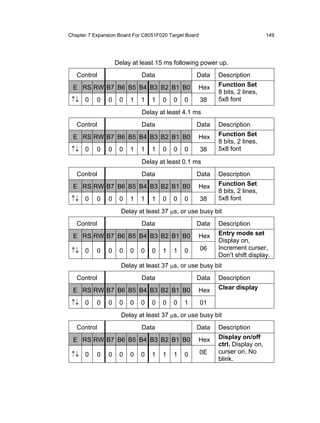
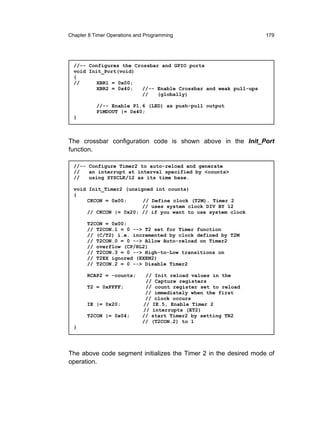
In Chapter 7 we present the design of an expansion board which is used
in conjunction with the Silicon Labs Micro-Controller Development Board
C8051F020-TB. The development board has rudimentary peripherals
built on it – it has the micro-controller chip, oscillator, power supply, RS-
232 Serial communication connector and just one push-button switch
and an LED. The expansion board provides additional inputs for
ADC/DAC, a LCD display, additional LEDS and several toggle and push-
button switches. The expansion board will be very handy for learners to


                                                                          vii
carry out experiments while learning the basics of embedded
programming. The complete design of the expansion board is provided
so that it can be built by anybody with some skills in PCB soldering. At
some stage, it is envisaged that the expansion board will be available
from Silicon Laboratories as a standard product.
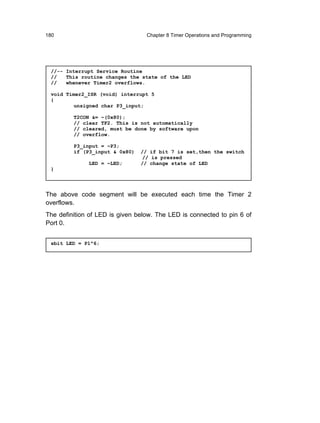
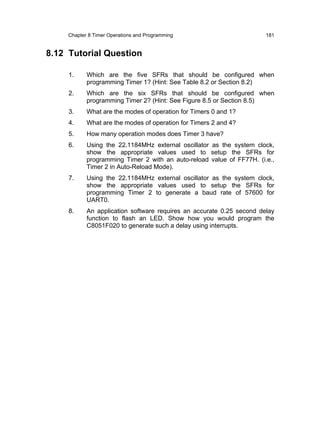
C8051F020 has a very rich set of timers which are very handy for
advanced applications. They are also used in conjunction with ADC/DAC
and for serial communication. Timer operations and programming are
detailed in Chapter 8.
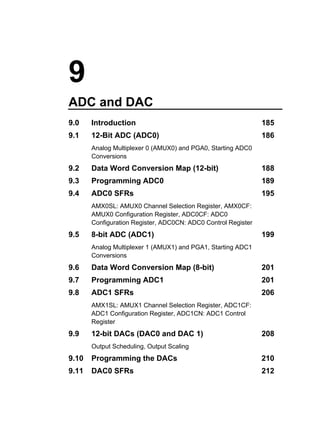
Chapter 9 introduces the on-chip ADCs and DACs and how to program
them. There are two multi-channel ADCs offering 12-bit and 8-bit
conversion resolution, and two 12-bit DACs.
Chapter 10 deals with the programming aspects of the Serial
Communication using UARTs. Different communication modes and
programming the Baud rate generator are covered in detail.
Interrupts have been immensely enhanced and extended in C8051F020
and are much more elaborate than the basic 8051 interrupts. These are
covered in Chapter 11.


viii
Acknowledgements
Several wonderful people have contributed to the successful completion
of this book and the authors wish to extend their sincere thanks to them
for their fabulous work.
Dr Chris Messom, Institute of Information and Mathematical Sciences,
Massey University, wrote Chapter 6, C8051F020 C Programming.
Ken Mercer, Institute of Information Sciences and Technology, Massey
University, wrote Chapter 7, Expansion Board for C8051F020 Target
Board. Ken also designed and built the expansion board and for this he
was ably supported by our student, Jonathan Seal. Together they have
done a wonderful job.
James Cheong, graduate of IIST, Massey University, contributed by way
of initial script typing and building the data tables.
Dr Subhas Mukhopadhyay, Institute of Information Sciences and
Technology, Massey University, made several valuable suggestions to
improve the book overall.
Dr Douglas R. Holberg, Director of Engineering, Silicon Laboratories,
for his immense enthusiasm and support for the project.
Last, but not the least, the authors gratefully acknowledge the efforts put
in by Prof. Serge Demidenko, Monash University, for pouring over the
manuscript and painstakingly editing it. His suggestions and inputs have
been invaluable.


                                                                         ix
Bibliography
I. Scott MacKenzie, The 8051 Microcontroller, Upper Saddler River,
N.J.: Prentice Hall, 1999

Sencer Yeralan, Helen Emery, The 8051 cookbook for Assembly and
C : with experiments in mechatronics and robotics, Gainesville, Fla.:
Rigel Press, 2000

David   Calcutt,    Fred   Cowan,    Hassan    Parchizadeh,     8051
microcontrollers : an applications-based introduction, Boston, Mass.
: Newnes, 2003

Cx51 Compiler, Optimizing C Compiler and Library Reference for
Classic and Extended 8051 Microcontrollers User’s Guide, Keil
Software, 11.2000

Macro Assembler and Utilities for 8051 and Variants, Macro
Assembler, Linker/Locator, Library Manager, Object Hex-Converter
for 8051, extended 8051 and 251 Microcontrollers User’s Guide, Keil
Software , 07.2000

C8051F020 Data Sheets (C8051F020/1/2/3-DS14 Preliminary Rev. 1.4),
Silicon Laboratories, 12/03


x
1
8051 Architecture Overview
1.0   Introduction                                               2
1.1   Overview of 8051 Micro-controller                          2
      Ports, Address Latch Enable (ALE), Reset (RST), System
      Clock - Oscillator
1.2   On-Chip Memory Organization                                5
      General Purpose RAM, Bit-addressable RAM, Register
      Banks
1.3   Special Function Registers                                 11
      Program Status Word, The B Register, Stack Pointer, Data
      Pointer, Parallel Input/Output Port Registers, Timer
      Registers, Serial Communication Registers, Interrupt
      Management Registers
1.4   Multiplexing Data and Address Bus                          17
1.5   Tutorial Questions                                         19
2                                          Chapter 1 8051 Architecture Overview


     1.0         Introduction
                 In 1980, Intel introduced 8051, which is the first device in the MCS-51™
                 family of microcontroller, to the market. There are other second source
                 suppliers of the ICs; these include Silicon Laboratories, Atmel, Philips,
                 Dallas Semiconductor and several others.
Intel 8051 has
been around
for over two     Though more than 20 years have passed since its introduction, the 8051
decades but is   is still as relevant today as it was in those days. In recent years some
still very
popular.         companies have incorporated many different features into the basic 8051
                 chip and one such company is Silicon Laboratories. In 2000, Silicon
                 Laboratories manufactured a field programmable, mixed signal chip
                 (C8051F020) based on the 8051 core CPU. The chip is offered in
                 different combinations of clock speed, FLASH and on-chip RAM size.
                 They also offer different digital and analog peripherals such as:

                 ♦     I/O ports
                 ♦     Timers/Counters
                 ♦     UARTs (Universal Asynchronous Receiver Transmitters)
                 ♦     SPI and SMBus serial transceivers
                 ♦     ADC/DAC (Analog-to-Digital Converters / Digital-to-Analog
                       Converters)
                 ♦     Temperature Sensor


     1.1         Overview of 8051 Microcontroller
                 These enhanced microcontrollers still use the MCS-51TM basic set of
                 machine instructions. The only differences that set them apart are the
                 additional hardware features and the enhanced speed of operation. This
                 section briefly describes the basic functions of the pins available.
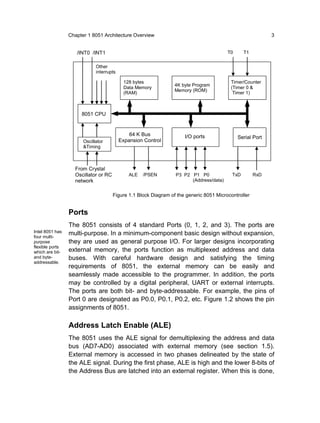
                 The internal features of the basic 8051 microcontroller can be seen in the
                 block diagram shown in Figure 1.1. It is capable of addressing 64K of
                 external program memory and a separate 64K of external data memory if
                 required.
Chapter 1 8051 Architecture Overview                                                      3


                    /INT0 /INT1                                                         T0      T1


                             Other
                             interrupts

                                           128 bytes                                     Timer/Counter
                                                                 4K byte Program
                                           Data Memory                                   (Timer 0 &
                                                                 Memory (ROM)
                                           (RAM)                                          Timer 1)


                      8051 CPU


                                              64 K Bus               I/O ports               Serial Port
                       Oscillator         Expansion Control
                       &Timing


                   From Crystal
                   Oscillator or RC           ALE   /PSEN        P3 P2 P1 P0              TxD        RxD
                   network                                             (Address/data)


                                      Figure 1.1 Block Diagram of the generic 8051 Microcontroller


                 Ports
                 The 8051 consists of 4 standard Ports (0, 1, 2, and 3). The ports are
Intel 8051 has   multi-purpose. In a minimum-component basic design without expansion,
four multi-
purpose          they are used as general purpose I/O. For larger designs incorporating
flexible ports
which are bit-   external memory, the ports function as multiplexed address and data
and byte-        buses. With careful hardware design and satisfying the timing
addressable.
                 requirements of 8051, the external memory can be easily and
                 seamlessly made accessible to the programmer. In addition, the ports
                 may be controlled by a digital peripheral, UART or external interrupts.
                 The ports are both bit- and byte-addressable. For example, the pins of
                 Port 0 are designated as P0.0, P0.1, P0.2, etc. Figure 1.2 shows the pin
                 assignments of 8051.

                 Address Latch Enable (ALE)
                 The 8051 uses the ALE signal for demultiplexing the address and data
                 bus (AD7-AD0) associated with external memory (see section 1.5).
                 External memory is accessed in two phases delineated by the state of
                 the ALE signal. During the first phase, ALE is high and the lower 8-bits of
                 the Address Bus are latched into an external register. When this is done,
4                                            Chapter 1 8051 Architecture Overview


the port lines are available for data input or output. When ALE falls,
signaling the beginning of the second phase, the address latch outputs
remain fixed and are no longer dependent on the latch input. Later in the
second phase, the Data Bus controls the state of the AD[0:7] at the time
/RD or /WR is asserted.


                                                 40      VCC
             XTL2        18
                                                 39      P0.0 AD0
             XTL1        19                      38      P0.1 AD1
                                                 37      P0.2 AD2
                                                 36      P0.3 AD3
                                                 35      P0.4 AD4
                                                 34      P0.5 AD5
          RXD P3.0       10                      33      P0.6 AD6
         TXD P3.1        11                      32      P0.7 AD7
         /INT0 P3.2      12
         /INT1 P3.3      13                      21      P2.0   AD8
         T0    P3.4      14      8051            22      P2.1   AD9
         T1    P3.5      15                      23      P2.2   AD10
         /WR P3.6        16                      24      P2.3   AD11
         /RD P3.7        17                      25      P2.4   AD12
                                                 26      P2.5   AD13
                                                 27      P2.6   AD14
              RST        9                       28      P2.7   AD15

               /EA       31                      1       P1.0
                                                 to      to
              ALE        30
                                                 8       P1.7
            /PSEN        29                      20      VSS


                        Figure 1.2 8051 pin assignment


Reset (RST)
Reset circuitry allows the 8051 to be easily placed in a predefined default
condition. On entry to the reset state, the following occur:
♦     The MCU halts program execution
♦     Special Function Registers (SFRs) are initialized to their defined
      reset values
♦     External port pins are forced to a known state
♦     Interrupts and timers are disabled
Sources of reset include Power-on Reset and External Reset.
Chapter 1 8051 Architecture Overview                                  5


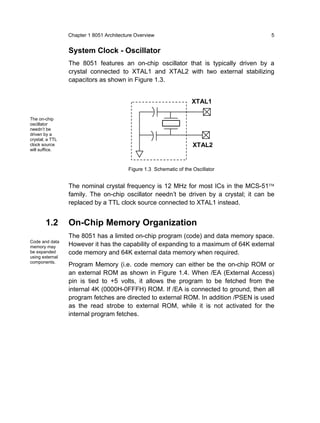
                 System Clock - Oscillator
                 The 8051 features an on-chip oscillator that is typically driven by a
                 crystal connected to XTAL1 and XTAL2 with two external stabilizing
                 capacitors as shown in Figure 1.3.


                                                                     XTAL1

The on-chip
oscillator
needn’t be
driven by a
crystal; a TTL
clock source                                                          XTAL2
will suffice.


                                          Figure 1.3 Schematic of the Oscillator


                 The nominal crystal frequency is 12 MHz for most ICs in the MCS-51™
                 family. The on-chip oscillator needn’t be driven by a crystal; it can be
                 replaced by a TTL clock source connected to XTAL1 instead.


        1.2      On-Chip Memory Organization
                 The 8051 has a limited on-chip program (code) and data memory space.
Code and data
memory may       However it has the capability of expanding to a maximum of 64K external
be expanded      code memory and 64K external data memory when required.
using external
components.
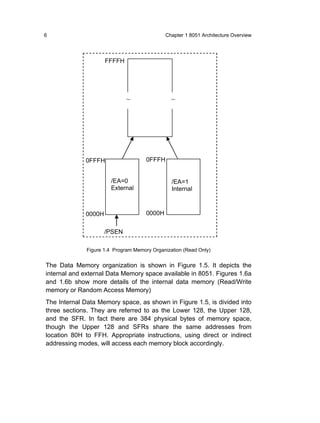
                 Program Memory (i.e. code memory can either be the on-chip ROM or
                 an external ROM as shown in Figure 1.4. When /EA (External Access)
                 pin is tied to +5 volts, it allows the program to be fetched from the
                 internal 4K (0000H-0FFFH) ROM. If /EA is connected to ground, then all
                 program fetches are directed to external ROM. In addition /PSEN is used
                 as the read strobe to external ROM, while it is not activated for the
                 internal program fetches.
6                                             Chapter 1 8051 Architecture Overview


                     FFFFH


                              ~                 ~


             0FFFH                    0FFFH


                       /EA=0                    /EA=1
                       External                 Internal


             0000H                    0000H


                     /PSEN

              Figure 1.4 Program Memory Organization (Read Only)


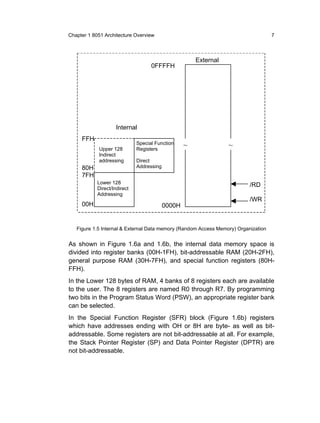
The Data Memory organization is shown in Figure 1.5. It depicts the
internal and external Data Memory space available in 8051. Figures 1.6a
and 1.6b show more details of the internal data memory (Read/Write
memory or Random Access Memory)
The Internal Data Memory space, as shown in Figure 1.5, is divided into
three sections. They are referred to as the Lower 128, the Upper 128,
and the SFR. In fact there are 384 physical bytes of memory space,
though the Upper 128 and SFRs share the same addresses from
location 80H to FFH. Appropriate instructions, using direct or indirect
addressing modes, will access each memory block accordingly.
Chapter 1 8051 Architecture Overview                                                7


                                                       External
                                    0FFFFH


                     Internal
     FFH
                              Special Function     ~              ~
            Upper 128         Registers
            Indirect
            addressing        Direct
     80H                      Addressing
     7FH
            Lower 128
                                                                          /RD
            Direct/Indirect
            Addressing
                                                                          /WR
     00H                                   0000H


   Figure 1.5 Internal & External Data memory (Random Access Memory) Organization


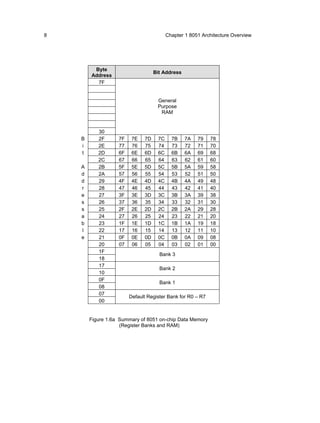
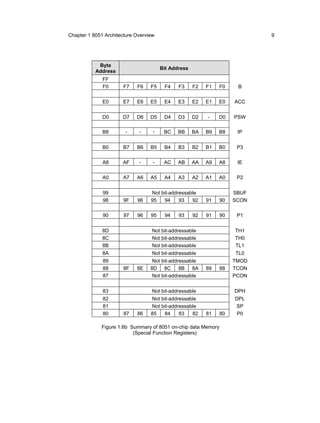
As shown in Figure 1.6a and 1.6b, the internal data memory space is
divided into register banks (00H-1FH), bit-addressable RAM (20H-2FH),
general purpose RAM (30H-7FH), and special function registers (80H-
FFH).
In the Lower 128 bytes of RAM, 4 banks of 8 registers each are available
to the user. The 8 registers are named R0 through R7. By programming
two bits in the Program Status Word (PSW), an appropriate register bank
can be selected.
In the Special Function Register (SFR) block (Figure 1.6b) registers
which have addresses ending with OH or 8H are byte- as well as bit-
addressable. Some registers are not bit-addressable at all. For example,
the Stack Pointer Register (SP) and Data Pointer Register (DPTR) are
not bit-addressable.
8                                        Chapter 1 8051 Architecture Overview


         Byte
                                   Bit Address
        Address
          7F


                                    General
                                    Purpose
                                     RAM


           30
    B      2F      7F    7E   7D    7C     7B    7A   79    78
    i      2E      77    76   75    74     73    72   71    70
    t      2D      6F    6E   6D    6C     6B    6A   69    68
           2C      67    66   65    64     63    62   61    60
    A      2B      5F    5E   5D    5C     5B    5A   59    58
    d      2A      57    56   55    54     53    52   51    50
    d      29      4F    4E   4D    4C     4B    4A   49    48
    r      28      47    46   45    44     43    42   41    40
    e      27      3F    3E   3D    3C     3B    3A   39    38
    s      26      37    36   35    34     33    32   31    30
    s      25      2F    2E   2D    2C     2B    2A   29    28
    a      24      27    26   25    24     23    22   21    20
    b      23      1F    1E   1D    1C     1B    1A   19    18
    l      22      17    16   15    14     13    12   11    10
    e      21      0F    0E   0D    0C     0B    0A   09    08
           20      07    06   05    04     03    02   01    00
           1F
                                     Bank 3
           18
           17
                                     Bank 2
           10
           0F
                                     Bank 1
           08
           07
                        Default Register Bank for R0 – R7
           00


        Figure 1.6a Summary of 8051 on-chip Data Memory
                    (Register Banks and RAM)
Chapter 1 8051 Architecture Overview                                       9


            Byte
                                       Bit Address
           Address
              FF
              F0       F7   F6    F5    F4    F3     F2   F1   F0    B

              E0      E7    E6    E5    E4    E3     E2   E1   E0   ACC


              D0      D7    D6    D5    D4    D3     D2   -    D0   PSW

              B8       -     -     -    BC    BB     BA   B9   B8    IP


              B0      B7    B6    B5    B4    B3     B2   B1   B0    P3

              A8      AF     -     -    AC    AB     AA   A9   A8    IE

              A0      A7    A6    A5    A4    A3     A2   A1   A0    P2


              99                  Not bit-addressable               SBUF
              98       9F   96    95   94     93   92     91   90   SCON

              90       97   96    95    94    93     92   91   90    P1


              8D                   Not bit-addressable              TH1
              8C                   Not bit-addressable              TH0
              8B                   Not bit-addressable              TL1
              8A                   Not bit-addressable              TL0
              89                   Not bit-addressable              TMOD
              88       8F   8E    8D 8C 8B          8A    89   88   TCON
              87                   Not bit-addressable              PCON


              83                   Not bit-addressable              DPH
              82                  Not bit-addressable               DPL
              81                  Not bit-addressable               SP
              80       87   86    85   84     83   82     81   80    P0

             Figure 1.6b Summary of 8051 on-chip data Memory
                          (Special Function Registers)
10                                           Chapter 1 8051 Architecture Overview


                  General Purpose RAM
                  There are 80 bytes of general purpose RAM from address 30H to 7FH.
                  The bottom 32 bytes from 00H to 2FH can be used as general purpose
Any location in   RAM too, although these locations have other specific use also.
the general
purpose RAM       Any location in the general purpose RAM can be accessed freely using
can be
accessed
                  the direct or indirect addressing modes. For example, to read the
freely using      contents of internal RAM address 62H into the accumulator A, the
the direct or
indirect          following instruction could be used:
addressing
modes.
                          MOV      A,62H
                  The above instruction uses direct addressing and transfers a byte of data
                  from location 62H (source) to the accumulator (destination). The
                  destination for the data is implicitly specified in the instruction op-code as
                  the accumulator (A). Addressing modes are discussed in details in
                  Chapter 3 (Instruction Set).
                  Internal RAM can also be accessed using indirect addressing through R0
                  or R1. The following two instructions perform the same operation as the
                  single instruction above:

                          MOV      R1,#62H
                          MOV      A,@R1
                  The first instruction uses immediate addressing to transfer the value 62H
                  into register R1. The second instruction uses indirect addressing to
                  transfer the data “pointed to by R1” into the accumulator.


                  Bit-addressable RAM
                  There are 128 general purpose bit-addressable locations at byte
                  addresses 20H through 2FH. For example, to clear bit 78H, the following
                  instructions could be used:

                          CLR      78H

                  Referring to Figure 1.6a, note that “bit address 78H” is the least
                  significant bit (bit 0) at “byte address 2FH”. The instruction has no effect
                  on the other bits at this address. The same operation can also be
                  performed as follows:
Chapter 1 8051 Architecture Overview                                   11

                         MOV       A,2FH
                         ANL       A,#11111110B
                         MOV       2FH,A


                Another alternative is to use the following instruction:
                         CLR       2F.0H


                Register Banks
                The bottom 32 locations of the internal memory, from location 00H to
                1FH, contain the register banks. The 8051 instruction set supports 8
                registers, R0 through R7. After a system reset these registers are at
                addresses 00H to 07H. The following instruction reads the contents of
                address 04H into the accumulator A:

                         MOV       A,R4     ;this is a 1 byte instruction using
                                            ;register addressing mode

                The same operation can be performed using the following instruction:

                         MOV       A,04H ;this is a 2-byte instruction using
                                         ;direct addressing mode

                Instructions using registers R0 to R7 are shorter than the equivalent
                instructions using direct addressing. Thus the data items used frequently
                in a program should use one of these registers to speed up the program
                execution.


      1.3       Special Function Registers
                The 8051 internal registers are configured as part of the on-chip RAM.
SFRs are
generally       Hence each of these registers also has a memory address. There are 21
accessed        special function registers (SFRs) at the top of the internal RAM, from
using direct
addressing.     addresses 80H to FFH (see Figure 1.6b).
Some SFRs
are both bit-   Most SFRs are accessed using direct addressing. Some SFRs are both
and byte-
addressable.    bit-addressable and byte-addressable. For example, the instructions

                         SETB      0D3H
                         SETB      0D4H
12                                               Chapter 1 8051 Architecture Overview


set bit 3 and 4 in the Program Status Word (PSW.3 and PSW.4), leaving
the other bits unchanged. This will select Bank 3 for registers R0 to R7 at
address locations 18H to 1FH. Since the SETB instruction operates on
bits (not bytes), only the addressed bit is affected.


Program Status Word
The program status word (PSW) at address D0H and contains the status
bits as shown in Table 1.1.

      Bit     Symbol       Bit Address                   Description
     PSW.7        CY            D7H         Carry flag
     PSW.6        AC            D6H         Auxiliary carry flag
     PSW.5        F0            D5H         User Flag 0
     PSW.4        RS1           D4H         Register bank select 1
                                            Register bank select 0
                                              00 = bank 0; address 00H-07H
     PSW.3        RS0           D3H           01 = bank 1; address 08H-0FH
                                              10 = bank 2; address 10H-17H
                                              11 = bank 3; address 18H-1FH
     PSW.2        OV            D2H         Overflow flag
     PSW.1         -            D1H         Reserved
     PSW.0        P             D0H         Even parity flag

                        Table 1.1 Summary of PSW Register bits


Carry Flag (CY)
The carry flag (CY) has a dual purpose. It is used in the traditional way
for arithmetic operations – it is set if there is a carry out of bit 7 during an
addition operation or set if there is a borrow into bit 7 during a subtraction
operation. For example, if accumulator A=F1H, then the instruction

            ADD    A,#15

leaves a value of 00H in the accumulator and sets the carry flag in PSW
(PSW.7).
The carry flag is extensively used as a 1-bit register in Boolean
operations on bit-valued data. For example, the following instruction
Chapter 1 8051 Architecture Overview                                         13


ANDs bit 38H with the carry flag and places the result back in the carry
flag:

         ANL       C,038H


Auxiliary Carry Flag (AC)
When adding binary coded decimal (BCD) values, the auxiliary carry flag
(AC) is set if a carry was generated out of bit 3 into bit 4 or if the result in
the lower nibble is in the range 0AH to 0FH. For example, the following
instruction sequence will result in the auxiliary carry flag being set.

         MOV       R0,#2
         MOV       A,#8
         ADD       A,R0


User Flag 0 (F0)
This is a general purpose flag bit available for user applications.


Register Bank Select Bits (RS1 and RS0)
The register bank select bits, RS0 and RS1, determine the active register
bank. They are cleared after reset (so Bank 0 is selected by default) and
are changed by the application program as required.
For example, the following instruction sequence enables register Bank 3
then moves the contents of register R0 (byte address 18H, see Figure
1.6a) to the accumulator:

         SETB      RS1      ;alternatively use instruction
                            ;SETB 0D4H
         SETB      RS0      ;alternatively use instruction
                            ;SETB 0D3H
         MOV       A,R0


Overflow Flag (OV)
The overflow flag (OV) is set after an addition or subtraction operation if
there is an arithmetic overflow (the result is out of range for the data
size). When signed numbers are added or subtracted, a program can
14                                         Chapter 1 8051 Architecture Overview


test this bit to determine if the result is in the proper range. For 8-bit
signed numbers, the result should be in the range of +127 to –128).


Even Parity Flag (P)
The number of ‘1’ bits in the accumulator plus the parity bit (P) is always
even. The parity bit is automatically set or cleared to establish even
parity with the accumulator. For example, if the accumulator contains
00101100B then P is set to 1. P is reset to 0 if the accumulator contains
even number of 1s.


The B Register
The B register, or accumulator B, is at address F0H and is used along
with the accumulator for multiplication and division operations. For
example:

        MOV     A,#9
        MOV     B,#5
        MUL     AB      ;9 x 5 = 45 or 2DH, B=0, A=2DH

        MOV     A,#99
        MOV     B,#5
        MUL     AB    ;99 x 5 = 495 or 1EFH, B=1, A=EFH

        MOV     A,#10
        MOV     B,#5
        DIV     AB    ;10/5 = 2, Remainder=0 , B=0, A=2

        MOV     A,#99
        MOV     B,#5
        DIV     AB    ;99/5=19(13H),Remainder=4,B=4,A=13H


The B register can also be used as a general purpose register. It is bit-
addressable through bit address F0H to F7H.


Stack Pointer
The stack pointer (SP) is an 8-bit register and is located at address 81H.
Stack operations include “pushing” data on the stack and “popping” data
off the stack. Each time data is pushed on to the stack, SP is
Chapter 1 8051 Architecture Overview                                    15


incremented. Popping from the stack reads data out and SP is
decremented. For example if SP=6FH and ACC=20H, after pushing the
accumulator content onto the stack, SP becomes 70H as shown in
Figure 1.7.

         MOV       A,#20H
         MOV       SP,#6FH
         PUSH      ACC

  SP=6FH before PUSH                               6FH            XX
  After PUSH ACC, SP=70H                           70H            20H

                                                                   .
                                                                   .
                                                                   .
                       Figure 1.7 Memory snap-shot of the Stack


Data Pointer
The data pointer register (DPTR) is used to access external code or data
memory. It is a 16-bit register located at addresses 82H (DPL, low byte)
and 83H (DPH, high byte). The following instructions load 5AH into the
external RAM location 1040H.

         MOV       A,#5AH
         MOV       DPTR,#1040H
         MOVX      @DPTR,A

The first instruction uses immediate addressing to load the data constant
5AH into the accumulator. The second instruction also uses immediate
addressing to load the 16-bit address constant 1040H into the data
pointer. The third instruction uses indirect addressing to move the value
in A (i.e. 5AH) to the external RAM location whose address is in the
DPTR register (i.e. 1040H). The “X” in the mnemonic “MOVX” indicates
that the move instruction accesses external data memory.
16                                          Chapter 1 8051 Architecture Overview


                 Parallel Input/Output Port Registers
                 The 8051 I/O ports consist of Port 0 located at address 80H, Port 1 at
                 address 90H, Port 2 at address A0H and Port 3 is located at address
                 B0H. All the ports are bi-directional. Besides being used as general
Bit-
                 input/output lines, Port 0 and 2 can be used to form the 16-bit address in
addressable      order to interface with the external memory, with Port 0 being the low
ports of 8051
provide          byte of the address and the Port 2 outputting the high byte of the
powerful         address. Similarly port 3 pins have alternate functions of serving as
interfacing
possibilities.   interrupt and timer inputs, serial port inputs and outputs, as well as RD
                 and WR lines for external Data Memory.
                 All the ports are bit-addressable and thus provide powerful interfacing
                 possibilities. For example, if a Light Emitting Diode (LED) is connected
                 through an appropriate driver to Port 1 bit 5, it could be turned on and off
                 using the following instructions-

                           SETB      P1.5

                 will turn the LED on, and

                           CLR       P1.5

                 will turn it off.
                 These instructions use the dot operator to address a bit of Port 1.
                 However, the following instruction can also be used:

                           CLR       95H    ; same as CLR P1.5


                 Timer Registers
The 8051
contains two
                 The basic 8051 contains two 16-bit timer/counters for timing intervals or
16-bit           counting events. Timer 0 is located at addresses 8AH (TL0, low byte)
timer/counters
for timing       and 8CH (TH0, high byte) and Timer 1 is located at addresses 8BH (TL1,
intervals and    low byte) and 8DH (TH1, high byte). The Timer Mode register (TMOD),
counting
events.          which is located at address 89H, and the Timer Control register (TCON),
                 which is located at address 88H, are used to program the timer
                 operations. Only TCON is bit-addressable. Timer operations and
                 programming details of C8051F020 are discussed in Chapter 8.
Chapter 1 8051 Architecture Overview                                       17


      Serial Communication Registers
      The 8051 contains an on-chip serial port for communication with serial
      devices such as modems or for interfacing with other peripheral devices
      with a serial interface (A/D converters, RF/IR transmitters, etc). The
      Serial Data Buffer register (SBUF) located at address 99H holds both the
      transmit data and the receive data. Writing to SBUF loads data for
      transmission while reading SBUF returns the received data. Various
      modes of operation are programmable through the bit-addressable Serial
      port Control register (SCON), which is located at address 98H. Serial
      communication issues for C8051F020 are discussed in detail in Chapter
      10.


      Interrupt Management Registers
      The 8051 has 5 interrupt sources which include 2 external interrupts, 2
      timer interrupts and a serial port interrupt. Each interrupt can be
      individually enabled or disabled by writing a ‘1’ or a ‘0’ respectively into
      the Interrupt Enable register (IE). The bit 7 of the register is a global
      enable bit, which if cleared, will disable all interrupts. In addition, each
      interrupt source can be set to either one of the two priority levels i.e. High
      or Low. This is done through the Interrupt Priority register (IP), which is
      located at address B8H. Interrupts for C8051F020 are discussed in detail
      in Chapter 11.


1.4   Multiplexing Address and Data Bus
      In order to save pins and accommodate other functions, the 8051 was
      designed with multiplexed address and data buses in mind. It reduces
      the separate 16 address and 8 data lines to a combined 16 lines of
      address and data.
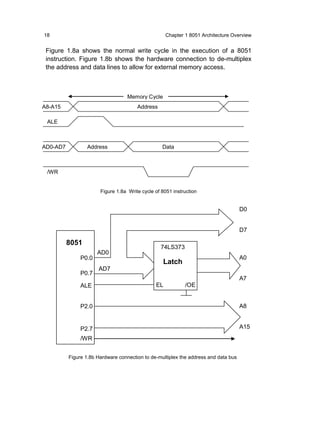
      The multiplexed mode operates by latching the low byte of the address
      using the ALE signal during the first half of each memory cycle. A
      74HC373 (or equivalent) latch holds the low byte of the address stable
      for the duration of the memory cycle. During the second half of the
      memory cycle, data is read from or written to the data bus.
18                                                  Chapter 1 8051 Architecture Overview


 Figure 1.8a shows the normal write cycle in the execution of a 8051
 instruction. Figure 1.8b shows the hardware connection to de-multiplex
 the address and data lines to allow for external memory access.


                                   Memory Cycle
A8-A15                                 Address

 ALE


AD0-AD7          Address                          Data


 /WR


                       Figure 1.8a Write cycle of 8051 instruction


                                                                                     D0


                                                                                     D7

          8051
                                                 74LS373
                      AD0
               P0.0                                                                  A0
                                                   Latch
                      AD7
               P0.7
                                                                                     A7
               ALE                             EL           /OE


               P2.0                                                                  A8


               P2.7                                                                  A15
               /WR


          Figure 1.8b Hardware connection to de-multiplex the address and data bus
Chapter 1 8051 Architecture Overview                                    19


1.5   Tutorial Questions

      1.     What instruction sequence could be used to read bit 1 of Port 0
             and write the state of the bit read to bit 0 of Port 2?
      2.     Illustrate an instruction sequence to store the value of 8AH in
             external RAM at address 3CB0H.
      3.     Write an instruction to initialize the stack pointer to create a 32-
             byte stack at the top of the memory of 8051.
      4.     What is the bit address of bit 2 in the byte address 2BH in the
             8051’s internal data memory?
      5.     What is the bit address of the most significant bit in the byte
             address 2DH in the 8051’s internal data memory?
      6.     What is the state of the Parity Flag in the PSW after the execution
             of each of the following instructions?

               (a)       MOV A, #0F1H
               (b)       MOV A, #0CH
2
Intro to Silicon Labs® C8051F020
2.0   Introduction                                           22
2.1   CIP-51                                                 22
2.2   C8051F020 System Overview                              24
2.3   Memory Organization                                    26
      Program Memory, Data Memory, Stack, Special Function
      Registers
2.4   I/O Ports and Crossbar                                 29
2.5   12-Bit Analog to Digital Converter                     31
2.6   8-Bit Analog to Digital Converter                      32
2.7   Digital to Analog Converters and Comparators 32
2.8   Voltage Reference                                      33
2.9   Tutorial Questions                                     38
22                               Chapter 2 Introduction to Silicon Labs’ C8051F020


      2.0          Introduction
                   This chapter gives an overview of the Silicon Labs C8051F020 micro-
                   controller. On-chip peripherals like ADC and DAC, and other features like
                   the cross-bar and the voltage reference generator are briefly introduced.
                   While programming using a high level language, such as C, makes it
                   less important to know the intricacies of the hardware architecture of the
                   micro-controller, it is still beneficial to have some knowledge of the
                   memory organization and special function registers. Thus, these are also
                   covered in this chapter.


      2.1          CIP-51
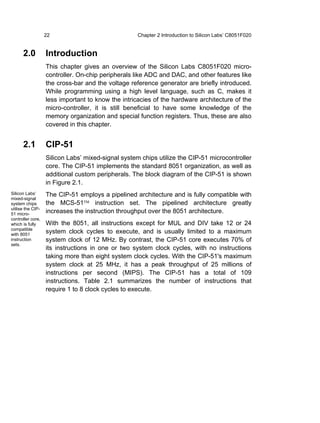
                   Silicon Labs’ mixed-signal system chips utilize the CIP-51 microcontroller
                   core. The CIP-51 implements the standard 8051 organization, as well as
                   additional custom peripherals. The block diagram of the CIP-51 is shown
                   in Figure 2.1.
Silicon Labs’      The CIP-51 employs a pipelined architecture and is fully compatible with
mixed-signal
system chips       the MCS-51™ instruction set. The pipelined architecture greatly
utilise the CIP-
51 micro-
                   increases the instruction throughput over the 8051 architecture.
controller core,
which is fully     With the 8051, all instructions except for MUL and DIV take 12 or 24
compatible
with 8051
                   system clock cycles to execute, and is usually limited to a maximum
instruction        system clock of 12 MHz. By contrast, the CIP-51 core executes 70% of
sets.
                   its instructions in one or two system clock cycles, with no instructions
                   taking more than eight system clock cycles. With the CIP-51's maximum
                   system clock at 25 MHz, it has a peak throughput of 25 millions of
                   instructions per second (MIPS). The CIP-51 has a total of 109
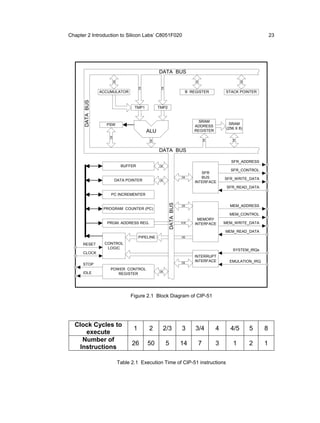
                   instructions. Table 2.1 summarizes the number of instructions that
                   require 1 to 8 clock cycles to execute.
Chapter 2 Introduction to Silicon Labs’ C8051F020                                                            23


                                                DATA BUS


                     D8


                                                                        D8


                                                                                                D8
                                     D8


                                                 D8
                 ACCUMULATOR                                        B REGISTER         STACK POINTER
      DATA BUS


                                 TMP1           TMP2


                                                                          SRAM
                   PSW                                                                    SRAM
                                                                        ADDRESS
                                                                                        (256 X 8)
                                          ALU                           REGISTER
                    D8


                                                                             D8


                                                                                           D8
                                          D8    DATA BUS

                                                                                          SFR_ADDRESS
                           BUFFER               D8
                                                                                          SFR_CONTROL
                                                                           SFR
                                                                  D8       BUS         SFR_WRITE_DATA
                         DATA POINTER           D8
                                                                        INTERFACE
                                                                                        SFR_READ_DATA
                     PC INCREMENTER
                                                       DATA BUS


                                                                  D8                      MEM_ADDRESS
                  PROGRAM COUNTER (PC)
                                                                                         MEM_CONTROL
                                                                         MEMORY
                   PRGM. ADDRESS REG.                             A16   INTERFACE      MEM_WRITE_DATA

                                                                                       MEM_READ_DATA
                                     PIPELINE                     D8

      RESET       CONTROL
                   LOGIC
                                                                                           SYSTEM_IRQs
      CLOCK
                                                                        INTERRUPT
                                                                  D8
                                                                        INTERFACE        EMULATION_IRQ
      STOP
                     POWER CONTROL
                                                D8
      IDLE              REGISTER


                               Figure 2.1 Block Diagram of CIP-51


  Clock Cycles to
                                 1        2          2/3          3     3/4        4      4/5        5   8
      execute
     Number of
                                26        50          5           14     7         3       1         2   1
    Instructions

                          Table 2.1 Execution Time of CIP-51 instructions
24                                           Chapter 2 Introduction to Silicon Labs’ C8051F020


     2.2        C8051F020 System Overview
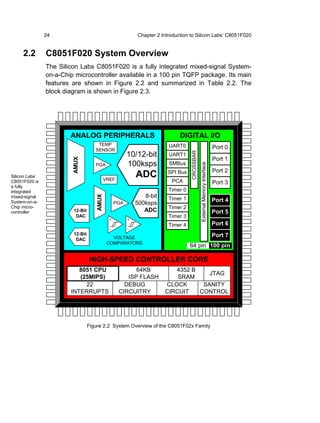
                The Silicon Labs C8051F020 is a fully integrated mixed-signal System-
                on-a-Chip microcontroller available in a 100 pin TQFP package. Its main
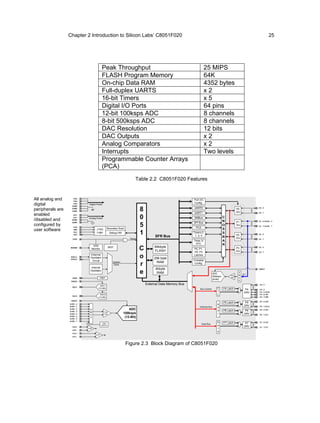
                features are shown in Figure 2.2 and summarized in Table 2.2. The
                block diagram is shown in Figure 2.3.


                        ANALOG PERIPHERALS                                     DIGITAL I/O
                                      TEMP                                UART0
                                     SENSOR
                                                                                                                           Port 0
                                                         10/12-bit


                                                                                    CROSSBAR
                                                                          UART1
                                                                                                                           Port 1
                         AMUX


                                     PGA                 100ksps          SMBus


                                                                                               External Memory Interface
                                                                          SPI Bus                                          Port 2
Silicon Labs’
                                             VREF
                                                             ADC
C8051F020 is                                                               PCA                                             Port 3
a fully
integrated                                                                Timer 0
mixed-signal                                                    8-bit
                                      AMUX


                                                                          Timer 1                                          Port 4
System-on-a-                                       PGA       500ksps
Chip micro-                                                               Timer 2
controller               12-Bit                                 ADC                                                        Port 5
                          DAC                                             Timer 3
                                               +         +
                                                                          Timer 4                                          Port 6
                                               -         -
                         12-Bit                                                                                            Port 7
                          DAC                   VOLTAGE
                                              COMPARATORS
                                                                                    64 pin 100 pin

                                  HIGH-SPEED CONTROLLER CORE
                           8051 CPU                       64KB             4352 B
                                                                                     JTAG
                           (25MIPS)                    ISP FLASH            SRAM
                             22                       DEBUG             CLOCK      SANITY
                        INTERRUPTS                  CIRCUITRY           CIRCUIT   CONTROL


                                  Figure 2.2 System Overview of the C8051F02x Family
Chapter 2 Introduction to Silicon Labs’ C8051F020                                                                                                      25


                                         Peak Throughput                                                           25 MIPS
                                         FLASH Program Memory                                                      64K
                                         On-chip Data RAM                                                          4352 bytes
                                         Full-duplex UARTS                                                         x2
                                         16-bit Timers                                                             x5
                                         Digital I/O Ports                                                         64 pins
                                         12-bit 100ksps ADC                                                        8 channels
                                         8-bit 500ksps ADC                                                         8 channels
                                         DAC Resolution                                                            12 bits
                                         DAC Outputs                                                               x2
                                         Analog Comparators                                                        x2
                                         Interrupts                                                                Two levels
                                         Programmable Counter Arrays
                                         (PCA)
                                                                     Table 2.2 C8051F020 Features


All analog and      VDD
                    VDD
                                                                                                        Port I/O
digital             VDD
                   DGND
                           Digital Power
                                                                                                        Config.

peripherals are    DGND
                                                                         8                               UART0                                    P0
                                                                                                                                                               P0.0
                   DGND
                                                                                                         UART1                                    Drv
enabled
                                                                                                                                                               P0.7

                                                                         0
                    AV+
                                                                                                         SMBus                       C
/disabled and              Analog Power
                    AV+
                   AGND
                                                                                                        SPI Bus
                                                                                                                                     R            P1           P1.0/AIN1.0
configured by
                   AGND

                    TCK                                                  5                                PCA
                                                                                                                                     O            Drv          P1.7/AIN1.7

user software       TMS           JTAG         Boundary Scan                                                                         S
                    TDI
                    TDO
                                  Logic           Debug HW               1         SFR Bus
                                                                                                        Timers 0,
                                                                                                         1, 2, 4
                                                                                                                                     S
                                                                                                                                     B
                                                                                                                                                  P2           P2.0

                   /RST                                          Reset                                                                            Drv          P2.7
                                                                                                        Timer 3/                     A
                                                                                                          RTC                        R
                              VDD                                                 64kbyte
                   MONEN
                             Monitor
                                                  WDT
                                                                         C        FLASH
                                                                                                        P0, P1,
                                                                                                        P2, P3
                                                                                                                                                  P3
                                                                                                                                                  Drv
                                                                                                                                                               P3.0

                                                                                                                                                               P3.7
                            External                                                                    Latches
                   XTAL1
                   XTAL2
                            Oscillator                                   o        256 byte
                                                                                                        Crossbar
                             Circuit                System                         RAM
                             Internal
                                                    Clock                r                               Config.

                            Oscillator
                                                                                   4kbyte                                                                      VREF1
                                                                         e          RAM                                    ADC
                                                                                                                                           Prog
                                                                                                                                                   A
                                                                                                                                                   M    8:1
                                                                                                                           500ksps
                    VREF             VREF                                                                                                  Gain    U
                                                                                                                           (8-Bit)                 X
                   VREFD

                                     DAC1
                                                                             External Data Memory Bus                                                          P4.0
                    DAC1
                                    (12-Bit)                                                                 Bus Control      C      P4 Latch             P4   P4.4
                                                                                                                              T                          DRV   P4.5/ALE
                                     DAC0                                                                                     L                                P4.6/RD
                    DAC0
                                    (12-Bit)                                                                                                                   P4.7/WR
                   VREF0
                                                                                                                                     P5 Latch             P5   P5.0/A8
                  AIN0.0                                                                                                      A                          DRV
                  AIN0.1                                                                                     Address Bus      d                                P5.7/A15
                  AIN0.2    A                                    ADC                                                          d      P6 Latch             P6   P6.0/A0
                  AIN0.3    M              Prog
                  AIN0.4    U              Gain              100ksps                                                          r                          DRV   P6.7/A7
                  AIN0.5
                  AIN0.6
                            X                                 (12-Bit)
                  AIN0.7
                                                                                                                              D      P7 Latch             P7   P7.0/D0
                                         TEMP                                                                   Data Bus
                                        SENSOR                                                                                a                          DRV
                    CP0+                                                                                                                                       P7.7/D7
                           CP0                                                                                                t
                    CP0-
                                                                                                                              a
                    CP1+
                                  CP1
                    CP1-


                                                               Figure 2.3 Block Diagram of C8051F020
26                                      Chapter 2 Introduction to Silicon Labs’ C8051F020


                  All analog and digital peripherals are enabled/disabled and configured by
                  user software. The FLASH memory can be reprogrammed even in-
                  circuit, providing non-volatile data storage, and also allows field
                  upgrades of the 8051 firmware.


      2.3         Memory Organization
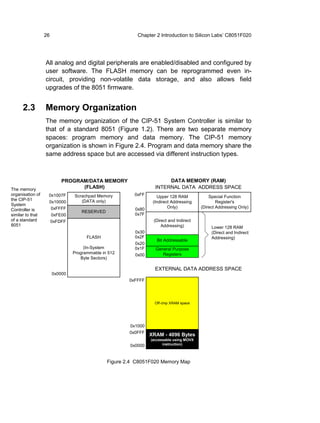
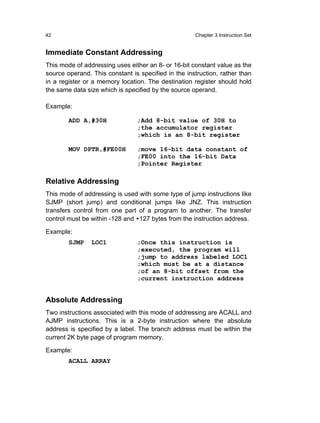
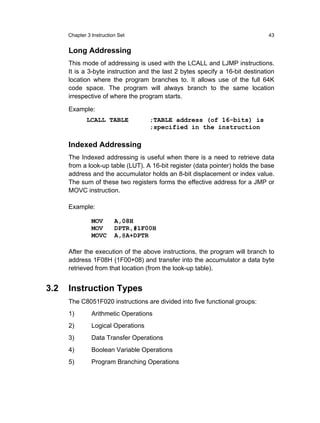
                  The memory organization of the CIP-51 System Controller is similar to
                  that of a standard 8051 (Figure 1.2). There are two separate memory
                  spaces: program memory and data memory. The CIP-51 memory
                  organization is shown in Figure 2.4. Program and data memory share the
                  same address space but are accessed via different instruction types.


                           PROGRAM/DATA MEMORY                         DATA MEMORY (RAM)
The memory                       (FLASH)                          INTERNAL DATA ADDRESS SPACE
organisation of    0x1007F      Scrachpad Memory         0xFF      Upper 128 RAM             Special Function
the CIP-51                         (DATA only)
                   0x10000                                       (Indirect Addressing            Register's
System
                    0xFFFF                               0x80            Only)           (Direct Addressing Only)
Controller is                       RESERVED
similar to that        0xFE00                            0x7F
of a standard          0xFDFF                                    (Direct and Indirect
8051                                                                 Addressing)              Lower 128 RAM
                                                         0x30                                 (Direct and Indirect
                                      FLASH              0x2F                                 Addressing)
                                                                   Bit Addressable
                                                         0x20
                                     (In-System          0x1F     General Purpose
                                Programmable in 512      0x00        Registers
                                   Byte Sectors)

                                                                  EXTERNAL DATA ADDRESS SPACE
                       0x0000
                                                       0xFFFF


                                                                  Off-chip XRAM space


                                                       0x1000
                                                       0x0FFF
                                                                XRAM - 4096 Bytes
                                                                (accessable using MOVX
                                                       0x0000         instruction)


                                               Figure 2.4 C8051F020 Memory Map
Chapter 2 Introduction to Silicon Labs’ C8051F020                        27


                Program Memory
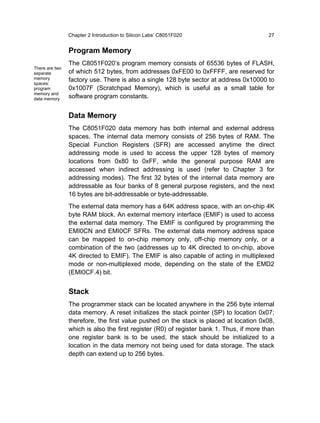
                The C8051F020’s program memory consists of 65536 bytes of FLASH,
There are two
separate        of which 512 bytes, from addresses 0xFE00 to 0xFFFF, are reserved for
memory          factory use. There is also a single 128 byte sector at address 0x10000 to
spaces:
program         0x1007F (Scratchpad Memory), which is useful as a small table for
memory and
data memory     software program constants.


                Data Memory
                The C8051F020 data memory has both internal and external address
                spaces. The internal data memory consists of 256 bytes of RAM. The
                Special Function Registers (SFR) are accessed anytime the direct
                addressing mode is used to access the upper 128 bytes of memory
                locations from 0x80 to 0xFF, while the general purpose RAM are
                accessed when indirect addressing is used (refer to Chapter 3 for
                addressing modes). The first 32 bytes of the internal data memory are
                addressable as four banks of 8 general purpose registers, and the next
                16 bytes are bit-addressable or byte-addressable.
                The external data memory has a 64K address space, with an on-chip 4K
                byte RAM block. An external memory interface (EMIF) is used to access
                the external data memory. The EMIF is configured by programming the
                EMI0CN and EMI0CF SFRs. The external data memory address space
                can be mapped to on-chip memory only, off-chip memory only, or a
                combination of the two (addresses up to 4K directed to on-chip, above
                4K directed to EMIF). The EMIF is also capable of acting in multiplexed
                mode or non-multiplexed mode, depending on the state of the EMD2
                (EMI0CF.4) bit.


                Stack
                The programmer stack can be located anywhere in the 256 byte internal
                data memory. A reset initializes the stack pointer (SP) to location 0x07;
                therefore, the first value pushed on the stack is placed at location 0x08,
                which is also the first register (R0) of register bank 1. Thus, if more than
                one register bank is to be used, the stack should be initialized to a
                location in the data memory not being used for data storage. The stack
                depth can extend up to 256 bytes.
28                                          Chapter 2 Introduction to Silicon Labs’ C8051F020


                  Special Function Registers

                   F8    SPI0CN        PCA0H    PCA0CPH0   PCA0CPH1   PCA0CPH2   PCA0CPH3   PCA0CPH4   WDTCN

                   F0       B         SCON1      SBUF1     SADDR1       TL4        TH4        EIP1      EIP2

                   E8    ADC0CN        PCA0L    PCA0CPL0   PCA0CPL1   PCA0CPL2   PCA0CPL3   PCA0CPL4   RSTSRC

                   E0      ACC         XBR0       XBR1       XBR2      RCAP4L    RCAP4H       EIE1      EIE2

                   D8    PCA0CN       PCA0MD    PCA0M0     PCA0CPM1   PCA0CPM2   PCA0CPM3   PCA0CPM4

                   D0      PSW        REF0CN     DAC0L      DAC0H     DAC0CN      DAC1L      DAC1H     DAC1CN

                   C8     T2CON       T4CON      RCAP2L    RCAP2H       TL2        TH2                 SMB0CR

                   C0    SMB0CN       SMB0STA   SMB0DAT    SMB0ADR    ADC0GTL    ADC0GTH    ADC0LTL    ADC0LTH
                   B8       IP        SADEN0    AMX0CF      AMX0SL     ADC0CF     P1MDIN     ADC0L      ADC0H

                   B0       P3        OSCXCN     OSCICN                           P74OUT     FLSCL      FLACL

                   A8       IE        SADDR0    ADC1CN      ADC1CF     AMX1SL      P3IF      SADEN1    EMI0CN

                   A0       P2        EMI0TC                EMI0CF    P0MDOUT    P1MDOUT    P2MDOUT    P3MDOUT

                   98     SCON0        SBUF0    SPI0CFG    SPIODAT      ADC1     SPI0CKR     CPT0CN    CPT1CN

                   90       P1        TMR3CN    TMR3RLL    TMR3RLH     TMR3L      TMR3H        P7

                   88     TCON         TMOD       TL0        TL1        TH0        TH1       CKCON      PSCTL

                   80       P0          SP        DPL        DPH         P4         P5         P6       PCON


                           0(8)
                                        1(9)      2(A)       3(B)       4(C)       5(D)       6(E)       7(F)
                            Bit
                        addressable
                                                     Table 2.3 SFR Memory Map


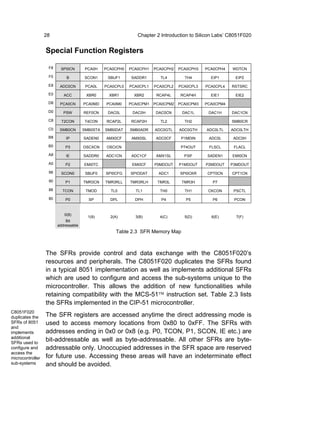
                  The SFRs provide control and data exchange with the C8051F020’s
                  resources and peripherals. The C8051F020 duplicates the SFRs found
                  in a typical 8051 implementation as well as implements additional SFRs
                  which are used to configure and access the sub-systems unique to the
                  microcontroller. This allows the addition of new functionalities while
                  retaining compatibility with the MCS-51™ instruction set. Table 2.3 lists
                  the SFRs implemented in the CIP-51 microcontroller.
C8051F020
duplicates the    The SFR registers are accessed anytime the direct addressing mode is
SFRs of 8051      used to access memory locations from 0x80 to 0xFF. The SFRs with
and
implements        addresses ending in 0x0 or 0x8 (e.g. P0, TCON, P1, SCON, IE etc.) are
additional
SFRs used to
                  bit-addressable as well as byte-addressable. All other SFRs are byte-
configure and     addressable only. Unoccupied addresses in the SFR space are reserved
access the
microcontroller   for future use. Accessing these areas will have an indeterminate effect
sub-systems       and should be avoided.
Chapter 2 Introduction to Silicon Labs’ C8051F020                                29


      2.4        I/O Ports and Crossbar
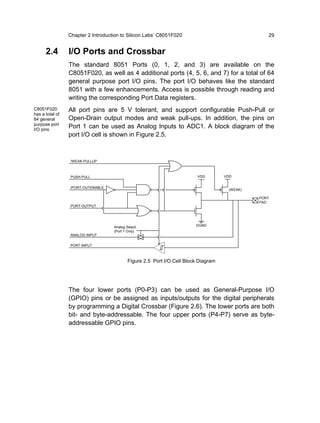
                 The standard 8051 Ports (0, 1, 2, and 3) are available on the
                 C8051F020, as well as 4 additional ports (4, 5, 6, and 7) for a total of 64
                 general purpose port I/O pins. The port I/O behaves like the standard
                 8051 with a few enhancements. Access is possible through reading and
                 writing the corresponding Port Data registers.
C8051F020        All port pins are 5 V tolerant, and support configurable Push-Pull or
has a total of
64 general       Open-Drain output modes and weak pull-ups. In addition, the pins on
purpose port
I/O pins
                 Port 1 can be used as Analog Inputs to ADC1. A block diagram of the
                 port I/O cell is shown in Figure 2.5.


                 /WEAK-PULLUP


                 PUSH-PULL                                                VDD        VDD


                 /PORT-OUTENABLE
                                                                                      (WEAK)

                                                                                               PORT
                                                                                               PAD
                 PORT-OUTPUT


                                    Analog Select                        DGND
                                    (Port 1 Only)
                 ANALOG INPUT

                 PORT-INPUT


                                            Figure 2.5 Port I/O Cell Block Diagram


                 The four lower ports (P0-P3) can be used as General-Purpose I/O
                 (GPIO) pins or be assigned as inputs/outputs for the digital peripherals
                 by programming a Digital Crossbar (Figure 2.6). The lower ports are both
                 bit- and byte-addressable. The four upper ports (P4-P7) serve as byte-
                 addressable GPIO pins.
30                                                                       Chapter 2 Introduction to Silicon Labs’ C8051F020


                       Highest                             UART0           2                XBR0, XBR1,       P0MDOUT, P1MDOUT,
                       Priority                                                            XBR2, P1MDIN       P2MDOUT, P3MDOUT
                                                                           4                 Registers             Registers
                                                            SPI

                                                                           2                                                      External
                                                           SMBus                            Priority                               Pins

                                                                           2                Decoder
                                                           UART1                                                                      P0.0
                                                                                                                     P0                      Highest
                                                                                                          8
                             (Internal Digital Signals)


                                                                           6                                         I/O                     Priority
                                                            PCA                                                     Cells             P0.7

                                                          Comptr.          2
                                                          Outputs                            Digital
                                                                                                                     P1               P1.0
                                                                                            Crossbar      8
                                                                                                                     I/O
                                                           T0, T1,                                                  Cells             P1.7
                                                          T2, T2EX,        8
                                                          T4,T4EX
                                                           /INT0,
                                                            /INT1                                                    P2               P2.0
                                                                                                          8
                                                                                                                     I/O
                                                                                                                    Cells             P2.7
                       Lowest                             /SYSCLK
                       Priority                           CNVSTR

                                                                                                                     P3               P3.0
                                                                       8                                  8
                                                                                                                     I/O                     Lowest
                                                                                                                    Cells             P3.7   Priority
                                                            P0
                                                                  (P0.0-P0.7)

                                                                       8

                                                            P1
                                                                  (P1.0-P1.7)               To External
                                                                                                                    To
                         Port                                                                 Memory
                                                                       8                                           ADC1
                       Latches                                                               Interface
                                                                                                                   Input
                                                                                              (EMIF)
                                                            P2
                                                                  (P2.0-P2.7)

                                                                       8

                                                            P3
                                                                  (P3.0-P3.7)


                                                                      Figure 2.6 Block Diagram of Lower Port I/O (P0 to P3)


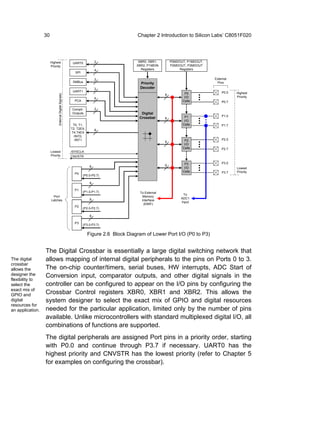
                  The Digital Crossbar is essentially a large digital switching network that
The digital       allows mapping of internal digital peripherals to the pins on Ports 0 to 3.
crossbar
allows the        The on-chip counter/timers, serial buses, HW interrupts, ADC Start of
designer the      Conversion input, comparator outputs, and other digital signals in the
flexibility to
select the        controller can be configured to appear on the I/O pins by configuring the
exact mix of
GPIO and          Crossbar Control registers XBR0, XBR1 and XBR2. This allows the
digital           system designer to select the exact mix of GPIO and digital resources
resources for
an application.   needed for the particular application, limited only by the number of pins
                  available. Unlike microcontrollers with standard multiplexed digital I/O, all
                  combinations of functions are supported.
                  The digital peripherals are assigned Port pins in a priority order, starting
                  with P0.0 and continue through P3.7 if necessary. UART0 has the
                  highest priority and CNVSTR has the lowest priority (refer to Chapter 5
                  for examples on configuring the crossbar).
Chapter 2 Introduction to Silicon Labs’ C8051F020                                                                   31


     2.5         12-Bit Analog to Digital Converter
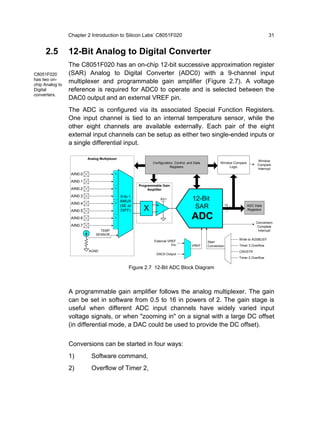
                 The C8051F020 has an on-chip 12-bit successive approximation register
C8051F020        (SAR) Analog to Digital Converter (ADC0) with a 9-channel input
has two on-
chip Analog to
                 multiplexer and programmable gain amplifier (Figure 2.7). A voltage
Digital          reference is required for ADC0 to operate and is selected between the
converters.
                 DAC0 output and an external VREF pin.
                 The ADC is configured via its associated Special Function Registers.
                 One input channel is tied to an internal temperature sensor, while the
                 other eight channels are available externally. Each pair of the eight
                 external input channels can be setup as either two single-ended inputs or
                 a single differential input.

                           Analog Multiplexer
                                                                                                                              Window
                                                             Configuration, Control, and Data          Window Compare
                                                                                                                              Compare
                                                                        Registers                           Logic
                                                                                                                              Interrupt
                  AIN0.0                   +

                  AIN0.1                   -
                                                      Programmable Gain
                  AIN0.2                   +               Amplifier

                  AIN0.3                     9-to-1
                                           -
                                             AMUX
                                                                   AV+                 12-Bit
                  AIN0.4                   +
                                             (SE or
                                                        X      +                        SAR                  12         ADC Data
                                                                                                                        Registers
                  AIN0.5                   - DIFF)             -
                  AIN0.6                   +                                           ADC                                   Conversion
                  AIN0.7                   -                                                                                  Complete
                                  TEMP                                                                                        Interrupt
                                SENSOR
                                                                                                                  Write to AD0BUSY
                                                              External VREF                     Start
                                                                         Pin           VREF     Conversion        Timer 3 Overflow
                           AGND                                                                                   CNVSTR
                                                               DAC0 Output
                                                                                                                  Timer 2 Overflow


                                                 Figure 2.7 12-Bit ADC Block Diagram


                 A programmable gain amplifier follows the analog multiplexer. The gain
                 can be set in software from 0.5 to 16 in powers of 2. The gain stage is
                 useful when different ADC input channels have widely varied input
                 voltage signals, or when "zooming in" on a signal with a large DC offset
                 (in differential mode, a DAC could be used to provide the DC offset).


                 Conversions can be started in four ways:
                 1)          Software command,
                 2)          Overflow of Timer 2,
32                                Chapter 2 Introduction to Silicon Labs’ C8051F020


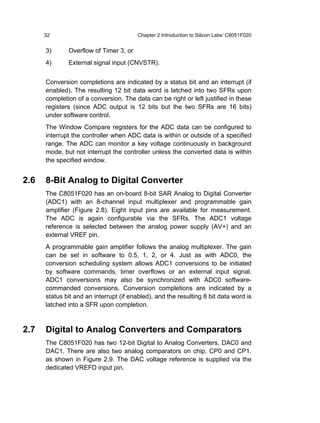
      3)      Overflow of Timer 3, or
      4)      External signal input (CNVSTR).


      Conversion completions are indicated by a status bit and an interrupt (if
      enabled). The resulting 12 bit data word is latched into two SFRs upon
      completion of a conversion. The data can be right or left justified in these
      registers (since ADC output is 12 bits but the two SFRs are 16 bits)
      under software control.
      The Window Compare registers for the ADC data can be configured to
      interrupt the controller when ADC data is within or outside of a specified
      range. The ADC can monitor a key voltage continuously in background
      mode, but not interrupt the controller unless the converted data is within
      the specified window.


2.6   8-Bit Analog to Digital Converter
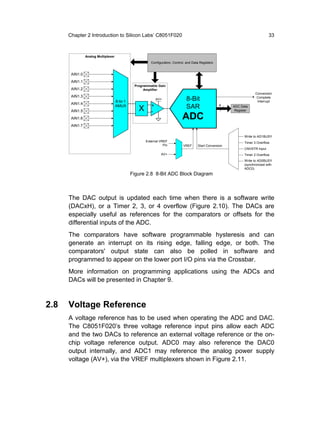
      The C8051F020 has an on-board 8-bit SAR Analog to Digital Converter
      (ADC1) with an 8-channel input multiplexer and programmable gain
      amplifier (Figure 2.8). Eight input pins are available for measurement.
      The ADC is again configurable via the SFRs. The ADC1 voltage
      reference is selected between the analog power supply (AV+) and an
      external VREF pin.
      A programmable gain amplifier follows the analog multiplexer. The gain
      can be set in software to 0.5, 1, 2, or 4. Just as with ADC0, the
      conversion scheduling system allows ADC1 conversions to be initiated
      by software commands, timer overflows or an external input signal.
      ADC1 conversions may also be synchronized with ADC0 software-
      commanded conversions. Conversion completions are indicated by a
      status bit and an interrupt (if enabled), and the resulting 8 bit data word is
      latched into a SFR upon completion.


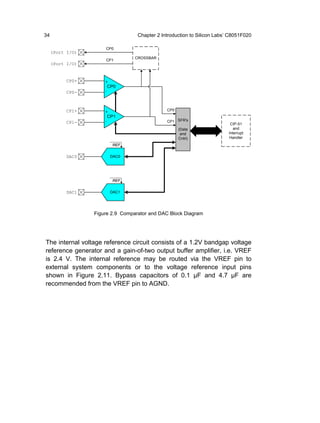
2.7   Digital to Analog Converters and Comparators
      The C8051F020 has two 12-bit Digital to Analog Converters, DAC0 and
      DAC1. There are also two analog comparators on chip, CP0 and CP1,
      as shown in Figure 2.9. The DAC voltage reference is supplied via the
      dedicated VREFD input pin.
Chapter 2 Introduction to Silicon Labs’ C8051F020                                                                         33


                Analog Multiplexer
                                                        Configuration, Control, and Data Registers


       AIN1.0
       AIN1.1
                                               Programmable Gain
       AIN1.2                                       Amplifier
                                                                                                                        Conversion
       AIN1.3
                                     8-to-1
                                                            AV+                8-Bit                                     Complete
                                                                                                                         Interrupt
       AIN1.4
                                     AMUX
                                                 X      +                      SAR                   8    ADC Data
       AIN1.5                                           -                                                  Register

       AIN1.6                                                                ADC
       AIN1.7

                                                                                                                 Write to AD1BUSY
                                                     External VREF                                               Timer 3 Overflow
                                                                Pin          VREF      Start Conversion
                                                                                                                 CNVSTR Input
                                                              AV+                                                Timer 2 Overflow
                                                                                                                 Write to AD0BUSY
                                                                                                                 (synchronized with
                                                                                                                 ADC0)
                                              Figure 2.8 8-Bit ADC Block Diagram


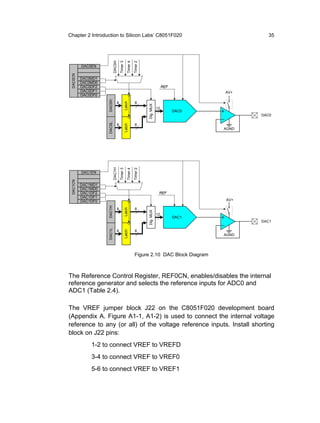
      The DAC output is updated each time when there is a software write
      (DACxH), or a Timer 2, 3, or 4 overflow (Figure 2.10). The DACs are
      especially useful as references for the comparators or offsets for the
      differential inputs of the ADC.
      The comparators have software programmable hysteresis and can
      generate an interrupt on its rising edge, falling edge, or both. The
      comparators' output state can also be polled in software and
      programmed to appear on the lower port I/O pins via the Crossbar.
      More information on programming applications using the ADCs and
      DACs will be presented in Chapter 9.


2.8   Voltage Reference
      A voltage reference has to be used when operating the ADC and DAC.
      The C8051F020’s three voltage reference input pins allow each ADC
      and the two DACs to reference an external voltage reference or the on-
      chip voltage reference output. ADC0 may also reference the DAC0
      output internally, and ADC1 may reference the analog power supply
      voltage (AV+), via the VREF multiplexers shown in Figure 2.11.
34                                 Chapter 2 Introduction to Silicon Labs’ C8051F020

                      CP0
     (Port I/O)
                                  CROSSBAR
                      CP1
     (Port I/O)


           CP0+       +
                          CP0
           CP0-       -


           CP1+       +                        CP0
                          CP1
           CP1-       -                        CP1 SFR's
                                                                           CIP-51
                                                     (Data                   and
                                                      and                 Interrupt
                                                     Cntrl)               Handler
                           REF


           DAC0            DAC0


                           REF


           DAC1            DAC1


                  Figure 2.9 Comparator and DAC Block Diagram


The internal voltage reference circuit consists of a 1.2V bandgap voltage
reference generator and a gain-of-two output buffer amplifier, i.e. VREF
is 2.4 V. The internal reference may be routed via the VREF pin to
external system components or to the voltage reference input pins
shown in Figure 2.11. Bypass capacitors of 0.1 µF and 4.7 µF are
recommended from the VREF pin to AGND.
Chapter 2 Introduction to Silicon Labs’ C8051F020                                                   35


                        DAC0H
                                Timer 3
                                          Timer 4
                                                    Timer 2
          DAC0EN

 DAC0CN
          DAC0MD1
          DAC0MD0
          DAC0DF2                                                             REF
          DAC0DF1                                                                          AV+
          DAC0DF0


                    DAC0H
                            8                         8


                                     Latch


                                                              Dig. MUX
                                                                         12
                                                                                    DAC0
                                                                                                  DAC0
                    DAC0L


                            8        Latch            8
                                                                                           AGND
                        DAC1H
                                Timer 3
                                          Timer 4
                                                    Timer 2


          DAC1EN
 DAC1CN


          DAC1MD1
          DAC1MD0
          DAC1DF2                                                         REF
          DAC1DF1
          DAC1DF0                                                                          AV+
                    DAC1H


                            8                         8
                                     Latch


                                                              Dig. MUX


                                                                         12
                                                                                    DAC1
                                                                                                  DAC1
                    DAC1L


                            8                         8
                                     Latch


                                                                                           AGND


                                                     Figure 2.10 DAC Block Diagram


The Reference Control Register, REF0CN, enables/disables the internal
reference generator and selects the reference inputs for ADC0 and
ADC1 (Table 2.4).

The VREF jumper block J22 on the C8051F020 development board
(Appendix A. Figure A1-1, A1-2) is used to connect the internal voltage
reference to any (or all) of the voltage reference inputs. Install shorting
block on J22 pins:
              1-2 to connect VREF to VREFD
              3-4 to connect VREF to VREF0
              5-6 to connect VREF to VREF1
36                                           Chapter 2 Introduction to Silicon Labs’ C8051F020


                                                     REF0CN


                                                      AD0VRS
                                                      AD1VRS
                                                      TEMPE

                                                      REFBE
                                                       BIASE
                                                                                ADC1
                                                                  AV+
                                                                                Ref
                                                                        1

                                     VREF1
              VDD                                                       0

  External
  Voltage       R1
 Reference
   Circuit                                                                      ADC0
             DGND                    VREF0                                      Ref
                                                                        0


                                                                        1


                                                      DAC0
                                     VREFD
                                                         Ref


                                                      DAC1                   BIASE

                                                                                       Bias to
                                                                                EN     ADCs,
                                     VREF                                              DACs
                                                                 x2           1.2V
               4.7µF         0.1µF                                          Band-Gap
                                                               REFBE

              Recommended Bypass
                   Capacitors


                       Figure 2.11 Voltage Reference Functional Block Diagram


Example:                  MOV         REF0CN,#00000011B

This enables the use of the ADC or DAC, and the internal voltage
reference. The appropriate jumpers have to be set on the development
board to connect the internal voltage reference to the ADC or DAC
voltage reference inputs.


In summary, the benefits of a highly integrated microcontroller include:
1)           More efficient circuit implementation and reducing board space
2)           Higher system reliability
3)           Cost effective
Chapter 2 Introduction to Silicon Labs’ C8051F020                              37


  Bit       Symbol                             Description
  7-5         -            Unused. Read=000b; Write=Don’t care.
                           ADC0 Voltage Reference Select
   4       AD0VRS          0: ADC0 voltage reference from VREF0 pin.
                           1: ADC0 voltage reference from DAC0 output.
                           ADC1 Voltage Reference Select
   3       AD1VRS          0: ADC1 voltage reference from VREF1 pin.
                           1: ADC1 voltage reference from AV+
                           Temperature Sensor Enable Bit
   2        TEMPE          0: Internal Temperature Sensor Off.
                           1: Internal Temperature Sensor On.
                           ADC/DAC Bias Generator Enable Bit
   1         BIASE         (Must be ‘1’ if using ADC or DAC)
                           0: Internal Bias Generator Off.
                           1: Internal Bias Generator On.
                           Internal Reference Buffer Enable Bit
   0        REFBE          0: Internal Reference Buffer Off.
                           1: Internal Reference Buffer On. Internal voltage
                              reference is driven on the VREF pin.
                     Table 2.4 REF0CN: Reference Control Register
38                              Chapter 2 Introduction to Silicon Labs’ C8051F020


2.9   Tutorial Questions

      1.   Why is the Silicon Labs mixed-signal system chip, which uses
           CIP-51, has a faster throughput than the MCS-51TM?
      2.   Give examples of analogue and digital components which are
           incorporated in the Silicon Labs C8051F020.
      3.   The Silicon Labs target board allows a program to be written and
           tested in its IDE (Integrated Development Environment)
           environment. Once tested successfully, the program can be
           downloaded into the memory and be executed from there. Name
           the memory involved when the downloading procedure takes
           place.
      4.   Which of the 4 ports in the Silicon Labs target board can be used
           to generate the GPI/O or input/outputs for some digital peripheral?
      5.   A voltage reference needs to be connected to the DAC (DAC0 or
           DAC1) before it is fully operational. If an internal voltage reference
           generator is to be used in this case, show the necessary steps
           (hardware and software means) involved in order to enable the
           above connection.
3
Instruction Set
3.0   Introduction                                                   40
3.1   Addressing Modes                                               40
      Register Addressing, Direct Addressing, Indirect Addressing,
      Immediate Constant Addressing, Relative Addressing,
      Absolute Addressing, Long Addressing, Indexed Addressing
3.2   Instruction Types                                              43
      Arithmetic Operations, Logical Operations, Data Transfer
      Instructions, Boolean Variable Instructions, Program
      Branching Instructions
3.3   Tutorial Questions                                             69
40                                                         Chapter 3 Instruction Set


3.0   Introduction
      A computer instruction is made up of an operation code (op-code)
      followed by either zero, one or two bytes of operands information. The
      op-code identifies the type of operation to be performed while the
      operands identify the source and destination of the data. The operand
      can be the data itself, a CPU register, a memory location or an I/O port.
      If the instruction is associated with more than one operand, the format is
      always:
              Instruction        Destination, Source


3.1   Addressing Modes
      Eight modes of addressing are available with C8051F020. The different
      addressing modes, shown in Table 3.1, determine how the operand byte
      is selected. Each addressing mode is discussed in detail below.


                 Addressing Modes                         Instruction
                 Register                        MOV A, B
                 Direct                          MOV 30H,A
                 Indirect                        ADD A,@R0
                 Immediate Constant              ADD A,#80H
                 Relative*                       SJMP AHEAD
                 Absolute*                       AJMP BACK
                 Long*                           LJMP FAR_AHEAD
                 Indexed                         MOVC A,@A+PC
              * Relate to Program Branching Instruction
                                 Table 3.1 Addressing Modes


      Register Addressing
      The register addressing instruction involves information transfer between
      registers.
      Example:         MOV       R0,A
Chapter 3 Instruction Set                                            41


The instruction above transfers the accumulator content into the R0
register, of which its related Register Bank (Bank 0, 1, 2, and 3) must
have been specified earlier.


Direct Addressing
The instruction allows you to specify the operand by giving its actual
memory address (in Hexadecimal) or by giving its abbreviated name
(e.g. P3).

Example:
          MOV       A, P3      ;transfer the contents of
                               ;Port 3 to the accumulator
          MOV       A, 20H     ;transfer the contents of RAM
                               ;location 20H to the
                               ;accumulator

Indirect Addressing
This mode uses a pointer to hold the effective address of the operand.
However only registers R0, R1 and DPTR can be used as the pointer
registers. The R0 and R1 registers can hold an 8-bit address whereas
DPTR can hold a 16-bit address.

Example:
          MOV       @R0,A      ;store the content of
                               ;accumulator into the memory
                               ;location pointed to by
                               ;register R0 e.g. R0 has the
                               ;8-bit address of 60H

          MOVX      A,@DPTR    ;transfer the contents from
                               ;the external memory location
                               ;pointed to by DPTR, into the
                               ;accumulator e.g. DPTR has a
                               ;16-bit address of 1234H
42                                                   Chapter 3 Instruction Set


Immediate Constant Addressing
This mode of addressing uses either an 8- or 16-bit constant value as the
source operand. This constant is specified in the instruction, rather than
in a register or a memory location. The destination register should hold
the same data size which is specified by the source operand.

Example:

        ADD A,#30H              ;Add 8-bit value of 30H to
                                ;the accumulator register
                                ;which is an 8-bit register

        MOV DPTR,#FE00H         ;move 16-bit data constant of
                                ;FE00 into the 16-bit Data
                                ;Pointer Register

Relative Addressing
This mode of addressing is used with some type of jump instructions like
SJMP (short jump) and conditional jumps like JNZ. This instruction
transfers control from one part of a program to another. The transfer
control must be within -128 and +127 bytes from the instruction address.

Example:
        SJMP    LOC1            ;Once this instruction is
                                ;executed, the program will
                                ;jump to address labeled LOC1
                                ;which must be at a distance
                                ;of an 8-bit offset from the
                                ;current instruction address


Absolute Addressing
Two instructions associated with this mode of addressing are ACALL and
AJMP instructions. This is a 2-byte instruction where the absolute
address is specified by a label. The branch address must be within the
current 2K byte page of program memory.

Example:
        ACALL ARRAY
Chapter 3 Instruction Set                                                43


      Long Addressing
      This mode of addressing is used with the LCALL and LJMP instructions.
      It is a 3-byte instruction and the last 2 bytes specify a 16-bit destination
      location where the program branches to. It allows use of the full 64K
      code space. The program will always branch to the same location
      irrespective of where the program starts.

      Example:
              LCALL TABLE            ;TABLE address (of 16-bits) is
                                     ;specified in the instruction

      Indexed Addressing
      The Indexed addressing is useful when there is a need to retrieve data
      from a look-up table (LUT). A 16-bit register (data pointer) holds the base
      address and the accumulator holds an 8-bit displacement or index value.
      The sum of these two registers forms the effective address for a JMP or
      MOVC instruction.

      Example:

                MOV       A,08H
                MOV       DPTR,#1F00H
                MOVC      A,@A+DPTR

      After the execution of the above instructions, the program will branch to
      address 1F08H (1F00+08) and transfer into the accumulator a data byte
      retrieved from that location (from the look-up table).


3.2   Instruction Types
      The C8051F020 instructions are divided into five functional groups:
      1)        Arithmetic Operations
      2)        Logical Operations
      3)        Data Transfer Operations
      4)        Boolean Variable Operations
      5)        Program Branching Operations
44                                                              Chapter 3 Instruction Set


Arithmetic Operations
With arithmetic instructions, the C8051F020 CPU has no special
knowledge of the data format, e.g. signed binary, unsigned binary, binary
coded decimal, ASCII, etc. Therefore, the appropriate status bits in the
PSW are set when specific conditions are met to manage the different
data formats. Table 3.2 lists the arithmetic instructions associated with
the C8051F020 MCU.

        Mnemonic                                 Description
 ADD A, Rn                     A = A + [Rn]
 ADD A, direct                 A = A + [direct memory]
 ADD A,@Ri                     A = A + [memory pointed to by Ri]
 ADD A,#data                   A = A + immediate data
 ADDC A,Rn                     A = A + [Rn] + CY
 ADDC A, direct                A = A + [direct memory] + CY
 ADDC A,@Ri                    A = A + [memory pointed to by Ri] + CY
 ADDC A,#data                  A = A + immediate data + CY
 SUBB A,Rn                     A = A - [Rn] - CY
 SUBB A, direct                A = A - [direct memory] - CY
 SUBB A,@Ri                    A = A - [@Ri] - CY
 SUBB A,#data                  A = A - immediate data - CY
 INC A                         A=A+1
 INC Rn                        [Rn] = [Rn] + 1
 INC direct                    [direct] = [direct] + 1
 INC @Ri                       [@Ri] = [@Ri] + 1
 DEC A                         A=A-1
 DEC Rn                        [Rn] = [Rn] - 1
 DEC direct                    [direct] = [direct] - 1
 DEC @Ri                       [@Ri] = [@Ri] - 1
 MUL AB                        Multiply A & B
 DIV AB                        Divide A by B
 DA A                          Decimal adjust A
                    Table 3.2 List of Arithmetic Instructions
Note:    [@Ri] means contents of memory location pointed to by Ri
         register
Chapter 3 Instruction Set                                                 45


ADD         A,<source-byte> and ADDC A,<source-byte>
ADD adds the data byte specified by the source operand to the
accumulator, leaving the result in the accumulator.
ADDC adds the data byte specified by the source operand, the carry flag
and the accumulator contents, leaving the result in the accumulator.


Operation of both the instructions, ADD and ADDC, can affect the carry
flag (CY), auxiliary carry flag (AC) and the overflow flag (OV).


CY=1      if there is a carryout from bit 7; cleared otherwise
AC =1 if there is a carryout from the lower 4-bit of A i.e. from bit 3;
      cleared otherwise
OV=1      if the signed result cannot be expressed within the number of
          bits in the destination operand; cleared otherwise


SUBB A,<source-byte>
SUBB subtracts the specified data byte and the carry flag together from
the accumulator, leaving the result in the accumulator.


CY=1      if a borrow is needed for bit 7; cleared otherwise
AC =1 if a borrow is needed for bit 3, cleared otherwise
OV=1 if a borrow is needed into bit 6, but not into bit 7, or into bit 7, but
     not into bit 6.
Example: The accumulator holds 0C1H (11000001B), Register1 holds
         40H (01000000B) and the CY=1.The instruction,

                            SUBB   A, R1

              gives the value 70H (01110000B) in the accumulator, with the
              CY=0 and AC=0 but OV=1.


Notice that the correct answer should be 71H (0C1H-50H). The
difference between this and the result given is due to the carry (or
46                                                     Chapter 3 Instruction Set


borrow) flag being set before the start of operation. So if the state of the
carry bit is unknown before the execution of the SUBB instruction, it must
be explicitly cleared by using CLR C instruction.


INC     <byte>
Increments the data variable by 1. The instruction is used in register,
direct or register direct addressing modes.


Example:         INC     6FH
If the internal RAM location 6FH contains 30H, then the instruction
increments this value, leaving 31H in location 6FH.

Example:
                 MOV     R1, #5E
                 INC     R1
                 INC     @R1

If R1=5E (01011110) and internal RAM location 5FH contains 20H, the
instructions will result in R1=5FH and internal RAM location 5FH to
increment by one to 21H.


DEC     <byte>
The data variable is decremented by 1. The instruction is used in
accumulator, register, direct or register direct addressing modes. A data
of value 00H underflows to FFH after the operation. No flags are
affected.


INC     DPTR
Increments the 16-bit data pointer by 1. DPTR is the only 16-bit register
that can be incremented.

Example:         INC DPTR


The instruction adds one to the contents of DPTR directly.
Chapter 3 Instruction Set                                                   47


MUL       AB
Multiplies A & B and the 16-bit result stored in [B15-8], [A7-0].
Multiplies the unsigned 8-bit integers in the      accumulator and the B
register. The Low order byte of the 16-bit          product will go to the
accumulator and the High order byte will go        to the B register. If the
product is greater than 255 (FFH), the overflow    flag is set; otherwise it is
cleared. The carry flag is always cleared.

Example:            MUL     AB

If ACC=85 (55H) and B=23 (17H), the instruction gives the product 1955
(07A3H), so B is now 07H and the accumulator is A3H. The overflow flag
is set and the carry flag is cleared.


DIV       AB
Divides A by B. The integer part of the quotient is stored in A and the
remainder goes to the B register.

Example:            DIV AB

If ACC=90 (5AH) and B=05(05H), the instruction leaves 18 (12H) in ACC
and the value 00 (00H) in B, since 90/5 = 18 (quotient) and 00
(remainder). Carry and OV are both cleared.
Note:     If B contains 00H before the division operation, then the values
          stored in ACC and B are undefined and an overflow flag is set.
          The carry flag is cleared.


DA        A
This is a decimal adjust instruction. It adjusts the 8-bit value in ACC
resulting from operations like ADD or ADDC and produces two 4-bit
digits (in packed Binary Coded Decimal (BCD) format). Effectively, this
instruction performs the decimal conversion by adding 00H, 06H, 60H or
66H to the accumulator, depending on the initial value of ACC and PSW.
If ACC bits A3-0 are greater than 9 (xxxx1010-xxxx1111), or if AC=1, then
a value 6 is added to the accumulator to produce a correct BCD digit in
the lower order nibble.
48                                                   Chapter 3 Instruction Set


If CY=1, because the high order bits A7-4 is now exceeding 9 (1010xxxx-
1111xxxx), then these high order bits will be increased by 6 to produce a
correct proper BCD in the high order nibble but not clear the carry.

Example:
                MOV     R0,#38H
                MOV     A,#80H
                ADDC    A
                DA      A
Before carrying out the above instruction, the accumulator value was
given as ACC=80H (10000000), which also represents BCD=80, R0=
38H (00111000) representing BCD=38, and the carry flag is cleared.
After the operation of ADDC, the result in the accumulator is ACC=B8H,
which is not a BCD value. In order to do a decimal adjustment to the
value, the DA instruction needs to be incorporated. Once DA operation is
carried out, the accumulator will result in ACC=18H, indicating
BCD=18.The carry flag is set, indicating that a decimal overflow occurred
(38+80=118).


Logical Operations
Logical instructions perform Boolean operations (AND, OR, XOR, and
NOT) on data bytes on a bit-by-bit basis. Table 3.3 lists the logical
instructions associated with the C8051F020.


ANL     <dest-byte>,<source-byte>
This instruction performs the logical AND operation on the source and
destination operands and stores the result in the destination variable. No
flags are affected.

Example:        ANL     A,R2
If ACC=D3H (11010011) and R2=75H (01110101), the result of the
instruction is ACC=51H (01010001).
The following instruction is also useful when there is a need to mask a
byte.

Example:        ANL     P1,#10111001B
Chapter 3 Instruction Set                                                     49


This instruction clears bits 6, 2 and 1 of output Port 1.


         Mnemonic                                      Description
 ANL A, Rn                           A = A & [Rn]
 ANL A, direct                       A = A & [direct memory]
 ANL A,@Ri                           A = A & [memory pointed to by Ri]
 ANL A,#data                         A= A & immediate data
 ANL direct,A                        [direct] = [direct] & A
 ANL direct,#data                    [direct] = [direct] & immediate data
 ORL A, Rn                           A = A OR [Rn]
 ORL A, direct                       A = A OR [direct]
 ORL A,@Ri                           A = A OR [@RI]
 ORL A,#data                         A = A OR immediate data
 ORL direct,A                        [direct] = [direct] OR A
 ORL direct,#data                    [direct] = [direct] OR immediate data
 XRL A, Rn                           A = A XOR [Rn]
 XRL A, direct                       A = A XOR [direct memory]
 XRL A,@Ri                           A = A XOR [@Ri]
 XRL A,#data                         A = A XOR immediate data
 XRL direct,A                        [direct] = [direct] XOR A
 XRL direct,#data                    [direct] = [direct] XOR immediate data
 CLR A                               Clear A
 CPL A                               Complement A
 RL A                                Rotate A left
 RLC A                               Rotate A left (through C)
 RR A                                Rotate A right
 RRC A                               Rotate A right (through C)
 SWAP A                              Swap nibbles

                            Table 3.3 List of Logical Instructions
50                                                         Chapter 3 Instruction Set


ORL     <dest-byte>,<source-byte>
This instruction performs the logical OR operation on the source and
destination operands and stores the result in the destination variable. No
flags are affected.

Example:         ORL      A,R2


If ACC=D3H (11010011) and R2=75H (01110101), the result of the
instruction is ACC=F7H (11110111).

Example:         ORL      P1,#11000010B


This instruction sets bits 7, 6, and 1 of output Port 1.


XRL     <dest-byte>,<source-byte>
This instruction performs the logical XOR (Exclusive OR) operation on
the source and destination operands and stores the result in the
destination variable. No flags are affected.

Example:         XRL      A,R0


If ACC=C3H (11000011) and R0=AAH (10101010), then the instruction
results in ACC=69H (01101001).

Example:         XRL      P1,#00110001

This instruction complements bits 5, 4, and 0 of output Port 1.


CLR     A
This instruction clears the accumulator (all bits set to 0). No flags are
affected.

Example:         CLR      A


If ACC=C3H, then the instruction results in ACC=00H.
Chapter 3 Instruction Set                                                51


CPL       A
This instruction logically complements each bit of the accumulator (one’s
complement). No flags are affected.

Example:            CPL     A


If ACC=C3H (11000011), then the instruction results in ACC=3CH
(00111100).


RL        A
The eight bits in the accumulator are rotated one bit to the left. Bit 7 is
rotated into the bit 0 position. No flags are affected.

Example:            RL      A


If ACC=C3H (11000011), then the instruction results in ACC=87H
(10000111) with the carry unaffected.


RLC       A
The instruction rotates the accumulator contents one bit to the left
through the carry flag. This means that the Bit 7 of the accumulator will
move into carry flag and the original value of the carry flag will move into
the Bit 0 position. No other flags are affected.

Example:            RLC     A

If ACC=C3H (11000011), and the carry flag is 1, the instruction results in
ACC=87H (10000111) with the carry flag set.


RR        A
The eight bits in the accumulator are rotated one bit to the right. Bit 0 is
rotated into the bit 7 position. No flags are affected.

Example:            RR      A
52                                                     Chapter 3 Instruction Set


If ACC=C3H (11000011), then the instruction results in ACC=E1H
(11100001) with the carry unaffected.


RRC     A
The instruction rotates the accumulator contents one bit to the right
through the carry flag. This means that the original value of carry flag will
move into Bit 7 of the accumulator and Bit 0 rotated into carry flag. No
other flags are affected.

Example:         RRC     A


If ACC=C3H (11000011), and the carry flag is 0, the instruction results in
ACC=61H (01100001) with the carry flag set.


SWAP A
This instruction interchanges the low order 4-bit nibbles (A3-0) with the
high order 4-bit nibbles (A7-4) of the ACC. The operation can also be
thought of as a 4-bit rotate instruction. No flags are affected.

Example:         SWAP    A
If ACC=C3H (11000011), then the instruction leaves ACC=3CH
(00111100).


Data Transfer Instructions
Data transfer instructions can be used to transfer data between an
internal RAM location and SFR location without going through the
accumulator. It is possible to transfer data between the internal and
external RAM by using indirect addressing. Table 3.4 presents the list of
data transfer instructions.
The upper 128 bytes of data RAM are accessed only by indirect
addressing and the SFRs are accessed only by direct addressing.
Chapter 3 Instruction Set                                                    53


        Mnemonic                                     Description
 MOV @Ri, direct                   [@Ri] = [direct]
 MOV @Ri, #data                    [@Ri] = immediate data
 MOV DPTR, #data 16                [DPTR] = immediate data
 MOVC A,@A+DPTR                    A = Code byte from [@A+DPTR]
 MOVC A,@A+PC                      A = Code byte from [@A+PC]
 MOVX A,@Ri                        A = Data byte from external ram [@Ri]
 MOVX A,@DPTR                      A = Data byte from external ram [@DPTR]
 MOVX @Ri, A                       External[@Ri] = A
 MOVX @DPTR,A                      External[@DPTR] = A
 PUSH direct                       Push into stack
 POP direct                        Pop from stack
 XCH A,Rn                          A = [Rn], [Rn] = A
 XCH A, direct                     A = [direct], [direct] = A
 XCH A, @Ri                        A = [@Rn], [@Rn] = A
 XCHD A,@Ri                        Exchange low order digits

                        Table 3.4 List of Data Transfer Instructions


MOV        <dest-byte>,<source-byte>
This instruction moves the source byte into the destination location. The
source byte is not affected, neither are any other registers or flags.

Example:            MOV       R1,#60               ;R1=60H
                    MOV       A,@R1                ;A=[60H]
                    MOV       R2,#61               ;R2=61H
                    ADD       A,@R2                ;A=A+[61H]
                    MOV       R7,A                 ;R7=A

If internal RAM locations 60H=10H, and 61H=20H, then after the
operations of the above instructions R7=A=30H. The data contents of
memory locations 60H and 61H remain intact.


MOV        DPTR, #data 16
This instruction loads the data pointer with the 16-bit constant and no
flags are affected.
54                                                   Chapter 3 Instruction Set


Example:        MOV     DPTR,#1032

This instruction loads the value 1032H into the data pointer, i.e.
DPH=10H and DPL=32H.


MOVC A,@A + <base-reg>
This instruction moves a code byte from program memory into ACC. The
effective address of the byte fetched is formed by adding the original 8-
bit accumulator contents and the contents of the base register, which is
either the data pointer (DPTR) or Program Counter (PC). 16-bit addition
is performed and no flags are affected.
The instruction is useful in reading the look-up tables in the program
memory. If the PC is used, it is incremented to the address of the
following instruction before being added to the ACC.

Example:                        CLR     A
                LOC1:           INC     A
                                MOVC    A,@A + PC
                                RET
                Look_up         DB      10H
                                DB      20H
                                DB      30H
                                DB      40H


The subroutine takes the value in the accumulator to 1 of 4 values
defined by the DB (Define Byte) directive. After the operation of the
subroutine it returns ACC=20H.


MOVX <dest-byte>,<source-byte>
This instruction transfers data between ACC and a byte of external data
memory. There are two forms of this instruction, the only difference
between them is whether to use an 8-bit or 16-bit indirect addressing
mode to access the external data RAM.
The 8-bit form of the MOVX instruction uses the EMI0CN SFR to
determine the upper 8 bits of the effective address to be accessed and
the contents of R0 or R1 to determine the lower 8 bits of the effective
address to be accessed.
Chapter 3 Instruction Set                                              55

Example:            MOV     EMI0CN,#10H ;load high byte of
                                        ;address into EMI0CN
                    MOV     R0,#34H      ;load low byte of
                                         ;address into R0(or R1)
                    MOVX    A,@R0        ;load contents of 1034H
                                         ;into ACC

The 16-bit form of the MOVX instruction accesses the memory location
pointed to by the contents of the DPTR register.

Example:            MOV     DPTR,#1034H ;load DPTR with 16 bit
                                        ;address to read
                                        ;(1034H)
                    MOVX    A,@DPTR      ;load contents of 1034H
                                         ;into ACC

The above example uses the 16-bit immediate MOV DPTR instruction to
set the contents of DPTR. Alternately, the DPTR can be accessed
through the SFR registers DPH, which contains the upper 8 bits of
DPTR, and DPL, which contains the lower 8 bits of DPTR.


PUSH Direct
This instruction increments the stack pointer (SP) by 1. The contents of
Direct, which is an internal memory location or a SFR, are copied into the
internal RAM location addressed by the stack pointer. No flags are
affected.

Example:            PUSH    22H
                    PUSH    23H

Initially the SP points to memory location 4FH and the contents of
memory locations 22H and 23H are 11H and 12H respectively. After the
above instructions, SP=51H, and the internal RAM locations 50H and
51H will store 11H and 12H respectively.

POP       Direct
This instruction reads the contents of the internal RAM location
addressed by the stack pointer (SP) and decrements the stack pointer by
56                                                    Chapter 3 Instruction Set


1. The data read is then transferred to the Direct address which is an
internal memory or a SFR. No flags are affected.

Example:        POP     DPH
                POP     DPL

If SP=51H originally and internal RAM locations 4FH, 50H and 51H
contain the values 30H, 11H and 12H respectively, the instructions
above leave SP=4FH and DPTR=1211H.
                POP     SP
If the above line of instruction follows, then SP=30H. In this case, SP is
decremented to 4EH before being loaded with the value popped (30H).


XCH     A,<byte>
This instruction swaps the contents of ACC with the contents of the
indicated data byte.

Example:        XCH     A,@R0

Suppose R0=2EH, ACC=F3H (11110011) and internal RAM location
2EH=76H (01110110). The result of the above instruction leaves RAM
location 2EH=F3H and ACC=76H.


XCHD A,@Ri
This instruction exchanges the low order nibble of ACC (bits 0-3), with
that of the internal RAM location pointed to by Ri register. The high order
nibbles (bits 7-4) of both the registers remain the same. No flags are
affected.

Example:        XCHD    A,@R0

If R0=2EH, ACC=76H (01110110) and internal RAM location 2EH=F3H
(11110011), the result of the instruction leaves RAM location 2EH=F6H
(11110110) and ACC=73H (01110011).
Chapter 3 Instruction Set                                                         57


Boolean Variable Instructions
The C8051F020 processor can perform single bit operations. The
operations include set, clear, as well as and, or and complement
instructions. Also included are bit–level moves or conditional jump
instructions. The available Boolean instructions are shown in Table 3.5.
All bit accesses use direct addressing.


         Mnemonic                                    Description
 CLR      C                         Clear C
 CLR      bit                       Clear direct bit
 SETB      C                        Set C
 SETB      bit                      Set direct bit
 CPL      C                         Complement c
 CPL      bit                       Complement direct bit
 ANL      C,bit                     AND bit with C
 ANL      C,/bit                    AND NOT bit with C
 ORL       C,bit                    OR bit with C
 ORL       C,/bit                   OR NOT bit with C
 MOV      C,bit                     MOV bit to C
 MOV      bit,C                     MOV C to bit
 JC        rel                      Jump if C set
 JNC      rel                       Jump if C not set
 JB       bit,rel                   Jump if specified bit set
 JNB      bit,rel                   Jump if specified bit not set
 JBC      bit,rel                   if specified bit set then clear it and jump
                      Table 3.5 List of Boolean Variable Instructions


CLR       <bit>
This operation clears (reset to 0) the specified bit indicated in the
instruction. No other flags are affected. CLR instruction can operate on
the carry flag or any directly-addressable bit.

Example:            CLR       P2.7
58                                                      Chapter 3 Instruction Set


If Port 2 has been previously written with DCH (11011100), then the
operation leaves the port set to 5CH (01011100).


SETB     <bit>
This operation sets the specified bit to 1. SETB instruction can operate
on the carry flag or any directly-addressable bit. No other flags are
affected.

Example:         SETB    C
                 SETB    P2.0

If the carry flag is cleared and the output Port 2 has the value of 24H
(00100100), then the result of the instructions sets the carry flag to 1 and
changes the Port 2 value to 25H (00100101).


CPL     <bit>
This operation complements the bit indicated by the operand. No other
flags are affected. CPL instruction can operate on the carry flag or any
directly-addressable bit.

Example:         CPL     P2.1
                 CPL     P2.2
If Port 2 has the value of 53H (01010011) before the start of the
instructions, then after the execution of the instructions it leaves the port
set to 55H (01010101).


ANL     C,<source-bit>
This instruction ANDs the bit addressed with the Carry bit and stores the
result in the Carry bit itself. If the source bit is a logical 0, then the
instruction clears the carry flag; else the carry flag is left in its original
value. If a slash (/) is used in the source operand bit, it means that the
logical complement of the addressed source bit is used, but the source
bit itself is not affected. No other flags are affected.
Chapter 3 Instruction Set                                                      59


Example:            MOV     C,P2.0           ;Load C with input pin
                                             ;state of P2.0
                    ANL     C,P2.7           ;AND carry flag with
                                             ;bit 7 of P2
                    MOV     P2.1,C           ;move C to bit 1 of
                                             ;port 2
                    ANL     C,/OV            ;AND with inverse of OV
                                             ;flag

If P2.0=1, P2.7=0 and OV=0 initially, then after the above instructions,
P2.1=0, CY=0 and the OV remains unchanged, i.e. OV=0.


ORL       C,<source-bit>
This instruction ORs the bit addressed with the Carry bit and stores the
result in the Carry bit itself. It sets the carry flag if the source bit is a
logical 1; else the carry is left in its original value. If a slash (/) is used in
the source operand bit, it means that the logical complement of the
addressed source bit is used, but the source bit itself is not affected.
No other flags are affected.

Example:            MOV     C,P2.0           ;Load C with input pin
                                             ;state of P2.0
                    ORL     C,P2.7           ;OR carry flag with
                                             ;bit 7 of P2
                    MOV     P2.1,C           ;move C to bit 1 of
                                             ;port 2
                    ORL     C,/OV            ;OR with inverse of OV
                                             ;flag


MOV        <dest-bit>,<source-bit>
The instruction loads the value of source operand bit into the destination
operand bit. One of the operands must be the carry flag; the other may
be any directly-addressable bit. No other register or flag is affected.

Example:            MOV     P2.3,C
                    MOV     C,P3.3
                    MOV     P2.0,C
60                                                     Chapter 3 Instruction Set


If P2=C5H (11000101), P3.3=0 and CY=1 initially, then after the above
instructions, P2=CCH (11001100) and CY=0.


JC      rel
This instruction branches to the address, indicated by the label, if the
carry flag is set, otherwise the program continues to the next instruction.
No flags are affected.

Example:         CLR     C
                 SUBB    A,R0
                 JC      ARRAY1
                 MOV     A,#20H

The carry flag is cleared initially. After the SUBB instruction, if the value
of A is smaller than R0, then the instruction sets the carry flag and
causes program execution to branch to ARRAY1 address, otherwise it
continues to the MOV instruction.


JNC     rel
This instruction branches to the address, indicated by the label, if the
carry flag is not set, otherwise the program continues to the next
instruction. No flags are affected. The carry flag is not modified.

Example:         CLR     C
                 SUBB    A,R0
                 JNC     ARRAY2
                 MOV     A,#20H

The above sequence of instructions will cause the jump to be taken if the
value of A is greater than or equal to R0. Otherwise the program will
continue to the MOV instruction.
Chapter 3 Instruction Set                                                  61


JB        <bit>,rel
This instruction jumps to the address indicated if the destination bit is 1,
otherwise the program continues to the next instruction. No flags are
affected. The bit tested is not modified.

Example:            JB      ACC.7,ARRAY1
                    JB      P1.2,ARRAY2

If the accumulator value is 01001010 and Port 1=57H (01010111), then
the above instruction sequence will cause the program to branch to the
instruction at ARRAY2.


JNB       <bit>,rel
This instruction jumps to the address indicated if the destination bit is 0,
otherwise the program continues to the next instruction. No flags are
affected. The bit tested is not modified.

Example:            JNB     ACC.6,ARRAY1
                    JNB     P1.3,ARRAY2

If the accumulator value is 01001010 and Port 1=57H (01010111), then
the above instruction sequence will cause the program to branch to the
instruction at ARRAY2.


JBC       <bit>,rel
If the source bit is 1, this instruction clears it and branches to the address
indicated; else it proceeds with the next instruction. The bit is not
cleared if it is already a 0. No flags are affected.

Example:            JBC     P1.3,ARRAY1
                    JBC     P1.2,ARRAY2

If P1=56H (01010110), the above instruction sequence will cause the
program to branch to the instruction at ARRAY2, modifying P1 to 52H
(01010010).
62                                                          Chapter 3 Instruction Set


Program Branching Instructions
Program branching instructions are used to control the flow of actions in
a program. Some instructions provide decision making capabilities and
transfer control to other parts of the program e.g. conditional and
unconditional branches. The list of program branching instructions is
shown in Table 3.6.


           Mnemonic                                  Description
 ACALL addr11                            Absolute subroutine call
 LCALL addr16                            Long subroutine call
 RET                                     Return from subroutine
 RETI                                    Return from interrupt
 AJMP addr11                             Absolute jump
 LJMP addr16                             Long jump
 SJMP rel                                Short jump
 JMP @A+DPTR                             Jump indirect
 JZ   rel                                Jump if A=0
 JNZ   rel                               Jump if A NOT=0
 CJNE A,direct,rel
 CJNE A,#data,rel
                                         Compare and Jump if Not Equal
 CJNE Rn,#data,rel
 CJNE @Ri,#data,rel
 DJNZ Rn,rel
                                         Decrement and Jump if Not Zero
 DJNZ direct,rel
 NOP                                     No Operation

                Table 3.6 List of Program Branching Instructions
Chapter 3 Instruction Set                                              63


ACALL addr11
This instruction unconditionally calls a subroutine indicated by the
address. The operation will cause the PC to increase by 2, then it pushes
the 16-bit PC value onto the stack (low order byte first) and increments
the stack pointer twice. The PC is now loaded with the value addr11 and
the program execution continues from this new location. The subroutine
called must therefore start within the same 2K block of the program
memory. No flags are affected.

Example:            ACALL LOC_SUB


If SP=07H initially and the label “LOC_SUB” is at program memory
location 0567H, then executing the instruction at location 0230H,
SP=09H, internal RAM locations 08H and 09H will contain 32H and 02H
respectively and PC=0567H.


LCALL addr16
This instruction calls a subroutine located at the indicated address. The
operation will cause the PC to increase by 3, then it pushes the 16-bit PC
value onto the stack (low order byte first) and increments the stack
pointer twice. The PC is then loaded with the value addr16 and the
program execution continues from this new location. Since it is a Long
call, the subroutine may therefore begin anywhere in the full 64KB
program memory address space. No flags are affected.

Example:            LCALL LOC_SUB

Initially, SP=07H and the label “LOC_SUB” is at program memory
location 2034H. Executing the instruction at location 0230H, SP=09H,
internal RAM locations 08H and 09H contain 33H and 02H respectively
and PC=2034H.
64                                                    Chapter 3 Instruction Set


RET
This instruction returns the program from a subroutine. RET pops the
high byte and low byte address of PC from the stack and decrements the
SP by 2. The execution of the instruction will result in the program to
resume from the location just after the “call” instruction. No flags are
affected.

Example:        RET
Suppose SP=0BH originally and internal RAM locations 0AH and 0BH
contain the values 30H and 02H respectively. The instruction leaves
SP=09H and program execution will continue at location 0230H.


RETI
This instruction returns the program from an interrupt subroutine. RETI
pops the high byte and low byte address of PC from the stack and
restores the interrupt logic to accept additional interrupts. SP decrements
by 2 and no other registers are affected. However the PSW is not
automatically restored to its pre-interrupt status. After the RETI, program
execution will resume immediately after the point at which the interrupt is
detected.

Example:        RETI
Suppose SP=0BH originally and an interrupt is detected during the
instruction ending at location 0213H. Internal RAM locations 0AH and
0BH contain the values 14H and 02H respectively. The RETI instruction
leaves SP=09H and returns program execution to location 0234H.


AJMP addr11
The AJMP instruction transfers program execution to the destination
address which is located at the absolute short range distance (short
range means 11-bit address). The destination must therefore be within
the same 2K block of program memory.

Example:        AJMP    NEAR
If the label NEAR is at program memory location 0120H, the AJMP
instruction at location 0234H loads the PC with 0120H.
Chapter 3 Instruction Set                                                65


LJMP addr16
The LJMP instruction transfers program execution to the destination
address which is located at the absolute long range distance (long range
means 16-bit address).The destination may therefore be anywhere in the
full 64K program memory address space. No flags are affected.

Example:            LJMP    FAR_ADR

If the label FAR_ADR is at program memory location 3456H, the LJMP
instruction at location 0120H loads the PC with 3456H.


SJMP rel
This is a short jump instruction, which increments the PC by 2 and then
adds the relative value ‘rel’ (signed 8-bit) to the PC. This will be the new
address where the program would branch to unconditionally. Therefore,
the range of destination allowed is from -128 to +127 bytes from the
instruction.

Example:            SJMP    RELSRT

If the label RELSRT is at program memory location 0120H and the SJMP
instruction is located at address 0100H, after executing the instruction,
PC=0120H.


JMP       @A + DPTR
This instruction adds the 8-bit unsigned value of the ACC to the 16-bit
data pointer and the resulting sum is returned to the PC. Neither ACC
nor DPTR is altered. No flags are affected.

Example:                         MOV      DPTR, #LOOK_TBL
                                 JMP      @A + DPTR
                    LOOK_TBL:    AJMP     LOC0
                                 AJMP     LOC1
                                 AJMP     LOC2
If the ACC=02H, execution jumps to LOC1.
Note: AJMP is a two byte instruction.
66                                                    Chapter 3 Instruction Set


JZ      rel
This instruction branches to the destination address if ACC=0; else the
program continues to the next instruction. The ACC is not modified and
no flags are affected.

Example:        SUBB A,#20H
                JZ    LABEL1
                DEC   A


If ACC originally holds 20H and CY=0, then the SUBB instruction
changes ACC to 00H and causes the program execution to continue at
the instruction identified by LABEL1; otherwise the program continues to
the DEC instruction.


JNZ     rel
This instruction branches to the destination address if any bit of ACC is a
1; else the program continues to the next instruction. The ACC is not
modified and no flags are affected.

Example:        DEC     A
                JNZ     LABEL2
                MOV     RO, A

If ACC originally holds 00H, then the instructions change ACC to FFH
and cause the program execution to continue at the instruction identified
by LABEL2; otherwise the program continues to MOV instruction.


CJNE <dest-byte>,<source-byte>,rel
This instruction compares the magnitude of the dest-byte and the
source-byte and branches if their values are not equal. The carry flag is
set if the unsigned dest-byte is less than the unsigned integer source-
byte; otherwise, the carry flag is cleared. Neither operand is affected.
Chapter 3 Instruction Set                                                67


Example:            CJNE  R3,#50H,NEQU
                          … …                     ;R3   = 50H
                    NEQU: JC    LOC1              ;If   R3 < 50H
                          … …                     ;R7   > 50H
                    LOC1: … …                     ;R3   < 50H


DJNZ <byte>,<rel-addr>
This instruction is ”decrement jump not zero”. It decrements the contents
of the destination location and if the resulting value is not 0, branches to
the address indicated by the source operand. An original value of 00H
underflows to FFH. No flags are affected.


Example:            DJNZ    20H,LOC1
                    DJNZ    30H,LOC2
                    DJNZ    40H,LOC3

If internal RAM locations 20H, 30H and 40H contain the values 01H, 5FH
and 16H respectively, the above instruction sequence will cause a jump
to the instruction at LOC2, with the values 00H, 5EH, and 15H in the 3
RAM locations. Note, the first instruction will not branch to LOC1
because the [20H] = 00H, hence the program continues to the second
instruction. Only after the execution of the second instruction (where the
location [30H] = 5FH), then the branching takes place.


NOP
This is the no operation instruction. The instruction takes one machine
cycle operation time. Hence it is useful to time the ON/OFF bit of an
output port.

Example:            CLR     P1.2
                    NOP
                    NOP
                    NOP
                    NOP
                    SETB    P1.2
68                                                  Chapter 3 Instruction Set


The above sequence of instructions outputs a low-going output pulse on
bit 2 of Port 1 lasting exactly 5 cycles. Note a simple SETB/CLR
generates a 1 cycle pulse, so four additional cycles must be inserted in
order to have a 5-clock pulse width.
Chapter 3 Instruction Set                                               69


3.3   Tutorial Questions

      1.      What addressing mode is used to access the upper 128 bytes of
              internal RAM of the C8051F020?
      2.      Show how the content of internal address 6BH could be
              transferred to the accumulator.
      3.      What is the difference between the following instructions:

                ADD     A, @R5     and   ADD   A, R5

      4.      Below show a sequence of instructions, give the result of
              accumulator before and after the DA instruction.

                MOV       A,13H
                MOV       R2,18H
                ADD       A, R2
                DA        A

      5.      Explain the difference between AJMP, SJMP, and LJMP
              instructions.
      6.      Write an instruction which is able to complement bit 7, 6, 2 and 0
              of Port 2.
      7.      Assuming that the CY=1 and ACC= F0H find the content of the
              accumulator after the execution of the following instruction:

                          RLC     A

      8.      Write a program that scans a string of 80 characters looking for a
              carriage return (CR= ASCII value 0DH). If CR is found, the length
              of the string (up to where the CR is found) is put into A register.
              Otherwise, put 30H (ASCII value of ‘0’) into A register.
4
ASM Directives
4.0   Introduction                             72
4.1   Address Control                          72
      ORG, USING, END
4.2   Symbol Definition                        74
      EQU, SET, CODE, DATA, IDATA, XDATA
4.3   Memory Initialization/Reservation        75
      DB, DW, DD, DS
4.4   Segment Control                          78
      Generic Segment (SEGMENT, RSEG),
      Absolute Segment (CSEG, DSEG and XSEG)
4.5   Example Program Template                 80
4.6   Tutorial Questions                       81
72                                                   Chapter 4 ASM Directives


4.0   Introduction
      Assembler directives are special codes placed in the assembly language
      program to instruct the assembler to perform a particular task or function.
      They can be used to define symbol values, reserve and initialize storage
      space for variables and control the placement of the program code. They
      are not assembly language instructions as they do not generate any
      machine code.


      The ASM directives are grouped into the following categories:
      1)      Address Control (ORG, USING) and END directive
      2)      Symbol Definition (EQU, SET, BIT, CODE, DATA, IDATA,
              and XDATA)
      3)      Memory Initialization/Reservation (DB, DW, DD, DS)
      4)      Segment Control (SEGMENT, RSEG, CSEG, DSEG, XSEG)


4.1   Address Control

      ORG
      The specified format for the ORG directive is:
              ORG     expression


      The ORG directive is used to set the location counter in the current
      segment to an offset address specified by the expression. However, it
      does not alter the segment address. The segment address can only be
      changed by using the standard segment directives.


      Example:        ORG     80H      ;Set location counter to
                                       ;80H


      The ORG directive need not only be used in the code segment but can
      be used in other segments too like the data segment. For example, to
Chapter 4 ASM Directives                                              73


reserve one byte memory space each at locations SECONDS and
MINUTES in the data segment, we would write,

                           DSEG          ;data segment
                           ORG 30H
           SECONDS:        DS    1
           MINUTES:        DS    1


USING
The specified format for the USING directive is:
         USING expression


expression may have a value from 0 to 3. This USING directive merely
informs the assembler which register bank to use for coding the AR0
through AR7 (the value of AR0 through AR7 is calculated as the absolute
address of R0 through R7 in the register bank specified by the USING
directive). It does not generate any code to select the register bank. So
to ensure a correct register bank, one must program the PSW register
appropriately.
Example:

         MOV      PSW,#00010000B         ;select Register
                                         ;Bank 2
                  USING 2                ;using Bank 2
                  PUSH AR7
         MOV      PSW,#00001000B         ;select Register
                                         ;Bank 1
                  USING 1                ;using Bank 1
                  PUSH AR3


END
The specified format for the END directive is:

         END
74                                                     Chapter 4 ASM Directives


      The END directive indicates the end of the source file. It informs the
      assembler where to stop assembling the program. Hence any text that
      appears after the END directive will be ignored by the assembler. The
      END directive is a must in every source file. If it is not written at the end
      of the program, the assembler will give an error message.


4.2   Symbol Definition
      The symbol definition directive assigns a symbolic name to an
      expression or a register. This expression can be a constant number, an
      address reference or another symbolic name.


      EQU, SET

      The format of the EQU and SET directives are as follows:

              Symbol           EQU      expression
              Symbol           EQU      register
              Symbol           SET      expression
              Symbol           SET      register

      Note:   expression can include simple mathematical operators like
              ‘+’, ’-‘, ‘ * ‘, ‘/’, MOD
              register includes A, R0, R1, R2, R3, R4, R5, R6 and R7

      Examples:

              COUNT            EQU      R3
              TOTAL            EQU      200
              AVERG            SET      TOTAL/5
              TABLE            EQU      10
              VALUE            SET      TABLE*TABLE

      Sometimes it is an advantage to use symbol to represent a value or a
      register because it makes the program more meaningful to a user.
      Another advantage is by equating the symbol to a value, the user only
      needs to change only once at the directive statement and the rest of the
      statements, which make reference to the symbol, will be updated
      automatically.
Chapter 4 ASM Directives                                                75


      CODE, DATA, IDATA, XDATA

      Each of these directives assigns an address value to a symbol. The
      format of the directive is as follows:
               Symbol            BIT            bit_address
               Symbol            CODE           code_address
               Symbol            DATA           data_address
               Symbol            IDATA          idata_address
               Symbol            XDATA          xdata_address

      Note:

      bit_address       The bit address which is available from bit-addressable
                        location of 20H through 2FH
      code_address The code address ranging from 0000H to 0FFFFH
      data_address      The address is from 00H to 7FH (internal data memory)
                        and the special function register address from 80H to
                        0FFH
      idata_address The address is ranging from 00H to 0FFH
      xdata_address The external data space ranging from 0000H to 0FFFFH

      Example:

               Act_bit           BIT     2EH    ;use bit location 2EH
                                                ;as Act_bit

               Port2             DATA    A0H    ;a special function
                                                ;register, P2


4.3   Memory Initialization/Reservation

      The directives for memory initialization and reservation are DB, DW, DD
      and DS. These directives will initialize or reserve memory storage in the
      form of a byte, a word, or a double word in the code space.
76                                                     Chapter 4 ASM Directives


DB (Define Byte)

The DB directive initializes code memory with a byte value. The directive
has the following format:

        label:   DB      expression, expression…

Note:
label            is the starting address where the byte values are stored
expression       is the byte value, it can be a character string, a symbol,
                 or an 8-bit constant

Example:

                         CSEG AT     200H
        MSG:             DB ‘ Please enter your password’, 0
        ARRAY:           DB 10H, 20H,30H,40H,50H


The above string of characters will be stored as ASCII bytes starting from
location 200H, which means location [200H]=50H, [201H]=6CH and so
on.
Notice that the DB directive is declared in a code segment. If it is defined
in a different segment, the assembler will generate an error.


DW (Define Word)

The DW directive initializes the code memory with a double byte or a 16-
bit word. The DW directive has the following format:


        label:           DW       expression ,expression…
Chapter 4 ASM Directives                                               77


Example:

         ;2 words allocated
         CNTVAL      DW     1025H, 2340H
         ;10 values of 1234H starting from location XLOC
         XLOC        DW     10 DUP (1234H)

The DUP operator can be used to duplicate a sequence of memory
contents.
Similarly, the DW directive can only be used in the code segment. If it is
defined in other segments, the assembler will give an error message.

DD (Define Double Word)

The DD directive initializes the code memory with double word or 32-bit
data value. The DD directive has the following format:
         label:            DD   expression ,expression…

Example:

         ADDR     DD       820056EFH, 10203040H
         EMPT     DD       3 DUP ( 0 )

Same as the DB and DW directives, DD can only be specified in the
code memory or segment. If it is declared in other segment it risks
having error message generated by the assembler.

DS (Define Storage)

The DS directive reserves a specified byte space in the memory. It can
only be used in the currently active segment like ISEG, DSEG or XSEG.
The DS directive has the following format:

         label:            DS   expression

The expression can not contain forward references, relocatable symbols
or external symbols.
78                                                 Chapter 4 ASM Directives


      Example:

             XSEG     AT 1000H       ;select memory block from
                                     ;external memory, starting
                                     ;address from1000H
             Input:          DS      16    ; reserve 16 bytes
             Wavetyp:        DS      1     ; reserve 1 byte

      The location counter of the segment is incremented by one byte every
      time the DS statement is encountered in the program. The user should
      be aware that no more than 16 byte values should be entered starting
      from the address ‘Input’ as shown in the above example.


4.4   Segment Control

      In x51 CPU structure, a block of code or data memory is usually referred
      to as a segment. There are two types of segments: generic and absolute.

      Generic Segment

      Generic segments are created using the SEGMENT directive. The
      format is as follows:

             Symbol          SEGMENT         segment_type

      Example:

             MYDATA          SEGMENT         DATA

      The above directive defines a relocatable segment named as MYDATA,
      with a memory class of DATA.
      Once the above segment name has been defined, the next step is to
      select that segment by using the RSEG directive as shown in the
      example below.

      Example:

             RSEG            MYDATA
Chapter 4 ASM Directives                                                 79


Whenever the above statement is encountered, the MYDATA segment
will become the current active segment until the assembler comes
across another RSEG directive, which will then define another segment
area.


Absolute Segment

Absolute segment means a fixed memory segment. Absolute segments
are created by CSEG, DSEG and XSEG directives. The format of this
directive is as follows:

CSEG AT address            ; defines an absolute code segment
DSEG AT address            ; defines an absolute data segment
XSEG AT address            ; defines an absolute external data segment


Example:

         CSEG     AT       0300H ;select code segment and           set
                                 ;the starting address at           0300H
         DSEG     AT       0400H ;select data segment and           set
                                 ;the starting address at           0400H


Section 4.5 shows a program template where various types of assembler
directives have been used.
80                                            Chapter 4 ASM Directives


4.5   Example Program Template
      ;----------------------------------------------------------
      $include (c8051f020.inc) ;Include register definition file
      ;----------------------------------------------------------
      ; EQUATES
      ;----------------------------------------------------------
      CR     EQU    0DH         ;Set CR (carriage return) to 0DH
      ;----------------------------------------------------------
      ; RESET and INTERRUPT VECTORS
      ;----------------------------------------------------------
                                  ; Reset Vector
             CSEG   AT 0          ; Jump to the start of code at
             LJMP   Main          ; the reset vector
                                  ; Timer 4 Overflow Vector
             ORG     83h          ; Jump to the start of code at
             LJMP    TIMER4INT    ; the Timer4 Interrupt vector
      ;----------------------------------------------------------
      ; DATA SEGMENT
      ;----------------------------------------------------------
      MYDATA         SEGMENT DATA
                    RSEG    MYDATA   ; Switch to this data segment.
                    ORG     30h
      Input:         DS      16
      temp:          DS      1
      ;----------------------------------------------------------
      ; CODE SEGMENT
      ;----------------------------------------------------------
      MYCODE         SEGMENT CODE
                     RSEG     MYCODE ; Switch to this code segment
                     USING     0     ; Specify register bank
                                     ; for main code.
      Main:                ; Insert Main Routine of program here
                           ; … …
                           ; … …
      ;----------------------------------------------------------
      ; Timer 4 Interrupt Service Routine
      ;----------------------------------------------------------
      TIMER4INT:           ; Insert Timer 4 ISR here
                           ; … …
                           ; … …
                           RETI
      ;----------------------------------------------------------
      ; Global Constant
      ;----------------------------------------------------------
      Rdm_Num_Table:
      DB   05eh, 0f0h, 051h, 0c9h, 0aeh, 020h, 087h, 080h
      DB   092h, 01ch, 079h, 075h, 025h, 07ch, 02bh, 047h
      ;----------------------------------------------------------
      ; End of file.
      END
Chapter 4 ASM Directives                                               81


4.6   Tutorial Questions
      1.     Give an example of the following:
               (a)      Absolute Segment directive
               (b)      Memory Initialization directive
               (c)      Relocatable Segment directive

      2.     Correct the error in the following instructions:]

               (a)      DSEG     AT   0300H
                        VAL:     DB     1
               (b)      PAR : EQU 200

      3.     Write a short program in a relocatable segment to do the following
             task:
             Add the values from register R0 and R3 of Bank 2 and output the
             sum to Port3

      4.     If there is a need for keyboard interfacing upon execution of the
             program, what sort of directives would be most suitable to be
             declared in the program in order to perform the above task?


      5.     Name the type of memory where the following assembler
             directives can be defined.

                        ORG      10H
                        DB       61H, 62H, 63H
                        DW       ‘0’,’1’,’2’


      6.     What is the advantage of using EQU directive in an assembly
             language program?
5
System Clock, Crossbar and
GPIO
5.0   Introduction                                                    85
5.1   Oscillator Programming Registers                                86
      Internal Oscillator Control Register (OSCICN), External
      Oscillator Control Register (OSCXCN)
5.2   Watchdog Timer                                                  88
      Watchdog Timer Control Register (WDTCN), Disable WDT
      Lockout, Enable/Reset WDT, Disable WDT, Setting WDT
      Interval
5.3   Digital Crossbar                                                90
      Crossbar Pin Assignment and Allocation Priority, Enabling the
      Crossbar
5.4   GPIO                                                            93
      Port pin Output Modes, Configuring Port pins as Digital Inputs,
      Port 3 External Interrupts, Disabling Weak Pull-ups, Analog
      Inputs at Port 1
5.5   Crossbar and GPIO SFRs                                          96
      Crossbar Register 0 (XBR0), Crossbar Register 1 (XBR1),
      Crossbar Register 2 (XBR2), Port0 Data Register (P0), Port0
      Output Mode Register (P0MDOUT), Port1 Data Register (P1),
      Port1 Output Mode Register (P1MDOUT), Port1 Input Mode
      Register (P1MDIN), Port2 Data Register (P2), Port2 Output
      Mode Register (P2MDOUT), Port3 Data Register (P3), Port3
      Output Mode Register (P3MDOUT), Port3 Interrupt Flag Register
      (P3IF)
84                               Chapter 5 System Clock, Crossbar and GPIO


5.6   Ports 4 through 7                                             103
      Port 7-4 Output Mode Register (P74OUT), Portx Data Register
      (Px)
5.7   Tutorial Questions                                            106
Chapter 5 System Clock, Crossbar and GPIO                                           85


5.0   Introduction
      The C8051F020 micro-controller may be operated from an external
      oscillator or an internal oscillator, both are included on the target board.
      After any reset, the MCU operates from the internal oscillator at a typical
      frequency of 2.0MHz by default but may be configured by software to
      operate at other typical frequencies of 4.0Mhz, 8.0MHz or 16MHz.
      Therefore, in many applications an external oscillator is not required.
      However, an external 22.1184MHz crystal is installed on the target board
      as shipped from the factory. It is especially useful in providing a system
      clock frequency suitable for high baud rate generation for UART. Both
      the oscillators are disabled when the /RST pin is held low. The oscillator
      and its associated programming registers are shown in Figure 5.1.


                                                                     OSCICN


                                                            MSCLKE


                                                                        IOSCEN
                                                                         CLKSL
                                                                         IFRDY


                                                                         IFCN1
                                                                         IFCN0
                                                         VDD
                                                                             EN

                                                                     Internal Clock
                             opt. 2                                    Generator

                             AV+                                                      SYSCLK
                                                         AV+
        opt. 4     opt. 3               opt. 1
           XTAL1    XTAL1       XTAL1            XTAL1
                                                            Input
                                                                             OSC
                    XTAL2                        XTAL2      Circuit


                                                  AGND
                                                            XOSCMD2
                                                            XOSCMD1
                                                            XOSCMD0
                                                             XTLVLD


                                                                             XFCN2
                                                                             XFCN1
                                                                             XFCN0


                                                                     OSCXCN


                       Figure 5.1 Oscillator and associated programming registers


      The external oscillator may be a crystal, capacitor, RC circuit or an
      external resonator. These are shown as various options in Figure 5.1.
      The oscillator circuit must be configured for one of these sources which
      is done by programming the OSCXCN special function register.
86                                       Chapter 5 System Clock, Crossbar and GPIO


5.1   Oscillator Programming Registers
      Two SFRs are provided to program the oscillator circuit. These are the
      OSCICN (Internal Oscillator Control Register) and OSCXCN (External
      Oscillator Control Register). The registers are described in this section.


      Internal Oscillator Control Register (OSCICN)

       Bit Symbol                                Description
                           Missing Clock Enable Bit
                           0: Missing Clock Detector Disabled
           7   MSCLKE
                           1: Missing Clock Detector Enabled. The reset is
                              triggered if clock is missing for more than 100µs
       6-5     Unused      Read = 00b, Write = don’t care
                           Internal Oscillator Frequency Ready Flag
                           0: Internal Oscillator Frequency not running at
           4   IFRDY          speed specified by the IFCN bits.
                           1: Internal Oscillator Frequency is running at
                              speed specified by the IFCN bits.
                           System Clock Source Select Bit
           3   CLKSL       0: Uses Internal Oscillator as System Clock
                           1: Uses External Oscillator as System Clock
                           Internal Oscillator Enable Bit
           2   IOSCEN      0: Internal Oscillator Disabled
                           1: Internal Oscillator Enabled
                           Internal Oscillator Frequency Control Bit
               IFCN1-      00: Internal Oscillator typical frequency is 2 MHz
       1-0                 01: Internal Oscillator typical frequency is 4 MHz
               IFCN 0
                           10: Internal Oscillator typical frequency is 8 MHz
                           11: Internal Oscillator typical frequency is 16 MHz
                    Table 5.1 OSCICN (Internal Oscillator Control) Register


      Bits 0 and 1 are used to select the internal oscillator frequency. Bit 2
      enables or disables the internal oscillator while bit 3 selects between the
      internal and external oscillator. Once the internal oscillator is enabled, it
      takes a while for it to settle down and generate the desired frequency set
      by IFCN1-IFCN0 (Bits 0 and 1). Bit 4 shows the status of the internal
      oscillator and is set to 1 when the oscillator is running at the specified
      speed. Bit 7 is to be set to 1 if missing clock detector is to be enabled. A
      reset is triggered if the clock is missing for a period greater than 100µs.
Chapter 5 System Clock, Crossbar and GPIO                                      87


The OSCICN SFR is at address 0xB2. Upon reset, the value in this
register is set to 0001 0100. This enables the internal oscillator to
operate at a frequency of 2 MHz.


External Oscillator Control Register (OSCXCN)

 Bit       Symbol                              Description
                           Crystal Oscillator Valid Flag
   7       XTLVLD          0: Crystal Oscillator is unused or not yet stable
                           1: Crystal Oscillator is running and stable
                           External Oscillator Mode Bits
                           00x: Off. XTAL1 pin is grounded internally.
                           010: System Clock from External CMOS Clock
                                on XTAL1 pin.
                           011: System Clock from External CMOS Clock
 6-4     XOSCMD2-0              on XTAL1 pin divided by 2.
                           10x: RC/C Oscillator Mode with divide by 2
                               stage.
                           110: Crystal Oscillator Mode
                           111: Crystal Oscillator Mode with divide by 2
                                stage
  3        Reserved        Read = undefined, Write = don’t care
 2-0       XFCN2-0         External Oscillator Frequency Control Bit

               Table 5.2 OSCXCN (External Oscillator Control) Register


If the crystal frequency is greater than 6.7 MHz, which is indeed the case
for the on-board crystal of the target board, bits 2-0 (XFCN2-0) must be
set to 111. Bits 6-4 (XOSCMD2-0) are programmed based on the
external oscillator whether it is RC/C, crystal or CMOS clock on XTAL1.
After the external oscillator has been enabled, by setting CLKSL
(OSCICN.3) to 1, one must wait for the crystal oscillator to be stable.
This can be checked by polling bit 7 (XTLVLD) of OSCXCN.
The OSCXCN SFR is at address 0xB1. Upon reset, the value in this
register is set to 0000 0000. This turns off the crystal oscillator and the
XTAL1 pin is grounded internally.
88                                    Chapter 5 System Clock, Crossbar and GPIO


      Example:

              MOV     OSCXCN, #67H              ;enable external
                                                ;crystal oscillator at
                                                ;22.1184MHz
            CLR   A                             ;wait at least 1ms
            DJNZ ACC, $                         ;wait ~512us
            DJNZ ACC, $                         ;wait ~512us
      XTLVLD_wait:                              ;poll for XTLVLD 1
            MOV   A, OSCXCN
            JNB   ACC.7, XTLVLD_wait
            ORL   OSCICN, #08H      ;select external
                                    ;oscillator as system
                                    ;clock source (CLKSL=1)
                                    ;disable Internal
                                    ;Oscillator (IOSCEN=0)
            ORL   OSCICN, #80H      ;enable missing clock
                                    ;detector (MSCLKE=1)

5.2   Watchdog Timer
      The MCU has a programmable Watchdog Timer (WDT) which runs off
      the system clock. An overflow of the WDT forces the MCU into the reset
      state. Before the WDT overflows, the application program must restart it.
      WDT is useful in preventing the system from running out of control,
      especially in critical applications. If the system experiences a software or
      hardware malfunction which prevents the software from restarting the
      WDT, the WDT will overflow and cause a reset. After a reset, the WDT is
      automatically enabled and starts running at the default maximum time
      interval which is 524 ms for a 2 MHz system clock.
      The WDT consists of a 21-bit timer running from the programmed system
      clock. A WDT reset is generated when the period between specific writes
      to its control register exceeds the programmed limit.
      The WDT may be enabled or disabled by software. It may also be locked
      to prevent accidental disabling. Once locked, the WDT cannot be
      disabled until the next system reset. It may also be permanently
      disabled. The watchdog features are controlled by programming the
      Watchdog Timer Control Register (WDTCN). The details of WDTCN are
      shown in Table 5.3.
Chapter 5 System Clock, Crossbar and GPIO                              89


Watchdog Timer Control Register (WDTCN)

          Bit                       Description
                 WDT Control
                 Writing 0xA5 both enables and reloads the WDT
          7-0    Writing 0xDE followed within 4 system clocks by
                 0xAD disables the WDT
                 Writing 0xFF locks out the disable feature
                 Watchdog Status Bit (when Read)
                 Reading this bit indicates the Watchdog Timer
           4     Status
                 0: WDT is inactive
                 1: WDT is active
                 Watchdog Timeout Interval Bits
          2-0    These bits set the Watchdog Timer Interval.
                 When writing these bits, WDTCN.7 must be set
                 to 0.

                Table 5.3 WDTCN (Watchdog Timer Control) Register


Disable WDT Lockout
Writing 0xFF to WDTCN locks out the disable feature. It cannot be
disabled until the next system reset. In applications where the watchdog
timer is essential, 0xFF should be written to WDTCN in the initialization
code. Writing 0xFF does not enable or reset the watchdog timer.


Enable/Reset WDT
To enable and reset the watchdog timer, write 0xA5 to the WDTCN
register. To prevent a watchdog timer overflow, the application must
periodically write 0xA5 to WDTCN.


Disable WDT
To disable the WDT, the application must write 0xDE followed by, within
4 clock cycles, 0xAD to the WDTCN register. If 0xAD is not written with 4
cycles of writing 0xDE, the disable operation is not effective. Interrupts
must be disabled during this procedure to avoid delay between the two
writes.
90                                   Chapter 5 System Clock, Crossbar and GPIO


      Example:

              CLR     EA                       ;disable all interrupts
              MOV     WDTCN, #0DEH             ;disable WDT
              MOV     WDTCN, #0ADH             ;disable WDT
              SETB    EA                       ;enable interrupts


      Setting WDT Interval
      Bits 2-0 of WDTCN control the watchdog timeout interval. The interval is
      given by the following equation:


                              43+WDTCN [2-0] x Tsysclk
      Tsysclk is the system clock period. For a 2 MHz system clock, the interval
      range that can be programmed is 0.032 ms to 524 ms. When the
      Watchdog Timeout Interval Bits are written to the WDTCN register, the
      WDTCN.7 bit must be held at logic 0. The programmed interval may be
      read back by reading the WDTCN register. After a reset, WDTCN[2-0]
      reads 111b.


5.3   Digital Crossbar
      The C8051F020 has a rich set of digital resources like UARTs, System
      Management Bus (SMBus),Timer control inputs and interrupts. However,
      these peripherals do not have dedicated pins through which they may be
      accessed. Instead they are available through the four lower I/O ports
      (P0, P1, P2 and P3). Each of the pins on P0, P1, P2 and P3 can be
      defined as a General Purpose Input/Output (GPIO) pin or can be
      controlled by a digital peripheral. Thus the lower ports have dual
      functionalities. Based on the application, a system designer would have
      to decide what capabilities are required and then allocate the necessary
      digital functions to the port pins. This flexibility makes the MCU very
      versatile. The resource allocation is controlled by programming the
      Priority Crossbar Decoder, simply called the “Crossbar”. The port pins
      are allocated and assigned to the digital peripherals using a priority
      order. Figure 5.2 is the functional block diagram showing the priority
      decoder, lower ports and the digital resources that may be controlled.
Chapter 5 System Clock, Crossbar and GPIO                                                                                     91

 Highest                              UART0          2                XBR0, XBR1,       P0MDOUT, P1MDOUT,
 Priority                                                            XBR2, P1MDIN       P2MDOUT, P3MDOUT
                                                     4                 Registers             Registers
                                       SPI

                                                     2                                                      External
                                      SMBus                           Priority                               Pins

                                                     2                Decoder
                                      UART1                                                                     P0.0
                                                                                               P0                      Highest
        (Internal Digital Signals)                                                  8
                                                     6                                         I/O                     Priority
                                       PCA                                                    Cells             P0.7

                                     Comptr.         2
                                     Outputs                           Digital
                                                                                               P1               P1.0
                                                                      Crossbar      8
                                                                                               I/O
                                      T0, T1,                                                 Cells             P1.7
                                     T2, T2EX,       8
                                     T4,T4EX
                                      /INT0,
                                       /INT1                                                   P2               P2.0
                                                                                    8
                                                                                               I/O
                                                                                              Cells             P2.7
  Lowest                             /SYSCLK
  Priority                           CNVSTR

                                                                                               P3               P3.0
                                                 8                                  8
                                                                                               I/O                     Lowest
                                                                                              Cells             P3.7   Priority
                                       P0
                                             (P0.0-P0.7)

                                                 8

                                       P1
                                             (P1.0-P1.7)              To External
                                                                                              To
    Port                                                                Memory
                                                 8                                           ADC1
  Latches                                                              Interface
                                                                                             Input
                                                                        (EMIF)
                                       P2
                                             (P2.0-P2.7)

                                                 8

                                       P3
                                             (P3.0-P3.7)


                                              Figure 5.2 Digital Crossbar and Lower I/O Ports


Crossbar Pin Assignment and Allocation Priority
The digital peripherals are assigned Port pins in a priority order which is
shown in Figure 5.3. UART0 has the highest priority and CNVSTR has
the lowest priority. There are three configuration registers, XBR0, XBR1
and XBR2, which are programmed to accomplish the pin allocations. If
the corresponding enable bits of the peripheral are set to logic 1 in the
crossbar registers, then the port pins are assigned to that peripheral. For
example, if the UART0EN bit (XBR0.2) is set to logic 1, the TX0 and RX0
pins will be mapped to the port pins P0.0 and P0.1 respectively. Since
UART0 has the highest priority, its pins will always be mapped to P0.0
and P0.1 when UART0EN is set to logic and will have precedence over
any other allocation. If a digital peripheral’s enable bit is not set to logic
1, then it is not accessible through the port pins. Pin assignments to
associated functions are done in groups, for example, TX0 and RX0 are
92                                                                         Chapter 5 System Clock, Crossbar and GPIO


assigned together. Each combination of enabled peripherals results in a
unique device pin-out.

                 P0                P1              P2              P3
                                                                             Crossbar Register Bits
 Pin I/O   0 1 2 3 4   5 6 7 0 1 2 3 4 5 6 7 0 1 2 3 4 5 6 7 0 1 2 3 4 5 6 7
   Tx0     ●
                                                                                                                     UART0EN: XBR0.2
   Rx0       ●
   SCK     ●   ●
  MISO       ●   ●
                                                                                                                      SPI0EN: XBR0.1
  MOSI         ●   ●
   NSS           ●     ●
   SDA     ●   ●   ●       ●
                                                                                                                      SMB0EN: XBR0.0
   SCL       ●   ●     ●       ●
   TX1     ●   ●   ●       ●       ●
                                                                                                                     UART1EN: XBR2.2
   RX1       ●   ●     ●       ●   ●   ●
  CEX0     ●   ●   ●       ●       ●   ●   ●
  CEX1       ●   ●     ●       ●   ●   ●   ●   ●
  CEX2         ●   ●       ●       ●   ●   ●   ●   ●                                                                 PCA0ME: XBR0.[5:3]
  CEX3           ●     ●       ●   ●   ●   ●   ●   ●   ●
  CEX4             ●       ●       ●   ●   ●   ●   ●   ●   ●
   ECI     ● ● ● ● ●   ●   ●   ●   ●   ●   ●   ●   ●   ●   ●   ●                                                       ECI0E: XBR0.6
   CP0     ● ● ● ● ●   ●   ●   ●   ●   ●   ●   ●   ●   ●   ●   ●   ●                                                    CP0E: XBR0.7
   CP1     ● ● ● ● ●   ●   ●   ●   ●   ●   ●   ●   ●   ●   ●   ●   ●   ●                                                CP1E: XBR1.0
    T0     ● ● ● ● ●   ●   ●   ●   ●   ●   ●   ●   ●   ●   ●   ●   ●   ●   ●                                             T0E: XBR1.1
  /INT0    ● ● ● ● ●   ●   ●   ●   ●   ●   ●   ●   ●   ●   ●   ●   ●   ●   ●   ●                                       INT0E: XBR1.2
    T1     ● ● ● ● ●   ●   ●   ●   ●   ●   ●   ●   ●   ●   ●   ●   ●   ●   ●   ●   ●                                     T1E: XBR1.3
  /INT1    ● ● ● ● ●   ●   ●   ●   ●   ●   ●   ●   ●   ●   ●   ●   ●   ●   ●   ●   ●   ●                               INT1E: XBR1.4
    T2     ● ● ● ● ●   ●   ●   ●   ●   ●   ●   ●   ●   ●   ●   ●   ●   ●   ●   ●   ●   ●   ●                             T2E: XBR1.5
  T2EX     ● ● ● ● ●   ●   ●   ●   ●   ●   ●   ●   ●   ●   ●   ●   ●   ●   ●   ●   ●   ●   ●   ●                      T2EXE: XBR1.6
    T4     ● ● ● ● ●   ●   ●   ●   ●   ●   ●   ●   ●   ●   ●   ●   ●   ●   ●   ●   ●   ●   ●   ●   ●                     T4E: XBR2.3
  T4EX     ● ● ● ● ●   ●   ●   ●   ●   ●   ●   ●   ●   ●   ●   ●   ●   ●   ●   ●   ●   ●   ●   ●   ● ●                T4EXE: XBR2.4
/SYSCLK    ● ● ● ● ●   ●   ●   ●   ●   ●   ●   ●   ●   ●   ●   ●   ●   ●   ●   ●   ●   ●   ●   ●   ● ● ●             SYSCKE: XBR1.7
CNVSTR     ● ● ● ● ●   ●   ●   ●   ●   ●   ●   ●   ●   ●   ●   ●   ●   ●   ●   ●   ●   ●   ●   ●   ● ● ● ●           CNVSTE: XBR2.0
                       AIN1.2/A10
                       AIN1.3/A11
                       AIN1.4/A12
                       AIN1.5/A13
                       AIN1.6/A14
                       AIN1.7/A15
                       AIN1.0/A8
                       AIN1.1/A9


                        A10m/A2
                        A11m/A3
                        A12m/A4
                        A13m/A5
                        A14m/A6
                        A15m/A7
                        A8m/A0
                        A9m/A1


                         AD0/D0
                         AD1/D1
                         AD2/D2
                         AD3/D3
                         AD4/D4
                         AD5/D5
                         AD6/D6
                         AD7/D7
                          /WR
                          ALE
                          /RD


                                     AIN1 Inputs /   Muxed Addr H /                                  Muxed Data /
                                   Mon-Muxed Addr H Non-Muxed Addr L                                Non-Muxed Data


                           Figure 5.3 Digital Crossbar Priority Decode Table


The output states of port pins that are allocated by the crossbar are
controlled by the digital peripheral that is mapped to those pins and
hence Writes to the Port Data registers (or associated Port bits) will have
no effect on the states of the pins. The Port pins on Port 0 to 3 that are
not allocated by the Crossbar may be accessed as General-Purpose I/O
pins by reading and writing the associated Port Data registers.
Chapter 5 System Clock, Crossbar and GPIO                                    93


      A Read of a Port Data Register (or Port bit) will always return the logic
      state present at the pin itself, regardless of whether the Crossbar has
      allocated the pin for peripheral use or not.
      Although the crossbar can be configured dynamically at runtime, the
      crossbar registers are typically configured in the initialization code of the
      application software and thereafter left alone. The peripherals are then
      configured individually.


      Enabling the Crossbar
      The crossbar is enabled once all the Crossbar registers (XBR0, XBR1
      and XBR2) have been configured. This is done by setting XBARE
      (XBR2.4) to logic 1. Until the Crossbar is enabled, the output drivers on
      Port 0 to 3 are explicitly disabled in order to prevent possible contention
      on port pins while the Crossbar registers and other registers, which can
      affect the device pin-out, are being written. The output drivers on
      Crossbar-assigned input signals are explicitly disabled.


5.4   GPIO
      The block diagram of the Port I/O cell is shown in Figure 5.4.

      /WEAK-PULLUP


      PUSH-PULL                                              VDD      VDD


      /PORT-OUTENABLE
                                                                       (WEAK)

                                                                                PORT
                                                                                PAD
      PORT-OUTPUT


                         Analog Select                       DGND
                         (Port 1 Only)
      ANALOG INPUT

      PORT-INPUT


                        Figure 5.4 Block Diagram of a Port I/O Cell
94                                    Chapter 5 System Clock, Crossbar and GPIO


Port pin Output Modes
The output mode of each port pin on Ports 0 through 3 can be configured
as either Open-Drain or Push-Pull. The default state is Open-Drain. The
output modes of the Port pins are determined by the bits in the
associated PnMDOUT registers. For example, a logic 1 in P1MDOUT.6
will configure the output mode of P1.6 to Push-Pull; a logic 0 in
P1MDOUT.6 will configure the output mode of P1.6 to Open-Drain. The
PnMDOUT registers control the output modes of the port pins regardless
of whether the Crossbar has allocated the Port pin for a digital peripheral
or not. The exceptions to this rule are the Port pins connected to SDA,
SCL, RX0 (if UART0 is in Mode 0), and RX1 (if UART1 is in Mode 0)
which are always configured as Open-Drain outputs irrespective of the
settings of the associated bits in the PnMDOUT registers.
In the Push-Pull configuration, writing a logic 0 to the associated bit in
the Port Data register will cause the Port pin to be driven to GND, and
writing a logic 1 will cause the Port pin to be driven to VDD. In the Open-
Drain configuration, writing a logic 0 to the associated bit in the Port Data
register will cause the Port pin to be driven to GND, and a logic 1 will
cause the Port pin to assume a high-impedance state. The Open-Drain
configuration is useful to prevent contention between devices in systems
where the Port pin participates in a shared interconnection in which
multiple outputs are connected to the same physical wire.


Configuring Port pins as Digital Inputs
A Port pin is configured as a digital input by setting its output mode to
“Open-Drain” and writing a logic 1 to the associated bit in the Port Data
register. For example, P3.7 is configured as a digital input by setting
P3MDOUT.7 to a logic 0 and P3.7 to a logic 1. If the Port pin has been
assigned to a digital peripheral by the Crossbar and that pin functions as
an input (for example RX0, the UART0 receive pin), then the output
drivers on that pin are automatically disabled.


Port 3 External Interrupts
Port pins for the external interrupts /INT0 and /INT1 are allocated and
assigned by the Crossbar. In addition two pins on Port 3, P3.6 and P3.7,
can be configured to generate edge sensitive interrupts. These interrupts
are configurable as falling- or rising-edge sensitive using the IE6CF
Chapter 5 System Clock, Crossbar and GPIO                                 95


(P3IF.2) and IE7CF (P3IF.3) bits. When an active edge is detected on
P3.6 or P3.7, a corresponding External Interrupt flag (IE6 or IE7) will be
set to logic 1 in the P3IF register and if the associated interrupt is
enabled, an interrupt will be generated and the CPU will vector to the
associated interrupt vector location.


Disabling Weak Pull-Ups
By default, each Port pin has an internal weak pull-up device enabled
which provides a resistive connection (about 100 kΩ) between the pin
and VDD. The weak pull-up devices can be globally disabled by writing
logic 1 to the Weak Pull-up Disable bit, (WEAKPUD, XBR2.7). The weak
pull-up is automatically deactivated on any pin that is driving a logic 0.
Hence an output pin will not contend with its own pull-up device.


Analog Inputs at Port 1 pins
The pins on Port 1 can serve as analog inputs to the ADC1 analog
multiplexer. A Port pin is configured as an Analog Input by writing a logic
0 to the associated bit in the P1MDIN register. All Port pins default to a
Digital Input mode. Configuring a Port pin as an analog input:
1.       Disables the digital input path from the pin. This prevents
         additional power supply current from being drawn when the
         voltage at the pin is near VDD / 2. A read of the Port Data bit will
         return a logic 0 regardless of the voltage at the Port pin.
2.       Disables the weak pull-up device on the pin.
3.       Causes the Crossbar to “skip over” the pin when allocating Port
         pins for digital peripherals.
It is important to note that the output drivers on a pin, which has been
configured as an Analog Input, are not explicitly disabled. Therefore, the
associated P1MDOUT bits of pins configured as Analog Inputs should
explicitly be set to logic 0 (Open-Drain output mode) and the associated
Port Data bits should be set to logic 1 (high-impedance).
96                                   Chapter 5 System Clock, Crossbar and GPIO


5.5   Crossbar and GPIO SFRs
      The Special Function Registers which are programmed to configure the
      Crossbar and the GPIO are discussed in this section.


      XBR0 (Crossbar Register 0)
      XBR0 SFR address is 0xE1 and upon reset has a value 0x00.


       Bit     Symbol                        Description
                         Comparator 0 Output Enable Bit.
           7    CP0E     0: CP0 unavailable at Port pin.
                         1: CP0 routed to Port pin.
                         PCA0 External Counter Input Enable Bit.
                         0: PCA0 External Counter Input unavailable at Port
           6    ECI0E       pin.
                         1: PCA0 External Counter Input (ECI0) routed to
                            Port pin.
                         PCA0 Module I/O Enable Bits.
                         000: All PCA0 I/O unavailable at Port pins.
                         001: CEX0 routed to Port pin.
                         010: CEX0, CEX1 routed to 2 Port pins.
                         011: CEX0, CEX1, and CEX2 routed to 3 Port pins.
       5-3     PCA0ME    100: CEX0, CEX1, CEX2, and CEX3 routed to 4
                               Port pins.
                         101: CEX0, CEX1, CEX2, CEX3, and CEX4 routed
                               to 5 Port pins.
                         110: RESERVED
                         111: RESERVED
                         UART0 I/O Enable Bit.
           2   UART0EN   0: UART0 I/O unavailable at Port pins.
                         1: UART0 TX routed to P0.0, and RX routed to
                            P0.1
                         SPI0 Bus I/O Enable Bit.
           1   SPI0EN    0: SPI0 I/O unavailable at Port pins.
                         1: SPI0 SCK, MISO, MOSI, and NSS routed to 4
                            Port pins.
                         SMBus0 Bus I/O Enable Bit.
           0   SMB0EN    0: SMBus0 I/O unavailable at Port pins.
                         1: SMBus0 SDA and SCL routed to 2 Port pins.
                         Table 5.4 XBR0 (Crossbar Register 0)
Chapter 5 System Clock, Crossbar and GPIO                     97


XBR1 (Crossbar Register 1)
XBR1 SFR address is 0xE2 and upon reset has a value 0x00.


 Bit Symbol                                 Description
                      /SYSCLK Output Enable Bit.
   7     SYSCKE       0: /SYSCLK unavailable at Port pin.
                      1: /SYSCLK routed to Port pin.
                      T2EX Input Enable Bit.
   6      T2EXE       0: T2EX unavailable at Port pin.
                      1: T2EX routed to Port pin.
                      T2 Input Enable Bit.
   5        T2E       0: T2 unavailable at Port pin.
                      1: T2 routed to Port pin.
                      /INT1 Input Enable Bit.
   4      INT1E       0: /INT1 unavailable at Port pin.
                      1: /INT1 routed to Port pin.
                      T1 Input Enable Bit.
   3        T1E       0: T1 unavailable at Port pin.
                      1: T1 routed to Port pin.
                      /INT0 Input Enable Bit.
   2      INT0E       0: /INT0 unavailable at Port pin.
                      1: /INT0 routed to Port pin.
                      T0 Input Enable Bit.
   1        T0E       0: T0 unavailable at Port pin.
                      1: T0 routed to Port pin.
                      CP1 Output Enable Bit.
   0       CP1E       0: CP1 unavailable at Port pin.
                      1: CP1 routed to Port pin.

                       Table 5.5 XBR1 (Crossbar Register 1)
98                                   Chapter 5 System Clock, Crossbar and GPIO


XBR2 (Crossbar Register 2)
XBR2 SFR address is 0xE3 and upon reset has a value 0x00.


 Bit     Symbol                         Description
                   Weak Pull-Up Disable Bit.
     7   WEAKPUD   0: Weak pull-ups globally enabled.
                   1: Weak pull-ups globally disabled.
                   Crossbar Enable Bit.
     6    XBARE    0: Crossbar disabled. All pins on Ports 0, 1, 2, and
                      3, are forced to Input mode.
                   1: Crossbar enabled.
     5      -      UNUSED. Read = 0, Write = don't care.
                   T4EX Input Enable Bit.
     4    T4EXE    0: T4EX unavailable at Port pin.
                   1: T4EX routed to Port pin.
                   T4 Input Enable Bit.
     3     T4E     0: T4 unavailable at Port pin.
                   1: T4 routed to Port pin.
                   UART1 I/O Enable Bit.
     2   UART1E    0: UART1 I/O unavailable at Port pins.
                   1: UART1 TX and RX routed to 2 Port pins.
                   External Memory Interface Low-Port Enable
                   Bit.
                   0: P0.7, P0.6, and P0.5 functions are determined
                      by the Crossbar or the Port latches.
                   1: If EMI0CF.4 = ‘0’ (External Memory Interface is
                      in Multiplexed mode) P0.7 (/WR), P0.6 (/RD),
     1    EMIFLE      and P0.5 (ALE) are ‘skipped’ by the Crossbar
                      and their output states are determined by the
                      Port latches and the External Memory Interface.
                   1: If EMI0CF.4 = ‘1’ (External Memory Interface is
                      in Non-multiplexed mode) P0.7 (/WR) and P0.6
                      (/RD) are ‘skipped’ by the Crossbar and their
                      output states are determined by the Port
                      latches and the External Memory Interface.
                   External Convert Start Input Enable Bit.
     0   CNVSTE    0: CNVSTR unavailable at Port pin.
                   1: CNVSTR routed to Port pin.

                   Table 5.6 XBR2 (Crossbar Register 2)
Chapter 5 System Clock, Crossbar and GPIO                                99


P0 (Port0 Data Register)
P0 SFR address is 0x80 and upon reset has a value 0xFF.


 Bit Symbol                                 Description
                      Port0 Output Latch Bits.
                      (Write - Output appears on I/O pins per XBR0,
                      XBR1, XBR2, and XBR3 Registers)
                      0: Logic Low Output.
 7-0     P0.[7:0]     1: Logic High Output (open if corresponding
                         P0MDOUT.n bit = 0).
                      (Read - Regardless of XBR0, XBR1, XBR2, and
                      XBR3 Register settings).
                      0: P0.n pin is logic low.
                      1: P0.n pin is logic high.

                         Table 5.7 P0 (Port0 Data Register)


P0MDOUT (Port0 Output Mode Register)
P0MDOUT SFR address is 0xA4 and upon reset has a value 0x00.


 Bit        Symbol                              Description
                              Port0 Output Mode Bits.
                              0: Port Pin output mode is configured as
 7-0    P0MDOUT.[7:0]            Open-Drain.
                              1: Port Pin output mode is configured as
                                 Push-Pull.

                 Table 5.8 P0MDOUT (Port0 Output Mode Register)
100                                       Chapter 5 System Clock, Crossbar and GPIO


P1 (Port1 Data Register)
P1 SFR address is 0x90 and upon reset has a value 0xFF.
 Bit Symbol                                 Description
                      Port1 Output Latch Bits.
                      (Write - Output appears on I/O pins per XBR0, XBR1,
                      XBR2, and XBR3 Registers)
                      0: Logic Low Output.
 7-0    P1.[7:0]      1: Logic High Output (open if corresponding
                         P1MDOUT.n bit = 0).
                      (Read - Regardless of XBR0, XBR1, XBR2, and XBR3
                      Register settings).
                      0: P1.n pin is logic low.
                      1: P1.n pin is logic high.
                         Table 5.9 P1 (Port1 Data Register)


P1MDOUT (Port1 Output Mode Register)
P1MDOUT SFR address is 0xA5 and upon reset has a value 0x00.
 Bit      Symbol                               Description
                             Port1 Output Mode Bits.
                             0: Port Pin output mode is configured as
 7-0   P1MDOUT.[7:0]            Open-Drain.
                             1: Port Pin output mode is configured as
                                Push-Pull.
              Table 5.10 P1MDOUT (Port1 Output Mode Register)


P1MDIN (Port1 Input Mode Register)
P1MDIN SFR address is 0xBD and upon reset has a value 0xFF.
 Bit      Symbol                               Description
                             Port 1 Input Mode Bits.
                             0: Port Pin is configured in Analog Input
                                mode. The digital input path is disabled (a
                                read from the Port bit will always return ‘0’).
 7-0    P1MDIN.[7:0]            The weak pull-up on the pin is disabled.
                             1: Port Pin is configured in Digital Input mode.
                                A read from the Port bit will return the logic
                                level at the Pin. The state of the weak pull-up is
                                determined by the WEAKPUD bit
                   Table 5.11 P1MDIN (Port1 Input Mode Register)
Chapter 5 System Clock, Crossbar and GPIO                                101


P2 (Port2 Data Register)
P2 SFR address is 0xA0 and upon reset has a value 0xFF.


 Bit Symbol                                 Description
                      Port2 Output Latch Bits.
                      (Write - Output appears on I/O pins per XBR0,
                      XBR1, XBR2, and XBR3 Registers)
                      0: Logic Low Output.
 7-0     P0.[7:0]     1: Logic High Output (open if corresponding
                         P2MDOUT.n bit = 0).
                      (Read - Regardless of XBR0, XBR1, XBR2, and
                      XBR3 Register settings).
                      0: P2.n pin is logic low.
                      1: P2.n pin is logic high.

                        Table 5.12 P2 (Port2 Data Register)


P2MDOUT (Port2 Output Mode Register)
P2MDOUT SFR address is 0xA6 and upon reset has a value 0x00.


 Bit        Symbol                             Description
                              Port2 Output Mode Bits.
                              0: Port Pin output mode is configured as
 7-0    P2MDOUT.[7:0]            Open-Drain.
                              1: Port Pin output mode is configured as
                                 Push-Pull.

                 Table 5.13 P2MDOUT (Port2 Output Mode Register)
102                                   Chapter 5 System Clock, Crossbar and GPIO


P3 (Port3 Data Register)
P3 SFR address is 0xB0 and upon reset has a value 0xFF.


 Bit Symbol                             Description
                   Port3 Output Latch Bits.
                   (Write - Output appears on I/O pins per XBR0,
                   XBR1, XBR2, and XBR3 Registers)
                   0: Logic Low Output.
 7-0   P3.[7:0]    1: Logic High Output (open if corresponding
                      P3MDOUT.n bit = 0).
                   (Read - Regardless of XBR0, XBR1, XBR2, and
                   XBR3 Register settings).
                   0: P3.n pin is logic low.
                   1: P3.n pin is logic high.

                     Table 5.14 P3 (Port3 Data Register)


P3MDOUT (Port3 Output Mode Register)
P3MDOUT SFR address is 0xA7 and upon reset has a value 0x00.


 Bit      Symbol                            Description
                          Port3 Output Mode Bits.
                          0: Port Pin output mode is configured as
 7-0   P3MDOUT.[7:0]         Open-Drain.
                          1: Port Pin output mode is configured as
                             Push-Pull.

              Table 5.15 P3MDOUT (Port3 Output Mode Register)
Chapter 5 System Clock, Crossbar and GPIO                                 103


      P3IF (Port 3 Interrupt Flag Register)
      P3IF SFR address is 0xAD and upon reset has a value 0x00.


       Bit Symbol                                  Description
                            External Interrupt 7 Pending Flag
                            0: No falling edge has been detected on P3.7 since
         7        IE7          this bit was last cleared.
                            1: This flag is set by hardware when a falling edge
                               on P3.7 is detected.
                            External Interrupt 6 Pending Flag
                            0: No falling edge has been detected on P3.6 since
         6        IE6          this bit was last cleared.
                            1: This flag is set by hardware when a falling edge
                               on P3.6 is detected.
       5-4         -        UNUSED. Read = 00b, Write = don’t care.
                            External Interrupt 7 Edge Configuration
                            0: External Interrupt 7 triggered by a falling edge on
         3      IE7CF          the IE7 input.
                            1: External Interrupt 7 triggered by a rising edge on
                               the IE7 input.
                            External Interrupt 6 Edge Configuration
                            0: External Interrupt 6 triggered by a falling edge on
         2      IE6CF          the IE6 input.
                            1: External Interrupt 6 triggered by a rising edge on
                               the IE6 input.
       1-0         -        UNUSED. Read = 00b, Write = don’t care.

                         Table 5.16 P3IF (Port 3 Interrupt Flag Register)


5.6   Ports 4 through 7
      All Port pins on Ports 4 through 7 can be accessed as General-Purpose
      I/O (GPIO) pins by reading and writing the associated Port Data
      registers, a set of SFRs which are byte-addressable.
      A Read of a Port Data register (or Port bit) will always return the logic
      state present at the pin itself, regardless of whether the Crossbar has
      allocated the pin for peripheral use or not.
104                                     Chapter 5 System Clock, Crossbar and GPIO


The SFRs associated with Ports 7 to 4 are P74OUT and the individual
Port Data registers, P4, P5, P6 and P7. These SFRs are described next.


P74OUT (Ports 7-4 Output Mode Register)
P74OUT SFR address is 0xB5 and upon reset has a value 0x00.


 Bit Symbol                               Description
                     Port7 Output Mode High Nibble Bit.
  7      P7H         0: P7.[7:4] configured as Open-Drain.
                     1: P7.[7:4] configured as Push-Pull.
                     Port7 Output Mode Low Nibble Bit.
  6       P7L        0: P7.[3:0] configured as Open-Drain.
                     1: P7.[3:0] configured as Push-Pull.
                     Port6 Output Mode High Nibble Bit.
  5      P6H         0: P6.[7:4] configured as Open-Drain.
                     1: P6.[7:4] configured as Push-Pull.
                     Port6 Output Mode Low Nibble Bit.
  4       P6L        0: P6.[3:0] configured as Open-Drain.
                     1: P6.[3:0] configured as Push-Pull.
                     Port5 Output Mode High Nibble Bit.
  3      P5H         0: P5.[7:4] configured as Open-Drain.
                     1: P5.[7:4] configured as Push-Pull.
                     Port5 Output Mode Low Nibble Bit.
  2       P5L        0: P5.[3:0] configured as Open-Drain.
                     1: P5.[3:0] configured as Push-Pull.
                     Port4 Output Mode High Nibble Bit.
  1      P4H         0: P4.[7:4] configured as Open-Drain.
                     1: P4.[7:4] configured as Push-Pull.
                     Port4 Output Mode Low Nibble Bit.
  0       P4L        0: P4.[3:0] configured as Open-Drain.
                     1: P4.[3:0] configured as Push-Pull.
                Table 5.17 P74OUT (Port 7-4 Output Mode Register)
Chapter 5 System Clock, Crossbar and GPIO                             105


Px (Ports x Data Register)
x is 4 to 7. P4, P5, P6 and P7 SFR addresses are 0x84, 0x85, 0x86 and
0x96 respectively and upon reset have a value 0xFF.


 Bit Symbol                                 Description
                      Portx Output Latch Bits.
                      Write - Output appears on I/O pins.
                      0: Logic Low Output.
 7-0     Px.[7:0]     1: Logic High Output (Open-Drain if corresponding
                         P74OUT bit = 0).
                      Read - Returns states of I/O pins.
                      0: Px.n pin is logic low.
                      1: Px.n pin is logic high.
                        Table 5.18 Px (Port x Data Register)
106                                   Chapter 5 System Clock, Crossbar and GPIO


5.7   Tutorial Questions
      1.    Four toggle switches (SW3, SW2, SW1 and SW0) are connected
            to Port 2 [7:4]. Four LEDs (LED3, LED2, LED1, and LED0) are
            connected to Port 3 [3:0]. Write the code to initialize the ports
            accordingly. The output port pins for LED must be in push-pull
            mode. Disable global weak pull-ups. If only a part of the port is
            used, make sure that the configuration and mode of the unused
            pins are not disturbed.


      2.    When a toggle switch is ON, it presents a logic 0 at the Port 2
            input. A LED turns ON when a logic 1 is set at the Port 3 output
            pin. If a switch (SW3 .. SW0) is ON, the corresponding LED
            (LED3 .. LED0) should be turned ON; OFF otherwise. Write the
            code to read the status of the switches and turn ON/OFF the
            respective LEDs.


      3.    What are the various external oscillator circuits that may be
            connected to the C8051F020 micro-controller and how do these
            affect the programming bits in the OSCXCN register?


      4.    Write a function to initialize the clock to use the internal oscillator
            at 8 MHz. The function prototype is -
                      void Init_Int_Osc(void);
            The missing clock detector has to be disabled.

      5.    The C8051F020 micro-controller is to be connected to receive
            commands from a peripheral device using UART1 serial
            communication in Mode 1 at 9600 baud rate. Timer 4 is used to
            generate the baud rate. System Clock used is 22.1184 MHz
            external crystal oscillator.

             (a) Write a function to configure and enable the crossbar and
                 Port 0 for UART1 communication. Transmit pin is to be set in
                 push-pull mode. The function prototype is -

                               void Init_Port(void);

                  (You can assume that UART0 is unused)
Chapter 5 System Clock, Crossbar and GPIO                              107

         (b) Write a function to set up the timer and UART1. The function
             prototype is –

                           void Init_UART1_T4(void);

              UART1 interrupts have to be enabled and set to high
              priority.

              (You can assume that the system clock has been properly
              setup by another function)

         (c) Show the working of how you have calculated the Timer 4
             Capture Register reload value for 9600 baud rate.
6
C8051F020 C Programming
6.0   Introduction                                                    110
6.1   Register Definitions, Initialization and Startup
      Code                                             110
      Basic C program structure
6.2   Programming Memory Models                                       111
      Overriding the default memory model, Bit-valued data,
      Special Function Registers, Locating Variables at absolute
      addresses
6.3   C Language Control Structures                                   115
      Relational Operators, Logical Operators, Bitwise Logical
      Operators, Compound Operators, Making Choices (if..else,
      switch..case), Repetition (for loop, while loop), Waiting for
      Events, Early Exits
6.4   Functions                                                       122
      Standard functions - Initializing System Clock, Memory Model
      Used for a Function
6.5   Interrupt Functions                                             123
      Timer 3 Interrupt Service Routine, Disabling Interrupts before
      Initialization, Timer 3 Interrupt Initialization, Register Banks
6.6   Reentrant Functions                                             127
6.7   Pointers                                                        127
      A Generic Pointer in KeilTM C, Memory Specific Pointers
6.8   Summary of Data Types                                           129
6.9   Tutorial Questions                                              130
110                                        Chapter 6 C8051F020 C Programming


6.0   Introduction
      This chapter introduces the KeilTM C compiler for the Silicon Labs
      C8051F020 board. We assume some familiarity with the C programming
      language to the level covered by most introductory courses in the C
      language.
      Experienced C programmers, who have little experience with the
      C8051F020 architecture, should become familiar with the system. The
      differences in programming the C8051F020 in C, compared to a
      standard C program, are almost all related to architectural issues. These
      explanations will have little meaning to those without an understanding of
      the C8051F020 chip.
      The KeilTM C compiler provided with the C8051F020 board does not
      come with a floating point library and so the floating point variables and
      functions should not be used. However if you require floating point
      variables, a full license for the KeilTM C compiler can be purchased.


6.1   Register Definitions, Initialization and Startup
      Code
      C is a high level programming language that is portable across many
      hardware architectures. This means that architecture specific features
      such as register definitions, initialization and start up code must be made
      available to your program via the use of libraries and include files.
      For the 8051 chip you need to include the file reg51.h or using the
      C8051F020-TB development board include the file c8051f020.h:


       #include <reg51.h>


      Or

       #include < c8051f020.h >


      These files contain all the definitions of the C8051F020 registers. The
      standard initialization and startup procedures for the C8051F020 are
      contained in startup.a51. This file is included in your project and will be
      assembled together with the compiled output of your C program. For
      custom applications, this startup file might need modification.
Chapter 6 C8051F020 C Programming                                     111


      Basic C program structure
      The following is the basic C program structure; all the programs you will
      write will have this basic structure.


        //--------------------------------------------------------------
        // Basic blank C program that does nothing
        // other than disable the watch dog timer
        //--------------------------------------------------------------
        // Includes
        //--------------------------------------------------------------

        #include <c8051f020.h> // SFR declarations

        void main (void)
        {

           // disable watchdog timer
           WDTCN = 0xde;
           WDTCN = 0xad;

           while(1);             // Stops program terminating and
                                 // restarting
        }
        //--------------------------------------------------------------


      Note: All variables must be declared at the start of a code block. You
      cannot declare variables amongst the program statements.
      You can test this program in the Silicon Labs IDE (Integrated
      Development Environment). You won’t see anything happening on the
      C8051F020 development board, but you can step through the program
      using the debugger.


6.2   Programming Memory Models
      The C8051F020 processor has 126 Bytes of directly addressable internal
      memory and up to 64 Kbytes of externally addressable space. The KeilTM
      C compiler has two main C programming memory models, SMALL and
      LARGE which are related to these two types of memory. In the SMALL
      memory model the default storage location is the 126 Bytes of internal
      memory while in the LARGE memory model the default storage location
      is the externally addressed memory.
112                                         Chapter 6 C8051F020 C Programming


The default memory model required is selected using the pragma
compiler control directive:

 #pragma small
 int X;


Any variable declared in this file (such as the variable X above) will be
stored in the internal memory of the C8051F020.
The choice of which memory model to use depends on the program, the
anticipated stack size and the size of data. If the stack and the data
cannot fit in the 128 Bytes of internal memory then the default memory
model should be LARGE, otherwise SMALL should be used.
Yet another memory model is the COMPACT memory model. This
memory model is not discussed in this chapter. More information on the
compact model can be found in the document Cx51 Compiler User’s
Guide for KeilTM Software.
You can test the different memory models with the Silicon Labs IDE
connected to the C8051F020-TB development board. Look at the symbol
view after downloading your program and see in which memory
addresses the compiler has stored your variables.


Overriding the default memory model
The default memory model can be overridden with the use of KeilTM C
programming language extensions that tell the compiler to place the
variables in another location. The two main available language
extensions are data and xdata:


 int data X;
 char data Initial;
 int xdata Y;
 char xdata SInitial;


The integer variable X and character variable Initial are stored in the first
128 bytes of internal memory while the integer variable Y and character
variable SInitial are stored in the external memory overriding any default
memory model.
Chapter 6 C8051F020 C Programming                                      113


Constant variables can be stored in the read-only code section of the
C8051F020 using the code language extension:

  const char code CR=0xDE;


In general, access to the internal memory is the fastest, so frequently
used data should be stored here while less frequently used data should
be stored on the external memory.
The memory storage related language extensions, bdata, and
associated data types bit, sbit, sfr and sfr16 will be discussed in the
following sections. Additional memory storage language extensions
including, pdata and idata, are not discussed in this chapter; refer to the
document Cx51 Compiler User’s Guide for KeilTM Software for
information on this.


Bit-valued Data
Bit-valued data and bit-addressable data must be stored in the bit-
addressable memory space on the C8051F020 (0x20 to 0x2F). This
means that bit- valued data and bit-addressable data must be labeled as
such using the bit, sbit and bdata.
Bit-addressable data must be identified with the bdata language
extension:

  int bdata X;


The integer variable X declared above is bit-addressable.
Any bit valued data must be given the bit data type, this is not a standard
C data type:

  bit flag;


The bit-valued data flag is declared as above.
The sbit data type is used to declare variables that access a particular
bit field of a previously declared bit-addressable variable.
114                                         Chapter 6 C8051F020 C Programming


 bdata X;
 sbit X7flag = X^7;         /* bit 7 of X */


X7flag declared above is a variable that references bit 7 of the integer
variable X.
You cannot declare a bit pointer or an array of bits.
The bit valued data segment is 16 bytes or 128 bits in size, so this limits
the amount of bit-valued data that a program can use.


Special Function Registers
As can be seen in the include files c8051f020.h or reg51.h, the special
function registers are declared as a sfr data type in KeilTM C. The value
in the declaration specifies the memory location of the register:

 /* BYTE Register      */
 sfr P0  = 0x80;
 sfr P1  = 0x90;


Extensions of the 8051 often have the low byte of a 16 bit register
preceding the high byte. In this scenario it is possible to declare a 16 bit
special function register, sfr16, giving the address of the low byte:


 sfr16 TMR3RL = 0x92;       // Timer3 reload value
 sfr16 TMR3   = 0x94;       // Timer3 counter


The memory location of the register used in the declaration must be a
constant rather than a variable or expression.
Chapter 6 C8051F020 C Programming                                    115


      Locating Variables at absolute addresses
      Variables can be located at a specific memory location using the _at_
      language extension:


        int X _at_   0x40;


      The above statement locates the integer X at the memory location 0x40.
      The _at_ language extension can not be used to locate bit addressable
      data.


6.3   C Language Control Structures
      C language is a structured programming language that provides
      sequence, selection and repetition language constructs to control the
      flow of a program.
      The sequence in which the program statements execute is one after
      another within a code block. Selection of different code blocks is
      determined by evaluating if and else if statements (as well as switch-
      case statements) while repetition is determined by the evaluation of for
      loop or while loop constructs.


      Relational Operators
      Relational operators compare data and the outcome is either True or
      False. The if statements, for loops and while loops can make use of C
      relational operators. These are summarized in Table 6.1.


                     Operator                Description
                         ==        Equal to
                         !=        Not Equal to
                          <        Less than
                          >        Greater than
                         <=        Less than or equal to
                         >=        Greater than or equal to

                               Table 6.1 Relational Operators
116                                               Chapter 6 C8051F020 C Programming


Logical Operators
Logical operators operate on Boolean data (True and False) and the
outcome is also Boolean. The logical operators are summarized in Table
6.2.


              Operator                    Description
                  &&           Logical AND
                   ||          Logical OR
                   !           Logical NOT
                            Table 6.2 Logical Operators


Bitwise Logical Operators
As well as the Logical operators that operate on integer or character
data, the C language also has bitwise logical operators. These are
summarized in Table 6.3.


                Operator                  Description
                     &            Bitwise AND
                     |            Bitwise OR
                     ~            Bitwise NOT
                     ^            Bitwise XOR
                        Table 6.3 Bit valued logical operators


Bitwise logical operators operate on each bit of the variables individually.

Example:
 X = 0x40 | 0x21;


The above statement will assign the value 0x61 to the variable X.

0x40             0100 0000
0x21             0010 0001 bitwise logical OR

0x61             0110 0001
Chapter 6 C8051F020 C Programming                                         117


Compound Operators
C language provides short cut bitwise operators acting on a single
variable similar to the +=, -=, /= and *= operators. These are summarized
in Tables 6.4 and 6.5.


 Operator         Description              Example            Equivalent
      +=        Add to variable              X += 2             X=X + 2
      -=        Subtract from                 X -= 1            X=X - 1
                variable
      /=        Divide variable               X /= 2            X=X / 2
      *=        Multiply variable             X *= 4            X=X * 4

                    Table 6.4 Compound Arithmetic Operators


 Operator         Description              Example            Equivalent
      &=        Bitwise And with          X &= 0x00FF         X=X & 0x00FF
                variable
      |=        Bitwise Or with           X |= 0x0080         X=X | 0x0080
                variable
      ^=        Bitwise XOR with          X ^= 0x07A0         X=X | 0x07A0
                variable

                     Table 6.5 Compound Bitwise Operators


Example: Initializing Crossbar and GPIO ports
We can initialize the crossbar and GPIO ports using the C bitwise
operators.

  //-- Configures the Crossbar and GPIO ports
    XBR2 = 0x40;         //-- Enable Crossbar and weak
                         //   pull-ups (globally)
    P1MDOUT |= 0x40;    //-- Enable P1.6 (LED) as push-pull output
118                                            Chapter 6 C8051F020 C Programming


Making Choices


                     No              Is the             Yes
                                   Condition
                                     True?


                 Execute                                Execute
            Statement Block2                       Statement Block 1


                      Figure 6.1 Flow chart for selection


Choices are made in the C language using an if else statement.


 if (x > 10)
      { y=y+1; }
 else
      { y=y-1; }


When the Condition is evaluated as True the first block is executed and if
the Condition evaluates as being False the second block is executed.
More conditions can be created using a sequence of if and else if
statements.


 if (x > 10)
      { y=y+1; }
 else if (x > 0)
           { y=y-1; }
      else
           { y=y-2; }


In some situations, when there is a list of integer or character choices a
switch-case statement can be used.
Chapter 6 C8051F020 C Programming                                   119


  switch (x)
  {
    case 5:
           y=y+2;    break;
    case 4: case    3:
           y=y+1;    break;
    case 2: case    1:
           y=y-1;    break;
    default:
           y=y-2;   break;
  }


When the variable x in the switch statement matches one of the case
statements, that block is executed. Only when the break statement is
reached does the flow of control break out of the switch statement. The
default block is executed when there are no matches with any of the
case statements.
If the break statements are missing from the switch-case statement
then the flow will continue within the switch-case block until a break
statement or the end of the switch-case block is reached.


Repetition
Numeric repetition of a code block for a fixed set of times is achieved
using a for loop construct.


  int i;
  int sum=0;
  for( i = 0; i<10; i++)
  {
    sum = sum + i;
  }
120                                               Chapter 6 C8051F020 C Programming


           Execute                                   Completed
                                                    the required
           statement(s) within                       number of
           the loop                                    times?
                                    Yes


                                                                No


                                                Execute statement that
                                                   follows the loop


                         Figure 6.2 Flow chart for a for loop


When the looping required is not determined by a fixed number of counts
but more complex conditions we normally use the while loop construct to
control the process.


                 Execute                             Is the
                 statement(s)                      condition
                                                     true?
                 within the loop
                                       Yes


                                                            No

                                              Execute statement that
                                                 follows the loop


                       Figure 6.3 Flow chart for a while loop


The while loop repeats the loop while the condition specified is true.
Chapter 6 C8051F020 C Programming                                      121


Waiting for Events
We can use a while loop to wait for the crystal oscillator valid flag to be
set.

  //-- wait till XTLVLD pin is set
  while ( !(OSCXCN & 0x80) );


Early Exits
When executing a code block or a loop, sometimes it is necessary to exit
the current code block. The C language provides several mechanisms to
do this.
The break statement will move the flow of control outside the end of the
current loop.
  int i;
  int sum=0;
  for( i = 0; i<10; i++)
  {
    sum = sum + i;
    if (sum > 25) break;
  }


The continue statement skips the remaining code in the current loop,
but continues from the start of the code block of the loop (after
incrementing and checking that the loop should not terminate)

  int i;
  int sum=0;
  for( i = 0; i<10; i++)
  {
    if (i == 5) continue;
    sum = sum + i;
  }
122                                        Chapter 6 C8051F020 C Programming


6.4   Functions
      Functions in C are declared using the return data type, the data type of
      the parameters and the body of the function.

       Unsigned long square (int x)
       {
               return x*x;
       }


      Standard functions in KeilTM C are not re-entrant and so should not be
      called recursively. This is the case as parameters and local variables are
      stored in a standard location for all calls to a particular function. This
      means that recursive calls will corrupt the data passed as arguments to
      the function as well as the local variables.
      A stack, starting straight after the last data stored in internal memory is
      used to keep track of function calls, but only the return address is stored
      on the stack, so conserving space. You can see the operation of the
      stack in the Silicon Labs IDE.
      Test the functions using the Silicon Labs IDE connected to the
      c8051f020 development board. You will notice that sometimes the
      compiler optimizations will result in some variables sharing the same
      memory address!


      Standard Function - Initializing System Clock
      We can write a C function to initialize the system clock.
Chapter 6 C8051F020 C Programming                                         123


        void Init_Clock(void)
        {
          OSCXCN = 0x67;              //-- 0110 0111b
          //-- External Osc Freq Control Bits (XFCN2-0) set
          //   to 111 because crystal frequency > 6.7 MHz
          //-- Crystal Oscillator Mode (XOSCMD2-0) set to 110

            //-- wait till XTLVLD pin is set
            while ( !(OSCXCN & 0x80) );

            OSCICN =   0x88;              //-- 1000 1000b
            //-- Bit   2 : Internal Osc. disabled (IOSCEN = 0)
            //-- Bit   3 : Uses External Oscillator as System
            //             Clock (CLKSL = 1)
            //-- Bit   7 : Missing Clock Detector Enabled (MSCLKE = 1)
        }


      Memory Model Used for a Function
      The memory model used for a function can override the default memory
      model with the use of the small, compact or large keywords.

        int square (int x) large
        {
                return x*x;
        }


6.5   Interrupt Functions
      The basic 8051 has 5 possible interrupts which are listed in Table 6.6.
124                                          Chapter 6 C8051F020 C Programming


      Interrupt No.          Description                   Address
           0             External INT 0                      0x0003
           1             Timer/ Counter 0                    0x000B
           2             External INT 1                      0x0013
           3             Timer/ Counter 1                    0x001B
           4             Serial Port                         0x0023

                          Table 6.6 8051 Interrupts


The Cx51 has extended these to 32 interrupts to handle additional
interrupts provided by manufacturers. The 22 interrupts implemented in
Silicon Labs C8051F020 are discussed in detail in Chapter 11.
An interrupt function is declared using the interrupt key word followed by
the required interrupt number.

 int count;

 void timer1_ISR (void) interrupt 3
 {
   count++;
 }


Interrupt functions must not take any parameters and not return any
parameters. Interrupt functions will be called automatically when the
interrupt is generated; they should not be called in normal program code,
this will generate a compiler error.


Timer 3 Interrupt Service Routine
We can write a timer 3 Interrupt service routine that changes the state of
an LED depending on whether a switch is pressed-
Chapter 6 C8051F020 C Programming                                         125


  //-- This routine changes the state of the LED
  //   whenever Timer3 overflows.

  void Timer3_ISR (void) interrupt 14
  {
    unsigned char P3_input;
    TMR3CN &= ~(0x80);      //-- clear TF3

      P3_input = ~P3;
      if (P3_input & 0x80)    //-- if bit 7 is set,
      {                        // then switch is pressed
        LED_count++;
          if ( (LED_count % 10) == 0)
          {                  //-- do every 10th count
             LED = ~LED;      //-- change state of LED
             LED_count = 0;
        }
      }
  }


Disabling Interrupts before Initialization
Before using interrupts (such as the timer interrupts) they should be
initialized. Before initialization interrupts should be disabled so that there
is no chance that the interrupt service routine is called before
initialization is complete.

  EA = 0;          //-- disable global interrupts


When initialization has been completed the interrupts can be enabled.
  EA = 1;          //-- enable global interrupts
126                                         Chapter 6 C8051F020 C Programming


Timer 3 Interrupt Initialization
We can put the timer 3 initialization statements within a C function
 //-- Configure Timer3 to auto-reload and generate
 //-- an interrupt at interval specified by <counts>
 //-- using SYSCLK/12 as its time base.

 void Init_Timer3 (unsigned int counts)
 {
   TMR3CN = 0x00; //-- Stop Timer3; Clear TF3;
                  //-- use SYSCLK/12 as timebase

      TMR3RL = -counts;   //--   Init reload values
      TMR3    = 0xffff;   //--   set to reload immediately
      EIE2   |= 0x01;     //--   enable Timer3 interrupts
      TMR3CN |= 0x04;     //--   start Timer3 by setting
                            //     TR3 (TMR3CN.2) to 1
 }


Register Banks
Normally a function uses the default set of registers. However there are 4
sets of registers available in the C8051F020. The register bank that is
currently in use can be changed for a particular function via the using
KeilTM C language extension.

 int count;

 void timer1 (void) interrupt 3 using 1
 {
   count++;
 }


The register bank specified by the using statement ranges from 0 to 3.
The register bank can be specified for normal functions, but are more
appropriate for interrupt functions. When no register bank is specified in
an interrupt function the state of the registers must be stored on the
stack before the interrupt service routine is called. If a new register bank
is specified then only the old register bank number needs to be copied to
the stack significantly improving the speed of the interrupt service
routine.
Chapter 6 C8051F020 C Programming                                      127


6.6   Reentrant Functions
      Normal KeilTM C functions are not re-entrant. A function must be declared
      as re-entrant to be able to be called recursively or to be called
      simultaneously by two or more processes. This capability is often
      required in real-time applications or in situations when interrupt code and
      non-interrupt code need to share a function.

        int fact (int X) reentrant
        {
          if ( X==1) { return 1; }
          else { return X*fact(X-1); }
        }


      A re-entrant function stores the local variables and parameters on a
      simulated stack. The default position of the simulated stack is at the end
      of internal memory (0xFF). The starting positions of the simulated stack
      are initialized in startup.a51 file.
      The simulated stack makes use of indirect addressing; this means that
      when you use the debugger and watch the values of the variables they
      will contain the address of the memory location where the variables are
      stored. You can view the internal RAM (address 0xff and below) to see
      the parameters and local variable placed on the simulated stack.


6.7   Pointers
      Pointers in C are a data type that stores the memory addresses. In
      standard C the data type of the variable stored at that memory address
      must also be declared:

        int * X;


      A Generic Pointer in KeilTM C
      Since there are different types of memory on the C8051F020 processor
      there are different types of pointers. These are generic pointers and
      memory specific pointers. In standard C language we need to declare
      the correct data type that the pointer points to. In KeilTM C we also need
      to be mindful of which memory model we are pointing to when we are
      using memory-specific pointers. Generic pointers remove this restriction,
128                                       Chapter 6 C8051F020 C Programming


but are less efficient as the compiler needs to store what memory model
is being pointed to. This means that a generic pointer takes 3 bytes of
storage - 1 byte to store the type of memory model that is pointed to and
two bytes to store the address.

 int * Y;
 char * ls;
 long * ptr;


You may also explicitly specify the memory location that the generic
pointer is stored in, to override the default memory model.

 int * xdata Y;
 char * idata ls;
 long * data ptr;


Memory Specific Pointers
A memory specific pointer points to a specific type of memory. This type
of pointer is efficient as the compiler does not need to store the type of
memory that is being pointed to. The data type of the variable stored at
the memory location must be specified.

 int xdata * Y;
 char data * ls;
 long idata * ptr;


You may also specify the memory location that the memory-specific
pointer is stored in, to override the default memory model.

 int data * xdata Y;
 char xdata * idata ls;
 long idata * data ptr;
Chapter 6 C8051F020 C Programming                                    129


6.8   Summary of Data Types
      In Table 6.7, we have summarized the Data Types that are available in
      the Cx51 compiler. The size of the data variable and the value range is
      also given.


        Data Type           Bits          Bytes    Value Range
        bit                   1             -      0 to 1
       signed char            8             1      -128 to +127
       unsigned char          8             1      0 to 255
       enum                 8/16          1 or 2   -128 to +127 or
                                                   -32768 to +32767
       signed short          16             2      -32768 to +32767
       unsigned              16             2      0 to 65535
       short
       signed int            16             2      -32768 to +32767
       unsigned int          16             2      0 to 65535
       signed long           32             4      -2147483648 to 2147483647
       unsigned long         32             4      0 to 4294967295
       float                 32             4      ±1.175494E-38 to
                                                   ±3.402823E+38
       sbit                   1             -      0 to 1
       sfr                    8             1      0 to 255
       sfr16                 16             2      0 to 65535

                                   Table 6.7 Data Types
130                                       Chapter 6 C8051F020 C Programming


6.9   Tutorial Questions
      1.    What are the different memory models available for programs
            using the KeilTM C compiler?

      2.    How do you set the default memory model?

      3.    How do you override the default memory model for the storage of
            a variable in your program?

      4.    How do you override the default memory model for a function?

      5.    How large is internal memory on the C8051F020?

      6.    How large is the bit addressable data space on the C8051F020?

      7.    Why can’t normal KeilTM C functions be used for recursive or re-
            entrant calls?

      8.    How does a KeilTM C re-entrant function work?

      9.    What is the number of standard interrupts on the C8051F020?

      10.   What is the total number of interrupts that the KeilTM C compiler
            can support?

      11.   What happens when an interrupt service routine is called?

      12.   How does the use of different register banks make interrupt calls
            more efficient?

      13.   How many register banks are available on the C8051F020?

      14.   How much memory space does a KeilTM C generic pointer take
            and why?

      15.   How much memory does a memory specific pointer take in KeilTM
            C?

      16.   What is the difference between “int * xdata ptr” and “int
            xdata * ptr” in KeilTM C?
7
Expansion Board for C8051F020
Target Board
7.0   Introduction                                                     132
      Expansion Board Block Diagram
7.1   Starting a Project                                               134
7.2   Blinking Using Software Delays                                   135
      Watchdog Timer, Configuring the Crossbar, Port
      Configuration, Software Delays, The main() Routine
7.3   Blinking Using a Timer                                           138
      Polling Timer 3, Timer 3 Interrupts, Interrupts in General,
      Changing the Clock Speed
7.4   Programming the LCD                                              142
      LCD Controller – Overall Structure, Pin Definitions,
      Instructions, Initialization Requirements, LCD Software,
      Synchronization – the Busy Bit, 8-Bit Initialization Sequence,
      LCD Integration
7.5   Reading Analog Signals                                           151
      Initialization, Interrupt Service Routines, The Main Code
7.6   Expansion Board Pictures                                         153
7.7   Circuit Diagram of the Expansion Board                           154
7.8   Expansion Board Physical Component Layout 155
132                          Chapter 7 Expansion Board For C8051F020 Target Board


7.0   Introduction
      The Silicon Labs C8051F020 evaluation board has pin header
      connections for all 8 ports so it is not difficult to attach additional devices.
      Nevertheless it is much more convenient and robust to mount switches
      and displays on a printed circuit board, which can then connect using the
      DIN96 connector – which also has all the ports available. The board we
      have developed uses the upper four ports which leave the lower, more
      versatile, ports available for other uses.
      This chapter will explain the expansion board and provide a number of
      example programs which are designed to help learning to program the
      Silicon Labs C8051F020. Some of these will require the expansion board
      (or similar hardware) while others only use the Silicon Labs C8051F020
      Evaluation board itself.


      Expansion Board Block Diagram

                         P7 b2-0         Control
                                     3                16 Character x 2 Lines
                         P6               Data        Liquid Crystal Display
                                     8
              96 pin
                         P5 b7-4
               DIN                   4             Four LEDs
            connector
            to Silicon   P5 b3-0
                                     4             Four Push Button Switches
               Labs
              MCU        P4
              Board                  8             DIP 8 Switches
                         AIN0.2
                                              Potentiometer
                         AIN0.3                                   Temperature Sensor
                         DAC1
                                         LCD Contrast (via JP1)
                         DAC0
                                                                            Test Point 2

                      Figure 7.1 Expansion board Functional Block diagram


      The various sub-sections of the expansion board are explained next.
Chapter 7 Expansion Board For C8051F020 Target Board                    133


Liquid Crystal Display
The LCD provided on the expansion board is a 2 lines x 16 characters
display module built around the Hitachi HD44780 micro-controller. The
LCD has a parallel interface and thus very convenient for connection to
the digital I/O port of C8051F020. The 8 data lines of the LCD are
connected to Port 6 and the control lines to the lower half of Port 7 (P7.0,
P7.1 and P7.2).
The LCD greatly enhances the versatility of the expansion board since a
convenient means of displaying program output is now at the disposal of
the user. Further details of the LCD and how to program it are given in
section 7.4.
LEDs
The Silicon Labs development board has only one LED, connected to
P1.6. In most applications, several more LEDs are required, often to
depict port status and program diagnostics. Thus four additional LEDs
are provided on the board, connected to the upper half of Port 5 (P5.4 –
P5.7).
Pushbutton Switches
Pushbuttons and toggle switches are required in any micro-processor
development system for generating digital input signals. The Silicon Labs
development board has only one pushbutton, connected to P3.7. 4
additional pushbuttons are provided on the expansion board; these are
connected to the lower half of Port 5 (P5.0 to P5.3).
Toggle Switches
To further increase the capabilities of the expansion board to provide
digital inputs, there are 8 toggle switches on it. These are in the form of
DIP (Dual-In-Line package) micro-switches connected to Port 4.
Potentiometer
The potentiometer allows the ADC to be used with no danger of the input
exceeding the maximum rated voltage. By altering a jumper pin (JP1),
the board can be configured to use the potentiometer to change the
contrast of the LCD display.
134                         Chapter 7 Expansion Board For C8051F020 Target Board


      Temperature Sensor
      Either a thermistor or a three-terminal temperature sensor (e.g. LM335)
      can be used. The pull up resistor should be changed to suit the device.
      LCD Contrast
      JP1 selects the source of the contrast voltage for the LCD, which is
      either the 10k trim pot (VR2) or the DAC1 output. Using the latter allows
      software control of the LCD contrast.
      Test Points
      The four analog signals on the board are all available on test points
      which allow an oscilloscope to be easily connected. Analog and digital
      grounds, and the 3.3 V supply, are also provided.
      Power Supply
      A very small current is drawn from the 3.3 V supply of the development
      board for biasing the potentiometer and temperature sensor. The LCD
      operates from +5 V generated using a 5 V regulator chip which runs off
      the unregulated supply on the Silicon Labs C8051F020 board. This can
      be grounded with a push button switch (via a current limiting resistor) so
      that the LCD can be reset. The LCD requires about 1.5 mA which
      increases to 8 mA when the switch is pressed.


7.1   Starting A Project
      In common with many Windows based software development
      environments, the Silicon Labs Integrated Development Environment
      (IDE) uses a project file to specify the actions to be performed on the set
      of files it is currently working with. With a simple project there will only be
      a single file involved but larger projects quickly expand to a number of .c
      source files and perhaps assembly files too. The project file stores other
      information too, including the state of the IDE desktop.
      A sensible approach is to start with an empty directory for a new project.
      Using      the     menus:        Project/New Project        followed      by
      Project/Save Project As and navigating to your new directory results in a
      workspace file (.wsp). Similarly, create a new .c file and save it as well.
      At this point you have a .wsp and a .c file in your directory, but the .c file
      is not actually part of the project. Project/Add Files to Project will allow
      you to add the file to the project.
Chapter 7 Expansion Board For C8051F020 Target Board                     135


      You can now proceed to write your program. It can be compiled with F7,
      downloaded with Alt-D, and run with F5. To combine the compile and
      download steps go to Project/Target Build Configuration and check the
      Enable automatic download/connect after build check box.


7.2   Blinking Using Software Delays
      To come to grips with programming a new microcontroller it is best to get
      something working – the simpler the better. A good place to start is
      blinking a LED. Using software delays, rather than an interrupt, is the
      simplest approach, although it is generally a poor practice. The program
      to do this is trivial but there are overheads involved in configuring the
      Silicon Labs C8051F020 which must be understood.
      The program shown in Figure 7.2 defines the pins which will be used
      within your program. Here two variables are declared, one called
      LED_16 and the other butt_37. LED_16 is pin 6 of port 1 while butt_37 is
      pin 7 of port 3.
      In a real program you should use names which relate to the function of
      the devices. For example butt_run (run button) and LED_toocold
      (LED to indicate temperature status) might be appropriate for a particular
      application.


       sbit LED_16 = P1^6;                      // green LED: 1 = ON; 0 = OFF
       sbit butt_37 = P3^7;                     // on-board push button:
                                                // 0 = pressed, 1 = not pressed


                                  Figure 7.2 Defining I/O Pins


      The Silicon Labs C8051F020 has many internal registers which control
      how it operates. These must be configured at run time – by a program as
      it executes. Although this could be performed by a block of code at the
      start of main() it is clearer to use a separate function – here, in Figure
      7.3, called init().

      Watchdog Timer
      The watchdog timer (WDT) is enabled by default at system start-up. Its
      purpose is to reset the microcontroller, should the running program lose
      control – perhaps by entering an infinite loop. The first two lines of init()
136                          Chapter 7 Expansion Board For C8051F020 Target Board


function disable the WDT, which avoids the overhead of regularly
resetting it.

 void init(void)
 {
    WDTCN = 0xDE;                // Watchdog Timer Ctrl Register
    WDTCN = 0xAD;                // Disable watch dog timer
    //---- Configure the XBRn Registers
    XBR0 = 0x00;                 //
    XBR1 = 0x00;                 // Enable the crossbar,
    XBR2 = 0x40;                 // weak pullups enabled

      //---- Port configuration (1 = Push Pull Output)
      P0MDOUT = 0x00;              // Output configuration          for P0
      P1MDOUT = 0x40;              // Output configuration          for P1,
                                   // LED_16 is push pull
      P2MDOUT = 0x00;              // Output configuration          for P2
      P3MDOUT = 0x00;              // Output configuration          for P3
      P74OUT = 0x48;               // Output configuration          for P4-7
                                   // (P7[0..3] push pull)
      P5 |= 0x0F; //- P5[3:0] Open Drain used as input
      P4 = 0xFF; //- P4 Open Drain used as input
 }

                     Figure 7.3 Initializing Internal Registers


To disable the WDT, two writes are needed to the watch dog timer
control register (WDTCN). These must occur within 4 clock cycles of
each other so interrupts should not be enabled at the time.

Configuring the Crossbar
The crossbar is controlled by three registers - XBR0, XBR1 and XBR2. It
is rather complex to setup the crossbar and a good approach is to use
the Silicon Labs’ Configuration Utility software to select the mapping you
require. In this example the only bit which needs to be set is in XBR2
called XBARE – Cross Bar Enable. If the crossbar is not enabled, all the
port pins remain as inputs only so an LED cannot be driven.

Port Configuration
With the crossbar enabled, the port pins will pull high via the internal
resistors, allowing the pin to source a few µA, when a logic 1 is written to
the pin. Internal transistors will pull the pin low in response to a logic 0
allowing it to sink up to 50 mA. The LED on P1.6 and the four LEDs on
the expansion board must be driven high to illuminate and so the port
pins that drive them need to be configured in push-pull output mode.
They can then easily source the required 10 mA for the LED. The output
Chapter 7 Expansion Board For C8051F020 Target Board                      137


mode of each of the pins of the lower four ports (P0 to P3) is individually
configurable while with the upper ports (P4 to P7) they are set in groups
of four pins.
A good programming practice is to configure only those pins that are
actually needed is.

Software Delays
Because the MCU operates very fast it is necessary to slow it down if a
blinking LED is to be observed. The program in Figure 7.4 shows three
functions which provide different amount of delays when called in a
program. huge_delay() calls large_delay() which in turn calls
small_delay(). Each has a loop which counts down. Calling
small_delay(10) will give a delay of about 40 µs while huge_delay(10)
will take about 2.3 s. Of course, if the clock is different from 2.0 MHz the
delays will be different too.
While software delays can be quite accurate, if calibrated, it is difficult to
do so and they lose any time taken by interrupts. They also tie up the
processor while running, so other tasks such as reading the keyboard
are ignored.

 void small_delay(char d)
 {
    while (d--);
 }


 void large_delay(char d)
 {
    while (d--)
       small_delay(255);
 }


 void huge_delay(char d)
 {
    while (d--)
       large_delay(255);
 }

                       Figure 7.4 The software delay routines
138                         Chapter 7 Expansion Board For C8051F020 Target Board


      The main() Routine
      Whereas many C programs run for a time and then exit, a program in a
      microcontroller normally runs forever. This can be seen in Figure 7.5
      where main() has a while loop that runs for ever (remember that 1 is
      Boolean true, 0 is false).
      Toggling the LED depends on the status of the push button connected to
      port pin P3.7. The push button is read and, when pressed, the LED is
      continuously illuminated. There is a second read operation which is less
      obvious. The port pin 1.6, which drives the LED, is first read. The read
      data is then inverted, and finally written back to P1.6; so it is storing the
      status of the LED, as well as driving it.

       void main(void)
       {
          init();
          while (1)
          {
             large_delay(200);            //   approx. 180ms delay
             if (butt_37)                 //   push button not pressed
                LED_16 = !LED_16;         //   toggle LED
             else                         //   push button pressed
                LED_16 = 1;               //   LED continuously illuminated
          }
       }

                                 Figure 7.5 main() routine

      Another point to note is that while the delay is about 180 ms, the LED
      flashes at about 2.8 Hz. This is because the loop must run twice for the
      LED to go through one cycle.


7.3   Blinking Using a Timer
      Polling Timer 3
      The Silicon Labs C8051F020 has 5 timers which run independently of
      the executing program. It is possible, and sometimes useful, to read
      them directly. In the next example Timer 3 will free run, reloading itself
      with zero when it overflows so it divides by the maximum possible –
      10000H. The actual reload frequency is 2.54 Hz when the main clock is
      2 MHz (2,000,000 / 12 / 65536).
      The program shown in Figure 7.6 has the initialization code for the timer
      which ensures it reloads after <counts> intervals. The main() routine
Chapter 7 Expansion Board For C8051F020 Target Board                          139


examines the high byte of Timer 3 and uses a bit mask to determine
when the count has passed halfway.

 void main(void)
 {
    init();
    Timer3_Init(0x0000);              // Init Timer3 to divide by 65536

     while (1)
     {
        LED_16 = ((TMR3H & 0x80) == 0x80);             // The high bit of
                                                       // TMR3 controls the
                                                       // LED
     }
 }

 void Timer3_Init(int counts)
 {
    TMR3CN = 0x00;                    //   Stop Timer3; Clear TF3;
                                      //   use SYSCLK/12 as timebase
     TMR3RL = -counts;                //   Init reload values
     TMR3 = 0xffff;                   //   set to reload immediately
     TMR3CN |= 0x04;                  //   start Timer3
 }


                             Figure 7.6 Polling Timer 3


Timer 3 Interrupt
An interrupt can be generated when Timer 3 overflows. This causes
execution to jump to its interrupt service routine (ISR) which has priority
14, and is identified to the compiler by interrupt 14 (in Figure 7.7). The
actual ISR code is only two lines. The timer flag bit is what actually
generates the interrupt – it is set when the timer overflows and it is the
programmers responsibility to clear it. It is part of the Timer 3 control
register and is not bit addressable so an AND operation must be used
with a bit mask which has a value 0111 1111b.

Interrupts in General
Interrupts can be tricky to use. It is necessary to be very careful when
accessing data which is shared between an ISR and another function,
say, main(). This is because main() doesn’t know when it will be
interrupted; it could be partway through reading a variable when an ISR
is called that changes the same variable. Even though this sequence of
events might be very unlikely, after many thousands of interrupts, it WILL
140                         Chapter 7 Expansion Board For C8051F020 Target Board


happen. This results in a program which works well almost all the time,
but occasionally does something strange. Globally disabling interrupts
(by setting the EA bit to zero) before accessing shared data from outside
an interrupt will prevent the above corruption.


 void main(void)
 {
    init();
    Timer3_Init(SYSCLK / 12 / 10);           //   Init Timer3 to generate
                                             //   interrupts at 10 Hz
      EA = 1;                                //   interrupts on
      while (1);                             //   main spins forever
 }

 void Timer3_Init(int counts)
 {
    TMR3CN = 0x00;                      //   Stop Timer3; Clear TF3;
                                        //   use SYSCLK/12 as time base
      TMR3RL = -counts;                 //   Init reload values
      TMR3 = 0xffff;                    //   set to reload immediately
      EIE2 |= 0x01;                     //   enable Timer3 interrupts
      TMR3CN |= 0x04;                   //   start Timer3
 }

 void Timer3_ISR(void) interrupt 14
 {
    TMR3CN &= ~(0x80);           // clear TF3
    LED_16 = ~LED_16;            // change state of LED
 }


                       Figure 7.7 – Using Timer 3 Interrupt


Changing the Clock Speed
Up to this point the Silicon Labs C8051F020 has been running at about
2 MHz, using its internal oscillator. The actual frequency is inaccurate
and can be between 1.5 and 2.4 MHz. For accurate timing, a quartz
crystal is preferable and the higher speed (22.11845 MHz) is usually an
advantage. However, power consumption is greater at higher clock
speeds.
Figure 7.8 shows the code required to switch from the internal oscillator
to the external crystal. This could happen at any time but it makes sense
to do it early, just after switching off the watchdog timer within the init()
function. The External Oscillator Control Register is configured for a high
speed crystal. Then, following a short delay, the bit 7 is polled until it
Chapter 7 Expansion Board For C8051F020 Target Board                            141


indicates the crystal has stabilized. Only at that point does the operation
switch to the external oscillator.

     OSCXCN = 0x67;                //            EXTERNAL Oscillator
                                   //            Control Register
     for (n = 0; n != 255; n++);   //            wait for osc to start
     while ((OSCXCN & 0x80) == 0); //            wait for xtal to stabilize

     OSCICN = 0x0C;                          // INTERNAL Oscillator
                                             // Control Register

                     Figure 7.8 Switching to the crystal oscillator.

There are two things to note in the new Timer 3 ISR shown in Figure 7.9.
The first is that with the faster oscillator the LED will flash too fast and
appear to be continuously illuminated. To make it flash slow enough to
be visible, an additional byte is used within the ISR to divide the blinking
rate, in this case, by five. Four out of five times the ISR is exited
prematurely; on the fifth the switch statement is executed.
The second feature shows a simple finite state machine. State machines
are useful when a sequence of actions or events must be detected or
created. In this case the four states loop in numerical order but they can
become much more complex in some scenarios.

 void Timer3_ISR(void) interrupt 14
 {
    static uchar state = 0;
    static uchar ctr = 0;
     TMR3CN &= ~(0x80);                    // clear TF3
     if (ctr--)
        return;
     ctr = 4;                              // divide by 5
     switch (state)                        // state machine
     {
       case 0:
         state = 1;
         P5 = 0x1F; break;                 // LED 1 on
       case 1:
         state = 2;
         P5 = 0x2F; break;                 // LED 2 on
       case 2:
         state = 3;
         P5 = 0x4F; break;                 // LED 3 on
       case 3:
         state = 0;
         P5 = 0x8F; break;                 // LED 4 on
       default: state = 0; break;          // for safety
     }
         Figure 7.9 LED Chaser: State machine in an Interrupt Service Routine
142                          Chapter 7 Expansion Board For C8051F020 Target Board


7.4   Programming the LCD
      Liquid Crystal Displays (LCDs) are manufactured by many different
      companies and come in a vast array of shapes and sizes. They range
      from basic 3 digit 7-segment displays, which are used for numeric
      indicators, to front panels for consumer products with custom icons, to
      full graphical displays for portable games.
      The module we have used is quite versatile and commonly found in low
      volume specialized equipment. It is based around the Hitachi HD44780
      controller, has a parallel interface, and displays 2 lines of text, with 16
      characters on a line. A character cannot appear in any position on the
      display; it must be in one of the predefined locations. This is what
      distinguishes a text display from a graphical one.
      Each character is formed from a grid of 5 x 8 pixels. These are
      predefined and are based on the ASCII character set, although 8
      additional custom characters can be defined and programmed.


      LCD Controller - Overall Structure
      The HD44780 is a microcontroller in its own right, albeit a specialized
      one. It is interfaced via an 8 or 4-bit parallel data bus with an additional 3
      control lines. It responds to a dozen different commands and does the
      complicated job of driving the actual display with no effort from the
      programmer. Figure 7.10 shows the functional blocks of the LCD used in
      the expansion board.


                                            Liquid Crystal Display


                     8                          Display Data         DDRAM
                  data                           (DD) RAM            Address
                                Interface


                 lines                           128 Bytes           Counter
                                  MPU


                                             Character Generator     CGRAM
                     3
                                                (CG) RAM             Address
               control
                                                 64 Bytes            Counter
                 lines

                          Figure 7.10 LCD Module Functional Blocks
Chapter 7 Expansion Board For C8051F020 Target Board                         143


                   Characters to be displayed are stored in Display Data RAM (DDRAM).
                   You will observe in Figure 7.11 that there is far more DDRAM than the
                   characters on the display. This means only part of DDRAM is actually
                   visible while the reminder is off to one side of the display. The visible
                   window can be scrolled to show any part of DDRAM.

                        00h                                                          39h
                                                                                       Line 1

                        40h                                                          79h
                                                                                       Line 2

                                         2 rows of 16
                                       characters visible
                                      Figure 7.11 2 Line x 16 Character LCD Window

                   The characters in the first row start at address 00h and the second row
                   starts at 40h. The value in the DDRAM Address Counter is where the
                   next character will be written. It can be set to any address. Normally the
                   module is configured so that subsequent characters go into the next
                   highest location (DDRAM is incremented). This results in writing from left
                   to right on the display. The simplest approach is to leave the display
                   window at 00h.
                   The Character Generator RAM (CGRAM) holds user defined characters.
                   Programming these is not covered in this text.

                   Pin Definitions
                   Figure 7.12 shows the pin out of the LCD module. Three pins are used
                   for the power supply, ground and contrast adjustment. HD22780S
                   modules require a +5V supply, however the HD44780U controller can
                   operate on a range of supplies, down to 2.7V. The expansion board
                   includes a 5V regulator so the S variant may be used too.
                   There are 11 signal lines altogether. These include the 8-bit bidirectional
The C8051F020
port pins are      data bus and three control lines which are write-only. They require clean
also tolerant of   digital signals which would normally be 0 or 5V. However they are
5V!
                   tolerant of 3.3V systems.
                   Be aware that the data bus is bidirectional, so at times the LCD controller
                   will want to drive the pins high or low. A connected microcontroller must
                   not attempt to drive the bus at the same time, except through pull-up
144                           Chapter 7 Expansion Board For C8051F020 Target Board


resistors. With an 8051F020 this is done by NOT using push-pull outputs
on the LCD data port, globally enabling weak pull-ups, and writing FFH
to the data port before attempting to read it.
Many microcontrollers are able to drive their pins much faster than the
HD44780 is able to read them. For example, the C8051F020 can toggle
a pin in 90 ns when running off its 22 MHz crystal while the HD44780
has minimum pulse requirements of almost 1us. Some sort of delay must
be built into your program to ensure your commands reach the LCD.


              Pin             Full
 Signal                                                 Function
            Number           Name
      VSS       1            Ground        0V common connection
                             Supply
      VDD       2                          +5V supply
                             Voltage
                                           When varied between 0 and VSS
      VO        3            Contrast
                                           changes the optimum viewing angle.
                                           ↑ (low to high transaction) The LCD
                                              controller reads the state of RS
                                              and RW
                                           Note: to write from the LCD (e.g. the
       E        6             Enable
                                              busy bit – see later) E should
                                              remain high.
                                           ↓ (high to low transaction) The LCD
                                              controller reads the data bus
                             Register      0: Instruction Register
      RS        4             Select       1: Data Register
                             Read or       0: Write to LCD
      RW        5             Write        1: Read from LCD
                            8-bit Data     To convey instructions or data to the
  D[0..7]     7 - 14           Bus         LCD controller
              15,16                        No Connection

                       Figure 7.12 LCD Module Pin Definitions

Instructions
Instructions are used for configuring the LCD controller, to pass it data
which will be displayed, and to read status information back from it.
Figure 7.13 shows the instructions in numerical order.
Chapter 7 Expansion Board For C8051F020 Target Board                                                    145


                 Control              Data Bits
                                                                                                      Exec
                   R R                                                                                Time
 Instruction     E          7   6     5   4    3   2     1   0              Description
                   S W
                                                                                                       (µs)
                                                                 Clears entire display. Sets DDRAM
 Clear Display ↑↓ 0 0       0   0     0   0    0   0     0   1                                          1520
                                                                 address counter to zero.
                                                                 Sets DDRAM address counter to
 Return Home ↑↓ 0 0         0   0     0   0    0   0     1   -   zero and returns display to original   1520
                                                                 position if shifted.
                                                                 Sets how curser and display will
  Entry Mode                                                     move when data is written.
                 ↑↓ 0 0     0   0     0   0    0   1 I/D S                                               37
     SET                                                         I/D=1: Increment, ID=0: Decrement
                                                                 S=1: shift display
                                                                 Controls visibility of display, curser
Display On/Off                                                   and blinking feature.
               ↑↓ 0 0       0   0     0   0    1   D     C   B                                           37
   Control                                                       D=1: display on, C=1: curser on,
                                                                 B=1: curser character blinks
                                                                 Moves curser or shifts display.
  Cursor or                                                      S/C=1, display shift, S/C=0, curser
                 ↑↓ 0 0     0   0     0       S/C R/L -      -                                           37
 Display Shift                                                   move
                                                                 R/L=1, right shift, R/L=0, left shift
                                                                 Interface data length (DL=1:8
                                                                 bits, DL=0: 4 bits)
                                                                 Number of display lines (N=1:2lines,
 Function Set ↑↓ 0 0        0   0     1 DL N       F     -   -                                           37
                                                                 N=0,1:line)
                                                                 Character Font (F=1:5x10 dots,
                                                                 F=0,5x8 dots)
                                                                 Character Generator RAM address.
 Set CGRAM
                 ↑↓ 0 0     0   1         b[5..0] Address        CGRAM data is sent and received         37
  Address
                                                                 following this command
                                                                 Display Data RAM address. DDRAM
 Set DDRAM
                 ↑↓ 0 0     1          b[6..0] Address           data is sent and received following     37
  Address
                                                                 this command
                                                                 BF=1 indicates internal operation
  Read Busy                                                      still being performed. Also returns
    Flag &       ↑1 0 1 BF            Address Counter            address counter contents (CG or DD 37
   Address                                                       RAM, depending on what was last
                                                                 accessed)
   Write to
                 ↑↓ 1 0             b[7..0] write data              Writes data to CG or DD RAM         37
    RAM
  Read from
                 ↑↓ 1 1             b[7..0] read data             Reads data from CG or DD RAM          37
    RAM

                           Figure 7.13 Hitachi HD44780 Instruction Set


Instructions are conveyed to the LCD controller by setting RS and RW as
listed and setting E high then low. The data is clocked into the controller
on the falling edge (↓).


Initialization Requirements
When the power is first applied to a HD44780 based module it will self
initialize provided the power supply rises at the correct rate. Interestingly
the default wakeup state has the display off! With a normal power supply,
146                         Chapter 7 Expansion Board For C8051F020 Target Board


the internal reset cannot be relied on so a series of instructions must be
issued. The first is Function Set, which should be repeated three times to
ensure initialization.
An option when initializing is to use 4-bit mode. This can be useful if your
micro has a limited number of port pins available. A total of 7 pins are
actually used since the three control lines are still needed but the whole
interface can fit into a single port. It is achieved by transferring all data
bytes in two 4-bit nibbles (using D4-D7). Hence it is a little bit slower and
a bit more complex to program. As the 8051F020 is well endowed with
ports we have used 8-bit mode throughout.


LCD Software
Communication with the LCD can generally be divided into either data
which is to be displayed, or commands which affect how it operates. The
difference is caused by the state of the two control lines, RS and RW.
Figure 7.14 shows the two functions for writing either data or a command
byte.
 char lcd_dat(char dat)
 {
    lcd_busy_wait();
    LCD_CTRL_PORT = LCD_CTRL_PORT | RS_MASK; // RS = 1
    LCD_CTRL_PORT = LCD_CTRL_PORT & ~RW_MASK; // RW = 0
    LCD_DAT_PORT = dat;
    pulse_E();
    return 1;
 }

 void lcd_cmd(char cmd)
 {
    lcd_busy_wait();
    LCD_CTRL_PORT = LCD_CTRL_PORT & ~RS_MASK; // RS = 0
    LCD_CTRL_PORT = LCD_CTRL_PORT & ~RW_MASK; // RW = 0
    LCD_DAT_PORT = cmd;
    pulse_E();
 }

                     Figure 7.14 Communicating with the LCD
Chapter 7 Expansion Board For C8051F020 Target Board                   147


 #define   LCD_DAT_PORT P6         // LCD is in 8 bit mode
 #define   LCD_CTRL_PORT P7        // 3 control pins on P7
 #define   RS_MASK       0x01      // for assessing LCD_CTRL_PORT
 #define   RW_MASK       0x02
 #define   E_MASK        0x04
 #define   pulse_E();
           small_delay(1);
           LCD_CTRL_PORT = LCD_CTRL_PORT | E_MASK;
           small_delay(1);
           LCD_CTRL_PORT = LCD_CTRL_PORT & ~E_MASK;


                          Figure 7.15 Preprocessor macros


These functions rely on several #defines and a macro for pulsing the
enable line which are shown in Figure 7.15. The MASK values reflect the
bits the control lines are connected to.


Synchronization – the Busy Bit
The LCD is actually quite slow to execute commands or process data
(relative to a microcontroller anyway!) so it is very easy to send it
information faster than it can be processed. The execution times are
listed in Figure 7.13 but these are based on an internal clock speed of
270 KHz which could vary.
The designers appreciated this and have provided a mechanism so the
LCD can indicate to the microcontroller when it can, or cannot, accept
data. Bit 7 of the data bus is known as the busy bit and its status can be
read by the microcontroller. The most efficient time to do so is just prior
to sending a new character.


 void lcd_busy_wait(void)
 {
    LCD_DAT_PORT = 0xFF;         // allow port pins to float
    LCD_CTRL_PORT = LCD_CTRL_PORT & ~RS_MASK; // RS = 0
    LCD_CTRL_PORT = LCD_CTRL_PORT | RW_MASK; // RW = 1
    small_delay(1);
    LCD_CTRL_PORT = LCD_CTRL_PORT | E_MASK;   // E = 1
    do {                         // wait for busy flag to drop
       small_delay(1);
    } while ((LCD_DAT_PORT & 0x80) != 0);
 }

                         Figure 7.16 Waiting for the busy bit
148                          Chapter 7 Expansion Board For C8051F020 Target Board


Figure 7.16 shows the function lcd_busy_wait(). It is quite simple - the
control lines are configured appropriately and the code waits for the busy
bit to drop. Small delays are required to give the LCD time to read the
signals. Note that the enable signal changes from being an edge
sensitive clock to a level sensitive enable for this read operation.


8-Bit Initialization Sequence
In the example program lcd_init() (Figure 7.17) the initialization
commands are issued. Delays are also specified to allow time for the
instructions to execute. Note that the busy bit cannot be used until after
the first two instructions – a software delay is needed.
Remember that each time a command byte is written to the data port, the
E bit must be raised and lowered (↑↓). On the rising edge, RS and RW
are read, on the falling edge the command is executed.
A point to note is that the optimization level is lowered from the default
maximum of 9 to 7. This is necessary to prevent the compiler cleverly
removing code it considers superfluous!


 #pragma OPTIMIZE (7)
 void lcd_init(void)
 {
    LCD_CTRL_PORT = LCD_CTRL_PORT &        ~RS_MASK; // RS = 0
    LCD_CTRL_PORT = LCD_CTRL_PORT &        ~RW_MASK; // RW = 0
    LCD_CTRL_PORT = LCD_CTRL_PORT &        ~E_MASK; // E = 0
    large_delay(200);            //        16ms delay

      LCD_DAT_PORT = 0x38;             // set 8-bit mode
      pulse_E();
      large_delay(50);                 // 4.1ms delay

      LCD_DAT_PORT = 0x38;             // set 8-bit mode
      pulse_E();
      large_delay(2);                  // 1.5ms delay

      LCD_DAT_PORT = 0x38;             // set 8-bit mode
      pulse_E();
      large_delay(2);                  // 1.6ms delay

      lcd_cmd(0x06);                   // curser moves right
      lcd_cmd(0x01);                   // clear display
      lcd_cmd(0x0E);                   // display and curser on
 }
 #pragma OPTIMIZE (9)

                        Figure 7.17 Initializing the LCD
Chapter 7 Expansion Board For C8051F020 Target Board                            149


                    Delay at least 15 ms following power up.
   Control                   Data                  Data     Description
 E RS RW B7 B6 B5 B4 B3 B2 B1 B0                   Hex      Function Set
                                                            8 bits, 2 lines,
 ↑↓ 0      0    0    0   1   1   1   0    0   0        38   5x8 font

                             Delay at least 4.1 ms
   Control                   Data                  Data     Description
 E RS RW B7 B6 B5 B4 B3 B2 B1 B0                   Hex      Function Set
                                                            8 bits, 2 lines,
 ↑↓ 0      0    0    0   1   1   1   0    0   0        38   5x8 font

                             Delay at least 0.1 ms
   Control                   Data                  Data     Description
 E RS RW B7 B6 B5 B4 B3 B2 B1 B0                   Hex      Function Set
                                                            8 bits, 2 lines,
 ↑↓ 0      0    0    0   1   1   1   0    0   0        38   5x8 font

                      Delay at least 37 µs, or use busy bit
   Control                   Data                  Data     Description
 E RS RW B7 B6 B5 B4 B3 B2 B1 B0                   Hex      Entry mode set
                                                            Display on,
 ↑↓ 0      0    0    0   0   0   0   1    1   0        06   Increment curser,
                                                            Don’t shift display.
                      Delay at least 37 µs, or use busy bit
   Control                   Data                  Data     Description
 E RS RW B7 B6 B5 B4 B3 B2 B1 B0                   Hex      Clear display

 ↑↓ 0      0    0    0   0   0   0   0    0   1        01
                      Delay at least 37 µs, or use busy bit
   Control                   Data                  Data     Description
 E RS RW B7 B6 B5 B4 B3 B2 B1 B0                   Hex      Display on/off
                                                            ctrl. Display on,
 ↑↓ 0      0    0    0   0   0   1   1    1   0        0E   curser on, No
                                                            blink.
150                          Chapter 7 Expansion Board For C8051F020 Target Board


LCD Integration
While it is nice to be able to write a character to the display, it is much
more convenient to write entire strings – especially if they can be
formatted. Astute readers may have noticed that the function
lcd_dat() in Figure 7.14 returned char which appeared unnecessary.
It does so to take advantage of a feature of the KeilTM compiler which has
the ability to redefine built-in library functions.
This can be done by renaming lcd_dat() as putchar(), which is an
ANSI C function in the stdio library. KeilTM have written putchar() to
send characters to the serial port. By replacing it with lcd_dat() they
now go to the LCD.
Replacing one function with another doesn’t appear very helpful. The
beauty of this approach is that other standard functions call putchar()
to achieve their low level output. One of the more useful I/O functions is
printf() which can now send formatted output to the LCD! This can
be seen in Figure 7.18.

 void main(void)
 {
    int ctr;
    init();
    P5 = 0x0F;
    lcd_init();
    while (1)
    {
       printf("Hello World %4d ", ctr++);
       huge_delay(3);
    }
 }
                      Figure 7.18 Writing a string to the LCD


This will quickly write past the end of the display and, after 64 characters,
wrap around to the second line, eventually coming back to overwrite the
first line. A function called lcd_goto() is also very useful and is shown in
Figure 7.19. To write to the start of the first line use lcd_goto(0), the
second line would use lcd_goto(0x40);

 void lcd_goto(char addr)
 {
    lcd_cmd(addr | 0x80);
 }

                      Figure 7.19 Moving the text entry point
Chapter 7 Expansion Board For C8051F020 Target Board                    151


7.5   Reading Analog Signals
      This section presents a program which uses the 12-bit analog to digital
      converter (ADC0) in the C8051F020 to read the potentiometer which is
      connected to AIN0.2.
      Initialization
      Normally analog readings are required at regular intervals. In the next
      example Timer 3 will be used to initiate conversions at a SAMPLE_RATE
      times each second. To allow capturing fast changing signals, the system
      clock is used directly, rather than dividing it by 12.

       void Timer3_Init(int counts)
       {
          TMR3CN = 0x02;         // Stop Timer3; Clear TF3
                                 // use SYSCLK as timebase
          TMR3RL = -counts;      // Init reload values
          TMR3 = 0xFFFF;         // set to reload immediately
          EIE2 |= 0x01;          // enable Timer3 interrupts
          TMR3CN |= 0x04;        // start Timer3
       }
       void ADC0_Init(void)
       {
          ADC0CN = 0x05;              //   ADC0 disabled; normal tracking
                                      //   mode; ADC0 conversions are initiated
                                      //   on overflow of Timer3; ADC0 data is
                                      //   left-justified
           REF0CN = 0x07;             //   enable temp sensor, on-chip VREF,
                                      //   and VREF output buffer
           AMX0SL = 0x02;             //   Select AIN0.2 ADC mux output
           ADC0CF = 0x86;             //   ADC conversion clock = SYSCLK/16,
                                      //   PGA gain = 0.5
           EIE2 |= 0x02;              //   enable ADC interrupts
       }

                            Figure 7.20 Timer and ADC Initialization.
      Five ADC registers must be initialized. By setting AMX0SL to 8, instead
      of 2, the on-chip temperature sensor can be selected. Remember that
      even though interrupts are enabled for these two sources, they won’t be
      executed until the EA bit is set.
      Interrupt Service Routines
      All that the Timer 3 ISR has to do is clear the overflow flag (TF3) which
      generated the interrupt. The ADC ISR has a similar task and it must also
      write the result somewhere that main() can read it. main() also needs
      to know that a new result is available. This is the purpose of the bit
      variable, adc_ready.
152                         Chapter 7 Expansion Board For C8051F020 Target Board


 void Timer3_ISR(void) interrupt 14
 {
    TMR3CN &= ~(0x80);     // clear TF3
 }

 void ADC0_ISR(void) interrupt 15 using 1
 {
    AD0INT = 0;            // clear ADC conversion
                           // complete indicator
    adc_result = ADC0;     // read ADC value
    adc_ready = 1;
 }


                      Figure 7.21 Interrupt Service Routines


The Main Code
 uint     adc_result;           // adc value transferred here
 bit      adc_ready = 0;        // flag from isr to main

 void main(void)
 {
    init();
    lcd_init();
    Timer3_Init(SYSCLK / SAMPLE_RATE); // initialize Timer3 to
                           // overflow at SAMPLE_RATE
    ADC0_Init();           // init ADC
    AD0EN = 1;             // enable ADC
    EA = 1;                // Enable global interrupts
    while (1)
    {
       if (adc_ready)
       {
          EA = 0;          // Disable interrupts
          adc_ready = 0;
          printf("ADC value %4u ", adc_result);
          EA = 1;          // Enable interrupts
          lcd_goto(0x00);
       }
    }
 }

                          Figure 7.22 The main() code

The key points to observe in main() are calling the various initialization
routines, activating the interrupts, and the way the flag adc_ready is
used to determine that a conversion is ready for display. In particular,
note that interrupts are switched off while accessing adc_result. This is
necessary to prevent the ADC ISR from changing the value half way
through printing it. All the same it is a poor practice to switch interrupts
off for a significant time (remember the LCD is quite slow). A better
Chapter 7 Expansion Board For C8051F020 Target Board                   153


      approach is to use a second buffer to copy the result into, before printing
      it. This is left as an exercise for the reader.


7.6   Expansion Board Pictures


                                  Figure 7.23 Expansion Board


                    Figure 7.24 Expansion Board Connected to C8051F020-TB
154                                                                 Chapter 7 Expansion Board For C8051F020 Target Board


7.7   Circuit Diagram of the Expansion Board
                      A                                                                   B                                                                               C
                              +3VD2 (+3.3VDC)                                                    DGND (Digital Gnd)                                                                XTAL1
                  1                                                                   1                                                                               1
                              MONEN                                                              P1.7                                                                              P1.6
                  2                                                                   2                                                                               2
                              P1.5                                                               P1.4                                                                              P1.3
                  3                                                                   3                                                                               3
                              P1.2                                                               P1.1                                                                              P1.0
                  4                                                                   4                                                                               4
                              P2.7                                                               P2.6                                                                              P2.5
                  5                                                                   5                                                                               5
                              P2.4                                                               P2.3                                                                              P2.2
                  6                                                                   6                                                                               6
                              P2.1                                                               P2.0                                                                              P3.7
                  7                                                                   7                                                                               7
                              P3.6                                                               P3.5                                                                              P3.4
                  8                                                                   8                                                                               8
                              P3.3                                                               P3.2                                                                              P3.1
                  9                                                                   9                                                                               9
                              P3.0                                                               P0.7                                                                              P0.6
                 10                                                                  10                                                                              10
                              P0.5                                                               P0.4                                                                              P0.3
                 11                                                                  11                                                                              11
                              P0.2                                                               P0.1                                                                              P0.0
                 12                                                                  12                                                                              12
                              P7.7                                                               P7.6                                                                              P7.5
                 13                                                                  13                                                                              13
                              NC2        P7.4                                                    NC1        P7.3                                                                   EN         P7.2
                 14                                                                  14                                                                              14
                              R/W        P7.1                                                    RS         P7.0                                                                   DB7        P6.7
                 15                                                                  15                                                                              15
                              DB6        P6.6                                                    DB5        P6.5                                                                   DB4        P6.4
                 16                                                                  16                                                                              16
                              DB3        P6.3                                                    DB2        P6.2                                                                   DB1        P6.1
                 17                                                                  17                                                                              17
                              DB0        P6.0                                                    P5.7                                                                              P5.6
                 18                                                                  18                                                                              18
                              P5.5                                                               P5.4                                                                              P5.3
                 19                                                                  19                                                                              19
                              P5.2                                                               P5.1                                                                              P5.0
                 20                                                                  20                                                                              20
                              P4.7                                                               P4.6                                                                              P4.5
                 21                                                                  21                                                                              21
                              P4.4                                                               P4.3                                                                              P4.2
                 22                                                                  22                                                                              22
                              P4.1                                                               P4.0                                                                              TMS
                 23                                                                  23                                                                              23
                              TCK                                                                TDI                                                                               TDO
                 24                                                                  24                                                                              24
                              /RST                                                               DGND (Digital Gnd)                                                                VUNREG
                 25                                                                  25                                                                              25
                              AGND (Analog Gnd)                                                  DAC1                                                                              DAC0
                 26                                                                  26                                                                              26
                              CP1-                                                               CP1+                                                                              CP0-
                 27                                                                  27                                                                              27
                              CP0+                                                               VREF                                                                              VREFD
                 28                                                                  28                                                                              28
                              VREF0                                                              VREF1                                                                             AIN0.7
                 29                                                                  29                                                                              29
                              AIN0.6                                                             AIN0.5                                                                            AIN0.4
                 30                                                                  30                                                                              30
                              AIN0.3                                                             AIN0.2                                                                            AIN0.1
                 31                                                                  31                                                                              31
                              AIN0.0                                                             AGND (Analog Gnd)                                                                 +3VD2 (+3.3VDC)
                 32                                                                  32                                                                              32
                      CON32                                                               CON32                                                                           CON32


                                 The 96-pin I/O connector                                                             RS 406-385


                                                                                               RS 173-675                                  AIN0.2
                                                                                                                                                              P5.0        R19            SW1
                                                                                                            VCC                                                           100
                                                          DAC1        Test Point 1
                                      VCC                                                                          Pot1
            +3VD2 (+3.3VDC)                               DAC0        Test Point 2                                 0.5                 AGND                                                                DGND
                                                                                                     VCC           100k                                       P5.1        R20            SW2
                                    C1                    AIN0.2      Test Point 3        Modified to            R17             R18    AIN0.3                            100
            DGND (Digital Gnd)      100nF                                                 pull up to +5V         1k              1k
                                                          AIN0.3      Test Point 4
                                     DGND                                                                                    TR1                                                                           DGND
                                                                                                                             Res Thermal                                  R21
                                                                                                             t°


            AGND (Analog Gnd)                                         Test Point 5                                                                            P5.2                       SW3
                                                                                                                                                                          100
                                     AGND               AGND
                                                                      Test Point 6
                                                                                                                                                                                                           DGND
                                                        DGND                                                          AGND       VO                           P5.3        R22            SW4
              Power Coupling                            Test Points
                                                                                                           VCC                                                            100

                                                                                                                              Pot2
                                                                                                                              0.5             DGND                                                         DGND
                                                                                                                              10k
                                                                                                                                                                                  KPT-1105D

                                        U1              +5V                                                               LCD1                                                    S1
       VUNREG R23                                                                          DGND      +5V    VSS                                        P4.0       R1          1                16
                                            Vin  Vout                                                                      VSS                                    R2
              100                                                                                           VDD                                        P4.1                   2                15
                                               GND            C4                                                           VDD                                  R3
                                    C2                                     C3                               VO                                         P4.2                   3                14
                          SW5                                 4.7uF                                                        VO                                   R4
                                    100nF                                  100nF                            RS                                         P4.3                   4                13
                                                                                                                           RS                                   R5
                                                                                                            R/W                                        P4.4     100           5                12
                                                                                                                           R/W                                  R6
                                                                                                            EN                                         P4.5                   6                11
                                                                                                                           E                                    R7
                                                                                                            DB0                                        P4.6                   7                10
                                                                                                                           DB0                                  R8
                                                                                                            DB1                                        P4.7                   8                9
                                                                                                                           DB1
                LCD Reset Sw                  DGND                                                          DB2
                                                                                                                           DB2                                  100
                                                                                                            DB3                                                                   SW DIP-8
                                                                                                                           DB3
                                                                                                            DB4                                                                                     DGND
                                                                                                                           DB4                                            R13
                                                                                                            DB5                                      P5.7
                                                                                                                           DB5
                                                                                                            DB6                                                           330
                                 Power Reg                                                                  DB7
                                                                                                            NC1
                                                                                                                           DB6
                                                                                                                           DB7
                                                                                                                                                              LED1
                                                                                                                           NC                                             R14
                                                                                                            NC2                                      P5.6
                                                                                                                           NC
                                                                                                                                                                          330
                                                                                                                          LCD, 16-PIN                         LED2

                                                                                                                          Z4170                      P5.5                 R15
                                                                                                                                                                          330
                                                                                                                                                              LED3

                                                                                                           Components                                P5.4                 R16
                                                                                                                                                                          1k
                                                                                                                                                              LED4                DGND


                                  Figure 7.25 Circuit diagram of the Versatile Expansion Board
Chapter 7 Expansion Board For C8051F020 Target Board                   155


7.8   Expansion Board Physical Component Layout


                     Figure 7.26 Expansion Board Physical Component Layout
8
Timer Operations and
Programming
8.0    Introduction                                              158
8.1    Functional Description                                    159
8.2    Timer Programming                                         160
8.3    Timer SFRs                                                161
8.4    Timers 0 and 1 Operating Modes                            161
       13-bit Timer Mode, 16-bit Timer Mode, 8-bit Auto-Reload
       Mode, Split (two 8-bit) Timer Mode
8.5    Timers 2, 3 & 4 Operating Modes                           164
       16-bit Auto-Reload Mode, Capture Mode, Baud Rate
       Generation
8.6    CKCON Register                                            170
8.7    Timers 0 and 1 SFRs                                       171
       TMOD, TCON
8.8    Timer 2 SFRs                                              173
       T2CON
8.9    Timer 3 SFRs                                              175
       TMR3CN
8.10   Timer 4 SFRs                                              176
       T4CON
8.11   Timer 2 - C Programming Example                           178
8.12   Tutorial Questions                                        181
158                                       Chapter 8 Timer Operations and Programming


8.0   Introduction
      One of the many tasks that are normally performed by a CPU is to time
      internal and external events. The microprocessor usually provides the
      timing functions such as timeout delays and event counting by means of
      software. Many a times, these functions are implemented using loops
      within the software. This effectively takes a lot of CPU’s processing time.
      A timer/counter is useful in the sense that it is able to handle various
      timing applications independently; hence it frees the CPU of such tasks,
      allowing it to do other urgent functions.
      A timer/counter consists of a series of divide-by-two flip-flops (FF). Each
      FF is clocked by the Q output of the previous FF, as shown in Figure 8.1.
      Each stage, starting from the LSB F/F to the MSB F/F, generates an
      output signal which is half the frequency of its own clock input. Thus a 3-
      bit timer in Figure 8.1 will divide the input clock frequency by 8 (23).
      Normally a timer/counter has added features like producing an interrupt
      at the end of a count. By adding the timer overflow F/F to the counter, it
      will aid to generate such an interrupt signal. Figure 8.1 shows that the
      output of the last stage (MSB) clocks a timer overflow flag. The counter
      will count from 000b to 111b and set the overflow flag on the transition
      from 111b to 000b.The timing diagram is shown in Figure 8.2.


                                                                            Timer
                       3 bit Timer Flip                                     Overflow
                       Flops                                                F/F or
            VCC                                                             Flag
                                                                          VCC


                   J                    J                  J                    J
                          Q                     Q                  Q                    Q
                   K                    K                  K                    K
                         QN                    QN                 QN                   QN
      Clock        CLK                  CLK                CLK                  CLK
                  JKFF                  JKFF               JKFF                 JKFF

                  LSB                                     MSB
                              Figure 8.1 Schematic of a 3-Bit Timer
Chapter 8 Timer Operations and Programming                                              159

              Clock

              LSB


              M SB
                            0     1      2      3     4       5     6     7     0
              Count

              Flag

                                       Figure 8.2 Timing Diagram


8.1   Functional Description
      Timers are used for:
          •     Interval timing
          •     Event counting
          •     Baud rate generation
      In interval timing applications, a timer is programmed as a frequency
      divider. In event counting applications, the counter is incremented
      whenever there is an event (1-to-0 or 0-to-1 transition) at its
      corresponding external input pin. Beside these two functions, the timers
      can also provide the baud rate for the C8051F020’s internal serial port.
      The C8051F020 contains 5 counter/timers. Table 8.1 lists all their
      operating modes.

       Mode              Timer 0 & 1                Timer 2        Timer 3          Timer 4
                                                                      16 bit
                                                   16 bit                          16 bit
                                                                   timer with
          0           13 bit counter/timer      counter/timer                   counter/timer
                                                                      auto-
                                                with capture                    with capture
                                                                     reload
                                                    16 bit                          16 bit
                                                counter/timer                   counter/timer
          1           16 bit counter/timer
                                                 with auto-                      with auto-
                                                   reload                          reload
                     8 bit counter/timer with
                           auto-reload.          Baud rate                       Baud rate
          2           Generate Baud rate        generator for                   generator for
                        (Timer 1 only) for        UART0                           UART1
                     UART0 and/or UART1
                             Two 8 bit
          3               counter/timers
                          (Timer 0 only)
                           Table 8.1 C8051F020 Timers and Operating Modes
160                                 Chapter 8 Timer Operations and Programming


      Timer 0 and Timer 1 are nearly identical and have four primary modes of
      operation. Timer 2 offers additional capabilities not available in Timers 0
      and 1. Timer 3 is similar to Timer 2, but without the capture or Baud rate
      generation modes. Timer 4 is identical to Timer 2, except it supplies
      baud rate generation capabilities to UART1 instead. The main Timer
      operation modes are discussed in the following sections.
      The timers are fully independent, and each may operate in a different
      mode. Timers 1, 2 and 4 may be used for UART baud rate generation in
      mode 2. Chapter 10 has more information on baud rate generation.


8.2   Timer Programming
      The timers can be programmed through the following sequence:
      A.      For Timers 0 and 1:
              1.      Select the desired clock by programming CKCON.3
                      (T0M) or CKCON.4 (T1M). The clock input may be the
                      system clock or the system clock divided by 12.
              2.      Select the operating       mode     (TMOD.0/TMOD.1         or
                      TMOD.4/TMOD.5)
              3.      Write the starting value for count up sequence into the
                      associated count registers (TL0, TL1, TH0 and TH1)
              4.      Set the appropriate control bits, and turn on Timer
                      (TCON.4 or TCON.6)


      B.      For Timer 3:
              1.      Write the auto-reload value into the auto-reload registers
                      (TMR3RLL and TMR3RLH)
              2.      Write the starting value for count up sequence into the
                      count registers (TMR3L and TMR3H)
              3.      Select the desired clock source (T3XCLK) and frequency
                      (T3M), set the control bits (TR3) and turn on Timer 3
                      (TMR3CN)
Chapter 8 Timer Operations and Programming                              161


      C.       For Timers 2 and 4:
               1.       Select the desired system clock frequency (CKCON)
               2.       Write the auto-reload value into the associated capture
                        registers if using auto-reload mode (RCAP2L, RCAP2H,
                        RCAP4L and RCAP4H)
               3.       Write the starting value for count up sequence into the
                        associated count registers (TL2, TL4, TH2 and TH4)
               4.       Select the mode (C/Tx, CP/RLx), set the appropriate
                        control bits (TRx) and turn on Timer (T2CON and
                        T4CON)


8.3   Timer SFRs
      The 22 special function registers used to access and control the timers
      are summarized in Table 8.2. Refer to Sections 8.7 to 8.10 for more
      detail on each bit of the six timer control SFRs (CKCON, TCON, TMOD,
      T2CON, TMR3CN and T4CON).


8.4   Timers 0 and 1 Operating Modes

      13-Bit Timer Mode (Mode 0)
      The 13-Bit Timer mode provides compatibility with the 8051’s
      predecessor, the 8048, and is not generally used in new designs.
      Therefore, there will be no further discussion on this mode.


      16-Bit Timer Mode (Mode 1)
      The 16-bit Timer mode is used by Timers 0 and 1 under Mode 1.
      Overflow occurs on the FFFFH to 0000H transition of the count and sets
      the timer overflow flag, TFx. A corresponding interrupt will occur if
      enabled. C/Tx (TMOD.2 and TMOD.6 – refer to Figure 8.3 and Table
      8.4) selects the timer's clock source. Clearing this bit selects the system
      clock as the trigger input for the timer. When C/Tx is set to 1, high-to-low
      transitions at the input pin Tx increment the count register (functions as a
      counter). x = 0 or 1, as Timers 0 and 1 are configured in the same
      manner.
162                                    Chapter 8 Timer Operations and Programming


 Affected      Timer                                                 Bit
                                 Purpose           Address
 Timers         SFR                                              Addressable
  0, 1, 2
             CKCON         Clock Control              8EH              No
  and 4
             TCON          Timer Control              88H              Yes
             TMOD          Timer Mode                 89H              No
             TL0           Timer 0 Low Byte           8AH              No
  0 and 1
             TL1           Timer 1 Low Byte           8BH              No
             TH0           Timer 0 High Byte          8CH              No
             TH1           Timer 1 High Byte          8DH              No
             T2CON         Timer 2 Control            C8H              Yes
                           Timer 2 Low Byte
             RCAP2L                                   CAH              No
                           Capture
      2                    Timer 2 High Byte
             RCAP2H                                   CBH              No
                           Capture
             TL2           Timer 2 Low Byte           CCH              No
             TH2           Timer 2 High Byte          CDH              No
             TMR3CN        Timer 3 Control            91H              No
                           Timer 3 Low Byte
             TMR3RLL                                  92H              No
                           Reload
      3                    Timer 3 High Byte
             TMR3RLH                                  93H              No
                           Reload
             TMR3L         Timer 3 Low Byte           94H              No
             TMR3H         Timer 3 High Byte          95H              No
             T4CON         Timer 4 Control            C9H              No
                           Timer 4 Low Byte
             RCAP4L                                   E4H              No
                           Capture
      4                    Timer 4 High Byte
             RCAP4H                                   E5H              No
                           Capture
             TL4           Timer 4 Low Byte           F4H              No
             TH4           Timer 4 High Byte          F5H              No
            Table 8.2 Special Function Registers of C8051F020 Timers


Starting the timer by setting TRx (TCON.4 and TCON.6 – refer to Figure
8.3 and Table 8.6) does not reset the count register. The count register
should be initialized to the desired value before enabling the timer. If an
interrupt service routine is required, the interrupt flag is enabled and an
interrupt is generated whenever the timer overflows. This applies to all
timer modes, for Timers 0 to 4.
Chapter 8 Timer Operations and Programming                                                                 163


8-Bit Auto-Reload Mode (Mode 2)
This mode configures Timers 0 and 1 to operate as 8 bit counter/timers
with automatic reload of the start value. Figure 8.3 shows the functional
block diagram and the SFRs associated. Both the counter/timers are
enabled and configured in Mode 2 in the same manner as in Mode 1.

                                    CKCON            TMOD
                                   TTTT      G   C   T T   G   C   T T
                                   4 2 1 0   A   /   1 1   A   /   0 0
                                   MMMM      T   T   MM    T   T   MM
                                             E   1   1 0   E   0   1 0
                                             1             0


                     12       0
  SYSCLK                               0

                              1

                                       1

           T0                                                                                   TF1
                                                      TCLK             TL0                      TR1
                 Crossbar                                                                       TF0   Interrupt
                                                                     (8 bits)                   TR0
                                                                                                IE1


                                                                                         TCON
        /INT0                TR0                                                                IT1
                                                                                                IE0
                                                                                                IT0
                     GATE0
                                                                      TH0       Reload
                                                                     (8 bits)


                Figure 8.3 Block Diagram of Timer 0 in 8 Bit Auto-Reload Mode


The timer low byte (TLx) operates as an 8-bit timer while the timer high
byte (THx) holds a reload value. When the count in TLx overflows from
FFH to 00H, the timer flag is set and the value in THx is loaded into TLx.
Counting continues from the reload value up to the next FFH overflow,
and so on.
This mode is convenient as the timer overflows at specific periodic
intervals once TMOD and THx are initialized. TLx must be initialized to
the desired value before enabling the timer for the first count to be
correct.
Timer 1 can be used as an 8-bit baud rate generator for UART0 and/or
UART1 in mode 2.
164                                            Chapter 8 Timer Operations and Programming


      Split (Two 8-Bit) Timer Mode (Mode 3)
      This mode applies to Timer 0 only. Under this mode, Timer 0 is split into
      two 8 bit timers as shown in Figure 8.4. TL0 and TH0 act as separate
      timers with FFH to 00H transitions setting the overflow flags TF0 and
      TF1 respectively. In addition, the timer in TL0 is controlled by the GATE0
      and C/T0 bits in TMOD.
      Timer 1 is stopped in this mode and can be started by switching it into
      Modes 0, 1, or 2. The only limitation is that Timer 1 cannot be clocked by
      external signals, set the TF1 flag or generate an interrupt. However, the
      Timer 1 overflow can still be used by the serial port to generate the baud
      rate for UART0 and/or UART1.

                                        CKCON            TMOD
                                       TT TT     G   C   T T   G   C   T T
                                       4 2 1 0   A   /   1 1   A   /   0 0
                                       MMMM      T   T   MM    T   T   MM
                                                 E   1   1 0   E   0   1 0
                                                 1             0


                          12      0
                                                 TR1                          TH0
        SYSCLK                                                                                 TF1   Interrupt
                                                                             (8 bits)          TR1
                                                                                               TF0   Interrupt
                                  1                                                            TR0
                                         0                                                     IE1


                                                                                        TCON
                                                                                               IT1
                                                                                               IE0
                                                                                               IT0

                                         1

                 T0
                                                                               TL0
                      Crossbar
                                                                             (8 bits)
             /INT0                     TR0


                          GATE0


                      Figure 8.4 Block Diagram of Timer 0 in Two 8-bit Timers Mode


8.5   Timers 2, 3 & 4 Operating Modes

      16-Bit Auto-Reload Mode
      This mode is used by Timers 2 and 4 under Mode 1 and is the only mode
      (Mode 0) of Timer 3. Refer to Table 8.1.
Chapter 8 Timer Operations and Programming                                                   165


Timers 2 & 4
As mentioned before, Timer 4 is identical to Timer 2. This mode is
selected by clearing the CP/RLz bit (Refer to Figure 8.5, Table 8.7 for
T2CON and Table 8.10 for T4CON).
NOTE: z = 2 or 4
The count register reload occurs on an FFFFH to 0000H transition and
sets the TFz timer overflow flag. An interrupt will occur if enabled. On
overflow, the 16 bit value held in the two capture registers (RCAPzH and
RCAPzL) is automatically loaded into the count registers (TLz and THz)
and the timer is restarted.
Setting TRz to 1 enables and starts the timer. The timers can use either
the system clock or transitions on an external input pin (Tz) as the clock
source (counter mode), specified by the C/Tz bit. If EXENz is set to 1, a
high-to-low transition on TzEX will also cause a Timer z reload, and a
Timer z interrupt if enabled. If EXENz is 0, transitions on TzEX will be
ignored.
The appropriate crossbars have to be configured to enable the input
pins. TLz and THz must be initialized to the desired value before
enabling the timer for the first count to be correct.


                                CKCON
                              TTTT
                              4 2 1 0
                              MMMM


                     12         0
  SYSCLK

                                1       0


                                        1       TCLK     TL2      TH2             CP/RL2
                T2
                                                                                   C/T2
                                                                                   TR2
                                                                          T2CON


                          Crossbar      TR2                                       EXEN2
                                                                                  TCLK0
                                                                                  RCLK0
              T2EX                                                                 EXF2    Interrupt
                                               Reload                               TF2
                                                        RCAP2L   RCAP2H
                              EXEN2


           Figure 8.5 Block Diagram of Timer 2 in 16-Bit Auto-Reload Mode (Mode 1)
166                                                      Chapter 8 Timer Operations and Programming

Example:

; Uses Timer 4 in 16-bit Auto-Reload Mode (Mode 1)
; -------------------------------------------------
ORL   CKCON, #01000000b ; Timer 4 uses system clock
MOV   RCAP4L, #33h      ; Set reload time to 0x2233
MOV   RCAP4H, #22h
MOV   TL4, RCAP4L       ; Initialize TL4 & TH4 before
MOV   TH4, RCAP4H       ; counting
MOV   T4CON, #00000100b ; Start Timer 4 in Mode 1

Timer 3
Timer 3 is always configured as an auto-reload timer, with the reload
value held in TMR3RLL and TMR3RLH. The operation is essentially the
same as for Timers 2 and 4, except for slight differences in register
names and clock sources (refer to Figure 8.6). TMR3CN is the only SFR
required to configure Timer 3.

                                        T3XCLK
          External
                     8                                                                             (to ADC)
 Oscillator Source
                                          1
                                                              TCLK    TMR3L   TMR3H               TF3         Interrupt
                     12    0
        SYSCLK                            0
                           1                       TR3                                  TMR3CN
                                                                                                   TR3
                                                                                                   T3M
                                (from SMBus) TOE             Reload                              T3XCLK
                          T3M                                         TMR3RLL TMR3RLH
                                  SCL    Crossbar


                                  Figure 8.6 Timer 3 Block Diagram


Timer 3 may be clocked by the external oscillator source (divided by 8)
or the system clock (divided by 1 or 12 according to T3M). When
T3XCLK is set to 1, Timer 3 is clocked by the external oscillator input
(divided by 8) regardless of the system clock selection. When T3XCLK is
0, the Timer 3 clock source is specified by bit T3M. Timer 3 can also be
used to start an ADC Data Conversion.
Timer 3 does not have a counter mode.


Capture Mode (Mode 0)
This mode is used by Timers 2 and 4 under Mode 0, and is selected by
setting CP/RLz (TzCON.0) and TRz (TzCON.2) to 1. Under this mode,
the timer functions as a normal 16 bit timer, setting the TFz bit upon an
FFFFH to 0000H transition of the count registers and generating an
Chapter 8 Timer Operations and Programming                                                    167


interrupt if the interrupt is enabled. The key difference is that a capture
function can be enabled to load the current value of the count registers
into the capture registers (Figure 8.7).
To enable the capture feature, the EXENz bit (TzCON.3) must be set to
1. If EXENz is cleared, transitions on TzEX will be ignored. When EXENz
is set, a high-to-low transition on the TzEX input pin causes the following
to occur:
1)        The 16-bit value in Timer z count registers (THz, TLz) is loaded
          into the capture registers (RCAPzH, RCAPzL)
2)        The Timer z External Flag (EXFz) is set to 1
3)        A Timer z interrupt is generated if interrupt generation has been
          enabled

                            CKCON
                          T TTT
                          4 2 1 0
                          MMMM


                 12         0
 SYSCLK

                            1       0


            T2                      1            TCLK     TL2      TH2             CP/RL2
                                                                                    C/T2
                                    TR2                                             TR2
                      Crossbar


                                                                           T2CON
                                                                                   EXEN2
                                                                                   TCLK0
                                                                                   RCLK0
          T2EX                                                                      EXF2    Interrupt
                                               Capture                               TF2
                                                         RCAP2L   RCAP2H
                          EXEN2


          Figure 8.7 Block Diagram of Timer 2 in 16 Bit Capture Mode (Mode 0)


The timers can use either SYSCLK, SYSCLK divided by 12, or high-to-
low transitions on the Tz input pin as the clock source when operating in
Capture mode. Clearing the C/Tz bit selects the system clock as the
input for the timer (divided by 1 or 12 as specified by TzM). When C/Tz is
set to 1, a high-to-low transition at the Tz input pin increments the
counter register.
168                                                                        Chapter 8 Timer Operations and Programming


The appropriate crossbars have to be configured to enable the input
pins.


Baud Rate Generation (Mode 2)
This mode is used by Timers 2 and 4 under Mode 2. Timer 2 configures
UART0 while Timer 4 configures UART1 (Figure 8.8 and Figure 8.9).
The baud rate generation mode is used only when UARTx is operated in
modes 1 or 3 (refer to Chapter 10 for more information on UART
operational modes). The Baud Rate Generator mode is selected by
setting RCLKx (TzCON.5) and/or TCLKx (TzCON.4) to 1. This forces
Timer z to operate in the auto-reload mode regardless of the state of the
CP/RLz bit.
NOTE: When x = 0, z = 2 and when x = 1, z = 4
In Baud Rate Generator mode, the timers work similarly to the auto-
reload mode. On overflow, the 16 bit value held in the two capture
registers (RCAPzH, RCAPzL) is automatically loaded into the count
registers (TLz and THz). However, the TFz overflow flag is not set and
no interrupt is generated. Instead, the overflow event is used as the input
to the UARTx's shift clock. The overflows can be selected to generate
baud rates for transmit and/or receive independently.

                                 C/T2


  SYSCLK               2              0
                                                                                                         RCLK0
                                                                                              Timer 2
                                                                                              Overflow
          T2       Crossbar           1                      TCLK         TL2     TH2                      0

                                                                                                                 16   RX0 Clock
                                TR2
                                                PCON                                    Reload             1
                                          SS     SS    S I
                                          MS     MS    TD               RCAP2L   RCAP2H
                                          OT     OT    OL
                                          DA     DA    PE
                                          0 T    1 T
                                            0      1                                                       0

                                                                                                                 16   TX0 Clock
                            2             0
                                                                                                           1
      Timer 1
      Overflow
                                                                        CP/RL2                           TCLK0
                                          1                              C/T2
                                                                         TR2
                                                                T2CON


                                                                        EXEN2
                                                                        TCLK0
                            EXEN2                                       RCLK0
                                                                         EXF2     Interrupt
                                                                          TF2
      T2EX       Crossbar


         Figure 8.8 Block Diagram of Timer 2 in Baud Rate Generation Mode (Mode 2)
Chapter 8 Timer Operations and Programming                                        169


In Baud Rate Generator mode, the Timer z time base is the system clock
divided by two. When selected as the UARTx baud clock source, Timer z
defines the UARTx baud rate as follows:

                                         SYSCLK
            BaudRate =
                            (65536 − [ RCAPzH , RCAPzL ]) × 32
If a different time base is required, setting the C/Tz bit to 1 will allow the
time base to be derived from the external input pin Tz. In this case, the
baud rate for the UART is calculated as:

                                          FCLK
            BaudRate =
                            (65536 − [ RCAPzH , RCAPzL ]) × 16

where FCLK is the frequency of the signal (TCLK) supplied to Timer z and
[RCAPzH, RCAPzL] is the 16 bit value held in the capture registers.


      Figure 8.9 Block Diagram of Timer 4 in Baud Rate Generation Mode (Mode 2)
170                                    Chapter 8 Timer Operations and Programming

      Example:

      ;----------------------------------------------------
      ; Using Timer 4 in Mode 2 to generate a baud rate of
      ; 2400 for UART1. System clock = 22.1184 MHz external
      ; oscillator
      ;----------------------------------------------------
      ORL   CKCON, #40h       ; Timer 4 uses system clock
      MOV   RCAP4L, #0E0h     ; Auto-reload value=FEE0
      MOV   RCAP4H, #0FEh
      MOV   TL4, RCAP4L       ; Initialize count registers
      MOV   TH4, RCAP4H
      MOV   T4CON, #00110100b ; Set Timer 4 in mode 2 and
                              ; start timer


8.6   CKCON Register
      For interval timing, the count registers are incremented on each clock
      tick. Clock ticks are derived from the system clock divided by either 1 or
      12 as specified by the Timer Clock Select bits (T0M –T2M and T4M) in
      CKCON register (Table 8.3). The twelve-clocks-per-tick option provides
      compatibility with the older generation of the 8051 family. Applications
      that require a faster timer should use the one-clock-per-tick option.
      For Timer 3, the clock is selected using T3M bit in TMR3CN register.

       Bit      Symbol                           Description
            7      -         Unused. Read=000b; Write=Don’t care.
                             Timer 4 Clock Select
            6     T4M        0: Timer 4 uses the system clock divided by 12.
                             1: Timer 4 uses the system clock.
                             Timer 2 Clock Select
            5     T2M        0: Timer 2 uses the system clock divided by 12.
                             1: Timer 2 uses the system clock.
                             Timer 1 Clock Select
            4     T1M        0: Timer 1 uses the system clock divided by 12.
                             1: Timer 1 uses the system clock.
                             Timer 0 Clock Select
            3     T0M        0: Timer 0 uses the system clock divided by 12.
                             1: Timer 0 uses the system clock
        2-0     Reserved     Read=000b. Must Write=000b
                           Table 8.3 CKCON: Clock Control Register
Chapter 8 Timer Operations and Programming                            171


8.7   Timers 0 and 1 SFRs

      TMOD
      The TMOD register contains two groups of 2 bits each (T0M1-T0M0 and
      T1M1-T1M0) that set the operating mode for Timer 0 and 1 (Table 8.4
      and Table 8.5).
      TMOD is not bit addressable. Generally, it is loaded once by software at
      the beginning of a program to initialize the timer modes. Thereafter, the
      timer can be stopped, started and so on by accessing the other timer
      SFRs.

       Bit Symbol                                  Description
                            Timer 1 Gate Control
                            0: Timer 1 enabled when TR1(TCON.6)=1
         7      GATE1          irrespective of /INT logic level
                            1: Timer 1 enabled only when TR1=1 AND
                               /INT=logic 1
                            Counter/Timer 1 Select
                            0: Timer Function: Timer 1 incremented by clock
         6       C/T1          defined by T1M bit (CKCON.4).
                            1: Counter Function: Timer 1 incremented by high-
                               to-low transition on external input pin (T1).
                T1M1-
       5-4                  Timer 1 Mode Select (Table 8.5)
                T1M0
                            Timer 0 Gate Control
                            0: Timer 0 enabled when TR0(TCON.4)=1
         3      GATE0          irrespective of /INT logic level
                            1: Timer 0 enabled only when TR0=1 AND
                               /INT=logic 1
                            Counter/Timer 0 Select
                            0: Timer Function: Timer 0 incremented by clock
         2       C/T0          defined by T0M bit (CKCON.3).
                            1: Counter Function; Timer 0 incremented by high-
                               to-low transition on external input pin (T0).
                T0M1-
       1-0                  Timer 0 Mode Select (Table 8.5)
                T0M0
                             Table 8.4 TMOD: Timer Mode Register
172                                      Chapter 8 Timer Operations and Programming


      M1         M0    Mode                    Description
       0         0         0      13 bit Counter/Timer
       0         1         1      16 bit Counter/Timer
                                  8 bit Counter/Timer with Auto-
       1         0         2
                                  reload
                                  Timer 1: Inactive
       1         1         3
                                  Timer 0: Two 8 bit Counter/Timers
                               Table 8.5 Timer Modes
TCON

 Bit Symbol                                 Description
                      Timer 1 Overflow Flag
                      Set by hardware when Timer 1 overflows. This flag can
                      be cleared by software but is automatically cleared when
  7        TF1        the CPU vectors to the Timer 1 interrupt service routine
                      (ISR).
                      0: No Timer 1 overflow detected
                      1: Timer 1 has overflowed
                      Timer 1 Run Control
  6        TR1        0: Timer 1 disabled
                      1: Timer 1 enabled
                      Timer 0 Overflow Flag
                      Same as TF1 but applies to Timer 0 instead.
  5        TF0
                      0: No Timer 0 overflow detected
                      1: Timer 0 has overflowed
                      Timer 0 Run Control
  4        TR0        0: Timer 0 disabled
                      1: Timer 0 enabled
                      External Interrupt 1
                      This flag is set by hardware when an edge/level of type
  3        IE1        defined by IT1 is detected. It can be cleared by software
                      but is automatically cleared when the CPU vectors to the
                      External Interrupt 1 ISR if IT1=1. This flag is the inverse of
                      the /INT1 input signal’s logic level when IT1=0
                      Interrupt 1 Type Select
  2        IT1        0: /INT1 is level triggered
                      1: /INT1 is edge triggered
                      External Interrupt 0
  1        IE0
                      Same as IE1 but applies to IT0 instead.
                      Interrupt 0 Type Select
  0        IT0        0: /INT0 is level triggered
                      1: /INT0 is edge triggered

                      Table 8.6 TCON: Timer Control Register
Chapter 8 Timer Operations and Programming                                    173


      The TCON register contains status and control bits for Timer 0 and 1
      (Table 8.6). The upper four bits in TCON are used to turn the timers on
      and off (TR0, TR1) or to signal a timer overflow (TF0, TF1). The lower
      four bits in TCON have nothing to do with the timers as such. They are
      used to detect and initiate external interrupts. Please refer to Chapter 11
      for more details on interrupts.
      The other 4 registers associated with Timers 0 and 1 are TL0, TL1, TH0
      and TH1. These enable access to the timers as two separate bytes.


8.8   Timer 2 SFRs

      T2CON
      The operating mode of Timer 2 is selected by setting the configuration
      bits in T2CON (Table 8.7 and Table 8.8).
      The RCAP2L and RCAP2H registers capture the low and high byte of
      Timer 2 respectively when Timer 2 is configured in capture mode. If
      Timer 2 is configured in auto-reload mode, these registers hold the low
      and high byte of the reload value. TL2 and TH2 are used to access
      Timer 2 as two separate bytes.


       RCLK0 TCLK0 CP/RL2 TR2                                          Mode
                                                        16 Bit Counter/Timer with
           0            0            1             1
                                                        Capture
                                                        16 Bit Counter/Timer with
           0            0            0             1
                                                        Auto-reload
                                                        Baud Rate Generator for
           0            1            X             1
                                                        UART0
                                                        Baud Rate Generator for
           1            0            X             1
                                                        UART0
                                                        Baud Rate Generator for
           1            1            X             1
                                                        UART0
           X            X            X             0    Off
                            Table 8.7 Mode Configuration for Timer 2
174                                 Chapter 8 Timer Operations and Programming


 Bit Symbol                            Description
               Timer 2 Overflow Flag
               Set by hardware when Timer 2 overflows. When the Timer 2
               interrupt is enabled (IE.5, see Chapter 8), setting this bit
  7    TF2     causes the CPU vectors to the Timer 2 ISR. This bit is not
               automatically cleared by hardware and must be cleared by
               software. TF2 will not be set when RCLK0 and/orTCLK0 are
               logic 1.
               Timer 2 External Flag
               Set by hardware when either a capture or reload is caused by
               a high-to-low transition on the T2EX input pin and EXEN2 is
  6   EXF2     logic 1. When the Timer 2 interrupt is enabled, setting this bit
               causes the CPU to vector to the Timer 2 ISR. This bit is not
               automatically cleared by hardware and must be cleared by
               software.
               Receive Clock Flag for UART0
  5   RCLK0    0: Timer 1 overflows used for receive clock
               1: Timer 2 overflows used for receive clock
               Transmit Clock Flag for UART0
  4   TCLK0    0: Timer 1 overflows used for transmit clock
               1: Timer 2 overflows used for transmit clock
               Timer 2 External Enable
               Enables high-to-low transitions on T2EX to trigger captures
  3   EXEN2    or reloads when Timer 2 is not operating in Baud Rate
               Generator mode.
               0: High-to-low transitions on T2EX ignored.
               1: High-to-low transitions on T2EX cause a capture or reload.
               Timer 2 Run Control
  2    TR2
               0: Timer 2 disabled 1: Timer 2 enabled
               Counter/Timer Select
               0: Timer Function: Timer 2 incremented by clock defined by
  1    C/T2       T2M bit (CKCON.5).
               1: Counter Function: Timer 2 incremented by high-to-low
                   transition on external input pin (T2).
               Capture/Reload Select
               EXEN2 must be logic 1 for high-to-low transitions on T2EX to
               be recognized and used to trigger captures or reloads. If
  0   CP/RL2   RCLK0 or TCLK0 is set, this bit is ignored and Timer 2 will
               function in auto-reload mode.
               0: Auto-reload on Timer 2 overflow or high-to-low transition at
                  T2EX (EXEN2=1)
               1: Capture on high-to-low transition at T2EX (EXEN2=1)

                 Table 8.8 T2CON: Timer 2 Control Register
Chapter 8 Timer Operations and Programming                             175


8.9   Timer 3 SFRs

      TMR3CN
      Timer 3 is always configured as an auto-reload timer, with the 16-bit
      reload value held in the TMR3RLL (low byte) and TMR3RLH (high byte)
      registers.
      TMR3L and TMR3H are the low and high bytes of Timer 3. TMR3CN is
      used to select the clock source and is the only SFR used to configure
      Timer 3 (Table 8.9).

       Bit Symbol                                  Description
                            Timer 3 Overflow Flag
                            Set by hardware when Timer 3 overflows from
                            FFFFH to 0000H. When the Timer 3 interrupt is
        7        TF3        enabled (EIE2.0, see Chapter 8), setting this bit
                            causes the CPU vectors to the Timer 3 ISR. This bit
                            is not automatically cleared by hardware and must
                            be cleared by software.
       6-3    UNUSED        Read=0000b, Write=don’t care
                            Timer 3 Run Control
        2        TR3        0: Timer 3 disabled
                            1: Timer 3 enabled
                            Timer 3 Clock Select
        1        T3M        0: Counter/Timer 3 uses the system clock divided
                            by 12.
                            1: Counter/Timer 3 uses the system clock.
                            Timer 3 External Clock Select
                            0: Timer 3 clock source defined by bit T3M
        0      T3XCLK          (TMR3CN.1)
                            1: Timer 3 clock source is the external oscillator
                               input divided by 8. T3M is ignored.
                          Table 8.9 TMR3CN: Timer 3 Control Register
176                                   Chapter 8 Timer Operations and Programming


8.10 Timer 4 SFRs

    T4CON
    The operating mode of Timer 4 is selected by setting the configuration
    bits in T4CON (Table 8.10 and Table 8.11). The T4CON functions are
    identical to T2CON.
    The RCAP4L and RCAP4H registers capture the low and high byte of
    Timer 4 respectively when Timer 4 is configured in capture mode. If
    Timer 4 is configured in auto-reload mode, the registers hold the low and
    high byte of the reload value. TL4 and TH4 are used to access Timer 4
    as two separate bytes.


     RCLK1      TCLK1      CP/RL4       TR4                  Mode
                                                 16 Bit Counter/Timer with
          0        0           1          1
                                                 Capture
                                                 16 Bit Counter/Timer with
          0        0           0          1
                                                 Auto-reload
                                                 Baud Rate Generator for
          0        1           X          1
                                                 UART1
                                                 Baud Rate Generator for
          1        0           X          1
                                                 UART1
                                                 Baud Rate Generator for
          1        1           X          1
                                                 UART1
          X        X           X          0      Off
                       Table 8.10 Mode Configuration for Timer 4
Chapter 8 Timer Operations and Programming                                    177


 Bit Symbol                                  Description
                    Timer 4 Overflow Flag
                    Set by hardware when Timer 4 overflows. When the Timer
                    4 interrupt is enabled (EIE2.2, see Chapter 8), setting this
   7       TF4      bit causes the CPU vectors to the Timer 4 ISR. This bit is
                    not automatically cleared by hardware and must be cleared
                    by software. TF4 will not be set when RCLK1 and/orTCLK1
                    are logic 1.
                    Timer 4 External Flag
                    Set by hardware when either a capture or reload is caused
                    by a high-to-low transition on the T4EX input pin and
   6      EXF4      EXEN4 is logic 1. When the Timer 4 interrupt is enabled,
                    setting this bit causes the CPU to vector to the Timer 4 ISR.
                    This bit is not automatically cleared by hardware and must
                    be cleared by software.
                    Receive Clock Flag for UART1
   5     RCLK1      0: Timer 1 overflows used for receive clock
                    1: Timer 4 overflows used for receive clock
                    Transmit Clock Flag for UART1
   4     TCLK1      0: Timer 1 overflows used for transmit clock
                    1: Timer 4 overflows used for transmit clock
                    Timer 4 External Enable
                    Enables high-to-low transitions on T4EX to trigger captures
                    or reloads when Timer 4 is not operating in Baud Rate
   3     EXEN4      Generator mode.
                    0: High-to-low transitions on T4EX ignored.
                    1: High-to-low transitions on T4EX cause a capture or
                       reload.
                    Timer 4 Run Control
   2       TR4      0: Timer 4 disabled
                    1: Timer 4 enabled
                    Counter/Timer Select
                    0: Timer Function: Timer 4 incremented by clock defined by
   1      C/T4         T4M bit (CKCON.6).
                    1: Counter Function: Timer 4 incremented by high-to-low
                       transition on external input pin (T4).
                    Capture/Reload Select
                    EXEN4 must be logic 1 for high-to-low transitions on T4EX
                    to be recognized and used to trigger captures or reloads. If
   0     CP/RL4     RCLK1 or TCLK1 is set, this bit is ignored and Timer 4 will
                    function in auto-reload mode.
                    0: Auto-reload on Timer 4 overflow or high-to-low transition
                       at T4EX (EXEN4=1)
                    1: Capture on high-to-low transition at T4EX (EXEN4=1)

                    Table 8.11 T4CON: Timer 4 Control Register
178                                 Chapter 8 Timer Operations and Programming


8.11 Timer 2 - C Programming Example
    In the following code segments, we have shown how to configure the
    Timer 2 in Mode 1 (16-bit auto-reload) to generate an interrupt at regular
    interval. The code would be very similar if we were to use Timer 4.


     //-- This program checks the status of switch at P3.7 and if
     //   it is pressed the LED at P1.6 starts blinking
     //   Uses Timer 2 and interrupts (LED4.C)

     #include <c8051f020.h>

     //--- 16-bit SFR Definitions for F020 --------------------------
     sfr16 T2       = 0xcc;      // Timer2
     sfr16 RCAP2    = 0xca;      // Timer2 capture/reload

     #define SYSCLK 2000000         //-- Uses internal oscillator 2MHz
     sbit LED = P1^6;

     //--   Function Prototypes ---------------------------------------
     void   Init_Port(void);
     void   Init_Timer2(unsigned int counts);
     void   Timer2_ISR(void);

     void main(void)
     {
             unsigned char blink_speed = 10;

              EA = 0;         //-- disable global interrupts

              WDTCN = 0xDE;   //-- disable watchdog timer
              WDTCN = 0xAD;

              Init_Port();
              LED = 0;
              Init_Timer2(SYSCLK/12/blink_speed);
              //-- Initialize Timer3 to generate interrupts

              EA = 1;         //-- enable global interrupts

              while(1)        //-- go on forever
              {
              }

     }


    In the main() function, the Watchdog timer is disabled, the Crossbar and
    I/O ports are configured and the Timer 2 is initialized. The endless while
    loop makes the program go on forever.
Chapter 8 Timer Operations and Programming                        179


  //-- Configures the Crossbar and GPIO ports
  void Init_Port(void)
  {
  //      XBR1 = 0x00;
          XBR2 = 0x40;   //-- Enable Crossbar and weak pull-ups
                         //   (globally)

           //-- Enable P1.6 (LED) as push-pull output
           P1MDOUT |= 0x40;
  }


The crossbar configuration code is shown above in the Init_Port
function.

  //-- Configure Timer2 to auto-reload and generate
  //   an interrupt at interval specified by <counts>
  //   using SYSCLK/12 as its time base.

  void Init_Timer2 (unsigned int counts)
  {
      CKCON = 0x00;      // Define clock (T2M). Timer 2
                         // uses system clock DIV BY 12
      // CKCON |= 0x20; // if you want to use system clock

       T2CON = 0x00;
       // T2CON.1 = 0 --> T2 set for Timer function
       // (C/T2) i.e. incremented by clock defined by T2M
       // T2CON.0 = 0 --> Allow Auto-reload on Timer2
       // overflow (CP/RL2)
       // T2CON.3 = 0 --> High-to-Low transitions on
       // T2EX ignored (EXEN2)
       // T2CON.2 = 0 --> Disable Timer2

       RCAP2 = -counts;       // Init reload values in the
                              // Capture registers
       T2 = 0xFFFF;           // count register set to reload
                              // immediately when the first
                              // clock occurs
       IE |= 0x20;           // IE.5, Enable Timer 2
                             // interrupts (ET2)
       T2CON |= 0x04;        // start Timer2 by setting TR2
                             // (T2CON.2) to 1
  }


The above code segment initializes the Timer 2 in the desired mode of
operation.
180                               Chapter 8 Timer Operations and Programming


 //-- Interrupt Service Routine
 //   This routine changes the state of the LED
 //   whenever Timer2 overflows.

 void Timer2_ISR (void) interrupt 5
 {
         unsigned char P3_input;

         T2CON &= ~(0x80);
         // clear TF2. This is not automatically
         // cleared, must be done by software upon
         // overflow.

         P3_input = ~P3;
         if (P3_input & 0x80)   // if bit 7 is set,then the switch
                                 // is pressed
              LED = ~LED;       // change state of LED
 }


The above code segment will be executed each time the Timer 2
overflows.
The definition of LED is given below. The LED is connected to pin 6 of
Port 0.


 sbit LED = P1^6;
Chapter 8 Timer Operations and Programming                        181


8.12 Tutorial Question

     1.     Which are the five SFRs that should be configured when
            programming Timer 1? (Hint: See Table 8.2 or Section 8.2)
     2.     Which are the six SFRs that should be configured when
            programming Timer 2? (Hint: See Figure 8.5 or Section 8.5)
     3.     What are the modes of operation for Timers 0 and 1?
     4.     What are the modes of operation for Timers 2 and 4?
     5.     How many operation modes does Timer 3 have?
     6.     Using the 22.1184MHz external oscillator as the system clock,
            show the appropriate values used to setup the SFRs for
            programming Timer 2 with an auto-reload value of FF77H. (i.e.,
            Timer 2 in Auto-Reload Mode).
     7.     Using the 22.1184MHz external oscillator as the system clock,
            show the appropriate values used to setup the SFRs for
            programming Timer 2 to generate a baud rate of 57600 for
            UART0.
     8.     An application software requires an accurate 0.25 second delay
            function to flash an LED. Show how you would program the
            C8051F020 to generate such a delay using interrupts.
9
ADC and DAC
9.0    Introduction                                            185
9.1    12-Bit ADC (ADC0)                                       186
       Analog Multiplexer 0 (AMUX0) and PGA0, Starting ADC0
       Conversions
9.2    Data Word Conversion Map (12-bit)                       188
9.3    Programming ADC0                                        189
9.4    ADC0 SFRs                                               195
       AMX0SL: AMUX0 Channel Selection Register, AMX0CF:
       AMUX0 Configuration Register, ADC0CF: ADC0
       Configuration Register, ADC0CN: ADC0 Control Register
9.5    8-bit ADC (ADC1)                                        199
       Analog Multiplexer 1 (AMUX1) and PGA1, Starting ADC1
       Conversions
9.6    Data Word Conversion Map (8-bit)                        201
9.7    Programming ADC1                                        201
9.8    ADC1 SFRs                                               206
       AMX1SL: AMUX1 Channel Selection Register, ADC1CF:
       ADC1 Configuration Register, ADC1CN: ADC1 Control
       Register
9.9    12-bit DACs (DAC0 and DAC 1)                            208
       Output Scheduling, Output Scaling
9.10   Programming the DACs                                    210
9.11   DAC0 SFRs                                               212
184                         Chapter 9 ADC and DAC


9.12   DAC1 SFRs                            213
9.13   Tutorial Questions                   214
Chapter 9 ADC and DAC                                                                                                                                185


9.0   Introduction
      A fully integrated control system with both analog and digital capabilities
      is the emerging trend in the technological industry. There is currently a
      demand for sophisticated control systems with high-speed precision
      digital and analog performance. Signals in the real world are analog and
      have to be digitized for processing.
      This chapter will introduce the analog and digital peripherals of the
      C8051F020. The chip contains one 8 bit and one 12 bit analog-to-digital
      converters (ADCs) and two 12 bit digital-to-analog converters (DACs).
      The C8051F020 also contains programmable gain amplifiers (PGAs),
      analog multiplexer (8 channel and 9 channel), two comparators, a
      precision voltage reference, and a temperature sensor to support analog
      applications. These are shown in Figure 9.1. The following sections will
      discuss the operation of these peripherals, as well as the SFRs used to
      configure them. A voltage reference has to be used when operating the
      ADC and DAC. Please refer to Section 2.8 for more details on setting the
      Voltage Reference.

        VDD
        VDD
                                                                                            Port I/O
                                                                                            Config.
        VDD    Digital Power
       DGND
                                                                                             UART0
       DGND
       DGND                                                  8                               UART1
                                                                                                                                      P0
                                                                                                                                      Drv
                                                                                                                                                   P0.0

                                                                                                                                                   P0.7

                                                             0
        AV+
        AV+    Analog Power                                                                  SMBus                       C
       AGND
       AGND                                                                                 SPI Bus
                                                                                                                         R            P1           P1.0/AIN1.0

        TCK
                                   Boundary Scan
                                                             5                                PCA
                                                                                                                         O
                                                                                                                         S
                                                                                                                                      Drv          P1.7/AIN1.7
        TMS           JTAG
        TDI
        TDO
                      Logic           Debug HW               1         SFR Bus
                                                                                            Timers 0,
                                                                                             1, 2, 4
                                                                                                                         S
                                                                                                                         B
                                                                                                                                      P2           P2.0

       /RST                                          Reset                                                                            Drv          P2.7
                                                                                            Timer 3/                     A
                                                                                              RTC                        R
                  VDD                                                 64kbyte
       MONEN
                 Monitor
                                      WDT
                                                             C        FLASH
                                                                                            P0, P1,
                                                                                            P2, P3
                                                                                                                                      P3
                                                                                                                                      Drv
                                                                                                                                                   P3.0

                                                                                                                                                   P3.7
                External                                                                    Latches
       XTAL1
       XTAL2
                Oscillator                                   o        256 byte
                                                                                            Crossbar
                 Circuit                System                         RAM
                 Internal
                                        Clock                r                               Config.

                Oscillator
                                                                       4kbyte                                                                      VREF1
                                                             e          RAM                                    ADC
                                                                                                                               Prog
                                                                                                                                       A
                                                                                                                                       M    8:1
                                                                                                               500ksps
        VREF             VREF                                                                                                  Gain    U
                                                                                                               (8-Bit)                 X
       VREFD

                         DAC1
                                                                 External Data Memory Bus                                                          P4.0
        DAC1
                        (12-Bit)                                                                 Bus Control      C      P4 Latch             P4   P4.4
                                                                                                                  T                          DRV   P4.5/ALE
                         DAC0                                                                                     L                                P4.6/RD
        DAC0
                        (12-Bit)                                                                                                                   P4.7/WR
       VREF0
                                                                                                                         P5 Latch             P5   P5.0/A8
      AIN0.0                                                                                                      A                          DRV
      AIN0.1                                                                                     Address Bus      d                                P5.7/A15
      AIN0.2    A                                    ADC                                                          d      P6 Latch             P6   P6.0/A0
      AIN0.3    M              Prog
      AIN0.4    U              Gain              100ksps                                                          r                          DRV   P6.7/A7
      AIN0.5
      AIN0.6
                X                                 (12-Bit)
      AIN0.7
                                                                                                                  D      P7 Latch             P7   P7.0/D0
                             TEMP                                                                   Data Bus
                            SENSOR                                                                                a                          DRV
        CP0+                                                                                                                                       P7.7/D7
               CP0                                                                                                t
        CP0-
                                                                                                                  a
        CP1+
                      CP1
        CP1-


                                                   Figure 9.1 Block Diagram of C8051F020
186                                                                                         Chapter 9 ADC and DAC


9.1   12-Bit ADC (ADC0)
      The ADC0 subsystem, shown in Figure 9.2, consists of a 9-channel,
      configurable analog multiplexer (AMUX0), a programmable gain amplifier
      (PGA0) and a 12-bit Successive Approximation Register (SAR) ADC.

                  ADC0GTH            ADC0GTL            ADC0LTH         ADC0LTL
                                                                                                      24          Comb.
                                                                                                                              AD0WINT
                                                                                                                  Logic

       AIN0              +                                        AV+                                              12


                                                                                SYSCLK
                                                                                         REF
       AIN1              -                        AD0EN

       AIN2              +


                                                                                                        ADC0H
                                                 AV+

       AIN3                9-to-1
                         -
                           AMUX                                   12-Bit
       AIN4              +
                           (SE or
                                       X     +                     SAR                          12
       AIN5              - DIFF)             -
       AIN6              +
                                                   AGND
                                                                  ADC


                                                                                                        ADC0L
       AIN7              -


                 TEMP


                                                                        AD0CM
               SENSOR                                                                                             00      AD0BUSY (W)

                                                                                               Start Conversion 01        Timer 3 Overflow
               AGND
                                                                                                                  10      CNVSTR
                                                 AMP0GN2
                                                 AMP0GN1
                                                 AMP0GN0
                                      AMX0AD3
                                      AMX0AD2
                                      AMX0AD1
                                      AMX0AD0


                                                                  AD0BUSY

                                                                                                                  11      Timer 2 Overflow
                                                                  AD0WINT
                                                                  AD0LJST
                      AIN67IC
                      AIN45IC
                      AIN23IC
                      AIN01IC


                                                                  AD0CM1
                                                                  AD0CM0
                                                 AD0SC4
                                                 AD0SC3
                                                 AD0SC2
                                                 AD0SC1
                                                 AD0SC0


                                                                  AD0INT
                                                                  AD0TM
                                                                  AD0EN


                                                                                                                AD0CM
                 AMX0CF             AMX0SL             ADC0CF      ADC0CN

                                Figure 9.2 Functional Block Diagram of ADC0


      ADC0 is enabled by setting AD0EN (ADC0CN.7) to 1. If this bit is 0, the
      ADC0 subsystem is in low power shutdown. AMUX0, PGA0 and the ADC
      data conversion modes are all configurable via SFRs.

      Analog Multiplexer 0 (AMUX0) and PGA0
      Eight of the AMUX0 channels are available for external measurements
      and the ninth channel is internally connected to an on-chip temperature
      sensor. Each of the multiplexer input pairs can be programmed to
      operate in either differential or single-ended mode. AMUX0 defaults to all
      single-ended inputs upon reset.
      The two SFRs associated with AMUX0 are the Channel Selection
      register AMX0SL (Table 9.1) and the Configuration register AMX0CF
      (Table 9.3) presented in subsequent sections.


      PGA0 amplifies the AMUX0 output signal by an amount determined by
      the ADC0 Configuration register, ADC0CF (Table 9.4). PGA0 can be
Chapter 9 ADC and DAC                                                187


programmed for gains of 0.5, 1, 2, 4, 8 or 16. The gain defaults to 1 on
reset.


Starting ADC0 Conversions
Conversions can be started in four different ways, depending on the
AD0CM1 and AD0CM0 bits in ADC0CN (Table 9.5). These are:
1)      Software command (Writing 1 to AD0BUSY)
2)      Overflow of Timer 2
3)      Overflow of Timer 3
4)      External signal input (rising edge of CNVSTR).


The AD0BUSY bit remains set to 1 during conversion and restored to 0
when the conversion is complete. The falling edge of AD0BUSY triggers
an interrupt (when enabled) and sets the AD0INT interrupt flag.
Converted data is stored in the ADC0H and ADC0L registers and can be
either left or right justified in the register pair depending on the
programmed state of the AD0LJST (ADC0CN.0) bit.


ADC0H[3:0]:ADC0L[7:0], if AD0LJST = 0
(ADC0H[7:4] will be the sign-extension of ADC0H.3 for a differential
reading, otherwise = 0000b).

ADC0H[7:0]:ADC0L[7:4], if AD0LJST = 1
(ADC0L[3:0] = 0000b).

Example:
If the ADC0 output data word = FFFH (111111111111b) & AD0LJST = 0:
                ADC0H:ADC0L = 0FFFH (0000111111111111)
If AD0LJST = 1:
                  ADC0H:ADC0L = FFF0H (1111111111110000b)
188                                                   Chapter 9 ADC and DAC


9.2   Data Word Conversion Map (12-bit)
      This section shows the mapping of the ADC0 analog inputs to the ADC0
      data word registers. For AD0LJST = 0:

                                                  Gain n
                       ADC 0Code = Vin ×               ×2
                                                  VREF
      where n= 12 for single-ended and n = 11 for differential inputs.


      Example:
      AIN0 is used as the input in single-ended mode (AMX0CF=00H and
      AMXSL=00H). Gain is set to 1.

            AIN0 – AGND            ADC0H:ADC0L             ADC0H:ADC0L
               (Volts)              (AD0LJST=0)             (AD0LJST=1)
                    4095
            VREF ×                        0FFFH                  FFF0H
                    4096
                VREF
                                          0800H                  8000H
                  2
                    2047
            VREF ×                        07FFH                  7FF0H
                    4096
                   0                      0000H                  0000H


      Example:
      AIN0 and AIN1 are used as the inputs in differential mode
      (AMX0CF=01H and AMXSL=00H). Gain is set to 1.
Chapter 9 ADC and DAC                                               189


           AIN0 – AGND            ADC0H:ADC0L            ADC0H:ADC0L
              (Volts)              (AD0LJST=0)            (AD0LJST=1)
                   2047
           VREF ×                       07FFH                 7FF0H
                   2048
               VREF
                                        0400H                 4000H
                 2
                    1
           VREF ×                       0001H                 0010H
                   2048
                    0                   0000H                 0000H
                      1
           − VREF ×                   FFFFH (-1d)             FFF0H
                     2048
                 VREF
               −                    FC00H (-1024d)            C000H
                   2
               − VREF               F800H (-2048d)            8000H


9.3   Programming ADC0
      ADC0 can be programmed through the following sequence:
      1)      Configure the voltage reference (REF0CN)
      2)      Set the SAR0 conversion clock frequency and PGA0 gain
              (ADC0CF)
      3)      Configure the multiplexer input channels (AMX0CF)
      4)      Select the desired multiplexer input channel (AMX0SL)
      5)      Set the appropriate control bits and start of conversion mode
              and turn on ADC0 (ADC0CN)


      The next multiplexer input channel (Step 3) can be selected in the ADC0
      ISR after the current channel has been converted and the AD0INT bit
      cleared. The newly selected channel will then be converted in the next
      conversion cycle. When initiating conversions by setting AD0BUSY to 1,
      the AD0INT bit (ADC0CN.5) may be polled to determine when a
      conversion has completed. The recommended polling procedure is:
190                                      Chapter 9 ADC and DAC


      1.    Clear AD0INT to 0
      2.    Set AD0BUSY to 1
      3.    Poll AD0INT for 1
      4.    Process ADC0 data

Example:
;----------------------------------------------------
; Vref setup:
; Enable internal bias generator and internal
; reference buffer, and select ADC0 reference from
; VREF0 pin.
;----------------------------------------------------

      MOV   REF0CN, #00000011b

;----------------------------------------------------
; System clock = 16 MHz internal oscillator.
;----------------------------------------------------

      MOV   OSCIN, #10000111b ;Enable 16 MHz Int Osc
IFRDY_wait:                   ;poll for IFRDY 1
      MOV   A, OSCIN
      JNB   ACC.4, IFRDY_wait

;----------------------------------------------------
; Configure ADC0 to use AIN0 as single-ended input
; only. Other inputs are not used.
;----------------------------------------------------

      MOV   ADC0CF, #10000000b;   SAR0 Conversion
                              ;   clock=941 kHz approx,
                              ;   Gain=1
      MOV   AMX0CF, #00H      ;   8 single-ended inputs
      MOV   AMX0SL, #00H      ;   Select AIN0 input
      MOV   ADC0CN, #10001101b;   Enable ADC0,
                              ;   Continuous Tracking
                              ;   Mode, conversion
                              ;   initiated on
                              ;   Timer 2 overflow and
                              ;   left justify data
Chapter 9 ADC and DAC                                                 191

Example: Measure Temperature using on-chip sensor (9th input of ADC0)


  //--   Uses Timer 3 and interrupts
  //--   Uses the External Crystal oscillator at 22.1184MHz
  //--   Measures the on-chip temperature sensor using ADC0
  //--   ADC0_Temp.C

  #include <c8051f020.h>

  //--------------------------------------------------------------
  // 16-bit SFR Definitions for C8051F020
  //--------------------------------------------------------------
  sfr16 TMR3RL   = 0x92;                    // Timer3 reload value
  sfr16 TMR3     = 0x94;                    // Timer3 counter
  sfr16 ADC0     = 0xbe;                    // ADC0 data
  //--------------------------------------------------------------
  // Global CONSTANTS
  //--------------------------------------------------------------
  #define SYSCLK 22118400 //-- External Crystal Oscillator @22MHz

  sbit LED = P1^6;
  unsigned int ADC0_reading;      //-- variable to store ADC0 value

  //-- function prototypes ---------------------------------------
  void Init_Clock(void); //-- initialize the clock to use external
                         //   crystal oscillator
  void Init_Port(void); //-- Configures the Crossbar & GPIO ports
  void Init_ADC0(void); //-- Initialize the ADC1
  void Init_Timer3(unsigned int counts);
  void Timer3_ISR(void); //-- ISR for Timer 3
  //--------------------------------------------------------------
  void main(void)
  {
          EA = 0;    //-- disable global interrupts
                     //-- It is a good idea to disable interrupts
                     //   before all the initialization
                     //   is complete
           WDTCN = 0xDE; //-- disable watchdog timer
           WDTCN = 0xAD;

           Init_Clock();
           Init_Port();
           Init_ADC0();
           LED = 0;               //-- turn off the LED

           //-- Initialise Timer3 to generate interrupts
           Init_Timer3(SYSCLK/12/10);

           EA = 1;         //-- enable global interrupts
           while(1)        //-- go on forever
           {
           }
  }
192                                               Chapter 9 ADC and DAC


 //--------------------------------------------------------------
 void Init_Clock(void)
 {
         OSCXCN = 0x67;         //-- 0110 0111b
         //-- External Osc Freq Control Bits (XFCN2-0) set to 111
         //   because crystal frequency > 6.7 MHz
         //   Crystal Oscillator Mode (XOSCMD2-0) set to 110

        //-- wait till XTLVLD pin is set
        while ( !(OSCXCN & 0x80) );

        OSCICN = 0x88;         //--    1000 1000b
        //-- Bit 2 : Internal Osc.    disabled (IOSCEN = 0)
        //-- Bit 3 : Uses External    Oscillator as System Clock
        // (CLKSL = 1)
        //-- Bit 7 : Missing Clock    Detector Enabled (MSCLKE = 1)
 }

 //--------------------------------------------------------------
 void Init_Port(void) //-- Configures the Crossbar and GPIO ports
 {
         XBR1 = 0x00;
         XBR2 = 0x40;   //-- Enable Crossbar and weak pull-ups
                        //   (globally)
         P1MDOUT |= 0x40;       //-- Enable P1.6 (LED) as push-
                                //   pull output
 }

 //--------------------------------------------------------------
 //-- Configure Timer3 to auto-reload and generate an interrupt
 //   at interval specified by <counts> using SYSCLK/12 as its
 //   time base.
 void Init_Timer3 (unsigned int counts)
 {
         TMR3CN = 0x00;   //-- Stop Timer3; Clear TF3;
                         //-- use SYSCLK/12 as timebase

        TMR3RL = -counts;   //--   Init reload values
        TMR3    = 0xffff;   //--   set to reload immediately
        EIE2   |= 0x01;     //--   enable Timer3 interrupts
        TMR3CN |= 0x04;     //--   start Timer3 by setting TR3
                            //     (TMR3CN.2) to 1
 }
Chapter 9 ADC and DAC                                                 193


 //--------------------------------------------------------------
 void Init_ADC0(void)
 {
         REF0CN = 0x07; //--Enable internal bias generator and
                         // internal reference buffer
                         // Select ADC0 reference from VREF0 pin
                         // Internal Temperature Sensor ON
         ADC0CF = 0x81; //--SAR0 conversion clock=1.3MHz
                         // approx., Gain=2

          AMX0SL = 0x08; //-- Select Temp Sensor
          ADC0CN = 0x84; //-- enable ADC0, Continuous Tracking
                         //   Mode Conversion initiated on Timer 3
                         //   overflow, ADC0 data is right
                         //   justified
 }

 //--------------------------------------------------------------
 //-- Interrupt Service Routine

 void Timer3_ISR (void) interrupt 14
 {
         TMR3CN &= ~(0x80);     //-- clear TF3 flag

          //-- wait for ADC0 conversion to be over
          while ( (ADC0CN & 0x20) == 0); //-- poll for AD0INT-->1
          ADC0_reading = ADC0;            //-- read ADC0 data
          ADC0CN &= 0xDF;                //-- clear AD0INT
 }


The Timer 3 overflow is used to initiate ADC0 conversion. Timer 3
Interrupt (EIE2.0) is also enabled; hence the Timer 3 ISR is executed as
soon as the ADC conversion starts. Within the Timer 3 ISR, we first reset
the TF3 (Timer 3 overflow flag) and then poll the AD0INT flag, waiting for
it to set to 1. The AD0INT flag is set when the ADC conversion is
complete. We then read the ADC conversion value from the register
ADC0 and load it into the variable ADC0_reading. To see the value
stored in ADC0_reading, go to the code edit window in the Silicon Labs
IDE and right-click on the variable name and add it to the Watch window.
When you stop the program, the variable in the Watch window will be
updated and you will be able to see its latest value. Instead of using the
polling technique as illustrated in the above code, we could also use the
ADC0 interrupt which can be enabled by setting EADC0 (EIE2.1). The
ISR for ADC0 will be called each time the conversion is completed.
Inside the ISR we simply need to read the ADC0 register and store the
value in a variable and thereafter clear the AD0INT flag.
194                                                Chapter 9 ADC and DAC


Example: Analog measurement using Interrupts


The ADC initialization code and the corresponding ISR are shown below:

 //-- ADC0_Temp_ISR.C
 //--------------------------------------------------------------

 void Init_ADC0(void)
 {
         REF0CN = 0x07; //--   Enable internal bias generator and
                        //     internal reference buffer
                        //     Select ADC0 reference from VREF0 pin
                        //     Internal Temperature Sensor ON

         ADC0CF = 0x81; //-- SAR0 conversion clock=1.3MHz
                        //   approx., Gain=2

         AMX0SL = 0x08; //-- Select Temp Sensor
         ADC0CN = 0x84; //-- enable ADC0, Continuous Tracking
                        //   Mode, Conversion initiated on Timer
                        //   3 overflow, ADC0 data is right
                        //   justified

         EIE2 |= 0x02;   //-- enable ADC Interrupts
 }

 //--------------------------------------------------------------
 void ADC0_ISR(void) interrupt 15
 {
         AD0INT = 0;    //-- clear ADC0 conversion complete
                        //    interrupt flag
         ADC0_reading = ADC0;
 }
Chapter 9 ADC and DAC                                                                                     195


9.4   ADC0 SFRs

      AMX0SL: AMUX0 Channel Selection Register

       Bit                           Symbol                                Description
       7-4                                 -          UNUSED. Read=0000, Write=don’t care
                                                      AMX0 Address Bits
       3-0                         AMX0AD3-0          0000-1111: ADC Inputs selected according to
                                                      Table 9.2.
                                           Table 9.1 AMX0SL: AMUX0 Channel Selection Register


                                               Register AMUX0SL Bits 3-0 (AMX0AD3-0)
                                          0000     0001    0010     0011    0100     0101    0110     0111    1xxx
                                                                                                             Temp
                                  0000    AIN0     AIN1    AIN2     AIN3    AIN4     AIN5    AIN6     AIN7
                                                                                                             Sensor
                                         +(AIN0)                                                             Temp
                                  0001                     AIN2     AIN3    AIN4     AIN5    AIN6     AIN7
                                         -(AIN1)                                                             Sensor
                                                          +(AIN2)                                            Temp
                                  0010    AIN0     AIN1                     AIN4     AIN5    AIN6     AIN7
                                                          -(AIN3)                                            Sensor
                                         +(AIN0)          +(AIN2)                                            Temp
                                  0011                                      AIN4     AIN5    AIN6     AIN7
                                         -(AIN1)          -(AIN3)                                            Sensor
                                                                           +(AIN4)                           Temp
                                  0100    AIN0     AIN1    AIN2     AIN3                     AIN6     AIN7
                                                                           -(AIN5)                           Sensor
       Register AMX0CF Bits 3-0


                                         +(AIN0)                           +(AIN4)                           Temp
                                  0101                     AIN2     AIN3                     AIN6     AIN7
                                         -(AIN1)                           -(AIN5)                           Sensor
                                                          +(AIN2)          +(AIN4)                           Temp
                                  0110    AIN0     AIN1                                      AIN6     AIN7
                                                          -(AIN3)          -(AIN5)                           Sensor
                                         +(AIN0)          +(AIN2)          +(AIN4)                           Temp
                                  0111                                                       AIN6     AIN7
                                         -(AIN1)          -(AIN3)          -(AIN5)                           Sensor
                                                                                            +(AIN6)          Temp
                                  1000    AIN0     AIN1    AIN2     AIN3    AIN4     AIN5
                                                                                            -(AIN7)          Sensor
                                         +(AIN0)                                            +(AIN6)          Temp
                                  1001                     AIN2     AIN3    AIN4     AIN5
                                         -(AIN1)                                            -(AIN7)          Sensor
                                                          +(AIN2)                           +(AIN6)          Temp
                                  1010    AIN0     AIN1                     AIN4     AIN5
                                                          -(AIN3)                           -(AIN7)          Sensor
                                         +(AIN0)          +(AIN2)                           +(AIN6)          Temp
                                  1011                                      AIN4     AIN5
                                         -(AIN1)          -(AIN3)                           -(AIN7)          Sensor
                                                                           +(AIN4)          +(AIN6)          Temp
                                  1100    AIN0     AIN1    AIN2     AIN3
                                                                           -(AIN5)          -(AIN7)          Sensor
                                         +(AIN0)                           +(AIN4)          +(AIN6)          Temp
                                  1101                     AIN2     AIN3
                                         -(AIN1)                           -(AIN5)          -(AIN7)          Sensor
                                                          +(AIN2)          +(AIN4)          +(AIN6)          Temp
                                  1110    AIN0     AIN1
                                                          -(AIN3)          -(AIN5)          -(AIN7)          Sensor
                                         +(AIN0)          +(AIN2)          +(AIN4)          +(AIN6)          Temp
                                  1111
                                         -(AIN1)          -(AIN3)          -(AIN5)          -(AIN7)          Sensor


                                                    Table 9.2 AMUX0 Channel Selection
196                                                    Chapter 9 ADC and DAC


AMX0CF: AMUX0 Configuration Register

 Bit Symbol                            Description
 7-4      -       UNUSED. Read=0000, Write=don’t care
                  AIN6, AIN7 Input Pair Configuration Bit
                  0: AIN6 and AIN7 are independent single-ended
  3    AIN67IC       inputs
                  1: AIN6, AIN7 are (respectively) +,- differential input
                     pair
                  AIN4, AIN5 Input Pair Configuration Bit
                  0: AIN4 and AIN5 are independent single-ended
  2    AIN45IC       inputs
                  1: AIN4, AIN5 are (respectively) +,- differential input
                     pair
                  AIN2, AIN3 Input Pair Configuration Bit
                  0: AIN2 and AIN3 are independent single-ended
  1    AIN23IC       inputs
                  1: AIN2, AIN3 are (respectively) +,- differential input
                     pair
                  AIN0, AIN1 Input Pair Configuration Bit
                  0: AIN0 and AIN1 are independent single-ended
  0    AIN01IC       inputs
                  1: AIN0, AIN1 are (respectively) +,- differential input
                     pair
              Table 9.3 AMX0CF: AMUX0 Configuration Register


The ADC0 Data Word is in 2’s complement format for channels
configured as differential input.
Chapter 9 ADC and DAC                                                  197


ADC0CF: ADC0 Configuration Register

 Bit     Symbol                           Description
                        ADC0 SAR0 Conversion Clock frequency Bits
                        SAR0 Conversion clock is derived from system
                        clock by the following equation, where AD0SC
                        refers to the 5 bit value in AD0SC4-0 and CLKSAR0
 7-3    AD0SC4-0        refers to the desired ADC0 SAR0 conversion
                        clock frequency.

                                                  SYSCLK
                                   AD0SC =                  −1
                                                  CLK SAR 0
                 ADC0 Internal Amplifier Gain (PGA)
                 000: Gain = 1
                 001: Gain = 2
 2-0   AMP0GN2-0 010: Gain = 4
                 011: Gain = 8
                 10x: Gain = 16
                 11x: Gain = 0.5
                 Table 9.4 ADC0CF: ADC0 Configuration Register


The conversion clock has a maximum frequency of 2.5MHz.

                                        SYSCLK
                        CLK SAR 0 =
                                       AD0SC + 1
If the System Clock Frequency is 16 MHz and AD0SC4-0 is set to
10000b, then the SAR0 conversion frequency is 16MHz/17 = 941.176
KHz. Hence if the value loaded in ADC0CF is 10000000, then the SAR0
conversion frequency will be 941 KHz approximately and the PGA0 gain
will be set to 1.
198                                                       Chapter 9 ADC and DAC


ADC0CN: ADC0 Control Register
 Bit Symbol                              Description
               ADC0 Enable Bit
  7     AD0EN  0: ADC0 Disabled.
               1: ADC0 Enabled. ADC0 is active and ready for data
                  conversions.
               ADC0 Track Mode Bit
               0: Continuous tracking unless a conversion is in process.
  6     AD0TM     ADC has to be enabled.
               1: Tracks when CNVSTR is low, converts on rising edge of
                  CNVSTR.
               ADC0 Conversion Complete Interrupt Flag
               NOTE: This flag must be cleared by software
  5     AD0INT 0: ADC0 has not completed a data conversion since the
                  last time this flag was cleared
               1: ADC0 has completed a data conversion
               ADC0 Busy Bit
               0: ADC0 Conversion is complete or a conversion is not
  4    AD0BUSY    currently in progress. AD0INT is set on the falling edge
                  of AD0BUSY.
               1: ADC0 Conversion is in progress.
               ADC0 Start of Conversion Mode Select
               If AD0TM=0:
               00: ADC0 conversion initiated on every write of ‘1’ to
                    AD0BUSY
               01: ADC0 conversion initiated on overflow of Timer 3
               10: ADC0 conversion initiated on rising edge of external
                    CNVSTR
               11: ADC0 conversion initiated on overflow of Timer 2
 3-2   AD0CM1-0
                   If AD0TM=1:
                   00: Tracking starts with the write of ‘1’ to AD0BUSY and
                       lasts for 3 SAR clocks, followed by conversion.
                   01: Tracking started by overflow of Timer 3 and last for 3
                       SAR clocks, followed by conversion.
                   10: ADC0 tracks only when CNVSTR input is 0, conversion
                       starts on rising CNVSTR edge.
                   11: Tracking started by overflow of Timer 2 and last for 3
                       SAR clocks, followed by conversion.
                   ADC0 Window Compare Interrupt Flag
  1    AD0WINT
                   NOTE: This bit must be cleared by software.
                   ADC0 Left Justify Select
  0    AD0LJST     0: Data in ADC0H:ADC0L registers are right justified.
                   1: Data in ADC0H:ADC0L registers are left justified.

           Table 9.5 ADC0CN: ADC0 Control Register (Bit Addressable)
Chapter 9 ADC and DAC                                                                                                      199


      The ADC0H and ADC0L registers are used to store the MSB and LSB of
      the ADC0 data word respectively.
      The ADC0GTH, ADC0GTL, ADC0LTH and ADC0LTL registers are the
      ADC0 Greater-Than and Less-Than registers respectively. These
      registers are used in the ADC0 Programmable Window Detector mode to
      store the 16 bit limits for the ADC0 output. The Programmable Window
      Detector mode is used to save code space and CPU bandwidth to
      deliver faster system response times. An interrupt is generated when an
      out-of-bound condition is detected.


9.5   8-Bit ADC (ADC1)
      The ADC1 subsystem consists of an 8-channel, configurable analog
      multiplexer (AMUX1), a programmable gain amplifier (PGA1) and an 8
      bit SAR ADC as shown in Figure 9.3. Its operation is essentially similar
      to the ADC0 subsystem, but with minor differences, e.g. ADC1 does not
      support the Programmable Window Detector mode and has 5 Start of
      Conversion modes instead of 4.
      ADC1 is enabled by setting AD1EN (ADC1CN.7) to 1. If this bit is 0, the
      ADC1 subsystem is in low power shutdown. AMUX1, PGA1 and the ADC
      data conversion modes are all configurable via SFRs.
                                                                                SYSCLK


                                                                     AV+
                                                                                         REF


                                                 AD1EN
       AIN1.0 (P1.0)
       AIN1.1 (P1.1)                            AV+

       AIN1.2 (P1.2)
                                                                     8-Bit
       AIN1.3 (P1.3)
                                     X     +                         SAR
                                                                                                      ADC1


                         8-to-1                                                                8
       AIN1.4 (P1.4)     AMUX              -
       AIN1.5 (P1.5)                              AGND
                                                                 ADC
       AIN1.6 (P1.6)
                                                                                                              000   Write to AD1BUSY
       AIN1.7 (P1.7)
                                                                                                              001   Timer 3 Overflow
                                                                              AD1CM


                                                                                         Start Conversion
                                                                                                              010   CNVSTR
                                                                                                              011   Timer 2 Overflow
                                                                                                              1xx   Write to AD0BUSY
                                                                                                                    (synchronized with
                                      AMX1AD2
                                      AMX1AD1
                                      AMX1AD0


                                                           AMP1GN1
                                                           AMP1GN0


                                                                     AD1BUSY


                                                                                                                    ADC0)
                                                                     AD1CM2
                                                                     AD1CM1
                                                                     AD1CM0
                                                AD1SC4
                                                AD1SC3
                                                AD1SC2
                                                AD1SC1
                                                AD1SC0


                                                                     AD1INT


                                                                                                            AD1CM
                                                                     AD1TM
                                                                     AD1EN


                                  AMX1SL              ADC1CF               ADC1CN

                        Figure 9.3 Functional Block Diagram of ADC1
200                                                 Chapter 9 ADC and DAC


AMUX1 and PGA1
Eight of the AMUX1 input channels are available for measurement and
operate in the single-ended mode only. The channels are selected by the
AMX1SL SFR (Table 9.6). PGA1 amplifies the AMUX1 output signal by
an amount determined by the ADC1 Configuration register, ADC1CF
(Table 9.7). PGA1 can be programmed for gains of 0.5, 1, 2 or 4. The
gain defaults to 0.5 on reset.
The analog inputs have to be configured explicitly by clearing the
appropriate bits in the P1MDIN register. The AIN1 pins are mapped to
Port 1, otherwise Port 1 pins are set to digital I/O mode by default.

Example:

MOV    P1MDIN,#00000111b ; P1.7 to P1.3: analog input
                         ; P1.2 to P1.0: digital input


Starting ADC1 Conversions
Conversions can be started in five different ways, depending on the
ADC1 Start of Conversion Mode bits (AD1CM2-0) in register ADC1CN
(Table 9.8).
1)      Software command (Writing 1 to AD1BUSY),
2)      Overflow of Timer 2
3)      Overflow of Timer 3
4)      External signal input (Rising edge of CNVSTR)
5)     Writing ‘1’ to the AD0BUSY (ADC0CN.4). i.e., initiate conversion
       of ADC1 and ADC0 with a single software command.


During conversion, the AD1BUSY bit remains set to 1 and is restored to
0 when the conversion is complete. The falling edge of AD1BUSY
triggers an interrupt (when enabled) and sets the AD1INT interrupt flag.
Converted data is stored in the ADC1 data word register, ADC1.
Chapter 9 ADC and DAC                                               201


9.6   Data Word Conversion Map (8-bit)
      The mapping of the ADC1 analog inputs to the ADC1 data word register
      is much simpler. There is only one mode of input and the data word does
      not need to be justified.
                                             Gain
                        ADC1Code = Vin ×          × 256
                                             VREF
      Example:
      Suppose AIN1.0 is used as the analog input (AMX1SL=00H):

                       AIN1.0 – AGND (Volts)         ADC1
                                   255
                            VREF ×                    FFH
                                   256
                               VREF
                                                      80H
                                 2
                                   127
                            VREF ×                    7FH
                                   256
                                   0                  00H


9.7   Programming ADC1
      ADC1 can be programmed through the following sequence:
      1)      Configure the voltage reference (REF0CN)
      2)      Configure appropriate pins on Port 1 as analog input (P1MDIN)
      3)      Set the SAR1 conversion clock frequency and PGA1 gain
              (ADC1CF)
      4)      Select the desired multiplexer input channel (AMX1SL)
      5)      Set the appropriate control bits and start of conversion mode
              and turn on ADC1 (ADC1CN)


      A similar polling procedure may be used to determine when a conversion
      has completed if conversions are initiated by setting AD1BUSY to 1.
202                                      Chapter 9 ADC and DAC


      1.    Clear AD1INT to 0
      2.    Set AD1BUSY to 1
      3.    Poll AD1INT for 1
      4.    Process ADC1 data

Example:

;----------------------------------------------------
; Vref setup:
; Enable internal bias generator and internal
; reference buffer, and select ADC1 reference from
; VREF1 pin.
;----------------------------------------------------

      MOV   REF0CN, #00000011b

;----------------------------------------------------
; System clock = 16 MHz internal oscillator.
;----------------------------------------------------

      MOV   OSCIN, #10000111b ;Enable 16 MHz Int Osc
IFRDY_wait:                   ;poll for IFRDY 1
      MOV   A, OSCIN
      JNB   ACC.4, IFRDY_wait

;----------------------------------------------------

      MOV   P1MDIN, #11111110b;   P1.0 configured as
                              ;   analog input
      MOV   ADC1CF, #10000001b;   SAR1 Conversion
                              ;   clock=941 kHz approx,
                              ;   Gain=1
      MOV   AMX1SL, #00H      ;   Select AIN1.0 input
      MOV   ADC1CN, #10000010b;   Enable ADC1,
                              ;   Continuous Tracking
                              ;   Mode and conversion
                              ;   initiated on Timer 3
                              ;   overflow.
Chapter 9 ADC and DAC                                                203

Example: Measuring Analog Input using ADC1

 //-- Uses Timer 3 and interrupts
 //-- Uses the internal oscillator at 16MHz
 //-- Measure Analog Input at ADC1 Channel 0

 #include <c8051f020.h>

 //--------------------------------------------------------------
 // 16-bit SFR Definitions for 'F02x
 //--------------------------------------------------------------
 sfr16 TMR3RL   = 0x92;            // Timer3 reload value
 sfr16 TMR3     = 0x94;            // Timer3 counter

 //--------------------------------------------------------------
 // Global CONSTANTS
 //--------------------------------------------------------------
 #define SYSCLK 16000000      //-- Internal Osc. 16MHz

 sbit LED = P1^6;
 unsigned char ADC1_reading;     //-- variable to store ADC1 value

 //-- function prototypes ---------------------------------------
 void Init_Clock(void);
 void Init_Port(void);
 void Init_ADC1(void);
 void Init_Timer3(unsigned int counts);
 void Timer3_ISR(void);
 //--------------------------------------------------------------

 void main(void)
 {
         EA = 0; //-- disable global interrupts

          WDTCN = 0xDE;   //-- disable watchdog timer
          WDTCN = 0xAD;

          Init_Clock();
          Init_Port();
          Init_ADC1();
          LED = 0;               //-- turn off the LED

          //-- Initialize Timer3 to generate interrupts
          Init_Timer3(SYSCLK/12/10);

          EA = 1;         //-- enable global interrupts

          while(1)        //-- go on forever
          {
          }

 }
204                                                 Chapter 9 ADC and DAC


 //--------------------------------------------------------------
 // Initialises the clock source

 void Init_Clock(void)
 {
         OSCICN = 0x87; //--   10000111b
                        //--   Enable 16 MHz Internal Oscillator
                        //--   and use it as System Clock
                        //--   Missing Clock Detector Enabled

         while ( (OSCICN & 0x10) == 0);//-- poll for IFRDY -> 1
 }
 //--------------------------------------------------------------


 //--------------------------------------------------------------
 // Configures the Crossbar and GPIO ports

 void Init_Port(void)
 {
         XBR1 = 0x00;
         XBR2 = 0x40;  //-- Enable Crossbar and weak pull-ups
                       //    (globally)
        P1MDIN = 0xFE; //-- P1.0 configured as analog input
                       //    11111110b, rest all output
        P1MDOUT |= 0x40; //-- Enable P1.6 (LED) as push-pull
                          //    output
        P1 |= 0x01;       //-- Disable ouput driver for P1.0 by
                          //    setting P1.0=1
 }
 //--------------------------------------------------------------


 //--------------------------------------------------------------
 //   Configure Timer3 to auto-reload and generate an interrupt
 //   at interval specified by <counts> using SYSCLK/12 as its
 //   time base.

 void Init_Timer3 (unsigned int counts)
 {
         TMR3CN = 0x00;   //-- Stop Timer3; Clear TF3;
                         //-- use SYSCLK/12 as timebase

        TMR3RL = -counts;      //--   Init reload values
        TMR3    = 0xffff;      //--   set to reload immediately
        EIE2   |= 0x01;        //--   enable Timer3 interrupts
        TMR3CN |= 0x04;        //--   start Timer3 by setting TR3
                               //     (TMR3CN.2) to 1
 }
 //--------------------------------------------------------------
Chapter 9 ADC and DAC                                                 205


 //--------------------------------------------------------------
 void Init_ADC1(void)
 {
         REF0CN = 0x03; //-- Enable internal bias generator and
                        //   internal reference buffer
                        //   Select ADC1 reference from VREF1 pin
         ADC1CF = 0x81; //-- SAR1 conversion clock=941KHz
                        //   approx., Gain=1
         AMX1SL = 0x00; //-- Select AIN1.0 input
         ADC1CN = 0x82; //-- enable ADC1, Continuous Tracking
                        //   Mode, Conversion initiated on Timer
                        //   3 overflow
 }
 //--------------------------------------------------------------


 //--------------------------------------------------------------
 // Interrupt Service Routine

 void Timer3_ISR (void) interrupt 14
 {
         TMR3CN &= ~(0x80);     //-- clear TF3 flag

          //-- wait for ADC1 conversion to be over
          while ( (ADC1CN & 0x20) == 0); //-- poll for AD1INT-->1
          ADC1_reading = ADC1;   //-- read ADC1 data
          ADC1CN &= 0xDF;        //-- clear AD1INT
 }
 //--------------------------------------------------------------


In this example we have again used Timer 3 to initiate the ADC1
conversion. Polling technique has been used to detect the completion of
ADC conversion.
To see the value stored in ADC1_reading, go to the code edit window in
the Silicon Labs IDE and right-click on the variable name and add it to
the Watch window. When you stop the program, the variable in the
Watch window will be updated and you will be able to see its latest value.
Instead of using the polling technique as illustrated in the above code,
we could also use the ADC1 interrupt which can be enabled by setting
EADC1 (EIE2.3). The ISR for ADC1 will be called each time the
conversion is completed. Inside the ISR we simply need to read the
ADC1 register and store the value in a variable and thereafter clear the
AD1INT flag.
206                                                       Chapter 9 ADC and DAC


9.8   ADC1 SFRs

      AMX1SL: AMUX1 Channel Select Register

       Bit    Symbol                             Description
       7-3        -           UNUSED. Read=00000, Write=don’t care
                              AMX1 Address Bits
                              000: AIN1.0 selected
                              001: AIN1.1 selected
                              010: AIN1.2 selected
       3-0   AMX1AD2-0        011: AIN1.3 selected
                              100: AIN1.4 selected
                              101: AIN1.5 selected
                              110: AIN1.6 selected
                              111: AIN1.7 selected
                      Table 9.6 AMX1SL: AMUX1 Channel Select Register


      ADC1CF: ADC1 Configuration Register

       Bit    Symbol                             Description
                             ADC1 SAR Conversion Clock frequency Bits
                             SAR Conversion clock is derived from system
                             clock by the following equation, where AD1SC
                             refers to the 5 bit value in AD1SC4-0, and
       7-3   AD1SC4-0        CLKSAR1 refers to the desired ADC1 SAR
                             conversion clock frequency.

                                                        SYSCLK
                                          AD1SC =                −1
                                                        CLK SAR1
        2         -    UNUSED. Read=0, Write=don’t care
                       ADC1 Internal Amplifier Gain (PGA)
                       00: Gain = 0.5
       1-0   AMP1GN1-0 01: Gain = 1
                       10: Gain = 2
                       11: Gain = 4
                       Table 9.7 ADC1CF: ADC1 Configuration Register


      CLKSAR1 has a maximum frequency of 6MHz.
Chapter 9 ADC and DAC                                                        207


ADC1CN: ADC1 Control Register

 Bit     Symbol                            Description
                        ADC1 Enable Bit
  7        AD1EN        0: ADC1 Disabled. Low-power shutdown mode.
                        1: ADC1 Enabled. ADC1 is active and ready for data
                           conversions.
                        ADC1 Track Mode Bit
                        0: Continuous tracking unless a conversion is made.
  6       AD1TM            ADC has to be enabled.
                        1: Tracks when CNVSTR is low, converts on rising
                           edge of CNVSTR.
                        ADC1 Conversion Complete Interrupt Flag
                        NOTE: This flag must be cleared by software
  5       AD1INT        0: ADC1 has not completed a data conversion since
                           the last time this flag was cleared
                        1: ADC1 has completed a data conversion
                        ADC1 Busy Bit
                        0: ADC1 Conversion is complete or a conversion is not
  4      AD1BUSY           currently in progress. AD1INT is set on the falling
                           edge of AD1BUSY.
                        1: ADC1 Conversion is in progress.
                        ADC1 Start of Conversion Mode Select
                        If AD1TM=0:
                        000: ADC1 conversion initiated on every write of ‘1’ to
                              AD1BUSY
                        001: ADC1 conversion initiated on overflow of Timer 3
                        010: ADC1 conversion initiated on rising edge of
                              external CNVSTR
                        011: ADC1 conversion initiated on overflow of Timer 2
                        1xx: ADC1 conversion initiated on write of ‘1’ to
                              AD0BUSY (synchronize with ADC0 software
                               commanded conversions)
  3-1    AD1CM2-0       If AD0TM=1:
                        000: Tracking starts with the write of ‘1’ to AD1BUSY
                               and lasts for 3 SAR1 clocks, followed by
                               conversion.
                        001: Tracking started by overflow of Timer 3 and last
                               for 3 SAR1 clocks, followed by conversion.
                        010: ADC1 tracks only when CNVSTR input is 0,
                               conversion starts on rising CNVSTR edge.
                        011: Tracking started by overflow of Timer 2 and last
                              for 3 SAR1 clocks, followed by conversion.
                        1xx: Tracking starts on write of ‘1’ to AD0BUSY and
                              lasts 3 SAR1 clocks, followed by conversion.
  0           -         UNUSED. Read=0, Write=don’t care
                   Table 9.8 ADC1CN: ADC1 Control Register
208                                                                                       Chapter 9 ADC and DAC


9.9   12-Bit DACs (DAC0 and DAC1)
      The DAC subsystem consists of two 12-bit DACs: DAC0 and DAC1. The
      two DACs are functionally identical and each is configured via the
      respective control registers, DAC0CN and DAC1CN. Figure 9.4 shows
      the functional block diagram of the two DACs..
      The DACs have an output swing of 0 V to VREF for a corresponding
      input code range of 000H to FFFH. The voltage reference for each DAC
      is supplied at the VREFD pin as explained in Chapter 2, section 2.8.
                             DAC0H
                                     Timer 3
                                               Timer 4
                                                         Timer 2


               DAC0EN
      DAC0CN


               DAC0MD1
               DAC0MD0
               DAC0DF2                                                             REF
               DAC0DF1                                                                            AV+
               DAC0DF0
                         DAC0H


                                 8                         8
                                          Latch


                                                                   Dig. MUX


                                                                              12
                                                                                         DAC0
                                                                                                                DAC0
                         DAC0L


                                 8                         8
                                          Latch


                                                                                                  AGND
                             DAC1H
                                     Timer 3
                                               Timer 4
                                                         Timer 2


               DAC1EN
      DAC1CN


               DAC1MD1
               DAC1MD0
               DAC1DF2                                                         REF
               DAC1DF1
               DAC1DF0                                                                             AV+
                         DAC1H


                                 8                         8
                                          Latch


                                                                   Dig. MUX


                                                                              12
                                                                                         DAC1
                                                                                                                DAC1
                         DAC1L


                                 8                         8
                                          Latch


                                                                                                  AGND


                         Figure 9.4 Functional Block Diagram of DAC0 and DAC1
Chapter 9 ADC and DAC                                               209


Output Scheduling
The DACs have four modes of output scheduling:
1)      Output on Demand (Writing to high byte of DACx data word
        register, DACxH)
2)      Timer 2 Overflow
3)      Timer 3 Overflow
4)      Timer 4 Overflow
NOTE: x = 0 or 1
The Output on Demand mode is the default mode. In this mode, the DAC
output is updated when DACxH is written to.
Writes to DACxL are held and have no effect on the DACx output until
DACxH is written to. Therefore, to write a 12 bit data word at full
resolution to DACx, the write sequence should be DACxL, followed by
DACxH.
The DACs can be used in 8 bit mode by initializing DACxL to the desired
value (typically 00H) and writing data to only DACxH. See section on
Output Scaling.
In the Timer Overflow modes, the DAC outputs are updated by a timer
overflow independently of the processor. Writes to both DAC data
registers (DACxL and DACxH) are held until an associated timer
overflow event occurs. The DACxH:DACxL contents are then copied to
the DAC input latches, allowing the DAC output to change to the new
value.
Timer Overflow Modes are useful for scheduling outputs at periodic
intervals, e.g. waveform generation at a defined output frequency.
210                                                    Chapter 9 ADC and DAC


    Output Scaling
    The format of the 12 bit data word in the DACxH and DACxL registers
    can be configured by setting the appropriate DACxDF bits
    (DACxCN.[2:0]). The five data word orientations are shown in Figure 9.5.

    DACxDF2-0 = 000:
                DACxH                                     DACxL
                   MSB                                                    LSB

    001:
                 DACxH                                    DACxL
                 MSB                                                 LSB

    010:
                DACxH                                     DACxL
             MSB                                                   LSB

    011:
                  DACxH                                   DACxL
           MSB                                              LSB

    1xx:
                  DACxH                                   DACxL
     MSB                                                  LSB
                             Figure 9.5 DAC Data Format


9.10 Programming the DACs
    DACx can be programmed through the following sequence:
    1)      Configure the voltage reference (REF0CN).
    2)      Load the data word registers with the desired 12 bit digital value
            (DACxH and DACxL).
    3)      Set the appropriate output scheduling mode and data word
            format, and turn on DACx (DACxCN.7).
    4)      Set up and run the appropriate timers if applicable.
Chapter 9 ADC and DAC                                   211


Example:

;----------------------------------------------------
; Vref setup:
; Enable internal bias generator and internal
; reference buffer. Pins 1-2 of J22 on the C8051F020
; development board must be connected to use the
; internal voltage reference generated as input to
; VREFD
;----------------------------------------------------

        MOV      REF0CN, #00000011b

;----------------------------------------------------
; DAC0 Setup
;----------------------------------------------------

MOV     DAC0H, #0FFh
MOV     DAC0L, #0h
MOV     DAC0CN, #10010100b; Enable DAC0 in left
                          ; justified mode and
                          ; update on Timer4 overflow

;----------------------------------------------------
; Timer 4 Setup
; NOTE: System clock = 22.1184 MHz external
; oscillator
;----------------------------------------------------

ORL     CKCON, #00100000b ; Timer 4 uses system clock
MOV     RCAP4L, #0Fh      ; Set reload time to 0xFF0F
MOV     RCAP4H, #0FFh     ; FFFF-FF0F = SYSCLK/DAC
                          ; sampling rate
                          ; DAC sampling time=92160 Hz
MOV     TL4, RCAP4L       ; Initialize TL4 & TH4 before
MOV     TH4, RCAP4H       ; counting
MOV     T4CON, #00000100b ; Start Timer 4 in 16 bit
                          ; auto-reload mode
212                                                     Chapter 9 ADC and DAC


9.11 DAC0 SFRs

    DAC0CN: DAC0 Control Register

     Bit    Symbol                          Description
                     DAC0 Enable Bit
                     0: DAC0 disabled. DAC0 is in low power
      7     DAC0EN     shutdown mode and the output pin is in a high
                       impedance state.
                     1: DAC0 enabled. DAC0 is operational and the
                        output pin is active.
     6-5       -     UNUSED. Read=00, Write=don’t care
                     DAC0 Mode Bits
                     00: DAC output updates occur on write to
                         DAC0H.
                     01: DAC output updates occur on Timer 3
     4-3   DAC0MD1-0     overflow.
                     10: DAC output updates occur on Timer 4
                         overflow.
                     11: DAC output updates occur on Timer 2
                         overflow.
                     DAC0 Data Format Bits. See Figure 9.5
                     000: The most significant 4 bits of the DAC0
                           Data Word are in DAC0H[3:0], while the
                           least significant 8 bits are in DAC0L[7:0].
                     001: The most significant 5 bits of the DAC0
                           Data Word are in DAC0H[4:0], while the
                           least significant 7 bits are in DAC0L[7:1].
     2-0   DAC0DF2-0 010: The most significant 6 bits of the DAC0
                           Data Word are in DAC0H[5:0], while the
                           least significant 6 bits are in DAC0L[7:2].
                     011: The most significant 7 bits of the DAC0
                           Data Word are in DAC0H[6:0], while the
                           least significant 5 bits are in DAC0L[7:3].
                     1xx: The most significant 8 bits of the DAC0 Data
                           Word are in DAC0H[7:0], while the least
                           significant 4 bits are in DAC0L[7:4].
                      Table 9.9 DAC0CN: DAC0 Control Register


    DAC0H and DAC0L are used to store the most significant and least
    significant DAC0 data word respectively.
Chapter 9 ADC and DAC                                           213


9.12 DAC1 SFRs

    DAC1CN: DAC1 Control Register

     Bit     Symbol                           Description
                     DAC1 Enable Bit
                     0: DAC1 disabled. DAC1 is in low power
      7     DAC1EN      shutdown mode and the output pin is in a high
                        impedance state.
                     1: DAC1 enabled. DAC1 is operational and the
                        output pin is active.
     6-5       -     UNUSED. Read=00, Write=don’t care
                     DAC1 Mode Bits
                     00: DAC output updates occur on write to DAC1H.
                     01: DAC output updates occur on Timer 3
     4-3   DAC1MD1-0     overflow.
                     10: DAC output updates occur on Timer 4
                         overflow.
                     11: DAC output updates occur on Timer 2
                         overflow.
                     DAC1 Data Format Bits. See Figure 9.5
                     000: The most significant 4 bits of the DAC1 Data
                           Word are in DAC1H[3:0], while the least
                           significant 8 bits are in DAC1L[7:0].
                     001: The most significant 5 bits of the DAC1 Data
                           Word are in DAC1H[4:0], while the least
                           significant 7 bits are in DAC1L[7:1].
     2-0   DAC1DF2-0 010: The most significant 6 bits of the DAC1 Data
                           Word are in DAC1H[5:0], while the least
                           significant 6 bits are in DAC1L[7:2].
                     011: The most significant 7 bits of the DAC1 Data
                           Word are in DAC1H[6:0], while the least
                           significant 5 bits are in DAC1L[7:3].
                     1xx: The most significant 8 bits of the DAC1 Data
                           Word are in DAC1H[7:0], while the least
                           significant 4 bits are in DAC1L[7:4].
                       Table 9.10 DAC1CN: DAC1 Control Register


    DAC1H and DAC1L are used to store the most significant and least
    significant DAC1 data word respectively.
214                                                Chapter 9 ADC and DAC


9.13 Tutorial Questions
     1.    Which are the five SFRs that should be configured when
           programming ADC0? (Hint: refer to Figure 9.2 and Section 9.4)
     2.    Which are the four extra SFRs that have to be configured when
           using ADC0 in the “Programmable Window Detector” mode?
     3.    What are the 4 possible events that can trigger ADC0 to start
           conversion?
     4.    What are the largest and smallest input voltage values recognized
           before the output is clipped at the full scale range if ADC0 is
           configured in single-ended input mode?
     5.    What are the largest and smallest input voltage values recognized
           before the output is clipped at the full scale range if ADC0 is
           configured in differential input mode?
     6.    Suppose ADC0 is configured such that all 8 inputs are single-
           ended. Show the contents of AMX0CF and AMX0SL if we want to
           convert channel 5.
     7.    Which are the five SFRs that should be configured when
           programming ADC1? (Hint: refer to Figure 9.3 and Section 9.8)
     8.    Which are the 5 possible events that can trigger ADC0 to start
           conversion?
     9.    What is ADC1’s operational mode and what are the largest and
           smallest input voltage values recognized before the output is
           clipped at the full scale range?
     10.   Which are the four SFRs that should be configured when
           programming DAC1? (Hint: refer to Figure 9.4 and Section 9.12)
     11.   What are the 4 possible events that can be used to schedule the
           DACs output?
     12.   What is the DAC0 and DAC1 full scale output voltage swing?
     13.   What are the 5 data word formats that can be used with the
           DACs?
10
Serial Communication
10.0   Introduction                                                216
10.1   UART0 and UART1                                             217
10.2   Programming the UARTs                                       219
10.3   Operation Modes                                             220
       8-Bit Shift Register (Mode 0) – Optional, 8-Bit UART with
       Variable Baud Rate (Mode 1), 9-Bit UART with Fixed Baud
       Rate (Mode 2), 9-Bit UART with Variable Baud Rate
       (Mode 3)
10.4   Interrupt Flags                                             225
10.5   UARTx SFRs                                                  227
       SCONx: UARTx Control Register, PCON: Power Control
       Register
10.6   Blinking LED at Different Frequencies –
       C Programming Example                                       229
10.7   Tutorial Questions                                          233
216                                                 Chapter 10 Serial Communication


10.0 Introduction
     With serial communication, data is transferred one bit at a time. An
     interface device converts the CPU’s parallel data and transmits it across
     a single link to another device. This data has to be reconstructed again
     before it can be understood by the device.
     There are 2 types of serial communication – asynchronous and
     synchronous.
     With asynchronous communication, the transmitter and receiver do not
     share a common clock. The transmitter shifts the data onto the serial line
     using its own clock. The transmitter also adds the start, stop and parity
     check bits as shown in Figure 10.1. The receiver will extract the data
     using its own clock and convert the serial data back to the parallel form
     after stripping off the start, stop and parity bits.


           Start Bit                                    Parity Bit      1 or 2 Stop Bits


                 D0    D1   D2   D3    D4    D5    D6    D7


                             1 Asynchronous Byte


                        Figure 10.1 Asynchronous Serial Data Format


     Asynchronous transmission is easy to implement but less efficient as it
     requires an extra 2-3 control bits for every 8 data bits. This method is
     usually used for low volume transmission.
     In the synchronous mode, blocks of data bytes are sent at a time over a
     serial line as shown in Figure 10.2. The data block is padded with one or
     more synchronizing bytes so that the receiver can identify which group of
     bits in the serial stream are data bits. A header is also included to inform
     the receiver about the number of data bytes in the block and other
     relevant information. At the tail end of the block are the error check bytes
     and the trailer consisting of synchronizing bytes. The error check bytes
     allow the receiver to detect any errors that might have occurred during
     the transmission.
Chapter 10 Serial Communication                                                               217


     Sync   Sync   Header    Header   Data   Data                Data   Check   Check   Sync   Sync
     Char   Char   Byte      Byte     Char 1 Char 2              Char n Byte    Byte    Char   Char

                                      1 Synchronous Data Block

                            Figure 10.2 Synchronous Serial Data Format


    The 8051 includes on-chip devices called Universal Asynchronous
    Receiver/Transmitters (UART) for serial communication. The essential
    operation of a UART is parallel-to-serial conversion of output data and
    serial-to-parallel conversion of input data. As the name suggests, only
    asynchronous serial communications is supported.
    UARTs are programmable devices capable of independent operation
    without much intervention from the CPU. In most cases, the CPU
    initializes the device to perform a particular operation and then merely
    sends the data to the device for conversion. The device appears
    transparent to the CPU.
    The UART takes the data byte and adds a single start bit. It then sends
    the start bit followed by the data bits (LSB first) out through the serial
    transmission line. Depending on how the device was initially configured,
    a parity bit may or may not be added followed by one or two stop bits.
    The start and stop bits help to ‘frame’ the data byte such that the
    receiving end can determine and extract the data. The parity bit is used
    to detect transmission errors and not to correct the corrupted data.
    The output of the UART (in serial format) is passed through a voltage
    level shifter to invert and convert the TTL logic levels to RS-232C logic
    levels of ±12V. This signal is then transmitted to other external devices
    via the serial link as shown in Figure 10.3.


10.1 UART0 and UART1
    The UARTs on the C8051F020 (UART0 & UART1) can operate in
    several modes over a wide range of frequencies. They feature full duplex
    operation (simultaneous transmission and reception) and receiver
    buffering, allowing one character to be received and held in a
218                                                                     Chapter 10 Serial Communication


                                                                Tx                               Tx
                                                                                                             External
              CPU                             UART                              TTL to                       Service
                                                                               RS-232C                       Device
                                                                Rx            Level Shifter      Rx
                           Parallel
                           Data                                 (a)                                        (b)


                                             Stop bits                                                       Stop bits
       Start bit                Parity bit                      Start bit                     Parity bit
  5V                                                     +12V


  0V    LSB                           MSB                -12V     LSB                               MSB
                   Data = 49H                                                Data = 49H

           (a) TTL output from UART                                   (b) Serial output, RS-232C levels


                   Figure 10.3 Asynchronous Serial Transmission of 7-Bit Data


buffer while a second is being received. If the CPU reads the first
character before the second has been fully received, data are not lost. A
Receive Overrun bit indicates when new received data is latched into the
receiver buffer before the previous received byte is read.
NOTE: x = 0 or 1. The two UARTs are functionally identical.
The UART block diagram is shown in Figure 10.4. Each UART is
accessed by two SFRs, SBUFx and SCONx. The Serial Port Buffer
(SBUFx) is essentially two buffers - writing loads data to be transmitted
and reading accesses received data. These are two separate and
distinct buffers (registers): the transmit write-only buffer and the receive
read-only register.
The Serial Port Control register (SCONx) contains status and control
bits. The control bits set the operating mode for the serial port, and
status bits indicate the end of the character transmission or reception.
The status bits are tested in software (polling) or programmed to cause
an interrupt.
The serial port frequency of operation, or baud rate, can be fixed
(derived from the on-chip oscillator) or variable. If a variable baud rate is
used, Timer 1 supplies the baud rate clock and must be programmed
accordingly.
In the following sections we will discuss the operational modes of the
UARTs and the steps required to configure them for use.
Chapter 10 Serial Communication                                                                                                         219


                                                                             SFR Bus


                       Write to
                       SBUF
                                             TB8


                                             D
                                                 SET

                                                       Q
                                                                           SBUF
                                                                      (Transmit Shift)                           TX
                                                 CLR
                                                                                                                      Crossbar

                                                                       Zero Detector


                                  Stop Bit                 Shift
                                                                                              Data
                                   Gen.

                                  Start                            Tx Control
                                  Tx Clock                                                    Send
                                                                               Tx IRQ


       UART                                                          SCON                    TI
                                                           S S S R T R T R                                               Serial Port
     Baud Rate                                                                                                           (UART0/1)
                                                           M M M E B B I I
     Generation                                            0 1 2 N 8 8                                                    Interrupt
       Logic                                                                                  RI


                                                                     EN           Rx IRQ
                                  Rx Clock                                                    Load
                                                                                             SBUF
                                                                   Rx Control
                                                                                            Address
                                                                                              Match
                                  Start
                                                                     Shift          0x1FF                                              Port I/O


                                  Frame Error                        Input Shift Register
                                   Detection                               (9 bits)


                                          Load SBUF                                                    RB8


                                                                                                         SADDR
                                                           SBUF                         Match Detect
                                                       (Receive Latch)                                   SADEN
                                                                                  Read
                                                                                  SBUF


                                                             SFR Bus
                                                                                                                 RX
                                                                                                                      Crossbar


                                          Figure 10.4 UART Block Diagram


10.2 Programming the UARTs
    The UARTs can be programmed through the following sequence:
    1)            Configure the digital crossbar (XBR0 or XBR2) to enable UART
                  operation.
    2)            Initialize the appropriate Timers for desired baud rate generation.
    3)            Enable/disable the baud rate doubler SMODx (PCON)
    4)            Select the serial port operation mode and enable/disable UART
                  reception (SCONx)
220                                              Chapter 10 Serial Communication


    The digital crossbars have to be configured to enable TXx and RXx as
    external I/O pins (XBR0.2 for UART0 and XBR2.2 for UART1). In
    addition XBARE (XBR2.6) must be set to 1 to enable the crossbar.

    Example:

    ORL    XBR0,#00000100b           ;Enable UART0 I/O
    ORL    XBR2,#01000000b           ;Enable Crossbar
    ORL    CKCON,#00010000b          ;Timer 1 uses system clock
                                     ;of 22.1184MHz
    MOV    TMOD,#20h                 ;Timer1 mode 2, 8 bit auto
                                     ;reload
    MOV    TH1, #F4h                 ;Baud rate = 115200
    SETB   TR1                       ;Start Timer 1
    ORL    PCON,#80h                 ;Disable UART0 baud rate div-
                                     ;by-2
    MOV    SCON0,#01010000b          ;UART0 mode 1 and enable RX


10.3 Operation Modes
    The UARTs have four modes of operation, selectable by configuring the
    SM bits in SCONx. Three modes enable asynchronous communications
    (Modes 1 to 3) while the fourth mode (Mode 0) operates as a simple shift
    register.


    8-Bit Shift Register (Mode 0)
    Mode 0 is selected by clearing the SM0x and SM1x bits of SCONx (refer
    to Table 10.1 in section 10.5). Serial data enters and exits through RXx
    while TXx outputs the shift clock. Mode 0 interconnect schematic is
    shown in Figure 10.5


                   TXx                      CLK
      C8051F020                                     Shift Register
                   RXx                      Data
                          8 Extra Outputs


                    Figure 10.5 UARTx Mode 0 Interconnect Diagram
Chapter 10 Serial Communication                                            221


Eight data bits are transmitted or received on the RXx pin with the LSB
first, and the TIx, Transmit Interrupt Flag (SCONx.1) is set at the end of
the 8th bit time. The baud rate is fixed at
                              SYSCLK
                                12
Data transmission begins when an instruction writes a data byte to the
SBUFx register. Data are shifted out on RXx with clock pulses sent out
TXx (Figure 10.6). Each transmitted bit is valid on the RXx pin for 1
machine cycle.
Data reception begins when the RENx Receive Enable bit (SCONx.4) is
set to 1 and the RIx Receive Interrupt Flag (SCONx.0) is cleared. One
cycle after the eighth bit is shifted in, the RIx flag is set and reception
stops until software clears the RIx bit. An interrupt will occur if enabled
when either TIx or RIx are set.
The general rule is to set RENx at the beginning of a program to initialize
the UART and then clear RIx to begin a data input operation. When RIx
is cleared, clock pulses are written out to TXx, beginning the next
machine cycle and data are clocked in from RXx.
RXx is used for both data input and output and TXx serves as the clock.
The clocking of data into the UART occurs on the rising edge of TXx.


                                    Mode 0 Transmit

  RXx (Data out)     D0       D1     D2     D3       D4   D5     D6   D7


  TXx (CLK out)


                                    Mode 0 Receive

  RXx (Data in)      D0       D1     D2     D3       D4   D5     D6   D7


  TXx (CLK out)


                          Figure 10.6 Timing Diagram of Mode 0
222                                            Chapter 10 Serial Communication


A possible application of this mode is to expand the output capability of
the chip. A serial-to-parallel shift register IC can be connected to the TXx
and RXx pins to provide an extra 8 output lines as shown in Figure 10.5.
Additional shift registers may be cascaded to the first for further
expansion.
In Mode 0, an external pull-up is typically required because RXx is forced
to open-drain.


8-Bit UART with Variable Baud Rate (Mode 1)
Mode 1 is selected when SM0x = 0 and SM1x = 1. It provides standard
asynchronous, full duplex serial communication. 10 bits are transmitted
on TXx or received on RXx for each data byte. These consist of a start
bit (always 0), the eight data bits (LSB first), and a stop bit (always 1).
For a receive operation, the eight data bits are stored in SBUFx and the
stop bit goes into RB8x (SCONx.2).
The baud rate is set by the overflow rate of Timer 1, Timer 2 (UART0) or
Timer 4 (UART1), or a combination of two (T1 and T2, or T1 and T4),
one for transmit and the other for receive. The UARTs can use Timer 1
operating in 8-Bit Auto-Reload Mode, or Timers 2 or 4 operating in
Baud Rate Generator Mode to generate the baud rate. The TXx and
RXx clocks are selected separately. If TCLKx and/or RCLKx (in T2CON /
T4CON register) are set to logic 0, Timer 1 acts as the baud rate source
for the TXx and/or RXx circuits, respectively. Please refer to Chapter 8
for complete timer configuration details.
The Mode 1 baud rate equations are shown below (for the use of Timer 1
and for the use of Timer 2 or 4), where T1M is the Timer 1 Clock Select
bit (CKCON), TH1 is the 8-bit reload register for Timer 1, SMODx is the
UARTx baud rate doubler (register PCON) and [RCAPzH , RCAPzL] is
the 16-bit reload register for Timers 2 or 4. z = 2 or 4.


             ⎛ 2SMODx ⎞ ⎛ SYSCLK ×12(T 1M −1) ⎞
  BaudRate = ⎜
             ⎜ 32 ⎟ ⎜ ⎟
                        ×⎜                    ⎟ for Timer 1
             ⎝        ⎠ ⎝    256 − TH1        ⎟
                                              ⎠
Chapter 10 Serial Communication                                                  223


                                  SYSCLK
   BaudRate =                                          for Timer 2 or 4
                     32 × (65536 − [RCAPzH , RCAPzL ])

Data transmission is initiated by writing to SBUFx. Data are shifted onto
TXx beginning with the start bit, followed by the eight data bits, then the
stop bit. The period for each bit is the reciprocal of the baud rate as
programmed in the timer. The TIx Transmit Interrupt Flag (SCONx.1) is
set at the beginning of the stop-bit time.
Data reception can begin any time after the RENx Receive Enable bit
(SCONx.4) is set to 1. Reception is initiated by a 1-to-0 transition on
RXx. The incoming bit stream is sampled in the middle of each bit period
(Figure 10.7). The receiver includes “false start bit detection”, ensuring
that a start bit is valid and not triggered by noise. This works by requiring
a stop bit to be detected eight counts after the first 1-to-0 transition. If this
does not occur, it is assumed that the 1-to-0 transition was triggered by
noise and is not a valid start bit. The receiver is reset and returns to the
idle state, looking for the next 1-to-0 transition.
   Mark          Start
                  Bit    D0    D1    D2     D3    D4     D5     D6   D7   Stop
   Space                                                                   Bit


  Bit Times


  Bit Sampling


                         Figure 10.7 Timing Diagram of Mode 1


If a valid start bit was detected, character reception continues. The start
bit is skipped, the 8 data bits are stored in SBUFx, the stop bit is stored
in RB8x and the RIx flag is set. However, these only occur if the following
conditions exist:
1. RIx = 0
2. SM2x = 0 (stop bit ignored) or SM2x = 1 and the received stop bit = 1
If these conditions are not met, SBUFx and RB8x will not be loaded and
the RIx flag will not be set. An interrupt will occur if enabled when either
TIx or RIx is set. The requirement that RIx = 0 ensures that software has
read the previous character (and cleared RIx).
224                                                        Chapter 10 Serial Communication


9-Bit UART with Fixed Baud Rate (Mode 2)
Mode 2 is selected when SM0x = 1 and SM1x = 0. 11 bits are
transmitted or received, a start bit, eight data bits, a programmable ninth
data bit, and a stop bit (Figure 10.8). On transmission, the ninth bit is
whatever has been put in TB8x in SCONx. It can be assigned the value
of the parity flag P in the PSW or used in multiprocessor
communications. On reception, the ninth bit received is placed in RB8x
and the stop bit is ignored.
If the communications require 8 data bits plus even parity, the following
example can be used to transmit the 8 bits in ACC with even parity
added in the 9th bit. If odd parity is required, the carry bit can be
complemented before moving to TB80.

Example:

MOV           C,P                 ; Put even parity bit in TB80 this
MOV           TB80, C             ; becomes the 9th data bit.
MOV           SBUF0,A             ; Move 8 bits from ACC to SBUF0

NOTE: SCON0 is bit addressable but SCON1 is byte addressable.
The baud rate in this mode is either 1/32nd or 1/64th of the system clock
frequency, depending on the value of the SMODx bit in the PCON SFR
(SMOD0 for UART0 and SMOD1 for UART1). The baud rate is given by
the following equation-


                                                         ⎛ SYSCLK ⎞
                         BaudRate = 2SMODx × ⎜
                                                         ⎝   64 ⎟ ⎠

  Mark           Start
                  Bit       D0    D1    D2    D3    D4     D5   D6    D7    D8    Stop
  Space                                                                            Bit


  Bit Times


  Bit Sampling


                         Figure 10.8 Timing Diagram of Mode 2 and Mode 3
Chapter 10 Serial Communication                                         225


     Data transmission begins when an instruction writes a data byte to
     SBUFx. The TIx Transmit Interrupt Flag (SCONx.1) is set at the
     beginning of the stop bit time. Data reception can begin any time after
     the RENx Receive Enable bit (SCONx.4) is set to 1. After the stop bit is
     received, the data byte will be loaded into the SBUFx receive register if
     RIx is 0 and one of the following conditions is met:
     1. SM2x = 0 (9th bit ignored)
     2. SM2x = 1, the received 9th bit = 1 and the received address matches
        the UARTx address.
     Both modes 2 and 3 support multiprocessor communications and
     hardware address recognition.


     9-Bit UART with Variable Baud Rate (Mode 3)
     Mode 3 is the same as Mode 2 except the baud rate is generated by the
     programmable timer as in Mode 1. In fact, modes 1, 2, and 3 are very
     similar. The differences lie in the baud rates (fixed in mode 2, variable in
     modes 1 and 3) and in the number of data bits (8 in mode 1, 9 in modes
     2 and 3).
     Mode 3 operation transmits 11 bits: a start bit, 8 data bits (LSB first), a
     programmable 9th data bit, and a stop bit.


10.4 Interrupt Flags
     The Receive and Transmit flags (RIx and TIx) in SCONx play an
     important role in serial communications. Both the bits are set by
     hardware but must be cleared by software.
     RIx is set at the end of character reception and indicates “receive buffer
     full”. This condition is tested in software (polled) or programmed to cause
     an interrupt. See Chapter 11 for more information on interrupts. If the
     application wishes to input (i.e. read) a character from the device
     connected to the serial port (e.g. COM1 port of PC), it must wait until RIx
     is set, then clear RIx and read the character from SBUFx.
     Example:
           WAIT: JNB             RI0,WAIT      ; Check RI0 until set
                 CLR             RI0           ; Clear RI0
                 MOV             A,SBUF0       ; Read character
226                                             Chapter 10 Serial Communication


TIx is set at the end of character transmission and indicates “transmit
buffer empty”. If the application wishes to send a character to the device
connected to the serial port, it must first check that the serial port is
ready. If a previous character was sent, we must wait until transmission
is finished before sending the next character.
Example:
      WAIT: JNB          TI0,WAIT         ; Check TI0 until set
            CLR          TI0              ; Clear TI0
            MOV          SBUF0,A          ; Send character

The receive and transmit instruction sequences above are usually part of
standard input character and output character subroutines. The following
example illustrates a subroutine called OUTCHR which transmits the 7-
bit ASCII code in the accumulator out UART0, with odd parity as the 8th
bit.
Example:

OUTCHR:          MOV     C,P   ; Put parity bit in C flag
                 CPL     C     ; Change to odd parity
                 MOV     ACC.7,C   ; Add to character code
AGAIN:           JNB     TI0,AGAIN ;TX empty? No: check
again
                 CLR     TI0           ;         Yes: clear flag
                 MOV     SBUF0,A       ; and send
                 CLR     ACC.7         ; Strip off parity bit
                         RET

The OUTCHR subroutine is a building block and is of little use by itself.
At a “higher level”, this subroutine is called to transmit a single character
or a string of characters.
Example:
                 MOV     A,#’Z’      ; Transmit ASCII code for
                 CALL    OUTCHR      ; “Z” to serial port
Chapter 10 Serial Communication                                                  227


10.5 UARTx SFRs
    SCONx: UARTx Control Register

     Bit Symbol                                Description
                     Serial Port Operation Mode
           SM0x-     00: Mode 0: Shift Register Mode
     7-6             01: Mode 1: 8 Bit UART, Variable Baud Rate
           SM1x
                     10: Mode 2: 9 Bit UART, Fixed Baud Rate
                     11: Mode 3: 9 Bit UART, Variable Baud Rate
                     Multiprocessor Communication Enable
                     The function of this bit depends on the Serial Port Operation
                     Mode.
                     Mode 0: No effect.
                     Mode 1: Checks for valid stop bit.
      5     SM2x               0: Logic level of stop bit is ignored.
                               1: RIx will only be activated if stop bit is 1
                     Mode 2 & 3: Multiprocessor Communications Enable.
                               0: Logic level of 9th bit is ignored.
                               1: RIx is set and an interrupt is generated only when
                                  the 9th bit is 1 and the received address matches
                                  the UARTx address or broadcast address.
                     Receive Enable
      4     RENx     0: UARTx reception disabled
                     1: UARTx reception enabled
                     9th Transmission Bit
      3     TB8x     The logic level of this bit will be assigned to the 9th transmission
                     bit in Modes 2 & 3. It is not used in Modes 0 & 1.
                     Set or cleared by software as required.
                     9th Receive Bit
      2     RB8x     This bit is assigned the logic level of the 9th bit received in
                     Modes 2 & 3. In Mode 1, if SM2x is 0, RB8x is assigned the
                     logic level of the received stop bit. RB8 is not used in Mode 0.
                     Transmit Interrupt Flag
                     Set by hardware when a byte of data has been transmitted by
      1      TIx     UARTx (after the 8th bit in Mode 0, or at the beginning of the
                     stop bits in other modes). When the UARTx interrupt is enabled,
                     setting this bit causes the CPU to vector to the UARTx ISR. This
                     bit must be cleared manually by software.
                     Receive Interrupt Flag
                     Set by hardware when a byte of data has been received by
      0      RIx     UARTx (as selected by the SM2x bit). When the UARTx
                     interrupt is enabled, setting this bit causes the CPU to vector to
                     the UARTx ISR. This bit must be cleared manually by software.

                         Table 10.1 SCONx: UARTx Control Register
228                                               Chapter 10 Serial Communication


The other registers associated with the UARTs are SBUFx, SADDRx and
SADENx. SBUFx accesses 2 registers, a transmit shift register and a
receive latch register. When data is written to SBUFx, it goes to the
transmit shift register and is held for serial transmission. Writing a byte to
SBUFx initiates transmission. A read of SBUFx returns the contents of
the receive latch. SADDRx and SADENx deal with slave addresses and
will not be discussed here.


PCON: Power Control Register

 Bit     Symbol                           Description
                       UART0 Baud Rate Doubler Enable
  7       SMOD0        0: UART0 baud rate divide-by-two enabled.
                       1: UART0 baud rate divide-by-two disabled.
  6      SSTAT0        UART0 Enhanced Status Mode Select
  5      Reserved      Read is undefined. Must write 0.
                       UART1 Baud Rate Doubler Enable
  4       SMOD1        0: UART1 baud rate divide-by-two enabled.
                       1: UART1 baud rate divide-by-two disabled.
  3      SSTAT1        UART1 Enhanced Status Mode Select
  2      Reserved      Read is undefined. Must write 0.
                       STOP Mode Select
  1        STOP        This bit will always read ‘0’. Writing a ‘1’ will place
                       the microcontroller into STOP mode. (Turns off
                       oscillator).
                       IDLE Mode Select
                       This bit will always read ‘0’. Writing a ‘1’ will place
  0         IDLE       the microcontroller into IDLE mode. (Shuts off
                       clock to CPU, but clock to Timers, Interrupts, and
                       all peripherals remain active).
                    Table 10.2 PCON: Power Control Register
Chapter 10 Serial Communication                                                 229


10.6 Blinking LED at Different Frequencies –
     C Programming Example
     In this program, the Green LED (P1.6) on the target C8051F020
     development board blinks at different speeds – slow, medium and fast. It
     receives a command on the UART0 port from a program running on the
     PC. The user interface of the PC program is shown in Figure 10.9


             Figure 10.9 GUI of the Serial Communication Program running on the PC


     The user may click on the desired radio button and click the Send button
     to send the command to the target board. The command sent is a one
     byte data – 0x01 for slow, 0x02 for medium and 0x03 for fast blinking
     speed respectively. The serial communication is at a baud rate of
     115200. The baud rate is generated using Timer 1. Each time a new
     command is received by the program running on C8051F020, the
     blinking speed of the LED is altered accordingly. The program code is
     given below:
230                                           Chapter 10 Serial Communication


 //--   This program makes the LED at P1.6 blink at different
 //     speeds (SerialComm.C)
 //--   Uses Timer 3 and interrupts for the blinking frequency
 //--   Uses the external crystal oscillator 22.11845 MHz
 //--   Receives commands from PC to change the blinking speed
 //--   Timer 1 is used to generate Baud rate for UART0

 #include <c8051f020.h>

 //--------------------------------------------------------------
 // 16-bit SFR Definitions for 'F02x
 //--------------------------------------------------------------
 sfr16 TMR3RL   = 0x92;                    // Timer3 reload value
 sfr16 TMR3     = 0x94;                    // Timer3 counter

 //--------------------------------------------------------------
 // Global CONSTANTS
 //--------------------------------------------------------------
 #define BLINKCLK 2000000

 sbit LED = P1^6;
 unsigned char LED_count;
 unsigned char blink_speed;
 char received_byte;
 unsigned short new_cmd_received;          //-- set each time new
                                           //   command is received

 //-- function prototypes ---------------------------------------
 void Init_Clock(void); //-- initialize the clock to use external
                        //   crystal oscillator
 void Init_Port(void); //-- Configures the Crossbar and GPIO
                        //   ports
 void Init_UART0(void); //-- configure and initialize the UART0
                        //   serial comm
 void Init_Timer3(unsigned int counts);
 void Timer3_ISR(void);         //-- ISR for Timer 3
 void UART0_ISR(void);         //-- ISR for UART0
 //--------------------------------------------------------------

 void Init_Clock(void)
 {
         OSCXCN = 0x67;         //-- 0110 0111b
         //-- External Osc Freq Control Bits (XFCN2-0) set to 111
         //   because crystal frequency > 6.7 MHz
         //-- Crystal Oscillator Mode (XOSCMD2-0) set to 110

          //-- wait till XTLVLD pin is set
          while ( !(OSCXCN & 0x80) );

          OSCICN = 0x88;         //--    1000 1000b
          //-- Bit 2 : Internal Osc.    disabled (IOSCEN = 0)
          //-- Bit 3 : Uses External    Oscillator as System Clock
          //   (CLKSL = 1)
          //-- Bit 7 : Missing Clock    Detector Enabled (MSCLKE = 1)
 }
Chapter 10 Serial Communication                                         231


  void Init_Port(void)        //-- Configures the Crossbar & GPIO ports
  {
          XBR0 = 0x04;        //-- Enable UART0
          XBR1 = 0x00;
          XBR2 = 0x40;    //-- Enable Crossbar and weak pull-ups
                          //   (globally)
           P0MDOUT |= 0x01;       //-- Enable TX0 as a push-pull o/p
           P1MDOUT |= 0x40;       //-- Enable P1.6 (LED) as push-
                                  //   pull output
  }

  //--------------------------------------------------------------
  void Init_UART0(void)
  {
          //-- set up Timer 1 to generate the baude rate (115200)
          //   for UART0
          CKCON |= 0x10; //-- T1M=1; Timer 1 uses the system clock
                         //   22.11845 MHz
          TMOD = 0x20;   //-- Timer 1 in Mode 2 (8-bit auto-
                         //   reload)
          TH1 = 0xF4;    //-- Baud rate = 115200
          TR1 = 1;       //-- start Timer 1 (TCON.6 = 1)
          T2CON &= 0xCF; //-- Timer 1 overflows used for receive &
                         //   transmit clock (RCLK0=0, TCLK0=0)
          //-- Set up the UART0
          PCON |= 0x80; //-- SMOD0=1 (UART0 baud rate divide-by-2
                         //   disabled)
          SCON0 = 0x50; //-- UART0 Mode 1, Logic level of stop
                         //   bit ignored and Receive enabled

           //-- enable UART0 interrupt
           IE |= 0x10;
           IP |= 0x10;    //-- set to high priority level

           RI0= 0;            //-- clear the receive interrupt flag;
                              //   ready to receive more
  }

  //--------------------------------------------------------------
  //-- Configure Timer3 to auto-reload and generate an interrupt
  //   at interval specified by <counts> using SYSCLK/12 as its
  // time base.

  void Init_Timer3 (unsigned int counts)
  {
          TMR3CN = 0x00;      //-- Stop Timer3; Clear TF3;
                             //-- use SYSCLK/12 as time base

           TMR3RL = -counts;       //--   Init reload values
           TMR3    = 0xffff;       //--   set to reload immediately
           EIE2   |= 0x01;         //--   enable Timer3 interrupts
           TMR3CN |= 0x04;         //--   start Timer3 by setting TR3
                                   //     (TMR3CN.2) to 1
  }
232                                       Chapter 10 Serial Communication


 //-- This routine changes the state of the LED whenever Timer3
 //   overflows.
 void Timer3_ISR (void) interrupt 14
 {
         TMR3CN &= ~(0x80);     //-- clear TF3

        LED_count++;
        if ( (LED_count % 10) == 0)   //-- do every 10th count
        {
                LED = ~LED;    //-- change state of LED
                LED_count = 0;
        }
 }
 //--------------------------------------------------------------
 void UART0_ISR(void) interrupt 4
 {
         //-- pending flags RI0 (SCON0.0) and TI0(SCON0.1)
         if ( RI0 == 1) //-- interrupt caused by received byte
         {
                 received_byte = SBUF0; //-- read the input buffer
                 RI0 = 0;               //-- clear the flag
                 new_cmd_received=1;
         }
 }
 //--------------------------------------------------------------
 void main(void)
 {
         blink_speed = 10;      received_byte = 2;
         new_cmd_received = 0; LED_count = 0;       LED = 0;
         EA = 0;         //-- disable global interrupts
         WDTCN = 0xDE; //-- disable watchdog timer
         WDTCN = 0xAD;
         Init_Clock(); Init_Port();
         Init_Timer3(BLINKCLK/12/blink_speed); Init_UART0();
         EA = 1;         //-- enable global interrupts
         while(1)        //-- go on forever
           {
             if (new_cmd_received == 1)
             {
                 switch (received_byte)
                 {
                    case 1   : blink_speed = 1; break; // slow
                    case 2   : blink_speed = 10; break; // medium
                    case 3   : blink_speed = 50; break; // fast
                    default : blink_speed = 10; break;
                 }
                 EA = 0;
                 Init_Timer3(BLINKCLK/12/blink_speed);
                 EA = 1; //-- enable interrupts
                 new_cmd_received = 0;
                 }
         }

 }
Chapter 10 Serial Communication                                             233


10.7 Tutorial Questions

     1.     Ignoring the SFRs that are required to configure the digital
            crossbar, what are the two SFRs that should be configured when
            programming UART0? (Hint: refer to Section 10.3)
     2.     What are the different modes of operation for UART0 and UART1?
     3.     What is the effect of clearing SMOD0 (PCON.7) and SMOD1
            (PCON.4) to 0?
     4.     UART1 is to be used to communicate with an external device
            using a serial protocol that uses a start bit, 8 data bits, 1 parity bit,
            and a stop bit at a baud rate of 9600. How should SCON1 be
            configured?
     5.     Sketch the timing diagram for the 7 bit ASCII coded character ‘Z’
            with even parity and 1 stop bit as it is transmitted out of UART0.
              a)       If the above transmission baud rate is 1200, what is the
                       maximum number of characters that can be transmitted
                       in 1 second?
              b)       Write a subroutine to enable UART0 to transmit the
                       character ‘Z’ continuously at a baud rate of 115200.
11
Interrupts
11.0   Introduction                                                   236
11.1   Interrupt Organization                                         236
       Interrupts Handler, Priority Level Structure
11.2   Interrupt Process                                              239
11.3   Interrupt Vectors                                              239
11.4   External Interrupts                                            240
11.5   Interrupt Latency                                              241
11.6   Interrupt SFRs                                                 241
       IE: Interrupt Enable, IP: Interrupt Priority, EIE1: Extended
       Interrupt Enable 1, EIE2: Extended Interrupt Enable 2, EIP1:
       Extended Interrupt Priority 1, EIP2: Extended Interrupt
       Priority 2, P3IF: Port 3 Interrupt Flag Register
11.7   Tutorial Questions                                             249
236                                                        Chapter 11 Interrupts


11.0 Introduction

     An interrupt is an event or an occurrence of a condition which causes a
     temporary suspension of the current program. Control is then passed to
     another special software sub-routine, called the Interrupt Service Routine
     (ISR). The ISR handles and executes the operations that must be
     undertaken in response to the interrupt. Once it finishes its task, it will
     return control back to the original program, which resumes from where it
     was left off.
     Sometimes multiple interrupts may happen at the same time. In
     situations like this, the CPU needs to decide which interrupt should be
     serviced first. This is usually done according to a pre-determined
     sequence and importance of the interrupt. This is termed as interrupt
     service priority.


11.1 Interrupt Organization
     The C8051F020 supports 22 interrupt sources as summarized in Table
     11.1, including 4 external interrupts, 5 timer interrupts and 2 serial port
     interrupts. Each interrupt source has one or more associated interrupt-
     pending flag(s) located in an SFR. When a peripheral or an external
     source meets a valid interrupt condition, the associated interrupt-pending
     flag is set to 1. Once a system is reset, all the interrupts will be disabled,
     and they must be enabled individually by software.
     In the case when two or more interrupts occur simultaneously while
     another is being serviced, there are two approaches to be considered.
     One is the polling sequence and another is a two-level priority scheme.
     The polling sequence is fixed while the interrupt priority level is software
     programmable.


     Interrupt Handler
     Each interrupt source can be individually enabled or disabled through the
     use of associated interrupt enable bit in the SFRs IE, EIE1 and EIE2
     (Tables 11.2, 11.4, and 11.5). However one must set the global
     enable/disable bit, EA (IE.7), to logic 1 before any individual interrupt is
     enabled. If the EA bit is ‘0’, none of the interrupt sources will be
     recognized by the CPU regardless of their interrupt enable settings.
Chapter 11 Interrupts                                                    237


Example:

SETB EA                  ; Enable Global Enable bit
ORL EIE2,#4H             ; Enable Timer4 interrupt

; the second instruction can be replaced by
; SETB EIE2.2

If interrupts are enabled and the interrupt pending (status) flag remains
set after the CPU completes the RETI instruction, a new interrupt request
will be generated immediately and the CPU will re-enter the ISR after the
completion of the next instruction.
If interrupts are disabled, the interrupt-pending flag is ignored by the
hardware and program execution continues as normal.


Priority Level Structure
Each interrupt source can be individually programmed to one of two
priority levels, low or high, through an associated interrupt priority bit in
the SFRs IP, EIP1 and EIP2 (Tables 11.3, 11.6, and 11.7). These three
SFRs are cleared upon a system reset to put all interrupts at low priority
by default. A low priority ISR is pre-empted by a high priority interrupt. A
high priority interrupt cannot be pre-empted.
If two interrupt request of different priority levels are recognized
simultaneously, the one with higher priority level will be serviced first. If
both the requests have the same priority level, an internal polling
sequence decides which request is serviced first. Thus within each
priority level there is a second priority structure determined by the polling
sequence as listed in the Priority Order Column in Table 11.1. In short,
the ‘priority within level’ structure is used to resolve simultaneous
interrupt requests of the same priority level.
238                                                                   Chapter 11 Interrupts


      Interrupt


                  Interrupt


                                             Pending


                                                                                Control
                              Priority


                                                                                Priority
       Source


                                                               Enable
                   Vector


                               Order


                                               Flag


                                                                Flag
                                                                               Always
 Reset             0000        Top            None         Always Enabled
                                                                               Highest
 External
 Interrupt 0       0003          0        IE0 (TCON.1)        EX0 (IE.0)      PX0 (IP.0)
 (/INT0)
 Timer 0
                   000B          1        TF0 (TCON.5)        ET0 (IE.1)      PT0 (IP.1)
 Overflow
 External
 Interrupt 1       0013          2        IE1 (TCON.3)        EX1 (IE.2)      PX1 (IP.2)
 (/INT1)
 Timer 1
                   001B          3        TF1 (TCON.7)        ET1 (IE.3)      PT1 (IP.3)
 Overflow
                                         RI0 (SCON0.0)
 UART0             0023          4                            ES0 (IE.4)      PS0 (IP.4)
                                         TI0 (SCON0.1)
 Timer 2
                   002B          5       TF2 (T2CON.7)        ET2 (IE.5)      PT2 (IP.5)
 Overflow
 Serial
                                                                                PSPI0
 Peripheral        0033          6       SPIF (SPI0CN.7)   ESPI0 (EIE1.0)
                                                                               (EIP1.0)
 Interface
 SMBus                                                         ESMB0            PSMB0
                   003B          7       SI (SMB0CN.3)
 Interface                                                    (EIE1.1)         (EIP1.1)
 ADC0 Window                               AD0WINT            EWADC0           PWADC0
                   0043          8
 Comparator                               (ADC0CN.2)          (EIE1.2)         (EIP1.2)
                                         CF (PCA0CN.7)
 Programmable                                                                   PPCA0
                   004B          9            CCFn         EPCA0 (EIE1.3)
 Counter Array                                                                 (EIP1.3)
                                          (PCA0CN.n)
 Comparator 0                                CP0FIF                             PCP0F
                   0053         10                         ECP0F (EIE1.4)
 Falling Edge                             (CPT0CN.4)                           (EIP1.2)
 Comparator 0                                CP0RIF             ECP0R           PCP0R
                   005B         11
 Rising Edge                              (CPT0CN.5)           (EIE1.5)        (EIP1.5)
 Comparator 1                                CP1FIF                             PCP1F
                   0063         12                         ECP1F (EIE1.6)
 Falling Edge                             (CPT1CN.4)                           (EIP1.6)
 Comparator 1                                CP1RIF             ECP1R           PCP1F
                   006B         13
 Rising Edge                              (CPT1CN.5)           (EIE1.7)        (EIP1.7)
 Timer 3
                   0073         14       TF3 (TMR3CN.7)      ET3 (EIE2.0)    PT3 (EIP2.0)
 Overflow
 ADC0 End of                                AD0INT              EADC0           PADC0
                   007B         15
 Conversion                               (ADC0CN.5)           (EIE2.1)        (EIP2.1)
 Timer 4
                   0083         16       TF4 (T4CON.7)       ET4 (EIE2.2)    PT4 (EIP2.2)
 Overflow
 ADC1 End of                                AD1INT              EADC1           PADC1
                   008B         17
 Conversion                               (ADC1CN.5)           (EIE2.3)        (EIP2.3)
 External
                   0093         18       IE6 (PRT3IF.5)      EX6 (EIE2.4)    PX6 (EIP2.4)
 Interrupt 6
 External
                   009B         19       IE7 (PRT3IF.6)      EX7 (EIE2.5)    PX7 (EIP2.5)
 Interrupt 7
                                         RI1 (SCON1.0)
 UART1             00A3         20                           ES1 (EIE2.6)    PS1 (EIP2.6)
                                         TI1 (SCON1.1)
 External
                                            XTLVLD                              PXVLD
 Crystal OSC      00AB          21                         EXVLD (EIE2.7)
                                          (OSCXCN.7)                           (EIP2.7)
 Ready

                              Table 11.1 Interrupt Summary
Chapter 11 Interrupts                                                 239


11.2 Interrupt Process
     Once an interrupt has been received and accepted by the CPU, the
     interrupt handling routine is activated as follows:


          a)        The CPU completes executing the current instruction
          b)        The CPU saves the Program Counter (PC) value by pushing
                    it on to the stack.
          c)        The PC is then loaded with the vector address of ISR
          d)        The ISR is executed.


     The execution of ISR proceeds until the RETI (Return from Interrupt)
     instruction is encountered. The RETI instruction informs the CPU that the
     interrupt subroutine has finished. The top two bytes from the stack are
     then popped and loaded into the Program Counter (PC). The CPU will
     continue executing the instruction from this PC address, which is the
     place where the execution of the main program was left off in order to
     invoke the ISR. Some interrupt pending flags are automatically cleared
     by the hardware when the CPU vectors to the ISR. This has an
     advantage of preventing a further interrupt within an interrupt. However,
     if the interrupt flag is not cleared by the hardware, then it is the
     programmer’s responsibility to clear it, using some software means, upon
     entering the ISR. If an interrupt pending flag remains set after the CPU
     completes the RETI instruction, a new interrupt request will be generated
     immediately and the CPU will re-enter the ISR after the completion of the
     next instruction.


11.3 Interrupt Vectors
     The Table 11.1 shows various interrupts sources and their associated
     vector addresses. For example, the External Interrupt 1(/INT1) has a
     vector address of 0013H and Timer 1 interrupt’s vector is at 001BH. The
     vector address is the starting address of the ISR; this is the address
     which CPU will load into PC when it encounters an interrupt.
     The example below shows a template of how a timer 4 interrupt can be
     used:
240                                                        Chapter 11 Interrupts

     Example:
                      CSEG AT 0
                      LJMP MAIN

                      ORG     0083H             ; vector address of
                                                ; timer 4
                      LJMP    TIMER4INT

     MYCODE           SEGMENT          CODE
                      RSEG             MYCODE ; switch to this code
                                              ; segment
                      USING            0      ; use register bank 0

     MAIN:            .                ; main program entry point
                      .
                      .

     TIMER4INT:       .
                      .                ; Timer 4 ISR Code
                      .
                      RETI             ; Return to main program

     If the ISR is small (8 bytes or less), there is no need to jump to a different
     area in memory. One can use the memory space between the two
     adjacent interrupt vectors to write the short ISR program.


11.4 External Interrupts

     The external interrupt sources can be programmed to be level-activated
     (low) or transition-activated (negative edge) on /INT0 or /INT1. These
     two external interrupt sources are configured by bits IT0 (TCON.0) and
     IT1 (TCON.2). IE0 (TCON.1) and IE1 (TCON.3) serve as the interrupt-
     pending flag for the /INT0 and /INT1 external interrupts, respectively.
     If a /INT0 or /INT1 external interrupt is configured as edge-sensitive, the
     corresponding interrupt-pending flag is automatically cleared by
     hardware when the CPU vectors to the ISR.
     When configured as level sensitive, the interrupt-pending flag follows the
     state of the external interrupt's input pin. The external interrupt source
     must hold the input active until the interrupt request is recognized. It
Chapter 11 Interrupts                                                  241


     must then deactivate the interrupt request before execution of the ISR
     completes otherwise another interrupt request will be generated.
     The other 2 external interrupts (External Interrupts 6 & 7) are edge-
     sensitive inputs and can be configured to trigger on a positive or negative
     edge. The interrupt-pending flags and configuration bits for these
     interrupts are in the Port 3 Interrupt Flag Register (Table 11.8).


11.5 Interrupt Latency

     Interrupt latency is the time lapsed from when an interrupt is asserted to
     when the CPU begins the ISR execution. It depends very much on the
     state of the CPU when the interrupt occurs. The fastest response time is
     5 system clock cycles, 1 clock cycle to detect the interrupt and 4 clock
     cycles to complete the LCALL to the ISR.
     If an interrupt is pending when RETI is executed, then a single instruction
     needs to be executed before an LCALL is made to service the pending
     interrupt. Therefore the maximum response time will be 18 system clock
     cycles; example - 1 clock cycle to detect the interrupt, 5 clock cycles to
     execute the RETI, 8 clock cycles to complete the DIV instruction and 4
     clock cycles to execute the LCALL to the ISR.


11.6 Interrupt SFRs
     The SFRs used to enable the interrupt sources and set their priority level
     are described in this section. Please refer to the appropriate chapter for
     information regarding valid interrupt conditions for the peripheral and the
     behavior of its interrupt-pending flag(s).
242                                                   Chapter 11 Interrupts


IE: Interrupt Enable

  Bit     Symbol                       Description
                   Enable All Interrupts
      7     EA     0: Disable all interrupt sources.
                   1: Enable each interrupt according to its
                      individual mask setting.
                   General Purpose Flag 0
      6   IEGF0    This is a general purpose flag for use under
                   software control.
                   Enable Timer 2 Interrupt
      5    ET2     0: Disable Timer 2 Interrupt.
                   1: Enable interrupt requests generated by TF2
                      (T2CON.7).
                   Enable UART0 Interrupt
      4    ES0     0: Disable UART0 Interrupt.
                   1: Enable UART0 Interrupt.
                   Enable Timer 1 Interrupt
      3    ET1     0: Disable Timer 1 Interrupt.
                   1: Enable interrupt requests generated by TF1
                      (TCON.7).
                   Enable External Interrupt 1
      2    EX1     0: Disable external interrupt 1.
                   1: Enable interrupt request generated by the
                      /INT1 pin.
                   Enable Timer 0 Interrupt
      1    ET0     0: Disable Timer 0 Interrupt.
                   1: Enable interrupt requests generated by TF0
                      (TCON.5).
                   Enable External Interrupt 0
      0    EX0     0: Disable external interrupt 0.
                   1: Enable interrupt request generated by the
                      /INT0 pin.
                   Table 11.2 IE (Interrupt Enable)
Chapter 11 Interrupts                                                        243


IP: Interrupt Priority

  Bit      Symbol                             Description
  7-6           -       UNUSED. Read=11, Write=don’t care
                        Timer 2 Interrupt Priority Control
    5         PT2       0: Timer 2 interrupt priority determined by default
                           priority order.
                        1: Timer 2 interrupts set to high priority level.
                        UART0 Interrupt Priority Control
    4         PS0       0: UART0 interrupt priority determined by default
                           priority order.
                        1: UART0 interrupts set to high priority level.
                        Timer 1 Interrupt Priority Control
    3         PT1       0: Timer 1 interrupt priority determined by default
                           priority order.
                        1: Timer 1 interrupts set to high priority level.
                        External Interrupt 1 Priority Control
                        0: External Interrupt 1 interrupt priority determined
    2         PX1          by default priority order.
                        1: External Interrupt 1 interrupts set to high priority
                           level.
                        Timer 0 Interrupt Priority Control
    1         PT0       0: Timer 0 interrupt priority determined by default
                           priority order.
                        1: Timer 0 interrupts set to high priority level.
                        External Interrupt 0 Priority Control
    0         PX0       0: External Interrupt 0 priority determined by
                           default priority order.
                        1: External Interrupt 0 set to high priority level.
                          Table 11.3 IP (Interrupt Priority)
244                                                            Chapter 11 Interrupts


EIE1: Extended Interrupt Enable 1

 Bit   Symbol                          Description
              Enable Comparator1 (CP1) Rising Edge Interrupt
  7     ECP1R 0: Disable CP1 Rising Edge interrupt.
              1: Enable interrupt requests generated by
                 CP1RIF (CPT1CN.5).
              Enable Comparator1 (CP1) Falling Edge Interrupt
  6     ECP1F 0: Disable CP1 Falling Edge interrupt.
              1: Enable interrupt requests generated by CP1FIF
                 (CPT1CN.4).
              Enable Comparator0 (CP0) Rising Edge Interrupt
  5     ECP0R 0: Disable CP0 Rising Edge interrupt.
              1: Enable interrupt requests generated by
                 CP0RIF (CPT0CN.5).
              Enable Comparator0 (CP0) Falling Edge Interrupt
  4     ECP0F 0: Disable CP0 Falling Edge interrupt.
              1: Enable interrupt requests generated by CP0FIF
                 (CPT0CN.4).
              Enable Programmable Counter Array (PCA0)
              Interrupt
  3     EPCA0
              0: Disable all PCA0 interrupts.
              1: Enable interrupt requests generated by PCA0.
              Enable Window Comparison ADC0 Interrupt
  2    EWADC0 0: Disable ADC0 Window Comparison Interrupt.
              1: Enable Interrupt request generated by ADC0
                 Window Comparisons.
              Enable System Management Bus (SMBus0)
              Interrupt
  1     ESMB0 0: Disable all SMBus interrupts.
              1: Enable interrupt requests generated by SI
                 (SMB0CN.3).
              Enable Serial Peripheral Interface (SPI0)
              Interrupt
  0     ESPI0 0: Disable all SPI0 interrupts.
              1: Enable interrupt requests generated by SPIF
                 (SPI0CN.7).
               Table 11.4 EIE1 (Extended Interrupt Enable 1)
Chapter 11 Interrupts                                                    245


EIE2: Extended Interrupt Enable 2

  Bit     Symbol                                 Description
                          Enable External Clock Source Valid (XTLVLD)
                          Interrupt
   7       EXVLD          0: Disable XTLVLD interrupt.
                          1: Enable interrupt requests generated by XTLVLD
                             (OXCXCN.7)
                          Enable UART1 Interrupt
   6         ES1          0: Disable UART1 Interrupt.
                          1: Enable UART1 Interrupt.
                          Enable External Interrupt 7
   5         EX7          0: Disable external interrupt 7.
                          1: Enable interrupt request generated by the
                             External Interrupt 7 input pin.
                          Enable External Interrupt 6
   4         EX6          0: Disable external interrupt 6.
                          1: Enable interrupt request generated by the
                             External Interrupt 6 input pin.
                          Enable ADC1 End of Conversion Interrupt
   3       EADC1          0: Disable ADC1 End of Conversion interrupt.
                          1: Enable interrupt requests generated by the
                             ADC1 End of Conversion Interrupt.
                          Enable Timer 4 Interrupt
   2         ET4          0: Disable Timer 4 Interrupt.
                          1: Enable interrupt requests generated by TF4
                             (T4CON.7).
                          Enable ADC0 End of Conversion Interrupt
   1       EADC0          0: Disable ADC0 End of Conversion interrupt.
                          1: Enable interrupt requests generated by the
                             ADC0 End of Conversion Interrupt.
                          Enable Timer 3 Interrupt
   0         ET3          0: Disable Timer 3 Interrupt.
                          1: Enable interrupt requests generated by TF3
                             (TMR3CN.7).
                        Table 11.5 EIE2 (Extended Interrupt Enable 2)
246                                                               Chapter 11 Interrupts


EIP1: Extended Interrupt Priority 1

 Bit   Symbol                             Description
                   Comparator1 (CP1) Rising Interrupt Priority
                   Control
  7    PCP1R
                   0: CP1 Rising interrupt set to low priority level.
                   1: CP1 Rising interrupt set to high priority level.
                   Comparator1 (CP1) Falling Interrupt Priority
                   Control
  6    PCP1F
                   0: CP1 Falling interrupt set to low priority level.
                   1: CP1 Falling interrupt set to high priority level.
                   Comparator0 (CP0) Rising Interrupt Priority
                   Control
  5    PCP0R
                   0: CP0 Rising interrupt set to low priority level.
                   1: CP0 Rising interrupt set to high priority level.
                   Comparator0 (CP0) Falling Interrupt Priority
                   Control
  4    PCP0F
                   0: CP0 Falling interrupt set to low priority level.
                   1: CP0 Falling interrupt set to high priority level.
                   Programmable Counter Array (PCA0) Interrupt
                   Priority Control
  3    PPCA0
                   0: PCA0 interrupt set to low priority level.
                   1: PCA0 interrupt set to high priority level.
                   ADC0 Window Comparator Interrupt Priority
                   Control
  2    PWADC0
                   0: ADC0 Window interrupt set to low priority level.
                   1: ADC0 Window interrupt set to high priority level.
                   System Management Bus (SMBus0) Interrupt
                   Priority Control
  1    PSMB0
                   0: SMBus interrupt set to low priority level.
                   1: SMBus interrupt set to high priority level.
                   Serial Peripheral Interface (SPI0) Interrupt
                   Priority Control
  0     PSPI0
                   0: SPI0 interrupt set to low priority level.
                   1: SPI0 interrupt set to high priority level.
                Table 11.6 EIP1 (Extended Interrupt Priority 1)
Chapter 11 Interrupts                                                        247


EIP2: Extended Interrupt Priority 2

 Bit      Symbol                                  Description
                            External Clock Source Valid (XTLVLD) Interrupt
                            Priority Control
   7       PXVLD
                            0: XTLVLD interrupt set to low priority level.
                            1: XTLVLD interrupt set to high priority level.
                            UART1 Interrupt Priority Control
   6         EP1            0: UART1 interrupt set to low priority level.
                            1: UART1 interrupt set to high priority level.
                            External Interrupt 7 Priority Control
   5         PX7            0: External Interrupt 7 set to low priority level.
                            1: External Interrupt 7 set to high priority level.
                            External Interrupt 6 Priority Control
   4         PX6            0: External Interrupt 6 set to low priority level.
                            1: External Interrupt 6 set to high priority level.
                            ADC1 End of Conversion Interrupt Priority
                            Control
   3       PADC1            0: ADC1 End of Conversion interrupt set to low
                               priority level.
                            1: ADC1 End of Conversion interrupt set to high
                               priority level.
                            Timer 4 Interrupt Priority Control
   2         PT4            0: Timer 4 interrupt set to low priority level.
                            1: Timer 4 interrupt set to high priority level.
                            ADC0 End of Conversion Interrupt Priority
                            Control
   1       PADC0            0: ADC0 End of Conversion interrupt set to low
                               priority level.
                            1: ADC0 End of Conversion interrupt set to high
                               priority level.
                            Timer 3 Interrupt Priority Control
   0         PT3            0: Timer 3 interrupt set to low priority level.
                            1: Timer 3 interrupt set to high priority level.
                        Table 11.7 EIP2 (Extended Interrupt Priority 2)
248                                                                Chapter 11 Interrupts


P3IF: Port 3 Interrupt Flag Register

 Bit   Symbol                              Description
                    External Interrupt 7 Pending Flag
                    0: No falling edge has been detected on P3.7
  7      IE7           since this bit was last cleared.
                    1: This flag is set by hardware when a falling edge
                       on P3.7 is detected.
                    External Interrupt 6 Pending Flag
                    0: No falling edge has been detected on P3.6
  6      IE6           since this bit was last cleared.
                    1: This flag is set by hardware when a falling edge
                       on P3.6 is detected.
 5-4      -         UNUSED. Read = 00, Write = don’t care
                    External Interrupt 7 Edge Configuration
                    0: External Interrupt 7 triggered by a falling edge
  3     IE7CF          on the IE7 input.
                    1: External Interrupt 7 triggered by a rising edge
                       on the IE7 input.
                    External Interrupt 6 Edge Configuration
                    0: External Interrupt 6 triggered by a falling edge
  2     IE6CF          on the IE6 input.
                    1: External Interrupt 6 triggered by a rising edge
                       on the IE6 input.
 1-0      -         UNUSED. Read = 00, Write = don’t care

                Table 11.8 P3IF (Port 3 Interrupt Flag Register)
Chapter 11 Interrupts                                                  249


11.7 Tutorial Questions

     1.      What step or steps should be taken to prevent the CPU from
             entering into the nested interrupt while serving the current ISR?
     2.      What is the vector address of UART0? How is it possible to
             recognize the interrupt source when this vector address is
             available for both the transmit interrupt as well as receive
             interrupt?
     3.      What is the next available memory where the user can write his or
             her program without interfering with the interrupt vector? Give an
             example of program code.
     4.      Write a program using Timer 0 and interrupts to create a 5 kHz
             square wave on P1.7
     5.      List the events that occur when an interrupt becomes active.
     6.      How to program the External Interrupt 7 to be of higher priority
             than External Interrupt 6?
Index
Absolute Addressing, 42                    DAC Output Scaling, 210
Absolute Segment, 79                       DAC Output Scheduling, 209
AD0BUSY bit, 187                           DAC0 SFRs, 212
AD0INT, 193                                DAC0CN: DAC0 Control Register, 212
ADC0 SFRs, 195                             DAC1 SFRs, 213
ADC0CF:                                    DAC1CN:
   ADC0 Configuration Register, 197           DAC1 Control Register, 213
ADC0CN:                                    DACs (12-Bit), 208
   ADC0 Control Register, 198              Data Memory Organization, 6
ADC1 SFRs, 206                             Data Pointer Register (DPTR), 15
ADC1CF:                                    Data Transfer Instructions, 52
   ADC1 Configuration Register, 206        Data Types, 129
ADC1CN:                                    Data Word Conversion Map (12-bit), 188
   ADC1 Control Register, 207              Data Word Conversion Map (8-bit), 201
Address Control, 72                        Digital Crossbar, 91
Address Latch Enable (ALE), 3              Direct Addressing 10, 11, 41
Addressing Modes, 40
AMUX0 Channel Selection, 195               EIE1 (Extended Interrupt Enable 1), 244
AMUX1, 200                                 EIE2 (Extended Interrupt Enable 2), 245
AMX0CF:                                    EIP1 (Extended Interrupt Priority 1), 246
   AMUX0 Configuration Register, 196       EIP2 (Extended Interrupt Priority 2), 247
AMX0SL:                                    END directive, 73
   AMUX0 Channel Selection Register, 195   Even Parity Flag, 14
AMX1SL:                                    Expansion Board:
   AMUX1 Channel Select Register, 206        Circuit Diagram, 154
Analog Measurement using Interrupts, 194     Functional Block diagram, 132
Analog Multiplexer 0 (AMUX0), 186            Physical Component Layout, 155
Arithmetic Operations, 44                    Pictures, 153
Asynchronous Serial Data Format, 216       External Interrupts, 240
Auxiliary Carry Flag (AC), 13              External memory, 3

B register, 14                             Functions, 122
Baud Rate Generation, 168
Baud Rate, 169, 222                        General Purpose RAM, 10
Bit-addressable RAM, 10                    GPIO, 93
Bit-valued Data, 113
Bitwise Logical Operators, 116             IE (Interrupt Enable), 242
Block Diagram:                             Immediate Addressing, 10, 15
   ADC0, 186                               Immediate Constant Addressing, 42
   ADC1, 199                               Indirect Addressing, 10, 41
   DAC0 and DAC1, 208                      Instruction Types, 43
   Timer 3, 166                            Interrupt:
   UART, 219                                  Functions, 123
Boolean Variable Instructions, 57             Handler, 236
                                              Latency, 241
Carry Flag (CY), 12                           Organization, 236
Changing the Clock Speed, 140                 Priority Level Structure, 237
CKCON: Clock Control Register, 170            Processing, 239
Compound Operators, 117                       Service Routines, 151
Configuring the Crossbar, 136                 SFRs, 241
                                              Summary, 238
252                                                                                Index

Interrupt: (Contd.)                          Register Bank Select Bits, 13
   Vectors, 239                              Register Banks, 11, 126
IP (Interrupt Priority), 243                 Relational Operators, 115
                                             Relative Addressing, 42
Logical Operations, 48                       Reset (RST), 4
Logical Operators, 116
Long Addressing, 43                          SCON0: UART0 Control Register, 227
                                             SCON1: UART1 Control Register, 227
Memory Initialization, 75                    SEGMENT directive, 78
                                             Software Delays, 135, 137
ORG directive, 72                            Special Function Registers, 9, 11, 114, 162
OSCICN:                                      Stack Pointer, 14
  Internal Oscillator Control Register, 86   Starting:
Oscillator Programming Registers, 86            A Project, 134
OSCXCN:                                         ADC0 Conversions, 187
  External Oscillator Control Register, 87      ADC1 Conversions, 200
Overflow Flag (OV), 13                       Symbol Definition, 74
                                             Synchronous Serial Data Format, 217
P0 (Port0 Data Register), 99                 System Clock Oscillator, 5
P0MDOUT (Port0 Output Mode Register),
  99                                         T2CON:
P1: Port1 Data Register, 100                    Timer 2 Control Register, 174
P1MDIN:                                      T4CON:
  Port1 Input Mode Register, 100                Timer 4 Control Register, 177
P1MDOUT:                                     TCON:
  Port1 Output Mode Register, 100               Timer Control Register, 172
P2: Port2 Data Register, 101                 Timer 0:
P2MDOUT:                                        8 Bit Auto-Reload Mode, 163
  Port2 Output Mode Register, 101               Two 8-bit Timers Mode, 164
P3: Port3 Data Register, 102                 Timer 2, 161
P3IF:                                        Timer 2:
  Port 3 Interrupt Flag Register, 103           C Programming Example, 178
P3IF:                                           16 Bit Capture Mode, 167
  Port 3 Interrupt Flag Register, 248           16-Bit Auto-Reload Mode (Mode 1), 165
P3MDOUT:                                        Baud Rate Generation Mode, 168
  Port3 Output Mode Register, 102               Mode Configuration, 173
P74OUT:                                         SFRs, 173
  Port 7-4 Output Mode Register, 104         Timer 3, 160, 166
PCON: Power Control Register, 228            Timer 3:
PGA0, 186                                       SFRs, 175
PGA1, 200                                    Timer 4, 161, 165
Pointers, 127                                Timer 4:
Port Configuration, 136                         Baud Rate Generation Mode, 169
Program Branching Instructions, 62              SFRs, 176
Program Status Word, 12                         Mode Configuration, 176
Programming:                                 Timer Modes, 172
  ADC0, 189                                  Timer SFRs, 161
  ADC1, 201                                  Timers 0 and 1 SFRs, 171
  Memory Models, 111                         Timers 0 and 1, 160
  DACs, 210                                  Timers and Operating Modes, 159
  Timer, 160                                 TMOD: Timer Mode Register, 171
  UARTs, 219                                 TMR3CN: Timer 3 Control Register, 175

Random Access Memory, 7                      UART:
Reading Analog Signals, 151                    Interrupt Flags, 225
Register Addressing, 40                        Operation Modes, 220
Index                                                                    253

UART: (Contd.)                       WDTCN:
  SFRs, 227                            Watchdog Timer Control Register, 89
  Fixed Baud Rate (Mode 2), 224
  Variable Baud Rate (Mode 1), 222   XBR0:
  Variable Baud Rate (Mode 3), 225     Crossbar Register 0, 96
UART0, 217                           XBR1:
UART1, 217                             Crossbar Register 1, 97
USING directive, 73                  XBR2:
                                       Crossbar Register 2, 98
Watchdog Timer, 135
About the Authors

Gourab Sen Gupta received his B.E (Electronics) degree from the University of
Indore, India in 1982 and Masters of Electronics Engineering (MEE) degree from
Philips International Institute, Eindhoven, Holland in 1984. After working for 5 years
as a Software Engineer in Philips India in the Consumer Electronics division, he
joined Singapore Polytechnic in 1989 where he is currently a Senior Lecturer in the
School of Electrical and Electronic Engineering. Since September 2002 he is a
Visiting Senior Lecturer at the Institute of Information Sciences and Technology,
Massey University, New Zealand, and is working towards his Ph.D. in Intelligent
Control of Multi-Agent Collaborative Systems.

His current research interests are in the area of Embedded Systems, Robotics,
Real-time Vision Processing, Behavior Programming for Multi-Agent Collaboration,
and Automated Testing & Measurement Systems. He has published and present-
ed over 30 research papers in various conferences and journals. He is a member
of IEEE.


 Ms. Moi Tin Chew got her B.Sc. (Honors) in Electrical & Electronic Engineering
 from North East London Polytechnic (UK) in 1981 and M.Sc. in Information
 Engineering from the City University, London (UK) in 1991. She has over twenty
 years of teaching and research experience in various institutions of higher learn-
 ing in different countries. From 2004 she is with Monash University (Malaysia
 Campus). Her teaching and research interests include Computer and
 Microprocessor Applications, Microprocessor Interfacing Techniques, Digital &
 Analogue Electronics, Logic Design, and Electrical Engineering. She has super-
 vised a large number of research and development projects for the industry and
 academia. She is an author of several publications and research presentations
 at conferences.

 Ms. Moi Tin Chew is a registered Chartered Engineer (UK) and a member of the
 Institution of Electrical Engineers (UK).


                         © 2005

14157565 embedded-programming

  • 1.
    EMBEDDED PROGRAMMING with Field-Programmable Mixed-Signal µControllers Moi Tin Chew Gourab Sen Gupta
  • 2.
    To My husband whomade me believe that I could write this book! Chew Moi Tin My students who never cease to teach me. My teachers who embedded knowledge in my mind. My parents, Eva and Niranjan, who taught me the values of life. Mamta, Anushree and Amiya for being so fault tolerant. Gourab Sen Gupta
  • 4.
    Contents Preface v Acknowledgements ix Bibliography x Chapter 1 8051 Architecture Overview ………………….1 1.0 Introduction 2 1.1 Overview of 8051 Micro-controller 2 1.2 On-Chip Memory Organization 5 1.3 Special Function Registers 11 1.4 Multiplexing Data and Address Bus 17 1.5 Tutorial Questions 19 Chapter 2 Intro to Silicon Labs’ C8051F020 …..…….. 21 2.0 Introduction 22 2.1 CIP-51 22 2.2 C8051F020 System Overview 24 2.3 Memory Organization 26 2.4 I/O Ports and Crossbar 29 2.5 12-Bit Analog to Digital Converter 31 2.6 8-Bit Analog to Digital Converter 32 2.7 Digital to Analog Converters and Comparators 32 2.8 Voltage Reference 33 2.9 Tutorial Questions 38 Chapter 3 Instruction Set ……………………………….. 39 3.0 Introduction 40 3.1 Addressing Modes 40 3.2 Instruction Types 43 3.3 Tutorial Questions 69 Chapter 4 ASM Directives ...…………………………….. 71 4.0 Introduction 72 4.1 Address Control 72 4.2 Symbol Definition 74 4.3 Memory Initialization/Reservation 75 4.4 Segment Control 78 4.5 Example Program Template 80 4.6 Tutorial Questions 81 i
  • 5.
    Chapter 5 System Clock, Crossbar and GPIO ...……. 83 5.0 Introduction 85 5.1 Oscillator Programming Registers 86 5.2 Watchdog Timer 88 5.3 Digital Crossbar 90 5.4 GPIO 93 5.5 Crossbar and GPIO SFRs 96 5.6 Ports 4 through 7 103 5.7 Tutorial Questions 106 Chapter 6 C8051F020 C Programming ………….……109 6.0 Introduction 110 6.1 Register Definitions, Initialization and Startup Code 110 6.2 Programming Memory Models 111 6.3 C Language Control Structures 115 6.4 Functions 122 6.5 Interrupt Functions 123 6.6 Re-entrant Functions 127 6.7 Pointers 127 6.8 Summary of Data Types 129 6.9 Tutorial Questions 130 Chapter 7 Expansion Board for C8051F020 Target Board …………………………………………. 131 7.0 Introduction 132 7.1 Starting a Project 134 7.2 Blinking Using Software Delays 135 7.3 Blinking Using a Timer 138 7.4 Programming the LCD 142 7.5 Reading Analog Signals 151 7.6 Expansion Board Pictures 153 7.7 Circuit Diagram of the Expansion Board 154 7.8 Expansion Board Physical Component Layout 155 Chapter 8 Timer Operation and Programming ….…. 157 8.0 Introduction 158 8.1 Functional Description 159 8.2 Timer Programming 160 8.3 Timer SFRs 161 8.4 Timers 0 and 1 Operating Modes 161 8.5 Timers 2, 3 & 4 Operating Modes 164 8.6 CKCON Register 170 8.7 Timers 0 and 1 SFRs 171 ii
  • 6.
    8.8 Timer 2 SFRs 173 8.9 Timer 3 SFRs 175 8.10 Timer 4 SFRs 176 8.11 Timer 2 - C Programming Example 178 8.12 Tutorial Questions 181 Chapter 9 ADC and DAC ………………………………. 183 9.0 Introduction 185 9.1 12-Bit ADC (ADC0) 186 9.2 Data Word Conversion Map (12-bit) 188 9.3 Programming ADC0 189 9.4 ADC0 SFRs 195 9.5 8-Bit ADC (ADC1) 199 9.6 Data Word Conversion Map (8-bit) 201 9.7 Programming ADC1 201 9.8 ADC1 SFRs 206 9.9 12-Bit DACs (DAC0 and DAC1) 208 9.10 Programming the DACs 210 9.11 DAC0 SFRs 212 9.12 DAC1 SFRs 213 9.13 Tutorial Questions 214 Chapter 10 Serial Communication ……………..……… 215 10.0 Introduction 216 10.1 UART0 and UART1 217 10.2 Programming the UARTs 219 10.3 Operation Modes 220 10.4 Interrupt Flags 225 10.5 UARTx SFRs 227 10.6 Blinking LED at Different Frequencies – C Programming Example 229 10.7 Tutorial Questions 233 Chapter 11 Interrupts ……………………………………. 235 11.0 Introduction 236 11.1 Interrupt Organization 236 11.2 Interrupt Process 239 11.3. Interrupt Vectors 239 11.4 External Interrupts 240 11.5 Interrupt Latency 241 11.6 Interrupt SFRs 241 11.7 Tutorial Questions 249 Index ………………………....………………………………. 251 iii
  • 7.
  • 8.
    Preface The 8051 Familyis one of the fasted growing microcontroller architectures in the world of electronics today. Intel Corporation introduced 8051 more than two decades ago; it is as popular today as it was then. Several chip vendors have extended 8051 to incorporate advanced features, numerous additional peripherals and extra memory, and have implemented mixed-signal capabilities. There are over 400 device variants of 8051 from various silicon vendors like Silicon Laboratories, Philips, Amtel, Dallas and Infineon to name a few. 8051 and its variants are immensely popular in the academic world too, just as they are in the arena of industrial applications. Embedded micro- controllers have found their way into many everyday appliances like the microwave oven, dish-washer and the fax machine. It is found even in toys! Of course microprocessors and microcontrollers have been the workhorses of embedded industrial applications for many years. It is for these reasons that teaching of microcontrollers is integral to any degree or diploma course in Electronics, Electrical, Mechatronics and Information Science. A fully integrated control system, with mixed signal Why we capabilities, is the emerging trend in the technological wrote this industry. There is currently a demand for sophisticated book? control systems with high-speed, precision digital and analog performance. Microcontrollers with mixed- signal capabilities are immensely popular in the industry. And it is for these compelling reasons they are taught at many universities and polytechnics delivering engineering courses. While there is a plethora of such devices from many vendors, there is a dearth of text books dealing with them. Every manufacturer supports its microcontroller device with data sheets and user guides. These are so voluminous that new learners, and often experienced blokes, just get blown off. One has to sift through piles of information sheets to dig out relevant data or methods even to get off the ground. Navigating through the information is nerve wrecking and often an exercise in futility. v
  • 9.
    Whereas, it isprecisely at this stage of learning that a leaner needs to be hand-held and guided. This is where this book comes in. It is pitched for the novice; someone just starting to learn microcontrollers. Only the relevant information is presented in a concise manner which is simple to read and comprehend. All the clutter has been cut out to make learning easy and interesting. At the same time all the knowledge that is required to accomplish a project is covered in fair details. The book examines the features of an advanced Who mixed-signal micro-controller. It is targeted mainly at should university and polytechnic students of electronics, read this electrical and computer science subjects who are book? involved in learning micro-controllers either at an introductory or advanced level. For projects using micro-controllers to design and build a system, this book will serve as a handy reference and source of information. However, practising engineers, hobbyists, science teachers and high school students, all alike, will find this book useful too. C8051F020, manufactured by Silicon Laboratories, is What is a ‘big brother’ of the ever popular 8051. Many features in this and capabilities have been added to the basic 8051 to book? create a very powerful micro-controller suitable for high-end, high-speed industrial applications as well as for use in every day electronic products. In this book we detail the architecture and programming aspects of the micro- controller. While readers conversant with the basic 8051 programming will certainly find it easier to read and grasp the contents, no assumptions are made about the prior knowledge of embedded programming. Assembly level programming has had its days, though they are by no means over yet. It is still the preferred language choice for writing applications where program execution speed is critical and of paramount importance such as in real-time systems. However, with the advent of robust high level programming language compilers, there is a definite shift towards writing programs in high-level languages such as C. In this vi
  • 10.
    book we doprovide some examples in assembly code but the majority are in C. So that a reader, with no prior knowledge of C programming, is not disadvantaged, there is a complete chapter on C programming (Chapter 6). While beginners must definitely spend time reading this chapter, even experienced C programmers will find it worthwhile to browse through it as there are many peculiarities and special features of the KeilTM C compiler which are different from the ANSI C and are related to the hardware architecture of the C8051F020 micro-controller. Chapter 1 gives a brief overview of the basic 8051 architecture. Readers intending to learn more about 8051 are advised to first read another text book; a few are listed in the Bibliography. The Silicon Labs C8051F020 micro-controller architecture is introduced in Chapter 2. The memory organisation and the various on-chip peripheral devices are briefly explained to give the reader a first taste of the features of the micro-controller. Chapter 3 details the addressing modes and the complete instruction set of 8051. The assembler directives are summarised in Chapter 4. Readers not intending to program in assembly language can safely skip reading these two chapters. The digital crossbar of the C8051F020 micro-controller is at the heart of the programming architecture and one must master this early to exploit the flexibility offered by the micro-controller in configuring peripherals and external interfaces. Chapter 5 details not only the crossbar; it also introduces other important features like the watchdog timer and programming the oscillator. Chapter 6 is all about learning to write programs in C. All the programs that are listed in the text book have been written and tested using KeilTM C compiler. While this compiler supports most of the ANSI C features, it is in many respects ‘closer to the hardware’. A ‘must read’ for every reader. In Chapter 7 we present the design of an expansion board which is used in conjunction with the Silicon Labs Micro-Controller Development Board C8051F020-TB. The development board has rudimentary peripherals built on it – it has the micro-controller chip, oscillator, power supply, RS- 232 Serial communication connector and just one push-button switch and an LED. The expansion board provides additional inputs for ADC/DAC, a LCD display, additional LEDS and several toggle and push- button switches. The expansion board will be very handy for learners to vii
  • 11.
    carry out experimentswhile learning the basics of embedded programming. The complete design of the expansion board is provided so that it can be built by anybody with some skills in PCB soldering. At some stage, it is envisaged that the expansion board will be available from Silicon Laboratories as a standard product. C8051F020 has a very rich set of timers which are very handy for advanced applications. They are also used in conjunction with ADC/DAC and for serial communication. Timer operations and programming are detailed in Chapter 8. Chapter 9 introduces the on-chip ADCs and DACs and how to program them. There are two multi-channel ADCs offering 12-bit and 8-bit conversion resolution, and two 12-bit DACs. Chapter 10 deals with the programming aspects of the Serial Communication using UARTs. Different communication modes and programming the Baud rate generator are covered in detail. Interrupts have been immensely enhanced and extended in C8051F020 and are much more elaborate than the basic 8051 interrupts. These are covered in Chapter 11. viii
  • 12.
    Acknowledgements Several wonderful peoplehave contributed to the successful completion of this book and the authors wish to extend their sincere thanks to them for their fabulous work. Dr Chris Messom, Institute of Information and Mathematical Sciences, Massey University, wrote Chapter 6, C8051F020 C Programming. Ken Mercer, Institute of Information Sciences and Technology, Massey University, wrote Chapter 7, Expansion Board for C8051F020 Target Board. Ken also designed and built the expansion board and for this he was ably supported by our student, Jonathan Seal. Together they have done a wonderful job. James Cheong, graduate of IIST, Massey University, contributed by way of initial script typing and building the data tables. Dr Subhas Mukhopadhyay, Institute of Information Sciences and Technology, Massey University, made several valuable suggestions to improve the book overall. Dr Douglas R. Holberg, Director of Engineering, Silicon Laboratories, for his immense enthusiasm and support for the project. Last, but not the least, the authors gratefully acknowledge the efforts put in by Prof. Serge Demidenko, Monash University, for pouring over the manuscript and painstakingly editing it. His suggestions and inputs have been invaluable. ix
  • 13.
    Bibliography I. Scott MacKenzie,The 8051 Microcontroller, Upper Saddler River, N.J.: Prentice Hall, 1999 Sencer Yeralan, Helen Emery, The 8051 cookbook for Assembly and C : with experiments in mechatronics and robotics, Gainesville, Fla.: Rigel Press, 2000 David Calcutt, Fred Cowan, Hassan Parchizadeh, 8051 microcontrollers : an applications-based introduction, Boston, Mass. : Newnes, 2003 Cx51 Compiler, Optimizing C Compiler and Library Reference for Classic and Extended 8051 Microcontrollers User’s Guide, Keil Software, 11.2000 Macro Assembler and Utilities for 8051 and Variants, Macro Assembler, Linker/Locator, Library Manager, Object Hex-Converter for 8051, extended 8051 and 251 Microcontrollers User’s Guide, Keil Software , 07.2000 C8051F020 Data Sheets (C8051F020/1/2/3-DS14 Preliminary Rev. 1.4), Silicon Laboratories, 12/03 x
  • 14.
    1 8051 Architecture Overview 1.0 Introduction 2 1.1 Overview of 8051 Micro-controller 2 Ports, Address Latch Enable (ALE), Reset (RST), System Clock - Oscillator 1.2 On-Chip Memory Organization 5 General Purpose RAM, Bit-addressable RAM, Register Banks 1.3 Special Function Registers 11 Program Status Word, The B Register, Stack Pointer, Data Pointer, Parallel Input/Output Port Registers, Timer Registers, Serial Communication Registers, Interrupt Management Registers 1.4 Multiplexing Data and Address Bus 17 1.5 Tutorial Questions 19
  • 15.
    2 Chapter 1 8051 Architecture Overview 1.0 Introduction In 1980, Intel introduced 8051, which is the first device in the MCS-51™ family of microcontroller, to the market. There are other second source suppliers of the ICs; these include Silicon Laboratories, Atmel, Philips, Dallas Semiconductor and several others. Intel 8051 has been around for over two Though more than 20 years have passed since its introduction, the 8051 decades but is is still as relevant today as it was in those days. In recent years some still very popular. companies have incorporated many different features into the basic 8051 chip and one such company is Silicon Laboratories. In 2000, Silicon Laboratories manufactured a field programmable, mixed signal chip (C8051F020) based on the 8051 core CPU. The chip is offered in different combinations of clock speed, FLASH and on-chip RAM size. They also offer different digital and analog peripherals such as: ♦ I/O ports ♦ Timers/Counters ♦ UARTs (Universal Asynchronous Receiver Transmitters) ♦ SPI and SMBus serial transceivers ♦ ADC/DAC (Analog-to-Digital Converters / Digital-to-Analog Converters) ♦ Temperature Sensor 1.1 Overview of 8051 Microcontroller These enhanced microcontrollers still use the MCS-51TM basic set of machine instructions. The only differences that set them apart are the additional hardware features and the enhanced speed of operation. This section briefly describes the basic functions of the pins available. The internal features of the basic 8051 microcontroller can be seen in the block diagram shown in Figure 1.1. It is capable of addressing 64K of external program memory and a separate 64K of external data memory if required.
  • 16.
    Chapter 1 8051Architecture Overview 3 /INT0 /INT1 T0 T1 Other interrupts 128 bytes Timer/Counter 4K byte Program Data Memory (Timer 0 & Memory (ROM) (RAM) Timer 1) 8051 CPU 64 K Bus I/O ports Serial Port Oscillator Expansion Control &Timing From Crystal Oscillator or RC ALE /PSEN P3 P2 P1 P0 TxD RxD network (Address/data) Figure 1.1 Block Diagram of the generic 8051 Microcontroller Ports The 8051 consists of 4 standard Ports (0, 1, 2, and 3). The ports are Intel 8051 has multi-purpose. In a minimum-component basic design without expansion, four multi- purpose they are used as general purpose I/O. For larger designs incorporating flexible ports which are bit- external memory, the ports function as multiplexed address and data and byte- buses. With careful hardware design and satisfying the timing addressable. requirements of 8051, the external memory can be easily and seamlessly made accessible to the programmer. In addition, the ports may be controlled by a digital peripheral, UART or external interrupts. The ports are both bit- and byte-addressable. For example, the pins of Port 0 are designated as P0.0, P0.1, P0.2, etc. Figure 1.2 shows the pin assignments of 8051. Address Latch Enable (ALE) The 8051 uses the ALE signal for demultiplexing the address and data bus (AD7-AD0) associated with external memory (see section 1.5). External memory is accessed in two phases delineated by the state of the ALE signal. During the first phase, ALE is high and the lower 8-bits of the Address Bus are latched into an external register. When this is done,
  • 17.
    4 Chapter 1 8051 Architecture Overview the port lines are available for data input or output. When ALE falls, signaling the beginning of the second phase, the address latch outputs remain fixed and are no longer dependent on the latch input. Later in the second phase, the Data Bus controls the state of the AD[0:7] at the time /RD or /WR is asserted. 40 VCC XTL2 18 39 P0.0 AD0 XTL1 19 38 P0.1 AD1 37 P0.2 AD2 36 P0.3 AD3 35 P0.4 AD4 34 P0.5 AD5 RXD P3.0 10 33 P0.6 AD6 TXD P3.1 11 32 P0.7 AD7 /INT0 P3.2 12 /INT1 P3.3 13 21 P2.0 AD8 T0 P3.4 14 8051 22 P2.1 AD9 T1 P3.5 15 23 P2.2 AD10 /WR P3.6 16 24 P2.3 AD11 /RD P3.7 17 25 P2.4 AD12 26 P2.5 AD13 27 P2.6 AD14 RST 9 28 P2.7 AD15 /EA 31 1 P1.0 to to ALE 30 8 P1.7 /PSEN 29 20 VSS Figure 1.2 8051 pin assignment Reset (RST) Reset circuitry allows the 8051 to be easily placed in a predefined default condition. On entry to the reset state, the following occur: ♦ The MCU halts program execution ♦ Special Function Registers (SFRs) are initialized to their defined reset values ♦ External port pins are forced to a known state ♦ Interrupts and timers are disabled Sources of reset include Power-on Reset and External Reset.
  • 18.
    Chapter 1 8051Architecture Overview 5 System Clock - Oscillator The 8051 features an on-chip oscillator that is typically driven by a crystal connected to XTAL1 and XTAL2 with two external stabilizing capacitors as shown in Figure 1.3. XTAL1 The on-chip oscillator needn’t be driven by a crystal; a TTL clock source XTAL2 will suffice. Figure 1.3 Schematic of the Oscillator The nominal crystal frequency is 12 MHz for most ICs in the MCS-51™ family. The on-chip oscillator needn’t be driven by a crystal; it can be replaced by a TTL clock source connected to XTAL1 instead. 1.2 On-Chip Memory Organization The 8051 has a limited on-chip program (code) and data memory space. Code and data memory may However it has the capability of expanding to a maximum of 64K external be expanded code memory and 64K external data memory when required. using external components. Program Memory (i.e. code memory can either be the on-chip ROM or an external ROM as shown in Figure 1.4. When /EA (External Access) pin is tied to +5 volts, it allows the program to be fetched from the internal 4K (0000H-0FFFH) ROM. If /EA is connected to ground, then all program fetches are directed to external ROM. In addition /PSEN is used as the read strobe to external ROM, while it is not activated for the internal program fetches.
  • 19.
    6 Chapter 1 8051 Architecture Overview FFFFH ~ ~ 0FFFH 0FFFH /EA=0 /EA=1 External Internal 0000H 0000H /PSEN Figure 1.4 Program Memory Organization (Read Only) The Data Memory organization is shown in Figure 1.5. It depicts the internal and external Data Memory space available in 8051. Figures 1.6a and 1.6b show more details of the internal data memory (Read/Write memory or Random Access Memory) The Internal Data Memory space, as shown in Figure 1.5, is divided into three sections. They are referred to as the Lower 128, the Upper 128, and the SFR. In fact there are 384 physical bytes of memory space, though the Upper 128 and SFRs share the same addresses from location 80H to FFH. Appropriate instructions, using direct or indirect addressing modes, will access each memory block accordingly.
  • 20.
    Chapter 1 8051Architecture Overview 7 External 0FFFFH Internal FFH Special Function ~ ~ Upper 128 Registers Indirect addressing Direct 80H Addressing 7FH Lower 128 /RD Direct/Indirect Addressing /WR 00H 0000H Figure 1.5 Internal & External Data memory (Random Access Memory) Organization As shown in Figure 1.6a and 1.6b, the internal data memory space is divided into register banks (00H-1FH), bit-addressable RAM (20H-2FH), general purpose RAM (30H-7FH), and special function registers (80H- FFH). In the Lower 128 bytes of RAM, 4 banks of 8 registers each are available to the user. The 8 registers are named R0 through R7. By programming two bits in the Program Status Word (PSW), an appropriate register bank can be selected. In the Special Function Register (SFR) block (Figure 1.6b) registers which have addresses ending with OH or 8H are byte- as well as bit- addressable. Some registers are not bit-addressable at all. For example, the Stack Pointer Register (SP) and Data Pointer Register (DPTR) are not bit-addressable.
  • 21.
    8 Chapter 1 8051 Architecture Overview Byte Bit Address Address 7F General Purpose RAM 30 B 2F 7F 7E 7D 7C 7B 7A 79 78 i 2E 77 76 75 74 73 72 71 70 t 2D 6F 6E 6D 6C 6B 6A 69 68 2C 67 66 65 64 63 62 61 60 A 2B 5F 5E 5D 5C 5B 5A 59 58 d 2A 57 56 55 54 53 52 51 50 d 29 4F 4E 4D 4C 4B 4A 49 48 r 28 47 46 45 44 43 42 41 40 e 27 3F 3E 3D 3C 3B 3A 39 38 s 26 37 36 35 34 33 32 31 30 s 25 2F 2E 2D 2C 2B 2A 29 28 a 24 27 26 25 24 23 22 21 20 b 23 1F 1E 1D 1C 1B 1A 19 18 l 22 17 16 15 14 13 12 11 10 e 21 0F 0E 0D 0C 0B 0A 09 08 20 07 06 05 04 03 02 01 00 1F Bank 3 18 17 Bank 2 10 0F Bank 1 08 07 Default Register Bank for R0 – R7 00 Figure 1.6a Summary of 8051 on-chip Data Memory (Register Banks and RAM)
  • 22.
    Chapter 1 8051Architecture Overview 9 Byte Bit Address Address FF F0 F7 F6 F5 F4 F3 F2 F1 F0 B E0 E7 E6 E5 E4 E3 E2 E1 E0 ACC D0 D7 D6 D5 D4 D3 D2 - D0 PSW B8 - - - BC BB BA B9 B8 IP B0 B7 B6 B5 B4 B3 B2 B1 B0 P3 A8 AF - - AC AB AA A9 A8 IE A0 A7 A6 A5 A4 A3 A2 A1 A0 P2 99 Not bit-addressable SBUF 98 9F 96 95 94 93 92 91 90 SCON 90 97 96 95 94 93 92 91 90 P1 8D Not bit-addressable TH1 8C Not bit-addressable TH0 8B Not bit-addressable TL1 8A Not bit-addressable TL0 89 Not bit-addressable TMOD 88 8F 8E 8D 8C 8B 8A 89 88 TCON 87 Not bit-addressable PCON 83 Not bit-addressable DPH 82 Not bit-addressable DPL 81 Not bit-addressable SP 80 87 86 85 84 83 82 81 80 P0 Figure 1.6b Summary of 8051 on-chip data Memory (Special Function Registers)
  • 23.
    10 Chapter 1 8051 Architecture Overview General Purpose RAM There are 80 bytes of general purpose RAM from address 30H to 7FH. The bottom 32 bytes from 00H to 2FH can be used as general purpose Any location in RAM too, although these locations have other specific use also. the general purpose RAM Any location in the general purpose RAM can be accessed freely using can be accessed the direct or indirect addressing modes. For example, to read the freely using contents of internal RAM address 62H into the accumulator A, the the direct or indirect following instruction could be used: addressing modes. MOV A,62H The above instruction uses direct addressing and transfers a byte of data from location 62H (source) to the accumulator (destination). The destination for the data is implicitly specified in the instruction op-code as the accumulator (A). Addressing modes are discussed in details in Chapter 3 (Instruction Set). Internal RAM can also be accessed using indirect addressing through R0 or R1. The following two instructions perform the same operation as the single instruction above: MOV R1,#62H MOV A,@R1 The first instruction uses immediate addressing to transfer the value 62H into register R1. The second instruction uses indirect addressing to transfer the data “pointed to by R1” into the accumulator. Bit-addressable RAM There are 128 general purpose bit-addressable locations at byte addresses 20H through 2FH. For example, to clear bit 78H, the following instructions could be used: CLR 78H Referring to Figure 1.6a, note that “bit address 78H” is the least significant bit (bit 0) at “byte address 2FH”. The instruction has no effect on the other bits at this address. The same operation can also be performed as follows:
  • 24.
    Chapter 1 8051Architecture Overview 11 MOV A,2FH ANL A,#11111110B MOV 2FH,A Another alternative is to use the following instruction: CLR 2F.0H Register Banks The bottom 32 locations of the internal memory, from location 00H to 1FH, contain the register banks. The 8051 instruction set supports 8 registers, R0 through R7. After a system reset these registers are at addresses 00H to 07H. The following instruction reads the contents of address 04H into the accumulator A: MOV A,R4 ;this is a 1 byte instruction using ;register addressing mode The same operation can be performed using the following instruction: MOV A,04H ;this is a 2-byte instruction using ;direct addressing mode Instructions using registers R0 to R7 are shorter than the equivalent instructions using direct addressing. Thus the data items used frequently in a program should use one of these registers to speed up the program execution. 1.3 Special Function Registers The 8051 internal registers are configured as part of the on-chip RAM. SFRs are generally Hence each of these registers also has a memory address. There are 21 accessed special function registers (SFRs) at the top of the internal RAM, from using direct addressing. addresses 80H to FFH (see Figure 1.6b). Some SFRs are both bit- Most SFRs are accessed using direct addressing. Some SFRs are both and byte- addressable. bit-addressable and byte-addressable. For example, the instructions SETB 0D3H SETB 0D4H
  • 25.
    12 Chapter 1 8051 Architecture Overview set bit 3 and 4 in the Program Status Word (PSW.3 and PSW.4), leaving the other bits unchanged. This will select Bank 3 for registers R0 to R7 at address locations 18H to 1FH. Since the SETB instruction operates on bits (not bytes), only the addressed bit is affected. Program Status Word The program status word (PSW) at address D0H and contains the status bits as shown in Table 1.1. Bit Symbol Bit Address Description PSW.7 CY D7H Carry flag PSW.6 AC D6H Auxiliary carry flag PSW.5 F0 D5H User Flag 0 PSW.4 RS1 D4H Register bank select 1 Register bank select 0 00 = bank 0; address 00H-07H PSW.3 RS0 D3H 01 = bank 1; address 08H-0FH 10 = bank 2; address 10H-17H 11 = bank 3; address 18H-1FH PSW.2 OV D2H Overflow flag PSW.1 - D1H Reserved PSW.0 P D0H Even parity flag Table 1.1 Summary of PSW Register bits Carry Flag (CY) The carry flag (CY) has a dual purpose. It is used in the traditional way for arithmetic operations – it is set if there is a carry out of bit 7 during an addition operation or set if there is a borrow into bit 7 during a subtraction operation. For example, if accumulator A=F1H, then the instruction ADD A,#15 leaves a value of 00H in the accumulator and sets the carry flag in PSW (PSW.7). The carry flag is extensively used as a 1-bit register in Boolean operations on bit-valued data. For example, the following instruction
  • 26.
    Chapter 1 8051Architecture Overview 13 ANDs bit 38H with the carry flag and places the result back in the carry flag: ANL C,038H Auxiliary Carry Flag (AC) When adding binary coded decimal (BCD) values, the auxiliary carry flag (AC) is set if a carry was generated out of bit 3 into bit 4 or if the result in the lower nibble is in the range 0AH to 0FH. For example, the following instruction sequence will result in the auxiliary carry flag being set. MOV R0,#2 MOV A,#8 ADD A,R0 User Flag 0 (F0) This is a general purpose flag bit available for user applications. Register Bank Select Bits (RS1 and RS0) The register bank select bits, RS0 and RS1, determine the active register bank. They are cleared after reset (so Bank 0 is selected by default) and are changed by the application program as required. For example, the following instruction sequence enables register Bank 3 then moves the contents of register R0 (byte address 18H, see Figure 1.6a) to the accumulator: SETB RS1 ;alternatively use instruction ;SETB 0D4H SETB RS0 ;alternatively use instruction ;SETB 0D3H MOV A,R0 Overflow Flag (OV) The overflow flag (OV) is set after an addition or subtraction operation if there is an arithmetic overflow (the result is out of range for the data size). When signed numbers are added or subtracted, a program can
  • 27.
    14 Chapter 1 8051 Architecture Overview test this bit to determine if the result is in the proper range. For 8-bit signed numbers, the result should be in the range of +127 to –128). Even Parity Flag (P) The number of ‘1’ bits in the accumulator plus the parity bit (P) is always even. The parity bit is automatically set or cleared to establish even parity with the accumulator. For example, if the accumulator contains 00101100B then P is set to 1. P is reset to 0 if the accumulator contains even number of 1s. The B Register The B register, or accumulator B, is at address F0H and is used along with the accumulator for multiplication and division operations. For example: MOV A,#9 MOV B,#5 MUL AB ;9 x 5 = 45 or 2DH, B=0, A=2DH MOV A,#99 MOV B,#5 MUL AB ;99 x 5 = 495 or 1EFH, B=1, A=EFH MOV A,#10 MOV B,#5 DIV AB ;10/5 = 2, Remainder=0 , B=0, A=2 MOV A,#99 MOV B,#5 DIV AB ;99/5=19(13H),Remainder=4,B=4,A=13H The B register can also be used as a general purpose register. It is bit- addressable through bit address F0H to F7H. Stack Pointer The stack pointer (SP) is an 8-bit register and is located at address 81H. Stack operations include “pushing” data on the stack and “popping” data off the stack. Each time data is pushed on to the stack, SP is
  • 28.
    Chapter 1 8051Architecture Overview 15 incremented. Popping from the stack reads data out and SP is decremented. For example if SP=6FH and ACC=20H, after pushing the accumulator content onto the stack, SP becomes 70H as shown in Figure 1.7. MOV A,#20H MOV SP,#6FH PUSH ACC SP=6FH before PUSH 6FH XX After PUSH ACC, SP=70H 70H 20H . . . Figure 1.7 Memory snap-shot of the Stack Data Pointer The data pointer register (DPTR) is used to access external code or data memory. It is a 16-bit register located at addresses 82H (DPL, low byte) and 83H (DPH, high byte). The following instructions load 5AH into the external RAM location 1040H. MOV A,#5AH MOV DPTR,#1040H MOVX @DPTR,A The first instruction uses immediate addressing to load the data constant 5AH into the accumulator. The second instruction also uses immediate addressing to load the 16-bit address constant 1040H into the data pointer. The third instruction uses indirect addressing to move the value in A (i.e. 5AH) to the external RAM location whose address is in the DPTR register (i.e. 1040H). The “X” in the mnemonic “MOVX” indicates that the move instruction accesses external data memory.
  • 29.
    16 Chapter 1 8051 Architecture Overview Parallel Input/Output Port Registers The 8051 I/O ports consist of Port 0 located at address 80H, Port 1 at address 90H, Port 2 at address A0H and Port 3 is located at address B0H. All the ports are bi-directional. Besides being used as general Bit- input/output lines, Port 0 and 2 can be used to form the 16-bit address in addressable order to interface with the external memory, with Port 0 being the low ports of 8051 provide byte of the address and the Port 2 outputting the high byte of the powerful address. Similarly port 3 pins have alternate functions of serving as interfacing possibilities. interrupt and timer inputs, serial port inputs and outputs, as well as RD and WR lines for external Data Memory. All the ports are bit-addressable and thus provide powerful interfacing possibilities. For example, if a Light Emitting Diode (LED) is connected through an appropriate driver to Port 1 bit 5, it could be turned on and off using the following instructions- SETB P1.5 will turn the LED on, and CLR P1.5 will turn it off. These instructions use the dot operator to address a bit of Port 1. However, the following instruction can also be used: CLR 95H ; same as CLR P1.5 Timer Registers The 8051 contains two The basic 8051 contains two 16-bit timer/counters for timing intervals or 16-bit counting events. Timer 0 is located at addresses 8AH (TL0, low byte) timer/counters for timing and 8CH (TH0, high byte) and Timer 1 is located at addresses 8BH (TL1, intervals and low byte) and 8DH (TH1, high byte). The Timer Mode register (TMOD), counting events. which is located at address 89H, and the Timer Control register (TCON), which is located at address 88H, are used to program the timer operations. Only TCON is bit-addressable. Timer operations and programming details of C8051F020 are discussed in Chapter 8.
  • 30.
    Chapter 1 8051Architecture Overview 17 Serial Communication Registers The 8051 contains an on-chip serial port for communication with serial devices such as modems or for interfacing with other peripheral devices with a serial interface (A/D converters, RF/IR transmitters, etc). The Serial Data Buffer register (SBUF) located at address 99H holds both the transmit data and the receive data. Writing to SBUF loads data for transmission while reading SBUF returns the received data. Various modes of operation are programmable through the bit-addressable Serial port Control register (SCON), which is located at address 98H. Serial communication issues for C8051F020 are discussed in detail in Chapter 10. Interrupt Management Registers The 8051 has 5 interrupt sources which include 2 external interrupts, 2 timer interrupts and a serial port interrupt. Each interrupt can be individually enabled or disabled by writing a ‘1’ or a ‘0’ respectively into the Interrupt Enable register (IE). The bit 7 of the register is a global enable bit, which if cleared, will disable all interrupts. In addition, each interrupt source can be set to either one of the two priority levels i.e. High or Low. This is done through the Interrupt Priority register (IP), which is located at address B8H. Interrupts for C8051F020 are discussed in detail in Chapter 11. 1.4 Multiplexing Address and Data Bus In order to save pins and accommodate other functions, the 8051 was designed with multiplexed address and data buses in mind. It reduces the separate 16 address and 8 data lines to a combined 16 lines of address and data. The multiplexed mode operates by latching the low byte of the address using the ALE signal during the first half of each memory cycle. A 74HC373 (or equivalent) latch holds the low byte of the address stable for the duration of the memory cycle. During the second half of the memory cycle, data is read from or written to the data bus.
  • 31.
    18 Chapter 1 8051 Architecture Overview Figure 1.8a shows the normal write cycle in the execution of a 8051 instruction. Figure 1.8b shows the hardware connection to de-multiplex the address and data lines to allow for external memory access. Memory Cycle A8-A15 Address ALE AD0-AD7 Address Data /WR Figure 1.8a Write cycle of 8051 instruction D0 D7 8051 74LS373 AD0 P0.0 A0 Latch AD7 P0.7 A7 ALE EL /OE P2.0 A8 P2.7 A15 /WR Figure 1.8b Hardware connection to de-multiplex the address and data bus
  • 32.
    Chapter 1 8051Architecture Overview 19 1.5 Tutorial Questions 1. What instruction sequence could be used to read bit 1 of Port 0 and write the state of the bit read to bit 0 of Port 2? 2. Illustrate an instruction sequence to store the value of 8AH in external RAM at address 3CB0H. 3. Write an instruction to initialize the stack pointer to create a 32- byte stack at the top of the memory of 8051. 4. What is the bit address of bit 2 in the byte address 2BH in the 8051’s internal data memory? 5. What is the bit address of the most significant bit in the byte address 2DH in the 8051’s internal data memory? 6. What is the state of the Parity Flag in the PSW after the execution of each of the following instructions? (a) MOV A, #0F1H (b) MOV A, #0CH
  • 34.
    2 Intro to SiliconLabs® C8051F020 2.0 Introduction 22 2.1 CIP-51 22 2.2 C8051F020 System Overview 24 2.3 Memory Organization 26 Program Memory, Data Memory, Stack, Special Function Registers 2.4 I/O Ports and Crossbar 29 2.5 12-Bit Analog to Digital Converter 31 2.6 8-Bit Analog to Digital Converter 32 2.7 Digital to Analog Converters and Comparators 32 2.8 Voltage Reference 33 2.9 Tutorial Questions 38
  • 35.
    22 Chapter 2 Introduction to Silicon Labs’ C8051F020 2.0 Introduction This chapter gives an overview of the Silicon Labs C8051F020 micro- controller. On-chip peripherals like ADC and DAC, and other features like the cross-bar and the voltage reference generator are briefly introduced. While programming using a high level language, such as C, makes it less important to know the intricacies of the hardware architecture of the micro-controller, it is still beneficial to have some knowledge of the memory organization and special function registers. Thus, these are also covered in this chapter. 2.1 CIP-51 Silicon Labs’ mixed-signal system chips utilize the CIP-51 microcontroller core. The CIP-51 implements the standard 8051 organization, as well as additional custom peripherals. The block diagram of the CIP-51 is shown in Figure 2.1. Silicon Labs’ The CIP-51 employs a pipelined architecture and is fully compatible with mixed-signal system chips the MCS-51™ instruction set. The pipelined architecture greatly utilise the CIP- 51 micro- increases the instruction throughput over the 8051 architecture. controller core, which is fully With the 8051, all instructions except for MUL and DIV take 12 or 24 compatible with 8051 system clock cycles to execute, and is usually limited to a maximum instruction system clock of 12 MHz. By contrast, the CIP-51 core executes 70% of sets. its instructions in one or two system clock cycles, with no instructions taking more than eight system clock cycles. With the CIP-51's maximum system clock at 25 MHz, it has a peak throughput of 25 millions of instructions per second (MIPS). The CIP-51 has a total of 109 instructions. Table 2.1 summarizes the number of instructions that require 1 to 8 clock cycles to execute.
  • 36.
    Chapter 2 Introductionto Silicon Labs’ C8051F020 23 DATA BUS D8 D8 D8 D8 D8 ACCUMULATOR B REGISTER STACK POINTER DATA BUS TMP1 TMP2 SRAM PSW SRAM ADDRESS (256 X 8) ALU REGISTER D8 D8 D8 D8 DATA BUS SFR_ADDRESS BUFFER D8 SFR_CONTROL SFR D8 BUS SFR_WRITE_DATA DATA POINTER D8 INTERFACE SFR_READ_DATA PC INCREMENTER DATA BUS D8 MEM_ADDRESS PROGRAM COUNTER (PC) MEM_CONTROL MEMORY PRGM. ADDRESS REG. A16 INTERFACE MEM_WRITE_DATA MEM_READ_DATA PIPELINE D8 RESET CONTROL LOGIC SYSTEM_IRQs CLOCK INTERRUPT D8 INTERFACE EMULATION_IRQ STOP POWER CONTROL D8 IDLE REGISTER Figure 2.1 Block Diagram of CIP-51 Clock Cycles to 1 2 2/3 3 3/4 4 4/5 5 8 execute Number of 26 50 5 14 7 3 1 2 1 Instructions Table 2.1 Execution Time of CIP-51 instructions
  • 37.
    24 Chapter 2 Introduction to Silicon Labs’ C8051F020 2.2 C8051F020 System Overview The Silicon Labs C8051F020 is a fully integrated mixed-signal System- on-a-Chip microcontroller available in a 100 pin TQFP package. Its main features are shown in Figure 2.2 and summarized in Table 2.2. The block diagram is shown in Figure 2.3. ANALOG PERIPHERALS DIGITAL I/O TEMP UART0 SENSOR Port 0 10/12-bit CROSSBAR UART1 Port 1 AMUX PGA 100ksps SMBus External Memory Interface SPI Bus Port 2 Silicon Labs’ VREF ADC C8051F020 is PCA Port 3 a fully integrated Timer 0 mixed-signal 8-bit AMUX Timer 1 Port 4 System-on-a- PGA 500ksps Chip micro- Timer 2 controller 12-Bit ADC Port 5 DAC Timer 3 + + Timer 4 Port 6 - - 12-Bit Port 7 DAC VOLTAGE COMPARATORS 64 pin 100 pin HIGH-SPEED CONTROLLER CORE 8051 CPU 64KB 4352 B JTAG (25MIPS) ISP FLASH SRAM 22 DEBUG CLOCK SANITY INTERRUPTS CIRCUITRY CIRCUIT CONTROL Figure 2.2 System Overview of the C8051F02x Family
  • 38.
    Chapter 2 Introductionto Silicon Labs’ C8051F020 25 Peak Throughput 25 MIPS FLASH Program Memory 64K On-chip Data RAM 4352 bytes Full-duplex UARTS x2 16-bit Timers x5 Digital I/O Ports 64 pins 12-bit 100ksps ADC 8 channels 8-bit 500ksps ADC 8 channels DAC Resolution 12 bits DAC Outputs x2 Analog Comparators x2 Interrupts Two levels Programmable Counter Arrays (PCA) Table 2.2 C8051F020 Features All analog and VDD VDD Port I/O digital VDD DGND Digital Power Config. peripherals are DGND 8 UART0 P0 P0.0 DGND UART1 Drv enabled P0.7 0 AV+ SMBus C /disabled and Analog Power AV+ AGND SPI Bus R P1 P1.0/AIN1.0 configured by AGND TCK 5 PCA O Drv P1.7/AIN1.7 user software TMS JTAG Boundary Scan S TDI TDO Logic Debug HW 1 SFR Bus Timers 0, 1, 2, 4 S B P2 P2.0 /RST Reset Drv P2.7 Timer 3/ A RTC R VDD 64kbyte MONEN Monitor WDT C FLASH P0, P1, P2, P3 P3 Drv P3.0 P3.7 External Latches XTAL1 XTAL2 Oscillator o 256 byte Crossbar Circuit System RAM Internal Clock r Config. Oscillator 4kbyte VREF1 e RAM ADC Prog A M 8:1 500ksps VREF VREF Gain U (8-Bit) X VREFD DAC1 External Data Memory Bus P4.0 DAC1 (12-Bit) Bus Control C P4 Latch P4 P4.4 T DRV P4.5/ALE DAC0 L P4.6/RD DAC0 (12-Bit) P4.7/WR VREF0 P5 Latch P5 P5.0/A8 AIN0.0 A DRV AIN0.1 Address Bus d P5.7/A15 AIN0.2 A ADC d P6 Latch P6 P6.0/A0 AIN0.3 M Prog AIN0.4 U Gain 100ksps r DRV P6.7/A7 AIN0.5 AIN0.6 X (12-Bit) AIN0.7 D P7 Latch P7 P7.0/D0 TEMP Data Bus SENSOR a DRV CP0+ P7.7/D7 CP0 t CP0- a CP1+ CP1 CP1- Figure 2.3 Block Diagram of C8051F020
  • 39.
    26 Chapter 2 Introduction to Silicon Labs’ C8051F020 All analog and digital peripherals are enabled/disabled and configured by user software. The FLASH memory can be reprogrammed even in- circuit, providing non-volatile data storage, and also allows field upgrades of the 8051 firmware. 2.3 Memory Organization The memory organization of the CIP-51 System Controller is similar to that of a standard 8051 (Figure 1.2). There are two separate memory spaces: program memory and data memory. The CIP-51 memory organization is shown in Figure 2.4. Program and data memory share the same address space but are accessed via different instruction types. PROGRAM/DATA MEMORY DATA MEMORY (RAM) The memory (FLASH) INTERNAL DATA ADDRESS SPACE organisation of 0x1007F Scrachpad Memory 0xFF Upper 128 RAM Special Function the CIP-51 (DATA only) 0x10000 (Indirect Addressing Register's System 0xFFFF 0x80 Only) (Direct Addressing Only) Controller is RESERVED similar to that 0xFE00 0x7F of a standard 0xFDFF (Direct and Indirect 8051 Addressing) Lower 128 RAM 0x30 (Direct and Indirect FLASH 0x2F Addressing) Bit Addressable 0x20 (In-System 0x1F General Purpose Programmable in 512 0x00 Registers Byte Sectors) EXTERNAL DATA ADDRESS SPACE 0x0000 0xFFFF Off-chip XRAM space 0x1000 0x0FFF XRAM - 4096 Bytes (accessable using MOVX 0x0000 instruction) Figure 2.4 C8051F020 Memory Map
  • 40.
    Chapter 2 Introductionto Silicon Labs’ C8051F020 27 Program Memory The C8051F020’s program memory consists of 65536 bytes of FLASH, There are two separate of which 512 bytes, from addresses 0xFE00 to 0xFFFF, are reserved for memory factory use. There is also a single 128 byte sector at address 0x10000 to spaces: program 0x1007F (Scratchpad Memory), which is useful as a small table for memory and data memory software program constants. Data Memory The C8051F020 data memory has both internal and external address spaces. The internal data memory consists of 256 bytes of RAM. The Special Function Registers (SFR) are accessed anytime the direct addressing mode is used to access the upper 128 bytes of memory locations from 0x80 to 0xFF, while the general purpose RAM are accessed when indirect addressing is used (refer to Chapter 3 for addressing modes). The first 32 bytes of the internal data memory are addressable as four banks of 8 general purpose registers, and the next 16 bytes are bit-addressable or byte-addressable. The external data memory has a 64K address space, with an on-chip 4K byte RAM block. An external memory interface (EMIF) is used to access the external data memory. The EMIF is configured by programming the EMI0CN and EMI0CF SFRs. The external data memory address space can be mapped to on-chip memory only, off-chip memory only, or a combination of the two (addresses up to 4K directed to on-chip, above 4K directed to EMIF). The EMIF is also capable of acting in multiplexed mode or non-multiplexed mode, depending on the state of the EMD2 (EMI0CF.4) bit. Stack The programmer stack can be located anywhere in the 256 byte internal data memory. A reset initializes the stack pointer (SP) to location 0x07; therefore, the first value pushed on the stack is placed at location 0x08, which is also the first register (R0) of register bank 1. Thus, if more than one register bank is to be used, the stack should be initialized to a location in the data memory not being used for data storage. The stack depth can extend up to 256 bytes.
  • 41.
    28 Chapter 2 Introduction to Silicon Labs’ C8051F020 Special Function Registers F8 SPI0CN PCA0H PCA0CPH0 PCA0CPH1 PCA0CPH2 PCA0CPH3 PCA0CPH4 WDTCN F0 B SCON1 SBUF1 SADDR1 TL4 TH4 EIP1 EIP2 E8 ADC0CN PCA0L PCA0CPL0 PCA0CPL1 PCA0CPL2 PCA0CPL3 PCA0CPL4 RSTSRC E0 ACC XBR0 XBR1 XBR2 RCAP4L RCAP4H EIE1 EIE2 D8 PCA0CN PCA0MD PCA0M0 PCA0CPM1 PCA0CPM2 PCA0CPM3 PCA0CPM4 D0 PSW REF0CN DAC0L DAC0H DAC0CN DAC1L DAC1H DAC1CN C8 T2CON T4CON RCAP2L RCAP2H TL2 TH2 SMB0CR C0 SMB0CN SMB0STA SMB0DAT SMB0ADR ADC0GTL ADC0GTH ADC0LTL ADC0LTH B8 IP SADEN0 AMX0CF AMX0SL ADC0CF P1MDIN ADC0L ADC0H B0 P3 OSCXCN OSCICN P74OUT FLSCL FLACL A8 IE SADDR0 ADC1CN ADC1CF AMX1SL P3IF SADEN1 EMI0CN A0 P2 EMI0TC EMI0CF P0MDOUT P1MDOUT P2MDOUT P3MDOUT 98 SCON0 SBUF0 SPI0CFG SPIODAT ADC1 SPI0CKR CPT0CN CPT1CN 90 P1 TMR3CN TMR3RLL TMR3RLH TMR3L TMR3H P7 88 TCON TMOD TL0 TL1 TH0 TH1 CKCON PSCTL 80 P0 SP DPL DPH P4 P5 P6 PCON 0(8) 1(9) 2(A) 3(B) 4(C) 5(D) 6(E) 7(F) Bit addressable Table 2.3 SFR Memory Map The SFRs provide control and data exchange with the C8051F020’s resources and peripherals. The C8051F020 duplicates the SFRs found in a typical 8051 implementation as well as implements additional SFRs which are used to configure and access the sub-systems unique to the microcontroller. This allows the addition of new functionalities while retaining compatibility with the MCS-51™ instruction set. Table 2.3 lists the SFRs implemented in the CIP-51 microcontroller. C8051F020 duplicates the The SFR registers are accessed anytime the direct addressing mode is SFRs of 8051 used to access memory locations from 0x80 to 0xFF. The SFRs with and implements addresses ending in 0x0 or 0x8 (e.g. P0, TCON, P1, SCON, IE etc.) are additional SFRs used to bit-addressable as well as byte-addressable. All other SFRs are byte- configure and addressable only. Unoccupied addresses in the SFR space are reserved access the microcontroller for future use. Accessing these areas will have an indeterminate effect sub-systems and should be avoided.
  • 42.
    Chapter 2 Introductionto Silicon Labs’ C8051F020 29 2.4 I/O Ports and Crossbar The standard 8051 Ports (0, 1, 2, and 3) are available on the C8051F020, as well as 4 additional ports (4, 5, 6, and 7) for a total of 64 general purpose port I/O pins. The port I/O behaves like the standard 8051 with a few enhancements. Access is possible through reading and writing the corresponding Port Data registers. C8051F020 All port pins are 5 V tolerant, and support configurable Push-Pull or has a total of 64 general Open-Drain output modes and weak pull-ups. In addition, the pins on purpose port I/O pins Port 1 can be used as Analog Inputs to ADC1. A block diagram of the port I/O cell is shown in Figure 2.5. /WEAK-PULLUP PUSH-PULL VDD VDD /PORT-OUTENABLE (WEAK) PORT PAD PORT-OUTPUT Analog Select DGND (Port 1 Only) ANALOG INPUT PORT-INPUT Figure 2.5 Port I/O Cell Block Diagram The four lower ports (P0-P3) can be used as General-Purpose I/O (GPIO) pins or be assigned as inputs/outputs for the digital peripherals by programming a Digital Crossbar (Figure 2.6). The lower ports are both bit- and byte-addressable. The four upper ports (P4-P7) serve as byte- addressable GPIO pins.
  • 43.
    30 Chapter 2 Introduction to Silicon Labs’ C8051F020 Highest UART0 2 XBR0, XBR1, P0MDOUT, P1MDOUT, Priority XBR2, P1MDIN P2MDOUT, P3MDOUT 4 Registers Registers SPI 2 External SMBus Priority Pins 2 Decoder UART1 P0.0 P0 Highest 8 (Internal Digital Signals) 6 I/O Priority PCA Cells P0.7 Comptr. 2 Outputs Digital P1 P1.0 Crossbar 8 I/O T0, T1, Cells P1.7 T2, T2EX, 8 T4,T4EX /INT0, /INT1 P2 P2.0 8 I/O Cells P2.7 Lowest /SYSCLK Priority CNVSTR P3 P3.0 8 8 I/O Lowest Cells P3.7 Priority P0 (P0.0-P0.7) 8 P1 (P1.0-P1.7) To External To Port Memory 8 ADC1 Latches Interface Input (EMIF) P2 (P2.0-P2.7) 8 P3 (P3.0-P3.7) Figure 2.6 Block Diagram of Lower Port I/O (P0 to P3) The Digital Crossbar is essentially a large digital switching network that The digital allows mapping of internal digital peripherals to the pins on Ports 0 to 3. crossbar allows the The on-chip counter/timers, serial buses, HW interrupts, ADC Start of designer the Conversion input, comparator outputs, and other digital signals in the flexibility to select the controller can be configured to appear on the I/O pins by configuring the exact mix of GPIO and Crossbar Control registers XBR0, XBR1 and XBR2. This allows the digital system designer to select the exact mix of GPIO and digital resources resources for an application. needed for the particular application, limited only by the number of pins available. Unlike microcontrollers with standard multiplexed digital I/O, all combinations of functions are supported. The digital peripherals are assigned Port pins in a priority order, starting with P0.0 and continue through P3.7 if necessary. UART0 has the highest priority and CNVSTR has the lowest priority (refer to Chapter 5 for examples on configuring the crossbar).
  • 44.
    Chapter 2 Introductionto Silicon Labs’ C8051F020 31 2.5 12-Bit Analog to Digital Converter The C8051F020 has an on-chip 12-bit successive approximation register C8051F020 (SAR) Analog to Digital Converter (ADC0) with a 9-channel input has two on- chip Analog to multiplexer and programmable gain amplifier (Figure 2.7). A voltage Digital reference is required for ADC0 to operate and is selected between the converters. DAC0 output and an external VREF pin. The ADC is configured via its associated Special Function Registers. One input channel is tied to an internal temperature sensor, while the other eight channels are available externally. Each pair of the eight external input channels can be setup as either two single-ended inputs or a single differential input. Analog Multiplexer Window Configuration, Control, and Data Window Compare Compare Registers Logic Interrupt AIN0.0 + AIN0.1 - Programmable Gain AIN0.2 + Amplifier AIN0.3 9-to-1 - AMUX AV+ 12-Bit AIN0.4 + (SE or X + SAR 12 ADC Data Registers AIN0.5 - DIFF) - AIN0.6 + ADC Conversion AIN0.7 - Complete TEMP Interrupt SENSOR Write to AD0BUSY External VREF Start Pin VREF Conversion Timer 3 Overflow AGND CNVSTR DAC0 Output Timer 2 Overflow Figure 2.7 12-Bit ADC Block Diagram A programmable gain amplifier follows the analog multiplexer. The gain can be set in software from 0.5 to 16 in powers of 2. The gain stage is useful when different ADC input channels have widely varied input voltage signals, or when "zooming in" on a signal with a large DC offset (in differential mode, a DAC could be used to provide the DC offset). Conversions can be started in four ways: 1) Software command, 2) Overflow of Timer 2,
  • 45.
    32 Chapter 2 Introduction to Silicon Labs’ C8051F020 3) Overflow of Timer 3, or 4) External signal input (CNVSTR). Conversion completions are indicated by a status bit and an interrupt (if enabled). The resulting 12 bit data word is latched into two SFRs upon completion of a conversion. The data can be right or left justified in these registers (since ADC output is 12 bits but the two SFRs are 16 bits) under software control. The Window Compare registers for the ADC data can be configured to interrupt the controller when ADC data is within or outside of a specified range. The ADC can monitor a key voltage continuously in background mode, but not interrupt the controller unless the converted data is within the specified window. 2.6 8-Bit Analog to Digital Converter The C8051F020 has an on-board 8-bit SAR Analog to Digital Converter (ADC1) with an 8-channel input multiplexer and programmable gain amplifier (Figure 2.8). Eight input pins are available for measurement. The ADC is again configurable via the SFRs. The ADC1 voltage reference is selected between the analog power supply (AV+) and an external VREF pin. A programmable gain amplifier follows the analog multiplexer. The gain can be set in software to 0.5, 1, 2, or 4. Just as with ADC0, the conversion scheduling system allows ADC1 conversions to be initiated by software commands, timer overflows or an external input signal. ADC1 conversions may also be synchronized with ADC0 software- commanded conversions. Conversion completions are indicated by a status bit and an interrupt (if enabled), and the resulting 8 bit data word is latched into a SFR upon completion. 2.7 Digital to Analog Converters and Comparators The C8051F020 has two 12-bit Digital to Analog Converters, DAC0 and DAC1. There are also two analog comparators on chip, CP0 and CP1, as shown in Figure 2.9. The DAC voltage reference is supplied via the dedicated VREFD input pin.
  • 46.
    Chapter 2 Introductionto Silicon Labs’ C8051F020 33 Analog Multiplexer Configuration, Control, and Data Registers AIN1.0 AIN1.1 Programmable Gain AIN1.2 Amplifier Conversion AIN1.3 8-to-1 AV+ 8-Bit Complete Interrupt AIN1.4 AMUX X + SAR 8 ADC Data AIN1.5 - Register AIN1.6 ADC AIN1.7 Write to AD1BUSY External VREF Timer 3 Overflow Pin VREF Start Conversion CNVSTR Input AV+ Timer 2 Overflow Write to AD0BUSY (synchronized with ADC0) Figure 2.8 8-Bit ADC Block Diagram The DAC output is updated each time when there is a software write (DACxH), or a Timer 2, 3, or 4 overflow (Figure 2.10). The DACs are especially useful as references for the comparators or offsets for the differential inputs of the ADC. The comparators have software programmable hysteresis and can generate an interrupt on its rising edge, falling edge, or both. The comparators' output state can also be polled in software and programmed to appear on the lower port I/O pins via the Crossbar. More information on programming applications using the ADCs and DACs will be presented in Chapter 9. 2.8 Voltage Reference A voltage reference has to be used when operating the ADC and DAC. The C8051F020’s three voltage reference input pins allow each ADC and the two DACs to reference an external voltage reference or the on- chip voltage reference output. ADC0 may also reference the DAC0 output internally, and ADC1 may reference the analog power supply voltage (AV+), via the VREF multiplexers shown in Figure 2.11.
  • 47.
    34 Chapter 2 Introduction to Silicon Labs’ C8051F020 CP0 (Port I/O) CROSSBAR CP1 (Port I/O) CP0+ + CP0 CP0- - CP1+ + CP0 CP1 CP1- - CP1 SFR's CIP-51 (Data and and Interrupt Cntrl) Handler REF DAC0 DAC0 REF DAC1 DAC1 Figure 2.9 Comparator and DAC Block Diagram The internal voltage reference circuit consists of a 1.2V bandgap voltage reference generator and a gain-of-two output buffer amplifier, i.e. VREF is 2.4 V. The internal reference may be routed via the VREF pin to external system components or to the voltage reference input pins shown in Figure 2.11. Bypass capacitors of 0.1 µF and 4.7 µF are recommended from the VREF pin to AGND.
  • 48.
    Chapter 2 Introductionto Silicon Labs’ C8051F020 35 DAC0H Timer 3 Timer 4 Timer 2 DAC0EN DAC0CN DAC0MD1 DAC0MD0 DAC0DF2 REF DAC0DF1 AV+ DAC0DF0 DAC0H 8 8 Latch Dig. MUX 12 DAC0 DAC0 DAC0L 8 Latch 8 AGND DAC1H Timer 3 Timer 4 Timer 2 DAC1EN DAC1CN DAC1MD1 DAC1MD0 DAC1DF2 REF DAC1DF1 DAC1DF0 AV+ DAC1H 8 8 Latch Dig. MUX 12 DAC1 DAC1 DAC1L 8 8 Latch AGND Figure 2.10 DAC Block Diagram The Reference Control Register, REF0CN, enables/disables the internal reference generator and selects the reference inputs for ADC0 and ADC1 (Table 2.4). The VREF jumper block J22 on the C8051F020 development board (Appendix A. Figure A1-1, A1-2) is used to connect the internal voltage reference to any (or all) of the voltage reference inputs. Install shorting block on J22 pins: 1-2 to connect VREF to VREFD 3-4 to connect VREF to VREF0 5-6 to connect VREF to VREF1
  • 49.
    36 Chapter 2 Introduction to Silicon Labs’ C8051F020 REF0CN AD0VRS AD1VRS TEMPE REFBE BIASE ADC1 AV+ Ref 1 VREF1 VDD 0 External Voltage R1 Reference Circuit ADC0 DGND VREF0 Ref 0 1 DAC0 VREFD Ref DAC1 BIASE Bias to EN ADCs, VREF DACs x2 1.2V 4.7µF 0.1µF Band-Gap REFBE Recommended Bypass Capacitors Figure 2.11 Voltage Reference Functional Block Diagram Example: MOV REF0CN,#00000011B This enables the use of the ADC or DAC, and the internal voltage reference. The appropriate jumpers have to be set on the development board to connect the internal voltage reference to the ADC or DAC voltage reference inputs. In summary, the benefits of a highly integrated microcontroller include: 1) More efficient circuit implementation and reducing board space 2) Higher system reliability 3) Cost effective
  • 50.
    Chapter 2 Introductionto Silicon Labs’ C8051F020 37 Bit Symbol Description 7-5 - Unused. Read=000b; Write=Don’t care. ADC0 Voltage Reference Select 4 AD0VRS 0: ADC0 voltage reference from VREF0 pin. 1: ADC0 voltage reference from DAC0 output. ADC1 Voltage Reference Select 3 AD1VRS 0: ADC1 voltage reference from VREF1 pin. 1: ADC1 voltage reference from AV+ Temperature Sensor Enable Bit 2 TEMPE 0: Internal Temperature Sensor Off. 1: Internal Temperature Sensor On. ADC/DAC Bias Generator Enable Bit 1 BIASE (Must be ‘1’ if using ADC or DAC) 0: Internal Bias Generator Off. 1: Internal Bias Generator On. Internal Reference Buffer Enable Bit 0 REFBE 0: Internal Reference Buffer Off. 1: Internal Reference Buffer On. Internal voltage reference is driven on the VREF pin. Table 2.4 REF0CN: Reference Control Register
  • 51.
    38 Chapter 2 Introduction to Silicon Labs’ C8051F020 2.9 Tutorial Questions 1. Why is the Silicon Labs mixed-signal system chip, which uses CIP-51, has a faster throughput than the MCS-51TM? 2. Give examples of analogue and digital components which are incorporated in the Silicon Labs C8051F020. 3. The Silicon Labs target board allows a program to be written and tested in its IDE (Integrated Development Environment) environment. Once tested successfully, the program can be downloaded into the memory and be executed from there. Name the memory involved when the downloading procedure takes place. 4. Which of the 4 ports in the Silicon Labs target board can be used to generate the GPI/O or input/outputs for some digital peripheral? 5. A voltage reference needs to be connected to the DAC (DAC0 or DAC1) before it is fully operational. If an internal voltage reference generator is to be used in this case, show the necessary steps (hardware and software means) involved in order to enable the above connection.
  • 52.
    3 Instruction Set 3.0 Introduction 40 3.1 Addressing Modes 40 Register Addressing, Direct Addressing, Indirect Addressing, Immediate Constant Addressing, Relative Addressing, Absolute Addressing, Long Addressing, Indexed Addressing 3.2 Instruction Types 43 Arithmetic Operations, Logical Operations, Data Transfer Instructions, Boolean Variable Instructions, Program Branching Instructions 3.3 Tutorial Questions 69
  • 53.
    40 Chapter 3 Instruction Set 3.0 Introduction A computer instruction is made up of an operation code (op-code) followed by either zero, one or two bytes of operands information. The op-code identifies the type of operation to be performed while the operands identify the source and destination of the data. The operand can be the data itself, a CPU register, a memory location or an I/O port. If the instruction is associated with more than one operand, the format is always: Instruction Destination, Source 3.1 Addressing Modes Eight modes of addressing are available with C8051F020. The different addressing modes, shown in Table 3.1, determine how the operand byte is selected. Each addressing mode is discussed in detail below. Addressing Modes Instruction Register MOV A, B Direct MOV 30H,A Indirect ADD A,@R0 Immediate Constant ADD A,#80H Relative* SJMP AHEAD Absolute* AJMP BACK Long* LJMP FAR_AHEAD Indexed MOVC A,@A+PC * Relate to Program Branching Instruction Table 3.1 Addressing Modes Register Addressing The register addressing instruction involves information transfer between registers. Example: MOV R0,A
  • 54.
    Chapter 3 InstructionSet 41 The instruction above transfers the accumulator content into the R0 register, of which its related Register Bank (Bank 0, 1, 2, and 3) must have been specified earlier. Direct Addressing The instruction allows you to specify the operand by giving its actual memory address (in Hexadecimal) or by giving its abbreviated name (e.g. P3). Example: MOV A, P3 ;transfer the contents of ;Port 3 to the accumulator MOV A, 20H ;transfer the contents of RAM ;location 20H to the ;accumulator Indirect Addressing This mode uses a pointer to hold the effective address of the operand. However only registers R0, R1 and DPTR can be used as the pointer registers. The R0 and R1 registers can hold an 8-bit address whereas DPTR can hold a 16-bit address. Example: MOV @R0,A ;store the content of ;accumulator into the memory ;location pointed to by ;register R0 e.g. R0 has the ;8-bit address of 60H MOVX A,@DPTR ;transfer the contents from ;the external memory location ;pointed to by DPTR, into the ;accumulator e.g. DPTR has a ;16-bit address of 1234H
  • 55.
    42 Chapter 3 Instruction Set Immediate Constant Addressing This mode of addressing uses either an 8- or 16-bit constant value as the source operand. This constant is specified in the instruction, rather than in a register or a memory location. The destination register should hold the same data size which is specified by the source operand. Example: ADD A,#30H ;Add 8-bit value of 30H to ;the accumulator register ;which is an 8-bit register MOV DPTR,#FE00H ;move 16-bit data constant of ;FE00 into the 16-bit Data ;Pointer Register Relative Addressing This mode of addressing is used with some type of jump instructions like SJMP (short jump) and conditional jumps like JNZ. This instruction transfers control from one part of a program to another. The transfer control must be within -128 and +127 bytes from the instruction address. Example: SJMP LOC1 ;Once this instruction is ;executed, the program will ;jump to address labeled LOC1 ;which must be at a distance ;of an 8-bit offset from the ;current instruction address Absolute Addressing Two instructions associated with this mode of addressing are ACALL and AJMP instructions. This is a 2-byte instruction where the absolute address is specified by a label. The branch address must be within the current 2K byte page of program memory. Example: ACALL ARRAY
  • 56.
    Chapter 3 InstructionSet 43 Long Addressing This mode of addressing is used with the LCALL and LJMP instructions. It is a 3-byte instruction and the last 2 bytes specify a 16-bit destination location where the program branches to. It allows use of the full 64K code space. The program will always branch to the same location irrespective of where the program starts. Example: LCALL TABLE ;TABLE address (of 16-bits) is ;specified in the instruction Indexed Addressing The Indexed addressing is useful when there is a need to retrieve data from a look-up table (LUT). A 16-bit register (data pointer) holds the base address and the accumulator holds an 8-bit displacement or index value. The sum of these two registers forms the effective address for a JMP or MOVC instruction. Example: MOV A,08H MOV DPTR,#1F00H MOVC A,@A+DPTR After the execution of the above instructions, the program will branch to address 1F08H (1F00+08) and transfer into the accumulator a data byte retrieved from that location (from the look-up table). 3.2 Instruction Types The C8051F020 instructions are divided into five functional groups: 1) Arithmetic Operations 2) Logical Operations 3) Data Transfer Operations 4) Boolean Variable Operations 5) Program Branching Operations
  • 57.
    44 Chapter 3 Instruction Set Arithmetic Operations With arithmetic instructions, the C8051F020 CPU has no special knowledge of the data format, e.g. signed binary, unsigned binary, binary coded decimal, ASCII, etc. Therefore, the appropriate status bits in the PSW are set when specific conditions are met to manage the different data formats. Table 3.2 lists the arithmetic instructions associated with the C8051F020 MCU. Mnemonic Description ADD A, Rn A = A + [Rn] ADD A, direct A = A + [direct memory] ADD A,@Ri A = A + [memory pointed to by Ri] ADD A,#data A = A + immediate data ADDC A,Rn A = A + [Rn] + CY ADDC A, direct A = A + [direct memory] + CY ADDC A,@Ri A = A + [memory pointed to by Ri] + CY ADDC A,#data A = A + immediate data + CY SUBB A,Rn A = A - [Rn] - CY SUBB A, direct A = A - [direct memory] - CY SUBB A,@Ri A = A - [@Ri] - CY SUBB A,#data A = A - immediate data - CY INC A A=A+1 INC Rn [Rn] = [Rn] + 1 INC direct [direct] = [direct] + 1 INC @Ri [@Ri] = [@Ri] + 1 DEC A A=A-1 DEC Rn [Rn] = [Rn] - 1 DEC direct [direct] = [direct] - 1 DEC @Ri [@Ri] = [@Ri] - 1 MUL AB Multiply A & B DIV AB Divide A by B DA A Decimal adjust A Table 3.2 List of Arithmetic Instructions Note: [@Ri] means contents of memory location pointed to by Ri register
  • 58.
    Chapter 3 InstructionSet 45 ADD A,<source-byte> and ADDC A,<source-byte> ADD adds the data byte specified by the source operand to the accumulator, leaving the result in the accumulator. ADDC adds the data byte specified by the source operand, the carry flag and the accumulator contents, leaving the result in the accumulator. Operation of both the instructions, ADD and ADDC, can affect the carry flag (CY), auxiliary carry flag (AC) and the overflow flag (OV). CY=1 if there is a carryout from bit 7; cleared otherwise AC =1 if there is a carryout from the lower 4-bit of A i.e. from bit 3; cleared otherwise OV=1 if the signed result cannot be expressed within the number of bits in the destination operand; cleared otherwise SUBB A,<source-byte> SUBB subtracts the specified data byte and the carry flag together from the accumulator, leaving the result in the accumulator. CY=1 if a borrow is needed for bit 7; cleared otherwise AC =1 if a borrow is needed for bit 3, cleared otherwise OV=1 if a borrow is needed into bit 6, but not into bit 7, or into bit 7, but not into bit 6. Example: The accumulator holds 0C1H (11000001B), Register1 holds 40H (01000000B) and the CY=1.The instruction, SUBB A, R1 gives the value 70H (01110000B) in the accumulator, with the CY=0 and AC=0 but OV=1. Notice that the correct answer should be 71H (0C1H-50H). The difference between this and the result given is due to the carry (or
  • 59.
    46 Chapter 3 Instruction Set borrow) flag being set before the start of operation. So if the state of the carry bit is unknown before the execution of the SUBB instruction, it must be explicitly cleared by using CLR C instruction. INC <byte> Increments the data variable by 1. The instruction is used in register, direct or register direct addressing modes. Example: INC 6FH If the internal RAM location 6FH contains 30H, then the instruction increments this value, leaving 31H in location 6FH. Example: MOV R1, #5E INC R1 INC @R1 If R1=5E (01011110) and internal RAM location 5FH contains 20H, the instructions will result in R1=5FH and internal RAM location 5FH to increment by one to 21H. DEC <byte> The data variable is decremented by 1. The instruction is used in accumulator, register, direct or register direct addressing modes. A data of value 00H underflows to FFH after the operation. No flags are affected. INC DPTR Increments the 16-bit data pointer by 1. DPTR is the only 16-bit register that can be incremented. Example: INC DPTR The instruction adds one to the contents of DPTR directly.
  • 60.
    Chapter 3 InstructionSet 47 MUL AB Multiplies A & B and the 16-bit result stored in [B15-8], [A7-0]. Multiplies the unsigned 8-bit integers in the accumulator and the B register. The Low order byte of the 16-bit product will go to the accumulator and the High order byte will go to the B register. If the product is greater than 255 (FFH), the overflow flag is set; otherwise it is cleared. The carry flag is always cleared. Example: MUL AB If ACC=85 (55H) and B=23 (17H), the instruction gives the product 1955 (07A3H), so B is now 07H and the accumulator is A3H. The overflow flag is set and the carry flag is cleared. DIV AB Divides A by B. The integer part of the quotient is stored in A and the remainder goes to the B register. Example: DIV AB If ACC=90 (5AH) and B=05(05H), the instruction leaves 18 (12H) in ACC and the value 00 (00H) in B, since 90/5 = 18 (quotient) and 00 (remainder). Carry and OV are both cleared. Note: If B contains 00H before the division operation, then the values stored in ACC and B are undefined and an overflow flag is set. The carry flag is cleared. DA A This is a decimal adjust instruction. It adjusts the 8-bit value in ACC resulting from operations like ADD or ADDC and produces two 4-bit digits (in packed Binary Coded Decimal (BCD) format). Effectively, this instruction performs the decimal conversion by adding 00H, 06H, 60H or 66H to the accumulator, depending on the initial value of ACC and PSW. If ACC bits A3-0 are greater than 9 (xxxx1010-xxxx1111), or if AC=1, then a value 6 is added to the accumulator to produce a correct BCD digit in the lower order nibble.
  • 61.
    48 Chapter 3 Instruction Set If CY=1, because the high order bits A7-4 is now exceeding 9 (1010xxxx- 1111xxxx), then these high order bits will be increased by 6 to produce a correct proper BCD in the high order nibble but not clear the carry. Example: MOV R0,#38H MOV A,#80H ADDC A DA A Before carrying out the above instruction, the accumulator value was given as ACC=80H (10000000), which also represents BCD=80, R0= 38H (00111000) representing BCD=38, and the carry flag is cleared. After the operation of ADDC, the result in the accumulator is ACC=B8H, which is not a BCD value. In order to do a decimal adjustment to the value, the DA instruction needs to be incorporated. Once DA operation is carried out, the accumulator will result in ACC=18H, indicating BCD=18.The carry flag is set, indicating that a decimal overflow occurred (38+80=118). Logical Operations Logical instructions perform Boolean operations (AND, OR, XOR, and NOT) on data bytes on a bit-by-bit basis. Table 3.3 lists the logical instructions associated with the C8051F020. ANL <dest-byte>,<source-byte> This instruction performs the logical AND operation on the source and destination operands and stores the result in the destination variable. No flags are affected. Example: ANL A,R2 If ACC=D3H (11010011) and R2=75H (01110101), the result of the instruction is ACC=51H (01010001). The following instruction is also useful when there is a need to mask a byte. Example: ANL P1,#10111001B
  • 62.
    Chapter 3 InstructionSet 49 This instruction clears bits 6, 2 and 1 of output Port 1. Mnemonic Description ANL A, Rn A = A & [Rn] ANL A, direct A = A & [direct memory] ANL A,@Ri A = A & [memory pointed to by Ri] ANL A,#data A= A & immediate data ANL direct,A [direct] = [direct] & A ANL direct,#data [direct] = [direct] & immediate data ORL A, Rn A = A OR [Rn] ORL A, direct A = A OR [direct] ORL A,@Ri A = A OR [@RI] ORL A,#data A = A OR immediate data ORL direct,A [direct] = [direct] OR A ORL direct,#data [direct] = [direct] OR immediate data XRL A, Rn A = A XOR [Rn] XRL A, direct A = A XOR [direct memory] XRL A,@Ri A = A XOR [@Ri] XRL A,#data A = A XOR immediate data XRL direct,A [direct] = [direct] XOR A XRL direct,#data [direct] = [direct] XOR immediate data CLR A Clear A CPL A Complement A RL A Rotate A left RLC A Rotate A left (through C) RR A Rotate A right RRC A Rotate A right (through C) SWAP A Swap nibbles Table 3.3 List of Logical Instructions
  • 63.
    50 Chapter 3 Instruction Set ORL <dest-byte>,<source-byte> This instruction performs the logical OR operation on the source and destination operands and stores the result in the destination variable. No flags are affected. Example: ORL A,R2 If ACC=D3H (11010011) and R2=75H (01110101), the result of the instruction is ACC=F7H (11110111). Example: ORL P1,#11000010B This instruction sets bits 7, 6, and 1 of output Port 1. XRL <dest-byte>,<source-byte> This instruction performs the logical XOR (Exclusive OR) operation on the source and destination operands and stores the result in the destination variable. No flags are affected. Example: XRL A,R0 If ACC=C3H (11000011) and R0=AAH (10101010), then the instruction results in ACC=69H (01101001). Example: XRL P1,#00110001 This instruction complements bits 5, 4, and 0 of output Port 1. CLR A This instruction clears the accumulator (all bits set to 0). No flags are affected. Example: CLR A If ACC=C3H, then the instruction results in ACC=00H.
  • 64.
    Chapter 3 InstructionSet 51 CPL A This instruction logically complements each bit of the accumulator (one’s complement). No flags are affected. Example: CPL A If ACC=C3H (11000011), then the instruction results in ACC=3CH (00111100). RL A The eight bits in the accumulator are rotated one bit to the left. Bit 7 is rotated into the bit 0 position. No flags are affected. Example: RL A If ACC=C3H (11000011), then the instruction results in ACC=87H (10000111) with the carry unaffected. RLC A The instruction rotates the accumulator contents one bit to the left through the carry flag. This means that the Bit 7 of the accumulator will move into carry flag and the original value of the carry flag will move into the Bit 0 position. No other flags are affected. Example: RLC A If ACC=C3H (11000011), and the carry flag is 1, the instruction results in ACC=87H (10000111) with the carry flag set. RR A The eight bits in the accumulator are rotated one bit to the right. Bit 0 is rotated into the bit 7 position. No flags are affected. Example: RR A
  • 65.
    52 Chapter 3 Instruction Set If ACC=C3H (11000011), then the instruction results in ACC=E1H (11100001) with the carry unaffected. RRC A The instruction rotates the accumulator contents one bit to the right through the carry flag. This means that the original value of carry flag will move into Bit 7 of the accumulator and Bit 0 rotated into carry flag. No other flags are affected. Example: RRC A If ACC=C3H (11000011), and the carry flag is 0, the instruction results in ACC=61H (01100001) with the carry flag set. SWAP A This instruction interchanges the low order 4-bit nibbles (A3-0) with the high order 4-bit nibbles (A7-4) of the ACC. The operation can also be thought of as a 4-bit rotate instruction. No flags are affected. Example: SWAP A If ACC=C3H (11000011), then the instruction leaves ACC=3CH (00111100). Data Transfer Instructions Data transfer instructions can be used to transfer data between an internal RAM location and SFR location without going through the accumulator. It is possible to transfer data between the internal and external RAM by using indirect addressing. Table 3.4 presents the list of data transfer instructions. The upper 128 bytes of data RAM are accessed only by indirect addressing and the SFRs are accessed only by direct addressing.
  • 66.
    Chapter 3 InstructionSet 53 Mnemonic Description MOV @Ri, direct [@Ri] = [direct] MOV @Ri, #data [@Ri] = immediate data MOV DPTR, #data 16 [DPTR] = immediate data MOVC A,@A+DPTR A = Code byte from [@A+DPTR] MOVC A,@A+PC A = Code byte from [@A+PC] MOVX A,@Ri A = Data byte from external ram [@Ri] MOVX A,@DPTR A = Data byte from external ram [@DPTR] MOVX @Ri, A External[@Ri] = A MOVX @DPTR,A External[@DPTR] = A PUSH direct Push into stack POP direct Pop from stack XCH A,Rn A = [Rn], [Rn] = A XCH A, direct A = [direct], [direct] = A XCH A, @Ri A = [@Rn], [@Rn] = A XCHD A,@Ri Exchange low order digits Table 3.4 List of Data Transfer Instructions MOV <dest-byte>,<source-byte> This instruction moves the source byte into the destination location. The source byte is not affected, neither are any other registers or flags. Example: MOV R1,#60 ;R1=60H MOV A,@R1 ;A=[60H] MOV R2,#61 ;R2=61H ADD A,@R2 ;A=A+[61H] MOV R7,A ;R7=A If internal RAM locations 60H=10H, and 61H=20H, then after the operations of the above instructions R7=A=30H. The data contents of memory locations 60H and 61H remain intact. MOV DPTR, #data 16 This instruction loads the data pointer with the 16-bit constant and no flags are affected.
  • 67.
    54 Chapter 3 Instruction Set Example: MOV DPTR,#1032 This instruction loads the value 1032H into the data pointer, i.e. DPH=10H and DPL=32H. MOVC A,@A + <base-reg> This instruction moves a code byte from program memory into ACC. The effective address of the byte fetched is formed by adding the original 8- bit accumulator contents and the contents of the base register, which is either the data pointer (DPTR) or Program Counter (PC). 16-bit addition is performed and no flags are affected. The instruction is useful in reading the look-up tables in the program memory. If the PC is used, it is incremented to the address of the following instruction before being added to the ACC. Example: CLR A LOC1: INC A MOVC A,@A + PC RET Look_up DB 10H DB 20H DB 30H DB 40H The subroutine takes the value in the accumulator to 1 of 4 values defined by the DB (Define Byte) directive. After the operation of the subroutine it returns ACC=20H. MOVX <dest-byte>,<source-byte> This instruction transfers data between ACC and a byte of external data memory. There are two forms of this instruction, the only difference between them is whether to use an 8-bit or 16-bit indirect addressing mode to access the external data RAM. The 8-bit form of the MOVX instruction uses the EMI0CN SFR to determine the upper 8 bits of the effective address to be accessed and the contents of R0 or R1 to determine the lower 8 bits of the effective address to be accessed.
  • 68.
    Chapter 3 InstructionSet 55 Example: MOV EMI0CN,#10H ;load high byte of ;address into EMI0CN MOV R0,#34H ;load low byte of ;address into R0(or R1) MOVX A,@R0 ;load contents of 1034H ;into ACC The 16-bit form of the MOVX instruction accesses the memory location pointed to by the contents of the DPTR register. Example: MOV DPTR,#1034H ;load DPTR with 16 bit ;address to read ;(1034H) MOVX A,@DPTR ;load contents of 1034H ;into ACC The above example uses the 16-bit immediate MOV DPTR instruction to set the contents of DPTR. Alternately, the DPTR can be accessed through the SFR registers DPH, which contains the upper 8 bits of DPTR, and DPL, which contains the lower 8 bits of DPTR. PUSH Direct This instruction increments the stack pointer (SP) by 1. The contents of Direct, which is an internal memory location or a SFR, are copied into the internal RAM location addressed by the stack pointer. No flags are affected. Example: PUSH 22H PUSH 23H Initially the SP points to memory location 4FH and the contents of memory locations 22H and 23H are 11H and 12H respectively. After the above instructions, SP=51H, and the internal RAM locations 50H and 51H will store 11H and 12H respectively. POP Direct This instruction reads the contents of the internal RAM location addressed by the stack pointer (SP) and decrements the stack pointer by
  • 69.
    56 Chapter 3 Instruction Set 1. The data read is then transferred to the Direct address which is an internal memory or a SFR. No flags are affected. Example: POP DPH POP DPL If SP=51H originally and internal RAM locations 4FH, 50H and 51H contain the values 30H, 11H and 12H respectively, the instructions above leave SP=4FH and DPTR=1211H. POP SP If the above line of instruction follows, then SP=30H. In this case, SP is decremented to 4EH before being loaded with the value popped (30H). XCH A,<byte> This instruction swaps the contents of ACC with the contents of the indicated data byte. Example: XCH A,@R0 Suppose R0=2EH, ACC=F3H (11110011) and internal RAM location 2EH=76H (01110110). The result of the above instruction leaves RAM location 2EH=F3H and ACC=76H. XCHD A,@Ri This instruction exchanges the low order nibble of ACC (bits 0-3), with that of the internal RAM location pointed to by Ri register. The high order nibbles (bits 7-4) of both the registers remain the same. No flags are affected. Example: XCHD A,@R0 If R0=2EH, ACC=76H (01110110) and internal RAM location 2EH=F3H (11110011), the result of the instruction leaves RAM location 2EH=F6H (11110110) and ACC=73H (01110011).
  • 70.
    Chapter 3 InstructionSet 57 Boolean Variable Instructions The C8051F020 processor can perform single bit operations. The operations include set, clear, as well as and, or and complement instructions. Also included are bit–level moves or conditional jump instructions. The available Boolean instructions are shown in Table 3.5. All bit accesses use direct addressing. Mnemonic Description CLR C Clear C CLR bit Clear direct bit SETB C Set C SETB bit Set direct bit CPL C Complement c CPL bit Complement direct bit ANL C,bit AND bit with C ANL C,/bit AND NOT bit with C ORL C,bit OR bit with C ORL C,/bit OR NOT bit with C MOV C,bit MOV bit to C MOV bit,C MOV C to bit JC rel Jump if C set JNC rel Jump if C not set JB bit,rel Jump if specified bit set JNB bit,rel Jump if specified bit not set JBC bit,rel if specified bit set then clear it and jump Table 3.5 List of Boolean Variable Instructions CLR <bit> This operation clears (reset to 0) the specified bit indicated in the instruction. No other flags are affected. CLR instruction can operate on the carry flag or any directly-addressable bit. Example: CLR P2.7
  • 71.
    58 Chapter 3 Instruction Set If Port 2 has been previously written with DCH (11011100), then the operation leaves the port set to 5CH (01011100). SETB <bit> This operation sets the specified bit to 1. SETB instruction can operate on the carry flag or any directly-addressable bit. No other flags are affected. Example: SETB C SETB P2.0 If the carry flag is cleared and the output Port 2 has the value of 24H (00100100), then the result of the instructions sets the carry flag to 1 and changes the Port 2 value to 25H (00100101). CPL <bit> This operation complements the bit indicated by the operand. No other flags are affected. CPL instruction can operate on the carry flag or any directly-addressable bit. Example: CPL P2.1 CPL P2.2 If Port 2 has the value of 53H (01010011) before the start of the instructions, then after the execution of the instructions it leaves the port set to 55H (01010101). ANL C,<source-bit> This instruction ANDs the bit addressed with the Carry bit and stores the result in the Carry bit itself. If the source bit is a logical 0, then the instruction clears the carry flag; else the carry flag is left in its original value. If a slash (/) is used in the source operand bit, it means that the logical complement of the addressed source bit is used, but the source bit itself is not affected. No other flags are affected.
  • 72.
    Chapter 3 InstructionSet 59 Example: MOV C,P2.0 ;Load C with input pin ;state of P2.0 ANL C,P2.7 ;AND carry flag with ;bit 7 of P2 MOV P2.1,C ;move C to bit 1 of ;port 2 ANL C,/OV ;AND with inverse of OV ;flag If P2.0=1, P2.7=0 and OV=0 initially, then after the above instructions, P2.1=0, CY=0 and the OV remains unchanged, i.e. OV=0. ORL C,<source-bit> This instruction ORs the bit addressed with the Carry bit and stores the result in the Carry bit itself. It sets the carry flag if the source bit is a logical 1; else the carry is left in its original value. If a slash (/) is used in the source operand bit, it means that the logical complement of the addressed source bit is used, but the source bit itself is not affected. No other flags are affected. Example: MOV C,P2.0 ;Load C with input pin ;state of P2.0 ORL C,P2.7 ;OR carry flag with ;bit 7 of P2 MOV P2.1,C ;move C to bit 1 of ;port 2 ORL C,/OV ;OR with inverse of OV ;flag MOV <dest-bit>,<source-bit> The instruction loads the value of source operand bit into the destination operand bit. One of the operands must be the carry flag; the other may be any directly-addressable bit. No other register or flag is affected. Example: MOV P2.3,C MOV C,P3.3 MOV P2.0,C
  • 73.
    60 Chapter 3 Instruction Set If P2=C5H (11000101), P3.3=0 and CY=1 initially, then after the above instructions, P2=CCH (11001100) and CY=0. JC rel This instruction branches to the address, indicated by the label, if the carry flag is set, otherwise the program continues to the next instruction. No flags are affected. Example: CLR C SUBB A,R0 JC ARRAY1 MOV A,#20H The carry flag is cleared initially. After the SUBB instruction, if the value of A is smaller than R0, then the instruction sets the carry flag and causes program execution to branch to ARRAY1 address, otherwise it continues to the MOV instruction. JNC rel This instruction branches to the address, indicated by the label, if the carry flag is not set, otherwise the program continues to the next instruction. No flags are affected. The carry flag is not modified. Example: CLR C SUBB A,R0 JNC ARRAY2 MOV A,#20H The above sequence of instructions will cause the jump to be taken if the value of A is greater than or equal to R0. Otherwise the program will continue to the MOV instruction.
  • 74.
    Chapter 3 InstructionSet 61 JB <bit>,rel This instruction jumps to the address indicated if the destination bit is 1, otherwise the program continues to the next instruction. No flags are affected. The bit tested is not modified. Example: JB ACC.7,ARRAY1 JB P1.2,ARRAY2 If the accumulator value is 01001010 and Port 1=57H (01010111), then the above instruction sequence will cause the program to branch to the instruction at ARRAY2. JNB <bit>,rel This instruction jumps to the address indicated if the destination bit is 0, otherwise the program continues to the next instruction. No flags are affected. The bit tested is not modified. Example: JNB ACC.6,ARRAY1 JNB P1.3,ARRAY2 If the accumulator value is 01001010 and Port 1=57H (01010111), then the above instruction sequence will cause the program to branch to the instruction at ARRAY2. JBC <bit>,rel If the source bit is 1, this instruction clears it and branches to the address indicated; else it proceeds with the next instruction. The bit is not cleared if it is already a 0. No flags are affected. Example: JBC P1.3,ARRAY1 JBC P1.2,ARRAY2 If P1=56H (01010110), the above instruction sequence will cause the program to branch to the instruction at ARRAY2, modifying P1 to 52H (01010010).
  • 75.
    62 Chapter 3 Instruction Set Program Branching Instructions Program branching instructions are used to control the flow of actions in a program. Some instructions provide decision making capabilities and transfer control to other parts of the program e.g. conditional and unconditional branches. The list of program branching instructions is shown in Table 3.6. Mnemonic Description ACALL addr11 Absolute subroutine call LCALL addr16 Long subroutine call RET Return from subroutine RETI Return from interrupt AJMP addr11 Absolute jump LJMP addr16 Long jump SJMP rel Short jump JMP @A+DPTR Jump indirect JZ rel Jump if A=0 JNZ rel Jump if A NOT=0 CJNE A,direct,rel CJNE A,#data,rel Compare and Jump if Not Equal CJNE Rn,#data,rel CJNE @Ri,#data,rel DJNZ Rn,rel Decrement and Jump if Not Zero DJNZ direct,rel NOP No Operation Table 3.6 List of Program Branching Instructions
  • 76.
    Chapter 3 InstructionSet 63 ACALL addr11 This instruction unconditionally calls a subroutine indicated by the address. The operation will cause the PC to increase by 2, then it pushes the 16-bit PC value onto the stack (low order byte first) and increments the stack pointer twice. The PC is now loaded with the value addr11 and the program execution continues from this new location. The subroutine called must therefore start within the same 2K block of the program memory. No flags are affected. Example: ACALL LOC_SUB If SP=07H initially and the label “LOC_SUB” is at program memory location 0567H, then executing the instruction at location 0230H, SP=09H, internal RAM locations 08H and 09H will contain 32H and 02H respectively and PC=0567H. LCALL addr16 This instruction calls a subroutine located at the indicated address. The operation will cause the PC to increase by 3, then it pushes the 16-bit PC value onto the stack (low order byte first) and increments the stack pointer twice. The PC is then loaded with the value addr16 and the program execution continues from this new location. Since it is a Long call, the subroutine may therefore begin anywhere in the full 64KB program memory address space. No flags are affected. Example: LCALL LOC_SUB Initially, SP=07H and the label “LOC_SUB” is at program memory location 2034H. Executing the instruction at location 0230H, SP=09H, internal RAM locations 08H and 09H contain 33H and 02H respectively and PC=2034H.
  • 77.
    64 Chapter 3 Instruction Set RET This instruction returns the program from a subroutine. RET pops the high byte and low byte address of PC from the stack and decrements the SP by 2. The execution of the instruction will result in the program to resume from the location just after the “call” instruction. No flags are affected. Example: RET Suppose SP=0BH originally and internal RAM locations 0AH and 0BH contain the values 30H and 02H respectively. The instruction leaves SP=09H and program execution will continue at location 0230H. RETI This instruction returns the program from an interrupt subroutine. RETI pops the high byte and low byte address of PC from the stack and restores the interrupt logic to accept additional interrupts. SP decrements by 2 and no other registers are affected. However the PSW is not automatically restored to its pre-interrupt status. After the RETI, program execution will resume immediately after the point at which the interrupt is detected. Example: RETI Suppose SP=0BH originally and an interrupt is detected during the instruction ending at location 0213H. Internal RAM locations 0AH and 0BH contain the values 14H and 02H respectively. The RETI instruction leaves SP=09H and returns program execution to location 0234H. AJMP addr11 The AJMP instruction transfers program execution to the destination address which is located at the absolute short range distance (short range means 11-bit address). The destination must therefore be within the same 2K block of program memory. Example: AJMP NEAR If the label NEAR is at program memory location 0120H, the AJMP instruction at location 0234H loads the PC with 0120H.
  • 78.
    Chapter 3 InstructionSet 65 LJMP addr16 The LJMP instruction transfers program execution to the destination address which is located at the absolute long range distance (long range means 16-bit address).The destination may therefore be anywhere in the full 64K program memory address space. No flags are affected. Example: LJMP FAR_ADR If the label FAR_ADR is at program memory location 3456H, the LJMP instruction at location 0120H loads the PC with 3456H. SJMP rel This is a short jump instruction, which increments the PC by 2 and then adds the relative value ‘rel’ (signed 8-bit) to the PC. This will be the new address where the program would branch to unconditionally. Therefore, the range of destination allowed is from -128 to +127 bytes from the instruction. Example: SJMP RELSRT If the label RELSRT is at program memory location 0120H and the SJMP instruction is located at address 0100H, after executing the instruction, PC=0120H. JMP @A + DPTR This instruction adds the 8-bit unsigned value of the ACC to the 16-bit data pointer and the resulting sum is returned to the PC. Neither ACC nor DPTR is altered. No flags are affected. Example: MOV DPTR, #LOOK_TBL JMP @A + DPTR LOOK_TBL: AJMP LOC0 AJMP LOC1 AJMP LOC2 If the ACC=02H, execution jumps to LOC1. Note: AJMP is a two byte instruction.
  • 79.
    66 Chapter 3 Instruction Set JZ rel This instruction branches to the destination address if ACC=0; else the program continues to the next instruction. The ACC is not modified and no flags are affected. Example: SUBB A,#20H JZ LABEL1 DEC A If ACC originally holds 20H and CY=0, then the SUBB instruction changes ACC to 00H and causes the program execution to continue at the instruction identified by LABEL1; otherwise the program continues to the DEC instruction. JNZ rel This instruction branches to the destination address if any bit of ACC is a 1; else the program continues to the next instruction. The ACC is not modified and no flags are affected. Example: DEC A JNZ LABEL2 MOV RO, A If ACC originally holds 00H, then the instructions change ACC to FFH and cause the program execution to continue at the instruction identified by LABEL2; otherwise the program continues to MOV instruction. CJNE <dest-byte>,<source-byte>,rel This instruction compares the magnitude of the dest-byte and the source-byte and branches if their values are not equal. The carry flag is set if the unsigned dest-byte is less than the unsigned integer source- byte; otherwise, the carry flag is cleared. Neither operand is affected.
  • 80.
    Chapter 3 InstructionSet 67 Example: CJNE R3,#50H,NEQU … … ;R3 = 50H NEQU: JC LOC1 ;If R3 < 50H … … ;R7 > 50H LOC1: … … ;R3 < 50H DJNZ <byte>,<rel-addr> This instruction is ”decrement jump not zero”. It decrements the contents of the destination location and if the resulting value is not 0, branches to the address indicated by the source operand. An original value of 00H underflows to FFH. No flags are affected. Example: DJNZ 20H,LOC1 DJNZ 30H,LOC2 DJNZ 40H,LOC3 If internal RAM locations 20H, 30H and 40H contain the values 01H, 5FH and 16H respectively, the above instruction sequence will cause a jump to the instruction at LOC2, with the values 00H, 5EH, and 15H in the 3 RAM locations. Note, the first instruction will not branch to LOC1 because the [20H] = 00H, hence the program continues to the second instruction. Only after the execution of the second instruction (where the location [30H] = 5FH), then the branching takes place. NOP This is the no operation instruction. The instruction takes one machine cycle operation time. Hence it is useful to time the ON/OFF bit of an output port. Example: CLR P1.2 NOP NOP NOP NOP SETB P1.2
  • 81.
    68 Chapter 3 Instruction Set The above sequence of instructions outputs a low-going output pulse on bit 2 of Port 1 lasting exactly 5 cycles. Note a simple SETB/CLR generates a 1 cycle pulse, so four additional cycles must be inserted in order to have a 5-clock pulse width.
  • 82.
    Chapter 3 InstructionSet 69 3.3 Tutorial Questions 1. What addressing mode is used to access the upper 128 bytes of internal RAM of the C8051F020? 2. Show how the content of internal address 6BH could be transferred to the accumulator. 3. What is the difference between the following instructions: ADD A, @R5 and ADD A, R5 4. Below show a sequence of instructions, give the result of accumulator before and after the DA instruction. MOV A,13H MOV R2,18H ADD A, R2 DA A 5. Explain the difference between AJMP, SJMP, and LJMP instructions. 6. Write an instruction which is able to complement bit 7, 6, 2 and 0 of Port 2. 7. Assuming that the CY=1 and ACC= F0H find the content of the accumulator after the execution of the following instruction: RLC A 8. Write a program that scans a string of 80 characters looking for a carriage return (CR= ASCII value 0DH). If CR is found, the length of the string (up to where the CR is found) is put into A register. Otherwise, put 30H (ASCII value of ‘0’) into A register.
  • 84.
    4 ASM Directives 4.0 Introduction 72 4.1 Address Control 72 ORG, USING, END 4.2 Symbol Definition 74 EQU, SET, CODE, DATA, IDATA, XDATA 4.3 Memory Initialization/Reservation 75 DB, DW, DD, DS 4.4 Segment Control 78 Generic Segment (SEGMENT, RSEG), Absolute Segment (CSEG, DSEG and XSEG) 4.5 Example Program Template 80 4.6 Tutorial Questions 81
  • 85.
    72 Chapter 4 ASM Directives 4.0 Introduction Assembler directives are special codes placed in the assembly language program to instruct the assembler to perform a particular task or function. They can be used to define symbol values, reserve and initialize storage space for variables and control the placement of the program code. They are not assembly language instructions as they do not generate any machine code. The ASM directives are grouped into the following categories: 1) Address Control (ORG, USING) and END directive 2) Symbol Definition (EQU, SET, BIT, CODE, DATA, IDATA, and XDATA) 3) Memory Initialization/Reservation (DB, DW, DD, DS) 4) Segment Control (SEGMENT, RSEG, CSEG, DSEG, XSEG) 4.1 Address Control ORG The specified format for the ORG directive is: ORG expression The ORG directive is used to set the location counter in the current segment to an offset address specified by the expression. However, it does not alter the segment address. The segment address can only be changed by using the standard segment directives. Example: ORG 80H ;Set location counter to ;80H The ORG directive need not only be used in the code segment but can be used in other segments too like the data segment. For example, to
  • 86.
    Chapter 4 ASMDirectives 73 reserve one byte memory space each at locations SECONDS and MINUTES in the data segment, we would write, DSEG ;data segment ORG 30H SECONDS: DS 1 MINUTES: DS 1 USING The specified format for the USING directive is: USING expression expression may have a value from 0 to 3. This USING directive merely informs the assembler which register bank to use for coding the AR0 through AR7 (the value of AR0 through AR7 is calculated as the absolute address of R0 through R7 in the register bank specified by the USING directive). It does not generate any code to select the register bank. So to ensure a correct register bank, one must program the PSW register appropriately. Example: MOV PSW,#00010000B ;select Register ;Bank 2 USING 2 ;using Bank 2 PUSH AR7 MOV PSW,#00001000B ;select Register ;Bank 1 USING 1 ;using Bank 1 PUSH AR3 END The specified format for the END directive is: END
  • 87.
    74 Chapter 4 ASM Directives The END directive indicates the end of the source file. It informs the assembler where to stop assembling the program. Hence any text that appears after the END directive will be ignored by the assembler. The END directive is a must in every source file. If it is not written at the end of the program, the assembler will give an error message. 4.2 Symbol Definition The symbol definition directive assigns a symbolic name to an expression or a register. This expression can be a constant number, an address reference or another symbolic name. EQU, SET The format of the EQU and SET directives are as follows: Symbol EQU expression Symbol EQU register Symbol SET expression Symbol SET register Note: expression can include simple mathematical operators like ‘+’, ’-‘, ‘ * ‘, ‘/’, MOD register includes A, R0, R1, R2, R3, R4, R5, R6 and R7 Examples: COUNT EQU R3 TOTAL EQU 200 AVERG SET TOTAL/5 TABLE EQU 10 VALUE SET TABLE*TABLE Sometimes it is an advantage to use symbol to represent a value or a register because it makes the program more meaningful to a user. Another advantage is by equating the symbol to a value, the user only needs to change only once at the directive statement and the rest of the statements, which make reference to the symbol, will be updated automatically.
  • 88.
    Chapter 4 ASMDirectives 75 CODE, DATA, IDATA, XDATA Each of these directives assigns an address value to a symbol. The format of the directive is as follows: Symbol BIT bit_address Symbol CODE code_address Symbol DATA data_address Symbol IDATA idata_address Symbol XDATA xdata_address Note: bit_address The bit address which is available from bit-addressable location of 20H through 2FH code_address The code address ranging from 0000H to 0FFFFH data_address The address is from 00H to 7FH (internal data memory) and the special function register address from 80H to 0FFH idata_address The address is ranging from 00H to 0FFH xdata_address The external data space ranging from 0000H to 0FFFFH Example: Act_bit BIT 2EH ;use bit location 2EH ;as Act_bit Port2 DATA A0H ;a special function ;register, P2 4.3 Memory Initialization/Reservation The directives for memory initialization and reservation are DB, DW, DD and DS. These directives will initialize or reserve memory storage in the form of a byte, a word, or a double word in the code space.
  • 89.
    76 Chapter 4 ASM Directives DB (Define Byte) The DB directive initializes code memory with a byte value. The directive has the following format: label: DB expression, expression… Note: label is the starting address where the byte values are stored expression is the byte value, it can be a character string, a symbol, or an 8-bit constant Example: CSEG AT 200H MSG: DB ‘ Please enter your password’, 0 ARRAY: DB 10H, 20H,30H,40H,50H The above string of characters will be stored as ASCII bytes starting from location 200H, which means location [200H]=50H, [201H]=6CH and so on. Notice that the DB directive is declared in a code segment. If it is defined in a different segment, the assembler will generate an error. DW (Define Word) The DW directive initializes the code memory with a double byte or a 16- bit word. The DW directive has the following format: label: DW expression ,expression…
  • 90.
    Chapter 4 ASMDirectives 77 Example: ;2 words allocated CNTVAL DW 1025H, 2340H ;10 values of 1234H starting from location XLOC XLOC DW 10 DUP (1234H) The DUP operator can be used to duplicate a sequence of memory contents. Similarly, the DW directive can only be used in the code segment. If it is defined in other segments, the assembler will give an error message. DD (Define Double Word) The DD directive initializes the code memory with double word or 32-bit data value. The DD directive has the following format: label: DD expression ,expression… Example: ADDR DD 820056EFH, 10203040H EMPT DD 3 DUP ( 0 ) Same as the DB and DW directives, DD can only be specified in the code memory or segment. If it is declared in other segment it risks having error message generated by the assembler. DS (Define Storage) The DS directive reserves a specified byte space in the memory. It can only be used in the currently active segment like ISEG, DSEG or XSEG. The DS directive has the following format: label: DS expression The expression can not contain forward references, relocatable symbols or external symbols.
  • 91.
    78 Chapter 4 ASM Directives Example: XSEG AT 1000H ;select memory block from ;external memory, starting ;address from1000H Input: DS 16 ; reserve 16 bytes Wavetyp: DS 1 ; reserve 1 byte The location counter of the segment is incremented by one byte every time the DS statement is encountered in the program. The user should be aware that no more than 16 byte values should be entered starting from the address ‘Input’ as shown in the above example. 4.4 Segment Control In x51 CPU structure, a block of code or data memory is usually referred to as a segment. There are two types of segments: generic and absolute. Generic Segment Generic segments are created using the SEGMENT directive. The format is as follows: Symbol SEGMENT segment_type Example: MYDATA SEGMENT DATA The above directive defines a relocatable segment named as MYDATA, with a memory class of DATA. Once the above segment name has been defined, the next step is to select that segment by using the RSEG directive as shown in the example below. Example: RSEG MYDATA
  • 92.
    Chapter 4 ASMDirectives 79 Whenever the above statement is encountered, the MYDATA segment will become the current active segment until the assembler comes across another RSEG directive, which will then define another segment area. Absolute Segment Absolute segment means a fixed memory segment. Absolute segments are created by CSEG, DSEG and XSEG directives. The format of this directive is as follows: CSEG AT address ; defines an absolute code segment DSEG AT address ; defines an absolute data segment XSEG AT address ; defines an absolute external data segment Example: CSEG AT 0300H ;select code segment and set ;the starting address at 0300H DSEG AT 0400H ;select data segment and set ;the starting address at 0400H Section 4.5 shows a program template where various types of assembler directives have been used.
  • 93.
    80 Chapter 4 ASM Directives 4.5 Example Program Template ;---------------------------------------------------------- $include (c8051f020.inc) ;Include register definition file ;---------------------------------------------------------- ; EQUATES ;---------------------------------------------------------- CR EQU 0DH ;Set CR (carriage return) to 0DH ;---------------------------------------------------------- ; RESET and INTERRUPT VECTORS ;---------------------------------------------------------- ; Reset Vector CSEG AT 0 ; Jump to the start of code at LJMP Main ; the reset vector ; Timer 4 Overflow Vector ORG 83h ; Jump to the start of code at LJMP TIMER4INT ; the Timer4 Interrupt vector ;---------------------------------------------------------- ; DATA SEGMENT ;---------------------------------------------------------- MYDATA SEGMENT DATA RSEG MYDATA ; Switch to this data segment. ORG 30h Input: DS 16 temp: DS 1 ;---------------------------------------------------------- ; CODE SEGMENT ;---------------------------------------------------------- MYCODE SEGMENT CODE RSEG MYCODE ; Switch to this code segment USING 0 ; Specify register bank ; for main code. Main: ; Insert Main Routine of program here ; … … ; … … ;---------------------------------------------------------- ; Timer 4 Interrupt Service Routine ;---------------------------------------------------------- TIMER4INT: ; Insert Timer 4 ISR here ; … … ; … … RETI ;---------------------------------------------------------- ; Global Constant ;---------------------------------------------------------- Rdm_Num_Table: DB 05eh, 0f0h, 051h, 0c9h, 0aeh, 020h, 087h, 080h DB 092h, 01ch, 079h, 075h, 025h, 07ch, 02bh, 047h ;---------------------------------------------------------- ; End of file. END
  • 94.
    Chapter 4 ASMDirectives 81 4.6 Tutorial Questions 1. Give an example of the following: (a) Absolute Segment directive (b) Memory Initialization directive (c) Relocatable Segment directive 2. Correct the error in the following instructions:] (a) DSEG AT 0300H VAL: DB 1 (b) PAR : EQU 200 3. Write a short program in a relocatable segment to do the following task: Add the values from register R0 and R3 of Bank 2 and output the sum to Port3 4. If there is a need for keyboard interfacing upon execution of the program, what sort of directives would be most suitable to be declared in the program in order to perform the above task? 5. Name the type of memory where the following assembler directives can be defined. ORG 10H DB 61H, 62H, 63H DW ‘0’,’1’,’2’ 6. What is the advantage of using EQU directive in an assembly language program?
  • 96.
    5 System Clock, Crossbarand GPIO 5.0 Introduction 85 5.1 Oscillator Programming Registers 86 Internal Oscillator Control Register (OSCICN), External Oscillator Control Register (OSCXCN) 5.2 Watchdog Timer 88 Watchdog Timer Control Register (WDTCN), Disable WDT Lockout, Enable/Reset WDT, Disable WDT, Setting WDT Interval 5.3 Digital Crossbar 90 Crossbar Pin Assignment and Allocation Priority, Enabling the Crossbar 5.4 GPIO 93 Port pin Output Modes, Configuring Port pins as Digital Inputs, Port 3 External Interrupts, Disabling Weak Pull-ups, Analog Inputs at Port 1 5.5 Crossbar and GPIO SFRs 96 Crossbar Register 0 (XBR0), Crossbar Register 1 (XBR1), Crossbar Register 2 (XBR2), Port0 Data Register (P0), Port0 Output Mode Register (P0MDOUT), Port1 Data Register (P1), Port1 Output Mode Register (P1MDOUT), Port1 Input Mode Register (P1MDIN), Port2 Data Register (P2), Port2 Output Mode Register (P2MDOUT), Port3 Data Register (P3), Port3 Output Mode Register (P3MDOUT), Port3 Interrupt Flag Register (P3IF)
  • 97.
    84 Chapter 5 System Clock, Crossbar and GPIO 5.6 Ports 4 through 7 103 Port 7-4 Output Mode Register (P74OUT), Portx Data Register (Px) 5.7 Tutorial Questions 106
  • 98.
    Chapter 5 SystemClock, Crossbar and GPIO 85 5.0 Introduction The C8051F020 micro-controller may be operated from an external oscillator or an internal oscillator, both are included on the target board. After any reset, the MCU operates from the internal oscillator at a typical frequency of 2.0MHz by default but may be configured by software to operate at other typical frequencies of 4.0Mhz, 8.0MHz or 16MHz. Therefore, in many applications an external oscillator is not required. However, an external 22.1184MHz crystal is installed on the target board as shipped from the factory. It is especially useful in providing a system clock frequency suitable for high baud rate generation for UART. Both the oscillators are disabled when the /RST pin is held low. The oscillator and its associated programming registers are shown in Figure 5.1. OSCICN MSCLKE IOSCEN CLKSL IFRDY IFCN1 IFCN0 VDD EN Internal Clock opt. 2 Generator AV+ SYSCLK AV+ opt. 4 opt. 3 opt. 1 XTAL1 XTAL1 XTAL1 XTAL1 Input OSC XTAL2 XTAL2 Circuit AGND XOSCMD2 XOSCMD1 XOSCMD0 XTLVLD XFCN2 XFCN1 XFCN0 OSCXCN Figure 5.1 Oscillator and associated programming registers The external oscillator may be a crystal, capacitor, RC circuit or an external resonator. These are shown as various options in Figure 5.1. The oscillator circuit must be configured for one of these sources which is done by programming the OSCXCN special function register.
  • 99.
    86 Chapter 5 System Clock, Crossbar and GPIO 5.1 Oscillator Programming Registers Two SFRs are provided to program the oscillator circuit. These are the OSCICN (Internal Oscillator Control Register) and OSCXCN (External Oscillator Control Register). The registers are described in this section. Internal Oscillator Control Register (OSCICN) Bit Symbol Description Missing Clock Enable Bit 0: Missing Clock Detector Disabled 7 MSCLKE 1: Missing Clock Detector Enabled. The reset is triggered if clock is missing for more than 100µs 6-5 Unused Read = 00b, Write = don’t care Internal Oscillator Frequency Ready Flag 0: Internal Oscillator Frequency not running at 4 IFRDY speed specified by the IFCN bits. 1: Internal Oscillator Frequency is running at speed specified by the IFCN bits. System Clock Source Select Bit 3 CLKSL 0: Uses Internal Oscillator as System Clock 1: Uses External Oscillator as System Clock Internal Oscillator Enable Bit 2 IOSCEN 0: Internal Oscillator Disabled 1: Internal Oscillator Enabled Internal Oscillator Frequency Control Bit IFCN1- 00: Internal Oscillator typical frequency is 2 MHz 1-0 01: Internal Oscillator typical frequency is 4 MHz IFCN 0 10: Internal Oscillator typical frequency is 8 MHz 11: Internal Oscillator typical frequency is 16 MHz Table 5.1 OSCICN (Internal Oscillator Control) Register Bits 0 and 1 are used to select the internal oscillator frequency. Bit 2 enables or disables the internal oscillator while bit 3 selects between the internal and external oscillator. Once the internal oscillator is enabled, it takes a while for it to settle down and generate the desired frequency set by IFCN1-IFCN0 (Bits 0 and 1). Bit 4 shows the status of the internal oscillator and is set to 1 when the oscillator is running at the specified speed. Bit 7 is to be set to 1 if missing clock detector is to be enabled. A reset is triggered if the clock is missing for a period greater than 100µs.
  • 100.
    Chapter 5 SystemClock, Crossbar and GPIO 87 The OSCICN SFR is at address 0xB2. Upon reset, the value in this register is set to 0001 0100. This enables the internal oscillator to operate at a frequency of 2 MHz. External Oscillator Control Register (OSCXCN) Bit Symbol Description Crystal Oscillator Valid Flag 7 XTLVLD 0: Crystal Oscillator is unused or not yet stable 1: Crystal Oscillator is running and stable External Oscillator Mode Bits 00x: Off. XTAL1 pin is grounded internally. 010: System Clock from External CMOS Clock on XTAL1 pin. 011: System Clock from External CMOS Clock 6-4 XOSCMD2-0 on XTAL1 pin divided by 2. 10x: RC/C Oscillator Mode with divide by 2 stage. 110: Crystal Oscillator Mode 111: Crystal Oscillator Mode with divide by 2 stage 3 Reserved Read = undefined, Write = don’t care 2-0 XFCN2-0 External Oscillator Frequency Control Bit Table 5.2 OSCXCN (External Oscillator Control) Register If the crystal frequency is greater than 6.7 MHz, which is indeed the case for the on-board crystal of the target board, bits 2-0 (XFCN2-0) must be set to 111. Bits 6-4 (XOSCMD2-0) are programmed based on the external oscillator whether it is RC/C, crystal or CMOS clock on XTAL1. After the external oscillator has been enabled, by setting CLKSL (OSCICN.3) to 1, one must wait for the crystal oscillator to be stable. This can be checked by polling bit 7 (XTLVLD) of OSCXCN. The OSCXCN SFR is at address 0xB1. Upon reset, the value in this register is set to 0000 0000. This turns off the crystal oscillator and the XTAL1 pin is grounded internally.
  • 101.
    88 Chapter 5 System Clock, Crossbar and GPIO Example: MOV OSCXCN, #67H ;enable external ;crystal oscillator at ;22.1184MHz CLR A ;wait at least 1ms DJNZ ACC, $ ;wait ~512us DJNZ ACC, $ ;wait ~512us XTLVLD_wait: ;poll for XTLVLD 1 MOV A, OSCXCN JNB ACC.7, XTLVLD_wait ORL OSCICN, #08H ;select external ;oscillator as system ;clock source (CLKSL=1) ;disable Internal ;Oscillator (IOSCEN=0) ORL OSCICN, #80H ;enable missing clock ;detector (MSCLKE=1) 5.2 Watchdog Timer The MCU has a programmable Watchdog Timer (WDT) which runs off the system clock. An overflow of the WDT forces the MCU into the reset state. Before the WDT overflows, the application program must restart it. WDT is useful in preventing the system from running out of control, especially in critical applications. If the system experiences a software or hardware malfunction which prevents the software from restarting the WDT, the WDT will overflow and cause a reset. After a reset, the WDT is automatically enabled and starts running at the default maximum time interval which is 524 ms for a 2 MHz system clock. The WDT consists of a 21-bit timer running from the programmed system clock. A WDT reset is generated when the period between specific writes to its control register exceeds the programmed limit. The WDT may be enabled or disabled by software. It may also be locked to prevent accidental disabling. Once locked, the WDT cannot be disabled until the next system reset. It may also be permanently disabled. The watchdog features are controlled by programming the Watchdog Timer Control Register (WDTCN). The details of WDTCN are shown in Table 5.3.
  • 102.
    Chapter 5 SystemClock, Crossbar and GPIO 89 Watchdog Timer Control Register (WDTCN) Bit Description WDT Control Writing 0xA5 both enables and reloads the WDT 7-0 Writing 0xDE followed within 4 system clocks by 0xAD disables the WDT Writing 0xFF locks out the disable feature Watchdog Status Bit (when Read) Reading this bit indicates the Watchdog Timer 4 Status 0: WDT is inactive 1: WDT is active Watchdog Timeout Interval Bits 2-0 These bits set the Watchdog Timer Interval. When writing these bits, WDTCN.7 must be set to 0. Table 5.3 WDTCN (Watchdog Timer Control) Register Disable WDT Lockout Writing 0xFF to WDTCN locks out the disable feature. It cannot be disabled until the next system reset. In applications where the watchdog timer is essential, 0xFF should be written to WDTCN in the initialization code. Writing 0xFF does not enable or reset the watchdog timer. Enable/Reset WDT To enable and reset the watchdog timer, write 0xA5 to the WDTCN register. To prevent a watchdog timer overflow, the application must periodically write 0xA5 to WDTCN. Disable WDT To disable the WDT, the application must write 0xDE followed by, within 4 clock cycles, 0xAD to the WDTCN register. If 0xAD is not written with 4 cycles of writing 0xDE, the disable operation is not effective. Interrupts must be disabled during this procedure to avoid delay between the two writes.
  • 103.
    90 Chapter 5 System Clock, Crossbar and GPIO Example: CLR EA ;disable all interrupts MOV WDTCN, #0DEH ;disable WDT MOV WDTCN, #0ADH ;disable WDT SETB EA ;enable interrupts Setting WDT Interval Bits 2-0 of WDTCN control the watchdog timeout interval. The interval is given by the following equation: 43+WDTCN [2-0] x Tsysclk Tsysclk is the system clock period. For a 2 MHz system clock, the interval range that can be programmed is 0.032 ms to 524 ms. When the Watchdog Timeout Interval Bits are written to the WDTCN register, the WDTCN.7 bit must be held at logic 0. The programmed interval may be read back by reading the WDTCN register. After a reset, WDTCN[2-0] reads 111b. 5.3 Digital Crossbar The C8051F020 has a rich set of digital resources like UARTs, System Management Bus (SMBus),Timer control inputs and interrupts. However, these peripherals do not have dedicated pins through which they may be accessed. Instead they are available through the four lower I/O ports (P0, P1, P2 and P3). Each of the pins on P0, P1, P2 and P3 can be defined as a General Purpose Input/Output (GPIO) pin or can be controlled by a digital peripheral. Thus the lower ports have dual functionalities. Based on the application, a system designer would have to decide what capabilities are required and then allocate the necessary digital functions to the port pins. This flexibility makes the MCU very versatile. The resource allocation is controlled by programming the Priority Crossbar Decoder, simply called the “Crossbar”. The port pins are allocated and assigned to the digital peripherals using a priority order. Figure 5.2 is the functional block diagram showing the priority decoder, lower ports and the digital resources that may be controlled.
  • 104.
    Chapter 5 SystemClock, Crossbar and GPIO 91 Highest UART0 2 XBR0, XBR1, P0MDOUT, P1MDOUT, Priority XBR2, P1MDIN P2MDOUT, P3MDOUT 4 Registers Registers SPI 2 External SMBus Priority Pins 2 Decoder UART1 P0.0 P0 Highest (Internal Digital Signals) 8 6 I/O Priority PCA Cells P0.7 Comptr. 2 Outputs Digital P1 P1.0 Crossbar 8 I/O T0, T1, Cells P1.7 T2, T2EX, 8 T4,T4EX /INT0, /INT1 P2 P2.0 8 I/O Cells P2.7 Lowest /SYSCLK Priority CNVSTR P3 P3.0 8 8 I/O Lowest Cells P3.7 Priority P0 (P0.0-P0.7) 8 P1 (P1.0-P1.7) To External To Port Memory 8 ADC1 Latches Interface Input (EMIF) P2 (P2.0-P2.7) 8 P3 (P3.0-P3.7) Figure 5.2 Digital Crossbar and Lower I/O Ports Crossbar Pin Assignment and Allocation Priority The digital peripherals are assigned Port pins in a priority order which is shown in Figure 5.3. UART0 has the highest priority and CNVSTR has the lowest priority. There are three configuration registers, XBR0, XBR1 and XBR2, which are programmed to accomplish the pin allocations. If the corresponding enable bits of the peripheral are set to logic 1 in the crossbar registers, then the port pins are assigned to that peripheral. For example, if the UART0EN bit (XBR0.2) is set to logic 1, the TX0 and RX0 pins will be mapped to the port pins P0.0 and P0.1 respectively. Since UART0 has the highest priority, its pins will always be mapped to P0.0 and P0.1 when UART0EN is set to logic and will have precedence over any other allocation. If a digital peripheral’s enable bit is not set to logic 1, then it is not accessible through the port pins. Pin assignments to associated functions are done in groups, for example, TX0 and RX0 are
  • 105.
    92 Chapter 5 System Clock, Crossbar and GPIO assigned together. Each combination of enabled peripherals results in a unique device pin-out. P0 P1 P2 P3 Crossbar Register Bits Pin I/O 0 1 2 3 4 5 6 7 0 1 2 3 4 5 6 7 0 1 2 3 4 5 6 7 0 1 2 3 4 5 6 7 Tx0 ● UART0EN: XBR0.2 Rx0 ● SCK ● ● MISO ● ● SPI0EN: XBR0.1 MOSI ● ● NSS ● ● SDA ● ● ● ● SMB0EN: XBR0.0 SCL ● ● ● ● TX1 ● ● ● ● ● UART1EN: XBR2.2 RX1 ● ● ● ● ● ● CEX0 ● ● ● ● ● ● ● CEX1 ● ● ● ● ● ● ● ● CEX2 ● ● ● ● ● ● ● ● PCA0ME: XBR0.[5:3] CEX3 ● ● ● ● ● ● ● ● ● CEX4 ● ● ● ● ● ● ● ● ● ECI ● ● ● ● ● ● ● ● ● ● ● ● ● ● ● ● ECI0E: XBR0.6 CP0 ● ● ● ● ● ● ● ● ● ● ● ● ● ● ● ● ● CP0E: XBR0.7 CP1 ● ● ● ● ● ● ● ● ● ● ● ● ● ● ● ● ● ● CP1E: XBR1.0 T0 ● ● ● ● ● ● ● ● ● ● ● ● ● ● ● ● ● ● ● T0E: XBR1.1 /INT0 ● ● ● ● ● ● ● ● ● ● ● ● ● ● ● ● ● ● ● ● INT0E: XBR1.2 T1 ● ● ● ● ● ● ● ● ● ● ● ● ● ● ● ● ● ● ● ● ● T1E: XBR1.3 /INT1 ● ● ● ● ● ● ● ● ● ● ● ● ● ● ● ● ● ● ● ● ● ● INT1E: XBR1.4 T2 ● ● ● ● ● ● ● ● ● ● ● ● ● ● ● ● ● ● ● ● ● ● ● T2E: XBR1.5 T2EX ● ● ● ● ● ● ● ● ● ● ● ● ● ● ● ● ● ● ● ● ● ● ● ● T2EXE: XBR1.6 T4 ● ● ● ● ● ● ● ● ● ● ● ● ● ● ● ● ● ● ● ● ● ● ● ● ● T4E: XBR2.3 T4EX ● ● ● ● ● ● ● ● ● ● ● ● ● ● ● ● ● ● ● ● ● ● ● ● ● ● T4EXE: XBR2.4 /SYSCLK ● ● ● ● ● ● ● ● ● ● ● ● ● ● ● ● ● ● ● ● ● ● ● ● ● ● ● SYSCKE: XBR1.7 CNVSTR ● ● ● ● ● ● ● ● ● ● ● ● ● ● ● ● ● ● ● ● ● ● ● ● ● ● ● ● CNVSTE: XBR2.0 AIN1.2/A10 AIN1.3/A11 AIN1.4/A12 AIN1.5/A13 AIN1.6/A14 AIN1.7/A15 AIN1.0/A8 AIN1.1/A9 A10m/A2 A11m/A3 A12m/A4 A13m/A5 A14m/A6 A15m/A7 A8m/A0 A9m/A1 AD0/D0 AD1/D1 AD2/D2 AD3/D3 AD4/D4 AD5/D5 AD6/D6 AD7/D7 /WR ALE /RD AIN1 Inputs / Muxed Addr H / Muxed Data / Mon-Muxed Addr H Non-Muxed Addr L Non-Muxed Data Figure 5.3 Digital Crossbar Priority Decode Table The output states of port pins that are allocated by the crossbar are controlled by the digital peripheral that is mapped to those pins and hence Writes to the Port Data registers (or associated Port bits) will have no effect on the states of the pins. The Port pins on Port 0 to 3 that are not allocated by the Crossbar may be accessed as General-Purpose I/O pins by reading and writing the associated Port Data registers.
  • 106.
    Chapter 5 SystemClock, Crossbar and GPIO 93 A Read of a Port Data Register (or Port bit) will always return the logic state present at the pin itself, regardless of whether the Crossbar has allocated the pin for peripheral use or not. Although the crossbar can be configured dynamically at runtime, the crossbar registers are typically configured in the initialization code of the application software and thereafter left alone. The peripherals are then configured individually. Enabling the Crossbar The crossbar is enabled once all the Crossbar registers (XBR0, XBR1 and XBR2) have been configured. This is done by setting XBARE (XBR2.4) to logic 1. Until the Crossbar is enabled, the output drivers on Port 0 to 3 are explicitly disabled in order to prevent possible contention on port pins while the Crossbar registers and other registers, which can affect the device pin-out, are being written. The output drivers on Crossbar-assigned input signals are explicitly disabled. 5.4 GPIO The block diagram of the Port I/O cell is shown in Figure 5.4. /WEAK-PULLUP PUSH-PULL VDD VDD /PORT-OUTENABLE (WEAK) PORT PAD PORT-OUTPUT Analog Select DGND (Port 1 Only) ANALOG INPUT PORT-INPUT Figure 5.4 Block Diagram of a Port I/O Cell
  • 107.
    94 Chapter 5 System Clock, Crossbar and GPIO Port pin Output Modes The output mode of each port pin on Ports 0 through 3 can be configured as either Open-Drain or Push-Pull. The default state is Open-Drain. The output modes of the Port pins are determined by the bits in the associated PnMDOUT registers. For example, a logic 1 in P1MDOUT.6 will configure the output mode of P1.6 to Push-Pull; a logic 0 in P1MDOUT.6 will configure the output mode of P1.6 to Open-Drain. The PnMDOUT registers control the output modes of the port pins regardless of whether the Crossbar has allocated the Port pin for a digital peripheral or not. The exceptions to this rule are the Port pins connected to SDA, SCL, RX0 (if UART0 is in Mode 0), and RX1 (if UART1 is in Mode 0) which are always configured as Open-Drain outputs irrespective of the settings of the associated bits in the PnMDOUT registers. In the Push-Pull configuration, writing a logic 0 to the associated bit in the Port Data register will cause the Port pin to be driven to GND, and writing a logic 1 will cause the Port pin to be driven to VDD. In the Open- Drain configuration, writing a logic 0 to the associated bit in the Port Data register will cause the Port pin to be driven to GND, and a logic 1 will cause the Port pin to assume a high-impedance state. The Open-Drain configuration is useful to prevent contention between devices in systems where the Port pin participates in a shared interconnection in which multiple outputs are connected to the same physical wire. Configuring Port pins as Digital Inputs A Port pin is configured as a digital input by setting its output mode to “Open-Drain” and writing a logic 1 to the associated bit in the Port Data register. For example, P3.7 is configured as a digital input by setting P3MDOUT.7 to a logic 0 and P3.7 to a logic 1. If the Port pin has been assigned to a digital peripheral by the Crossbar and that pin functions as an input (for example RX0, the UART0 receive pin), then the output drivers on that pin are automatically disabled. Port 3 External Interrupts Port pins for the external interrupts /INT0 and /INT1 are allocated and assigned by the Crossbar. In addition two pins on Port 3, P3.6 and P3.7, can be configured to generate edge sensitive interrupts. These interrupts are configurable as falling- or rising-edge sensitive using the IE6CF
  • 108.
    Chapter 5 SystemClock, Crossbar and GPIO 95 (P3IF.2) and IE7CF (P3IF.3) bits. When an active edge is detected on P3.6 or P3.7, a corresponding External Interrupt flag (IE6 or IE7) will be set to logic 1 in the P3IF register and if the associated interrupt is enabled, an interrupt will be generated and the CPU will vector to the associated interrupt vector location. Disabling Weak Pull-Ups By default, each Port pin has an internal weak pull-up device enabled which provides a resistive connection (about 100 kΩ) between the pin and VDD. The weak pull-up devices can be globally disabled by writing logic 1 to the Weak Pull-up Disable bit, (WEAKPUD, XBR2.7). The weak pull-up is automatically deactivated on any pin that is driving a logic 0. Hence an output pin will not contend with its own pull-up device. Analog Inputs at Port 1 pins The pins on Port 1 can serve as analog inputs to the ADC1 analog multiplexer. A Port pin is configured as an Analog Input by writing a logic 0 to the associated bit in the P1MDIN register. All Port pins default to a Digital Input mode. Configuring a Port pin as an analog input: 1. Disables the digital input path from the pin. This prevents additional power supply current from being drawn when the voltage at the pin is near VDD / 2. A read of the Port Data bit will return a logic 0 regardless of the voltage at the Port pin. 2. Disables the weak pull-up device on the pin. 3. Causes the Crossbar to “skip over” the pin when allocating Port pins for digital peripherals. It is important to note that the output drivers on a pin, which has been configured as an Analog Input, are not explicitly disabled. Therefore, the associated P1MDOUT bits of pins configured as Analog Inputs should explicitly be set to logic 0 (Open-Drain output mode) and the associated Port Data bits should be set to logic 1 (high-impedance).
  • 109.
    96 Chapter 5 System Clock, Crossbar and GPIO 5.5 Crossbar and GPIO SFRs The Special Function Registers which are programmed to configure the Crossbar and the GPIO are discussed in this section. XBR0 (Crossbar Register 0) XBR0 SFR address is 0xE1 and upon reset has a value 0x00. Bit Symbol Description Comparator 0 Output Enable Bit. 7 CP0E 0: CP0 unavailable at Port pin. 1: CP0 routed to Port pin. PCA0 External Counter Input Enable Bit. 0: PCA0 External Counter Input unavailable at Port 6 ECI0E pin. 1: PCA0 External Counter Input (ECI0) routed to Port pin. PCA0 Module I/O Enable Bits. 000: All PCA0 I/O unavailable at Port pins. 001: CEX0 routed to Port pin. 010: CEX0, CEX1 routed to 2 Port pins. 011: CEX0, CEX1, and CEX2 routed to 3 Port pins. 5-3 PCA0ME 100: CEX0, CEX1, CEX2, and CEX3 routed to 4 Port pins. 101: CEX0, CEX1, CEX2, CEX3, and CEX4 routed to 5 Port pins. 110: RESERVED 111: RESERVED UART0 I/O Enable Bit. 2 UART0EN 0: UART0 I/O unavailable at Port pins. 1: UART0 TX routed to P0.0, and RX routed to P0.1 SPI0 Bus I/O Enable Bit. 1 SPI0EN 0: SPI0 I/O unavailable at Port pins. 1: SPI0 SCK, MISO, MOSI, and NSS routed to 4 Port pins. SMBus0 Bus I/O Enable Bit. 0 SMB0EN 0: SMBus0 I/O unavailable at Port pins. 1: SMBus0 SDA and SCL routed to 2 Port pins. Table 5.4 XBR0 (Crossbar Register 0)
  • 110.
    Chapter 5 SystemClock, Crossbar and GPIO 97 XBR1 (Crossbar Register 1) XBR1 SFR address is 0xE2 and upon reset has a value 0x00. Bit Symbol Description /SYSCLK Output Enable Bit. 7 SYSCKE 0: /SYSCLK unavailable at Port pin. 1: /SYSCLK routed to Port pin. T2EX Input Enable Bit. 6 T2EXE 0: T2EX unavailable at Port pin. 1: T2EX routed to Port pin. T2 Input Enable Bit. 5 T2E 0: T2 unavailable at Port pin. 1: T2 routed to Port pin. /INT1 Input Enable Bit. 4 INT1E 0: /INT1 unavailable at Port pin. 1: /INT1 routed to Port pin. T1 Input Enable Bit. 3 T1E 0: T1 unavailable at Port pin. 1: T1 routed to Port pin. /INT0 Input Enable Bit. 2 INT0E 0: /INT0 unavailable at Port pin. 1: /INT0 routed to Port pin. T0 Input Enable Bit. 1 T0E 0: T0 unavailable at Port pin. 1: T0 routed to Port pin. CP1 Output Enable Bit. 0 CP1E 0: CP1 unavailable at Port pin. 1: CP1 routed to Port pin. Table 5.5 XBR1 (Crossbar Register 1)
  • 111.
    98 Chapter 5 System Clock, Crossbar and GPIO XBR2 (Crossbar Register 2) XBR2 SFR address is 0xE3 and upon reset has a value 0x00. Bit Symbol Description Weak Pull-Up Disable Bit. 7 WEAKPUD 0: Weak pull-ups globally enabled. 1: Weak pull-ups globally disabled. Crossbar Enable Bit. 6 XBARE 0: Crossbar disabled. All pins on Ports 0, 1, 2, and 3, are forced to Input mode. 1: Crossbar enabled. 5 - UNUSED. Read = 0, Write = don't care. T4EX Input Enable Bit. 4 T4EXE 0: T4EX unavailable at Port pin. 1: T4EX routed to Port pin. T4 Input Enable Bit. 3 T4E 0: T4 unavailable at Port pin. 1: T4 routed to Port pin. UART1 I/O Enable Bit. 2 UART1E 0: UART1 I/O unavailable at Port pins. 1: UART1 TX and RX routed to 2 Port pins. External Memory Interface Low-Port Enable Bit. 0: P0.7, P0.6, and P0.5 functions are determined by the Crossbar or the Port latches. 1: If EMI0CF.4 = ‘0’ (External Memory Interface is in Multiplexed mode) P0.7 (/WR), P0.6 (/RD), 1 EMIFLE and P0.5 (ALE) are ‘skipped’ by the Crossbar and their output states are determined by the Port latches and the External Memory Interface. 1: If EMI0CF.4 = ‘1’ (External Memory Interface is in Non-multiplexed mode) P0.7 (/WR) and P0.6 (/RD) are ‘skipped’ by the Crossbar and their output states are determined by the Port latches and the External Memory Interface. External Convert Start Input Enable Bit. 0 CNVSTE 0: CNVSTR unavailable at Port pin. 1: CNVSTR routed to Port pin. Table 5.6 XBR2 (Crossbar Register 2)
  • 112.
    Chapter 5 SystemClock, Crossbar and GPIO 99 P0 (Port0 Data Register) P0 SFR address is 0x80 and upon reset has a value 0xFF. Bit Symbol Description Port0 Output Latch Bits. (Write - Output appears on I/O pins per XBR0, XBR1, XBR2, and XBR3 Registers) 0: Logic Low Output. 7-0 P0.[7:0] 1: Logic High Output (open if corresponding P0MDOUT.n bit = 0). (Read - Regardless of XBR0, XBR1, XBR2, and XBR3 Register settings). 0: P0.n pin is logic low. 1: P0.n pin is logic high. Table 5.7 P0 (Port0 Data Register) P0MDOUT (Port0 Output Mode Register) P0MDOUT SFR address is 0xA4 and upon reset has a value 0x00. Bit Symbol Description Port0 Output Mode Bits. 0: Port Pin output mode is configured as 7-0 P0MDOUT.[7:0] Open-Drain. 1: Port Pin output mode is configured as Push-Pull. Table 5.8 P0MDOUT (Port0 Output Mode Register)
  • 113.
    100 Chapter 5 System Clock, Crossbar and GPIO P1 (Port1 Data Register) P1 SFR address is 0x90 and upon reset has a value 0xFF. Bit Symbol Description Port1 Output Latch Bits. (Write - Output appears on I/O pins per XBR0, XBR1, XBR2, and XBR3 Registers) 0: Logic Low Output. 7-0 P1.[7:0] 1: Logic High Output (open if corresponding P1MDOUT.n bit = 0). (Read - Regardless of XBR0, XBR1, XBR2, and XBR3 Register settings). 0: P1.n pin is logic low. 1: P1.n pin is logic high. Table 5.9 P1 (Port1 Data Register) P1MDOUT (Port1 Output Mode Register) P1MDOUT SFR address is 0xA5 and upon reset has a value 0x00. Bit Symbol Description Port1 Output Mode Bits. 0: Port Pin output mode is configured as 7-0 P1MDOUT.[7:0] Open-Drain. 1: Port Pin output mode is configured as Push-Pull. Table 5.10 P1MDOUT (Port1 Output Mode Register) P1MDIN (Port1 Input Mode Register) P1MDIN SFR address is 0xBD and upon reset has a value 0xFF. Bit Symbol Description Port 1 Input Mode Bits. 0: Port Pin is configured in Analog Input mode. The digital input path is disabled (a read from the Port bit will always return ‘0’). 7-0 P1MDIN.[7:0] The weak pull-up on the pin is disabled. 1: Port Pin is configured in Digital Input mode. A read from the Port bit will return the logic level at the Pin. The state of the weak pull-up is determined by the WEAKPUD bit Table 5.11 P1MDIN (Port1 Input Mode Register)
  • 114.
    Chapter 5 SystemClock, Crossbar and GPIO 101 P2 (Port2 Data Register) P2 SFR address is 0xA0 and upon reset has a value 0xFF. Bit Symbol Description Port2 Output Latch Bits. (Write - Output appears on I/O pins per XBR0, XBR1, XBR2, and XBR3 Registers) 0: Logic Low Output. 7-0 P0.[7:0] 1: Logic High Output (open if corresponding P2MDOUT.n bit = 0). (Read - Regardless of XBR0, XBR1, XBR2, and XBR3 Register settings). 0: P2.n pin is logic low. 1: P2.n pin is logic high. Table 5.12 P2 (Port2 Data Register) P2MDOUT (Port2 Output Mode Register) P2MDOUT SFR address is 0xA6 and upon reset has a value 0x00. Bit Symbol Description Port2 Output Mode Bits. 0: Port Pin output mode is configured as 7-0 P2MDOUT.[7:0] Open-Drain. 1: Port Pin output mode is configured as Push-Pull. Table 5.13 P2MDOUT (Port2 Output Mode Register)
  • 115.
    102 Chapter 5 System Clock, Crossbar and GPIO P3 (Port3 Data Register) P3 SFR address is 0xB0 and upon reset has a value 0xFF. Bit Symbol Description Port3 Output Latch Bits. (Write - Output appears on I/O pins per XBR0, XBR1, XBR2, and XBR3 Registers) 0: Logic Low Output. 7-0 P3.[7:0] 1: Logic High Output (open if corresponding P3MDOUT.n bit = 0). (Read - Regardless of XBR0, XBR1, XBR2, and XBR3 Register settings). 0: P3.n pin is logic low. 1: P3.n pin is logic high. Table 5.14 P3 (Port3 Data Register) P3MDOUT (Port3 Output Mode Register) P3MDOUT SFR address is 0xA7 and upon reset has a value 0x00. Bit Symbol Description Port3 Output Mode Bits. 0: Port Pin output mode is configured as 7-0 P3MDOUT.[7:0] Open-Drain. 1: Port Pin output mode is configured as Push-Pull. Table 5.15 P3MDOUT (Port3 Output Mode Register)
  • 116.
    Chapter 5 SystemClock, Crossbar and GPIO 103 P3IF (Port 3 Interrupt Flag Register) P3IF SFR address is 0xAD and upon reset has a value 0x00. Bit Symbol Description External Interrupt 7 Pending Flag 0: No falling edge has been detected on P3.7 since 7 IE7 this bit was last cleared. 1: This flag is set by hardware when a falling edge on P3.7 is detected. External Interrupt 6 Pending Flag 0: No falling edge has been detected on P3.6 since 6 IE6 this bit was last cleared. 1: This flag is set by hardware when a falling edge on P3.6 is detected. 5-4 - UNUSED. Read = 00b, Write = don’t care. External Interrupt 7 Edge Configuration 0: External Interrupt 7 triggered by a falling edge on 3 IE7CF the IE7 input. 1: External Interrupt 7 triggered by a rising edge on the IE7 input. External Interrupt 6 Edge Configuration 0: External Interrupt 6 triggered by a falling edge on 2 IE6CF the IE6 input. 1: External Interrupt 6 triggered by a rising edge on the IE6 input. 1-0 - UNUSED. Read = 00b, Write = don’t care. Table 5.16 P3IF (Port 3 Interrupt Flag Register) 5.6 Ports 4 through 7 All Port pins on Ports 4 through 7 can be accessed as General-Purpose I/O (GPIO) pins by reading and writing the associated Port Data registers, a set of SFRs which are byte-addressable. A Read of a Port Data register (or Port bit) will always return the logic state present at the pin itself, regardless of whether the Crossbar has allocated the pin for peripheral use or not.
  • 117.
    104 Chapter 5 System Clock, Crossbar and GPIO The SFRs associated with Ports 7 to 4 are P74OUT and the individual Port Data registers, P4, P5, P6 and P7. These SFRs are described next. P74OUT (Ports 7-4 Output Mode Register) P74OUT SFR address is 0xB5 and upon reset has a value 0x00. Bit Symbol Description Port7 Output Mode High Nibble Bit. 7 P7H 0: P7.[7:4] configured as Open-Drain. 1: P7.[7:4] configured as Push-Pull. Port7 Output Mode Low Nibble Bit. 6 P7L 0: P7.[3:0] configured as Open-Drain. 1: P7.[3:0] configured as Push-Pull. Port6 Output Mode High Nibble Bit. 5 P6H 0: P6.[7:4] configured as Open-Drain. 1: P6.[7:4] configured as Push-Pull. Port6 Output Mode Low Nibble Bit. 4 P6L 0: P6.[3:0] configured as Open-Drain. 1: P6.[3:0] configured as Push-Pull. Port5 Output Mode High Nibble Bit. 3 P5H 0: P5.[7:4] configured as Open-Drain. 1: P5.[7:4] configured as Push-Pull. Port5 Output Mode Low Nibble Bit. 2 P5L 0: P5.[3:0] configured as Open-Drain. 1: P5.[3:0] configured as Push-Pull. Port4 Output Mode High Nibble Bit. 1 P4H 0: P4.[7:4] configured as Open-Drain. 1: P4.[7:4] configured as Push-Pull. Port4 Output Mode Low Nibble Bit. 0 P4L 0: P4.[3:0] configured as Open-Drain. 1: P4.[3:0] configured as Push-Pull. Table 5.17 P74OUT (Port 7-4 Output Mode Register)
  • 118.
    Chapter 5 SystemClock, Crossbar and GPIO 105 Px (Ports x Data Register) x is 4 to 7. P4, P5, P6 and P7 SFR addresses are 0x84, 0x85, 0x86 and 0x96 respectively and upon reset have a value 0xFF. Bit Symbol Description Portx Output Latch Bits. Write - Output appears on I/O pins. 0: Logic Low Output. 7-0 Px.[7:0] 1: Logic High Output (Open-Drain if corresponding P74OUT bit = 0). Read - Returns states of I/O pins. 0: Px.n pin is logic low. 1: Px.n pin is logic high. Table 5.18 Px (Port x Data Register)
  • 119.
    106 Chapter 5 System Clock, Crossbar and GPIO 5.7 Tutorial Questions 1. Four toggle switches (SW3, SW2, SW1 and SW0) are connected to Port 2 [7:4]. Four LEDs (LED3, LED2, LED1, and LED0) are connected to Port 3 [3:0]. Write the code to initialize the ports accordingly. The output port pins for LED must be in push-pull mode. Disable global weak pull-ups. If only a part of the port is used, make sure that the configuration and mode of the unused pins are not disturbed. 2. When a toggle switch is ON, it presents a logic 0 at the Port 2 input. A LED turns ON when a logic 1 is set at the Port 3 output pin. If a switch (SW3 .. SW0) is ON, the corresponding LED (LED3 .. LED0) should be turned ON; OFF otherwise. Write the code to read the status of the switches and turn ON/OFF the respective LEDs. 3. What are the various external oscillator circuits that may be connected to the C8051F020 micro-controller and how do these affect the programming bits in the OSCXCN register? 4. Write a function to initialize the clock to use the internal oscillator at 8 MHz. The function prototype is - void Init_Int_Osc(void); The missing clock detector has to be disabled. 5. The C8051F020 micro-controller is to be connected to receive commands from a peripheral device using UART1 serial communication in Mode 1 at 9600 baud rate. Timer 4 is used to generate the baud rate. System Clock used is 22.1184 MHz external crystal oscillator. (a) Write a function to configure and enable the crossbar and Port 0 for UART1 communication. Transmit pin is to be set in push-pull mode. The function prototype is - void Init_Port(void); (You can assume that UART0 is unused)
  • 120.
    Chapter 5 SystemClock, Crossbar and GPIO 107 (b) Write a function to set up the timer and UART1. The function prototype is – void Init_UART1_T4(void); UART1 interrupts have to be enabled and set to high priority. (You can assume that the system clock has been properly setup by another function) (c) Show the working of how you have calculated the Timer 4 Capture Register reload value for 9600 baud rate.
  • 122.
    6 C8051F020 C Programming 6.0 Introduction 110 6.1 Register Definitions, Initialization and Startup Code 110 Basic C program structure 6.2 Programming Memory Models 111 Overriding the default memory model, Bit-valued data, Special Function Registers, Locating Variables at absolute addresses 6.3 C Language Control Structures 115 Relational Operators, Logical Operators, Bitwise Logical Operators, Compound Operators, Making Choices (if..else, switch..case), Repetition (for loop, while loop), Waiting for Events, Early Exits 6.4 Functions 122 Standard functions - Initializing System Clock, Memory Model Used for a Function 6.5 Interrupt Functions 123 Timer 3 Interrupt Service Routine, Disabling Interrupts before Initialization, Timer 3 Interrupt Initialization, Register Banks 6.6 Reentrant Functions 127 6.7 Pointers 127 A Generic Pointer in KeilTM C, Memory Specific Pointers 6.8 Summary of Data Types 129 6.9 Tutorial Questions 130
  • 123.
    110 Chapter 6 C8051F020 C Programming 6.0 Introduction This chapter introduces the KeilTM C compiler for the Silicon Labs C8051F020 board. We assume some familiarity with the C programming language to the level covered by most introductory courses in the C language. Experienced C programmers, who have little experience with the C8051F020 architecture, should become familiar with the system. The differences in programming the C8051F020 in C, compared to a standard C program, are almost all related to architectural issues. These explanations will have little meaning to those without an understanding of the C8051F020 chip. The KeilTM C compiler provided with the C8051F020 board does not come with a floating point library and so the floating point variables and functions should not be used. However if you require floating point variables, a full license for the KeilTM C compiler can be purchased. 6.1 Register Definitions, Initialization and Startup Code C is a high level programming language that is portable across many hardware architectures. This means that architecture specific features such as register definitions, initialization and start up code must be made available to your program via the use of libraries and include files. For the 8051 chip you need to include the file reg51.h or using the C8051F020-TB development board include the file c8051f020.h: #include <reg51.h> Or #include < c8051f020.h > These files contain all the definitions of the C8051F020 registers. The standard initialization and startup procedures for the C8051F020 are contained in startup.a51. This file is included in your project and will be assembled together with the compiled output of your C program. For custom applications, this startup file might need modification.
  • 124.
    Chapter 6 C8051F020C Programming 111 Basic C program structure The following is the basic C program structure; all the programs you will write will have this basic structure. //-------------------------------------------------------------- // Basic blank C program that does nothing // other than disable the watch dog timer //-------------------------------------------------------------- // Includes //-------------------------------------------------------------- #include <c8051f020.h> // SFR declarations void main (void) { // disable watchdog timer WDTCN = 0xde; WDTCN = 0xad; while(1); // Stops program terminating and // restarting } //-------------------------------------------------------------- Note: All variables must be declared at the start of a code block. You cannot declare variables amongst the program statements. You can test this program in the Silicon Labs IDE (Integrated Development Environment). You won’t see anything happening on the C8051F020 development board, but you can step through the program using the debugger. 6.2 Programming Memory Models The C8051F020 processor has 126 Bytes of directly addressable internal memory and up to 64 Kbytes of externally addressable space. The KeilTM C compiler has two main C programming memory models, SMALL and LARGE which are related to these two types of memory. In the SMALL memory model the default storage location is the 126 Bytes of internal memory while in the LARGE memory model the default storage location is the externally addressed memory.
  • 125.
    112 Chapter 6 C8051F020 C Programming The default memory model required is selected using the pragma compiler control directive: #pragma small int X; Any variable declared in this file (such as the variable X above) will be stored in the internal memory of the C8051F020. The choice of which memory model to use depends on the program, the anticipated stack size and the size of data. If the stack and the data cannot fit in the 128 Bytes of internal memory then the default memory model should be LARGE, otherwise SMALL should be used. Yet another memory model is the COMPACT memory model. This memory model is not discussed in this chapter. More information on the compact model can be found in the document Cx51 Compiler User’s Guide for KeilTM Software. You can test the different memory models with the Silicon Labs IDE connected to the C8051F020-TB development board. Look at the symbol view after downloading your program and see in which memory addresses the compiler has stored your variables. Overriding the default memory model The default memory model can be overridden with the use of KeilTM C programming language extensions that tell the compiler to place the variables in another location. The two main available language extensions are data and xdata: int data X; char data Initial; int xdata Y; char xdata SInitial; The integer variable X and character variable Initial are stored in the first 128 bytes of internal memory while the integer variable Y and character variable SInitial are stored in the external memory overriding any default memory model.
  • 126.
    Chapter 6 C8051F020C Programming 113 Constant variables can be stored in the read-only code section of the C8051F020 using the code language extension: const char code CR=0xDE; In general, access to the internal memory is the fastest, so frequently used data should be stored here while less frequently used data should be stored on the external memory. The memory storage related language extensions, bdata, and associated data types bit, sbit, sfr and sfr16 will be discussed in the following sections. Additional memory storage language extensions including, pdata and idata, are not discussed in this chapter; refer to the document Cx51 Compiler User’s Guide for KeilTM Software for information on this. Bit-valued Data Bit-valued data and bit-addressable data must be stored in the bit- addressable memory space on the C8051F020 (0x20 to 0x2F). This means that bit- valued data and bit-addressable data must be labeled as such using the bit, sbit and bdata. Bit-addressable data must be identified with the bdata language extension: int bdata X; The integer variable X declared above is bit-addressable. Any bit valued data must be given the bit data type, this is not a standard C data type: bit flag; The bit-valued data flag is declared as above. The sbit data type is used to declare variables that access a particular bit field of a previously declared bit-addressable variable.
  • 127.
    114 Chapter 6 C8051F020 C Programming bdata X; sbit X7flag = X^7; /* bit 7 of X */ X7flag declared above is a variable that references bit 7 of the integer variable X. You cannot declare a bit pointer or an array of bits. The bit valued data segment is 16 bytes or 128 bits in size, so this limits the amount of bit-valued data that a program can use. Special Function Registers As can be seen in the include files c8051f020.h or reg51.h, the special function registers are declared as a sfr data type in KeilTM C. The value in the declaration specifies the memory location of the register: /* BYTE Register */ sfr P0 = 0x80; sfr P1 = 0x90; Extensions of the 8051 often have the low byte of a 16 bit register preceding the high byte. In this scenario it is possible to declare a 16 bit special function register, sfr16, giving the address of the low byte: sfr16 TMR3RL = 0x92; // Timer3 reload value sfr16 TMR3 = 0x94; // Timer3 counter The memory location of the register used in the declaration must be a constant rather than a variable or expression.
  • 128.
    Chapter 6 C8051F020C Programming 115 Locating Variables at absolute addresses Variables can be located at a specific memory location using the _at_ language extension: int X _at_ 0x40; The above statement locates the integer X at the memory location 0x40. The _at_ language extension can not be used to locate bit addressable data. 6.3 C Language Control Structures C language is a structured programming language that provides sequence, selection and repetition language constructs to control the flow of a program. The sequence in which the program statements execute is one after another within a code block. Selection of different code blocks is determined by evaluating if and else if statements (as well as switch- case statements) while repetition is determined by the evaluation of for loop or while loop constructs. Relational Operators Relational operators compare data and the outcome is either True or False. The if statements, for loops and while loops can make use of C relational operators. These are summarized in Table 6.1. Operator Description == Equal to != Not Equal to < Less than > Greater than <= Less than or equal to >= Greater than or equal to Table 6.1 Relational Operators
  • 129.
    116 Chapter 6 C8051F020 C Programming Logical Operators Logical operators operate on Boolean data (True and False) and the outcome is also Boolean. The logical operators are summarized in Table 6.2. Operator Description && Logical AND || Logical OR ! Logical NOT Table 6.2 Logical Operators Bitwise Logical Operators As well as the Logical operators that operate on integer or character data, the C language also has bitwise logical operators. These are summarized in Table 6.3. Operator Description & Bitwise AND | Bitwise OR ~ Bitwise NOT ^ Bitwise XOR Table 6.3 Bit valued logical operators Bitwise logical operators operate on each bit of the variables individually. Example: X = 0x40 | 0x21; The above statement will assign the value 0x61 to the variable X. 0x40 0100 0000 0x21 0010 0001 bitwise logical OR 0x61 0110 0001
  • 130.
    Chapter 6 C8051F020C Programming 117 Compound Operators C language provides short cut bitwise operators acting on a single variable similar to the +=, -=, /= and *= operators. These are summarized in Tables 6.4 and 6.5. Operator Description Example Equivalent += Add to variable X += 2 X=X + 2 -= Subtract from X -= 1 X=X - 1 variable /= Divide variable X /= 2 X=X / 2 *= Multiply variable X *= 4 X=X * 4 Table 6.4 Compound Arithmetic Operators Operator Description Example Equivalent &= Bitwise And with X &= 0x00FF X=X & 0x00FF variable |= Bitwise Or with X |= 0x0080 X=X | 0x0080 variable ^= Bitwise XOR with X ^= 0x07A0 X=X | 0x07A0 variable Table 6.5 Compound Bitwise Operators Example: Initializing Crossbar and GPIO ports We can initialize the crossbar and GPIO ports using the C bitwise operators. //-- Configures the Crossbar and GPIO ports XBR2 = 0x40; //-- Enable Crossbar and weak // pull-ups (globally) P1MDOUT |= 0x40; //-- Enable P1.6 (LED) as push-pull output
  • 131.
    118 Chapter 6 C8051F020 C Programming Making Choices No Is the Yes Condition True? Execute Execute Statement Block2 Statement Block 1 Figure 6.1 Flow chart for selection Choices are made in the C language using an if else statement. if (x > 10) { y=y+1; } else { y=y-1; } When the Condition is evaluated as True the first block is executed and if the Condition evaluates as being False the second block is executed. More conditions can be created using a sequence of if and else if statements. if (x > 10) { y=y+1; } else if (x > 0) { y=y-1; } else { y=y-2; } In some situations, when there is a list of integer or character choices a switch-case statement can be used.
  • 132.
    Chapter 6 C8051F020C Programming 119 switch (x) { case 5: y=y+2; break; case 4: case 3: y=y+1; break; case 2: case 1: y=y-1; break; default: y=y-2; break; } When the variable x in the switch statement matches one of the case statements, that block is executed. Only when the break statement is reached does the flow of control break out of the switch statement. The default block is executed when there are no matches with any of the case statements. If the break statements are missing from the switch-case statement then the flow will continue within the switch-case block until a break statement or the end of the switch-case block is reached. Repetition Numeric repetition of a code block for a fixed set of times is achieved using a for loop construct. int i; int sum=0; for( i = 0; i<10; i++) { sum = sum + i; }
  • 133.
    120 Chapter 6 C8051F020 C Programming Execute Completed the required statement(s) within number of the loop times? Yes No Execute statement that follows the loop Figure 6.2 Flow chart for a for loop When the looping required is not determined by a fixed number of counts but more complex conditions we normally use the while loop construct to control the process. Execute Is the statement(s) condition true? within the loop Yes No Execute statement that follows the loop Figure 6.3 Flow chart for a while loop The while loop repeats the loop while the condition specified is true.
  • 134.
    Chapter 6 C8051F020C Programming 121 Waiting for Events We can use a while loop to wait for the crystal oscillator valid flag to be set. //-- wait till XTLVLD pin is set while ( !(OSCXCN & 0x80) ); Early Exits When executing a code block or a loop, sometimes it is necessary to exit the current code block. The C language provides several mechanisms to do this. The break statement will move the flow of control outside the end of the current loop. int i; int sum=0; for( i = 0; i<10; i++) { sum = sum + i; if (sum > 25) break; } The continue statement skips the remaining code in the current loop, but continues from the start of the code block of the loop (after incrementing and checking that the loop should not terminate) int i; int sum=0; for( i = 0; i<10; i++) { if (i == 5) continue; sum = sum + i; }
  • 135.
    122 Chapter 6 C8051F020 C Programming 6.4 Functions Functions in C are declared using the return data type, the data type of the parameters and the body of the function. Unsigned long square (int x) { return x*x; } Standard functions in KeilTM C are not re-entrant and so should not be called recursively. This is the case as parameters and local variables are stored in a standard location for all calls to a particular function. This means that recursive calls will corrupt the data passed as arguments to the function as well as the local variables. A stack, starting straight after the last data stored in internal memory is used to keep track of function calls, but only the return address is stored on the stack, so conserving space. You can see the operation of the stack in the Silicon Labs IDE. Test the functions using the Silicon Labs IDE connected to the c8051f020 development board. You will notice that sometimes the compiler optimizations will result in some variables sharing the same memory address! Standard Function - Initializing System Clock We can write a C function to initialize the system clock.
  • 136.
    Chapter 6 C8051F020C Programming 123 void Init_Clock(void) { OSCXCN = 0x67; //-- 0110 0111b //-- External Osc Freq Control Bits (XFCN2-0) set // to 111 because crystal frequency > 6.7 MHz //-- Crystal Oscillator Mode (XOSCMD2-0) set to 110 //-- wait till XTLVLD pin is set while ( !(OSCXCN & 0x80) ); OSCICN = 0x88; //-- 1000 1000b //-- Bit 2 : Internal Osc. disabled (IOSCEN = 0) //-- Bit 3 : Uses External Oscillator as System // Clock (CLKSL = 1) //-- Bit 7 : Missing Clock Detector Enabled (MSCLKE = 1) } Memory Model Used for a Function The memory model used for a function can override the default memory model with the use of the small, compact or large keywords. int square (int x) large { return x*x; } 6.5 Interrupt Functions The basic 8051 has 5 possible interrupts which are listed in Table 6.6.
  • 137.
    124 Chapter 6 C8051F020 C Programming Interrupt No. Description Address 0 External INT 0 0x0003 1 Timer/ Counter 0 0x000B 2 External INT 1 0x0013 3 Timer/ Counter 1 0x001B 4 Serial Port 0x0023 Table 6.6 8051 Interrupts The Cx51 has extended these to 32 interrupts to handle additional interrupts provided by manufacturers. The 22 interrupts implemented in Silicon Labs C8051F020 are discussed in detail in Chapter 11. An interrupt function is declared using the interrupt key word followed by the required interrupt number. int count; void timer1_ISR (void) interrupt 3 { count++; } Interrupt functions must not take any parameters and not return any parameters. Interrupt functions will be called automatically when the interrupt is generated; they should not be called in normal program code, this will generate a compiler error. Timer 3 Interrupt Service Routine We can write a timer 3 Interrupt service routine that changes the state of an LED depending on whether a switch is pressed-
  • 138.
    Chapter 6 C8051F020C Programming 125 //-- This routine changes the state of the LED // whenever Timer3 overflows. void Timer3_ISR (void) interrupt 14 { unsigned char P3_input; TMR3CN &= ~(0x80); //-- clear TF3 P3_input = ~P3; if (P3_input & 0x80) //-- if bit 7 is set, { // then switch is pressed LED_count++; if ( (LED_count % 10) == 0) { //-- do every 10th count LED = ~LED; //-- change state of LED LED_count = 0; } } } Disabling Interrupts before Initialization Before using interrupts (such as the timer interrupts) they should be initialized. Before initialization interrupts should be disabled so that there is no chance that the interrupt service routine is called before initialization is complete. EA = 0; //-- disable global interrupts When initialization has been completed the interrupts can be enabled. EA = 1; //-- enable global interrupts
  • 139.
    126 Chapter 6 C8051F020 C Programming Timer 3 Interrupt Initialization We can put the timer 3 initialization statements within a C function //-- Configure Timer3 to auto-reload and generate //-- an interrupt at interval specified by <counts> //-- using SYSCLK/12 as its time base. void Init_Timer3 (unsigned int counts) { TMR3CN = 0x00; //-- Stop Timer3; Clear TF3; //-- use SYSCLK/12 as timebase TMR3RL = -counts; //-- Init reload values TMR3 = 0xffff; //-- set to reload immediately EIE2 |= 0x01; //-- enable Timer3 interrupts TMR3CN |= 0x04; //-- start Timer3 by setting // TR3 (TMR3CN.2) to 1 } Register Banks Normally a function uses the default set of registers. However there are 4 sets of registers available in the C8051F020. The register bank that is currently in use can be changed for a particular function via the using KeilTM C language extension. int count; void timer1 (void) interrupt 3 using 1 { count++; } The register bank specified by the using statement ranges from 0 to 3. The register bank can be specified for normal functions, but are more appropriate for interrupt functions. When no register bank is specified in an interrupt function the state of the registers must be stored on the stack before the interrupt service routine is called. If a new register bank is specified then only the old register bank number needs to be copied to the stack significantly improving the speed of the interrupt service routine.
  • 140.
    Chapter 6 C8051F020C Programming 127 6.6 Reentrant Functions Normal KeilTM C functions are not re-entrant. A function must be declared as re-entrant to be able to be called recursively or to be called simultaneously by two or more processes. This capability is often required in real-time applications or in situations when interrupt code and non-interrupt code need to share a function. int fact (int X) reentrant { if ( X==1) { return 1; } else { return X*fact(X-1); } } A re-entrant function stores the local variables and parameters on a simulated stack. The default position of the simulated stack is at the end of internal memory (0xFF). The starting positions of the simulated stack are initialized in startup.a51 file. The simulated stack makes use of indirect addressing; this means that when you use the debugger and watch the values of the variables they will contain the address of the memory location where the variables are stored. You can view the internal RAM (address 0xff and below) to see the parameters and local variable placed on the simulated stack. 6.7 Pointers Pointers in C are a data type that stores the memory addresses. In standard C the data type of the variable stored at that memory address must also be declared: int * X; A Generic Pointer in KeilTM C Since there are different types of memory on the C8051F020 processor there are different types of pointers. These are generic pointers and memory specific pointers. In standard C language we need to declare the correct data type that the pointer points to. In KeilTM C we also need to be mindful of which memory model we are pointing to when we are using memory-specific pointers. Generic pointers remove this restriction,
  • 141.
    128 Chapter 6 C8051F020 C Programming but are less efficient as the compiler needs to store what memory model is being pointed to. This means that a generic pointer takes 3 bytes of storage - 1 byte to store the type of memory model that is pointed to and two bytes to store the address. int * Y; char * ls; long * ptr; You may also explicitly specify the memory location that the generic pointer is stored in, to override the default memory model. int * xdata Y; char * idata ls; long * data ptr; Memory Specific Pointers A memory specific pointer points to a specific type of memory. This type of pointer is efficient as the compiler does not need to store the type of memory that is being pointed to. The data type of the variable stored at the memory location must be specified. int xdata * Y; char data * ls; long idata * ptr; You may also specify the memory location that the memory-specific pointer is stored in, to override the default memory model. int data * xdata Y; char xdata * idata ls; long idata * data ptr;
  • 142.
    Chapter 6 C8051F020C Programming 129 6.8 Summary of Data Types In Table 6.7, we have summarized the Data Types that are available in the Cx51 compiler. The size of the data variable and the value range is also given. Data Type Bits Bytes Value Range bit 1 - 0 to 1 signed char 8 1 -128 to +127 unsigned char 8 1 0 to 255 enum 8/16 1 or 2 -128 to +127 or -32768 to +32767 signed short 16 2 -32768 to +32767 unsigned 16 2 0 to 65535 short signed int 16 2 -32768 to +32767 unsigned int 16 2 0 to 65535 signed long 32 4 -2147483648 to 2147483647 unsigned long 32 4 0 to 4294967295 float 32 4 ±1.175494E-38 to ±3.402823E+38 sbit 1 - 0 to 1 sfr 8 1 0 to 255 sfr16 16 2 0 to 65535 Table 6.7 Data Types
  • 143.
    130 Chapter 6 C8051F020 C Programming 6.9 Tutorial Questions 1. What are the different memory models available for programs using the KeilTM C compiler? 2. How do you set the default memory model? 3. How do you override the default memory model for the storage of a variable in your program? 4. How do you override the default memory model for a function? 5. How large is internal memory on the C8051F020? 6. How large is the bit addressable data space on the C8051F020? 7. Why can’t normal KeilTM C functions be used for recursive or re- entrant calls? 8. How does a KeilTM C re-entrant function work? 9. What is the number of standard interrupts on the C8051F020? 10. What is the total number of interrupts that the KeilTM C compiler can support? 11. What happens when an interrupt service routine is called? 12. How does the use of different register banks make interrupt calls more efficient? 13. How many register banks are available on the C8051F020? 14. How much memory space does a KeilTM C generic pointer take and why? 15. How much memory does a memory specific pointer take in KeilTM C? 16. What is the difference between “int * xdata ptr” and “int xdata * ptr” in KeilTM C?
  • 144.
    7 Expansion Board forC8051F020 Target Board 7.0 Introduction 132 Expansion Board Block Diagram 7.1 Starting a Project 134 7.2 Blinking Using Software Delays 135 Watchdog Timer, Configuring the Crossbar, Port Configuration, Software Delays, The main() Routine 7.3 Blinking Using a Timer 138 Polling Timer 3, Timer 3 Interrupts, Interrupts in General, Changing the Clock Speed 7.4 Programming the LCD 142 LCD Controller – Overall Structure, Pin Definitions, Instructions, Initialization Requirements, LCD Software, Synchronization – the Busy Bit, 8-Bit Initialization Sequence, LCD Integration 7.5 Reading Analog Signals 151 Initialization, Interrupt Service Routines, The Main Code 7.6 Expansion Board Pictures 153 7.7 Circuit Diagram of the Expansion Board 154 7.8 Expansion Board Physical Component Layout 155
  • 145.
    132 Chapter 7 Expansion Board For C8051F020 Target Board 7.0 Introduction The Silicon Labs C8051F020 evaluation board has pin header connections for all 8 ports so it is not difficult to attach additional devices. Nevertheless it is much more convenient and robust to mount switches and displays on a printed circuit board, which can then connect using the DIN96 connector – which also has all the ports available. The board we have developed uses the upper four ports which leave the lower, more versatile, ports available for other uses. This chapter will explain the expansion board and provide a number of example programs which are designed to help learning to program the Silicon Labs C8051F020. Some of these will require the expansion board (or similar hardware) while others only use the Silicon Labs C8051F020 Evaluation board itself. Expansion Board Block Diagram P7 b2-0 Control 3 16 Character x 2 Lines P6 Data Liquid Crystal Display 8 96 pin P5 b7-4 DIN 4 Four LEDs connector to Silicon P5 b3-0 4 Four Push Button Switches Labs MCU P4 Board 8 DIP 8 Switches AIN0.2 Potentiometer AIN0.3 Temperature Sensor DAC1 LCD Contrast (via JP1) DAC0 Test Point 2 Figure 7.1 Expansion board Functional Block diagram The various sub-sections of the expansion board are explained next.
  • 146.
    Chapter 7 ExpansionBoard For C8051F020 Target Board 133 Liquid Crystal Display The LCD provided on the expansion board is a 2 lines x 16 characters display module built around the Hitachi HD44780 micro-controller. The LCD has a parallel interface and thus very convenient for connection to the digital I/O port of C8051F020. The 8 data lines of the LCD are connected to Port 6 and the control lines to the lower half of Port 7 (P7.0, P7.1 and P7.2). The LCD greatly enhances the versatility of the expansion board since a convenient means of displaying program output is now at the disposal of the user. Further details of the LCD and how to program it are given in section 7.4. LEDs The Silicon Labs development board has only one LED, connected to P1.6. In most applications, several more LEDs are required, often to depict port status and program diagnostics. Thus four additional LEDs are provided on the board, connected to the upper half of Port 5 (P5.4 – P5.7). Pushbutton Switches Pushbuttons and toggle switches are required in any micro-processor development system for generating digital input signals. The Silicon Labs development board has only one pushbutton, connected to P3.7. 4 additional pushbuttons are provided on the expansion board; these are connected to the lower half of Port 5 (P5.0 to P5.3). Toggle Switches To further increase the capabilities of the expansion board to provide digital inputs, there are 8 toggle switches on it. These are in the form of DIP (Dual-In-Line package) micro-switches connected to Port 4. Potentiometer The potentiometer allows the ADC to be used with no danger of the input exceeding the maximum rated voltage. By altering a jumper pin (JP1), the board can be configured to use the potentiometer to change the contrast of the LCD display.
  • 147.
    134 Chapter 7 Expansion Board For C8051F020 Target Board Temperature Sensor Either a thermistor or a three-terminal temperature sensor (e.g. LM335) can be used. The pull up resistor should be changed to suit the device. LCD Contrast JP1 selects the source of the contrast voltage for the LCD, which is either the 10k trim pot (VR2) or the DAC1 output. Using the latter allows software control of the LCD contrast. Test Points The four analog signals on the board are all available on test points which allow an oscilloscope to be easily connected. Analog and digital grounds, and the 3.3 V supply, are also provided. Power Supply A very small current is drawn from the 3.3 V supply of the development board for biasing the potentiometer and temperature sensor. The LCD operates from +5 V generated using a 5 V regulator chip which runs off the unregulated supply on the Silicon Labs C8051F020 board. This can be grounded with a push button switch (via a current limiting resistor) so that the LCD can be reset. The LCD requires about 1.5 mA which increases to 8 mA when the switch is pressed. 7.1 Starting A Project In common with many Windows based software development environments, the Silicon Labs Integrated Development Environment (IDE) uses a project file to specify the actions to be performed on the set of files it is currently working with. With a simple project there will only be a single file involved but larger projects quickly expand to a number of .c source files and perhaps assembly files too. The project file stores other information too, including the state of the IDE desktop. A sensible approach is to start with an empty directory for a new project. Using the menus: Project/New Project followed by Project/Save Project As and navigating to your new directory results in a workspace file (.wsp). Similarly, create a new .c file and save it as well. At this point you have a .wsp and a .c file in your directory, but the .c file is not actually part of the project. Project/Add Files to Project will allow you to add the file to the project.
  • 148.
    Chapter 7 ExpansionBoard For C8051F020 Target Board 135 You can now proceed to write your program. It can be compiled with F7, downloaded with Alt-D, and run with F5. To combine the compile and download steps go to Project/Target Build Configuration and check the Enable automatic download/connect after build check box. 7.2 Blinking Using Software Delays To come to grips with programming a new microcontroller it is best to get something working – the simpler the better. A good place to start is blinking a LED. Using software delays, rather than an interrupt, is the simplest approach, although it is generally a poor practice. The program to do this is trivial but there are overheads involved in configuring the Silicon Labs C8051F020 which must be understood. The program shown in Figure 7.2 defines the pins which will be used within your program. Here two variables are declared, one called LED_16 and the other butt_37. LED_16 is pin 6 of port 1 while butt_37 is pin 7 of port 3. In a real program you should use names which relate to the function of the devices. For example butt_run (run button) and LED_toocold (LED to indicate temperature status) might be appropriate for a particular application. sbit LED_16 = P1^6; // green LED: 1 = ON; 0 = OFF sbit butt_37 = P3^7; // on-board push button: // 0 = pressed, 1 = not pressed Figure 7.2 Defining I/O Pins The Silicon Labs C8051F020 has many internal registers which control how it operates. These must be configured at run time – by a program as it executes. Although this could be performed by a block of code at the start of main() it is clearer to use a separate function – here, in Figure 7.3, called init(). Watchdog Timer The watchdog timer (WDT) is enabled by default at system start-up. Its purpose is to reset the microcontroller, should the running program lose control – perhaps by entering an infinite loop. The first two lines of init()
  • 149.
    136 Chapter 7 Expansion Board For C8051F020 Target Board function disable the WDT, which avoids the overhead of regularly resetting it. void init(void) { WDTCN = 0xDE; // Watchdog Timer Ctrl Register WDTCN = 0xAD; // Disable watch dog timer //---- Configure the XBRn Registers XBR0 = 0x00; // XBR1 = 0x00; // Enable the crossbar, XBR2 = 0x40; // weak pullups enabled //---- Port configuration (1 = Push Pull Output) P0MDOUT = 0x00; // Output configuration for P0 P1MDOUT = 0x40; // Output configuration for P1, // LED_16 is push pull P2MDOUT = 0x00; // Output configuration for P2 P3MDOUT = 0x00; // Output configuration for P3 P74OUT = 0x48; // Output configuration for P4-7 // (P7[0..3] push pull) P5 |= 0x0F; //- P5[3:0] Open Drain used as input P4 = 0xFF; //- P4 Open Drain used as input } Figure 7.3 Initializing Internal Registers To disable the WDT, two writes are needed to the watch dog timer control register (WDTCN). These must occur within 4 clock cycles of each other so interrupts should not be enabled at the time. Configuring the Crossbar The crossbar is controlled by three registers - XBR0, XBR1 and XBR2. It is rather complex to setup the crossbar and a good approach is to use the Silicon Labs’ Configuration Utility software to select the mapping you require. In this example the only bit which needs to be set is in XBR2 called XBARE – Cross Bar Enable. If the crossbar is not enabled, all the port pins remain as inputs only so an LED cannot be driven. Port Configuration With the crossbar enabled, the port pins will pull high via the internal resistors, allowing the pin to source a few µA, when a logic 1 is written to the pin. Internal transistors will pull the pin low in response to a logic 0 allowing it to sink up to 50 mA. The LED on P1.6 and the four LEDs on the expansion board must be driven high to illuminate and so the port pins that drive them need to be configured in push-pull output mode. They can then easily source the required 10 mA for the LED. The output
  • 150.
    Chapter 7 ExpansionBoard For C8051F020 Target Board 137 mode of each of the pins of the lower four ports (P0 to P3) is individually configurable while with the upper ports (P4 to P7) they are set in groups of four pins. A good programming practice is to configure only those pins that are actually needed is. Software Delays Because the MCU operates very fast it is necessary to slow it down if a blinking LED is to be observed. The program in Figure 7.4 shows three functions which provide different amount of delays when called in a program. huge_delay() calls large_delay() which in turn calls small_delay(). Each has a loop which counts down. Calling small_delay(10) will give a delay of about 40 µs while huge_delay(10) will take about 2.3 s. Of course, if the clock is different from 2.0 MHz the delays will be different too. While software delays can be quite accurate, if calibrated, it is difficult to do so and they lose any time taken by interrupts. They also tie up the processor while running, so other tasks such as reading the keyboard are ignored. void small_delay(char d) { while (d--); } void large_delay(char d) { while (d--) small_delay(255); } void huge_delay(char d) { while (d--) large_delay(255); } Figure 7.4 The software delay routines
  • 151.
    138 Chapter 7 Expansion Board For C8051F020 Target Board The main() Routine Whereas many C programs run for a time and then exit, a program in a microcontroller normally runs forever. This can be seen in Figure 7.5 where main() has a while loop that runs for ever (remember that 1 is Boolean true, 0 is false). Toggling the LED depends on the status of the push button connected to port pin P3.7. The push button is read and, when pressed, the LED is continuously illuminated. There is a second read operation which is less obvious. The port pin 1.6, which drives the LED, is first read. The read data is then inverted, and finally written back to P1.6; so it is storing the status of the LED, as well as driving it. void main(void) { init(); while (1) { large_delay(200); // approx. 180ms delay if (butt_37) // push button not pressed LED_16 = !LED_16; // toggle LED else // push button pressed LED_16 = 1; // LED continuously illuminated } } Figure 7.5 main() routine Another point to note is that while the delay is about 180 ms, the LED flashes at about 2.8 Hz. This is because the loop must run twice for the LED to go through one cycle. 7.3 Blinking Using a Timer Polling Timer 3 The Silicon Labs C8051F020 has 5 timers which run independently of the executing program. It is possible, and sometimes useful, to read them directly. In the next example Timer 3 will free run, reloading itself with zero when it overflows so it divides by the maximum possible – 10000H. The actual reload frequency is 2.54 Hz when the main clock is 2 MHz (2,000,000 / 12 / 65536). The program shown in Figure 7.6 has the initialization code for the timer which ensures it reloads after <counts> intervals. The main() routine
  • 152.
    Chapter 7 ExpansionBoard For C8051F020 Target Board 139 examines the high byte of Timer 3 and uses a bit mask to determine when the count has passed halfway. void main(void) { init(); Timer3_Init(0x0000); // Init Timer3 to divide by 65536 while (1) { LED_16 = ((TMR3H & 0x80) == 0x80); // The high bit of // TMR3 controls the // LED } } void Timer3_Init(int counts) { TMR3CN = 0x00; // Stop Timer3; Clear TF3; // use SYSCLK/12 as timebase TMR3RL = -counts; // Init reload values TMR3 = 0xffff; // set to reload immediately TMR3CN |= 0x04; // start Timer3 } Figure 7.6 Polling Timer 3 Timer 3 Interrupt An interrupt can be generated when Timer 3 overflows. This causes execution to jump to its interrupt service routine (ISR) which has priority 14, and is identified to the compiler by interrupt 14 (in Figure 7.7). The actual ISR code is only two lines. The timer flag bit is what actually generates the interrupt – it is set when the timer overflows and it is the programmers responsibility to clear it. It is part of the Timer 3 control register and is not bit addressable so an AND operation must be used with a bit mask which has a value 0111 1111b. Interrupts in General Interrupts can be tricky to use. It is necessary to be very careful when accessing data which is shared between an ISR and another function, say, main(). This is because main() doesn’t know when it will be interrupted; it could be partway through reading a variable when an ISR is called that changes the same variable. Even though this sequence of events might be very unlikely, after many thousands of interrupts, it WILL
  • 153.
    140 Chapter 7 Expansion Board For C8051F020 Target Board happen. This results in a program which works well almost all the time, but occasionally does something strange. Globally disabling interrupts (by setting the EA bit to zero) before accessing shared data from outside an interrupt will prevent the above corruption. void main(void) { init(); Timer3_Init(SYSCLK / 12 / 10); // Init Timer3 to generate // interrupts at 10 Hz EA = 1; // interrupts on while (1); // main spins forever } void Timer3_Init(int counts) { TMR3CN = 0x00; // Stop Timer3; Clear TF3; // use SYSCLK/12 as time base TMR3RL = -counts; // Init reload values TMR3 = 0xffff; // set to reload immediately EIE2 |= 0x01; // enable Timer3 interrupts TMR3CN |= 0x04; // start Timer3 } void Timer3_ISR(void) interrupt 14 { TMR3CN &= ~(0x80); // clear TF3 LED_16 = ~LED_16; // change state of LED } Figure 7.7 – Using Timer 3 Interrupt Changing the Clock Speed Up to this point the Silicon Labs C8051F020 has been running at about 2 MHz, using its internal oscillator. The actual frequency is inaccurate and can be between 1.5 and 2.4 MHz. For accurate timing, a quartz crystal is preferable and the higher speed (22.11845 MHz) is usually an advantage. However, power consumption is greater at higher clock speeds. Figure 7.8 shows the code required to switch from the internal oscillator to the external crystal. This could happen at any time but it makes sense to do it early, just after switching off the watchdog timer within the init() function. The External Oscillator Control Register is configured for a high speed crystal. Then, following a short delay, the bit 7 is polled until it
  • 154.
    Chapter 7 ExpansionBoard For C8051F020 Target Board 141 indicates the crystal has stabilized. Only at that point does the operation switch to the external oscillator. OSCXCN = 0x67; // EXTERNAL Oscillator // Control Register for (n = 0; n != 255; n++); // wait for osc to start while ((OSCXCN & 0x80) == 0); // wait for xtal to stabilize OSCICN = 0x0C; // INTERNAL Oscillator // Control Register Figure 7.8 Switching to the crystal oscillator. There are two things to note in the new Timer 3 ISR shown in Figure 7.9. The first is that with the faster oscillator the LED will flash too fast and appear to be continuously illuminated. To make it flash slow enough to be visible, an additional byte is used within the ISR to divide the blinking rate, in this case, by five. Four out of five times the ISR is exited prematurely; on the fifth the switch statement is executed. The second feature shows a simple finite state machine. State machines are useful when a sequence of actions or events must be detected or created. In this case the four states loop in numerical order but they can become much more complex in some scenarios. void Timer3_ISR(void) interrupt 14 { static uchar state = 0; static uchar ctr = 0; TMR3CN &= ~(0x80); // clear TF3 if (ctr--) return; ctr = 4; // divide by 5 switch (state) // state machine { case 0: state = 1; P5 = 0x1F; break; // LED 1 on case 1: state = 2; P5 = 0x2F; break; // LED 2 on case 2: state = 3; P5 = 0x4F; break; // LED 3 on case 3: state = 0; P5 = 0x8F; break; // LED 4 on default: state = 0; break; // for safety } Figure 7.9 LED Chaser: State machine in an Interrupt Service Routine
  • 155.
    142 Chapter 7 Expansion Board For C8051F020 Target Board 7.4 Programming the LCD Liquid Crystal Displays (LCDs) are manufactured by many different companies and come in a vast array of shapes and sizes. They range from basic 3 digit 7-segment displays, which are used for numeric indicators, to front panels for consumer products with custom icons, to full graphical displays for portable games. The module we have used is quite versatile and commonly found in low volume specialized equipment. It is based around the Hitachi HD44780 controller, has a parallel interface, and displays 2 lines of text, with 16 characters on a line. A character cannot appear in any position on the display; it must be in one of the predefined locations. This is what distinguishes a text display from a graphical one. Each character is formed from a grid of 5 x 8 pixels. These are predefined and are based on the ASCII character set, although 8 additional custom characters can be defined and programmed. LCD Controller - Overall Structure The HD44780 is a microcontroller in its own right, albeit a specialized one. It is interfaced via an 8 or 4-bit parallel data bus with an additional 3 control lines. It responds to a dozen different commands and does the complicated job of driving the actual display with no effort from the programmer. Figure 7.10 shows the functional blocks of the LCD used in the expansion board. Liquid Crystal Display 8 Display Data DDRAM data (DD) RAM Address Interface lines 128 Bytes Counter MPU Character Generator CGRAM 3 (CG) RAM Address control 64 Bytes Counter lines Figure 7.10 LCD Module Functional Blocks
  • 156.
    Chapter 7 ExpansionBoard For C8051F020 Target Board 143 Characters to be displayed are stored in Display Data RAM (DDRAM). You will observe in Figure 7.11 that there is far more DDRAM than the characters on the display. This means only part of DDRAM is actually visible while the reminder is off to one side of the display. The visible window can be scrolled to show any part of DDRAM. 00h 39h Line 1 40h 79h Line 2 2 rows of 16 characters visible Figure 7.11 2 Line x 16 Character LCD Window The characters in the first row start at address 00h and the second row starts at 40h. The value in the DDRAM Address Counter is where the next character will be written. It can be set to any address. Normally the module is configured so that subsequent characters go into the next highest location (DDRAM is incremented). This results in writing from left to right on the display. The simplest approach is to leave the display window at 00h. The Character Generator RAM (CGRAM) holds user defined characters. Programming these is not covered in this text. Pin Definitions Figure 7.12 shows the pin out of the LCD module. Three pins are used for the power supply, ground and contrast adjustment. HD22780S modules require a +5V supply, however the HD44780U controller can operate on a range of supplies, down to 2.7V. The expansion board includes a 5V regulator so the S variant may be used too. There are 11 signal lines altogether. These include the 8-bit bidirectional The C8051F020 port pins are data bus and three control lines which are write-only. They require clean also tolerant of digital signals which would normally be 0 or 5V. However they are 5V! tolerant of 3.3V systems. Be aware that the data bus is bidirectional, so at times the LCD controller will want to drive the pins high or low. A connected microcontroller must not attempt to drive the bus at the same time, except through pull-up
  • 157.
    144 Chapter 7 Expansion Board For C8051F020 Target Board resistors. With an 8051F020 this is done by NOT using push-pull outputs on the LCD data port, globally enabling weak pull-ups, and writing FFH to the data port before attempting to read it. Many microcontrollers are able to drive their pins much faster than the HD44780 is able to read them. For example, the C8051F020 can toggle a pin in 90 ns when running off its 22 MHz crystal while the HD44780 has minimum pulse requirements of almost 1us. Some sort of delay must be built into your program to ensure your commands reach the LCD. Pin Full Signal Function Number Name VSS 1 Ground 0V common connection Supply VDD 2 +5V supply Voltage When varied between 0 and VSS VO 3 Contrast changes the optimum viewing angle. ↑ (low to high transaction) The LCD controller reads the state of RS and RW Note: to write from the LCD (e.g. the E 6 Enable busy bit – see later) E should remain high. ↓ (high to low transaction) The LCD controller reads the data bus Register 0: Instruction Register RS 4 Select 1: Data Register Read or 0: Write to LCD RW 5 Write 1: Read from LCD 8-bit Data To convey instructions or data to the D[0..7] 7 - 14 Bus LCD controller 15,16 No Connection Figure 7.12 LCD Module Pin Definitions Instructions Instructions are used for configuring the LCD controller, to pass it data which will be displayed, and to read status information back from it. Figure 7.13 shows the instructions in numerical order.
  • 158.
    Chapter 7 ExpansionBoard For C8051F020 Target Board 145 Control Data Bits Exec R R Time Instruction E 7 6 5 4 3 2 1 0 Description S W (µs) Clears entire display. Sets DDRAM Clear Display ↑↓ 0 0 0 0 0 0 0 0 0 1 1520 address counter to zero. Sets DDRAM address counter to Return Home ↑↓ 0 0 0 0 0 0 0 0 1 - zero and returns display to original 1520 position if shifted. Sets how curser and display will Entry Mode move when data is written. ↑↓ 0 0 0 0 0 0 0 1 I/D S 37 SET I/D=1: Increment, ID=0: Decrement S=1: shift display Controls visibility of display, curser Display On/Off and blinking feature. ↑↓ 0 0 0 0 0 0 1 D C B 37 Control D=1: display on, C=1: curser on, B=1: curser character blinks Moves curser or shifts display. Cursor or S/C=1, display shift, S/C=0, curser ↑↓ 0 0 0 0 0 S/C R/L - - 37 Display Shift move R/L=1, right shift, R/L=0, left shift Interface data length (DL=1:8 bits, DL=0: 4 bits) Number of display lines (N=1:2lines, Function Set ↑↓ 0 0 0 0 1 DL N F - - 37 N=0,1:line) Character Font (F=1:5x10 dots, F=0,5x8 dots) Character Generator RAM address. Set CGRAM ↑↓ 0 0 0 1 b[5..0] Address CGRAM data is sent and received 37 Address following this command Display Data RAM address. DDRAM Set DDRAM ↑↓ 0 0 1 b[6..0] Address data is sent and received following 37 Address this command BF=1 indicates internal operation Read Busy still being performed. Also returns Flag & ↑1 0 1 BF Address Counter address counter contents (CG or DD 37 Address RAM, depending on what was last accessed) Write to ↑↓ 1 0 b[7..0] write data Writes data to CG or DD RAM 37 RAM Read from ↑↓ 1 1 b[7..0] read data Reads data from CG or DD RAM 37 RAM Figure 7.13 Hitachi HD44780 Instruction Set Instructions are conveyed to the LCD controller by setting RS and RW as listed and setting E high then low. The data is clocked into the controller on the falling edge (↓). Initialization Requirements When the power is first applied to a HD44780 based module it will self initialize provided the power supply rises at the correct rate. Interestingly the default wakeup state has the display off! With a normal power supply,
  • 159.
    146 Chapter 7 Expansion Board For C8051F020 Target Board the internal reset cannot be relied on so a series of instructions must be issued. The first is Function Set, which should be repeated three times to ensure initialization. An option when initializing is to use 4-bit mode. This can be useful if your micro has a limited number of port pins available. A total of 7 pins are actually used since the three control lines are still needed but the whole interface can fit into a single port. It is achieved by transferring all data bytes in two 4-bit nibbles (using D4-D7). Hence it is a little bit slower and a bit more complex to program. As the 8051F020 is well endowed with ports we have used 8-bit mode throughout. LCD Software Communication with the LCD can generally be divided into either data which is to be displayed, or commands which affect how it operates. The difference is caused by the state of the two control lines, RS and RW. Figure 7.14 shows the two functions for writing either data or a command byte. char lcd_dat(char dat) { lcd_busy_wait(); LCD_CTRL_PORT = LCD_CTRL_PORT | RS_MASK; // RS = 1 LCD_CTRL_PORT = LCD_CTRL_PORT & ~RW_MASK; // RW = 0 LCD_DAT_PORT = dat; pulse_E(); return 1; } void lcd_cmd(char cmd) { lcd_busy_wait(); LCD_CTRL_PORT = LCD_CTRL_PORT & ~RS_MASK; // RS = 0 LCD_CTRL_PORT = LCD_CTRL_PORT & ~RW_MASK; // RW = 0 LCD_DAT_PORT = cmd; pulse_E(); } Figure 7.14 Communicating with the LCD
  • 160.
    Chapter 7 ExpansionBoard For C8051F020 Target Board 147 #define LCD_DAT_PORT P6 // LCD is in 8 bit mode #define LCD_CTRL_PORT P7 // 3 control pins on P7 #define RS_MASK 0x01 // for assessing LCD_CTRL_PORT #define RW_MASK 0x02 #define E_MASK 0x04 #define pulse_E(); small_delay(1); LCD_CTRL_PORT = LCD_CTRL_PORT | E_MASK; small_delay(1); LCD_CTRL_PORT = LCD_CTRL_PORT & ~E_MASK; Figure 7.15 Preprocessor macros These functions rely on several #defines and a macro for pulsing the enable line which are shown in Figure 7.15. The MASK values reflect the bits the control lines are connected to. Synchronization – the Busy Bit The LCD is actually quite slow to execute commands or process data (relative to a microcontroller anyway!) so it is very easy to send it information faster than it can be processed. The execution times are listed in Figure 7.13 but these are based on an internal clock speed of 270 KHz which could vary. The designers appreciated this and have provided a mechanism so the LCD can indicate to the microcontroller when it can, or cannot, accept data. Bit 7 of the data bus is known as the busy bit and its status can be read by the microcontroller. The most efficient time to do so is just prior to sending a new character. void lcd_busy_wait(void) { LCD_DAT_PORT = 0xFF; // allow port pins to float LCD_CTRL_PORT = LCD_CTRL_PORT & ~RS_MASK; // RS = 0 LCD_CTRL_PORT = LCD_CTRL_PORT | RW_MASK; // RW = 1 small_delay(1); LCD_CTRL_PORT = LCD_CTRL_PORT | E_MASK; // E = 1 do { // wait for busy flag to drop small_delay(1); } while ((LCD_DAT_PORT & 0x80) != 0); } Figure 7.16 Waiting for the busy bit
  • 161.
    148 Chapter 7 Expansion Board For C8051F020 Target Board Figure 7.16 shows the function lcd_busy_wait(). It is quite simple - the control lines are configured appropriately and the code waits for the busy bit to drop. Small delays are required to give the LCD time to read the signals. Note that the enable signal changes from being an edge sensitive clock to a level sensitive enable for this read operation. 8-Bit Initialization Sequence In the example program lcd_init() (Figure 7.17) the initialization commands are issued. Delays are also specified to allow time for the instructions to execute. Note that the busy bit cannot be used until after the first two instructions – a software delay is needed. Remember that each time a command byte is written to the data port, the E bit must be raised and lowered (↑↓). On the rising edge, RS and RW are read, on the falling edge the command is executed. A point to note is that the optimization level is lowered from the default maximum of 9 to 7. This is necessary to prevent the compiler cleverly removing code it considers superfluous! #pragma OPTIMIZE (7) void lcd_init(void) { LCD_CTRL_PORT = LCD_CTRL_PORT & ~RS_MASK; // RS = 0 LCD_CTRL_PORT = LCD_CTRL_PORT & ~RW_MASK; // RW = 0 LCD_CTRL_PORT = LCD_CTRL_PORT & ~E_MASK; // E = 0 large_delay(200); // 16ms delay LCD_DAT_PORT = 0x38; // set 8-bit mode pulse_E(); large_delay(50); // 4.1ms delay LCD_DAT_PORT = 0x38; // set 8-bit mode pulse_E(); large_delay(2); // 1.5ms delay LCD_DAT_PORT = 0x38; // set 8-bit mode pulse_E(); large_delay(2); // 1.6ms delay lcd_cmd(0x06); // curser moves right lcd_cmd(0x01); // clear display lcd_cmd(0x0E); // display and curser on } #pragma OPTIMIZE (9) Figure 7.17 Initializing the LCD
  • 162.
    Chapter 7 ExpansionBoard For C8051F020 Target Board 149 Delay at least 15 ms following power up. Control Data Data Description E RS RW B7 B6 B5 B4 B3 B2 B1 B0 Hex Function Set 8 bits, 2 lines, ↑↓ 0 0 0 0 1 1 1 0 0 0 38 5x8 font Delay at least 4.1 ms Control Data Data Description E RS RW B7 B6 B5 B4 B3 B2 B1 B0 Hex Function Set 8 bits, 2 lines, ↑↓ 0 0 0 0 1 1 1 0 0 0 38 5x8 font Delay at least 0.1 ms Control Data Data Description E RS RW B7 B6 B5 B4 B3 B2 B1 B0 Hex Function Set 8 bits, 2 lines, ↑↓ 0 0 0 0 1 1 1 0 0 0 38 5x8 font Delay at least 37 µs, or use busy bit Control Data Data Description E RS RW B7 B6 B5 B4 B3 B2 B1 B0 Hex Entry mode set Display on, ↑↓ 0 0 0 0 0 0 0 1 1 0 06 Increment curser, Don’t shift display. Delay at least 37 µs, or use busy bit Control Data Data Description E RS RW B7 B6 B5 B4 B3 B2 B1 B0 Hex Clear display ↑↓ 0 0 0 0 0 0 0 0 0 1 01 Delay at least 37 µs, or use busy bit Control Data Data Description E RS RW B7 B6 B5 B4 B3 B2 B1 B0 Hex Display on/off ctrl. Display on, ↑↓ 0 0 0 0 0 0 1 1 1 0 0E curser on, No blink.
  • 163.
    150 Chapter 7 Expansion Board For C8051F020 Target Board LCD Integration While it is nice to be able to write a character to the display, it is much more convenient to write entire strings – especially if they can be formatted. Astute readers may have noticed that the function lcd_dat() in Figure 7.14 returned char which appeared unnecessary. It does so to take advantage of a feature of the KeilTM compiler which has the ability to redefine built-in library functions. This can be done by renaming lcd_dat() as putchar(), which is an ANSI C function in the stdio library. KeilTM have written putchar() to send characters to the serial port. By replacing it with lcd_dat() they now go to the LCD. Replacing one function with another doesn’t appear very helpful. The beauty of this approach is that other standard functions call putchar() to achieve their low level output. One of the more useful I/O functions is printf() which can now send formatted output to the LCD! This can be seen in Figure 7.18. void main(void) { int ctr; init(); P5 = 0x0F; lcd_init(); while (1) { printf("Hello World %4d ", ctr++); huge_delay(3); } } Figure 7.18 Writing a string to the LCD This will quickly write past the end of the display and, after 64 characters, wrap around to the second line, eventually coming back to overwrite the first line. A function called lcd_goto() is also very useful and is shown in Figure 7.19. To write to the start of the first line use lcd_goto(0), the second line would use lcd_goto(0x40); void lcd_goto(char addr) { lcd_cmd(addr | 0x80); } Figure 7.19 Moving the text entry point
  • 164.
    Chapter 7 ExpansionBoard For C8051F020 Target Board 151 7.5 Reading Analog Signals This section presents a program which uses the 12-bit analog to digital converter (ADC0) in the C8051F020 to read the potentiometer which is connected to AIN0.2. Initialization Normally analog readings are required at regular intervals. In the next example Timer 3 will be used to initiate conversions at a SAMPLE_RATE times each second. To allow capturing fast changing signals, the system clock is used directly, rather than dividing it by 12. void Timer3_Init(int counts) { TMR3CN = 0x02; // Stop Timer3; Clear TF3 // use SYSCLK as timebase TMR3RL = -counts; // Init reload values TMR3 = 0xFFFF; // set to reload immediately EIE2 |= 0x01; // enable Timer3 interrupts TMR3CN |= 0x04; // start Timer3 } void ADC0_Init(void) { ADC0CN = 0x05; // ADC0 disabled; normal tracking // mode; ADC0 conversions are initiated // on overflow of Timer3; ADC0 data is // left-justified REF0CN = 0x07; // enable temp sensor, on-chip VREF, // and VREF output buffer AMX0SL = 0x02; // Select AIN0.2 ADC mux output ADC0CF = 0x86; // ADC conversion clock = SYSCLK/16, // PGA gain = 0.5 EIE2 |= 0x02; // enable ADC interrupts } Figure 7.20 Timer and ADC Initialization. Five ADC registers must be initialized. By setting AMX0SL to 8, instead of 2, the on-chip temperature sensor can be selected. Remember that even though interrupts are enabled for these two sources, they won’t be executed until the EA bit is set. Interrupt Service Routines All that the Timer 3 ISR has to do is clear the overflow flag (TF3) which generated the interrupt. The ADC ISR has a similar task and it must also write the result somewhere that main() can read it. main() also needs to know that a new result is available. This is the purpose of the bit variable, adc_ready.
  • 165.
    152 Chapter 7 Expansion Board For C8051F020 Target Board void Timer3_ISR(void) interrupt 14 { TMR3CN &= ~(0x80); // clear TF3 } void ADC0_ISR(void) interrupt 15 using 1 { AD0INT = 0; // clear ADC conversion // complete indicator adc_result = ADC0; // read ADC value adc_ready = 1; } Figure 7.21 Interrupt Service Routines The Main Code uint adc_result; // adc value transferred here bit adc_ready = 0; // flag from isr to main void main(void) { init(); lcd_init(); Timer3_Init(SYSCLK / SAMPLE_RATE); // initialize Timer3 to // overflow at SAMPLE_RATE ADC0_Init(); // init ADC AD0EN = 1; // enable ADC EA = 1; // Enable global interrupts while (1) { if (adc_ready) { EA = 0; // Disable interrupts adc_ready = 0; printf("ADC value %4u ", adc_result); EA = 1; // Enable interrupts lcd_goto(0x00); } } } Figure 7.22 The main() code The key points to observe in main() are calling the various initialization routines, activating the interrupts, and the way the flag adc_ready is used to determine that a conversion is ready for display. In particular, note that interrupts are switched off while accessing adc_result. This is necessary to prevent the ADC ISR from changing the value half way through printing it. All the same it is a poor practice to switch interrupts off for a significant time (remember the LCD is quite slow). A better
  • 166.
    Chapter 7 ExpansionBoard For C8051F020 Target Board 153 approach is to use a second buffer to copy the result into, before printing it. This is left as an exercise for the reader. 7.6 Expansion Board Pictures Figure 7.23 Expansion Board Figure 7.24 Expansion Board Connected to C8051F020-TB
  • 167.
    154 Chapter 7 Expansion Board For C8051F020 Target Board 7.7 Circuit Diagram of the Expansion Board A B C +3VD2 (+3.3VDC) DGND (Digital Gnd) XTAL1 1 1 1 MONEN P1.7 P1.6 2 2 2 P1.5 P1.4 P1.3 3 3 3 P1.2 P1.1 P1.0 4 4 4 P2.7 P2.6 P2.5 5 5 5 P2.4 P2.3 P2.2 6 6 6 P2.1 P2.0 P3.7 7 7 7 P3.6 P3.5 P3.4 8 8 8 P3.3 P3.2 P3.1 9 9 9 P3.0 P0.7 P0.6 10 10 10 P0.5 P0.4 P0.3 11 11 11 P0.2 P0.1 P0.0 12 12 12 P7.7 P7.6 P7.5 13 13 13 NC2 P7.4 NC1 P7.3 EN P7.2 14 14 14 R/W P7.1 RS P7.0 DB7 P6.7 15 15 15 DB6 P6.6 DB5 P6.5 DB4 P6.4 16 16 16 DB3 P6.3 DB2 P6.2 DB1 P6.1 17 17 17 DB0 P6.0 P5.7 P5.6 18 18 18 P5.5 P5.4 P5.3 19 19 19 P5.2 P5.1 P5.0 20 20 20 P4.7 P4.6 P4.5 21 21 21 P4.4 P4.3 P4.2 22 22 22 P4.1 P4.0 TMS 23 23 23 TCK TDI TDO 24 24 24 /RST DGND (Digital Gnd) VUNREG 25 25 25 AGND (Analog Gnd) DAC1 DAC0 26 26 26 CP1- CP1+ CP0- 27 27 27 CP0+ VREF VREFD 28 28 28 VREF0 VREF1 AIN0.7 29 29 29 AIN0.6 AIN0.5 AIN0.4 30 30 30 AIN0.3 AIN0.2 AIN0.1 31 31 31 AIN0.0 AGND (Analog Gnd) +3VD2 (+3.3VDC) 32 32 32 CON32 CON32 CON32 The 96-pin I/O connector RS 406-385 RS 173-675 AIN0.2 P5.0 R19 SW1 VCC 100 DAC1 Test Point 1 VCC Pot1 +3VD2 (+3.3VDC) DAC0 Test Point 2 0.5 AGND DGND VCC 100k P5.1 R20 SW2 C1 AIN0.2 Test Point 3 Modified to R17 R18 AIN0.3 100 DGND (Digital Gnd) 100nF pull up to +5V 1k 1k AIN0.3 Test Point 4 DGND TR1 DGND Res Thermal R21 t° AGND (Analog Gnd) Test Point 5 P5.2 SW3 100 AGND AGND Test Point 6 DGND DGND AGND VO P5.3 R22 SW4 Power Coupling Test Points VCC 100 Pot2 0.5 DGND DGND 10k KPT-1105D U1 +5V LCD1 S1 VUNREG R23 DGND +5V VSS P4.0 R1 1 16 Vin Vout VSS R2 100 VDD P4.1 2 15 GND C4 VDD R3 C2 C3 VO P4.2 3 14 SW5 4.7uF VO R4 100nF 100nF RS P4.3 4 13 RS R5 R/W P4.4 100 5 12 R/W R6 EN P4.5 6 11 E R7 DB0 P4.6 7 10 DB0 R8 DB1 P4.7 8 9 DB1 LCD Reset Sw DGND DB2 DB2 100 DB3 SW DIP-8 DB3 DB4 DGND DB4 R13 DB5 P5.7 DB5 DB6 330 Power Reg DB7 NC1 DB6 DB7 LED1 NC R14 NC2 P5.6 NC 330 LCD, 16-PIN LED2 Z4170 P5.5 R15 330 LED3 Components P5.4 R16 1k LED4 DGND Figure 7.25 Circuit diagram of the Versatile Expansion Board
  • 168.
    Chapter 7 ExpansionBoard For C8051F020 Target Board 155 7.8 Expansion Board Physical Component Layout Figure 7.26 Expansion Board Physical Component Layout
  • 170.
    8 Timer Operations and Programming 8.0 Introduction 158 8.1 Functional Description 159 8.2 Timer Programming 160 8.3 Timer SFRs 161 8.4 Timers 0 and 1 Operating Modes 161 13-bit Timer Mode, 16-bit Timer Mode, 8-bit Auto-Reload Mode, Split (two 8-bit) Timer Mode 8.5 Timers 2, 3 & 4 Operating Modes 164 16-bit Auto-Reload Mode, Capture Mode, Baud Rate Generation 8.6 CKCON Register 170 8.7 Timers 0 and 1 SFRs 171 TMOD, TCON 8.8 Timer 2 SFRs 173 T2CON 8.9 Timer 3 SFRs 175 TMR3CN 8.10 Timer 4 SFRs 176 T4CON 8.11 Timer 2 - C Programming Example 178 8.12 Tutorial Questions 181
  • 171.
    158 Chapter 8 Timer Operations and Programming 8.0 Introduction One of the many tasks that are normally performed by a CPU is to time internal and external events. The microprocessor usually provides the timing functions such as timeout delays and event counting by means of software. Many a times, these functions are implemented using loops within the software. This effectively takes a lot of CPU’s processing time. A timer/counter is useful in the sense that it is able to handle various timing applications independently; hence it frees the CPU of such tasks, allowing it to do other urgent functions. A timer/counter consists of a series of divide-by-two flip-flops (FF). Each FF is clocked by the Q output of the previous FF, as shown in Figure 8.1. Each stage, starting from the LSB F/F to the MSB F/F, generates an output signal which is half the frequency of its own clock input. Thus a 3- bit timer in Figure 8.1 will divide the input clock frequency by 8 (23). Normally a timer/counter has added features like producing an interrupt at the end of a count. By adding the timer overflow F/F to the counter, it will aid to generate such an interrupt signal. Figure 8.1 shows that the output of the last stage (MSB) clocks a timer overflow flag. The counter will count from 000b to 111b and set the overflow flag on the transition from 111b to 000b.The timing diagram is shown in Figure 8.2. Timer 3 bit Timer Flip Overflow Flops F/F or VCC Flag VCC J J J J Q Q Q Q K K K K QN QN QN QN Clock CLK CLK CLK CLK JKFF JKFF JKFF JKFF LSB MSB Figure 8.1 Schematic of a 3-Bit Timer
  • 172.
    Chapter 8 TimerOperations and Programming 159 Clock LSB M SB 0 1 2 3 4 5 6 7 0 Count Flag Figure 8.2 Timing Diagram 8.1 Functional Description Timers are used for: • Interval timing • Event counting • Baud rate generation In interval timing applications, a timer is programmed as a frequency divider. In event counting applications, the counter is incremented whenever there is an event (1-to-0 or 0-to-1 transition) at its corresponding external input pin. Beside these two functions, the timers can also provide the baud rate for the C8051F020’s internal serial port. The C8051F020 contains 5 counter/timers. Table 8.1 lists all their operating modes. Mode Timer 0 & 1 Timer 2 Timer 3 Timer 4 16 bit 16 bit 16 bit timer with 0 13 bit counter/timer counter/timer counter/timer auto- with capture with capture reload 16 bit 16 bit counter/timer counter/timer 1 16 bit counter/timer with auto- with auto- reload reload 8 bit counter/timer with auto-reload. Baud rate Baud rate 2 Generate Baud rate generator for generator for (Timer 1 only) for UART0 UART1 UART0 and/or UART1 Two 8 bit 3 counter/timers (Timer 0 only) Table 8.1 C8051F020 Timers and Operating Modes
  • 173.
    160 Chapter 8 Timer Operations and Programming Timer 0 and Timer 1 are nearly identical and have four primary modes of operation. Timer 2 offers additional capabilities not available in Timers 0 and 1. Timer 3 is similar to Timer 2, but without the capture or Baud rate generation modes. Timer 4 is identical to Timer 2, except it supplies baud rate generation capabilities to UART1 instead. The main Timer operation modes are discussed in the following sections. The timers are fully independent, and each may operate in a different mode. Timers 1, 2 and 4 may be used for UART baud rate generation in mode 2. Chapter 10 has more information on baud rate generation. 8.2 Timer Programming The timers can be programmed through the following sequence: A. For Timers 0 and 1: 1. Select the desired clock by programming CKCON.3 (T0M) or CKCON.4 (T1M). The clock input may be the system clock or the system clock divided by 12. 2. Select the operating mode (TMOD.0/TMOD.1 or TMOD.4/TMOD.5) 3. Write the starting value for count up sequence into the associated count registers (TL0, TL1, TH0 and TH1) 4. Set the appropriate control bits, and turn on Timer (TCON.4 or TCON.6) B. For Timer 3: 1. Write the auto-reload value into the auto-reload registers (TMR3RLL and TMR3RLH) 2. Write the starting value for count up sequence into the count registers (TMR3L and TMR3H) 3. Select the desired clock source (T3XCLK) and frequency (T3M), set the control bits (TR3) and turn on Timer 3 (TMR3CN)
  • 174.
    Chapter 8 TimerOperations and Programming 161 C. For Timers 2 and 4: 1. Select the desired system clock frequency (CKCON) 2. Write the auto-reload value into the associated capture registers if using auto-reload mode (RCAP2L, RCAP2H, RCAP4L and RCAP4H) 3. Write the starting value for count up sequence into the associated count registers (TL2, TL4, TH2 and TH4) 4. Select the mode (C/Tx, CP/RLx), set the appropriate control bits (TRx) and turn on Timer (T2CON and T4CON) 8.3 Timer SFRs The 22 special function registers used to access and control the timers are summarized in Table 8.2. Refer to Sections 8.7 to 8.10 for more detail on each bit of the six timer control SFRs (CKCON, TCON, TMOD, T2CON, TMR3CN and T4CON). 8.4 Timers 0 and 1 Operating Modes 13-Bit Timer Mode (Mode 0) The 13-Bit Timer mode provides compatibility with the 8051’s predecessor, the 8048, and is not generally used in new designs. Therefore, there will be no further discussion on this mode. 16-Bit Timer Mode (Mode 1) The 16-bit Timer mode is used by Timers 0 and 1 under Mode 1. Overflow occurs on the FFFFH to 0000H transition of the count and sets the timer overflow flag, TFx. A corresponding interrupt will occur if enabled. C/Tx (TMOD.2 and TMOD.6 – refer to Figure 8.3 and Table 8.4) selects the timer's clock source. Clearing this bit selects the system clock as the trigger input for the timer. When C/Tx is set to 1, high-to-low transitions at the input pin Tx increment the count register (functions as a counter). x = 0 or 1, as Timers 0 and 1 are configured in the same manner.
  • 175.
    162 Chapter 8 Timer Operations and Programming Affected Timer Bit Purpose Address Timers SFR Addressable 0, 1, 2 CKCON Clock Control 8EH No and 4 TCON Timer Control 88H Yes TMOD Timer Mode 89H No TL0 Timer 0 Low Byte 8AH No 0 and 1 TL1 Timer 1 Low Byte 8BH No TH0 Timer 0 High Byte 8CH No TH1 Timer 1 High Byte 8DH No T2CON Timer 2 Control C8H Yes Timer 2 Low Byte RCAP2L CAH No Capture 2 Timer 2 High Byte RCAP2H CBH No Capture TL2 Timer 2 Low Byte CCH No TH2 Timer 2 High Byte CDH No TMR3CN Timer 3 Control 91H No Timer 3 Low Byte TMR3RLL 92H No Reload 3 Timer 3 High Byte TMR3RLH 93H No Reload TMR3L Timer 3 Low Byte 94H No TMR3H Timer 3 High Byte 95H No T4CON Timer 4 Control C9H No Timer 4 Low Byte RCAP4L E4H No Capture 4 Timer 4 High Byte RCAP4H E5H No Capture TL4 Timer 4 Low Byte F4H No TH4 Timer 4 High Byte F5H No Table 8.2 Special Function Registers of C8051F020 Timers Starting the timer by setting TRx (TCON.4 and TCON.6 – refer to Figure 8.3 and Table 8.6) does not reset the count register. The count register should be initialized to the desired value before enabling the timer. If an interrupt service routine is required, the interrupt flag is enabled and an interrupt is generated whenever the timer overflows. This applies to all timer modes, for Timers 0 to 4.
  • 176.
    Chapter 8 TimerOperations and Programming 163 8-Bit Auto-Reload Mode (Mode 2) This mode configures Timers 0 and 1 to operate as 8 bit counter/timers with automatic reload of the start value. Figure 8.3 shows the functional block diagram and the SFRs associated. Both the counter/timers are enabled and configured in Mode 2 in the same manner as in Mode 1. CKCON TMOD TTTT G C T T G C T T 4 2 1 0 A / 1 1 A / 0 0 MMMM T T MM T T MM E 1 1 0 E 0 1 0 1 0 12 0 SYSCLK 0 1 1 T0 TF1 TCLK TL0 TR1 Crossbar TF0 Interrupt (8 bits) TR0 IE1 TCON /INT0 TR0 IT1 IE0 IT0 GATE0 TH0 Reload (8 bits) Figure 8.3 Block Diagram of Timer 0 in 8 Bit Auto-Reload Mode The timer low byte (TLx) operates as an 8-bit timer while the timer high byte (THx) holds a reload value. When the count in TLx overflows from FFH to 00H, the timer flag is set and the value in THx is loaded into TLx. Counting continues from the reload value up to the next FFH overflow, and so on. This mode is convenient as the timer overflows at specific periodic intervals once TMOD and THx are initialized. TLx must be initialized to the desired value before enabling the timer for the first count to be correct. Timer 1 can be used as an 8-bit baud rate generator for UART0 and/or UART1 in mode 2.
  • 177.
    164 Chapter 8 Timer Operations and Programming Split (Two 8-Bit) Timer Mode (Mode 3) This mode applies to Timer 0 only. Under this mode, Timer 0 is split into two 8 bit timers as shown in Figure 8.4. TL0 and TH0 act as separate timers with FFH to 00H transitions setting the overflow flags TF0 and TF1 respectively. In addition, the timer in TL0 is controlled by the GATE0 and C/T0 bits in TMOD. Timer 1 is stopped in this mode and can be started by switching it into Modes 0, 1, or 2. The only limitation is that Timer 1 cannot be clocked by external signals, set the TF1 flag or generate an interrupt. However, the Timer 1 overflow can still be used by the serial port to generate the baud rate for UART0 and/or UART1. CKCON TMOD TT TT G C T T G C T T 4 2 1 0 A / 1 1 A / 0 0 MMMM T T MM T T MM E 1 1 0 E 0 1 0 1 0 12 0 TR1 TH0 SYSCLK TF1 Interrupt (8 bits) TR1 TF0 Interrupt 1 TR0 0 IE1 TCON IT1 IE0 IT0 1 T0 TL0 Crossbar (8 bits) /INT0 TR0 GATE0 Figure 8.4 Block Diagram of Timer 0 in Two 8-bit Timers Mode 8.5 Timers 2, 3 & 4 Operating Modes 16-Bit Auto-Reload Mode This mode is used by Timers 2 and 4 under Mode 1 and is the only mode (Mode 0) of Timer 3. Refer to Table 8.1.
  • 178.
    Chapter 8 TimerOperations and Programming 165 Timers 2 & 4 As mentioned before, Timer 4 is identical to Timer 2. This mode is selected by clearing the CP/RLz bit (Refer to Figure 8.5, Table 8.7 for T2CON and Table 8.10 for T4CON). NOTE: z = 2 or 4 The count register reload occurs on an FFFFH to 0000H transition and sets the TFz timer overflow flag. An interrupt will occur if enabled. On overflow, the 16 bit value held in the two capture registers (RCAPzH and RCAPzL) is automatically loaded into the count registers (TLz and THz) and the timer is restarted. Setting TRz to 1 enables and starts the timer. The timers can use either the system clock or transitions on an external input pin (Tz) as the clock source (counter mode), specified by the C/Tz bit. If EXENz is set to 1, a high-to-low transition on TzEX will also cause a Timer z reload, and a Timer z interrupt if enabled. If EXENz is 0, transitions on TzEX will be ignored. The appropriate crossbars have to be configured to enable the input pins. TLz and THz must be initialized to the desired value before enabling the timer for the first count to be correct. CKCON TTTT 4 2 1 0 MMMM 12 0 SYSCLK 1 0 1 TCLK TL2 TH2 CP/RL2 T2 C/T2 TR2 T2CON Crossbar TR2 EXEN2 TCLK0 RCLK0 T2EX EXF2 Interrupt Reload TF2 RCAP2L RCAP2H EXEN2 Figure 8.5 Block Diagram of Timer 2 in 16-Bit Auto-Reload Mode (Mode 1)
  • 179.
    166 Chapter 8 Timer Operations and Programming Example: ; Uses Timer 4 in 16-bit Auto-Reload Mode (Mode 1) ; ------------------------------------------------- ORL CKCON, #01000000b ; Timer 4 uses system clock MOV RCAP4L, #33h ; Set reload time to 0x2233 MOV RCAP4H, #22h MOV TL4, RCAP4L ; Initialize TL4 & TH4 before MOV TH4, RCAP4H ; counting MOV T4CON, #00000100b ; Start Timer 4 in Mode 1 Timer 3 Timer 3 is always configured as an auto-reload timer, with the reload value held in TMR3RLL and TMR3RLH. The operation is essentially the same as for Timers 2 and 4, except for slight differences in register names and clock sources (refer to Figure 8.6). TMR3CN is the only SFR required to configure Timer 3. T3XCLK External 8 (to ADC) Oscillator Source 1 TCLK TMR3L TMR3H TF3 Interrupt 12 0 SYSCLK 0 1 TR3 TMR3CN TR3 T3M (from SMBus) TOE Reload T3XCLK T3M TMR3RLL TMR3RLH SCL Crossbar Figure 8.6 Timer 3 Block Diagram Timer 3 may be clocked by the external oscillator source (divided by 8) or the system clock (divided by 1 or 12 according to T3M). When T3XCLK is set to 1, Timer 3 is clocked by the external oscillator input (divided by 8) regardless of the system clock selection. When T3XCLK is 0, the Timer 3 clock source is specified by bit T3M. Timer 3 can also be used to start an ADC Data Conversion. Timer 3 does not have a counter mode. Capture Mode (Mode 0) This mode is used by Timers 2 and 4 under Mode 0, and is selected by setting CP/RLz (TzCON.0) and TRz (TzCON.2) to 1. Under this mode, the timer functions as a normal 16 bit timer, setting the TFz bit upon an FFFFH to 0000H transition of the count registers and generating an
  • 180.
    Chapter 8 TimerOperations and Programming 167 interrupt if the interrupt is enabled. The key difference is that a capture function can be enabled to load the current value of the count registers into the capture registers (Figure 8.7). To enable the capture feature, the EXENz bit (TzCON.3) must be set to 1. If EXENz is cleared, transitions on TzEX will be ignored. When EXENz is set, a high-to-low transition on the TzEX input pin causes the following to occur: 1) The 16-bit value in Timer z count registers (THz, TLz) is loaded into the capture registers (RCAPzH, RCAPzL) 2) The Timer z External Flag (EXFz) is set to 1 3) A Timer z interrupt is generated if interrupt generation has been enabled CKCON T TTT 4 2 1 0 MMMM 12 0 SYSCLK 1 0 T2 1 TCLK TL2 TH2 CP/RL2 C/T2 TR2 TR2 Crossbar T2CON EXEN2 TCLK0 RCLK0 T2EX EXF2 Interrupt Capture TF2 RCAP2L RCAP2H EXEN2 Figure 8.7 Block Diagram of Timer 2 in 16 Bit Capture Mode (Mode 0) The timers can use either SYSCLK, SYSCLK divided by 12, or high-to- low transitions on the Tz input pin as the clock source when operating in Capture mode. Clearing the C/Tz bit selects the system clock as the input for the timer (divided by 1 or 12 as specified by TzM). When C/Tz is set to 1, a high-to-low transition at the Tz input pin increments the counter register.
  • 181.
    168 Chapter 8 Timer Operations and Programming The appropriate crossbars have to be configured to enable the input pins. Baud Rate Generation (Mode 2) This mode is used by Timers 2 and 4 under Mode 2. Timer 2 configures UART0 while Timer 4 configures UART1 (Figure 8.8 and Figure 8.9). The baud rate generation mode is used only when UARTx is operated in modes 1 or 3 (refer to Chapter 10 for more information on UART operational modes). The Baud Rate Generator mode is selected by setting RCLKx (TzCON.5) and/or TCLKx (TzCON.4) to 1. This forces Timer z to operate in the auto-reload mode regardless of the state of the CP/RLz bit. NOTE: When x = 0, z = 2 and when x = 1, z = 4 In Baud Rate Generator mode, the timers work similarly to the auto- reload mode. On overflow, the 16 bit value held in the two capture registers (RCAPzH, RCAPzL) is automatically loaded into the count registers (TLz and THz). However, the TFz overflow flag is not set and no interrupt is generated. Instead, the overflow event is used as the input to the UARTx's shift clock. The overflows can be selected to generate baud rates for transmit and/or receive independently. C/T2 SYSCLK 2 0 RCLK0 Timer 2 Overflow T2 Crossbar 1 TCLK TL2 TH2 0 16 RX0 Clock TR2 PCON Reload 1 SS SS S I MS MS TD RCAP2L RCAP2H OT OT OL DA DA PE 0 T 1 T 0 1 0 16 TX0 Clock 2 0 1 Timer 1 Overflow CP/RL2 TCLK0 1 C/T2 TR2 T2CON EXEN2 TCLK0 EXEN2 RCLK0 EXF2 Interrupt TF2 T2EX Crossbar Figure 8.8 Block Diagram of Timer 2 in Baud Rate Generation Mode (Mode 2)
  • 182.
    Chapter 8 TimerOperations and Programming 169 In Baud Rate Generator mode, the Timer z time base is the system clock divided by two. When selected as the UARTx baud clock source, Timer z defines the UARTx baud rate as follows: SYSCLK BaudRate = (65536 − [ RCAPzH , RCAPzL ]) × 32 If a different time base is required, setting the C/Tz bit to 1 will allow the time base to be derived from the external input pin Tz. In this case, the baud rate for the UART is calculated as: FCLK BaudRate = (65536 − [ RCAPzH , RCAPzL ]) × 16 where FCLK is the frequency of the signal (TCLK) supplied to Timer z and [RCAPzH, RCAPzL] is the 16 bit value held in the capture registers. Figure 8.9 Block Diagram of Timer 4 in Baud Rate Generation Mode (Mode 2)
  • 183.
    170 Chapter 8 Timer Operations and Programming Example: ;---------------------------------------------------- ; Using Timer 4 in Mode 2 to generate a baud rate of ; 2400 for UART1. System clock = 22.1184 MHz external ; oscillator ;---------------------------------------------------- ORL CKCON, #40h ; Timer 4 uses system clock MOV RCAP4L, #0E0h ; Auto-reload value=FEE0 MOV RCAP4H, #0FEh MOV TL4, RCAP4L ; Initialize count registers MOV TH4, RCAP4H MOV T4CON, #00110100b ; Set Timer 4 in mode 2 and ; start timer 8.6 CKCON Register For interval timing, the count registers are incremented on each clock tick. Clock ticks are derived from the system clock divided by either 1 or 12 as specified by the Timer Clock Select bits (T0M –T2M and T4M) in CKCON register (Table 8.3). The twelve-clocks-per-tick option provides compatibility with the older generation of the 8051 family. Applications that require a faster timer should use the one-clock-per-tick option. For Timer 3, the clock is selected using T3M bit in TMR3CN register. Bit Symbol Description 7 - Unused. Read=000b; Write=Don’t care. Timer 4 Clock Select 6 T4M 0: Timer 4 uses the system clock divided by 12. 1: Timer 4 uses the system clock. Timer 2 Clock Select 5 T2M 0: Timer 2 uses the system clock divided by 12. 1: Timer 2 uses the system clock. Timer 1 Clock Select 4 T1M 0: Timer 1 uses the system clock divided by 12. 1: Timer 1 uses the system clock. Timer 0 Clock Select 3 T0M 0: Timer 0 uses the system clock divided by 12. 1: Timer 0 uses the system clock 2-0 Reserved Read=000b. Must Write=000b Table 8.3 CKCON: Clock Control Register
  • 184.
    Chapter 8 TimerOperations and Programming 171 8.7 Timers 0 and 1 SFRs TMOD The TMOD register contains two groups of 2 bits each (T0M1-T0M0 and T1M1-T1M0) that set the operating mode for Timer 0 and 1 (Table 8.4 and Table 8.5). TMOD is not bit addressable. Generally, it is loaded once by software at the beginning of a program to initialize the timer modes. Thereafter, the timer can be stopped, started and so on by accessing the other timer SFRs. Bit Symbol Description Timer 1 Gate Control 0: Timer 1 enabled when TR1(TCON.6)=1 7 GATE1 irrespective of /INT logic level 1: Timer 1 enabled only when TR1=1 AND /INT=logic 1 Counter/Timer 1 Select 0: Timer Function: Timer 1 incremented by clock 6 C/T1 defined by T1M bit (CKCON.4). 1: Counter Function: Timer 1 incremented by high- to-low transition on external input pin (T1). T1M1- 5-4 Timer 1 Mode Select (Table 8.5) T1M0 Timer 0 Gate Control 0: Timer 0 enabled when TR0(TCON.4)=1 3 GATE0 irrespective of /INT logic level 1: Timer 0 enabled only when TR0=1 AND /INT=logic 1 Counter/Timer 0 Select 0: Timer Function: Timer 0 incremented by clock 2 C/T0 defined by T0M bit (CKCON.3). 1: Counter Function; Timer 0 incremented by high- to-low transition on external input pin (T0). T0M1- 1-0 Timer 0 Mode Select (Table 8.5) T0M0 Table 8.4 TMOD: Timer Mode Register
  • 185.
    172 Chapter 8 Timer Operations and Programming M1 M0 Mode Description 0 0 0 13 bit Counter/Timer 0 1 1 16 bit Counter/Timer 8 bit Counter/Timer with Auto- 1 0 2 reload Timer 1: Inactive 1 1 3 Timer 0: Two 8 bit Counter/Timers Table 8.5 Timer Modes TCON Bit Symbol Description Timer 1 Overflow Flag Set by hardware when Timer 1 overflows. This flag can be cleared by software but is automatically cleared when 7 TF1 the CPU vectors to the Timer 1 interrupt service routine (ISR). 0: No Timer 1 overflow detected 1: Timer 1 has overflowed Timer 1 Run Control 6 TR1 0: Timer 1 disabled 1: Timer 1 enabled Timer 0 Overflow Flag Same as TF1 but applies to Timer 0 instead. 5 TF0 0: No Timer 0 overflow detected 1: Timer 0 has overflowed Timer 0 Run Control 4 TR0 0: Timer 0 disabled 1: Timer 0 enabled External Interrupt 1 This flag is set by hardware when an edge/level of type 3 IE1 defined by IT1 is detected. It can be cleared by software but is automatically cleared when the CPU vectors to the External Interrupt 1 ISR if IT1=1. This flag is the inverse of the /INT1 input signal’s logic level when IT1=0 Interrupt 1 Type Select 2 IT1 0: /INT1 is level triggered 1: /INT1 is edge triggered External Interrupt 0 1 IE0 Same as IE1 but applies to IT0 instead. Interrupt 0 Type Select 0 IT0 0: /INT0 is level triggered 1: /INT0 is edge triggered Table 8.6 TCON: Timer Control Register
  • 186.
    Chapter 8 TimerOperations and Programming 173 The TCON register contains status and control bits for Timer 0 and 1 (Table 8.6). The upper four bits in TCON are used to turn the timers on and off (TR0, TR1) or to signal a timer overflow (TF0, TF1). The lower four bits in TCON have nothing to do with the timers as such. They are used to detect and initiate external interrupts. Please refer to Chapter 11 for more details on interrupts. The other 4 registers associated with Timers 0 and 1 are TL0, TL1, TH0 and TH1. These enable access to the timers as two separate bytes. 8.8 Timer 2 SFRs T2CON The operating mode of Timer 2 is selected by setting the configuration bits in T2CON (Table 8.7 and Table 8.8). The RCAP2L and RCAP2H registers capture the low and high byte of Timer 2 respectively when Timer 2 is configured in capture mode. If Timer 2 is configured in auto-reload mode, these registers hold the low and high byte of the reload value. TL2 and TH2 are used to access Timer 2 as two separate bytes. RCLK0 TCLK0 CP/RL2 TR2 Mode 16 Bit Counter/Timer with 0 0 1 1 Capture 16 Bit Counter/Timer with 0 0 0 1 Auto-reload Baud Rate Generator for 0 1 X 1 UART0 Baud Rate Generator for 1 0 X 1 UART0 Baud Rate Generator for 1 1 X 1 UART0 X X X 0 Off Table 8.7 Mode Configuration for Timer 2
  • 187.
    174 Chapter 8 Timer Operations and Programming Bit Symbol Description Timer 2 Overflow Flag Set by hardware when Timer 2 overflows. When the Timer 2 interrupt is enabled (IE.5, see Chapter 8), setting this bit 7 TF2 causes the CPU vectors to the Timer 2 ISR. This bit is not automatically cleared by hardware and must be cleared by software. TF2 will not be set when RCLK0 and/orTCLK0 are logic 1. Timer 2 External Flag Set by hardware when either a capture or reload is caused by a high-to-low transition on the T2EX input pin and EXEN2 is 6 EXF2 logic 1. When the Timer 2 interrupt is enabled, setting this bit causes the CPU to vector to the Timer 2 ISR. This bit is not automatically cleared by hardware and must be cleared by software. Receive Clock Flag for UART0 5 RCLK0 0: Timer 1 overflows used for receive clock 1: Timer 2 overflows used for receive clock Transmit Clock Flag for UART0 4 TCLK0 0: Timer 1 overflows used for transmit clock 1: Timer 2 overflows used for transmit clock Timer 2 External Enable Enables high-to-low transitions on T2EX to trigger captures 3 EXEN2 or reloads when Timer 2 is not operating in Baud Rate Generator mode. 0: High-to-low transitions on T2EX ignored. 1: High-to-low transitions on T2EX cause a capture or reload. Timer 2 Run Control 2 TR2 0: Timer 2 disabled 1: Timer 2 enabled Counter/Timer Select 0: Timer Function: Timer 2 incremented by clock defined by 1 C/T2 T2M bit (CKCON.5). 1: Counter Function: Timer 2 incremented by high-to-low transition on external input pin (T2). Capture/Reload Select EXEN2 must be logic 1 for high-to-low transitions on T2EX to be recognized and used to trigger captures or reloads. If 0 CP/RL2 RCLK0 or TCLK0 is set, this bit is ignored and Timer 2 will function in auto-reload mode. 0: Auto-reload on Timer 2 overflow or high-to-low transition at T2EX (EXEN2=1) 1: Capture on high-to-low transition at T2EX (EXEN2=1) Table 8.8 T2CON: Timer 2 Control Register
  • 188.
    Chapter 8 TimerOperations and Programming 175 8.9 Timer 3 SFRs TMR3CN Timer 3 is always configured as an auto-reload timer, with the 16-bit reload value held in the TMR3RLL (low byte) and TMR3RLH (high byte) registers. TMR3L and TMR3H are the low and high bytes of Timer 3. TMR3CN is used to select the clock source and is the only SFR used to configure Timer 3 (Table 8.9). Bit Symbol Description Timer 3 Overflow Flag Set by hardware when Timer 3 overflows from FFFFH to 0000H. When the Timer 3 interrupt is 7 TF3 enabled (EIE2.0, see Chapter 8), setting this bit causes the CPU vectors to the Timer 3 ISR. This bit is not automatically cleared by hardware and must be cleared by software. 6-3 UNUSED Read=0000b, Write=don’t care Timer 3 Run Control 2 TR3 0: Timer 3 disabled 1: Timer 3 enabled Timer 3 Clock Select 1 T3M 0: Counter/Timer 3 uses the system clock divided by 12. 1: Counter/Timer 3 uses the system clock. Timer 3 External Clock Select 0: Timer 3 clock source defined by bit T3M 0 T3XCLK (TMR3CN.1) 1: Timer 3 clock source is the external oscillator input divided by 8. T3M is ignored. Table 8.9 TMR3CN: Timer 3 Control Register
  • 189.
    176 Chapter 8 Timer Operations and Programming 8.10 Timer 4 SFRs T4CON The operating mode of Timer 4 is selected by setting the configuration bits in T4CON (Table 8.10 and Table 8.11). The T4CON functions are identical to T2CON. The RCAP4L and RCAP4H registers capture the low and high byte of Timer 4 respectively when Timer 4 is configured in capture mode. If Timer 4 is configured in auto-reload mode, the registers hold the low and high byte of the reload value. TL4 and TH4 are used to access Timer 4 as two separate bytes. RCLK1 TCLK1 CP/RL4 TR4 Mode 16 Bit Counter/Timer with 0 0 1 1 Capture 16 Bit Counter/Timer with 0 0 0 1 Auto-reload Baud Rate Generator for 0 1 X 1 UART1 Baud Rate Generator for 1 0 X 1 UART1 Baud Rate Generator for 1 1 X 1 UART1 X X X 0 Off Table 8.10 Mode Configuration for Timer 4
  • 190.
    Chapter 8 TimerOperations and Programming 177 Bit Symbol Description Timer 4 Overflow Flag Set by hardware when Timer 4 overflows. When the Timer 4 interrupt is enabled (EIE2.2, see Chapter 8), setting this 7 TF4 bit causes the CPU vectors to the Timer 4 ISR. This bit is not automatically cleared by hardware and must be cleared by software. TF4 will not be set when RCLK1 and/orTCLK1 are logic 1. Timer 4 External Flag Set by hardware when either a capture or reload is caused by a high-to-low transition on the T4EX input pin and 6 EXF4 EXEN4 is logic 1. When the Timer 4 interrupt is enabled, setting this bit causes the CPU to vector to the Timer 4 ISR. This bit is not automatically cleared by hardware and must be cleared by software. Receive Clock Flag for UART1 5 RCLK1 0: Timer 1 overflows used for receive clock 1: Timer 4 overflows used for receive clock Transmit Clock Flag for UART1 4 TCLK1 0: Timer 1 overflows used for transmit clock 1: Timer 4 overflows used for transmit clock Timer 4 External Enable Enables high-to-low transitions on T4EX to trigger captures or reloads when Timer 4 is not operating in Baud Rate 3 EXEN4 Generator mode. 0: High-to-low transitions on T4EX ignored. 1: High-to-low transitions on T4EX cause a capture or reload. Timer 4 Run Control 2 TR4 0: Timer 4 disabled 1: Timer 4 enabled Counter/Timer Select 0: Timer Function: Timer 4 incremented by clock defined by 1 C/T4 T4M bit (CKCON.6). 1: Counter Function: Timer 4 incremented by high-to-low transition on external input pin (T4). Capture/Reload Select EXEN4 must be logic 1 for high-to-low transitions on T4EX to be recognized and used to trigger captures or reloads. If 0 CP/RL4 RCLK1 or TCLK1 is set, this bit is ignored and Timer 4 will function in auto-reload mode. 0: Auto-reload on Timer 4 overflow or high-to-low transition at T4EX (EXEN4=1) 1: Capture on high-to-low transition at T4EX (EXEN4=1) Table 8.11 T4CON: Timer 4 Control Register
  • 191.
    178 Chapter 8 Timer Operations and Programming 8.11 Timer 2 - C Programming Example In the following code segments, we have shown how to configure the Timer 2 in Mode 1 (16-bit auto-reload) to generate an interrupt at regular interval. The code would be very similar if we were to use Timer 4. //-- This program checks the status of switch at P3.7 and if // it is pressed the LED at P1.6 starts blinking // Uses Timer 2 and interrupts (LED4.C) #include <c8051f020.h> //--- 16-bit SFR Definitions for F020 -------------------------- sfr16 T2 = 0xcc; // Timer2 sfr16 RCAP2 = 0xca; // Timer2 capture/reload #define SYSCLK 2000000 //-- Uses internal oscillator 2MHz sbit LED = P1^6; //-- Function Prototypes --------------------------------------- void Init_Port(void); void Init_Timer2(unsigned int counts); void Timer2_ISR(void); void main(void) { unsigned char blink_speed = 10; EA = 0; //-- disable global interrupts WDTCN = 0xDE; //-- disable watchdog timer WDTCN = 0xAD; Init_Port(); LED = 0; Init_Timer2(SYSCLK/12/blink_speed); //-- Initialize Timer3 to generate interrupts EA = 1; //-- enable global interrupts while(1) //-- go on forever { } } In the main() function, the Watchdog timer is disabled, the Crossbar and I/O ports are configured and the Timer 2 is initialized. The endless while loop makes the program go on forever.
  • 192.
    Chapter 8 TimerOperations and Programming 179 //-- Configures the Crossbar and GPIO ports void Init_Port(void) { // XBR1 = 0x00; XBR2 = 0x40; //-- Enable Crossbar and weak pull-ups // (globally) //-- Enable P1.6 (LED) as push-pull output P1MDOUT |= 0x40; } The crossbar configuration code is shown above in the Init_Port function. //-- Configure Timer2 to auto-reload and generate // an interrupt at interval specified by <counts> // using SYSCLK/12 as its time base. void Init_Timer2 (unsigned int counts) { CKCON = 0x00; // Define clock (T2M). Timer 2 // uses system clock DIV BY 12 // CKCON |= 0x20; // if you want to use system clock T2CON = 0x00; // T2CON.1 = 0 --> T2 set for Timer function // (C/T2) i.e. incremented by clock defined by T2M // T2CON.0 = 0 --> Allow Auto-reload on Timer2 // overflow (CP/RL2) // T2CON.3 = 0 --> High-to-Low transitions on // T2EX ignored (EXEN2) // T2CON.2 = 0 --> Disable Timer2 RCAP2 = -counts; // Init reload values in the // Capture registers T2 = 0xFFFF; // count register set to reload // immediately when the first // clock occurs IE |= 0x20; // IE.5, Enable Timer 2 // interrupts (ET2) T2CON |= 0x04; // start Timer2 by setting TR2 // (T2CON.2) to 1 } The above code segment initializes the Timer 2 in the desired mode of operation.
  • 193.
    180 Chapter 8 Timer Operations and Programming //-- Interrupt Service Routine // This routine changes the state of the LED // whenever Timer2 overflows. void Timer2_ISR (void) interrupt 5 { unsigned char P3_input; T2CON &= ~(0x80); // clear TF2. This is not automatically // cleared, must be done by software upon // overflow. P3_input = ~P3; if (P3_input & 0x80) // if bit 7 is set,then the switch // is pressed LED = ~LED; // change state of LED } The above code segment will be executed each time the Timer 2 overflows. The definition of LED is given below. The LED is connected to pin 6 of Port 0. sbit LED = P1^6;
  • 194.
    Chapter 8 TimerOperations and Programming 181 8.12 Tutorial Question 1. Which are the five SFRs that should be configured when programming Timer 1? (Hint: See Table 8.2 or Section 8.2) 2. Which are the six SFRs that should be configured when programming Timer 2? (Hint: See Figure 8.5 or Section 8.5) 3. What are the modes of operation for Timers 0 and 1? 4. What are the modes of operation for Timers 2 and 4? 5. How many operation modes does Timer 3 have? 6. Using the 22.1184MHz external oscillator as the system clock, show the appropriate values used to setup the SFRs for programming Timer 2 with an auto-reload value of FF77H. (i.e., Timer 2 in Auto-Reload Mode). 7. Using the 22.1184MHz external oscillator as the system clock, show the appropriate values used to setup the SFRs for programming Timer 2 to generate a baud rate of 57600 for UART0. 8. An application software requires an accurate 0.25 second delay function to flash an LED. Show how you would program the C8051F020 to generate such a delay using interrupts.
  • 196.
    9 ADC and DAC 9.0 Introduction 185 9.1 12-Bit ADC (ADC0) 186 Analog Multiplexer 0 (AMUX0) and PGA0, Starting ADC0 Conversions 9.2 Data Word Conversion Map (12-bit) 188 9.3 Programming ADC0 189 9.4 ADC0 SFRs 195 AMX0SL: AMUX0 Channel Selection Register, AMX0CF: AMUX0 Configuration Register, ADC0CF: ADC0 Configuration Register, ADC0CN: ADC0 Control Register 9.5 8-bit ADC (ADC1) 199 Analog Multiplexer 1 (AMUX1) and PGA1, Starting ADC1 Conversions 9.6 Data Word Conversion Map (8-bit) 201 9.7 Programming ADC1 201 9.8 ADC1 SFRs 206 AMX1SL: AMUX1 Channel Selection Register, ADC1CF: ADC1 Configuration Register, ADC1CN: ADC1 Control Register 9.9 12-bit DACs (DAC0 and DAC 1) 208 Output Scheduling, Output Scaling 9.10 Programming the DACs 210 9.11 DAC0 SFRs 212
  • 197.
    184 Chapter 9 ADC and DAC 9.12 DAC1 SFRs 213 9.13 Tutorial Questions 214
  • 198.
    Chapter 9 ADCand DAC 185 9.0 Introduction A fully integrated control system with both analog and digital capabilities is the emerging trend in the technological industry. There is currently a demand for sophisticated control systems with high-speed precision digital and analog performance. Signals in the real world are analog and have to be digitized for processing. This chapter will introduce the analog and digital peripherals of the C8051F020. The chip contains one 8 bit and one 12 bit analog-to-digital converters (ADCs) and two 12 bit digital-to-analog converters (DACs). The C8051F020 also contains programmable gain amplifiers (PGAs), analog multiplexer (8 channel and 9 channel), two comparators, a precision voltage reference, and a temperature sensor to support analog applications. These are shown in Figure 9.1. The following sections will discuss the operation of these peripherals, as well as the SFRs used to configure them. A voltage reference has to be used when operating the ADC and DAC. Please refer to Section 2.8 for more details on setting the Voltage Reference. VDD VDD Port I/O Config. VDD Digital Power DGND UART0 DGND DGND 8 UART1 P0 Drv P0.0 P0.7 0 AV+ AV+ Analog Power SMBus C AGND AGND SPI Bus R P1 P1.0/AIN1.0 TCK Boundary Scan 5 PCA O S Drv P1.7/AIN1.7 TMS JTAG TDI TDO Logic Debug HW 1 SFR Bus Timers 0, 1, 2, 4 S B P2 P2.0 /RST Reset Drv P2.7 Timer 3/ A RTC R VDD 64kbyte MONEN Monitor WDT C FLASH P0, P1, P2, P3 P3 Drv P3.0 P3.7 External Latches XTAL1 XTAL2 Oscillator o 256 byte Crossbar Circuit System RAM Internal Clock r Config. Oscillator 4kbyte VREF1 e RAM ADC Prog A M 8:1 500ksps VREF VREF Gain U (8-Bit) X VREFD DAC1 External Data Memory Bus P4.0 DAC1 (12-Bit) Bus Control C P4 Latch P4 P4.4 T DRV P4.5/ALE DAC0 L P4.6/RD DAC0 (12-Bit) P4.7/WR VREF0 P5 Latch P5 P5.0/A8 AIN0.0 A DRV AIN0.1 Address Bus d P5.7/A15 AIN0.2 A ADC d P6 Latch P6 P6.0/A0 AIN0.3 M Prog AIN0.4 U Gain 100ksps r DRV P6.7/A7 AIN0.5 AIN0.6 X (12-Bit) AIN0.7 D P7 Latch P7 P7.0/D0 TEMP Data Bus SENSOR a DRV CP0+ P7.7/D7 CP0 t CP0- a CP1+ CP1 CP1- Figure 9.1 Block Diagram of C8051F020
  • 199.
    186 Chapter 9 ADC and DAC 9.1 12-Bit ADC (ADC0) The ADC0 subsystem, shown in Figure 9.2, consists of a 9-channel, configurable analog multiplexer (AMUX0), a programmable gain amplifier (PGA0) and a 12-bit Successive Approximation Register (SAR) ADC. ADC0GTH ADC0GTL ADC0LTH ADC0LTL 24 Comb. AD0WINT Logic AIN0 + AV+ 12 SYSCLK REF AIN1 - AD0EN AIN2 + ADC0H AV+ AIN3 9-to-1 - AMUX 12-Bit AIN4 + (SE or X + SAR 12 AIN5 - DIFF) - AIN6 + AGND ADC ADC0L AIN7 - TEMP AD0CM SENSOR 00 AD0BUSY (W) Start Conversion 01 Timer 3 Overflow AGND 10 CNVSTR AMP0GN2 AMP0GN1 AMP0GN0 AMX0AD3 AMX0AD2 AMX0AD1 AMX0AD0 AD0BUSY 11 Timer 2 Overflow AD0WINT AD0LJST AIN67IC AIN45IC AIN23IC AIN01IC AD0CM1 AD0CM0 AD0SC4 AD0SC3 AD0SC2 AD0SC1 AD0SC0 AD0INT AD0TM AD0EN AD0CM AMX0CF AMX0SL ADC0CF ADC0CN Figure 9.2 Functional Block Diagram of ADC0 ADC0 is enabled by setting AD0EN (ADC0CN.7) to 1. If this bit is 0, the ADC0 subsystem is in low power shutdown. AMUX0, PGA0 and the ADC data conversion modes are all configurable via SFRs. Analog Multiplexer 0 (AMUX0) and PGA0 Eight of the AMUX0 channels are available for external measurements and the ninth channel is internally connected to an on-chip temperature sensor. Each of the multiplexer input pairs can be programmed to operate in either differential or single-ended mode. AMUX0 defaults to all single-ended inputs upon reset. The two SFRs associated with AMUX0 are the Channel Selection register AMX0SL (Table 9.1) and the Configuration register AMX0CF (Table 9.3) presented in subsequent sections. PGA0 amplifies the AMUX0 output signal by an amount determined by the ADC0 Configuration register, ADC0CF (Table 9.4). PGA0 can be
  • 200.
    Chapter 9 ADCand DAC 187 programmed for gains of 0.5, 1, 2, 4, 8 or 16. The gain defaults to 1 on reset. Starting ADC0 Conversions Conversions can be started in four different ways, depending on the AD0CM1 and AD0CM0 bits in ADC0CN (Table 9.5). These are: 1) Software command (Writing 1 to AD0BUSY) 2) Overflow of Timer 2 3) Overflow of Timer 3 4) External signal input (rising edge of CNVSTR). The AD0BUSY bit remains set to 1 during conversion and restored to 0 when the conversion is complete. The falling edge of AD0BUSY triggers an interrupt (when enabled) and sets the AD0INT interrupt flag. Converted data is stored in the ADC0H and ADC0L registers and can be either left or right justified in the register pair depending on the programmed state of the AD0LJST (ADC0CN.0) bit. ADC0H[3:0]:ADC0L[7:0], if AD0LJST = 0 (ADC0H[7:4] will be the sign-extension of ADC0H.3 for a differential reading, otherwise = 0000b). ADC0H[7:0]:ADC0L[7:4], if AD0LJST = 1 (ADC0L[3:0] = 0000b). Example: If the ADC0 output data word = FFFH (111111111111b) & AD0LJST = 0: ADC0H:ADC0L = 0FFFH (0000111111111111) If AD0LJST = 1: ADC0H:ADC0L = FFF0H (1111111111110000b)
  • 201.
    188 Chapter 9 ADC and DAC 9.2 Data Word Conversion Map (12-bit) This section shows the mapping of the ADC0 analog inputs to the ADC0 data word registers. For AD0LJST = 0: Gain n ADC 0Code = Vin × ×2 VREF where n= 12 for single-ended and n = 11 for differential inputs. Example: AIN0 is used as the input in single-ended mode (AMX0CF=00H and AMXSL=00H). Gain is set to 1. AIN0 – AGND ADC0H:ADC0L ADC0H:ADC0L (Volts) (AD0LJST=0) (AD0LJST=1) 4095 VREF × 0FFFH FFF0H 4096 VREF 0800H 8000H 2 2047 VREF × 07FFH 7FF0H 4096 0 0000H 0000H Example: AIN0 and AIN1 are used as the inputs in differential mode (AMX0CF=01H and AMXSL=00H). Gain is set to 1.
  • 202.
    Chapter 9 ADCand DAC 189 AIN0 – AGND ADC0H:ADC0L ADC0H:ADC0L (Volts) (AD0LJST=0) (AD0LJST=1) 2047 VREF × 07FFH 7FF0H 2048 VREF 0400H 4000H 2 1 VREF × 0001H 0010H 2048 0 0000H 0000H 1 − VREF × FFFFH (-1d) FFF0H 2048 VREF − FC00H (-1024d) C000H 2 − VREF F800H (-2048d) 8000H 9.3 Programming ADC0 ADC0 can be programmed through the following sequence: 1) Configure the voltage reference (REF0CN) 2) Set the SAR0 conversion clock frequency and PGA0 gain (ADC0CF) 3) Configure the multiplexer input channels (AMX0CF) 4) Select the desired multiplexer input channel (AMX0SL) 5) Set the appropriate control bits and start of conversion mode and turn on ADC0 (ADC0CN) The next multiplexer input channel (Step 3) can be selected in the ADC0 ISR after the current channel has been converted and the AD0INT bit cleared. The newly selected channel will then be converted in the next conversion cycle. When initiating conversions by setting AD0BUSY to 1, the AD0INT bit (ADC0CN.5) may be polled to determine when a conversion has completed. The recommended polling procedure is:
  • 203.
    190 Chapter 9 ADC and DAC 1. Clear AD0INT to 0 2. Set AD0BUSY to 1 3. Poll AD0INT for 1 4. Process ADC0 data Example: ;---------------------------------------------------- ; Vref setup: ; Enable internal bias generator and internal ; reference buffer, and select ADC0 reference from ; VREF0 pin. ;---------------------------------------------------- MOV REF0CN, #00000011b ;---------------------------------------------------- ; System clock = 16 MHz internal oscillator. ;---------------------------------------------------- MOV OSCIN, #10000111b ;Enable 16 MHz Int Osc IFRDY_wait: ;poll for IFRDY 1 MOV A, OSCIN JNB ACC.4, IFRDY_wait ;---------------------------------------------------- ; Configure ADC0 to use AIN0 as single-ended input ; only. Other inputs are not used. ;---------------------------------------------------- MOV ADC0CF, #10000000b; SAR0 Conversion ; clock=941 kHz approx, ; Gain=1 MOV AMX0CF, #00H ; 8 single-ended inputs MOV AMX0SL, #00H ; Select AIN0 input MOV ADC0CN, #10001101b; Enable ADC0, ; Continuous Tracking ; Mode, conversion ; initiated on ; Timer 2 overflow and ; left justify data
  • 204.
    Chapter 9 ADCand DAC 191 Example: Measure Temperature using on-chip sensor (9th input of ADC0) //-- Uses Timer 3 and interrupts //-- Uses the External Crystal oscillator at 22.1184MHz //-- Measures the on-chip temperature sensor using ADC0 //-- ADC0_Temp.C #include <c8051f020.h> //-------------------------------------------------------------- // 16-bit SFR Definitions for C8051F020 //-------------------------------------------------------------- sfr16 TMR3RL = 0x92; // Timer3 reload value sfr16 TMR3 = 0x94; // Timer3 counter sfr16 ADC0 = 0xbe; // ADC0 data //-------------------------------------------------------------- // Global CONSTANTS //-------------------------------------------------------------- #define SYSCLK 22118400 //-- External Crystal Oscillator @22MHz sbit LED = P1^6; unsigned int ADC0_reading; //-- variable to store ADC0 value //-- function prototypes --------------------------------------- void Init_Clock(void); //-- initialize the clock to use external // crystal oscillator void Init_Port(void); //-- Configures the Crossbar & GPIO ports void Init_ADC0(void); //-- Initialize the ADC1 void Init_Timer3(unsigned int counts); void Timer3_ISR(void); //-- ISR for Timer 3 //-------------------------------------------------------------- void main(void) { EA = 0; //-- disable global interrupts //-- It is a good idea to disable interrupts // before all the initialization // is complete WDTCN = 0xDE; //-- disable watchdog timer WDTCN = 0xAD; Init_Clock(); Init_Port(); Init_ADC0(); LED = 0; //-- turn off the LED //-- Initialise Timer3 to generate interrupts Init_Timer3(SYSCLK/12/10); EA = 1; //-- enable global interrupts while(1) //-- go on forever { } }
  • 205.
    192 Chapter 9 ADC and DAC //-------------------------------------------------------------- void Init_Clock(void) { OSCXCN = 0x67; //-- 0110 0111b //-- External Osc Freq Control Bits (XFCN2-0) set to 111 // because crystal frequency > 6.7 MHz // Crystal Oscillator Mode (XOSCMD2-0) set to 110 //-- wait till XTLVLD pin is set while ( !(OSCXCN & 0x80) ); OSCICN = 0x88; //-- 1000 1000b //-- Bit 2 : Internal Osc. disabled (IOSCEN = 0) //-- Bit 3 : Uses External Oscillator as System Clock // (CLKSL = 1) //-- Bit 7 : Missing Clock Detector Enabled (MSCLKE = 1) } //-------------------------------------------------------------- void Init_Port(void) //-- Configures the Crossbar and GPIO ports { XBR1 = 0x00; XBR2 = 0x40; //-- Enable Crossbar and weak pull-ups // (globally) P1MDOUT |= 0x40; //-- Enable P1.6 (LED) as push- // pull output } //-------------------------------------------------------------- //-- Configure Timer3 to auto-reload and generate an interrupt // at interval specified by <counts> using SYSCLK/12 as its // time base. void Init_Timer3 (unsigned int counts) { TMR3CN = 0x00; //-- Stop Timer3; Clear TF3; //-- use SYSCLK/12 as timebase TMR3RL = -counts; //-- Init reload values TMR3 = 0xffff; //-- set to reload immediately EIE2 |= 0x01; //-- enable Timer3 interrupts TMR3CN |= 0x04; //-- start Timer3 by setting TR3 // (TMR3CN.2) to 1 }
  • 206.
    Chapter 9 ADCand DAC 193 //-------------------------------------------------------------- void Init_ADC0(void) { REF0CN = 0x07; //--Enable internal bias generator and // internal reference buffer // Select ADC0 reference from VREF0 pin // Internal Temperature Sensor ON ADC0CF = 0x81; //--SAR0 conversion clock=1.3MHz // approx., Gain=2 AMX0SL = 0x08; //-- Select Temp Sensor ADC0CN = 0x84; //-- enable ADC0, Continuous Tracking // Mode Conversion initiated on Timer 3 // overflow, ADC0 data is right // justified } //-------------------------------------------------------------- //-- Interrupt Service Routine void Timer3_ISR (void) interrupt 14 { TMR3CN &= ~(0x80); //-- clear TF3 flag //-- wait for ADC0 conversion to be over while ( (ADC0CN & 0x20) == 0); //-- poll for AD0INT-->1 ADC0_reading = ADC0; //-- read ADC0 data ADC0CN &= 0xDF; //-- clear AD0INT } The Timer 3 overflow is used to initiate ADC0 conversion. Timer 3 Interrupt (EIE2.0) is also enabled; hence the Timer 3 ISR is executed as soon as the ADC conversion starts. Within the Timer 3 ISR, we first reset the TF3 (Timer 3 overflow flag) and then poll the AD0INT flag, waiting for it to set to 1. The AD0INT flag is set when the ADC conversion is complete. We then read the ADC conversion value from the register ADC0 and load it into the variable ADC0_reading. To see the value stored in ADC0_reading, go to the code edit window in the Silicon Labs IDE and right-click on the variable name and add it to the Watch window. When you stop the program, the variable in the Watch window will be updated and you will be able to see its latest value. Instead of using the polling technique as illustrated in the above code, we could also use the ADC0 interrupt which can be enabled by setting EADC0 (EIE2.1). The ISR for ADC0 will be called each time the conversion is completed. Inside the ISR we simply need to read the ADC0 register and store the value in a variable and thereafter clear the AD0INT flag.
  • 207.
    194 Chapter 9 ADC and DAC Example: Analog measurement using Interrupts The ADC initialization code and the corresponding ISR are shown below: //-- ADC0_Temp_ISR.C //-------------------------------------------------------------- void Init_ADC0(void) { REF0CN = 0x07; //-- Enable internal bias generator and // internal reference buffer // Select ADC0 reference from VREF0 pin // Internal Temperature Sensor ON ADC0CF = 0x81; //-- SAR0 conversion clock=1.3MHz // approx., Gain=2 AMX0SL = 0x08; //-- Select Temp Sensor ADC0CN = 0x84; //-- enable ADC0, Continuous Tracking // Mode, Conversion initiated on Timer // 3 overflow, ADC0 data is right // justified EIE2 |= 0x02; //-- enable ADC Interrupts } //-------------------------------------------------------------- void ADC0_ISR(void) interrupt 15 { AD0INT = 0; //-- clear ADC0 conversion complete // interrupt flag ADC0_reading = ADC0; }
  • 208.
    Chapter 9 ADCand DAC 195 9.4 ADC0 SFRs AMX0SL: AMUX0 Channel Selection Register Bit Symbol Description 7-4 - UNUSED. Read=0000, Write=don’t care AMX0 Address Bits 3-0 AMX0AD3-0 0000-1111: ADC Inputs selected according to Table 9.2. Table 9.1 AMX0SL: AMUX0 Channel Selection Register Register AMUX0SL Bits 3-0 (AMX0AD3-0) 0000 0001 0010 0011 0100 0101 0110 0111 1xxx Temp 0000 AIN0 AIN1 AIN2 AIN3 AIN4 AIN5 AIN6 AIN7 Sensor +(AIN0) Temp 0001 AIN2 AIN3 AIN4 AIN5 AIN6 AIN7 -(AIN1) Sensor +(AIN2) Temp 0010 AIN0 AIN1 AIN4 AIN5 AIN6 AIN7 -(AIN3) Sensor +(AIN0) +(AIN2) Temp 0011 AIN4 AIN5 AIN6 AIN7 -(AIN1) -(AIN3) Sensor +(AIN4) Temp 0100 AIN0 AIN1 AIN2 AIN3 AIN6 AIN7 -(AIN5) Sensor Register AMX0CF Bits 3-0 +(AIN0) +(AIN4) Temp 0101 AIN2 AIN3 AIN6 AIN7 -(AIN1) -(AIN5) Sensor +(AIN2) +(AIN4) Temp 0110 AIN0 AIN1 AIN6 AIN7 -(AIN3) -(AIN5) Sensor +(AIN0) +(AIN2) +(AIN4) Temp 0111 AIN6 AIN7 -(AIN1) -(AIN3) -(AIN5) Sensor +(AIN6) Temp 1000 AIN0 AIN1 AIN2 AIN3 AIN4 AIN5 -(AIN7) Sensor +(AIN0) +(AIN6) Temp 1001 AIN2 AIN3 AIN4 AIN5 -(AIN1) -(AIN7) Sensor +(AIN2) +(AIN6) Temp 1010 AIN0 AIN1 AIN4 AIN5 -(AIN3) -(AIN7) Sensor +(AIN0) +(AIN2) +(AIN6) Temp 1011 AIN4 AIN5 -(AIN1) -(AIN3) -(AIN7) Sensor +(AIN4) +(AIN6) Temp 1100 AIN0 AIN1 AIN2 AIN3 -(AIN5) -(AIN7) Sensor +(AIN0) +(AIN4) +(AIN6) Temp 1101 AIN2 AIN3 -(AIN1) -(AIN5) -(AIN7) Sensor +(AIN2) +(AIN4) +(AIN6) Temp 1110 AIN0 AIN1 -(AIN3) -(AIN5) -(AIN7) Sensor +(AIN0) +(AIN2) +(AIN4) +(AIN6) Temp 1111 -(AIN1) -(AIN3) -(AIN5) -(AIN7) Sensor Table 9.2 AMUX0 Channel Selection
  • 209.
    196 Chapter 9 ADC and DAC AMX0CF: AMUX0 Configuration Register Bit Symbol Description 7-4 - UNUSED. Read=0000, Write=don’t care AIN6, AIN7 Input Pair Configuration Bit 0: AIN6 and AIN7 are independent single-ended 3 AIN67IC inputs 1: AIN6, AIN7 are (respectively) +,- differential input pair AIN4, AIN5 Input Pair Configuration Bit 0: AIN4 and AIN5 are independent single-ended 2 AIN45IC inputs 1: AIN4, AIN5 are (respectively) +,- differential input pair AIN2, AIN3 Input Pair Configuration Bit 0: AIN2 and AIN3 are independent single-ended 1 AIN23IC inputs 1: AIN2, AIN3 are (respectively) +,- differential input pair AIN0, AIN1 Input Pair Configuration Bit 0: AIN0 and AIN1 are independent single-ended 0 AIN01IC inputs 1: AIN0, AIN1 are (respectively) +,- differential input pair Table 9.3 AMX0CF: AMUX0 Configuration Register The ADC0 Data Word is in 2’s complement format for channels configured as differential input.
  • 210.
    Chapter 9 ADCand DAC 197 ADC0CF: ADC0 Configuration Register Bit Symbol Description ADC0 SAR0 Conversion Clock frequency Bits SAR0 Conversion clock is derived from system clock by the following equation, where AD0SC refers to the 5 bit value in AD0SC4-0 and CLKSAR0 7-3 AD0SC4-0 refers to the desired ADC0 SAR0 conversion clock frequency. SYSCLK AD0SC = −1 CLK SAR 0 ADC0 Internal Amplifier Gain (PGA) 000: Gain = 1 001: Gain = 2 2-0 AMP0GN2-0 010: Gain = 4 011: Gain = 8 10x: Gain = 16 11x: Gain = 0.5 Table 9.4 ADC0CF: ADC0 Configuration Register The conversion clock has a maximum frequency of 2.5MHz. SYSCLK CLK SAR 0 = AD0SC + 1 If the System Clock Frequency is 16 MHz and AD0SC4-0 is set to 10000b, then the SAR0 conversion frequency is 16MHz/17 = 941.176 KHz. Hence if the value loaded in ADC0CF is 10000000, then the SAR0 conversion frequency will be 941 KHz approximately and the PGA0 gain will be set to 1.
  • 211.
    198 Chapter 9 ADC and DAC ADC0CN: ADC0 Control Register Bit Symbol Description ADC0 Enable Bit 7 AD0EN 0: ADC0 Disabled. 1: ADC0 Enabled. ADC0 is active and ready for data conversions. ADC0 Track Mode Bit 0: Continuous tracking unless a conversion is in process. 6 AD0TM ADC has to be enabled. 1: Tracks when CNVSTR is low, converts on rising edge of CNVSTR. ADC0 Conversion Complete Interrupt Flag NOTE: This flag must be cleared by software 5 AD0INT 0: ADC0 has not completed a data conversion since the last time this flag was cleared 1: ADC0 has completed a data conversion ADC0 Busy Bit 0: ADC0 Conversion is complete or a conversion is not 4 AD0BUSY currently in progress. AD0INT is set on the falling edge of AD0BUSY. 1: ADC0 Conversion is in progress. ADC0 Start of Conversion Mode Select If AD0TM=0: 00: ADC0 conversion initiated on every write of ‘1’ to AD0BUSY 01: ADC0 conversion initiated on overflow of Timer 3 10: ADC0 conversion initiated on rising edge of external CNVSTR 11: ADC0 conversion initiated on overflow of Timer 2 3-2 AD0CM1-0 If AD0TM=1: 00: Tracking starts with the write of ‘1’ to AD0BUSY and lasts for 3 SAR clocks, followed by conversion. 01: Tracking started by overflow of Timer 3 and last for 3 SAR clocks, followed by conversion. 10: ADC0 tracks only when CNVSTR input is 0, conversion starts on rising CNVSTR edge. 11: Tracking started by overflow of Timer 2 and last for 3 SAR clocks, followed by conversion. ADC0 Window Compare Interrupt Flag 1 AD0WINT NOTE: This bit must be cleared by software. ADC0 Left Justify Select 0 AD0LJST 0: Data in ADC0H:ADC0L registers are right justified. 1: Data in ADC0H:ADC0L registers are left justified. Table 9.5 ADC0CN: ADC0 Control Register (Bit Addressable)
  • 212.
    Chapter 9 ADCand DAC 199 The ADC0H and ADC0L registers are used to store the MSB and LSB of the ADC0 data word respectively. The ADC0GTH, ADC0GTL, ADC0LTH and ADC0LTL registers are the ADC0 Greater-Than and Less-Than registers respectively. These registers are used in the ADC0 Programmable Window Detector mode to store the 16 bit limits for the ADC0 output. The Programmable Window Detector mode is used to save code space and CPU bandwidth to deliver faster system response times. An interrupt is generated when an out-of-bound condition is detected. 9.5 8-Bit ADC (ADC1) The ADC1 subsystem consists of an 8-channel, configurable analog multiplexer (AMUX1), a programmable gain amplifier (PGA1) and an 8 bit SAR ADC as shown in Figure 9.3. Its operation is essentially similar to the ADC0 subsystem, but with minor differences, e.g. ADC1 does not support the Programmable Window Detector mode and has 5 Start of Conversion modes instead of 4. ADC1 is enabled by setting AD1EN (ADC1CN.7) to 1. If this bit is 0, the ADC1 subsystem is in low power shutdown. AMUX1, PGA1 and the ADC data conversion modes are all configurable via SFRs. SYSCLK AV+ REF AD1EN AIN1.0 (P1.0) AIN1.1 (P1.1) AV+ AIN1.2 (P1.2) 8-Bit AIN1.3 (P1.3) X + SAR ADC1 8-to-1 8 AIN1.4 (P1.4) AMUX - AIN1.5 (P1.5) AGND ADC AIN1.6 (P1.6) 000 Write to AD1BUSY AIN1.7 (P1.7) 001 Timer 3 Overflow AD1CM Start Conversion 010 CNVSTR 011 Timer 2 Overflow 1xx Write to AD0BUSY (synchronized with AMX1AD2 AMX1AD1 AMX1AD0 AMP1GN1 AMP1GN0 AD1BUSY ADC0) AD1CM2 AD1CM1 AD1CM0 AD1SC4 AD1SC3 AD1SC2 AD1SC1 AD1SC0 AD1INT AD1CM AD1TM AD1EN AMX1SL ADC1CF ADC1CN Figure 9.3 Functional Block Diagram of ADC1
  • 213.
    200 Chapter 9 ADC and DAC AMUX1 and PGA1 Eight of the AMUX1 input channels are available for measurement and operate in the single-ended mode only. The channels are selected by the AMX1SL SFR (Table 9.6). PGA1 amplifies the AMUX1 output signal by an amount determined by the ADC1 Configuration register, ADC1CF (Table 9.7). PGA1 can be programmed for gains of 0.5, 1, 2 or 4. The gain defaults to 0.5 on reset. The analog inputs have to be configured explicitly by clearing the appropriate bits in the P1MDIN register. The AIN1 pins are mapped to Port 1, otherwise Port 1 pins are set to digital I/O mode by default. Example: MOV P1MDIN,#00000111b ; P1.7 to P1.3: analog input ; P1.2 to P1.0: digital input Starting ADC1 Conversions Conversions can be started in five different ways, depending on the ADC1 Start of Conversion Mode bits (AD1CM2-0) in register ADC1CN (Table 9.8). 1) Software command (Writing 1 to AD1BUSY), 2) Overflow of Timer 2 3) Overflow of Timer 3 4) External signal input (Rising edge of CNVSTR) 5) Writing ‘1’ to the AD0BUSY (ADC0CN.4). i.e., initiate conversion of ADC1 and ADC0 with a single software command. During conversion, the AD1BUSY bit remains set to 1 and is restored to 0 when the conversion is complete. The falling edge of AD1BUSY triggers an interrupt (when enabled) and sets the AD1INT interrupt flag. Converted data is stored in the ADC1 data word register, ADC1.
  • 214.
    Chapter 9 ADCand DAC 201 9.6 Data Word Conversion Map (8-bit) The mapping of the ADC1 analog inputs to the ADC1 data word register is much simpler. There is only one mode of input and the data word does not need to be justified. Gain ADC1Code = Vin × × 256 VREF Example: Suppose AIN1.0 is used as the analog input (AMX1SL=00H): AIN1.0 – AGND (Volts) ADC1 255 VREF × FFH 256 VREF 80H 2 127 VREF × 7FH 256 0 00H 9.7 Programming ADC1 ADC1 can be programmed through the following sequence: 1) Configure the voltage reference (REF0CN) 2) Configure appropriate pins on Port 1 as analog input (P1MDIN) 3) Set the SAR1 conversion clock frequency and PGA1 gain (ADC1CF) 4) Select the desired multiplexer input channel (AMX1SL) 5) Set the appropriate control bits and start of conversion mode and turn on ADC1 (ADC1CN) A similar polling procedure may be used to determine when a conversion has completed if conversions are initiated by setting AD1BUSY to 1.
  • 215.
    202 Chapter 9 ADC and DAC 1. Clear AD1INT to 0 2. Set AD1BUSY to 1 3. Poll AD1INT for 1 4. Process ADC1 data Example: ;---------------------------------------------------- ; Vref setup: ; Enable internal bias generator and internal ; reference buffer, and select ADC1 reference from ; VREF1 pin. ;---------------------------------------------------- MOV REF0CN, #00000011b ;---------------------------------------------------- ; System clock = 16 MHz internal oscillator. ;---------------------------------------------------- MOV OSCIN, #10000111b ;Enable 16 MHz Int Osc IFRDY_wait: ;poll for IFRDY 1 MOV A, OSCIN JNB ACC.4, IFRDY_wait ;---------------------------------------------------- MOV P1MDIN, #11111110b; P1.0 configured as ; analog input MOV ADC1CF, #10000001b; SAR1 Conversion ; clock=941 kHz approx, ; Gain=1 MOV AMX1SL, #00H ; Select AIN1.0 input MOV ADC1CN, #10000010b; Enable ADC1, ; Continuous Tracking ; Mode and conversion ; initiated on Timer 3 ; overflow.
  • 216.
    Chapter 9 ADCand DAC 203 Example: Measuring Analog Input using ADC1 //-- Uses Timer 3 and interrupts //-- Uses the internal oscillator at 16MHz //-- Measure Analog Input at ADC1 Channel 0 #include <c8051f020.h> //-------------------------------------------------------------- // 16-bit SFR Definitions for 'F02x //-------------------------------------------------------------- sfr16 TMR3RL = 0x92; // Timer3 reload value sfr16 TMR3 = 0x94; // Timer3 counter //-------------------------------------------------------------- // Global CONSTANTS //-------------------------------------------------------------- #define SYSCLK 16000000 //-- Internal Osc. 16MHz sbit LED = P1^6; unsigned char ADC1_reading; //-- variable to store ADC1 value //-- function prototypes --------------------------------------- void Init_Clock(void); void Init_Port(void); void Init_ADC1(void); void Init_Timer3(unsigned int counts); void Timer3_ISR(void); //-------------------------------------------------------------- void main(void) { EA = 0; //-- disable global interrupts WDTCN = 0xDE; //-- disable watchdog timer WDTCN = 0xAD; Init_Clock(); Init_Port(); Init_ADC1(); LED = 0; //-- turn off the LED //-- Initialize Timer3 to generate interrupts Init_Timer3(SYSCLK/12/10); EA = 1; //-- enable global interrupts while(1) //-- go on forever { } }
  • 217.
    204 Chapter 9 ADC and DAC //-------------------------------------------------------------- // Initialises the clock source void Init_Clock(void) { OSCICN = 0x87; //-- 10000111b //-- Enable 16 MHz Internal Oscillator //-- and use it as System Clock //-- Missing Clock Detector Enabled while ( (OSCICN & 0x10) == 0);//-- poll for IFRDY -> 1 } //-------------------------------------------------------------- //-------------------------------------------------------------- // Configures the Crossbar and GPIO ports void Init_Port(void) { XBR1 = 0x00; XBR2 = 0x40; //-- Enable Crossbar and weak pull-ups // (globally) P1MDIN = 0xFE; //-- P1.0 configured as analog input // 11111110b, rest all output P1MDOUT |= 0x40; //-- Enable P1.6 (LED) as push-pull // output P1 |= 0x01; //-- Disable ouput driver for P1.0 by // setting P1.0=1 } //-------------------------------------------------------------- //-------------------------------------------------------------- // Configure Timer3 to auto-reload and generate an interrupt // at interval specified by <counts> using SYSCLK/12 as its // time base. void Init_Timer3 (unsigned int counts) { TMR3CN = 0x00; //-- Stop Timer3; Clear TF3; //-- use SYSCLK/12 as timebase TMR3RL = -counts; //-- Init reload values TMR3 = 0xffff; //-- set to reload immediately EIE2 |= 0x01; //-- enable Timer3 interrupts TMR3CN |= 0x04; //-- start Timer3 by setting TR3 // (TMR3CN.2) to 1 } //--------------------------------------------------------------
  • 218.
    Chapter 9 ADCand DAC 205 //-------------------------------------------------------------- void Init_ADC1(void) { REF0CN = 0x03; //-- Enable internal bias generator and // internal reference buffer // Select ADC1 reference from VREF1 pin ADC1CF = 0x81; //-- SAR1 conversion clock=941KHz // approx., Gain=1 AMX1SL = 0x00; //-- Select AIN1.0 input ADC1CN = 0x82; //-- enable ADC1, Continuous Tracking // Mode, Conversion initiated on Timer // 3 overflow } //-------------------------------------------------------------- //-------------------------------------------------------------- // Interrupt Service Routine void Timer3_ISR (void) interrupt 14 { TMR3CN &= ~(0x80); //-- clear TF3 flag //-- wait for ADC1 conversion to be over while ( (ADC1CN & 0x20) == 0); //-- poll for AD1INT-->1 ADC1_reading = ADC1; //-- read ADC1 data ADC1CN &= 0xDF; //-- clear AD1INT } //-------------------------------------------------------------- In this example we have again used Timer 3 to initiate the ADC1 conversion. Polling technique has been used to detect the completion of ADC conversion. To see the value stored in ADC1_reading, go to the code edit window in the Silicon Labs IDE and right-click on the variable name and add it to the Watch window. When you stop the program, the variable in the Watch window will be updated and you will be able to see its latest value. Instead of using the polling technique as illustrated in the above code, we could also use the ADC1 interrupt which can be enabled by setting EADC1 (EIE2.3). The ISR for ADC1 will be called each time the conversion is completed. Inside the ISR we simply need to read the ADC1 register and store the value in a variable and thereafter clear the AD1INT flag.
  • 219.
    206 Chapter 9 ADC and DAC 9.8 ADC1 SFRs AMX1SL: AMUX1 Channel Select Register Bit Symbol Description 7-3 - UNUSED. Read=00000, Write=don’t care AMX1 Address Bits 000: AIN1.0 selected 001: AIN1.1 selected 010: AIN1.2 selected 3-0 AMX1AD2-0 011: AIN1.3 selected 100: AIN1.4 selected 101: AIN1.5 selected 110: AIN1.6 selected 111: AIN1.7 selected Table 9.6 AMX1SL: AMUX1 Channel Select Register ADC1CF: ADC1 Configuration Register Bit Symbol Description ADC1 SAR Conversion Clock frequency Bits SAR Conversion clock is derived from system clock by the following equation, where AD1SC refers to the 5 bit value in AD1SC4-0, and 7-3 AD1SC4-0 CLKSAR1 refers to the desired ADC1 SAR conversion clock frequency. SYSCLK AD1SC = −1 CLK SAR1 2 - UNUSED. Read=0, Write=don’t care ADC1 Internal Amplifier Gain (PGA) 00: Gain = 0.5 1-0 AMP1GN1-0 01: Gain = 1 10: Gain = 2 11: Gain = 4 Table 9.7 ADC1CF: ADC1 Configuration Register CLKSAR1 has a maximum frequency of 6MHz.
  • 220.
    Chapter 9 ADCand DAC 207 ADC1CN: ADC1 Control Register Bit Symbol Description ADC1 Enable Bit 7 AD1EN 0: ADC1 Disabled. Low-power shutdown mode. 1: ADC1 Enabled. ADC1 is active and ready for data conversions. ADC1 Track Mode Bit 0: Continuous tracking unless a conversion is made. 6 AD1TM ADC has to be enabled. 1: Tracks when CNVSTR is low, converts on rising edge of CNVSTR. ADC1 Conversion Complete Interrupt Flag NOTE: This flag must be cleared by software 5 AD1INT 0: ADC1 has not completed a data conversion since the last time this flag was cleared 1: ADC1 has completed a data conversion ADC1 Busy Bit 0: ADC1 Conversion is complete or a conversion is not 4 AD1BUSY currently in progress. AD1INT is set on the falling edge of AD1BUSY. 1: ADC1 Conversion is in progress. ADC1 Start of Conversion Mode Select If AD1TM=0: 000: ADC1 conversion initiated on every write of ‘1’ to AD1BUSY 001: ADC1 conversion initiated on overflow of Timer 3 010: ADC1 conversion initiated on rising edge of external CNVSTR 011: ADC1 conversion initiated on overflow of Timer 2 1xx: ADC1 conversion initiated on write of ‘1’ to AD0BUSY (synchronize with ADC0 software commanded conversions) 3-1 AD1CM2-0 If AD0TM=1: 000: Tracking starts with the write of ‘1’ to AD1BUSY and lasts for 3 SAR1 clocks, followed by conversion. 001: Tracking started by overflow of Timer 3 and last for 3 SAR1 clocks, followed by conversion. 010: ADC1 tracks only when CNVSTR input is 0, conversion starts on rising CNVSTR edge. 011: Tracking started by overflow of Timer 2 and last for 3 SAR1 clocks, followed by conversion. 1xx: Tracking starts on write of ‘1’ to AD0BUSY and lasts 3 SAR1 clocks, followed by conversion. 0 - UNUSED. Read=0, Write=don’t care Table 9.8 ADC1CN: ADC1 Control Register
  • 221.
    208 Chapter 9 ADC and DAC 9.9 12-Bit DACs (DAC0 and DAC1) The DAC subsystem consists of two 12-bit DACs: DAC0 and DAC1. The two DACs are functionally identical and each is configured via the respective control registers, DAC0CN and DAC1CN. Figure 9.4 shows the functional block diagram of the two DACs.. The DACs have an output swing of 0 V to VREF for a corresponding input code range of 000H to FFFH. The voltage reference for each DAC is supplied at the VREFD pin as explained in Chapter 2, section 2.8. DAC0H Timer 3 Timer 4 Timer 2 DAC0EN DAC0CN DAC0MD1 DAC0MD0 DAC0DF2 REF DAC0DF1 AV+ DAC0DF0 DAC0H 8 8 Latch Dig. MUX 12 DAC0 DAC0 DAC0L 8 8 Latch AGND DAC1H Timer 3 Timer 4 Timer 2 DAC1EN DAC1CN DAC1MD1 DAC1MD0 DAC1DF2 REF DAC1DF1 DAC1DF0 AV+ DAC1H 8 8 Latch Dig. MUX 12 DAC1 DAC1 DAC1L 8 8 Latch AGND Figure 9.4 Functional Block Diagram of DAC0 and DAC1
  • 222.
    Chapter 9 ADCand DAC 209 Output Scheduling The DACs have four modes of output scheduling: 1) Output on Demand (Writing to high byte of DACx data word register, DACxH) 2) Timer 2 Overflow 3) Timer 3 Overflow 4) Timer 4 Overflow NOTE: x = 0 or 1 The Output on Demand mode is the default mode. In this mode, the DAC output is updated when DACxH is written to. Writes to DACxL are held and have no effect on the DACx output until DACxH is written to. Therefore, to write a 12 bit data word at full resolution to DACx, the write sequence should be DACxL, followed by DACxH. The DACs can be used in 8 bit mode by initializing DACxL to the desired value (typically 00H) and writing data to only DACxH. See section on Output Scaling. In the Timer Overflow modes, the DAC outputs are updated by a timer overflow independently of the processor. Writes to both DAC data registers (DACxL and DACxH) are held until an associated timer overflow event occurs. The DACxH:DACxL contents are then copied to the DAC input latches, allowing the DAC output to change to the new value. Timer Overflow Modes are useful for scheduling outputs at periodic intervals, e.g. waveform generation at a defined output frequency.
  • 223.
    210 Chapter 9 ADC and DAC Output Scaling The format of the 12 bit data word in the DACxH and DACxL registers can be configured by setting the appropriate DACxDF bits (DACxCN.[2:0]). The five data word orientations are shown in Figure 9.5. DACxDF2-0 = 000: DACxH DACxL MSB LSB 001: DACxH DACxL MSB LSB 010: DACxH DACxL MSB LSB 011: DACxH DACxL MSB LSB 1xx: DACxH DACxL MSB LSB Figure 9.5 DAC Data Format 9.10 Programming the DACs DACx can be programmed through the following sequence: 1) Configure the voltage reference (REF0CN). 2) Load the data word registers with the desired 12 bit digital value (DACxH and DACxL). 3) Set the appropriate output scheduling mode and data word format, and turn on DACx (DACxCN.7). 4) Set up and run the appropriate timers if applicable.
  • 224.
    Chapter 9 ADCand DAC 211 Example: ;---------------------------------------------------- ; Vref setup: ; Enable internal bias generator and internal ; reference buffer. Pins 1-2 of J22 on the C8051F020 ; development board must be connected to use the ; internal voltage reference generated as input to ; VREFD ;---------------------------------------------------- MOV REF0CN, #00000011b ;---------------------------------------------------- ; DAC0 Setup ;---------------------------------------------------- MOV DAC0H, #0FFh MOV DAC0L, #0h MOV DAC0CN, #10010100b; Enable DAC0 in left ; justified mode and ; update on Timer4 overflow ;---------------------------------------------------- ; Timer 4 Setup ; NOTE: System clock = 22.1184 MHz external ; oscillator ;---------------------------------------------------- ORL CKCON, #00100000b ; Timer 4 uses system clock MOV RCAP4L, #0Fh ; Set reload time to 0xFF0F MOV RCAP4H, #0FFh ; FFFF-FF0F = SYSCLK/DAC ; sampling rate ; DAC sampling time=92160 Hz MOV TL4, RCAP4L ; Initialize TL4 & TH4 before MOV TH4, RCAP4H ; counting MOV T4CON, #00000100b ; Start Timer 4 in 16 bit ; auto-reload mode
  • 225.
    212 Chapter 9 ADC and DAC 9.11 DAC0 SFRs DAC0CN: DAC0 Control Register Bit Symbol Description DAC0 Enable Bit 0: DAC0 disabled. DAC0 is in low power 7 DAC0EN shutdown mode and the output pin is in a high impedance state. 1: DAC0 enabled. DAC0 is operational and the output pin is active. 6-5 - UNUSED. Read=00, Write=don’t care DAC0 Mode Bits 00: DAC output updates occur on write to DAC0H. 01: DAC output updates occur on Timer 3 4-3 DAC0MD1-0 overflow. 10: DAC output updates occur on Timer 4 overflow. 11: DAC output updates occur on Timer 2 overflow. DAC0 Data Format Bits. See Figure 9.5 000: The most significant 4 bits of the DAC0 Data Word are in DAC0H[3:0], while the least significant 8 bits are in DAC0L[7:0]. 001: The most significant 5 bits of the DAC0 Data Word are in DAC0H[4:0], while the least significant 7 bits are in DAC0L[7:1]. 2-0 DAC0DF2-0 010: The most significant 6 bits of the DAC0 Data Word are in DAC0H[5:0], while the least significant 6 bits are in DAC0L[7:2]. 011: The most significant 7 bits of the DAC0 Data Word are in DAC0H[6:0], while the least significant 5 bits are in DAC0L[7:3]. 1xx: The most significant 8 bits of the DAC0 Data Word are in DAC0H[7:0], while the least significant 4 bits are in DAC0L[7:4]. Table 9.9 DAC0CN: DAC0 Control Register DAC0H and DAC0L are used to store the most significant and least significant DAC0 data word respectively.
  • 226.
    Chapter 9 ADCand DAC 213 9.12 DAC1 SFRs DAC1CN: DAC1 Control Register Bit Symbol Description DAC1 Enable Bit 0: DAC1 disabled. DAC1 is in low power 7 DAC1EN shutdown mode and the output pin is in a high impedance state. 1: DAC1 enabled. DAC1 is operational and the output pin is active. 6-5 - UNUSED. Read=00, Write=don’t care DAC1 Mode Bits 00: DAC output updates occur on write to DAC1H. 01: DAC output updates occur on Timer 3 4-3 DAC1MD1-0 overflow. 10: DAC output updates occur on Timer 4 overflow. 11: DAC output updates occur on Timer 2 overflow. DAC1 Data Format Bits. See Figure 9.5 000: The most significant 4 bits of the DAC1 Data Word are in DAC1H[3:0], while the least significant 8 bits are in DAC1L[7:0]. 001: The most significant 5 bits of the DAC1 Data Word are in DAC1H[4:0], while the least significant 7 bits are in DAC1L[7:1]. 2-0 DAC1DF2-0 010: The most significant 6 bits of the DAC1 Data Word are in DAC1H[5:0], while the least significant 6 bits are in DAC1L[7:2]. 011: The most significant 7 bits of the DAC1 Data Word are in DAC1H[6:0], while the least significant 5 bits are in DAC1L[7:3]. 1xx: The most significant 8 bits of the DAC1 Data Word are in DAC1H[7:0], while the least significant 4 bits are in DAC1L[7:4]. Table 9.10 DAC1CN: DAC1 Control Register DAC1H and DAC1L are used to store the most significant and least significant DAC1 data word respectively.
  • 227.
    214 Chapter 9 ADC and DAC 9.13 Tutorial Questions 1. Which are the five SFRs that should be configured when programming ADC0? (Hint: refer to Figure 9.2 and Section 9.4) 2. Which are the four extra SFRs that have to be configured when using ADC0 in the “Programmable Window Detector” mode? 3. What are the 4 possible events that can trigger ADC0 to start conversion? 4. What are the largest and smallest input voltage values recognized before the output is clipped at the full scale range if ADC0 is configured in single-ended input mode? 5. What are the largest and smallest input voltage values recognized before the output is clipped at the full scale range if ADC0 is configured in differential input mode? 6. Suppose ADC0 is configured such that all 8 inputs are single- ended. Show the contents of AMX0CF and AMX0SL if we want to convert channel 5. 7. Which are the five SFRs that should be configured when programming ADC1? (Hint: refer to Figure 9.3 and Section 9.8) 8. Which are the 5 possible events that can trigger ADC0 to start conversion? 9. What is ADC1’s operational mode and what are the largest and smallest input voltage values recognized before the output is clipped at the full scale range? 10. Which are the four SFRs that should be configured when programming DAC1? (Hint: refer to Figure 9.4 and Section 9.12) 11. What are the 4 possible events that can be used to schedule the DACs output? 12. What is the DAC0 and DAC1 full scale output voltage swing? 13. What are the 5 data word formats that can be used with the DACs?
  • 228.
    10 Serial Communication 10.0 Introduction 216 10.1 UART0 and UART1 217 10.2 Programming the UARTs 219 10.3 Operation Modes 220 8-Bit Shift Register (Mode 0) – Optional, 8-Bit UART with Variable Baud Rate (Mode 1), 9-Bit UART with Fixed Baud Rate (Mode 2), 9-Bit UART with Variable Baud Rate (Mode 3) 10.4 Interrupt Flags 225 10.5 UARTx SFRs 227 SCONx: UARTx Control Register, PCON: Power Control Register 10.6 Blinking LED at Different Frequencies – C Programming Example 229 10.7 Tutorial Questions 233
  • 229.
    216 Chapter 10 Serial Communication 10.0 Introduction With serial communication, data is transferred one bit at a time. An interface device converts the CPU’s parallel data and transmits it across a single link to another device. This data has to be reconstructed again before it can be understood by the device. There are 2 types of serial communication – asynchronous and synchronous. With asynchronous communication, the transmitter and receiver do not share a common clock. The transmitter shifts the data onto the serial line using its own clock. The transmitter also adds the start, stop and parity check bits as shown in Figure 10.1. The receiver will extract the data using its own clock and convert the serial data back to the parallel form after stripping off the start, stop and parity bits. Start Bit Parity Bit 1 or 2 Stop Bits D0 D1 D2 D3 D4 D5 D6 D7 1 Asynchronous Byte Figure 10.1 Asynchronous Serial Data Format Asynchronous transmission is easy to implement but less efficient as it requires an extra 2-3 control bits for every 8 data bits. This method is usually used for low volume transmission. In the synchronous mode, blocks of data bytes are sent at a time over a serial line as shown in Figure 10.2. The data block is padded with one or more synchronizing bytes so that the receiver can identify which group of bits in the serial stream are data bits. A header is also included to inform the receiver about the number of data bytes in the block and other relevant information. At the tail end of the block are the error check bytes and the trailer consisting of synchronizing bytes. The error check bytes allow the receiver to detect any errors that might have occurred during the transmission.
  • 230.
    Chapter 10 SerialCommunication 217 Sync Sync Header Header Data Data Data Check Check Sync Sync Char Char Byte Byte Char 1 Char 2 Char n Byte Byte Char Char 1 Synchronous Data Block Figure 10.2 Synchronous Serial Data Format The 8051 includes on-chip devices called Universal Asynchronous Receiver/Transmitters (UART) for serial communication. The essential operation of a UART is parallel-to-serial conversion of output data and serial-to-parallel conversion of input data. As the name suggests, only asynchronous serial communications is supported. UARTs are programmable devices capable of independent operation without much intervention from the CPU. In most cases, the CPU initializes the device to perform a particular operation and then merely sends the data to the device for conversion. The device appears transparent to the CPU. The UART takes the data byte and adds a single start bit. It then sends the start bit followed by the data bits (LSB first) out through the serial transmission line. Depending on how the device was initially configured, a parity bit may or may not be added followed by one or two stop bits. The start and stop bits help to ‘frame’ the data byte such that the receiving end can determine and extract the data. The parity bit is used to detect transmission errors and not to correct the corrupted data. The output of the UART (in serial format) is passed through a voltage level shifter to invert and convert the TTL logic levels to RS-232C logic levels of ±12V. This signal is then transmitted to other external devices via the serial link as shown in Figure 10.3. 10.1 UART0 and UART1 The UARTs on the C8051F020 (UART0 & UART1) can operate in several modes over a wide range of frequencies. They feature full duplex operation (simultaneous transmission and reception) and receiver buffering, allowing one character to be received and held in a
  • 231.
    218 Chapter 10 Serial Communication Tx Tx External CPU UART TTL to Service RS-232C Device Rx Level Shifter Rx Parallel Data (a) (b) Stop bits Stop bits Start bit Parity bit Start bit Parity bit 5V +12V 0V LSB MSB -12V LSB MSB Data = 49H Data = 49H (a) TTL output from UART (b) Serial output, RS-232C levels Figure 10.3 Asynchronous Serial Transmission of 7-Bit Data buffer while a second is being received. If the CPU reads the first character before the second has been fully received, data are not lost. A Receive Overrun bit indicates when new received data is latched into the receiver buffer before the previous received byte is read. NOTE: x = 0 or 1. The two UARTs are functionally identical. The UART block diagram is shown in Figure 10.4. Each UART is accessed by two SFRs, SBUFx and SCONx. The Serial Port Buffer (SBUFx) is essentially two buffers - writing loads data to be transmitted and reading accesses received data. These are two separate and distinct buffers (registers): the transmit write-only buffer and the receive read-only register. The Serial Port Control register (SCONx) contains status and control bits. The control bits set the operating mode for the serial port, and status bits indicate the end of the character transmission or reception. The status bits are tested in software (polling) or programmed to cause an interrupt. The serial port frequency of operation, or baud rate, can be fixed (derived from the on-chip oscillator) or variable. If a variable baud rate is used, Timer 1 supplies the baud rate clock and must be programmed accordingly. In the following sections we will discuss the operational modes of the UARTs and the steps required to configure them for use.
  • 232.
    Chapter 10 SerialCommunication 219 SFR Bus Write to SBUF TB8 D SET Q SBUF (Transmit Shift) TX CLR Crossbar Zero Detector Stop Bit Shift Data Gen. Start Tx Control Tx Clock Send Tx IRQ UART SCON TI S S S R T R T R Serial Port Baud Rate (UART0/1) M M M E B B I I Generation 0 1 2 N 8 8 Interrupt Logic RI EN Rx IRQ Rx Clock Load SBUF Rx Control Address Match Start Shift 0x1FF Port I/O Frame Error Input Shift Register Detection (9 bits) Load SBUF RB8 SADDR SBUF Match Detect (Receive Latch) SADEN Read SBUF SFR Bus RX Crossbar Figure 10.4 UART Block Diagram 10.2 Programming the UARTs The UARTs can be programmed through the following sequence: 1) Configure the digital crossbar (XBR0 or XBR2) to enable UART operation. 2) Initialize the appropriate Timers for desired baud rate generation. 3) Enable/disable the baud rate doubler SMODx (PCON) 4) Select the serial port operation mode and enable/disable UART reception (SCONx)
  • 233.
    220 Chapter 10 Serial Communication The digital crossbars have to be configured to enable TXx and RXx as external I/O pins (XBR0.2 for UART0 and XBR2.2 for UART1). In addition XBARE (XBR2.6) must be set to 1 to enable the crossbar. Example: ORL XBR0,#00000100b ;Enable UART0 I/O ORL XBR2,#01000000b ;Enable Crossbar ORL CKCON,#00010000b ;Timer 1 uses system clock ;of 22.1184MHz MOV TMOD,#20h ;Timer1 mode 2, 8 bit auto ;reload MOV TH1, #F4h ;Baud rate = 115200 SETB TR1 ;Start Timer 1 ORL PCON,#80h ;Disable UART0 baud rate div- ;by-2 MOV SCON0,#01010000b ;UART0 mode 1 and enable RX 10.3 Operation Modes The UARTs have four modes of operation, selectable by configuring the SM bits in SCONx. Three modes enable asynchronous communications (Modes 1 to 3) while the fourth mode (Mode 0) operates as a simple shift register. 8-Bit Shift Register (Mode 0) Mode 0 is selected by clearing the SM0x and SM1x bits of SCONx (refer to Table 10.1 in section 10.5). Serial data enters and exits through RXx while TXx outputs the shift clock. Mode 0 interconnect schematic is shown in Figure 10.5 TXx CLK C8051F020 Shift Register RXx Data 8 Extra Outputs Figure 10.5 UARTx Mode 0 Interconnect Diagram
  • 234.
    Chapter 10 SerialCommunication 221 Eight data bits are transmitted or received on the RXx pin with the LSB first, and the TIx, Transmit Interrupt Flag (SCONx.1) is set at the end of the 8th bit time. The baud rate is fixed at SYSCLK 12 Data transmission begins when an instruction writes a data byte to the SBUFx register. Data are shifted out on RXx with clock pulses sent out TXx (Figure 10.6). Each transmitted bit is valid on the RXx pin for 1 machine cycle. Data reception begins when the RENx Receive Enable bit (SCONx.4) is set to 1 and the RIx Receive Interrupt Flag (SCONx.0) is cleared. One cycle after the eighth bit is shifted in, the RIx flag is set and reception stops until software clears the RIx bit. An interrupt will occur if enabled when either TIx or RIx are set. The general rule is to set RENx at the beginning of a program to initialize the UART and then clear RIx to begin a data input operation. When RIx is cleared, clock pulses are written out to TXx, beginning the next machine cycle and data are clocked in from RXx. RXx is used for both data input and output and TXx serves as the clock. The clocking of data into the UART occurs on the rising edge of TXx. Mode 0 Transmit RXx (Data out) D0 D1 D2 D3 D4 D5 D6 D7 TXx (CLK out) Mode 0 Receive RXx (Data in) D0 D1 D2 D3 D4 D5 D6 D7 TXx (CLK out) Figure 10.6 Timing Diagram of Mode 0
  • 235.
    222 Chapter 10 Serial Communication A possible application of this mode is to expand the output capability of the chip. A serial-to-parallel shift register IC can be connected to the TXx and RXx pins to provide an extra 8 output lines as shown in Figure 10.5. Additional shift registers may be cascaded to the first for further expansion. In Mode 0, an external pull-up is typically required because RXx is forced to open-drain. 8-Bit UART with Variable Baud Rate (Mode 1) Mode 1 is selected when SM0x = 0 and SM1x = 1. It provides standard asynchronous, full duplex serial communication. 10 bits are transmitted on TXx or received on RXx for each data byte. These consist of a start bit (always 0), the eight data bits (LSB first), and a stop bit (always 1). For a receive operation, the eight data bits are stored in SBUFx and the stop bit goes into RB8x (SCONx.2). The baud rate is set by the overflow rate of Timer 1, Timer 2 (UART0) or Timer 4 (UART1), or a combination of two (T1 and T2, or T1 and T4), one for transmit and the other for receive. The UARTs can use Timer 1 operating in 8-Bit Auto-Reload Mode, or Timers 2 or 4 operating in Baud Rate Generator Mode to generate the baud rate. The TXx and RXx clocks are selected separately. If TCLKx and/or RCLKx (in T2CON / T4CON register) are set to logic 0, Timer 1 acts as the baud rate source for the TXx and/or RXx circuits, respectively. Please refer to Chapter 8 for complete timer configuration details. The Mode 1 baud rate equations are shown below (for the use of Timer 1 and for the use of Timer 2 or 4), where T1M is the Timer 1 Clock Select bit (CKCON), TH1 is the 8-bit reload register for Timer 1, SMODx is the UARTx baud rate doubler (register PCON) and [RCAPzH , RCAPzL] is the 16-bit reload register for Timers 2 or 4. z = 2 or 4. ⎛ 2SMODx ⎞ ⎛ SYSCLK ×12(T 1M −1) ⎞ BaudRate = ⎜ ⎜ 32 ⎟ ⎜ ⎟ ×⎜ ⎟ for Timer 1 ⎝ ⎠ ⎝ 256 − TH1 ⎟ ⎠
  • 236.
    Chapter 10 SerialCommunication 223 SYSCLK BaudRate = for Timer 2 or 4 32 × (65536 − [RCAPzH , RCAPzL ]) Data transmission is initiated by writing to SBUFx. Data are shifted onto TXx beginning with the start bit, followed by the eight data bits, then the stop bit. The period for each bit is the reciprocal of the baud rate as programmed in the timer. The TIx Transmit Interrupt Flag (SCONx.1) is set at the beginning of the stop-bit time. Data reception can begin any time after the RENx Receive Enable bit (SCONx.4) is set to 1. Reception is initiated by a 1-to-0 transition on RXx. The incoming bit stream is sampled in the middle of each bit period (Figure 10.7). The receiver includes “false start bit detection”, ensuring that a start bit is valid and not triggered by noise. This works by requiring a stop bit to be detected eight counts after the first 1-to-0 transition. If this does not occur, it is assumed that the 1-to-0 transition was triggered by noise and is not a valid start bit. The receiver is reset and returns to the idle state, looking for the next 1-to-0 transition. Mark Start Bit D0 D1 D2 D3 D4 D5 D6 D7 Stop Space Bit Bit Times Bit Sampling Figure 10.7 Timing Diagram of Mode 1 If a valid start bit was detected, character reception continues. The start bit is skipped, the 8 data bits are stored in SBUFx, the stop bit is stored in RB8x and the RIx flag is set. However, these only occur if the following conditions exist: 1. RIx = 0 2. SM2x = 0 (stop bit ignored) or SM2x = 1 and the received stop bit = 1 If these conditions are not met, SBUFx and RB8x will not be loaded and the RIx flag will not be set. An interrupt will occur if enabled when either TIx or RIx is set. The requirement that RIx = 0 ensures that software has read the previous character (and cleared RIx).
  • 237.
    224 Chapter 10 Serial Communication 9-Bit UART with Fixed Baud Rate (Mode 2) Mode 2 is selected when SM0x = 1 and SM1x = 0. 11 bits are transmitted or received, a start bit, eight data bits, a programmable ninth data bit, and a stop bit (Figure 10.8). On transmission, the ninth bit is whatever has been put in TB8x in SCONx. It can be assigned the value of the parity flag P in the PSW or used in multiprocessor communications. On reception, the ninth bit received is placed in RB8x and the stop bit is ignored. If the communications require 8 data bits plus even parity, the following example can be used to transmit the 8 bits in ACC with even parity added in the 9th bit. If odd parity is required, the carry bit can be complemented before moving to TB80. Example: MOV C,P ; Put even parity bit in TB80 this MOV TB80, C ; becomes the 9th data bit. MOV SBUF0,A ; Move 8 bits from ACC to SBUF0 NOTE: SCON0 is bit addressable but SCON1 is byte addressable. The baud rate in this mode is either 1/32nd or 1/64th of the system clock frequency, depending on the value of the SMODx bit in the PCON SFR (SMOD0 for UART0 and SMOD1 for UART1). The baud rate is given by the following equation- ⎛ SYSCLK ⎞ BaudRate = 2SMODx × ⎜ ⎝ 64 ⎟ ⎠ Mark Start Bit D0 D1 D2 D3 D4 D5 D6 D7 D8 Stop Space Bit Bit Times Bit Sampling Figure 10.8 Timing Diagram of Mode 2 and Mode 3
  • 238.
    Chapter 10 SerialCommunication 225 Data transmission begins when an instruction writes a data byte to SBUFx. The TIx Transmit Interrupt Flag (SCONx.1) is set at the beginning of the stop bit time. Data reception can begin any time after the RENx Receive Enable bit (SCONx.4) is set to 1. After the stop bit is received, the data byte will be loaded into the SBUFx receive register if RIx is 0 and one of the following conditions is met: 1. SM2x = 0 (9th bit ignored) 2. SM2x = 1, the received 9th bit = 1 and the received address matches the UARTx address. Both modes 2 and 3 support multiprocessor communications and hardware address recognition. 9-Bit UART with Variable Baud Rate (Mode 3) Mode 3 is the same as Mode 2 except the baud rate is generated by the programmable timer as in Mode 1. In fact, modes 1, 2, and 3 are very similar. The differences lie in the baud rates (fixed in mode 2, variable in modes 1 and 3) and in the number of data bits (8 in mode 1, 9 in modes 2 and 3). Mode 3 operation transmits 11 bits: a start bit, 8 data bits (LSB first), a programmable 9th data bit, and a stop bit. 10.4 Interrupt Flags The Receive and Transmit flags (RIx and TIx) in SCONx play an important role in serial communications. Both the bits are set by hardware but must be cleared by software. RIx is set at the end of character reception and indicates “receive buffer full”. This condition is tested in software (polled) or programmed to cause an interrupt. See Chapter 11 for more information on interrupts. If the application wishes to input (i.e. read) a character from the device connected to the serial port (e.g. COM1 port of PC), it must wait until RIx is set, then clear RIx and read the character from SBUFx. Example: WAIT: JNB RI0,WAIT ; Check RI0 until set CLR RI0 ; Clear RI0 MOV A,SBUF0 ; Read character
  • 239.
    226 Chapter 10 Serial Communication TIx is set at the end of character transmission and indicates “transmit buffer empty”. If the application wishes to send a character to the device connected to the serial port, it must first check that the serial port is ready. If a previous character was sent, we must wait until transmission is finished before sending the next character. Example: WAIT: JNB TI0,WAIT ; Check TI0 until set CLR TI0 ; Clear TI0 MOV SBUF0,A ; Send character The receive and transmit instruction sequences above are usually part of standard input character and output character subroutines. The following example illustrates a subroutine called OUTCHR which transmits the 7- bit ASCII code in the accumulator out UART0, with odd parity as the 8th bit. Example: OUTCHR: MOV C,P ; Put parity bit in C flag CPL C ; Change to odd parity MOV ACC.7,C ; Add to character code AGAIN: JNB TI0,AGAIN ;TX empty? No: check again CLR TI0 ; Yes: clear flag MOV SBUF0,A ; and send CLR ACC.7 ; Strip off parity bit RET The OUTCHR subroutine is a building block and is of little use by itself. At a “higher level”, this subroutine is called to transmit a single character or a string of characters. Example: MOV A,#’Z’ ; Transmit ASCII code for CALL OUTCHR ; “Z” to serial port
  • 240.
    Chapter 10 SerialCommunication 227 10.5 UARTx SFRs SCONx: UARTx Control Register Bit Symbol Description Serial Port Operation Mode SM0x- 00: Mode 0: Shift Register Mode 7-6 01: Mode 1: 8 Bit UART, Variable Baud Rate SM1x 10: Mode 2: 9 Bit UART, Fixed Baud Rate 11: Mode 3: 9 Bit UART, Variable Baud Rate Multiprocessor Communication Enable The function of this bit depends on the Serial Port Operation Mode. Mode 0: No effect. Mode 1: Checks for valid stop bit. 5 SM2x 0: Logic level of stop bit is ignored. 1: RIx will only be activated if stop bit is 1 Mode 2 & 3: Multiprocessor Communications Enable. 0: Logic level of 9th bit is ignored. 1: RIx is set and an interrupt is generated only when the 9th bit is 1 and the received address matches the UARTx address or broadcast address. Receive Enable 4 RENx 0: UARTx reception disabled 1: UARTx reception enabled 9th Transmission Bit 3 TB8x The logic level of this bit will be assigned to the 9th transmission bit in Modes 2 & 3. It is not used in Modes 0 & 1. Set or cleared by software as required. 9th Receive Bit 2 RB8x This bit is assigned the logic level of the 9th bit received in Modes 2 & 3. In Mode 1, if SM2x is 0, RB8x is assigned the logic level of the received stop bit. RB8 is not used in Mode 0. Transmit Interrupt Flag Set by hardware when a byte of data has been transmitted by 1 TIx UARTx (after the 8th bit in Mode 0, or at the beginning of the stop bits in other modes). When the UARTx interrupt is enabled, setting this bit causes the CPU to vector to the UARTx ISR. This bit must be cleared manually by software. Receive Interrupt Flag Set by hardware when a byte of data has been received by 0 RIx UARTx (as selected by the SM2x bit). When the UARTx interrupt is enabled, setting this bit causes the CPU to vector to the UARTx ISR. This bit must be cleared manually by software. Table 10.1 SCONx: UARTx Control Register
  • 241.
    228 Chapter 10 Serial Communication The other registers associated with the UARTs are SBUFx, SADDRx and SADENx. SBUFx accesses 2 registers, a transmit shift register and a receive latch register. When data is written to SBUFx, it goes to the transmit shift register and is held for serial transmission. Writing a byte to SBUFx initiates transmission. A read of SBUFx returns the contents of the receive latch. SADDRx and SADENx deal with slave addresses and will not be discussed here. PCON: Power Control Register Bit Symbol Description UART0 Baud Rate Doubler Enable 7 SMOD0 0: UART0 baud rate divide-by-two enabled. 1: UART0 baud rate divide-by-two disabled. 6 SSTAT0 UART0 Enhanced Status Mode Select 5 Reserved Read is undefined. Must write 0. UART1 Baud Rate Doubler Enable 4 SMOD1 0: UART1 baud rate divide-by-two enabled. 1: UART1 baud rate divide-by-two disabled. 3 SSTAT1 UART1 Enhanced Status Mode Select 2 Reserved Read is undefined. Must write 0. STOP Mode Select 1 STOP This bit will always read ‘0’. Writing a ‘1’ will place the microcontroller into STOP mode. (Turns off oscillator). IDLE Mode Select This bit will always read ‘0’. Writing a ‘1’ will place 0 IDLE the microcontroller into IDLE mode. (Shuts off clock to CPU, but clock to Timers, Interrupts, and all peripherals remain active). Table 10.2 PCON: Power Control Register
  • 242.
    Chapter 10 SerialCommunication 229 10.6 Blinking LED at Different Frequencies – C Programming Example In this program, the Green LED (P1.6) on the target C8051F020 development board blinks at different speeds – slow, medium and fast. It receives a command on the UART0 port from a program running on the PC. The user interface of the PC program is shown in Figure 10.9 Figure 10.9 GUI of the Serial Communication Program running on the PC The user may click on the desired radio button and click the Send button to send the command to the target board. The command sent is a one byte data – 0x01 for slow, 0x02 for medium and 0x03 for fast blinking speed respectively. The serial communication is at a baud rate of 115200. The baud rate is generated using Timer 1. Each time a new command is received by the program running on C8051F020, the blinking speed of the LED is altered accordingly. The program code is given below:
  • 243.
    230 Chapter 10 Serial Communication //-- This program makes the LED at P1.6 blink at different // speeds (SerialComm.C) //-- Uses Timer 3 and interrupts for the blinking frequency //-- Uses the external crystal oscillator 22.11845 MHz //-- Receives commands from PC to change the blinking speed //-- Timer 1 is used to generate Baud rate for UART0 #include <c8051f020.h> //-------------------------------------------------------------- // 16-bit SFR Definitions for 'F02x //-------------------------------------------------------------- sfr16 TMR3RL = 0x92; // Timer3 reload value sfr16 TMR3 = 0x94; // Timer3 counter //-------------------------------------------------------------- // Global CONSTANTS //-------------------------------------------------------------- #define BLINKCLK 2000000 sbit LED = P1^6; unsigned char LED_count; unsigned char blink_speed; char received_byte; unsigned short new_cmd_received; //-- set each time new // command is received //-- function prototypes --------------------------------------- void Init_Clock(void); //-- initialize the clock to use external // crystal oscillator void Init_Port(void); //-- Configures the Crossbar and GPIO // ports void Init_UART0(void); //-- configure and initialize the UART0 // serial comm void Init_Timer3(unsigned int counts); void Timer3_ISR(void); //-- ISR for Timer 3 void UART0_ISR(void); //-- ISR for UART0 //-------------------------------------------------------------- void Init_Clock(void) { OSCXCN = 0x67; //-- 0110 0111b //-- External Osc Freq Control Bits (XFCN2-0) set to 111 // because crystal frequency > 6.7 MHz //-- Crystal Oscillator Mode (XOSCMD2-0) set to 110 //-- wait till XTLVLD pin is set while ( !(OSCXCN & 0x80) ); OSCICN = 0x88; //-- 1000 1000b //-- Bit 2 : Internal Osc. disabled (IOSCEN = 0) //-- Bit 3 : Uses External Oscillator as System Clock // (CLKSL = 1) //-- Bit 7 : Missing Clock Detector Enabled (MSCLKE = 1) }
  • 244.
    Chapter 10 SerialCommunication 231 void Init_Port(void) //-- Configures the Crossbar & GPIO ports { XBR0 = 0x04; //-- Enable UART0 XBR1 = 0x00; XBR2 = 0x40; //-- Enable Crossbar and weak pull-ups // (globally) P0MDOUT |= 0x01; //-- Enable TX0 as a push-pull o/p P1MDOUT |= 0x40; //-- Enable P1.6 (LED) as push- // pull output } //-------------------------------------------------------------- void Init_UART0(void) { //-- set up Timer 1 to generate the baude rate (115200) // for UART0 CKCON |= 0x10; //-- T1M=1; Timer 1 uses the system clock // 22.11845 MHz TMOD = 0x20; //-- Timer 1 in Mode 2 (8-bit auto- // reload) TH1 = 0xF4; //-- Baud rate = 115200 TR1 = 1; //-- start Timer 1 (TCON.6 = 1) T2CON &= 0xCF; //-- Timer 1 overflows used for receive & // transmit clock (RCLK0=0, TCLK0=0) //-- Set up the UART0 PCON |= 0x80; //-- SMOD0=1 (UART0 baud rate divide-by-2 // disabled) SCON0 = 0x50; //-- UART0 Mode 1, Logic level of stop // bit ignored and Receive enabled //-- enable UART0 interrupt IE |= 0x10; IP |= 0x10; //-- set to high priority level RI0= 0; //-- clear the receive interrupt flag; // ready to receive more } //-------------------------------------------------------------- //-- Configure Timer3 to auto-reload and generate an interrupt // at interval specified by <counts> using SYSCLK/12 as its // time base. void Init_Timer3 (unsigned int counts) { TMR3CN = 0x00; //-- Stop Timer3; Clear TF3; //-- use SYSCLK/12 as time base TMR3RL = -counts; //-- Init reload values TMR3 = 0xffff; //-- set to reload immediately EIE2 |= 0x01; //-- enable Timer3 interrupts TMR3CN |= 0x04; //-- start Timer3 by setting TR3 // (TMR3CN.2) to 1 }
  • 245.
    232 Chapter 10 Serial Communication //-- This routine changes the state of the LED whenever Timer3 // overflows. void Timer3_ISR (void) interrupt 14 { TMR3CN &= ~(0x80); //-- clear TF3 LED_count++; if ( (LED_count % 10) == 0) //-- do every 10th count { LED = ~LED; //-- change state of LED LED_count = 0; } } //-------------------------------------------------------------- void UART0_ISR(void) interrupt 4 { //-- pending flags RI0 (SCON0.0) and TI0(SCON0.1) if ( RI0 == 1) //-- interrupt caused by received byte { received_byte = SBUF0; //-- read the input buffer RI0 = 0; //-- clear the flag new_cmd_received=1; } } //-------------------------------------------------------------- void main(void) { blink_speed = 10; received_byte = 2; new_cmd_received = 0; LED_count = 0; LED = 0; EA = 0; //-- disable global interrupts WDTCN = 0xDE; //-- disable watchdog timer WDTCN = 0xAD; Init_Clock(); Init_Port(); Init_Timer3(BLINKCLK/12/blink_speed); Init_UART0(); EA = 1; //-- enable global interrupts while(1) //-- go on forever { if (new_cmd_received == 1) { switch (received_byte) { case 1 : blink_speed = 1; break; // slow case 2 : blink_speed = 10; break; // medium case 3 : blink_speed = 50; break; // fast default : blink_speed = 10; break; } EA = 0; Init_Timer3(BLINKCLK/12/blink_speed); EA = 1; //-- enable interrupts new_cmd_received = 0; } } }
  • 246.
    Chapter 10 SerialCommunication 233 10.7 Tutorial Questions 1. Ignoring the SFRs that are required to configure the digital crossbar, what are the two SFRs that should be configured when programming UART0? (Hint: refer to Section 10.3) 2. What are the different modes of operation for UART0 and UART1? 3. What is the effect of clearing SMOD0 (PCON.7) and SMOD1 (PCON.4) to 0? 4. UART1 is to be used to communicate with an external device using a serial protocol that uses a start bit, 8 data bits, 1 parity bit, and a stop bit at a baud rate of 9600. How should SCON1 be configured? 5. Sketch the timing diagram for the 7 bit ASCII coded character ‘Z’ with even parity and 1 stop bit as it is transmitted out of UART0. a) If the above transmission baud rate is 1200, what is the maximum number of characters that can be transmitted in 1 second? b) Write a subroutine to enable UART0 to transmit the character ‘Z’ continuously at a baud rate of 115200.
  • 248.
    11 Interrupts 11.0 Introduction 236 11.1 Interrupt Organization 236 Interrupts Handler, Priority Level Structure 11.2 Interrupt Process 239 11.3 Interrupt Vectors 239 11.4 External Interrupts 240 11.5 Interrupt Latency 241 11.6 Interrupt SFRs 241 IE: Interrupt Enable, IP: Interrupt Priority, EIE1: Extended Interrupt Enable 1, EIE2: Extended Interrupt Enable 2, EIP1: Extended Interrupt Priority 1, EIP2: Extended Interrupt Priority 2, P3IF: Port 3 Interrupt Flag Register 11.7 Tutorial Questions 249
  • 249.
    236 Chapter 11 Interrupts 11.0 Introduction An interrupt is an event or an occurrence of a condition which causes a temporary suspension of the current program. Control is then passed to another special software sub-routine, called the Interrupt Service Routine (ISR). The ISR handles and executes the operations that must be undertaken in response to the interrupt. Once it finishes its task, it will return control back to the original program, which resumes from where it was left off. Sometimes multiple interrupts may happen at the same time. In situations like this, the CPU needs to decide which interrupt should be serviced first. This is usually done according to a pre-determined sequence and importance of the interrupt. This is termed as interrupt service priority. 11.1 Interrupt Organization The C8051F020 supports 22 interrupt sources as summarized in Table 11.1, including 4 external interrupts, 5 timer interrupts and 2 serial port interrupts. Each interrupt source has one or more associated interrupt- pending flag(s) located in an SFR. When a peripheral or an external source meets a valid interrupt condition, the associated interrupt-pending flag is set to 1. Once a system is reset, all the interrupts will be disabled, and they must be enabled individually by software. In the case when two or more interrupts occur simultaneously while another is being serviced, there are two approaches to be considered. One is the polling sequence and another is a two-level priority scheme. The polling sequence is fixed while the interrupt priority level is software programmable. Interrupt Handler Each interrupt source can be individually enabled or disabled through the use of associated interrupt enable bit in the SFRs IE, EIE1 and EIE2 (Tables 11.2, 11.4, and 11.5). However one must set the global enable/disable bit, EA (IE.7), to logic 1 before any individual interrupt is enabled. If the EA bit is ‘0’, none of the interrupt sources will be recognized by the CPU regardless of their interrupt enable settings.
  • 250.
    Chapter 11 Interrupts 237 Example: SETB EA ; Enable Global Enable bit ORL EIE2,#4H ; Enable Timer4 interrupt ; the second instruction can be replaced by ; SETB EIE2.2 If interrupts are enabled and the interrupt pending (status) flag remains set after the CPU completes the RETI instruction, a new interrupt request will be generated immediately and the CPU will re-enter the ISR after the completion of the next instruction. If interrupts are disabled, the interrupt-pending flag is ignored by the hardware and program execution continues as normal. Priority Level Structure Each interrupt source can be individually programmed to one of two priority levels, low or high, through an associated interrupt priority bit in the SFRs IP, EIP1 and EIP2 (Tables 11.3, 11.6, and 11.7). These three SFRs are cleared upon a system reset to put all interrupts at low priority by default. A low priority ISR is pre-empted by a high priority interrupt. A high priority interrupt cannot be pre-empted. If two interrupt request of different priority levels are recognized simultaneously, the one with higher priority level will be serviced first. If both the requests have the same priority level, an internal polling sequence decides which request is serviced first. Thus within each priority level there is a second priority structure determined by the polling sequence as listed in the Priority Order Column in Table 11.1. In short, the ‘priority within level’ structure is used to resolve simultaneous interrupt requests of the same priority level.
  • 251.
    238 Chapter 11 Interrupts Interrupt Interrupt Pending Control Priority Priority Source Enable Vector Order Flag Flag Always Reset 0000 Top None Always Enabled Highest External Interrupt 0 0003 0 IE0 (TCON.1) EX0 (IE.0) PX0 (IP.0) (/INT0) Timer 0 000B 1 TF0 (TCON.5) ET0 (IE.1) PT0 (IP.1) Overflow External Interrupt 1 0013 2 IE1 (TCON.3) EX1 (IE.2) PX1 (IP.2) (/INT1) Timer 1 001B 3 TF1 (TCON.7) ET1 (IE.3) PT1 (IP.3) Overflow RI0 (SCON0.0) UART0 0023 4 ES0 (IE.4) PS0 (IP.4) TI0 (SCON0.1) Timer 2 002B 5 TF2 (T2CON.7) ET2 (IE.5) PT2 (IP.5) Overflow Serial PSPI0 Peripheral 0033 6 SPIF (SPI0CN.7) ESPI0 (EIE1.0) (EIP1.0) Interface SMBus ESMB0 PSMB0 003B 7 SI (SMB0CN.3) Interface (EIE1.1) (EIP1.1) ADC0 Window AD0WINT EWADC0 PWADC0 0043 8 Comparator (ADC0CN.2) (EIE1.2) (EIP1.2) CF (PCA0CN.7) Programmable PPCA0 004B 9 CCFn EPCA0 (EIE1.3) Counter Array (EIP1.3) (PCA0CN.n) Comparator 0 CP0FIF PCP0F 0053 10 ECP0F (EIE1.4) Falling Edge (CPT0CN.4) (EIP1.2) Comparator 0 CP0RIF ECP0R PCP0R 005B 11 Rising Edge (CPT0CN.5) (EIE1.5) (EIP1.5) Comparator 1 CP1FIF PCP1F 0063 12 ECP1F (EIE1.6) Falling Edge (CPT1CN.4) (EIP1.6) Comparator 1 CP1RIF ECP1R PCP1F 006B 13 Rising Edge (CPT1CN.5) (EIE1.7) (EIP1.7) Timer 3 0073 14 TF3 (TMR3CN.7) ET3 (EIE2.0) PT3 (EIP2.0) Overflow ADC0 End of AD0INT EADC0 PADC0 007B 15 Conversion (ADC0CN.5) (EIE2.1) (EIP2.1) Timer 4 0083 16 TF4 (T4CON.7) ET4 (EIE2.2) PT4 (EIP2.2) Overflow ADC1 End of AD1INT EADC1 PADC1 008B 17 Conversion (ADC1CN.5) (EIE2.3) (EIP2.3) External 0093 18 IE6 (PRT3IF.5) EX6 (EIE2.4) PX6 (EIP2.4) Interrupt 6 External 009B 19 IE7 (PRT3IF.6) EX7 (EIE2.5) PX7 (EIP2.5) Interrupt 7 RI1 (SCON1.0) UART1 00A3 20 ES1 (EIE2.6) PS1 (EIP2.6) TI1 (SCON1.1) External XTLVLD PXVLD Crystal OSC 00AB 21 EXVLD (EIE2.7) (OSCXCN.7) (EIP2.7) Ready Table 11.1 Interrupt Summary
  • 252.
    Chapter 11 Interrupts 239 11.2 Interrupt Process Once an interrupt has been received and accepted by the CPU, the interrupt handling routine is activated as follows: a) The CPU completes executing the current instruction b) The CPU saves the Program Counter (PC) value by pushing it on to the stack. c) The PC is then loaded with the vector address of ISR d) The ISR is executed. The execution of ISR proceeds until the RETI (Return from Interrupt) instruction is encountered. The RETI instruction informs the CPU that the interrupt subroutine has finished. The top two bytes from the stack are then popped and loaded into the Program Counter (PC). The CPU will continue executing the instruction from this PC address, which is the place where the execution of the main program was left off in order to invoke the ISR. Some interrupt pending flags are automatically cleared by the hardware when the CPU vectors to the ISR. This has an advantage of preventing a further interrupt within an interrupt. However, if the interrupt flag is not cleared by the hardware, then it is the programmer’s responsibility to clear it, using some software means, upon entering the ISR. If an interrupt pending flag remains set after the CPU completes the RETI instruction, a new interrupt request will be generated immediately and the CPU will re-enter the ISR after the completion of the next instruction. 11.3 Interrupt Vectors The Table 11.1 shows various interrupts sources and their associated vector addresses. For example, the External Interrupt 1(/INT1) has a vector address of 0013H and Timer 1 interrupt’s vector is at 001BH. The vector address is the starting address of the ISR; this is the address which CPU will load into PC when it encounters an interrupt. The example below shows a template of how a timer 4 interrupt can be used:
  • 253.
    240 Chapter 11 Interrupts Example: CSEG AT 0 LJMP MAIN ORG 0083H ; vector address of ; timer 4 LJMP TIMER4INT MYCODE SEGMENT CODE RSEG MYCODE ; switch to this code ; segment USING 0 ; use register bank 0 MAIN: . ; main program entry point . . TIMER4INT: . . ; Timer 4 ISR Code . RETI ; Return to main program If the ISR is small (8 bytes or less), there is no need to jump to a different area in memory. One can use the memory space between the two adjacent interrupt vectors to write the short ISR program. 11.4 External Interrupts The external interrupt sources can be programmed to be level-activated (low) or transition-activated (negative edge) on /INT0 or /INT1. These two external interrupt sources are configured by bits IT0 (TCON.0) and IT1 (TCON.2). IE0 (TCON.1) and IE1 (TCON.3) serve as the interrupt- pending flag for the /INT0 and /INT1 external interrupts, respectively. If a /INT0 or /INT1 external interrupt is configured as edge-sensitive, the corresponding interrupt-pending flag is automatically cleared by hardware when the CPU vectors to the ISR. When configured as level sensitive, the interrupt-pending flag follows the state of the external interrupt's input pin. The external interrupt source must hold the input active until the interrupt request is recognized. It
  • 254.
    Chapter 11 Interrupts 241 must then deactivate the interrupt request before execution of the ISR completes otherwise another interrupt request will be generated. The other 2 external interrupts (External Interrupts 6 & 7) are edge- sensitive inputs and can be configured to trigger on a positive or negative edge. The interrupt-pending flags and configuration bits for these interrupts are in the Port 3 Interrupt Flag Register (Table 11.8). 11.5 Interrupt Latency Interrupt latency is the time lapsed from when an interrupt is asserted to when the CPU begins the ISR execution. It depends very much on the state of the CPU when the interrupt occurs. The fastest response time is 5 system clock cycles, 1 clock cycle to detect the interrupt and 4 clock cycles to complete the LCALL to the ISR. If an interrupt is pending when RETI is executed, then a single instruction needs to be executed before an LCALL is made to service the pending interrupt. Therefore the maximum response time will be 18 system clock cycles; example - 1 clock cycle to detect the interrupt, 5 clock cycles to execute the RETI, 8 clock cycles to complete the DIV instruction and 4 clock cycles to execute the LCALL to the ISR. 11.6 Interrupt SFRs The SFRs used to enable the interrupt sources and set their priority level are described in this section. Please refer to the appropriate chapter for information regarding valid interrupt conditions for the peripheral and the behavior of its interrupt-pending flag(s).
  • 255.
    242 Chapter 11 Interrupts IE: Interrupt Enable Bit Symbol Description Enable All Interrupts 7 EA 0: Disable all interrupt sources. 1: Enable each interrupt according to its individual mask setting. General Purpose Flag 0 6 IEGF0 This is a general purpose flag for use under software control. Enable Timer 2 Interrupt 5 ET2 0: Disable Timer 2 Interrupt. 1: Enable interrupt requests generated by TF2 (T2CON.7). Enable UART0 Interrupt 4 ES0 0: Disable UART0 Interrupt. 1: Enable UART0 Interrupt. Enable Timer 1 Interrupt 3 ET1 0: Disable Timer 1 Interrupt. 1: Enable interrupt requests generated by TF1 (TCON.7). Enable External Interrupt 1 2 EX1 0: Disable external interrupt 1. 1: Enable interrupt request generated by the /INT1 pin. Enable Timer 0 Interrupt 1 ET0 0: Disable Timer 0 Interrupt. 1: Enable interrupt requests generated by TF0 (TCON.5). Enable External Interrupt 0 0 EX0 0: Disable external interrupt 0. 1: Enable interrupt request generated by the /INT0 pin. Table 11.2 IE (Interrupt Enable)
  • 256.
    Chapter 11 Interrupts 243 IP: Interrupt Priority Bit Symbol Description 7-6 - UNUSED. Read=11, Write=don’t care Timer 2 Interrupt Priority Control 5 PT2 0: Timer 2 interrupt priority determined by default priority order. 1: Timer 2 interrupts set to high priority level. UART0 Interrupt Priority Control 4 PS0 0: UART0 interrupt priority determined by default priority order. 1: UART0 interrupts set to high priority level. Timer 1 Interrupt Priority Control 3 PT1 0: Timer 1 interrupt priority determined by default priority order. 1: Timer 1 interrupts set to high priority level. External Interrupt 1 Priority Control 0: External Interrupt 1 interrupt priority determined 2 PX1 by default priority order. 1: External Interrupt 1 interrupts set to high priority level. Timer 0 Interrupt Priority Control 1 PT0 0: Timer 0 interrupt priority determined by default priority order. 1: Timer 0 interrupts set to high priority level. External Interrupt 0 Priority Control 0 PX0 0: External Interrupt 0 priority determined by default priority order. 1: External Interrupt 0 set to high priority level. Table 11.3 IP (Interrupt Priority)
  • 257.
    244 Chapter 11 Interrupts EIE1: Extended Interrupt Enable 1 Bit Symbol Description Enable Comparator1 (CP1) Rising Edge Interrupt 7 ECP1R 0: Disable CP1 Rising Edge interrupt. 1: Enable interrupt requests generated by CP1RIF (CPT1CN.5). Enable Comparator1 (CP1) Falling Edge Interrupt 6 ECP1F 0: Disable CP1 Falling Edge interrupt. 1: Enable interrupt requests generated by CP1FIF (CPT1CN.4). Enable Comparator0 (CP0) Rising Edge Interrupt 5 ECP0R 0: Disable CP0 Rising Edge interrupt. 1: Enable interrupt requests generated by CP0RIF (CPT0CN.5). Enable Comparator0 (CP0) Falling Edge Interrupt 4 ECP0F 0: Disable CP0 Falling Edge interrupt. 1: Enable interrupt requests generated by CP0FIF (CPT0CN.4). Enable Programmable Counter Array (PCA0) Interrupt 3 EPCA0 0: Disable all PCA0 interrupts. 1: Enable interrupt requests generated by PCA0. Enable Window Comparison ADC0 Interrupt 2 EWADC0 0: Disable ADC0 Window Comparison Interrupt. 1: Enable Interrupt request generated by ADC0 Window Comparisons. Enable System Management Bus (SMBus0) Interrupt 1 ESMB0 0: Disable all SMBus interrupts. 1: Enable interrupt requests generated by SI (SMB0CN.3). Enable Serial Peripheral Interface (SPI0) Interrupt 0 ESPI0 0: Disable all SPI0 interrupts. 1: Enable interrupt requests generated by SPIF (SPI0CN.7). Table 11.4 EIE1 (Extended Interrupt Enable 1)
  • 258.
    Chapter 11 Interrupts 245 EIE2: Extended Interrupt Enable 2 Bit Symbol Description Enable External Clock Source Valid (XTLVLD) Interrupt 7 EXVLD 0: Disable XTLVLD interrupt. 1: Enable interrupt requests generated by XTLVLD (OXCXCN.7) Enable UART1 Interrupt 6 ES1 0: Disable UART1 Interrupt. 1: Enable UART1 Interrupt. Enable External Interrupt 7 5 EX7 0: Disable external interrupt 7. 1: Enable interrupt request generated by the External Interrupt 7 input pin. Enable External Interrupt 6 4 EX6 0: Disable external interrupt 6. 1: Enable interrupt request generated by the External Interrupt 6 input pin. Enable ADC1 End of Conversion Interrupt 3 EADC1 0: Disable ADC1 End of Conversion interrupt. 1: Enable interrupt requests generated by the ADC1 End of Conversion Interrupt. Enable Timer 4 Interrupt 2 ET4 0: Disable Timer 4 Interrupt. 1: Enable interrupt requests generated by TF4 (T4CON.7). Enable ADC0 End of Conversion Interrupt 1 EADC0 0: Disable ADC0 End of Conversion interrupt. 1: Enable interrupt requests generated by the ADC0 End of Conversion Interrupt. Enable Timer 3 Interrupt 0 ET3 0: Disable Timer 3 Interrupt. 1: Enable interrupt requests generated by TF3 (TMR3CN.7). Table 11.5 EIE2 (Extended Interrupt Enable 2)
  • 259.
    246 Chapter 11 Interrupts EIP1: Extended Interrupt Priority 1 Bit Symbol Description Comparator1 (CP1) Rising Interrupt Priority Control 7 PCP1R 0: CP1 Rising interrupt set to low priority level. 1: CP1 Rising interrupt set to high priority level. Comparator1 (CP1) Falling Interrupt Priority Control 6 PCP1F 0: CP1 Falling interrupt set to low priority level. 1: CP1 Falling interrupt set to high priority level. Comparator0 (CP0) Rising Interrupt Priority Control 5 PCP0R 0: CP0 Rising interrupt set to low priority level. 1: CP0 Rising interrupt set to high priority level. Comparator0 (CP0) Falling Interrupt Priority Control 4 PCP0F 0: CP0 Falling interrupt set to low priority level. 1: CP0 Falling interrupt set to high priority level. Programmable Counter Array (PCA0) Interrupt Priority Control 3 PPCA0 0: PCA0 interrupt set to low priority level. 1: PCA0 interrupt set to high priority level. ADC0 Window Comparator Interrupt Priority Control 2 PWADC0 0: ADC0 Window interrupt set to low priority level. 1: ADC0 Window interrupt set to high priority level. System Management Bus (SMBus0) Interrupt Priority Control 1 PSMB0 0: SMBus interrupt set to low priority level. 1: SMBus interrupt set to high priority level. Serial Peripheral Interface (SPI0) Interrupt Priority Control 0 PSPI0 0: SPI0 interrupt set to low priority level. 1: SPI0 interrupt set to high priority level. Table 11.6 EIP1 (Extended Interrupt Priority 1)
  • 260.
    Chapter 11 Interrupts 247 EIP2: Extended Interrupt Priority 2 Bit Symbol Description External Clock Source Valid (XTLVLD) Interrupt Priority Control 7 PXVLD 0: XTLVLD interrupt set to low priority level. 1: XTLVLD interrupt set to high priority level. UART1 Interrupt Priority Control 6 EP1 0: UART1 interrupt set to low priority level. 1: UART1 interrupt set to high priority level. External Interrupt 7 Priority Control 5 PX7 0: External Interrupt 7 set to low priority level. 1: External Interrupt 7 set to high priority level. External Interrupt 6 Priority Control 4 PX6 0: External Interrupt 6 set to low priority level. 1: External Interrupt 6 set to high priority level. ADC1 End of Conversion Interrupt Priority Control 3 PADC1 0: ADC1 End of Conversion interrupt set to low priority level. 1: ADC1 End of Conversion interrupt set to high priority level. Timer 4 Interrupt Priority Control 2 PT4 0: Timer 4 interrupt set to low priority level. 1: Timer 4 interrupt set to high priority level. ADC0 End of Conversion Interrupt Priority Control 1 PADC0 0: ADC0 End of Conversion interrupt set to low priority level. 1: ADC0 End of Conversion interrupt set to high priority level. Timer 3 Interrupt Priority Control 0 PT3 0: Timer 3 interrupt set to low priority level. 1: Timer 3 interrupt set to high priority level. Table 11.7 EIP2 (Extended Interrupt Priority 2)
  • 261.
    248 Chapter 11 Interrupts P3IF: Port 3 Interrupt Flag Register Bit Symbol Description External Interrupt 7 Pending Flag 0: No falling edge has been detected on P3.7 7 IE7 since this bit was last cleared. 1: This flag is set by hardware when a falling edge on P3.7 is detected. External Interrupt 6 Pending Flag 0: No falling edge has been detected on P3.6 6 IE6 since this bit was last cleared. 1: This flag is set by hardware when a falling edge on P3.6 is detected. 5-4 - UNUSED. Read = 00, Write = don’t care External Interrupt 7 Edge Configuration 0: External Interrupt 7 triggered by a falling edge 3 IE7CF on the IE7 input. 1: External Interrupt 7 triggered by a rising edge on the IE7 input. External Interrupt 6 Edge Configuration 0: External Interrupt 6 triggered by a falling edge 2 IE6CF on the IE6 input. 1: External Interrupt 6 triggered by a rising edge on the IE6 input. 1-0 - UNUSED. Read = 00, Write = don’t care Table 11.8 P3IF (Port 3 Interrupt Flag Register)
  • 262.
    Chapter 11 Interrupts 249 11.7 Tutorial Questions 1. What step or steps should be taken to prevent the CPU from entering into the nested interrupt while serving the current ISR? 2. What is the vector address of UART0? How is it possible to recognize the interrupt source when this vector address is available for both the transmit interrupt as well as receive interrupt? 3. What is the next available memory where the user can write his or her program without interfering with the interrupt vector? Give an example of program code. 4. Write a program using Timer 0 and interrupts to create a 5 kHz square wave on P1.7 5. List the events that occur when an interrupt becomes active. 6. How to program the External Interrupt 7 to be of higher priority than External Interrupt 6?
  • 264.
    Index Absolute Addressing, 42 DAC Output Scaling, 210 Absolute Segment, 79 DAC Output Scheduling, 209 AD0BUSY bit, 187 DAC0 SFRs, 212 AD0INT, 193 DAC0CN: DAC0 Control Register, 212 ADC0 SFRs, 195 DAC1 SFRs, 213 ADC0CF: DAC1CN: ADC0 Configuration Register, 197 DAC1 Control Register, 213 ADC0CN: DACs (12-Bit), 208 ADC0 Control Register, 198 Data Memory Organization, 6 ADC1 SFRs, 206 Data Pointer Register (DPTR), 15 ADC1CF: Data Transfer Instructions, 52 ADC1 Configuration Register, 206 Data Types, 129 ADC1CN: Data Word Conversion Map (12-bit), 188 ADC1 Control Register, 207 Data Word Conversion Map (8-bit), 201 Address Control, 72 Digital Crossbar, 91 Address Latch Enable (ALE), 3 Direct Addressing 10, 11, 41 Addressing Modes, 40 AMUX0 Channel Selection, 195 EIE1 (Extended Interrupt Enable 1), 244 AMUX1, 200 EIE2 (Extended Interrupt Enable 2), 245 AMX0CF: EIP1 (Extended Interrupt Priority 1), 246 AMUX0 Configuration Register, 196 EIP2 (Extended Interrupt Priority 2), 247 AMX0SL: END directive, 73 AMUX0 Channel Selection Register, 195 Even Parity Flag, 14 AMX1SL: Expansion Board: AMUX1 Channel Select Register, 206 Circuit Diagram, 154 Analog Measurement using Interrupts, 194 Functional Block diagram, 132 Analog Multiplexer 0 (AMUX0), 186 Physical Component Layout, 155 Arithmetic Operations, 44 Pictures, 153 Asynchronous Serial Data Format, 216 External Interrupts, 240 Auxiliary Carry Flag (AC), 13 External memory, 3 B register, 14 Functions, 122 Baud Rate Generation, 168 Baud Rate, 169, 222 General Purpose RAM, 10 Bit-addressable RAM, 10 GPIO, 93 Bit-valued Data, 113 Bitwise Logical Operators, 116 IE (Interrupt Enable), 242 Block Diagram: Immediate Addressing, 10, 15 ADC0, 186 Immediate Constant Addressing, 42 ADC1, 199 Indirect Addressing, 10, 41 DAC0 and DAC1, 208 Instruction Types, 43 Timer 3, 166 Interrupt: UART, 219 Functions, 123 Boolean Variable Instructions, 57 Handler, 236 Latency, 241 Carry Flag (CY), 12 Organization, 236 Changing the Clock Speed, 140 Priority Level Structure, 237 CKCON: Clock Control Register, 170 Processing, 239 Compound Operators, 117 Service Routines, 151 Configuring the Crossbar, 136 SFRs, 241 Summary, 238
  • 265.
    252 Index Interrupt: (Contd.) Register Bank Select Bits, 13 Vectors, 239 Register Banks, 11, 126 IP (Interrupt Priority), 243 Relational Operators, 115 Relative Addressing, 42 Logical Operations, 48 Reset (RST), 4 Logical Operators, 116 Long Addressing, 43 SCON0: UART0 Control Register, 227 SCON1: UART1 Control Register, 227 Memory Initialization, 75 SEGMENT directive, 78 Software Delays, 135, 137 ORG directive, 72 Special Function Registers, 9, 11, 114, 162 OSCICN: Stack Pointer, 14 Internal Oscillator Control Register, 86 Starting: Oscillator Programming Registers, 86 A Project, 134 OSCXCN: ADC0 Conversions, 187 External Oscillator Control Register, 87 ADC1 Conversions, 200 Overflow Flag (OV), 13 Symbol Definition, 74 Synchronous Serial Data Format, 217 P0 (Port0 Data Register), 99 System Clock Oscillator, 5 P0MDOUT (Port0 Output Mode Register), 99 T2CON: P1: Port1 Data Register, 100 Timer 2 Control Register, 174 P1MDIN: T4CON: Port1 Input Mode Register, 100 Timer 4 Control Register, 177 P1MDOUT: TCON: Port1 Output Mode Register, 100 Timer Control Register, 172 P2: Port2 Data Register, 101 Timer 0: P2MDOUT: 8 Bit Auto-Reload Mode, 163 Port2 Output Mode Register, 101 Two 8-bit Timers Mode, 164 P3: Port3 Data Register, 102 Timer 2, 161 P3IF: Timer 2: Port 3 Interrupt Flag Register, 103 C Programming Example, 178 P3IF: 16 Bit Capture Mode, 167 Port 3 Interrupt Flag Register, 248 16-Bit Auto-Reload Mode (Mode 1), 165 P3MDOUT: Baud Rate Generation Mode, 168 Port3 Output Mode Register, 102 Mode Configuration, 173 P74OUT: SFRs, 173 Port 7-4 Output Mode Register, 104 Timer 3, 160, 166 PCON: Power Control Register, 228 Timer 3: PGA0, 186 SFRs, 175 PGA1, 200 Timer 4, 161, 165 Pointers, 127 Timer 4: Port Configuration, 136 Baud Rate Generation Mode, 169 Program Branching Instructions, 62 SFRs, 176 Program Status Word, 12 Mode Configuration, 176 Programming: Timer Modes, 172 ADC0, 189 Timer SFRs, 161 ADC1, 201 Timers 0 and 1 SFRs, 171 Memory Models, 111 Timers 0 and 1, 160 DACs, 210 Timers and Operating Modes, 159 Timer, 160 TMOD: Timer Mode Register, 171 UARTs, 219 TMR3CN: Timer 3 Control Register, 175 Random Access Memory, 7 UART: Reading Analog Signals, 151 Interrupt Flags, 225 Register Addressing, 40 Operation Modes, 220
  • 266.
    Index 253 UART: (Contd.) WDTCN: SFRs, 227 Watchdog Timer Control Register, 89 Fixed Baud Rate (Mode 2), 224 Variable Baud Rate (Mode 1), 222 XBR0: Variable Baud Rate (Mode 3), 225 Crossbar Register 0, 96 UART0, 217 XBR1: UART1, 217 Crossbar Register 1, 97 USING directive, 73 XBR2: Crossbar Register 2, 98 Watchdog Timer, 135
  • 268.
    About the Authors GourabSen Gupta received his B.E (Electronics) degree from the University of Indore, India in 1982 and Masters of Electronics Engineering (MEE) degree from Philips International Institute, Eindhoven, Holland in 1984. After working for 5 years as a Software Engineer in Philips India in the Consumer Electronics division, he joined Singapore Polytechnic in 1989 where he is currently a Senior Lecturer in the School of Electrical and Electronic Engineering. Since September 2002 he is a Visiting Senior Lecturer at the Institute of Information Sciences and Technology, Massey University, New Zealand, and is working towards his Ph.D. in Intelligent Control of Multi-Agent Collaborative Systems. His current research interests are in the area of Embedded Systems, Robotics, Real-time Vision Processing, Behavior Programming for Multi-Agent Collaboration, and Automated Testing & Measurement Systems. He has published and present- ed over 30 research papers in various conferences and journals. He is a member of IEEE. Ms. Moi Tin Chew got her B.Sc. (Honors) in Electrical & Electronic Engineering from North East London Polytechnic (UK) in 1981 and M.Sc. in Information Engineering from the City University, London (UK) in 1991. She has over twenty years of teaching and research experience in various institutions of higher learn- ing in different countries. From 2004 she is with Monash University (Malaysia Campus). Her teaching and research interests include Computer and Microprocessor Applications, Microprocessor Interfacing Techniques, Digital & Analogue Electronics, Logic Design, and Electrical Engineering. She has super- vised a large number of research and development projects for the industry and academia. She is an author of several publications and research presentations at conferences. Ms. Moi Tin Chew is a registered Chartered Engineer (UK) and a member of the Institution of Electrical Engineers (UK). © 2005