Hand Held Wireless Computers in  Education Marcia Wert
Handheld Wireless Computers Encompass: PDA’s  or Personal Digital Assistants Wireless laptops/compact laptops/Ultra compact laptops Mobile Phones Smart Phones Tablet PC’s  Game consoles - Wi Media Players – Ipod’s Hybrid devices - include a mixture of mobile phones and tablet PC’s
Need for Handheld Wireless The need for business professionals to keep track of: •  Contacts •  e-mail •  voice mail  •  addresses  •  phone numbers •  appointments
Need for Handheld Wireless  Mobility of Communication to access the Internet Ability to connect anytime -  as long as an Internet portal is available Need for speed to connect – electronic trading
Categories  The project will be narrowed to Personal Digital Assistants or PDA’s 2 Categories  Hand Held Computers: Larger Liquid Crystal Display Mini Keyboard Palm-Size Computer Stylus Touch Screen and hand writing recognition
Characteristics  Characteristics of PDA’s No Hard Drive Programs stored on Read-only Memory (ROM) Microprocessor Input/Output ports
History  History of the PDA These Companies invented and marketed their PDA’s 1980 - Invented By Psion Company 1993 - Apple  used touch sensitive screens and handwriting recognition 1995 - US Robotics – Palm Pilot http://www.youtube.com/watch?v=Iz4GwLpxAhc
Lead Thinkers  Lead Thinkers on this Research Cheung Sum Wing Hew Foon Khe  Lead Designers Psion - Nick Healey - as a programmer, with a degree in Computer and Microprocessor  Engineering  Apple- Newton- Steve Capps and Michael Tchao
Problems in Development Psion's weak point was Internet connectivity in countries where wireless service isn't available Apple’s Newton-  Problem with fonts  Sent faxes  Limited communication
Problems in Development Palm Pilot - limited memory and a relatively slow processor, also key components still written in Assembler  Good assembler programmers Development of  programs Instructions to write Complex algorithms Debugging
Intended Market In the beginning The business world, in order to be mobile in  communications Present Education Field
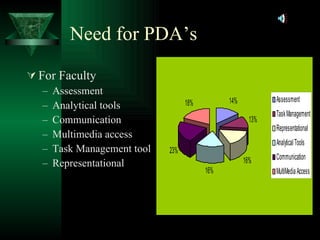
Findings On utilizing the devices as  (21.8%)-Communication (20.5%)- Multimedia access (17.9%)-Task management tool On the use of handhelds as  (14.1%)-Assessment (12.8%)-Capture tools  (6.4%)-Representational (6.4%)-Analytical tools
Steps for Innovation Process Production - Initiated by Packaging Licensing of PDA’s Marketing Consists of two 1 hour classes to instruct faculty and students on usage Distribution Set number of PDA’s for 2 classes and corresponding faculty
Stages Knowledge Persuasion Decision Decision Implementation Confirmation
Knowledge Stage 1995 – Co-Worker 2001 – PDA’s in the classroom A small video supporting knowledge studies from universities on PDA’s http://www.youtube.com/watch?v=rOyGyXatx5c
Persuasion Stage Costs can be minimized  High Mobility Good visuals in color, sound, and networking  Familiar “Start” menu Standard Microsoft applications Standard support for the hardware  Supports other Hardware  Increases motivation of students Click on image
Decision Stage Investment Faculty Hardware costs Software costs Training costs Information Technology Faculty Students Click
Implementation Stage Time period for Delivery – 1 month One hour class to instruction students on the use of the PDA  Two hour classes to instruct faculty- “ While the teachers were clear on the basic operations of the PDAs, they were caught by surprise concerning student engagement and in the ways the software could be used to pose or solve particular coding problems.” As stated by Goldman, Pea, Maldonado, Martin, White and associates at Stanford University (2004). Active enrollment of students in credit classes and corresponding training classes Schrage, M. (2004). The power of Persuasion, Retrieved 10 05, 2009 from  http://www.leighbureau.com/speakers/MSchrage/essays/persuasion.pdf Goldman, S., Pea, R., Maldonado, H., Martin, L. White, T. & the WILD Team @ Stanford University. (2004).  Functioning in the wireless classroom , P. 5. Retrieved 10 06, 2009 from  http://hci.stanford.edu/publications/2004/WILDClassroomWMTE2004/WILDClassroomWMTE2004.pdf   But my PDA, unlike my phone, actually “persuaded” me to learn how to better use it. (Schrage,2004)
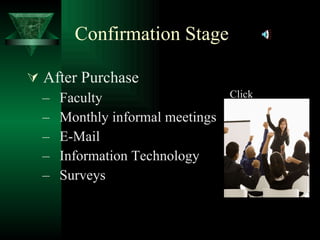
Confirmation Stage After Purchase Faculty Monthly informal meetings E-Mail Information Technology Surveys Click
Communication Channels Knowledge – Mass Media    for Education Persuasion – Interpersonal Decision – Interpersonal/ Mass Media Implementation – Interpersonal Confirmation - Interpersonal Be not the first by who the new is tried, nor the last to lay the old aside.  - Alexander Pope, An Essay on Criticism, Part II   http:// cyber.bentley.edu/faculty/wb/courses/370/opencommclimate.doc
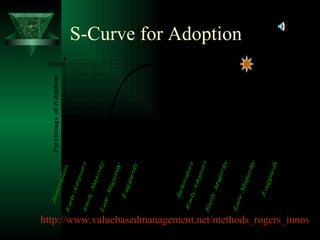
S-Curve for Adoption http://www.valuebasedmanagement.net/methods_rogers_innovation_adoption_curve.html
Key Innovators and Early Adopters Younger Instructors  Non-tenure Instructors
Strategies for Key Innovators and Early Adopters Persuasion  Complexity  Compatibility  Ease of Use or Trail ability
Laggards Older Instructors Persuasion  Retirement  Persuasion
Strategies for Laggards Group and peer pressure Change agents  Group meetings for faculty
Hybrid of Centralized and Decentralized Approach  Centralized  Decentralized  http://www4.uwm.edu/cuts/bench/princp.htm#cent
Key Change Agents Dean Faculty Leaders
S-Curve for Adoption Critical Mass
Need for PDA’s The need for PDA’s for this University To promote future growth of the student populace by: Accreditation Improvement Visualization of cutting edge technologies
Need for PDA’s For Faculty Assessment Analytical tools Communication Multimedia access Task Management tool Representational
Need for PDA’s For Students Communication Multimedia access Task Management tool
Questions?

Innovation

  • 1.
    Hand Held WirelessComputers in Education Marcia Wert
  • 2.
    Handheld Wireless ComputersEncompass: PDA’s or Personal Digital Assistants Wireless laptops/compact laptops/Ultra compact laptops Mobile Phones Smart Phones Tablet PC’s Game consoles - Wi Media Players – Ipod’s Hybrid devices - include a mixture of mobile phones and tablet PC’s
  • 3.
    Need for HandheldWireless The need for business professionals to keep track of: • Contacts • e-mail • voice mail • addresses • phone numbers • appointments
  • 4.
    Need for HandheldWireless Mobility of Communication to access the Internet Ability to connect anytime - as long as an Internet portal is available Need for speed to connect – electronic trading
  • 5.
    Categories Theproject will be narrowed to Personal Digital Assistants or PDA’s 2 Categories Hand Held Computers: Larger Liquid Crystal Display Mini Keyboard Palm-Size Computer Stylus Touch Screen and hand writing recognition
  • 6.
    Characteristics Characteristicsof PDA’s No Hard Drive Programs stored on Read-only Memory (ROM) Microprocessor Input/Output ports
  • 7.
    History Historyof the PDA These Companies invented and marketed their PDA’s 1980 - Invented By Psion Company 1993 - Apple used touch sensitive screens and handwriting recognition 1995 - US Robotics – Palm Pilot http://www.youtube.com/watch?v=Iz4GwLpxAhc
  • 8.
    Lead Thinkers Lead Thinkers on this Research Cheung Sum Wing Hew Foon Khe Lead Designers Psion - Nick Healey - as a programmer, with a degree in Computer and Microprocessor Engineering Apple- Newton- Steve Capps and Michael Tchao
  • 9.
    Problems in DevelopmentPsion's weak point was Internet connectivity in countries where wireless service isn't available Apple’s Newton- Problem with fonts Sent faxes Limited communication
  • 10.
    Problems in DevelopmentPalm Pilot - limited memory and a relatively slow processor, also key components still written in Assembler Good assembler programmers Development of programs Instructions to write Complex algorithms Debugging
  • 11.
    Intended Market Inthe beginning The business world, in order to be mobile in communications Present Education Field
  • 12.
    Findings On utilizingthe devices as (21.8%)-Communication (20.5%)- Multimedia access (17.9%)-Task management tool On the use of handhelds as (14.1%)-Assessment (12.8%)-Capture tools (6.4%)-Representational (6.4%)-Analytical tools
  • 13.
    Steps for InnovationProcess Production - Initiated by Packaging Licensing of PDA’s Marketing Consists of two 1 hour classes to instruct faculty and students on usage Distribution Set number of PDA’s for 2 classes and corresponding faculty
  • 14.
    Stages Knowledge PersuasionDecision Decision Implementation Confirmation
  • 15.
    Knowledge Stage 1995– Co-Worker 2001 – PDA’s in the classroom A small video supporting knowledge studies from universities on PDA’s http://www.youtube.com/watch?v=rOyGyXatx5c
  • 16.
    Persuasion Stage Costscan be minimized High Mobility Good visuals in color, sound, and networking Familiar “Start” menu Standard Microsoft applications Standard support for the hardware Supports other Hardware Increases motivation of students Click on image
  • 17.
    Decision Stage InvestmentFaculty Hardware costs Software costs Training costs Information Technology Faculty Students Click
  • 18.
    Implementation Stage Timeperiod for Delivery – 1 month One hour class to instruction students on the use of the PDA Two hour classes to instruct faculty- “ While the teachers were clear on the basic operations of the PDAs, they were caught by surprise concerning student engagement and in the ways the software could be used to pose or solve particular coding problems.” As stated by Goldman, Pea, Maldonado, Martin, White and associates at Stanford University (2004). Active enrollment of students in credit classes and corresponding training classes Schrage, M. (2004). The power of Persuasion, Retrieved 10 05, 2009 from http://www.leighbureau.com/speakers/MSchrage/essays/persuasion.pdf Goldman, S., Pea, R., Maldonado, H., Martin, L. White, T. & the WILD Team @ Stanford University. (2004). Functioning in the wireless classroom , P. 5. Retrieved 10 06, 2009 from http://hci.stanford.edu/publications/2004/WILDClassroomWMTE2004/WILDClassroomWMTE2004.pdf But my PDA, unlike my phone, actually “persuaded” me to learn how to better use it. (Schrage,2004)
  • 19.
    Confirmation Stage AfterPurchase Faculty Monthly informal meetings E-Mail Information Technology Surveys Click
  • 20.
    Communication Channels Knowledge– Mass Media for Education Persuasion – Interpersonal Decision – Interpersonal/ Mass Media Implementation – Interpersonal Confirmation - Interpersonal Be not the first by who the new is tried, nor the last to lay the old aside. - Alexander Pope, An Essay on Criticism, Part II http:// cyber.bentley.edu/faculty/wb/courses/370/opencommclimate.doc
  • 21.
    S-Curve for Adoptionhttp://www.valuebasedmanagement.net/methods_rogers_innovation_adoption_curve.html
  • 22.
    Key Innovators andEarly Adopters Younger Instructors Non-tenure Instructors
  • 23.
    Strategies for KeyInnovators and Early Adopters Persuasion Complexity Compatibility Ease of Use or Trail ability
  • 24.
    Laggards Older InstructorsPersuasion Retirement Persuasion
  • 25.
    Strategies for LaggardsGroup and peer pressure Change agents Group meetings for faculty
  • 26.
    Hybrid of Centralizedand Decentralized Approach Centralized Decentralized http://www4.uwm.edu/cuts/bench/princp.htm#cent
  • 27.
    Key Change AgentsDean Faculty Leaders
  • 28.
    S-Curve for AdoptionCritical Mass
  • 29.
    Need for PDA’sThe need for PDA’s for this University To promote future growth of the student populace by: Accreditation Improvement Visualization of cutting edge technologies
  • 30.
    Need for PDA’sFor Faculty Assessment Analytical tools Communication Multimedia access Task Management tool Representational
  • 31.
    Need for PDA’sFor Students Communication Multimedia access Task Management tool
  • 32.