Implementing Universal & Inclusive
Design for Online Learning Accessibility
Sheryl Burgstahler
Director of Accessible
Technology Services
University of Washington
Howard Kramer
Access Specialist
University of Colorado at
Boulder
Lily Bond (Moderator)
3Play Media
lily@3playmedia.com
Twitter: @3playmedia
Implementing Universal and
Inclusive Design for Online
Learning Accessibility
Sheryl Burgstahler
Director, Accessible Technology
Services; Director, DO-IT Center
sherylb@uw.edu
Howard Kramer, AHEAD,
University of Colorado at
Boulder
hkramer@Colorado.edu
hkramer@ahead.org
Agenda
 Inclusive/Universal Design of Course Materials
& Pedagogy
 Overview– Sheryl
 Accessibility of Course Materials – Howard
 Inclusive Pedagogy – Sheryl
 Resources
What do they have in common?
University of Cincinnati • Youngstown State University •
University of Colorado-Boulder • University of Montana-
Missoula • UC Berkeley • South Carolina Technical
College System • Louisiana Tech University • MIT •
Maricopa Community College District • Florida State
University • CSU Fullerton • California Community
Colleges • Ohio State University: University of Kentucky
• Harvard University • Miami University in Ohio
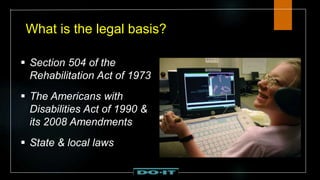
What is the legal basis?
 Section 504 of the
Rehabilitation Act of 1973
 The Americans with
Disabilities Act of 1990 &
its 2008 Amendments
 State & local laws
Definition of “accessible”:
“Accessible” means a person with a disability is afforded
the opportunity to acquire the same information, engage
in the same interactions, & enjoy the same services as a
person without a disability in an equally effective &
equally integrated manner, with substantially equivalent
ease of use. The person with a disability must be able to
obtain the information as fully, equally & independently
as a person without a disability.
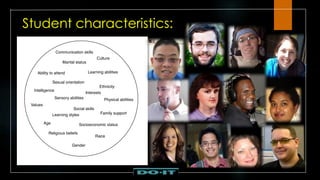
Student characteristics:
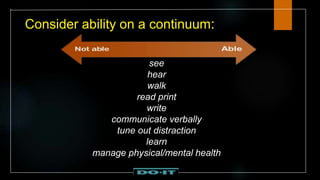
Consider ability on a continuum:
see
hear
walk
read print
write
communicate verbally
tune out distraction
learn
manage physical/mental health
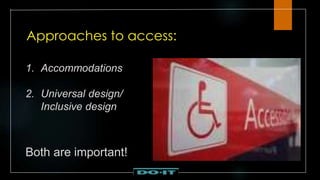
Approaches to access:
1. Accommodations
2. Universal design/
Inclusive design
Both are important!
Most common accommodations
for online Learning at the UW:
 Creating accessible documents (mainly
reformatting PDF files)
26,000 pages each quarter
 Captioning videos
55 hours costing > $10,000 each quarter
Rather than relying on
accommodations alone…
Consider designing the course to
be more welcoming to,
accessible to, & usable by a
broad audience.
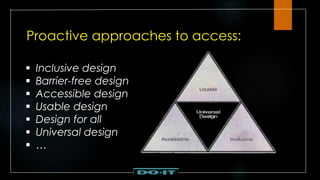
Proactive approaches to access:
 Inclusive design
 Barrier-free design
 Accessible design
 Usable design
 Design for all
 Universal design
 …
Universal Design =
“the design of products & environments to
be usable by all people, to the greatest
extent possible, without the need for
adaptation or specialized design.”
The Center for Universal Design
www.design.ncsu.edu/cud
In applying UD to online leaning:
Provide multiple ways to:
 gain knowledge
 interact
 demonstrate knowledge
Provide multiple means for:
representation
engagement
action & expression (Center for Applied Special Technology, CAST)
Accessibility of course documents
Ensure that the documents used in your
courses are accessible to students with
vision, print, mobility & cognitive disabilities.
Accessible PDFs
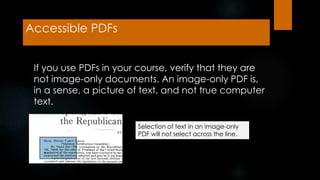
If you use PDFs in your course, verify that they are
not image-only documents. An image-only PDF is,
in a sense, a picture of text, and not true computer
text.
Selection of text in an image-only
PDF will not select across the line.
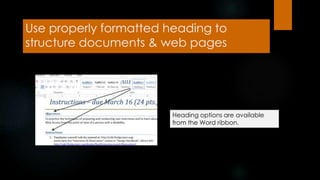
Use properly formatted heading to
structure documents & web pages
Heading options are available
from the Word ribbon.
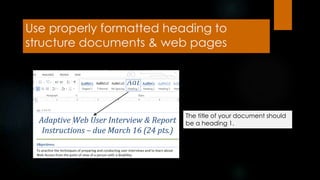
Use properly formatted heading to
structure documents & web pages
The title of your document should
be a heading 1.
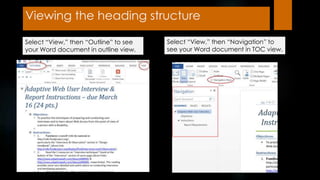
Viewing the heading structure
Select “View,” then “Outline” to see
your Word document in outline view.
Select “View,” then “Navigation” to
see your Word document in TOC view.
Use properly formatted heading to
structure documents & web pages
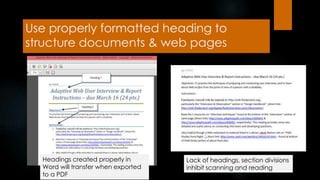
Headings created properly in
Word will transfer when exported
to a PDF
Lack of headings, section divisions
inhibit scanning and reading
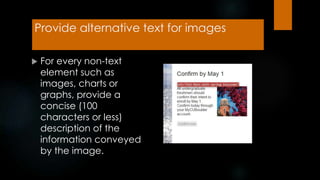
Provide alternative text for images
 For every non-text
element such as
images, charts or
graphs, provide a
concise (100
characters or less)
description of the
information conveyed
by the image.
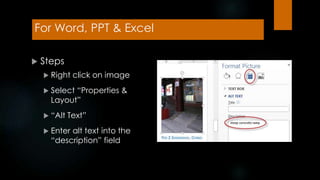
For Word, PPT & Excel
 Steps
 Right click on image
 Select “Properties &
Layout”
 “Alt Text”
 Enter alt text into the
“description” field
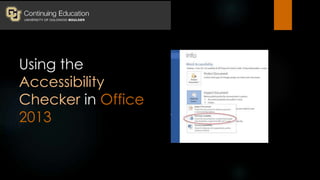
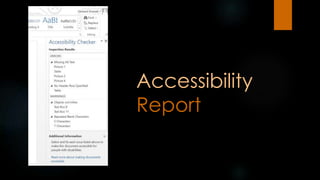
Using the
Accessibility
Checker in Office
2013
Accessibility
Report
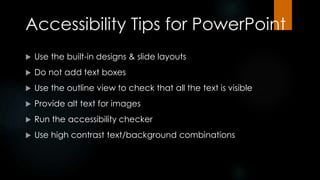
Accessibility Tips for PowerPoint
 Use the built-in designs & slide layouts
 Do not add text boxes
 Use the outline view to check that all the text is visible
 Provide alt text for images
 Run the accessibility checker
 Use high contrast text/background combinations
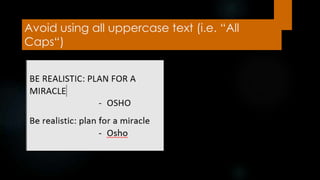
Avoid using all uppercase text (i.e. “All
Caps“)
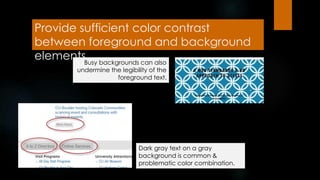
Provide sufficient color contrast
between foreground and background
elementsBusy backgrounds can also
undermine the legibility of the
foreground text.
Dark gray text on a gray
background is common &
problematic color combination.
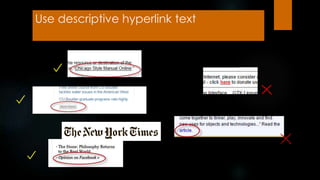
Use descriptive hyperlink text
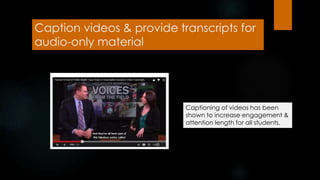
Caption videos & provide transcripts for
audio-only material
Captioning of videos has been
shown to increase engagement &
attention length for all students.
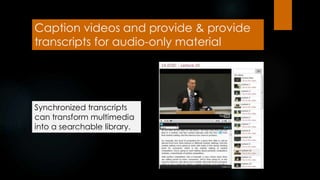
Caption videos and provide & provide
transcripts for audio-only material
Synchronized transcripts
can transform multimedia
into a searchable library.
A universally designed syllabus:
 Is friendly/welcoming
 Is structured under subheads logically organized
 Is in an accessible format
 Includes key information, e.g.,
o Instructor information
o Course description
o Learning objectives
A universally designed syllabus:
 Includes target audience, technical level,
OPTIONAL content, expectations
 Shares assignments & grading
 Includes required reading
 Includes statements regarding (1)
accessibility & (2) disability-related
accommodations
Teach using multiple mediums with
content relevant to all learners:
1. Assume a wide range of
a. language skills (spell acronyms, avoid/define
jargon).
b. technology skills (provide training).
c. Interests & backgrounds (provide relevant
examples).
d. Other characteristics (e.g., gender, age, race,
ethnicity, culture)
2. Provide multiple ways to
a. Gain knowledge (e.g., in text, videos,
collaborative activities.
b. Communicate &, collaborate (e.g., email,
discussion board)
c. Demonstrate learning (e.g., different types
of tests, discussion, essays, presentations)
3. Use clear, consistent organization & layouts of
4. Provide outlines & other scaffolding tools.
5. Provide specific feedback on project parts & offer
corrective opportunities.
6. Allow adequate time for practice, activities, projects,
tests.
7. Make instructions & expectations clear for activities,
projects, readings.
8. Make examples & assignments relevant to learners
with a wide variety of characteristics
Resources
• Accessibility for Online Course Content
(Portland CC)
www.pcc.edu/resources/instructional-
support/access/
• Accessibility Tutorials (Tseng College at
CSUN)
tsengcollege.csun.edu/accessibility/tutorials
• Universal Design & Accessibility for Online
Courses webdevgroupcu.org/conted/
Resources continued
• Basics of Inclusive Design MOOC (will be on Coursera platform) -
sign up for mailing list at accessinghigherground.org/about
• Accessing Higher Ground 2015 - Virtual Conference & Video
archives: accessinghigherground.org
• W3C WAI Easy Checks www.w3.org/WAI/eval/preliminary.html
(excellent introduction to web accessibility)
• AccessDL resources & discussion list, DO-IT
www.uw.edu/doit/programs/accessdl
Thank you
> Howard Kramer
hkramer@Colorado.edu
> Sheryl Burgstahler
sherylb@uw.edu
339
Howard Kramer
Access Specialist
University of Colorado at
Boulder
hkramer@ahead.org
Sheryl Burgstahler
Director of Accessible
Technology Services
University of Washington
sherylb@uw.edu
Lily Bond
3Play Media
www.3playmedia.com
lily@3playmedia.com
Upcoming Webinars
 December 3: How to Implement Accessible Lecture
Capture
 December 10: Quick Start to Captioning
Register at:
http://www.3playmedia.com/webinars/
Q&A

Implementing Universal and Inclusive Design for Online Learning Accessibility

  • 1.
    Implementing Universal &Inclusive Design for Online Learning Accessibility Sheryl Burgstahler Director of Accessible Technology Services University of Washington Howard Kramer Access Specialist University of Colorado at Boulder Lily Bond (Moderator) 3Play Media lily@3playmedia.com Twitter: @3playmedia
  • 2.
    Implementing Universal and InclusiveDesign for Online Learning Accessibility Sheryl Burgstahler Director, Accessible Technology Services; Director, DO-IT Center sherylb@uw.edu Howard Kramer, AHEAD, University of Colorado at Boulder hkramer@Colorado.edu hkramer@ahead.org
  • 3.
    Agenda  Inclusive/Universal Designof Course Materials & Pedagogy  Overview– Sheryl  Accessibility of Course Materials – Howard  Inclusive Pedagogy – Sheryl  Resources
  • 4.
    What do theyhave in common? University of Cincinnati • Youngstown State University • University of Colorado-Boulder • University of Montana- Missoula • UC Berkeley • South Carolina Technical College System • Louisiana Tech University • MIT • Maricopa Community College District • Florida State University • CSU Fullerton • California Community Colleges • Ohio State University: University of Kentucky • Harvard University • Miami University in Ohio
  • 5.
    What is thelegal basis?  Section 504 of the Rehabilitation Act of 1973  The Americans with Disabilities Act of 1990 & its 2008 Amendments  State & local laws
  • 6.
    Definition of “accessible”: “Accessible”means a person with a disability is afforded the opportunity to acquire the same information, engage in the same interactions, & enjoy the same services as a person without a disability in an equally effective & equally integrated manner, with substantially equivalent ease of use. The person with a disability must be able to obtain the information as fully, equally & independently as a person without a disability.
  • 7.
  • 8.
    Consider ability ona continuum: see hear walk read print write communicate verbally tune out distraction learn manage physical/mental health
  • 9.
    Approaches to access: 1.Accommodations 2. Universal design/ Inclusive design Both are important!
  • 10.
    Most common accommodations foronline Learning at the UW:  Creating accessible documents (mainly reformatting PDF files) 26,000 pages each quarter  Captioning videos 55 hours costing > $10,000 each quarter
  • 11.
    Rather than relyingon accommodations alone… Consider designing the course to be more welcoming to, accessible to, & usable by a broad audience.
  • 12.
    Proactive approaches toaccess:  Inclusive design  Barrier-free design  Accessible design  Usable design  Design for all  Universal design  …
  • 13.
    Universal Design = “thedesign of products & environments to be usable by all people, to the greatest extent possible, without the need for adaptation or specialized design.” The Center for Universal Design www.design.ncsu.edu/cud
  • 14.
    In applying UDto online leaning: Provide multiple ways to:  gain knowledge  interact  demonstrate knowledge Provide multiple means for: representation engagement action & expression (Center for Applied Special Technology, CAST)
  • 15.
    Accessibility of coursedocuments Ensure that the documents used in your courses are accessible to students with vision, print, mobility & cognitive disabilities.
  • 16.
    Accessible PDFs If youuse PDFs in your course, verify that they are not image-only documents. An image-only PDF is, in a sense, a picture of text, and not true computer text. Selection of text in an image-only PDF will not select across the line.
  • 17.
    Use properly formattedheading to structure documents & web pages Heading options are available from the Word ribbon.
  • 18.
    Use properly formattedheading to structure documents & web pages The title of your document should be a heading 1.
  • 19.
    Viewing the headingstructure Select “View,” then “Outline” to see your Word document in outline view. Select “View,” then “Navigation” to see your Word document in TOC view.
  • 20.
    Use properly formattedheading to structure documents & web pages Headings created properly in Word will transfer when exported to a PDF Lack of headings, section divisions inhibit scanning and reading
  • 21.
    Provide alternative textfor images  For every non-text element such as images, charts or graphs, provide a concise (100 characters or less) description of the information conveyed by the image.
  • 22.
    For Word, PPT& Excel  Steps  Right click on image  Select “Properties & Layout”  “Alt Text”  Enter alt text into the “description” field
  • 23.
  • 24.
  • 25.
    Accessibility Tips forPowerPoint  Use the built-in designs & slide layouts  Do not add text boxes  Use the outline view to check that all the text is visible  Provide alt text for images  Run the accessibility checker  Use high contrast text/background combinations
  • 26.
    Avoid using alluppercase text (i.e. “All Caps“)
  • 27.
    Provide sufficient colorcontrast between foreground and background elementsBusy backgrounds can also undermine the legibility of the foreground text. Dark gray text on a gray background is common & problematic color combination.
  • 28.
  • 29.
    Caption videos &provide transcripts for audio-only material Captioning of videos has been shown to increase engagement & attention length for all students.
  • 30.
    Caption videos andprovide & provide transcripts for audio-only material Synchronized transcripts can transform multimedia into a searchable library.
  • 31.
    A universally designedsyllabus:  Is friendly/welcoming  Is structured under subheads logically organized  Is in an accessible format  Includes key information, e.g., o Instructor information o Course description o Learning objectives
  • 32.
    A universally designedsyllabus:  Includes target audience, technical level, OPTIONAL content, expectations  Shares assignments & grading  Includes required reading  Includes statements regarding (1) accessibility & (2) disability-related accommodations
  • 33.
    Teach using multiplemediums with content relevant to all learners: 1. Assume a wide range of a. language skills (spell acronyms, avoid/define jargon). b. technology skills (provide training). c. Interests & backgrounds (provide relevant examples). d. Other characteristics (e.g., gender, age, race, ethnicity, culture)
  • 34.
    2. Provide multipleways to a. Gain knowledge (e.g., in text, videos, collaborative activities. b. Communicate &, collaborate (e.g., email, discussion board) c. Demonstrate learning (e.g., different types of tests, discussion, essays, presentations) 3. Use clear, consistent organization & layouts of
  • 35.
    4. Provide outlines& other scaffolding tools. 5. Provide specific feedback on project parts & offer corrective opportunities. 6. Allow adequate time for practice, activities, projects, tests. 7. Make instructions & expectations clear for activities, projects, readings. 8. Make examples & assignments relevant to learners with a wide variety of characteristics
  • 36.
    Resources • Accessibility forOnline Course Content (Portland CC) www.pcc.edu/resources/instructional- support/access/ • Accessibility Tutorials (Tseng College at CSUN) tsengcollege.csun.edu/accessibility/tutorials • Universal Design & Accessibility for Online Courses webdevgroupcu.org/conted/
  • 37.
    Resources continued • Basicsof Inclusive Design MOOC (will be on Coursera platform) - sign up for mailing list at accessinghigherground.org/about • Accessing Higher Ground 2015 - Virtual Conference & Video archives: accessinghigherground.org • W3C WAI Easy Checks www.w3.org/WAI/eval/preliminary.html (excellent introduction to web accessibility) • AccessDL resources & discussion list, DO-IT www.uw.edu/doit/programs/accessdl
  • 38.
    Thank you > HowardKramer hkramer@Colorado.edu > Sheryl Burgstahler sherylb@uw.edu
  • 39.
    339 Howard Kramer Access Specialist Universityof Colorado at Boulder hkramer@ahead.org Sheryl Burgstahler Director of Accessible Technology Services University of Washington sherylb@uw.edu Lily Bond 3Play Media www.3playmedia.com lily@3playmedia.com Upcoming Webinars  December 3: How to Implement Accessible Lecture Capture  December 10: Quick Start to Captioning Register at: http://www.3playmedia.com/webinars/ Q&A