REMINDER
Check in on the COLLABORATE
mobile app
Implementation Review: EPPM P6
8.x at a Major Utility
Prepared by:
Bill Hyde
Director
SUB3 Management, Inc.
Aligning OPPM and SAP Interface
Session ID#: 15473
This is a divider slide title that
can be two lines
Implementation Review: Pepco Holding, Inc.
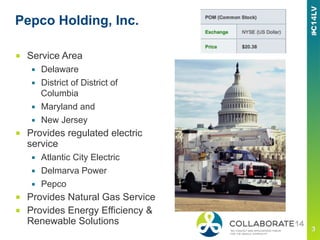
Pepco Holding, Inc.
■  Service Area
▪  Delaware
▪  District of District of
Columbia
▪  Maryland and
▪  New Jersey
■  Provides regulated electric
service
▪  Atlantic City Electric
▪  Delmarva Power
▪  Pepco
■  Provides Natural Gas Service
■  Provides Energy Efficiency &
Renewable Solutions
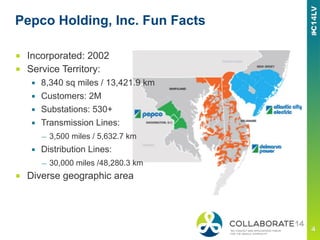
Pepco Holding, Inc. Fun Facts
■  Incorporated: 2002
■  Service Territory:
▪  8,340 sq miles / 13,421.9 km
▪  Customers: 2M
▪  Substations: 530+
▪  Transmission Lines:
—  3,500 miles / 5,632.7 km
▪  Distribution Lines:
—  30,000 miles /48,280.3 km
■  Diverse geographic area
Project Vision
■  Departments within the organization working in concert with
one another utilizing centralized and linked databases to track
comprehensive aspects of the capital projects throughout
their lifecycle.
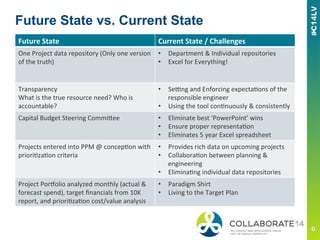
Future	
  State	
   Current	
  State	
  /	
  Challenges	
  
One	
  Project	
  data	
  repository	
  (Only	
  one	
  version	
  
of	
  the	
  truth)	
  
•  Department	
  &	
  Individual	
  repositories	
  
•  Excel	
  for	
  Everything!	
  	
  
Transparency	
  
What	
  is	
  the	
  true	
  resource	
  need?	
  Who	
  is	
  
accountable?	
  
•  SeEng	
  and	
  Enforcing	
  expectaFons	
  of	
  the	
  
responsible	
  engineer	
  
•  Using	
  the	
  tool	
  conFnuously	
  &	
  consistently	
  
Capital	
  Budget	
  Steering	
  CommiJee	
   •  Eliminate	
  best	
  ‘PowerPoint’	
  wins	
  
•  Ensure	
  proper	
  representaFon	
  	
  
•  Eliminates	
  5	
  year	
  Excel	
  spreadsheet	
  
Projects	
  entered	
  into	
  PPM	
  @	
  concepFon	
  with	
  
prioriFzaFon	
  criteria	
  
•  Provides	
  rich	
  data	
  on	
  upcoming	
  projects	
  	
  
•  CollaboraFon	
  between	
  planning	
  &	
  
engineering	
  
•  EliminaFng	
  individual	
  data	
  repositories	
  
Project	
  PorRolio	
  analyzed	
  monthly	
  (actual	
  &	
  
forecast	
  spend),	
  target	
  financials	
  from	
  10K	
  
report,	
  and	
  prioriFzaFon	
  cost/value	
  analysis	
  
•  Paradigm	
  Shirt	
  
•  Living	
  to	
  the	
  Target	
  Plan	
  
Future State vs. Current State
Future	
  State	
   Current	
  State	
  /	
  Challenges	
  
Fully	
  loaded	
  schedules	
  exist	
  for	
  all	
  project	
  the	
  
Project	
  PorRolio	
  
•  Implement	
  WBS	
  consistently	


•  Work	
  with	
  responsible	
  engineer	
  
throughout	
  organizaFon	
  
Update	
  schedules	
  consistently	
  and	
  regularly	
  
to	
  drive	
  monthly	
  forecast	
  	
  
•  SeEng	
  and	
  Enforcing	
  expectaFons	
  of	
  the	
  
responsible	
  engineer	


Scope	
  Changes:	
  Must	
  be	
  approved	
  by	
  sponsor	
  
&	
  routed	
  via	
  the	
  Capital	
  Budget	
  Steering	
  
CommiJee	
  prior	
  to	
  any	
  changes	
  
•  EliminaFng	
  individual/small	
  group	
  
decision	
  making	
  
•  Eliminate	
  Monday	
  Morning	
  
Quarterbacking	
  
Annual	
  budget	
  prepared	
  from	
  project	
  
porRolio	
  which	
  is	
  acFvely	
  managed	
  to	
  
financial	
  targets	
  
•  Shi_ing	
  the	
  paradigm	
  
•  AccepFng	
  there	
  is	
  a	
  beJer	
  way	
  
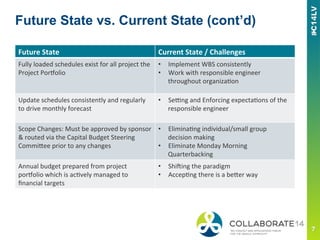
Future State vs. Current State (cont’d)
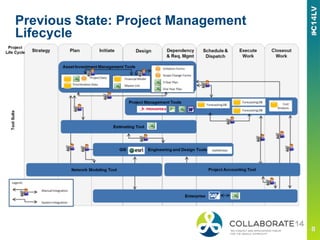
Previous State: Project Management
Lifecycle
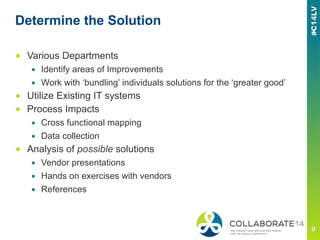
Determine the Solution
■  Various Departments
▪  Identify areas of Improvements
▪  Work with ‘bundling’ individuals solutions for the ‘greater good’
■  Utilize Existing IT systems
■  Process Impacts
▪  Cross functional mapping
▪  Data collection
■  Analysis of possible solutions
▪  Vendor presentations
▪  Hands on exercises with vendors
▪  References
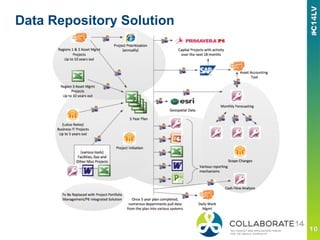
Data Repository Solution
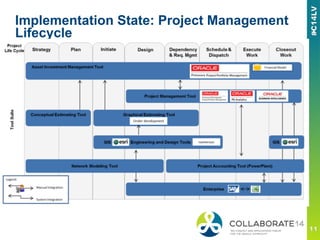
Implementation State: Project Management
Lifecycle
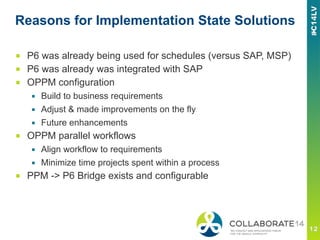
Reasons for Implementation State Solutions
■  P6 was already being used for schedules (versus SAP, MSP)
■  P6 was already was integrated with SAP
■  OPPM configuration
▪  Build to business requirements
▪  Adjust & made improvements on the fly
▪  Future enhancements
■  OPPM parallel workflows
▪  Align workflow to requirements
▪  Minimize time projects spent within a process
■  PPM -> P6 Bridge exists and configurable
Integrated Solution
■  Four Phase Implementation Methodology
▪  Strategic Alignment
▪  Design
▪  Configure
▪  Implement
■  Strategic Alignment
▪  Align Proposal to true business need
▪  Received approval of modified approach
■  Design
▪  Project Definition to match SAP
▪  Enhanced Work Breakdown Structure
▪  Enhanced SAP->P6 Interface Design
Integrated Solution
■  Configure
▪  Phase 1
—  Initiate Project
—  Retrofitted In Flight Projects
—  Tested Revised SAP->P6 Interface
—  Configured flexible solution to allow for easy enhancements
▪  Phase 2
—  Populated System
—  Analytics / Reporting
■  Implement
▪  JIT Training Workshops
▪  Rolling wave of projects
▪  Lesson Learned
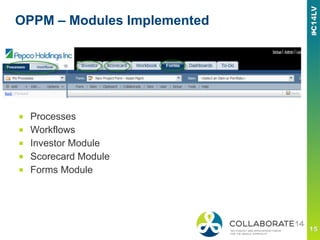
OPPM – Modules Implemented
■  Processes
■  Workflows
■  Investor Module
■  Scorecard Module
■  Forms Module
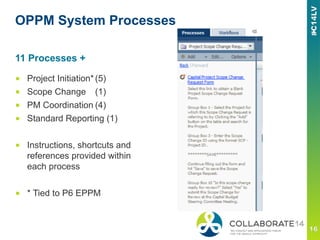
OPPM System Processes
■  Project Initiation*(5)
■  Scope Change (1)
■  PM Coordination (4)
■  Standard Reporting (1)
■  Instructions, shortcuts and
references provided within
each process
■  * Tied to P6 EPPM
11 Processes +
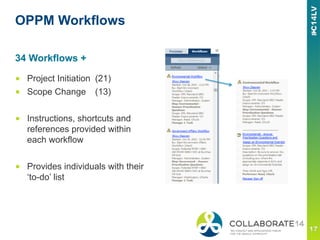
OPPM Workflows
■  Project Initiation (21)
■  Scope Change (13)
■  Instructions, shortcuts and
references provided within
each workflow
■  Provides individuals with their
‘to-do’ list
34 Workflows +
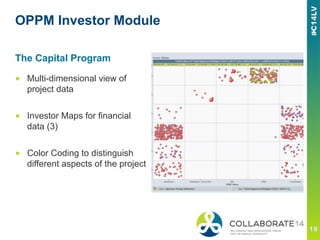
OPPM Investor Module
■  Multi-dimensional view of
project data
■  Investor Maps for financial
data (3)
■  Color Coding to distinguish
different aspects of the project
The Capital Program
OPPM Scorecard Module
■  40+ Scorecards
▪  Capital Program
—  5 Year Capital Plan
—  1 Year Capital Plan
▪  PJM Interconnection LLC (PJM) Reports
—  Regional Transmission Organization in the United States
▪  Reliability Enhancement Plan
▪  Manage Portfolio Data Dynamically
—  New Project Requests
—  Project Scope Change Status
—  Project Teams
OPPM Forms
■  25+ Forms
■  Forms has several tabs (1 to 7)
■  Forms include:
▪  Admin
▪  Scope changes
▪  Project Initiation
▪  Project Prioritization
▪  Project Review
▪  Work Coordination
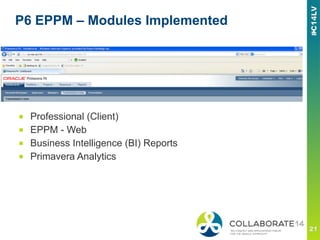
P6 EPPM – Modules Implemented
■  Professional (Client)
■  EPPM - Web
■  Business Intelligence (BI) Reports
■  Primavera Analytics
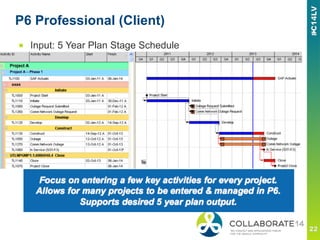
P6 Professional (Client)
■  Input: 5 Year Plan Stage Schedule
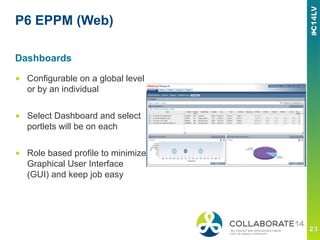
P6 EPPM (Web)
■  Configurable on a global level
or by an individual
■  Select Dashboard and select
portlets will be on each
■  Role based profile to minimize
Graphical User Interface
(GUI) and keep job easy
Dashboards
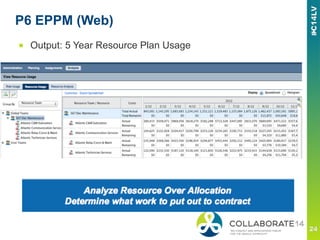
P6 EPPM (Web)
■  Output: 5 Year Resource Plan Usage
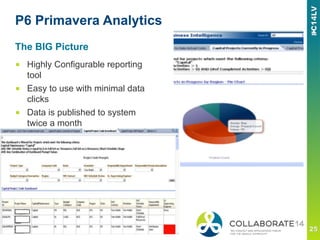
P6 Primavera Analytics
■  Highly Configurable reporting
tool
■  Easy to use with minimal data
clicks
■  Data is published to system
twice a month
The BIG Picture
Lesson Learned – What went well
■  Admit a problem(s) needs to be addressed
■  Senior Management Support
■  Vision
■  Defined Scope
■  Stakeholder involvement
■  Dedicated, multi-disciplinary team
■  Current State / Future State Analysis
■  Embracing Change – the users
Lesson Learned – Opportunities for
Improvement
■  IT Resources, competing Projects
■  Some areas did not provide desired level of input during
design stage
■  IT security measures provided some limitations implementing
solutions full capabilities
■  Push back from process changes ‘be careful what you ask
for’
■  Changing strategies effected timeline
■  Keeping users happy - Rolling out additional features
Thank You!.......Questions
■  Contact Info
▪  Bill Hyde
▪  whyde@sub3mgmt.com
▪  SUB3 Management Inc.
—  www.sub3mgmt.com
—  @SUB3MGMT
■  Sources and Thanks to Pepco Holdings, Inc.
▪  Kim Deeley, kim.deeley@pepcoholdings.com
▪  Pamela Zucaro, pamela.zucaro@pepcoholdings.com
Please complete the session
evaluation
We appreciate your feedback and insight
You may complete the session evaluation either
on paper or online via the mobile app

Implementation review eppm p6 8.2 at a major utility - Oracle Primavera P6 Collaborate 14

  • 1.
    REMINDER Check in onthe COLLABORATE mobile app Implementation Review: EPPM P6 8.x at a Major Utility Prepared by: Bill Hyde Director SUB3 Management, Inc. Aligning OPPM and SAP Interface Session ID#: 15473
  • 2.
    This is adivider slide title that can be two lines Implementation Review: Pepco Holding, Inc.
  • 3.
    Pepco Holding, Inc. ■ Service Area ▪  Delaware ▪  District of District of Columbia ▪  Maryland and ▪  New Jersey ■  Provides regulated electric service ▪  Atlantic City Electric ▪  Delmarva Power ▪  Pepco ■  Provides Natural Gas Service ■  Provides Energy Efficiency & Renewable Solutions
  • 4.
    Pepco Holding, Inc.Fun Facts ■  Incorporated: 2002 ■  Service Territory: ▪  8,340 sq miles / 13,421.9 km ▪  Customers: 2M ▪  Substations: 530+ ▪  Transmission Lines: —  3,500 miles / 5,632.7 km ▪  Distribution Lines: —  30,000 miles /48,280.3 km ■  Diverse geographic area
  • 5.
    Project Vision ■  Departmentswithin the organization working in concert with one another utilizing centralized and linked databases to track comprehensive aspects of the capital projects throughout their lifecycle.
  • 6.
    Future  State  Current  State  /  Challenges   One  Project  data  repository  (Only  one  version   of  the  truth)   •  Department  &  Individual  repositories   •  Excel  for  Everything!     Transparency   What  is  the  true  resource  need?  Who  is   accountable?   •  SeEng  and  Enforcing  expectaFons  of  the   responsible  engineer   •  Using  the  tool  conFnuously  &  consistently   Capital  Budget  Steering  CommiJee   •  Eliminate  best  ‘PowerPoint’  wins   •  Ensure  proper  representaFon     •  Eliminates  5  year  Excel  spreadsheet   Projects  entered  into  PPM  @  concepFon  with   prioriFzaFon  criteria   •  Provides  rich  data  on  upcoming  projects     •  CollaboraFon  between  planning  &   engineering   •  EliminaFng  individual  data  repositories   Project  PorRolio  analyzed  monthly  (actual  &   forecast  spend),  target  financials  from  10K   report,  and  prioriFzaFon  cost/value  analysis   •  Paradigm  Shirt   •  Living  to  the  Target  Plan   Future State vs. Current State
  • 7.
    Future  State  Current  State  /  Challenges   Fully  loaded  schedules  exist  for  all  project  the   Project  PorRolio   •  Implement  WBS  consistently       •  Work  with  responsible  engineer   throughout  organizaFon   Update  schedules  consistently  and  regularly   to  drive  monthly  forecast     •  SeEng  and  Enforcing  expectaFons  of  the   responsible  engineer     Scope  Changes:  Must  be  approved  by  sponsor   &  routed  via  the  Capital  Budget  Steering   CommiJee  prior  to  any  changes   •  EliminaFng  individual/small  group   decision  making   •  Eliminate  Monday  Morning   Quarterbacking   Annual  budget  prepared  from  project   porRolio  which  is  acFvely  managed  to   financial  targets   •  Shi_ing  the  paradigm   •  AccepFng  there  is  a  beJer  way   Future State vs. Current State (cont’d)
  • 8.
    Previous State: ProjectManagement Lifecycle
  • 9.
    Determine the Solution ■ Various Departments ▪  Identify areas of Improvements ▪  Work with ‘bundling’ individuals solutions for the ‘greater good’ ■  Utilize Existing IT systems ■  Process Impacts ▪  Cross functional mapping ▪  Data collection ■  Analysis of possible solutions ▪  Vendor presentations ▪  Hands on exercises with vendors ▪  References
  • 10.
  • 11.
    Implementation State: ProjectManagement Lifecycle
  • 12.
    Reasons for ImplementationState Solutions ■  P6 was already being used for schedules (versus SAP, MSP) ■  P6 was already was integrated with SAP ■  OPPM configuration ▪  Build to business requirements ▪  Adjust & made improvements on the fly ▪  Future enhancements ■  OPPM parallel workflows ▪  Align workflow to requirements ▪  Minimize time projects spent within a process ■  PPM -> P6 Bridge exists and configurable
  • 13.
    Integrated Solution ■  FourPhase Implementation Methodology ▪  Strategic Alignment ▪  Design ▪  Configure ▪  Implement ■  Strategic Alignment ▪  Align Proposal to true business need ▪  Received approval of modified approach ■  Design ▪  Project Definition to match SAP ▪  Enhanced Work Breakdown Structure ▪  Enhanced SAP->P6 Interface Design
  • 14.
    Integrated Solution ■  Configure ▪ Phase 1 —  Initiate Project —  Retrofitted In Flight Projects —  Tested Revised SAP->P6 Interface —  Configured flexible solution to allow for easy enhancements ▪  Phase 2 —  Populated System —  Analytics / Reporting ■  Implement ▪  JIT Training Workshops ▪  Rolling wave of projects ▪  Lesson Learned
  • 15.
    OPPM – ModulesImplemented ■  Processes ■  Workflows ■  Investor Module ■  Scorecard Module ■  Forms Module
  • 16.
    OPPM System Processes ■ Project Initiation*(5) ■  Scope Change (1) ■  PM Coordination (4) ■  Standard Reporting (1) ■  Instructions, shortcuts and references provided within each process ■  * Tied to P6 EPPM 11 Processes +
  • 17.
    OPPM Workflows ■  ProjectInitiation (21) ■  Scope Change (13) ■  Instructions, shortcuts and references provided within each workflow ■  Provides individuals with their ‘to-do’ list 34 Workflows +
  • 18.
    OPPM Investor Module ■ Multi-dimensional view of project data ■  Investor Maps for financial data (3) ■  Color Coding to distinguish different aspects of the project The Capital Program
  • 19.
    OPPM Scorecard Module ■ 40+ Scorecards ▪  Capital Program —  5 Year Capital Plan —  1 Year Capital Plan ▪  PJM Interconnection LLC (PJM) Reports —  Regional Transmission Organization in the United States ▪  Reliability Enhancement Plan ▪  Manage Portfolio Data Dynamically —  New Project Requests —  Project Scope Change Status —  Project Teams
  • 20.
    OPPM Forms ■  25+Forms ■  Forms has several tabs (1 to 7) ■  Forms include: ▪  Admin ▪  Scope changes ▪  Project Initiation ▪  Project Prioritization ▪  Project Review ▪  Work Coordination
  • 21.
    P6 EPPM –Modules Implemented ■  Professional (Client) ■  EPPM - Web ■  Business Intelligence (BI) Reports ■  Primavera Analytics
  • 22.
    P6 Professional (Client) ■ Input: 5 Year Plan Stage Schedule
  • 23.
    P6 EPPM (Web) ■ Configurable on a global level or by an individual ■  Select Dashboard and select portlets will be on each ■  Role based profile to minimize Graphical User Interface (GUI) and keep job easy Dashboards
  • 24.
    P6 EPPM (Web) ■ Output: 5 Year Resource Plan Usage
  • 25.
    P6 Primavera Analytics ■ Highly Configurable reporting tool ■  Easy to use with minimal data clicks ■  Data is published to system twice a month The BIG Picture
  • 26.
    Lesson Learned –What went well ■  Admit a problem(s) needs to be addressed ■  Senior Management Support ■  Vision ■  Defined Scope ■  Stakeholder involvement ■  Dedicated, multi-disciplinary team ■  Current State / Future State Analysis ■  Embracing Change – the users
  • 27.
    Lesson Learned –Opportunities for Improvement ■  IT Resources, competing Projects ■  Some areas did not provide desired level of input during design stage ■  IT security measures provided some limitations implementing solutions full capabilities ■  Push back from process changes ‘be careful what you ask for’ ■  Changing strategies effected timeline ■  Keeping users happy - Rolling out additional features
  • 28.
    Thank You!.......Questions ■  ContactInfo ▪  Bill Hyde ▪  whyde@sub3mgmt.com ▪  SUB3 Management Inc. —  www.sub3mgmt.com —  @SUB3MGMT ■  Sources and Thanks to Pepco Holdings, Inc. ▪  Kim Deeley, kim.deeley@pepcoholdings.com ▪  Pamela Zucaro, pamela.zucaro@pepcoholdings.com
  • 29.
    Please complete thesession evaluation We appreciate your feedback and insight You may complete the session evaluation either on paper or online via the mobile app