P6 Services: How to install,
configure, tips and
troubleshooting
Ruben Reyes M, Pablo Oyarzo M
Copyright © 2012, Oracle and/or its affiliates. All rights reserved. Confidential – Oracle Restricted6
Program Agenda
 Definition & Architecture
 Working with P6 Services
 Troubleshoot and Best Practices
 Q&A
Copyright © 2012, Oracle and/or its affiliates. All rights reserved. Confidential – Oracle Restricted7
Definition & Architecture of
P6 Services
Copyright © 2012, Oracle and/or its affiliates. All rights reserved. Confidential – Oracle Restricted8
Job Services v/s P6 Services
– Job Services (Pre release 8.x)
 Windows based
 Limited functionalities
 Not Scalable
– P6 Services (Post release 8.x)
 Java based (platform independent)
 Multiple functionalities
 Highly Scalable
 Publish Project and Global data
Copyright © 2012, Oracle and/or its affiliates. All rights reserved. Confidential – Oracle Restricted9
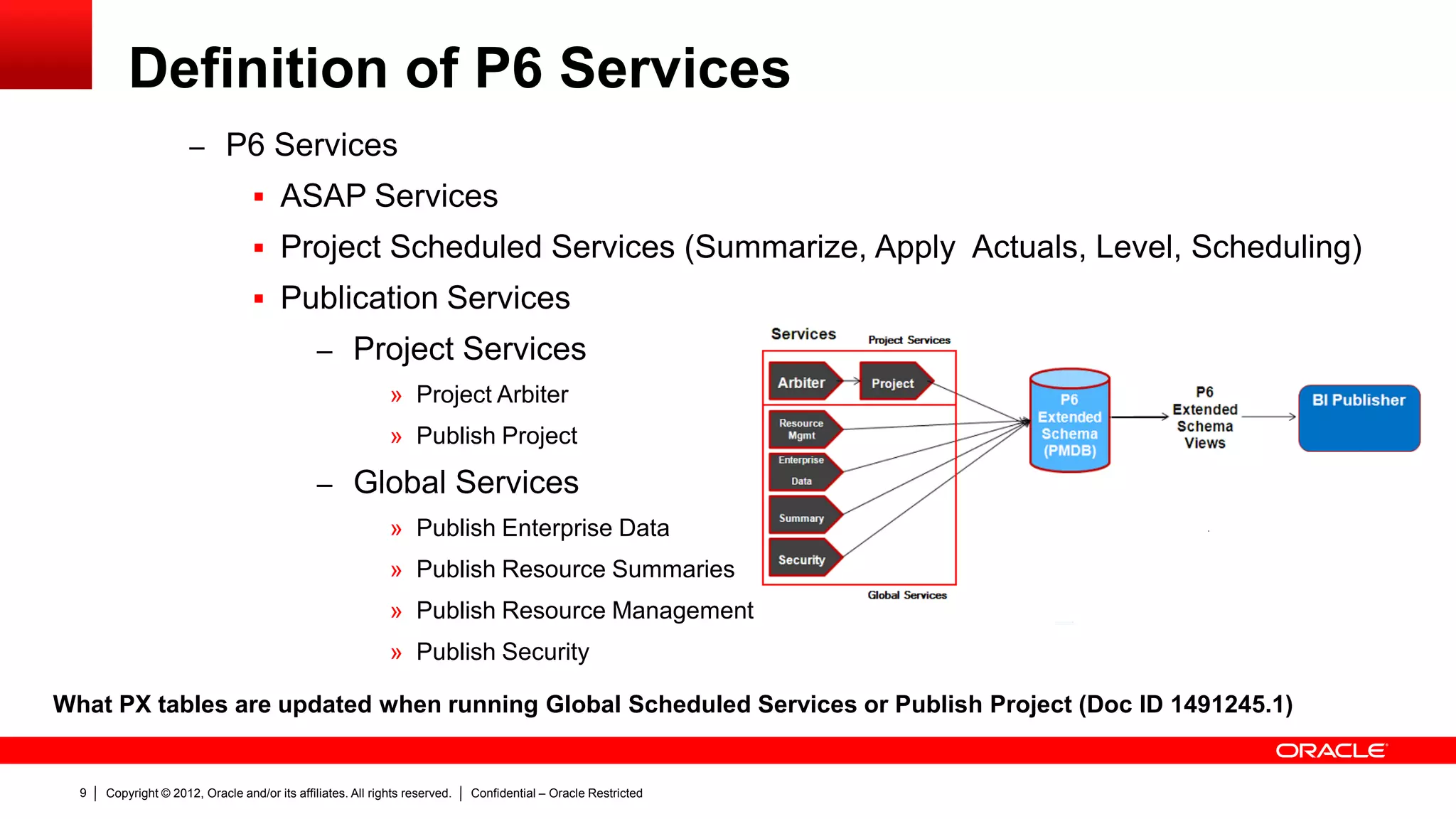
Definition of P6 Services
– P6 Services
 ASAP Services
 Project Scheduled Services (Summarize, Apply Actuals, Level, Scheduling)
 Publication Services
– Project Services
» Project Arbiter
» Publish Project
– Global Services
» Publish Enterprise Data
» Publish Resource Summaries
» Publish Resource Management
» Publish Security
What PX tables are updated when running Global Scheduled Services or Publish Project (Doc ID 1491245.1)
Copyright © 2012, Oracle and/or its affiliates. All rights reserved. Confidential – Oracle Restricted10
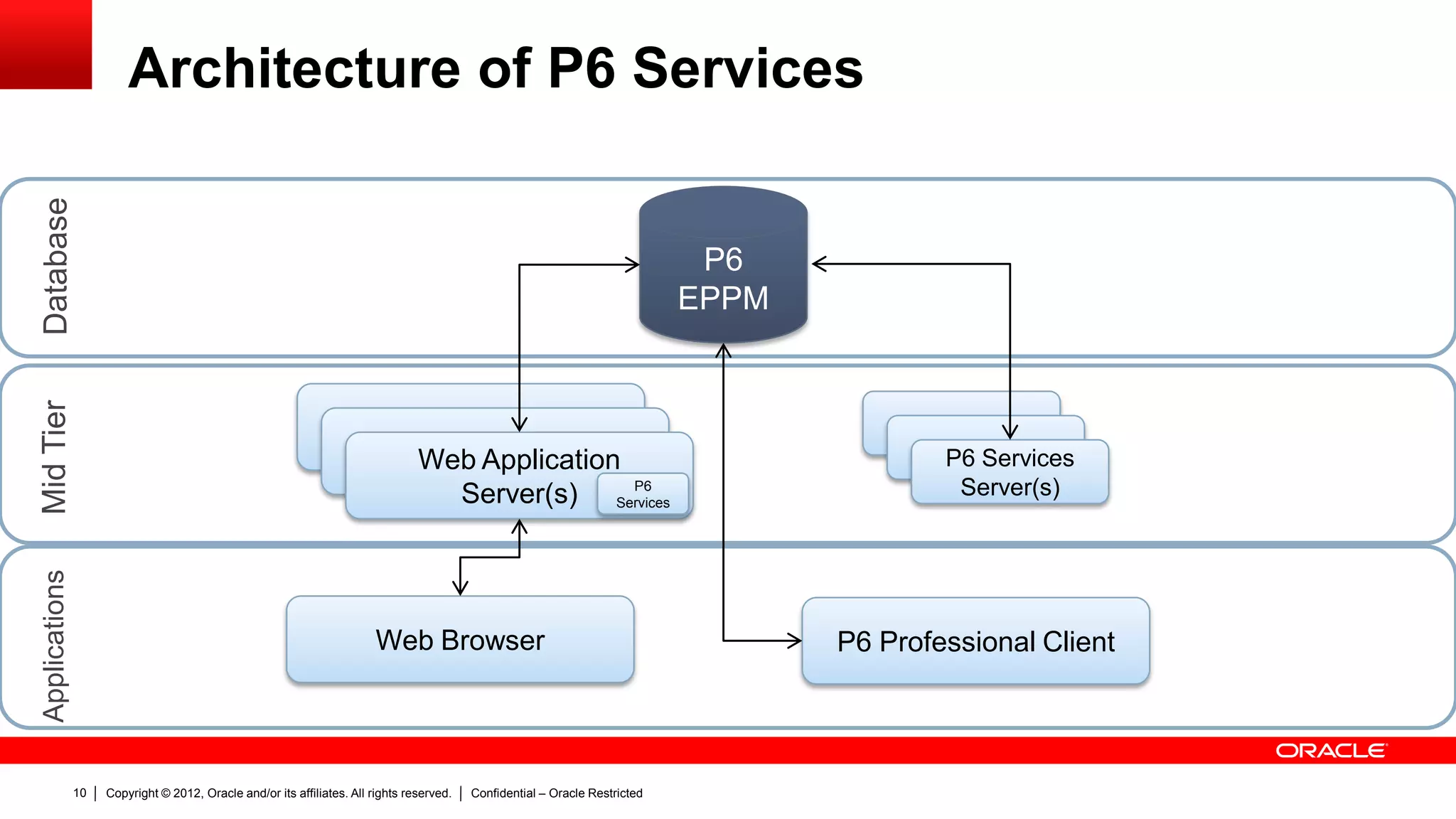
Architecture of P6 Services
P6
EPPM
DatabaseMidTierApplications
Web Application Servers
Web Application ServersWeb Application
Server(s)
Web Browser P6 Professional Client
P6
Services
P6 Services
Server(s)
Copyright © 2012, Oracle and/or its affiliates. All rights reserved. Confidential – Oracle Restricted11
Working with P6 Services
Copyright © 2012, Oracle and/or its affiliates. All rights reserved. Confidential – Oracle Restricted12
Working with P6 Services
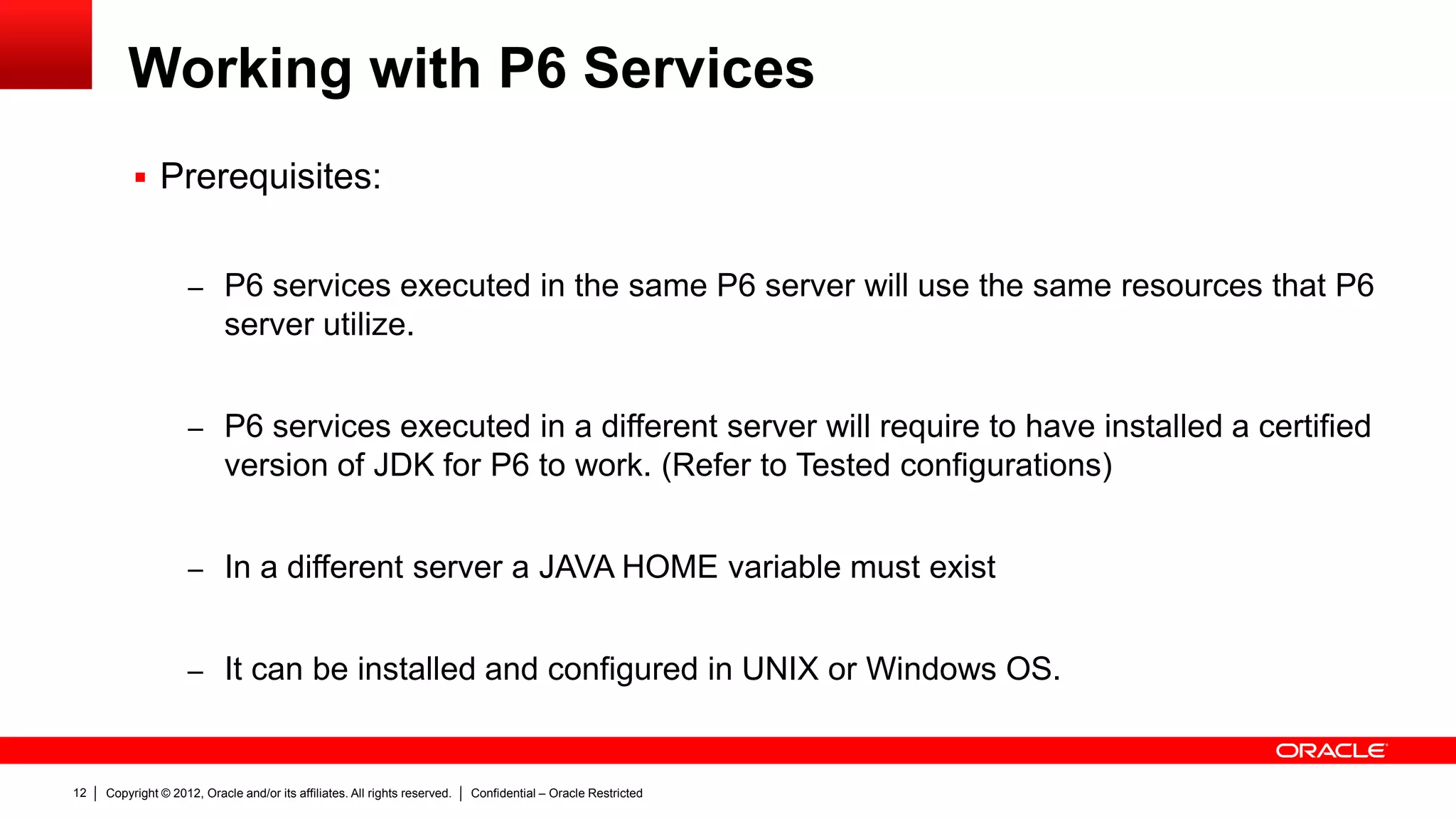
 Prerequisites:
– P6 services executed in the same P6 server will use the same resources that P6
server utilize.
– P6 services executed in a different server will require to have installed a certified
version of JDK for P6 to work. (Refer to Tested configurations)
– In a different server a JAVA HOME variable must exist
– It can be installed and configured in UNIX or Windows OS.
Copyright © 2012, Oracle and/or its affiliates. All rights reserved. Confidential – Oracle Restricted13
Working with P6 Services
 Prerequisites:
Number of
Objects/Deployment
categories
SMALL MEDIUM LARGE
Projects 200 1,000 50,000
Active Users 50 100 200
Activities 100,000 1,000,000 5,000,000
Activities per project 5,000 10,000 20,000
Resources 500 1,000 4,000
Resource assignments 100,000 1,000,000 5,000,000
Resource assignments
per project
5,000 10,000 20,000
Risks 100 500 2,500
Resource/Deployment
categories
SMALL MEDIUM LARGE
Operating System
Oracle Enterprise Linux
(OEL) 64-bit or
Windows server 64-bit
or equivalent
Oracle Enterprise Linux
(OEL) 64-bit or
Windows server 64-bit
or equivalent
Oracle Enterprise Linux
(OEL) 64-bit or
Windows server 64-bit
or equivalent
CPU
Intel Xeon 5000 series
(Quad Core 3.46 GHz)
or equivalent
Intel Xeon 5000 series
(Quad Core 3.46 GHz)
or equivalent
Intel Xeon 5000 series
(Quad Core 3.46 GHz)
or equivalent
RAM 8 GB 8 GB 16 GB
Java Heap Size 4 GB per node 4 GB per node 8 GB per node
Storage
50 GB, depending on
log historic log storage
75 GB, depending on
log historic log storage
100 GB, depending on
log historic log storage
Copyright © 2012, Oracle and/or its affiliates. All rights reserved. Confidential – Oracle Restricted14
Working with P6 Services
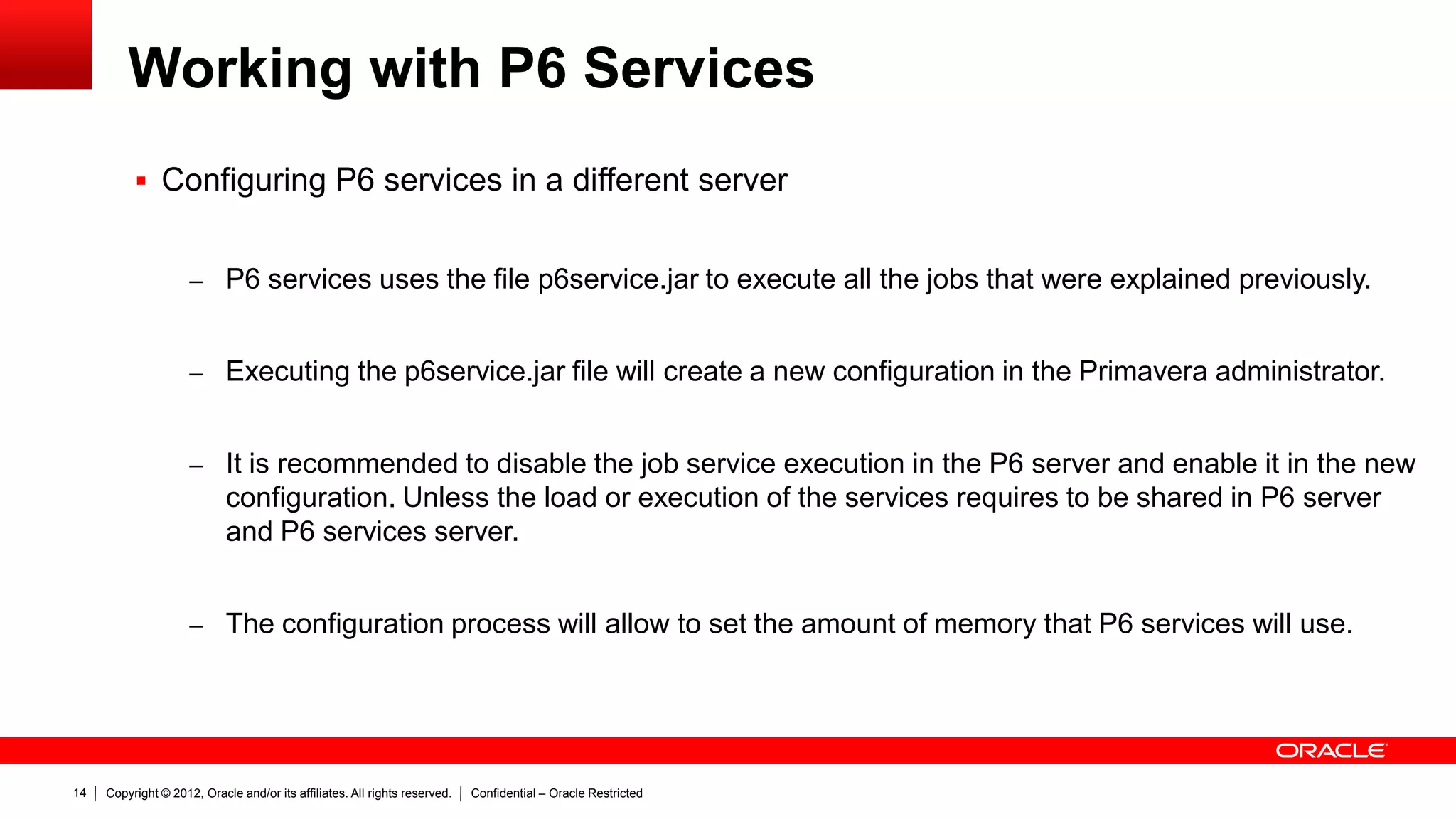
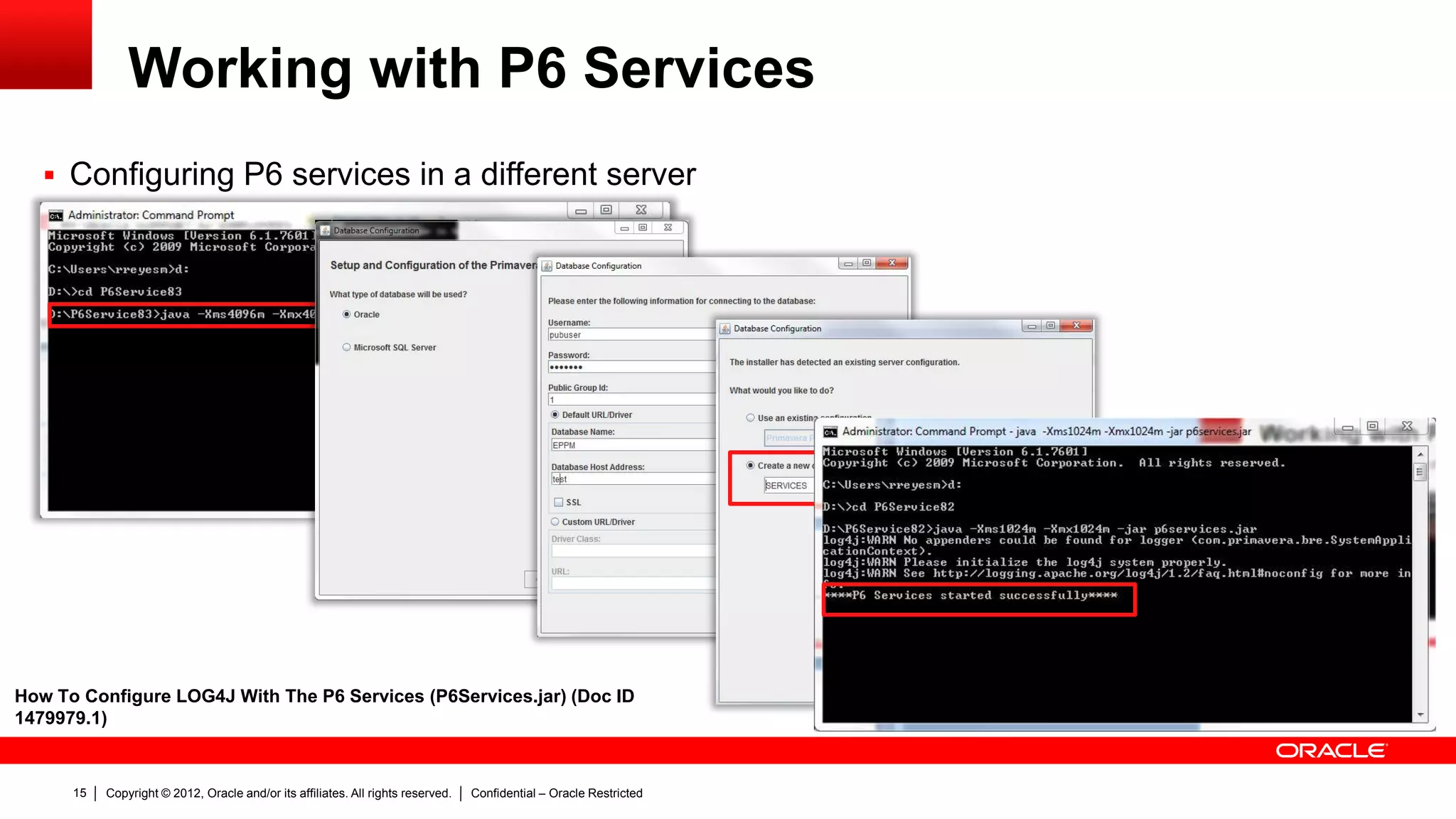
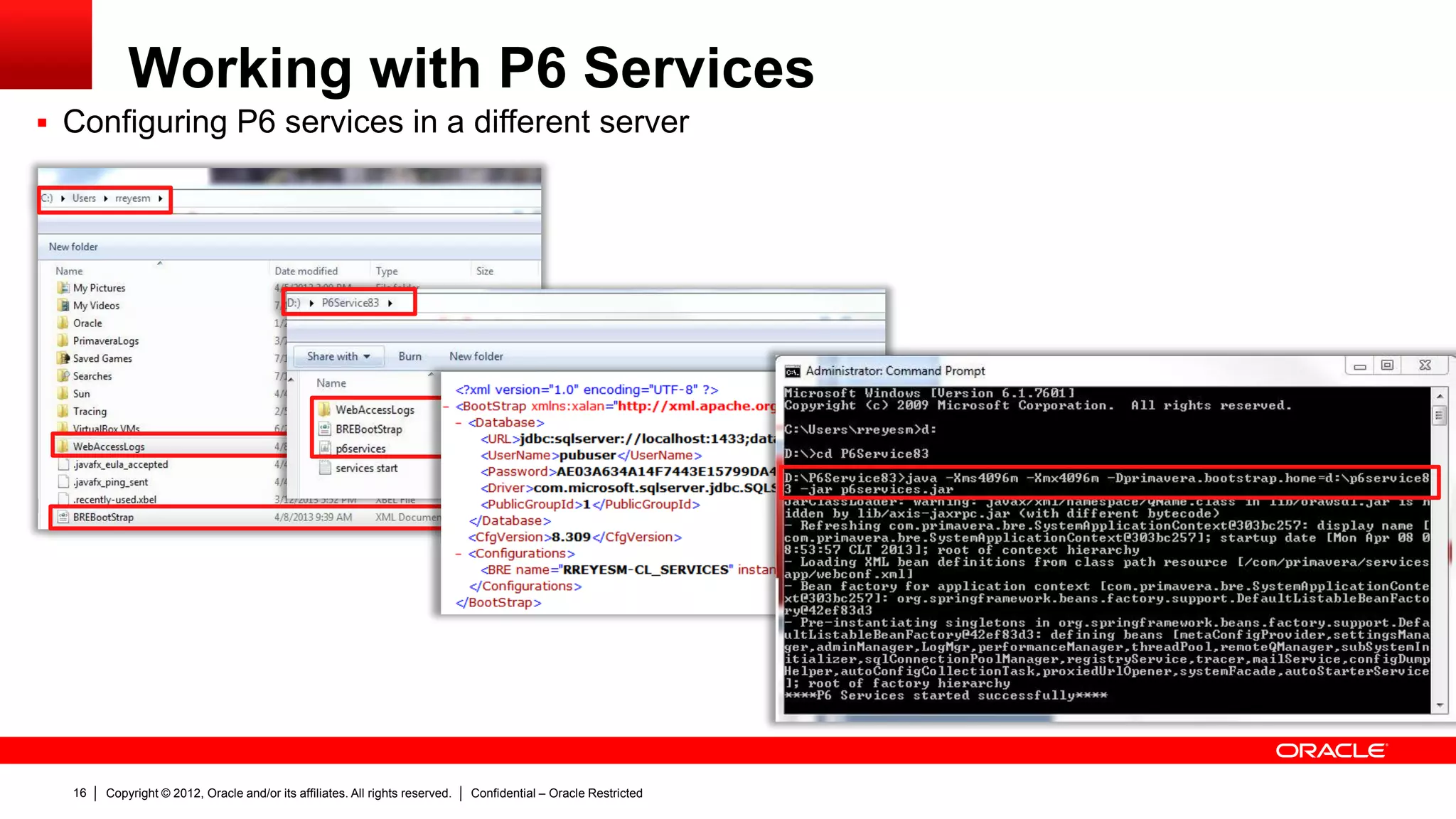
 Configuring P6 services in a different server
– P6 services uses the file p6service.jar to execute all the jobs that were explained previously.
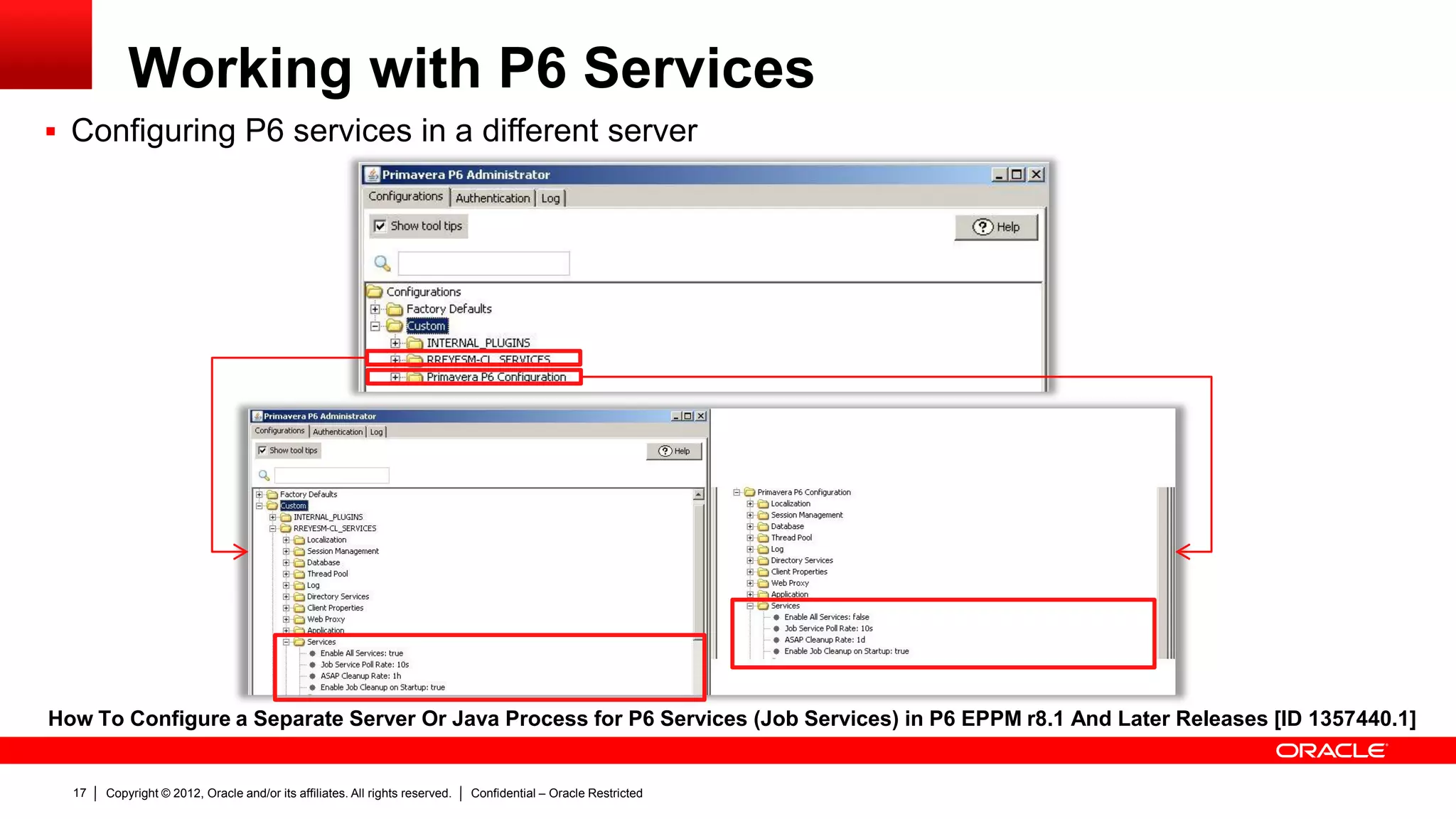
– Executing the p6service.jar file will create a new configuration in the Primavera administrator.
– It is recommended to disable the job service execution in the P6 server and enable it in the new
configuration. Unless the load or execution of the services requires to be shared in P6 server
and P6 services server.
– The configuration process will allow to set the amount of memory that P6 services will use.
Copyright © 2012, Oracle and/or its affiliates. All rights reserved. Confidential – Oracle Restricted15
Working with P6 Services
 Configuring P6 services in a different server
How To Configure LOG4J With The P6 Services (P6Services.jar) (Doc ID
1479979.1)
Copyright © 2012, Oracle and/or its affiliates. All rights reserved. Confidential – Oracle Restricted16
Working with P6 Services
 Configuring P6 services in a different server
Copyright © 2012, Oracle and/or its affiliates. All rights reserved. Confidential – Oracle Restricted17
Working with P6 Services
 Configuring P6 services in a different server
How To Configure a Separate Server Or Java Process for P6 Services (Job Services) in P6 EPPM r8.1 And Later Releases [ID 1357440.1]
Copyright © 2012, Oracle and/or its affiliates. All rights reserved. Confidential – Oracle Restricted18
Working with P6 Services
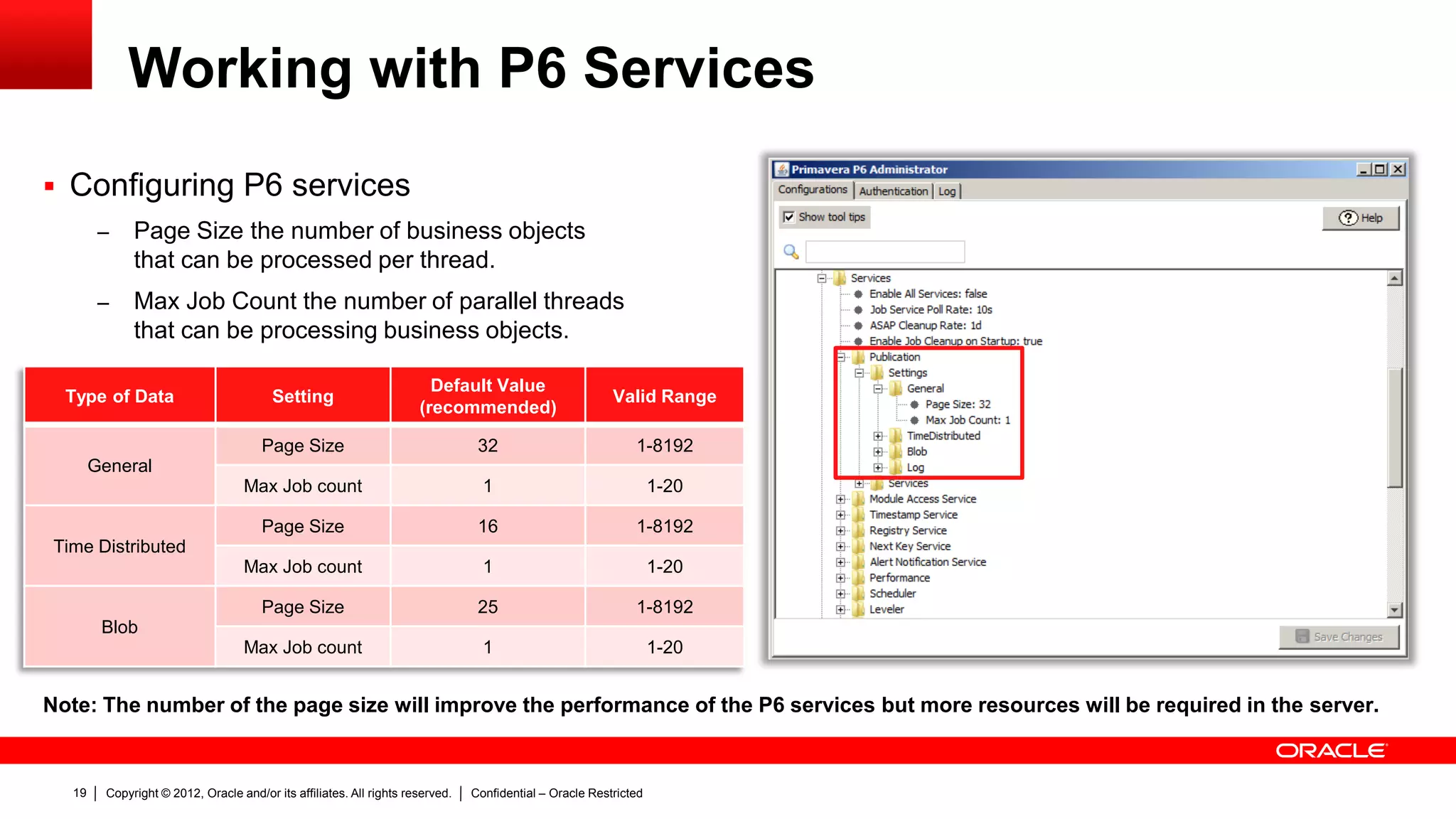
 Configuring P6 services
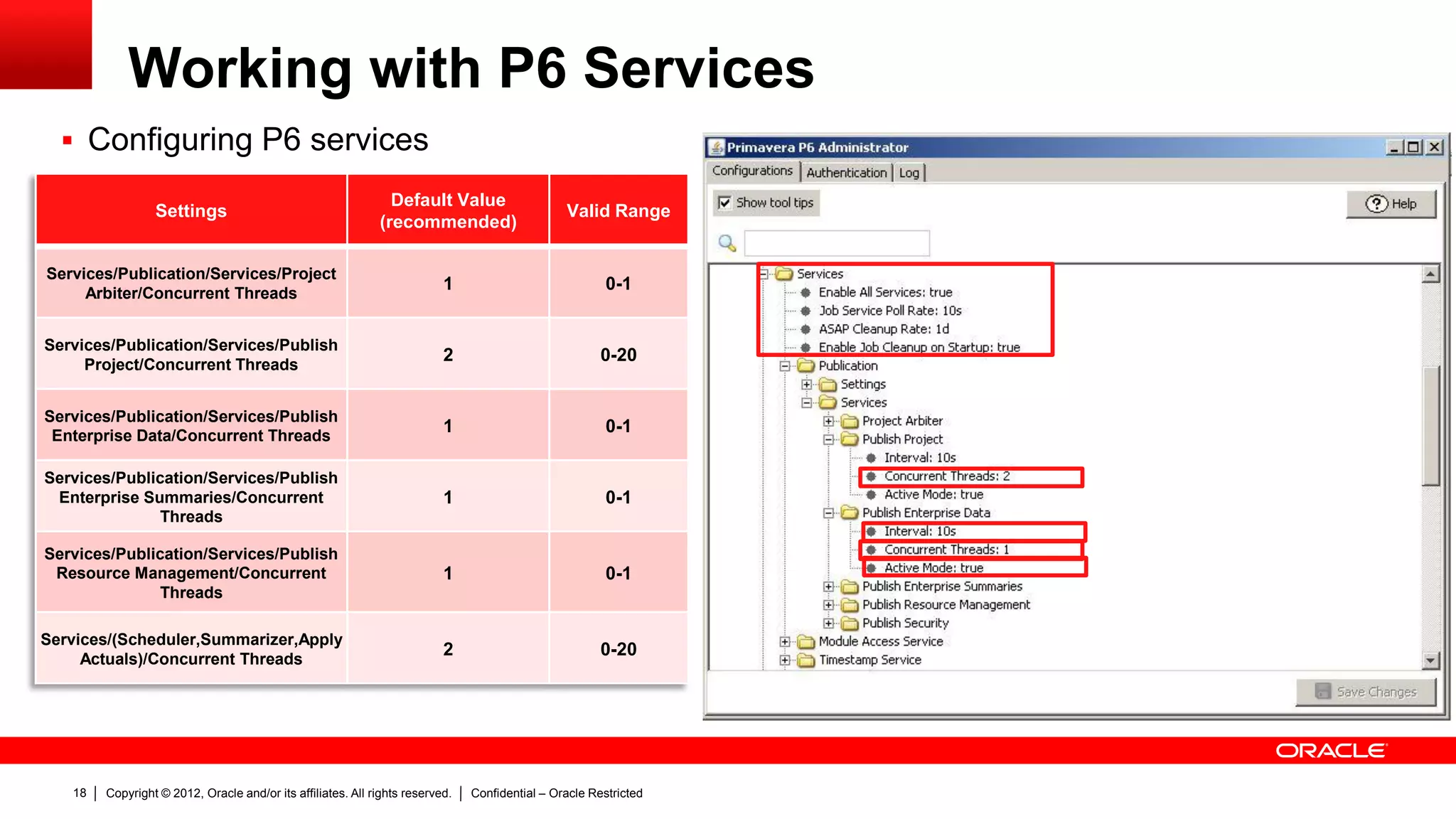
– Job service Poll Rate is the time that is
verified in the JOBSVC table if there is a
new job to be executed
– ASAP cleanup rate is the interval that is
used to clean up the table JOBSVC and
JOBLOG for the ASAP jobs
– Enable Job Cleanup on Startup is used
in case of failure, once P6 server is
started
Settings
Default Value
(recommended)
Valid Range
Services/Publication/Services/Project
Arbiter/Concurrent Threads
1 0-1
Services/Publication/Services/Publish
Project/Concurrent Threads
2 0-20
Services/Publication/Services/Publish
Enterprise Data/Concurrent Threads
1 0-1
Services/Publication/Services/Publish
Enterprise Summaries/Concurrent
Threads
1 0-1
Services/Publication/Services/Publish
Resource Management/Concurrent
Threads
1 0-1
Services/(Scheduler,Summarizer,Apply
Actuals)/Concurrent Threads
2 0-20
Copyright © 2012, Oracle and/or its affiliates. All rights reserved. Confidential – Oracle Restricted19
Working with P6 Services
 Configuring P6 services
– Page Size the number of business objects
that can be processed per thread.
– Max Job Count the number of parallel threads
that can be processing business objects.
Type of Data Setting
Default Value
(recommended)
Valid Range
General
Page Size 32 1-8192
Max Job count 1 1-20
Time Distributed
Page Size 16 1-8192
Max Job count 1 1-20
Blob
Page Size 25 1-8192
Max Job count 1 1-20
Note: The number of the page size will improve the performance of the P6 services but more resources will be required in the server.
Copyright © 2012, Oracle and/or its affiliates. All rights reserved. Confidential – Oracle Restricted20
Working with P6 Services
 Configuring P6 services
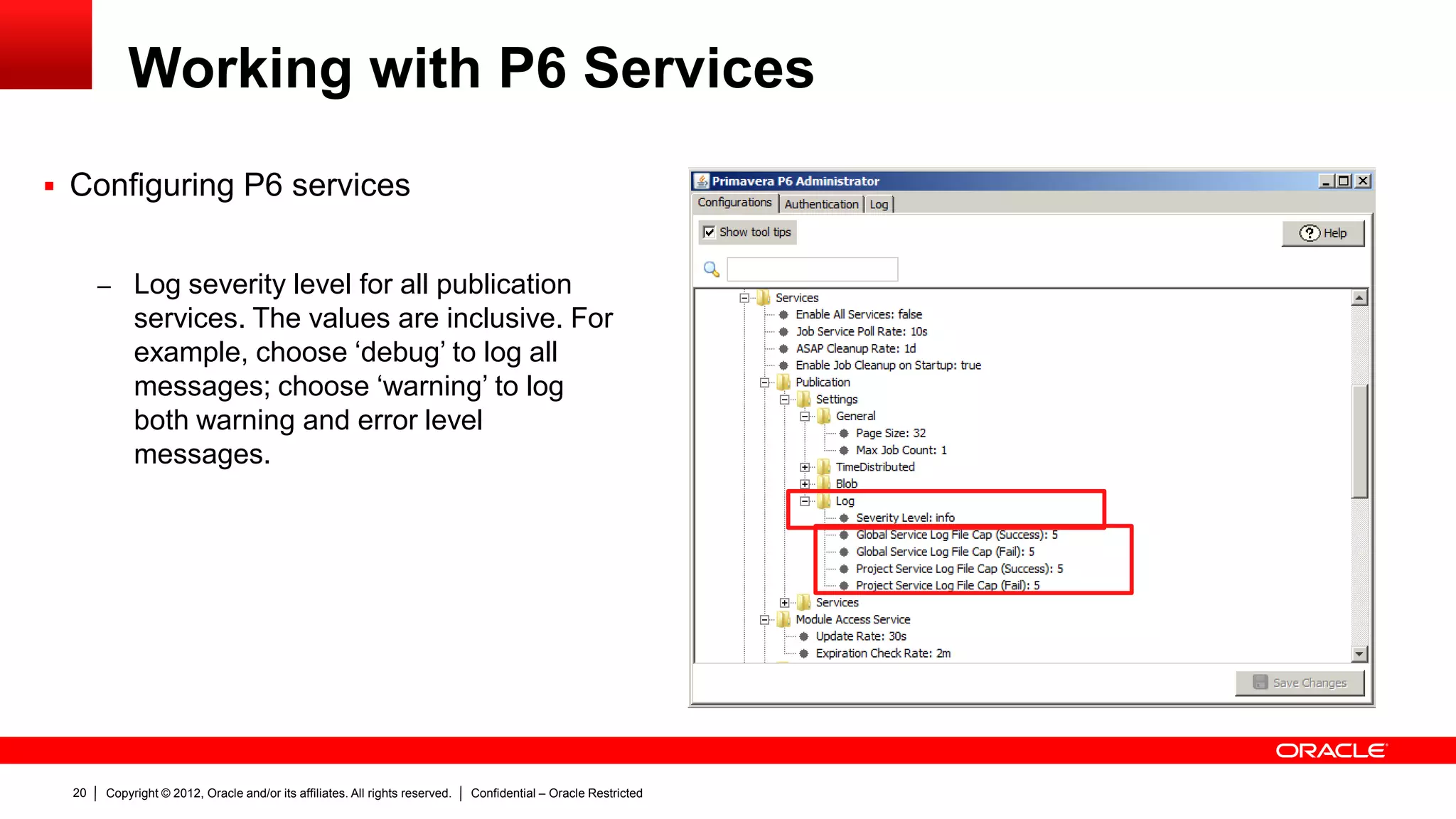
– Log severity level for all publication
services. The values are inclusive. For
example, choose ‘debug’ to log all
messages; choose ‘warning’ to log
both warning and error level
messages.
Copyright © 2012, Oracle and/or its affiliates. All rights reserved. Confidential – Oracle Restricted21
Working with P6 Services
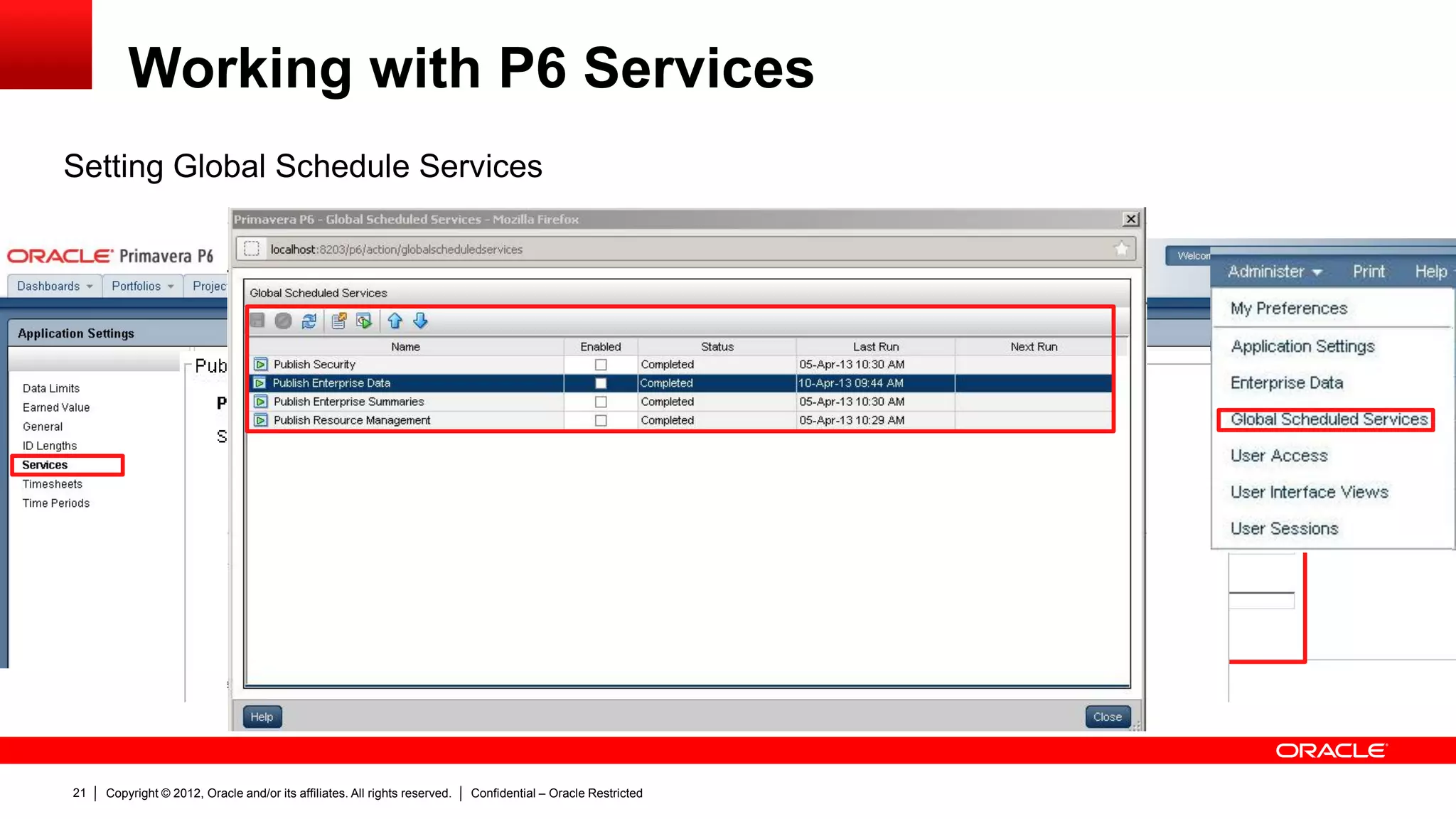
Setting Global Schedule Services
Copyright © 2012, Oracle and/or its affiliates. All rights reserved. Confidential – Oracle Restricted22
Working with P6 Services
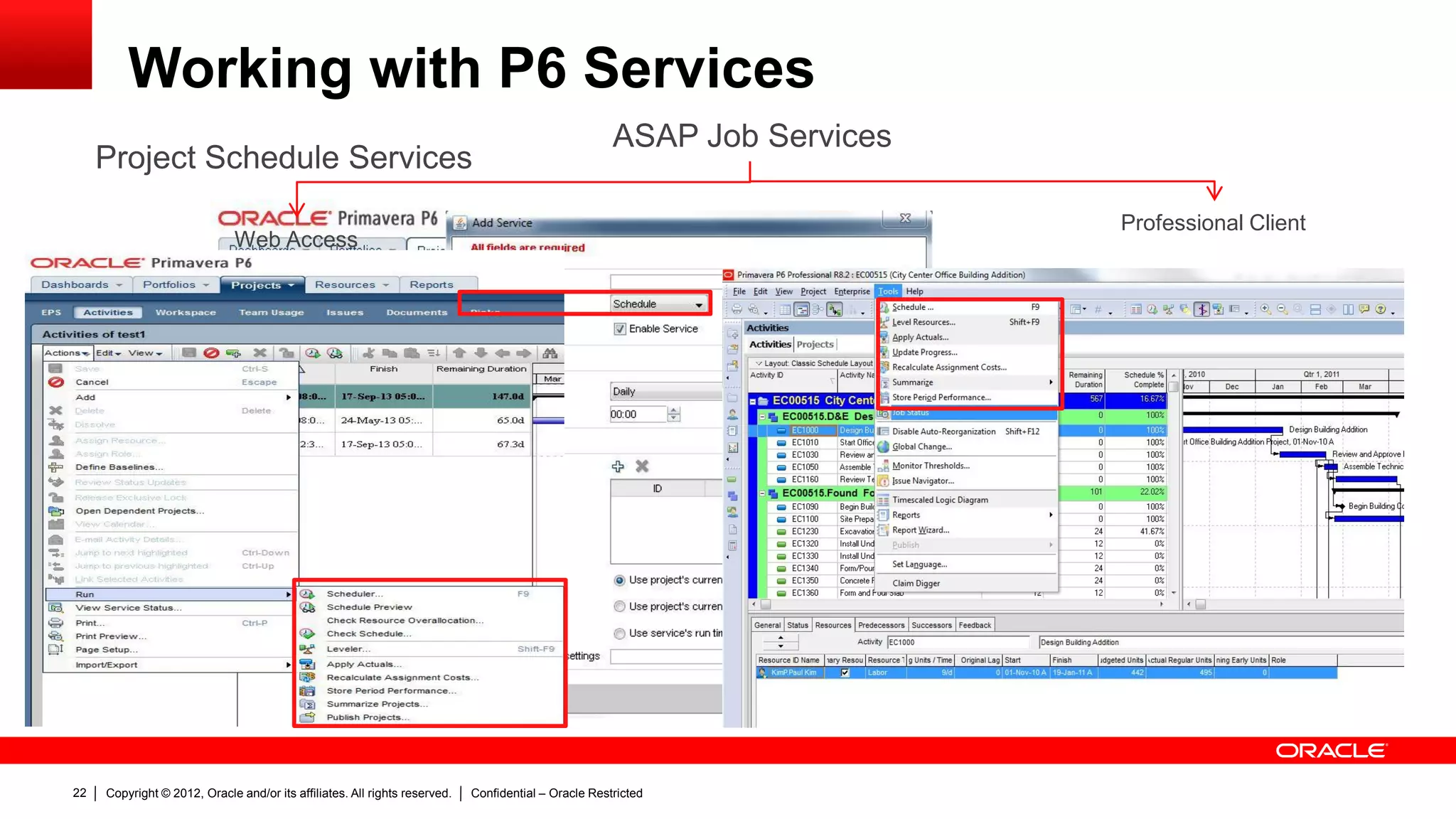
Project Schedule Services
Web Access
ASAP Job Services
Professional Client
Copyright © 2012, Oracle and/or its affiliates. All rights reserved. Confidential – Oracle Restricted23
Working with P6 Services
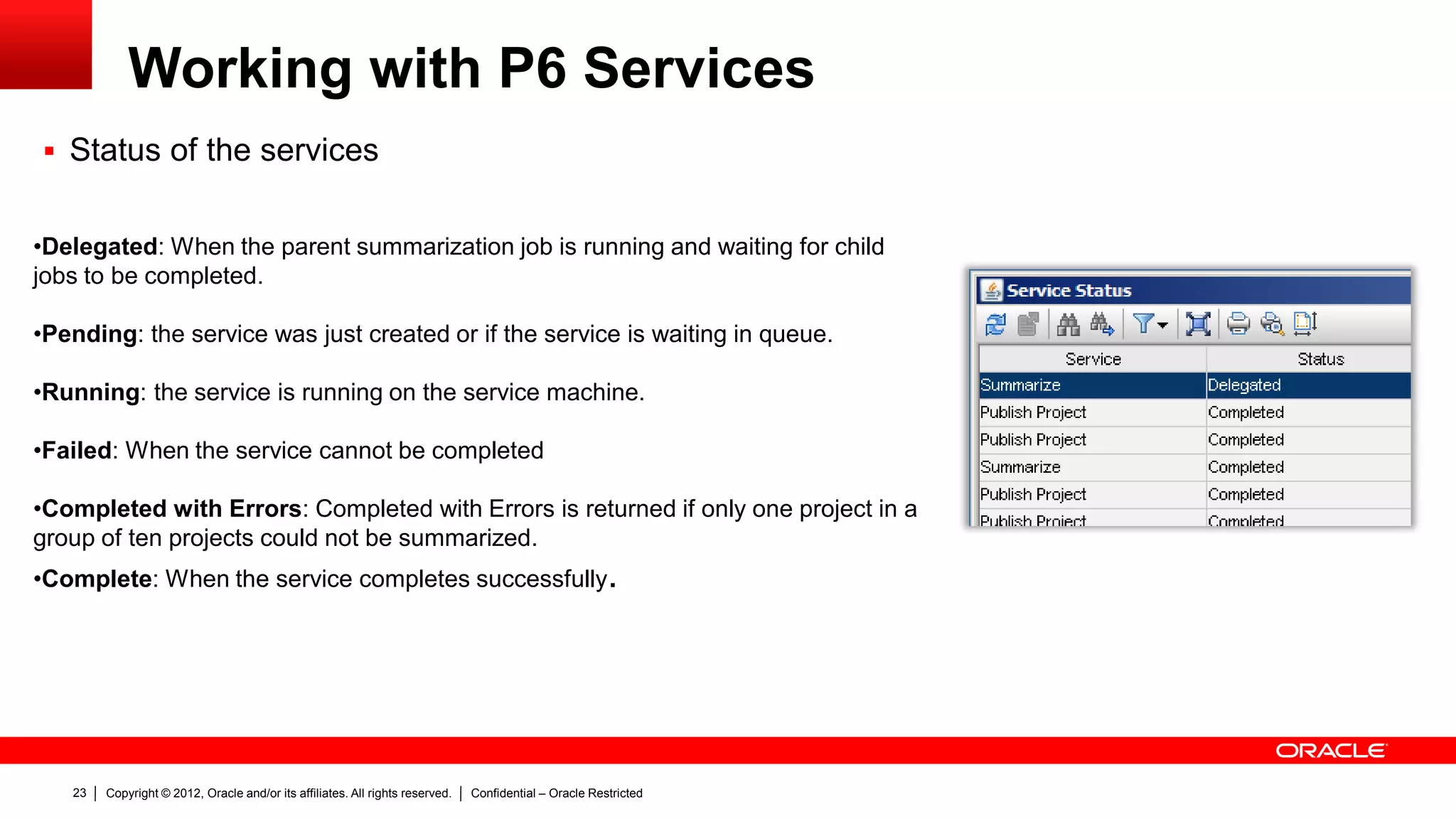
 Status of the services
•Delegated: When the parent summarization job is running and waiting for child
jobs to be completed.
•Pending: the service was just created or if the service is waiting in queue.
•Running: the service is running on the service machine.
•Failed: When the service cannot be completed
•Completed with Errors: Completed with Errors is returned if only one project in a
group of ten projects could not be summarized.
•Complete: When the service completes successfully.
Copyright © 2012, Oracle and/or its affiliates. All rights reserved. Confidential – Oracle Restricted24
Troubleshoot of P6
Services
Copyright © 2012, Oracle and/or its affiliates. All rights reserved. Confidential – Oracle Restricted25
Troubleshoot of P6 Services
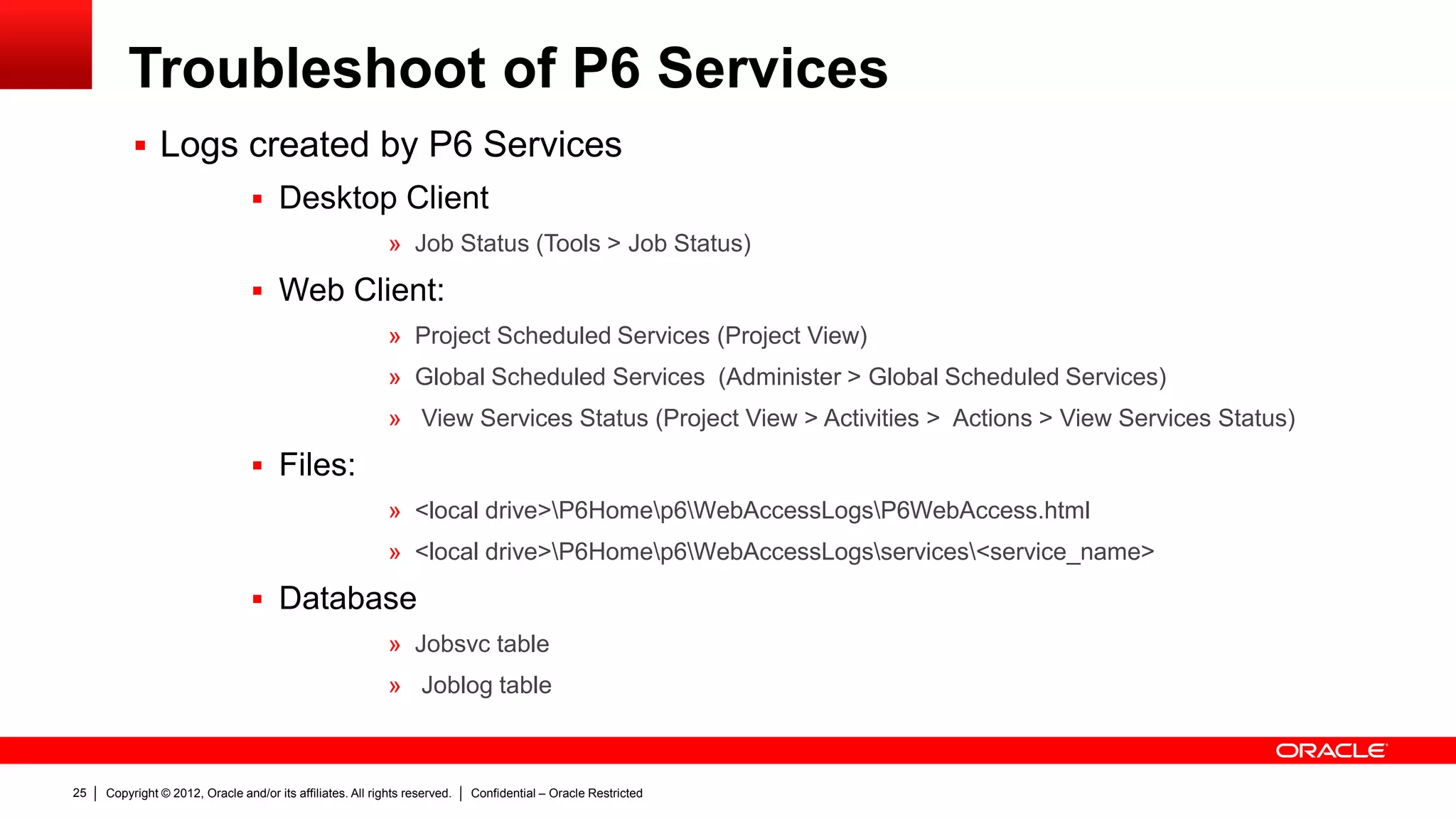
 Logs created by P6 Services
 Desktop Client
» Job Status (Tools > Job Status)
 Web Client:
» Project Scheduled Services (Project View)
» Global Scheduled Services (Administer > Global Scheduled Services)
» View Services Status (Project View > Activities > Actions > View Services Status)
 Files:
» <local drive>P6Homep6WebAccessLogsP6WebAccess.html
» <local drive>P6Homep6WebAccessLogsservices<service_name>
 Database
» Jobsvc table
» Joblog table
Copyright © 2012, Oracle and/or its affiliates. All rights reserved. Confidential – Oracle Restricted26
Troubleshoot of P6 Services: Schedule Services
 Desktop Client
– You can find details about Scheduled
and ASAP Services in Job status
option, under the Tools menu.
– After version 8.2, the “View Log”
button was added to Job status
window.
– “View Log” allows you to read log files
from the database that may be helpful
to troubleshoot the issue.
Copyright © 2012, Oracle and/or its affiliates. All rights reserved. Confidential – Oracle Restricted27
Troubleshoot of P6 Services: Schedule Services
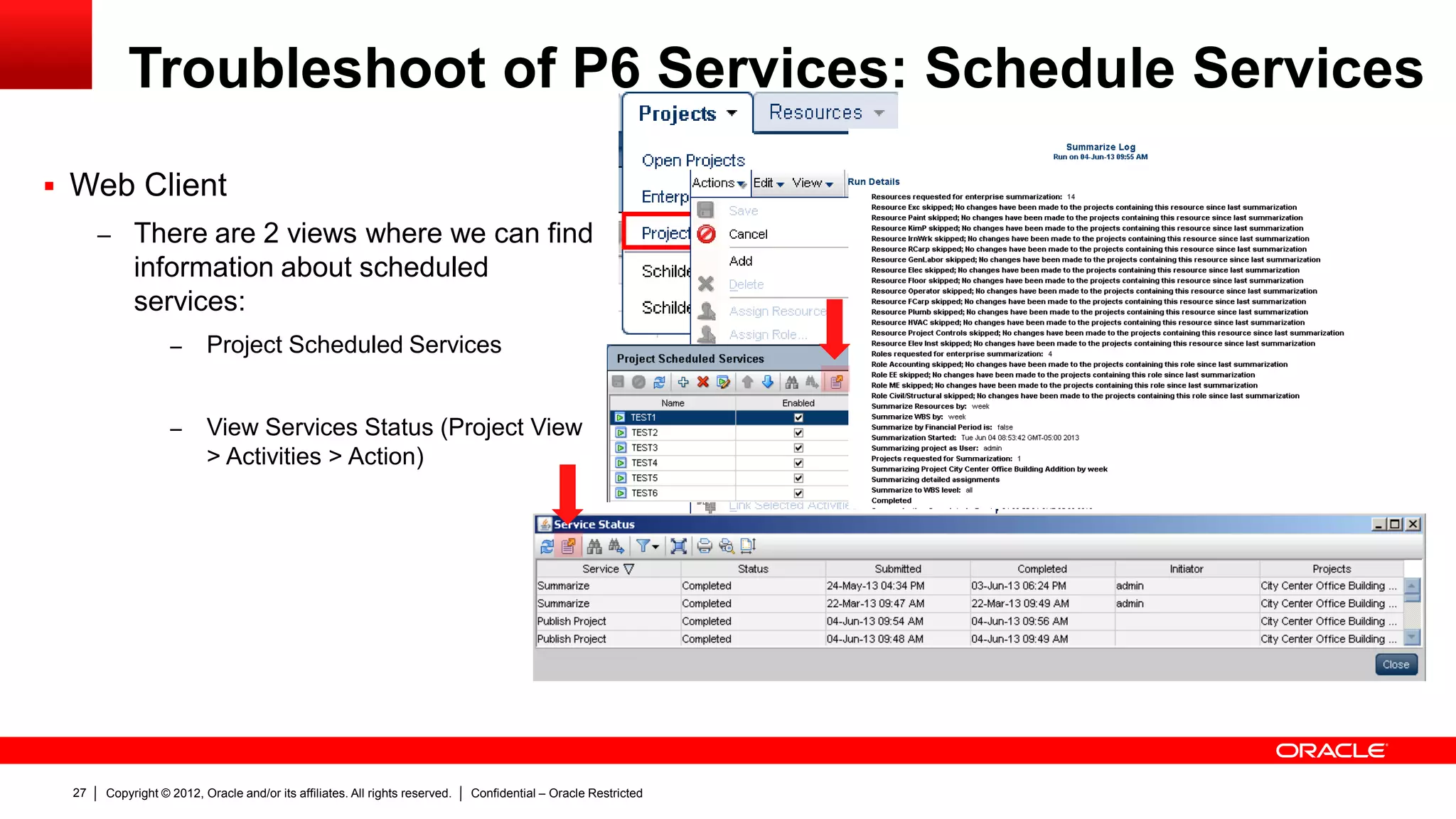
 Web Client
– There are 2 views where we can find
information about scheduled
services:
– Project Scheduled Services
– View Services Status (Project View
> Activities > Action)
Copyright © 2012, Oracle and/or its affiliates. All rights reserved. Confidential – Oracle Restricted28
Troubleshoot of P6 Services: Schedule Services
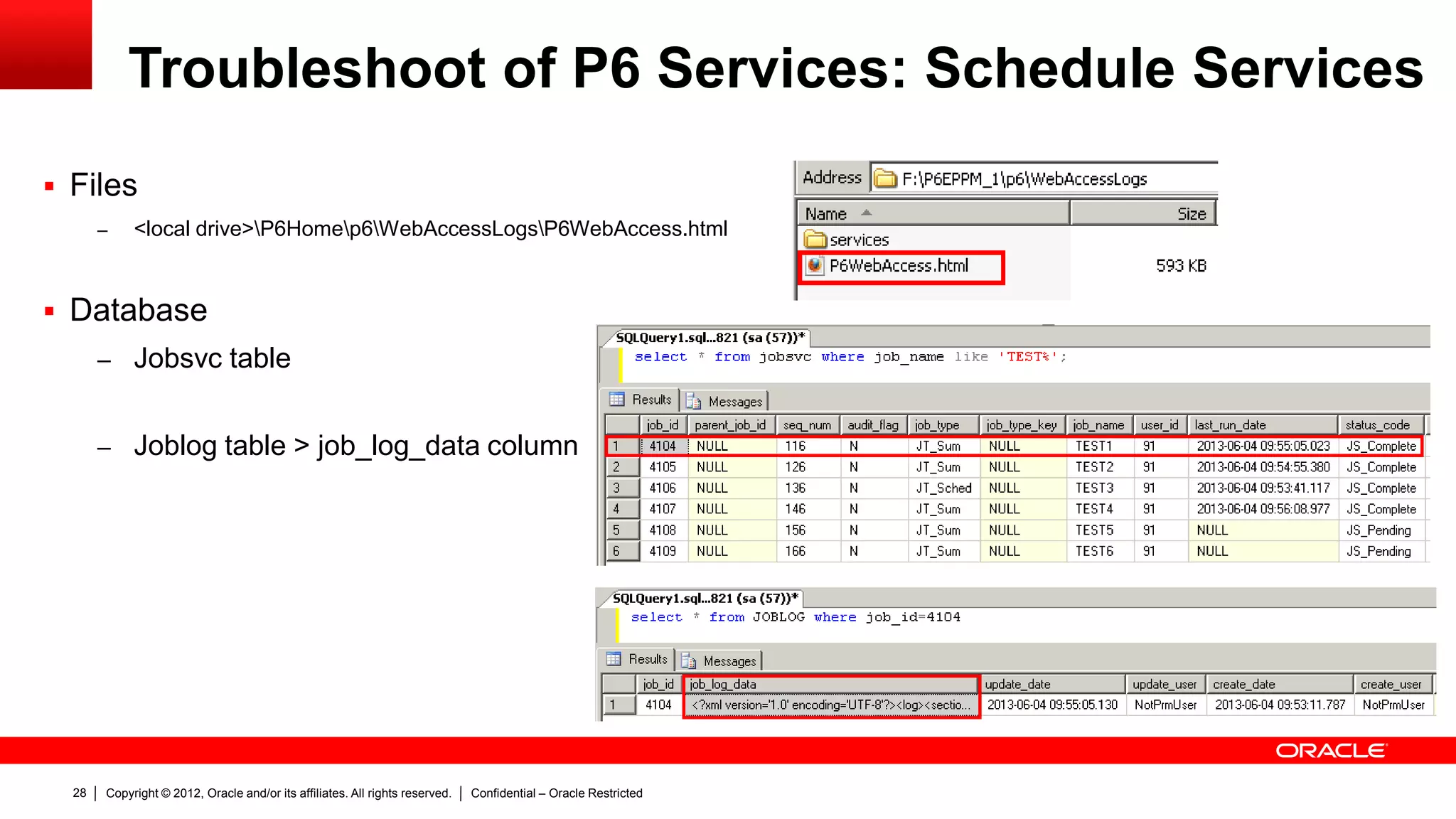
 Files
– <local drive>P6Homep6WebAccessLogsP6WebAccess.html
 Database
– Jobsvc table
– Joblog table > job_log_data column
Copyright © 2012, Oracle and/or its affiliates. All rights reserved. Confidential – Oracle Restricted29
Troubleshoot of P6 Services: Schedule Services
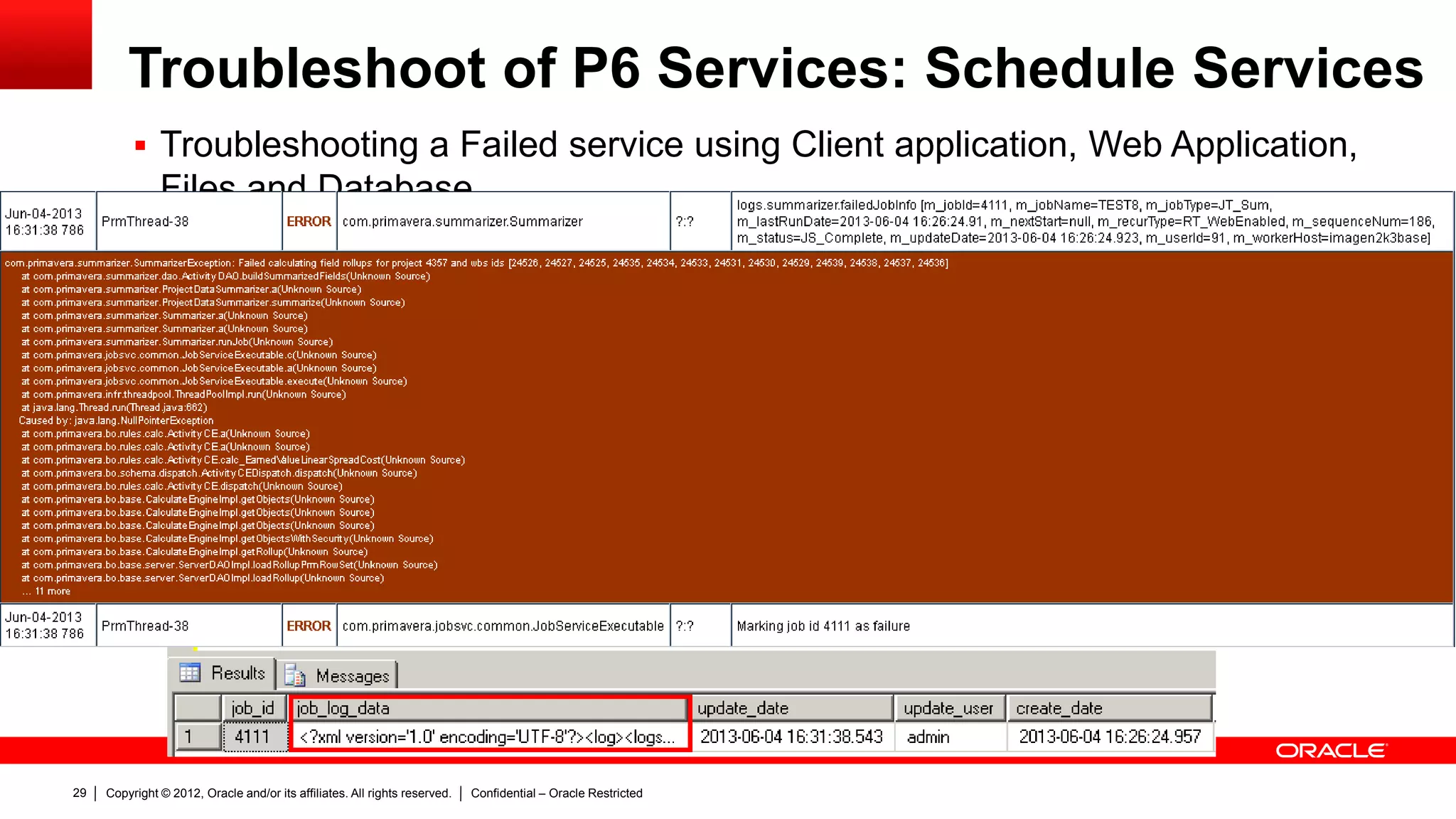
 Troubleshooting a Failed service using Client application, Web Application,
Files and Database
Copyright © 2012, Oracle and/or its affiliates. All rights reserved. Confidential – Oracle Restricted30
Troubleshoot of P6 Services: Schedule Services
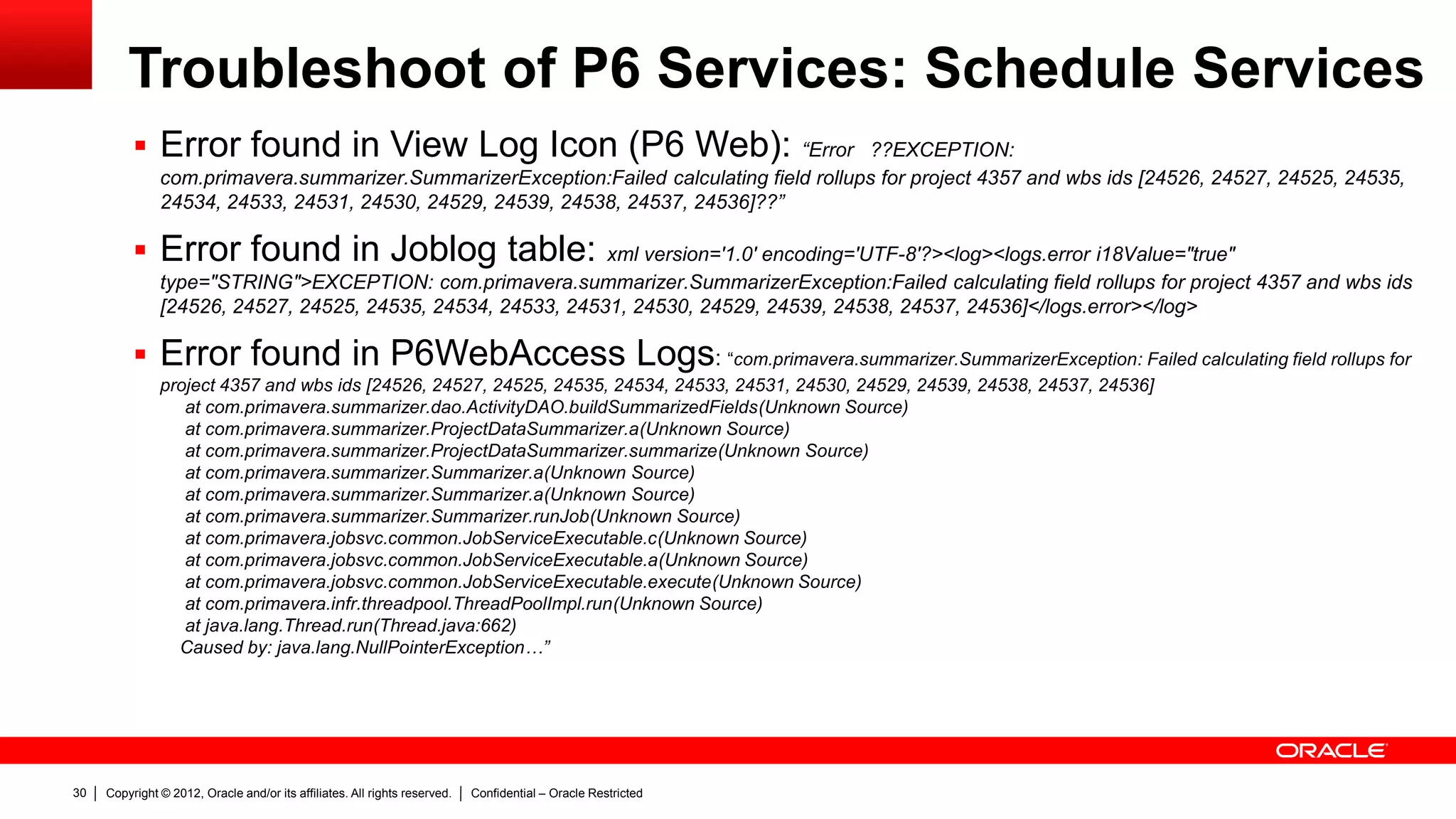
 Error found in View Log Icon (P6 Web): “Error ??EXCEPTION:
com.primavera.summarizer.SummarizerException:Failed calculating field rollups for project 4357 and wbs ids [24526, 24527, 24525, 24535,
24534, 24533, 24531, 24530, 24529, 24539, 24538, 24537, 24536]??”
 Error found in Joblog table: xml version='1.0' encoding='UTF-8'?><log><logs.error i18Value="true"
type="STRING">EXCEPTION: com.primavera.summarizer.SummarizerException:Failed calculating field rollups for project 4357 and wbs ids
[24526, 24527, 24525, 24535, 24534, 24533, 24531, 24530, 24529, 24539, 24538, 24537, 24536]</logs.error></log>
 Error found in P6WebAccess Logs: “com.primavera.summarizer.SummarizerException: Failed calculating field rollups for
project 4357 and wbs ids [24526, 24527, 24525, 24535, 24534, 24533, 24531, 24530, 24529, 24539, 24538, 24537, 24536]
at com.primavera.summarizer.dao.ActivityDAO.buildSummarizedFields(Unknown Source)
at com.primavera.summarizer.ProjectDataSummarizer.a(Unknown Source)
at com.primavera.summarizer.ProjectDataSummarizer.summarize(Unknown Source)
at com.primavera.summarizer.Summarizer.a(Unknown Source)
at com.primavera.summarizer.Summarizer.runJob(Unknown Source)
at com.primavera.jobsvc.common.JobServiceExecutable.c(Unknown Source)
at com.primavera.jobsvc.common.JobServiceExecutable.a(Unknown Source)
at com.primavera.jobsvc.common.JobServiceExecutable.execute(Unknown Source)
at com.primavera.infr.threadpool.ThreadPoolImpl.run(Unknown Source)
at java.lang.Thread.run(Thread.java:662)
Caused by: java.lang.NullPointerException…”
Copyright © 2012, Oracle and/or its affiliates. All rights reserved. Confidential – Oracle Restricted31
Troubleshoot of P6 Services: Schedule Services
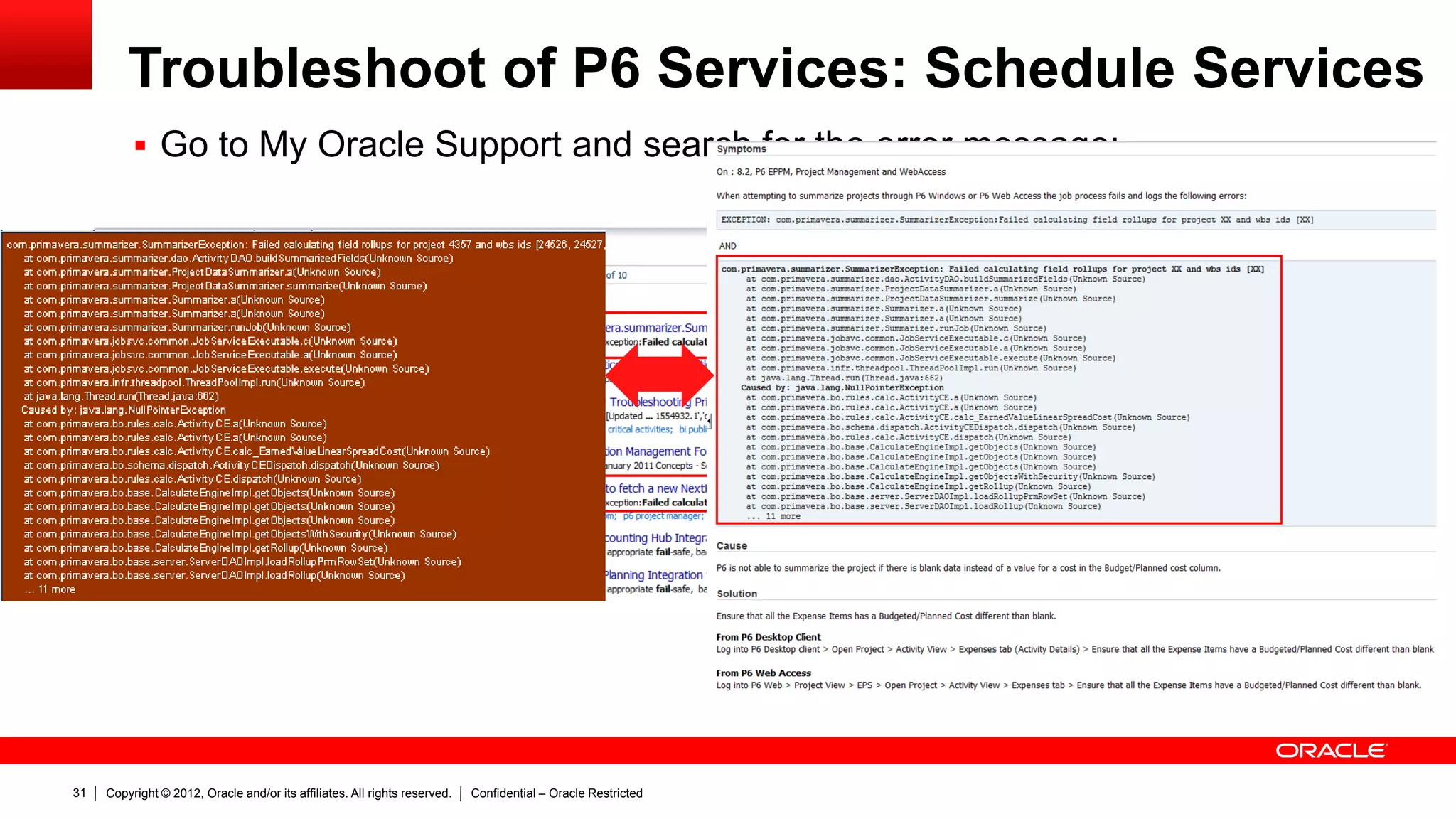
 Go to My Oracle Support and search for the error message:
Copyright © 2012, Oracle and/or its affiliates. All rights reserved. Confidential – Oracle Restricted32
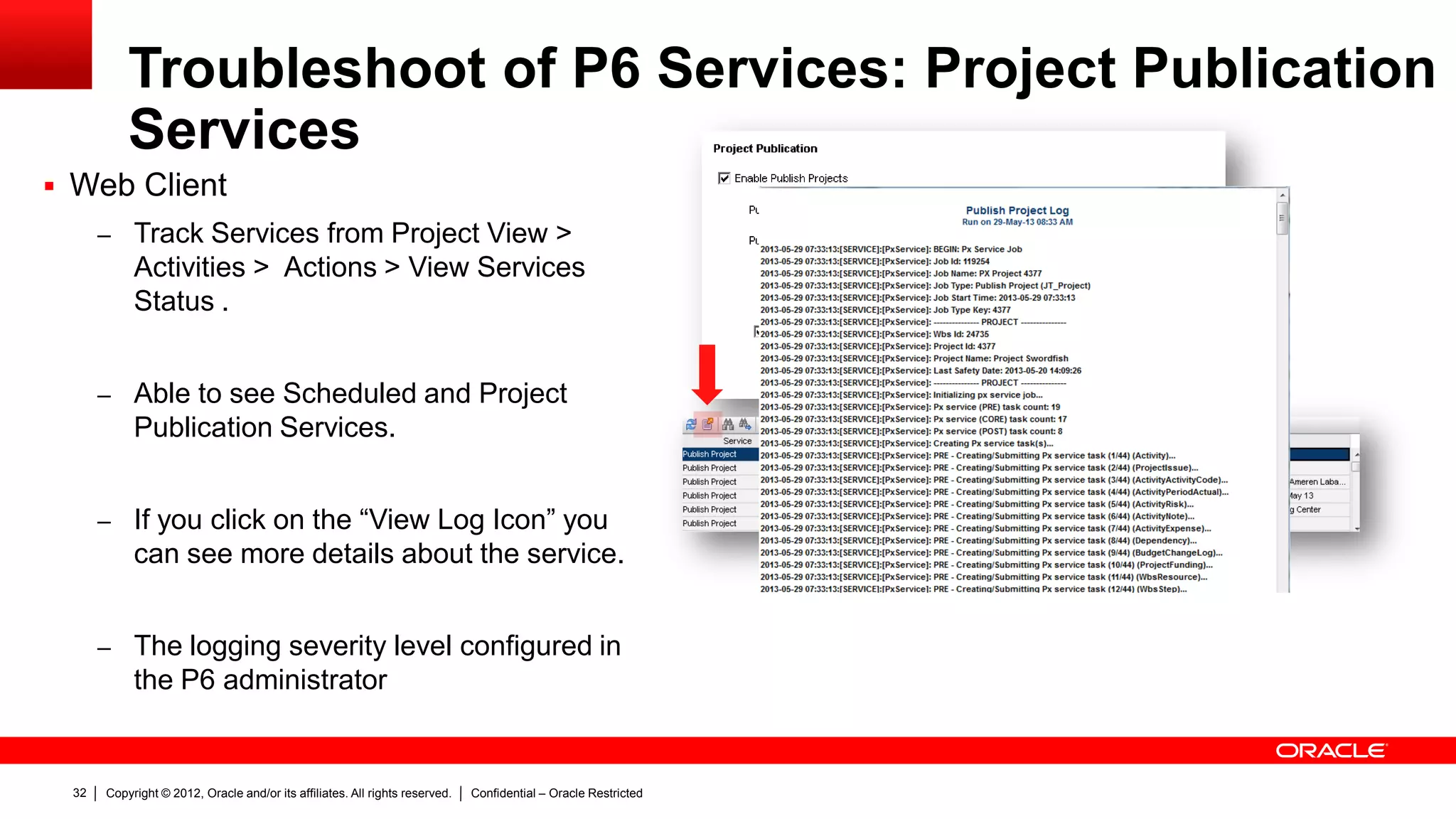
Troubleshoot of P6 Services: Project Publication
Services
 Web Client
– Track Services from Project View >
Activities > Actions > View Services
Status .
– Able to see Scheduled and Project
Publication Services.
– If you click on the “View Log Icon” you
can see more details about the service.
– The logging severity level configured in
the P6 administrator
Copyright © 2012, Oracle and/or its affiliates. All rights reserved. Confidential – Oracle Restricted33
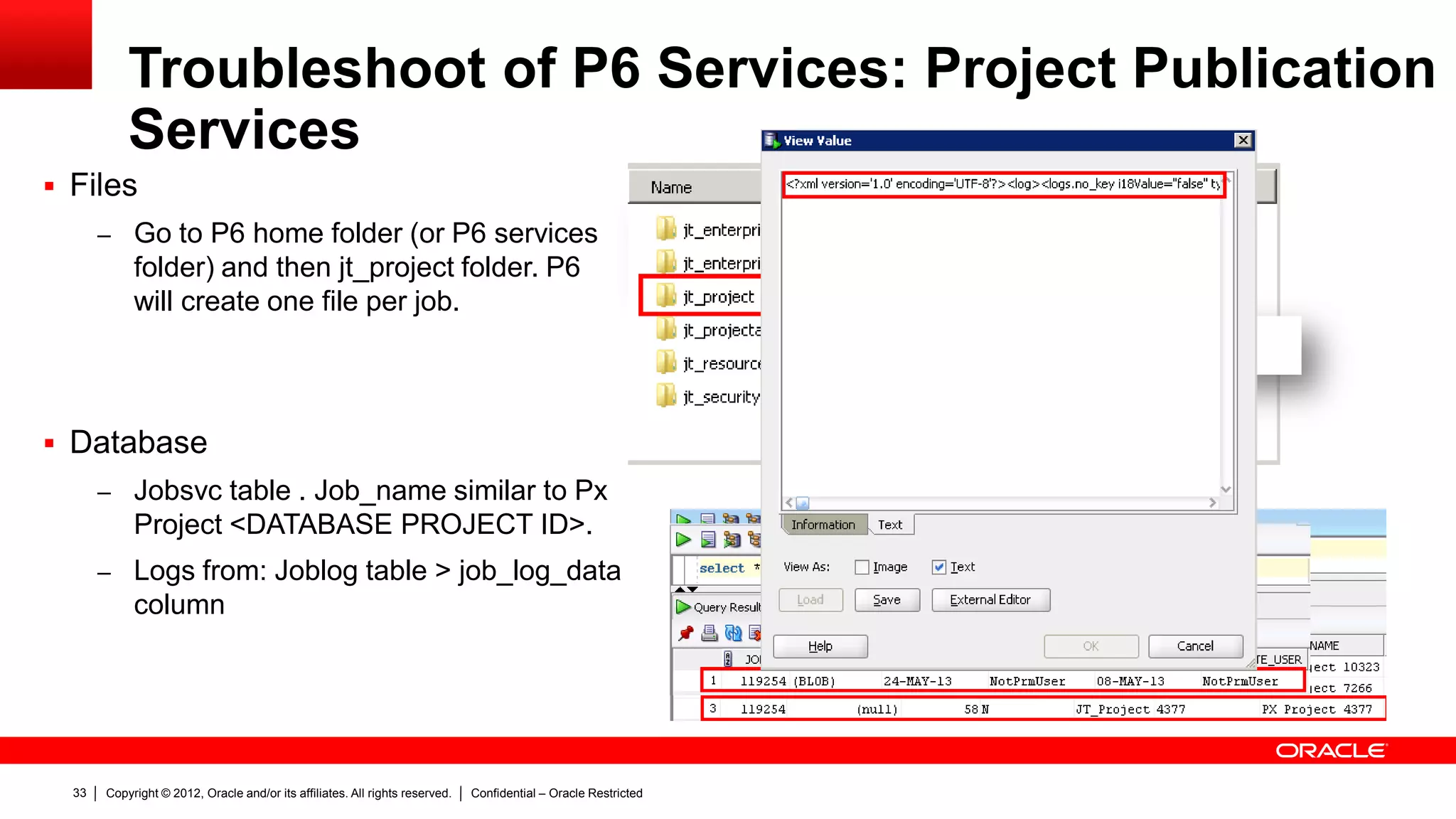
Troubleshoot of P6 Services: Project Publication
Services
 Files
– Go to P6 home folder (or P6 services
folder) and then jt_project folder. P6
will create one file per job.
 Database
– Jobsvc table . Job_name similar to Px
Project <DATABASE PROJECT ID>.
– Logs from: Joblog table > job_log_data
column
Copyright © 2012, Oracle and/or its affiliates. All rights reserved. Confidential – Oracle Restricted34
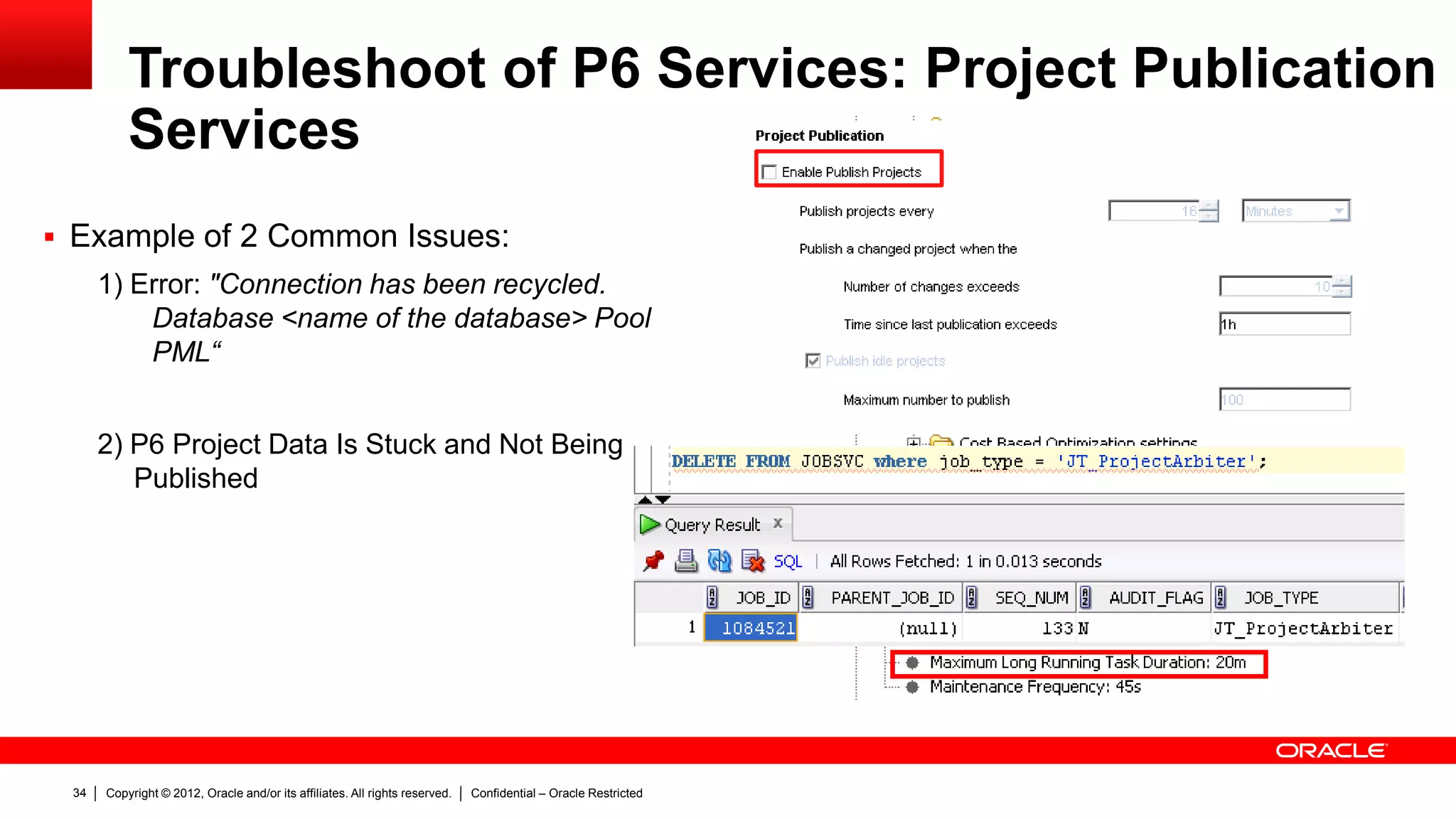
Troubleshoot of P6 Services: Project Publication
Services
 Example of 2 Common Issues:
1) Error: "Connection has been recycled.
Database <name of the database> Pool
PML“
2) P6 Project Data Is Stuck and Not Being
Published
Copyright © 2012, Oracle and/or its affiliates. All rights reserved. Confidential – Oracle Restricted35
Troubleshoot of P6 Services
 Factors that can impact in performance issues:
 Number of concurrent jobs
 Number of Activities / Projects / EPS
 Java Memory Assigned to P6 services or P6 deployment
 Database server impact
Copyright © 2012, Oracle and/or its affiliates. All rights reserved. Confidential – Oracle Restricted36
Troubleshoot of P6 Services
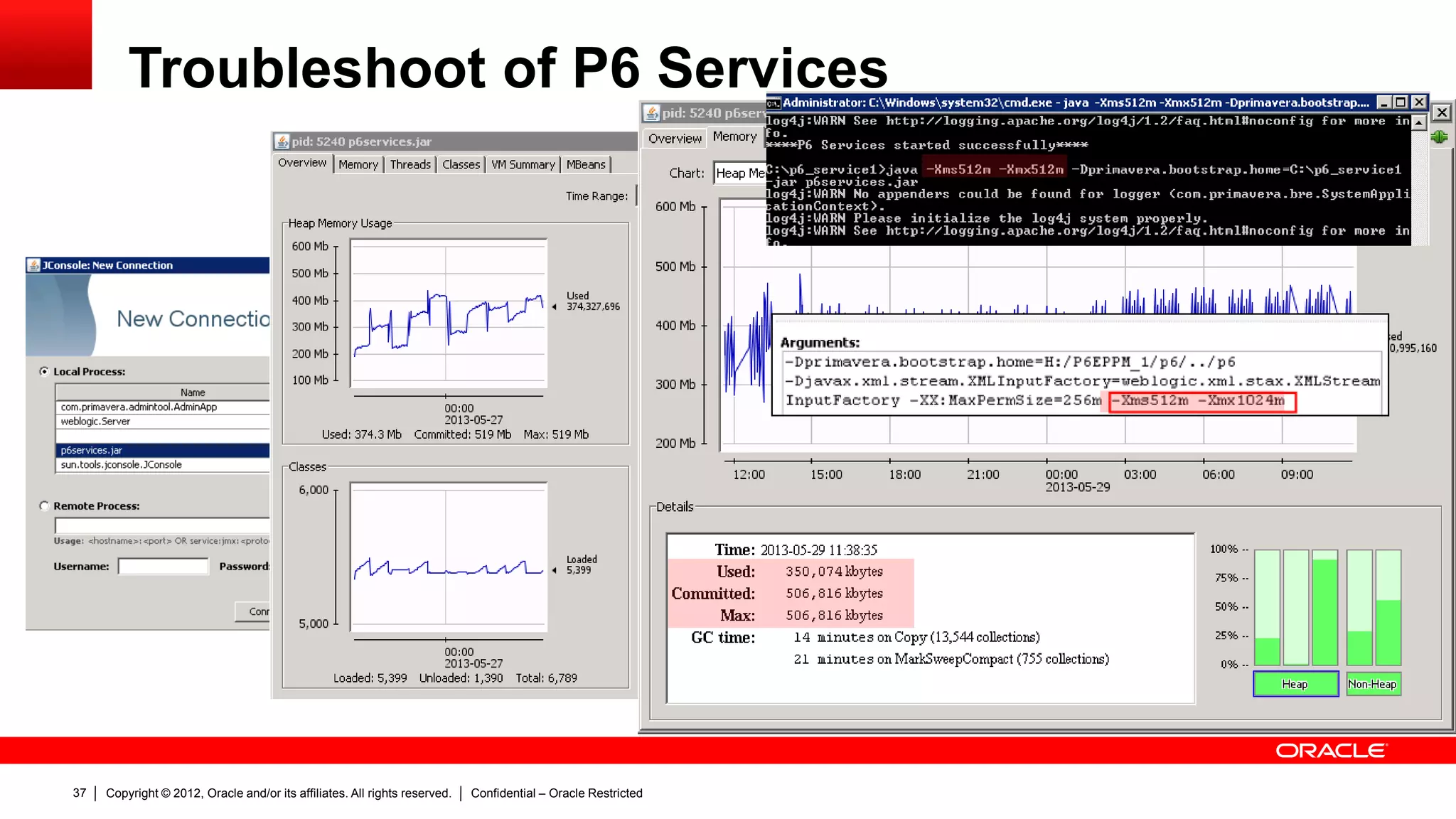
 Performance issues
– Task Manager: To monitor the CPU and Memory usage of the server where P6
services are running.
– Troubleshooting Performance issues using Java Development Kit (JDK) Tools:
– Java VisualVM: http://docs.oracle.com/javase/6/docs/technotes/guides/visualvm/index.html
– Jconsole: http://docs.oracle.com/javase/6/docs/technotes/guides/management/jconsole.html
– JRockit Management Console:
http://www.oracle.com/technetwork/middleware/jrockit/overview/index-090630.html
Copyright © 2012, Oracle and/or its affiliates. All rights reserved. Confidential – Oracle Restricted37
Troubleshoot of P6 Services
Copyright © 2012, Oracle and/or its affiliates. All rights reserved. Confidential – Oracle Restricted38
Best Practices
 Summarize Projects instead of EPS
 Monitor the Heap Memory Usage of P6 Services.
 Run heavily data-intensive jobs in off-peak hours
 Deploy P6 Services as a separate application
 Use the latest Service Pack / Hot Fix available for your version
Copyright © 2012, Oracle and/or its affiliates. All rights reserved. Confidential – Oracle Restricted39
Top Articles and Community Links
 Knowledge Base notes
– How To Configure a Separate Server Or Java Process for P6 Services (Job Services) in P6 EPPM r8.1 And Later
Releases (Doc ID 1357440.1)
– How To Find What Project Failed When Running a Summarize Scheduled Service (Doc ID 1532839.1)
– How To Enable Publication Services in P6 EPPM R8.1/R8.2 (Doc ID 1324828.1)
– How To Change the Connection Pool Settings For P6 Web Access (Doc ID 1484704.1)
– P6 Project Data Is Not Being Published Via The Publication Services (Doc ID 1333858.1)
– Configure P6Services.jar (Scheduled Services) as a Windows Service (Doc ID 1392903.1)
 Oracle Technology Network documentation
– P6 Extended Schema White Paper 8.1:
http://docs.oracle.com/cd/E20686_01/English/Technical_Documentation/Reporting_Database/P6%20Extended%20Schem
a%20White%20Paper.pdf
 Oracle Blogs
– https://blogs.oracle.com/priminout/entry/px_services_project_publication_arbiter
 Community:
– https://communities.oracle.com/portal/server.pt?open=514&objID=224&mode=2&threadid=720142
Copyright © 2012, Oracle and/or its affiliates. All rights reserved. Confidential – Oracle Restricted40
Summary
 P6 Services definition
 How to work with P6 Services
 How to troubleshoot P6 Services
 Best Practices to work with P6 Services
 Links to highlighted documents
What we covered today
Copyright © 2012, Oracle and/or its affiliates. All rights reserved. Confidential – Oracle Restricted41
Learn More
 About Oracle Support Best Practices
www.oracle.com/goto/proactivesupport
 Get Proactive in My Oracle Support
https://support. oracle.com | Doc ID: 432.1
 Get Proactive Blog
https://blogs.oracle.com/getproactive/
 Ask the Get Proactive Team
get-proactive_ww@oracle.com
Available References and Resources to Get Proactive
Copyright © 2012, Oracle and/or its affiliates. All rights reserved. Confidential – Oracle Restricted42
Questions & Answers
Copyright © 2012, Oracle and/or its affiliates. All rights reserved. Confidential – Oracle Restricted43
THANK YOU
Copyright © 2012, Oracle and/or its affiliates. All rights reserved. Confidential – Oracle Restricted44

P6 Services: How to install, configure, tips and troubleshooting

  • 1.
    P6 Services: Howto install, configure, tips and troubleshooting Ruben Reyes M, Pablo Oyarzo M
  • 2.
    Copyright © 2012,Oracle and/or its affiliates. All rights reserved. Confidential – Oracle Restricted6 Program Agenda  Definition & Architecture  Working with P6 Services  Troubleshoot and Best Practices  Q&A
  • 3.
    Copyright © 2012,Oracle and/or its affiliates. All rights reserved. Confidential – Oracle Restricted7 Definition & Architecture of P6 Services
  • 4.
    Copyright © 2012,Oracle and/or its affiliates. All rights reserved. Confidential – Oracle Restricted8 Job Services v/s P6 Services – Job Services (Pre release 8.x)  Windows based  Limited functionalities  Not Scalable – P6 Services (Post release 8.x)  Java based (platform independent)  Multiple functionalities  Highly Scalable  Publish Project and Global data
  • 5.
    Copyright © 2012,Oracle and/or its affiliates. All rights reserved. Confidential – Oracle Restricted9 Definition of P6 Services – P6 Services  ASAP Services  Project Scheduled Services (Summarize, Apply Actuals, Level, Scheduling)  Publication Services – Project Services » Project Arbiter » Publish Project – Global Services » Publish Enterprise Data » Publish Resource Summaries » Publish Resource Management » Publish Security What PX tables are updated when running Global Scheduled Services or Publish Project (Doc ID 1491245.1)
  • 6.
    Copyright © 2012,Oracle and/or its affiliates. All rights reserved. Confidential – Oracle Restricted10 Architecture of P6 Services P6 EPPM DatabaseMidTierApplications Web Application Servers Web Application ServersWeb Application Server(s) Web Browser P6 Professional Client P6 Services P6 Services Server(s)
  • 7.
    Copyright © 2012,Oracle and/or its affiliates. All rights reserved. Confidential – Oracle Restricted11 Working with P6 Services
  • 8.
    Copyright © 2012,Oracle and/or its affiliates. All rights reserved. Confidential – Oracle Restricted12 Working with P6 Services  Prerequisites: – P6 services executed in the same P6 server will use the same resources that P6 server utilize. – P6 services executed in a different server will require to have installed a certified version of JDK for P6 to work. (Refer to Tested configurations) – In a different server a JAVA HOME variable must exist – It can be installed and configured in UNIX or Windows OS.
  • 9.
    Copyright © 2012,Oracle and/or its affiliates. All rights reserved. Confidential – Oracle Restricted13 Working with P6 Services  Prerequisites: Number of Objects/Deployment categories SMALL MEDIUM LARGE Projects 200 1,000 50,000 Active Users 50 100 200 Activities 100,000 1,000,000 5,000,000 Activities per project 5,000 10,000 20,000 Resources 500 1,000 4,000 Resource assignments 100,000 1,000,000 5,000,000 Resource assignments per project 5,000 10,000 20,000 Risks 100 500 2,500 Resource/Deployment categories SMALL MEDIUM LARGE Operating System Oracle Enterprise Linux (OEL) 64-bit or Windows server 64-bit or equivalent Oracle Enterprise Linux (OEL) 64-bit or Windows server 64-bit or equivalent Oracle Enterprise Linux (OEL) 64-bit or Windows server 64-bit or equivalent CPU Intel Xeon 5000 series (Quad Core 3.46 GHz) or equivalent Intel Xeon 5000 series (Quad Core 3.46 GHz) or equivalent Intel Xeon 5000 series (Quad Core 3.46 GHz) or equivalent RAM 8 GB 8 GB 16 GB Java Heap Size 4 GB per node 4 GB per node 8 GB per node Storage 50 GB, depending on log historic log storage 75 GB, depending on log historic log storage 100 GB, depending on log historic log storage
  • 10.
    Copyright © 2012,Oracle and/or its affiliates. All rights reserved. Confidential – Oracle Restricted14 Working with P6 Services  Configuring P6 services in a different server – P6 services uses the file p6service.jar to execute all the jobs that were explained previously. – Executing the p6service.jar file will create a new configuration in the Primavera administrator. – It is recommended to disable the job service execution in the P6 server and enable it in the new configuration. Unless the load or execution of the services requires to be shared in P6 server and P6 services server. – The configuration process will allow to set the amount of memory that P6 services will use.
  • 11.
    Copyright © 2012,Oracle and/or its affiliates. All rights reserved. Confidential – Oracle Restricted15 Working with P6 Services  Configuring P6 services in a different server How To Configure LOG4J With The P6 Services (P6Services.jar) (Doc ID 1479979.1)
  • 12.
    Copyright © 2012,Oracle and/or its affiliates. All rights reserved. Confidential – Oracle Restricted16 Working with P6 Services  Configuring P6 services in a different server
  • 13.
    Copyright © 2012,Oracle and/or its affiliates. All rights reserved. Confidential – Oracle Restricted17 Working with P6 Services  Configuring P6 services in a different server How To Configure a Separate Server Or Java Process for P6 Services (Job Services) in P6 EPPM r8.1 And Later Releases [ID 1357440.1]
  • 14.
    Copyright © 2012,Oracle and/or its affiliates. All rights reserved. Confidential – Oracle Restricted18 Working with P6 Services  Configuring P6 services – Job service Poll Rate is the time that is verified in the JOBSVC table if there is a new job to be executed – ASAP cleanup rate is the interval that is used to clean up the table JOBSVC and JOBLOG for the ASAP jobs – Enable Job Cleanup on Startup is used in case of failure, once P6 server is started Settings Default Value (recommended) Valid Range Services/Publication/Services/Project Arbiter/Concurrent Threads 1 0-1 Services/Publication/Services/Publish Project/Concurrent Threads 2 0-20 Services/Publication/Services/Publish Enterprise Data/Concurrent Threads 1 0-1 Services/Publication/Services/Publish Enterprise Summaries/Concurrent Threads 1 0-1 Services/Publication/Services/Publish Resource Management/Concurrent Threads 1 0-1 Services/(Scheduler,Summarizer,Apply Actuals)/Concurrent Threads 2 0-20
  • 15.
    Copyright © 2012,Oracle and/or its affiliates. All rights reserved. Confidential – Oracle Restricted19 Working with P6 Services  Configuring P6 services – Page Size the number of business objects that can be processed per thread. – Max Job Count the number of parallel threads that can be processing business objects. Type of Data Setting Default Value (recommended) Valid Range General Page Size 32 1-8192 Max Job count 1 1-20 Time Distributed Page Size 16 1-8192 Max Job count 1 1-20 Blob Page Size 25 1-8192 Max Job count 1 1-20 Note: The number of the page size will improve the performance of the P6 services but more resources will be required in the server.
  • 16.
    Copyright © 2012,Oracle and/or its affiliates. All rights reserved. Confidential – Oracle Restricted20 Working with P6 Services  Configuring P6 services – Log severity level for all publication services. The values are inclusive. For example, choose ‘debug’ to log all messages; choose ‘warning’ to log both warning and error level messages.
  • 17.
    Copyright © 2012,Oracle and/or its affiliates. All rights reserved. Confidential – Oracle Restricted21 Working with P6 Services Setting Global Schedule Services
  • 18.
    Copyright © 2012,Oracle and/or its affiliates. All rights reserved. Confidential – Oracle Restricted22 Working with P6 Services Project Schedule Services Web Access ASAP Job Services Professional Client
  • 19.
    Copyright © 2012,Oracle and/or its affiliates. All rights reserved. Confidential – Oracle Restricted23 Working with P6 Services  Status of the services •Delegated: When the parent summarization job is running and waiting for child jobs to be completed. •Pending: the service was just created or if the service is waiting in queue. •Running: the service is running on the service machine. •Failed: When the service cannot be completed •Completed with Errors: Completed with Errors is returned if only one project in a group of ten projects could not be summarized. •Complete: When the service completes successfully.
  • 20.
    Copyright © 2012,Oracle and/or its affiliates. All rights reserved. Confidential – Oracle Restricted24 Troubleshoot of P6 Services
  • 21.
    Copyright © 2012,Oracle and/or its affiliates. All rights reserved. Confidential – Oracle Restricted25 Troubleshoot of P6 Services  Logs created by P6 Services  Desktop Client » Job Status (Tools > Job Status)  Web Client: » Project Scheduled Services (Project View) » Global Scheduled Services (Administer > Global Scheduled Services) » View Services Status (Project View > Activities > Actions > View Services Status)  Files: » <local drive>P6Homep6WebAccessLogsP6WebAccess.html » <local drive>P6Homep6WebAccessLogsservices<service_name>  Database » Jobsvc table » Joblog table
  • 22.
    Copyright © 2012,Oracle and/or its affiliates. All rights reserved. Confidential – Oracle Restricted26 Troubleshoot of P6 Services: Schedule Services  Desktop Client – You can find details about Scheduled and ASAP Services in Job status option, under the Tools menu. – After version 8.2, the “View Log” button was added to Job status window. – “View Log” allows you to read log files from the database that may be helpful to troubleshoot the issue.
  • 23.
    Copyright © 2012,Oracle and/or its affiliates. All rights reserved. Confidential – Oracle Restricted27 Troubleshoot of P6 Services: Schedule Services  Web Client – There are 2 views where we can find information about scheduled services: – Project Scheduled Services – View Services Status (Project View > Activities > Action)
  • 24.
    Copyright © 2012,Oracle and/or its affiliates. All rights reserved. Confidential – Oracle Restricted28 Troubleshoot of P6 Services: Schedule Services  Files – <local drive>P6Homep6WebAccessLogsP6WebAccess.html  Database – Jobsvc table – Joblog table > job_log_data column
  • 25.
    Copyright © 2012,Oracle and/or its affiliates. All rights reserved. Confidential – Oracle Restricted29 Troubleshoot of P6 Services: Schedule Services  Troubleshooting a Failed service using Client application, Web Application, Files and Database
  • 26.
    Copyright © 2012,Oracle and/or its affiliates. All rights reserved. Confidential – Oracle Restricted30 Troubleshoot of P6 Services: Schedule Services  Error found in View Log Icon (P6 Web): “Error ??EXCEPTION: com.primavera.summarizer.SummarizerException:Failed calculating field rollups for project 4357 and wbs ids [24526, 24527, 24525, 24535, 24534, 24533, 24531, 24530, 24529, 24539, 24538, 24537, 24536]??”  Error found in Joblog table: xml version='1.0' encoding='UTF-8'?><log><logs.error i18Value="true" type="STRING">EXCEPTION: com.primavera.summarizer.SummarizerException:Failed calculating field rollups for project 4357 and wbs ids [24526, 24527, 24525, 24535, 24534, 24533, 24531, 24530, 24529, 24539, 24538, 24537, 24536]</logs.error></log>  Error found in P6WebAccess Logs: “com.primavera.summarizer.SummarizerException: Failed calculating field rollups for project 4357 and wbs ids [24526, 24527, 24525, 24535, 24534, 24533, 24531, 24530, 24529, 24539, 24538, 24537, 24536] at com.primavera.summarizer.dao.ActivityDAO.buildSummarizedFields(Unknown Source) at com.primavera.summarizer.ProjectDataSummarizer.a(Unknown Source) at com.primavera.summarizer.ProjectDataSummarizer.summarize(Unknown Source) at com.primavera.summarizer.Summarizer.a(Unknown Source) at com.primavera.summarizer.Summarizer.a(Unknown Source) at com.primavera.summarizer.Summarizer.runJob(Unknown Source) at com.primavera.jobsvc.common.JobServiceExecutable.c(Unknown Source) at com.primavera.jobsvc.common.JobServiceExecutable.a(Unknown Source) at com.primavera.jobsvc.common.JobServiceExecutable.execute(Unknown Source) at com.primavera.infr.threadpool.ThreadPoolImpl.run(Unknown Source) at java.lang.Thread.run(Thread.java:662) Caused by: java.lang.NullPointerException…”
  • 27.
    Copyright © 2012,Oracle and/or its affiliates. All rights reserved. Confidential – Oracle Restricted31 Troubleshoot of P6 Services: Schedule Services  Go to My Oracle Support and search for the error message:
  • 28.
    Copyright © 2012,Oracle and/or its affiliates. All rights reserved. Confidential – Oracle Restricted32 Troubleshoot of P6 Services: Project Publication Services  Web Client – Track Services from Project View > Activities > Actions > View Services Status . – Able to see Scheduled and Project Publication Services. – If you click on the “View Log Icon” you can see more details about the service. – The logging severity level configured in the P6 administrator
  • 29.
    Copyright © 2012,Oracle and/or its affiliates. All rights reserved. Confidential – Oracle Restricted33 Troubleshoot of P6 Services: Project Publication Services  Files – Go to P6 home folder (or P6 services folder) and then jt_project folder. P6 will create one file per job.  Database – Jobsvc table . Job_name similar to Px Project <DATABASE PROJECT ID>. – Logs from: Joblog table > job_log_data column
  • 30.
    Copyright © 2012,Oracle and/or its affiliates. All rights reserved. Confidential – Oracle Restricted34 Troubleshoot of P6 Services: Project Publication Services  Example of 2 Common Issues: 1) Error: "Connection has been recycled. Database <name of the database> Pool PML“ 2) P6 Project Data Is Stuck and Not Being Published
  • 31.
    Copyright © 2012,Oracle and/or its affiliates. All rights reserved. Confidential – Oracle Restricted35 Troubleshoot of P6 Services  Factors that can impact in performance issues:  Number of concurrent jobs  Number of Activities / Projects / EPS  Java Memory Assigned to P6 services or P6 deployment  Database server impact
  • 32.
    Copyright © 2012,Oracle and/or its affiliates. All rights reserved. Confidential – Oracle Restricted36 Troubleshoot of P6 Services  Performance issues – Task Manager: To monitor the CPU and Memory usage of the server where P6 services are running. – Troubleshooting Performance issues using Java Development Kit (JDK) Tools: – Java VisualVM: http://docs.oracle.com/javase/6/docs/technotes/guides/visualvm/index.html – Jconsole: http://docs.oracle.com/javase/6/docs/technotes/guides/management/jconsole.html – JRockit Management Console: http://www.oracle.com/technetwork/middleware/jrockit/overview/index-090630.html
  • 33.
    Copyright © 2012,Oracle and/or its affiliates. All rights reserved. Confidential – Oracle Restricted37 Troubleshoot of P6 Services
  • 34.
    Copyright © 2012,Oracle and/or its affiliates. All rights reserved. Confidential – Oracle Restricted38 Best Practices  Summarize Projects instead of EPS  Monitor the Heap Memory Usage of P6 Services.  Run heavily data-intensive jobs in off-peak hours  Deploy P6 Services as a separate application  Use the latest Service Pack / Hot Fix available for your version
  • 35.
    Copyright © 2012,Oracle and/or its affiliates. All rights reserved. Confidential – Oracle Restricted39 Top Articles and Community Links  Knowledge Base notes – How To Configure a Separate Server Or Java Process for P6 Services (Job Services) in P6 EPPM r8.1 And Later Releases (Doc ID 1357440.1) – How To Find What Project Failed When Running a Summarize Scheduled Service (Doc ID 1532839.1) – How To Enable Publication Services in P6 EPPM R8.1/R8.2 (Doc ID 1324828.1) – How To Change the Connection Pool Settings For P6 Web Access (Doc ID 1484704.1) – P6 Project Data Is Not Being Published Via The Publication Services (Doc ID 1333858.1) – Configure P6Services.jar (Scheduled Services) as a Windows Service (Doc ID 1392903.1)  Oracle Technology Network documentation – P6 Extended Schema White Paper 8.1: http://docs.oracle.com/cd/E20686_01/English/Technical_Documentation/Reporting_Database/P6%20Extended%20Schem a%20White%20Paper.pdf  Oracle Blogs – https://blogs.oracle.com/priminout/entry/px_services_project_publication_arbiter  Community: – https://communities.oracle.com/portal/server.pt?open=514&objID=224&mode=2&threadid=720142
  • 36.
    Copyright © 2012,Oracle and/or its affiliates. All rights reserved. Confidential – Oracle Restricted40 Summary  P6 Services definition  How to work with P6 Services  How to troubleshoot P6 Services  Best Practices to work with P6 Services  Links to highlighted documents What we covered today
  • 37.
    Copyright © 2012,Oracle and/or its affiliates. All rights reserved. Confidential – Oracle Restricted41 Learn More  About Oracle Support Best Practices www.oracle.com/goto/proactivesupport  Get Proactive in My Oracle Support https://support. oracle.com | Doc ID: 432.1  Get Proactive Blog https://blogs.oracle.com/getproactive/  Ask the Get Proactive Team get-proactive_ww@oracle.com Available References and Resources to Get Proactive
  • 38.
    Copyright © 2012,Oracle and/or its affiliates. All rights reserved. Confidential – Oracle Restricted42 Questions & Answers
  • 39.
    Copyright © 2012,Oracle and/or its affiliates. All rights reserved. Confidential – Oracle Restricted43 THANK YOU
  • 40.
    Copyright © 2012,Oracle and/or its affiliates. All rights reserved. Confidential – Oracle Restricted44