Copyright © 2016, Oracle and/or its affiliates. All rights reserved. |
Oracle Primavera
What’s New in Primavera Unifier 16.1
Ray McEntee - Director, Product Strategy
Krishna Madhuvarsu – Director, Product Strategy
April, 2016
Oracle Confidential – Internal/Restricted/Highly Restricted
Copyright © 2016, Oracle and/or its affiliates. All rights reserved. |
Safe Harbor Statement
The following is intended to outline our general product direction. It is intended for
information purposes only, and may not be incorporated into any contract. It is not a
commitment to deliver any material, code, or functionality, and should not be relied upon
in making purchasing decisions. The development, release, and timing of any features or
functionality described for Oracle’s products remains at the sole discretion of Oracle.
Copyright © 2016, Oracle and/or its affiliates. All rights reserved. |
Summary
• Mobile Application
• Primavera Unifier Gateway Provider Enhancements
• Project Controls Base Configuration
• PM Book Templates
• Primavera Analytics
• Custom Report Enhancements
• AutoVue 3D Support
• Usability Enhancements
Copyright © 2016, Oracle and/or its affiliates. All rights reserved. |
Mobile Application
Oracle Confidential – Internal/Restricted/Highly Restricted 5
Copyright © 2016, Oracle and/or its affiliates. All rights reserved. |
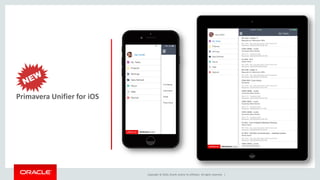
Primavera Unifier for iOS
Copyright © 2016, Oracle and/or its affiliates. All rights reserved. |
• Key Features
– Review the tasks and send them to
next step in the workflow.
– Create Business Process records on
Project or Company level.
– Attach pictures to record right from the
filed where the work is happening.
– Work on your Tasks or create new
records online or offline.
– Available on iPhone and iPad
7
Oracle’s Primavera Unifier Mobile 16.1
Key Features & Benefits
• Benefits
– Cut down the paper work and manual
effort updating tasks.
– Faster turnaround times responding to
tasks.
– Access key task information wherever
you are.
– Executives can now review and
approve the key organizational
processes on the go.
Copyright © 2016, Oracle and/or its affiliates. All rights reserved. |
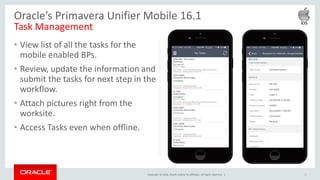
• View list of all the tasks for the
mobile enabled BPs.
• Review, update the information and
submit the tasks for next step in the
workflow.
• Attach pictures right from the
worksite.
• Access Tasks even when offline.
8
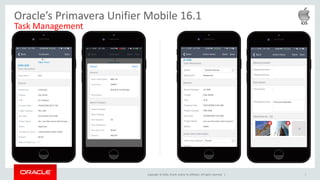
Oracle’s Primavera Unifier Mobile 16.1
Task Management
Copyright © 2016, Oracle and/or its affiliates. All rights reserved. | 9
Oracle’s Primavera Unifier Mobile 16.1
Task Management
Copyright © 2016, Oracle and/or its affiliates. All rights reserved. |
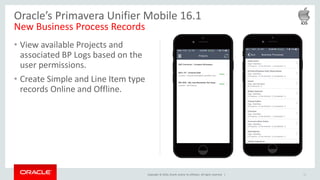
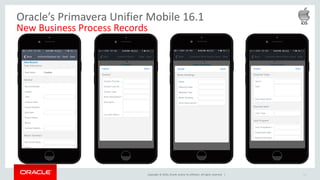
• View available Projects and
associated BP Logs based on the
user permissions.
• Create Simple and Line Item type
records Online and Offline.
10
Oracle’s Primavera Unifier Mobile 16.1
New Business Process Records
Copyright © 2016, Oracle and/or its affiliates. All rights reserved. | 11
Oracle’s Primavera Unifier Mobile 16.1
New Business Process Records
Copyright © 2016, Oracle and/or its affiliates. All rights reserved. |
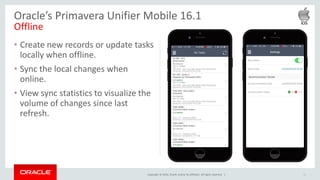
• Create new records or update tasks
locally when offline.
• Sync the local changes when
online.
• View sync statistics to visualize the
volume of changes since last
refresh.
12
Oracle’s Primavera Unifier Mobile 16.1
Offline
Copyright © 2016, Oracle and/or its affiliates. All rights reserved. | 13
Oracle’s Primavera Unifier Mobile 16.1
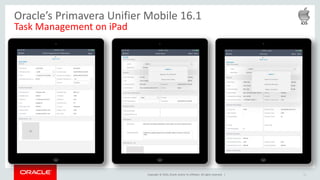
Task Management on iPad
Copyright © 2016, Oracle and/or its affiliates. All rights reserved. | 14
Oracle’s Primavera Unifier Mobile 16.1
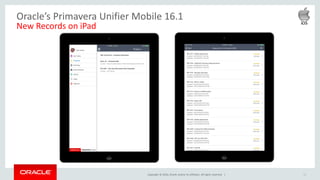
New Records on iPad
Copyright © 2016, Oracle and/or its affiliates. All rights reserved. |
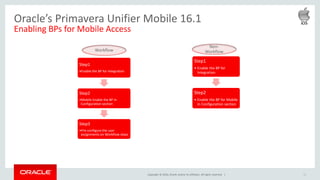
Step1
•Enable the BP for Integration
Step2
•Mobile Enable the BP in
Configuration section
Step3
•Pre-configure the user
assignments on Workflow steps
15
Oracle’s Primavera Unifier Mobile 16.1
Enabling BPs for Mobile Access
Step1
• Enable the BP for
Integration
Step2
• Enable the BP for Mobile
in Configuration section
Workflow
Non-
Workflow
Copyright © 2016, Oracle and/or its affiliates. All rights reserved. |
Primavera Unifier Gateway Provider
Oracle Confidential – Internal/Restricted/Highly Restricted 16
Copyright © 2016, Oracle and/or its affiliates. All rights reserved. |
Use Case
• Provide the ability to be able to use Primavera Gateway to synchronize
Primavera Unifier business processes with external systems via Primavera
Gateway.
• Provides a means to create an integration with an external system without
have to code the integration.
• Typically this is used to create Contracts, Change Orders and Payment
applications in the corporate ERP System and to receive Payment
Information back from the ERP system.
Copyright © 2016, Oracle and/or its affiliates. All rights reserved. |
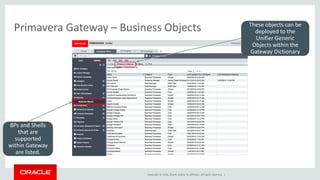
Primavera Gateway – Business Objects
BPs and Shells
that are
supported
within Gateway
are listed.
These objects can be
deployed to the
Unifier Generic
Objects within the
Gateway Dictionary
Copyright © 2016, Oracle and/or its affiliates. All rights reserved. |
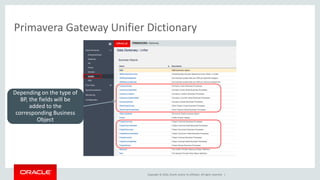
Primavera Gateway Unifier Dictionary
Depending on the type of
BP, the fields will be
added to the
corresponding Business
Object
Copyright © 2016, Oracle and/or its affiliates. All rights reserved. |
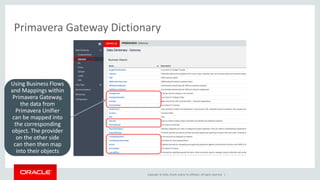
Primavera Gateway Dictionary
Using Business Flows
and Mappings within
Primavera Gateway,
the data from
Primavera Unifier
can be mapped into
the corresponding
object. The provider
on the other side
can then then map
into their objects
Copyright © 2016, Oracle and/or its affiliates. All rights reserved. |
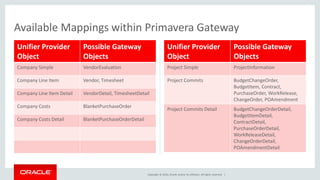
Unifier Provider
Object
Possible Gateway
Objects
Company Simple VendorEvaluation
Company Line Item Vendor, Timesheet
Company Line Item Detail VendorDetail, TimesheetDetail
Company Costs BlanketPurchaseOrder
Company Costs Detail BlanketPurchaseOrderDetail
Unifier Provider
Object
Possible Gateway
Objects
Project Simple ProjectInformation
Project Commits BudgetChangeOrder,
BudgetItem, Contract,
PurchaseOrder, WorkRelease,
ChangeOrder, POAmendment
Project Commits Detail BudgetChangeOrderDetail,
BudgetItemDetail,
ContractDetail,
PurchaseOrderDetail,
WorkReleaseDetail,
ChangeOrderDetail,
POAmendmentDetail
Available Mappings within Primavera Gateway
Copyright © 2016, Oracle and/or its affiliates. All rights reserved. |
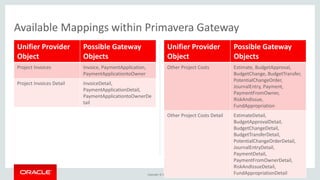
Unifier Provider
Object
Possible Gateway
Objects
Project Invoices Invoice, PaymentApplication,
PaymentApplicationtoOwner
Project Invoices Detail InvoiceDetail,
PaymentApplicationDetail,
PaymentApplicationtoOwnerDe
tail
Unifier Provider
Object
Possible Gateway
Objects
Other Project Costs Estimate, BudgetApproval,
BudgetChange, BudgetTransfer,
PotentialChangeOrder,
JournalEntry, Payment,
PaymentFromOwner,
RiskAndIssue,
FundAppropriation
Other Project Costs Detail EstimateDetail,
BudgetApprovalDetail,
BudgetChangeDetail,
BudgetTransferDetail,
PotentialChangeOrderDetail,
JournalEntryDetail,
PaymentDetail,
PaymentFromOwnerDetail,
RiskAndIssueDetail,
FundAppropriationDetail
Available Mappings within Primavera Gateway
Copyright © 2016, Oracle and/or its affiliates. All rights reserved. |
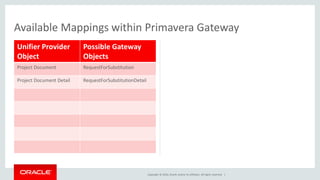
Unifier Provider
Object
Possible Gateway
Objects
Project Document RequestForSubstitution
Project Document Detail RequestForSubstitutionDetail
Available Mappings within Primavera Gateway
Copyright © 2016, Oracle and/or its affiliates. All rights reserved. |
Project Controls Base Configuration
Oracle Confidential – Internal/Restricted/Highly Restricted 24
Copyright © 2016, Oracle and/or its affiliates. All rights reserved. |
New Base Configuration
• Now contains two starting templates
– Owner
– Contractor
• Both templates provide significant starting points for customers to
configure Unifier based on their requirements.
• New Contractor template includes 46 Business Processes, the majority of
which are new.
• Owner template contains 44 Business Process many of which have been
updated/replaced since 15.2.
Copyright © 2016, Oracle and/or its affiliates. All rights reserved. |
New Base Configuration
• Setup configuration now uses standard group names rather than generic
groups.
• Incorporates more recent functionality
– Summary Payment Application type SOVs
– Activity Sheets
– Summary Sheets within Cash Flow
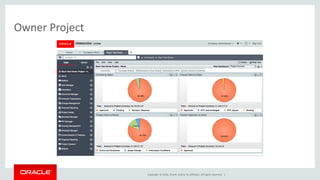
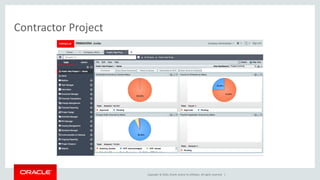
• New Project Dashboards with drill down capabilities added.
Copyright © 2016, Oracle and/or its affiliates. All rights reserved. |
Owner Project
Copyright © 2016, Oracle and/or its affiliates. All rights reserved. |
Contractor Project
Copyright © 2016, Oracle and/or its affiliates. All rights reserved. |
PM Book Templates
Oracle Confidential – Internal/Restricted/Highly Restricted 29
Copyright © 2016, Oracle and/or its affiliates. All rights reserved. |
PM Book Templates
• Since every Asset will have a related PM Book that is based on a template,
if you need to change all PM Books for a type of asset it is an extremely
time consuming effort.
• This enhancement allows you to push changes from a PM Book template to
all PM Books that were created from the template.
• This will significantly reduce the effort required and will ensure all PM
Books are updated.
Copyright © 2016, Oracle and/or its affiliates. All rights reserved. |
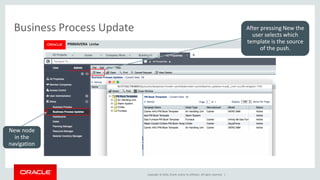
Business Process Update
New node
in the
navigation
After pressing New the
user selects which
template is the source
of the push.
Copyright © 2016, Oracle and/or its affiliates. All rights reserved. |
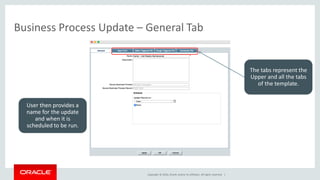
Business Process Update – General Tab
User then provides a
name for the update
and when it is
scheduled to be run.
The tabs represent the
Upper and all the tabs
of the template.
Copyright © 2016, Oracle and/or its affiliates. All rights reserved. |
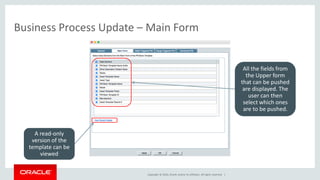
Business Process Update – Main Form
All the fields from
the Upper form
that can be pushed
are displayed. The
user can then
select which ones
are to be pushed.
A read-only
version of the
template can be
viewed
Copyright © 2016, Oracle and/or its affiliates. All rights reserved. |
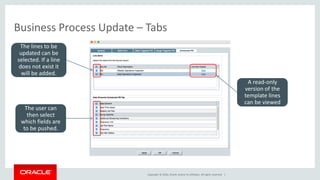
Business Process Update – Tabs
A read-only
version of the
template lines
can be viewed
The lines to be
updated can be
selected. If a line
does not exist it
will be added.
The user can
then select
which fields are
to be pushed.
Copyright © 2016, Oracle and/or its affiliates. All rights reserved. |
PM Book Templates
• After the push, Unifier will recalculate when the next work orders are to be
created.
• It will take into account any new families that are created.
• Line items cannot be deleted, but they can be set to a status that does not
generate a work order.
Copyright © 2016, Oracle and/or its affiliates. All rights reserved. |
Primavera Analytics
Oracle Confidential – Internal/Restricted/Highly Restricted 36
Copyright © 2016, Oracle and/or its affiliates. All rights reserved. |
Primavera Analytics
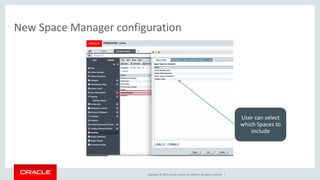
• Include Space and Level data from Primavera Unifier into Primavera
Analytics
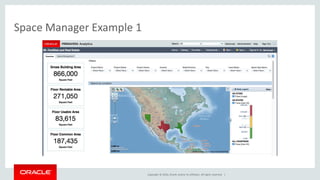
• Quickly identify the amount of space available and where that space is
located.
• Report on rental income from all properties and drill down into specific
properties in order to identify the most profitable.
• Work Order Analysis
Copyright © 2016, Oracle and/or its affiliates. All rights reserved. |
New Space Manager configuration
User can select
which Spaces to
include
Copyright © 2016, Oracle and/or its affiliates. All rights reserved. |
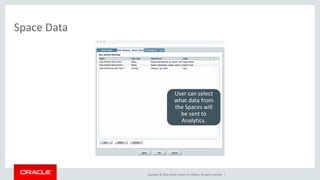
Space Data
User can select
what data from
the Spaces will
be sent to
Analytics.
Copyright © 2016, Oracle and/or its affiliates. All rights reserved. |
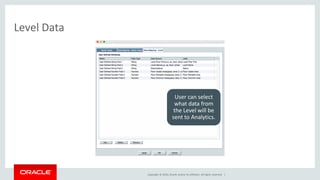
Level Data
User can select
what data from
the Level will be
sent to Analytics.
Copyright © 2016, Oracle and/or its affiliates. All rights reserved. |
Space Manager Example 1
Copyright © 2016, Oracle and/or its affiliates. All rights reserved. |
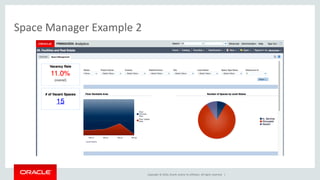
Space Manager Example 2
Copyright © 2016, Oracle and/or its affiliates. All rights reserved. |
Custom Report Enhancements
Oracle Confidential – Internal/Restricted/Highly Restricted 43
Copyright © 2016, Oracle and/or its affiliates. All rights reserved. |
Creating Custom Reports in BI Publisher
• Provides an easier way to create Data Models over the Primavera Unifier
Data Views.
• Can take advantage of the power of BI Publisher to format the reports.
• Can schedule reports directly in BI Publisher.
• Can be synchronized with Primavera Unifier to allow users to run the
reports.
Copyright © 2016, Oracle and/or its affiliates. All rights reserved. |
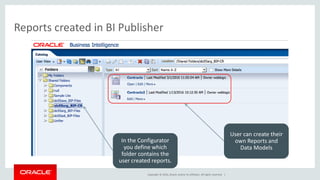
Reports created in BI Publisher
In the Configurator
you define which
folder contains the
user created reports.
User can create their
own Reports and
Data Models
Copyright © 2016, Oracle and/or its affiliates. All rights reserved. |
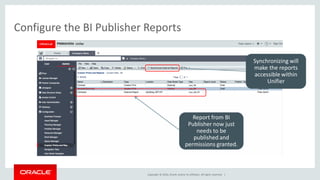
Configure the BI Publisher Reports
Synchronizing will
make the reports
accessible within
Unifier
Report from BI
Publisher now just
needs to be
published and
permissions granted.
Copyright © 2016, Oracle and/or its affiliates. All rights reserved. |
Oracle AutoVue 3D
Oracle Confidential – Internal/Restricted/Highly Restricted 47
Copyright © 2016, Oracle and/or its affiliates. All rights reserved. |
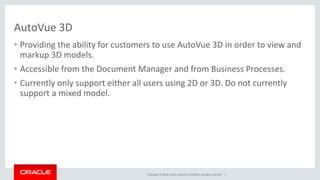
AutoVue 3D
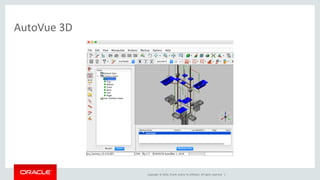
• Providing the ability for customers to use AutoVue 3D in order to view and
markup 3D models.
• Accessible from the Document Manager and from Business Processes.
• Currently only support either all users using 2D or 3D. Do not currently
support a mixed model.
Copyright © 2016, Oracle and/or its affiliates. All rights reserved. |
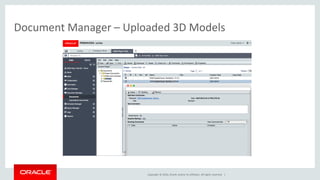
Document Manager – Uploaded 3D Models
Copyright © 2016, Oracle and/or its affiliates. All rights reserved. |
AutoVue 3D
Copyright © 2016, Oracle and/or its affiliates. All rights reserved. |
Usability Enhancements
Oracle Confidential – Internal/Restricted/Highly Restricted 51
Copyright © 2016, Oracle and/or its affiliates. All rights reserved. |
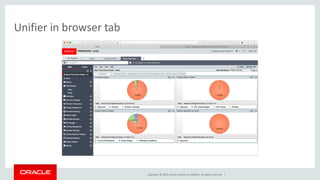
Unifier in browser tab
Copyright © 2016, Oracle and/or its affiliates. All rights reserved. |
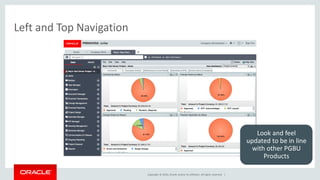
Left and Top Navigation
Look and feel
updated to be in line
with other PGBU
Products
Copyright © 2016, Oracle and/or its affiliates. All rights reserved. |
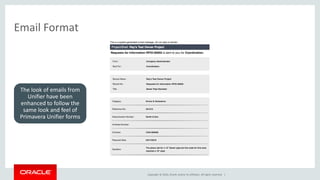
Email Format
The look of emails from
Unifier have been
enhanced to follow the
same look and feel of
Primavera Unifier forms
Copyright © 2016, Oracle and/or its affiliates. All rights reserved. |
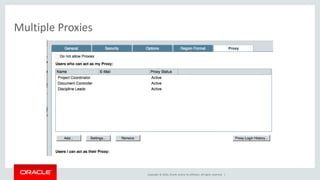
Multiple Proxies
Copyright © 2016, Oracle and/or its affiliates. All rights reserved. |
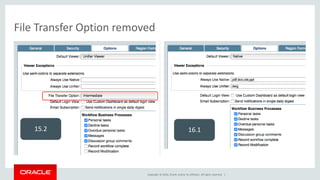
File Transfer Option removed
15.2 16.1
Copyright © 2016, Oracle and/or its affiliates. All rights reserved. |
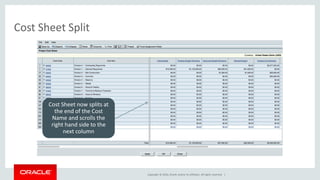
Cost Sheet Split
Cost Sheet now splits at
the end of the Cost
Name and scrolls the
right hand side to the
next column
Copyright © 2016, Oracle and/or its affiliates. All rights reserved. |
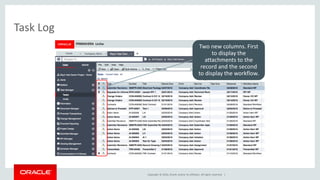
Task Log
Two new columns. First
to display the
attachments to the
record and the second
to display the workflow.
Copyright © 2016, Oracle and/or its affiliates. All rights reserved. |
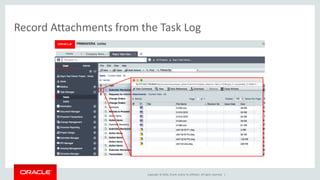
Record Attachments from the Task Log
Copyright © 2016, Oracle and/or its affiliates. All rights reserved. |
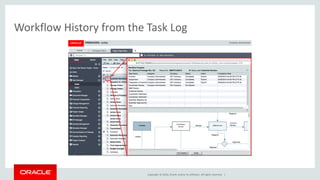
Workflow History from the Task Log
Copyright © 2016, Oracle and/or its affiliates. All rights reserved. |
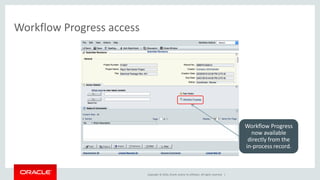
Workflow Progress access
Workflow Progress
now available
directly from the
in-process record.
Copyright © 2016, Oracle and/or its affiliates. All rights reserved. |
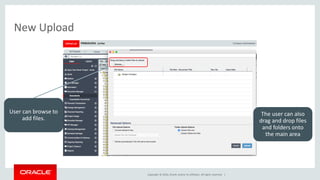
New Upload
User can browse to
add files.
The user can also
drag and drop files
and folders onto
the main area
Copyright © 2016, Oracle and/or its affiliates. All rights reserved. |
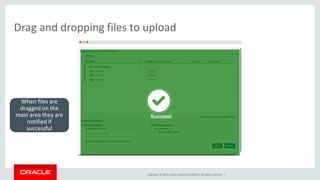
Drag and dropping files to upload
When files are
dragged on the
main area they are
notified if
successful
Copyright © 2016, Oracle and/or its affiliates. All rights reserved. |
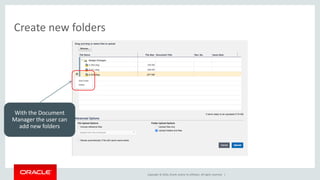
Create new folders
With the Document
Manager the user can
add new folders
Copyright © 2016, Oracle and/or its affiliates. All rights reserved. |
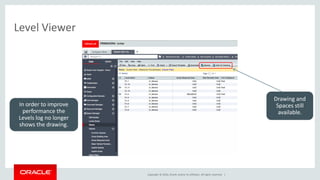
Level Viewer
Drawing and
Spaces still
available.
In order to improve
performance the
Levels log no longer
shows the drawing.
Copyright © 2016, Oracle and/or its affiliates. All rights reserved. |
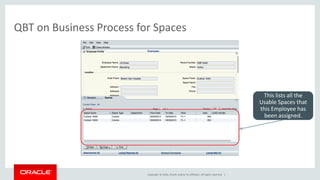
QBT on Business Process for Spaces
This lists all the
Usable Spaces that
this Employee has
been assigned.
Copyright © 2016, Oracle and/or its affiliates. All rights reserved. |
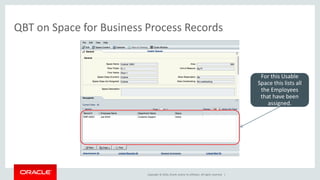
QBT on Space for Business Process Records
For this Usable
Space this lists all
the Employees
that have been
assigned.
Copyright © 2016, Oracle and/or its affiliates. All rights reserved. |
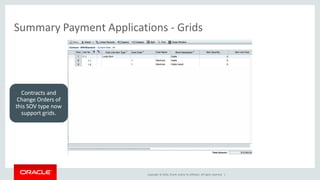
Summary Payment Applications - Grids
Contracts and
Change Orders of
this SOV type now
support grids.
Copyright © 2016, Oracle and/or its affiliates. All rights reserved. |
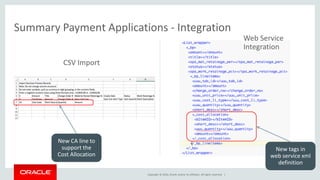
Summary Payment Applications - Integration
New CA line to
support the
Cost Allocation
CSV Import
New tags in
web service xml
definition
Web Service
Integration
Copyright © 2016, Oracle and/or its affiliates. All rights reserved. |
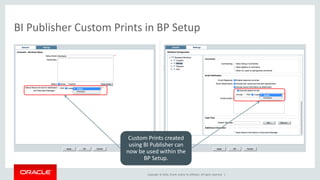
BI Publisher Custom Prints in BP Setup
Custom Prints created
using BI Publisher can
now be used within the
BP Setup.
Copyright © 2016, Oracle and/or its affiliates. All rights reserved. |
Technical Enhancements
Oracle Confidential – Internal/Restricted/Highly Restricted 71
Copyright © 2016, Oracle and/or its affiliates. All rights reserved. |
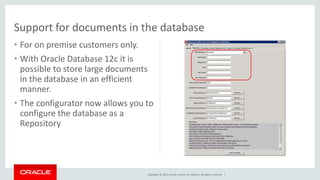
• For on premise customers only.
• With Oracle Database 12c it is
possible to store large documents
in the database in an efficient
manner.
• The configurator now allows you to
configure the database as a
Repository
Support for documents in the database
Copyright © 2016, Oracle and/or its affiliates. All rights reserved. |
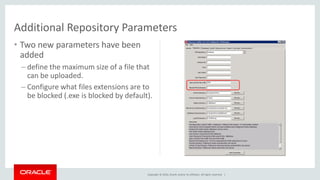
• Two new parameters have been
added
– define the maximum size of a file that
can be uploaded.
– Configure what files extensions are to
be blocked (.exe is blocked by default).
Additional Repository Parameters
Copyright © 2016, Oracle and/or its affiliates. All rights reserved. |
Resending Emails
• Currently if the email server was not accessible, Primavera Unifier would
attempt to send the emails and if the server was not accessible the email
could be lost.
• With 16.1, if we cannot send an email due to the server not being available,
we will store the email in the database and re-send when the email server
is available.
Copyright © 2016, Oracle and/or its affiliates. All rights reserved. |
Safe Harbor Statement
The preceding is intended to outline our general product direction. It is intended for
information purposes only, and may not be incorporated into any contract. It is not a
commitment to deliver any material, code, or functionality, and should not be relied upon
in making purchasing decisions. The development, release, and timing of any features or
functionality described for Oracle’s products remains at the sole discretion of Oracle.
Copyright © 2016, Oracle and/or its affiliates. All rights reserved. |
What's New in Unifier 16.1

What's New in Unifier 16.1

  • 2.
    Copyright © 2016,Oracle and/or its affiliates. All rights reserved. | Oracle Primavera What’s New in Primavera Unifier 16.1 Ray McEntee - Director, Product Strategy Krishna Madhuvarsu – Director, Product Strategy April, 2016 Oracle Confidential – Internal/Restricted/Highly Restricted
  • 3.
    Copyright © 2016,Oracle and/or its affiliates. All rights reserved. | Safe Harbor Statement The following is intended to outline our general product direction. It is intended for information purposes only, and may not be incorporated into any contract. It is not a commitment to deliver any material, code, or functionality, and should not be relied upon in making purchasing decisions. The development, release, and timing of any features or functionality described for Oracle’s products remains at the sole discretion of Oracle.
  • 4.
    Copyright © 2016,Oracle and/or its affiliates. All rights reserved. | Summary • Mobile Application • Primavera Unifier Gateway Provider Enhancements • Project Controls Base Configuration • PM Book Templates • Primavera Analytics • Custom Report Enhancements • AutoVue 3D Support • Usability Enhancements
  • 5.
    Copyright © 2016,Oracle and/or its affiliates. All rights reserved. | Mobile Application Oracle Confidential – Internal/Restricted/Highly Restricted 5
  • 6.
    Copyright © 2016,Oracle and/or its affiliates. All rights reserved. | Primavera Unifier for iOS
  • 7.
    Copyright © 2016,Oracle and/or its affiliates. All rights reserved. | • Key Features – Review the tasks and send them to next step in the workflow. – Create Business Process records on Project or Company level. – Attach pictures to record right from the filed where the work is happening. – Work on your Tasks or create new records online or offline. – Available on iPhone and iPad 7 Oracle’s Primavera Unifier Mobile 16.1 Key Features & Benefits • Benefits – Cut down the paper work and manual effort updating tasks. – Faster turnaround times responding to tasks. – Access key task information wherever you are. – Executives can now review and approve the key organizational processes on the go.
  • 8.
    Copyright © 2016,Oracle and/or its affiliates. All rights reserved. | • View list of all the tasks for the mobile enabled BPs. • Review, update the information and submit the tasks for next step in the workflow. • Attach pictures right from the worksite. • Access Tasks even when offline. 8 Oracle’s Primavera Unifier Mobile 16.1 Task Management
  • 9.
    Copyright © 2016,Oracle and/or its affiliates. All rights reserved. | 9 Oracle’s Primavera Unifier Mobile 16.1 Task Management
  • 10.
    Copyright © 2016,Oracle and/or its affiliates. All rights reserved. | • View available Projects and associated BP Logs based on the user permissions. • Create Simple and Line Item type records Online and Offline. 10 Oracle’s Primavera Unifier Mobile 16.1 New Business Process Records
  • 11.
    Copyright © 2016,Oracle and/or its affiliates. All rights reserved. | 11 Oracle’s Primavera Unifier Mobile 16.1 New Business Process Records
  • 12.
    Copyright © 2016,Oracle and/or its affiliates. All rights reserved. | • Create new records or update tasks locally when offline. • Sync the local changes when online. • View sync statistics to visualize the volume of changes since last refresh. 12 Oracle’s Primavera Unifier Mobile 16.1 Offline
  • 13.
    Copyright © 2016,Oracle and/or its affiliates. All rights reserved. | 13 Oracle’s Primavera Unifier Mobile 16.1 Task Management on iPad
  • 14.
    Copyright © 2016,Oracle and/or its affiliates. All rights reserved. | 14 Oracle’s Primavera Unifier Mobile 16.1 New Records on iPad
  • 15.
    Copyright © 2016,Oracle and/or its affiliates. All rights reserved. | Step1 •Enable the BP for Integration Step2 •Mobile Enable the BP in Configuration section Step3 •Pre-configure the user assignments on Workflow steps 15 Oracle’s Primavera Unifier Mobile 16.1 Enabling BPs for Mobile Access Step1 • Enable the BP for Integration Step2 • Enable the BP for Mobile in Configuration section Workflow Non- Workflow
  • 16.
    Copyright © 2016,Oracle and/or its affiliates. All rights reserved. | Primavera Unifier Gateway Provider Oracle Confidential – Internal/Restricted/Highly Restricted 16
  • 17.
    Copyright © 2016,Oracle and/or its affiliates. All rights reserved. | Use Case • Provide the ability to be able to use Primavera Gateway to synchronize Primavera Unifier business processes with external systems via Primavera Gateway. • Provides a means to create an integration with an external system without have to code the integration. • Typically this is used to create Contracts, Change Orders and Payment applications in the corporate ERP System and to receive Payment Information back from the ERP system.
  • 18.
    Copyright © 2016,Oracle and/or its affiliates. All rights reserved. | Primavera Gateway – Business Objects BPs and Shells that are supported within Gateway are listed. These objects can be deployed to the Unifier Generic Objects within the Gateway Dictionary
  • 19.
    Copyright © 2016,Oracle and/or its affiliates. All rights reserved. | Primavera Gateway Unifier Dictionary Depending on the type of BP, the fields will be added to the corresponding Business Object
  • 20.
    Copyright © 2016,Oracle and/or its affiliates. All rights reserved. | Primavera Gateway Dictionary Using Business Flows and Mappings within Primavera Gateway, the data from Primavera Unifier can be mapped into the corresponding object. The provider on the other side can then then map into their objects
  • 21.
    Copyright © 2016,Oracle and/or its affiliates. All rights reserved. | Unifier Provider Object Possible Gateway Objects Company Simple VendorEvaluation Company Line Item Vendor, Timesheet Company Line Item Detail VendorDetail, TimesheetDetail Company Costs BlanketPurchaseOrder Company Costs Detail BlanketPurchaseOrderDetail Unifier Provider Object Possible Gateway Objects Project Simple ProjectInformation Project Commits BudgetChangeOrder, BudgetItem, Contract, PurchaseOrder, WorkRelease, ChangeOrder, POAmendment Project Commits Detail BudgetChangeOrderDetail, BudgetItemDetail, ContractDetail, PurchaseOrderDetail, WorkReleaseDetail, ChangeOrderDetail, POAmendmentDetail Available Mappings within Primavera Gateway
  • 22.
    Copyright © 2016,Oracle and/or its affiliates. All rights reserved. | Unifier Provider Object Possible Gateway Objects Project Invoices Invoice, PaymentApplication, PaymentApplicationtoOwner Project Invoices Detail InvoiceDetail, PaymentApplicationDetail, PaymentApplicationtoOwnerDe tail Unifier Provider Object Possible Gateway Objects Other Project Costs Estimate, BudgetApproval, BudgetChange, BudgetTransfer, PotentialChangeOrder, JournalEntry, Payment, PaymentFromOwner, RiskAndIssue, FundAppropriation Other Project Costs Detail EstimateDetail, BudgetApprovalDetail, BudgetChangeDetail, BudgetTransferDetail, PotentialChangeOrderDetail, JournalEntryDetail, PaymentDetail, PaymentFromOwnerDetail, RiskAndIssueDetail, FundAppropriationDetail Available Mappings within Primavera Gateway
  • 23.
    Copyright © 2016,Oracle and/or its affiliates. All rights reserved. | Unifier Provider Object Possible Gateway Objects Project Document RequestForSubstitution Project Document Detail RequestForSubstitutionDetail Available Mappings within Primavera Gateway
  • 24.
    Copyright © 2016,Oracle and/or its affiliates. All rights reserved. | Project Controls Base Configuration Oracle Confidential – Internal/Restricted/Highly Restricted 24
  • 25.
    Copyright © 2016,Oracle and/or its affiliates. All rights reserved. | New Base Configuration • Now contains two starting templates – Owner – Contractor • Both templates provide significant starting points for customers to configure Unifier based on their requirements. • New Contractor template includes 46 Business Processes, the majority of which are new. • Owner template contains 44 Business Process many of which have been updated/replaced since 15.2.
  • 26.
    Copyright © 2016,Oracle and/or its affiliates. All rights reserved. | New Base Configuration • Setup configuration now uses standard group names rather than generic groups. • Incorporates more recent functionality – Summary Payment Application type SOVs – Activity Sheets – Summary Sheets within Cash Flow • New Project Dashboards with drill down capabilities added.
  • 27.
    Copyright © 2016,Oracle and/or its affiliates. All rights reserved. | Owner Project
  • 28.
    Copyright © 2016,Oracle and/or its affiliates. All rights reserved. | Contractor Project
  • 29.
    Copyright © 2016,Oracle and/or its affiliates. All rights reserved. | PM Book Templates Oracle Confidential – Internal/Restricted/Highly Restricted 29
  • 30.
    Copyright © 2016,Oracle and/or its affiliates. All rights reserved. | PM Book Templates • Since every Asset will have a related PM Book that is based on a template, if you need to change all PM Books for a type of asset it is an extremely time consuming effort. • This enhancement allows you to push changes from a PM Book template to all PM Books that were created from the template. • This will significantly reduce the effort required and will ensure all PM Books are updated.
  • 31.
    Copyright © 2016,Oracle and/or its affiliates. All rights reserved. | Business Process Update New node in the navigation After pressing New the user selects which template is the source of the push.
  • 32.
    Copyright © 2016,Oracle and/or its affiliates. All rights reserved. | Business Process Update – General Tab User then provides a name for the update and when it is scheduled to be run. The tabs represent the Upper and all the tabs of the template.
  • 33.
    Copyright © 2016,Oracle and/or its affiliates. All rights reserved. | Business Process Update – Main Form All the fields from the Upper form that can be pushed are displayed. The user can then select which ones are to be pushed. A read-only version of the template can be viewed
  • 34.
    Copyright © 2016,Oracle and/or its affiliates. All rights reserved. | Business Process Update – Tabs A read-only version of the template lines can be viewed The lines to be updated can be selected. If a line does not exist it will be added. The user can then select which fields are to be pushed.
  • 35.
    Copyright © 2016,Oracle and/or its affiliates. All rights reserved. | PM Book Templates • After the push, Unifier will recalculate when the next work orders are to be created. • It will take into account any new families that are created. • Line items cannot be deleted, but they can be set to a status that does not generate a work order.
  • 36.
    Copyright © 2016,Oracle and/or its affiliates. All rights reserved. | Primavera Analytics Oracle Confidential – Internal/Restricted/Highly Restricted 36
  • 37.
    Copyright © 2016,Oracle and/or its affiliates. All rights reserved. | Primavera Analytics • Include Space and Level data from Primavera Unifier into Primavera Analytics • Quickly identify the amount of space available and where that space is located. • Report on rental income from all properties and drill down into specific properties in order to identify the most profitable. • Work Order Analysis
  • 38.
    Copyright © 2016,Oracle and/or its affiliates. All rights reserved. | New Space Manager configuration User can select which Spaces to include
  • 39.
    Copyright © 2016,Oracle and/or its affiliates. All rights reserved. | Space Data User can select what data from the Spaces will be sent to Analytics.
  • 40.
    Copyright © 2016,Oracle and/or its affiliates. All rights reserved. | Level Data User can select what data from the Level will be sent to Analytics.
  • 41.
    Copyright © 2016,Oracle and/or its affiliates. All rights reserved. | Space Manager Example 1
  • 42.
    Copyright © 2016,Oracle and/or its affiliates. All rights reserved. | Space Manager Example 2
  • 43.
    Copyright © 2016,Oracle and/or its affiliates. All rights reserved. | Custom Report Enhancements Oracle Confidential – Internal/Restricted/Highly Restricted 43
  • 44.
    Copyright © 2016,Oracle and/or its affiliates. All rights reserved. | Creating Custom Reports in BI Publisher • Provides an easier way to create Data Models over the Primavera Unifier Data Views. • Can take advantage of the power of BI Publisher to format the reports. • Can schedule reports directly in BI Publisher. • Can be synchronized with Primavera Unifier to allow users to run the reports.
  • 45.
    Copyright © 2016,Oracle and/or its affiliates. All rights reserved. | Reports created in BI Publisher In the Configurator you define which folder contains the user created reports. User can create their own Reports and Data Models
  • 46.
    Copyright © 2016,Oracle and/or its affiliates. All rights reserved. | Configure the BI Publisher Reports Synchronizing will make the reports accessible within Unifier Report from BI Publisher now just needs to be published and permissions granted.
  • 47.
    Copyright © 2016,Oracle and/or its affiliates. All rights reserved. | Oracle AutoVue 3D Oracle Confidential – Internal/Restricted/Highly Restricted 47
  • 48.
    Copyright © 2016,Oracle and/or its affiliates. All rights reserved. | AutoVue 3D • Providing the ability for customers to use AutoVue 3D in order to view and markup 3D models. • Accessible from the Document Manager and from Business Processes. • Currently only support either all users using 2D or 3D. Do not currently support a mixed model.
  • 49.
    Copyright © 2016,Oracle and/or its affiliates. All rights reserved. | Document Manager – Uploaded 3D Models
  • 50.
    Copyright © 2016,Oracle and/or its affiliates. All rights reserved. | AutoVue 3D
  • 51.
    Copyright © 2016,Oracle and/or its affiliates. All rights reserved. | Usability Enhancements Oracle Confidential – Internal/Restricted/Highly Restricted 51
  • 52.
    Copyright © 2016,Oracle and/or its affiliates. All rights reserved. | Unifier in browser tab
  • 53.
    Copyright © 2016,Oracle and/or its affiliates. All rights reserved. | Left and Top Navigation Look and feel updated to be in line with other PGBU Products
  • 54.
    Copyright © 2016,Oracle and/or its affiliates. All rights reserved. | Email Format The look of emails from Unifier have been enhanced to follow the same look and feel of Primavera Unifier forms
  • 55.
    Copyright © 2016,Oracle and/or its affiliates. All rights reserved. | Multiple Proxies
  • 56.
    Copyright © 2016,Oracle and/or its affiliates. All rights reserved. | File Transfer Option removed 15.2 16.1
  • 57.
    Copyright © 2016,Oracle and/or its affiliates. All rights reserved. | Cost Sheet Split Cost Sheet now splits at the end of the Cost Name and scrolls the right hand side to the next column
  • 58.
    Copyright © 2016,Oracle and/or its affiliates. All rights reserved. | Task Log Two new columns. First to display the attachments to the record and the second to display the workflow.
  • 59.
    Copyright © 2016,Oracle and/or its affiliates. All rights reserved. | Record Attachments from the Task Log
  • 60.
    Copyright © 2016,Oracle and/or its affiliates. All rights reserved. | Workflow History from the Task Log
  • 61.
    Copyright © 2016,Oracle and/or its affiliates. All rights reserved. | Workflow Progress access Workflow Progress now available directly from the in-process record.
  • 62.
    Copyright © 2016,Oracle and/or its affiliates. All rights reserved. | New Upload User can browse to add files. The user can also drag and drop files and folders onto the main area
  • 63.
    Copyright © 2016,Oracle and/or its affiliates. All rights reserved. | Drag and dropping files to upload When files are dragged on the main area they are notified if successful
  • 64.
    Copyright © 2016,Oracle and/or its affiliates. All rights reserved. | Create new folders With the Document Manager the user can add new folders
  • 65.
    Copyright © 2016,Oracle and/or its affiliates. All rights reserved. | Level Viewer Drawing and Spaces still available. In order to improve performance the Levels log no longer shows the drawing.
  • 66.
    Copyright © 2016,Oracle and/or its affiliates. All rights reserved. | QBT on Business Process for Spaces This lists all the Usable Spaces that this Employee has been assigned.
  • 67.
    Copyright © 2016,Oracle and/or its affiliates. All rights reserved. | QBT on Space for Business Process Records For this Usable Space this lists all the Employees that have been assigned.
  • 68.
    Copyright © 2016,Oracle and/or its affiliates. All rights reserved. | Summary Payment Applications - Grids Contracts and Change Orders of this SOV type now support grids.
  • 69.
    Copyright © 2016,Oracle and/or its affiliates. All rights reserved. | Summary Payment Applications - Integration New CA line to support the Cost Allocation CSV Import New tags in web service xml definition Web Service Integration
  • 70.
    Copyright © 2016,Oracle and/or its affiliates. All rights reserved. | BI Publisher Custom Prints in BP Setup Custom Prints created using BI Publisher can now be used within the BP Setup.
  • 71.
    Copyright © 2016,Oracle and/or its affiliates. All rights reserved. | Technical Enhancements Oracle Confidential – Internal/Restricted/Highly Restricted 71
  • 72.
    Copyright © 2016,Oracle and/or its affiliates. All rights reserved. | • For on premise customers only. • With Oracle Database 12c it is possible to store large documents in the database in an efficient manner. • The configurator now allows you to configure the database as a Repository Support for documents in the database
  • 73.
    Copyright © 2016,Oracle and/or its affiliates. All rights reserved. | • Two new parameters have been added – define the maximum size of a file that can be uploaded. – Configure what files extensions are to be blocked (.exe is blocked by default). Additional Repository Parameters
  • 74.
    Copyright © 2016,Oracle and/or its affiliates. All rights reserved. | Resending Emails • Currently if the email server was not accessible, Primavera Unifier would attempt to send the emails and if the server was not accessible the email could be lost. • With 16.1, if we cannot send an email due to the server not being available, we will store the email in the database and re-send when the email server is available.
  • 75.
    Copyright © 2016,Oracle and/or its affiliates. All rights reserved. |
  • 76.
    Copyright © 2016,Oracle and/or its affiliates. All rights reserved. | Safe Harbor Statement The preceding is intended to outline our general product direction. It is intended for information purposes only, and may not be incorporated into any contract. It is not a commitment to deliver any material, code, or functionality, and should not be relied upon in making purchasing decisions. The development, release, and timing of any features or functionality described for Oracle’s products remains at the sole discretion of Oracle.
  • 77.
    Copyright © 2016,Oracle and/or its affiliates. All rights reserved. |