REMINDER
Check in on the
COLLABORATE mobile app
Project Initiation in OPPM to
Project Execution in P6 EPPM
Prepared by:
L. Camille Frost
Master Principal Sales Consultant
Oracle | Primavera Global Business Unit
Session ID#: 15404
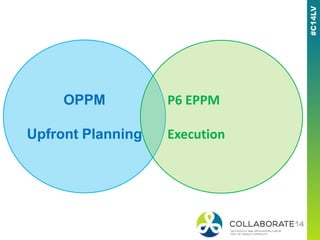
OPPM
Upfront Planning
P6 EPPM
Execution
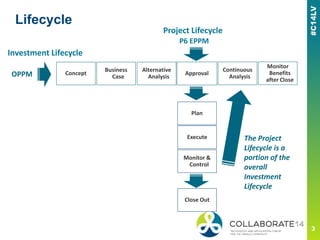
Lifecycle
Project Lifecycle
OPPM
P6 EPPM
Plan
Execute
Alternative
Analysis
Concept
Business
Case
Investment Lifecycle
Approval
Close Out
Continuous
Analysis
Monitor &
Control
Monitor
Benefits
after Close
The Project
Lifecycle is a
portion of the
overall
Investment
Lifecycle
OPPM versus P6 EPPM
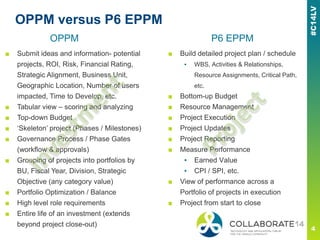
■ Submit ideas and information- potential
projects, ROI, Risk, Financial Rating,
Strategic Alignment, Business Unit,
Geographic Location, Number of users
impacted, Time to Develop, etc.
■ Tabular view – scoring and analyzing
■ Top-down Budget
■ ‘Skeleton’ project (Phases / Milestones)
■ Governance Process / Phase Gates
(workflow & approvals)
■ Grouping of projects into portfolios by
BU, Fiscal Year, Division, Strategic
Objective (any category value)
■ Portfolio Optimization / Balance
■ High level role requirements
■ Entire life of an investment (extends
beyond project close-out)
■ Build detailed project plan / schedule
▪ WBS, Activities & Relationships,
Resource Assignments, Critical Path,
etc.
■ Bottom-up Budget
■ Resource Management
■ Project Execution
■ Project Updates
■ Project Reporting
■ Measure Performance
▪ Earned Value
▪ CPI / SPI, etc.
■ View of performance across a
Portfolio of projects in execution
■ Project from start to close
OPPM P6 EPPM
What is a Portfolio
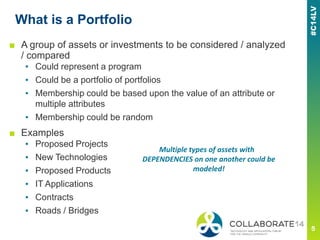
■ A group of assets or investments to be considered / analyzed
/ compared
▪ Could represent a program
▪ Could be a portfolio of portfolios
▪ Membership could be based upon the value of an attribute or
multiple attributes
▪ Membership could be random
■ Examples
▪ Proposed Projects
▪ New Technologies
▪ Proposed Products
▪ IT Applications
▪ Contracts
▪ Roads / Bridges
Multiple types of assets with
DEPENDENCIES on one another could be
modeled!
What is the Goal of Portfolio Management
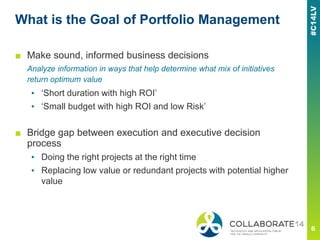
■ Make sound, informed business decisions
Analyze information in ways that help determine what mix of initiatives
return optimum value
▪ ‘Short duration with high ROI’
▪ ‘Small budget with high ROI and low Risk’
■ Bridge gap between execution and executive decision
process
▪ Doing the right projects at the right time
▪ Replacing low value or redundant projects with potential higher
value
Portfolio Management Process
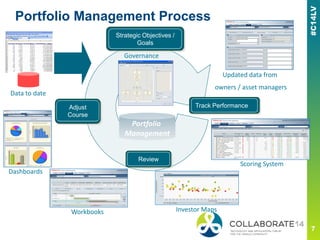
Investor Maps
Data to date
Updated data from
owners / asset managers
Scoring System
Dashboards
Review
Track PerformanceAdjust
Course
Governance
Strategic Objectives /
Goals
Portfolio
Management
Workbooks
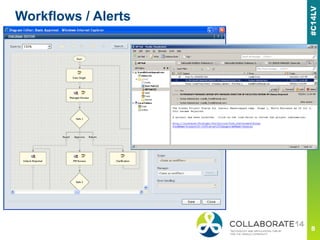
Workflows / Alerts
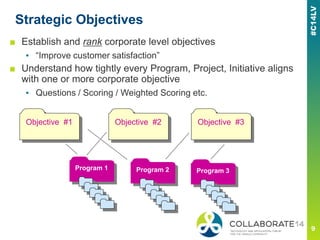
Strategic Objectives
■ Establish and rank corporate level objectives
▪ “Improve customer satisfaction”
■ Understand how tightly every Program, Project, Initiative aligns
with one or more corporate objective
▪ Questions / Scoring / Weighted Scoring etc.
Objective #1 Objective #2 Objective #3
Program 3Program 2Program 1
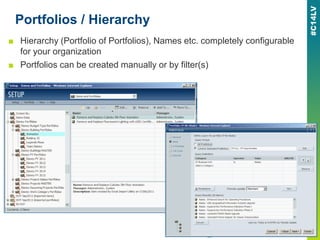
Portfolios / Hierarchy
■ Hierarchy (Portfolio of Portfolios), Names etc. completely configurable
for your organization
■ Portfolios can be created manually or by filter(s)
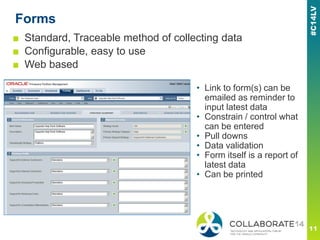
Forms
■ Standard, Traceable method of collecting data
■ Configurable, easy to use
■ Web based
• Link to form(s) can be
emailed as reminder to
input latest data
• Constrain / control what
can be entered
• Pull downs
• Data validation
• Form itself is a report of
latest data
• Can be printed
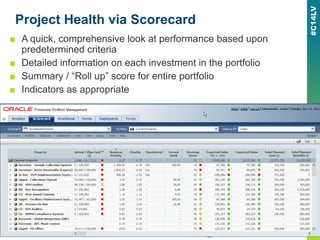
Project Health via Scorecard
■ A quick, comprehensive look at performance based upon
predetermined criteria
■ Detailed information on each investment in the portfolio
■ Summary / “Roll up” score for entire portfolio
■ Indicators as appropriate
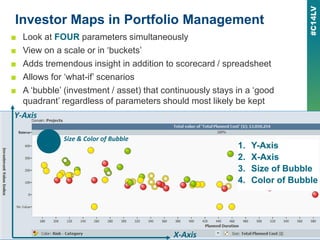
Investor Maps in Portfolio Management
■ Look at FOUR parameters simultaneously
■ View on a scale or in ‘buckets’
■ Adds tremendous insight in addition to scorecard / spreadsheet
■ Allows for ‘what-if’ scenarios
■ A ‘bubble’ (investment / asset) that continuously stays in a ‘good
quadrant’ regardless of parameters should most likely be kept
1. Y-Axis
2. X-Axis
3. Size of Bubble
4. Color of Bubble
Y-Axis
X-Axis
Size & Color of Bubble
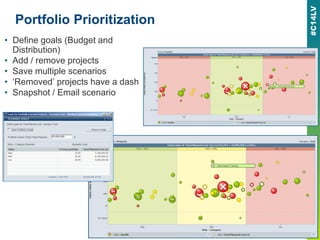
Portfolio Prioritization
• Define goals (Budget and
Distribution)
• Add / remove projects
• Save multiple scenarios
• ‘Removed’ projects have a dash
• Snapshot / Email scenario
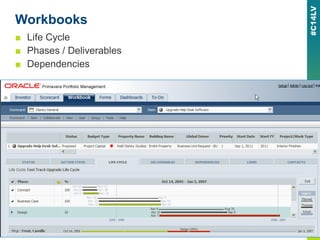
Workbooks
■ Life Cycle
■ Phases / Deliverables
■ Dependencies
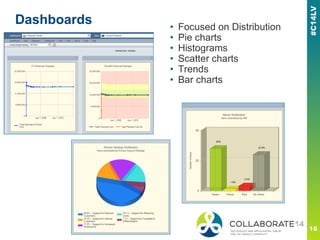
Dashboards • Focused on Distribution
• Pie charts
• Histograms
• Scatter charts
• Trends
• Bar charts
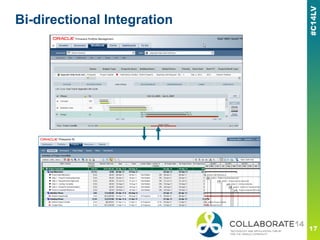
Bi-directional Integration
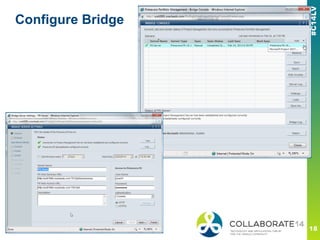
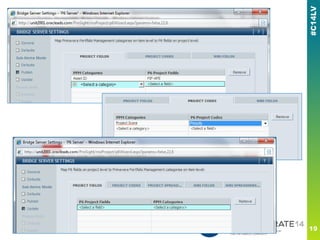
Configure Bridge
Please complete the session
evaluation
We appreciate your feedback and insight
You may complete the session evaluation either
on paper or online via the mobile app

Project initiation in oppm to project execution in p6 eppm - Oracle Primavera Collaborate 14

  • 1.
    REMINDER Check in onthe COLLABORATE mobile app Project Initiation in OPPM to Project Execution in P6 EPPM Prepared by: L. Camille Frost Master Principal Sales Consultant Oracle | Primavera Global Business Unit Session ID#: 15404
  • 2.
  • 3.
    Lifecycle Project Lifecycle OPPM P6 EPPM Plan Execute Alternative Analysis Concept Business Case InvestmentLifecycle Approval Close Out Continuous Analysis Monitor & Control Monitor Benefits after Close The Project Lifecycle is a portion of the overall Investment Lifecycle
  • 4.
    OPPM versus P6EPPM ■ Submit ideas and information- potential projects, ROI, Risk, Financial Rating, Strategic Alignment, Business Unit, Geographic Location, Number of users impacted, Time to Develop, etc. ■ Tabular view – scoring and analyzing ■ Top-down Budget ■ ‘Skeleton’ project (Phases / Milestones) ■ Governance Process / Phase Gates (workflow & approvals) ■ Grouping of projects into portfolios by BU, Fiscal Year, Division, Strategic Objective (any category value) ■ Portfolio Optimization / Balance ■ High level role requirements ■ Entire life of an investment (extends beyond project close-out) ■ Build detailed project plan / schedule ▪ WBS, Activities & Relationships, Resource Assignments, Critical Path, etc. ■ Bottom-up Budget ■ Resource Management ■ Project Execution ■ Project Updates ■ Project Reporting ■ Measure Performance ▪ Earned Value ▪ CPI / SPI, etc. ■ View of performance across a Portfolio of projects in execution ■ Project from start to close OPPM P6 EPPM
  • 5.
    What is aPortfolio ■ A group of assets or investments to be considered / analyzed / compared ▪ Could represent a program ▪ Could be a portfolio of portfolios ▪ Membership could be based upon the value of an attribute or multiple attributes ▪ Membership could be random ■ Examples ▪ Proposed Projects ▪ New Technologies ▪ Proposed Products ▪ IT Applications ▪ Contracts ▪ Roads / Bridges Multiple types of assets with DEPENDENCIES on one another could be modeled!
  • 6.
    What is theGoal of Portfolio Management ■ Make sound, informed business decisions Analyze information in ways that help determine what mix of initiatives return optimum value ▪ ‘Short duration with high ROI’ ▪ ‘Small budget with high ROI and low Risk’ ■ Bridge gap between execution and executive decision process ▪ Doing the right projects at the right time ▪ Replacing low value or redundant projects with potential higher value
  • 7.
    Portfolio Management Process InvestorMaps Data to date Updated data from owners / asset managers Scoring System Dashboards Review Track PerformanceAdjust Course Governance Strategic Objectives / Goals Portfolio Management Workbooks
  • 8.
  • 9.
    Strategic Objectives ■ Establishand rank corporate level objectives ▪ “Improve customer satisfaction” ■ Understand how tightly every Program, Project, Initiative aligns with one or more corporate objective ▪ Questions / Scoring / Weighted Scoring etc. Objective #1 Objective #2 Objective #3 Program 3Program 2Program 1
  • 10.
    Portfolios / Hierarchy ■Hierarchy (Portfolio of Portfolios), Names etc. completely configurable for your organization ■ Portfolios can be created manually or by filter(s)
  • 11.
    Forms ■ Standard, Traceablemethod of collecting data ■ Configurable, easy to use ■ Web based • Link to form(s) can be emailed as reminder to input latest data • Constrain / control what can be entered • Pull downs • Data validation • Form itself is a report of latest data • Can be printed
  • 12.
    Project Health viaScorecard ■ A quick, comprehensive look at performance based upon predetermined criteria ■ Detailed information on each investment in the portfolio ■ Summary / “Roll up” score for entire portfolio ■ Indicators as appropriate
  • 13.
    Investor Maps inPortfolio Management ■ Look at FOUR parameters simultaneously ■ View on a scale or in ‘buckets’ ■ Adds tremendous insight in addition to scorecard / spreadsheet ■ Allows for ‘what-if’ scenarios ■ A ‘bubble’ (investment / asset) that continuously stays in a ‘good quadrant’ regardless of parameters should most likely be kept 1. Y-Axis 2. X-Axis 3. Size of Bubble 4. Color of Bubble Y-Axis X-Axis Size & Color of Bubble
  • 14.
    Portfolio Prioritization • Definegoals (Budget and Distribution) • Add / remove projects • Save multiple scenarios • ‘Removed’ projects have a dash • Snapshot / Email scenario
  • 15.
    Workbooks ■ Life Cycle ■Phases / Deliverables ■ Dependencies
  • 16.
    Dashboards • Focusedon Distribution • Pie charts • Histograms • Scatter charts • Trends • Bar charts
  • 17.
  • 18.
  • 21.
    Please complete thesession evaluation We appreciate your feedback and insight You may complete the session evaluation either on paper or online via the mobile app