By  AMULRAJ.A Networking
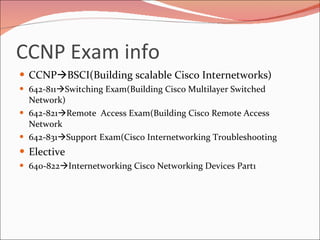
CCNP Exam info CCNP  BSCI(Building scalable Cisco Internetworks) 642-811  Switching Exam(Building Cisco Multilayer Switched Network) 642-821  Remote  Access Exam(Building Cisco Remote Access Network 642-831  Support Exam(Cisco Internetworking Troubleshooting Elective 640-822  Internetworking Cisco Networking Devices Part1
Networking Def: A network is a group of two or more  computer systems  linked together. A network is a connection  Interface between more than one device. To connect two or more computers together with the ability to communicate with each other.
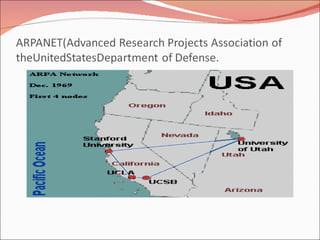
Networking began its infancy in the mid -1960’s. by the US Department of Defence (DoD). The original intention of networking was being  developed to withstand a nuclear war.  Telephone networks were to vulnerable and would terminate all conversations should a nuclear war occur.
 
 
WE ARE DEALING WITH MACHINES INSTEAD OF  PEOPLE IN TODAY’S WORLD. OUR PRIVACY IS  AFFECTED AND ALMOST ALL OF OUR PERSONAL  INFORMATION CAN BE FOUND IN  THE “VIRTUAL WORLD” .
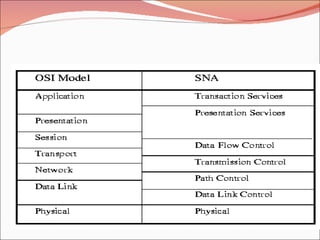
Berkeley developed a convenient program interface to the network and wrote many applications, utility, and management programs to make networking easier. In it early infancy, the OSI protocols were crushed and the TCP/IP protocols were already in widespread use. The OSI Model had seven layers because at the time, IBM had a propriety seven -layer protocol called SNA (Systems Network Architecture).
 
At the time, IBM dominated the computer companies and every was scared to death that IBM would use its clout to force everyone to use SNA. The OSI was to be produced like an IBM-reference  model. The OSI model became the world standard and was not controlled by one company, but by a neutral organization, ISO (International Standards Association).
Use of Networking Wired Network benefits: file sharing printer / peripheral sharing Internet connection sharing  multi-player games Internet telephone service Wireless Network Benefits: Computer mobility No unsightly wires
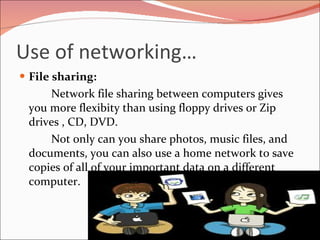
Use of networking… File sharing: Network file sharing between computers gives you more flexibity than using floppy drives or Zip drives , CD, DVD. Not only can you share photos, music files, and documents, you can also use a home network to save copies of all of your important data on a different computer.
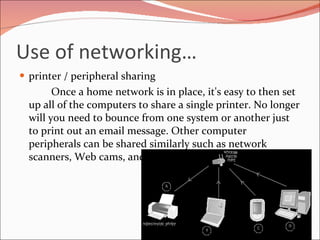
Use of networking… printer / peripheral sharing Once a home network is in place, it's easy to then set up all of the computers to share a single printer. No longer will you need to bounce from one system or another just to print out an email message. Other computer peripherals can be shared similarly such as network scanners, Web cams, and CD burners.
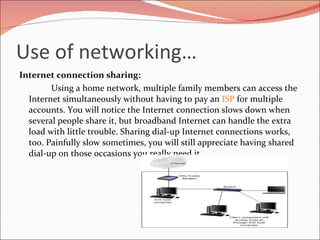
Use of networking… Internet connection sharing: Using a home network, multiple family members can access the Internet simultaneously without having to pay an  ISP  for multiple accounts. You will notice the Internet connection slows down when several people share it, but broadband Internet can handle the extra load with little trouble. Sharing dial-up Internet connections works, too. Painfully slow sometimes, you will still appreciate having shared dial-up on those occasions you really need it.
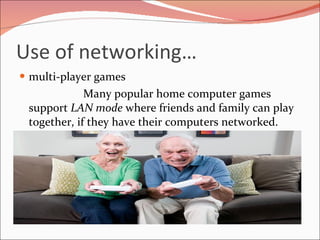
Use of networking… multi-player games Many popular home computer games support  LAN mode  where friends and family can play together, if they have their computers networked.
Use of networking… Internet telephone service So-called  Voice over IP (VoIP)  services allow you to make and receive phone calls through your home network across the Internet, saving you money.
Use of networking… Although you can realize these same benefits with a wired home network, you should carefully consider building a wireless home network instead, for the following reasons: Computer mobility No unsightly wires
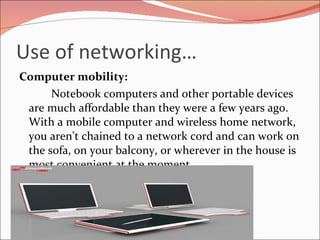
Use of networking… Computer mobility: Notebook computers and other portable devices are much affordable than they were a few years ago. With a mobile computer and wireless home network, you aren't chained to a network cord and can work on the sofa, on your balcony, or wherever in the house is most convenient at the moment.
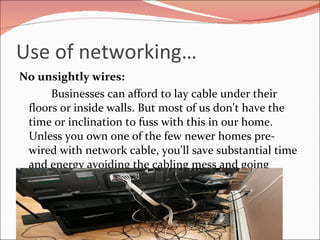
Use of networking… No unsightly wires: Businesses can afford to lay cable under their floors or inside walls. But most of us don't have the time or inclination to fuss with this in our home. Unless you own one of the few newer homes pre-wired with network cable, you'll save substantial time and energy avoiding the cabling mess and going wireless
Classification of Network Peer to Peer Network Client Server Network
Classification of Networking A model of communication where every node in the network acts alike. As opposed to the Client-Server model, where one node provides services and other nodes use the services.
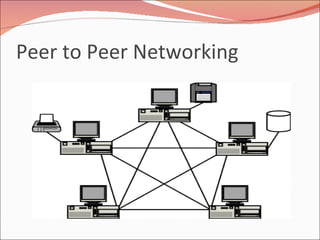
Peer to Peer Networking
Uses of P2P Networking File sharing •  Instant messaging •  Voice communication •  Collaboration •  Backup •  Distributed computing
Advantages of Networking It is easy to install.  Configuration of computers is easy.  Users can control their shared resources.  The cost and operation of this network is less.  It is ideal for small businesses having ten or fewer computers.  It needs an operating system and a few cables to get connected.  A full time network administrator is not required
Disadvantage of networking A computer can be accessed anytime.  Network security has to be applied to each computer separately.  Backup has to be performed on each computer separately.  No centralized server is available to manage and control the access of data.  Users have to use separate passwords on each computer in the network
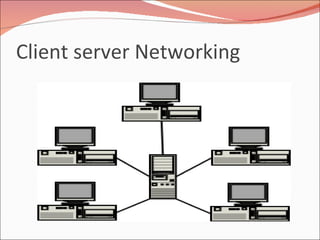
Client server Networking
Clent Server Networking Centralized  - Resources and data security are controlled through the server. Scalability  - Any or all elements can be replaced individually as needs increase Flexibility - New technology can be easily integrated into system.  Backup  � as all data is stored centrally it is easy to backup
Disadvantege of C-S Networking Can have a single point of failure. Server can get overloaded. Because beckup server needed for files and data. Generally more expensive and difficult to set up initially. More cost to maintain the system
Types of Networking LAN MAN WAN PAN
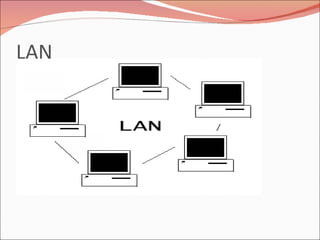
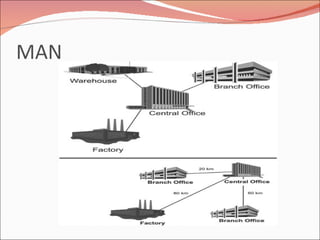
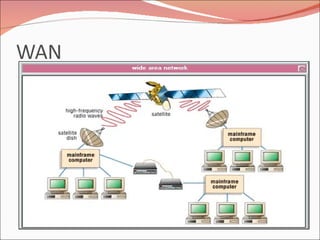
TYPES OF NETWORKS LAN – LOCAL AREA NETWORK   IS A SMALL  GEOGRAPHICAL AREA SUCH AS OUR SCHOOL  BOARD. MAN – METROPOLITAN AREA NETWORK   IS A  NETWORK OVER A LARGER GEOGRAPHICAL AREA  SUCH AS THE REGIONAL(softlogic) GOVERNMENT. WAN – WIDE AREA NETWORK   IS A NETWORK USED  OVER AN EXTREMELY LARGE GEOGRAPHICAL AREA  SUCH AS THE CENTRALIZED(Google) GOVERNMENT.
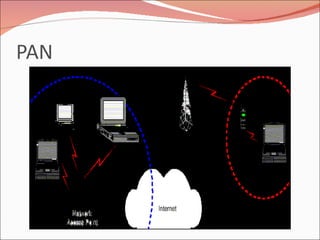
A  personal area network  (PAN)  is a computer network used for communication among computer devices, including telephones and personal digital assistants


Topologies Of Networking What is Topology? “ The way in which the connections are made among all the computers is called the topology of the network”.  Network topology specifically refers to the physical layout of the network, specially the location of the computers and how the cable is run between them. BUS topology Star Ring mesh
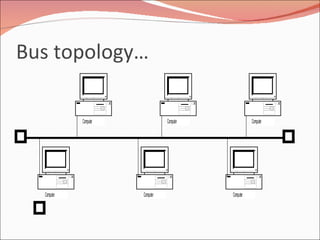
Bus Topology… The bus topology is the simplest and most common. It is often used when a network installation is small, simple, or temporary.  It is a Passive topology. This means that computers on the bus only listen for data being sent, they are not responsible for moving the data from one computer to the next.
Bus topology… In an active topology network, the computers regenerate signals and are responsible for moving the data through the network. On a  bus network, all the computer are connected to a single cable. When one computer sends a signal using the cable, all the computers on the network receive the information, but only one (Addressee) accepts it. The rest disregard the message.
Bus topology…
Advantage of Bus  The bus is simple, reliable in very small network, and easy to use.  The bus requires the least amount of cable to connect the computers together and is therefore less expensive than other cabling arrangements. Failure of one node does not affect the rest of network.
Disadvantages of Bus Heavy network traffic can slow a bus considerably. A break in the cable or lake of proper termination can bring the network down. It is difficult to troubleshoot a bus.
Suitability of bus The network is small The least expensive solution is required The network is not expected to grow much
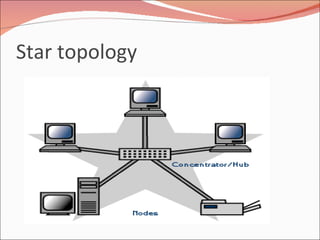
Star Topology In a star topology, each device has a dedicated point to point link only to central controller, usually called a hub/server/host.  Each computer on a star network communicates with a central hub that resends the message appropriate computer(s) The hub can be active or passive. An active hub regenerate the electrical signal and sends it to all the computers connected to it.
Star topology… This type of hub is often called a multiport repeater. Active hub require electrical power to run. A passive hub, such as wiring panels, merely acts as a connection point and does not amplify or regenerate the signal.  Passive hubs do not require electrical power to run.
Star topology
Advantages of Star Topology It is easy to modify and add new computers to a star network During adding/deleting a node network can function normally. When the capacity of the central hub is exceeded, it can be replaced with one that has a larger number of ports to plug lines into. Provide for centralised monitoring and management of the network. Single computer failure do not necessarily bring down the whole star network.
Disadvantages of Star Topology If the central hub fails, the whole network fails to operate. It cost more to cable a star network. Require dedicated server and NOS
Appropriateness It must be easy to add or remove client computer. It must be easy to troubleshoot. The network is large. The network is expected to grow in the future.
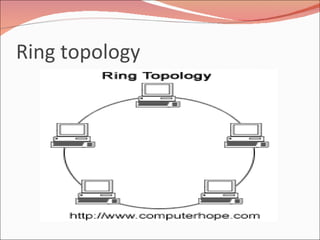
Ring topology
Ring topology… In a ring topology, each computer is connected directly to the next computer in line, forming a circle of cable. It uses token to pass the information from one computer to another.  Every computer is connected to the next compute in the ring, and each retransmit what it receives from the previous computer.  The message flow around the ring in one direction. Ring is an active topology. There is no termination because there is no end to the ring
Advantage of ring… All the computers have equal access to the network. Allows error checking, and acknowledgement.
Disadvantage of ring… Failure of one computer can affect the whole network. It is difficult to troubleshoot the ring network. Adding or removing computers disturbs the network
Appropriateness The network must operate reasonably under a heavy load A higher-speed network is required. The network will not be frequently reconfigured.
Mesh topology…
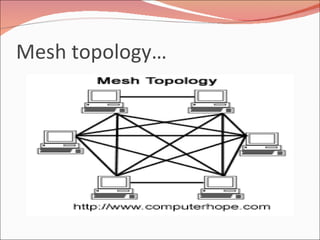
Mesh Topology In a mesh topology, every devices has a dedicated point to point  link to every other device. A fully connected mesh network therefore has n(n-1)/2 physical channels to link n devices.  To accommodate that many links, every device on the network must have n-1 input/output ports.
Advantages of Mesh Topology Because of the dedicated link, no traffic between computers. Failure of one node computer not affect rest of the network. Because of the dedicated link privacy and security are guaranteed  Point to point links make fault identification and fault isolation easy.
Disadvantages of Mesh Topology Due to the amount of cabling and number of input output ports, it is expensive. Large space is require to run the cables.
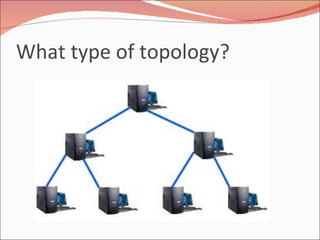
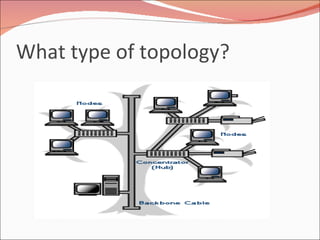
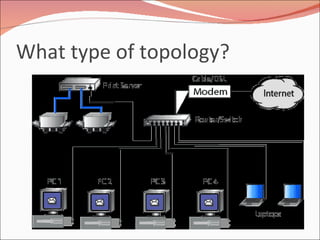
What type of topology?
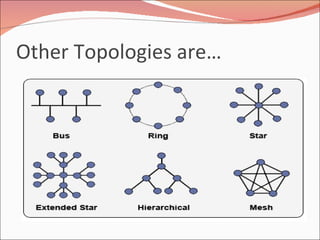
Other Topologies are…
 

Networking basics

  • 1.
    By AMULRAJ.ANetworking
  • 2.
    CCNP Exam infoCCNP  BSCI(Building scalable Cisco Internetworks) 642-811  Switching Exam(Building Cisco Multilayer Switched Network) 642-821  Remote Access Exam(Building Cisco Remote Access Network 642-831  Support Exam(Cisco Internetworking Troubleshooting Elective 640-822  Internetworking Cisco Networking Devices Part1
  • 3.
    Networking Def: Anetwork is a group of two or more computer systems linked together. A network is a connection Interface between more than one device. To connect two or more computers together with the ability to communicate with each other.
  • 4.
    Networking began itsinfancy in the mid -1960’s. by the US Department of Defence (DoD). The original intention of networking was being developed to withstand a nuclear war. Telephone networks were to vulnerable and would terminate all conversations should a nuclear war occur.
  • 5.
  • 6.
  • 7.
    WE ARE DEALINGWITH MACHINES INSTEAD OF PEOPLE IN TODAY’S WORLD. OUR PRIVACY IS AFFECTED AND ALMOST ALL OF OUR PERSONAL INFORMATION CAN BE FOUND IN THE “VIRTUAL WORLD” .
  • 8.
    Berkeley developed aconvenient program interface to the network and wrote many applications, utility, and management programs to make networking easier. In it early infancy, the OSI protocols were crushed and the TCP/IP protocols were already in widespread use. The OSI Model had seven layers because at the time, IBM had a propriety seven -layer protocol called SNA (Systems Network Architecture).
  • 9.
  • 10.
    At the time,IBM dominated the computer companies and every was scared to death that IBM would use its clout to force everyone to use SNA. The OSI was to be produced like an IBM-reference model. The OSI model became the world standard and was not controlled by one company, but by a neutral organization, ISO (International Standards Association).
  • 11.
    Use of NetworkingWired Network benefits: file sharing printer / peripheral sharing Internet connection sharing multi-player games Internet telephone service Wireless Network Benefits: Computer mobility No unsightly wires
  • 12.
    Use of networking…File sharing: Network file sharing between computers gives you more flexibity than using floppy drives or Zip drives , CD, DVD. Not only can you share photos, music files, and documents, you can also use a home network to save copies of all of your important data on a different computer.
  • 13.
    Use of networking…printer / peripheral sharing Once a home network is in place, it's easy to then set up all of the computers to share a single printer. No longer will you need to bounce from one system or another just to print out an email message. Other computer peripherals can be shared similarly such as network scanners, Web cams, and CD burners.
  • 14.
    Use of networking…Internet connection sharing: Using a home network, multiple family members can access the Internet simultaneously without having to pay an ISP for multiple accounts. You will notice the Internet connection slows down when several people share it, but broadband Internet can handle the extra load with little trouble. Sharing dial-up Internet connections works, too. Painfully slow sometimes, you will still appreciate having shared dial-up on those occasions you really need it.
  • 15.
    Use of networking…multi-player games Many popular home computer games support LAN mode where friends and family can play together, if they have their computers networked.
  • 16.
    Use of networking…Internet telephone service So-called Voice over IP (VoIP) services allow you to make and receive phone calls through your home network across the Internet, saving you money.
  • 17.
    Use of networking…Although you can realize these same benefits with a wired home network, you should carefully consider building a wireless home network instead, for the following reasons: Computer mobility No unsightly wires
  • 18.
    Use of networking…Computer mobility: Notebook computers and other portable devices are much affordable than they were a few years ago. With a mobile computer and wireless home network, you aren't chained to a network cord and can work on the sofa, on your balcony, or wherever in the house is most convenient at the moment.
  • 19.
    Use of networking…No unsightly wires: Businesses can afford to lay cable under their floors or inside walls. But most of us don't have the time or inclination to fuss with this in our home. Unless you own one of the few newer homes pre-wired with network cable, you'll save substantial time and energy avoiding the cabling mess and going wireless
  • 20.
    Classification of NetworkPeer to Peer Network Client Server Network
  • 21.
    Classification of NetworkingA model of communication where every node in the network acts alike. As opposed to the Client-Server model, where one node provides services and other nodes use the services.
  • 22.
    Peer to PeerNetworking
  • 23.
    Uses of P2PNetworking File sharing • Instant messaging • Voice communication • Collaboration • Backup • Distributed computing
  • 24.
    Advantages of NetworkingIt is easy to install. Configuration of computers is easy. Users can control their shared resources. The cost and operation of this network is less. It is ideal for small businesses having ten or fewer computers. It needs an operating system and a few cables to get connected. A full time network administrator is not required
  • 25.
    Disadvantage of networkingA computer can be accessed anytime. Network security has to be applied to each computer separately. Backup has to be performed on each computer separately. No centralized server is available to manage and control the access of data. Users have to use separate passwords on each computer in the network
  • 26.
  • 27.
    Clent Server NetworkingCentralized - Resources and data security are controlled through the server. Scalability - Any or all elements can be replaced individually as needs increase Flexibility - New technology can be easily integrated into system. Backup � as all data is stored centrally it is easy to backup
  • 28.
    Disadvantege of C-SNetworking Can have a single point of failure. Server can get overloaded. Because beckup server needed for files and data. Generally more expensive and difficult to set up initially. More cost to maintain the system
  • 29.
    Types of NetworkingLAN MAN WAN PAN
  • 30.
    TYPES OF NETWORKSLAN – LOCAL AREA NETWORK IS A SMALL GEOGRAPHICAL AREA SUCH AS OUR SCHOOL BOARD. MAN – METROPOLITAN AREA NETWORK IS A NETWORK OVER A LARGER GEOGRAPHICAL AREA SUCH AS THE REGIONAL(softlogic) GOVERNMENT. WAN – WIDE AREA NETWORK IS A NETWORK USED OVER AN EXTREMELY LARGE GEOGRAPHICAL AREA SUCH AS THE CENTRALIZED(Google) GOVERNMENT.
  • 31.
    A personalarea network (PAN) is a computer network used for communication among computer devices, including telephones and personal digital assistants
  • 32.
  • 33.
  • 34.
  • 35.
  • 36.
    Topologies Of NetworkingWhat is Topology? “ The way in which the connections are made among all the computers is called the topology of the network”. Network topology specifically refers to the physical layout of the network, specially the location of the computers and how the cable is run between them. BUS topology Star Ring mesh
  • 37.
    Bus Topology… Thebus topology is the simplest and most common. It is often used when a network installation is small, simple, or temporary. It is a Passive topology. This means that computers on the bus only listen for data being sent, they are not responsible for moving the data from one computer to the next.
  • 38.
    Bus topology… Inan active topology network, the computers regenerate signals and are responsible for moving the data through the network. On a bus network, all the computer are connected to a single cable. When one computer sends a signal using the cable, all the computers on the network receive the information, but only one (Addressee) accepts it. The rest disregard the message.
  • 39.
  • 40.
    Advantage of Bus The bus is simple, reliable in very small network, and easy to use. The bus requires the least amount of cable to connect the computers together and is therefore less expensive than other cabling arrangements. Failure of one node does not affect the rest of network.
  • 41.
    Disadvantages of BusHeavy network traffic can slow a bus considerably. A break in the cable or lake of proper termination can bring the network down. It is difficult to troubleshoot a bus.
  • 42.
    Suitability of busThe network is small The least expensive solution is required The network is not expected to grow much
  • 43.
    Star Topology Ina star topology, each device has a dedicated point to point link only to central controller, usually called a hub/server/host. Each computer on a star network communicates with a central hub that resends the message appropriate computer(s) The hub can be active or passive. An active hub regenerate the electrical signal and sends it to all the computers connected to it.
  • 44.
    Star topology… Thistype of hub is often called a multiport repeater. Active hub require electrical power to run. A passive hub, such as wiring panels, merely acts as a connection point and does not amplify or regenerate the signal. Passive hubs do not require electrical power to run.
  • 45.
  • 46.
    Advantages of StarTopology It is easy to modify and add new computers to a star network During adding/deleting a node network can function normally. When the capacity of the central hub is exceeded, it can be replaced with one that has a larger number of ports to plug lines into. Provide for centralised monitoring and management of the network. Single computer failure do not necessarily bring down the whole star network.
  • 47.
    Disadvantages of StarTopology If the central hub fails, the whole network fails to operate. It cost more to cable a star network. Require dedicated server and NOS
  • 48.
    Appropriateness It mustbe easy to add or remove client computer. It must be easy to troubleshoot. The network is large. The network is expected to grow in the future.
  • 49.
  • 50.
    Ring topology… Ina ring topology, each computer is connected directly to the next computer in line, forming a circle of cable. It uses token to pass the information from one computer to another. Every computer is connected to the next compute in the ring, and each retransmit what it receives from the previous computer. The message flow around the ring in one direction. Ring is an active topology. There is no termination because there is no end to the ring
  • 51.
    Advantage of ring…All the computers have equal access to the network. Allows error checking, and acknowledgement.
  • 52.
    Disadvantage of ring…Failure of one computer can affect the whole network. It is difficult to troubleshoot the ring network. Adding or removing computers disturbs the network
  • 53.
    Appropriateness The networkmust operate reasonably under a heavy load A higher-speed network is required. The network will not be frequently reconfigured.
  • 54.
  • 55.
    Mesh Topology Ina mesh topology, every devices has a dedicated point to point link to every other device. A fully connected mesh network therefore has n(n-1)/2 physical channels to link n devices. To accommodate that many links, every device on the network must have n-1 input/output ports.
  • 56.
    Advantages of MeshTopology Because of the dedicated link, no traffic between computers. Failure of one node computer not affect rest of the network. Because of the dedicated link privacy and security are guaranteed Point to point links make fault identification and fault isolation easy.
  • 57.
    Disadvantages of MeshTopology Due to the amount of cabling and number of input output ports, it is expensive. Large space is require to run the cables.
  • 58.
    What type oftopology?
  • 59.
    What type oftopology?
  • 60.
    What type oftopology?
  • 61.
    What type oftopology?
  • 62.
  • 63.