Networks Jimmy F G  -  Thursday, June 12, 2008 Sampoerna Foundation
Networks By the end of this session, you will: Define and describe a LAN and WAN. Understand the hardware required. Know the 3 LAN topologies.
Networks What is a  Network ? What is a  LAN ? What hardware do you need to make one? What is a  WAN ? What hardware do you need to make one? What are the  advantages  and  disadvantages  of a network? Draw a  star ,  ring  and  bus  network – give advantages and disadvantages of each.
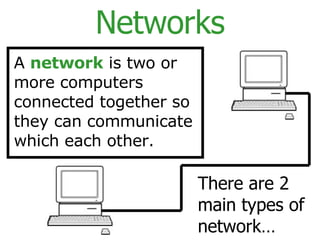
Networks A  network  is two or more computers connected together so they can communicate which each other.  There are 2 main types of network…
Networks: LANs LAN  stands for:  L OCAL  A REA  N ETWORK LANs are networks that are found where computers within a  building  need to communicate. They are Small and Local!
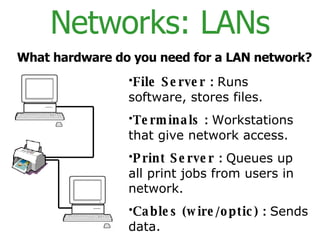
Networks: LANs File Server :   Runs software, stores files. Terminals :   Workstations that give network access. Print Server :   Queues up all print jobs from users in network. Cables (wire/optic) :   Sends data. What hardware do you need for a LAN network?
Networks: WANs WAN  stands for:  W IDE  A REA  N ETWORK WANs are networks that are found where computers in  different areas  or  countries  need to communicate. They are long range and not local!
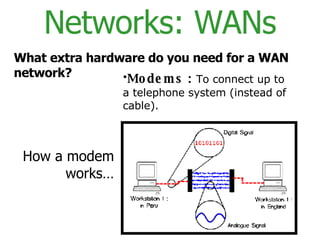
Networks: WANs What extra hardware do you need for a WAN network? Modems :   To connect up to a telephone system (instead of cable). How a modem works…
Networks: Ad/Disad Some  advantages  of a network are: Resources (Hardware and Software) can be shared. Allows more effective communication between users e.g. via e-mail. Networks are cheaper than “stand-alone PCs.” Information held on the network can be accessed by all users with authorised access.
Networks: Ad/Disad Some  disadvantages  of a network are: The set-up and maintenance costs can be expensive. A fault with the network server can cause difficulties with the organisation. Networks need security measures to restrict access to users. WANs are vulnerable to hackers and viruses.
Networks As well as knowing the advantages and disadvantages of a network…  You need to know the advantages and disadvantages of 3 network topologies…
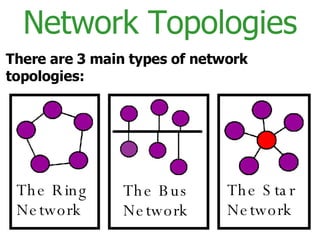
Network Topologies There are 3 main types of network topologies: The Ring Network The Bus Network The Star Network
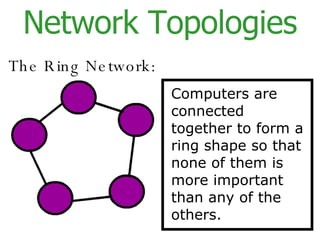
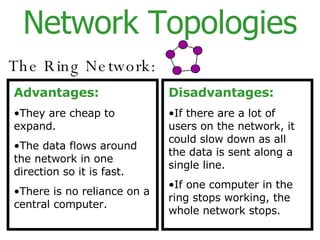
Network Topologies The Ring Network: Computers  are connected together to form a ring shape so that none of the m  is more important than any of the others.
Network Topologies The Ring Network: Advantages: They are cheap to expand. The data flows around the network in one direction so it is fast. There is no reliance on a central computer. Disadvantages: If there are a lot of users on the network, it could slow down as all the data is sent along a single line. If one computer in the ring stops working, the whole network stops.
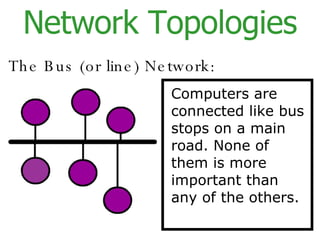
Network Topologies The Bus (or line) Network: Computers  are connected  like bus stops on a main road.   None  of the m  is more important than any of the others.
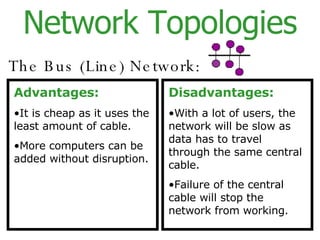
Network Topologies The Bus (Line) Network: Advantages: It is cheap as it uses the least amount of cable. More computers can be added without disruption. Disadvantages: With a lot of users, the network will be slow as data has to travel through the same central cable. Failure of the central cable will stop the network from working.
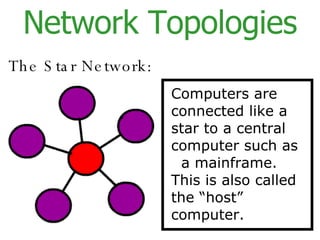
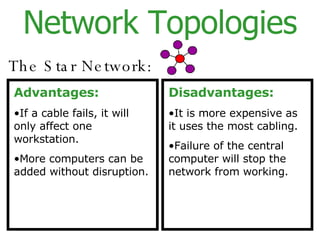
Network Topologies The Star Network: Computers  are connected  like a star to a central computer such as  a mainframe. This is also called the “host” computer.
Network Topologies The Star Network: Advantages: If a cable fails, it will only affect one workstation. More computers can be added without disruption. Disadvantages: It is more expensive as it uses the most cabling. Failure of the central computer will stop the network from working.
Networks: Security Because networks are almost vital to an organisation’s daily activities, they must be kept safe and secure… There are 3 main types of network security… Physical ,  Access  and  Data .
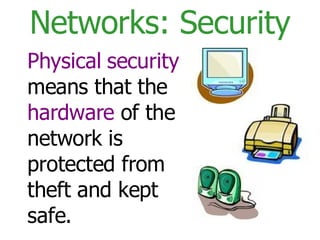
Networks: Security Physical   security  means that the  hardware  of the network is protected from theft and kept safe.
Networks: Security Access security  means that there is a  limit  to the amount of  access  a user has to the information held on the network.
Networks: Security Data security  means that there are measures taken to  prevent  the loss of data held on the system.
File Server - HW Main computer  on the network. More  powerful  than other computers on the network. Contains a large amount of  RAM and Hard Disk  space. Holds the networks  OS  e.g. Windows XP Holds the  application software  e.g. Microsoft Office Suite. Stores the  user files  created on the system.
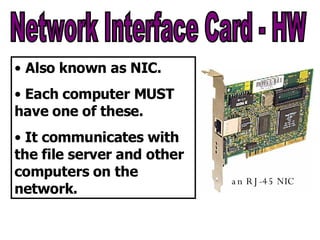
Network Interface Card - HW Also known as NIC. Each computer MUST have one of these. It communicates with the file server and other computers on the network. an RJ-45 NIC
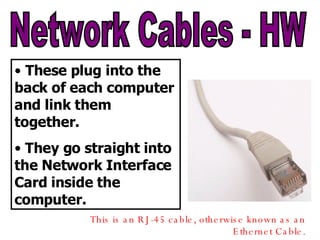
Network Cables - HW These plug into the back of each computer and link them together. They go straight into the Network Interface Card inside the computer. This is an RJ-45 cable, otherwise known as an Ethernet Cable.
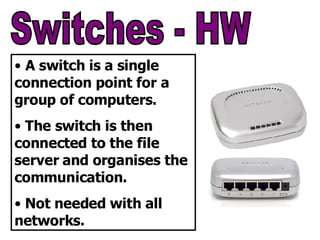
Switches - HW A switch is a single connection point for a group of computers. The switch is then connected to the file server and organises the communication. Not needed with all networks.
WANs HW and SW By the end of this section, you will know and understand the hardware and software involved in making a WAN!
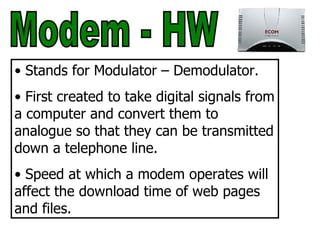
Modem - HW Stands for Modulator – Demodulator. First created to take digital signals from a computer and convert them to analogue so that they can be transmitted down a telephone line. Speed at which a modem operates will affect the download time of web pages and files.
ISP - Internet Service Provider An ISP sells Internet access to companies and individuals. It provides web servers which connect to the Internet. An ISP will provide it’s customers with a wide range of services… Bandwidth options. Email service. Web Hosting. Online and Telephone assistance.
Browser Software Browser software allows users to view and use the web pages on the Internet. Features include: An Address Bar. A Navigation Bar. A Bookmark/Favourites Option. A Search Engine. A History Button. Browser Setting and Internet Options e.g. Filtering.

Network Sampoerna

  • 1.
    Networks Jimmy FG - Thursday, June 12, 2008 Sampoerna Foundation
  • 2.
    Networks By theend of this session, you will: Define and describe a LAN and WAN. Understand the hardware required. Know the 3 LAN topologies.
  • 3.
    Networks What isa Network ? What is a LAN ? What hardware do you need to make one? What is a WAN ? What hardware do you need to make one? What are the advantages and disadvantages of a network? Draw a star , ring and bus network – give advantages and disadvantages of each.
  • 4.
    Networks A network is two or more computers connected together so they can communicate which each other. There are 2 main types of network…
  • 5.
    Networks: LANs LAN stands for: L OCAL A REA N ETWORK LANs are networks that are found where computers within a building need to communicate. They are Small and Local!
  • 6.
    Networks: LANs FileServer : Runs software, stores files. Terminals : Workstations that give network access. Print Server : Queues up all print jobs from users in network. Cables (wire/optic) : Sends data. What hardware do you need for a LAN network?
  • 7.
    Networks: WANs WAN stands for: W IDE A REA N ETWORK WANs are networks that are found where computers in different areas or countries need to communicate. They are long range and not local!
  • 8.
    Networks: WANs Whatextra hardware do you need for a WAN network? Modems : To connect up to a telephone system (instead of cable). How a modem works…
  • 9.
    Networks: Ad/Disad Some advantages of a network are: Resources (Hardware and Software) can be shared. Allows more effective communication between users e.g. via e-mail. Networks are cheaper than “stand-alone PCs.” Information held on the network can be accessed by all users with authorised access.
  • 10.
    Networks: Ad/Disad Some disadvantages of a network are: The set-up and maintenance costs can be expensive. A fault with the network server can cause difficulties with the organisation. Networks need security measures to restrict access to users. WANs are vulnerable to hackers and viruses.
  • 11.
    Networks As wellas knowing the advantages and disadvantages of a network… You need to know the advantages and disadvantages of 3 network topologies…
  • 12.
    Network Topologies Thereare 3 main types of network topologies: The Ring Network The Bus Network The Star Network
  • 13.
    Network Topologies TheRing Network: Computers are connected together to form a ring shape so that none of the m is more important than any of the others.
  • 14.
    Network Topologies TheRing Network: Advantages: They are cheap to expand. The data flows around the network in one direction so it is fast. There is no reliance on a central computer. Disadvantages: If there are a lot of users on the network, it could slow down as all the data is sent along a single line. If one computer in the ring stops working, the whole network stops.
  • 15.
    Network Topologies TheBus (or line) Network: Computers are connected like bus stops on a main road. None of the m is more important than any of the others.
  • 16.
    Network Topologies TheBus (Line) Network: Advantages: It is cheap as it uses the least amount of cable. More computers can be added without disruption. Disadvantages: With a lot of users, the network will be slow as data has to travel through the same central cable. Failure of the central cable will stop the network from working.
  • 17.
    Network Topologies TheStar Network: Computers are connected like a star to a central computer such as a mainframe. This is also called the “host” computer.
  • 18.
    Network Topologies TheStar Network: Advantages: If a cable fails, it will only affect one workstation. More computers can be added without disruption. Disadvantages: It is more expensive as it uses the most cabling. Failure of the central computer will stop the network from working.
  • 19.
    Networks: Security Becausenetworks are almost vital to an organisation’s daily activities, they must be kept safe and secure… There are 3 main types of network security… Physical , Access and Data .
  • 20.
    Networks: Security Physical security means that the hardware of the network is protected from theft and kept safe.
  • 21.
    Networks: Security Accesssecurity means that there is a limit to the amount of access a user has to the information held on the network.
  • 22.
    Networks: Security Datasecurity means that there are measures taken to prevent the loss of data held on the system.
  • 23.
    File Server -HW Main computer on the network. More powerful than other computers on the network. Contains a large amount of RAM and Hard Disk space. Holds the networks OS e.g. Windows XP Holds the application software e.g. Microsoft Office Suite. Stores the user files created on the system.
  • 24.
    Network Interface Card- HW Also known as NIC. Each computer MUST have one of these. It communicates with the file server and other computers on the network. an RJ-45 NIC
  • 25.
    Network Cables -HW These plug into the back of each computer and link them together. They go straight into the Network Interface Card inside the computer. This is an RJ-45 cable, otherwise known as an Ethernet Cable.
  • 26.
    Switches - HWA switch is a single connection point for a group of computers. The switch is then connected to the file server and organises the communication. Not needed with all networks.
  • 27.
    WANs HW andSW By the end of this section, you will know and understand the hardware and software involved in making a WAN!
  • 28.
    Modem - HWStands for Modulator – Demodulator. First created to take digital signals from a computer and convert them to analogue so that they can be transmitted down a telephone line. Speed at which a modem operates will affect the download time of web pages and files.
  • 29.
    ISP - InternetService Provider An ISP sells Internet access to companies and individuals. It provides web servers which connect to the Internet. An ISP will provide it’s customers with a wide range of services… Bandwidth options. Email service. Web Hosting. Online and Telephone assistance.
  • 30.
    Browser Software Browsersoftware allows users to view and use the web pages on the Internet. Features include: An Address Bar. A Navigation Bar. A Bookmark/Favourites Option. A Search Engine. A History Button. Browser Setting and Internet Options e.g. Filtering.