ICS3211 - Intelligent
Interfaces II
Combining design with technology for effective human-
computer interaction
Week 9
Department of AI,
University of Malta,
20201
Testing & Evaluation
Week 9 overview:
• The What, Why and When of Evaluation & Testing
• Testing: expert review and lab testing
• Evaluation: formative/summative
• Evaluation: heuristic, cognitive walkthrough, usability testing
• Case study: evaluating different interfaces
2
Learning Outcomes
At the end of this session you should be able to:
• describe different forms of evaluation for different interfaces;
• compare and contrast the different evaluation methods with the
different contexts and identify the best one to use;
• list various rules for the heuristic evaluation (Schniederman &
Nielsen);
• list the various types of usability testing involved in evaluation;
• combine the various evaluation methods to come up with a
method that is most suitable to the project chosen.
3
Introduction
• Why evaluate?
• Designers become too entranced
• What I like
• Sunk cost fallacy
• Experienced designers know extensive testing is required
• How do you test?
• A web site?
• Air traffic control system?
• When do you test?
4
What to Evaluate?
• What to evaluate may range from screen functions,
aesthetic designs to workflows;
• Users of an ambient display may want to know if it
changes people’s behaviour;
• Class Activity: What aspects would you want to
evaluate in a VR system designed to change users’
behaviour (you can choose which behaviour you
would want to see modified). Log in to Moodle VLE.
5
• Evaluation stages depends on product being
designed;
• Formative evaluations - evaluation done to check a
product continues to meet users’ needs
• Summative evaluations - evaluation done to assess
the success of a product
6
Ways of Categorising
Evaluation
Evaluation Categories
• Cognitive Psychological Approaches
• Social Psychology Methods - Interviews and
Questionnaires
• Social Science Methods
• Engineering Approaches
7
Expert Review
• Colleagues or Customers
• Ask for opinions
• Considerations:
• What is an expert? User or designer?
• Half day to week
8
Formal Usability Inspection
• Experts hold courtroom-style meeting
• Each side gives arguments (in an adversarial
format)
• There is a judge or moderator
• Extensive and expensive
• Good for novice designers and managers
9
Expert Reviews
• Can be conducted at any time in the design process
• Focus on being comprehensive rather than being specific on
improvements
• Example review recommendations
• Change log in procedure (from 3 to 5 minutes, because users
were busy)
• Reordering sequence of displays, removing nonessential
actions, providing feedback.
• Also come up with features for future releases
10
Expert Review
• Placed in situation similar to user
• Take training courses
• Read documentation
• Take tutorials
• Try the interface in a realistic work environment (complete with noise and
distractions)
• Bird’s eye view
• Studying a full set of printed screens laid on the floor or pinned to the walls
• See topics such as consistency
11
Heuristic Evaluation
• Give Expert heuristic, ask them to evaluate
• Shneiderman's "Eight Golden Rules of Interface
Design"
• Nielsen’s Heuristics
12
Shneiderman's "Eight Golden
Rules of Interface Design
• Strive for consistency
• Enable frequent users to use shortcuts
• Offer informative feedback
• Design dialog to yield closure
• Offer simple error handling
• Permit easy reversal of actions
• Support internal locus of control
• Reduce short-term memory load
13
Nielsen’s Heuristics
• Visibility of system status
• Match between system and the real world
• User control and freedom
• Consistency and standards
• Error prevention
• Recognition rather than recall
• Flexibility and efficiency of use
• Aesthetic and minimalist design
• Help users recognize, diagnose, and recover from errors
• Help and documentation
14
Consistency Inspection
• Verify consistency across family of interfaces
• Check terminology, fonts, color, layout, i/o formats
• Look at documentation and online help
• Also can be used in conjunction with software tools
15
Cognitive Walkthrough
• Experts “simulate” being users going through the interface
• Tasks are ordered by frequency
• Good for interfaces that can be learned by “exploratory
browsing”
• Usually walkthrough by themselves, then report their
experiences (written, video) to designers meeting
• Useful if application is geared for group the designers might not
be familiar with:
• Military, Assistive Technologies
16
Metaphors of human Thinking
(MOT)
• Experts consider metaphors for five aspects of
human thinking
• Habit
• Stream of thought
• Awareness and Associations
• Relation between utterances and thought
• Knowing
• Appears better than cognitive walkthrough and
heuristic evaluation
17
Types of Evaluation
• Controlled settings involving users
• usability testing
• living labs
• Natural settings involving users
• field studies
• Any settings not involving users
18
Usability Testing and Labs
• 1980s, testing was luxury (but deadlines crept up)
• Usability testing was incentive for deadlines
• Fewer project overlays
• Sped up projects
• Cost savings
• Labs are different than academia
• Less general theory
• More practical studies
19
Staff
• Expertise in testing (psych, hci, comp sci)
• 10 to 15 projects per year
• Meet with UI architect to plan testing (Figure 4.2)
• Participate in early task analysis and design reviews
• T – 2-6 weeks, creates study design and test plan
• E.g. Who are participants? Beta testers, current customers,
in company staff, advertising
• T -1 week, pilot test (1-3 participants)
20
Participants
• Labs categorize users based on:
• Computing background
• Experience with task
• Motivation
• Education
• Ability with the language used in the interface
• Controls for
• Physical concerns (e.g. eyesight, handedness, age)
• Experimental conditions (e.g. time of day, physical surroundings, noise,
temperature, distractions)
21
Recording Participants
• Logging is important, yet tedious
• Software to help
• Powerful to see people use your interface
• New approaches: eye tracking
• IRB items
• Focus users on interface
• Tell them the task, duration
22
Thinking Aloud
• Concurrent think aloud
• Invite users to think aloud
• Nothing they say is wrong
• Don’t interrupt, let the user talk
• Spontaneous, encourages positive suggestions
• Can be done in teams of participants
• Retrospective think aloud
• Asks people afterwards what they were thinking
• Issues with accuracy
• Does not interrupt users (timings are more accurate)
23
Types of Usability Testing
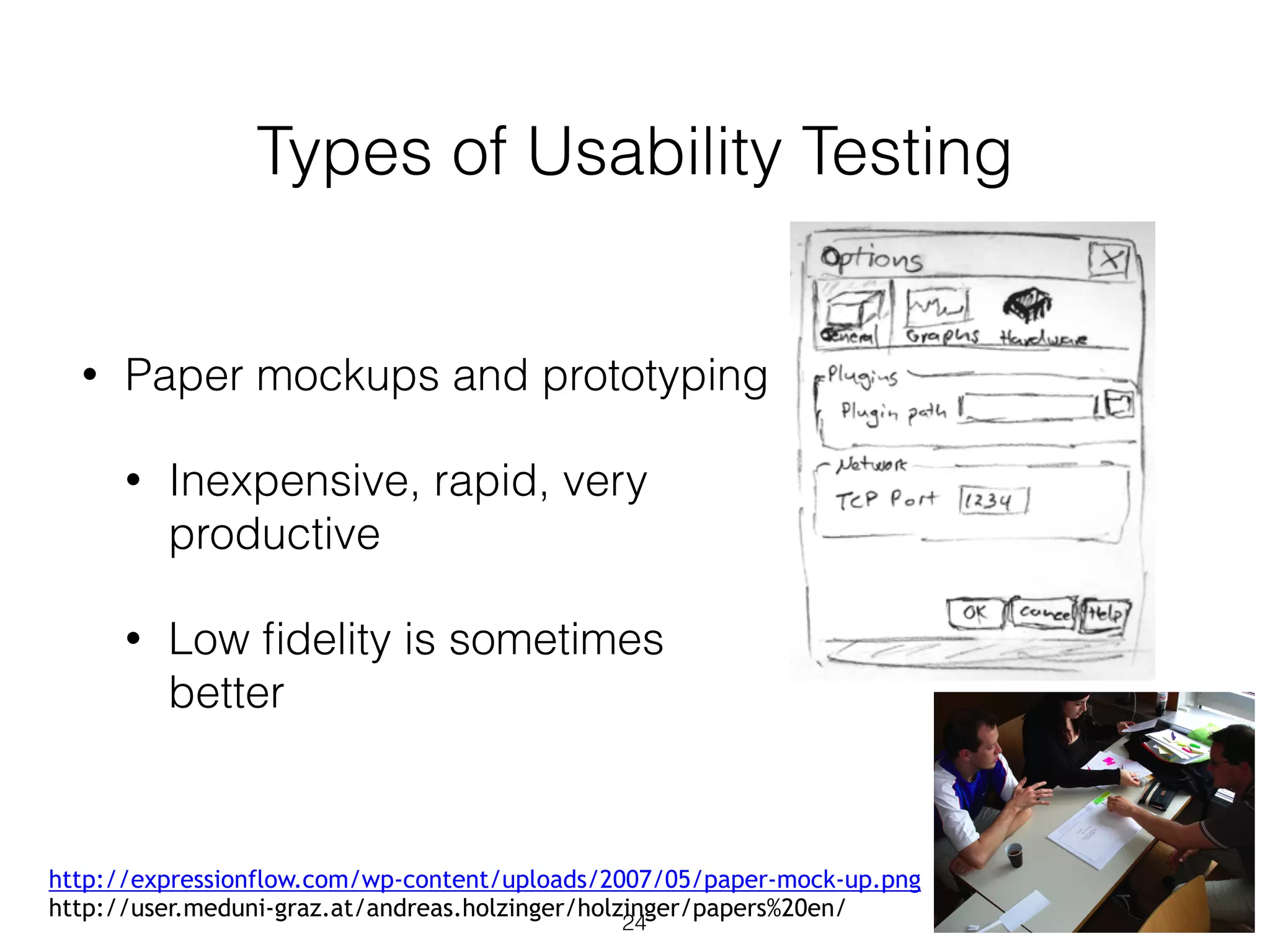
• Paper mockups and prototyping
• Inexpensive, rapid, very
productive
• Low fidelity is sometimes
better
24
http://expressionflow.com/wp-content/uploads/2007/05/paper-mock-up.png
http://user.meduni-graz.at/andreas.holzinger/holzinger/papers%20en/
Types of Usability Testing
• Discount usability testing
• Test early and often (with 3 to 6 testers)
• Pros: Most serious problems can be found with 6 testers. Good for
formative evaluation (early)
• Cons: Complex systems can’t be tested this way. Not good for summative
evaluation (late)
• Competitive usability testing
• Compare against prior or competitor’s versions
• Experimenter bias, be careful to not “prime the user”
• Within-subjects is preferred
25
Types of Usability Testing
• Universal usability testing
• Test with highly diverse
• Users (experience levels, ability, etc.)
• Platforms (mac, pc, linux)
• Hardware (old (how old is old?) -> latest)
• Networks (dial-up -> broadband)
• Field tests and portable labs
• Tests UI in realistic environments
• Beta tests
26
Types of Usability Testing
• Remote usability testing (via web)
• Recruited via online communities, email
• Large n
• Difficulty in logging, validating data
• Software can help
• Can You Break this Test
• Challenge testers to break a system
• Games, security, public displays
27
Limitations
• Focuses on first-time users
• Limited coverage of interface features
• Emergency (military, medical, mission-critical)
• Rarely used features
• Difficult to simulate realistic conditions
• Testing mobile devices
• Signal strength
• Batteries
• User focus
• Yet formal studies on user studies have identified
• Cost savings
• Return on investment (Sherman 2006, Bias and Mayhew 2005)
28
Survey Instruments
• Questionnaires
• Paper or online (e.g. surveymonkey.com)
• Easy to grasp for many people
• The power of many can be shown
• 80% of the 500 users who tried the system liked Option A
• 3 out of the 4 experts like Option B
• Success depends on
• Clear goals in advance
• Focused items
29
Designing survey questions
• Ideally
• Based on existing questions
• Reviewed by colleagues
• Pilot tested
• Direct activities are better than gathering statistics
• Fosters unexpected discoveries
• Important to pre-test questions
• Understandability
• Bias
30
Likert Scales
• Most common methodology
• Strongly Agree, Agree, Neutral, Disagree, Strongly
Disagree
• 5, 7, 9-point scales
• Examples
• Improves my performance in book searching and
buying
• Enables me to search and buy books faster
• Makes it easier to search for and purchase books
31
Most Used Likert-scales
• Questionnaire for User
Interaction Satisfaction
• E.g. questions
• How long have you
worked on this system?
• System Usability Scale
(SUS) – Brooke 1996
• Post-Study System
Usability Questionniare
• Computer System
Usability Questionniare
• Software usability
Measurement Inventory
• Website Analysis and
MeasureMent Inventory
• Mobile Phone Usability
Questionnaire
• Validity, Reliability
32
Bipolar Semantically
Anchored
• Coleman and Williges (1985)
• Pleasant versus Irritating
• Hostile 1 2 3 4 5 6 7 Friendly
• If needed, take existing questionnaires and alter
them slightly for your application
33
Acceptance Tests
• Set goals for performance
• Objective
• Measurable
• Examples
• Mean time between failures (e.g. MOSI)
• Test cases
• Response time requirements
• Readability (including documentation and help)
• Satisfaction
• Comprehensibility
34
Let’s discuss
You want your project to be user friendly.
• Choose Schneiderman or Nielsen’s heuristics to
provide an evaluation methodology:
• What kind of setting would you use?
• How much control would you want to exert?
• Which methods are recorded and when will they
be recorded?
35
Acceptance Tests
• By completing the acceptance tests
• Can be part of contractual fulfillment
• Demonstrate objectivity
• Different than usability tests
• More adversarial
• Neutral party should conduct that
• Ex. Video game and smartphone companies
• App Store, Microsoft, Nintendo, Sony
36
Evaluation during use
• Evaluation methods after a product has been released
• Interviews with individual users
• Get very detailed on specific concerns
• Costly and time-consuming
• Focus group discussions
• Patterns of usage
• Certain people can dominate or sway opinion
• Targeted focus groups
37
Continuous Logging
• The system itself logs user usage
• Video game example
• Other examples
• Track frequency of errors (gives an ordered list of what to address via tutorials,
training, text changes, etc.)
• Speed of performance
• Track which features are used and which are not
• Web Analytics
• Privacy? What gets logged? Opt-in/out?
• What about companies?
38
Online and Telephone Help
• Users enjoy having people ready to help (real-time
chat online or via telephone)
• E.g. Netflix has 8.4 million customers, how many
telephone customer service reps?
• 375
• Expensive, but higher customer satisfaction
• Cheaper versions use Bug Report systems
39
Automated Evaluation
• Software for evaluation
• Low level: Spelling, term concordance
• Metrics: number of displays, tabs, widgets, links
• World Wide Web Consortium Markup Validation
• US NIST Web Metrics Testbed
• New research areas: Evaluation of mobile platforms
40
Case Study
• Computer Game:
• Physiological responses used to evaluate users’
experiences;
• Video of participants playing - observation;
• User satisfaction questionnaire;
• Possibilities of applying crowdsourcing for online
performance evaluations
41

ICS3211 Lecture 9

  • 1.
    ICS3211 - Intelligent InterfacesII Combining design with technology for effective human- computer interaction Week 9 Department of AI, University of Malta, 20201
  • 2.
    Testing & Evaluation Week9 overview: • The What, Why and When of Evaluation & Testing • Testing: expert review and lab testing • Evaluation: formative/summative • Evaluation: heuristic, cognitive walkthrough, usability testing • Case study: evaluating different interfaces 2
  • 3.
    Learning Outcomes At theend of this session you should be able to: • describe different forms of evaluation for different interfaces; • compare and contrast the different evaluation methods with the different contexts and identify the best one to use; • list various rules for the heuristic evaluation (Schniederman & Nielsen); • list the various types of usability testing involved in evaluation; • combine the various evaluation methods to come up with a method that is most suitable to the project chosen. 3
  • 4.
    Introduction • Why evaluate? •Designers become too entranced • What I like • Sunk cost fallacy • Experienced designers know extensive testing is required • How do you test? • A web site? • Air traffic control system? • When do you test? 4
  • 5.
    What to Evaluate? •What to evaluate may range from screen functions, aesthetic designs to workflows; • Users of an ambient display may want to know if it changes people’s behaviour; • Class Activity: What aspects would you want to evaluate in a VR system designed to change users’ behaviour (you can choose which behaviour you would want to see modified). Log in to Moodle VLE. 5
  • 6.
    • Evaluation stagesdepends on product being designed; • Formative evaluations - evaluation done to check a product continues to meet users’ needs • Summative evaluations - evaluation done to assess the success of a product 6 Ways of Categorising Evaluation
  • 7.
    Evaluation Categories • CognitivePsychological Approaches • Social Psychology Methods - Interviews and Questionnaires • Social Science Methods • Engineering Approaches 7
  • 8.
    Expert Review • Colleaguesor Customers • Ask for opinions • Considerations: • What is an expert? User or designer? • Half day to week 8
  • 9.
    Formal Usability Inspection •Experts hold courtroom-style meeting • Each side gives arguments (in an adversarial format) • There is a judge or moderator • Extensive and expensive • Good for novice designers and managers 9
  • 10.
    Expert Reviews • Canbe conducted at any time in the design process • Focus on being comprehensive rather than being specific on improvements • Example review recommendations • Change log in procedure (from 3 to 5 minutes, because users were busy) • Reordering sequence of displays, removing nonessential actions, providing feedback. • Also come up with features for future releases 10
  • 11.
    Expert Review • Placedin situation similar to user • Take training courses • Read documentation • Take tutorials • Try the interface in a realistic work environment (complete with noise and distractions) • Bird’s eye view • Studying a full set of printed screens laid on the floor or pinned to the walls • See topics such as consistency 11
  • 12.
    Heuristic Evaluation • GiveExpert heuristic, ask them to evaluate • Shneiderman's "Eight Golden Rules of Interface Design" • Nielsen’s Heuristics 12
  • 13.
    Shneiderman's "Eight Golden Rulesof Interface Design • Strive for consistency • Enable frequent users to use shortcuts • Offer informative feedback • Design dialog to yield closure • Offer simple error handling • Permit easy reversal of actions • Support internal locus of control • Reduce short-term memory load 13
  • 14.
    Nielsen’s Heuristics • Visibilityof system status • Match between system and the real world • User control and freedom • Consistency and standards • Error prevention • Recognition rather than recall • Flexibility and efficiency of use • Aesthetic and minimalist design • Help users recognize, diagnose, and recover from errors • Help and documentation 14
  • 15.
    Consistency Inspection • Verifyconsistency across family of interfaces • Check terminology, fonts, color, layout, i/o formats • Look at documentation and online help • Also can be used in conjunction with software tools 15
  • 16.
    Cognitive Walkthrough • Experts“simulate” being users going through the interface • Tasks are ordered by frequency • Good for interfaces that can be learned by “exploratory browsing” • Usually walkthrough by themselves, then report their experiences (written, video) to designers meeting • Useful if application is geared for group the designers might not be familiar with: • Military, Assistive Technologies 16
  • 17.
    Metaphors of humanThinking (MOT) • Experts consider metaphors for five aspects of human thinking • Habit • Stream of thought • Awareness and Associations • Relation between utterances and thought • Knowing • Appears better than cognitive walkthrough and heuristic evaluation 17
  • 18.
    Types of Evaluation •Controlled settings involving users • usability testing • living labs • Natural settings involving users • field studies • Any settings not involving users 18
  • 19.
    Usability Testing andLabs • 1980s, testing was luxury (but deadlines crept up) • Usability testing was incentive for deadlines • Fewer project overlays • Sped up projects • Cost savings • Labs are different than academia • Less general theory • More practical studies 19
  • 20.
    Staff • Expertise intesting (psych, hci, comp sci) • 10 to 15 projects per year • Meet with UI architect to plan testing (Figure 4.2) • Participate in early task analysis and design reviews • T – 2-6 weeks, creates study design and test plan • E.g. Who are participants? Beta testers, current customers, in company staff, advertising • T -1 week, pilot test (1-3 participants) 20
  • 21.
    Participants • Labs categorizeusers based on: • Computing background • Experience with task • Motivation • Education • Ability with the language used in the interface • Controls for • Physical concerns (e.g. eyesight, handedness, age) • Experimental conditions (e.g. time of day, physical surroundings, noise, temperature, distractions) 21
  • 22.
    Recording Participants • Loggingis important, yet tedious • Software to help • Powerful to see people use your interface • New approaches: eye tracking • IRB items • Focus users on interface • Tell them the task, duration 22
  • 23.
    Thinking Aloud • Concurrentthink aloud • Invite users to think aloud • Nothing they say is wrong • Don’t interrupt, let the user talk • Spontaneous, encourages positive suggestions • Can be done in teams of participants • Retrospective think aloud • Asks people afterwards what they were thinking • Issues with accuracy • Does not interrupt users (timings are more accurate) 23
  • 24.
    Types of UsabilityTesting • Paper mockups and prototyping • Inexpensive, rapid, very productive • Low fidelity is sometimes better 24 http://expressionflow.com/wp-content/uploads/2007/05/paper-mock-up.png http://user.meduni-graz.at/andreas.holzinger/holzinger/papers%20en/
  • 25.
    Types of UsabilityTesting • Discount usability testing • Test early and often (with 3 to 6 testers) • Pros: Most serious problems can be found with 6 testers. Good for formative evaluation (early) • Cons: Complex systems can’t be tested this way. Not good for summative evaluation (late) • Competitive usability testing • Compare against prior or competitor’s versions • Experimenter bias, be careful to not “prime the user” • Within-subjects is preferred 25
  • 26.
    Types of UsabilityTesting • Universal usability testing • Test with highly diverse • Users (experience levels, ability, etc.) • Platforms (mac, pc, linux) • Hardware (old (how old is old?) -> latest) • Networks (dial-up -> broadband) • Field tests and portable labs • Tests UI in realistic environments • Beta tests 26
  • 27.
    Types of UsabilityTesting • Remote usability testing (via web) • Recruited via online communities, email • Large n • Difficulty in logging, validating data • Software can help • Can You Break this Test • Challenge testers to break a system • Games, security, public displays 27
  • 28.
    Limitations • Focuses onfirst-time users • Limited coverage of interface features • Emergency (military, medical, mission-critical) • Rarely used features • Difficult to simulate realistic conditions • Testing mobile devices • Signal strength • Batteries • User focus • Yet formal studies on user studies have identified • Cost savings • Return on investment (Sherman 2006, Bias and Mayhew 2005) 28
  • 29.
    Survey Instruments • Questionnaires •Paper or online (e.g. surveymonkey.com) • Easy to grasp for many people • The power of many can be shown • 80% of the 500 users who tried the system liked Option A • 3 out of the 4 experts like Option B • Success depends on • Clear goals in advance • Focused items 29
  • 30.
    Designing survey questions •Ideally • Based on existing questions • Reviewed by colleagues • Pilot tested • Direct activities are better than gathering statistics • Fosters unexpected discoveries • Important to pre-test questions • Understandability • Bias 30
  • 31.
    Likert Scales • Mostcommon methodology • Strongly Agree, Agree, Neutral, Disagree, Strongly Disagree • 5, 7, 9-point scales • Examples • Improves my performance in book searching and buying • Enables me to search and buy books faster • Makes it easier to search for and purchase books 31
  • 32.
    Most Used Likert-scales •Questionnaire for User Interaction Satisfaction • E.g. questions • How long have you worked on this system? • System Usability Scale (SUS) – Brooke 1996 • Post-Study System Usability Questionniare • Computer System Usability Questionniare • Software usability Measurement Inventory • Website Analysis and MeasureMent Inventory • Mobile Phone Usability Questionnaire • Validity, Reliability 32
  • 33.
    Bipolar Semantically Anchored • Colemanand Williges (1985) • Pleasant versus Irritating • Hostile 1 2 3 4 5 6 7 Friendly • If needed, take existing questionnaires and alter them slightly for your application 33
  • 34.
    Acceptance Tests • Setgoals for performance • Objective • Measurable • Examples • Mean time between failures (e.g. MOSI) • Test cases • Response time requirements • Readability (including documentation and help) • Satisfaction • Comprehensibility 34
  • 35.
    Let’s discuss You wantyour project to be user friendly. • Choose Schneiderman or Nielsen’s heuristics to provide an evaluation methodology: • What kind of setting would you use? • How much control would you want to exert? • Which methods are recorded and when will they be recorded? 35
  • 36.
    Acceptance Tests • Bycompleting the acceptance tests • Can be part of contractual fulfillment • Demonstrate objectivity • Different than usability tests • More adversarial • Neutral party should conduct that • Ex. Video game and smartphone companies • App Store, Microsoft, Nintendo, Sony 36
  • 37.
    Evaluation during use •Evaluation methods after a product has been released • Interviews with individual users • Get very detailed on specific concerns • Costly and time-consuming • Focus group discussions • Patterns of usage • Certain people can dominate or sway opinion • Targeted focus groups 37
  • 38.
    Continuous Logging • Thesystem itself logs user usage • Video game example • Other examples • Track frequency of errors (gives an ordered list of what to address via tutorials, training, text changes, etc.) • Speed of performance • Track which features are used and which are not • Web Analytics • Privacy? What gets logged? Opt-in/out? • What about companies? 38
  • 39.
    Online and TelephoneHelp • Users enjoy having people ready to help (real-time chat online or via telephone) • E.g. Netflix has 8.4 million customers, how many telephone customer service reps? • 375 • Expensive, but higher customer satisfaction • Cheaper versions use Bug Report systems 39
  • 40.
    Automated Evaluation • Softwarefor evaluation • Low level: Spelling, term concordance • Metrics: number of displays, tabs, widgets, links • World Wide Web Consortium Markup Validation • US NIST Web Metrics Testbed • New research areas: Evaluation of mobile platforms 40
  • 41.
    Case Study • ComputerGame: • Physiological responses used to evaluate users’ experiences; • Video of participants playing - observation; • User satisfaction questionnaire; • Possibilities of applying crowdsourcing for online performance evaluations 41