

Evaluation beyond the desktop ...
Thomas Grill
mailto:thomas.grill@sbg.ac.at
17.06.2009

Human Computer Interaction & Usability Unit
Thursday, May 27, 2010

http://icts.sbg.ac.at
What’s the difference?

...
● - HCI - Topic 2 - Topic 3 - Topic 4 - Topic 5
Thursday, May 27, 2010

2 / 41
● Why is it different?
• The

range of computerized systems is far greater than just
desktop application.
• In particular, unconventional input channels such as
Tangible user interfaces
• Physical objects are representations and controls for digital objects
 Gesture inputs, movement tracking
 Eye- and gaze tracking


• and

environmental profiles such as

Virtual environments
 Augmented reality


• are

difficult or impossible to test using ordinary usability
labs

● - What - Where - How - Tools - Assignment
Thursday, May 27, 2010

3 / 45
●

General problems related to the usability of
unconventional user interaction
• In

UbiComp applications
The feasibility rather than the usability is tested
 No established software usability culture for mobile and UbiComp
applications


• Lack

of trained specialists
• Screenbased testing methods are often not feasible
• Direct porting between different platforms is not feasible
nor does it cover the particular platform requirements
• Fast-paced software market environment


No time for long-lasting user testing?

● - What - Where - How - Tools - Assignment
Thursday, May 27, 2010

4 / 45
What to evaluate?

...
● - HCI - Topic 2 - Topic 3 - Topic 4 - Topic 5
Thursday, May 27, 2010

5 / 41
1

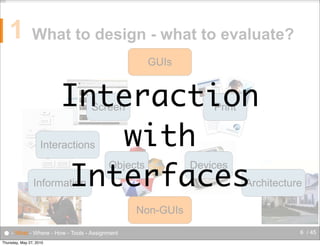
What to design - what to evaluate?
GUIs

Interaction
with
Interfaces
Screen

Print

Interactions

Objects

Information

Devices

Architecture

Non-GUIs
● - What - Where - How - Tools - Assignment
Thursday, May 27, 2010

6 / 45
1

Usability of ...
• desktop

applications

WIMP environment
 Standard interaction devices (mouse/keyboard/...)


• mobile

applications

mobile environment
 mobile devices (smartphones, handhelds, ubicomp appliances, ...)


• real

world applications

real world environment (mobile+static)
 real world objects, ubicomp objects


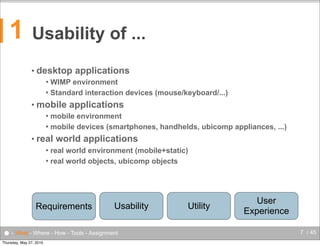
Requirements

Usability

● - What - Where - How - Tools - Assignment
Thursday, May 27, 2010

Utility

User
Experience
7 / 45
1

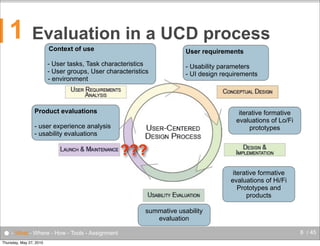
Evaluation in a UCD process
Context of use

User requirements

- User tasks, Task characteristics
- User groups, User characteristics
- environment

- Usability parameters
- UI design requirements

Product evaluations

iterative formative
evaluations of Lo/Fi
prototypes

- user experience analysis
- usability evaluations

???
iterative formative
evaluations of Hi/Fi
Prototypes and
products
summative usability
evaluation

● - What - Where - How - Tools - Assignment
Thursday, May 27, 2010

8 / 45
1

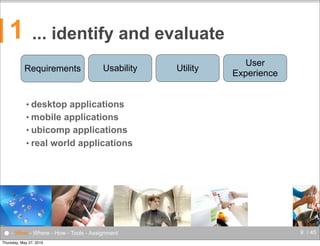
... identify and evaluate
Requirements

Usability

Utility

User
Experience

• desktop

applications
• mobile applications
• ubicomp applications
• real world applications

● - What - Where - How - Tools - Assignment
Thursday, May 27, 2010

9 / 45
1

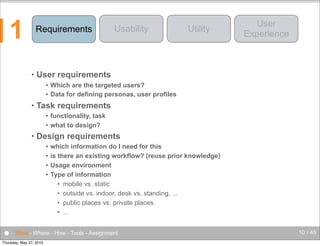
Requirements

•

Usability

Utility

User
Experience

User requirements
Which are the targeted users?
 Data for defining personas, user profiles


•

Task requirements
functionality, task
 what to design?


•

Design requirements
which information do I need for this
 is there an existing workflow? (reuse prior knowledge)
 Usage environment
 Type of information
• mobile vs. static
• outside vs. indoor, desk vs. standing, ...
• public places vs. private places
• ...


● - What - Where - How - Tools - Assignment
Thursday, May 27, 2010

10 / 45
1

Requirements

•

Usability

Utility

User
Experience

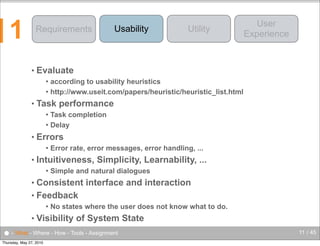
Evaluate
according to usability heuristics
 http://www.useit.com/papers/heuristic/heuristic_list.html


•

Task performance
Task completion
 Delay


•

Errors


•

Error rate, error messages, error handling, ...

Intuitiveness, Simplicity, Learnability, ...


Simple and natural dialogues

Consistent interface and interaction
• Feedback
•



•

No states where the user does not know what to do.

Visibility of System State

● - What - Where - How - Tools - Assignment
Thursday, May 27, 2010

11 / 45
1

Requirements

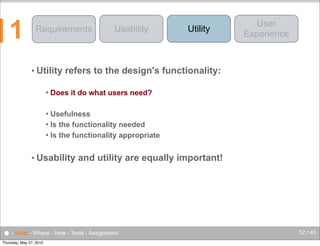
• Utility


Usability

Utility

User
Experience

refers to the design's functionality:

Does it do what users need?

Usefulness
 Is the functionality needed
 Is the functionality appropriate


• Usability

and utility are equally important!

● - What - Where - How - Tools - Assignment
Thursday, May 27, 2010

12 / 45
1

Requirements

Usability

● - What - Where - How - Tools - Assignment
Thursday, May 27, 2010

Utility

User
Experience

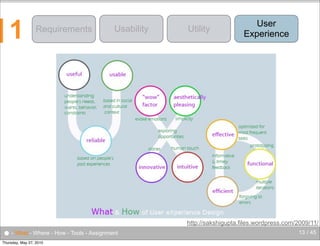
http://sakshigupta.files.wordpress.com/2009/11/
13 / 45
1

Requirements

Usability

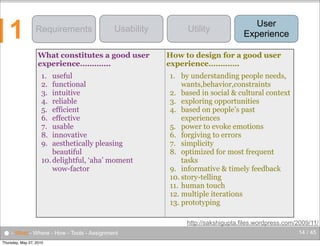
What constitutes a good user
experience………….
1.
2.
3.
4.
5.
6.
7.
8.
9.

useful
functional
intuitive
reliable
efficient
effective
usable
innovative
aesthetically pleasing
beautiful
10. delightful, ‘aha’ moment
wow-factor

● - What - Where - How - Tools - Assignment
Thursday, May 27, 2010

Utility

User
Experience

How to design for a good user
experience………….
1. by understanding people needs,
wants,behavior,constraints
2. based in social & cultural context
3. exploring opportunities
4. based on people’s past
experiences
5. power to evoke emotions
6. forgiving to errors
7. simplicity
8. optimized for most frequent
tasks
9. informative & timely feedback
10. story-telling
11. human touch
12. multiple iterations
13. prototyping
http://sakshigupta.files.wordpress.com/2009/11/
14 / 45
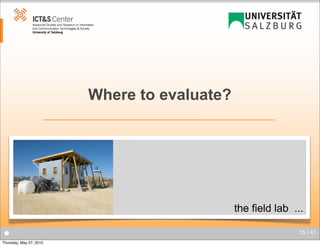
Where to evaluate?

the field lab ...
●
Thursday, May 27, 2010

15 / 41
2

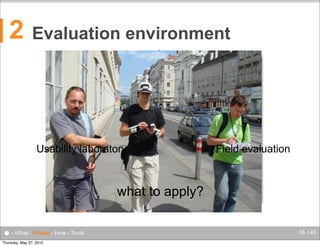
Evaluation environment
video camera

audio

usability lab

system

video monitor

tasks

Usability laboratory

one way mirror

facilitator

recording unit

Field evaluation
evaluator

what to apply?
● - What - Where - How - Tools
Thursday, May 27, 2010

16 / 45
2

Select the appropriate
evaluation environment
• What
• In

to evaluate?

the lab (in-Vitro)
“Realistic” usage scenario can be setup/simulated in a usability
laboratory
 Usually in-door usage
 Usability lab, Smart Homes
 Evaluating concrete tasks, performing user tests
 lower costs


● - What - Where - How - Tools
Thursday, May 27, 2010

17 / 45
2

Select the appropriate
evaluation environment
• What
• In

to evaluate?

the field (in-Situ)
Mobile task scenario
 Outdoor usage
 Observing users in real world scenarios
 higher costs


● - What - Where - How - Tools
Thursday, May 27, 2010

18 / 45
2

Select the appropriate
evaluation environment
• What
• In

to evaluate?

the real world (in-Vivo)
Long time usability observations
 User experience analysis
 Indoor and outdoor usage
 Observing/Sensing/Logging of users in real world scenarios
 higher costs / higher effort


● - What - Where - How - Tools
Thursday, May 27, 2010

19 / 45
How to evaluate?

...
●
Thursday, May 27, 2010

20 / 41
3

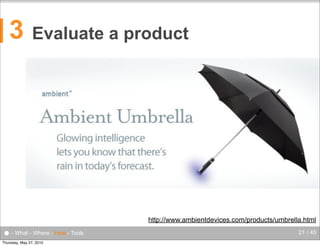
Evaluate a product

http://www.ambientdevices.com/products/umbrella.html

● - What - Where - How - Tools
Thursday, May 27, 2010

21 / 45
3

Define the goals of the evaluation ...
• What

do I want to find out?

I have a design / idea.
• Does it make sense?
• Is it useful?
 Usability
 User Experience
 Utility
 General usage behaviour
 Which user group to address
 ...


● - What - Where - How - Tools
Thursday, May 27, 2010

22 / 45
3

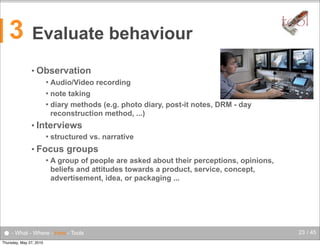
Evaluate behaviour

tool

• Observation
Audio/Video recording
 note taking
 diary methods (e.g. photo diary, post-it notes, DRM - day
reconstruction method, ...)


• Interviews


structured vs. narrative

• Focus


groups

A group of people are asked about their perceptions, opinions,
beliefs and attitudes towards a product, service, concept,
advertisement, idea, or packaging ...

● - What - Where - How - Tools
Thursday, May 27, 2010

23 / 45
3

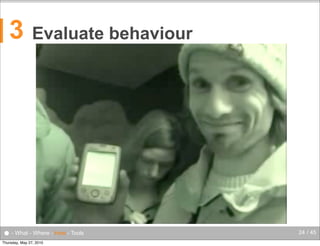
Evaluate behaviour

● - What - Where - How - Tools
Thursday, May 27, 2010

24 / 45
3

Evaluate usability
• Evaluate

behaviour

• Measure
task completion
 error rate
 critical incidents method


• Measuring
Sensing
 Logging


• Important
Time synchronization of all measured data!!!
 Analysis tools help here (ELAN, NVivo, MacEval, Morae, ...)


● - What - Where - How - Tools
Thursday, May 27, 2010

25 / 45
3

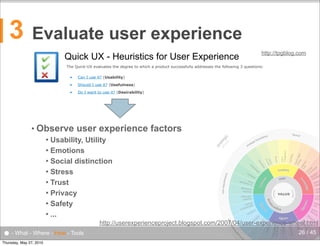
Evaluate user experience
http://tpgblog.com

Quick UX - Heuristics for User Experience

The Quick-UX evaluates the degree to which a product successfully addresses the following 3 questions:
Can I use it? (Usability)

•

Should I use it? (Usefulness)

•

Do I want to use it? (Desirability)

customer

ty
abili

g
mar ke
tin

brand
management

n ce

y

e
cr

il i
dib

e

sa
tisf
act
ion
expected
function
ality
no u
erro nexpecte
d
rs

expected
information

ty

d
e si r
abi
lit

co

ty
bili
ifya
ver
r
te fo
opria
appr se
purpo

ity
rm
nfo

y
alit

naming

f
rd o
wo uth
o
m

as
e

ess
en

iqu
un

usef
uln
es
s

fer

men
ts

dif

es s

user require

c
ac

VALUE

AG
WC li

comp

conte
separ

color
and c

med
use ia

gra
ele phic
me
nts
typ
og
ra
ph
y

on

t

ti
nc
fu
d
an

c
on
te
n

se

ness

l
ua

nt
me ts
ce e n
pla elem
of

ion
igat
nav

intuitive

str ucture

naming
categ and
orizat
ion

co n
sist
enc
y

Thursday, May 27, 2010

u s er

er ility
ws tib
ro pa
b m
co
ard c
nd
sta mplian
co

http://userexperienceproject.blogspot.com/2007/04/user-experience-wheel.html
to
vo ne o
ice f

● - What - Where - How - Tools

f i n d a bi l i t y

usability

ic
eg
rat
st

launch

on
dati
oun
f

ex p e
ri

ic

provider

Usability, Utility
 Emotions
 Social distinction
 Stress
 Trust
 Privacy
 Safety
 ...


str
a
ph teg

user experience factors

e
nt
i at
ion

• Observe

s ea
stra rch en
gine
teg
y
r es
po
tim n
e se

•

26 / 45
3

Evaluate user experience
• How?
• Evaluation

methods based on cognitive and social

sciences
Interviews
 Questionnaires
 long-term evaluations with diary method
 Critical Incident Method (ICT)
 ...


● - What - Where - How - Tools
Thursday, May 27, 2010

27 / 45
3

How to evaluate ...
• Select,

create, or define an appropriate

Evaluation Method
 Evaluation Environment
 The participants of the evaluation scenario
• experts
• test users
 Prepare
• test scenarios
• questionnaires
• necessary forms (e.g. non-disclosure form, session checklists, ...)


tool

•
•
•

http://www.stcsig.org/usability/resources/toolkit/toolkit.html
A set of document templates useful during usability evaluations
NASA Usability toolkit (http://www.hq.nasa.gov/pao/portal/usability/resources/index.htm)

• ....

● - What - Where - How - Tools
Thursday, May 27, 2010

28 / 45
3

How to evaluate ...
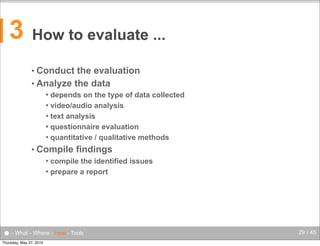
• Conduct

the evaluation
• Analyze the data
depends on the type of data collected
 video/audio analysis
 text analysis
 questionnaire evaluation
 quantitative / qualitative methods


• Compile

findings

compile the identified issues
 prepare a report


● - What - Where - How - Tools
Thursday, May 27, 2010

29 / 45
3

!"#$%&'()&*'#$%&*+',-$+,&%.&-,'/"0"12&345&
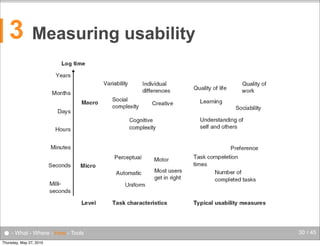
Measuring usability

● - What - Where - How - Tools
Thursday, May 27, 2010

30 / 45
Evaluation tools in the field ...

... tools
●
Thursday, May 27, 2010

31 / 41
4

Questionnaires
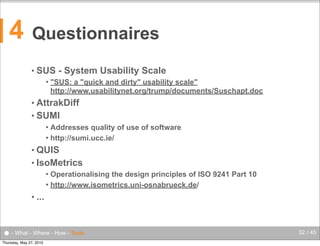
• SUS


- System Usability Scale

"SUS: a "quick and dirty" usability scale"
http://www.usabilitynet.org/trump/documents/Suschapt.doc

• AttrakDiff
• SUMI
Addresses quality of use of software
 http://sumi.ucc.ie/


• QUIS
• IsoMetrics
Operationalising the design principles of ISO 9241 Part 10
 http://www.isometrics.uni-osnabrueck.de/


• ...

● - What - Where - How - Tools
Thursday, May 27, 2010

32 / 45
4

Traditional tools ...
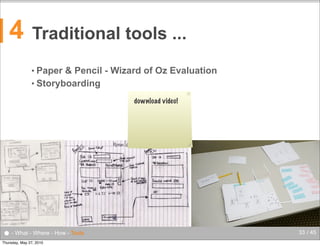
• Paper

& Pencil - Wizard of Oz Evaluation
• Storyboarding
download video!

● - What - Where - How - Tools
Thursday, May 27, 2010

33 / 45
4

Recording tools
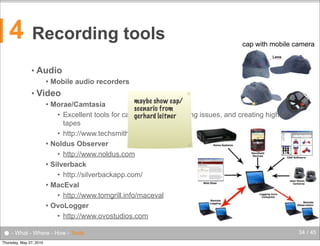
•

Audio


•

cap with mobile camera

Mobile audio recorders

Video

maybe show cap/
Morae/Camtasia
scenario from
• Excellent tools for capturing video, logging issues, and creating highlight
gerhard leitner
tapes
• http://www.techsmith.com/
 Noldus Observer
• http://www.noldus.com
 Silverback
• http://silverbackapp.com/
 MacEval
• http://www.tomgrill.info/maceval
 OvoLogger
• http://www.ovostudios.com


● - What - Where - How - Tools
Thursday, May 27, 2010

34 / 45
4

Recording tools
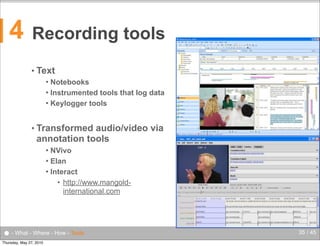
• Text
Notebooks
 Instrumented tools that log data
 Keylogger tools


• Transformed

audio/video via
annotation tools
NVivo
 Elan
 Interact
• http://www.mangoldinternational.com


● - What - Where - How - Tools
Thursday, May 27, 2010

35 / 45
4

Recording tools
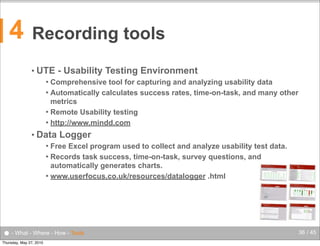
• UTE

- Usability Testing Environment

Comprehensive tool for capturing and analyzing usability data
 Automatically calculates success rates, time-on-task, and many other
metrics
 Remote Usability testing
 http://www.mindd.com


• Data

Logger

Free Excel program used to collect and analyze usability test data.
 Records task success, time-on-task, survey questions, and
automatically generates charts.
 www.userfocus.co.uk/resources/datalogger .html


● - What - Where - How - Tools
Thursday, May 27, 2010

36 / 45
4

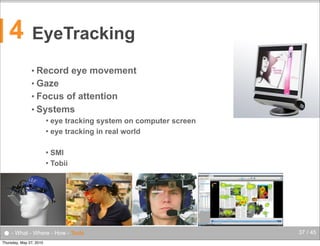
EyeTracking
• Record

eye movement

• Gaze
• Focus

of attention
• Systems
eye tracking system on computer screen
 eye tracking in real world


SMI
 Tobii


● - What - Where - How - Tools
Thursday, May 27, 2010

37 / 45
4

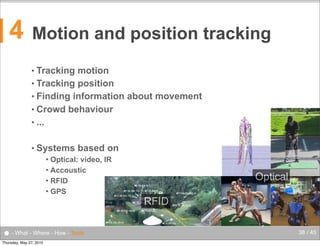
Motion and position tracking
• Tracking

motion
• Tracking position
• Finding information about movement
• Crowd behaviour
• ...
• Systems

based on

Optical: video, IR
 Accoustic
 RFID
 GPS


● - What - Where - How - Tools
Thursday, May 27, 2010

Optical
RFID
38 / 45
4

Recording tools
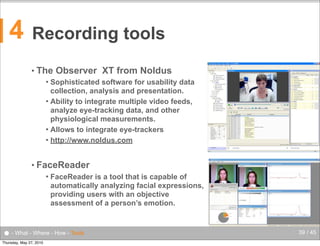
• The

Observer XT from Noldus

Sophisticated software for usability data
collection, analysis and presentation.
 Ability to integrate multiple video feeds,
analyze eye-tracking data, and other
physiological measurements.
 Allows to integrate eye-trackers
 http://www.noldus.com


• FaceReader


FaceReader is a tool that is capable of
automatically analyzing facial expressions,
providing users with an objective
assessment of a person’s emotion.

● - What - Where - How - Tools
Thursday, May 27, 2010

39 / 45
4

Recording tools

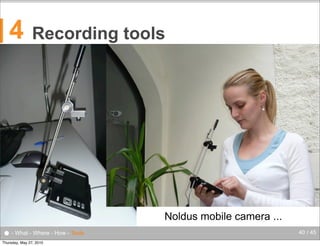
Noldus mobile camera ...
● - What - Where - How - Tools
Thursday, May 27, 2010

40 / 45
4

Recording tools

Video system using
regular and IP
based moveable
cameras
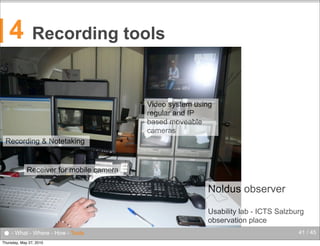
Recording & Notetaking

Receiver for mobile camera

Noldus observer
Usability lab - ICTS Salzburg
observation place

● - What - Where - How - Tools
Thursday, May 27, 2010

41 / 45
4

Recording tools

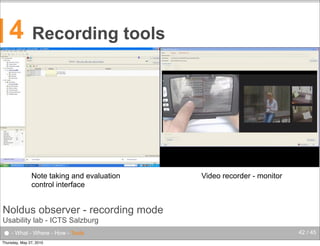
Note taking and evaluation
control interface

Video recorder - monitor

Noldus observer - recording mode
Usability lab - ICTS Salzburg

● - What - Where - How - Tools
Thursday, May 27, 2010

42 / 45
Thursday, May 27, 2010
4

Analysis tools
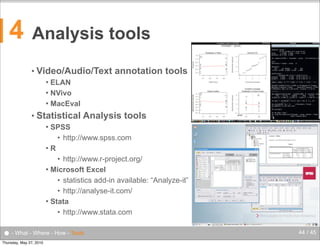
• Video/Audio/Text

annotation tools

ELAN
 NVivo
 MacEval


• Statistical

Analysis tools

SPSS
• http://www.spss.com
R
• http://www.r-project.org/
 Microsoft Excel
• statistics add-in available: “Analyze-it”
• http://analyse-it.com/
 Stata
• http://www.stata.com


● - What - Where - How - Tools
Thursday, May 27, 2010

44 / 45
* Contact
HCI & Usability Unit
ICT&S Center, University of Salzburg
Sigmund-Haffner-Gasse 18
5020 Salzburg, Austria
hci-unit@icts.sbg.ac.at

Dr. Thomas Grill
thomas.grill@sbg.ac.at

Human Computer Interaction & Usability Unit
Thursday, May 27, 2010

hci-unit@icts.sbg.ac.at

Evaluation beyond the desktop

  • 1.
    Evaluation beyond thedesktop ... Thomas Grill mailto:thomas.grill@sbg.ac.at 17.06.2009 Human Computer Interaction & Usability Unit Thursday, May 27, 2010 http://icts.sbg.ac.at
  • 2.
    What’s the difference? ... ●- HCI - Topic 2 - Topic 3 - Topic 4 - Topic 5 Thursday, May 27, 2010 2 / 41
  • 3.
    ● Why isit different? • The range of computerized systems is far greater than just desktop application. • In particular, unconventional input channels such as Tangible user interfaces • Physical objects are representations and controls for digital objects  Gesture inputs, movement tracking  Eye- and gaze tracking  • and environmental profiles such as Virtual environments  Augmented reality  • are difficult or impossible to test using ordinary usability labs ● - What - Where - How - Tools - Assignment Thursday, May 27, 2010 3 / 45
  • 4.
    ● General problems relatedto the usability of unconventional user interaction • In UbiComp applications The feasibility rather than the usability is tested  No established software usability culture for mobile and UbiComp applications  • Lack of trained specialists • Screenbased testing methods are often not feasible • Direct porting between different platforms is not feasible nor does it cover the particular platform requirements • Fast-paced software market environment  No time for long-lasting user testing? ● - What - Where - How - Tools - Assignment Thursday, May 27, 2010 4 / 45
  • 5.
    What to evaluate? ... ●- HCI - Topic 2 - Topic 3 - Topic 4 - Topic 5 Thursday, May 27, 2010 5 / 41
  • 6.
    1 What to design- what to evaluate? GUIs Interaction with Interfaces Screen Print Interactions Objects Information Devices Architecture Non-GUIs ● - What - Where - How - Tools - Assignment Thursday, May 27, 2010 6 / 45
  • 7.
    1 Usability of ... •desktop applications WIMP environment  Standard interaction devices (mouse/keyboard/...)  • mobile applications mobile environment  mobile devices (smartphones, handhelds, ubicomp appliances, ...)  • real world applications real world environment (mobile+static)  real world objects, ubicomp objects  Requirements Usability ● - What - Where - How - Tools - Assignment Thursday, May 27, 2010 Utility User Experience 7 / 45
  • 8.
    1 Evaluation in aUCD process Context of use User requirements - User tasks, Task characteristics - User groups, User characteristics - environment - Usability parameters - UI design requirements Product evaluations iterative formative evaluations of Lo/Fi prototypes - user experience analysis - usability evaluations ??? iterative formative evaluations of Hi/Fi Prototypes and products summative usability evaluation ● - What - Where - How - Tools - Assignment Thursday, May 27, 2010 8 / 45
  • 9.
    1 ... identify andevaluate Requirements Usability Utility User Experience • desktop applications • mobile applications • ubicomp applications • real world applications ● - What - Where - How - Tools - Assignment Thursday, May 27, 2010 9 / 45
  • 10.
    1 Requirements • Usability Utility User Experience User requirements Which arethe targeted users?  Data for defining personas, user profiles  • Task requirements functionality, task  what to design?  • Design requirements which information do I need for this  is there an existing workflow? (reuse prior knowledge)  Usage environment  Type of information • mobile vs. static • outside vs. indoor, desk vs. standing, ... • public places vs. private places • ...  ● - What - Where - How - Tools - Assignment Thursday, May 27, 2010 10 / 45
  • 11.
    1 Requirements • Usability Utility User Experience Evaluate according to usabilityheuristics  http://www.useit.com/papers/heuristic/heuristic_list.html  • Task performance Task completion  Delay  • Errors  • Error rate, error messages, error handling, ... Intuitiveness, Simplicity, Learnability, ...  Simple and natural dialogues Consistent interface and interaction • Feedback •  • No states where the user does not know what to do. Visibility of System State ● - What - Where - How - Tools - Assignment Thursday, May 27, 2010 11 / 45
  • 12.
    1 Requirements • Utility  Usability Utility User Experience refers tothe design's functionality: Does it do what users need? Usefulness  Is the functionality needed  Is the functionality appropriate  • Usability and utility are equally important! ● - What - Where - How - Tools - Assignment Thursday, May 27, 2010 12 / 45
  • 13.
    1 Requirements Usability ● - What- Where - How - Tools - Assignment Thursday, May 27, 2010 Utility User Experience http://sakshigupta.files.wordpress.com/2009/11/ 13 / 45
  • 14.
    1 Requirements Usability What constitutes agood user experience…………. 1. 2. 3. 4. 5. 6. 7. 8. 9. useful functional intuitive reliable efficient effective usable innovative aesthetically pleasing beautiful 10. delightful, ‘aha’ moment wow-factor ● - What - Where - How - Tools - Assignment Thursday, May 27, 2010 Utility User Experience How to design for a good user experience…………. 1. by understanding people needs, wants,behavior,constraints 2. based in social & cultural context 3. exploring opportunities 4. based on people’s past experiences 5. power to evoke emotions 6. forgiving to errors 7. simplicity 8. optimized for most frequent tasks 9. informative & timely feedback 10. story-telling 11. human touch 12. multiple iterations 13. prototyping http://sakshigupta.files.wordpress.com/2009/11/ 14 / 45
  • 15.
    Where to evaluate? thefield lab ... ● Thursday, May 27, 2010 15 / 41
  • 16.
    2 Evaluation environment video camera audio usabilitylab system video monitor tasks Usability laboratory one way mirror facilitator recording unit Field evaluation evaluator what to apply? ● - What - Where - How - Tools Thursday, May 27, 2010 16 / 45
  • 17.
    2 Select the appropriate evaluationenvironment • What • In to evaluate? the lab (in-Vitro) “Realistic” usage scenario can be setup/simulated in a usability laboratory  Usually in-door usage  Usability lab, Smart Homes  Evaluating concrete tasks, performing user tests  lower costs  ● - What - Where - How - Tools Thursday, May 27, 2010 17 / 45
  • 18.
    2 Select the appropriate evaluationenvironment • What • In to evaluate? the field (in-Situ) Mobile task scenario  Outdoor usage  Observing users in real world scenarios  higher costs  ● - What - Where - How - Tools Thursday, May 27, 2010 18 / 45
  • 19.
    2 Select the appropriate evaluationenvironment • What • In to evaluate? the real world (in-Vivo) Long time usability observations  User experience analysis  Indoor and outdoor usage  Observing/Sensing/Logging of users in real world scenarios  higher costs / higher effort  ● - What - Where - How - Tools Thursday, May 27, 2010 19 / 45
  • 20.
  • 21.
    3 Evaluate a product http://www.ambientdevices.com/products/umbrella.html ●- What - Where - How - Tools Thursday, May 27, 2010 21 / 45
  • 22.
    3 Define the goalsof the evaluation ... • What do I want to find out? I have a design / idea. • Does it make sense? • Is it useful?  Usability  User Experience  Utility  General usage behaviour  Which user group to address  ...  ● - What - Where - How - Tools Thursday, May 27, 2010 22 / 45
  • 23.
    3 Evaluate behaviour tool • Observation Audio/Videorecording  note taking  diary methods (e.g. photo diary, post-it notes, DRM - day reconstruction method, ...)  • Interviews  structured vs. narrative • Focus  groups A group of people are asked about their perceptions, opinions, beliefs and attitudes towards a product, service, concept, advertisement, idea, or packaging ... ● - What - Where - How - Tools Thursday, May 27, 2010 23 / 45
  • 24.
    3 Evaluate behaviour ● -What - Where - How - Tools Thursday, May 27, 2010 24 / 45
  • 25.
    3 Evaluate usability • Evaluate behaviour •Measure task completion  error rate  critical incidents method  • Measuring Sensing  Logging  • Important Time synchronization of all measured data!!!  Analysis tools help here (ELAN, NVivo, MacEval, Morae, ...)  ● - What - Where - How - Tools Thursday, May 27, 2010 25 / 45
  • 26.
    3 Evaluate user experience http://tpgblog.com QuickUX - Heuristics for User Experience The Quick-UX evaluates the degree to which a product successfully addresses the following 3 questions: Can I use it? (Usability) • Should I use it? (Usefulness) • Do I want to use it? (Desirability) customer ty abili g mar ke tin brand management n ce y e cr il i dib e sa tisf act ion expected function ality no u erro nexpecte d rs expected information ty d e si r abi lit co ty bili ifya ver r te fo opria appr se purpo ity rm nfo y alit naming f rd o wo uth o m as e ess en iqu un usef uln es s fer men ts dif es s user require c ac VALUE AG WC li comp conte separ color and c med use ia gra ele phic me nts typ og ra ph y on t ti nc fu d an c on te n se ness l ua nt me ts ce e n pla elem of ion igat nav intuitive str ucture naming categ and orizat ion co n sist enc y Thursday, May 27, 2010 u s er er ility ws tib ro pa b m co ard c nd sta mplian co http://userexperienceproject.blogspot.com/2007/04/user-experience-wheel.html to vo ne o ice f ● - What - Where - How - Tools f i n d a bi l i t y usability ic eg rat st launch on dati oun f ex p e ri ic provider Usability, Utility  Emotions  Social distinction  Stress  Trust  Privacy  Safety  ...  str a ph teg user experience factors e nt i at ion • Observe s ea stra rch en gine teg y r es po tim n e se • 26 / 45
  • 27.
    3 Evaluate user experience •How? • Evaluation methods based on cognitive and social sciences Interviews  Questionnaires  long-term evaluations with diary method  Critical Incident Method (ICT)  ...  ● - What - Where - How - Tools Thursday, May 27, 2010 27 / 45
  • 28.
    3 How to evaluate... • Select, create, or define an appropriate Evaluation Method  Evaluation Environment  The participants of the evaluation scenario • experts • test users  Prepare • test scenarios • questionnaires • necessary forms (e.g. non-disclosure form, session checklists, ...)  tool • • • http://www.stcsig.org/usability/resources/toolkit/toolkit.html A set of document templates useful during usability evaluations NASA Usability toolkit (http://www.hq.nasa.gov/pao/portal/usability/resources/index.htm) • .... ● - What - Where - How - Tools Thursday, May 27, 2010 28 / 45
  • 29.
    3 How to evaluate... • Conduct the evaluation • Analyze the data depends on the type of data collected  video/audio analysis  text analysis  questionnaire evaluation  quantitative / qualitative methods  • Compile findings compile the identified issues  prepare a report  ● - What - Where - How - Tools Thursday, May 27, 2010 29 / 45
  • 30.
    3 !"#$%&'()&*'#$%&*+',-$+,&%.&-,'/"0"12&345& Measuring usability ● -What - Where - How - Tools Thursday, May 27, 2010 30 / 45
  • 31.
    Evaluation tools inthe field ... ... tools ● Thursday, May 27, 2010 31 / 41
  • 32.
    4 Questionnaires • SUS  - SystemUsability Scale "SUS: a "quick and dirty" usability scale" http://www.usabilitynet.org/trump/documents/Suschapt.doc • AttrakDiff • SUMI Addresses quality of use of software  http://sumi.ucc.ie/  • QUIS • IsoMetrics Operationalising the design principles of ISO 9241 Part 10  http://www.isometrics.uni-osnabrueck.de/  • ... ● - What - Where - How - Tools Thursday, May 27, 2010 32 / 45
  • 33.
    4 Traditional tools ... •Paper & Pencil - Wizard of Oz Evaluation • Storyboarding download video! ● - What - Where - How - Tools Thursday, May 27, 2010 33 / 45
  • 34.
    4 Recording tools • Audio  • cap withmobile camera Mobile audio recorders Video maybe show cap/ Morae/Camtasia scenario from • Excellent tools for capturing video, logging issues, and creating highlight gerhard leitner tapes • http://www.techsmith.com/  Noldus Observer • http://www.noldus.com  Silverback • http://silverbackapp.com/  MacEval • http://www.tomgrill.info/maceval  OvoLogger • http://www.ovostudios.com  ● - What - Where - How - Tools Thursday, May 27, 2010 34 / 45
  • 35.
    4 Recording tools • Text Notebooks Instrumented tools that log data  Keylogger tools  • Transformed audio/video via annotation tools NVivo  Elan  Interact • http://www.mangoldinternational.com  ● - What - Where - How - Tools Thursday, May 27, 2010 35 / 45
  • 36.
    4 Recording tools • UTE -Usability Testing Environment Comprehensive tool for capturing and analyzing usability data  Automatically calculates success rates, time-on-task, and many other metrics  Remote Usability testing  http://www.mindd.com  • Data Logger Free Excel program used to collect and analyze usability test data.  Records task success, time-on-task, survey questions, and automatically generates charts.  www.userfocus.co.uk/resources/datalogger .html  ● - What - Where - How - Tools Thursday, May 27, 2010 36 / 45
  • 37.
    4 EyeTracking • Record eye movement •Gaze • Focus of attention • Systems eye tracking system on computer screen  eye tracking in real world  SMI  Tobii  ● - What - Where - How - Tools Thursday, May 27, 2010 37 / 45
  • 38.
    4 Motion and positiontracking • Tracking motion • Tracking position • Finding information about movement • Crowd behaviour • ... • Systems based on Optical: video, IR  Accoustic  RFID  GPS  ● - What - Where - How - Tools Thursday, May 27, 2010 Optical RFID 38 / 45
  • 39.
    4 Recording tools • The ObserverXT from Noldus Sophisticated software for usability data collection, analysis and presentation.  Ability to integrate multiple video feeds, analyze eye-tracking data, and other physiological measurements.  Allows to integrate eye-trackers  http://www.noldus.com  • FaceReader  FaceReader is a tool that is capable of automatically analyzing facial expressions, providing users with an objective assessment of a person’s emotion. ● - What - Where - How - Tools Thursday, May 27, 2010 39 / 45
  • 40.
    4 Recording tools Noldus mobilecamera ... ● - What - Where - How - Tools Thursday, May 27, 2010 40 / 45
  • 41.
    4 Recording tools Video systemusing regular and IP based moveable cameras Recording & Notetaking Receiver for mobile camera Noldus observer Usability lab - ICTS Salzburg observation place ● - What - Where - How - Tools Thursday, May 27, 2010 41 / 45
  • 42.
    4 Recording tools Note takingand evaluation control interface Video recorder - monitor Noldus observer - recording mode Usability lab - ICTS Salzburg ● - What - Where - How - Tools Thursday, May 27, 2010 42 / 45
  • 43.
  • 44.
    4 Analysis tools • Video/Audio/Text annotationtools ELAN  NVivo  MacEval  • Statistical Analysis tools SPSS • http://www.spss.com R • http://www.r-project.org/  Microsoft Excel • statistics add-in available: “Analyze-it” • http://analyse-it.com/  Stata • http://www.stata.com  ● - What - Where - How - Tools Thursday, May 27, 2010 44 / 45
  • 45.
    * Contact HCI &Usability Unit ICT&S Center, University of Salzburg Sigmund-Haffner-Gasse 18 5020 Salzburg, Austria hci-unit@icts.sbg.ac.at Dr. Thomas Grill thomas.grill@sbg.ac.at Human Computer Interaction & Usability Unit Thursday, May 27, 2010 hci-unit@icts.sbg.ac.at