ICS3211 - Intelligent
Interfaces II
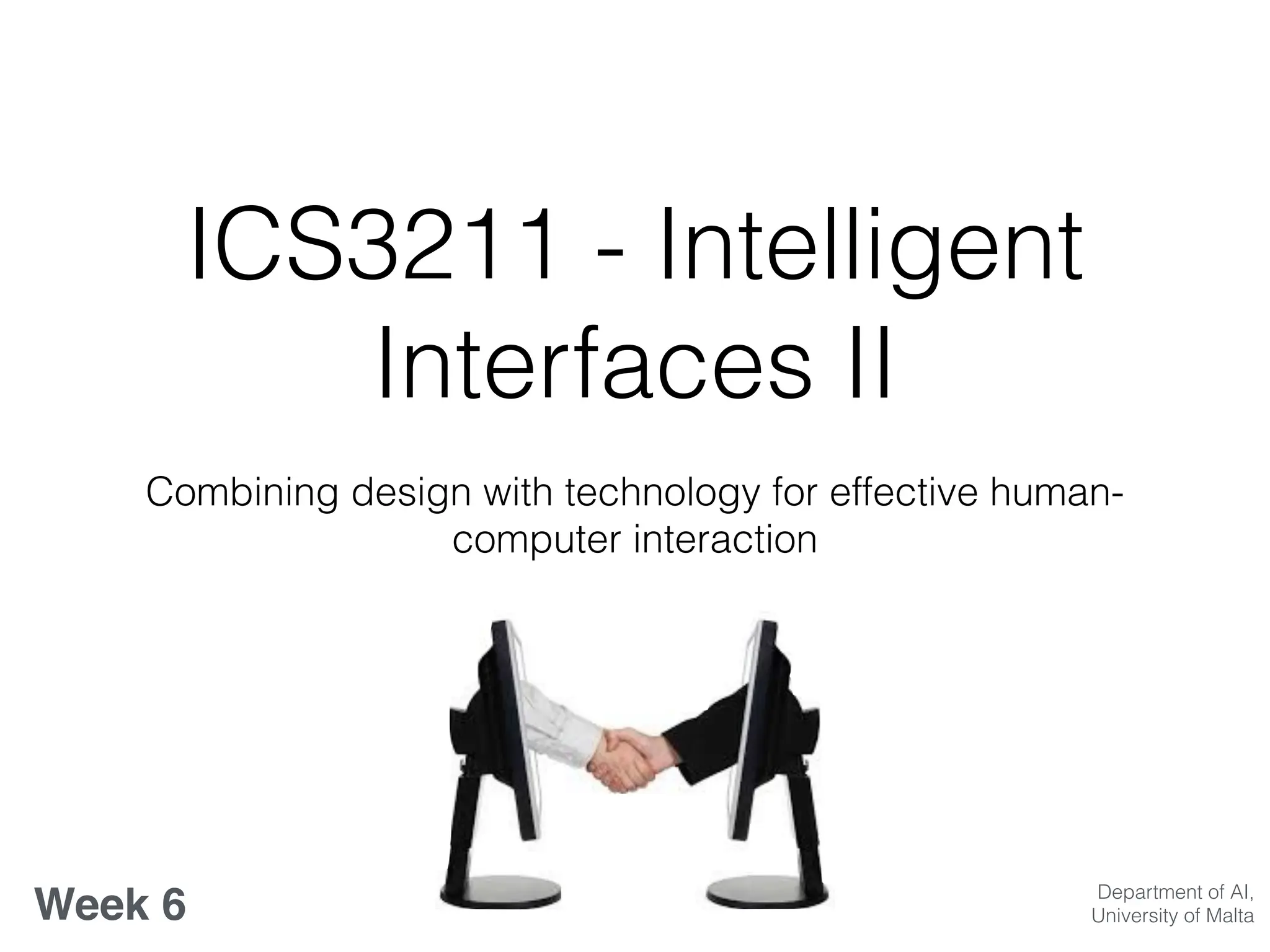
Combining design with technology for effective human-
computer interaction
Week 6 Department of AI,
University of Malta
IUI’s Trends, Designs &
ASRs
Week 6 overview:
• What’s new in IUIs? : trends and challenges;
• Adaptive UIs and Design guidelines for UIs;
• Automatic Speech Recognition;
Learning Outcomes
At the end of this session you should be able to:
• Identify future trends in IUI’s
• Illustrate design guidelines and criticise UI designs
• Characterise ASR systems, with recent advancements
and identify challenges in their development
Lecture Outline
• The Future of IUIs
• Design of IUIs
• Activity
• ASR: trends, applications & challenges
The Future of IUIs
• Ubiquitous computing vision;
• Synthesise structure from low level input;
• Smart homes, smart wearables with intelligent use
of sensors;
What’s new in IUIs? : trends
& challenges
• Interfaces as important components for interaction
tasks;
• Sensor-based new interaction paradigms;
• Human-Centred data analysis;
• Pervasive affective computing;
• Challenges of IUIs;
Recap
• Check out the following two projects:
• https://www.fastcompany.com/3021522/mit-invents-
a-shapeshifting-display-you-can-reach-through-and-
touch
• https://digitash.com/uncategorized/interactive-
splash-display-projects-images-into-air/
• What properties characterise the input devices in these
projects? How would you choose to evaluate them?
Design Guidelines
• Poster Analogy
• Design for the most difficult common denominator;
• Avoid overuse of saturated colours;
• Consider different users’ levels of skill;
• Be aware of the fatigue factor;
• Other differences to consider;
• Use the squint test;
Designing Interfaces
• Effective & appropriate
use of the medium;
• Element of time;
• Consistent &
appropriate visual
language;
• Navigation aids;
• Graphics/icons;
• Metaphor;
• Colour;
• Legibility
• Readability
Adaptive User Interfaces
• Context awareness;
• Pervasive information visualisation;
• Ontologies in information visualisation;
• Information visualisation services;
Designing & Visualising
Information
• Log on to the site: http://
www.informationisbeautiful.net/
• Focus on design of the information visualisation,
and the interactivity provided by the user interface
• Now find: http://www.informationisbeautiful.net/
visualizations/the-internet-of-things-a-primer/
• How can intelligence be added to an interface for a
more improved information visualisation?
Designing for Human
Information Processing
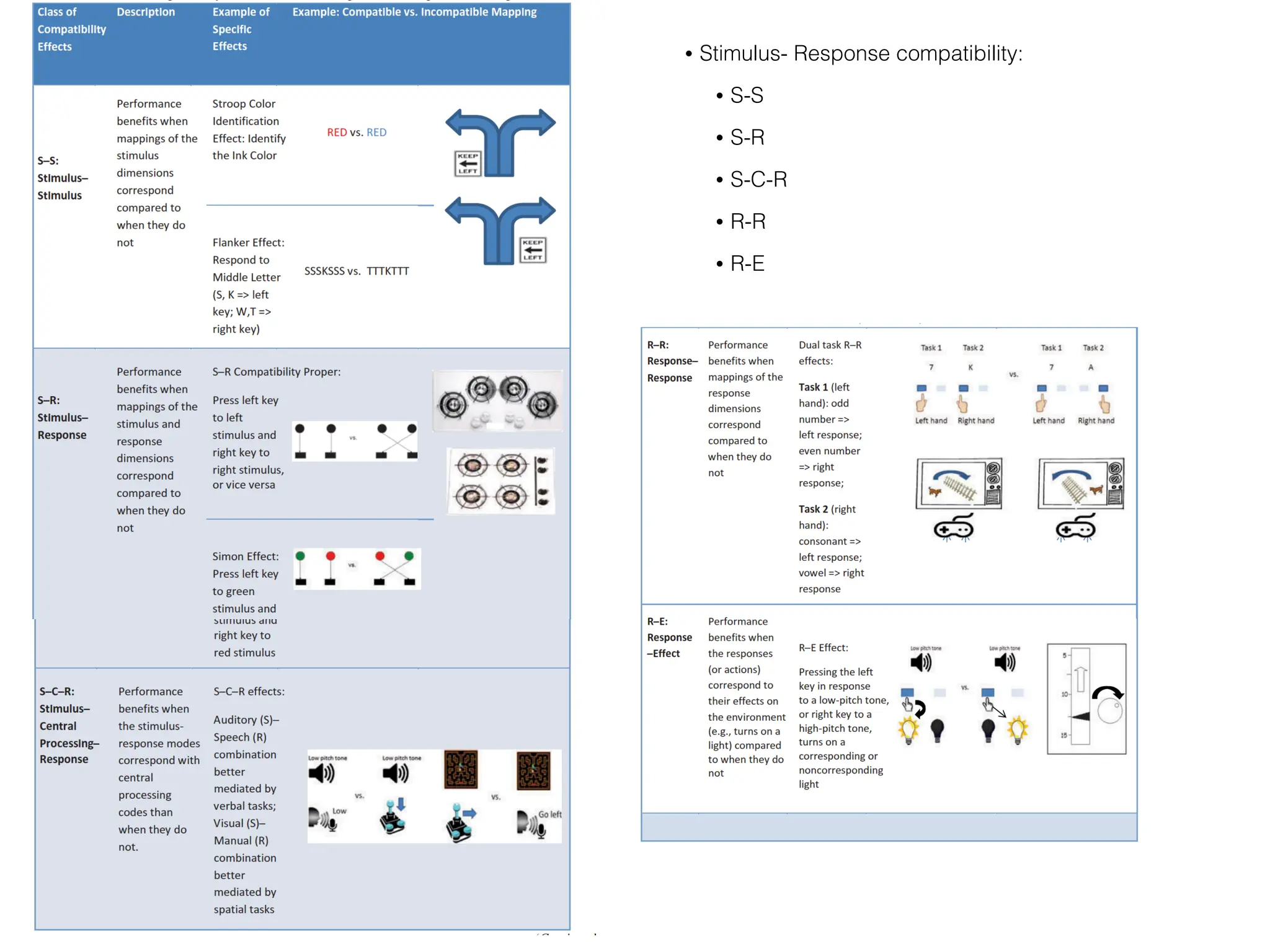
• Stimulus- Response compatibility: classes;
• S-S
• S-R
• S-C-R
• R-R
• R-E
• Stimulus- Response compatibility:
• S-S
• S-R
• S-C-R
• R-R
• R-E
• Compatibilities between alternate displays,
responses and consequences play important role
• Spatial compatibility for any task with spatial
properties
• Performance limitations from incompatibilities
cannot be easily overcome
• Use of Simon-type correspondence effects
• Compatibility issues arise for binary choices as well
as multiple task contexts
• More direct input manipulation requires taking into
consideration compatibility effects between
responses
• C:D relations can be optimised by adhering to
population stereotypes
• High compatibility essential for products intended
for use by older adults
Automatic Speech
Recognition
• Real life examples where such ASR have its
benefits include for accessibility for the visually
impaired
• A recent paper: "Intelligent Human-Robot
Interaction Using Voice Commands and Machine
Learning" Authors: Chen,L.,Wang,Y., Liu, J.
Published: 2020
Automatic Speech
Recognition
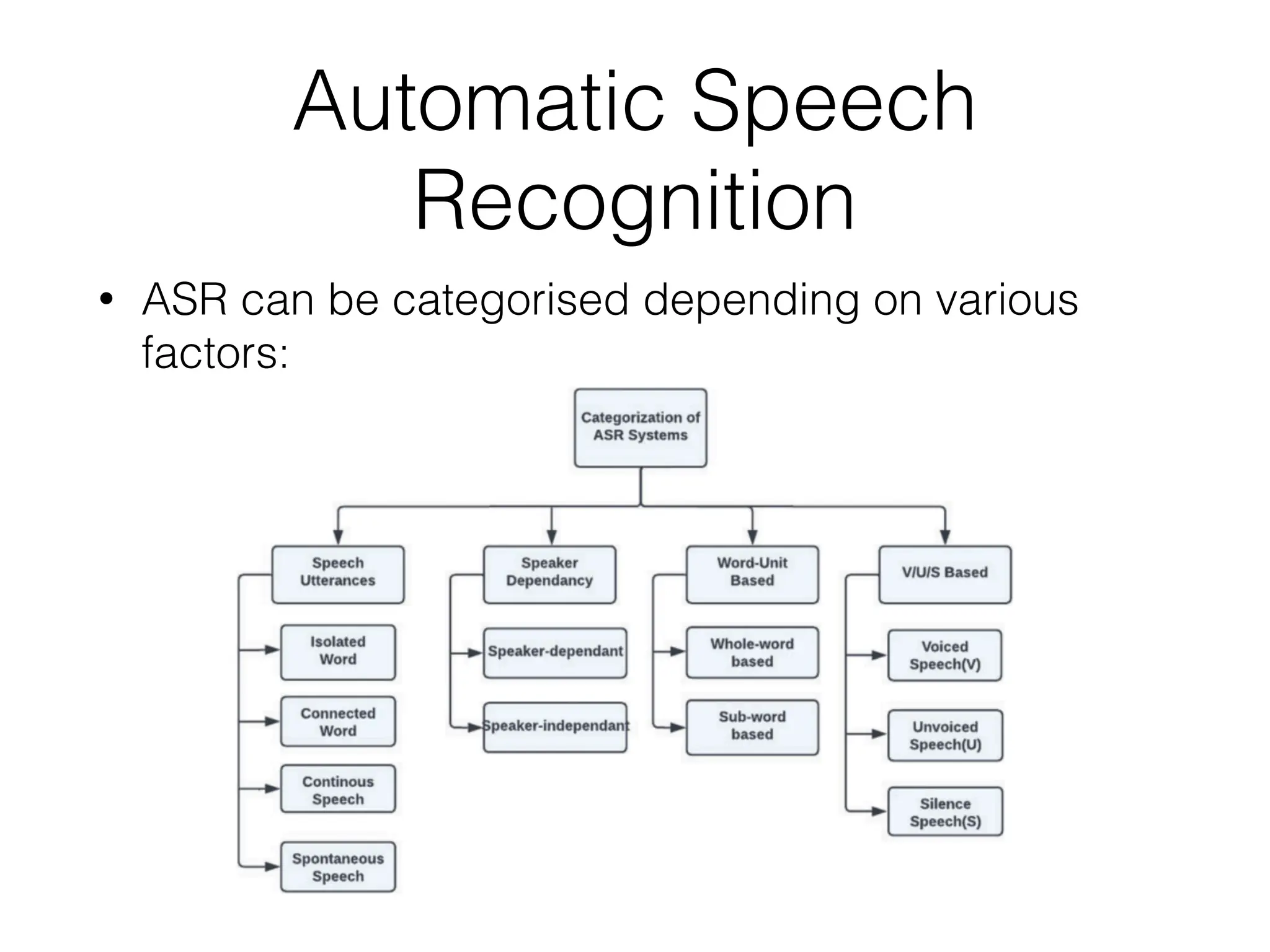
• ASR can be categorised depending on various
factors:
Speech Recognition
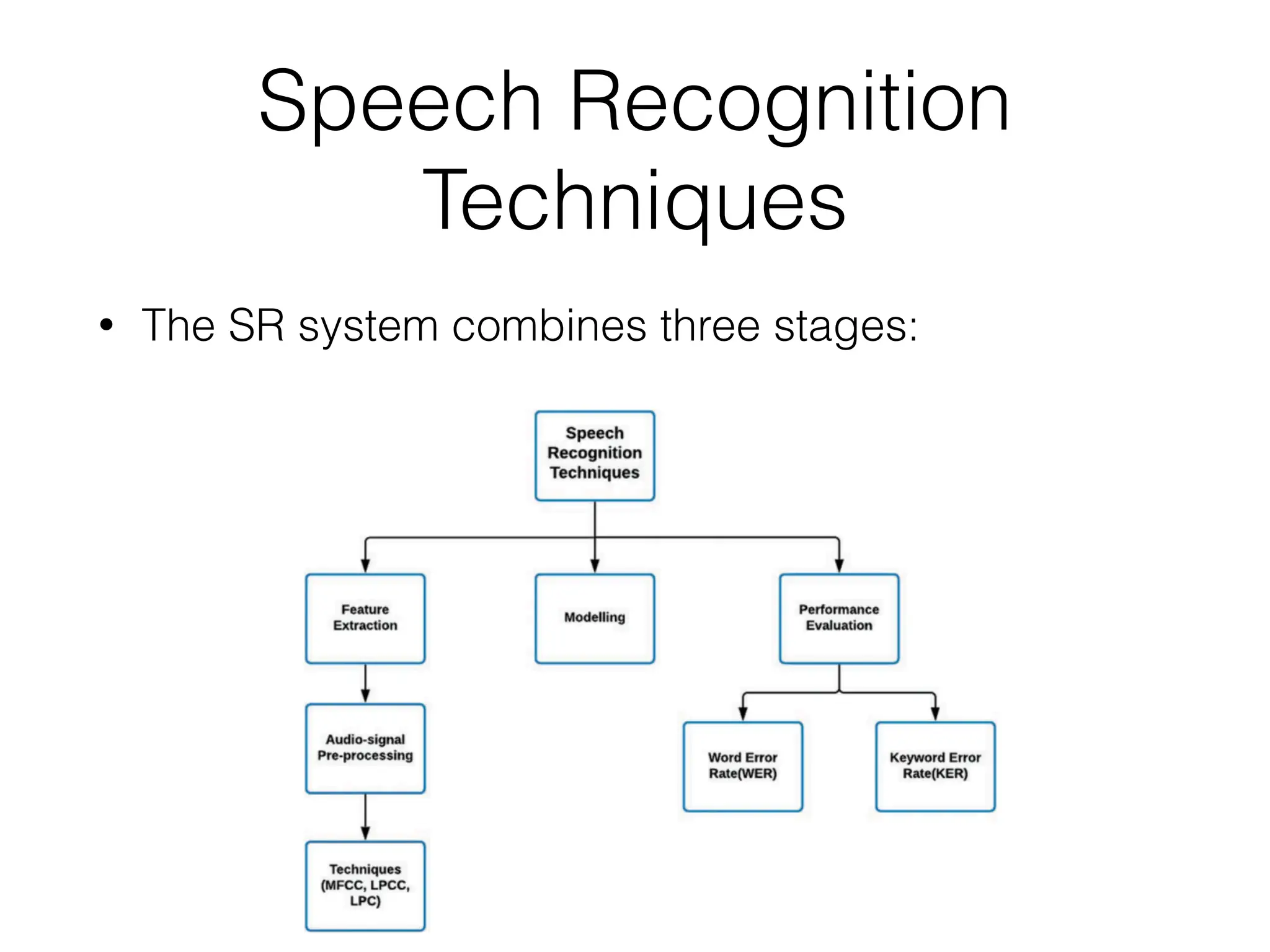
Techniques
• The SR system combines three stages:
Advancements in ASR
Systems
• ASR Using Deep Learning
• Speech Emotion Recognition Systems
• Development of Tools for High-Performance
Speech Recognition Systems
Applications of ASR
Systems
• Telecommunications Industry
• Emotion Recognition
• Healthcare Industry
• Aviation Industry
Challenges in ASR Systems
• Variation in Accents
• Children-centric Focus
• Model Training
• Noise
–Rick Rashid
“These devices will eventually replace paper
print media. We are reaching a point in the
future where any surface can be an interactive
surface.”

ICS3211_lecture_week62023.pdf

  • 1.
    ICS3211 - Intelligent InterfacesII Combining design with technology for effective human- computer interaction Week 6 Department of AI, University of Malta
  • 2.
    IUI’s Trends, Designs& ASRs Week 6 overview: • What’s new in IUIs? : trends and challenges; • Adaptive UIs and Design guidelines for UIs; • Automatic Speech Recognition;
  • 3.
    Learning Outcomes At theend of this session you should be able to: • Identify future trends in IUI’s • Illustrate design guidelines and criticise UI designs • Characterise ASR systems, with recent advancements and identify challenges in their development
  • 4.
    Lecture Outline • TheFuture of IUIs • Design of IUIs • Activity • ASR: trends, applications & challenges
  • 6.
    The Future ofIUIs • Ubiquitous computing vision; • Synthesise structure from low level input; • Smart homes, smart wearables with intelligent use of sensors;
  • 7.
    What’s new inIUIs? : trends & challenges • Interfaces as important components for interaction tasks; • Sensor-based new interaction paradigms; • Human-Centred data analysis; • Pervasive affective computing; • Challenges of IUIs;
  • 8.
    Recap • Check outthe following two projects: • https://www.fastcompany.com/3021522/mit-invents- a-shapeshifting-display-you-can-reach-through-and- touch • https://digitash.com/uncategorized/interactive- splash-display-projects-images-into-air/ • What properties characterise the input devices in these projects? How would you choose to evaluate them?
  • 9.
    Design Guidelines • PosterAnalogy • Design for the most difficult common denominator; • Avoid overuse of saturated colours; • Consider different users’ levels of skill; • Be aware of the fatigue factor; • Other differences to consider; • Use the squint test;
  • 10.
    Designing Interfaces • Effective& appropriate use of the medium; • Element of time; • Consistent & appropriate visual language; • Navigation aids; • Graphics/icons; • Metaphor; • Colour; • Legibility • Readability
  • 11.
    Adaptive User Interfaces •Context awareness; • Pervasive information visualisation; • Ontologies in information visualisation; • Information visualisation services;
  • 13.
    Designing & Visualising Information •Log on to the site: http:// www.informationisbeautiful.net/ • Focus on design of the information visualisation, and the interactivity provided by the user interface • Now find: http://www.informationisbeautiful.net/ visualizations/the-internet-of-things-a-primer/ • How can intelligence be added to an interface for a more improved information visualisation?
  • 14.
    Designing for Human InformationProcessing • Stimulus- Response compatibility: classes; • S-S • S-R • S-C-R • R-R • R-E
  • 15.
    • Stimulus- Responsecompatibility: • S-S • S-R • S-C-R • R-R • R-E
  • 16.
    • Compatibilities betweenalternate displays, responses and consequences play important role • Spatial compatibility for any task with spatial properties • Performance limitations from incompatibilities cannot be easily overcome • Use of Simon-type correspondence effects • Compatibility issues arise for binary choices as well as multiple task contexts
  • 17.
    • More directinput manipulation requires taking into consideration compatibility effects between responses • C:D relations can be optimised by adhering to population stereotypes • High compatibility essential for products intended for use by older adults
  • 18.
    Automatic Speech Recognition • Reallife examples where such ASR have its benefits include for accessibility for the visually impaired • A recent paper: "Intelligent Human-Robot Interaction Using Voice Commands and Machine Learning" Authors: Chen,L.,Wang,Y., Liu, J. Published: 2020
  • 19.
    Automatic Speech Recognition • ASRcan be categorised depending on various factors:
  • 20.
    Speech Recognition Techniques • TheSR system combines three stages:
  • 21.
    Advancements in ASR Systems •ASR Using Deep Learning • Speech Emotion Recognition Systems • Development of Tools for High-Performance Speech Recognition Systems
  • 22.
    Applications of ASR Systems •Telecommunications Industry • Emotion Recognition • Healthcare Industry • Aviation Industry
  • 23.
    Challenges in ASRSystems • Variation in Accents • Children-centric Focus • Model Training • Noise
  • 24.
    –Rick Rashid “These deviceswill eventually replace paper print media. We are reaching a point in the future where any surface can be an interactive surface.”