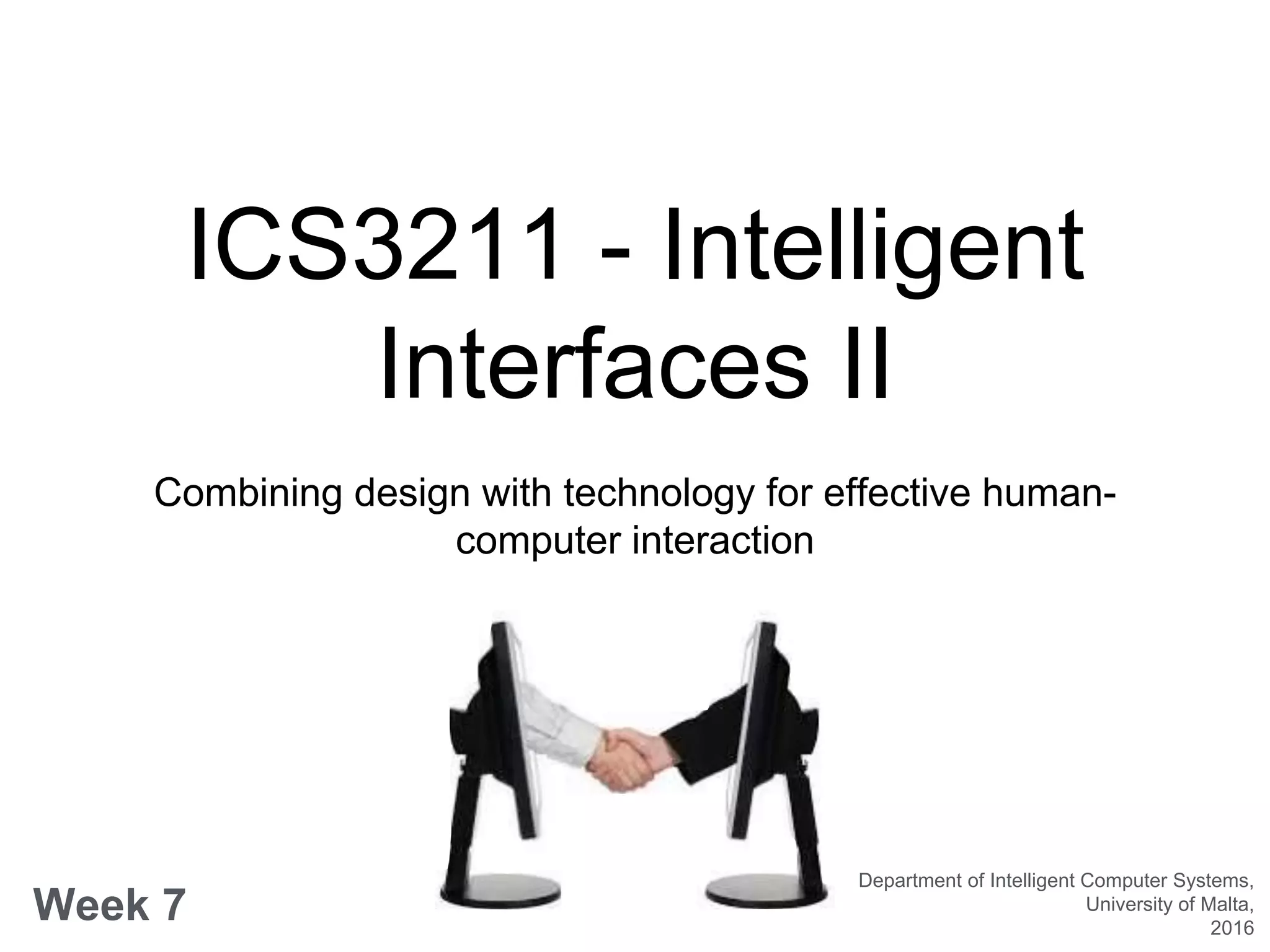
ICS3211 - Intelligent
Interfaces II
Combining design with technology for effective human-
computer interaction
Week 7
Department of Intelligent Computer Systems,
University of Malta,
2016
Design for Multimodal
Interfaces
Week 6 overview:
• Paper Prototype - Task 3 (1 hour)
• Multimodal interactions
• Human interaction in multimodal systems
• Design guidelines
• Real world systems
Learning Outcomes
At the end of this session you should be able to:
• Describe the characteristics of multimodal interfaces;
• Draw inferences about the design of multimodal interfaces;
• Compare and contrast the multiple modalities which interfaces
would require depending on the context;
• List the best practices of the design principles for multimodal
interfaces;
Paper Prototyping - Task 3
• Set up your project around the lab;
• 1 person from the team facilitates the prototyping
exercise;
• 1-2 persons will move around the available project
prototypes;
• Prototype facilitator briefs user, describes main
task, records observations, photos/videos, etc.
Multimedia vs. Multimodal
• Multimedia – more than one mode of
communication is output to the user; e.g. a sound
clip attached to a presentation.
• Media channels: text, graphics, animation, video:
all visual media
• Multimodal – computer processes more than one
mode of communication; e.g. the combined input of
speech and touch in smart phones
• Sensory modalities: Visual, auditory, tactile,
Multimodal Interactions
• Traditional WIMP offers limited input/output
possibilities;
• Mix of audio/visual interactions important for
communication;
• All senses (including touch) are relevant;
• Combination of multiple modalities (including
speech, gestures, etc.) offer new functionalities.
Multimodal Interactions
• Modality is the mode or path of communication
according to human senses, using different types of
information and different interface devices;
• Some definitions:
Multimodal HCI system is simply one that responds to inputs in
more than one modality or communication channel (e.g. speech,
gesture, writing and others) [James/Sebe]
Multimodal interfaces process two or more combined user input
modes (such as speech, pen, touch, manual gesture, gaze and head
and body movements) in a coordinated manner with multimedia
system output. [Oviatt]
Multimodal Interactions
• Use this padlet
[https://padlet.com/vanessa_camille/multimodal_ICS
3211 ] to list how the two modalities using speech
and gesture differ;
Input Modalities
• Speech or other sounds
• Head movements
(facial expression,
gaze)
• Pointing, pen, touch
• Body
movement/gestures
• Motion controller
(accelerometer)
• Tangibles
• Positioning
• Brain-computer
interface
• Biomodalities (sweat,
pulse, respiration)
Output Modalities
• Visual:
• Visualization
• 3D GUIs
• Virtual/Augmented Reality
• Auditory:
• Speech – Embodied
Conversational
• Sound
• Haptics
• Force feedback
• Low freq. bass
• Pain
• Taste
• Scent
Speech vs. Gestures
• Information that can be accessed from speech:
• Word recognition
• Language recognition
• Speaker recognition
• Emotion recognition
• Accent recognition
Speech vs. Gestures
• Humans use their body as communication modality:
• Gestures (explicit & implicit)
• Body language
• Focus of attention
• Activity
• Perception by computers:
• Computer vision
• Body mounted sensors
Haptics
• Manipulation tasks require feeling of objects;
• Computers can perceive this by:
• Haptic interfaces
• Tangible objects
• Force sensors
Biophysiological Modalities
• Body information through:
• Brain activity
• Skin conductance
• Temperature
• Heart rate
• Reveal information on:
• Workload
• Emotional state
• Mood
• Fatigue
Types of Multimodal
Interfaces
• Perceptual
• highly interactive
• rich, natural interaction
• Attentive
• context aware
• implicit
• Enactive
• relies on active manipulation through the use of hands or body, such
as TUI
Challenges of Multimodal
Interfaces
• Development of cognitive theories to guide
multimodal system design
• Development of effective natural language
processing
• Dialogue processing
• Error-handling techniques
• Function robustly and adaptively
• Support for collaborative multi-person use
Design of Multimodal
Interfaces
• Multimodal interfaces are designed for:
• compatibility with users’ work practices;
• flexibility;
• Design criteria;
• robustness increases as the number and heterogeneity of
modalities increase;
• performance improves with adaptivity of interface;
• persistence of operation despite physical damage, loss of
power, etc.
Guidelines for the Design of
Multimodal Interfaces
• To achieve more natural interaction, like human-
human interaction
• To increase robustness by providing redundant and
complementary information
Guidelines for the Design of
Multimodal Interfaces
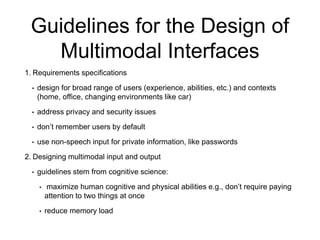
1. Requirements specifications
• design for broad range of users (experience, abilities, etc.) and contexts
(home, office, changing environments like car)
• address privacy and security issues
• don’t remember users by default
• use non-speech input for private information, like passwords
2. Designing multimodal input and output
• guidelines stem from cognitive science:
• maximize human cognitive and physical abilities e.g., don’t require paying
attention to two things at once
• reduce memory load
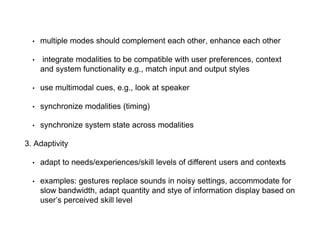
• multiple modes should complement each other, enhance each other
• integrate modalities to be compatible with user preferences, context
and system functionality e.g., match input and output styles
• use multimodal cues, e.g., look at speaker
• synchronize modalities (timing)
• synchronize system state across modalities
3. Adaptivity
• adapt to needs/experiences/skill levels of different users and contexts
• examples: gestures replace sounds in noisy settings, accommodate for
slow bandwidth, adapt quantity and stye of information display based on
user’s perceived skill level
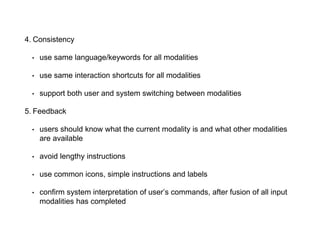
4. Consistency
• use same language/keywords for all modalities
• use same interaction shortcuts for all modalities
• support both user and system switching between modalities
5. Feedback
• users should know what the current modality is and what other modalities
are available
• avoid lengthy instructions
• use common icons, simple instructions and labels
• confirm system interpretation of user’s commands, after fusion of all input
modalities has completed
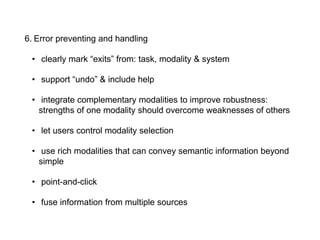
6. Error preventing and handling
• clearly mark “exits” from: task, modality & system
• support “undo” & include help
• integrate complementary modalities to improve robustness:
strengths of one modality should overcome weaknesses of others
• let users control modality selection
• use rich modalities that can convey semantic information beyond
simple
• point-and-click
• fuse information from multiple sources
• Users do like to interact multimodally with artificial systems
• Multimodal interaction is preferred in spatial domains; we should
offer & expect more than point & speak
• Multimodal interaction changes the way we talk; we need to adapt
our speech processing components
• Speech and gesture are synchronized but not simultaneous;
• We cannot assume redundancy of content; we need to process
modalities in an integrated manner
• Use multimodality for better system error characteristics, through
expecting simplified speech, fusion of modalities to clear out
uncertainty & offering the right modality for the right task
Myths of Multimodal
Interfaces
1. If you build a multimodal system, users will interact multimodally
2. Speech and pointing is the dominant multimodal integration pattern
3. Multimodal input involves simultaneous signals
4. Speech is the primary input mode in any multimodal system that includes it
5. Multimodal language does not differ linguistically from unimodal language
6. Multimodal integration involves redundancy of content between modes
7. Individual error-prone recognition technologies combine multimodally to
produce even greater unreliability
8. All users’ multimodal commands are integrated in a uniform way
9. Different input modes are capable of transmitting comparable content
10.Enhanced efficiency is the main advantage of multimodal systems
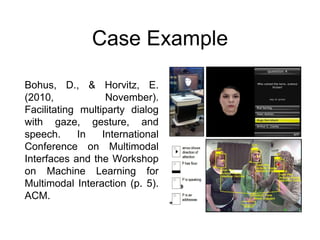
Case Example
Bohus, D., & Horvitz, E.
(2010, November).
Facilitating multiparty dialog
with gaze, gesture, and
speech. In International
Conference on Multimodal
Interfaces and the Workshop
on Machine Learning for
Multimodal Interaction (p. 5).
ACM.
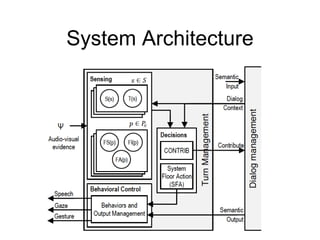
System Architecture
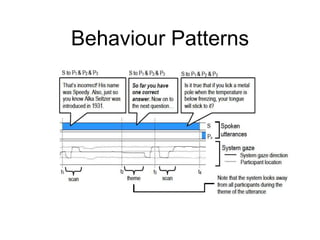
Behaviour Patterns
Key Concepts in Multimodal
Interfaces
• We cannot always believe our intuition on how
interaction will function; we need to find out by
performing well designed user studies
• We need to take a close look at how human – human
communication and interaction works before we can
build systems that resemble this behaviour; costly
collection and annotation of real world data is
necessary
• We need to generate semantic representations from
our sub-symbolic feature space

ICS3211 lecture 07

  • 1.
    ICS3211 - Intelligent InterfacesII Combining design with technology for effective human- computer interaction Week 7 Department of Intelligent Computer Systems, University of Malta, 2016
  • 2.
    Design for Multimodal Interfaces Week6 overview: • Paper Prototype - Task 3 (1 hour) • Multimodal interactions • Human interaction in multimodal systems • Design guidelines • Real world systems
  • 3.
    Learning Outcomes At theend of this session you should be able to: • Describe the characteristics of multimodal interfaces; • Draw inferences about the design of multimodal interfaces; • Compare and contrast the multiple modalities which interfaces would require depending on the context; • List the best practices of the design principles for multimodal interfaces;
  • 4.
    Paper Prototyping -Task 3 • Set up your project around the lab; • 1 person from the team facilitates the prototyping exercise; • 1-2 persons will move around the available project prototypes; • Prototype facilitator briefs user, describes main task, records observations, photos/videos, etc.
  • 5.
    Multimedia vs. Multimodal •Multimedia – more than one mode of communication is output to the user; e.g. a sound clip attached to a presentation. • Media channels: text, graphics, animation, video: all visual media • Multimodal – computer processes more than one mode of communication; e.g. the combined input of speech and touch in smart phones • Sensory modalities: Visual, auditory, tactile,
  • 6.
    Multimodal Interactions • TraditionalWIMP offers limited input/output possibilities; • Mix of audio/visual interactions important for communication; • All senses (including touch) are relevant; • Combination of multiple modalities (including speech, gestures, etc.) offer new functionalities.
  • 7.
    Multimodal Interactions • Modalityis the mode or path of communication according to human senses, using different types of information and different interface devices; • Some definitions: Multimodal HCI system is simply one that responds to inputs in more than one modality or communication channel (e.g. speech, gesture, writing and others) [James/Sebe] Multimodal interfaces process two or more combined user input modes (such as speech, pen, touch, manual gesture, gaze and head and body movements) in a coordinated manner with multimedia system output. [Oviatt]
  • 8.
    Multimodal Interactions • Usethis padlet [https://padlet.com/vanessa_camille/multimodal_ICS 3211 ] to list how the two modalities using speech and gesture differ;
  • 9.
    Input Modalities • Speechor other sounds • Head movements (facial expression, gaze) • Pointing, pen, touch • Body movement/gestures • Motion controller (accelerometer) • Tangibles • Positioning • Brain-computer interface • Biomodalities (sweat, pulse, respiration)
  • 10.
    Output Modalities • Visual: •Visualization • 3D GUIs • Virtual/Augmented Reality • Auditory: • Speech – Embodied Conversational • Sound • Haptics • Force feedback • Low freq. bass • Pain • Taste • Scent
  • 11.
    Speech vs. Gestures •Information that can be accessed from speech: • Word recognition • Language recognition • Speaker recognition • Emotion recognition • Accent recognition
  • 12.
    Speech vs. Gestures •Humans use their body as communication modality: • Gestures (explicit & implicit) • Body language • Focus of attention • Activity • Perception by computers: • Computer vision • Body mounted sensors
  • 13.
    Haptics • Manipulation tasksrequire feeling of objects; • Computers can perceive this by: • Haptic interfaces • Tangible objects • Force sensors
  • 14.
    Biophysiological Modalities • Bodyinformation through: • Brain activity • Skin conductance • Temperature • Heart rate • Reveal information on: • Workload • Emotional state • Mood • Fatigue
  • 15.
    Types of Multimodal Interfaces •Perceptual • highly interactive • rich, natural interaction • Attentive • context aware • implicit • Enactive • relies on active manipulation through the use of hands or body, such as TUI
  • 16.
    Challenges of Multimodal Interfaces •Development of cognitive theories to guide multimodal system design • Development of effective natural language processing • Dialogue processing • Error-handling techniques • Function robustly and adaptively • Support for collaborative multi-person use
  • 17.
    Design of Multimodal Interfaces •Multimodal interfaces are designed for: • compatibility with users’ work practices; • flexibility; • Design criteria; • robustness increases as the number and heterogeneity of modalities increase; • performance improves with adaptivity of interface; • persistence of operation despite physical damage, loss of power, etc.
  • 18.
    Guidelines for theDesign of Multimodal Interfaces • To achieve more natural interaction, like human- human interaction • To increase robustness by providing redundant and complementary information
  • 19.
    Guidelines for theDesign of Multimodal Interfaces 1. Requirements specifications • design for broad range of users (experience, abilities, etc.) and contexts (home, office, changing environments like car) • address privacy and security issues • don’t remember users by default • use non-speech input for private information, like passwords 2. Designing multimodal input and output • guidelines stem from cognitive science: • maximize human cognitive and physical abilities e.g., don’t require paying attention to two things at once • reduce memory load
  • 20.
    • multiple modesshould complement each other, enhance each other • integrate modalities to be compatible with user preferences, context and system functionality e.g., match input and output styles • use multimodal cues, e.g., look at speaker • synchronize modalities (timing) • synchronize system state across modalities 3. Adaptivity • adapt to needs/experiences/skill levels of different users and contexts • examples: gestures replace sounds in noisy settings, accommodate for slow bandwidth, adapt quantity and stye of information display based on user’s perceived skill level
  • 21.
    4. Consistency • usesame language/keywords for all modalities • use same interaction shortcuts for all modalities • support both user and system switching between modalities 5. Feedback • users should know what the current modality is and what other modalities are available • avoid lengthy instructions • use common icons, simple instructions and labels • confirm system interpretation of user’s commands, after fusion of all input modalities has completed
  • 22.
    6. Error preventingand handling • clearly mark “exits” from: task, modality & system • support “undo” & include help • integrate complementary modalities to improve robustness: strengths of one modality should overcome weaknesses of others • let users control modality selection • use rich modalities that can convey semantic information beyond simple • point-and-click • fuse information from multiple sources
  • 23.
    • Users dolike to interact multimodally with artificial systems • Multimodal interaction is preferred in spatial domains; we should offer & expect more than point & speak • Multimodal interaction changes the way we talk; we need to adapt our speech processing components • Speech and gesture are synchronized but not simultaneous; • We cannot assume redundancy of content; we need to process modalities in an integrated manner • Use multimodality for better system error characteristics, through expecting simplified speech, fusion of modalities to clear out uncertainty & offering the right modality for the right task
  • 24.
    Myths of Multimodal Interfaces 1.If you build a multimodal system, users will interact multimodally 2. Speech and pointing is the dominant multimodal integration pattern 3. Multimodal input involves simultaneous signals 4. Speech is the primary input mode in any multimodal system that includes it 5. Multimodal language does not differ linguistically from unimodal language 6. Multimodal integration involves redundancy of content between modes 7. Individual error-prone recognition technologies combine multimodally to produce even greater unreliability 8. All users’ multimodal commands are integrated in a uniform way 9. Different input modes are capable of transmitting comparable content 10.Enhanced efficiency is the main advantage of multimodal systems
  • 25.
    Case Example Bohus, D.,& Horvitz, E. (2010, November). Facilitating multiparty dialog with gaze, gesture, and speech. In International Conference on Multimodal Interfaces and the Workshop on Machine Learning for Multimodal Interaction (p. 5). ACM.
  • 26.
  • 27.
  • 28.
    Key Concepts inMultimodal Interfaces • We cannot always believe our intuition on how interaction will function; we need to find out by performing well designed user studies • We need to take a close look at how human – human communication and interaction works before we can build systems that resemble this behaviour; costly collection and annotation of real world data is necessary • We need to generate semantic representations from our sub-symbolic feature space