


By: Akhil Kaushik
Assistant Professor CSE Deptt
Introduction
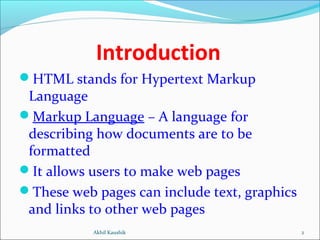
HTML stands for Hypertext Markup
Language
Markup Language – A language for
describing how documents are to be
formatted
It allows users to make web pages
These web pages can include text, graphics
and links to other web pages
2Akhil Kaushik
Working of HTML
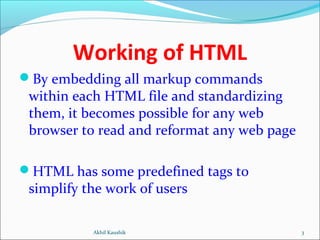
By embedding all markup commands
within each HTML file and standardizing
them, it becomes possible for any web
browser to read and reformat any web page
HTML has some predefined tags to
simplify the work of users
3Akhil Kaushik
Standard HTML Tags
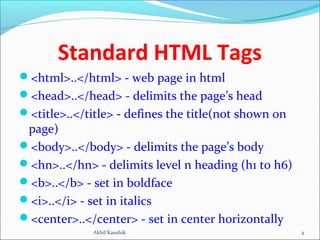
<html>..</html> - web page in html
<head>..</head> - delimits the page’s head
<title>..</title> - defines the title(not shown on
page)
<body>..</body> - delimits the page’s body
<hn>..</hn> - delimits level n heading (h1 to h6)
<b>..</b> - set in boldface
<i>..</i> - set in italics
<center>..</center> - set in center horizontally
4Akhil Kaushik
Standard HTML Tags
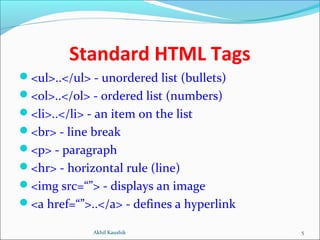
<ul>..</ul> - unordered list (bullets)
<ol>..</ol> - ordered list (numbers)
<li>..</li> - an item on the list
<br> - line break
<p> - paragraph
<hr> - horizontal rule (line)
<img src=“”> - displays an image
<a href=“”>..</a> - defines a hyperlink
5Akhil Kaushik
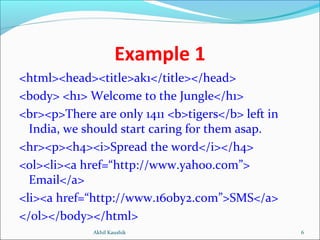
Example 1
<html><head><title>ak1</title></head>
<body> <h1> Welcome to the Jungle</h1>
<br><p>There are only 1411 <b>tigers</b> left in
India, we should start caring for them asap.
<hr><p><h4><i>Spread the word</i></h4>
<ol><li><a href=“http://www.yahoo.com”>
Email</a>
<li><a href=“http://www.160by2.com”>SMS</a>
</ol></body></html>
6Akhil Kaushik
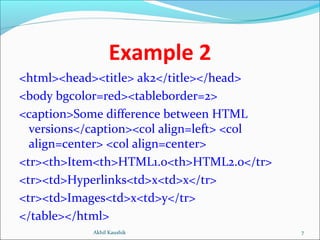
Example 2
<html><head><title> ak2</title></head>
<body bgcolor=red><tableborder=2>
<caption>Some difference between HTML
versions</caption><col align=left> <col
align=center> <col align=center>
<tr><th>Item<th>HTML1.0<th>HTML2.0</tr>
<tr><td>Hyperlinks<td>x<td>x</tr>
<tr><td>Images<td>x<td>y</tr>
</table></html>
7Akhil Kaushik
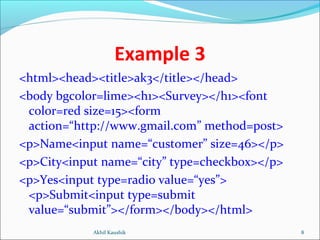
Example 3
<html><head><title>ak3</title></head>
<body bgcolor=lime><h1><Survey></h1><font
color=red size=15><form
action=“http://www.gmail.com” method=post>
<p>Name<input name=“customer” size=46></p>
<p>City<input name=“city” type=checkbox></p>
<p>Yes<input type=radio value=“yes”>
<p>Submit<input type=submit
value=“submit”></form></body></html>
8Akhil Kaushik
T H A N K S
9Akhil Kaushik
T H A N K S
9Akhil Kaushik

HTML basics

  • 1.
    By: Akhil Kaushik AssistantProfessor CSE Deptt
  • 2.
    Introduction HTML stands forHypertext Markup Language Markup Language – A language for describing how documents are to be formatted It allows users to make web pages These web pages can include text, graphics and links to other web pages 2Akhil Kaushik
  • 3.
    Working of HTML Byembedding all markup commands within each HTML file and standardizing them, it becomes possible for any web browser to read and reformat any web page HTML has some predefined tags to simplify the work of users 3Akhil Kaushik
  • 4.
    Standard HTML Tags <html>..</html>- web page in html <head>..</head> - delimits the page’s head <title>..</title> - defines the title(not shown on page) <body>..</body> - delimits the page’s body <hn>..</hn> - delimits level n heading (h1 to h6) <b>..</b> - set in boldface <i>..</i> - set in italics <center>..</center> - set in center horizontally 4Akhil Kaushik
  • 5.
    Standard HTML Tags <ul>..</ul>- unordered list (bullets) <ol>..</ol> - ordered list (numbers) <li>..</li> - an item on the list <br> - line break <p> - paragraph <hr> - horizontal rule (line) <img src=“”> - displays an image <a href=“”>..</a> - defines a hyperlink 5Akhil Kaushik
  • 6.
    Example 1 <html><head><title>ak1</title></head> <body> <h1>Welcome to the Jungle</h1> <br><p>There are only 1411 <b>tigers</b> left in India, we should start caring for them asap. <hr><p><h4><i>Spread the word</i></h4> <ol><li><a href=“http://www.yahoo.com”> Email</a> <li><a href=“http://www.160by2.com”>SMS</a> </ol></body></html> 6Akhil Kaushik
  • 7.
    Example 2 <html><head><title> ak2</title></head> <bodybgcolor=red><tableborder=2> <caption>Some difference between HTML versions</caption><col align=left> <col align=center> <col align=center> <tr><th>Item<th>HTML1.0<th>HTML2.0</tr> <tr><td>Hyperlinks<td>x<td>x</tr> <tr><td>Images<td>x<td>y</tr> </table></html> 7Akhil Kaushik
  • 8.
    Example 3 <html><head><title>ak3</title></head> <body bgcolor=lime><h1><Survey></h1><font color=redsize=15><form action=“http://www.gmail.com” method=post> <p>Name<input name=“customer” size=46></p> <p>City<input name=“city” type=checkbox></p> <p>Yes<input type=radio value=“yes”> <p>Submit<input type=submit value=“submit”></form></body></html> 8Akhil Kaushik
  • 9.
    T H AN K S 9Akhil Kaushik
  • 10.
    T H AN K S 9Akhil Kaushik