Charts in
MS-Excel
Submitted by: Manvi Nagi
Rachit Suri
What is a Chart?
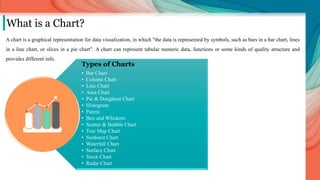
A chart is a graphical representation for data visualization, in which "the data is represented by symbols, such as bars in a bar chart, lines
in a line chart, or slices in a pie chart". A chart can represent tabular numeric data, functions or some kinds of quality structure and
provides different info.
Types of Charts
• Bar Chart
• Column Chart
• Line Chart
• Area Chart
• Pie & Doughnut Chart
• Histogram
• Pareto
• Box and Whiskers
• Scatter & Bubble Chart
• Tree Map Chart
• Sunburst Chart
• Waterfall Chart
• Surface Chart
• Stock Chart
• Radar Chart
English name Sex Age Suicide date Description Status Total working weeks Decency
Ma Xiang-qian Male 19 23-01-10 Threw himself from building Deceased 50 -20
Mr. Li Male 28 11-03-10 Threw himself from building Unknown 32 -30
Tian Yu Female 17 17-03-10 Threw herself from building Paralyzed from waist down 40 -15
Mr. Lau Male 23 29-03-10 Threw himself from building Unknown 36 -10
Rao Shu-qin Female 18 06-04-10 Threw herself from building Survived 28 -9
Ms. Ning Female 18 07-04-10 Threw herself from building Deceased 46 -5
Lu Xin Male 24 06-05-10 Threw himself from building Deceased 41 -2
Zhu Chen-ming Female 24 11-05-10 Threw herself from building Deceased 29 0
Liang Chao Male 21 14-05-10 Threw himself from building Deceased 70 1
Nan Gan Male 21 21-05-10 Threw himself from building Deceased 84 5
Li Hai Male 19 25-05-10 Threw himself from building Deceased 63 7
Mr. He Male 23 26-05-10 Threw himself from building Unknown 23 12
Mr. Chen Male 25 27-05-10 Suicide Deceased 49 14
Mr. Liu Male 18 20-07-10 Threw himself from the sixth floor Deceased 33 20
Unknown Male 23 05-11-10 Threw himself from building Deceased 17 26
Wang Ling Female 25 07-01-11 Jumped from building Deceased 5 34
Unknown Male 20 26-05-11 Threw himself from building. Deceased 23 48
Mr. Cai Male 21 01-07-11 Threw himself from building Deceased 57 55
Li Rongying Female 20 23-11-11 Threw herself from building Deceased 38 20
Xu Lizhi Male 24 24-04-13 Threw himself from building Deceased 20 -70
Data Entry:
Before one starts to dwell into making colorful and attractive data charts, one must know their respective function. It is the data that governs
what chart should be adequate to represent it and not vice-versa. Hence, one must thoroughly analyze the table and recognize the type and
number of variables present in it to select the proper chart.
Few types of data are:
 Quantitative data
• Ratio data
• Interval data
 Qualitative data
• Ordinal data
• Nominal data
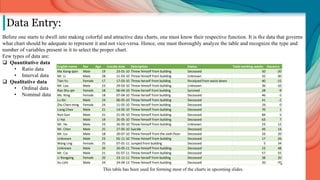
This table has been used for forming most of the charts in upcoming slides.
Where to find the Charts?
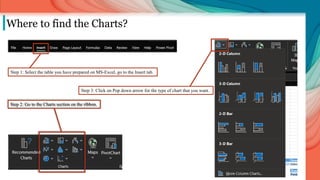
Step 1: Select the table you have prepared on MS-Excel, go to the Insert tab.
Step 2: Go to the Charts section on the ribbon.
Step 3: Click on Pop down arrow for the type of chart that you want.
Column chart
When to use ?
 The data has a small number of discrete categories.
 Each of those categories has a single value.
 The chart needs to compare the values for each category.
 In business settings, column charts are regularly used in reporting.
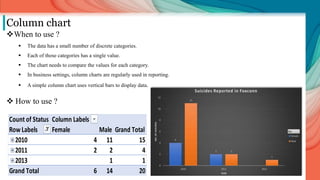
 A simple column chart uses vertical bars to display data.
 How to use ?
Count of Status Column Labels
Row Labels Female Male Grand Total
2010 4 11 15
2011 2 2 4
2013 1 1
Grand Total 6 14 20
Bar chart
When to use ?
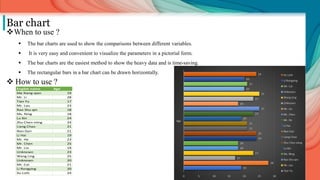
 The bar charts are used to show the comparisons between different variables.
 It is very easy and convenient to visualize the parameters in a pictorial form.
 The bar charts are the easiest method to show the heavy data and is time-saving.
 The rectangular bars in a bar chart can be drawn horizontally.
 How to use ?
English name Age
Ma Xiang-qian 19
Mr. Li 28
Tian Yu 17
Mr. Lau 23
Rao Shu-qin 18
Ms. Ning 18
Lu Xin 24
Zhu Chen-ming 24
Liang Chao 21
Nan Gan 21
Li Hai 19
Mr. He 23
Mr. Chen 25
Mr. Liu 18
Unknown 23
Wang Ling 25
Unknown 20
Mr. Cai 21
Li Rongying 20
Xu Lizhi 24
Line chart
When to use ?
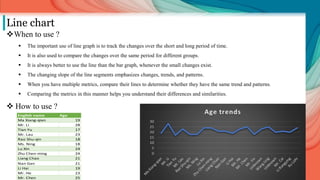
 The important use of line graph is to track the changes over the short and long period of time.
 It is also used to compare the changes over the same period for different groups.
 It is always better to use the line than the bar graph, whenever the small changes exist.
 The changing slope of the line segments emphasizes changes, trends, and patterns.
 When you have multiple metrics, compare their lines to determine whether they have the same trend and patterns.
 Comparing the metrics in this manner helps you understand their differences and similarities.
 How to use ?
English name Age
Ma Xiang-qian 19
Mr. Li 28
Tian Yu 17
Mr. Lau 23
Rao Shu-qin 18
Ms. Ning 18
Lu Xin 24
Zhu Chen-ming 24
Liang Chao 21
Nan Gan 21
Li Hai 19
Mr. He 23
Mr. Chen 25
Area Chart
When to use ?
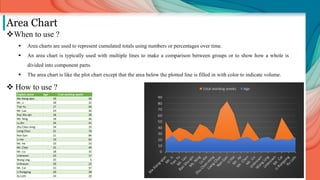
 Area charts are used to represent cumulated totals using numbers or percentages over time.
 An area chart is typically used with multiple lines to make a comparison between groups or to show how a whole is
divided into component parts.
 The area chart is like the plot chart except that the area below the plotted line is filled in with color to indicate volume.
 How to use ?
English name Age Total working weeks
Ma Xiang-qian 19 50
Mr. Li 28 32
Tian Yu 17 40
Mr. Lau 23 36
Rao Shu-qin 18 28
Ms. Ning 18 46
Lu Xin 24 41
Zhu Chen-ming 24 29
Liang Chao 21 70
Nan Gan 21 84
Li Hai 19 63
Mr. He 23 23
Mr. Chen 25 49
Mr. Liu 18 33
Unknown 23 17
Wang Ling 25 5
Unknown 20 23
Mr. Cai 21 57
Li Rongying 20 38
Xu Lizhi 24 20
Pie Chart
When to use ?
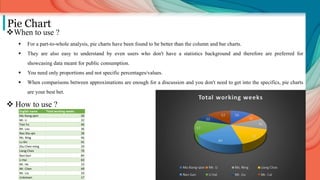
 For a part-to-whole analysis, pie charts have been found to be better than the column and bar charts.
 They are also easy to understand by even users who don't have a statistics background and therefore are preferred for
showcasing data meant for public consumption.
 You need only proportions and not specific percentages/values.
 When comparisons between approximations are enough for a discussion and you don't need to get into the specifics, pie charts
are your best bet.
 How to use ?
English name Total working weeks
Ma Xiang-qian 50
Mr. Li 32
Tian Yu 40
Mr. Lau 36
Rao Shu-qin 28
Ms. Ning 46
Lu Xin 41
Zhu Chen-ming 29
Liang Chao 70
Nan Gan 84
Li Hai 63
Mr. He 23
Mr. Chen 49
Mr. Liu 33
Unknown 17
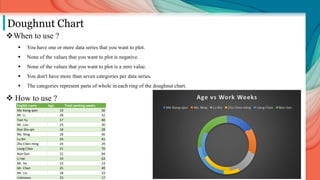
Doughnut Chart
When to use ?
 You have one or more data series that you want to plot.
 None of the values that you want to plot is negative.
 None of the values that you want to plot is a zero value.
 You don't have more than seven categories per data series.
 The categories represent parts of whole in each ring of the doughnut chart.
 How to use ?
English name Age Total working weeks
Ma Xiang-qian 19 50
Mr. Li 28 32
Tian Yu 17 40
Mr. Lau 23 36
Rao Shu-qin 18 28
Ms. Ning 18 46
Lu Xin 24 41
Zhu Chen-ming 24 29
Liang Chao 21 70
Nan Gan 21 84
Li Hai 19 63
Mr. He 23 23
Mr. Chen 25 49
Mr. Liu 18 33
Unknown 23 17
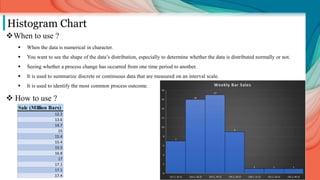
Histogram Chart
When to use ?
 When the data is numerical in character.
 You want to see the shape of the data’s distribution, especially to determine whether the data is distributed normally or not.
 Seeing whether a process change has occurred from one time period to another.
 It is used to summarize discrete or continuous data that are measured on an interval scale.
 It is used to identify the most common process outcome.
 How to use ?
Sale (Million Bars)
12.2
13.6
14.7
15
15.4
15.4
15.5
16.8
17
17.1
17.1
17.4
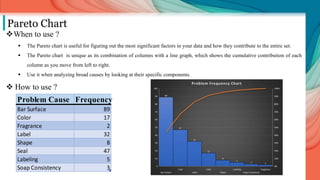
Pareto Chart
When to use ?
 The Pareto chart is useful for figuring out the most significant factors in your data and how they contribute to the entire set.
 The Pareto chart is unique as its combination of columns with a line graph, which shows the cumulative contribution of each
column as you move from left to right.
 Use it when analyzing broad causes by looking at their specific components.
 How to use ?
Problem Cause Frequency
Bar Surface 89
Color 17
Fragrance 2
Label 32
Shape 8
Seal 47
Labeling 5
Soap Consistency 3
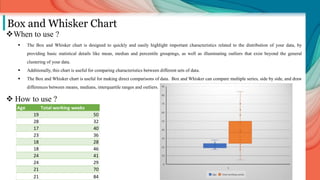
Box and Whisker Chart
When to use ?
 The Box and Whisker chart is designed to quickly and easily highlight important characteristics related to the distribution of your data, by
providing basic statistical details like mean, median and percentile groupings, as well as illuminating outliers that exist beyond the general
clustering of your data.
 Additionally, this chart is useful for comparing characteristics between different sets of data.
 The Box and Whisker chart is useful for making direct comparisons of data. Box and Whisker can compare multiple series, side by side, and draw
differences between means, medians, interquartile ranges and outliers.
 How to use ?
Age Total working weeks
19 50
28 32
17 40
23 36
18 28
18 46
24 41
24 29
21 70
21 84
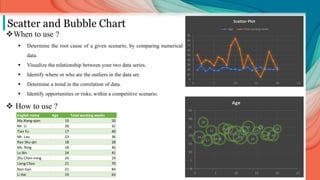
Scatter and Bubble Chart
When to use ?
 Determine the root cause of a given scenario, by comparing numerical
data.
 Visualize the relationship between your two data series.
 Identify where or who are the outliers in the data set.
 Determine a trend in the correlation of data.
 Identify opportunities or risks, within a competitive scenario.
 How to use ?
English name Age Total working weeks
Ma Xiang-qian 19 50
Mr. Li 28 32
Tian Yu 17 40
Mr. Lau 23 36
Rao Shu-qin 18 28
Ms. Ning 18 46
Lu Xin 24 41
Zhu Chen-ming 24 29
Liang Chao 21 70
Nan Gan 21 84
Li Hai 19 63
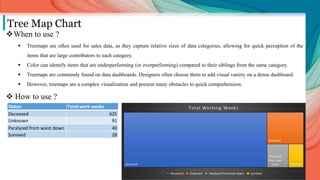
Tree Map Chart
When to use ?
 Treemaps are often used for sales data, as they capture relative sizes of data categories, allowing for quick perception of the
items that are large contributors to each category.
 Color can identify items that are underperforming (or overperforming) compared to their siblings from the same category.
 Treemaps are commonly found on data dashboards. Designers often choose them to add visual variety on a dense dashboard.
 However, treemaps are a complex visualization and present many obstacles to quick comprehension.
 How to use ?
Status Total work weeks
Deceased 625
Unknown 91
Paralyzed from waist down 40
Survived 28
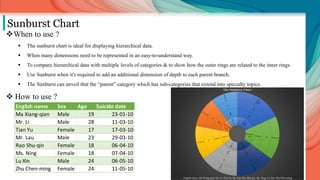
Sunburst Chart
When to use ?
 The sunburst chart is ideal for displaying hierarchical data.
 When many dimensions need to be represented in an easy-to-understand way.
 To compare hierarchical data with multiple levels of categories & to show how the outer rings are related to the inner rings.
 Use Sunburst when it's required to add an additional dimension of depth to each parent branch.
 The Sunburst can unveil that the “parent” category which has sub-categories that extend into specialty topics.
 How to use ?
English name Sex Age Suicide date
Ma Xiang-qian Male 19 23-01-10
Mr. Li Male 28 11-03-10
Tian Yu Female 17 17-03-10
Mr. Lau Male 23 29-03-10
Rao Shu-qin Female 18 06-04-10
Ms. Ning Female 18 07-04-10
Lu Xin Male 24 06-05-10
Zhu Chen-ming Female 24 11-05-10
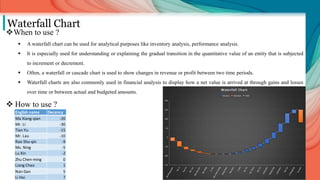
Waterfall Chart
When to use ?
 A waterfall chart can be used for analytical purposes like inventory analysis, performance analysis.
 It is especially used for understanding or explaining the gradual transition in the quantitative value of an entity that is subjected
to increment or decrement.
 Often, a waterfall or cascade chart is used to show changes in revenue or profit between two time periods.
 Waterfall charts are also commonly used in financial analysis to display how a net value is arrived at through gains and losses
over time or between actual and budgeted amounts.
 How to use ?
English name Decency
Ma Xiang-qian -20
Mr. Li -30
Tian Yu -15
Mr. Lau -10
Rao Shu-qin -9
Ms. Ning -5
Lu Xin -2
Zhu Chen-ming 0
Liang Chao 1
Nan Gan 5
Li Hai 7
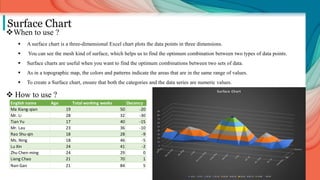
Surface Chart
When to use ?
 A surface chart is a three-dimensional Excel chart plots the data points in three dimensions.
 You can see the mesh kind of surface, which helps us to find the optimum combination between two types of data points.
 Surface charts are useful when you want to find the optimum combinations between two sets of data.
 As in a topographic map, the colors and patterns indicate the areas that are in the same range of values.
 To create a Surface chart, ensure that both the categories and the data series are numeric values.
 How to use ?
English name Age Total working weeks Decency
Ma Xiang-qian 19 50 -20
Mr. Li 28 32 -30
Tian Yu 17 40 -15
Mr. Lau 23 36 -10
Rao Shu-qin 18 28 -9
Ms. Ning 18 46 -5
Lu Xin 24 41 -2
Zhu Chen-ming 24 29 0
Liang Chao 21 70 1
Nan Gan 21 84 5
Li Hai 19 63 7
Mr. He 23 23 12
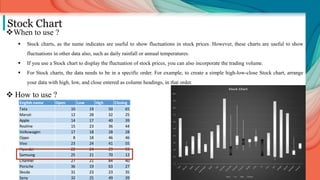
Stock Chart
When to use ?
 Stock charts, as the name indicates are useful to show fluctuations in stock prices. However, these charts are useful to show
fluctuations in other data also, such as daily rainfall or annual temperatures.
 If you use a Stock chart to display the fluctuation of stock prices, you can also incorporate the trading volume.
 For Stock charts, the data needs to be in a specific order. For example, to create a simple high-low-close Stock chart, arrange
your data with high, low, and close entered as column headings, in that order.
 How to use ?
English name Open Low High Closing Total
Tata 10 19 50 65 144
Maruti 12 28 32 25 97
Apple 14 17 40 39 110
Realme 15 23 36 44 118
Volkswagen 17 18 28 28 91
Oppo 8 18 46 46 118
Vivo 23 24 41 55 143
Hyundai 22 24 29 93 168
Samsung 25 21 70 12 128
Channel 27 21 84 40 172
Porsche 36 19 63 27 145
Skoda 31 23 23 35 112
Sony 32 25 49 39 145
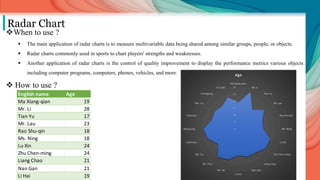
Radar Chart
When to use ?
 The main application of radar charts is to measure multivariable data being shared among similar groups, people, or objects.
 Radar charts commonly used in sports to chart players' strengths and weaknesses.
 Another application of radar charts is the control of quality improvement to display the performance metrics various objects
including computer programs, computers, phones, vehicles, and more.
 How to use ?
English name Age
Ma Xiang-qian 19
Mr. Li 28
Tian Yu 17
Mr. Lau 23
Rao Shu-qin 18
Ms. Ning 18
Lu Xin 24
Zhu Chen-ming 24
Liang Chao 21
Nan Gan 21
Li Hai 19
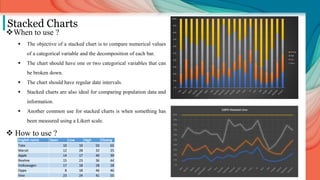
Stacked Charts
When to use ?
 The objective of a stacked chart is to compare numerical values
of a categorical variable and the decomposition of each bar.
 The chart should have one or two categorical variables that can
be broken down.
 The chart should have regular date intervals.
 Stacked charts are also ideal for comparing population data and
information.
 Another common use for stacked charts is when something has
been measured using a Likert scale.
 How to use ?
English name Open Low High Closing Total
Tata 10 19 50 65 144
Maruti 12 28 32 25 97
Apple 14 17 40 39 110
Realme 15 23 36 44 118
Volkswagen 17 18 28 28 91
Oppo 8 18 46 46 118
Vivo 23 24 41 55 143
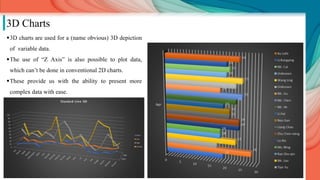
3D Charts
3D charts are used for a (name obvious) 3D depiction
of variable data.
The use of “Z Axis” is also possible to plot data,
which can’t be done in conventional 2D charts.
These provide us with the ability to present more
complex data with ease.
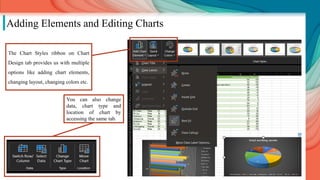
Adding Elements and Editing Charts
The Chart Styles ribbon on Chart
Design tab provides us with multiple
options like adding chart elements,
changing layout, changing colors etc.
You can also change
data, chart type and
location of chart by
accessing the same tab.
THANK YOU

Graphs and Charts in Excel.pptx

  • 1.
    Charts in MS-Excel Submitted by:Manvi Nagi Rachit Suri
  • 2.
    What is aChart? A chart is a graphical representation for data visualization, in which "the data is represented by symbols, such as bars in a bar chart, lines in a line chart, or slices in a pie chart". A chart can represent tabular numeric data, functions or some kinds of quality structure and provides different info. Types of Charts • Bar Chart • Column Chart • Line Chart • Area Chart • Pie & Doughnut Chart • Histogram • Pareto • Box and Whiskers • Scatter & Bubble Chart • Tree Map Chart • Sunburst Chart • Waterfall Chart • Surface Chart • Stock Chart • Radar Chart
  • 3.
    English name SexAge Suicide date Description Status Total working weeks Decency Ma Xiang-qian Male 19 23-01-10 Threw himself from building Deceased 50 -20 Mr. Li Male 28 11-03-10 Threw himself from building Unknown 32 -30 Tian Yu Female 17 17-03-10 Threw herself from building Paralyzed from waist down 40 -15 Mr. Lau Male 23 29-03-10 Threw himself from building Unknown 36 -10 Rao Shu-qin Female 18 06-04-10 Threw herself from building Survived 28 -9 Ms. Ning Female 18 07-04-10 Threw herself from building Deceased 46 -5 Lu Xin Male 24 06-05-10 Threw himself from building Deceased 41 -2 Zhu Chen-ming Female 24 11-05-10 Threw herself from building Deceased 29 0 Liang Chao Male 21 14-05-10 Threw himself from building Deceased 70 1 Nan Gan Male 21 21-05-10 Threw himself from building Deceased 84 5 Li Hai Male 19 25-05-10 Threw himself from building Deceased 63 7 Mr. He Male 23 26-05-10 Threw himself from building Unknown 23 12 Mr. Chen Male 25 27-05-10 Suicide Deceased 49 14 Mr. Liu Male 18 20-07-10 Threw himself from the sixth floor Deceased 33 20 Unknown Male 23 05-11-10 Threw himself from building Deceased 17 26 Wang Ling Female 25 07-01-11 Jumped from building Deceased 5 34 Unknown Male 20 26-05-11 Threw himself from building. Deceased 23 48 Mr. Cai Male 21 01-07-11 Threw himself from building Deceased 57 55 Li Rongying Female 20 23-11-11 Threw herself from building Deceased 38 20 Xu Lizhi Male 24 24-04-13 Threw himself from building Deceased 20 -70 Data Entry: Before one starts to dwell into making colorful and attractive data charts, one must know their respective function. It is the data that governs what chart should be adequate to represent it and not vice-versa. Hence, one must thoroughly analyze the table and recognize the type and number of variables present in it to select the proper chart. Few types of data are:  Quantitative data • Ratio data • Interval data  Qualitative data • Ordinal data • Nominal data This table has been used for forming most of the charts in upcoming slides.
  • 4.
    Where to findthe Charts? Step 1: Select the table you have prepared on MS-Excel, go to the Insert tab. Step 2: Go to the Charts section on the ribbon. Step 3: Click on Pop down arrow for the type of chart that you want.
  • 5.
    Column chart When touse ?  The data has a small number of discrete categories.  Each of those categories has a single value.  The chart needs to compare the values for each category.  In business settings, column charts are regularly used in reporting.  A simple column chart uses vertical bars to display data.  How to use ? Count of Status Column Labels Row Labels Female Male Grand Total 2010 4 11 15 2011 2 2 4 2013 1 1 Grand Total 6 14 20
  • 6.
    Bar chart When touse ?  The bar charts are used to show the comparisons between different variables.  It is very easy and convenient to visualize the parameters in a pictorial form.  The bar charts are the easiest method to show the heavy data and is time-saving.  The rectangular bars in a bar chart can be drawn horizontally.  How to use ? English name Age Ma Xiang-qian 19 Mr. Li 28 Tian Yu 17 Mr. Lau 23 Rao Shu-qin 18 Ms. Ning 18 Lu Xin 24 Zhu Chen-ming 24 Liang Chao 21 Nan Gan 21 Li Hai 19 Mr. He 23 Mr. Chen 25 Mr. Liu 18 Unknown 23 Wang Ling 25 Unknown 20 Mr. Cai 21 Li Rongying 20 Xu Lizhi 24
  • 7.
    Line chart When touse ?  The important use of line graph is to track the changes over the short and long period of time.  It is also used to compare the changes over the same period for different groups.  It is always better to use the line than the bar graph, whenever the small changes exist.  The changing slope of the line segments emphasizes changes, trends, and patterns.  When you have multiple metrics, compare their lines to determine whether they have the same trend and patterns.  Comparing the metrics in this manner helps you understand their differences and similarities.  How to use ? English name Age Ma Xiang-qian 19 Mr. Li 28 Tian Yu 17 Mr. Lau 23 Rao Shu-qin 18 Ms. Ning 18 Lu Xin 24 Zhu Chen-ming 24 Liang Chao 21 Nan Gan 21 Li Hai 19 Mr. He 23 Mr. Chen 25
  • 8.
    Area Chart When touse ?  Area charts are used to represent cumulated totals using numbers or percentages over time.  An area chart is typically used with multiple lines to make a comparison between groups or to show how a whole is divided into component parts.  The area chart is like the plot chart except that the area below the plotted line is filled in with color to indicate volume.  How to use ? English name Age Total working weeks Ma Xiang-qian 19 50 Mr. Li 28 32 Tian Yu 17 40 Mr. Lau 23 36 Rao Shu-qin 18 28 Ms. Ning 18 46 Lu Xin 24 41 Zhu Chen-ming 24 29 Liang Chao 21 70 Nan Gan 21 84 Li Hai 19 63 Mr. He 23 23 Mr. Chen 25 49 Mr. Liu 18 33 Unknown 23 17 Wang Ling 25 5 Unknown 20 23 Mr. Cai 21 57 Li Rongying 20 38 Xu Lizhi 24 20
  • 9.
    Pie Chart When touse ?  For a part-to-whole analysis, pie charts have been found to be better than the column and bar charts.  They are also easy to understand by even users who don't have a statistics background and therefore are preferred for showcasing data meant for public consumption.  You need only proportions and not specific percentages/values.  When comparisons between approximations are enough for a discussion and you don't need to get into the specifics, pie charts are your best bet.  How to use ? English name Total working weeks Ma Xiang-qian 50 Mr. Li 32 Tian Yu 40 Mr. Lau 36 Rao Shu-qin 28 Ms. Ning 46 Lu Xin 41 Zhu Chen-ming 29 Liang Chao 70 Nan Gan 84 Li Hai 63 Mr. He 23 Mr. Chen 49 Mr. Liu 33 Unknown 17
  • 10.
    Doughnut Chart When touse ?  You have one or more data series that you want to plot.  None of the values that you want to plot is negative.  None of the values that you want to plot is a zero value.  You don't have more than seven categories per data series.  The categories represent parts of whole in each ring of the doughnut chart.  How to use ? English name Age Total working weeks Ma Xiang-qian 19 50 Mr. Li 28 32 Tian Yu 17 40 Mr. Lau 23 36 Rao Shu-qin 18 28 Ms. Ning 18 46 Lu Xin 24 41 Zhu Chen-ming 24 29 Liang Chao 21 70 Nan Gan 21 84 Li Hai 19 63 Mr. He 23 23 Mr. Chen 25 49 Mr. Liu 18 33 Unknown 23 17
  • 11.
    Histogram Chart When touse ?  When the data is numerical in character.  You want to see the shape of the data’s distribution, especially to determine whether the data is distributed normally or not.  Seeing whether a process change has occurred from one time period to another.  It is used to summarize discrete or continuous data that are measured on an interval scale.  It is used to identify the most common process outcome.  How to use ? Sale (Million Bars) 12.2 13.6 14.7 15 15.4 15.4 15.5 16.8 17 17.1 17.1 17.4
  • 12.
    Pareto Chart When touse ?  The Pareto chart is useful for figuring out the most significant factors in your data and how they contribute to the entire set.  The Pareto chart is unique as its combination of columns with a line graph, which shows the cumulative contribution of each column as you move from left to right.  Use it when analyzing broad causes by looking at their specific components.  How to use ? Problem Cause Frequency Bar Surface 89 Color 17 Fragrance 2 Label 32 Shape 8 Seal 47 Labeling 5 Soap Consistency 3
  • 13.
    Box and WhiskerChart When to use ?  The Box and Whisker chart is designed to quickly and easily highlight important characteristics related to the distribution of your data, by providing basic statistical details like mean, median and percentile groupings, as well as illuminating outliers that exist beyond the general clustering of your data.  Additionally, this chart is useful for comparing characteristics between different sets of data.  The Box and Whisker chart is useful for making direct comparisons of data. Box and Whisker can compare multiple series, side by side, and draw differences between means, medians, interquartile ranges and outliers.  How to use ? Age Total working weeks 19 50 28 32 17 40 23 36 18 28 18 46 24 41 24 29 21 70 21 84
  • 14.
    Scatter and BubbleChart When to use ?  Determine the root cause of a given scenario, by comparing numerical data.  Visualize the relationship between your two data series.  Identify where or who are the outliers in the data set.  Determine a trend in the correlation of data.  Identify opportunities or risks, within a competitive scenario.  How to use ? English name Age Total working weeks Ma Xiang-qian 19 50 Mr. Li 28 32 Tian Yu 17 40 Mr. Lau 23 36 Rao Shu-qin 18 28 Ms. Ning 18 46 Lu Xin 24 41 Zhu Chen-ming 24 29 Liang Chao 21 70 Nan Gan 21 84 Li Hai 19 63
  • 15.
    Tree Map Chart Whento use ?  Treemaps are often used for sales data, as they capture relative sizes of data categories, allowing for quick perception of the items that are large contributors to each category.  Color can identify items that are underperforming (or overperforming) compared to their siblings from the same category.  Treemaps are commonly found on data dashboards. Designers often choose them to add visual variety on a dense dashboard.  However, treemaps are a complex visualization and present many obstacles to quick comprehension.  How to use ? Status Total work weeks Deceased 625 Unknown 91 Paralyzed from waist down 40 Survived 28
  • 16.
    Sunburst Chart When touse ?  The sunburst chart is ideal for displaying hierarchical data.  When many dimensions need to be represented in an easy-to-understand way.  To compare hierarchical data with multiple levels of categories & to show how the outer rings are related to the inner rings.  Use Sunburst when it's required to add an additional dimension of depth to each parent branch.  The Sunburst can unveil that the “parent” category which has sub-categories that extend into specialty topics.  How to use ? English name Sex Age Suicide date Ma Xiang-qian Male 19 23-01-10 Mr. Li Male 28 11-03-10 Tian Yu Female 17 17-03-10 Mr. Lau Male 23 29-03-10 Rao Shu-qin Female 18 06-04-10 Ms. Ning Female 18 07-04-10 Lu Xin Male 24 06-05-10 Zhu Chen-ming Female 24 11-05-10
  • 17.
    Waterfall Chart When touse ?  A waterfall chart can be used for analytical purposes like inventory analysis, performance analysis.  It is especially used for understanding or explaining the gradual transition in the quantitative value of an entity that is subjected to increment or decrement.  Often, a waterfall or cascade chart is used to show changes in revenue or profit between two time periods.  Waterfall charts are also commonly used in financial analysis to display how a net value is arrived at through gains and losses over time or between actual and budgeted amounts.  How to use ? English name Decency Ma Xiang-qian -20 Mr. Li -30 Tian Yu -15 Mr. Lau -10 Rao Shu-qin -9 Ms. Ning -5 Lu Xin -2 Zhu Chen-ming 0 Liang Chao 1 Nan Gan 5 Li Hai 7
  • 18.
    Surface Chart When touse ?  A surface chart is a three-dimensional Excel chart plots the data points in three dimensions.  You can see the mesh kind of surface, which helps us to find the optimum combination between two types of data points.  Surface charts are useful when you want to find the optimum combinations between two sets of data.  As in a topographic map, the colors and patterns indicate the areas that are in the same range of values.  To create a Surface chart, ensure that both the categories and the data series are numeric values.  How to use ? English name Age Total working weeks Decency Ma Xiang-qian 19 50 -20 Mr. Li 28 32 -30 Tian Yu 17 40 -15 Mr. Lau 23 36 -10 Rao Shu-qin 18 28 -9 Ms. Ning 18 46 -5 Lu Xin 24 41 -2 Zhu Chen-ming 24 29 0 Liang Chao 21 70 1 Nan Gan 21 84 5 Li Hai 19 63 7 Mr. He 23 23 12
  • 19.
    Stock Chart When touse ?  Stock charts, as the name indicates are useful to show fluctuations in stock prices. However, these charts are useful to show fluctuations in other data also, such as daily rainfall or annual temperatures.  If you use a Stock chart to display the fluctuation of stock prices, you can also incorporate the trading volume.  For Stock charts, the data needs to be in a specific order. For example, to create a simple high-low-close Stock chart, arrange your data with high, low, and close entered as column headings, in that order.  How to use ? English name Open Low High Closing Total Tata 10 19 50 65 144 Maruti 12 28 32 25 97 Apple 14 17 40 39 110 Realme 15 23 36 44 118 Volkswagen 17 18 28 28 91 Oppo 8 18 46 46 118 Vivo 23 24 41 55 143 Hyundai 22 24 29 93 168 Samsung 25 21 70 12 128 Channel 27 21 84 40 172 Porsche 36 19 63 27 145 Skoda 31 23 23 35 112 Sony 32 25 49 39 145
  • 20.
    Radar Chart When touse ?  The main application of radar charts is to measure multivariable data being shared among similar groups, people, or objects.  Radar charts commonly used in sports to chart players' strengths and weaknesses.  Another application of radar charts is the control of quality improvement to display the performance metrics various objects including computer programs, computers, phones, vehicles, and more.  How to use ? English name Age Ma Xiang-qian 19 Mr. Li 28 Tian Yu 17 Mr. Lau 23 Rao Shu-qin 18 Ms. Ning 18 Lu Xin 24 Zhu Chen-ming 24 Liang Chao 21 Nan Gan 21 Li Hai 19
  • 21.
    Stacked Charts When touse ?  The objective of a stacked chart is to compare numerical values of a categorical variable and the decomposition of each bar.  The chart should have one or two categorical variables that can be broken down.  The chart should have regular date intervals.  Stacked charts are also ideal for comparing population data and information.  Another common use for stacked charts is when something has been measured using a Likert scale.  How to use ? English name Open Low High Closing Total Tata 10 19 50 65 144 Maruti 12 28 32 25 97 Apple 14 17 40 39 110 Realme 15 23 36 44 118 Volkswagen 17 18 28 28 91 Oppo 8 18 46 46 118 Vivo 23 24 41 55 143
  • 22.
    3D Charts 3D chartsare used for a (name obvious) 3D depiction of variable data. The use of “Z Axis” is also possible to plot data, which can’t be done in conventional 2D charts. These provide us with the ability to present more complex data with ease.
  • 23.
    Adding Elements andEditing Charts The Chart Styles ribbon on Chart Design tab provides us with multiple options like adding chart elements, changing layout, changing colors etc. You can also change data, chart type and location of chart by accessing the same tab.
  • 24.